battery PEUGEOT BOXER 2021 Owners Manual
[x] Cancel search | Manufacturer: PEUGEOT, Model Year: 2021, Model line: BOXER, Model: PEUGEOT BOXER 2021Pages: 212, PDF Size: 6.37 MB
Page 4 of 212
2
Contents
■
Overview
■
Eco-driving
1InstrumentsInstrument panel 8
Warning and indicator lamps 9
Indicators 13
Vehicle configuration (MODE) 15
Touch screen audio and multimedia system 21
Setting the date and time 21
Trip computer 22
Trip computer 22
2AccessKey 23
Remote control 23
Front doors 26
Sliding side door 26
Rear doors 27
Alarm 27
Electric windows 28
3Ease of use and comfortFront seats 30
Front bench seat 31
Rear seats 32
Rear bench seat 32
Steering wheel adjustment 33
Mirrors 34
Heating and Ventilation 35
Heating/Manual air conditioning 35
Automatic air conditioning 36
Heating (Electric) 37
Additional heating systems 39
Rear heating/air conditioning 39
Additional programmable heating 40
Front demist - defrost 42
Rear screen de-icing 42
Cab layout 43
Rear fittings 47
Exterior fittings 49
4Lighting and visibilityLighting control stalk 51
Direction indicators 51
LED daytime running lamps 51
Automatic headlamp dipping 52
Headlamp beam height adjustment 54
Wiper control stalk 54
Changing a wiper blade 55
5SafetyGeneral safety recommendations 56
Hazard warning lamps 56
Horn 56
Pedestrian horn (Electric) 57
Electronic stability control (ESC) 57
Seat belts 60
Airbags 62
Child seats 63
Deactivating the front passenger airbag 65
ISOFIX seats 66
Child lock 68
6DrivingDriving recommendations 69
Starting-switching off the engine 72
Battery standby system 73
Parking brake 74
Gearbox 74
Drive selector (Electric) 75
Gear shift indicator 75
Stop & Start 76
Hill start assist 77
Tyre under-inflation detection 78
Pneumatic suspension 79
Driving and manoeuvring aids - General
recommendations
80
Road signs recognition 82
Speed limiter 83
Cruise control - Specific recommendations 85
Cruise control 85
Lane departure warning system 86
Blind spot monitoring with trailer detection 89
Active Safety Brake with Collision Risk Alert and
Intelligent emergency braking assistance
90
Rear parking sensors 93
Reversing camera 94
7Practical informationFuel 96
Compatibility of fuels 97
Charging system (Electric) 97
Charging the traction battery (Electric) 101
Snow chains 103
Towing a trailer 104
Towbar with quickly detachable towball 104
Roof-mounted carrying system 107
Bonnet 107
Page 5 of 212
3
Contents
Diesel engines 108
Electric motor 109
Checking levels 109
Checks 111
AdBlue® (BlueHDi engines) 11 4
Advice on care and maintenance 11 6
8In the event of a breakdownTemporary puncture repair kit 11 8
Spare wheel 11 9
Changing a bulb 125
Fuses 129
12
V battery
/ Accessory battery 130
Towing 132
9Technical dataEngine technical data and towed loads 135
Diesel engines 136
Electric motor 137
Weights 138
Dimensions 141
Identification markings 145
Glossary of labels 146
10Special featuresCrew cab 148
Chassis cab / Flatbed cab 148
Double cab 154
Drop-side back 157
11Audio systemFirst steps 162
Steering mounted controls 162
Radio 163
Media 163
Telephone 165
Settings 165
Voice commands 166
12Touch screen audio and telematics systemFirst steps 169
Steering mounted controls 170
Menus 170
Radio 171
DAB (Digital Audio Broadcasting) radio 172
Media 172
Navigation 174
Telephone 177
Vehicle information 179
Settings 179
Voice commands 180
13ALPINE® X902D systemFirst steps 184
Menus 185
14Event data recorders
■
Alphabetical index
Page 7 of 212
5
Overview
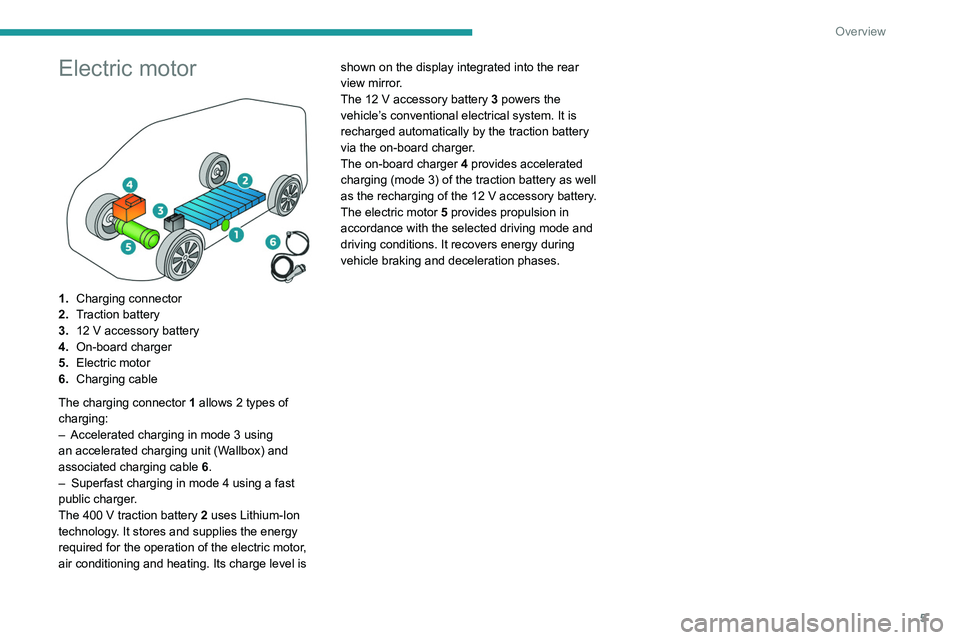
Electric motor
1.Charging connector
2. Traction battery
3. 12
V accessory battery
4. On-board charger
5. Electric motor
6. Charging cable
The charging connector 1 allows 2
types of
charging:
–
Accelerated charging in mode 3 using
an accelerated charging unit (W
allbox) and
associated charging cable 6.
–
Superfast charging in mode 4 using a fast
public charger
.
The 400
V traction battery 2 uses Lithium-Ion
technology. It stores and supplies the energy
required for the operation of the electric motor,
air conditioning and heating. Its charge level is shown on the display integrated into the rear
view mirror.
The 12
V accessory battery 3 powers the
vehicle’s conventional electrical system. It is
recharged automatically by the traction battery
via the on-board charger.
The on-board charger 4 provides accelerated
charging (mode 3) of the traction battery as well
as the recharging of the 12 V accessory battery.
The electric motor 5 provides propulsion in
accordance with the selected driving mode and
driving conditions. It recovers energy during
vehicle braking and deceleration phases.
Page 11 of 212
9
Instruments
1
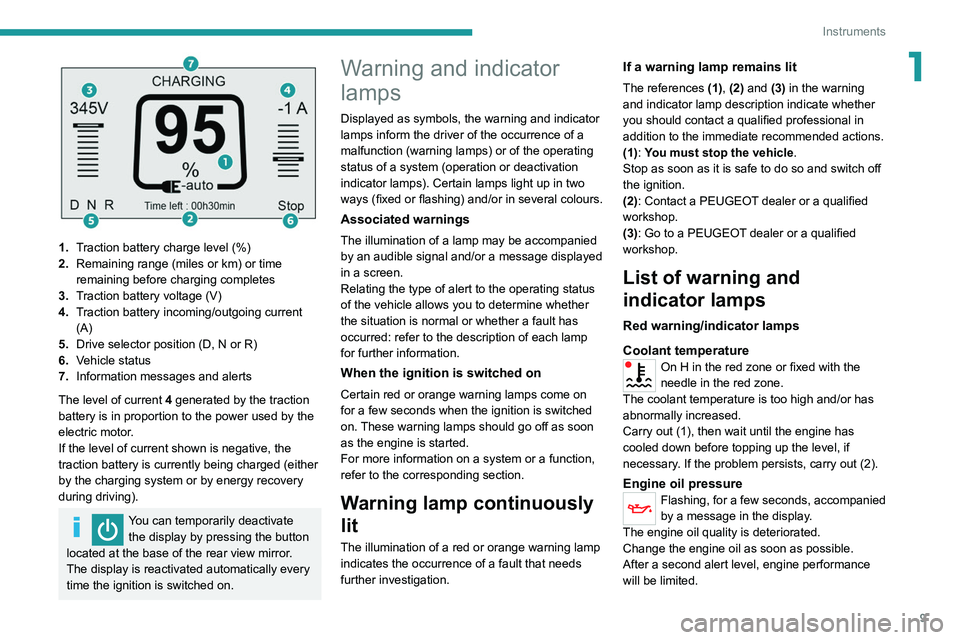
1.Traction battery charge level (%)
2. Remaining range (miles or km) or time
remaining before charging completes
3. Traction battery voltage (V)
4. Traction battery incoming/outgoing current
(A)
5. Drive selector position (D, N or R)
6. Vehicle status
7. Information messages and alerts
The level of current 4 generated by the traction
battery is in proportion to the power used by the
electric motor.
If the level of current shown is negative, the
traction battery is currently being charged (either
by the charging system or by energy recovery
during driving).
You can temporarily deactivate the display by pressing the button
located at the base of the rear view mirror.
The display is reactivated automatically every
time the ignition is switched on.
Warning and indicator
lamps
Displayed as symbols, the warning and indicator
lamps inform the driver of the occurrence of a
malfunction (warning lamps) or of the operating
status of a system (operation or deactivation
indicator lamps). Certain lamps light up in two
ways (fixed or flashing) and/or in several colours.
Associated warnings
The illumination of a lamp may be accompanied
by an audible signal and/or a message displayed
in a screen.
Relating the type of alert to the operating status
of the vehicle allows you to determine whether
the situation is normal or whether a fault has
occurred: refer to the description of each lamp
for further information.
When the ignition is switched on
Certain red or orange warning lamps come on
for a few seconds when the ignition is switched
on. These warning lamps should go off as soon
as the engine is started.
For more information on a system or a function,
refer to the corresponding section.
Warning lamp continuously
lit
The illumination of a red or orange warning lamp
indicates the occurrence of a fault that needs
further investigation.
If a warning lamp remains lit
The references (1), (2) and (3) in the warning
and indicator lamp description indicate whether
you should contact a qualified professional in
addition to the immediate recommended actions.
(1): You must stop the vehicle .
Stop as soon as it is safe to do so and switch off
the ignition.
(2): Contact a PEUGEOT dealer or a qualified
workshop.
(3): Go to a PEUGEOT dealer or a qualified
workshop.
List of warning and
indicator lamps
Red warning/indicator lamps
Coolant temperature
On H in the red zone or fixed with the
needle in the red zone.
The coolant temperature is too high and/or has
abnormally increased.
Carry out (1), then wait until the engine has
cooled down before topping up the level, if
necessary. If the problem persists, carry out (2).
Engine oil pressureFlashing, for a few seconds, accompanied
by a message in the display.
The engine oil quality is deteriorated.
Change the engine oil as soon as possible.
After a second alert level, engine performance
will be limited.
Page 12 of 212
10
Instruments
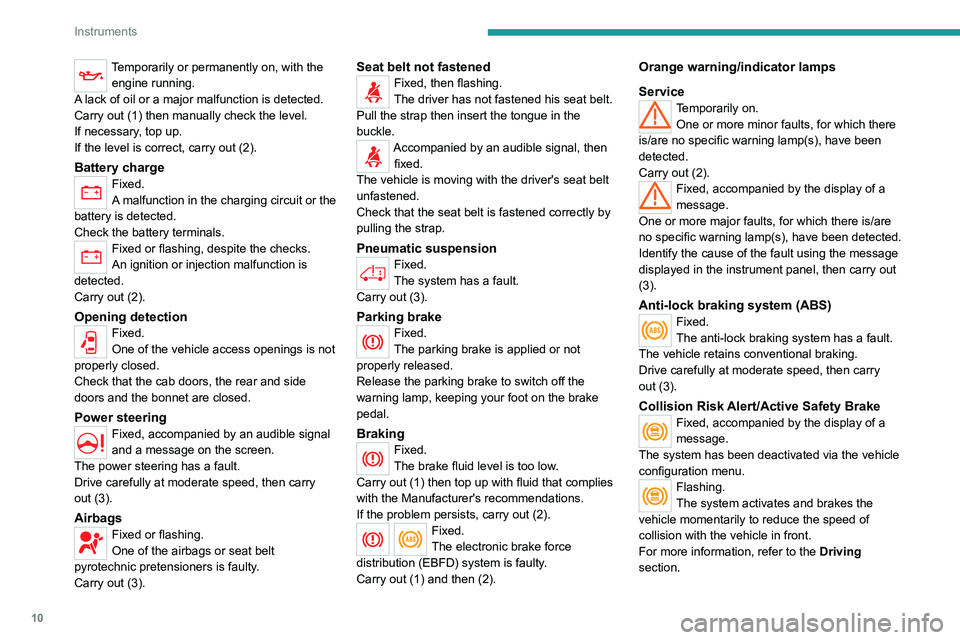
Temporarily or permanently on, with the engine running.
A lack of oil or a major malfunction is detected.
Carry out (1) then manually check the level.
If necessary, top up.
If the level is correct, carry out (2).
Battery chargeFixed.
A malfunction in the charging circuit or the
battery is detected.
Check the battery terminals.
Fixed or flashing, despite the checks.
An ignition or injection malfunction is
detected.
Carry out (2).
Opening detectionFixed.
One of the vehicle access openings is not
properly closed.
Check that the cab doors, the rear and side
doors and the bonnet are closed.
Power steering
Fixed, accompanied by an audible signal
and a message on the screen.
The power steering has a fault.
Drive carefully at moderate speed, then carry
out (3).
AirbagsFixed or flashing.
One of the airbags or seat belt
pyrotechnic pretensioners is faulty.
Carry out (3).
Seat belt not fastenedFixed, then flashing.
The driver has not fastened his seat belt.
Pull the strap then insert the tongue in the
buckle.
Accompanied by an audible signal, then fixed.
The vehicle is moving with the driver's seat belt
unfastened.
Check that the seat belt is fastened correctly by
pulling the strap.
Pneumatic suspensionFixed.
The system has a fault.
Carry out (3).
Parking brakeFixed.
The parking brake is applied or not
properly released.
Release the parking brake to switch off the
warning lamp, keeping your foot on the brake
pedal.
BrakingFixed.
The brake fluid level is too low.
Carry out (1) then top up with fluid that complies
with the Manufacturer's recommendations.
If the problem persists, carry out (2).
Fixed.
The electronic brake force
distribution
(EBFD) system is faulty.
Carry out (1) and then (2).
Orange warning/indicator lamps
Service
Temporarily on. One or more minor faults, for which there
is/are no specific warning lamp(s), have been
detected.
Carry out (2).
Fixed, accompanied by the display of a
message.
One or more major faults, for which there is/are
no specific warning lamp(s), have been detected.
Identify the cause of the fault using the message
displayed in the instrument panel, then carry out
(3).
Anti-lock braking system (ABS)Fixed.
The anti-lock braking system has a fault.
The vehicle retains conventional braking.
Drive carefully at moderate speed, then carry
out (3).
Collision Risk Alert/Active Safety BrakeFixed, accompanied by the display of a
message.
The system has been deactivated via the vehicle
configuration menu.
Flashing.
The system activates and brakes the
vehicle momentarily to reduce the speed of
collision with the vehicle in front.
For more information, refer to the Driving
section.
Page 24 of 212
22
Instruments
► Select the "Time setting" menu to set the time
and the clock format (24h or 12h) or select the
"Date setting" menu to set the day, month and
year.
For more information on Vehicle configuration
(MODE), refer to the corresponding section.
Using the touch screen audio and
telematics system
From the "Clock and Date" sub-menu:
► Select "T ime setting and format" to set the
hour, minutes and seconds and choose the
format (24h, 12h with am or pm).
►
Select "Date setting" to set the day
, month
and year.
To set the time manually, "Time Synchro" must be deactivated (Off).
Trip computer
Information displayed about the current journey
(range, current fuel consumption, average fuel
consumption, etc.).
This function is not available on electric vehicles.
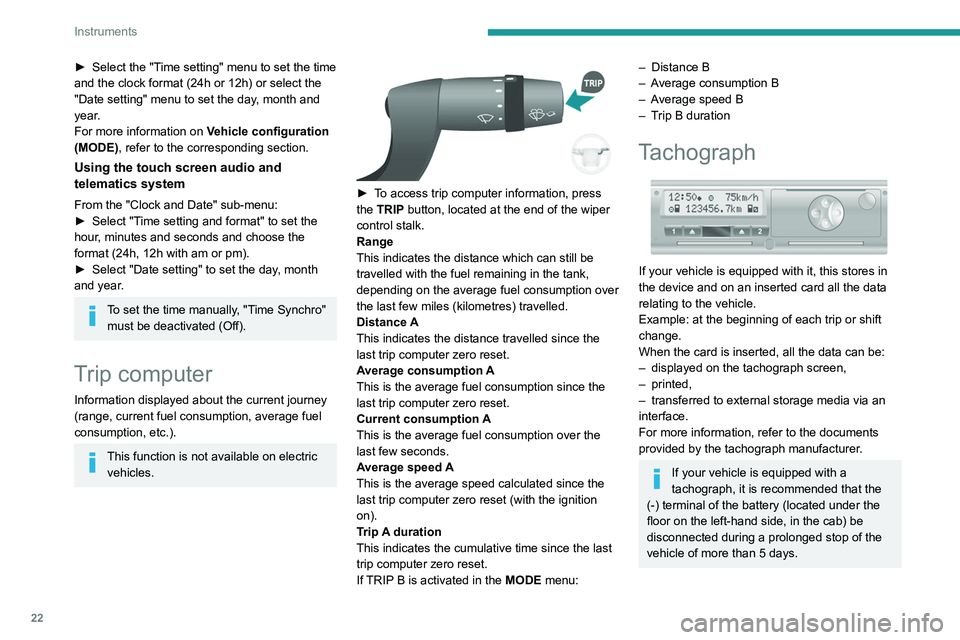
► To access trip computer information, press
the TRIP button, located at the end of the wiper
control stalk.
Range
This indicates the distance which can still be
travelled with the fuel remaining in the tank,
depending on the average fuel consumption over
the last few miles (kilometres) travelled.
Distance A
This
indicates the distance travelled since the
last trip computer zero reset.
Average consumption A
This is the average fuel consumption since the
last trip computer zero reset.
Current consumption A
This is the average fuel consumption over the
last few seconds.
Average speed A
This is the average speed calculated since the
last trip computer zero reset (with the ignition
on).
Trip A duration
This
indicates the cumulative time since the last
trip computer zero reset.
If TRIP B is activated in the MODE menu:
– Distance B
– A verage consumption B
–
A
verage speed B
–
T
rip B duration
Tachograph
If your vehicle is equipped with it, this stores in
the device and on an inserted card all the data
relating to the vehicle.
Example: at the beginning of each trip or shift
change.
When the card is inserted, all the data can be:
–
displayed on the tachograph screen,
–
printed,
–
transferred to external storage media via an
interface.
For more information, refer to the documents
provided by the tachograph manufacturer
.
If your vehicle is equipped with a
tachograph, it is recommended that the
(-) terminal of the battery (located under the
floor on the left-hand side, in the cab) be
disconnected
during a prolonged stop of the
vehicle of more than 5 days.
Page 26 of 212

24
Access
If your vehicle is so equipped, pressing this
control activates the alarm.
The central locking control indicator lamp comes
on and flashes.
Folding / Unfolding the
key
► Press this button to unfold / fold the
key .
If you do not press the button, you risk
damaging the mechanism.
Deadlocking
Pressing this button twice in succession
deadlocks the vehicle.
It is then impossible to open the doors from the
inside or the outside.
The direction indicators flash three times.
Never leave anyone inside the vehicle
when it is deadlocked.
Changing the battery
Reference: CR 2032/3 volts.
► Press the button to eject the key .
►
T
urn the screw 1 from the closed padlock
to the open padlock, using a fine-tipped
screwdriver.
►
Lever with the screwdriver to extract the
battery holder unit
2
.
►
Remove the unit and replace the battery 3
respecting the polarities.
►
Reclose the battery holder 2
inside the key
and lock it by turning the screw 1.
There is a risk of damage if the
replacement battery is not of the correct
type.
Only use identical batteries or batteries of an
equivalent type to those recommended by
PEUGEOT dealers. Return used batteries to
approved collection points.
This equipment contains a button type battery.
Do not swallow the battery. Risk of chemical
burns!
Swallowing the battery can cause serious
internal burning in only 2 hours and can be
fatal.
If batteries have been swallowed or inserted
into a part of the body, seek immediate
medical advice.
Keep new and used batteries out of the reach
of children.
If the battery compartment does not close
properly, stop using the product and keep it
out of the reach of children.
Risk of explosion if the battery is
replaced with an incorrect type!
Replace the battery with the same type.
Risk of explosion or leaking of
inflammable liquid or gas!
Do not use in/store in/place in an environment
where the temperature is extremely high or
where the pressure is extremely low due to
very high altitude.
Do not try to burn, crush or cut a used battery.
Page 40 of 212
38
Ease of use and comfort
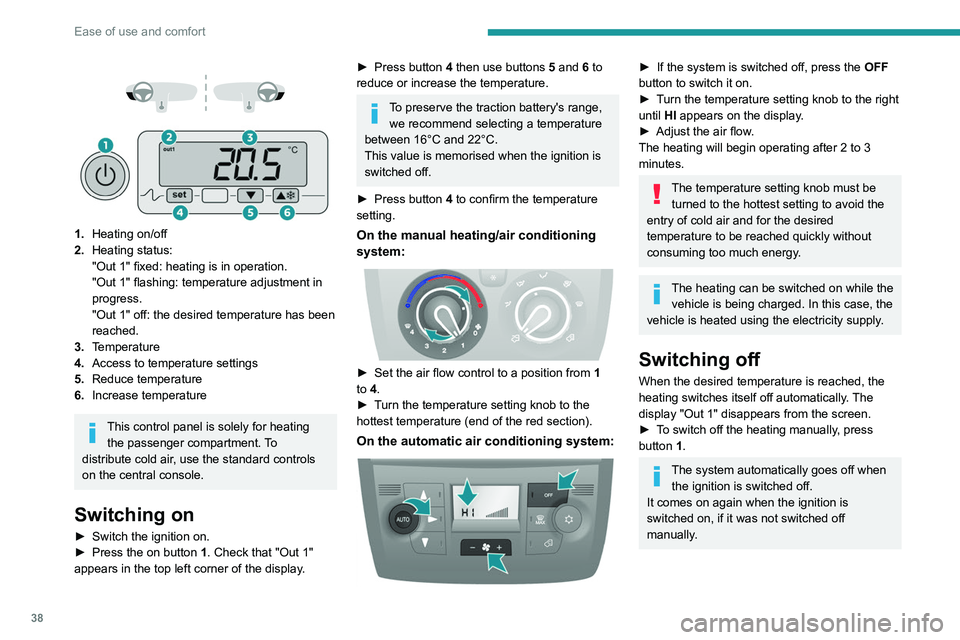
1. Heating on/off
2. Heating status:
"Out 1" fixed: heating is in operation.
"Out 1" flashing: temperature adjustment in
progress.
"Out 1" off: the desired temperature has been
reached.
3. Temperature
4. Access to temperature settings
5. Reduce temperature
6. Increase temperature
This control panel is solely for heating
the passenger compartment. To
distribute cold air, use the standard controls
on the central console.
Switching on
► Switch the ignition on.
► Press the on button 1. Check that "Out 1"
appears in the top left corner of the display.
► Press button 4 then use buttons 5 and 6 to
reduce or increase the temperature.
To preserve the traction battery's range, we recommend selecting a temperature
between 16°C and 22°C.
This value is memorised when the ignition is
switched off.
►
Press button
4 to confirm the temperature
setting.
On the manual heating/air conditioning
system:
► Set the air flow control to a position from 1
to 4.
►
T
urn the temperature setting knob to the
hottest temperature (end of the red section).
On the automatic air conditioning system:
► If the system is switched off, press the OFF
button to switch it on.
►
T
urn the temperature setting knob to the right
until HI appears on the display.
►
Adjust the air flow
.
The heating will begin operating after 2 to 3
minutes.
The temperature setting knob must be turned to the hottest setting to avoid the
entry of cold air and for the desired
temperature to be reached quickly without
consuming too much energy.
The heating can be switched on while the vehicle is being charged. In this case, the
vehicle is heated using the electricity supply.
Switching off
When the desired temperature is reached, the
heating switches itself off automatically. The
display "Out 1" disappears from the screen.
►
T
o switch off the heating manually, press
button 1.
The system automatically goes off when the ignition is switched off.
It comes on again when the ignition is
switched on, if it was not switched off
manually.
Page 43 of 212
41
Ease of use and comfort
3The screen and time setting indicator lamp light
up.
►
Within ten seconds, press one of the setting
buttons
1 until the exact time is displayed:
•
>
to increase the hours, or
•
<
to decrease the hours.
By holding the button down, the numbers scroll
faster.
►
Release
button
3
.
When the screen switches off, the time is
memorised.
Reading the time
► Press one of the buttons 1.
The time display indicator lamp comes on and
the time is displayed for approximately ten
seconds.
Immediate starting of the
heating system
Before turning on the heating, check that:
– the temperature control knob is in the Hot air
position (red),
–
the air flow control knob is in position 2
.
►
Press button
2.
The screen and the heating cycle indicator lamp
will come on and stay on for the entire operating
time.
Delayed starting of the
heating system
The start time can be programmed between 1
minute and 24 hours in advance.
You can memorise up to three different start
times, but only programme a single delayed
start.
To perform a daily start at a fixed time, reprogramme the memorised time each
day.
►
Press button
3; the screen comes on.
The - -:- - symbol or the previous memorised
time and the corresponding preset number (1, 2
or 3) are displayed for 10 seconds.
To recall the other preset times, press button 3 several times before the end of
the 10 seconds.
Within 10 seconds, press one of the buttons 1 to
select the desired start time.
The memorisation is confirmed by the
disappearance of the start time, the display of
the preset number (1, 2 or 3) and the lighting of
the screen.
By default, preset times are already
memorised in the system (1 = 06:00, 2 =
16:00, 3 = 22:00). Any change cancels and
replaces the previous preset time.
If the battery is disconnected, the default
preset times will be restored.
Cancelling the programming
► To delete the programmed start time, briefly
press button 3.
The lighting of the screen and the preset number
(1, 2 or 3) go off.
Recalling one of the preset
start times
► Press button 3 as many times as necessary
until the number corresponding to the desired
preset start time (1, 2 or 3) appears.
After ten seconds, the time disappears but
remains memorised while the corresponding
number (1, 2 or 3) and the screen remain on.
Setting the operating
duration
The operating duration can be set between 10
and 60 minutes.
►
Press and hold button 3
.
►
Press simultaneously one of the buttons 1
.
The time and the time setting indicator lamp light
up.
►
Press and hold button 3
again.
►
Press simultaneously one of the buttons 1
again.
The programmed operating duration is displayed
and the heating or ventilation cycle indicator
lamp flashes.
►
Set the duration by pressing one of the
buttons
1.
Page 44 of 212
42
Ease of use and comfort
The memorisation is confirmed by the
disappearance of the duration on the screen or
by pressing button 3 again.
Switching the heating off
In the event of a delayed start, the heating
switches off automatically at the end of the
programmed duration.
►
In the event of an immediate start, press
button
2 again to switch it off manually.
The heating cycle indicator lamp and the screen
switch off.
Have the additional heating checked at
least once a year at the beginning of
winter.
For maintenance and repairs, contact a
PEUGEOT dealer or a qualified workshop
only.
Only use approved replacement parts.
To avoid the risks of poisoning or asphyxia, the programmable heating
must not be used, even for short periods, in a
closed environment such as a garage or
workshop which is not equipped with an
exhaust gas extraction system.
The additional heating turns off when the
battery voltage is low, to allow the vehicle to
start.
The additional heating is supplied by the
vehicle fuel tank. Make sure the fuel gauge
level indicator is not in the reserve.
Always switch off the additional heating when
refuelling to avoid any risk of fire or explosion!
The temperature in the vicinity of the heater
must not exceed 120°C. A higher temperature
(e.g. in the case of oven painting) could
damage electronic circuits components.
The additional heating is equipped with a
thermal limiter which cuts off combustion in
case of engine overheating due to lack of
coolant. Check the level and top-up with fluid,
if necessary.
For more information on Checking levels,
refer to the corresponding section.
Then press the programme selection button
before turning on the heating again.
Front demist - defrost
These markings on the control panel indicate the control positions for rapid
demisting or defrosting of the windscreen and
side windows.
With manual air
conditioning
► Set the air flow and air distribution
controls to the appropriately marked
positions.
T
o make the windscreen de-icing and demisting
more efficient and faster:
►
increase the air flow setting,
► momentarily swi tch the exterior air
intake control to air recirculation.
With automatic air
conditioning
► Press this button. The indicator lamp
lights up.
The system manages the air conditioning, the air
flow and intake, the de-icing of the rear screen
and distributes air optimally to the windscreen
and front side windows.
If the vehicle is equipped with an additional
heating system, deactivate it to ensure fast and
efficient demisting / de-icing.
De-icing the rear screen
and/or door mirrors
► Press this button to activate/deactivate
demisting/de-icing of the rear screen and
door mirrors.
The indicator lamp illuminates
when the fonction is activated.
This function turns off automatically to prevent
excessive power consumption.
Rear screen demisting/de-icing can only
operate when the engine is running.