change time PEUGEOT PARTNER 2022 User Guide
[x] Cancel search | Manufacturer: PEUGEOT, Model Year: 2022, Model line: PARTNER, Model: PEUGEOT PARTNER 2022Pages: 324, PDF Size: 9.42 MB
Page 89 of 324
87
Lighting and visibility
4This system is a driving aid.The driver remains responsible for
the vehicle's lighting, its correct use in the
prevailing light, visibility and traffic conditions,
and for compliance with driving and vehicle
regulations.
The system becomes operational when the vehicle exceeds 16 mph (25 km/h).
When the speed falls below 9 mph (15 km/h),
the function is no longer operational.
Activation/Deactivation
The settings are changed via the Driving/Vehicle touch screen
menu.
When deactivated, the lighting system changes
to "automatic illumination of headlamps" mode.
The state of the system is stored when the
ignition is switched off.
Operation
If the ambient light level is very low and traffic
conditions permit:
– The main beam headla mps
come on automatically. These
indicator lamps light up on the instrument panel.
If the ambient light level is sufficient and/or the
traffic conditions do not allow the main beam
headlamps to be lit:
– The dipped beam head lamps
remain lit. These indicator lamps
light up on the instrument panel.
The function is deactivated if the foglamps
are switched on or if the system detects poor
visibility conditions (e.g.
fog, heavy rain,
snowfall).
When the foglamps are switched off or when the
visibility conditions become favourable again, the
function is automatically reactivated.
This indicator lamp goes out when the function is deactivated.
Pause
If the situation requires a change of headlamp
beam, the driver can take over at any time.
► A "headlamp flash" pauses the
function and the lighting system switches
to "automatic illumination of lamps" mode:
–
If the "AUT
O" and "Dipped beam" indicator
lamps were on, the system changes to main
beam.
–
If the "AUT
O" and "Main beam"
indicator
lamps were on, the system changes to
dipped beam.
►
T
o reactivate the function, once again switch
the headlamps manually between dipped and
main beam.
The system may be disrupted or not work correctly:
–
When visibility conditions are poor
(snowfall, heavy rain, etc.).
– If the windscreen in front of the camera is
dirty , misted or obscured (for example, by a
sticker).
–
If the vehicle is facing highly reflective
signs.
When the system detects thick fog, it
temporarily deactivates the function.
The system is not able to detect:
–
Road users that do not have their own
lighting, such as pedestrians.
–
V
ehicles whose lighting is obscured (for
example, vehicles driving behind a safety
barrier on a motorway).
–
V
ehicles at the top or bottom of a steep
slope, on winding roads, on crossroads.
Clean the windscreen regularly,
particularly the area in front of the
camera.
The internal surface of the windscreen can
also become misted around the camera.
In humid and cold weather, demist the
windscreen regularly.
Do not allow snow to accumulate on the
bonnet or roof of the vehicle as this could
obstruct the detection camera.
Page 91 of 324
89
Lighting and visibility
4To avoid damaging the wiper blades, do not operate the screenwash if the
screenwash reservoir is empty.
Only operate the screenwash if there is no
risk of the fluid freezing on the windscreen
and hindering visibility. During the winter
period, use "very cold climate" rated products.
Never top up with water.
Low screenwash fluid level
When the low level of the reservoir is
reached, this warning lamp lights up on
the instrument panel, accompanied by an
audible signal and a message.
It comes on when the ignition is switched on,
or every time the stalk is operated, until the
reservoir is refilled.
Refill the screenwash reservoir (or have it
refilled) the next time you stop.
Rear wiper
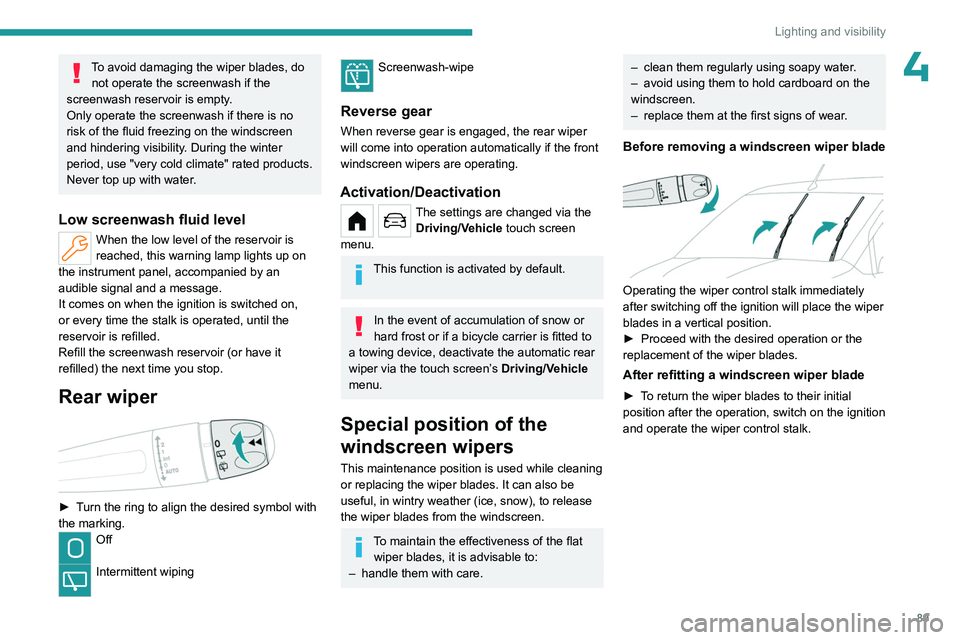
► Turn the ring to align the desired symbol with
the marking.
Off
Intermittent wiping
Screenwash-wipe
Reverse gear
When reverse gear is engaged, the rear wiper
will come into operation automatically if the front
windscreen wipers are operating.
Activation/Deactivation
The settings are changed via the Driving/Vehicle touch screen
menu.
This function is activated by default.
In the event of accumulation of snow or
hard frost or if a bicycle carrier is fitted to
a towing device, deactivate the automatic rear
wiper via the touch screen’s Driving/Vehicle
menu.
Special position of the
windscreen wipers
This maintenance position is used while cleaning
or replacing the wiper blades. It can also be
useful, in wintry weather (ice, snow), to release
the wiper blades from the windscreen.
To maintain the effectiveness of the flat wiper blades, it is advisable to:
–
handle them with care.
– clean them regularly using soapy water .
– avoid using them to hold cardboard on the
windscreen.
–
replace them at the first signs of wear
.
Before removing a windscreen wiper blade
Operating the wiper control stalk immediately
after switching off the ignition will place the wiper
blades in a vertical position.
►
Proceed with the desired operation or the
replacement of the wiper blades.
After refitting a windscreen wiper blade
► To return the wiper blades to their initial
position after the operation, switch on the ignition
and operate the wiper control stalk.
Page 100 of 324
98
Safety
Snow
This mode adapts its strategy to the conditions of grip encountered for each of
the two front wheels on moving off.
(mode active up to 50 mph (80
km/h))
All terrain (mud, damp grass, etc.)
This mode, when moving off, allows considerable spin on the wheel with the
least grip to optimise clearing of the mud and to
regain grip. At the same time, the wheel with the
most grip is controlled in such a way as to
transmit as much torque as possible.
When moving, the system optimises wheel spin
to respond to the driver's requirements as fully
as possible.
(mode active up to 31 mph (50
km/h))
Sand
This mode allows little spin on the two driving wheels at the same time to allow
the vehicle to move forward and limit the risks of
getting stuck in the sand.
(mode active up to 75 mph (120
km/h))
Do not use the other modes on sand as
the vehicle may become stuck.
Deactivation
You can deactivate the ASR and DSC systems by turning the knob to the "OFF"
position.
The ASR and DSC systems will no longer act on the operation of the engine
or of the brakes in the event of a change of
trajectory.
These systems are reactivated automatically
from 31 mph (50
km/h) and whenever the
ignition is switched on.
Recommendations
Your vehicle is designed principally to
drive on tarmac roads but it allows you to
occasionally drive on other less passable
terrain.
However, it does not permit off-road driving
such as:
–
crossing and driving on terrain which
could damage the underbody or strip away
components (fuel pipe, fuel cooler
, etc.) due
to obstacles or stones in particular,
–
driving on terrain with steep gradients and
poor grip,
–
crossing a stream.
Hill Assist Descent
Control
Hill Assist Descent Control system for medium to
steep slopes, on tarmac or other road surfaces
(e.g. gravel, mud).
This system reduces the risk of slip or loss of
control of the vehicle when descending, whether
going forward or in reverse.
During a descent, the system assists the driver
in maintaining a constant speed, depending on
the gear engaged, while progressively releasing
the brakes.
For the system to activate, the gradient
must be greater than 5%.
The system can be used with the gearbox in
neutral.
Otherwise, engage a gear corresponding to
the speed to prevent the engine stalling.
With an automatic gearbox, the system can
be used with the selector at N, D or R.
When the system is regulating, the Active
Safety Brake system is automatically
deactivated.
The system is no longer available if the speed of the vehicle is:
–
above 43 mph (70
km/h).
–
managed by the
Adaptive cruise control,
depending on the type of gearbox.
Switching on
By default, the system is not selected.
The state of the function is not saved when the
ignition is switched off.
Page 104 of 324
102
Safety
6.Rear centre seat belt (row 2) not fastened/
unfastened warning lamp.
7. Rear right-hand seat belt (row 2) not
fastened/unfastened warning lamp.
Not fastened at the front
When the ignition is switched on, warning lamp
1 lights up on the instrument panel (depending
on version) and the corresponding indicator lamp
(2, 3 or 4 (depending on version)) lights up if the
driver and/or front passenger have not fastened
their seat belts.
At a speed greater than 12 mph (20 km/h),
these warning lamps flash, accompanied by an
increasing audible signal for approximately two
minutes. After two minutes, these warning lamps
remain on as long as the front seatbelts are not
fastened.
Not fastened at the rear
When the ignition is switched on, with the engine
running or the vehicle moving at a speed below
12
mph (20 km/h), warning lamp 1 (depending
on version) and the corresponding indicator
lamps (5 to 7) light up for around sixty seconds,
if one or more rear seat belts (row 2) are not
fastened.
There are no seat belt warning lamps for row 3.
Unfastened
After the ignition is switched on, warning lamp 1
(depending on version) and the corresponding
indicator lamps light up if the driver and/or one or
more passengers unfasten their seat belts.
At a speed greater than 12 mph (20 km/h), these
warning lamps flash, accompanied by an audible
signal for approximately two minutes. After this
time, these warning lamps remain on as long as
the seatbelts are not refastened.
Advice
The driver must ensure that passengers use the seat belts correctly and that they
are all fastened before setting off.
Wherever seated in the vehicle, you must
always fasten the seat belt, even for short
journeys.
Do not invert the seat belt buckles, as they
will not fulfil their role properly.
To ensure the proper functioning of the belt
buckles, make sure that there are no foreign
bodies present (e.g.
a coin) before fastening.
Before and after use, ensure that the seat belt
is reeled in correctly.
After folding or moving a seat or rear bench
seat, ensure that the seat belt is positioned
and reeled in correctly.
Installation
The lower part of the strap must be
positioned as low as possible over the pelvis.
The upper part must be positioned in the
hollow of the shoulder.
At the front, adjusting the position of the
seat belt may require the seat height to be
adjusted.
In order to be effective, a seat belt must:
–
be tightened as close to the body as
possible.
–
be pulled in front of you with a smooth
movement, checking that it is not twisted.
–
must only be used to secure one person.
–
not show signs of tearing or fraying.
–
not be changed or modified, in order to
avoid affecting its performance.
Recommendations for children
Use a suitable child seat if the passenger
is less than 12 years old or shorter than 1.5
metres.
Never use the same seat belt to secure more
than one child.
Never carry a child on your lap.
For more information on Child seats, refer to
the corresponding section.
Maintenance
In accordance with current safety
regulations, for all work on your vehicle's
seat belts, contact a qualified workshop with
the skills and equipment needed, which a
PEUGEOT dealer is able to provide.
Page 130 of 324
128
Driving
The steering mounted controls do not allow neutral to be selected and reverse
gear to be engaged or disengaged.
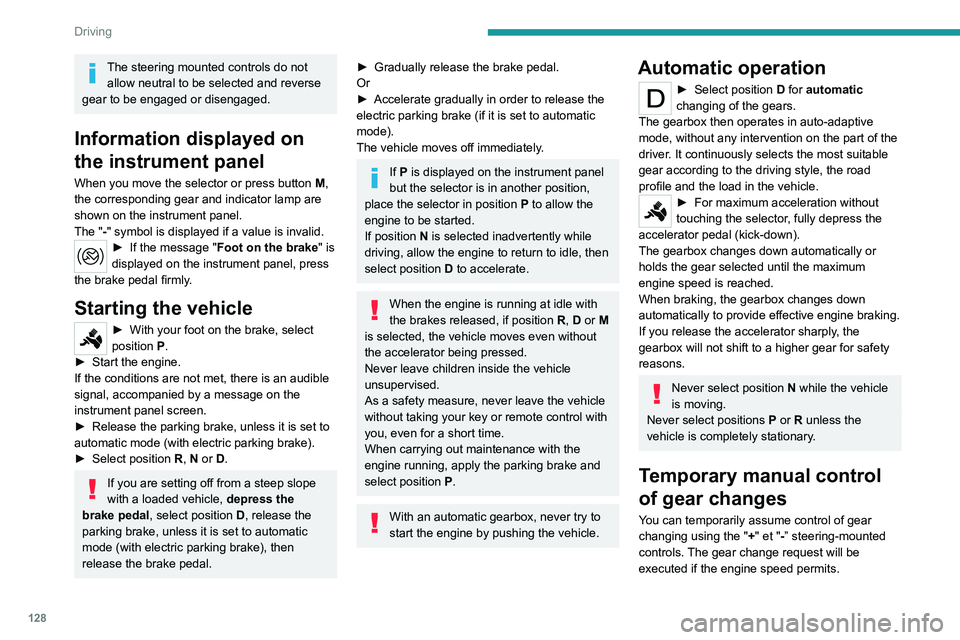
Information displayed on
the instrument panel
When you move the selector or press button M ,
the corresponding gear and indicator lamp are
shown on the instrument panel.
The "-" symbol is displayed if a value is invalid.
► If the message " Foot on the brake" is
displayed on the instrument panel, press
the brake pedal firmly.
Starting the vehicle
► With your foot on the brake, select
position P
.
►
Start the engine.
If the conditions are not met, there is an audible
signal, accompanied by a message on the
instrument panel screen.
►
Release the parking brake, unless it is set to
automatic mode (with electric parking brake).
►
Select position R
, N or D.
If you are setting off from a steep slope
with a loaded vehicle, depress the
brake pedal, select position D, release the
parking brake, unless it is set to automatic
mode (with electric parking brake), then
release the brake pedal.
► Gradually release the brake pedal.
Or
►
Accelerate gradually in order to release the
electric parking brake (if it is set to automatic
mode).
The vehicle moves off immediately
.
If P is displayed on the instrument panel
but the selector is in another position,
place the selector in position P to allow the
engine to be started.
If position N is selected inadvertently while
driving, allow the engine to return to idle, then
select position D to accelerate.
When the engine is running at idle with
the brakes released, if position R, D or M
is selected, the vehicle moves even without
the accelerator being pressed.
Never leave children inside the vehicle
unsupervised.
As a safety measure, never leave the vehicle
without taking your key or remote control with
you, even for a short time.
When carrying out maintenance with the
engine running, apply the parking brake and
select position P.
With an automatic gearbox, never try to
start the engine by pushing the vehicle.
Automatic operation
► Select position D for automatic
changing of the gears.
The gearbox then operates in auto-adaptive
mode, without any intervention on the part of the
driver. It continuously selects the most suitable
gear according to the driving style, the road
profile and the load in the vehicle.
► For maximum acceleration without
touching the selector , fully depress the
accelerator pedal (kick-down).
The gearbox changes down automatically or
holds the gear selected until the maximum
engine speed is reached.
When braking, the gearbox changes down
automatically to provide effective engine braking.
If you release the accelerator sharply, the
gearbox will not shift to a higher gear for safety
reasons.
Never select position N while the vehicle
is moving.
Never select positions P or R unless the
vehicle is completely stationary.
Temporary manual control
of gear changes
You can temporarily assume control of gear
changing using the " +" et "-” steering-mounted
controls. The gear change request will be
executed if the engine speed permits.
Page 131 of 324
129
Driving
6This function allows you to anticipate certain
situations, such as overtaking another vehicle or
approaching a bend in the road.
After a few seconds with no inputs via the control
paddles, the gearbox reverts to automatic
operation.
Creeping (moving without
using the accelerator)
This function facilitates manoeuvring of the
vehicle at low speed (when parking, in traffic
jams, etc.).
When the engine is at idle, with the parking
brake released and gear position D, M or R
selected, the vehicle begins to creep forward
as soon as you take your foot off the brake pedal
(even without pressing the accelerator).
As a safety precaution, never leave the vehicle with the engine running and the
doors closed.
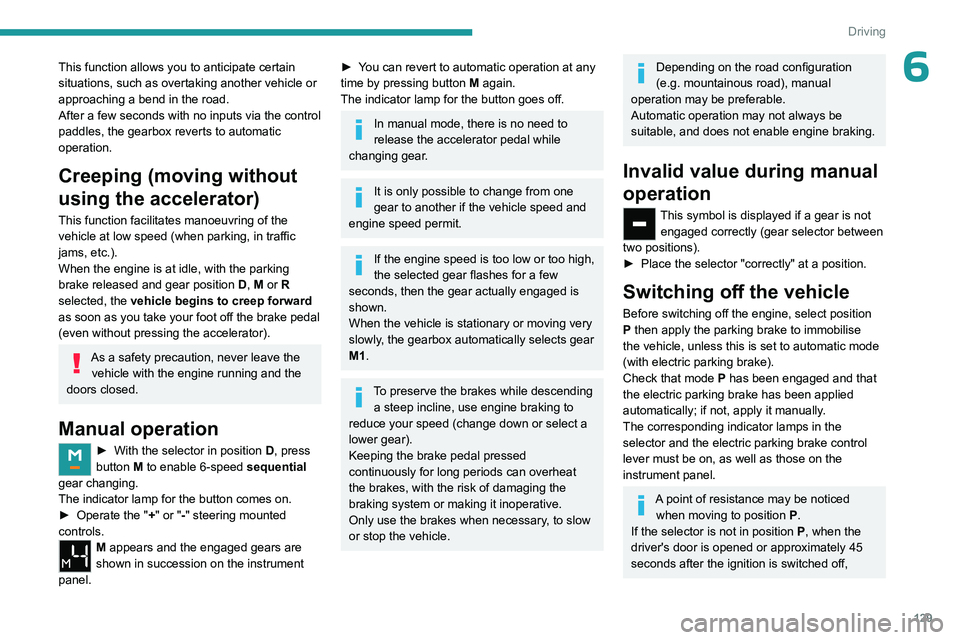
Manual operation
► With the selector in position D , press
button M to enable 6-speed sequential
gear changing.
The indicator lamp for the button comes on.
►
Operate the "
+" or "-" steering mounted
controls.
M appears and the engaged gears are
shown in succession on the instrument
panel.
► You can revert to automatic operation at any
time by pressing button M again.
The indicator lamp for the button goes off.
In manual mode, there is no need to
release the accelerator pedal while
changing gear.
It is only possible to change from one
gear to another if the vehicle speed and
engine speed permit.
If the engine speed is too low or too high,
the selected gear flashes for a few
seconds, then the gear actually engaged is
shown.
When the vehicle is stationary or moving very
slowly, the gearbox automatically selects gear
M1.
To preserve the brakes while descending a steep incline, use engine braking to
reduce your speed (change down or select a
lower gear).
Keeping the brake pedal pressed
continuously for long periods can overheat
the brakes, with the risk of damaging the
braking system or making it inoperative.
Only use the brakes when necessary, to slow
or stop the vehicle.
Depending on the road configuration
(e.g. mountainous road), manual
operation may be preferable.
Automatic operation may not always be
suitable, and does not enable engine braking.
Invalid value during manual
operation
This symbol is displayed if a gear is not engaged correctly (gear selector between
two positions).
►
Place the selector "correctly" at a position.
Switching off the vehicle
Before switching off the engine, select position
P then apply the parking brake to immobilise
the vehicle, unless this is set to automatic mode
(with electric parking brake).
Check that mode
P has been engaged and that
the electric parking brake has been applied
automatically; if not, apply it manually.
The corresponding indicator lamps in the
selector and the electric parking brake control
lever must be on, as well as those on the
instrument panel.
A point of resistance may be noticed when moving to position P.
If the selector is not in position P, when the
driver's door is opened or approximately 45
seconds after the ignition is switched off,
Page 133 of 324
131
Driving
6► To return to mode N, push without passing
the point of resistance.
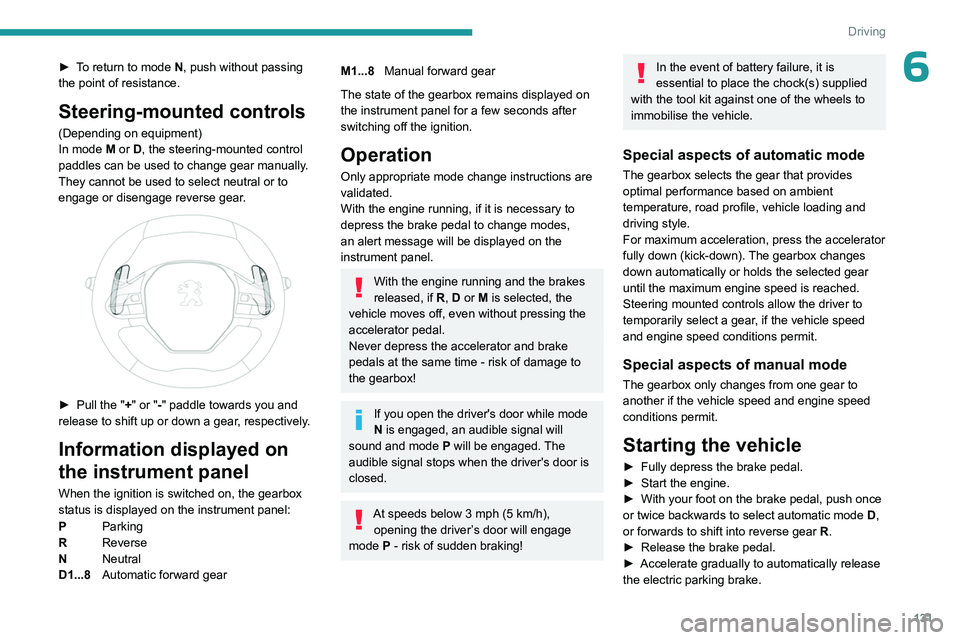
Steering-mounted controls
(Depending on equipment)
In mode M or D, the steering-mounted control
paddles can be used to change gear manually.
They cannot be used to select neutral or to
engage or disengage reverse gear.
► Pull the " +" or "-" paddle towards you and
release to shift up or down a gear, respectively.
Information displayed on
the instrument panel
When the ignition is switched on, the gearbox
status is displayed on the instrument panel:
P Parking
R Reverse
N Neutral
D1...8 Automatic forward gear
M1...8Manual forward gear
The state of the gearbox remains displayed on
the instrument panel for a few seconds after
switching off the ignition.
Operation
Only appropriate mode change instructions are
validated.
With the engine running, if it is necessary to
depress the brake pedal to change modes,
an alert message will be displayed on the
instrument panel.
With the engine running and the brakes
released, if R, D or M is selected, the
vehicle moves off, even without pressing the
accelerator pedal.
Never depress the accelerator and brake
pedals at the same time - risk of damage to
the gearbox!
If you open the driver's door while mode
N is engaged, an audible signal will
sound and mode P will be engaged. The
audible signal stops when the driver's door is
closed.
At speeds below 3 mph (5 km/h),
opening the driver ’s door will engage
mode P
- risk of sudden braking!
In the event of battery failure, it is
essential to place the chock(s) supplied
with the tool kit against one of the wheels to
immobilise the vehicle.
Special aspects of automatic mode
The gearbox selects the gear that provides
optimal performance based on ambient
temperature, road profile, vehicle loading and
driving style.
For maximum acceleration, press the accelerator
fully down (kick-down). The gearbox changes
down automatically or holds the selected gear
until the maximum engine speed is reached.
Steering mounted controls allow the driver to
temporarily select a gear, if the vehicle speed
and engine speed conditions permit.
Special aspects of manual mode
The gearbox only changes from one gear to
another if the vehicle speed and engine speed
conditions permit.
Starting the vehicle
► Fully depress the brake pedal.
► Start the engine.
►
With your foot on the brake pedal, push once
or twice backwards to select automatic mode D
,
or forwards to shift into reverse gear R.
►
Release the brake pedal.
►
Accelerate gradually to automatically release
the electric parking brake.
Page 138 of 324
136
Driving
Restarting the engine (START mode)
The engine automatically restarts as soon as the
driver indicates the intention of moving off again:
With a manual gearbox: with the clutch pedal
fully depressed.
With an automatic gearbox:
–
With the selector in position D
or M: with the
brake pedal released.
–
With the selector in position N
and the brake
pedal released: with the selector at D or M.
–
With the selector in position P
and the brake
pedal depressed: with the selector at R, N, D
or M.
–
Reverse gear engaged.
Special cases
The engine will restart automatically if the
conditions for operation are met again and in the
following case:
–
V
ehicle speed exceeds 2 mph (3 km/h)
(depending on engine).
In this case, this indicator lamp flashes for
a few seconds, then goes off.
Malfunctions
Depending on the vehicle’s equipment:In the event of a system malfunction, this
warning lamp flashes on the instrument
panel.
The warning lamp in this button flashes and a message appears, accompanied by
an audible signal.
Have it checked by a PEUGEOT dealer or a
qualified workshop.
The vehicle stalls in STOP mode
All of the instrument panel warning lamps come
on if there is a fault.
Depending on version, a warning message
may also be displayed, prompting you to place
the gear selector in position N and depress the
brake pedal.
►
Switch off the ignition then start the engine
again with the key or the " ST
ART/STOP" button.
12 V battery
The Stop & Start system requires a
12 V battery of specific technology and
specification.
All work must be carried out only by a
PEUGEOT
dealer or a qualified workshop
Tyre under-inflation detection
This system alerts the driver if one or more tyres
suffer a drop in pressure.
The alert is raised when the vehicle is moving,
not when stationary.
It compares the information given by the wheel
speed sensors with reference values, which
must be reinitialised every time the tyre
pressures are adjusted or a wheel changed.
It takes into account the last values stored
during the reinitialisation request. It is therefore
essential that the tyre pressure is correct during
the operation. This operation is the driver’s
responsibility.
The tyre under-inflation detection cannot, in any circumstances, replace the need
for vigilance on the part of the driver.
This system does not avoid the need to
regularly check the tyre pressures (including
the spare wheel), especially before a long
journey.
Driving with under-inflated tyres, particularly
in adverse conditions (heavy load, high
speed, long journey):
–
worsens road-holding.
–
lengthens braking distances.
–
causes premature wear of the tyres.
–
increases energy consumption.
The inflation pressures defined for the vehicle can be found on the tyre pressure
label.
For more information on the Identification
markings, refer to the corresponding section.
Checking tyre pressures
This check should be done monthly
when the tyres are "cold" (vehicle stopped for
1 hour or after a journey of less than 6 miles
(10
km) at moderate speeds).
Otherwise, add 0.3 bar to the pressures
shown on the label.
Page 143 of 324
141
Driving
6The settings are changed via the Driving/Vehicle touch screen
menu.
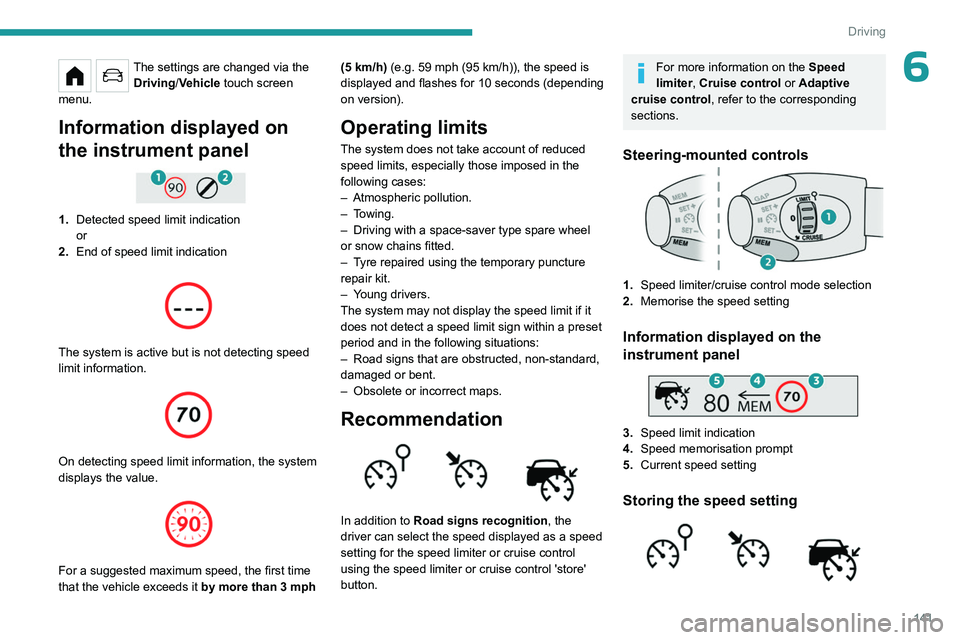
Information displayed on
the instrument panel
1. Detected speed limit indication
or
2. End of speed limit indication
The system is active but is not detecting speed
limit information.
On detecting speed limit information, the system
displays the value.
For a suggested maximum speed, the first time
that the vehicle exceeds it
by more than 3 mph (5
km/h) (e.g. 59 mph (95 km/h)), the speed is
displayed and flashes for 10 seconds (depending
on version).
Operating limits
The system does not take account of reduced
speed limits, especially those imposed in the
following cases:
–
Atmospheric pollution.
–
Towing.
–
Driving with a space-saver type spare wheel
or snow chains fitted.
–
T
yre repaired using the temporary puncture
repair kit.
–
Y
oung drivers.
The system may not display the speed limit if it
does not detect a speed limit sign within a preset
period and in the following situations:
–
Road signs that are obstructed, non-standard,
damaged or bent.
–
Obsolete or incorrect maps.
Recommendation
In addition to Road signs recognition , the
driver can select the speed displayed as a speed
setting for the speed limiter or cruise control
using the speed limiter or cruise control 'store'
button.
For more information on the Speed
limiter, Cruise control or Adaptive
cruise control, refer to the corresponding
sections.
Steering-mounted controls
1. Speed limiter/cruise control mode selection
2. Memorise the speed setting
Information displayed on the
instrument panel
3.Speed limit indication
4. Speed memorisation prompt
5. Current speed setting
Storing the speed setting
Page 145 of 324
143
Driving
6For more information on Memorising speeds
or the Road signs recognition , refer to the
corresponding sections.
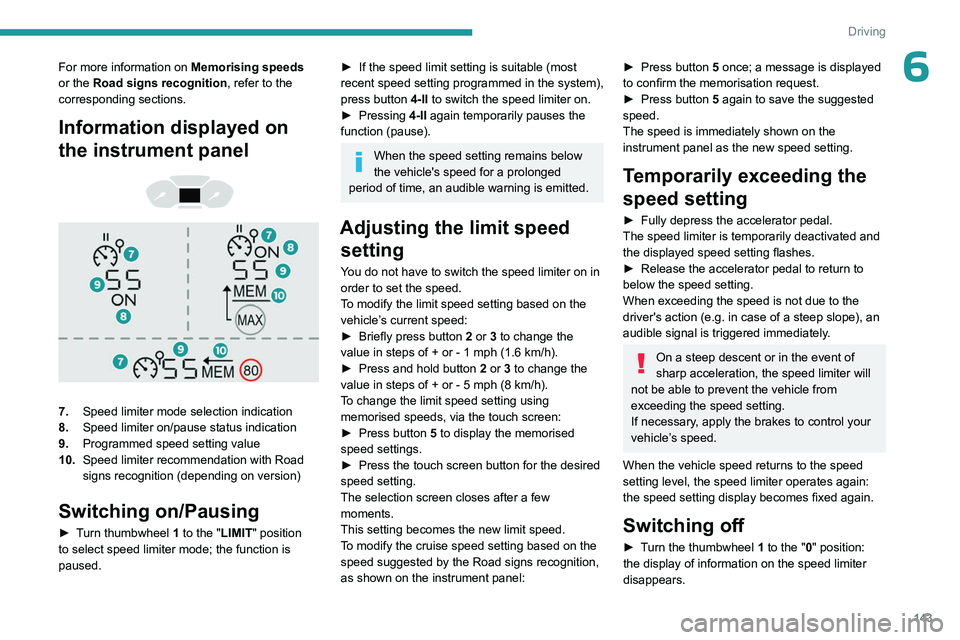
Information displayed on
the instrument panel
7. Speed limiter mode selection indication
8. Speed limiter on/pause status indication
9. Programmed speed setting value
10. Speed limiter recommendation with Road
signs recognition (depending on version)
Switching on/Pausing
► Turn thumbwheel 1 to the "LIMIT" position
to select speed limiter mode; the function is
paused.
► If the speed limit setting is suitable (most
recent speed setting programmed in the system),
press button
4-II to switch the speed limiter on.
►
Pressing
4-II again temporarily pauses the
function (pause).
When the speed setting remains below
the vehicle's speed for a prolonged
period of time, an audible warning is emitted.
Adjusting the limit speed setting
You do not have to switch the speed limiter on in
order to set the speed.
To modify the limit speed setting based on the
vehicle’s current speed:
►
Briefly press button
2 or 3 to change the
value in steps of +
or - 1 mph (1.6 km/h).
►
Press and hold button
2
or 3 to change the
value in steps of +
or - 5 mph (8 km/h).
To change the limit speed setting using memorised speeds, via the touch screen:
►
Press button
5 to display the memorised
speed settings.
►
Press the touch screen button for the desired
speed setting.
The selection screen closes after a few
moments.
This setting becomes the new limit speed.
T
o modify the cruise speed setting based on the
speed suggested by the Road signs recognition,
as shown on the instrument panel:
► Press button 5 once; a message is displayed
to confirm the memorisation request.
►
Press button
5 again to save the suggested
speed.
The speed is immediately shown on the
instrument panel as the new speed setting.
Temporarily exceeding the
speed setting
► Fully depress the accelerator pedal.
The speed limiter is temporarily deactivated and
the displayed speed setting flashes.
►
Release the accelerator pedal to return to
below the speed setting.
When exceeding the speed is not due to the
driver's action (e.g.
in case of a steep slope), an
audible signal is triggered immediately.
On a steep descent or in the event of
sharp acceleration, the speed limiter will
not be able to prevent the vehicle from
exceeding the speed setting.
If necessary, apply the brakes to control your
vehicle’s speed.
When the vehicle speed returns to the speed
setting level, the speed limiter operates again:
the speed setting display becomes fixed again.
Switching off
► Turn the thumbwheel 1 to the "0" position:
the display of information on the speed limiter
disappears.