key PEUGEOT PARTNER TEPEE ELECTRIC 2017 Owner's Manual
[x] Cancel search | Manufacturer: PEUGEOT, Model Year: 2017, Model line: PARTNER TEPEE ELECTRIC, Model: PEUGEOT PARTNER TEPEE ELECTRIC 2017Pages: 252, PDF Size: 9.89 MB
Page 148 of 252
110
Manual deactivation
In certain circumstances, such as the need
to maintain a comfortable temperature in the
passenger compartment, it may be preferable
to deactivate the Stop & Start system.
The system can be deactivated at any time,
once the ignition is switched on.
F
A
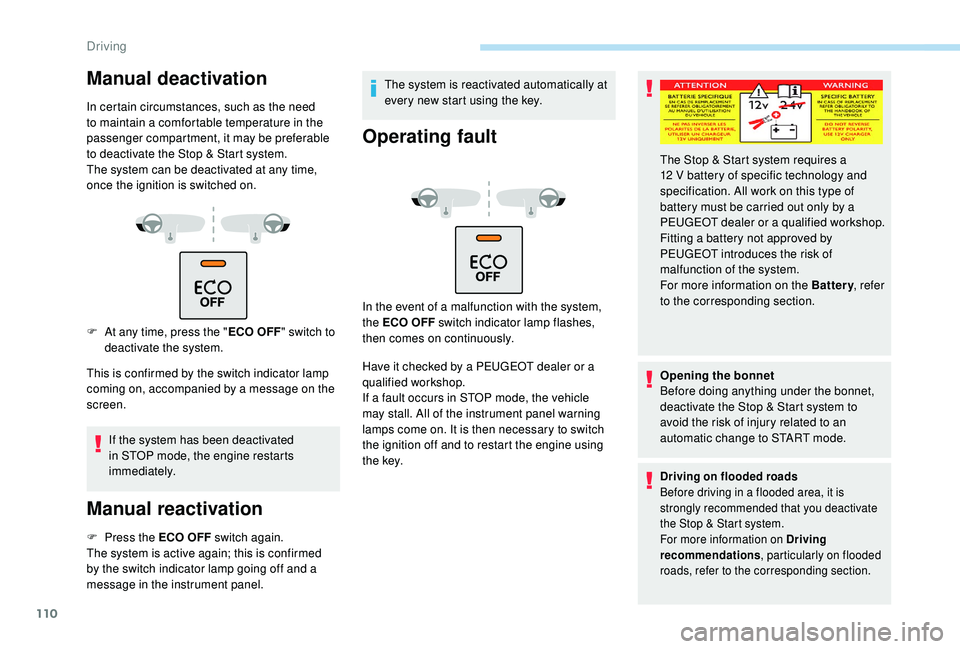
t any time, press the " ECO OFF"
switch to
deactivate the system.
This is confirmed by the switch indicator lamp
coming on, accompanied by a message on the
screen.
If the system has been deactivated
in STOP mode, the engine restarts
immediately.
Manual reactivation
F Press the ECO OFF switch again.
The system is active again; this is confirmed
by the switch indicator lamp going off and a
message in the instrument panel. The system is reactivated automatically at
every new start using the key.
Operating fault
In the event of a malfunction with the system,
the ECO OFF switch indicator lamp flashes,
then comes on continuously.
Have it checked by a PEUGEOT dealer or a
qualified workshop.
If a fault occurs in STOP mode, the vehicle
may stall. All of the instrument panel warning
lamps come on. It is then necessary to switch
the ignition off and to restart the engine using
t h e key.
Opening the bonnet
Before doing anything under the bonnet,
deactivate the Stop & Start system to
avoid the risk of injury related to an
automatic change to START mode.
Driving on flooded roads
Before driving in a flooded area, it is
strongly recommended that you deactivate
the Stop & Start system.
For more information on Driving
recommendations
, particularly on flooded
roads, refer to the corresponding section.
The Stop & Start system requires a
12 V battery of specific technology and
specification. All work on this type of
battery must be carried out only by a
PEUGEOT dealer or a qualified workshop.
Fitting a battery not approved by
PEUGEOT
introduces the risk of
malfunction of the system.
For more information on the Battery , refer
to the corresponding section.
Driving
Page 164 of 252
126
Fuel
Low fuel level
When the low fuel level is reached
this warning lamp comes on.
When it first comes on, around 8
litres remain
in the tank, according to your driving style and
your engine.
You must refuel as soon as possible to avoid
running out.
Never continue to drive until you run out of fuel,
as this could damage the emission control and
injection systems.
Filling
The fuel tank must be filled with the engine
off. When filling the fuel tank, do not continue after
the 3
rd cut-off of the nozzle. This could cause
malfunctions.
The capacity of the tank is approximately
60
litres (53 litres for BlueHDi Diesel versions).
F
A
fter filling the fuel tank, lock the cap and
close the flap.
When refilling, a mechanical
system prevents opening of
the left side door. Ensure
that nobody attempts to slide
open this door while the fuel
flap is open.
After closing the flap, the
sliding side door can become
blocked. Push the door to
close it and then open it.
When refilling, ensure that
nobody attempts to open the
sliding side door while the
fuel filler flap is open.
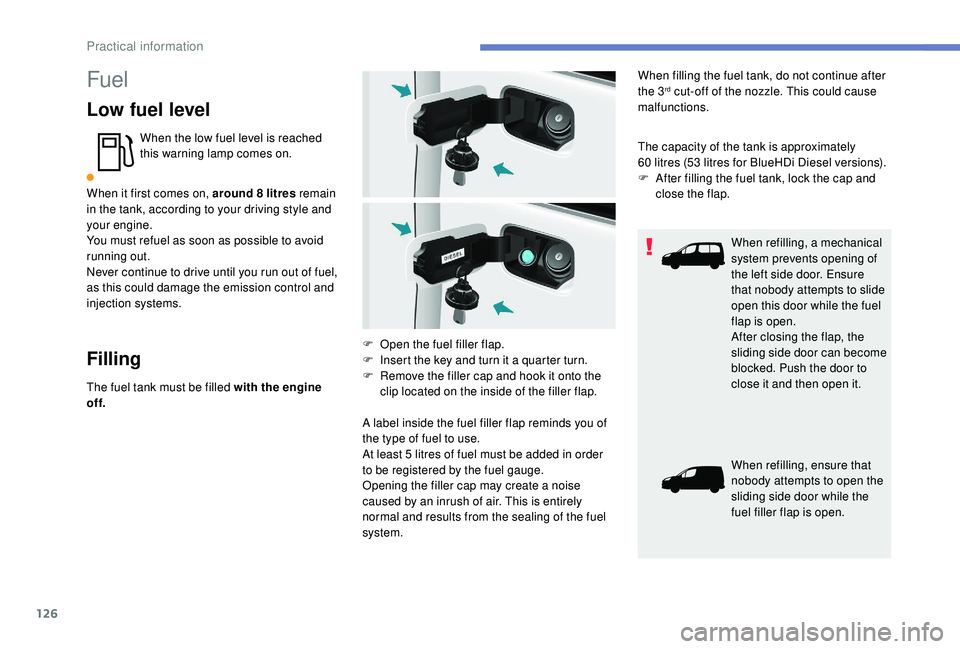
F
O
pen the fuel filler flap.
F
I
nsert the key and turn it a quarter turn.
F
R
emove the filler cap and hook it onto the
clip located on the inside of the filler flap.
A label inside the fuel filler flap reminds you of
the type of fuel to use.
At least 5
litres of fuel must be added in order
to be registered by the fuel gauge.
Opening the filler cap may create a noise
caused by an inrush of air. This is entirely
normal and results from the sealing of the fuel
system.
Practical information
Page 165 of 252
127
Fuel system cut-off
In the event of a severe collision, a device
automatically cuts off the fuel supply to the
engine.The flashing of this warning lamp is
accompanied by a message on the
screen.
Verify the absence of any odour and fuel leaks
outside the vehicle and restore the supply:
F
s
witch off the ignition (STOP position),
F
r
emove the key from the ignition,
F
r
einsert the key in the ignition,
F
s
witch on the ignition and start.
7
Practical information
Page 170 of 252
132
Instructions for fitting and before
each use
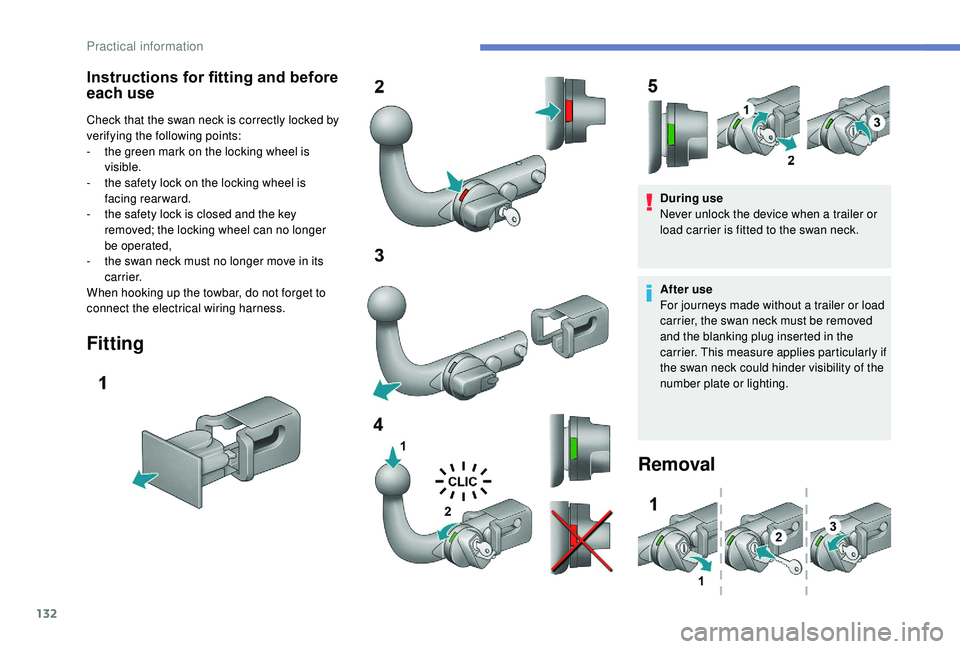
Check that the swan neck is correctly locked by
verifying the following points:
-
t
he green mark on the locking wheel is
visible.
-
t
he safety lock on the locking wheel is
facing rearward.
-
t
he safety lock is closed and the key
removed; the locking wheel can no longer
be operated,
-
t
he swan neck must no longer move in its
c a r r i e r.
When hooking up the towbar, do not forget to
connect the electrical wiring harness.
Fitting
During use
Never unlock the device when a trailer or
load carrier is fitted to the swan neck.
After use
For journeys made without a trailer or load
carrier, the swan neck must be removed
and the blanking plug inserted in the
carrier. This measure applies particularly if
the swan neck could hinder visibility of the
number plate or lighting.
Removal
Practical information
Page 180 of 252
142
Procedure
Before topping up, ensure that the vehicle is
parked on a flat and level sur face.
In wintry conditions, ensure that the
temperature of the vehicle is above -11°C.
Otherwise the AdBlue
® may be frozen and
so cannot be poured into its tank. Park your
vehicle in a warmer area for a few hours to
allow the top-up to be carried out. F
O
btain an AdBlue
® container or bottle. After
first checking the use-by date, read the
instructions on the label carefully before
pouring the contents of the container or
bottle into your vehicle's AdBlue tank.
Or
F
I
nsert the AdBlue
® pump nozzle and refill
the tank until the nozzle stops automatically.
Important:
-
T
o avoid over flowing the AdBlue
® tank,
i
t is recommended:
•
T
o top up between 10 and 13
litres
using AdBlue
® containers or bottles.
Or
•
T
hat you stop after the nozzle’s first
automatic cut-out if you are refilling
at a ser vice station.
-
I
f your vehicle's AdBlue
® tank is
completely empty – which is confirmed
by the alert messages and the
impossibility of starting the engine –
you must add at least 5
litres. Impor tant: when topping up after
a breakdown due to running out
of AdBlue,
you must wait for at least
5 minutes before switching on the
ignition, opening the driver's door,
unlocking the vehicle or inser ting the
key in the switch.
Switch on the ignition, then after a
minimum of 10 seconds, start the engine.
F
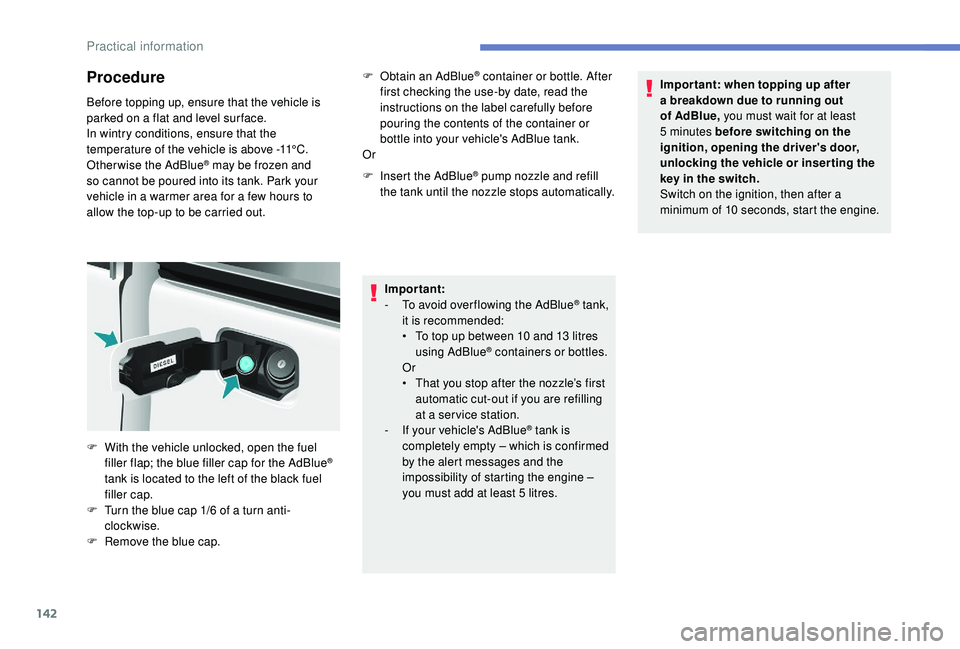
W
ith the vehicle unlocked, open the fuel
filler flap; the blue filler cap for the AdBlue
®
tank is located to the left of the black fuel
filler cap.
F
T
urn the blue cap 1/6 of a turn anti-
clockwise.
F
R
emove the blue cap.
Practical information
Page 197 of 252
159
Economy mode
When the engine is switched off and the key is
left in the ignition on position, certain functions
(windscreen wipers, electric windows, courtesy
lamps, audio system, etc.) can be used for a
combined duration of no more than than thirty
minutes, so as not to discharge the battery.
After thirty minutes the active functions are
put on standby and the battery warning lamp
flashes with a message displayed in the screen.
In order to restore the use of these functions
immediately, start the engine and let it run for a
few minutes.
The time available to you will then be double
the period for which the engine is left running.
However, this period will always be between
five and thirty minutes.The engine will not start if the battery is
discharged.
Towing your vehicle
For more information on Changing a
wheel and in particular the tools, refer to
the corresponding section. Vehicles fitted with a manual gearbox
(Diesel version)
For vehicles fitted with a manual gearbox,
the gear lever must be in neutral. Failure
to obser ve this special condition could
result in damage to the transmission and
braking components and to the absence
of braking assistance when the engine is
started again.
From the front
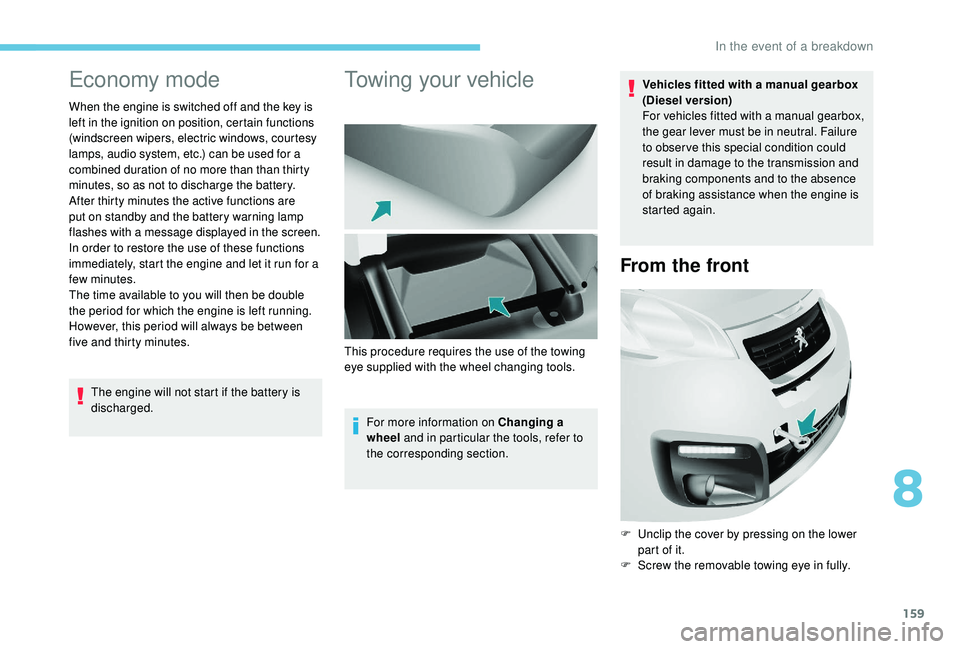
F Unclip the cover by pressing on the lower
part of it.
F
S
crew the removable towing eye in fully.
This procedure requires the use of the towing
eye supplied with the wheel changing tools.
8
In the event of a breakdown
Page 220 of 252
8
"AM Radio ".
OR Press Radio Media to display the
primary page.
Press the secondary page.
Press " Frequency ".
THEN
Enter the frequency in full (e.g.:
92.10
MHz) using the keypad then
" Confirm ".
Changing radio station
Pressing the name of the current radio station
brings up a list.
To change radio station press the name of the
desired station.
Presetting a station
Select a radio station or frequency (refer to the
corresponding section).
Press " Preset".
Select a number in the list to preset the
previously chosen/set radio station. Or
A press on the button in the upper-right part of
the screen presets all of the stations one after
the other.
Recalling preset stations
Press Radio Media
to display the
primary page.
Select " Preset".
Activating/Deactivating RDS
Press Radio Media to display the
primary page.
Press the secondary page. Select "Settings ".
Select " Radio".
Activate/Deactivate " RDS options".
RDS, if activated, allows you to
continue listening to the same station
by automatically retuning to alternative
frequencies. However, in certain conditions,
coverage of an RDS station may not be
assured throughout the entire country as
radio stations do not cover 100% of the
territory. This explains the loss of reception
of the station during a journey.A long press on a number saves (presets) the
station.
DAB (Digital Audio
Broadcasting) radio
Digital radio
Digital radio provides higher quality
reception and also the graphical display
of current information on the radio station
being listened to. Select "List" in the
primary page.
The different multiplexes offer a choice
of radio stations arranged in alphabetical
o r d e r.
Press Radio Media to display the
primary page.
Select change of source. Select "DAB Radio ".
7-inch touch screen
Page 228 of 252
16
Manual connection
Press Telephone to display the
primary page
Press the secondary page. Select "Bluetooth
®" to display the
list of paired devices.
Select the device to connect
Press " Search for devices ".
The connection is confirmed by the display of a
message and the name of the telephone.
Managing paired
telephones
This function allows the connection or
disconnection of a peripheral device as
well as the deletion of a pairing.
Press Telephone to display the
primary page.
Press the secondary page. Select "Bluetooth
®" to display the
list of paired devices. Select the device in the list.
Select "
Search for devices "
Or
" Connect/Disconnect " to start or end the
Bluetooth
® connection with the selected device.
Or
" Delete " to delete the pairing.
Receiving a call
An incoming call is announced by a ring and a
superimposed display in the screen.
Make a short press on the steering
mounted TEL button to accept an
incoming call.
Make a long press
on the steering mounted TEL button
to reject the call.
Or Select "End call".
Making a call
Using the telephone is not recommended
while driving.
Park the vehicle.
Make the call using the steering mounted
controls.
Calling a new number
Press Telephone to display the
primary page.
Enter the phone number using the
digital keypad.
Press " Call" to start the call.
Calling a contact
Press Telephone to display the
primary page.
Or make a long press
on the steering mounted TEL button.
Select " Contacts ".
Select the desired contact from the list offered.
7-inch touch screen
Page 240 of 252
6
Information and advice
The audio system will only play files with
the ".mp3" extension with a sampling rate
of 22.05 kHz or 44.1 kHz. No other file type
(".wma", ".mp4", ".m3u", etc.) can be played.
It is recommended that file names be of no
more than 20 characters and without special
characters (e.g.: "
? ; ù) so as to avoid any
problem reading or displaying the files..
In order to be able to play a recorded CDR or
CDRW, when recording it is preferable to select
the ISO 9660 level 1.2 or Joliet standards.
If the disc is recorded in another format, it may
not be played correctly.
It is recommended that the same recording
standard is always used for an individual disc,
with as low a speed as possible (4x maximum)
for optimum sound quality.
In the particular case of a multi-session CD, the
Joliet standard is recommended.
Use only USB memory sticks in FAT32 format
(File Allocation Table).
To protect the system, do not use a USB
hub. It is recommended that you use genuine
Apple® USB cables for correct operation.
Bluetooth® audio streaming
Streaming allows you to listen to audio files on
your smartphone using the vehicle's speakers.
Connect the telephone: see the "
Telephone"
section.
Select in the menu " Bluetooth
®: Telephone –
Audio " the telephone to connect.
The audio system connects to a newly paired
telephone automatically.
Activate the streaming source by
pressing SOURCE.
In certain cases, playing of the
audio files must be initiated from the
keypad.
Connecting Apple® players
Connect the Apple® player to the USB port
using a suitable cable (not supplied).
Play starts automatically.
Control is via the audio system controls.
The classifications available are those of the
portable device connected (artists/albums/
genres/playlists/audiobooks/podcasts).
The version of the software in the audio system
may not be compatible with the generation of
your Apple
® p l aye r.
The control of common tracks is possible
via the audio system control buttons and the
steering mounted controls, if the telephone
supports the function.
The contextual information can be displayed in
the screen.
Telephone
Pairing a Bluetooth®
telephone
Screen C (availability depends on
model and version)
For reasons of safety and because
it requires sustained attention by the
driver, the pairing of a Bluetooth
® mobile
telephone with the Bluetooth® hands-free
system of your audio system must be done
with the vehicle stationary and the ignition
on.
Peugeot Connect Sound (RD5)
Page 241 of 252
7
Visit www.peugeot.co.uk for more information
(compatibility, more help, etc.).
Activate the Bluetooth
® function on the
telephone and ensure that it is "visible to all"
(telephone configuration).
Press the MENU button.
In the menu, select:
-
" Bluetooth
®: Telephone –
Audio "
-
" Bluetooth
® configuration "
-
" Perform a Bluetooth® search "
A window is displayed with a search in progress
message. The services available depend on
the network, the SIM card and the
compatibility of the Bluetooth
® devices
used.
Check the instructions for your telephone
and with your ser vice provider for the
ser vices to which you have access.
The first 4 telephones recognised are displayed
in this window. The "
Telephone " menu permits access to the
following functions in particular: " Directory", if
your telephone is fully compatible, " Calls list",
" Consult the paired equipment ".
Select the telephone to be connected from the
list. Only one telephone can be connected at
a time.
Confirm with OK.
A message on the screen indicates the
telephone chosen. To accept the pairing, enter
the same code on the telephone, then confirm
with OK.
In case of failure, the number of attempts is not
restricted.
A message that the pairing has been
successful appears in the screen. A virtual keypad is displayed in the screen:
enter a code with at least 4 digits.
Authorised automatic connection is only active
after the telephone has been configured.
The directory and the call list can be accessed
after the necessary synchronisation period.
Receiving a call
An incoming call is announced by a ring and a
superimposed display in the screen.
Select the " YES" tab in the screen
using the buttons.
Confirm with OK.
Press this button at the steering
mounted controls to accept the call.
Making a call
From the menu " Bluetooth®: Telephone –
Audio ".
Select " Manage the telephone call".
Select " Call".
Or
Select " Calls list ".
Or
Select " Directory ".
.
Peugeot Connect Sound (RD5)