lock RAM 1500 2021 Workshop Manual
[x] Cancel search | Manufacturer: RAM, Model Year: 2021, Model line: 1500, Model: RAM 1500 2021Pages: 496, PDF Size: 20.89 MB
Page 102 of 496
100GETTING TO KNOW YOUR VEHICLE
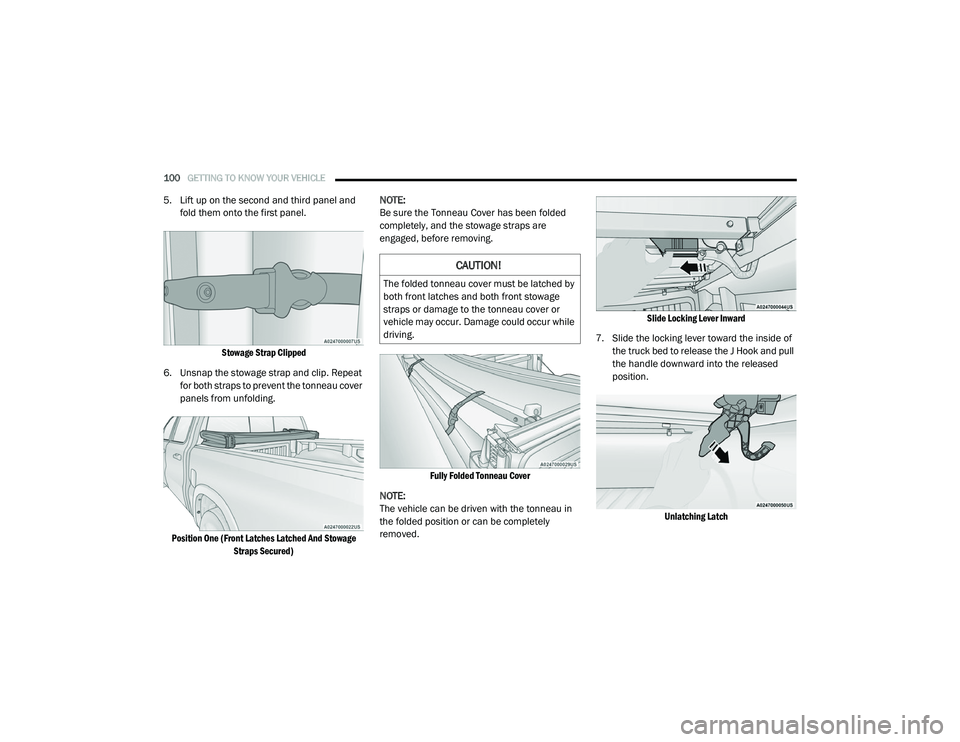
5. Lift up on the second and third panel and
fold them onto the first panel.
Stowage Strap Clipped
6. Unsnap the stowage strap and clip. Repeat for both straps to prevent the tonneau cover
panels from unfolding.
Position One (Front Latches Latched And Stowage Straps Secured)
NOTE:
Be sure the Tonneau Cover has been folded
completely, and the stowage straps are
engaged, before removing.
Fully Folded Tonneau Cover
NOTE:
The vehicle can be driven with the tonneau in
the folded position or can be completely
removed.
Slide Locking Lever Inward
7. Slide the locking lever toward the inside of the truck bed to release the J Hook and pull
the handle downward into the released
position.
Unlatching Latch
CAUTION!
The folded tonneau cover must be latched by
both front latches and both front stowage
straps or damage to the tonneau cover or
vehicle may occur. Damage could occur while
driving.
21_DT_OM_EN_USC_t.book Page 100
Page 103 of 496
GETTING TO KNOW YOUR VEHICLE101
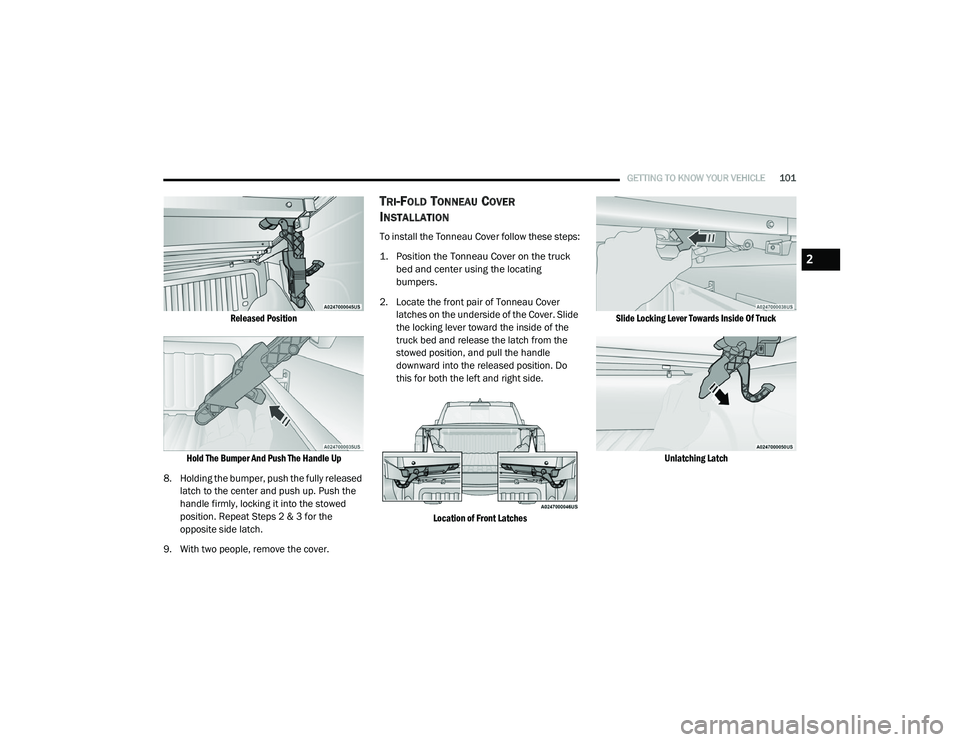
Released Position
Hold The Bumper And Push The Handle Up
8. Holding the bumper, push the fully released latch to the center and push up. Push the
handle firmly, locking it into the stowed
position. Repeat Steps 2 & 3 for the
opposite side latch.
9. With two people, remove the cover.
TRI-FOLD TONNEAU COVER
I
NSTALLATION
To install the Tonneau Cover follow these steps:
1. Position the Tonneau Cover on the truck
bed and center using the locating
bumpers.
2. Locate the front pair of Tonneau Cover latches on the underside of the Cover. Slide
the locking lever toward the inside of the
truck bed and release the latch from the
stowed position, and pull the handle
downward into the released position. Do
this for both the left and right side.
Location of Front Latches Slide Locking Lever Towards Inside Of Truck
Unlatching Latch
2
21_DT_OM_EN_USC_t.book Page 101
Page 104 of 496
102GETTING TO KNOW YOUR VEHICLE
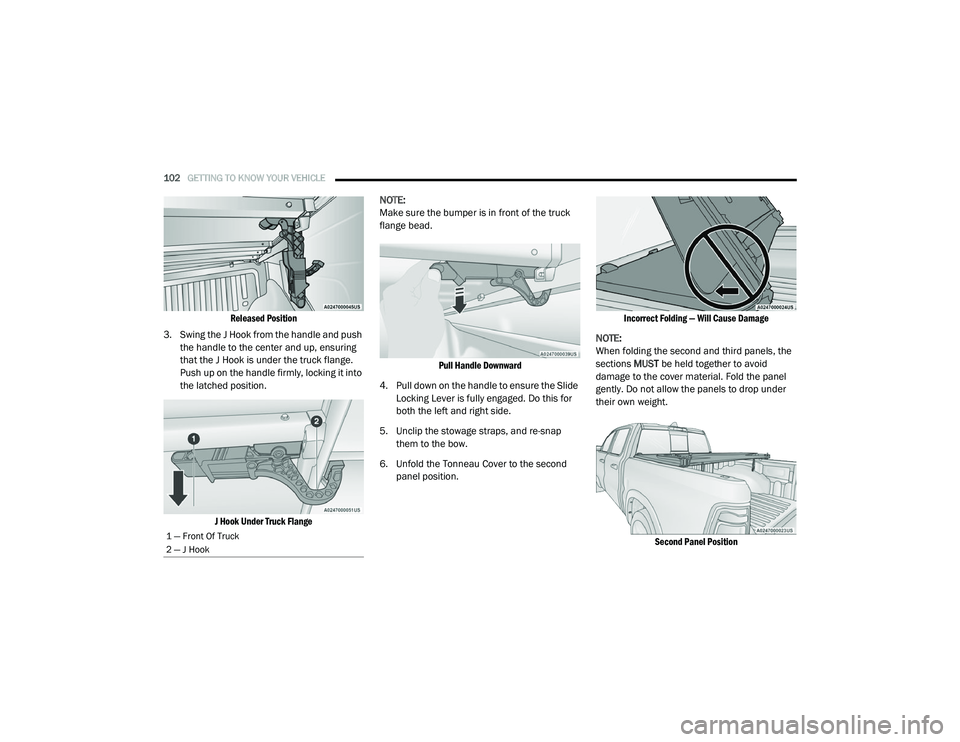
Released Position
3. Swing the J Hook from the handle and push the handle to the center and up, ensuring
that the J Hook is under the truck flange.
Push up on the handle firmly, locking it into
the latched position.
J Hook Under Truck Flange
NOTE:
Make sure the bumper is in front of the truck
flange bead.
Pull Handle Downward
4. Pull down on the handle to ensure the Slide Locking Lever is fully engaged. Do this for
both the left and right side.
5. Unclip the stowage straps, and re-snap them to the bow.
6. Unfold the Tonneau Cover to the second panel position.
Incorrect Folding — Will Cause Damage
NOTE:
When folding the second and third panels, the
sections MUST be held together to avoid
damage to the cover material. Fold the panel
gently. Do not allow the panels to drop under
their own weight.
Second Panel Position
1 — Front Of Truck
2 — J Hook
21_DT_OM_EN_USC_t.book Page 102
Page 105 of 496
GETTING TO KNOW YOUR VEHICLE103
NOTE:
Unfold the panel gently, and do not allow the
panels to drop under their own weight.
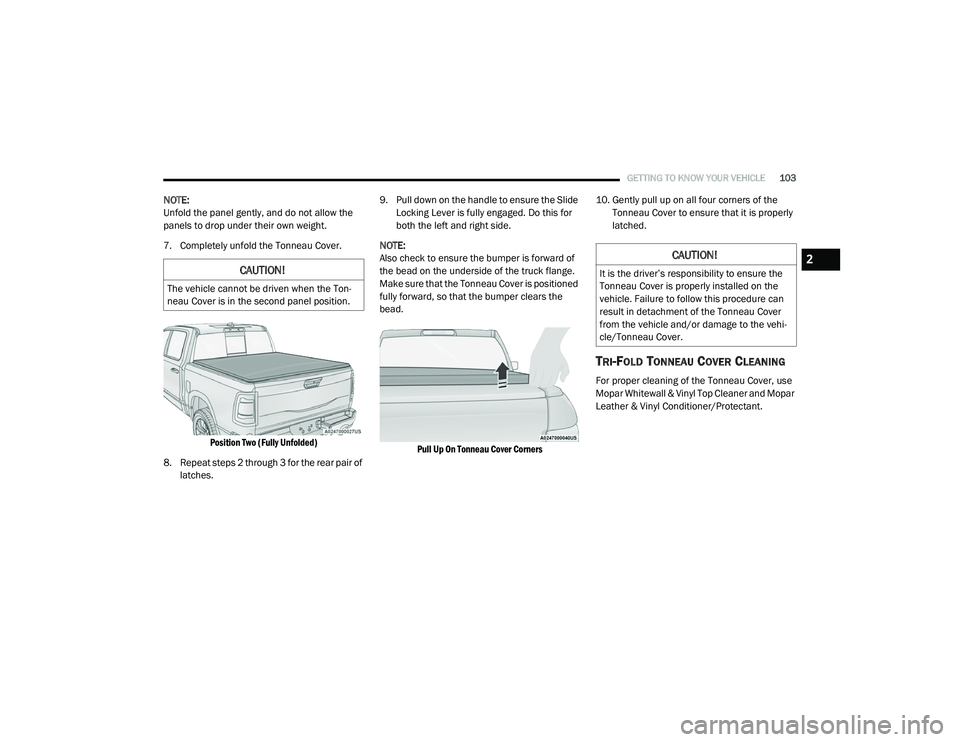
7. Completely unfold the Tonneau Cover.
Position Two (Fully Unfolded)
8. Repeat steps 2 through 3 for the rear pair of latches. 9. Pull down on the handle to ensure the Slide
Locking Lever is fully engaged. Do this for
both the left and right side.
NOTE:
Also check to ensure the bumper is forward of
the bead on the underside of the truck flange.
Make sure that the Tonneau Cover is positioned
fully forward, so that the bumper clears the
bead.
Pull Up On Tonneau Cover Corners
10. Gently pull up on all four corners of the
Tonneau Cover to ensure that it is properly
latched.
TRI-FOLD TONNEAU COVER CLEANING
For proper cleaning of the Tonneau Cover, use
Mopar Whitewall & Vinyl Top Cleaner and Mopar
Leather & Vinyl Conditioner/Protectant.
CAUTION!
The vehicle cannot be driven when the Ton -
neau Cover is in the second panel position.
CAUTION!
It is the driver’s responsibility to ensure the
Tonneau Cover is properly installed on the
vehicle. Failure to follow this procedure can
result in detachment of the Tonneau Cover
from the vehicle and/or damage to the vehi -
cle/Tonneau Cover.
2
21_DT_OM_EN_USC_t.book Page 103
Page 118 of 496

116GETTING TO KNOW YOUR INSTRUMENT PANEL
DISPLAY MENU ITEMS
Push and release the up or down arrow
button until the desired selectable menu icon is
highlighted in the instrument cluster display.
Speedometer
Push and release the up or down arrow
button until the speedometer menu item is
highlighted in the instrument cluster display.
Push and release the OK button to cycle the
display between mph and km/h.
Vehicle Info
Push and release the up or down arrow
button until the Vehicle Info menu icon is
displayed in the instrument cluster display.
Push and release the left or right arrow
button to scroll through the information
submenus and push and release the OK button
to select or reset the resettable submenus.
Tire Pressure Monitor System
Air Suspension — If Equipped
Coolant Temperature — If Equipped
Trans Temperature (Automatic only)
Oil Temperature
Oil Pressure — If Equipped
Oil Life
Battery Voltage — If Equipped
Gauge Summary — If Equipped
Coolant Temp
Trans Temp
Oil Temp
Oil Pressure
Engine Hours
Off-Road
Push and release the up or down arrow
button until the Off-Road menu icon is displayed
in the instrument cluster display. Push and
release the left or right arrow button to
scroll through the information submenus.
Drivetrain
Front Wheel Angle: displays the graphical
and numerical value of calculated
average front wheel angle from the
steering wheel orientation.
Transfer Case Lock Status: displays
“Lock” graphic only during 4WD High,
4WD High Part Time, 4WD Low status.
Axle Lock And Sway Bar Status (If
Equipped): displays front and rear or rear
only axle locker graphic, and sway bar
connection graphic with text message
(connected or disconnected).
Pitch And Roll
Displays the pitch and roll of the vehicle
in the graphic with the angle number on
the screen.
NOTE:
When vehicle speed becomes too high to
display the pitch and roll, “- -” will display in
place of the numbers, and the graphic will be
greyed out. A message indicating the necessary
speed for the feature to become available will
also display.
Driver Assist — If Equipped
The Driver Assist menu displays the status of
the ACC and LaneSense systems.
Push and release the up or down arrow
button until the Driver Assist menu is displayed
in the instrument cluster display.
21_DT_OM_EN_USC_t.book Page 116
Page 129 of 496
GETTING TO KNOW YOUR INSTRUMENT PANEL127
the brake fluid level is low, or that there is a
problem with the Anti-Lock Brake System
reservoir.
If the light remains on when the parking brake
has been disengaged, and the fluid level is at
the full mark on the master cylinder reservoir, it
indicates a possible brake hydraulic system
malfunction or that a problem with the Brake
Booster has been detected by the Anti-Lock
Brake System (ABS) / Electronic Stability
Control (ESC) system. In this case, the light will
remain on until the condition has been
corrected. If the problem is related to the brake
booster, the ABS pump will run when applying
the brake, and a brake pedal pulsation may be
felt during each stop.
The dual brake system provides a reserve
braking capacity in the event of a failure to a
portion of the hydraulic system. A leak in either
half of the dual brake system is indicated by the
Brake Warning Light, which will turn on when
the brake fluid level in the master cylinder has
dropped below a specified level.
The light will remain on until the cause is
corrected. NOTE:
The light may flash momentarily during sharp
cornering maneuvers, which change fluid level
conditions. The vehicle should have service
performed, and the brake fluid level checked.
If brake failure is indicated, immediate repair is
necessary.
Vehicles equipped with the Anti-Lock Brake
System (ABS) are also equipped with Electronic
Brake Force Distribution (EBD). In the event of
an EBD failure, the Brake Warning Light will turn
on along with the ABS Light. Immediate repair to
the ABS system is required.
Operation of the Brake Warning Light can be
checked by turning the ignition switch from the
OFF position to the ON/RUN position. The light
should illuminate for approximately two
seconds. The light should then turn off unless the parking brake is applied or a brake fault is
detected. If the light does not illuminate, have
the light inspected by an authorized dealer.
The light also will turn on when the parking
brake is applied with the ignition switch in the
ON/RUN position.
NOTE:
This light shows only that the parking brake is
applied. It does not show the degree of brake
application.
Hood Open Warning Light
This warning light will illuminate when
the hood is ajar/open and not fully
closed.
NOTE:
If the vehicle is moving, there will also be a
single chime.
Vehicle Security Warning Light — If
Equipped
This light will flash at a fast rate for
approximately 15 seconds when the
vehicle security system is arming, and
then will flash slowly until the vehicle
is disarmed.
WARNING!
Driving a vehicle with the red brake light on is
dangerous. Part of the brake system may
have failed. It will take longer to stop the
vehicle. You could have a collision. Have the
vehicle checked immediately.
3
21_DT_OM_EN_USC_t.book Page 127
Page 134 of 496
132GETTING TO KNOW YOUR INSTRUMENT PANEL
Your vehicle has also been equipped with a
TPMS malfunction indicator to indicate when
the system is not operating properly. The TPMS
malfunction indicator is combined with the low
tire pressure telltale. When the system detects
a malfunction, the telltale will flash for
approximately one minute and then remain
continuously illuminated. This sequence will
continue upon subsequent vehicle start-ups as
long as the malfunction exists. When the
malfunction indicator is illuminated, the system
may not be able to detect or signal low tire
pressure as intended. TPMS malfunctions may
occur for a variety of reasons, including the
installation of replacement or alternate tires or
wheels on the vehicle that prevent the TPMS
from functioning properly. Always check the
TPMS malfunction telltale after replacing one or
more tires or wheels on your vehicle to ensure
that the replacement or alternate tires and
wheels allow the TPMS to continue to function
properly.
Anti-Lock Brake System (ABS) Warning
Light
This warning light monitors the ABS.
The light will turn on when the ignition
is placed in the ON/RUN or ACC/ON/
RUN position and may stay on for as
long as four seconds.If the ABS light remains on or turns on while
driving, then the Anti-Lock portion of the brake
system is not functioning and service is
required as soon as possible. However, the
conventional brake system will continue to
operate normally, assuming the Brake Warning
Light is not also on.
If the ABS light does not turn on when the
ignition is placed in the ON/RUN or ACC/ON/
RUN position, have the brake system inspected
by an authorized dealer.
Rear Axle Locker Fault Indicator Light — If
Equipped
This warning light will illuminate to
indicate when a rear axle locker fault
has been detected.
Service Forward Collision Warning (FCW)
Light — If Equipped
This warning light will illuminate to
indicate a fault in the FCW System.
Contact an authorized dealer for
service Ú
page 324.
CAUTION!
The TPMS has been optimized for the original
equipment tires and wheels. TPMS pressures
and warning have been established for the
tire size equipped on your vehicle.
Undesirable system operation or sensor
damage may result when using replacement
equipment that is not of the same size, type,
and/or style. Aftermarket wheels can cause
sensor damage. Using aftermarket tire
sealants may cause the Tire Pressure
Monitoring System (TPMS) sensor to become
inoperable. After using an aftermarket tire
sealant it is recommended that you take your
vehicle to an authorized dealer to have your
sensor function checked.
21_DT_OM_EN_USC_t.book Page 132
Page 136 of 496
134GETTING TO KNOW YOUR INSTRUMENT PANEL
Air Suspension Normal Height Indicator
Light— If Equipped
This light will illuminate when the air
suspension system is set to the
Normal setting Úpage 165.
Air Suspension Aerodynamic Height
Indicator Light— If Equipped
This light will illuminate when the air
suspension system is set to the
Aerodynamic setting.
Entry/Exit Indicator Light— If Equipped
This light will illuminate when the
vehicle is automatically lowered from
ride height position downward for
easy entry and exit of the vehicle
Úpage 165.
Air Suspension Ride Height Raising
Indicator Light— If Equipped
This light will blink and alert the driver
that the vehicle is changing to a
higher ride height.
Air Suspension Ride Height Lowering
Indicator Light— If Equipped
This light will blink and alert the driver
that the vehicle is changing to a lower
ride height.
Rear Axle Lock Indicator Light
This light indicates when the rear axle
lock has been activated.
4WD Indicator Light — If Equipped
This light alerts the driver that the
vehicle is in the four-wheel drive
mode, and the front and rear
driveshafts are mechanically locked
together forcing the front and rear wheels to
rotate at the same speed.
4WD Low Indicator Light — If Equipped
This light alerts the driver that the
vehicle is in the 4WD Low mode. The
front and rear driveshafts are
mechanically locked together forcing the front and rear wheels to rotate at the same
speed. Low range provides a greater gear
reduction ratio to provide increased torque at
the wheels Ú
page 161.
4WD High Indicator Light — If Equipped
This light alerts the driver that the
vehicle is in the 4WD High mode. The
front and rear driveshafts are
mechanically locked together forcing
the front and rear wheels to rotate at the same
speed.
NEUTRAL Indicator Light — If Equipped
This light alerts the driver that the
4WD power transfer case is in the
NEUTRAL mode and the front and rear
driveshafts are disengaged from the
powertrain.
Low Diesel Exhaust Fluid (DEF) Indicator
Light — If Equipped
The Low DEF Indicator will illuminate
if the vehicle is low on Diesel Exhaust
Fluid (DEF) Ú page 211.
21_DT_OM_EN_USC_t.book Page 134
Page 142 of 496
140 (Continued)
(Continued)
STARTING AND OPERATING
STARTING THE ENGINE
GASOLINE ENGINE
Before starting your vehicle, adjust your seat,
adjust both inside and outside mirrors, and
fasten your seat belt.
The starter should not be operated for more
than 10-second intervals. Waiting a few
seconds between such intervals will protect the
starter from overheating. DIESEL ENGINE
Before starting your vehicle, adjust your seat,
both inside and outside mirrors, and fasten your
seat belts.
The starter is allowed to crank for up to
25-second intervals. Waiting a few minutes
between such intervals will protect the starter
from overheating.
WARNING!
When leaving the vehicle, always make
sure the keyless ignition node is in the OFF
mode, remove the key fob from the vehicle
and lock the vehicle.
Never leave children alone in a vehicle, or
with access to an unlocked vehicle.
Allowing children to be in a vehicle unat-
tended is dangerous for a number of
reasons. A child or others could be seriously
or fatally injured. Children should be
warned not to touch the parking brake,
brake pedal or the gear selector.
Do not leave the key fob in or near the
vehicle, or in a location accessible to chil-
dren, and do not leave the ignition of a
vehicle equipped with Keyless Enter-N-Go
in the ACC or ON/RUN mode. A child could
operate power windows, other controls, or
move the vehicle.
Do not leave children or animals inside
parked vehicles in hot weather. Interior
heat build-up may cause serious injury or
death.
WARNING! (Continued)WARNING!
Before exiting a vehicle, always come to a
complete stop, then shift the automatic
transmission into PARK and apply the
parking brake.
Always make sure the ENGINE START/STOP
button is in the OFF mode, key fob is
removed from the vehicle and vehicle is
locked.
Never leave children alone in a vehicle, or
with access to an unlocked vehicle. Leaving
children in a vehicle unattended is
dangerous for a number of reasons. A child
or others could be seriously or fatally
injured. Children should be warned not to
touch the parking brake, brake pedal or the
gear selector.
21_DT_OM_EN_USC_t.book Page 140
Page 143 of 496

STARTING AND OPERATING141
(Continued)
NOTE:
Engine start up in very low ambient temperature
could result in evident white smoke. This condi -
tion will disappear as the engine warms up.
AUTOMATIC TRANSMISSION
Start the engine with the transmission in PARK
position. Apply the brake before shifting into any
driving range.
NOTE:
This vehicle is equipped with a transmission
shift interlocking system. The brake pedal
must be pressed to shift out of PARK.
If equipped with an 8-speed transmission,
starting the vehicle in NEUTRAL is not
possible unless the Manual Park Release has
been activated Ú page 390.
AUTOPARK
AutoPark is a supplemental feature to assist in
placing the vehicle in PARK should the
situations on the following pages occur. It is a
back up system and should not be relied upon as the primary method by which the driver shifts
the vehicle into PARK.
The conditions under which AutoPark will
engage are outlined on the following pages.
Do not leave the key fob in or near the
vehicle, or in a location accessible to chil-
dren, and do not leave the ignition of a
vehicle equipped with Keyless Enter-N-Go
in the ACC or ON/RUN mode. A child could
operate power windows, other controls, or
move the vehicle.
Do not leave children or animals inside
parked vehicles in hot weather. Interior
heat build-up may cause serious injury or
death.
CAUTION!
The engine is allowed to crank as long as
25 seconds. If the engine fails to start
during this period, please wait at least two
minutes for the starter to cool before
repeating start procedure.
WARNING!
(Continued)
If the “Water in Fuel Indicator Light”
remains on, DO NOT START engine before
you drain the water from the fuel filter to
avoid engine damage Ú page 412.
CAUTION! (Continued)
WARNING!
Driver inattention could lead to failure to
place the vehicle in PARK. ALWAYS DO A
VISUAL CHECK that your vehicle is in PARK
by verifying that a solid (not blinking) “P” is
indicated in the instrument cluster display
and near the gear selector. If the “P” indi -
cator is blinking, your vehicle is not in
PARK. As an added precaution, always
apply the parking brake when exiting the
vehicle.
AutoPark is a supplemental feature. It is not
designed to replace the need to shift your
vehicle into PARK. It is a back up system
and should not be relied upon as the
primary method by which the driver shifts
the vehicle into PARK.
4
21_DT_OM_EN_USC_t.book Page 141