ECO mode RENAULT ALASKAN 2017 User Guide
[x] Cancel search | Manufacturer: RENAULT, Model Year: 2017, Model line: ALASKAN, Model: RENAULT ALASKAN 2017Pages: 340, PDF Size: 6.93 MB
Page 70 of 340
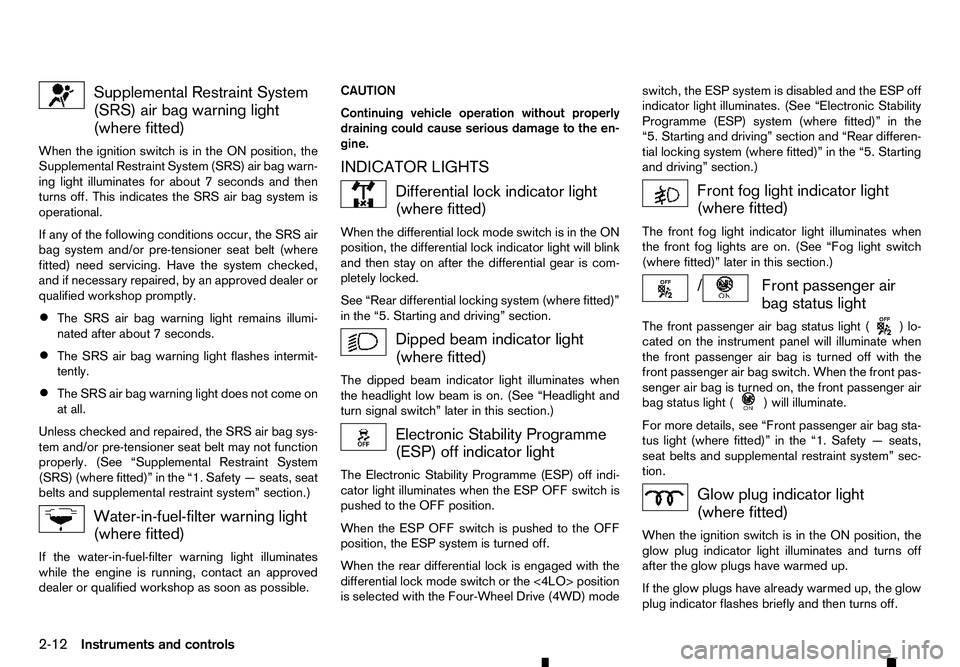
Supplemental Restraint System
(SRS) air bag warning light (where fitted)
When the ignition switch is in the ON position, the
Supplemental Restraint System (SRS) air bag warn-
ing light illuminates for about 7seconds and then
turns off. This indicates the SRS air bag system is
operational.
If any of the following conditions occur, the SRS air
bag system and/or pre-tensioner seat belt (where
fitted) need servicing. Have the system checked,
and if necessary repaired, by an approved dealer or
qualified workshop promptly.
• The SRS air bag warning light remains illumi-
nated after about
7seconds.
• The SRS air bag warning light flashes intermit-
tently.
• The SRS air bag warning light does not come on
at all.
Unless checked and repaired, the SRS air bag sys-
tem and/or pre-tensioner seat belt may not function
properly. (See “Supplemental Restraint System
(SRS) (where fitted)” in the “1. Safety —seats, seat
belts and supplemental restraint system” section.) Water-in-fuel-filter warning light
(where fitted)
If the water-in-fuel-filter warning light illuminates
while the engine is running, contact an approved
dealer or qualified workshop as soon as possible. CAUTION
Continuing vehicle operation without properly
draining could cause serious damage to the en-
gine.
INDICATOR LIGHTS Differential lock indicator light
(where fitted)
When the differential lock mode switch is in the ON
position, the differential lock indicator light will blink
and then stay on after the differential gear is com-
pletely locked.
See “Rear differential locking system (where fitted)”
in the “5. Starting and driving” section. Dipped beam indicator light
(where fitted)
The dipped beam indicator light illuminates when
the headlight low beam is on. (See “Headlight and
turn signal switch” later in this section.) Electronic Stability Programme
(ESP) off indicator light
The Electronic Stability Programme (ESP) off indi-
cator light illuminates when the ESP OFF switch is
pushed to the OFF position.
When the ESP OFF switch is pushed to the OFF
position, the ESP system is turned off.
When the rear differential lock is engaged with the
differential lock mode switch or the <4LO> position
is selected with the Four-Wheel Drive (4WD) mode switch, the ESP system is disabled and the ESP off
indicator light illuminates. (See “Electronic Stability
Programme (ESP) system (where fitted)” in the
“5. Starting and driving” section and “Rear differen-
tial locking system (where fitted)” in the “5. Starting
and driving” section.)
Front fog light indicator light
(where fitted)
The front fog light indicator light illuminates when
the front fog lights are on. (See “Fog light switch
(where fitted)” later in this section.) / Front passenger air
bag status light
The front passenger air bag status light ( )l
o-
cated on the instrument panel will illuminate when
the front passenger air bag is turned off with the
front passenger air bag switch. When the front pas-
senger air bag is turned on, the front passenger air
bag status light ( )w
ill illuminate.
For more details, see “Front passenger air bag sta-
tus light (where fitted)” in the “1. Safety —seats,
seat belts and supplemental restraint system” sec-
tion. Glow plug indicator light
(where fitted)
When the ignition switch is in the ON position, the
glow plug indicator light illuminates and turns off
after the glow plugs have warmed up.
If the glow plugs have already warmed up, the glow
plug indicator flashes briefly and then turns off.
2-12 Instruments and controls
Page 72 of 340
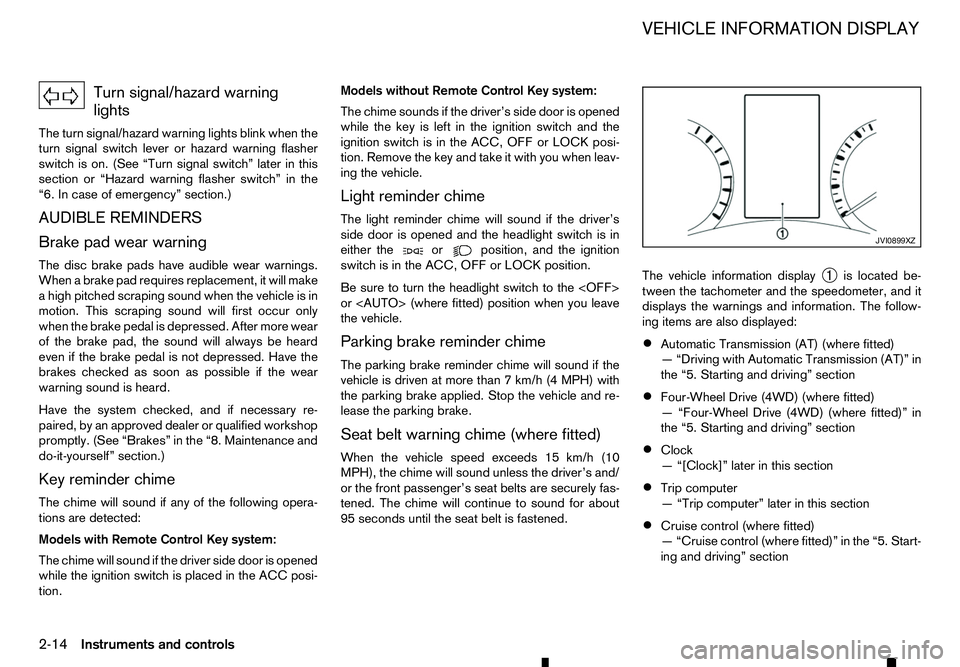
Turn signal/hazard warning
lights
The turn signal/hazard warning lights blink when the
turn signal switch lever or hazard warning flasher
switch is on. (See “Turn signal switch” later in this
section or “Hazard warning flasher switch” in the
“6. In case of emergency” section.)
AUDIBLE REMINDERS
Brake pad wear warning The disc brake pads have audible wear warnings.
When abrake pad requires replacement, it will make
ah igh pitched scraping sound when the vehicle is in
motion. This scraping sound will first occur only
when the brake pedal is depressed. After more wear
of the brake pad, the sound will always be heard
even if the brake pedal is not depressed. Have the
brakes checked as soon as possible if the wear
warning sound is heard.
Have the system checked, and if necessary re-
paired, by an approved dealer or qualified workshop
promptly. (See “Brakes” in the “8. Maintenance and
do-it-yourself” section.)
Key reminder chime
The chime will sound if any of the following opera-
tions are detected:
Models with Remote Control Key system:
The chime will sound if the driver side door is opened
while the ignition switch is placed in the ACC posi-
tion. Models without Remote Control Key system:
The chime sounds if the driver’s side door is opened
while the key is left in the ignition switch and the
ignition switch is in the ACC, OFF or LOCK posi-
tion. Remove the key and take it with you when leav-
ing the vehicle.
Light reminder chime
The light reminder chime will sound if the driver’s
side door is opened and the headlight switch is in
either the or position, and the ignition
switch is in the ACC, OFF or LOCK position.
Be sure to turn the headlight switch to the
or
the vehicle.
Parking brake reminder chime
The parking brake reminder chime will sound if the
vehicle is driven at more than 7km/h (4 MPH) with
the parking brake applied. Stop the vehicle and re-
lease the parking brake.
Seat belt warning chime (where fitted)
When the vehicle speed exceeds 15 km/h (10
MPH), the chime will sound unless the driver’s and/
or the front passenger’s seat belts are securely fas-
tened. The chime will continue to sound for about
95 seconds until the seat belt is fastened. The vehicle information display
➀is located be-
tween the tachometer and the speedometer, and it
displays the warnings and information. The follow-
ing items are also displayed:
• Automatic Transmission (AT) (where fitted)
—“
Driving with Automatic Transmission (AT)” in
the “5. Starting and driving” section
• Four-Wheel Drive (4WD) (where fitted)
—“
Four-Wheel Drive (4WD) (where fitted)” in
the “5. Starting and driving” section
• Clock
—“
[Clock]” later in this section
• Trip computer
—“
Trip computer” later in this section
• Cruise control (where fitted)
—“
Cruise control (where fitted)” in the “5. Start-
ing and driving” section JVI0899XZ
VEHICLE INFORMATION DISPLAY
2-14 Instruments and controls
Page 80 of 340
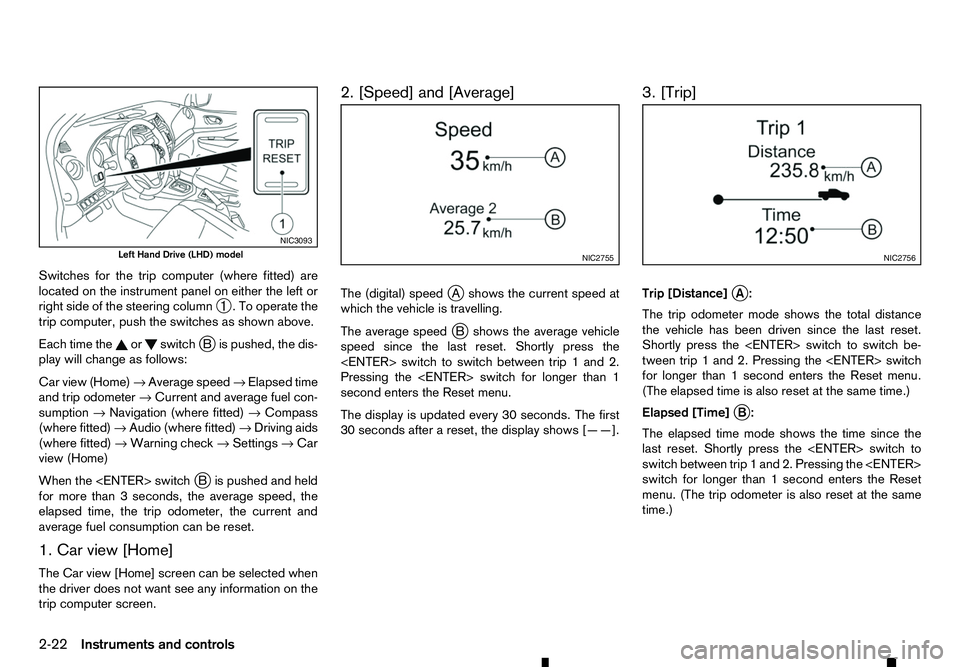
Switches for the trip computer (where fitted) are
located on the instrument panel on either the left or
right side of the steering column ➀.Too
perate the
trip computer, push the switches as shown above.
Each time the or switch
jBi spushed, the dis-
play will change as follows:
Car view (Home) →Average speed →Elapsed time
and trip odometer →Current and average fuel con-
sumption →Navigation (where fitted) →Compass
(where fitted) →Audio (where fitted) →Driving aids
(where fitted) →Warning check →Settings →Car
view (Home)
When the
Bi spushed and held
for more than 3seconds, the average speed, the
elapsed time, the trip odometer, the current and
average fuel consumption can be reset.
1. Car view [Home]
The Car view [Home] screen can be selected when
the driver does not want see any information on the
trip computer screen. 2. [Speed] and [Average]
The (digital) speed
jAs hows the current speed at
which the vehicle is travelling.
The average speed j
Bs hows the average vehicle
speed since the last reset. Shortly press the
Pressing the
second enters the Reset menu.
The display is updated every 30 seconds. The first
30 seconds after areset, the display shows [——]. 3. [Trip]
Trip [Distance]
jA:
The trip odometer mode shows the total distance
the vehicle has been driven since the last reset.
Shortly press the
tween trip 1and 2. Pressing the
for longer than 1second enters the Reset menu.
(The elapsed time is also reset at the same time.)
Elapsed [Time] j
B:
The elapsed time mode shows the time since the
last reset. Shortly press the
switch between trip 1and 2. Pressing the
switch for longer than 1second enters the Reset
menu. (The trip odometer is also reset at the same
time.) NIC3093
Left Hand Drive (LHD) model
NIC2755 NIC2756
2-22 Instruments and controls
Page 81 of 340
![RENAULT ALASKAN 2017 User Guide 4. [Fuel Economy]
[Average] fuel consumption jA:
The average fuel consumption mode shows the av-
erage fuel consumption since the last reset. Push
the <ENTER> switch for longer than 1second to
enter t](/img/7/58394/w960_58394-80.png "RENAULT ALASKAN 2017 User Guide 4. [Fuel Economy]
[Average] fuel consumption jA:
The average fuel consumption mode shows the av-
erage fuel consumption since the last reset. Push
the <ENTER> switch for longer than 1second to
enter t")
4. [Fuel Economy]
[Average] fuel consumption jA:
The average fuel consumption mode shows the av-
erage fuel consumption since the last reset. Push
the
enter the Reset menu.
The display is updated every 30 seconds. For about
the first 500 m(1/3 mile) after areset, the display
shows [——].
Push
Economy page.
The unit of measurement (l/100km, km/l, or MPG)
can be set in the settings menu. See, “[Units]” in the
“2. Instruments and controls” section.
Current fuel consumption jB:
The scale shows the current fuel consumption. 5. [Navigation] (where fitted)
When the route guidance is set in the navigation
system, this item shows the navigation route infor-
mation.
6. Compass (where fitted)
This display indicates the heading direction of the
vehicle jAa swell as acompass rose jBa round
the vehicle representation.
7. [Audio] (where fitted) j
A Current source
j B Current frequency
j C Current radio station name
The audio mode shows the status of audio informa-
tion.
For more details, see “FM AM radio with compact
disc (CD) player (Type A)” in the “4. Display screen,
heater and air conditioner, and audio system” sec-
tion or the separately provided Touchscreen Navi-
gation Owner’s manual.
8. [Driving Aids] (where fitted)
The driving aids mode shows the operating condi-
tion for the driving aids.
• Active Emergency Braking
Push
menu. NIC2758
NIC2732
NIC3105 NIC2734
Instruments and controls
2-23
Page 84 of 340
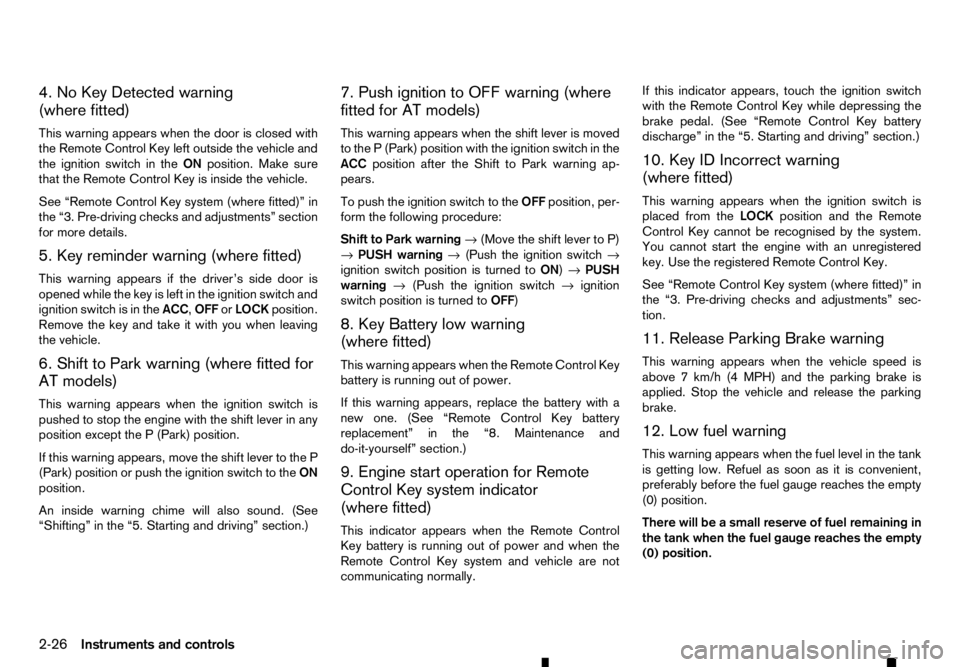
4. No Key Detected warning
(where fitted)
This warning appears when the door is closed with
the Remote Control Key left outside the vehicle and
the ignition switch in the ONposition. Make sure
that the Remote Control Key is inside the vehicle.
See “Remote Control Key system (where fitted)” in
the “3. Pre-driving checks and adjustments” section
for more details.
5. Key reminder warning (where fitted)
This warning appears if the driver’s side door is
opened while the key is left in the ignition switch and
ignition switch is in the ACC,OFForLOCK position.
Remove the key and take it with you when leaving
the vehicle.
6. Shift to Park warning (where fitted for
AT models)
This warning appears when the ignition switch is
pushed to stop the engine with the shift lever in any
position except the P(Park) position.
If this warning appears, move the shift lever to the P
(Park) position or push the ignition switch to the ON
position.
An inside warning chime will also sound. (See
“Shifting” in the “5. Starting and driving” section.) 7. Push ignition to OFF warning (where
fitted for AT models)
This warning appears when the shift lever is moved
to the
P(Park) position with the ignition switch in the
ACC position after the Shift to Park warning ap-
pears.
To push the ignition switch to the OFFposition, per-
form the following procedure:
Shift to Park warning →(Move the shift lever to P)
→ PUSH warning →(Push the ignition switch →
ignition switch position is turned to ON)→PUSH
warning →(Push the ignition switch →ignition
switch position is turned to OFF)
8. Key Battery low warning
(where fitted)
This warning appears when the Remote Control Key
battery is running out of power.
If this warning appears, replace the battery with a
new one. (See “Remote Control Key battery
replacement” in the “8. Maintenance and
do-it-yourself” section.)
9. Engine start operation for Remote
Control Key system indicator
(where fitted)
This indicator appears when the Remote Control
Key battery is running out of power and when the
Remote Control Key system and vehicle are not
communicating normally. If this indicator appears, touch the ignition switch
with the Remote Control Key while depressing the
brake pedal. (See “Remote Control Key battery
discharge” in the “5. Starting and driving” section.)
10. Key ID Incorrect warning
(where fitted)
This warning appears when the ignition switch is
placed from the LOCKposition and the Remote
Control Key cannot be recognised by the system.
You cannot start the engine with an unregistered
key. Use the registered Remote Control Key.
See “Remote Control Key system (where fitted)” in
the “3. Pre-driving checks and adjustments” sec-
tion.
11. Release Parking Brake warning
This warning appears when the vehicle speed is
above 7km/h (4 MPH) and the parking brake is
applied. Stop the vehicle and release the parking
brake.
12. Low fuel warning
This warning appears when the fuel level in the tank
is getting low. Refuel as soon as it is convenient,
preferably before the fuel gauge reaches the empty
(0) position.
There will be asmall reserve of fuel remaining in
the tank when the fuel gauge reaches the empty
(0) position.
2-26 Instruments and controls
Page 85 of 340
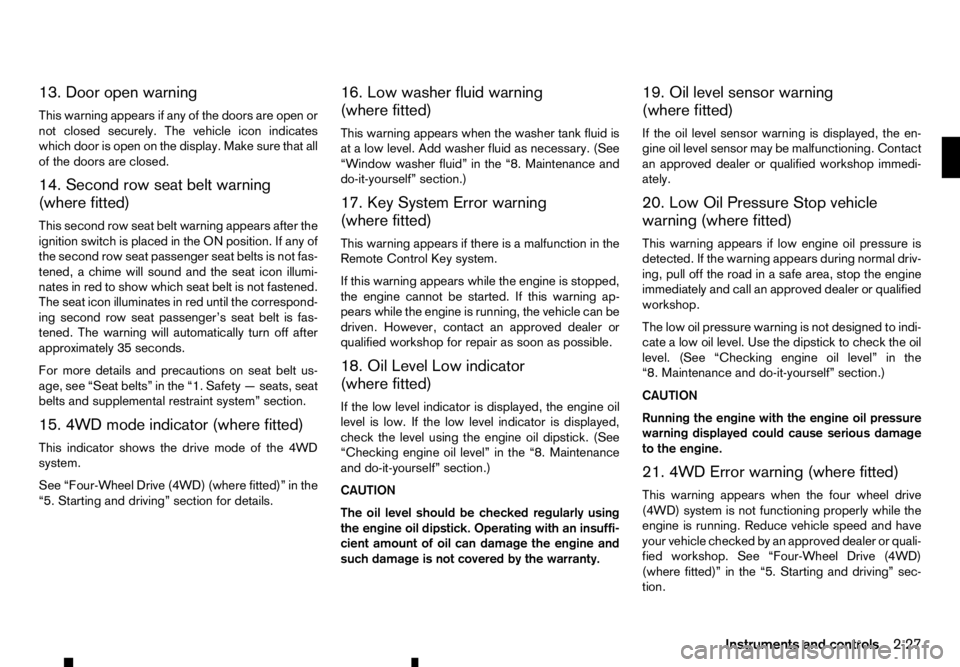
13. Door open warning
This warning appears if any of the doors are open or
not closed securely. The vehicle icon indicates
which door is open on the display. Make sure that all
of the doors are closed.
14. Second row seat belt warning
(where fitted)
This second row seat belt warning appears after the
ignition switch is placed in the ON position. If any of
the second row seat passenger seat belts is not fas-
tened, achime will sound and the seat icon illumi-
nates in red to show which seat belt is not fastened.
The seat icon illuminates in red until the correspond-
ing second row seat passenger’s seat belt is fas-
tened. The warning will automatically turn off after approximately 35 seconds.
For more details and precautions on seat belt us-
age, see “Seat belts” in the “1. Safety —seats, seat
belts and supplemental restraint system” section.
15. 4WD mode indicator (where fitted)
This indicator shows the drive mode of the 4WD
system.
See “Four-Wheel Drive (4WD) (where fitted)” in the
“5. Starting and driving” section for details. 16. Low washer fluid warning
(where fitted)
This warning appears when the washer tank fluid is
at
alow level. Add washer fluid as necessary. (See
“Window washer fluid” in the “8. Maintenance and
do-it-yourself” section.)
17. Key System Error warning
(where fitted)
This warning appears if there is amalfunction in the
Remote Control Key system.
If this warning appears while the engine is stopped,
the engine cannot be started. If this warning ap-
pears while the engine is running, the vehicle can be
driven. However, contact an approved dealer or
qualified workshop for repair as soon as possible.
18. Oil Level Low indicator
(where fitted)
If the low level indicator is displayed, the engine oil
level is low. If the low level indicator is displayed, check the level using the engine oil dipstick. (See
“Checking engine oil level” in the “8. Maintenance
and do-it-yourself” section.)
CAUTION
The oil level should be checked regularly using
the engine oil dipstick. Operating with an insuffi-
cient amount of oil can damage the engine and such damage is not covered by the warranty. 19. Oil level sensor warning
(where fitted)
If the oil level sensor warning is displayed, the en-
gine oil level sensor may be malfunctioning. Contact
an approved dealer or qualified workshop immedi-
ately.
20. Low Oil Pressure Stop vehicle
warning (where fitted)
This warning appears if low engine oil pressure is
detected. If the warning appears during normal driv-
ing, pull off the road in
asafe area, stop the engine
immediately and call an approved dealer or qualified
workshop.
The low oil pressure warning is not designed to indi-
cate alow oil level. Use the dipstick to check the oil
level. (See “Checking engine oil level” in the
“8. Maintenance and do-it-yourself” section.)
CAUTION
Running the engine with the engine oil pressure
warning displayed could cause serious damage
to the engine.
21. 4WD Error warning (where fitted)
This warning appears when the four wheel drive
(4WD) system is not functioning properly while the
engine is running. Reduce vehicle speed and have
your vehicle checked by an approved dealer or quali-
fied workshop. See “Four-Wheel Drive (4WD)
(where fitted)” in the “5. Starting and driving” sec-
tion.
Instruments and controls 2-27
Page 88 of 340
–T
he oil replacement indicator is displayed
in the vehicle information display.
• The engine oil should be changed before the
distance to oil change reaches
0km(0miles).
Continued driving after the distance to oil
change reaches 0km(0miles) may result in
reduced engine performance.
• The Diesel Particulate Filter (DPF) may also
become saturated because regeneration is
restricted once the distance to oil change
reaches 0km(0m iles).
Have the vehicle inspected by an approved
dealer or qualified workshop if the above con-
dition occurs.
• The oil change interval will reduce faster with
certain types of driving, especially at low
speeds in urban conditions.
3. Low level reminder
If the low level indicator is displayed, the engine oil level is low. If the low level reminder is displayed,
check the level using the engine oil dipstick. (See
“Checking engine oil level” in the “8. Maintenance
and do-it-yourself” section.)
CAUTION
The oil level should be checked regularly using
the engine oil dipstick. Operating with an insuffi-
cient amount of oil can damage the engine and
such damage is not covered by the warranty. 4. Oil level sensor warning
If the oil sensor warning is displayed, the engine oil
level sensor may be malfunctioning. Contact an ap-
proved dealer or qualified workshop immediately.
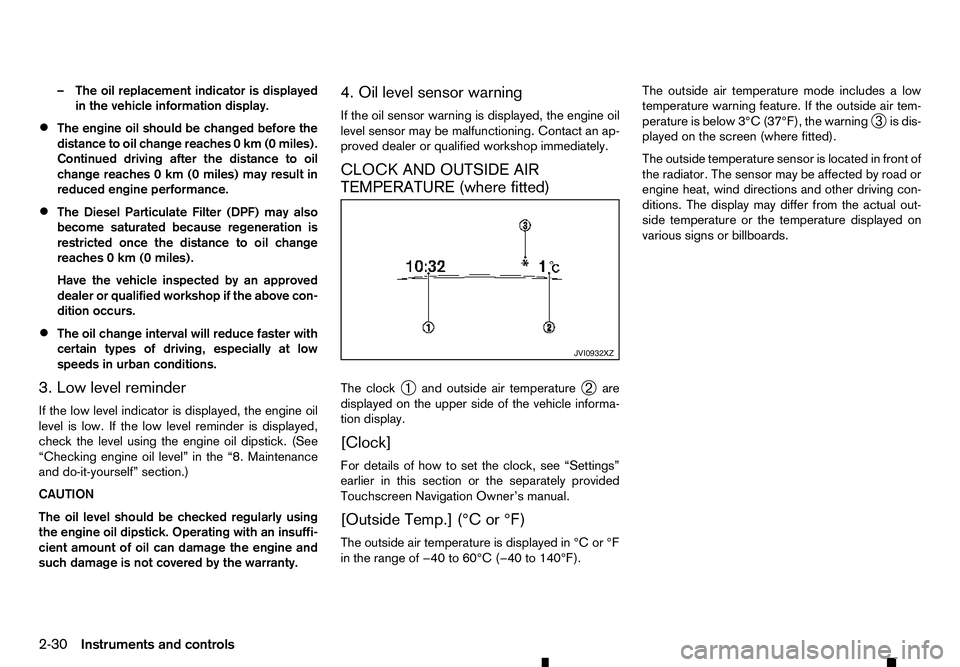
CLOCK AND OUTSIDE AIR
TEMPERATURE (where fitted)
The clock
➀and outside air temperature
➁are
displayed on the upper side of the vehicle informa-
tion display.
[Clock]
For details of how to set the clock, see “Settings”
earlier in this section or the separately provided
Touchscreen Navigation Owner’s manual.
[Outside Temp.] (°C or °F)
The outside air temperature is displayed in °C or °F
in the range of −40 to 60°C (−40 to 140°F). The outside air temperature mode includes
alow
temperature warning feature. If the outside air tem-
perature is below 3°C (37°F), the warning ➂is dis-
played on the screen (where fitted).
The outside temperature sensor is located in front of
the radiator. The sensor may be affected by road or
engine heat, wind directions and other driving con-
ditions. The display may differ from the actual out-
side temperature or the temperature displayed on
various signs or billboards. JVI0932XZ
2-30 Instruments and controls
Page 108 of 340
WARNING
• Always look before opening any doors, to
avoid an accident with oncoming traffic.
• To help avoid risk of injury or death through
unintended operation of the vehicle and/or its
systems, do not leave children, people who
require the assistance of others, or pets unat-
tended in your vehicle. Additionally, the tem-
perature inside
aclosed vehicle on awarm
day can quickly become high enough to cause
as ignificant risk of injury or death to people
and pets.
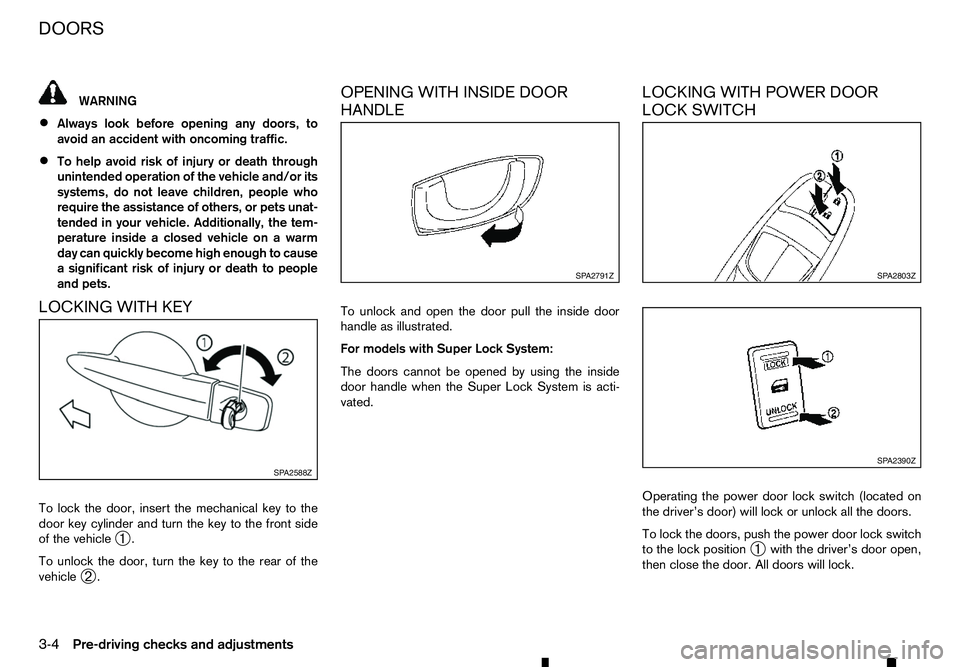
LOCKING WITH KEY
To lock the door, insert the mechanical key to the door key cylinder and turn the key to the front side
of the vehicle ➀.
To unlock the door, turn the key to the rear of the
vehicle ➁. OPENING WITH INSIDE DOOR
HANDLE
To unlock and open the door pull the inside door
handle as illustrated.
For models with Super Lock System:
The doors cannot be opened by using the inside
door handle when the Super Lock System is acti-
vated.
LOCKING WITH POWER DOOR
LOCK SWITCH
Operating the power door lock switch (located on
the driver’s door) will lock or unlock all the doors.
To lock the doors, push the power door lock switch
to the lock position
➀with the driver’s door open,
then close the door. All doors will lock. SP A2588Z SP A2791Z
SP A2803Z
SP A2390Z
DOORS
3-4
Pre-driving checks and adjustments
Page 110 of 340
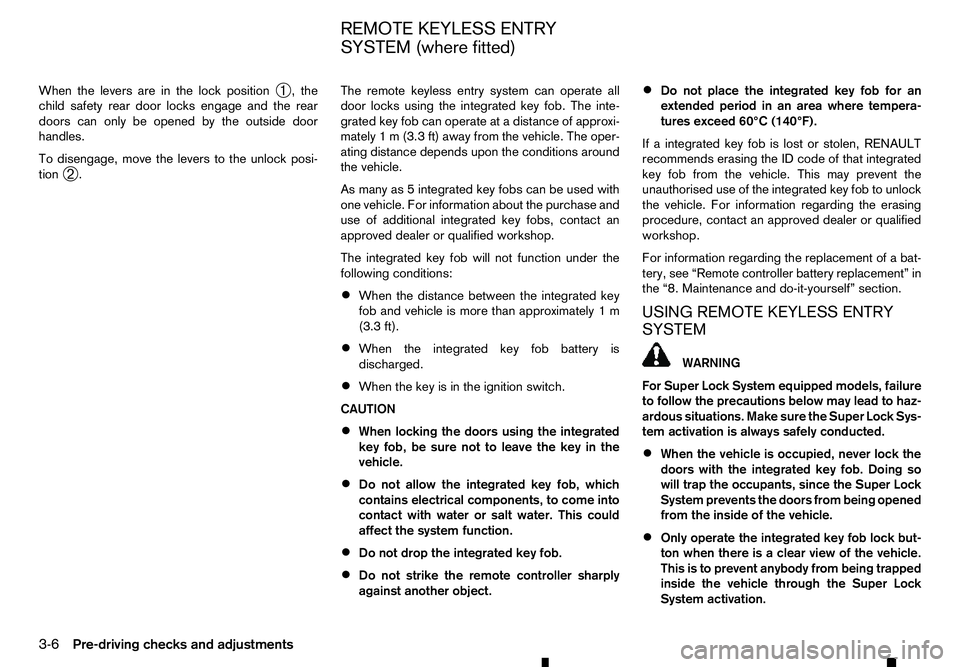
When the levers are in the lock position
➀,t
he
child safety rear door locks engage and the rear
doors can only be opened by the outside door
handles.
To disengage, move the levers to the unlock posi-
tion ➁. The remote keyless entry system can operate all
door locks using the integrated key fob. The inte-
grated key fob can operate at
adistance of approxi-
mately 1m(3.3 ft) away from the vehicle. The oper-
ating distance depends upon the conditions around
the vehicle.
As many as 5integrated key fobs can be used with
one vehicle. For information about the purchase and
use of additional integrated key fobs, contact an
approved dealer or qualified workshop.
The integrated key fob will not function under the
following conditions:
• When the distance between the integrated key
fob and vehicle is more than approximately 1m
(3.3 ft).
• When the integrated key fob battery is
discharged.
• When the key is in the ignition switch.
CAUTION
• When locking the doors using the integrated
key fob, be sure not to leave the key in the
vehicle.
• Do not allow the integrated key fob, which
contains electrical components, to come into
contact with water or salt water. This could
affect the system function.
• Do not drop the integrated key fob.
• Do not strike the remote controller sharply
against another object. •
Do not place the integrated key fob for an
extended period in an area where tempera-
tures exceed 60°C (140°F).
If ai ntegrated key fob is lost or stolen, RENAULT
recommends erasing the ID code of that integrated
key fob from the vehicle. This may prevent the
unauthorised use of the integrated key fob to unlock
the vehicle. For information regarding the erasing
procedure, contact an approved dealer or qualified
workshop.
For information regarding the replacement of abat-
tery, see “Remote controller battery replacement” in
the “8. Maintenance and do-it-yourself” section.
USING REMOTE KEYLESS ENTRY
SYSTEM WARNING
For Super Lock System equipped models, failure
to follow the precautions below may lead to haz-
ardous situations. Make sure the Super Lock Sys-
tem activation is always safely conducted.
• When the vehicle is occupied, never lock the
doors with the integrated key fob. Doing so
will trap the occupants, since the Super Lock
System prevents the doors from being opened
from the inside of the vehicle.
• Only operate the integrated key fob lock but-
ton when there is
aclear view of the vehicle.
This is to prevent anybody from being trapped
inside the vehicle through the Super Lock
System activation.
REMOTE KEYLESS ENTRY
SYSTEM (where fitted)
3-6 Pre-driving checks and adjustments
Page 116 of 340
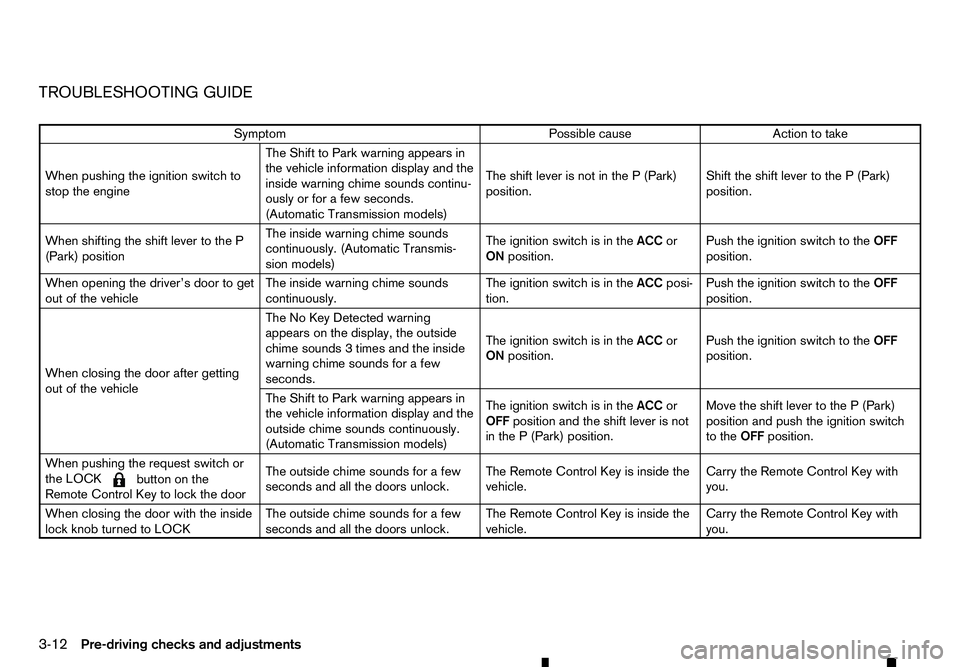
TROUBLESHOOTING GUIDE
Symptom
Possible cause
Action to take
When pushing the ignition switch to
stop the engine The Shift to Park warning appears in
the vehicle information display and the
inside warning chime sounds continu-
ously or for
afew seconds.
(Automatic Transmission models) The shift lever is not in the
P(Park)
position. Shift the shift lever to the
P(Park)
position.
When shifting the shift lever to the P
(Park) position The inside warning chime sounds
continuously. (Automatic Transmis-
sion models)
The ignition switch is in the
ACCor
ON position. Push the ignition switch to the
OFF
position.
When opening the driver’s door to get
out of the vehicle The inside warning chime sounds
continuously.The ignition switch is in the
ACCposi-
tion. Push the ignition switch to the
OFF
position.
When closing the door after getting
out of the vehicle The No Key Detected warning
appears on the display, the outside
chime sounds
3times and the inside
warning chime sounds for afew
seconds. The ignition switch is in the
ACCor
ON position. Push the ignition switch to the
OFF
position.
The Shift to Park warning appears in
the vehicle information display and the
outside chime sounds continuously.
(Automatic Transmission models) The ignition switch is in the
ACCor
OFF position and the shift lever is not
in the P(Park) position. Move the shift lever to the
P(Park)
position and push the ignition switch
to the OFFposition.
When pushing the request switch or
the LOCK
m button
on the
Remote Control Key to lock the door The outside chime sounds for
afew
seconds and all the doors unlock. The Remote Control Key is inside the
vehicle. Carry the Remote Control Key with
you.
When closing the door with the inside
lock knob turned to LOCK The outside chime sounds for
afew
seconds and all the doors unlock. The Remote Control Key is inside the
vehicle. Carry the Remote Control Key with
you.
3-12 Pre-driving checks and adjustments