torque SUBARU FORESTER 2004 Service Repair Manual
[x] Cancel search | Manufacturer: SUBARU, Model Year: 2004, Model line: FORESTER, Model: SUBARU FORESTER 2004Pages: 2870, PDF Size: 38.67 MB
Page 1622 of 2870
IG(H4DOTC)-6
IGNITION
Spark Plug
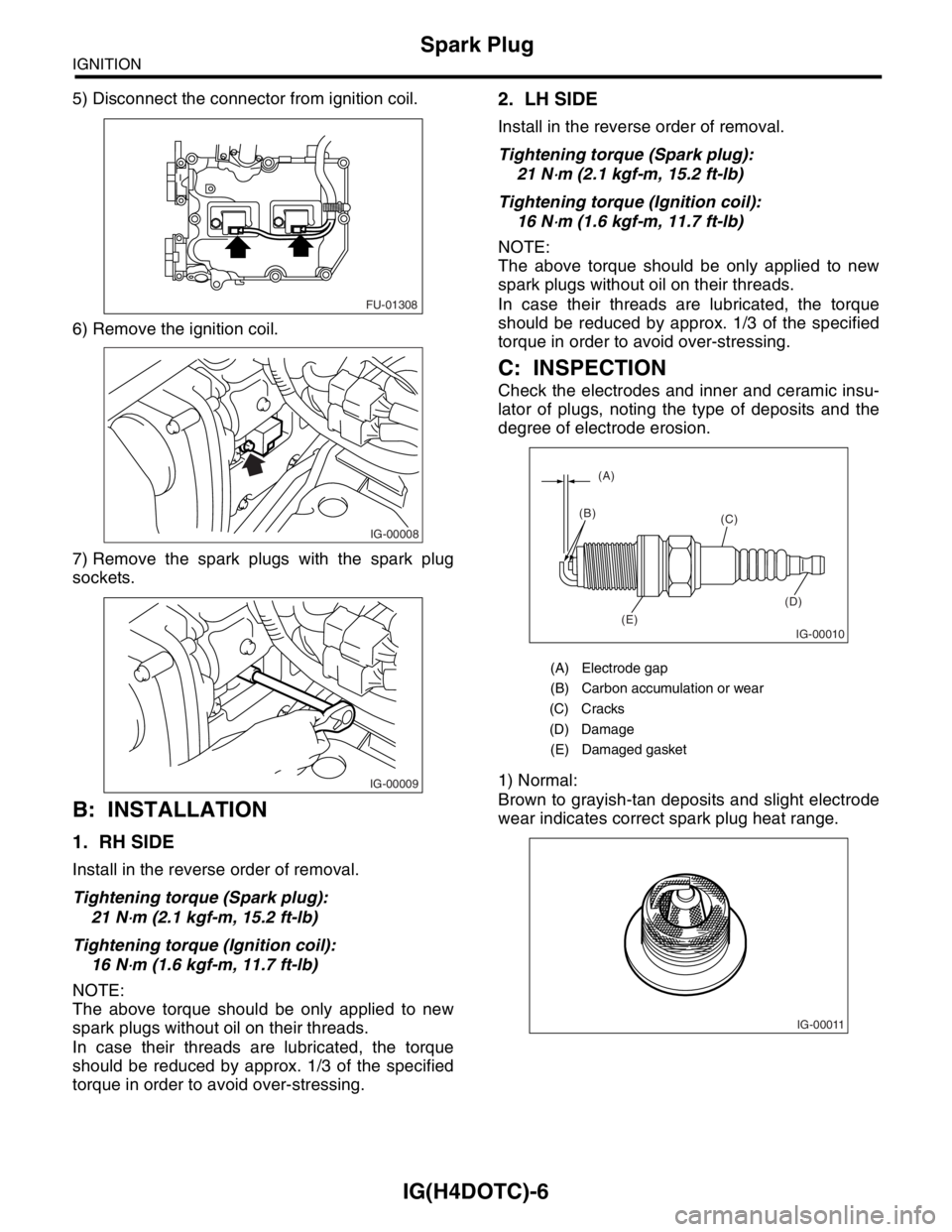
5) Disconnect the connector from ignition coil.
6) Remove the ignition coil.
7) Remove the spark plugs with the spark plug
sockets.
B: INSTALLATION
1. RH SIDE
Install in the reverse order of removal.
Tightening torque (Spark plug):
21 N
⋅m (2.1 kgf-m, 15.2 ft-lb)
Tightening torque (Ignition coil):
16 N
⋅m (1.6 kgf-m, 11.7 ft-lb)
NOTE:
The above torque should be only applied to new
spark plugs without oil on their threads.
In case their threads are lubricated, the torque
should be reduced by approx. 1/3 of the specified
torque in order to avoid over-stressing.
2. LH SIDE
Install in the reverse order of removal.
Tightening torque (Spark plug):
21 N
⋅m (2.1 kgf-m, 15.2 ft-lb)
Tightening torque (Ignition coil):
16 N
⋅m (1.6 kgf-m, 11.7 ft-lb)
NOTE:
The above torque should be only applied to new
spark plugs without oil on their threads.
In case their threads are lubricated, the torque
should be reduced by approx. 1/3 of the specified
torque in order to avoid over-stressing.
C: INSPECTION
Check the electrodes and inner and ceramic insu-
lator of plugs, noting the type of deposits and the
degree of electrode erosion.
1) Normal:
Brown to grayish-tan deposits and slight electrode
wear indicates correct spark plug heat range.
FU-01308
IG-00008
IG-00009
(A) Electrode gap
(B) Carbon accumulation or wear
(C) Cracks
(D) Damage
(E) Damaged gasket
IG-00010
(A)
(B)
(C)
(D)
(E)
IG-00011
Page 1624 of 2870

IG(H4DOTC)-8
IGNITION
Ignition Coil & Ignitor ASSY
3. Ignition Coil & Ignitor ASSY
A: REMOVAL
Direct ignition type has been adopted. Refer to the
“SparkPlug Removal” for removal procedure.
B: INSTALLATION
Install in the reverse order of removal.
Tightening torque:
16 N
⋅m (1.6 kgf-m, 11.7 ft-lb)
C: INSPECTION
Ignitor is integrated with the coil. Therefore resis-
tance cannot be measured.
Page 1651 of 2870
EN(H4DOTC)-21
ENGINE (DIAGNOSTIC)
Electrical Component Location
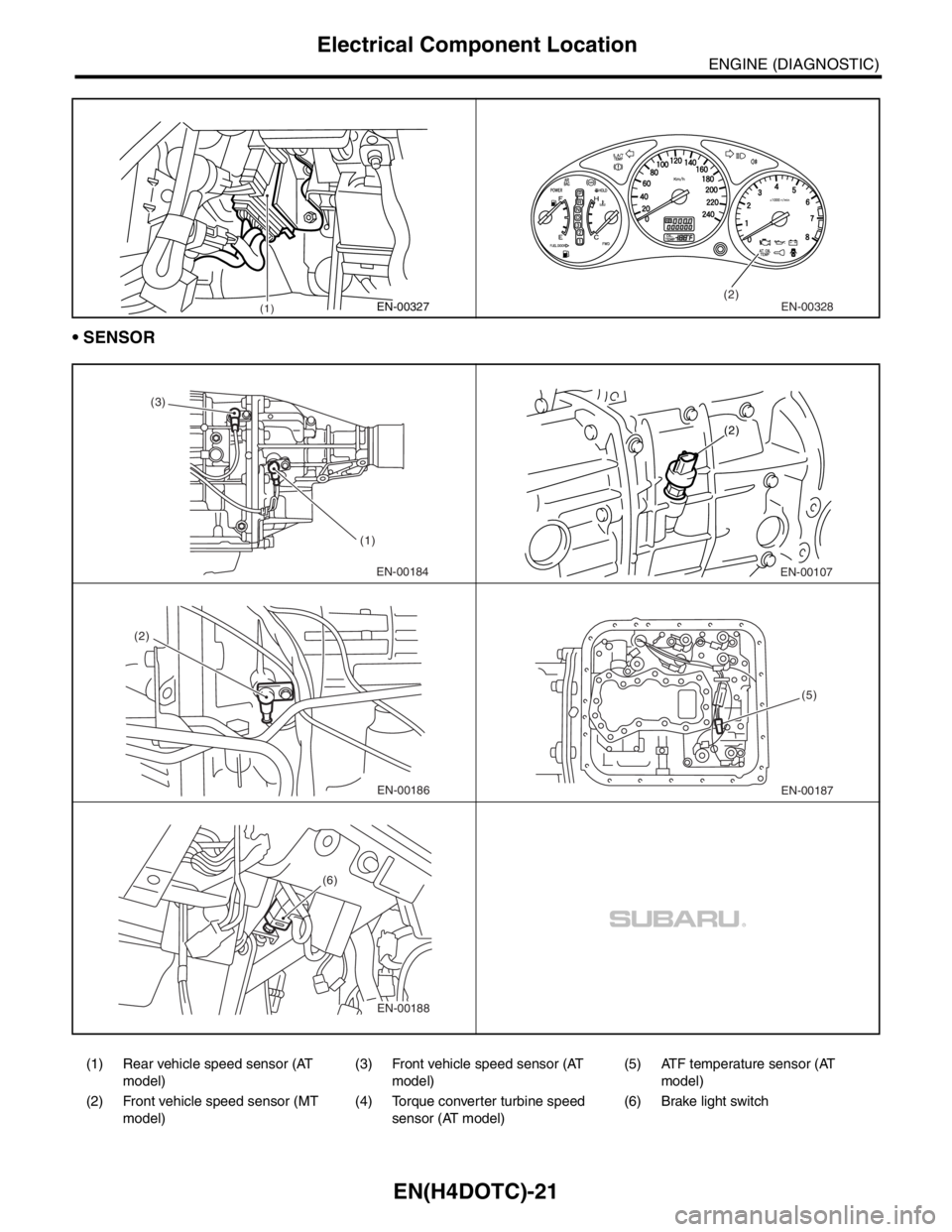
SENSOR
(1) Rear vehicle speed sensor (AT
model)(3) Front vehicle speed sensor (AT
model)(5) ATF temperature sensor (AT
model)
(2) Front vehicle speed sensor (MT
model)(4) Torque converter turbine speed
sensor (AT model)(6) Brake light switch
(1)EN-00327(2)EN-00328
EN-00184 (3)
(1)EN-00107 (2)
EN-00186 (2)EN-00187(5)
EN-00188 (6)
Page 1665 of 2870

EN(H4DOTC)-35
ENGINE (DIAGNOSTIC)
Subaru Select Monitor
NOTE:
For detailed operation procedure, refer to the “SUBARU SELECT MONITOR OPERATION MANUAL”.
5. READ CURRENT DATA FOR ENGINE (OBD MODE)
1) On the «Main Menu» display screen, select the {Each System Check} and press the [YES] key.
2) On the «System Selection Menu» display screen, select the {Engine} and press the [YES] key.
3) Press the [YES] key after the information of engine type was displayed.
4) On the «Engine Diagnosis» display screen, select the {OBD System} and press the [YES] key.
5) On the «OBD Menu» screen, select the {Current Data Display/Save}, and then press the [YES] key.
6) On the «Data Display Menu» screen, select the {Data Display} and press the [YES] key.
7) Using the scroll key, move the display screen up or down until the desired data is shown.
A list of the support data is shown in the following table.
Air conditioning signal A/C Compressor Signal ON or OFF
Radiator main fan relay signal Radiator Fan Relay #1 ON or OFF
Knocking signal Knocking Signal ON or OFF
Radiator sub fan relay signal Radiator Fan Relay #2 ON or OFF
Power steering switch signal P/S Switch ON or OFF
Engine torque control permission signal Torque Permission Signal ON or OFF
Rear oxygen sensor rich signal Rear Oxygen Rich Signal ON or OFF
Starter switch signal Starter Switch ON or OFF
Idle switch signal Idle Switch ON or OFF
Crankshaft position sensor signal Crankshaft Position Sig. ON or OFF
Camshaft position sensor signal Camshaft Position Sig. ON or OFF
Rear defogger switch signal Rear Defogger SW ON or OFF
Blower fan switch signal Blower Fan SW ON or OFF
Small light switch signal Light Switch ON or OFF
Tumble generated valve output signal TGV Output ON or OFF
Exhaust temperature signal Exhaust Gas Temperature°C
Estimated cumulative driving distance Odd Meter km
Roughness Monitor for #1 cylinder Roughness Monitor #1 —
Roughness Monitor for #2 cylinder Roughness Monitor #2 —
Roughness Monitor for #3 cylinder Roughness Monitor #3 —
Roughness Monitor for #4 cylinder Roughness Monitor #4 —
Wiper switch signal Wiper Switch ON or OFF
A/C middle pressure switch signal A/C Mid pressure switch ON or OFF
AT retard angle demand signal Retard Signal from AT ON or OFF
AT fuel cut demand signal Fuel Cut Signal from AT ON or OFF
Description Display Unit of measure
Number of diagnosis code Number of Diag. Code —
Condition of malfunction indicator light MI (MIL) ON or OFF
Monitoring test of misfire Misfire monitoring Complete or incomplete
Monitoring test of fuel system Fuel system monitoring Complete or incomplete
Monitoring test of comprehensive component Component monitoring Complete or incomplete
Test of catalyst Catalyst Diagnosis Complete or incomplete
Test of heating-type catalyst Heated catalyst No support
Test of evaporative emission purge control system Evaporative purge system No support
Test of secondary air system Secondary air system No support
Test of air conditioning system refrigerant A/C system refrigerant No support
Test of oxygen sensor Oxygen sensor Complete or incomplete
Test of oxygen sensor heater Oxygen Heater Diagnosis Complete or incomplete
Test of EGR system EGR system No supportRemarks Display Unit of measure
Page 1667 of 2870
![SUBARU FORESTER 2004 Service Repair Manual EN(H4DOTC)-37
ENGINE (DIAGNOSTIC)
Subaru Select Monitor
7. LED OPERATION MODE FOR ENGINE
1) On the «Main Menu» display screen, select the {Each System Check} and press the [YES] key.
2) On the «Sys](/img/17/57426/w960_57426-1666.png "SUBARU FORESTER 2004 Service Repair Manual EN(H4DOTC)-37
ENGINE (DIAGNOSTIC)
Subaru Select Monitor
7. LED OPERATION MODE FOR ENGINE
1) On the «Main Menu» display screen, select the {Each System Check} and press the [YES] key.
2) On the «Sys")
EN(H4DOTC)-37
ENGINE (DIAGNOSTIC)
Subaru Select Monitor
7. LED OPERATION MODE FOR ENGINE
1) On the «Main Menu» display screen, select the {Each System Check} and press the [YES] key.
2) On the «System Selection Menu» display screen, select the {Engine} and press the [YES] key.
3) Press the [YES] key after the information of engine type was displayed.
4) On the «Engine Diagnosis» screen, select the {Current Data Display/Save}, and then press the [YES] key.
5) On the «Data Display» screen, select the {Data & LED Display} and press the [YES] key.
6) Using the scroll key, move the display screen up or down until the desired data is shown.
A list of the support data is shown in the following table.
NOTE:
For detailed operation procedure, refer to the “SUBARU SELECT MONITOR OPERATION MANUAL”.
Description Display Message LED “ON” requirements
Ignition switch signal Ignition Switch ON or OFF When ignition switch is ON.
Test mode connector signal Test Mode Signal ON or OFF When test mode connector is connected.
Neutral position switch signal Neutral Position Switch ON or OFF When neutral position signal is entered.
Air conditioning switch signal A/C Switch ON or OFF When air conditioning switch is ON.
Air conditioning relay signal A/C Compressor Signal ON or OFF When air conditioning relay is in function.
Radiator main fan relay signal Radiator Fan Relay #1 ON or OFF When radiator main fan relay is in function.
Knocking signal Knocking Signal ON or OFF When knocking signal is input.
Radiator sub fan relay signal Radiator Fan Relay #2 ON or OFF When radiator sub fan relay is in function.
Engine torque control permission
signalTorque Control Permission ON or OFFWhen engine torque control permission sig-
nal is entered.
Rear oxygen sensor rich signalRear O
2 Rich Signal
ON or OFFWhen rear oxygen sensor mixture ratio is
rich.
Starter switch signal Starter Switch ON or OFF When starter switch signal is entered.
Idle switch signal Idle Switch ON or OFF When idle switch signal is entered.
Crankshaft position sensor signal Crankshaft Position Signal ON or OFFWhen crankshaft position sensor signal is
input.
Camshaft position sensor signal Camshaft Position Signal ON or OFFWhen camshaft position sensor signal is
entered.
Power steering switch signal P/S Switch ON or OFF When power steering switch is entered.
Rear defogger switch signal Rear Defogger Switch ON or OFF When rear defogger switch is ON.
Blower fan switch signal Blower Fan Switch ON or OFF When blower fan switch is ON.
Light switch signal Light Switch ON or OFF When small light switch is ON.
Wiper switch signal Wiper Switch ON or OFF When wiper switch is ON.
A/C middle pressure switch signal A/C Mid Pressure Switch ON or OFF When A/C switch is ON.
AT retard angle demand signal Retard Signal from AT ON or OFF When AT retard angle demand signal exists.
AT fuel cut demand signal Fuel Cut Signal from AT ON or OFF When AT fuel cut demand signal exists.
AT/MT identification signal AT Vehicle ID Signal ON or OFF For AT model
Tumble generated valve actuator
signalTGV Output ON or OFF When TGV actuator signal is output.
Tumble generated valve drive sig-
nalTGV DriveOPEN or
CLOSEWhen TGV moves and valve opens.
Page 1668 of 2870
![SUBARU FORESTER 2004 Service Repair Manual EN(H4DOTC)-38
ENGINE (DIAGNOSTIC)
Subaru Select Monitor
8. READ CURRENT DATA FOR AT
1) On the «Main Menu» display screen, select the {Each System Check} and press the [YES] key.
2) On the «System S](/img/17/57426/w960_57426-1667.png "SUBARU FORESTER 2004 Service Repair Manual EN(H4DOTC)-38
ENGINE (DIAGNOSTIC)
Subaru Select Monitor
8. READ CURRENT DATA FOR AT
1) On the «Main Menu» display screen, select the {Each System Check} and press the [YES] key.
2) On the «System S")
EN(H4DOTC)-38
ENGINE (DIAGNOSTIC)
Subaru Select Monitor
8. READ CURRENT DATA FOR AT
1) On the «Main Menu» display screen, select the {Each System Check} and press the [YES] key.
2) On the «System Selection Menu» display screen, select the {Transmission} and press the [YES] key.
3) Press the [YES] key after displayed the information of transmission type.
4) On the «Transmission Diagnosis» screen, select the {Current Data Display/Save}, and then press the
[YES] key.
5) On the «Data Display Menu» screen, select the {Data Display} and press the [YES] key.
6) Using the scroll key, move the display screen up or down until the desired data is shown.
A list of the support data is shown in the following table.
NOTE:
For detailed operation procedure, refer to the “SUBARU SELECT MONITOR OPERATION MANUAL”.
Description Display Unit of measure
Battery voltage Battery Voltage V
Rear vehicle speed sensor signal Rear Wheel Speed km/h or MPH
Front vehicle speed sensor signal Front Wheel Speed km/h or MPH
Engine speed signal Engine Speed rpm
ATF temperature signal ATF Temp.°C or °F
Mass air flow sensor signal Air Flow Sensor Voltage V
Throttle position signal Throttle Sensor Voltage V
Gear Position Gear position —
Line pressure control duty ratio Line Pressure Duty Ratio %
Lock up clutch control duty ratio Lock Up Duty Ratio %
Transfer clutch control duty ratio Transfer Duty Ratio %
Throttle position sensor power supply Throttle Sensor Power V
Turbine revolution signal Turbine Revolution Speed rpm
2-4 Brake timing pressure control duty ratio Brake Clutch Duty Ratio %
Stop light switch signal Stop Light Switch ON or OFF
Anti lock brake system signal ABS Signal ON or OFF
Cruise control system signal Cruise Control Signal ON or OFF
Neutral/Parking range signal N/P Range Signal ON or OFF
Reverse range signal R Range Signal ON or OFF
Drive range signal D Range Signal ON or OFF
3rd range signal 3rd Range Signal ON or OFF
2nd range signal 2nd Range Signal ON or OFF
1st range signal 1st Range Signal ON or OFF
Shift control solenoid A Shift Solenoid #1 ON or OFF
Shift control solenoid B Shift Solenoid #2 ON or OFF
Torque control output signal #1 Torque Control Signal #1 ON or OFF
Torque control output signal #2 Torque Control Signal #2 ON or OFF
Torque control cut signal Torque Control Cut Sig. ON or OFF
2-4 brake timing control solenoid valve 2-4 Brake Timing Sol. ON or OFF
Low clutch timing control solenoid valve Low Clutch Timing Sol. ON or OFF
Automatic transmission diagnosis indicator lamp Diagnosis Lamp ON or OFF
Page 1928 of 2870

EN(H4DOTC)-295
ENGINE (DIAGNOSTIC)
General Diagnostic Table
20.General Diagnostic Table
A: INSPECTION
1. ENGINE
NOTE:
Malfunction of parts other than those listed is also possible.
Symptom Problem parts
1. Engine stalls during idling.1) Idle air control solenoid valve
2) Manifold absolute pressure sensor
3) Mass air flow and intake air temperature sensor
4) Ignition parts (*1)
5) Engine coolant temperature sensor (*2)
6) Crankshaft position sensor (*3)
7) Camshaft position sensor (*3)
8) Fuel injection parts (*4)
2. Rough idling1) Idle air control solenoid valve
2) Manifold absolute pressure sensor
3) Mass air flow and intake air temperature sensor
4) Engine coolant temperature sensor (*2)
5) Ignition parts (*1)
6) Air intake system (*5)
7) Fuel injection parts (*4)
8) Throttle position sensor
9) Crankshaft position sensor (*3)
10) Camshaft position sensor (*3)
11) Oxygen sensor
12) Fuel pump and fuel pump relay
3. Engine does not return to idle.1) Idle air control solenoid valve
2) Engine coolant temperature sensor
3) Accelerator cable (*6)
4) Throttle position sensor
5) Manifold absolute pressure sensor
6) Mass air flow sensor
4. Poor acceleration1) Manifold absolute pressure sensor
2) Mass air flow and intake air temperature sensor
3) Throttle position sensor
4) Fuel injection parts (*4)
5) Fuel pump and fuel pump relay
6) Engine coolant temperature sensor (*2)
7) Crankshaft position sensor (*3)
8) Camshaft position sensor (*3)
9) A/C switch and A/C cut relay
10) Engine torque control signal circuit
11) Ignition parts (*1)
5. Engine stalls or engine sags or hesitates at
acceleration.1) Manifold absolute pressure sensor
2) Mass air flow and intake air temperature sensor
3) Engine coolant temperature sensor (*2)
4) Crankshaft position sensor (*3)
5) Camshaft position sensor (*3)
6) Purge control solenoid valve
7) Fuel injection parts (*4)
8) Throttle position sensor
9) Fuel pump and fuel pump relay
Page 1934 of 2870

FU(H4DOTC 2.5)-4
FUEL INJECTION (FUEL SYSTEM)
General Description
(1) Fuel pipe ASSY (12) O-ring (22) Purge hose
(2) Fuel hose (13) Fuel injector pipe (23) Tumble generator valve actuator
(3) Clamp (14) Pressure regulator
(4) Purge control solenoid valve (15) Pressure regulator hoseTightening torque: N·m (kgf-m, ft-lb)
(5) Vacuum hose (16) Fuel pipe protector RHT1: 5 (0.5, 3.7)
(6) Vacuum control hose (17) Blow-by hose stayT2: 8.25 (0.84, 6.1)
(7) Intake manifold gasket (18) Intake manifoldT3: 17 (1.73, 12.5)
(8) Guide pin (19) Wastegate control solenoid valve
ASSYT4: 19 (1.94, 13.7)
(9) Tumble generator valve ASSYT5: 25 (2.5, 18.1)
(10) Tumble generator valve gasket (20) Nipple
(11) Fuel injector (21) Purge valve
Page 1935 of 2870
FU(H4DOTC 2.5)-5
FUEL INJECTION (FUEL SYSTEM)
General Description
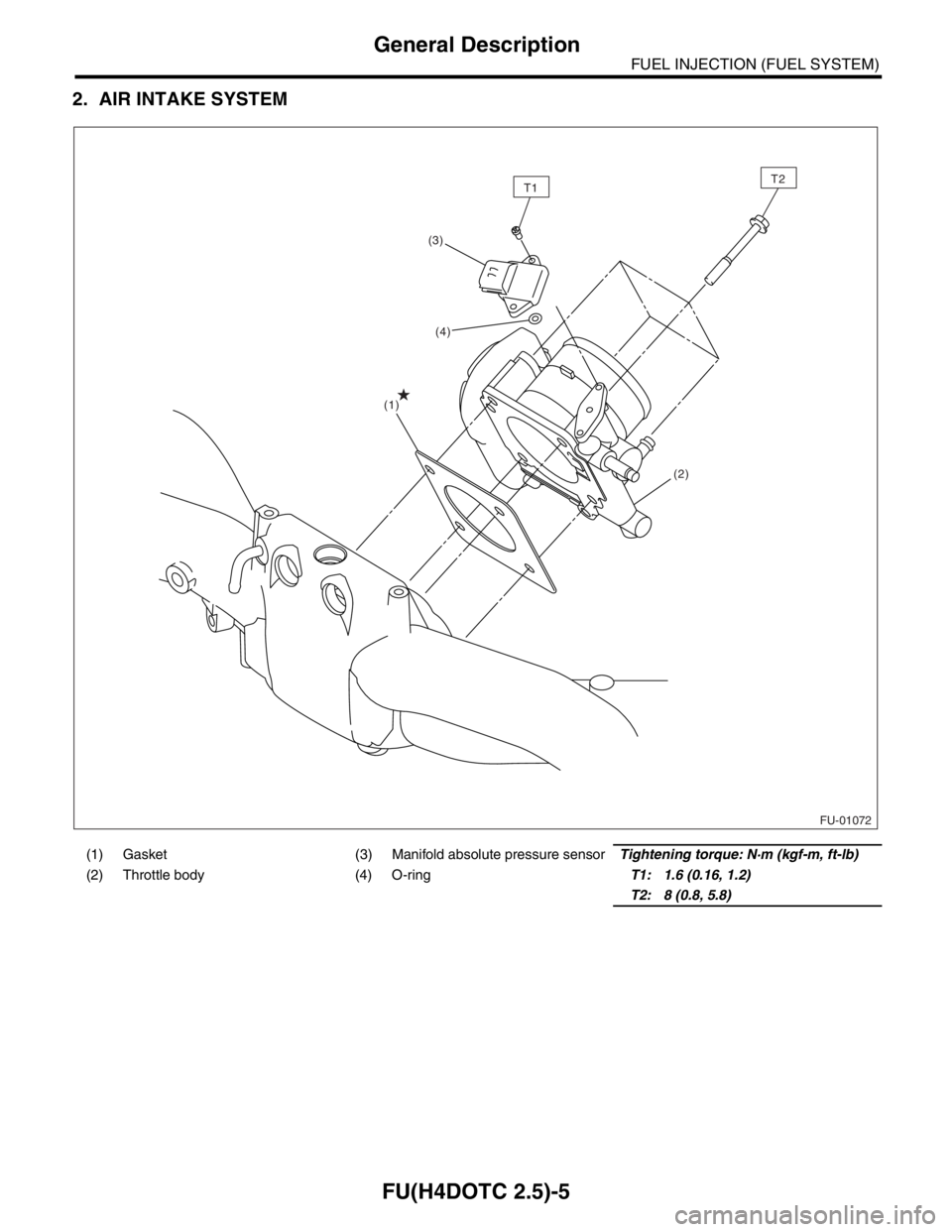
2. AIR INTAKE SYSTEM
(1) Gasket (3) Manifold absolute pressure sensorTightening torque: N·m (kgf-m, ft-lb)
(2) Throttle body (4) O-ringT1: 1.6 (0.16, 1.2)
T2: 8 (0.8, 5.8)
FU-01072
T1T2
(1)(3)
(2)
(4)
Page 1936 of 2870
FU(H4DOTC 2.5)-6
FUEL INJECTION (FUEL SYSTEM)
General Description
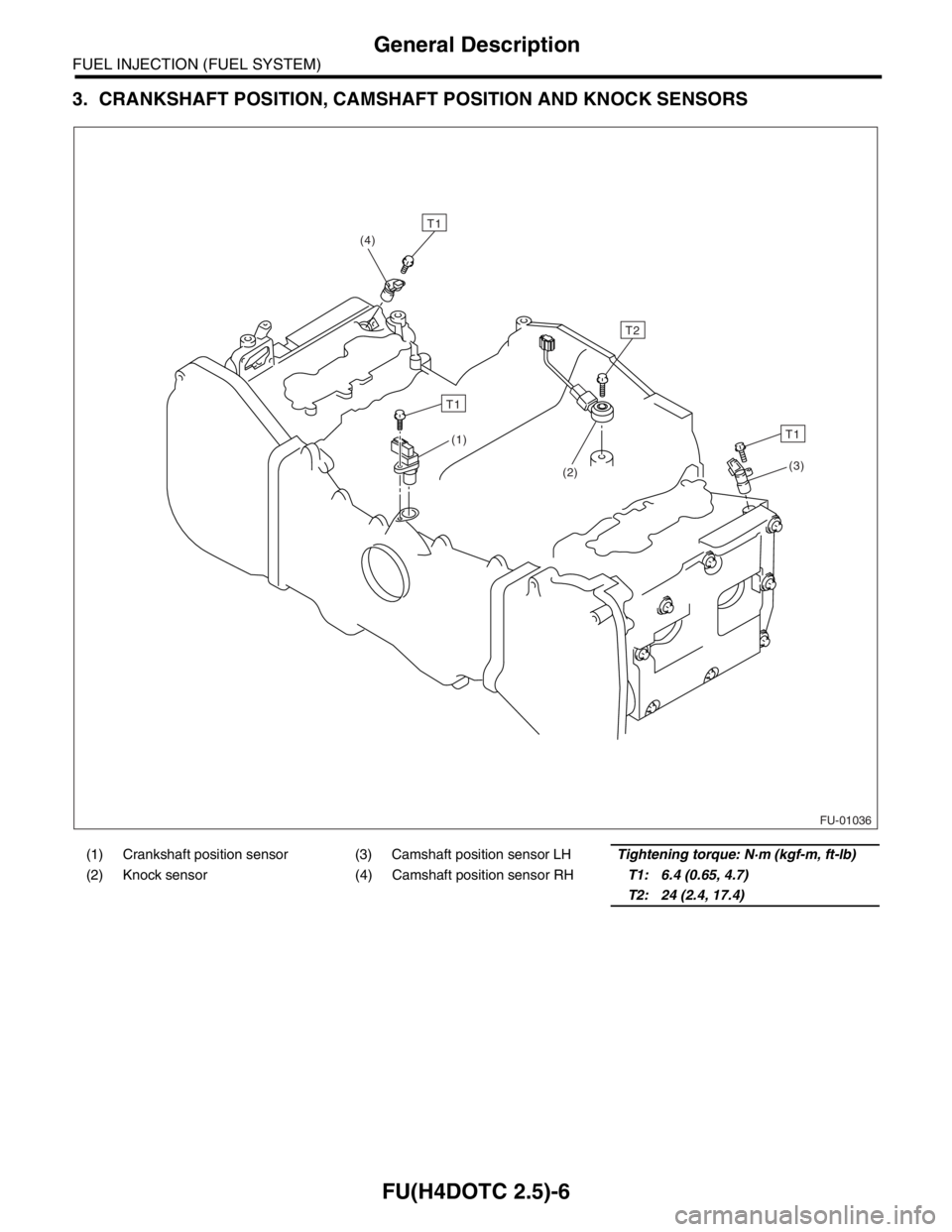
3. CRANKSHAFT POSITION, CAMSHAFT POSITION AND KNOCK SENSORS
(1) Crankshaft position sensor (3) Camshaft position sensor LHTightening torque: N·m (kgf-m, ft-lb)
(2) Knock sensor (4) Camshaft position sensor RHT1: 6.4 (0.65, 4.7)
T2: 24 (2.4, 17.4)
FU-01036
T1
(4)
T1
T2
T1
(3)
(2) (1)