front SUBARU OUTBACK 2016 6.G Manual PDF
[x] Cancel search | Manufacturer: SUBARU, Model Year: 2016, Model line: OUTBACK, Model: SUBARU OUTBACK 2016 6.GPages: 572, PDF Size: 21.79 MB
Page 166 of 572
Instruments and controls/Warning and indicator lights
&SRS airbag system
warning light
WARNING
If the warning light exhibits any of
the following conditions, there may
be a malfunction in the seatbelt
pretensioners and/or SRS airbag
system.
.Flashing or flickering of the warn-
ing light
.No illumination of the warning
light when the ignition switch is
first turned to the“ON”position
.Continuous illumination of the
warning light
.Illumination of the warning light
while driving
Immediately take your vehicle to
your nearest SUBARU dealer to
have the system checked. Unless
checked and properly repaired, the
seatbelt pretensioners and/or SRS
airbags will operate improperly (e.g.
SRS airbags may inflate in a very
minor collision or not inflate in a
severe collision), which may in-
crease the risk of injury.
For details about the components mon-itored by the warning light, refer to“SRS
airbag system monitors”F1-68.
&Front passenger’s frontal
airbag ON and OFF indica-
tors
NOTE
For details about the operating condi-
tions of SRS seat cushion airbag, refer
to“SRS seat cushion airbag operation”
F1-61.
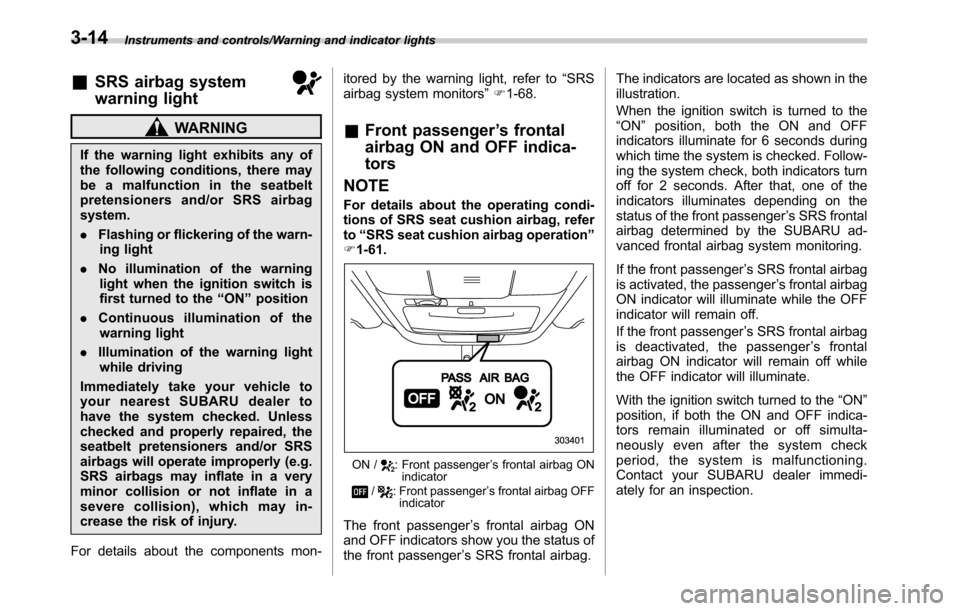
ON /: Front passenger’s frontal airbag ON
indicator
/: Front passenger’s frontal airbag OFF
indicator
The front passenger’s frontal airbag ON
and OFF indicators show you the status of
the front passenger’s SRS frontal airbag.The indicators are located as shown in the
illustration.
When the ignition switch is turned to the
“ON”position, both the ON and OFF
indicators illuminate for 6 seconds during
which time the system is checked. Follow-
ing the system check, both indicators turn
off for 2 seconds. After that, one of the
indicators illuminates depending on the
status of the front passenger’s SRS frontal
airbag determined by the SUBARU ad-
vanced frontal airbag system monitoring.
If the front passenger’s SRS frontal airbag
is activated, the passenger’s frontal airbag
ON indicator will illuminate while the OFF
indicator will remain off.
If the front passenger’s SRS frontal airbag
is deactivated, the passenger’s frontal
airbag ON indicator will remain off while
the OFF indicator will illuminate.
With the ignition switch turned to the“ON”
position, if both the ON and OFF indica-
tors remain illuminated or off simulta-
neously even after the system check
period, the system is malfunctioning.
Contact your SUBARU dealer immedi-
ately for an inspection.
3-14
Page 170 of 572
Instruments and controls/Warning and indicator lights
odically (at least monthly) using a
tire gauge. After any change to tire
pressure(s), the tire pressure mon-
itoring system will not re-check tire
inflation pressures until the vehicle
is first driven more than 20 mph (32
km/h). After adjusting the tire pres-
sures, increase the vehicle speed to
at least 20 mph (32 km/h) to start the
TPMS re-checking of the tire infla-
tion pressures. If the tire pressures
are now above the severe low
pressure threshold, the low tire
pressure warning light should turn
off a few minutes later. Therefore, be
sure to install the specified size for
the front and rear tires.
&ABS warning light
CAUTION
.If any of the following conditions
occur, we recommend that you
have the ABS repaired at the first
available opportunity by your
SUBARU dealer.
–The warning light does not
illuminate when the ignition
switch is turned to the“ON”
position.–The warning light illuminates
when the ignition switch is
turned to the“ON”position,
but it does not turn off even
after starting the vehicle.
–The warning light illuminates
during driving.
.When the warning light is on (and
brake system warning light is
off), the ABS function shuts
down; however, the conventional
brake system continues to oper-
ate normally.
The ABS warning light illuminates to-
gether with the brake system warning light
if the EBD system malfunctions. For
further details of the EBD system mal-
function warning, refer to“Brake system
warning light”F3-18.
NOTE
If the warning light behavior is as
described in the following conditions,
the ABS may be considered normal.
.The warning light illuminates right
after the engine is started but turns off
immediately, remaining off.
.The warning light remains illumi-
nated after the engine has been started,
but it turns off while driving.
.The warning light illuminates duringdriving, but it turns off immediately and
remains off.
When driving with an insufficient battery
voltage such as when the engine is jump
started, the ABS warning light may illumi-
nate. This is due to the low battery voltage
and does not indicate a malfunction.
When the battery becomes fully charged,
the light will turn off.
&Brake system
warning light
WARNING
.Driving with the brake system
warning light on is dangerous.
This indicates your brake system
may not be working properly. If
the light remains illuminated,
have the brakes inspected by a
SUBARU dealer immediately.
.If at all in doubt about whether
the brakes are operating prop-
erly, do not drive the vehicle.
Have your vehicle towed to the
nearest SUBARU dealer for re-
pair.
.If the brake system warning light
illuminates, the electronic park-
ing brake system may be mal-
functioning. Immediately stop
3-18
Page 183 of 572

&Headlight indicator
light
This indicator light illuminates under the
following conditions.
.when the light switch is turned to the
“
”or“”position
.when the light switch is in the“AUTO”
position and the headlights illuminate
automatically
&Front fog light indicator
light (if equipped)
This indicator light illuminates while the
front fog lights are illuminated.
&X-mode indicator (if
equipped)
This indicator appears while the X-mode is
activated. It will disappear when the X-
mode is deactivated.
&Hill descent control
indicator (if equipped)
This indicator appears while the hill
descent control function is in standby. It
will flash while the hill descent control
function is operating. It will disappear
when the hill descent control function is
not available.
&Steering responsive
fog lights OFF indicator
(models with EyeSight
system)
This indicator appears when the steering
responsive fog lights system is deacti-
vated. This indicator disappears when the
system is activated.
For details about the steering responsive
fog lights system, refer to“Steering
responsive fog lights system (models with
EyeSight system)”F3-49.
&BSD/RCTA warning in-
dicator (if equipped)
This warning indicator appears on the
multi information display when the BSD
(Blind Spot Detection) or RCTA (Rear
Cross Traffic Alert) is not functioning for
any reason. For further details, refer to
“BSD/RCTA warning indicator”F7-58. If
this indicator remains displayed, have
your vehicle inspected by your SUBARU
dealer as soon as possible.
&BSD/RCTA OFF indica-
tor (if equipped)
This indicator appears on the multi in-
formation display when the BSD/RCTA
OFF switch is pressed to deactivate theBSD (Blind Spot Detection) and RCTA
(Rear Cross Traffic Alert). For details, refer
to“BSD/RCTA OFF switch”F7-59.
&Icy road surface warn-
ing
When the outside temperature is 378F
(38C) or less, the icy road surface warning
will illuminate to inform the driver that the
road surface may be frozen.
NOTE
.The outside temperature indicator
shows the temperature in the area
around the sensor. Therefore, the tem-
perature indication may differ from the
actual outside air temperature.
.The icy road surface warning screen
should be treated only as a guide. Be
sure to check the condition of the road
surface before driving.
.Once the icy road surface warning
screen appears, it will not disappear
unless the outside temperature has
increased to 418F(58C) or higher.
Instruments and controls/Warning and indicator lights3-31
Page 185 of 572
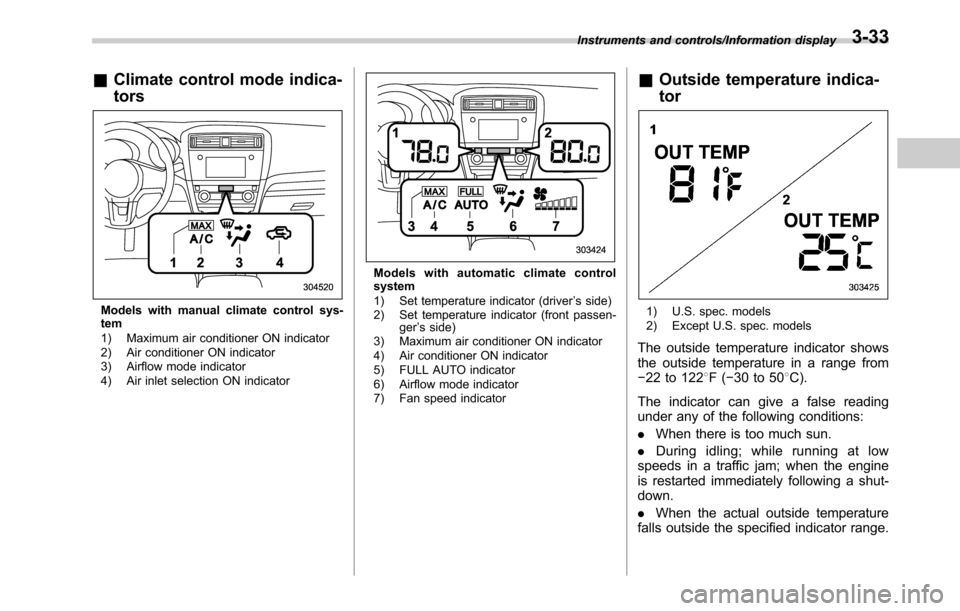
&Climate control mode indica-
tors
Models with manual climate control sys-
tem
1) Maximum air conditioner ON indicator
2) Air conditioner ON indicator
3) Airflow mode indicator
4) Air inlet selection ON indicator
Models with automatic climate control
system
1) Set temperature indicator (driver’s side)
2) Set temperature indicator (front passen-
ger’s side)
3) Maximum air conditioner ON indicator
4) Air conditioner ON indicator
5) FULL AUTO indicator
6) Airflow mode indicator
7) Fan speed indicator
&Outside temperature indica-
tor
1) U.S. spec. models
2) Except U.S. spec. models
The outside temperature indicator shows
the outside temperature in a range from
−22 to 1228F(−30 to 508C).
The indicator can give a false reading
under any of the following conditions:
.When there is too much sun.
.During idling; while running at low
speeds in a traffic jam; when the engine
is restarted immediately following a shut-
down.
.When the actual outside temperature
falls outside the specified indicator range.
Instruments and controls/Information display3-33
Page 193 of 572

!Screen Settings
After entering the“Screen Settings”menu,
select one of the following menus.
!Welcome Screen
The welcome screen can be activated or
deactivated. Select“On (with Sound)”to
activate the screen and sound. Select“On
(without Sound)”to activate the screen
and deactivate the sound. Select“Off”to
deactivate the screen.
!Good-bye Screen
The Good-bye screen can be activated or
deactivated. Select“On”to activate the
screen. Select“Off”to deactivate the
screen.
!Gauge Initial Movement
The movement of the meter needles and
gauge needles that occurs when the
ignition switch is turned to the“ON”
position can be activated or deactivated.
Select“On”to activate. Select“Off”to
deactivate.
!Gear Position Indicator Settings
(MT models)
The gear position indicator light can be
activated or deactivated. Select“On”to
activate. Select“Off”to deactivate.!Units
You can select the displayed units of the
distance, vehicle speed and volume.
Operate the“
”or“”switch on the
steering wheel to display the preferred
units. Then pull the“
/SET”switch to
select the displayed units.
!Languages
Operate the“
”or“”switch on the
steering wheel to display the preferred
language. Then pull the“
/SET”switch to
select the displayed language.
!Combination Meter Illumination (if
equipped)
After entering the“Combination Meter
Illumination”menu, select the following
menu.
!Meter Ring Illumination
The illumination of the combination meter
rings can be activated or deactivated.
Select“On”to activate the illumination.
Select“Off”to deactivate the illumination.
!EyeSight (models with EyeSight
system)
NOTE
For models with the EyeSight system,
refer to the Owner’s Manual supple-
ment for the EyeSight system.After entering the“EyeSight”menu, select
one of the following menus.
!Warning Volume
The volume of the warning buzzer that
sounds when the EyeSight system is in
use can be set in 3 stages (“Max”,“Mid”
and“Min”).
!Lead Vehicle Acquisition Sound
When adaptive cruise control is used, the
buzzer that sounds under any of the
following conditions can be activated or
deactivated.
.A vehicle is detected in front
.Detection is not possible
Select“On”to activate the buzzer. Select
“Off”to deactivate the buzzer.
!Lead Vehicle Moving Monitor
Function
When adaptive cruise control is used, the
buzzer that sounds if a vehicle in front has
started can be activated or deactivated.
Select“On”to activate the buzzer. Select
“Off”to deactivate the buzzer.
!Vehicle Icon
The vehicle icon indication can be acti-
vated or deactivated. Select“On”to
activate. Select“Off”to deactivate.
Instruments and controls/Multi information display
–CONTINUED–3-41
Page 196 of 572
Instruments and controls/Light control switch
&Headlights
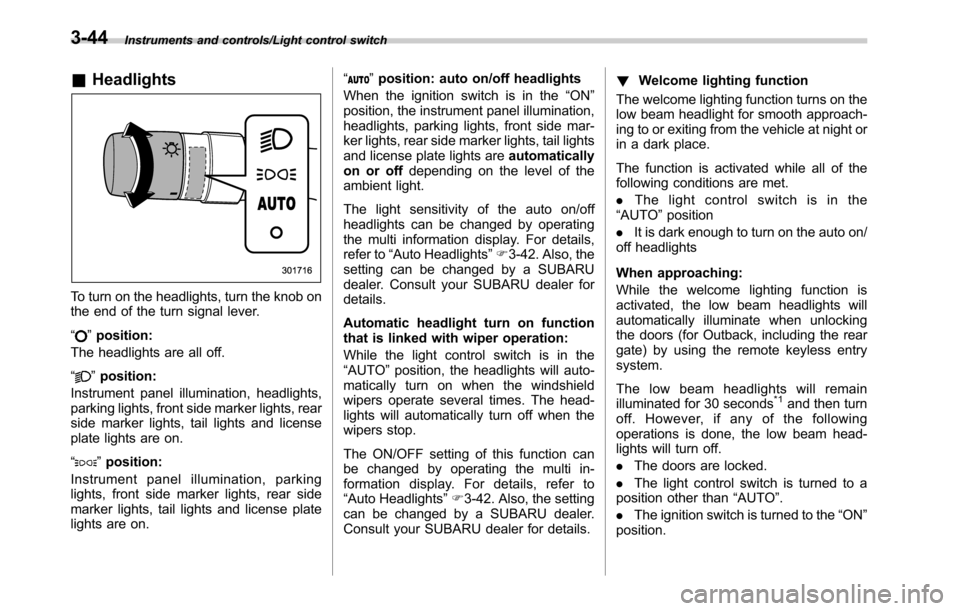
To turn on the headlights, turn the knob on
the end of the turn signal lever.
“
”position:
The headlights are all off.
“
”position:
Instrument panel illumination, headlights,
parking lights, front side marker lights, rear
side marker lights, tail lights and license
plate lights are on.
“
”position:
Instrument panel illumination, parking
lights, front side marker lights, rear side
marker lights, tail lights and license plate
lights are on.“
”position: auto on/off headlights
When the ignition switch is in the“ON”
position, the instrument panel illumination,
headlights, parking lights, front side mar-
ker lights, rear side marker lights, tail lights
and license plate lights areautomatically
on or offdepending on the level of the
ambient light.
The light sensitivity of the auto on/off
headlights can be changed by operating
the multi information display. For details,
refer to“Auto Headlights”F3-42. Also, the
setting can be changed by a SUBARU
dealer. Consult your SUBARU dealer for
details.
Automatic headlight turn on function
that is linked with wiper operation:
While the light control switch is in the
“AUTO”position, the headlights will auto-
matically turn on when the windshield
wipers operate several times. The head-
lights will automatically turn off when the
wipers stop.
The ON/OFF setting of this function can
be changed by operating the multi in-
formation display. For details, refer to
“Auto Headlights”F3-42. Also, the setting
can be changed by a SUBARU dealer.
Consult your SUBARU dealer for details.!Welcome lighting function
The welcome lighting function turns on the
low beam headlight for smooth approach-
ing to or exiting from the vehicle at night or
in a dark place.
The function is activated while all of the
following conditions are met.
.The light control switch is in the
“AUTO”position
.It is dark enough to turn on the auto on/
off headlights
When approaching:
While the welcome lighting function is
activated, the low beam headlights will
automatically illuminate when unlocking
the doors (for Outback, including the rear
gate) by using the remote keyless entry
system.
The low beam headlights will remain
illuminated for 30 seconds
*1and then turn
off. However, if any of the following
operations is done, the low beam head-
lights will turn off.
.The doors are locked.
.The light control switch is turned to a
position other than“AUTO”.
.The ignition switch is turned to the“ON”
position.
3-44
Page 198 of 572
Instruments and controls/Light control switch
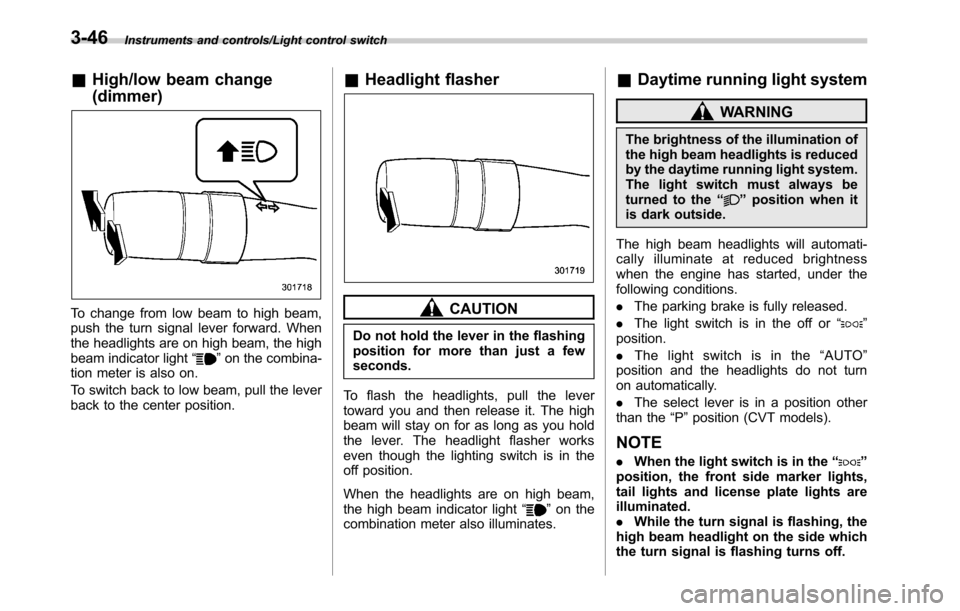
&High/low beam change
(dimmer)
To change from low beam to high beam,
push the turn signal lever forward. When
the headlights are on high beam, the high
beam indicator light“
”on the combina-
tion meter is also on.
To switch back to low beam, pull the lever
back to the center position.
&Headlight flasher
CAUTION
Do not hold the lever in the flashing
position for more than just a few
seconds.
To flash the headlights, pull the lever
toward you and then release it. The high
beam will stay on for as long as you hold
the lever. The headlight flasher works
even though the lighting switch is in the
off position.
When the headlights are on high beam,
the high beam indicator light“
”on the
combination meter also illuminates.
&Daytime running light system
WARNING
The brightness of the illumination of
the high beam headlights is reduced
by the daytime running light system.
The light switch must always be
turned to the“
”position when it
is dark outside.
The high beam headlights will automati-
cally illuminate at reduced brightness
when the engine has started, under the
following conditions.
.The parking brake is fully released.
.The light switch is in the off or“
”
position.
.The light switch is in the“AUTO”
position and the headlights do not turn
on automatically.
.The select lever is in a position other
than the“P”position (CVT models).
NOTE
.When the light switch is in the“”
position, the front side marker lights,
tail lights and license plate lights are
illuminated.
.While the turn signal is flashing, the
high beam headlight on the side which
the turn signal is flashing turns off.
3-46
Page 201 of 572
Front fog light switch
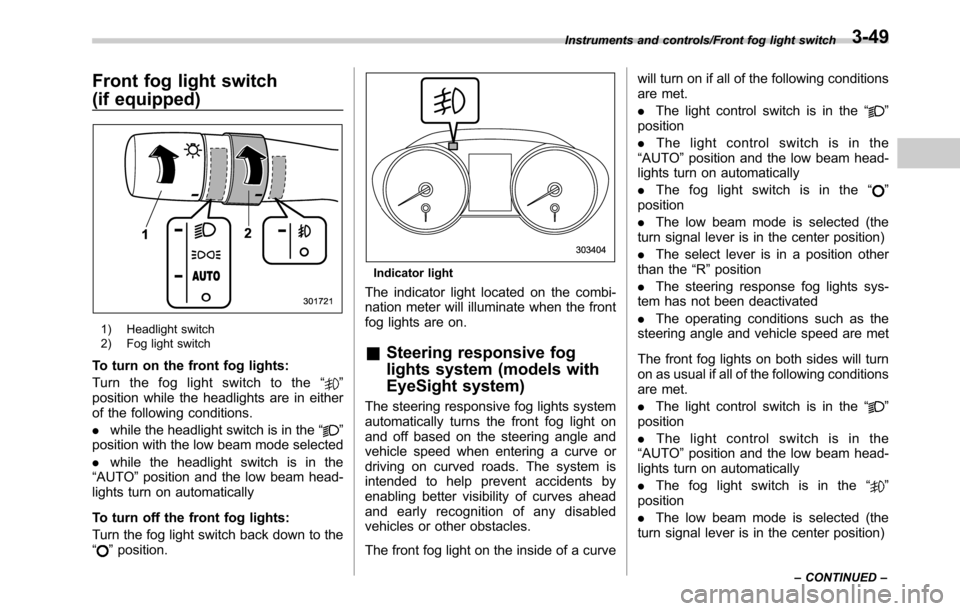
(if equipped)
1) Headlight switch
2) Fog light switch
To turn on the front fog lights:
Turn the fog light switch to the“
”
position while the headlights are in either
of the following conditions.
.while the headlight switch is in the“
”
position with the low beam mode selected
.while the headlight switch is in the
“AUTO”position and the low beam head-
lights turn on automatically
To turn off the front fog lights:
Turn the fog light switch back down to the
“
”position.
Indicator light
The indicator light located on the combi-
nation meter will illuminate when the front
fog lights are on.
&Steering responsive fog
lights system (models with
EyeSight system)
The steering responsive fog lights system
automatically turns the front fog light on
and off based on the steering angle and
vehicle speed when entering a curve or
driving on curved roads. The system is
intended to help prevent accidents by
enabling better visibility of curves ahead
and early recognition of any disabled
vehicles or other obstacles.
The front fog light on the inside of a curvewill turn on if all of the following conditions
are met.
.The light control switch is in the“
”
position
.The light control switch is in the
“AUTO”position and the low beam head-
lights turn on automatically
.The fog light switch is in the“
”
position
.The low beam mode is selected (the
turn signal lever is in the center position)
.The select lever is in a position other
than the“R”position
.The steering response fog lights sys-
tem has not been deactivated
.The operating conditions such as the
steering angle and vehicle speed are met
The front fog lights on both sides will turn
on as usual if all of the following conditions
are met.
.The light control switch is in the“
”
position
.The light control switch is in the
“AUTO”position and the low beam head-
lights turn on automatically
.The fog light switch is in the“
”
position
.The low beam mode is selected (the
turn signal lever is in the center position)
Instruments and controls/Front fog light switch
–CONTINUED–3-49
Page 205 of 572
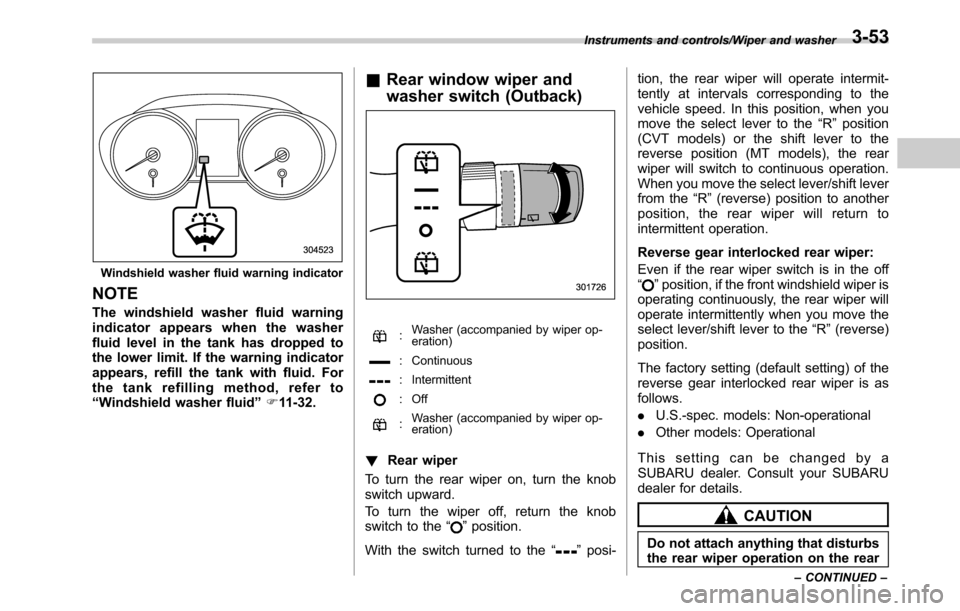
Windshield washer fluid warning indicator
NOTE
The windshield washer fluid warning
indicator appears when the washer
fluid level in the tank has dropped to
the lower limit. If the warning indicator
appears, refill the tank with fluid. For
the tank refilling method, refer to
“Windshield washer fluid”F11-32.
&Rear window wiper and
washer switch (Outback)
:Washer (accompanied by wiper op-
eration)
: Continuous
: Intermittent
: Off
:Washer (accompanied by wiper op-
eration)
!Rear wiper
To turn the rear wiper on, turn the knob
switch upward.
To turn the wiper off, return the knob
switch to the“
”position.
With the switch turned to the“
”posi-tion, the rear wiper will operate intermit-
tently at intervals corresponding to the
vehicle speed. In this position, when you
move the select lever to the“R”position
(CVT models) or the shift lever to the
reverse position (MT models), the rear
wiper will switch to continuous operation.
When you move the select lever/shift lever
from the“R”(reverse) position to another
position, the rear wiper will return to
intermittent operation.
Reverse gear interlocked rear wiper:
Even if the rear wiper switch is in the off
“
”position, if the front windshield wiper is
operating continuously, the rear wiper will
operate intermittently when you move the
select lever/shift lever to the“R”(reverse)
position.
The factory setting (default setting) of the
reverse gear interlocked rear wiper is as
follows.
.U.S.-spec. models: Non-operational
.Other models: Operational
This setting can be changed by a
SUBARU dealer. Consult your SUBARU
dealer for details.
CAUTION
Do not attach anything that disturbs
the rear wiper operation on the rear
Instruments and controls/Wiper and washer
–CONTINUED–3-53
Page 209 of 572
!Photosensors
The mirror has a photosensor attached on
both the front and back sides. During
nighttime driving, these sensors detect
distracting glare from vehicle headlights
behind you and automatically dim the
mirror to eliminate glare and preserve
your vision. For this reason, use care not
to cover the sensors with stickers, or other
similar items. Periodically wipe the sen-
sors clean using a piece of dry soft cotton
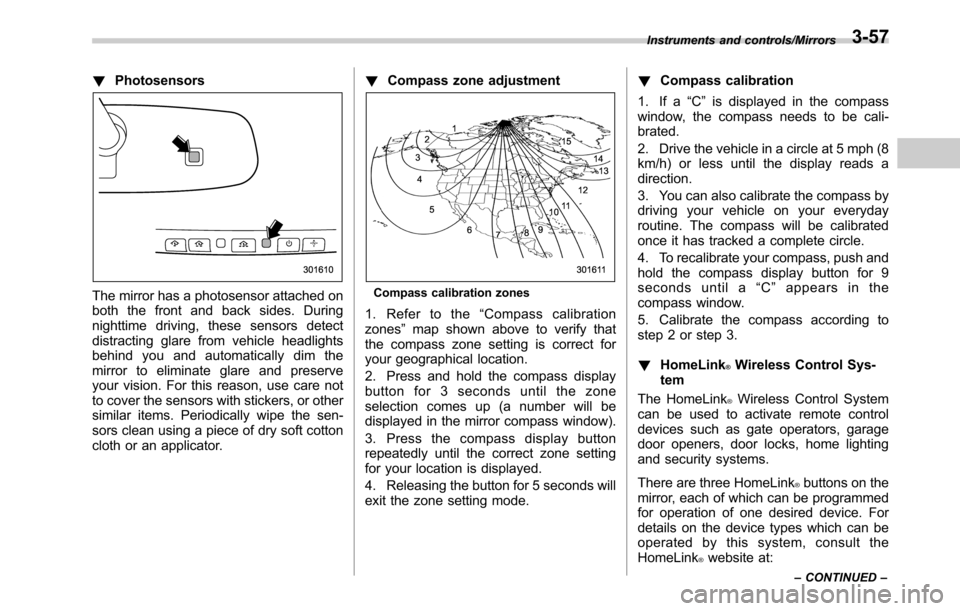
cloth or an applicator.!Compass zone adjustmentCompass calibration zones
1. Refer to the“Compass calibration
zones”map shown above to verify that
the compass zone setting is correct for
your geographical location.
2. Press and hold the compass display
button for 3 seconds until the zone
selection comes up (a number will be
displayed in the mirror compass window).
3. Press the compass display button
repeatedly until the correct zone setting
for your location is displayed.
4. Releasing the button for 5 seconds will
exit the zone setting mode.!Compass calibration
1. If a“C”is displayed in the compass
window, the compass needs to be cali-
brated.
2. Drive the vehicle in a circle at 5 mph (8
km/h) or less until the display reads a
direction.
3. You can also calibrate the compass by
driving your vehicle on your everyday
routine. The compass will be calibrated
once it has tracked a complete circle.
4. To recalibrate your compass, push and
hold the compass display button for 9
seconds until a“C”appears in the
compass window.
5. Calibrate the compass according to
step 2 or step 3.
!HomeLink
®Wireless Control Sys-
tem
The HomeLink
®Wireless Control System
can be used to activate remote control
devices such as gate operators, garage
door openers, door locks, home lighting
and security systems.
There are three HomeLink
®buttons on the
mirror, each of which can be programmed
for operation of one desired device. For
details on the device types which can be
operated by this system, consult the
HomeLink
®website at:
Instruments and controls/Mirrors
–CONTINUED–3-57