front SUBARU OUTBACK 2016 6.G Repair Manual
[x] Cancel search | Manufacturer: SUBARU, Model Year: 2016, Model line: OUTBACK, Model: SUBARU OUTBACK 2016 6.GPages: 572, PDF Size: 21.79 MB
Page 133 of 572
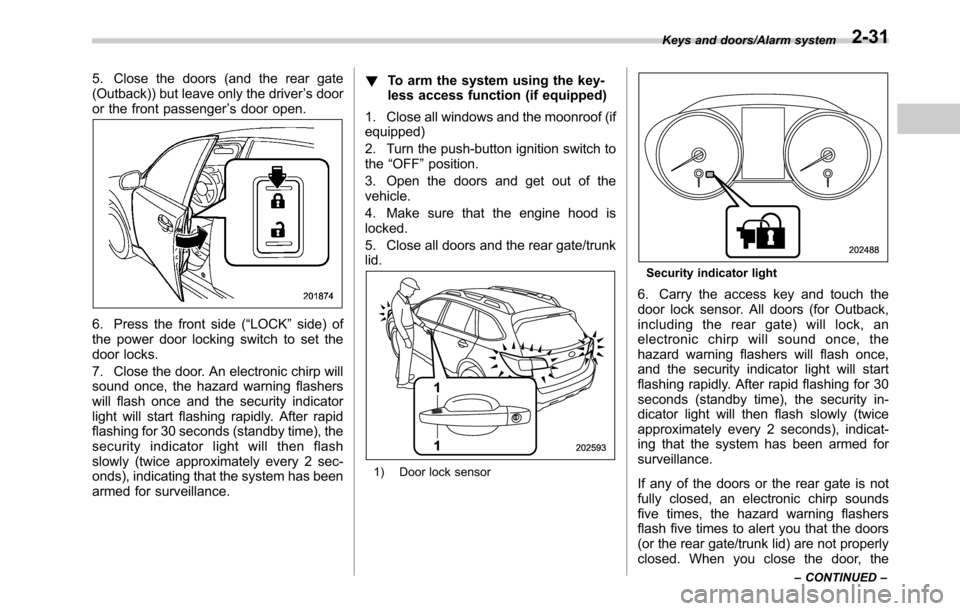
5. Close the doors (and the rear gate
(Outback)) but leave only the driver’s door
or the front passenger’s door open.
6. Press the front side (“LOCK”side) of
the power door locking switch to set the
door locks.
7. Close the door. An electronic chirp will
sound once, the hazard warning flashers
will flash once and the security indicator
light will start flashing rapidly. After rapid
flashing for 30 seconds (standby time), the
security indicator light will then flash
slowly (twice approximately every 2 sec-
onds), indicating that the system has been
armed for surveillance.!To arm the system using the key-
less access function (if equipped)
1. Close all windows and the moonroof (if
equipped)
2. Turn the push-button ignition switch to
the“OFF”position.
3. Open the doors and get out of the
vehicle.
4. Make sure that the engine hood is
locked.
5. Close all doors and the rear gate/trunk
lid.
1) Door lock sensor
Security indicator light
6. Carry the access key and touch the
door lock sensor. All doors (for Outback,
including the rear gate) will lock, an
electronic chirp will sound once, the
hazard warning flashers will flash once,
and the security indicator light will start
flashing rapidly. After rapid flashing for 30
seconds (standby time), the security in-
dicator light will then flash slowly (twice
approximately every 2 seconds), indicat-
ing that the system has been armed for
surveillance.
If any of the doors or the rear gate is not
fully closed, an electronic chirp sounds
five times, the hazard warning flashers
flash five times to alert you that the doors
(or the rear gate/trunk lid) are not properly
closed. When you close the door, the
Keys and doors/Alarm system
–CONTINUED–2-31
Page 134 of 572

Keys and doors/Alarm system
system will automatically arm and doors
will automatically lock.
&Disarming the system
Perform either of the following procedures.
.Briefly press the disarm button (for less
than 2 seconds) on the access key/remote
transmitter.
.Carry the access key and perform
either of the following procedures (models
with“keyless access with push-button
start system”).
–Grip the front door handle.
–Press the rear gate opener button.
The flashing of the security indicator light
will then change slowly (once approxi-
mately every 3 seconds from twice ap-
proximately every 2 seconds), indicating
that the alarm system has been disarmed.
!Emergency disarming
If you cannot disarm the system using the
transmitter (i.e. the transmitter is lost,
broken or the transmitter battery is too
weak), you can disarm the system without
using the transmitter.
The system can be disarmed if you turn
the ignition switch from the“LOCK”/“OFF”
to the“ON”position with a registered key/
access key.
NOTE
For models with“keyless access with
push-button start system”, if the ac-
cess key battery is discharged, perform
the procedure described in“Switching
power”F9-18. In such a case, replace
the battery immediately. Refer to“Re-
placing battery of access key”F11-50.
&Valet mode
When you choose the valet mode, the
alarm system does not operate. In valet
mode, the access key/remote transmitter
is used only for locking and unlocking the
doors and rear gate (Outback) and panic
activation.
To enter the valet mode, change the
setting of your vehicle’s alarm system for
deactivation mode. Refer to“Activating
and deactivating the alarm system”F2-
28. The security indicator light will con-
tinue to flash once every 3 seconds
indicating that the system is in the valet
mode.
To exit valet mode, change the setting of
your vehicle’s alarm system for activation
mode. Refer to“Activating and deactivat-
ing the alarm system”F2-28.
&Tripped sensor identification
The security indicator light flashes when
the alarm system has been triggered.
Also, the number of flashes indicates the
location of unauthorized intrusion or the
severity of impact on the vehicle.
When the ignition switch is turned to the
“ON”position, the indicator light will
illuminate for 1 second and then flash as
follows:
.When a door or rear gate (Outback)
was opened: 5 times
.When the trunk (Legacy) was opened:
4 times
.When a strong impact or multiple
impacts were sensed: twice (only models
with shock sensors (dealer option))
.When a light impact was sensed: once
(only models with shock sensors (dealer
option))
&Shock sensors (dealer op-
tion)
The shock sensors trigger the alarm
system when they sense impacts applied
to the vehicle and when any of their
electric wires is cut. The alarm system
causes the horn to sound and the hazard
warning flashers to flash for a short time
when the sensed impact is weak, but it
warns of a strong impact or multiple
2-32
Page 136 of 572
Keys and doors/Windows
&Power window operation by
driver
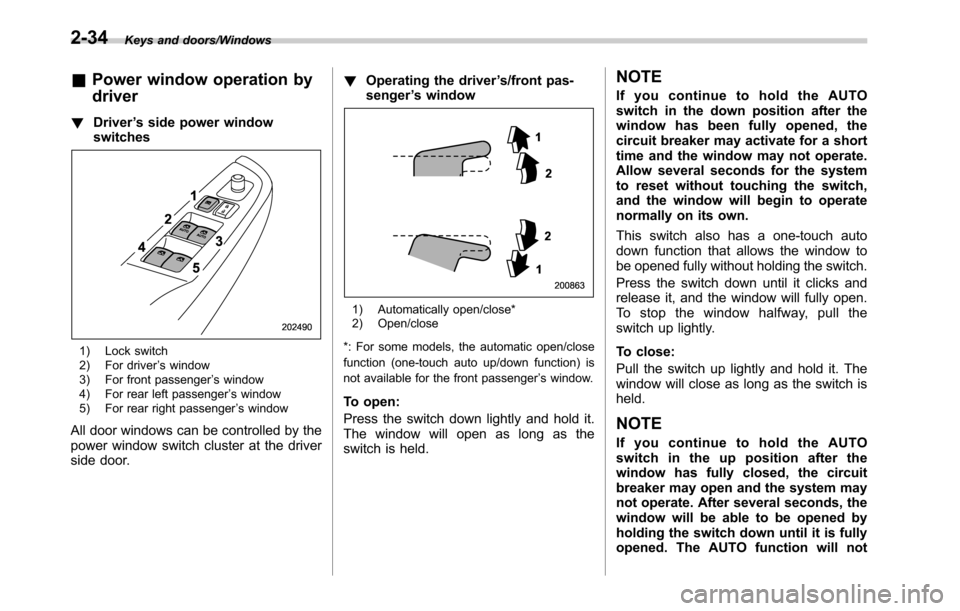
!Driver’s side power window
switches
1) Lock switch
2) For driver’s window
3) For front passenger’s window
4) For rear left passenger’s window
5) For rear right passenger’s window
All door windows can be controlled by the
power window switch cluster at the driver
side door.!Operating the driver’s/front pas-
senger’s window
1) Automatically open/close*
2) Open/close
*: For some models, the automatic open/close
function (one-touch auto up/down function) is
not available for the front passenger’s window.
To open:
Press the switch down lightly and hold it.
The window will open as long as the
switch is held.
NOTE
If you continue to hold the AUTO
switch in the down position after the
window has been fully opened, the
circuit breaker may activate for a short
time and the window may not operate.
Allow several seconds for the system
to reset without touching the switch,
and the window will begin to operate
normally on its own.
This switch also has a one-touch auto
down function that allows the window to
be opened fully without holding the switch.
Press the switch down until it clicks and
release it, and the window will fully open.
To stop the window halfway, pull the
switch up lightly.
To close:
Pull the switch up lightly and hold it. The
window will close as long as the switch is
held.
NOTE
If you continue to hold the AUTO
switch in the up position after the
window has fully closed, the circuit
breaker may open and the system may
not operate. After several seconds, the
window will be able to be opened by
holding the switch down until it is fully
opened. The AUTO function will not
2-34
Page 138 of 572
Keys and doors/Windows
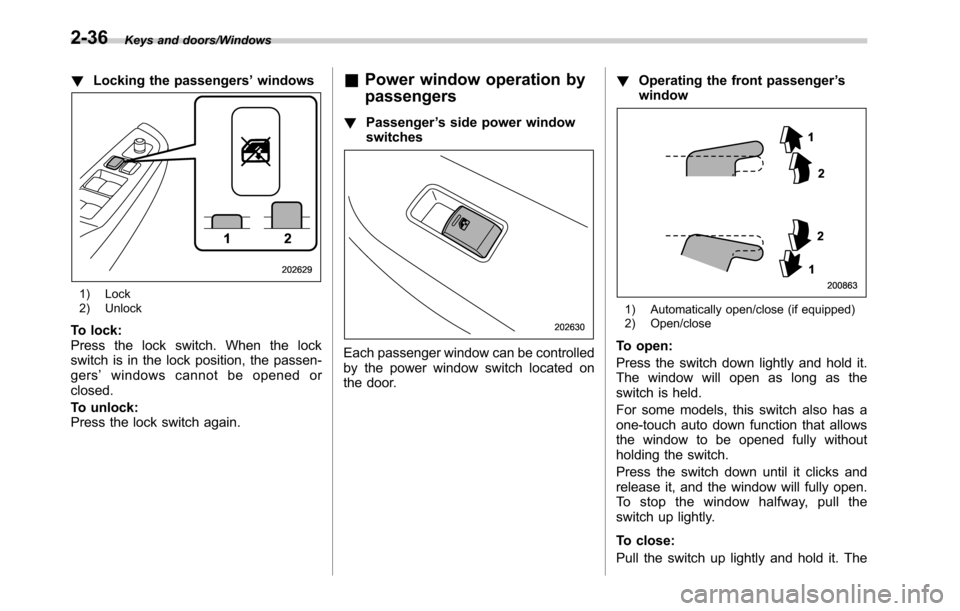
!Locking the passengers’windows
1) Lock
2) Unlock
To lock:
Press the lock switch. When the lock
switch is in the lock position, the passen-
gers’windows cannot be opened or
closed.
To unlock:
Press the lock switch again.
&Power window operation by
passengers
!Passenger’s side power window
switches
Each passenger window can be controlled
by the power window switch located on
the door.!Operating the front passenger’s
window
1) Automatically open/close (if equipped)
2) Open/close
To open:
Press the switch down lightly and hold it.
The window will open as long as the
switch is held.
For some models, this switch also has a
one-touch auto down function that allows
the window to be opened fully without
holding the switch.
Press the switch down until it clicks and
release it, and the window will fully open.
To stop the window halfway, pull the
switch up lightly.
To close:
Pull the switch up lightly and hold it. The
2-36
Page 139 of 572
window will close as long as the switch is
held.
For some models, this switch also has a
one-touch auto up function that allows the
window to be closed fully without holding
the switch.
Pull the switch up until it clicks and release
it, and the window will fully close. To stop
the window halfway, press the switch
down lightly.
NOTE
If the vehicle’s battery is disconnected
due to situations such as battery or
fuse replacement, the one-touch auto
up/down function is deactivated. Initi-
alize the power window to reactivate
the one-touch auto up/down function.
Refer to“Initialization of power win-
dow”F2-37.
!Anti-entrapment function
Refer to“Anti-entrapment function”F2-
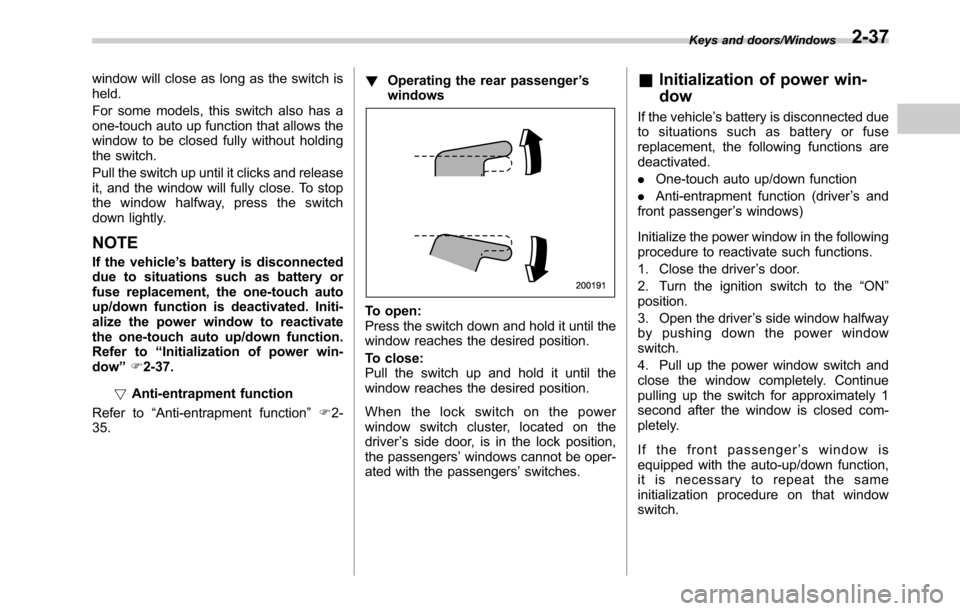
35.!Operating the rear passenger’s
windows
To open:
Press the switch down and hold it until the
window reaches the desired position.
To close:
Pull the switch up and hold it until the
window reaches the desired position.
When the lock switch on the power
window switch cluster, located on the
driver’s side door, is in the lock position,
the passengers’windows cannot be oper-
ated with the passengers’switches.
&Initialization of power win-
dow
If the vehicle’s battery is disconnected due
to situations such as battery or fuse
replacement, the following functions are
deactivated.
.One-touch auto up/down function
.Anti-entrapment function (driver’s and
front passenger’s windows)
Initialize the power window in the following
procedure to reactivate such functions.
1. Close the driver’s door.
2. Turn the ignition switch to the“ON”
position.
3. Open the driver’s side window halfway
by pushing down the power window
switch.
4. Pull up the power window switch and
close the window completely. Continue
pulling up the switch for approximately 1
second after the window is closed com-
pletely.
If the front passenger’s window is
equipped with the auto-up/down function,
it is necessary to repeat the same
initialization procedure on that window
switch.
Keys and doors/Windows2-37
Page 151 of 572
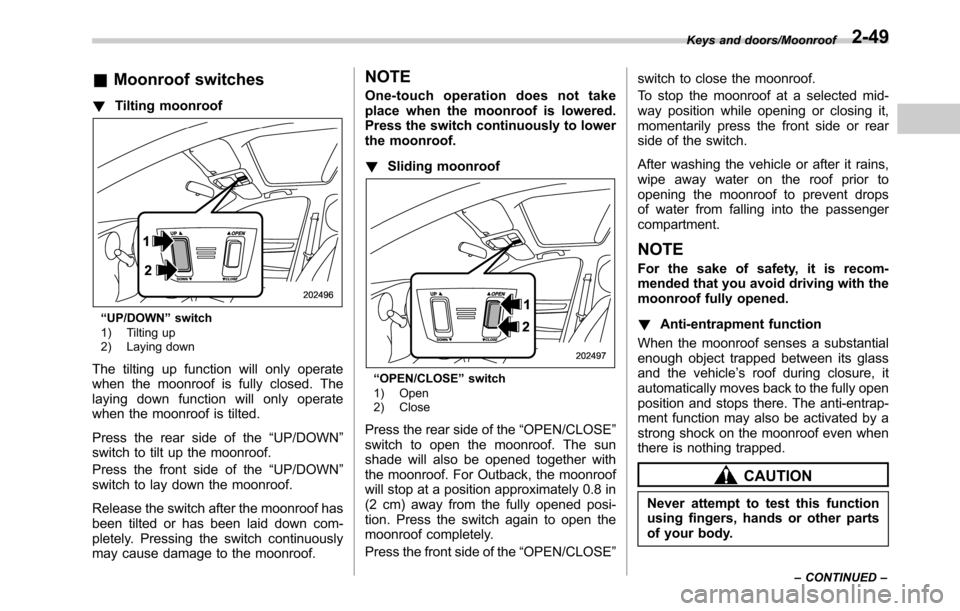
&Moonroof switches
!Tilting moonroof
“UP/DOWN”switch
1) Tilting up
2) Laying down
The tilting up function will only operate
when the moonroof is fully closed. The
laying down function will only operate
when the moonroof is tilted.
Press the rear side of the“UP/DOWN”
switch to tilt up the moonroof.
Press the front side of the“UP/DOWN”
switch to lay down the moonroof.
Release the switch after the moonroof has
been tilted or has been laid down com-
pletely. Pressing the switch continuously
may cause damage to the moonroof.
NOTE
One-touch operation does not take
place when the moonroof is lowered.
Press the switch continuously to lower
the moonroof.
!Sliding moonroof
“OPEN/CLOSE”switch
1) Open
2) Close
Press the rear side of the“OPEN/CLOSE”
switch to open the moonroof. The sun
shade will also be opened together with
the moonroof. For Outback, the moonroof
will stop at a position approximately 0.8 in
(2 cm) away from the fully opened posi-
tion. Press the switch again to open the
moonroof completely.
Press the front side of the“OPEN/CLOSE”switch to close the moonroof.
To stop the moonroof at a selected mid-
way position while opening or closing it,
momentarily press the front side or rear
side of the switch.
After washing the vehicle or after it rains,
wipe away water on the roof prior to
opening the moonroof to prevent drops
of water from falling into the passenger
compartment.
NOTE
For the sake of safety, it is recom-
mended that you avoid driving with the
moonroof fully opened.
!Anti-entrapment function
When the moonroof senses a substantial
enough object trapped between its glass
and the vehicle’s roof during closure, it
automatically moves back to the fully open
position and stops there. The anti-entrap-
ment function may also be activated by a
strong shock on the moonroof even when
there is nothing trapped.
CAUTION
Never attempt to test this function
using fingers, hands or other parts
of your body.
Keys and doors/Moonroof
–CONTINUED–2-49
Page 153 of 572

Ignition switch (models without push-
button start system)......................................... 3-3
LOCK.................................................................. 3-3
ACC.................................................................... 3-4
ON...................................................................... 3-4
START ................................................................ 3-4
Key reminder chime............................................ 3-4
Ignition switch light............................................. 3-4
Push-button ignition switch (models with
push-button start system)............................... 3-5
Safety precautions.............................................. 3-5
Operating range for push-button start system...... 3-5
Switching power................................................. 3-6
When access key does not operate properly........ 3-7
Hazard warning flasher....................................... 3-7
Meters and gauges.............................................. 3-7
Combination meter illumination........................... 3-7
Canceling the function for meter/gauge needle
movement upon turning on the ignition
switch............................................................... 3-8
Speedometer....................................................... 3-8
Odometer............................................................ 3-8
Double trip meter................................................ 3-9
Tachometer......................................................... 3-9
Fuel gauge......................................................... 3-10
Temperature gauge............................................ 3-11
ECO gauge........................................................ 3-11
Warning and indicator lights............................. 3-12
Seatbelt warning light and chime........................ 3-12
SRS airbag system warning light........................ 3-14Front passenger’s frontal airbag ON and OFF
indicators........................................................ 3-14
CHECK ENGINE warning light/Malfunction
indicator light.................................................. 3-15
Charge warning light.......................................... 3-15
Oil pressure warning light.................................. 3-15
Engine low oil level warning indicator................ 3-16
AT OIL TEMP warning light (CVT models)........... 3-16
Low tire pressure warning light (U.S. spec.
models)........................................................... 3-16
ABS warning light.............................................. 3-18
Brake system warning light................................ 3-18
Electronic parking brake indicator light.............. 3-20
Hill Holder indicator light................................... 3-21
Low fuel warning light....................................... 3-21
Door open indicator........................................... 3-22
Windshield washer fluid warning indicator.......... 3-22
All-Wheel Drive warning light (CVT models) ........ 3-22
Power steering warning light.............................. 3-22
Vehicle Dynamics Control warning light/Vehicle
Dynamics Control operation indicator light ....... 3-23
Vehicle Dynamics Control OFF indicator light..... 3-24
Warning chimes and warning indicator of the
keyless access with push-button start system (if
equipped)........................................................ 3-24
Security indicator light....................................... 3-29
Select lever/gear position indicator..................... 3-30
Turn signal indicator lights................................. 3-30
High beam indicator light................................... 3-30
Cruise control indicator..................................... 3-30
Cruise control set indicator................................ 3-30
Instruments and controls
3
Page 154 of 572

Instruments and controls
Automatic headlight beam leveler warning light
(models with HID headlights)............................ 3-30
Headlight indicator light..................................... 3-31
Front fog light indicator light (if equipped).......... 3-31
X-mode indicator (if equipped)............................ 3-31
Hill descent control indicator (if equipped).......... 3-31
Steering responsive fog lights OFF indicator
(models with EyeSight system)......................... 3-31
BSD/RCTA warning indicator (if equipped).......... 3-31
BSD/RCTA OFF indicator (if equipped)................ 3-31
Icy road surface warning.................................... 3-31
Information display............................................ 3-32
Clock................................................................. 3-32
Climate control mode indicators......................... 3-33
Outside temperature indicator............................ 3-33
Multi information display................................... 3-34
Basic operation.................................................. 3-34
Welcome screen and Good-bye screen............... 3-35
Warning screen.................................................. 3-35
Basic screens.................................................... 3-36
Telltale screen.................................................... 3-38
Menu screens.................................................... 3-38
Light control switch........................................... 3-43Headlights.......................................................... 3-44
High/low beam change (dimmer)......................... 3-46Headlight flasher............................................... 3-46
Daytime running light system............................. 3-46
Headlight beam leveler (models with HID
headlights)...................................................... 3-47
Turn signal lever................................................ 3-47
One-touch lane changer..................................... 3-48
Illumination brightness control......................... 3-48Auto dimmer cancel function............................. 3-48
Front fog light switch (if equipped).................. 3-49Steering responsive fog lights system (models
with EyeSight system)..................................... 3-49
Wiper and washer.............................................. 3-50Windshield wiper and washer switches.............. 3-52
Rear window wiper and washer switch
(Outback)........................................................ 3-53
Defogger and deicer.......................................... 3-54
Mirrors................................................................ 3-56
Inside mirror (without auto-dimming function) (if
equipped)........................................................ 3-56
Auto-dimming mirror/compass with HomeLink
®(if
equipped)........................................................ 3-56
Outside mirrors................................................. 3-62
Tilt/telescopic steering wheel........................... 3-63
Horn.................................................................... 3-63
Page 164 of 572
Instruments and controls/Warning and indicator lights
Warning and indicator lights
Several of the warning and indicator lights
illuminate momentarily and then go out
when the ignition switch is initially turned
to the“ON”position. This permits check-
ing the operation of the bulbs.
Apply the parking brake and turn the
ignition switch to the“ON”position. For
the system check, the following lights
illuminate and turn off after several sec-
onds or after the engine has started:
: Seatbelt warning light
(The seatbelt warning light turns off
only when the driver fastens the
seatbelt.)
: Front passenger’s seatbelt warning
light
(The seatbelt warning light turns off
only when the front seat passenger
fastens the seatbelt.)
: SRS airbag system warning light
ON /
: Front passenger’s frontal airbag
ON indicator light
/: Front passenger’s frontal airbag
OFF indicator light
/: CHECK ENGINE warning light/
Malfunction indicator light
: Charge warning light
: Oil pressure warning light
: AT OIL TEMP warning light
(CVT models)
/: ABS warning light
: Vehicle Dynamics Control warning
light/Vehicle Dynamics Control opera-
tion indicator light
: Vehicle Dynamics Control OFF indica-
tor light
/: Brake system warning light
: Hill Holder indicator light
: All-Wheel Drive warning light (CVT
models)
: Power steering warning light
: Low tire pressure warning light
(U.S. spec. models)
: Low fuel warning light
: Hill descent control indicator (if
equipped)
If any lights fail to illuminate, it indicates a
burned-out bulb or a malfunction of the
corresponding system.
Consult your authorized SUBARU dealer
for repair.
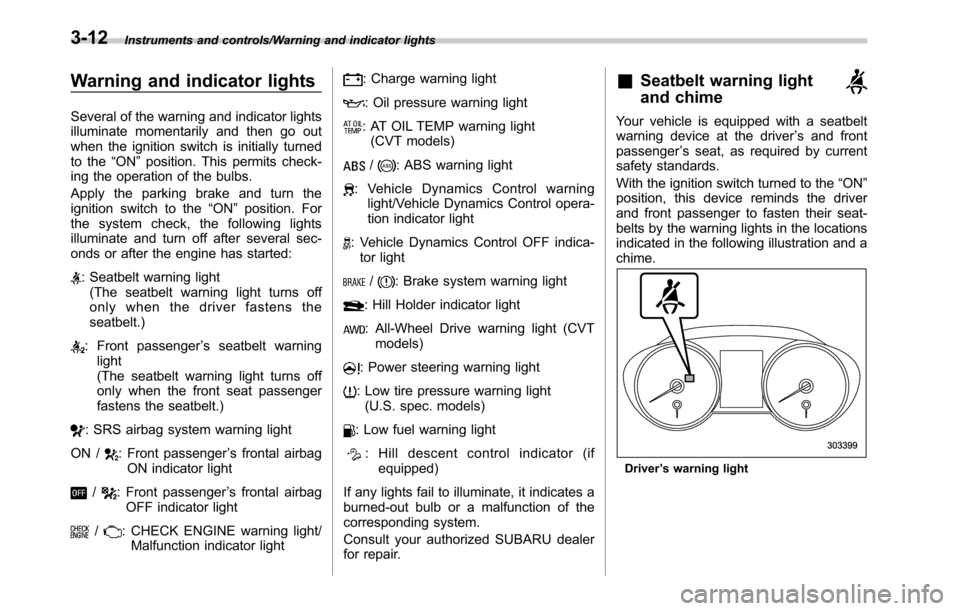
&Seatbelt warning light
and chime
Your vehicle is equipped with a seatbelt
warning device at the driver’s and front
passenger’s seat, as required by current
safety standards.
With the ignition switch turned to the“ON”
position, this device reminds the driver
and front passenger to fasten their seat-
belts by the warning lights in the locations
indicated in the following illustration and a
chime.
Driver’s warning light
3-12
Page 165 of 572
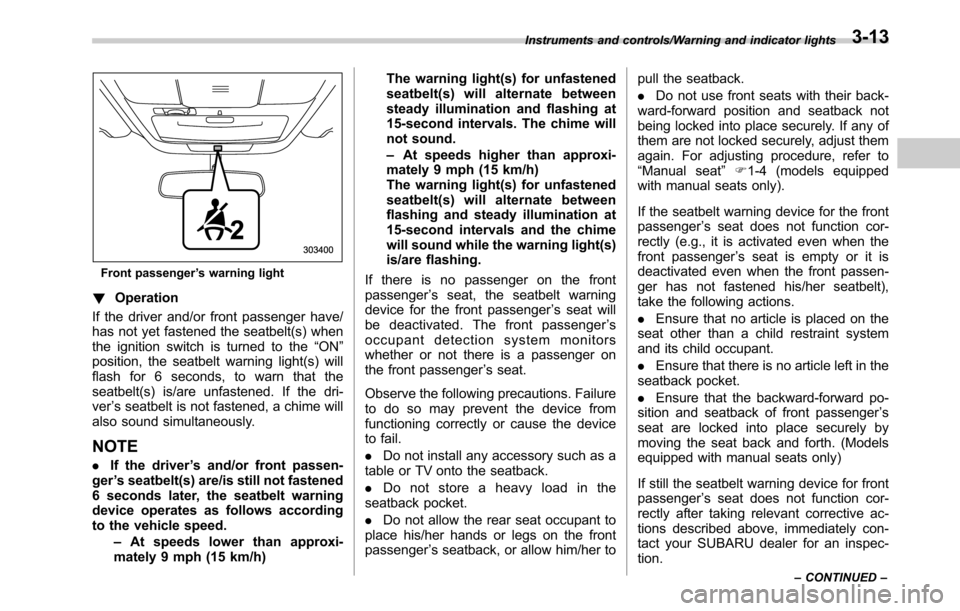
Front passenger’s warning light
!Operation
If the driver and/or front passenger have/
has not yet fastened the seatbelt(s) when
the ignition switch is turned to the“ON”
position, the seatbelt warning light(s) will
flash for 6 seconds, to warn that the
seatbelt(s) is/are unfastened. If the dri-
ver’s seatbelt is not fastened, a chime will
also sound simultaneously.
NOTE
.If the driver’s and/or front passen-
ger’s seatbelt(s) are/is still not fastened
6 seconds later, the seatbelt warning
device operates as follows according
to the vehicle speed.
–At speeds lower than approxi-
mately 9 mph (15 km/h)The warning light(s) for unfastened
seatbelt(s) will alternate between
steady illumination and flashing at
15-second intervals. The chime will
not sound.
–At speeds higher than approxi-
mately 9 mph (15 km/h)
The warning light(s) for unfastened
seatbelt(s) will alternate between
flashing and steady illumination at
15-second intervals and the chime
will sound while the warning light(s)
is/are flashing.
If there is no passenger on the front
passenger’s seat, the seatbelt warning
device for the front passenger’s seat will
be deactivated. The front passenger’s
occupant detection system monitors
whether or not there is a passenger on
the front passenger’s seat.
Observe the following precautions. Failure
to do so may prevent the device from
functioning correctly or cause the device
to fail.
.Do not install any accessory such as a
table or TV onto the seatback.
.Do not store a heavy load in the
seatback pocket.
.Do not allow the rear seat occupant to
place his/her hands or legs on the front
passenger’s seatback, or allow him/her topull the seatback.
.Do not use front seats with their back-
ward-forward position and seatback not
being locked into place securely. If any of
them are not locked securely, adjust them
again. For adjusting procedure, refer to
“Manual seat”F1-4 (models equipped
with manual seats only).
If the seatbelt warning device for the front
passenger’s seat does not function cor-
rectly (e.g., it is activated even when the
front passenger’s seat is empty or it is
deactivated even when the front passen-
ger has not fastened his/her seatbelt),
take the following actions.
.Ensure that no article is placed on the
seat other than a child restraint system
and its child occupant.
.Ensure that there is no article left in the
seatback pocket.
.Ensure that the backward-forward po-
sition and seatback of front passenger’s
seat are locked into place securely by
moving the seat back and forth. (Models
equipped with manual seats only)
If still the seatbelt warning device for front
passenger’s seat does not function cor-
rectly after taking relevant corrective ac-
tions described above, immediately con-
tact your SUBARU dealer for an inspec-
tion.
Instruments and controls/Warning and indicator lights
–CONTINUED–3-13