front SUBARU OUTBACK 2016 6.G Manual Online
[x] Cancel search | Manufacturer: SUBARU, Model Year: 2016, Model line: OUTBACK, Model: SUBARU OUTBACK 2016 6.GPages: 572, PDF Size: 21.79 MB
Page 215 of 572
Tilt/telescopic steering wheel
WARNING
.Do not adjust the steering wheel
tilt/telescopic position while driv-
ing. This may cause loss of
vehicle control and result in
personal injury.
.If the lever cannot be raised to
the fixed position, adjust the
steering wheel again. It is dan-
gerous to drive without locking
the steering wheel. This may
cause loss of vehicle control
and result in personal injury.
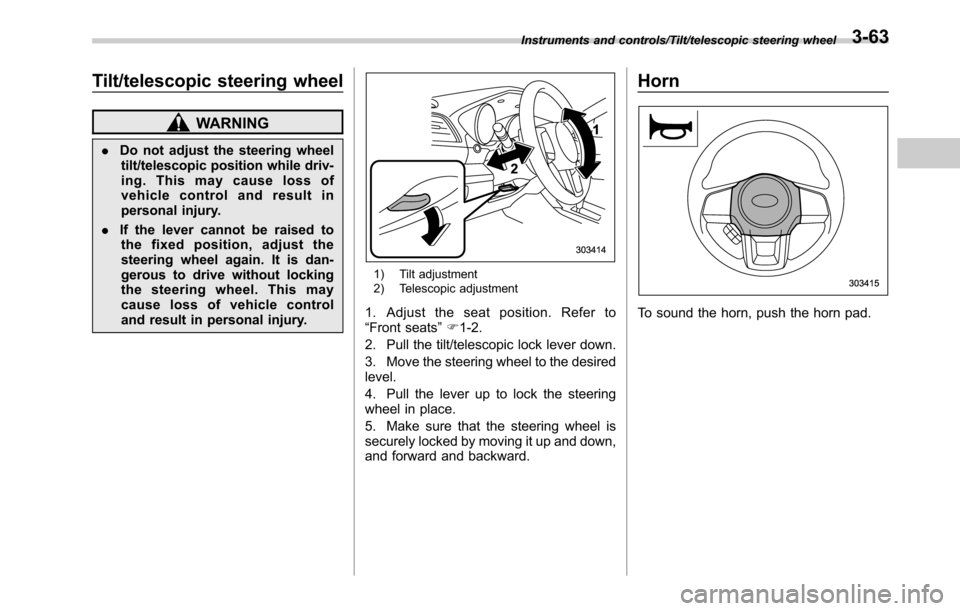
1) Tilt adjustment
2) Telescopic adjustment
1. Adjust the seat position. Refer to
“Front seats”F1-2.
2. Pull the tilt/telescopic lock lever down.
3. Move the steering wheel to the desired
level.
4. Pull the lever up to lock the steering
wheel in place.
5. Make sure that the steering wheel is
securely locked by moving it up and down,
and forward and backward.
Horn
To sound the horn, push the horn pad.
Instruments and controls/Tilt/telescopic steering wheel3-63
Page 222 of 572

Climate control/Manual climate control
and become damaged, the system may
not be able to control the interior tempera-
ture correctly. To avoid damaging the
sensors, observe the following precau-
tions:
–Do not subject the sensors to impact.
–Keep water away from the sensors.
–Do not cover the sensors.
The sensors are located as follows:
–Solar sensor: beside the speaker grille
on the dashboard
–Interior air temperature sensor: on the
side of the driver-side part of the center
panel
–Outside temperature sensor: behind
front grille.Manual climate control
&Airflow mode selection
Select the preferred airflow mode by
pressing the airflow mode selection button
or defroster button.
Airflow modes are as follows.
A) Models with rear ventilators
(Ventilation): Instrument panel outlets
A) Models with rear ventilators
(Bi-level): Instrument panel outlets and the
foot outlets
A) Models with rear ventilators
(Heat): Foot outlets, both side outlets of
4-6
Page 224 of 572

Climate control/Manual climate control
.The air conditioner will turn on.
While the MAX A/C mode is selected,
performing the following operation returns
the system to the setting that had been
selected before the MAX A/C mode is
selected.
.Turn the temperature control dial to a
position other than“MAX A/C”position
(models with type A climate control sys-
tem).
.Press the“MAX A/C”button again
(models with type B climate control sys-
tem).
!“DUAL”mode (type B)
You can change the setting of the driver’s
side and front passenger’s side tempera-
ture independently by selecting the
“DUAL”mode.
You can select the“DUAL”mode by
performing either of the following proce-
dures.
.Press the“DUAL”button
.Turn the passenger’s side temperature
control dial
The“DUAL”mode can be canceled by
pressing the“DUAL”button.
When the“DUAL”mode is selected:
Turn the driver’ssidedialtosetthe
driver’s side temperature. Turn the frontpassenger’s side dial to set the front
passenger’s side temperature.
When the“DUAL”mode is canceled:
Set the desired temperature by turning the
driver’s side dial.
&Fan speed control
The fan operates only when the ignition
switch is in the“ON”position. Select the
preferred fan speed by turning the fan
speed control dial (type A), or by pressing
the fan speed control buttons (type B).
&Air conditioner control
The air conditioner operates only when
the engine is running.
Press the air conditioner button while the
fan is in operation to turn on the air
conditioner. When the air conditioner is
on, the“A/C”indicator light illuminates.
To turn off the air conditioner, press the
button again. The indicator light will turn
off.
NOTE
For efficient defogging or dehumidify-
ing in cold weather, turn on the air
conditioner. However, if the ambient
temperature decreases to approxi-
mately 328F(08C), the air conditioner
and dehumidification system may notwork properly.
&Air inlet selection
Select the air inlet by pressing the air inlet
selection button.
ON position (recirculation): Interior air is
recirculated inside the vehicle. Press the
air inlet selection button to the ON position
for fast cooling with the air conditioner or
when driving on a dusty road. When the
ON position is selected, the“
”indicator
light on the information display (type A)/
the indicator light on the air inlet selection
button (type B) illuminates.
OFF position (outside air): Outside air is
drawn into the passenger compartment.
Press the air inlet selection button to the
OFF position when the interior has cooled
to a comfortable temperature and the road
is no longer dusty. The indicator light will
turn off.
4-8
Page 225 of 572
WARNING
Continued operation in the ON posi-
tion may fog up the windows. Switch
to the OFF position as soon as the
outside dusty condition clears.
Defrosting
Select the desired“”mode or“”mode
to defrost or dehumidify the windshield
and front door windows by performing the
following procedures.
.To select the“
”mode, press the
defroster button.
.To select the“
”mode, press the
airflow mode selection button and select
the“
”mode.
NOTE
.When the“”mode or“”mode
is selected, the air conditioner com-
pressor automatically operates to more
quickly defog the windshield. (The air
conditioner indicator light does not
illuminate in this case.) At the same
time, the air inlet selection is automa-
tically set to the outside air mode. For
details, refer to“Airflow mode selec-
tion”F4-6.
.If the defroster button is pressed
while the“
”mode is selected, it will
return to the previous mode before
selecting the“
”mode.
Operating tips for heater and
air conditioner
&Cleaning ventilator grille
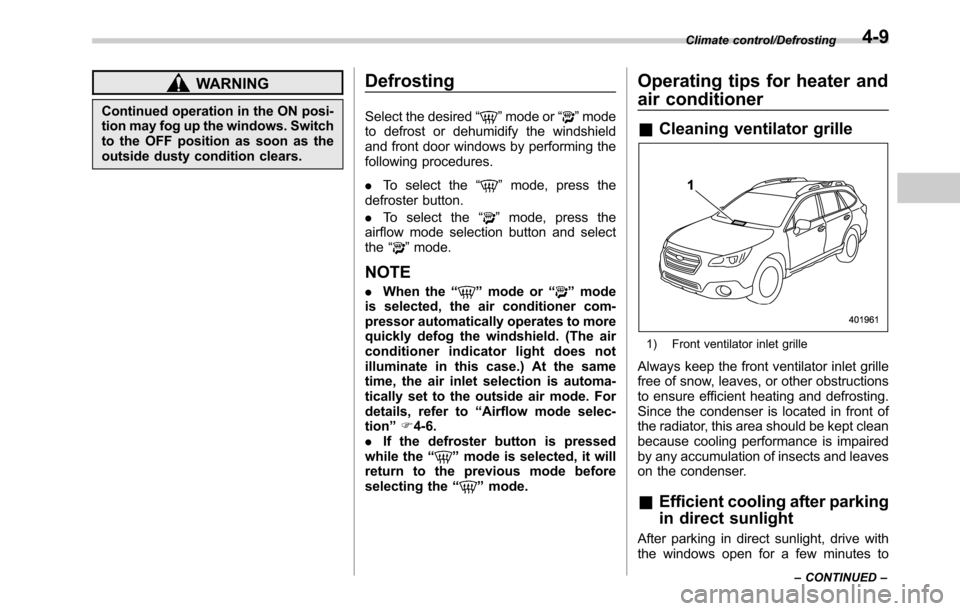
1) Front ventilator inlet grille
Always keep the front ventilator inlet grille
free of snow, leaves, or other obstructions
to ensure efficient heating and defrosting.
Since the condenser is located in front of
the radiator, this area should be kept clean
because cooling performance is impaired
by any accumulation of insects and leaves
on the condenser.
&Efficient cooling after parking
in direct sunlight
After parking in direct sunlight, drive with
the windows open for a few minutes to
Climate control/Defrosting
–CONTINUED–4-9
Page 248 of 572
Audio/Audio set
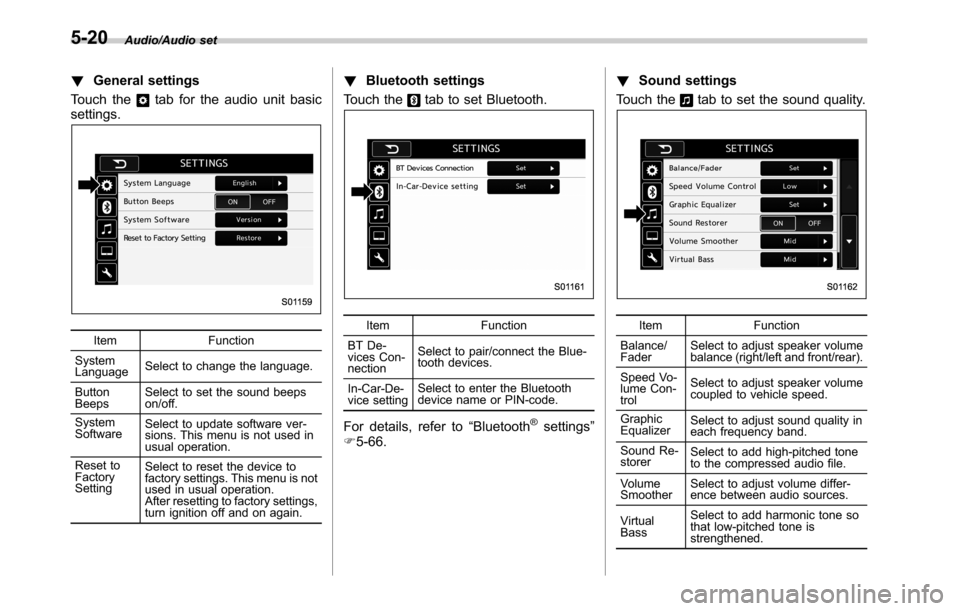
!General settings
Touch the
tab for the audio unit basic
settings.
Item Function
System
LanguageSelect to change the language.
Button
BeepsSelect to set the sound beeps
on/off.
System
SoftwareSelect to update software ver-
sions. This menu is not used in
usual operation.
Reset to
Factory
SettingSelect to reset the device to
factory settings. This menu is not
used in usual operation.
After resetting to factory settings,
turn ignition off and on again.
!Bluetooth settings
Touch the
tab to set Bluetooth.
Item Function
BT De-
vices Con-
nectionSelect to pair/connect the Blue-
tooth devices.
In-Car-De-
vice settingSelect to enter the Bluetooth
device name or PIN-code.
For details, refer to“Bluetooth®settings”
F5-66.!Sound settings
Touch the
tab to set the sound quality.
Item Function
Balance/
FaderSelect to adjust speaker volume
balance (right/left and front/rear).
Speed Vo-
lume Con-
trolSelect to adjust speaker volume
coupled to vehicle speed.
Graphic
EqualizerSelect to adjust sound quality in
each frequency band.
Sound Re-
storerSelect to add high-pitched tone
to the compressed audio file.
Volume
SmootherSelect to adjust volume differ-
ence between audio sources.
Virtual
BassSelect to add harmonic tone so
that low-pitched tone is
strengthened.
5-20
Page 249 of 572

Item Function
Vocal Im-
age Con-
trolSelect to pick-up vocal sound
signal from the sound data, and
adjust it to right/left or front/rear.Refer to the following table for the adjustment range of each audio setting item and
default value.
Item Step Default
Balance/
FaderVolume
Balance
ControlBalance L9-R9 0 (Center)
Fader F9-R9 0 (Center)
Vocal
Image
ControlBalance L9-R9 R3
Fader F9-R9 0 (Center)
Speed Volume Control OFF, Low, High Low
Graphic Equalizer−6-+6 0 (Flat)
Sound Restorer ON, OFF ON
Volume Smoother OFF, Low, Mid, High Mid
Virtual Bass OFF, Low, Mid, HighMidAudio/Audio set
–CONTINUED–
5-21
Page 250 of 572
Audio/Audio set
!“Balance/Fader”
A good balance of the left and right stereo
channels and of the front and rear sound
levels is important for good quality audio
program listening.
Keep in mind that when listening to a
stereo recording or broadcast, changing
the right/left balance will increase the
volume of 1 group of sounds while
decreasing the volume of another.
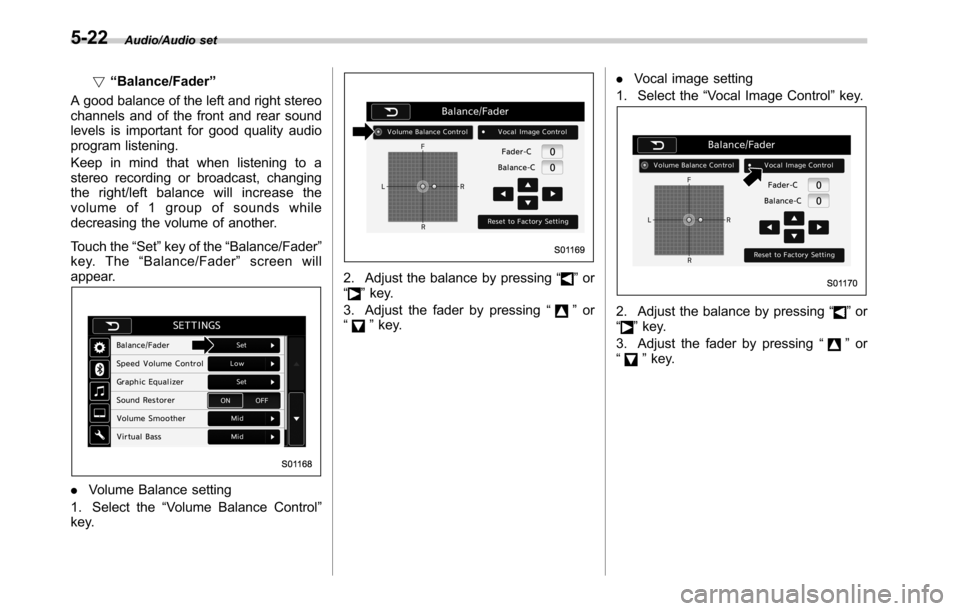
Touch the“Set”key of the“Balance/Fader”
key. The“Balance/Fader”screen will
appear.
.Volume Balance setting
1. Select the“Volume Balance Control”
key.
2. Adjust the balance by pressing“”or
“”key.
3. Adjust the fader by pressing“
”or
“”key..Vocal image setting
1. Select the“Vocal Image Control”key.2. Adjust the balance by pressing“”or
“”key.
3. Adjust the fader by pressing“
”or
“”key.
5-22
Page 299 of 572
Hands-free phone system
The hands-free system enables calls to be
made and received without having to take
your hands off the steering wheel.
This system supports Bluetooth. Bluetooth
is a wireless data system that enables cell
phones to be used without being con-
nected by a cable or placed in a cradle.
The operating procedure of the phone is
explained here.
WARNING
.While driving, do not use a cell
phone or connect the Bluetooth
phone. Doing so may result in
loss of control of your vehicle
and cause an accident or serious
injury.
.Your audio unit is fitted with
Bluetooth antennas. People with
implantable cardiac pacemakers,
cardiac resynchronization ther-
apy-pacemakers or implantable
cardioverter defibrillators should
maintain a reasonable distance
between themselves and the
Bluetooth antennas. The radio
waves may affect the operation
of such devices..Before using Bluetooth devices,
users of any electrical medical
device other than implantable
cardiac pacemakers, cardiac re-
synchronization therapy-pace-
makers or implantable cardiover-
ter defibrillators should consult
the manufacturer of the device
for information about its opera-
tion under the influence of radio
waves. Radio waves could have
unexpected effects on the opera-
tion of such medical devices.CAUTION
Do not leave your cell phone in the
vehicle. The temperature inside may
rise to a level that could damage the
phone.
NOTE
.If your cell phone does not support
Bluetooth, this system cannot function.
.In the following conditions, the sys-
tem may not function:
–The cell phone is turned off.
–The current position is outside
the communication area.
–The cell phone is not connected.
–The cell phone has a low battery..When using the hands free function
and other Bluetooth functions at the
same time, the following problems may
occur:
–The Bluetooth connection may
be cut.
–Noise may be heard when play-
ing back voice with the Bluetooth
function.
.The other party’s voice will be heard
from the front speakers. The audio/
visual system will be muted during
phone calls or when hands-free voice
commands are used.
.Talk alternately with the other party
on the phone. If both parties speak at
the same time, the other party may not
hear what has been said. (This is not a
malfunction.)
.Keep call volume down. Otherwise,
the other party’s voice may be audible
outside the vehicle and voice echo may
increase. When talking on the phone,
speak clearly towards the microphone.
.The other party may not hear you
clearly when:
–Drivingonanunpavedroad.
(Making excessive traffic noise.)
–Driving at high speeds.
–The moonroof or windows are
open.
–The air conditioning vents are
Audio/Hands–free phone system
–CONTINUED–5-71
Page 323 of 572

Interior light......................................................... 6-2
Dome light.......................................................... 6-2
Map light............................................................. 6-2
Cargo area light (Outback)................................... 6-3
OFF delay timer.................................................. 6-4
Sun visors........................................................... 6-4Vanity mirror with light........................................ 6-5
Storage compartment......................................... 6-6Glove box........................................................... 6-6
Center console.................................................... 6-6
Overhead console............................................... 6-7
Pocket................................................................ 6-7
Cup holder........................................................... 6-8Front passenger’s cup holder.............................. 6-8
Rear passenger’s cup holder............................... 6-9
Bottle holders...................................................... 6-9
Accessory power outlets................................... 6-10
Ashtray (if equipped)......................................... 6-12
Coat hook........................................................... 6-13Shopping bag hook........................................... 6-14
Legacy.............................................................. 6-14
Outback............................................................ 6-14
Convenient grip (Outback)................................ 6-14
Floor mat............................................................ 6-15
Cargo area cover (Outback–if equipped)....... 6-16
Using the cover................................................. 6-16
To install the front cover.................................... 6-17
To remove the front cover.................................. 6-17
To remove the cover housing ............................. 6-17
Stowage of the cargo area cover........................ 6-18
To take out the stowed cover housing................ 6-19
To install the cover housing............................... 6-19
Convenient tie-down hooks (Outback)............. 6-19
Under-floor storage compartment.................... 6-20
Rear view camera.............................................. 6-21
How to use the rear view camera....................... 6-22
Viewing range on the screen.............................. 6-23
Help line............................................................ 6-24
Interior equipment
6
Page 327 of 572
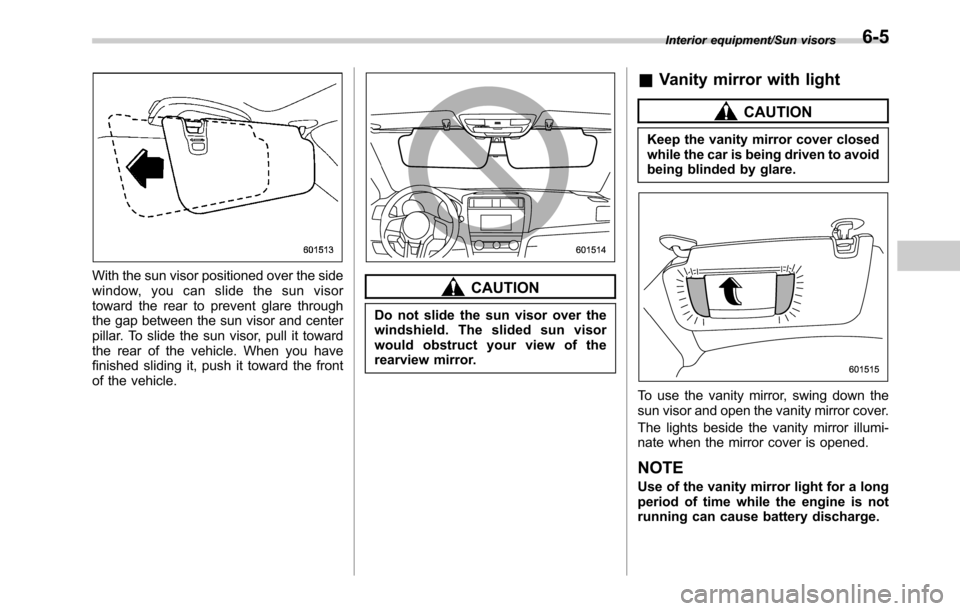
With the sun visor positioned over the side
window, you can slide the sun visor
toward the rear to prevent glare through
the gap between the sun visor and center
pillar. To slide the sun visor, pull it toward
the rear of the vehicle. When you have
finished sliding it, push it toward the front
of the vehicle.CAUTION
Do not slide the sun visor over the
windshield. The slided sun visor
would obstruct your view of the
rearview mirror.
&Vanity mirror with light
CAUTION
Keep the vanity mirror cover closed
while the car is being driven to avoid
being blinded by glare.
To use the vanity mirror, swing down the
sun visor and open the vanity mirror cover.
The lights beside the vanity mirror illumi-
nate when the mirror cover is opened.
NOTE
Use of the vanity mirror light for a long
period of time while the engine is not
running can cause battery discharge.
Interior equipment/Sun visors6-5