front SUBARU OUTBACK 2016 6.G Workshop Manual
[x] Cancel search | Manufacturer: SUBARU, Model Year: 2016, Model line: OUTBACK, Model: SUBARU OUTBACK 2016 6.GPages: 572, PDF Size: 21.79 MB
Page 98 of 572
Seat, seatbelt and SRS airbags/*SRS airbag (Supplemental Restraint System airbag)
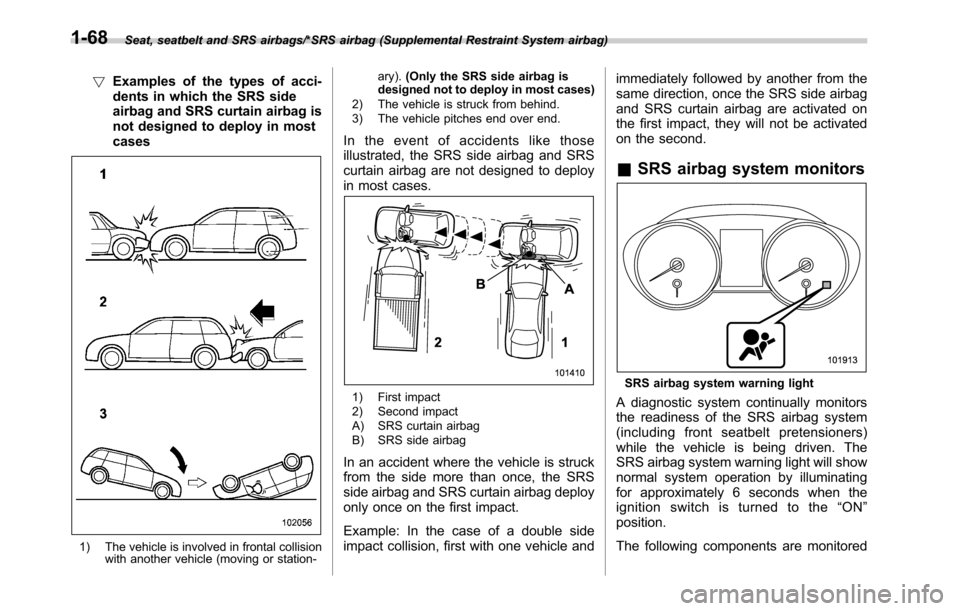
!Examples of the types of acci-
dents in which the SRS side
airbag and SRS curtain airbag is
not designed to deploy in most
cases
1) The vehicle is involved in frontal collision
with another vehicle (moving or station-ary).(Only the SRS side airbag is
designed not to deploy in most cases)
2) The vehicle is struck from behind.
3) The vehicle pitches end over end.
In the event of accidents like those
illustrated, the SRS side airbag and SRS
curtain airbag are not designed to deploy
in most cases.
1) First impact
2) Second impact
A) SRS curtain airbag
B) SRS side airbag
In an accident where the vehicle is struck
from the side more than once, the SRS
side airbag and SRS curtain airbag deploy
only once on the first impact.
Example: In the case of a double side
impact collision, first with one vehicle andimmediately followed by another from the
same direction, once the SRS side airbag
and SRS curtain airbag are activated on
the first impact, they will not be activated
on the second.
&SRS airbag system monitors
SRS airbag system warning light
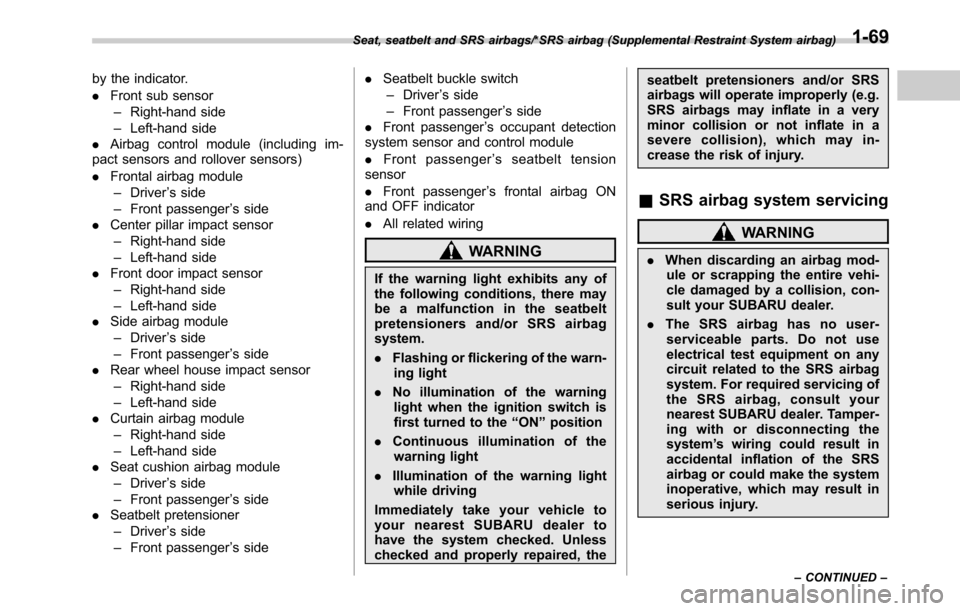
A diagnostic system continually monitors
the readiness of the SRS airbag system
(including front seatbelt pretensioners)
while the vehicle is being driven. The
SRS airbag system warning light will show
normal system operation by illuminating
for approximately 6 seconds when the
ignition switch is turned to the“ON”
position.
The following components are monitored
1-68
Page 99 of 572
by the indicator.
.Front sub sensor
–Right-hand side
–Left-hand side
.Airbag control module (including im-
pact sensors and rollover sensors)
.Frontal airbag module
–Driver’s side
–Front passenger’s side
.Center pillar impact sensor
–Right-hand side
–Left-hand side
.Front door impact sensor
–Right-hand side
–Left-hand side
.Side airbag module
–Driver’s side
–Front passenger’s side
.Rear wheel house impact sensor
–Right-hand side
–Left-hand side
.Curtain airbag module
–Right-hand side
–Left-hand side
.Seat cushion airbag module
–Driver’s side
–Front passenger’s side
.Seatbelt pretensioner
–Driver’s side
–Front passenger’s side.Seatbelt buckle switch
–Driver’s side
–Front passenger’s side
.Front passenger’s occupant detection
system sensor and control module
.Front passenger’s seatbelt tension
sensor
.Front passenger’s frontal airbag ON
and OFF indicator
.All related wiring
WARNING
If the warning light exhibits any of
the following conditions, there may
be a malfunction in the seatbelt
pretensioners and/or SRS airbag
system.
.Flashing or flickering of the warn-
ing light
.No illumination of the warning
light when the ignition switch is
first turned to the“ON”position
.Continuous illumination of the
warning light
.Illumination of the warning light
while driving
Immediatelytakeyourvehicleto
your nearest SUBARU dealer to
have the system checked. Unless
checked and properly repaired, theseatbelt pretensioners and/or SRS
airbags will operate improperly (e.g.
SRS airbags may inflate in a very
minor collision or not inflate in a
severe collision), which may in-
crease the risk of injury.
&SRS airbag system servicing
WARNING
.When discarding an airbag mod-
ule or scrapping the entire vehi-
cle damaged by a collision, con-
sult your SUBARU dealer.
.The SRS airbag has no user-
serviceable parts. Do not use
electrical test equipment on any
circuit related to the SRS airbag
system. For required servicing of
the SRS airbag, consult your
nearest SUBARU dealer. Tamper-
ing with or disconnecting the
system’s wiring could result in
accidental inflation of the SRS
airbag or could make the system
inoperative, which may result in
serious injury.
Seat, seatbelt and SRS airbags/*SRS airbag (Supplemental Restraint System airbag)
–CONTINUED–1-69
Page 100 of 572
Seat, seatbelt and SRS airbags/*SRS airbag (Supplemental Restraint System airbag)
CAUTION
If you need service or repair in areas
indicated in the following list, have
the work performed by an author-
ized SUBARU dealer. The SRS air-
bag control module, impact sensors
and airbag modules are stored in
these areas.
.Under the center console
.Inside each front fender
.Steering wheel and column and
nearby areas
.Top of the dashboard on front
passenger’ssideandnearby
areas
.Each front seat and nearby area
.Inside each center pillar
.Inside each front door
.In each roof side (from the front
pillar to a point over the rear seat)
.Between the rear seat cushion
and rear wheel house on each
side
.Under the rear center seat
In the event that the SRS airbag is
deployed, replacement of the system
should be performed only by an author-
ized SUBARU dealer. When the compo-nents of the SRS airbag system are
replaced, use only genuine SUBARU
parts.
NOTE
In the following cases, contact your
SUBARU dealer as soon as possible.
.The front part of the vehicle was
involved in an accident in which only
the driver’s SRS frontal airbag or both
driver’s and front passenger’sSRS
frontal airbags did not deploy.
.The pad of the steering wheel, the
cover over the front passenger’s SRS
frontal airbag, or either roof side (from
the front pillar to a point over the rear
seat) is scratched, cracked, or other-
wise damaged.
.The center pillar, front door, rear
wheel house or rear sub frame, or an
area near these parts, was involved in
an accident in which the SRS side
airbag and SRS curtain airbag did not
deploy.
.The fabric or leather of either front
seatback and seat cushion is cut,
frayed, or otherwise damaged.
.The rear part of the vehicle was
involved in an accident.
&Precautions against vehicle
modification
WARNING
.To avoid accidental activation of
the system or rendering the sys-
tem inoperative, which may re-
sult in serious injury, no modifi-
cations should be made to any
components or wiring of the SRS
airbag system.
This includes the following mod-
ifications.
–Installation of custom steering
wheels
–Attachment of additional trim
materials to the dashboard
–Installation of custom seats
–Replacement of seat fabric or
leather
–Installation of additional fabric
or leather on the front seat
–Attachment of a hands-free
microphone or any other ac-
cessory to a front pillar, a
center pillar, a rear pillar, the
windshield, a side window, an
assist grip, or any other cabin
surface that would be near a
1-70
Page 101 of 572
deploying SRS curtain airbag
–Installation of additional elec-
trical/electronic equipment
such as a mobile two-way
radio on or near the SRS
airbag system components
and/or wiring
–Modifications on or inside the
front door panels for the pur-
pose of a speaker replace-
ment or sound insulation
.The impact sensors, which detect
the pressure of an impact, are
located in the doors. Do not
modify any components of the
doors or door trims, such as the
addition of door speakers for
example. Any modifications to
the doors create a risk of the
airbag system becoming inop-
erative or unintended airbag de-
ployment.
CAUTION
Do not perform any of the following
modifications. Such modifications
can interfere with proper operation
of the SRS airbag system.
.Attachment of any equipment
(bush bar, bullbar, winches, snowplow, skid/sump plate, etc.) other
than genuine SUBARU acces-
sory parts.
.Modification of the suspension
system or front end structure.
.Installation of a tire of different
size and construction from the
tires specified on the vehicle
placard attached to the driver’s
door pillar or specified for indivi-
dual vehicle models in this Own-
er’s Manual.
.Attachment of any equipment
(side steps or side sill protectors,
etc.) other than genuine SUBARU
accessory parts to the side body.
Always consult your SUBARU dealer if
you want to install any accessory parts on
your vehicle.
Seat, seatbelt and SRS airbags/*SRS airbag (Supplemental Restraint System airbag)1-71
Page 108 of 572
Keys and doors/Door locks
Door locks
&Locking and unlocking from
the outside
NOTE
If you unlock the driver’s door with a
key (including a mechanical key) and
open the door while the alarm system
is armed, the alarm system is triggered
and the vehicle’s horn sounds. In this
case, perform any of the following
operations:
Models with“keyless access with
push-button start system”:
.Press any button on the access key
(except when the access key battery is
discharged).
.Turn the push-button ignition switch
to the“ACC”position.
.Carry the access key and perform
either of the following procedures.
–Grip the front door handle
–Press the rear gate opener button
Models without“keyless access with
push-button start system”:
.Press any button on the remote
transmitter (except when the transmit-
ter battery is discharged).
.Insert the key into the ignition
switch and turn the ignition switch tothe“ON”position.
For details about the alarm system,
refer to“Alarm system”F2-28.
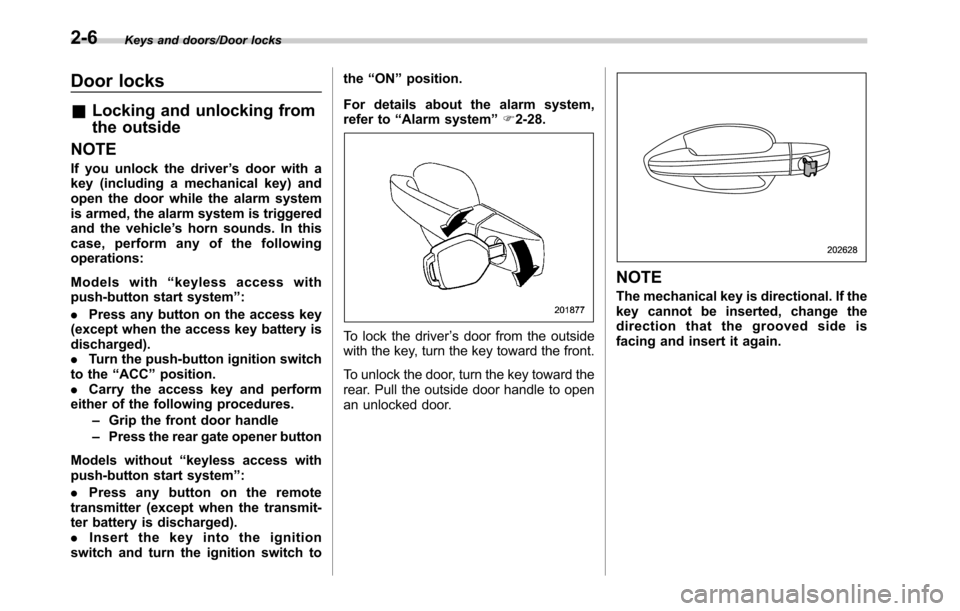
To lock the driver’s door from the outside
with the key, turn the key toward the front.
To unlock the door, turn the key toward the
rear. Pull the outside door handle to open
an unlocked door.
NOTE
The mechanical key is directional. If the
key cannot be inserted, change the
direction that the grooved side is
facing and insert it again.
2-6
Page 109 of 572
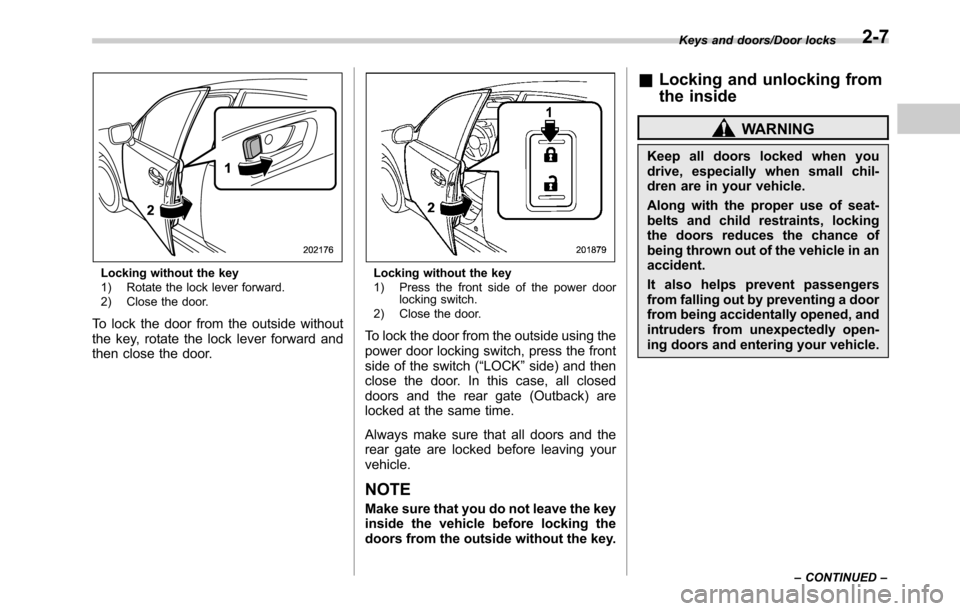
Locking without the key
1) Rotate the lock lever forward.
2) Close the door.
To lock the door from the outside without
the key, rotate the lock lever forward and
then close the door.
Locking without the key
1) Press the front side of the power door
locking switch.
2) Close the door.
To lock the door from the outside using the
power door locking switch, press the front
side of the switch (“LOCK”side) and then
close the door. In this case, all closed
doors and the rear gate (Outback) are
locked at the same time.
Always make sure that all doors and the
rear gate are locked before leaving your
vehicle.
NOTE
Make sure that you do not leave the key
inside the vehicle before locking the
doors from the outside without the key.
&Locking and unlocking from
the inside
WARNING
Keep all doors locked when you
drive, especially when small chil-
dren are in your vehicle.
Along with the proper use of seat-
belts and child restraints, locking
the doors reduces the chance of
being thrown out of the vehicle in an
accident.
It also helps prevent passengers
from falling out by preventing a door
from being accidentally opened, and
intruders from unexpectedly open-
ing doors and entering your vehicle.
Keys and doors/Door locks
–CONTINUED–2-7
Page 111 of 572
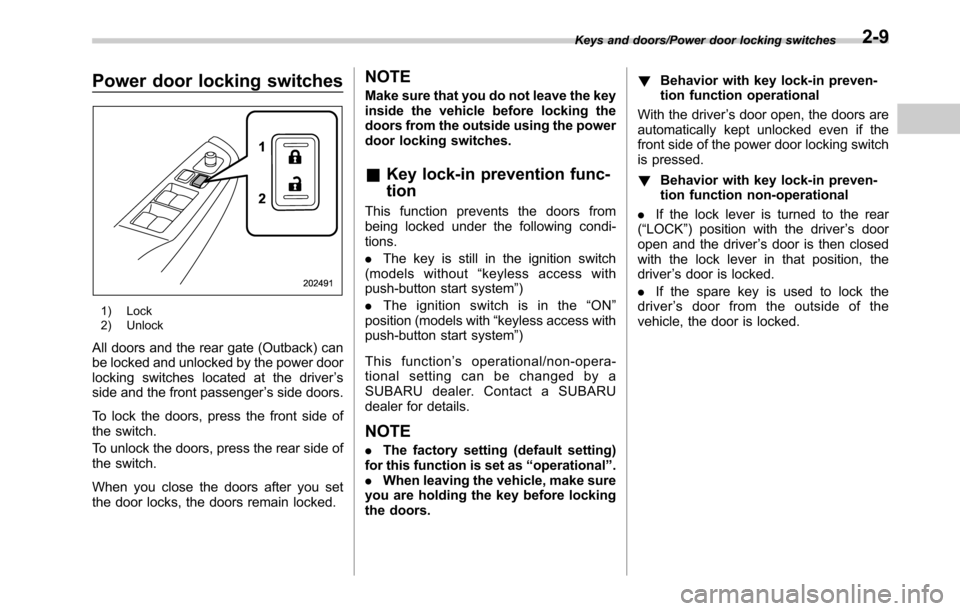
Power door locking switches
1) Lock
2) Unlock
All doors and the rear gate (Outback) can
be locked and unlocked by the power door
locking switches located at the driver’s
side and the front passenger’s side doors.
To lock the doors, press the front side of
the switch.
To unlock the doors, press the rear side of
the switch.
When you close the doors after you set
the door locks, the doors remain locked.
NOTE
Make sure that you do not leave the key
inside the vehicle before locking the
doors from the outside using the power
door locking switches.
&Key lock-in prevention func-
tion
This function prevents the doors from
being locked under the following condi-
tions.
.The key is still in the ignition switch
(models without“keyless access with
push-button start system”)
.Theignitionswitchisinthe“ON”
position (models with“keyless access with
push-button start system”)
This function’s operational/non-opera-
tional setting can be changed by a
SUBARU dealer. Contact a SUBARU
dealer for details.
NOTE
.The factory setting (default setting)
for this function is set as“operational”.
.When leaving the vehicle, make sure
you are holding the key before locking
the doors.!Behavior with key lock-in preven-
tion function operational
With the driver’s door open, the doors are
automatically kept unlocked even if the
front side of the power door locking switch
is pressed.
!Behavior with key lock-in preven-
tion function non-operational
.If the lock lever is turned to the rear
(“LOCK”) position with the driver’s door
open and the driver’s door is then closed
with the lock lever in that position, the
driver’s door is locked.
.If the spare key is used to lock the
driver’s door from the outside of the
vehicle, the door is locked.
Keys and doors/Power door locking switches2-9
Page 116 of 572
Keys and doors/Keyless access with push–button start system
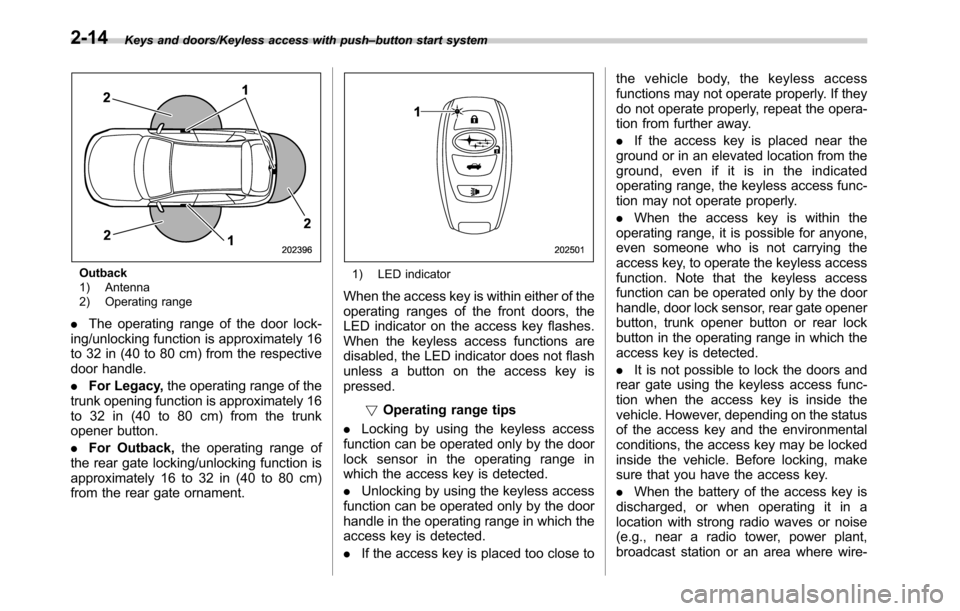
Outback
1) Antenna
2) Operating range
.The operating range of the door lock-
ing/unlocking function is approximately 16
to 32 in (40 to 80 cm) from the respective
door handle.
.For Legacy,the operating range of the
trunk opening function is approximately 16
to 32 in (40 to 80 cm) from the trunk
opener button.
.For Outback,the operating range of
the rear gate locking/unlocking function is
approximately 16 to 32 in (40 to 80 cm)
from the rear gate ornament.
1) LED indicator
When the access key is within either of the
operating ranges of the front doors, the
LED indicator on the access key flashes.
When the keyless access functions are
disabled, the LED indicator does not flash
unless a button on the access key is
pressed.
!Operating range tips
.Locking by using the keyless access
function can be operated only by the door
lock sensor in the operating range in
which the access key is detected.
.Unlocking by using the keyless access
function can be operated only by the door
handle in the operating range in which the
access key is detected.
.If the access key is placed too close tothe vehicle body, the keyless access
functions may not operate properly. If they
do not operate properly, repeat the opera-
tion from further away.
.If the access key is placed near the
ground or in an elevated location from the
ground, even if it is in the indicated
operating range, the keyless access func-
tion may not operate properly.
.When the access key is within the
operating range, it is possible for anyone,
even someone who is not carrying the
access key, to operate the keyless access
function. Note that the keyless access
function can be operated only by the door
handle, door lock sensor, rear gate opener
button, trunk opener button or rear lock
button in the operating range in which the
access key is detected.
.It is not possible to lock the doors and
rear gate using the keyless access func-
tion when the access key is inside the
vehicle. However, depending on the status
of the access key and the environmental
conditions, the access key may be locked
inside the vehicle. Before locking, make
sure that you have the access key.
.When the battery of the access key is
discharged, or when operating it in a
location with strong radio waves or noise
(e.g., near a radio tower, power plant,
broadcast station or an area where wire-
2-14
Page 117 of 572

less equipment is used), or while talking
on a cell phone, the operating ranges may
be reduced, or the keyless access func-
tion may not operate.
In such a case, perform the procedure
described in“Locking and unlocking”F9-
18.
.When an access key is in the operating
range, if the door handle becomes wet
due to exposure to a significant amount of
water when the vehicle is washed or
during heavy rain, the doors may be
locked or unlocked.
.The keyless access function may not
operate properly depending on the status
of the access key and the radio wave
conditions around the vehicle. In such a
case, perform the procedure described in
“Locking and unlocking”F9-18.
!How to use keyless access func-
tions
!Keyless access function tips
.When you lock the doors and rear gate
using the keyless access function, turn the
push-button ignition switch off. It is not
possible to lock the doors and rear gate
using the keyless access function when
the push-button ignition switch is on the
“ACC”or“ON”position. Refer to“Switch-
ing power”F3-6.
.If the door handle is gripped with agloved hand, the door lock may not be
released.
.If the door lock sensor is touched three
times or more repeatedly, the system will
ignore the sensor operation.
.When performing the locking proce-
dure too quickly, locking may not have
been completed. After locking the doors, it
is recommended to pull the REAR door
handles to confirm that the doors have
been locked.
.It is possible to lock the doors even
when one of the doors is open. After
performing the locking procedure, close
the opened door or rear gate to lock it.
.Within 3 seconds after locking the
doors and the rear gate by using the
keyless access function, it is not possible
to unlock doors and/or the rear gate by
using the keyless access function.
.When locking, be sure to carry the
access key to prevent locking the access
key in the vehicle.!Unlocking
Carry the access key, and grip the door
handle.
.When the driver’s door handle is
gripped, only the driver’s door will be
unlocked.
.When the front passenger’s door han-
dle is gripped, all doors (for Outback,
including the rear gate) will be unlocked.
Also, an electronic chirp will sound twice
and the hazard warning flashers will flash
twice.
Keys and doors/Keyless access with push–button start system
–CONTINUED–2-15
Page 119 of 572
perform the unlocking operation once
first. You can then touch the door lock
sensor to lock the doors.
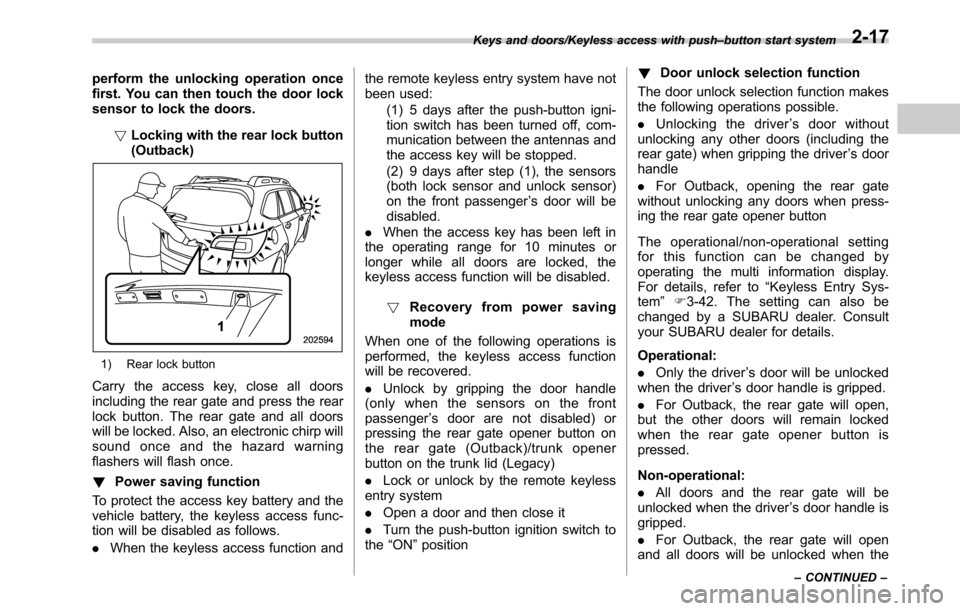
!Locking with the rear lock button
(Outback)
1) Rear lock button
Carry the access key, close all doors
including the rear gate and press the rear
lock button. The rear gate and all doors
will be locked. Also, an electronic chirp will
sound once and the hazard warning
flashers will flash once.
!Power saving function
To protect the access key battery and the
vehicle battery, the keyless access func-
tion will be disabled as follows.
.When the keyless access function andthe remote keyless entry system have not
been used:
(1) 5 days after the push-button igni-
tion switch has been turned off, com-
munication between the antennas and
the access key will be stopped.
(2) 9 days after step (1), the sensors
(both lock sensor and unlock sensor)
on the front passenger’s door will be
disabled.
.When the access key has been left in
the operating range for 10 minutes or
longer while all doors are locked, the
keyless access function will be disabled.
!Recovery from power saving
mode
When one of the following operations is
performed, the keyless access function
will be recovered.
.Unlock by gripping the door handle
(only when the sensors on the front
passenger’s door are not disabled) or
pressing the rear gate opener button on
the rear gate (Outback)/trunk opener
button on the trunk lid (Legacy)
.Lock or unlock by the remote keyless
entry system
.Open a door and then close it
.Turn the push-button ignition switch to
the“ON”position!Door unlock selection function
The door unlock selection function makes
the following operations possible.
.Unlocking the driver’s door without
unlocking any other doors (including the
rear gate) when gripping the driver’s door
handle
.For Outback, opening the rear gate
without unlocking any doors when press-
ing the rear gate opener button
The operational/non-operational setting
for this function can be changed by
operating the multi information display.
For details, refer to“Keyless Entry Sys-
tem”F3-42. The setting can also be
changed by a SUBARU dealer. Consult
your SUBARU dealer for details.
Operational:
.Only the driver’s door will be unlocked
when the driver’s door handle is gripped.
.For Outback, the rear gate will open,
but the other doors will remain locked
when the rear gate opener button is
pressed.
Non-operational:
.All doors and the rear gate will be
unlocked when the driver’s door handle is
gripped.
.For Outback, the rear gate will open
and all doors will be unlocked when the
Keys and doors/Keyless access with push–button start system
–CONTINUED–2-17