warning TOYOTA AVENSIS 2015 Owners Manual
[x] Cancel search | Manufacturer: TOYOTA, Model Year: 2015, Model line: AVENSIS, Model: TOYOTA AVENSIS 2015Pages: 648, PDF Size: 39.64 MB
Page 301 of 648
3014-6. Using the driving support systems
4
Driving
AVENSIS_OM_OM20C20E_(EE)
WARNING
Any of the following conditions may result in an accident which could cause
death or serious injury:
■ The ABS does not operate effectively when
●The limits of tire gripping performance have been exceeded (such as
excessively worn tires on a snow covered road).
● The vehicle hydroplanes while driving at high speed on wet or slick roads.
■ Stopping distance when the ABS is operating may exceed that of nor-
mal conditions
The ABS is not designed to shorten t he vehicle’s stopping distance. Always
maintain a safe distance from the vehicle in front of you, especially in the
following situations:
● When driving on dirt, gravel or snow-covered roads
● When driving with tire chains
● When driving over bumps in the road
● When driving over roads with potholes or uneven surfaces
■ TRC may not operate effectively when
Directional control and power may not be achievable while driving on slip-
pery road surfaces, even if the TRC system is operating.
Drive the vehicle carefully in conditions where stability and power may be
lost.
■ Hill- start assist control does not operate effectively when
●Do not overly rely on the hill-start assist control. The hill-start assist control
may not operate effectively on steep inclines and roads covered with ice.
● Unlike the parking brake, hill-start assist control is not intended to hold the
vehicle stationary for an extended period of time. Do not attempt to use
hill-start assist control to hold the vehicle on an incline, as doing so may
lead to an accident.
■ When the VSC is activated
The slip indicator light flashes. Always drive carefully.
Reckless driving may cause an accident. Exercise particular care when the
indicator light flashes.
■ When the TRC/VSC systems are turned off
Be especially careful and drive at a speed appropriate to the road condi-
tions. As these are systems to help ensure vehicle stability and driving
force, do not turn the TRC/VSC systems off unless necessary.
AVENSIS_OM_OM20C20E_(EE).book Page 301 Thursday, January 29, 2015 1:47 PM
Page 302 of 648
3024-6. Using the driving support systems
AVENSIS_OM_OM20C20E_(EE)
WARNING
■ Replacing tires
Make sure that all tires are of the specified size, brand, tread pattern and
total load capacity. In addition, make sure that the tires are inflated to the
recommended tire inflation pressure level.
The ABS, TRC and VSC systems will not function correctly if different tires
are installed on the vehicle.
Contact any authorized Toyota dealer or repairer, or another duly qualified
and equipped professional for further in formation when replacing tires or
wheels.
■ Handling of tires and suspension
Using tires with any kind of problem or modifying the suspension will affect
the driving assist systems, and may cause the system to malfunction.
AVENSIS_OM_OM20C20E_(EE).book Page 302 Thursday, January 29, 2015 1:47 PM
Page 305 of 648
3054-7. Driving tips
4
Driving
AVENSIS_OM_OM20C20E_(EE)
WARNING
■ Driving with snow tires
Observe the following precautions to reduce the risk of accidents.
Failing to do so may result in a loss of vehicle control and cause death or
serious injury.
●Use tires of the size specified for your vehicle.
● Maintain the recommended level of tire inflation pressure.
● Do not drive at speeds in excess of the speed limit or the speed limit spec-
ified for the snow tires being used.
● Snow tires should be installed on all wheels.
■ Driving with tire chains
Observe the following precautions to reduce the risk of accidents.
Failing to do so may result in the vehicle being unable to be driven safely,
and may cause death or serious injury.
●Do not drive in excess of the speed limit specified for the tire chains being
used or 50 km/h (30 mph), whichever is lower.
● Avoid driving on bumpy road surfaces or over potholes.
● Avoid sudden acceleration, abrupt steering, sudden braking and shifting
operations that cause sudden engine braking.
● Slow down sufficiently before entering a curve to ensure that vehicle con-
trol is maintained.
NOTICE
■ Repairing or replacing snow tires (vehicles with the tire pressure warn-
ing system)
Request repairs or replacement of snow tires from Toyota dealers or legiti-
mate tire retailers.
This is because the removal and attachment of snow tires affects the opera-
tion of the tire pressure warning valves and transmitters.
■ Fitting tire chains (vehicles with the tire pressure warning system)
The tire pressure warning valves and transmitters may not function correctly
when tire chains are fitted.
AVENSIS_OM_OM20C20E_(EE).book Page 305 Thursday, January 29, 2015 1:47 PM
Page 310 of 648
3105-1. Basic Operations
AVENSIS_OM_OM20C20E_(EE)
■Using cellular phones
Interference may be heard through the audio system’s speakers if a cellular
phone is being used inside or close to the vehicle while the audio system is
operating.
WARNING
■ Certification for the CD player
This product is a class I laser product.
●Do not open the cover of the player or attempt to repair the unit by your-
self.
Refer servicing to qualified personnel.
● Laser power: No hazardous
NOTICE
■ To prevent battery discharge
Do not leave the audio system on longer than necessary when the engine is
stopped.
■ To avoid damaging the audio system
Take care not to spill drinks or other fluids over the audio system.
AVENSIS_OM_OM20C20E_(EE).book Page 310 Thursday, January 29, 2015 1:47 PM
Page 311 of 648
311
5
5-1. Basic Operations
Audio system
AVENSIS_OM_OM20C20E_(EE)
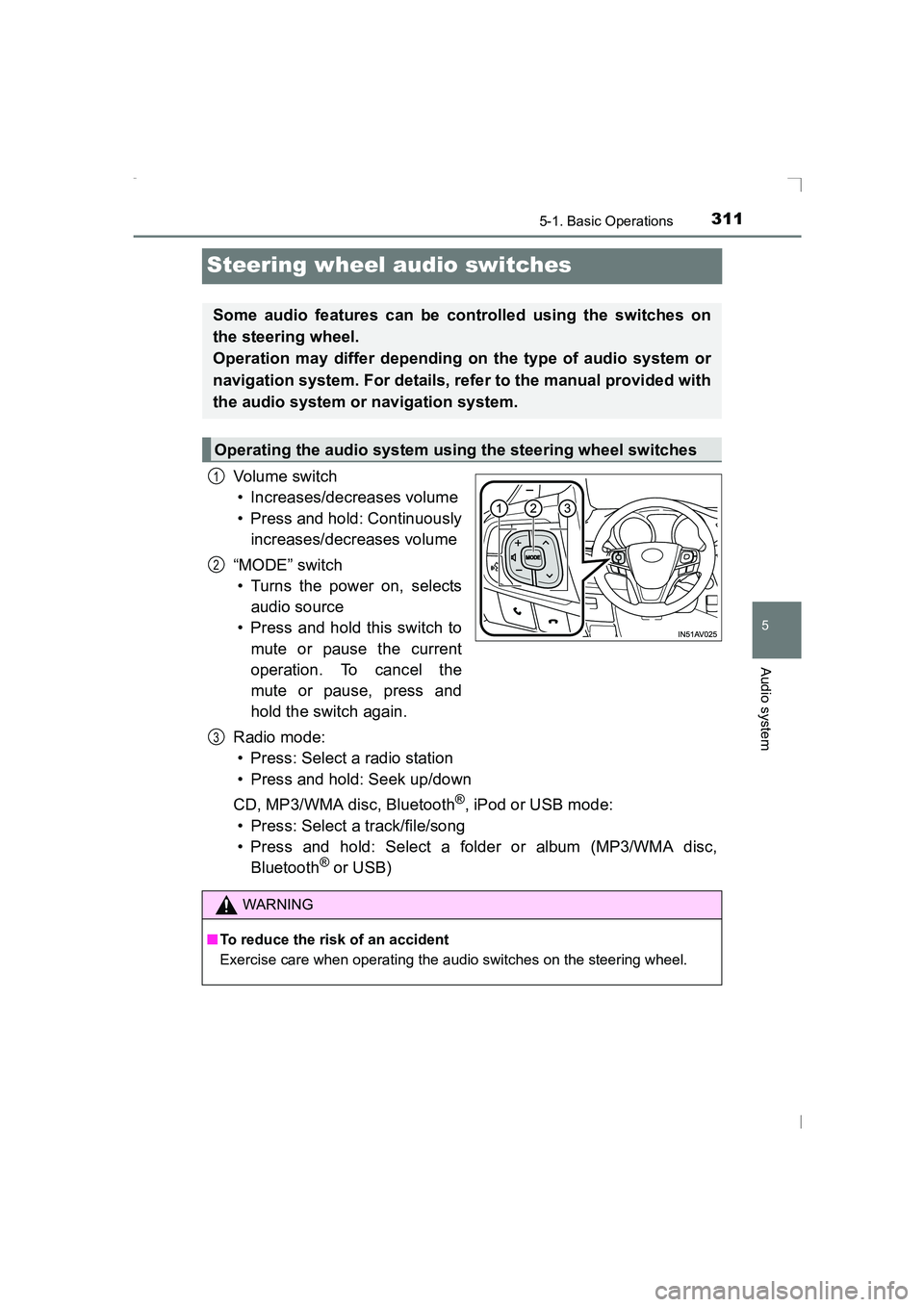
Steering wheel audio switches
Vo lu m e swi tc h• Increases/decreases volume
• Press and hold: Continuously increases/decreases volume
“MODE” switch • Turns the power on, selects
audio source
• Press and hold this switch to
mute or pause the current
operation. To cancel the
mute or pause, press and
hold the switch again.
Radio mode: • Press: Select a radio station
• Press and hold: Seek up/down
CD, MP3/WMA disc, Bluetooth
®, iPod or USB mode:
• Press: Select a track/file/song
• Press and hold: Select a folder or album (MP3/WMA disc, Bluetooth
® or USB)
Some audio features can be controlled using the switches on
the steering wheel.
Operation may differ depending on the type of audio system or
navigation system. For details, refer to the manual provided with
the audio system or navigation system.
Operating the audio system using the steering wheel switches
1
2
WARNING
■ To reduce the risk of an accident
Exercise care when operating the audio switches on the steering wheel.
3
AVENSIS_OM_OM20C20E_(EE).book Page 311 Thursday, January 29, 2015 1:47 PM
Page 312 of 648
3125-1. Basic Operations
AVENSIS_OM_OM20C20E_(EE)
AUX port/USB por t∗
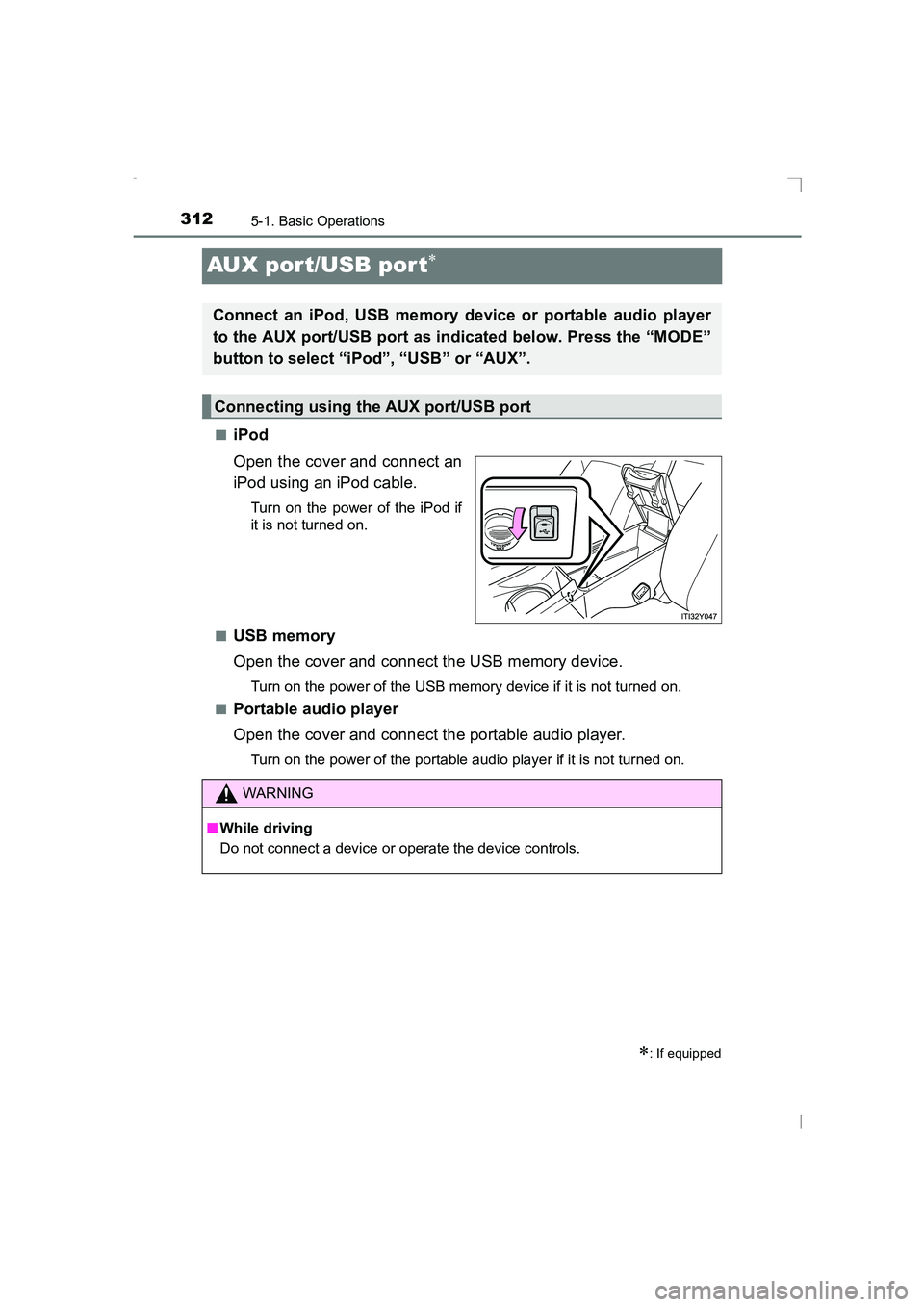
■iPod
Open the cover and connect an
iPod using an iPod cable.
Turn on the power of the iPod if
it is not turned on.
■
USB memory
Open the cover and connect the USB memory device.
Turn on the power of the USB memory device if it is not turned on.
■
Portable audio player
Open the cover and connect the portable audio player.
Turn on the power of the portable audio player if it is not turned on.
∗: If equipped
Connect an iPod, USB memory device or portable audio player
to the AUX port/USB port as indicated below. Press the “MODE”
button to select “iPod”, “USB” or “AUX”.
Connecting using the AUX port/USB port
WARNING
■ While driving
Do not connect a device or operate the device controls.
AVENSIS_OM_OM20C20E_(EE).book Page 312 Thursday, January 29, 2015 1:47 PM
Page 340 of 648
3405-5. Using an external device
AVENSIS_OM_OM20C20E_(EE)
WARNING
■ Caution while driving
Do not connect iPod or operate the controls.
Doing so may cause an accident, resulting in death or serious injury.
NOTICE
■To prevent damage to iPod or its terminal
●Do not leave iPod in the vehicle. The temperature inside the vehicle may
become high.
● Do not push down on or apply unnecessary pressure to the iPod while it is
connected.
● Do not insert foreign objects into the port.
AVENSIS_OM_OM20C20E_(EE).book Page 340 Thursday, January 29, 2015 1:47 PM
Page 348 of 648
3485-5. Using an external device
AVENSIS_OM_OM20C20E_(EE)●
MP3 and WMA playback
• When a device containing MP3 or WMA files is connected, all files in the
USB memory are checked. Once the file check is finished, the first MP3
or WMA file is played. To make the file check finish more quickly, we rec-
ommend that you do not include any files other than MP3 or WMA files or
create any unnecessary folders.
• When the USB memory is connected and the audio source is changed to USB memory mode, the USB memory will start playing the first file in the
first folder.
If the same device is removed and reinserted (and the contents have not
been changed), the USB memory will resume play from the same point in
which it was last used.
● Extensions
If the file extensions .mp3 and .wma are used for files other than MP3 and
WMA files, they will be skipped (not played).
● Playback
• To play MP3 files with steady s ound quality, we recommend a fixed bit
rate of at least 128 kbps and a sampling frequency of 44.1 kHz.
• There is a wide variety of freeware and other encoding software for MP3
and WMA files on the market, and depending on the status of the encod-
ing and the file format, poor sound quality or noise at the start of playback
may result.
In some cases, playback may not be possible at all.
• Microsoft, Windows, and Windows Media are registered trademarks of Microsoft Corporation in the U.S.A. and other countries.
WARNING
■ Caution while driving
Do not connect USB memory or operate the controls.
Doing so may cause an accident, resulting in death or serious injury.
NOTICE
■To prevent damage to USB memory or its terminal
●Do not leave USB memory in the vehicle. The temperature inside the vehi-
cle may become high.
● Do not push down on or apply unnecessary pressure to the USB memory
while it is connected.
● Do not insert foreign objects into the port.
AVENSIS_OM_OM20C20E_(EE).book Page 348 Thursday, January 29, 2015 1:47 PM
Page 379 of 648
3795-10. Bluetooth®
5
Audio system
AVENSIS_OM_OM20C20E_(EE)
WARNING
■ Caution while driving
Observe the following precautions to avoid an accident that could result in
death or serious injuries.
●Do not use a cellular phone.
● Do not connect Bluetooth
® device or operate the controls.
■ Caution regarding interference with electronic devices
●Your audio unit is fitted with Bluetooth
® antennas. People with implantable
cardiac pacemakers, cardiac resynchronization therapy-pacemakers or
implantable cardioverter defibrillators should maintain a reasonable dis-
tance between themselves and the Bluetooth
® antennas.
The radio waves may affect the operation of such devices.
● Before using Bluetooth
® devices, users of any electrical medical device
other than implantable cardiac pacemakers, cardiac resynchronization
therapy-pacemakers or implantable cardioverter defibrillators should con-
sult the manufacturer of the device for information about its operation
under the influence of radio waves. Radio waves could have unexpected
effects on the operation of such medical devices.
NOTICE
■ To prevent damage to Bluetooth® device
Do not leave Bluetooth® device in the vehicle. The temperature inside the
vehicle may become high, resulting in damage to the device.
AVENSIS_OM_OM20C20E_(EE).book Page 379 Thursday, January 29, 2015 1:47 PM
Page 387 of 648
3876-1. Using the air conditioning system and defogger
AVENSIS_OM_OM20C20E_(EE)
6
Interior features
Press the Stop & Start cancel switch to restart the engine.
■ Air conditioning filter
→ P. 480
WARNING
■ To prevent the windshield from fogging up
●Do not use
during cool air operation in extremely humid
weather. The difference between the temperature of the outside air and
that of the windshield can cause the outer surface of the windshield to fog
up, blocking your vision.
■ To prevent burns
●Do not touch the rear view mirror surfaces when the outside rear view mir-
ror defoggers are on.
● Do not touch the glass at the lower part of the windshield or to the side of
the front pillars when the windshield wiper de-icer is on. (vehicles with
windshield wiper de-icer)
NOTICE
■ To prevent battery discharge
Do not leave the air conditioning syst em on longer than necessary when the
engine is stopped.
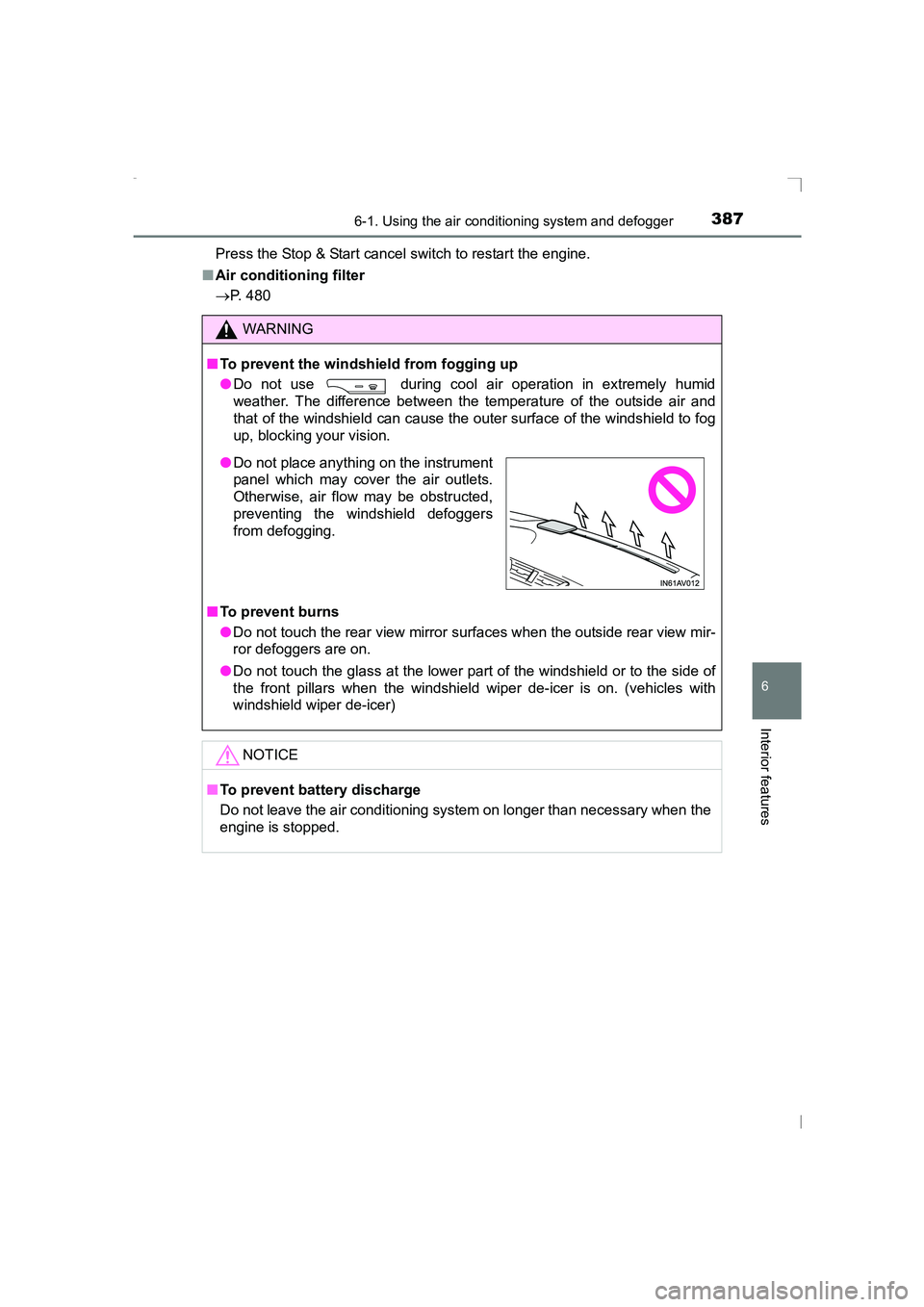
● Do not place anything on the instrument
panel which may cover the air outlets.
Otherwise, air flow may be obstructed,
preventing the windshield defoggers
from defogging.
AVENSIS_OM_OM20C20E_(EE).book Page 387 Thursday, January 29, 2015 1:47 PM