transmission TOYOTA AYGO X 2022 (in English) User Guide
[x] Cancel search | Manufacturer: TOYOTA, Model Year: 2022, Model line: AYGO X, Model: TOYOTA AYGO X 2022Pages: 494, PDF Size: 92.53 MB
Page 131 of 494
129
4
Owner's Manual_Europe_M99V08_en
4-2. Driving procedures
Driving
4-2.Driving pro cedu res
1Check that the parking brake is
set.
2 Check that the shift lever is in P
(Multidrive) or N (manual trans-
mission).
3 Firmly depress the brake pedal
(Multidrive) or clutch pedal
(manual transmission).
4 Turn the engine switch to
START to start the engine.
■If the engine does not start
The engine immobilizer system may not have been deactivated. ( P.74) Contact any authorized Toyota retailer or Toyota
authorized repairer, or any reliable repairer.
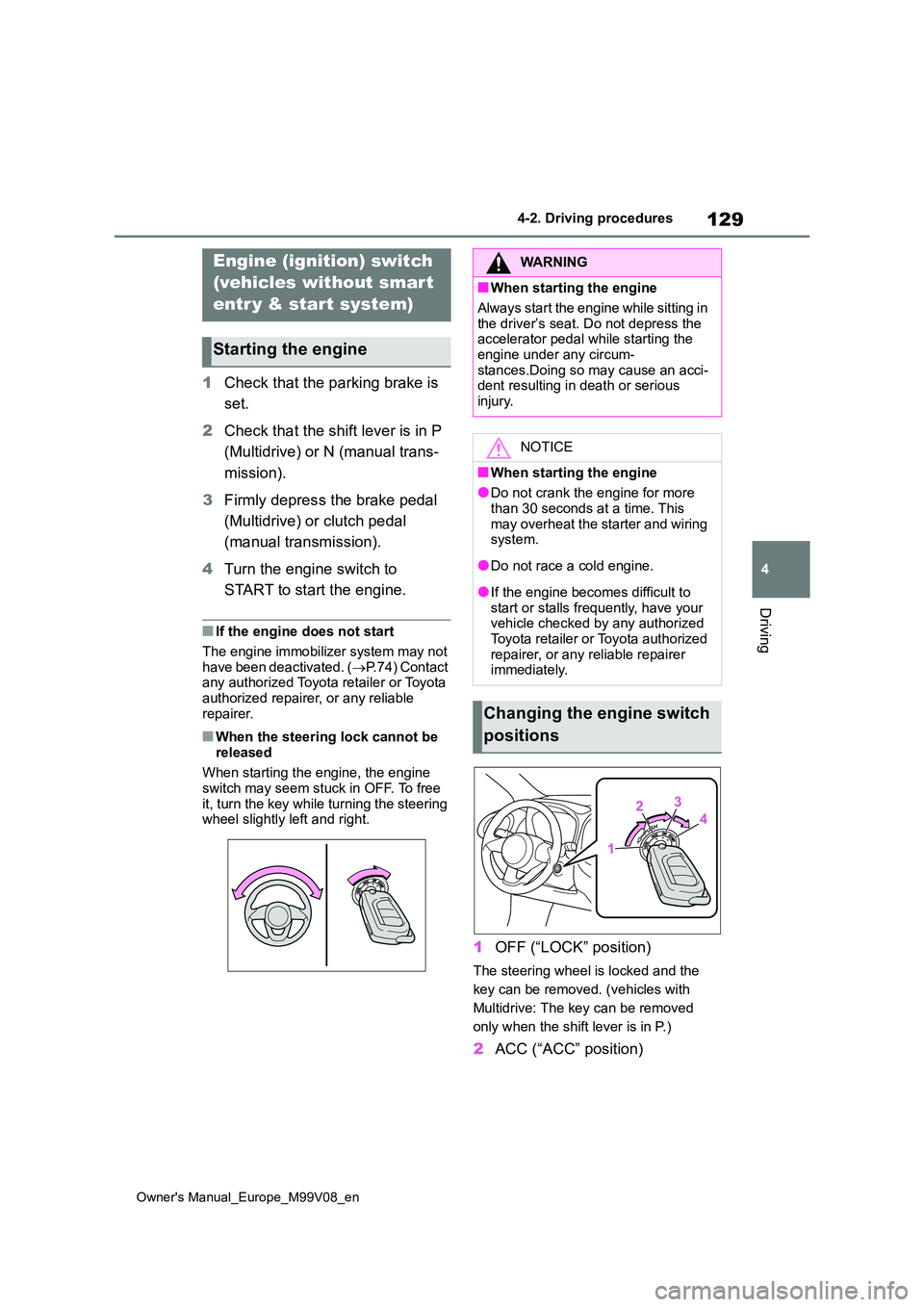
■When the steering lock cannot be released
When starting the engine, the engine switch may seem stuck in OFF. To free
it, turn the key while turning the steering wheel slightly left and right.
1 OFF (“LOCK” position)
The steering wheel is locked and the
key can be removed. (vehicles with
Multidrive: The key can be removed
only when the shift lever is in P.)
2 ACC (“ACC” position)
Engine (ignition) switch
(vehicles without smart
entr y & start system)
Starting the engine
WARNING
■When starting the engine
Always start the engine while sitting in
the driver’s seat. Do not depress the accelerator pedal while starting the engine under any circum-
stances.Doing so may cause an acci- dent resulting in death or serious injury.
NOTICE
■When starting the engine
●Do not crank the engine for more
than 30 seconds at a time. This may overheat the starter and wiring system.
●Do not race a cold engine.
●If the engine becomes difficult to start or stalls frequently, have your vehicle checked by any authorized
Toyota retailer or Toyota authorized repairer, or any reliable repairer immediately.
Changing the engine switch
positions
Page 132 of 494
130
Owner's Manual_Europe_M99V08_en
4-2. Driving procedures
Some electrical components such as
the audio system can be used.
3 ON (“ON” position)
All electrical components can be used.
4START (“START” position)
For starting the engine.
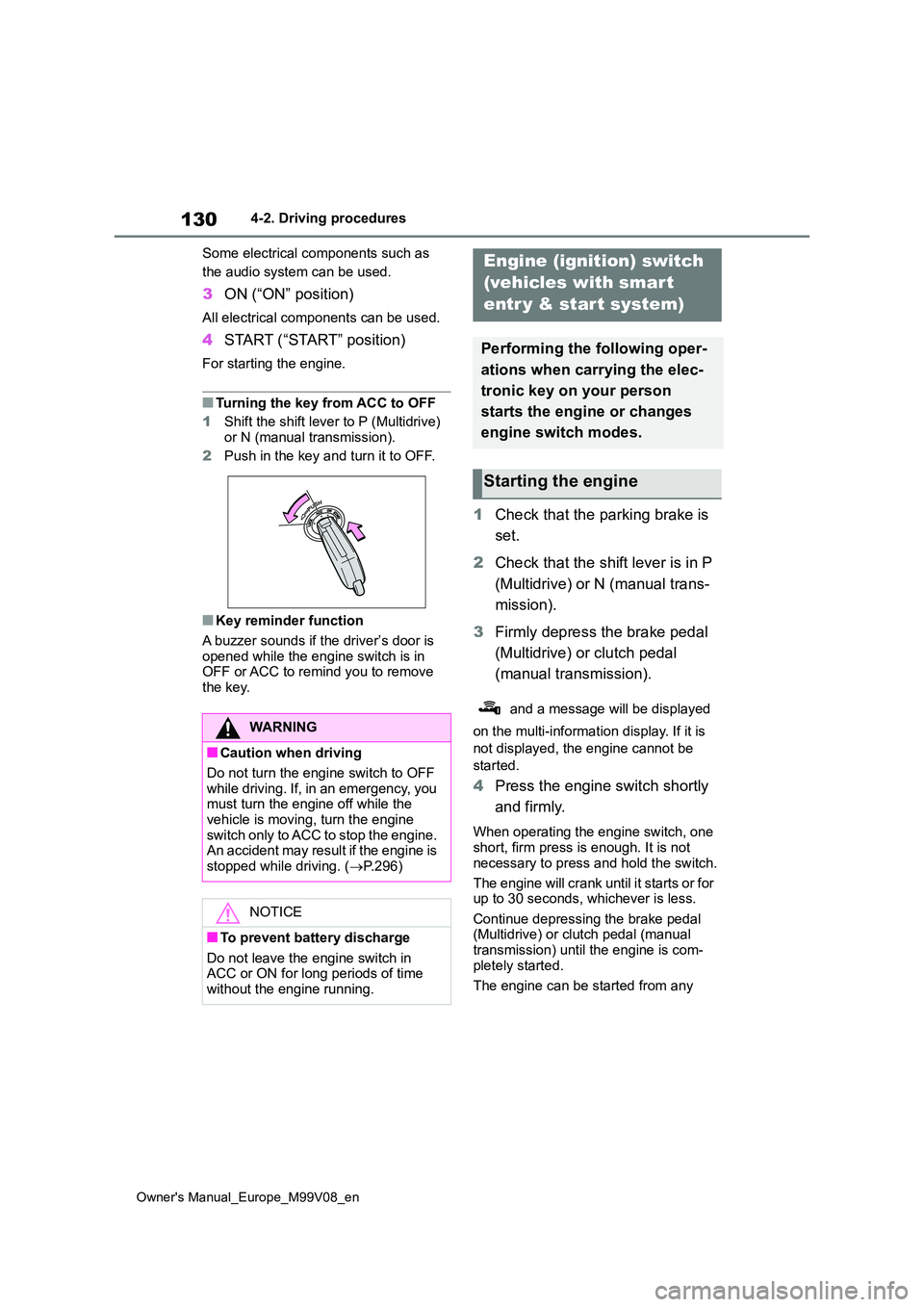
■Turning the key from ACC to OFF
1 Shift the shift lever to P (Multidrive)
or N (manual transmission).
2 Push in the key and turn it to OFF.
■Key reminder function
A buzzer sounds if the driver’s door is opened while the engine switch is in OFF or ACC to remind you to remove
the key.
1 Check that the parking brake is
set.
2 Check that the shift lever is in P
(Multidrive) or N (manual trans-
mission).
3 Firmly depress the brake pedal
(Multidrive) or clutch pedal
(manual transmission).
and a message will be displayed
on the multi-information display. If it is
not displayed, the engine cannot be
started.
4 Press the engine switch shortly
and firmly.
When operating the engine switch, one short, firm press is enough. It is not
necessary to press and hold the switch.
The engine will crank until it starts or for up to 30 seconds, whichever is less.
Continue depressing the brake pedal (Multidrive) or clutch pedal (manual transmission) until the engine is com-
pletely started.
The engine can be started from any
WARNING
■Caution when driving
Do not turn the engine switch to OFF while driving. If, in an emergency, you must turn the engine off while the
vehicle is moving, turn the engine switch only to ACC to stop the engine. An accident may result if the engine is
stopped while driving. ( P.296)
NOTICE
■To prevent battery discharge
Do not leave the engine switch in ACC or ON for long periods of time without the engine running.
Engine (ignition) switch
(vehicles with smart
entr y & start system)
Performing the following oper-
ations when carrying the elec-
tronic key on your person
starts the engine or changes
engine switch modes.
Starting the engine
Page 134 of 494
132
Owner's Manual_Europe_M99V08_en
4-2. Driving procedures
■Customization
If the smart entry & start system has been deactivated in a customized set-ting, refer to P.334.
Multidrive
1 Stop the vehicle completely.
2 Set the parking brake (P.141),
and shift the shift lever to P.
Check the parking brake indicator is
illuminated.
3 Press the engine switch.
The engine will stop, and the meter dis- play will be extinguished.
4 Release the brake pedal and
check that “ACCESSORY” or
“IGNITION ON” is not shown on
the multi-information display.
Manual transmission
1 Stop the vehicle completely.
2 If the parking brake is in manual
mode, set the parking brake.
( P.141)
Check the parking brake indicator is illuminated.
3 Shift the shift lever to N.
( P.139)
4 Press the engine switch.
The engine will stop, and the meter dis-
play will be extinguished.
5 Release the brake pedal and
check that “ACCESSORY” or
“IGNITION ON” is not shown on
the multi-information display.
WARNING
■When starting the engine
A lwa ys st a r t t h e e ng i ne whi l e s it t in g in the driver’s seat. Do not depress the
accelerator pedal while starting the engine under any circumstances.Doing so may cause an accident
resulting in death or serious injury.
■Caution while driving
If engine failure occurs while the vehi- cle is moving, do not lock or open the doors until the vehicle reaches a safe
and complete stop. Activation of the steering lock in this circumstance may lead to an accident, resulting in death
or serious injury.
NOTICE
■When starting the engine
●Do not race a cold engine.
●If the engine becomes difficult to start or stalls frequently, have your vehicle checked by any authorized
Toyota retailer or Toyota authorized repairer, or any reliable repairer immediately.
■Symptoms indicating a malfunc-tion with the engine switch
If the engine switch seems to be oper- ating somewhat differently than usual, such as the switch sticking slightly,
there may be a malfunction. Contact any authorized Toyota retailer or Toy-ota authorized repairer, or any reliable
repairer immediately.
Stopping the engine
Page 135 of 494
133
4
Owner's Manual_Europe_M99V08_en
4-2. Driving procedures
Driving
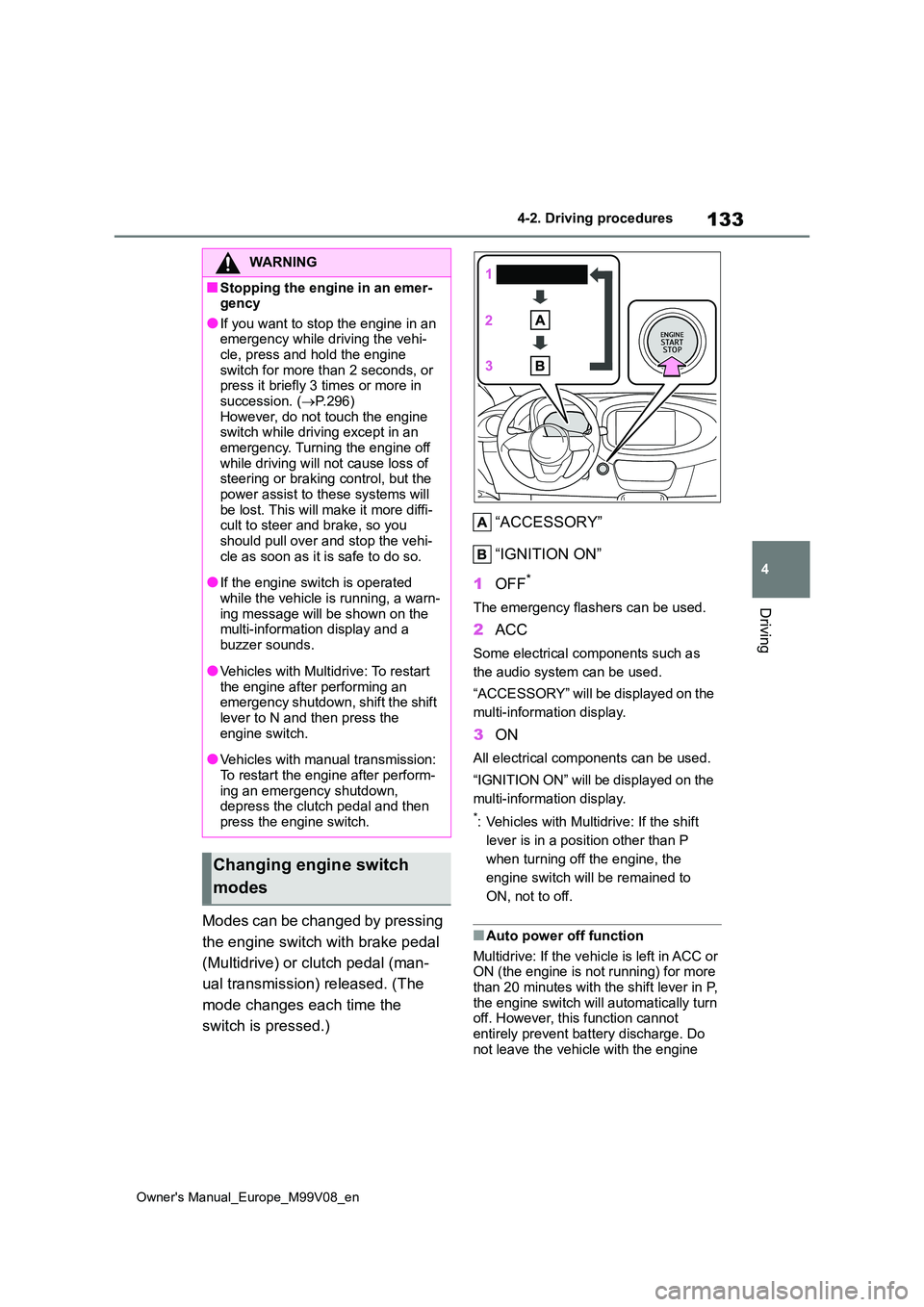
Modes can be changed by pressing
the engine switch with brake pedal
(Multidrive) or clutch pedal (man-
ual transmission) released. (The
mode changes each time the
switch is pressed.)
“ACCESSORY”
“IGNITION ON”
1 OFF*
The emergency flashers can be used.
2ACC
Some electrical components such as
the audio system can be used.
“ACCESSORY” will be displayed on the
multi-information display.
3 ON
All electrical components can be used.
“IGNITION ON” will be displayed on the
multi-information display.
*: Vehicles with Multidrive: If the shift
lever is in a position other than P
when turning off the engine, the
engine switch will be remained to
ON, not to off.
■Auto power off function
Multidrive: If the vehicle is left in ACC or ON (the engine is not running) for more than 20 minutes with the shift lever in P,
the engine switch will automatically turn off. However, this function cannot entirely prevent battery discharge. Do
not leave the vehicle with the engine
WARNING
■Stopping the engine in an emer- gency
●If you want to stop the engine in an emergency while driving the vehi-cle, press and hold the engine
switch for more than 2 seconds, or press it briefly 3 times or more in succession. ( P.296)
However, do not touch the engine switch while driving except in an emergency. Turning the engine off
while driving will not cause loss of steering or braking control, but the power assist to these systems will
be lost. This will make it more diffi- cult to steer and brake, so you should pull over and stop the vehi-
cle as soon as it is safe to do so.
●If the engine switch is operated
while the vehicle is running, a warn- ing message will be shown on the multi-information display and a
buzzer sounds.
●Vehicles with Multidrive: To restart
the engine after performing an emergency shutdown, shift the shift lever to N and then press the
engine switch.
●Vehicles with manual transmission:
To restart the engine after perform- ing an emergency shutdown, depress the clutch pedal and then
press the engine switch.
Changing engine switch
modes
Page 136 of 494
134
Owner's Manual_Europe_M99V08_en
4-2. Driving procedures
switch in ACC or ON for long periods of
time when the engine is not running.
Manual transmission: If the vehicle is left in ACC or ON (the engine is not running)
for more than 20 minutes, the engine switch will automatically turn off. How-ever, this function cannot entirely pre-
vent battery discharge. Do not leave the vehicle with the engine switch in ACC or ON for long periods of time when the
engine is not running.
If the engine is stopped with the
shift lever in a position other than P,
the engine switch will not be turned
off. Perform the following procedure
to turn the switch off:
1 Check that the parking brake is
set.
2 Shift the shift lever to P.
3 Check that “IGNITION ON” is
displayed on the multi-informa-
tion display and press the
engine switch shortly and firmly.
4 Check that “ACCESSORY” or
“IGNITION ON” on the multi-
information display is off.
NOTICE
■To prevent battery discharge
●Do not leave the engine switch in
ACC or ON for long periods of time without the engine running.
●If “ACCESSORY” or “IGNITION ON” is displayed on the multi-infor-mation display, the engine switch is
not off. Exit the vehicle after turning the engine switch off.
When stopping the engine
with the shift lever in a posi-
tion other than P (vehicles
with Multidrive)
NOTICE
■To prevent battery discharge
Do not stop the engine when the shift lever is in a position other than P. If
the engine is stopped in another shift lever position, the engine switch will
not be turned off and remained to ON. If the vehicle is left in ON, battery dis-charge may occur.
Page 137 of 494
135
4
Owner's Manual_Europe_M99V08_en
4-2. Driving procedures
Driving
*: If equipped
*: To improve fuel efficiency and reduce
noise, shift the shift lever to D for nor-
mal driving.
■To protect the Multidrive
If the Multidrive fluid temperature is
high, “Transmission Oil Temp. High Stop in a safe place and See owner’s man-ual” will be displayed on the multi-infor-
mation display and the vehicle will go into transmission protection mode auto-matically. Have the vehicle inspected by
any authorized Toyota retailer or Toyota authorized repairer, or any reliable repairer.
■Multidrive fail-safe control
The system detects malfunctioning parts targeted (all of the solenoids that per-
form the shifting function) by the On-
Board Diagnostics, and performs fail- safe mechanisms, such as restricting the shifting function or transmission ratio
control. In this event, the malfunction indicator lamp turns on.
■When driving with dynamic radar cruise control activated (if
equipped)
Even when switching the driving mode to power mode with the intent of
enabling engine braking, engine braking will not occur because dynamic radar cruise control will not be canceled.
( P.181)
■Restraining sudden start (Drive- Start Control)
P. 1 2 6
■AI-SHIFT
AI-SHIFT automatically selects the suit- able gear step according to driver per-formance and driving conditions. AI-
SHIFT automatically operates when the shift lever in D. (Shifting the shift lever to M cancels the function.)
■After recharging/reconnecting the
battery
P. 3 3 7
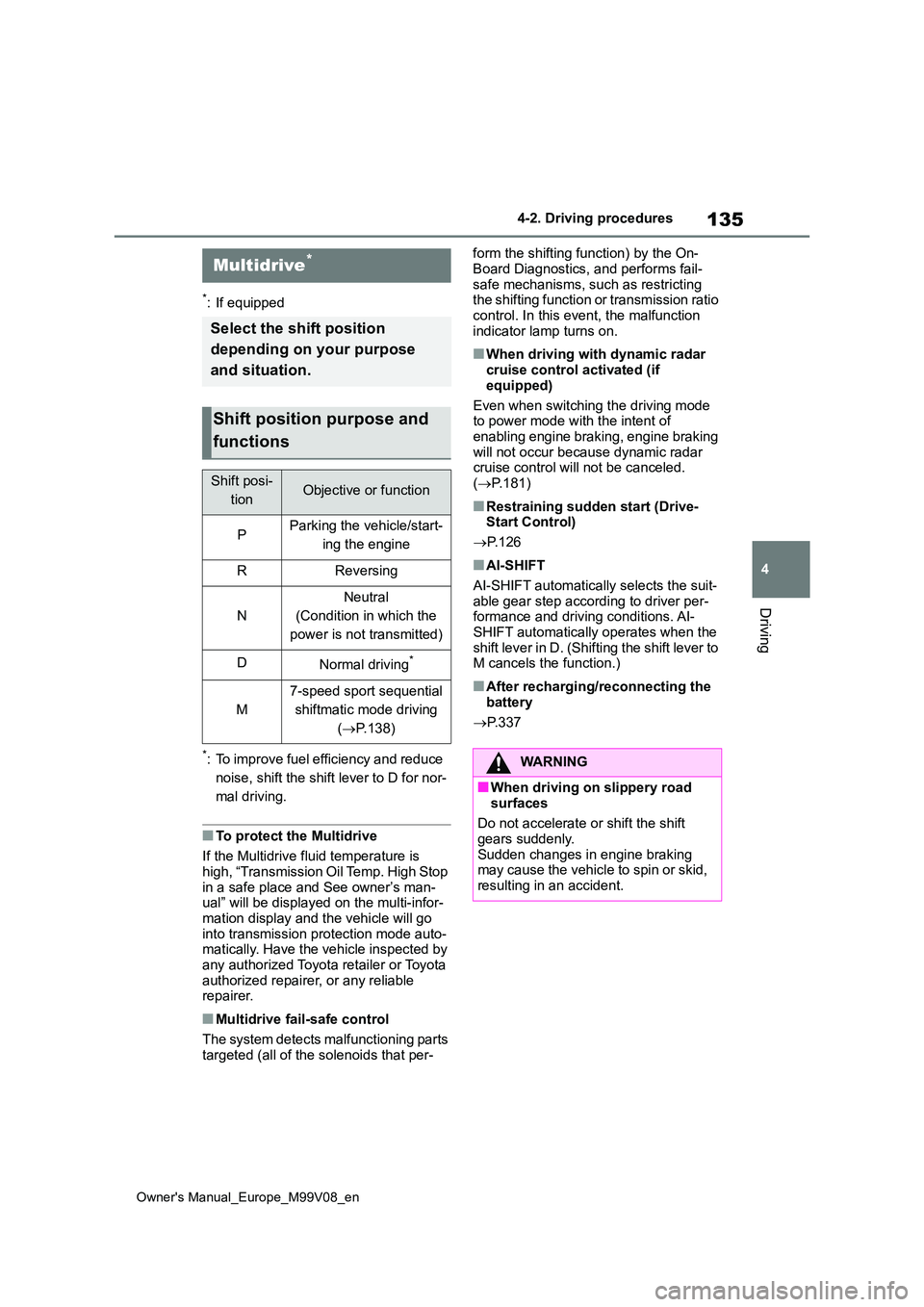
Multidrive*
Select the shift position
depending on your purpose
and situation.
Shift position purpose and
functions
Shift posi-
tionObjective or function
PParking the vehicle/start-
ing the engine
RReversing
N
Neutral
(Condition in which the
power is not transmitted)
DNormal driving*
M
7-speed sport sequential
shiftmatic mode driving
( P.138)
WARNING
■When driving on slippery road
surfaces
Do not accelerate or shift the shift gears suddenly.
Sudden changes in engine braking may cause the vehicle to spin or skid, resulting in an accident.
Page 140 of 494
138
Owner's Manual_Europe_M99V08_en
4-2. Driving procedures
possible even when the paddle shift
switch is operated. (A buzzer will sound twice.)
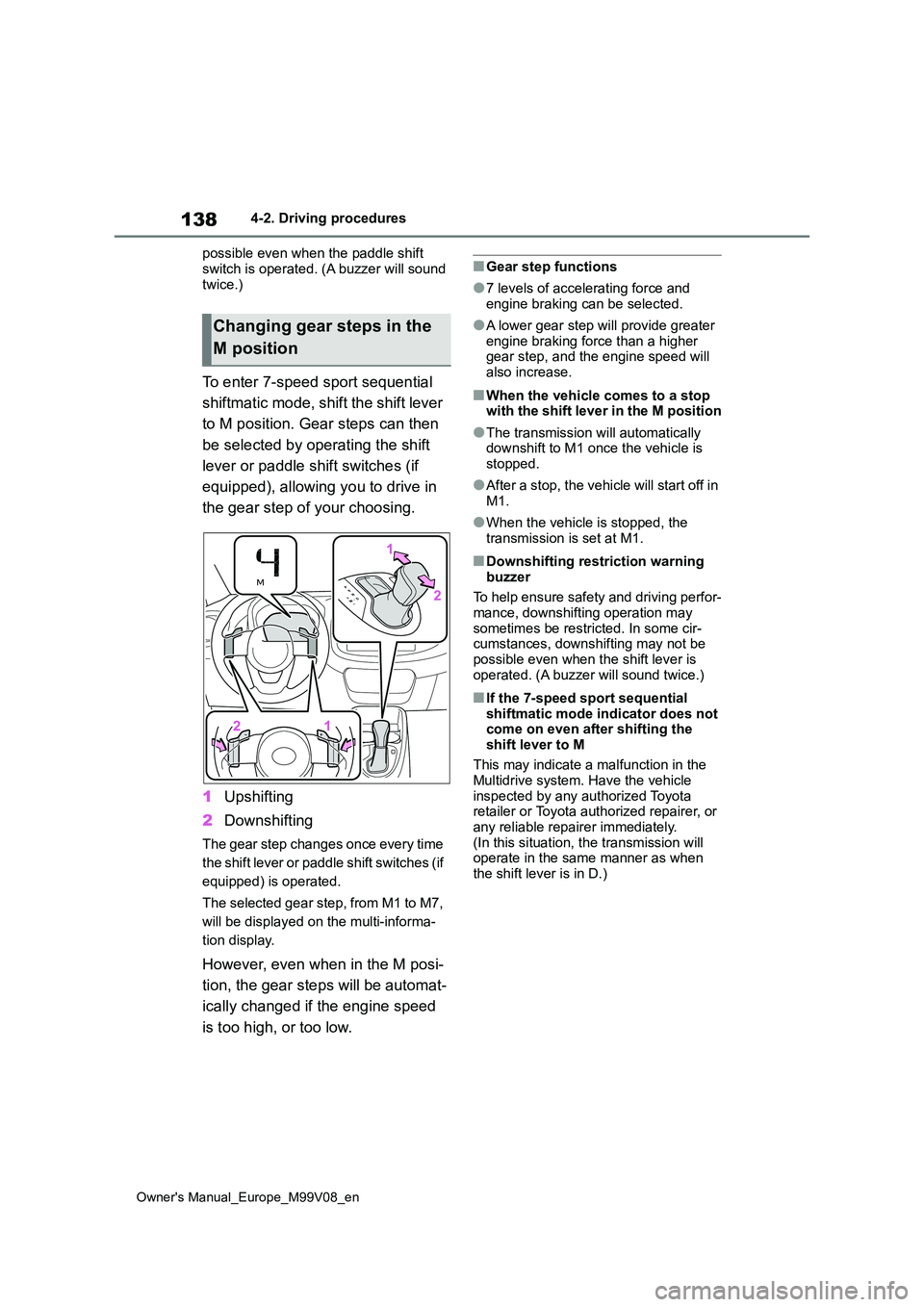
To enter 7-speed sport sequential
shiftmatic mode, shift the shift lever
to M position. Gear steps can then
be selected by operating the shift
lever or paddle shift switches (if
equipped), allowing you to drive in
the gear step of your choosing.
1 Upshifting
2 Downshifting
The gear step changes once every time
the shift lever or paddle shift switches (if
equipped) is operated.
The selected gear step, from M1 to M7,
will be displayed on the multi-informa-
tion display.
However, even when in the M posi-
tion, the gear steps will be automat-
ically changed if the engine speed
is too high, or too low.
■Gear step functions
●7 levels of accelerating force and engine braking can be selected.
●A lower gear step will provide greater engine braking force than a higher gear step, and the engine speed will
also increase.
■When the vehicle comes to a stop with the shift lever in the M position
●The transmission will automatically downshift to M1 once the vehicle is stopped.
●After a stop, the vehicle will start off in M1.
●When the vehicle is stopped, the transmission is set at M1.
■Downshifting restriction warning
buzzer
To help ensure safety and driving perfor- mance, downshifting operation may
sometimes be restricted. In some cir- cumstances, downshifting may not be possible even when the shift lever is
operated. (A buzzer will sound twice.)
■If the 7-speed sport sequential shiftmatic mode indicator does not come on even after shifting the
shift lever to M
This may indicate a malfunction in the
Multidrive system. Have the vehicle inspected by any authorized Toyota retailer or Toyota authorized repairer, or
any reliable repairer immediately. (In this situation, the transmission will operate in the same manner as when
the shift lever is in D.)
Changing gear steps in the
M position
Page 141 of 494
139
4
Owner's Manual_Europe_M99V08_en
4-2. Driving procedures
Driving
*: If equipped
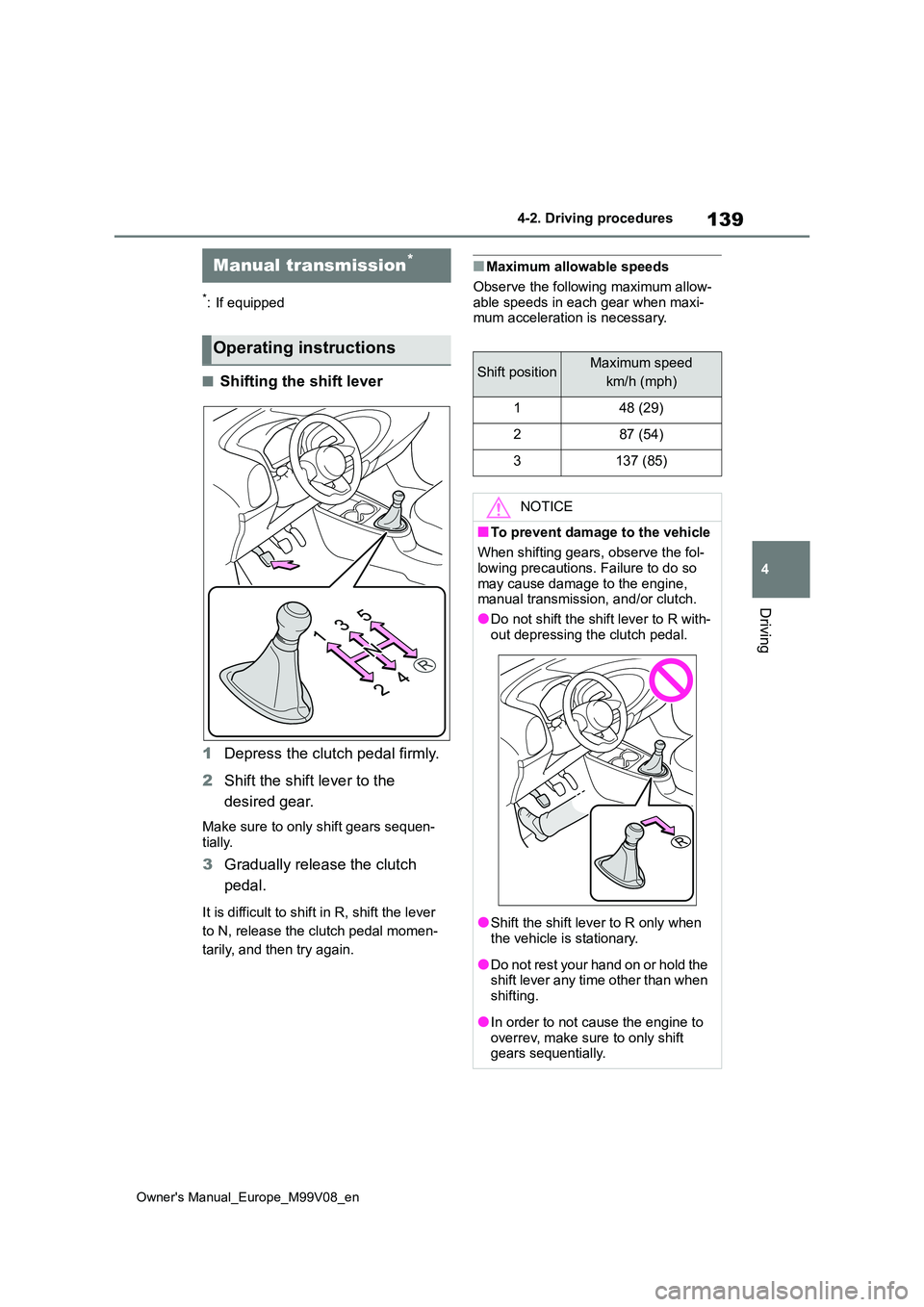
■Shifting the shift lever
1 Depress the clutch pedal firmly.
2 Shift the shift lever to the
desired gear.
Make sure to only shift gears sequen-
tially.
3 Gradually release the clutch
pedal.
It is difficult to shift in R, shift the lever
to N, release the clutch pedal momen-
tarily, and then try again.
■Maximum allowable speeds
Observe the following maximum allow-
able speeds in each gear when maxi- mum acceleration is necessary.
Manual transmission*
Operating instructions
Shift positionMaximum speed
km/h (mph)
148 (29)
287 (54)
3137 (85)
NOTICE
■To prevent damage to the vehicle
When shifting gears, observe the fol- lowing precautions. Failure to do so
may cause damage to the engine, manual transmission, and/or clutch.
●Do not shift the shift lever to R with-
out depressing the clutch pedal.
●Shift the shift lever to R only when the vehicle is stationary.
●Do not rest your hand on or hold the shift lever any time other than when
shifting.
●In order to not cause the engine to
overrev, make sure to only shift gears sequentially.
Page 143 of 494
141
4
Owner's Manual_Europe_M99V08_en
4-2. Driving procedures
Driving
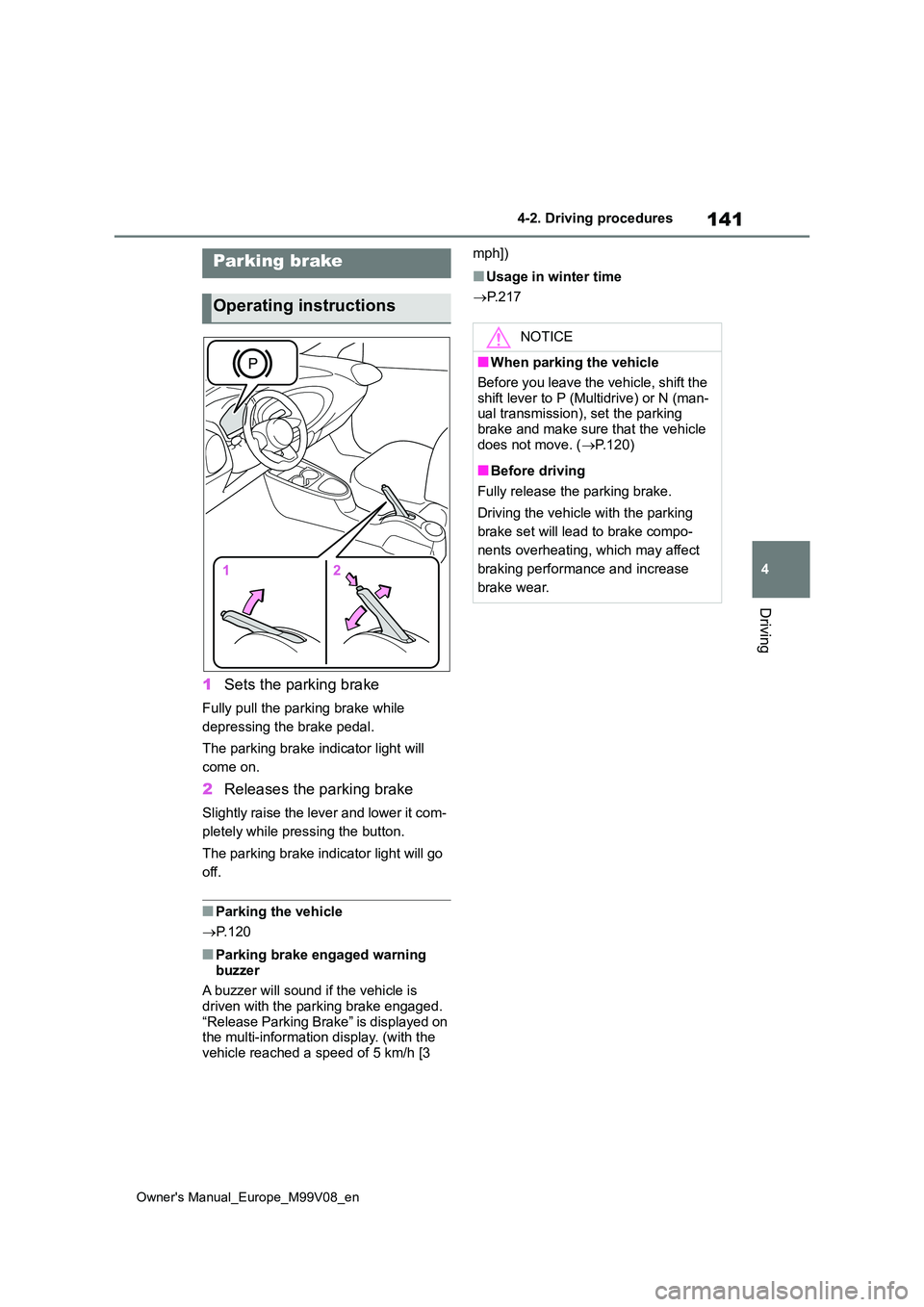
1Sets the parking brake
Fully pull the parking brake while
depressing the brake pedal.
The parking brake indicator light will
come on.
2 Releases the parking brake
Slightly raise the lever and lower it com-
pletely while pressing the button.
The parking brake indicator light will go
off.
■Parking the vehicle
P. 1 2 0
■Parking brake engaged warning
buzzer
A buzzer will sound if the vehicle is driven with the parking brake engaged.
“Release Parking Brake” is displayed on the multi-information display. (with the
vehicle reached a speed of 5 km/h [3
mph])
■Usage in winter time
P. 2 1 7
Parking brake
Operating instructions
NOTICE
■When parking the vehicle
Before you leave the vehicle, shift the
shift lever to P (Multidrive) or N (man- ual transmission), set the parking brake and make sure that the vehicle
does not move. ( P.120)
■Before driving
Fully release the parking brake.
Driving the vehicle with the parking
brake set will lead to brake compo-
nents overheating, which may affect
braking performance and increase
brake wear.
Page 191 of 494
189
4
Owner's Manual_Europe_M99V08_en
4-5. Using the driving support systems
Driving
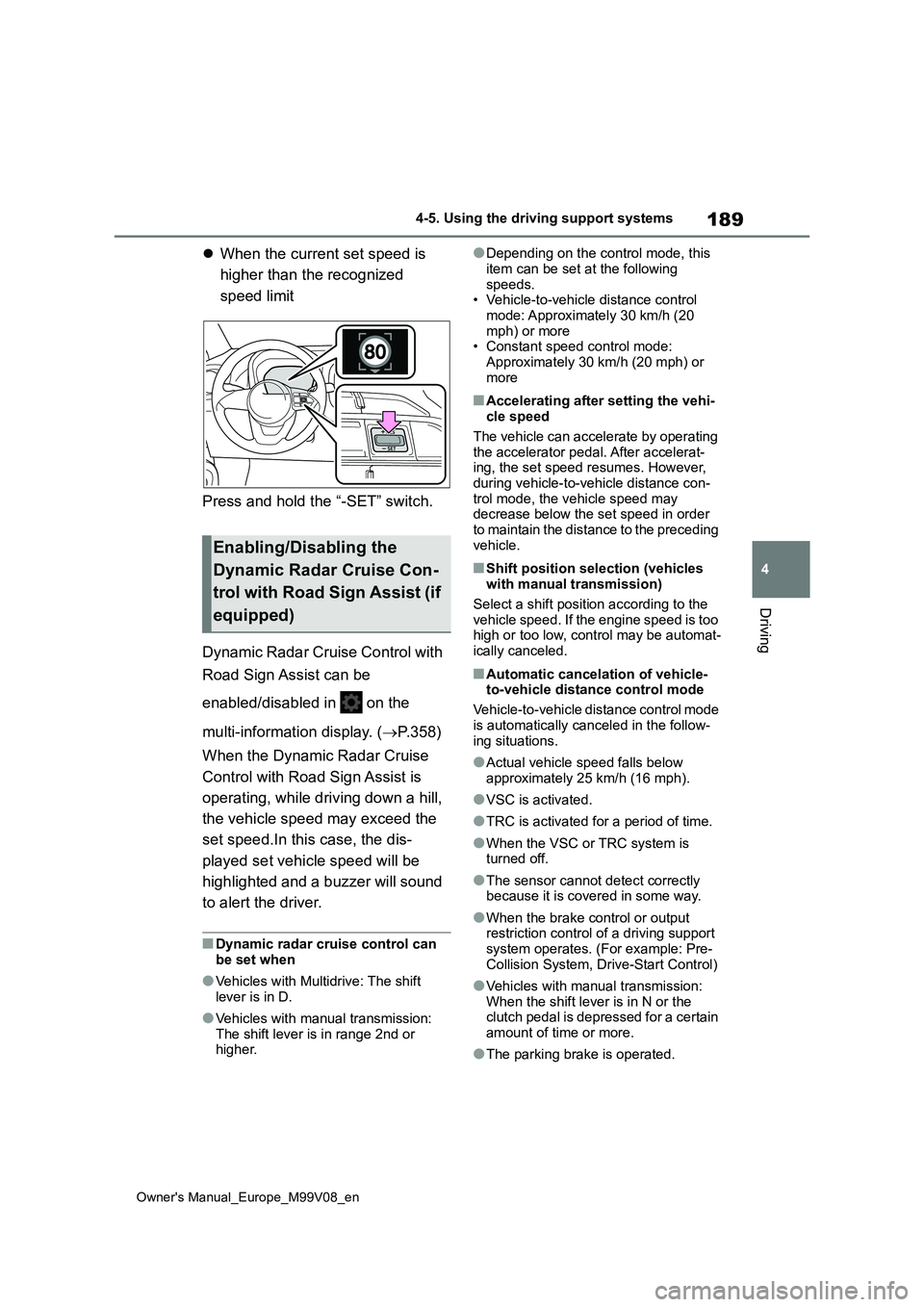
When the current set speed is
higher than the recognized
speed limit
Press and hold the “-SET” switch.
Dynamic Radar Cruise Control with
Road Sign Assist can be
enabled/disabled in on the
multi-information display. ( P.358)
When the Dynamic Radar Cruise
Control with Road Sign Assist is
operating, while driving down a hill,
the vehicle speed may exceed the
set speed.In this case, the dis-
played set vehicle speed will be
highlighted and a buzzer will sound
to alert the driver.
■Dynamic radar cruise control can
be set when
●Vehicles with Multidrive: The shift
lever is in D.
●Vehicles with manual transmission:
The shift lever is in range 2nd or higher.
●Depending on the control mode, this
item can be set at the following speeds.• Vehicle-to-vehicle distance control
mode: Approximately 30 km/h (20 mph) or more• Constant speed control mode:
Approximately 30 km/h (20 mph) or more
■Accelerating after setting the vehi-cle speed
The vehicle can accelerate by operating the accelerator pedal. After accelerat-ing, the set speed resumes. However,
during vehicle-to-vehicle distance con- trol mode, the vehicle speed may decrease below the set speed in order
to maintain the distance to the preceding vehicle.
■Shift position selection (vehicles with manual transmission)
Select a shift position according to the vehicle speed. If the engine speed is too high or too low, control may be automat-
ically canceled.
■Automatic cancelation of vehicle- to-vehicle distance control mode
Vehicle-to-vehicle distance control mode
is automatically canceled in the follow- ing situations.
●Actual vehicle speed falls below approximately 25 km/h (16 mph).
●VSC is activated.
●TRC is activated for a period of time.
●When the VSC or TRC system is turned off.
●The sensor cannot detect correctly because it is covered in some way.
●When the brake control or output restriction control of a driving support
system operates. (For example: Pre- Collision System, Drive-Start Control)
●Vehicles with manual transmission: When the shift lever is in N or the clutch pedal is depressed for a certain
amount of time or more.
●The parking brake is operated.
Enabling/Disabling the
Dynamic Radar Cruise Con-
trol with Road Sign Assist (if
equipped)