display TOYOTA C-HR 2019 (in English) Workshop Manual
[x] Cancel search | Manufacturer: TOYOTA, Model Year: 2019, Model line: C-HR, Model: TOYOTA C-HR 2019Pages: 532, PDF Size: 10.35 MB
Page 244 of 532
2444-5. Using the driving support systems
C-HR_OM_USA_OM10569U■
Temporary cancellation of functions
When the operation conditions are no longer met, a function may be tempo-
rarily canceled. However, when the operation conditions are met again, oper-
ation of the function is automatically restored. ( P. 243)
■ Steering control function
Depending on the vehicle speed, lane departure situation, road conditions,
etc., the driver may not feel the function is operating or the function may not
operate at all.
■ Lane departure alert function
The warning buzzer may be difficult to hear due to external noi se, audio play-
back, etc.
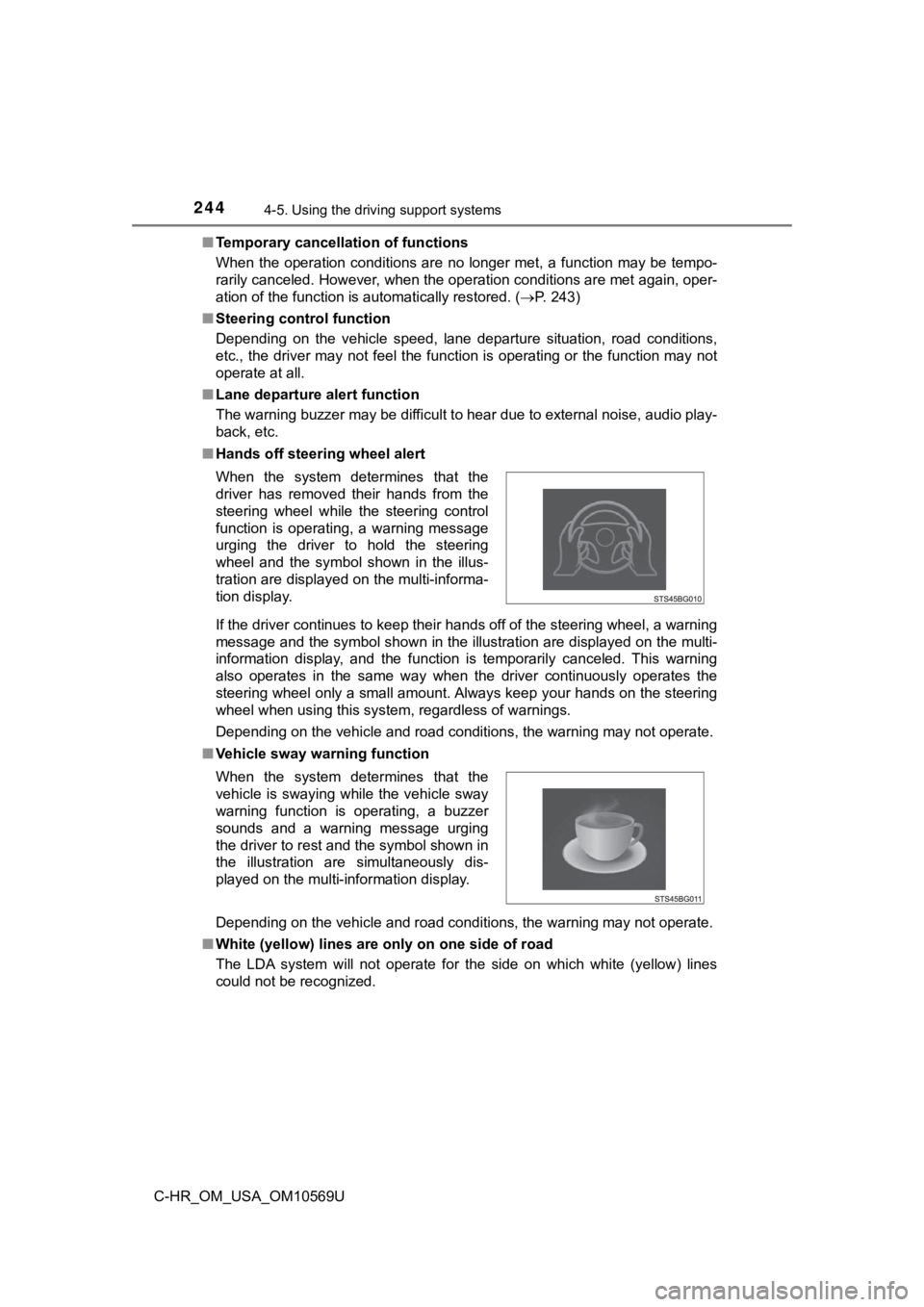
■ Hands off steering wheel alert
If the driver continues to keep their hands off of the steering wheel, a warning
message and the symbol shown in the illustration are displayed on the multi-
information display, and the function is temporarily canceled. This warning
also operates in the same way when the driver continuously operates the
steering wheel only a small amount. Always keep your hands on t he steering
wheel when using this system, regardless of warnings.
Depending on the vehicle and road conditions, the warning may n ot operate.
■ Vehicle sway warning function
Depending on the vehicle and road conditions, the warning may n ot operate.
■ White (yellow) lines are only on one side of road
The LDA system will not operate for the side on which white (yellow) lines
could not be recognized. When the system determines that the
driver has removed their hands from the
steering wheel while the steering control
function is operating, a warning message
urging the driver to hold the steering
wheel and the symbol shown in the illus-
tration are displayed on the multi-informa-
tion display.
When the system determines that the
vehicle is swaying while the vehicle sway
warning function is operating, a buzzer
sounds and a warning message urging
the driver to rest and the symbol shown in
the illustration are simultaneously dis-
played on the multi-information display.
Page 246 of 532
2464-5. Using the driving support systems
C-HR_OM_USA_OM10569U■
Warning message
If the following warning message is displayed on the multi-info rmation display
and the LDA indicator illuminates in orange, follow the appropr iate trouble-
shooting procedure.
If a different warning message is displayed, follow the instructions displayed
on the screen.
Warning messageDetails/Actions
“Lane Departure Alert
Malfunction.
Visit Your Dealer.”The system may not be operating properly.
Have the vehicle inspected at your Toyota
dealer.
“Front Camera
Vision Blocked.
Clean and Demist
Windshield.”
Dirt, rain, condensation, ice, snow, etc., are
present on the windshield in front of the camera
sensor.
Turn the LDA system off, remove any dirt,
rain, condensation, ice, snow, etc., from the
windshield, and then turn the LDA system
back on.
“Front Camera
Unavailable.”
The operation conditions of the camera sensor
(temperature, etc.) are not met.
When the operation conditions of the camera
sensor (temperature, etc.) are met, the LDA
system will become available. Turn the LDA
system off, wait for a little while, and then
turn the LDA system back on.
“LDA Unavailable.”
The LDA system is temporarily canceled due to
a malfunction in a sensor other than the camera
sensor.
Turn the LDA system off and follow the
appropriate troubleshooting procedures for
the warning message. A fterward, drive the
vehicle for a short time, and then turn the
LDA system back on.
“LDA Unavailable
Below Approx. 32 MPH (50km/h).”
The LDA system cannot be used as the vehicle
speed is approximately less than 32 mph (50
km/h).
Drive the vehicle at approximately 32 mph (50
km/h) or more.
Page 248 of 532
2484-5. Using the driving support systems
C-HR_OM_USA_OM10569U
Dynamic radar cruise controlwith full-speed
range
In vehicle-to-vehicle distance control mode, the vehicle automa tically
accelerates, decelerates and st ops to match the speed changes o f the
preceding vehicle even if the acc elerator pedal is not depressed. In
constant speed control mode, t he vehicle runs at a fixed speed.
Use the dynamic radar cruise control with full-speed range on f ree-
ways and highways.
● Vehicle-to-vehicle distance control mode ( P. 251)
● Constant speed c ontrol mode (P. 258)
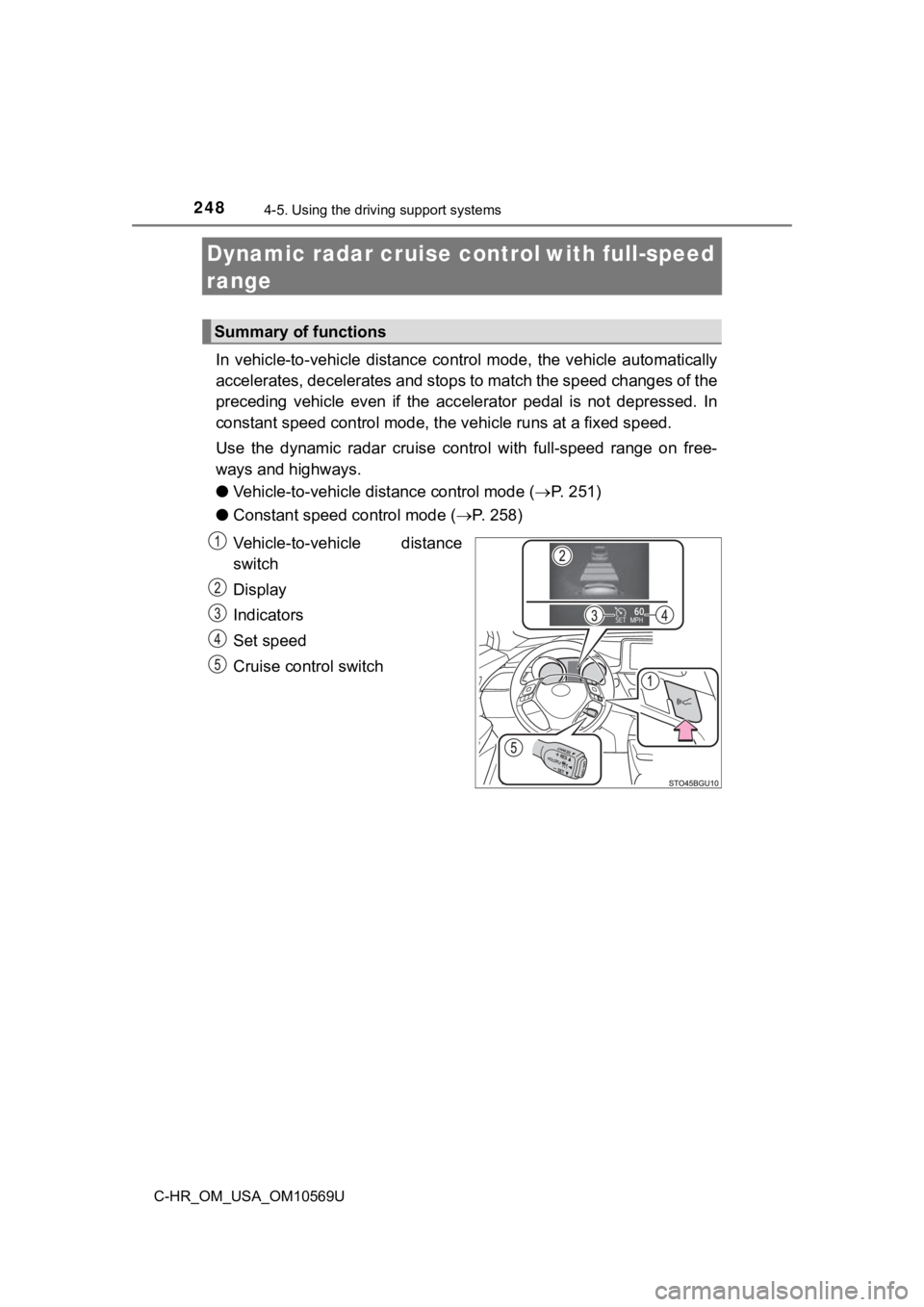
Vehicle-to-vehicle distance
switch
Display
Indicators
Set speed
Cruise control switch
Summary of functions
Page 253 of 532
2534-5. Using the driving support systems
4
Driving
C-HR_OM_USA_OM10569U
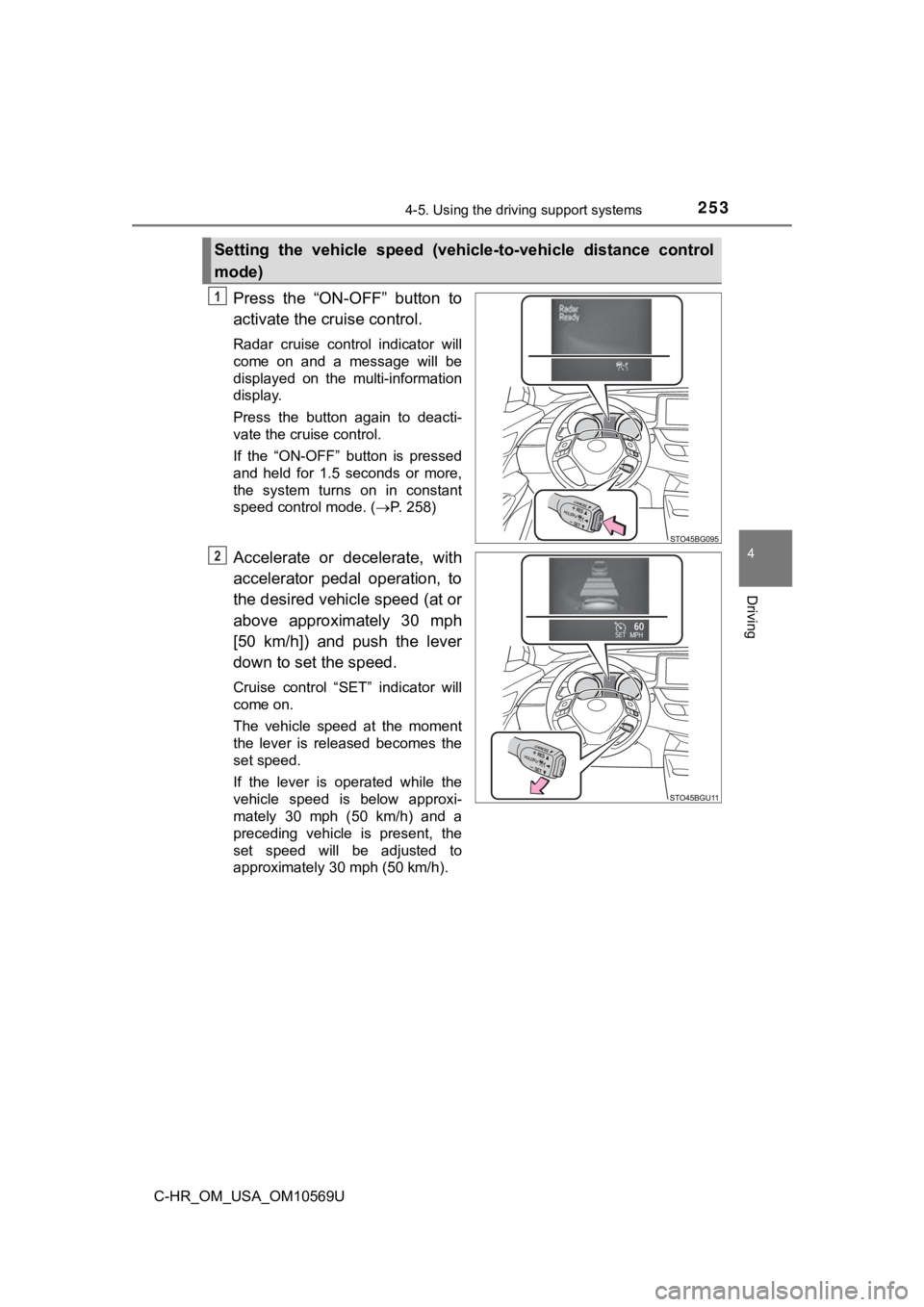
Press the “ON-OFF” button to
activate the cruise control.
Radar cruise control indicator will
come on and a message will be
displayed on the multi-information
display.
Press the button again to deacti-
vate the cruise control.
If the “ON-OFF” button is pressed
and held for 1.5 seconds or more,
the system turns on in constant
speed control mode. (P. 258)
Accelerate or decelerate, with
accelerator pedal operation, to
the desired vehicle speed (at or
above approximately 30 mph
[50 km/h]) and push the lever
down to set the speed.
Cruise control “SET” indicator will
come on.
The vehicle speed at the moment
the lever is released becomes the
set speed.
If the lever is operated while the
vehicle speed is below approxi-
mately 30 mph (50 km/h) and a
preceding vehicle is present, the
set speed will be adjusted to
approximately 30 mph (50 km/h).
Setting the vehicle speed (vehicle-to-vehicle distance control
mode)
1
2
Page 254 of 532
2544-5. Using the driving support systems
C-HR_OM_USA_OM10569U
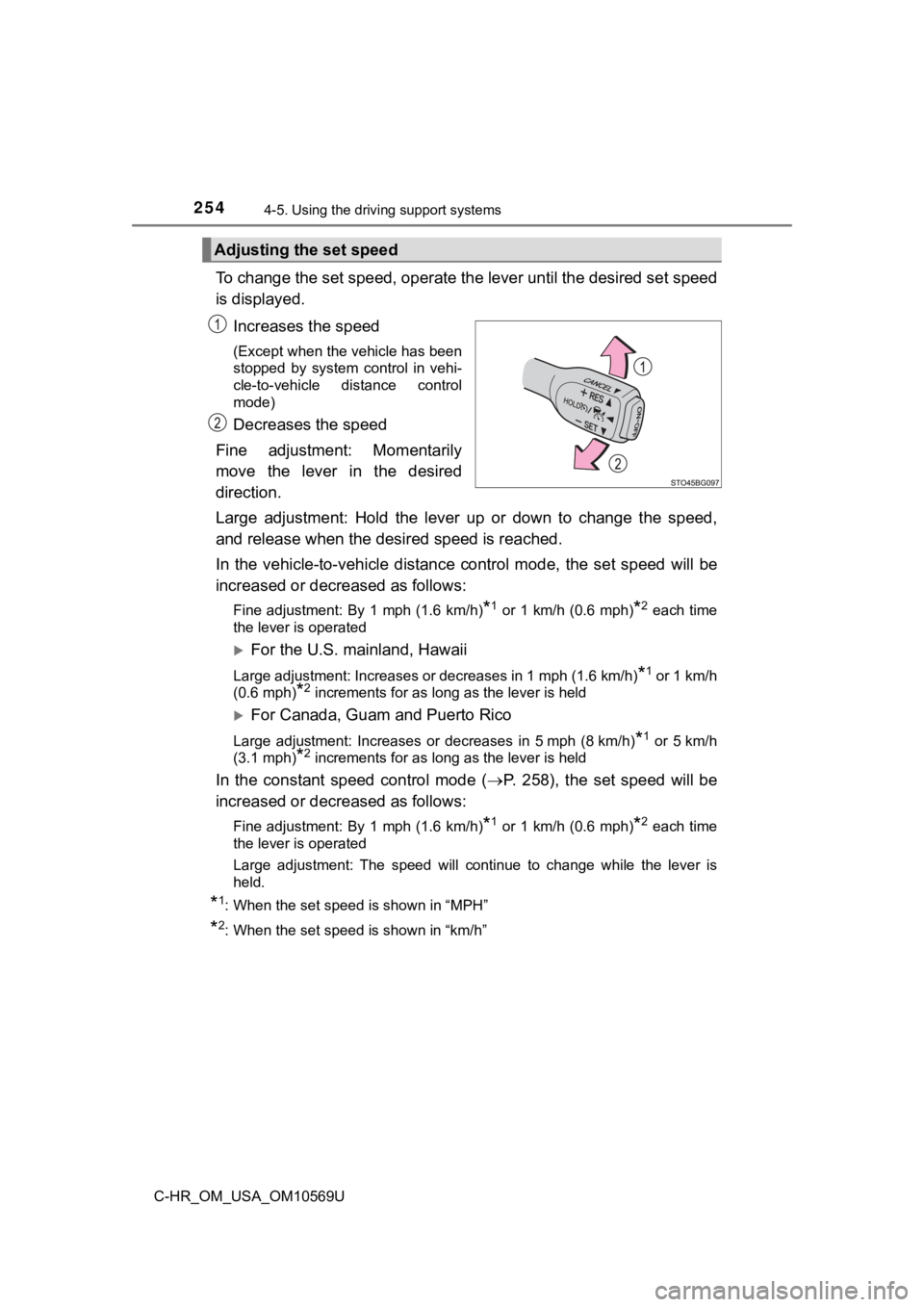
To change the set speed, operate the lever until the desired se t speed
is displayed.
Increases the speed
(Except when the vehicle has been
stopped by system control in vehi-
cle-to-vehicle distance control
mode)
Decreases the speed
Fine adjustment: Momentarily
move the lever in the desired
direction.
Large adjustment: Hold the lever up or down to change the speed ,
and release when the des ired speed is reached.
In the vehicle-to-vehicle distance control mode, the set speed will be
increased or decreased as follows:
Fine adjustment: By 1 mph (1.6 km/h)*1 or 1 km/h (0.6 mph)*2 each time
the lever is operated
For the U.S. mainland, Hawaii
Large adjustment: Increases or decreases in 1 mph (1.6 km/h)*1 or 1 km/h
(0.6 mph)
*2 increments for as long as the lever is held
For Canada, Guam and Puerto Rico
Large adjustment: Increases or decreases in 5 mph (8 km/h)*1 or 5 km/h
(3.1 mph)
*2 increments for as long as the lever is held
In the constant speed control mode ( P. 258), the set speed will be
increased or decreased as follows:
Fine adjustment: By 1 mph (1.6 km/h)*1 or 1 km/h (0.6 mph)*2 each time
the lever is operated
Large adjustment: The speed will continue to change while the l ever is
held.
*1: When the set speed is shown in “MPH”
*2: When the set speed is shown in “km/h”
Adjusting the set speed
Page 255 of 532
2554-5. Using the driving support systems
4
Driving
C-HR_OM_USA_OM10569U
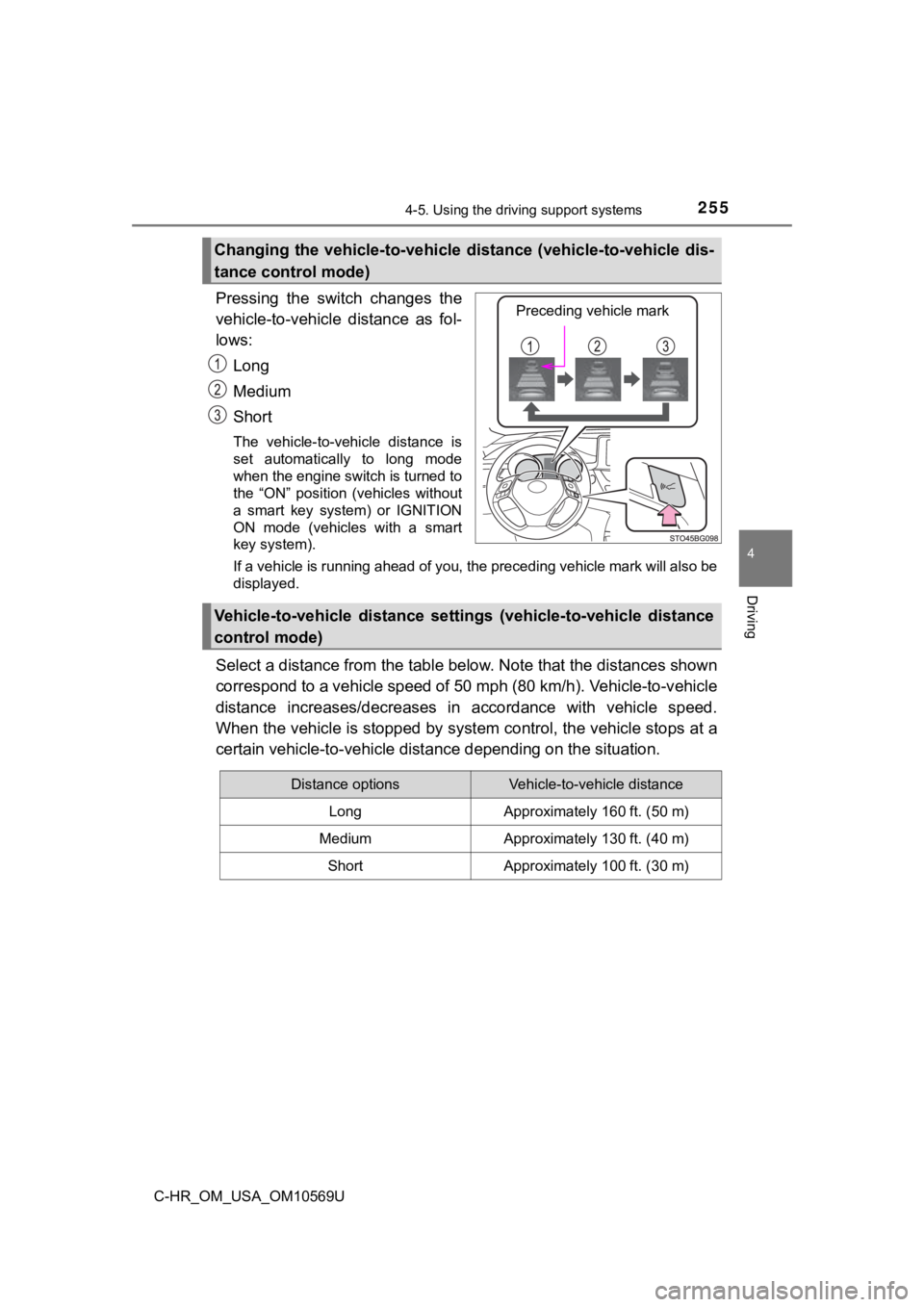
Pressing the switch changes the
vehicle-to-vehicle distance as fol-
lows:Long
Medium
Short
The vehicle-to-vehicle distance is
set automatically to long mode
when the engine switch is turned to
the “ON” position (vehicles without
a smart key system) or IGNITION
ON mode (vehicles with a smart
key system).
If a vehicle is running ahead of you, the preceding vehicle mar k will also be
displayed.
Select a distance from the tabl e below. Note that the distances shown
correspond to a vehicle speed of 50 mph (80 km/h). Vehicle-to-v ehicle
distance increases/decreases in accordance with vehicle speed.
When the vehicle is stopped by system control, the vehicle stop s at a
certain vehicle-to-vehicle dista nce depending on the situation.
Changing the vehicle-to-vehicle d istance (vehicle-to-vehicle dis-
tance control mode)
Preceding vehicle mark
Vehicle-to-vehicle distance settings (vehicle-to-vehicle distan ce
control mode)
Distance optionsVehicle-to-vehicle distance
LongApproximately 160 ft. (50 m)
MediumApproximately 130 ft. (40 m)
ShortApproximately 100 ft. (30 m)
Page 257 of 532
2574-5. Using the driving support systems
4
Driving
C-HR_OM_USA_OM10569U
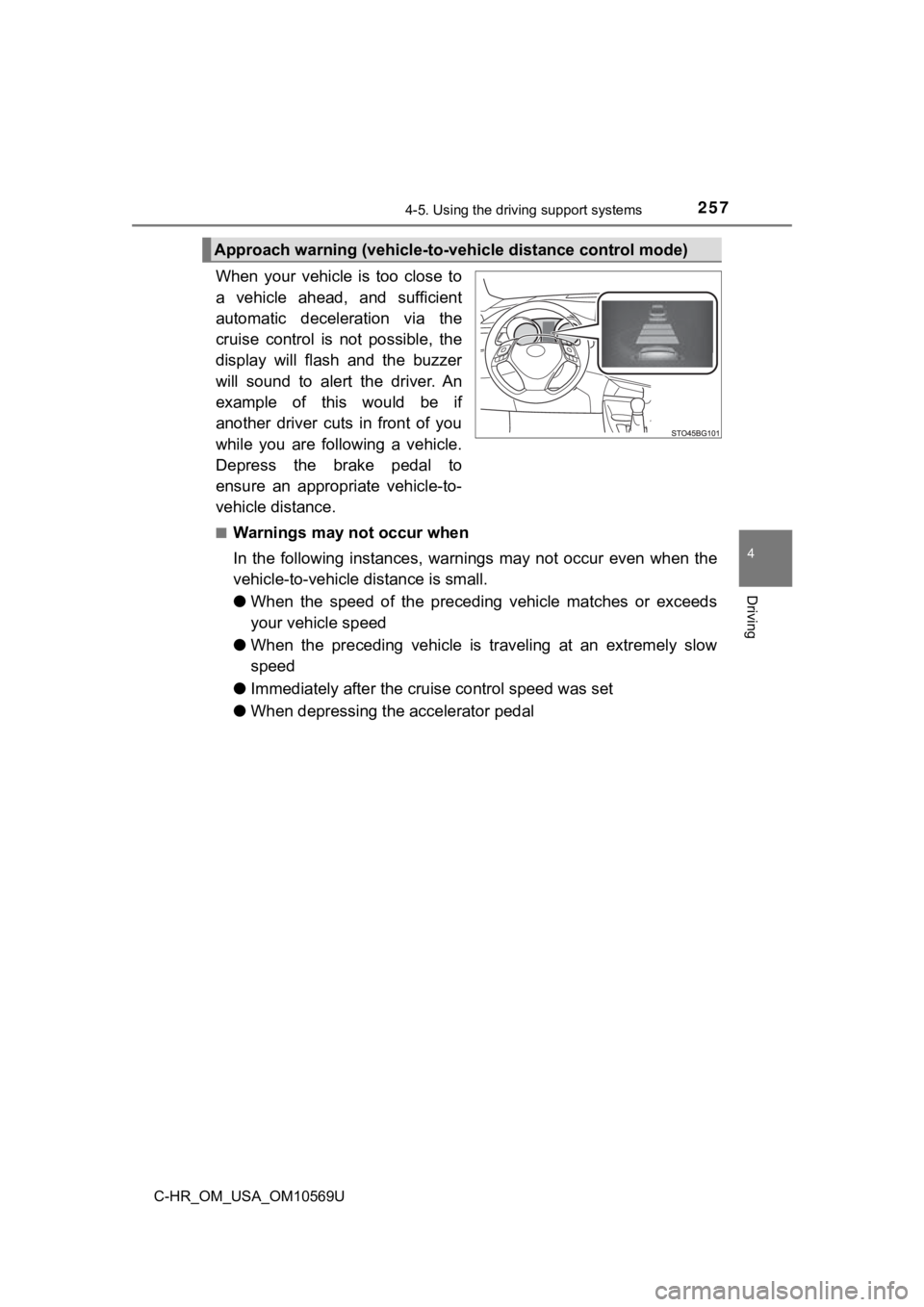
When your vehicle is too close to
a vehicle ahead, and sufficient
automatic deceleration via the
cruise control is not possible, the
display will flash and the buzzer
will sound to alert the driver. An
example of this would be if
another driver cuts in front of you
while you are following a vehicle.
Depress the brake pedal to
ensure an appropriate vehicle-to-
vehicle distance.
■Warnings may not occur when
In the following instances, warnings may not occur even when th e
vehicle-to-vehicle distance is small.
● When the speed of the preceding vehicle matches or exceeds
your vehicle speed
● When the preceding vehicle is traveling at an extremely slow
speed
● Immediately after the cruise control speed was set
● When depressing the accelerator pedal
Approach warning (vehicle-to-v ehicle distance control mode)
Page 260 of 532
2604-5. Using the driving support systems
C-HR_OM_USA_OM10569U■
Automatic cancelation of c onstant speed control mode
Constant speed control mode is automatically canceled in the following situa-
tions:
● Actual vehicle speed is more than approximately 10 mph (16 km/h ) below
the set vehicle speed.
● Actual vehicle speed falls below approximately 25 mph (40 km/h) .
● VSC is activated.
● TRAC is activated for a period of time.
● When the VSC or TRAC system is turned off.
● Pre-collision braking is activated.
If constant speed control mode is automatically canceled for an y other rea-
son, there may be a malfunction in the system. Contact your Toyota dealer.
■ Brake system operation sound
If the brakes are applied automatically while the vehicle is in vehicle-to-vehi-
cle distance control mode, a brake system operation sound may b e heard.
This does not indicate a malfunction.
■ Warning messages and buzzers for d ynamic radar cruise control with
full-speed range
Warning messages and buzzers are used to indicate a system malfunction or
to inform the driver of the need for caution while driving. If a warning message
is shown on the multi-information display, read the message and follow the
instructions.
■ When the sensor may not be correctly detect ing the vehicle ahead
In the case of the following and depending on the conditions, o perate the
brake pedal when deceleration of the system is insufficient or operate the
accelerator pedal when acceleration is required.
As the sensor may not be able to correctly detect these types o f vehicles, the
approach warning ( P. 257) may not be activated.
● Vehicles that cut in suddenly
● Vehicles traveling at low speeds
● Vehicles that are not moving in the same lane
Page 263 of 532
2634-5. Using the driving support systems
4
Driving
C-HR_OM_USA_OM10569U
Driving mode select
■Changing the driving mode
To select the drive mode, perform operations on the multi-infor mation
display.
Press “ ” or “” of meter control sw itches and select .
Press “ ” or “ ” of the meter control switches, and select “Drive
Mode”.
Press “ ” or “ ” of the meter control switches, and select drive
mode.
In response to driving conditions , one of 3 drive modes can be
selected.
Select the drive mode
1
2
3
Page 264 of 532

2644-5. Using the driving support systems
C-HR_OM_USA_OM10569U■
Driving modes
●
“NORMAL” mode
Provides an optimal balance of fuel economy, quietness, and
dynamic performance. Suitable for city driving.
● “SPORT” mode
Controls the transmission and eng ine to provide quick, powerful
acceleration. This mode also chan ges the steering feel, making it
suitable for when agile driving response is desired, such as wh en
driving on roads with many curves.
When sport mode is selected, the “SPORT” indicator will illumin ate
on the multi-information display.
● “ECO” mode
Helps the driver accelerate in an eco-friendly manner and
improve fuel economy through moderate throttle characteristics
and by controlling the operation of the air conditioning system
(heating/cooling).
When Eco mode is selected, the “ECO MODE” indicator will illumi -
nate on the multi-information display.
While the air conditioning is being used, the system automatically
switches to air conditioning eco mode ( P. 297), allowing for driving
that leads to even better fuel economy.
■ Canceling driving modes
●Select another drive mode. Also, “SPORT” mode will be canceled automati-
cally when the engine switch is turned off.
● “NORMAL” mode and “ECO” mode will not be canceled automatically until
another drive mode is selected, even if the engine switch is tu rned off.