lock TOYOTA LAND CRUISER 2012 Owners Manual
[x] Cancel search | Manufacturer: TOYOTA, Model Year: 2012, Model line: LAND CRUISER, Model: TOYOTA LAND CRUISER 2012Pages: 692, PDF Size: 29.3 MB
Page 330 of 692
330 2-5. Driving information
L/C200_EE (OM60G38E)
Guidance
Your vehicle will handle differently when towing a trailer. In order to
avoid accident, death or serious injury, keep the following in mind
when towing:
Checking connections between trailer and lights
Stop the vehicle and check the operation of the connection
between the trailer and lights after driving for a brief period as well
as before setting off.
Practicing driving with a coupled trailer
Get the feel for turning, stopping and reversing with the trailer
coupled by practicing in an area with no or light traffic.
When reversing with a coupled trailer, hold the section of the
steering wheel nearest to you and rotate clockwise to turn the
trailer left or counterclockwise to turn right. Always rotate gradu-
ally to prevent steering error. Have someone guide you when
reversing to lessen the risk of accident.
Increasing vehicle-to-vehicle distance
At a speed of 10 km/h (6 mph), the distance to the vehicle running
ahead of you should be equivalent to or greater than the combined
length of your vehicle and trailer. Avoid sudden braking that may
cause skidding. Otherwise, the vehicle may spin out of control.
This is especially true when driving on wet or slippery road sur-
faces.
Page 335 of 692
3Interior features
335
L/C200_EE (OM60G38E)
3-3. Using the Bluetooth® audio
system
Bluetooth
® audio
system ............................ 402
Using the Bluetooth
®
audio system .................. 407
Operating a Bluetooth
®
enabled portable
player .............................. 410
Setting up a Bluetooth
®
enabled portable
player .............................. 413
Bluetooth
® audio
system setup .................. 417
3-4. Using the hands-free system
(for cellular phone)
Hands-free system
(for cellular phone).......... 418
Using the hands-free
system ............................ 423
Making a phone call.......... 430
Setting a cellular phone .... 434
Security and
system setup .................. 438
Using the phone book....... 442
3-5. Using the interior lights
Interior lights list................ 448
• Interior lights ................... 449
• Personal lights ................ 4503-6. Using the storage features
List of storage features ..... 452
• Glove box ....................... 453
• Console box.................... 454
• Overhead console .......... 455
• Cup holders .................... 456
• Bottle holders.................. 458
• Card holder ..................... 460
• Auxiliary box ................... 460
3-7. Other interior features
Cool box............................ 461
Sun visors ......................... 463
Vanity mirror ..................... 464
Clock ................................. 465
Outside temperature
display ............................ 466
Ashtray.............................. 468
Cigarette lighter ................ 470
Power outlet ...................... 471
Heated steering wheel ...... 474
Seat heaters and
ventilators ....................... 476
Armrest ............................. 480
Assist grip ......................... 481
Floor mats ......................... 482
Luggage compartment
features........................... 484
Page 349 of 692
349 3-1. Using the air conditioning system and defogger
3
Interior features
L/C200_EE (OM60G38E)
CAUTION
To prevent the windshield from fogging up
Do not use during cool air operation in extremely humid weather.
The difference between the temperature of the outside air and that of the
windshield can cause the outer surface of the windshield to fog up, blocking
your vision.
NOTICE
To prevent battery discharge
Do not leave the air conditioning system on longer than necessary when the
engine is stopped.
Page 397 of 692
397 3-2. Using the audio system
3
Interior features
L/C200_EE (OM60G38E)Adjusting sound quality
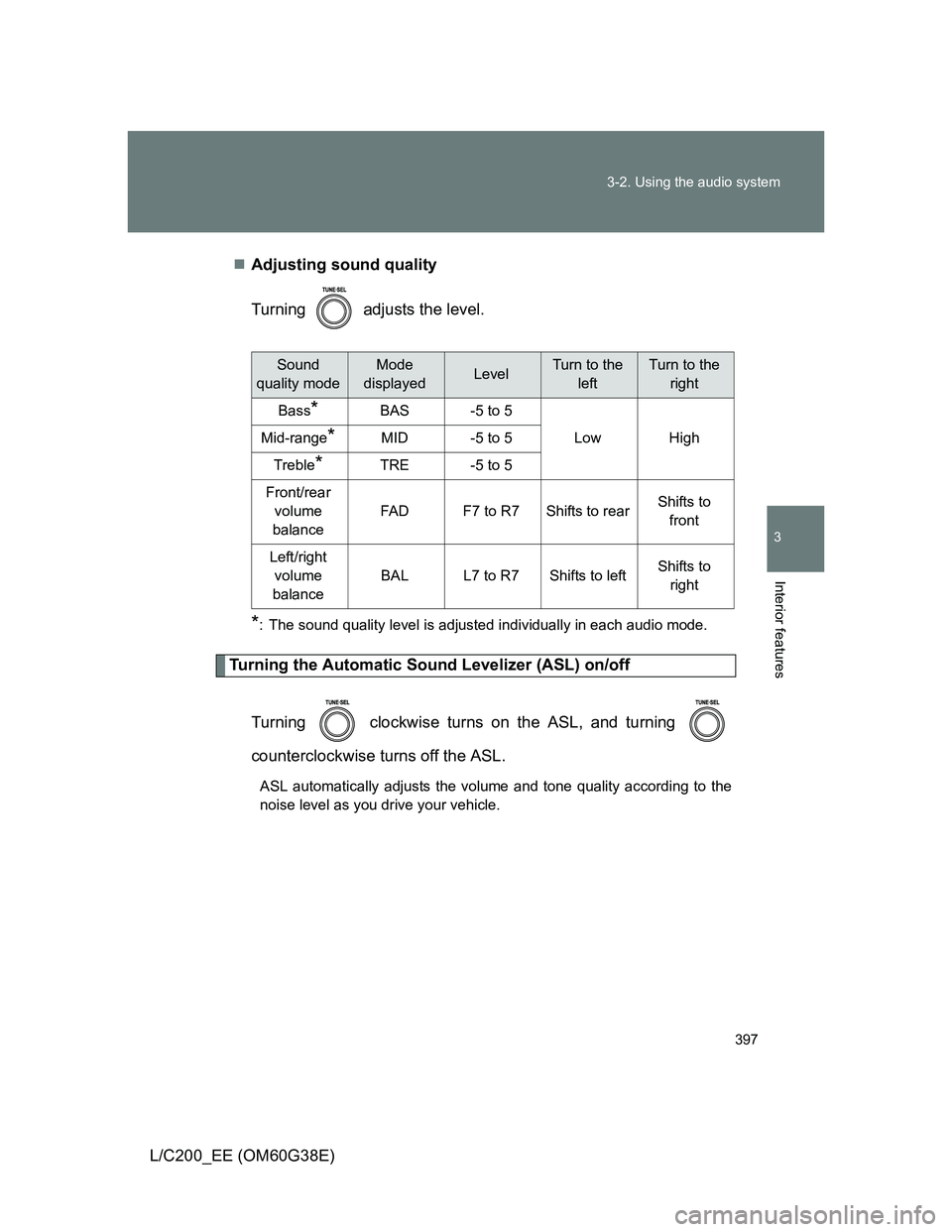
Turning adjusts the level.
*: The sound quality level is adjusted individually in each audio mode.
Turning the Automatic Sound Levelizer (ASL) on/off
Turning clockwise turns on the ASL, and turning
counterclockwise turns off the ASL.
ASL automatically adjusts the volume and tone quality according to the
noise level as you drive your vehicle.
Sound
quality modeMode
displayedLevelTurn to the
leftTurn to the
right
Bass*BAS-5 to 5
LowHighMid-range*MID-5 to 5
Treble*TRE-5 to 5
Front/rear
volume
balance
FA DF7 to R7Shifts to rearShifts to
front
Left/right
volume
balance
BALL7 to R7Shifts to leftShifts to
right
Page 428 of 692
428 3-4. Using the hands-free system (for cellular phone)
L/C200_EE (OM60G38E)
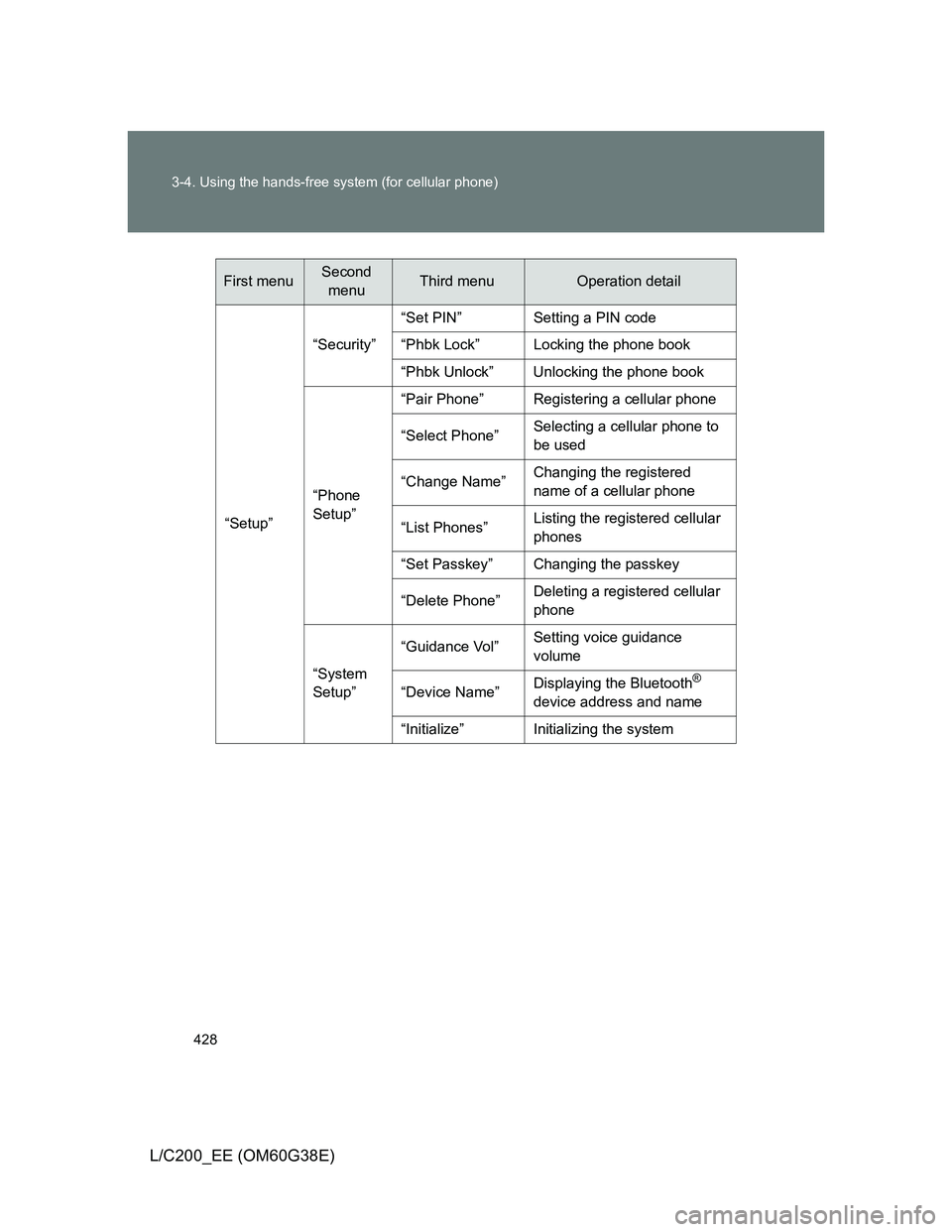
“Setup”“Security”“Set PIN” Setting a PIN code
“Phbk Lock” Locking the phone book
“Phbk Unlock” Unlocking the phone book
“Phone
Setup”“Pair Phone” Registering a cellular phone
“Select Phone”Selecting a cellular phone to
be used
“Change Name”Changing the registered
name of a cellular phone
“List Phones”Listing the registered cellular
phones
“Set Passkey” Changing the passkey
“Delete Phone”Deleting a registered cellular
phone
“System
Setup”“Guidance Vol”Setting voice guidance
volume
“Device Name”Displaying the Bluetooth
®
device address and name
“Initialize” Initializing the system
First menuSecond
menuThird menuOperation detail
Page 438 of 692
438
3-4. Using the hands-free system (for cellular phone)
L/C200_EE (OM60G38E)
Security and system setup
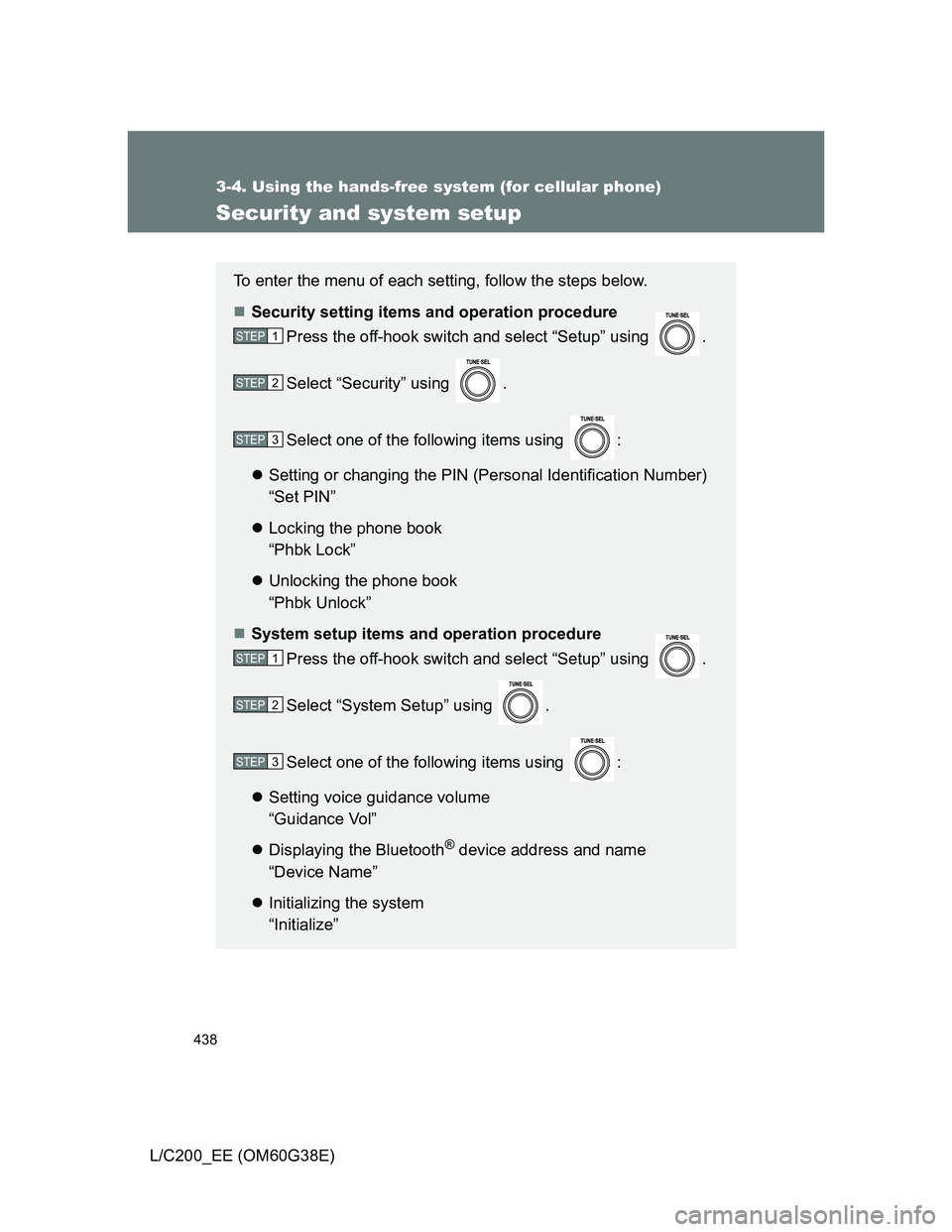
To enter the menu of each setting, follow the steps below.
Security setting items and operation procedure
Press the off-hook switch and select “Setup” using .
Select “Security” using .
Select one of the following items using :
Setting or changing the PIN (Personal Identification Number)
“Set PIN”
Locking the phone book
“Phbk Lock”
Unlocking the phone book
“Phbk Unlock”
System setup items and operation procedure
Press the off-hook switch and select “Setup” using .
Select “System Setup” using .
Select one of the following items using :
Setting voice guidance volume
“Guidance Vol”
Displaying the Bluetooth
® device address and name
“Device Name”
Initializing the system
“Initialize”
STEP1
STEP2
STEP3
STEP1
STEP2
STEP3
Page 439 of 692
439 3-4. Using the hands-free system (for cellular phone)
3
Interior features
L/C200_EE (OM60G38E)
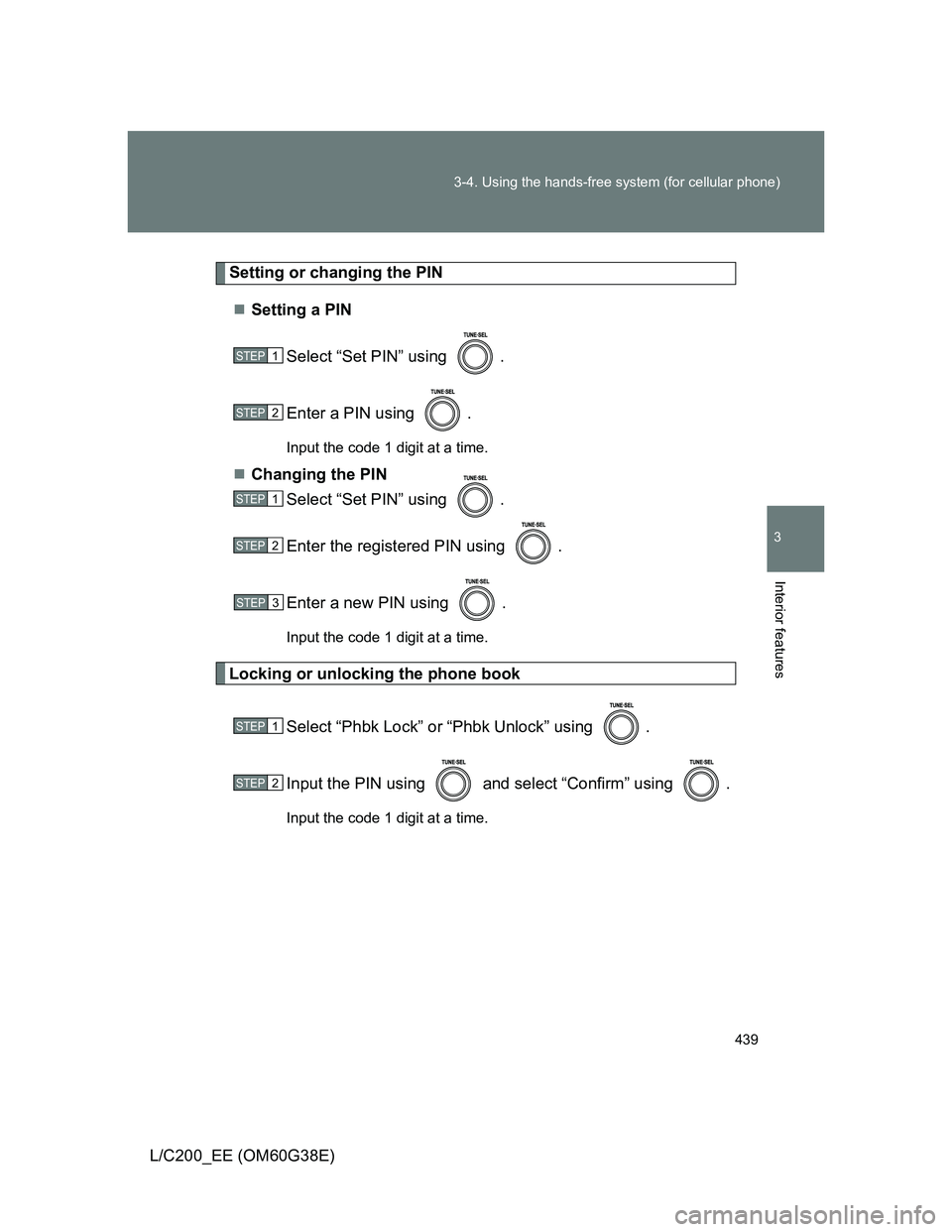
Setting or changing the PIN
Setting a PIN
Select “Set PIN” using .
Enter a PIN using .
Input the code 1 digit at a time.
Changing the PIN
Select “Set PIN” using .
Enter the registered PIN using .
Enter a new PIN using .
Input the code 1 digit at a time.
Locking or unlocking the phone book
Select “Phbk Lock” or “Phbk Unlock” using .
Input the PIN using and select “Confirm” using .
Input the code 1 digit at a time.
STEP1
STEP2
STEP1
STEP2
STEP3
STEP1
STEP2
Page 440 of 692
440 3-4. Using the hands-free system (for cellular phone)
L/C200_EE (OM60G38E)
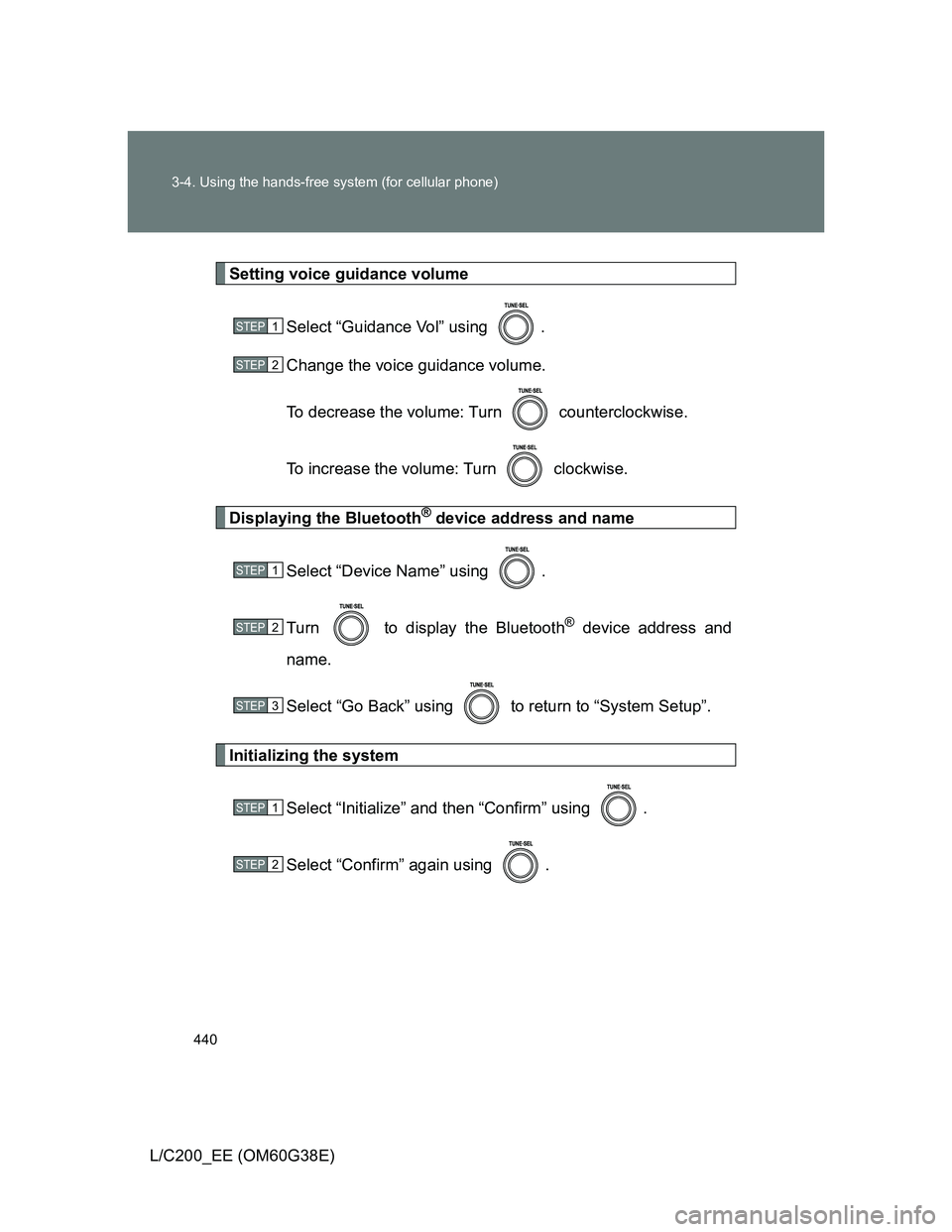
Setting voice guidance volume
Select “Guidance Vol” using .
Change the voice guidance volume.
To decrease the volume: Turn counterclockwise.
To increase the volume: Turn clockwise.
Displaying the Bluetooth® device address and name
Select “Device Name” using .
Turn to display the Bluetooth
® device address and
name.
Select “Go Back” using to return to “System Setup”.
Initializing the system
Select “Initialize” and then “Confirm” using .
Select “Confirm” again using .
STEP1
STEP2
STEP1
STEP2
STEP3
STEP1
STEP2
Page 441 of 692
441 3-4. Using the hands-free system (for cellular phone)
3
Interior features
L/C200_EE (OM60G38E)
Initialization
The following data in the system can be initialized:
• Phone book
• Outgoing and incoming history
• Speed dials
• Registered cellular phone data
• Security code
• Registered Bluetooth
® enabled portable player data
• Passkey for the cellular phones
• Passkey for the Bluetooth
® audio players
• Guidance volume
• Receiver volume
• Ring tone volume
Once the initialization has been completed, the data cannot be restored
to its original state.
When the phone book is locked
The following functions cannot be used:
Dialing by inputting a name
Speed dialing
Dialing a number stored in the call history memory
Using the phone book
Page 451 of 692
451 3-5. Using the interior lights
3
Interior features
L/C200_EE (OM60G38E)
Illuminated entry system
The lights automatically turn on/off according to “ENGINE START STOP”
switch mode, the presence of the electronic key, whether the doors are
locked/unlocked, and whether the doors are open/closed.
To prevent battery discharge
If the interior light and “ENGINE START STOP” switch light remain on when
the door is not fully closed, “ENGINE START STOP” switch is OFF and the
interior light switch is in the door position, the lights will go off automatically
after 20 minutes.
Customization that can be configured at any authorized Toyota dealer
or repairer, or another duly qualified and equipped professional
Settings (e.g. The time elapsed before lights turn off) can be changed.
(Customizable features P. 665)