fuse TOYOTA RAV4 2006 Service User Guide
[x] Cancel search | Manufacturer: TOYOTA, Model Year: 2006, Model line: RAV4, Model: TOYOTA RAV4 2006Pages: 2000, PDF Size: 45.84 MB
Page 551 of 2000

2GR-FE ENGINE CONTROL SYSTEM – SFI SYSTEMES–27
ES
READINESS MONITOR DRIVE
PAT T E R N
1. PURPOSE OF READINESS TESTS
• The On-Board Diagnostic (OBD II) system is designed to
monitor the performance of emission related components,
and indicate any detected abnormalities with DTC
(Diagnostic Trouble Codes). Since various components
need to be monitored during different driving conditions,
the OBD II system is designed to run separate monitoring
programs called Readiness Monitors.
• The intelligent tester's software must be version 9.0 or
newer to view the Readiness Monitor Status. To view the
status, select the following menu items: DIAGNOSIS /
ENHANCED OBD II / MONITOR INFO / MONITOR
STATUS.
• When the Readiness Monitor status reads COMPL
(complete), the necessary conditions have been met for
running the performance tests for that Readiness Monitor.
• A generic OBD II scan tool can also be used to view the
Readiness Monitor status.
HINT:
Many state Inspection and Maintenance (I/M) programs
require a vehicle's Readiness Monitor status to show COMPL
before beginning emission tests.
The Readiness Monitor will be reset to INCMPL (incomplete)
if:
• The ECM has lost battery power or blown a fuse.
• DTCs have been cleared.
• The conditions for running the Readiness Monitor have not
been met.
If the Readiness Monitor status shows INCMPL, follow the
appropriate Readiness Monitor Drive Pattern to change the
status to COMPL.
CAUTION:
Strictly observe posted speed limits, traffic laws, and
road conditions when performing these drive patterns.
NOTICE:
These drive patterns represent the fastest method of
satisfying all conditions necessary to achieve complete
status for each specific Readiness Monitor.
In the event of a drive pattern being interrupted (possibly
due to factors such as traffic conditions), the drive
pattern can be resumed. In most cases, the Readiness
Monitor will still achieve complete status upon
completion of the drive pattern.
To ensure completion of the Readiness Monitors, avoid
sudden changes in vehicle load and speed (driving up
and down hills and/or sudden acceleration).
Page 569 of 2000
2GR-FE ENGINE CONTROL SYSTEM – SFI SYSTEMES–45
ES
DTC CHECK / CLEAR
NOTICE:
When the diagnosis system is changed from normal
mode to check mode or vice versa, all DTCs and freeze
frame data recorded in normal mode are erased. Before
changing modes, always check and make a note of any
DTCs and freeze frame data.
HINT:
• DTCs which are stored in the ECM can be displayed on
the intelligent tester. The intelligent tester can display
current and pending DTCs.
• Some DTCs are not set if the ECM does not detect the
same malfunction again during a second consecutive
driving cycle. However, such malfunctions, detected on
only one occasion, are stored as pending DTCs.
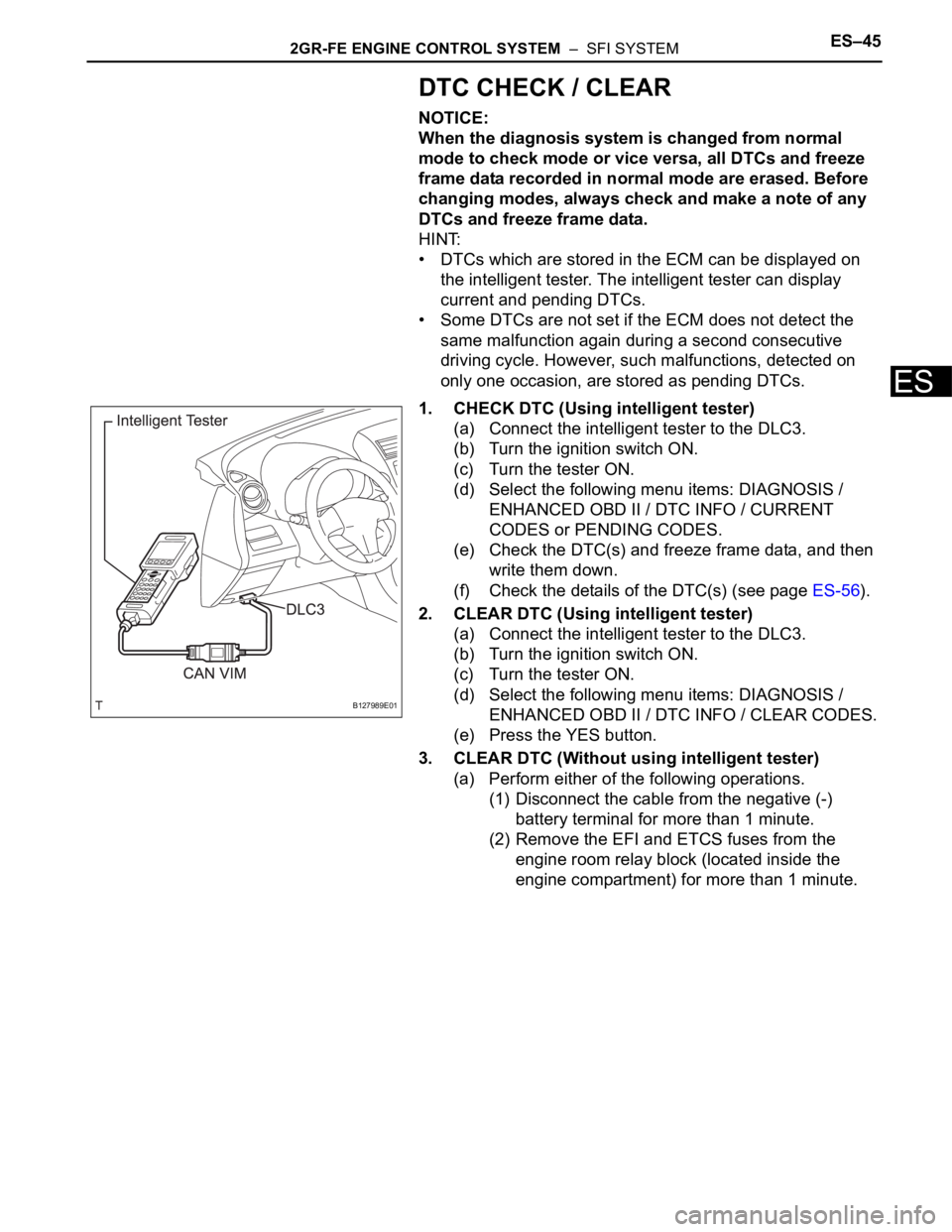
1. CHECK DTC (Using intelligent tester)
(a) Connect the intelligent tester to the DLC3.
(b) Turn the ignition switch ON.
(c) Turn the tester ON.
(d) Select the following menu items: DIAGNOSIS /
ENHANCED OBD II / DTC INFO / CURRENT
CODES or PENDING CODES.
(e) Check the DTC(s) and freeze frame data, and then
write them down.
(f) Check the details of the DTC(s) (see page ES-56).
2. CLEAR DTC (Using intelligent tester)
(a) Connect the intelligent tester to the DLC3.
(b) Turn the ignition switch ON.
(c) Turn the tester ON.
(d) Select the following menu items: DIAGNOSIS /
ENHANCED OBD II / DTC INFO / CLEAR CODES.
(e) Press the YES button.
3. CLEAR DTC (Without using intelligent tester)
(a) Perform either of the following operations.
(1) Disconnect the cable from the negative (-)
battery terminal for more than 1 minute.
(2) Remove the EFI and ETCS fuses from the
engine room relay block (located inside the
engine compartment) for more than 1 minute.
B127989E01
Page 854 of 2000
CO–62GR-FE COOLING – COOLING FAN SYSTEM
CO
ON-VEHICLE INSPECTION
HINT:
It is normal for the cooling fan to sometimes rotate when the
ignition switch is turned from ACC to ON.
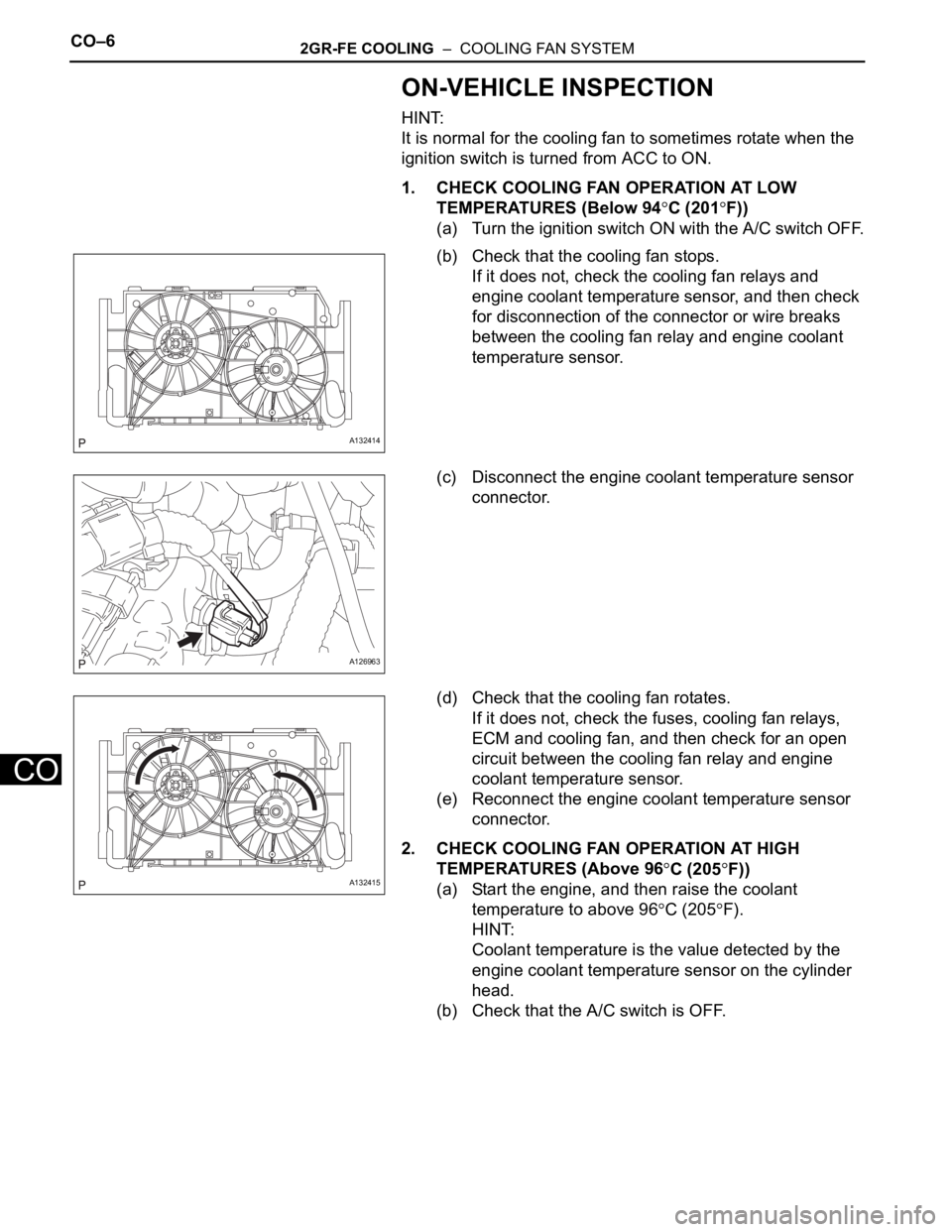
1. CHECK COOLING FAN OPERATION AT LOW
TEMPERATURES (Below 94
C (201F))
(a) Turn the ignition switch ON with the A/C switch OFF.
(b) Check that the cooling fan stops.
If it does not, check the cooling fan relays and
engine coolant temperature sensor, and then check
for disconnection of the connector or wire breaks
between the cooling fan relay and engine coolant
temperature sensor.
(c) Disconnect the engine coolant temperature sensor
connector.
(d) Check that the cooling fan rotates.
If it does not, check the fuses, cooling fan relays,
ECM and cooling fan, and then check for an open
circuit between the cooling fan relay and engine
coolant temperature sensor.
(e) Reconnect the engine coolant temperature sensor
connector.
2. CHECK COOLING FAN OPERATION AT HIGH
TEMPERATURES (Above 96
C (205F))
(a) Start the engine, and then raise the coolant
temperature to above 96
C (205F).
HINT:
Coolant temperature is the value detected by the
engine coolant temperature sensor on the cylinder
head.
(b) Check that the A/C switch is OFF.
A132414
A126963
A132415
Page 928 of 2000
2GR-FE CHARGING – CHARGING SYSTEMCH–5
CH
ON-VEHICLE INSPECTION
1. CHECK BATTERY CONDITION
NOTICE:
If the battery is weak or if the engine is difficult to
start, perform the following procedures.
(a) Check the battery for damage and deformation. If
severe damage, deformation or leakage is found,
replace the battery.
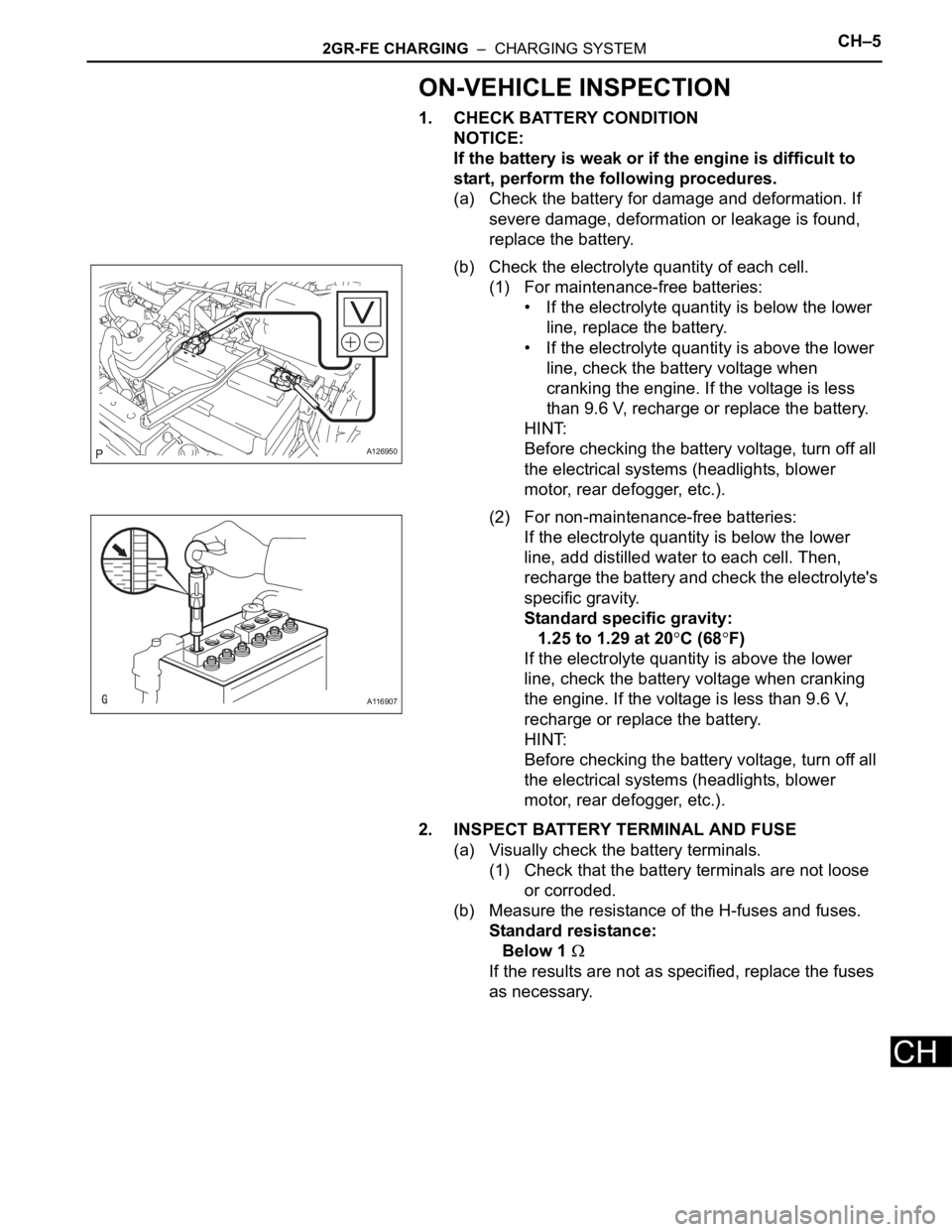
(b) Check the electrolyte quantity of each cell.
(1) For maintenance-free batteries:
• If the electrolyte quantity is below the lower
line, replace the battery.
• If the electrolyte quantity is above the lower
line, check the battery voltage when
cranking the engine. If the voltage is less
than 9.6 V, recharge or replace the battery.
HINT:
Before checking the battery voltage, turn off all
the electrical systems (headlights, blower
motor, rear defogger, etc.).
(2) For non-maintenance-free batteries:
If the electrolyte quantity is below the lower
line, add distilled water to each cell. Then,
recharge the battery and check the electrolyte's
specific gravity.
Standard specific gravity:
1.25 to 1.29 at 20
C (68F)
If the electrolyte quantity is above the lower
line, check the battery voltage when cranking
the engine. If the voltage is less than 9.6 V,
recharge or replace the battery.
HINT:
Before checking the battery voltage, turn off all
the electrical systems (headlights, blower
motor, rear defogger, etc.).
2. INSPECT BATTERY TERMINAL AND FUSE
(a) Visually check the battery terminals.
(1) Check that the battery terminals are not loose
or corroded.
(b) Measure the resistance of the H-fuses and fuses.
Standard resistance:
Below 1
If the results are not as specified, replace the fuses
as necessary.
A126950
A116907
Page 970 of 2000
AX–36U140F AUTOMATIC TRANSAXLE – AUTOMATIC TRANSAXLE SYSTEM
AX
2. CLEAR DTC
(a) When using the intelligent tester:
(1) Connect the intelligent tester to the CAN VIM.
Then connect the CAN VIM to the DLC3.
(2) Turn the ignition switch ON and turn the tester
ON.
(3) Enter the following menus: DIAGNOSIS /
ENHANCED OBD II / DTC INFO / CLEAR
CODES. Then and press YES.
HINT:
When operating the tester to erase the codes,
the DTCs and freeze frame data will be erased.
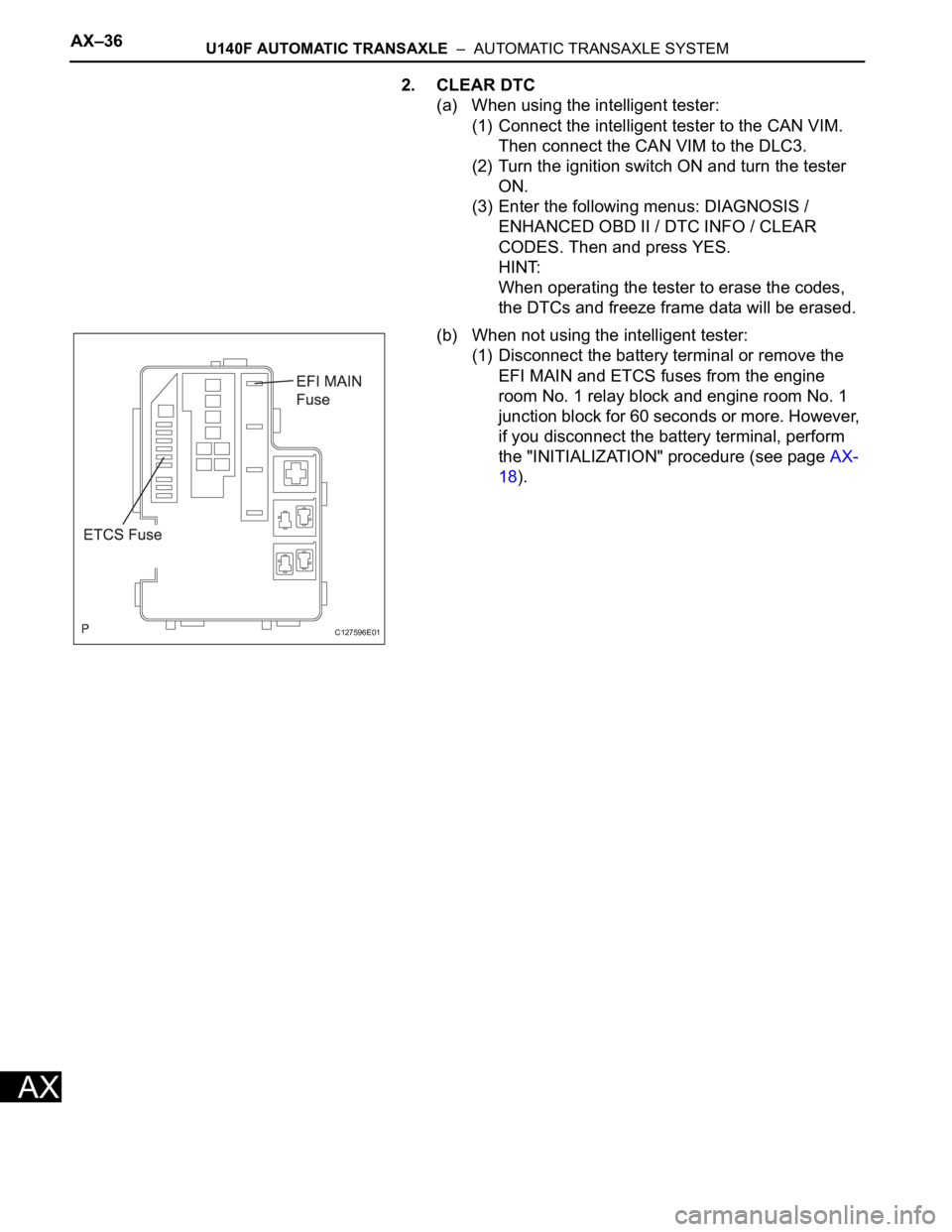
(b) When not using the intelligent tester:
(1) Disconnect the battery terminal or remove the
EFI MAIN and ETCS fuses from the engine
room No. 1 relay block and engine room No. 1
junction block for 60 seconds or more. However,
if you disconnect the battery terminal, perform
the "INITIALIZATION" procedure (see page AX-
18).
C127596E01
Page 1053 of 2000
U151E AUTOMATIC TRANSAXLE – AUTOMATIC TRANSAXLE SYSTEMAX–37
AX
Turn the ignition switch OFF after the
symptom is simulated once. Then repeat the
simulation process. When the symptom has
been simulated twice, the MIL illuminates
and the DTCs are recorded in the ECM.
2. CLEAR DTC
(a) When using the intelligent tester:
(1) Connect the intelligent tester to the CAN VIM.
Then connect the CAN VIM to the DLC3.
(2) Turn the ignition switch ON and turn the tester
ON.
(3) Enter the following menus: DIAGNOSIS /
ENHANCED OBD II / DTC INFO / CLEAR
CODES. Then press YES.
HINT:
When operating the tester to erase the codes,
the DTCs and freeze frame data will be erased.
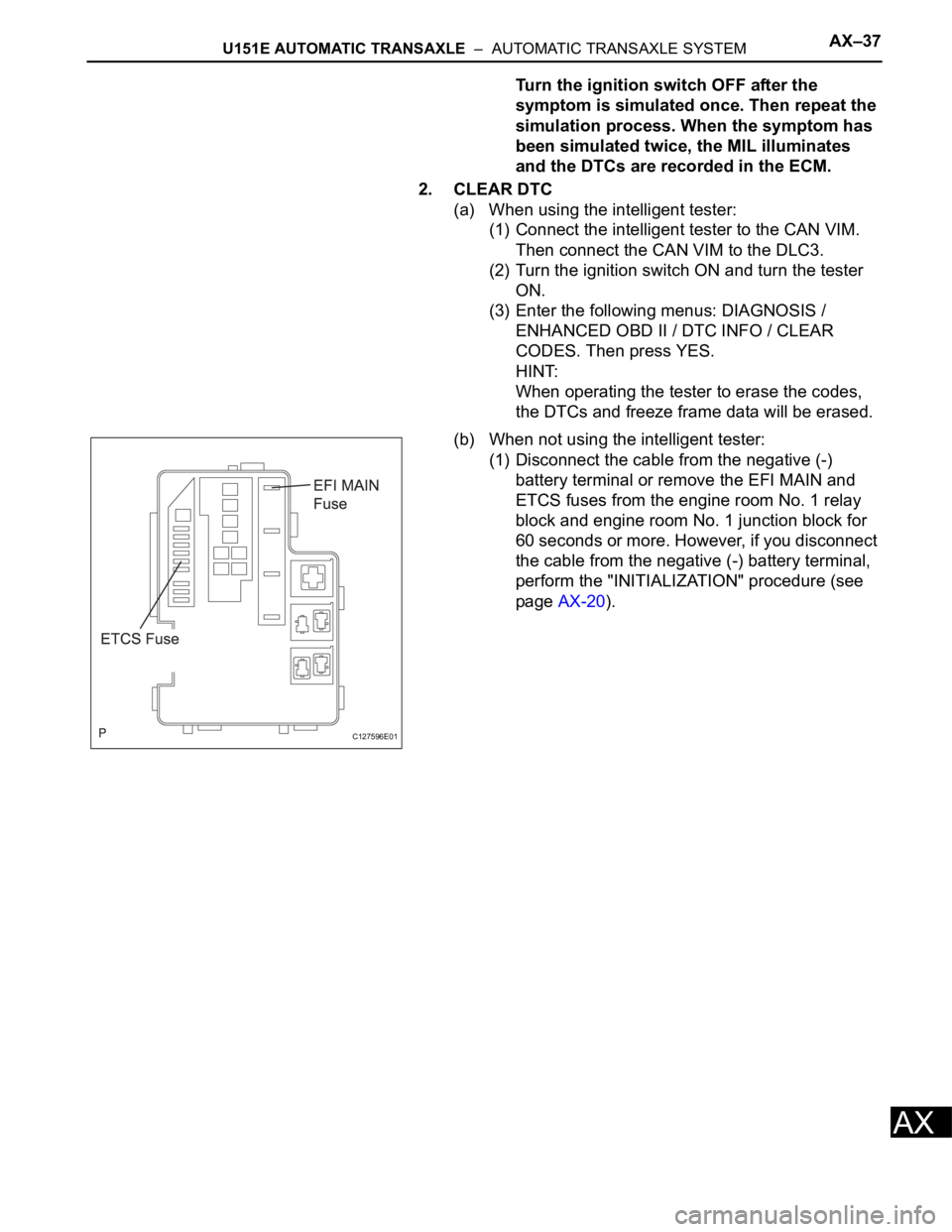
(b) When not using the intelligent tester:
(1) Disconnect the cable from the negative (-)
battery terminal or remove the EFI MAIN and
ETCS fuses from the engine room No. 1 relay
block and engine room No. 1 junction block for
60 seconds or more. However, if you disconnect
the cable from the negative (-) battery terminal,
perform the "INITIALIZATION" procedure (see
page AX-20).
C127596E01
Page 1156 of 2000
U151F AUTOMATIC TRANSAXLE – AUTOMATIC TRANSAXLE SYSTEMAX–37
AX
Turn the ignition switch OFF after the
symptom is simulated once. Then repeat the
simulation process. When the symptom has
been simulated twice, the MIL illuminates
and the DTCs are recorded in the ECM.
2. CLEAR DTC
(a) When using the intelligent tester:
(1) Connect the intelligent tester to the CAN VIM.
Then connect the CAN VIM to the DLC3.
(2) Turn the ignition switch ON and turn the tester
ON.
(3) Enter the following menus: DIAGNOSIS /
ENHANCED OBD II / DTC INFO / CLEAR
CODES. Then press YES.
HINT:
When operating the tester to erase the codes,
the DTCs and freeze frame data will be erased.
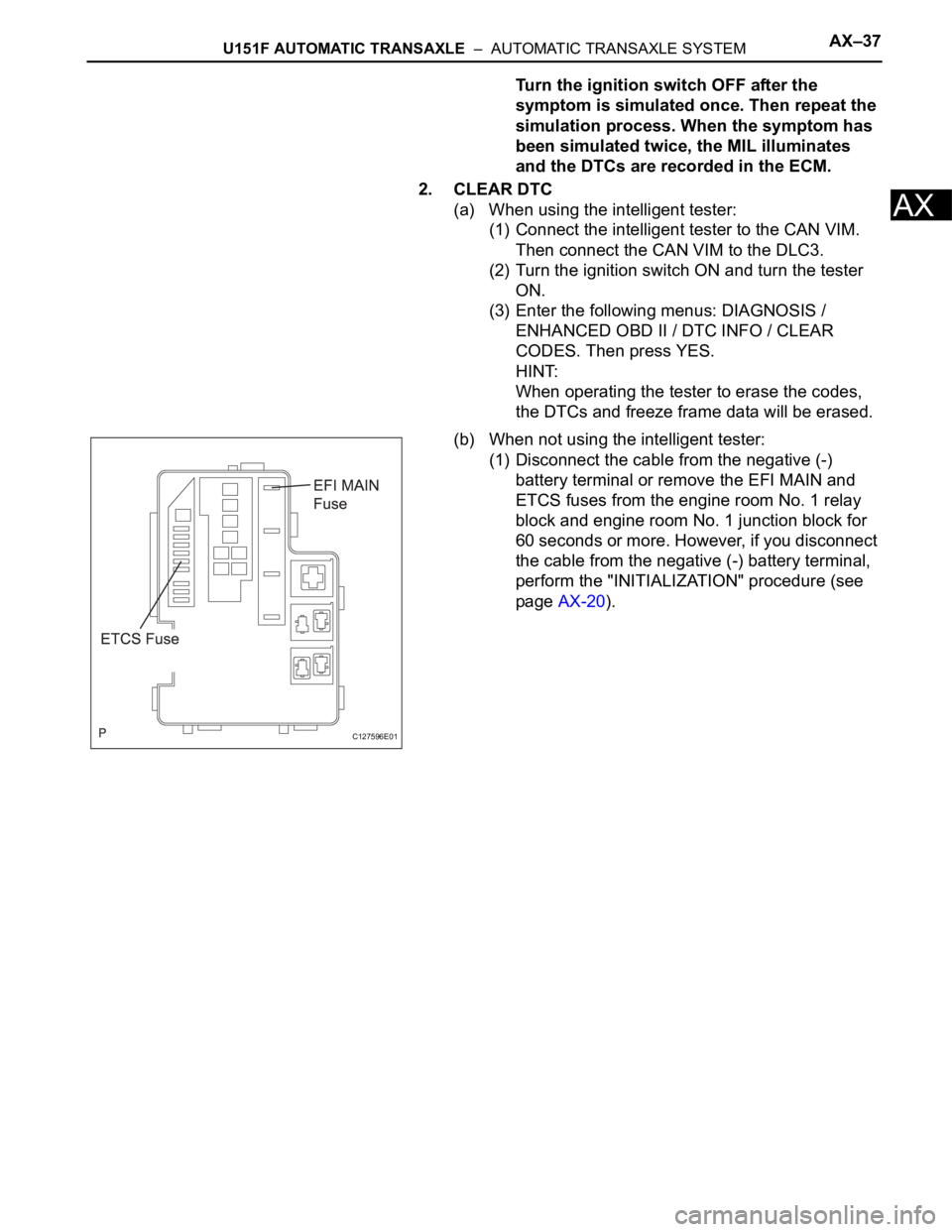
(b) When not using the intelligent tester:
(1) Disconnect the cable from the negative (-)
battery terminal or remove the EFI MAIN and
ETCS fuses from the engine room No. 1 relay
block and engine room No. 1 junction block for
60 seconds or more. However, if you disconnect
the cable from the negative (-) battery terminal,
perform the "INITIALIZATION" procedure (see
page AX-20).
C127596E01
Page 1260 of 2000
AX–36U241E AUTOMATIC TRANSAXLE – AUTOMATIC TRANSAXLE SYSTEM
AX
2. CLEAR DTC
(a) When using the intelligent tester:
(1) Connect the intelligent tester to the CAN VIM.
Then connect the CAN VIM to the DLC3.
(2) Turn the ignition switch ON and turn the tester
ON.
(3) Enter the following menus: DIAGNOSIS /
ENHANCED OBD II / DTC INFO / CLEAR
CODES. Then and press YES.
HINT:
When operating the tester to erase the codes,
the DTCs and freeze frame data will be erased.
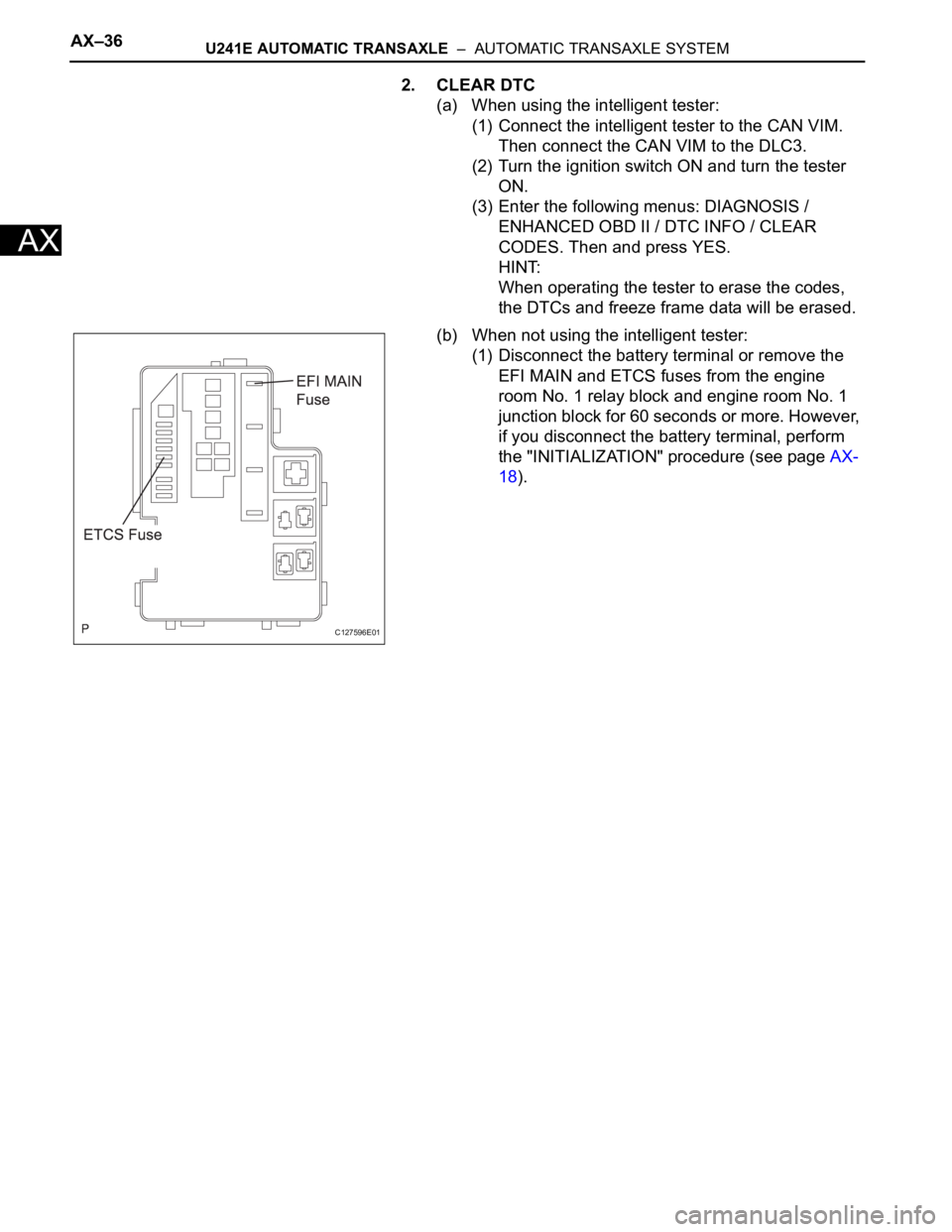
(b) When not using the intelligent tester:
(1) Disconnect the battery terminal or remove the
EFI MAIN and ETCS fuses from the engine
room No. 1 relay block and engine room No. 1
junction block for 60 seconds or more. However,
if you disconnect the battery terminal, perform
the "INITIALIZATION" procedure (see page AX-
18).
C127596E01
Page 1343 of 2000
GF1A TRANSFER – ACTIVE TORQUE CONTROL 4WD SYSTEMTF–15
TF
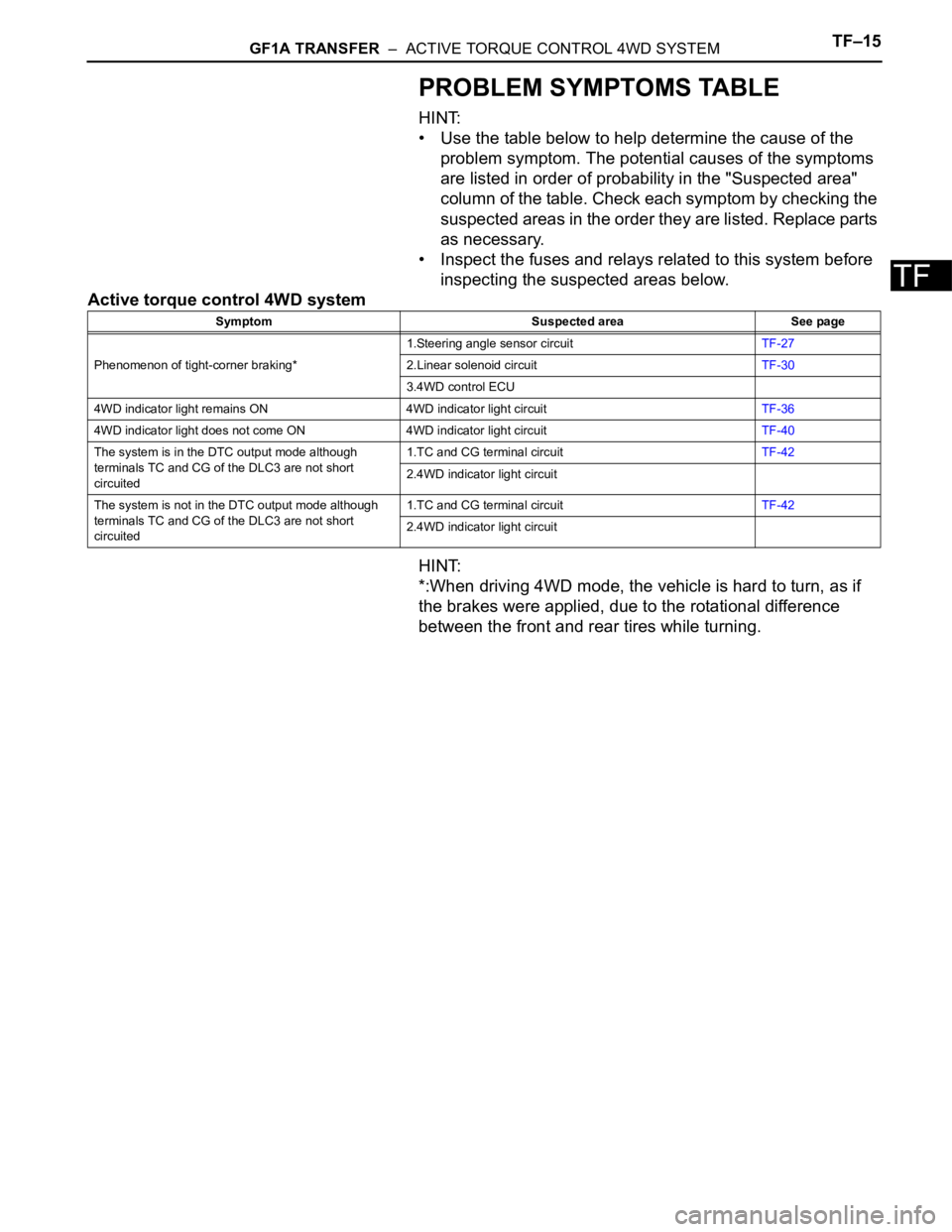
PROBLEM SYMPTOMS TABLE
HINT:
• Use the table below to help determine the cause of the
problem symptom. The potential causes of the symptoms
are listed in order of probability in the "Suspected area"
column of the table. Check each symptom by checking the
suspected areas in the order they are listed. Replace parts
as necessary.
• Inspect the fuses and relays related to this system before
inspecting the suspected areas below.
Active torque control 4WD system
HINT:
*:When driving 4WD mode, the vehicle is hard to turn, as if
the brakes were applied, due to the rotational difference
between the front and rear tires while turning.
Symptom Suspected area See page
Phenomenon of tight-corner braking*1.Steering angle sensor circuitTF-27
2.Linear solenoid circuitTF-30
3.4WD control ECU
4WD indicator light remains ON 4WD indicator light circuitTF-36
4WD indicator light does not come ON 4WD indicator light circuitTF-40
The system is in the DTC output mode although
terminals TC and CG of the DLC3 are not short
circuited1.TC and CG terminal circuitTF-42
2.4WD indicator light circuit
The system is not in the DTC output mode although
terminals TC and CG of the DLC3 are not short
circuited1.TC and CG terminal circuitTF-42
2.4WD indicator light circuit
Page 1347 of 2000
GF1A TRANSFER – ACTIVE TORQUE CONTROL 4WD SYSTEMTF–19
TF
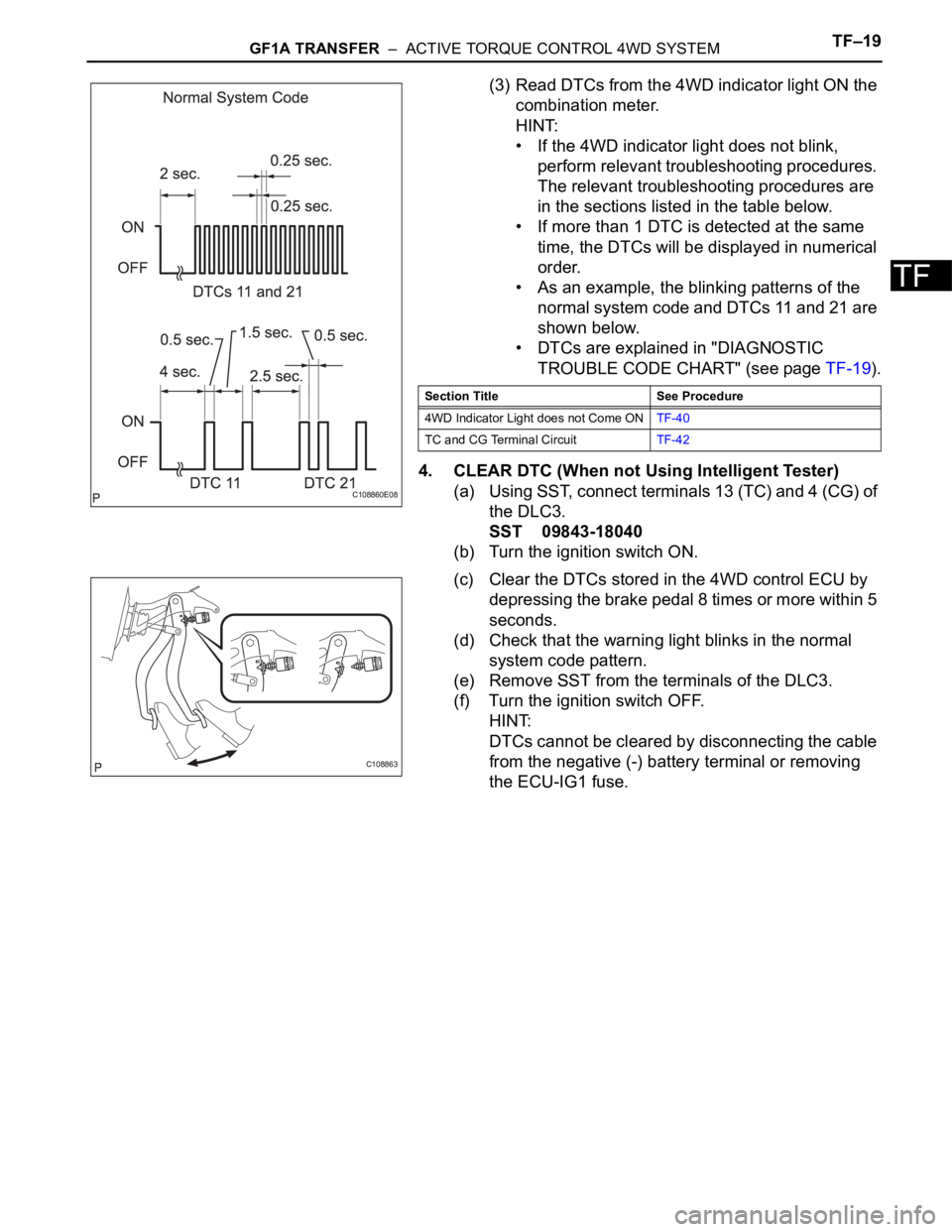
(3) Read DTCs from the 4WD indicator light ON the
combination meter.
HINT:
• If the 4WD indicator light does not blink,
perform relevant troubleshooting procedures.
The relevant troubleshooting procedures are
in the sections listed in the table below.
• If more than 1 DTC is detected at the same
time, the DTCs will be displayed in numerical
order.
• As an example, the blinking patterns of the
normal system code and DTCs 11 and 21 are
shown below.
• DTCs are explained in "DIAGNOSTIC
TROUBLE CODE CHART" (see page TF-19).
4. CLEAR DTC (When not Using Intelligent Tester)
(a) Using SST, connect terminals 13 (TC) and 4 (CG) of
the DLC3.
SST 09843-18040
(b) Turn the ignition switch ON.
(c) Clear the DTCs stored in the 4WD control ECU by
depressing the brake pedal 8 times or more within 5
seconds.
(d) Check that the warning light blinks in the normal
system code pattern.
(e) Remove SST from the terminals of the DLC3.
(f) Turn the ignition switch OFF.
HINT:
DTCs cannot be cleared by disconnecting the cable
from the negative (-) battery terminal or removing
the ECU-IG1 fuse.
C108860E08
Section Title See Procedure
4WD Indicator Light does not Come ONTF-40
TC and CG Terminal CircuitTF-42
C108863