Charge TOYOTA RAV4 PHEV 2021 Owners Manual
[x] Cancel search | Manufacturer: TOYOTA, Model Year: 2021, Model line: RAV4 PHEV, Model: TOYOTA RAV4 PHEV 2021Pages: 666, PDF Size: 161.28 MB
Page 480 of 666
4786-4. Using the other interior features
The USB charging ports are used
to supply 2.1 A of electricity at 5 V
to external devices.
The USB charging ports are for
charging only. They are not
designed for data transfer or other
purposes.
Depending on the external device,
it may not charge properly. Refer to
the manual included with the device
before using a U SB charging port.
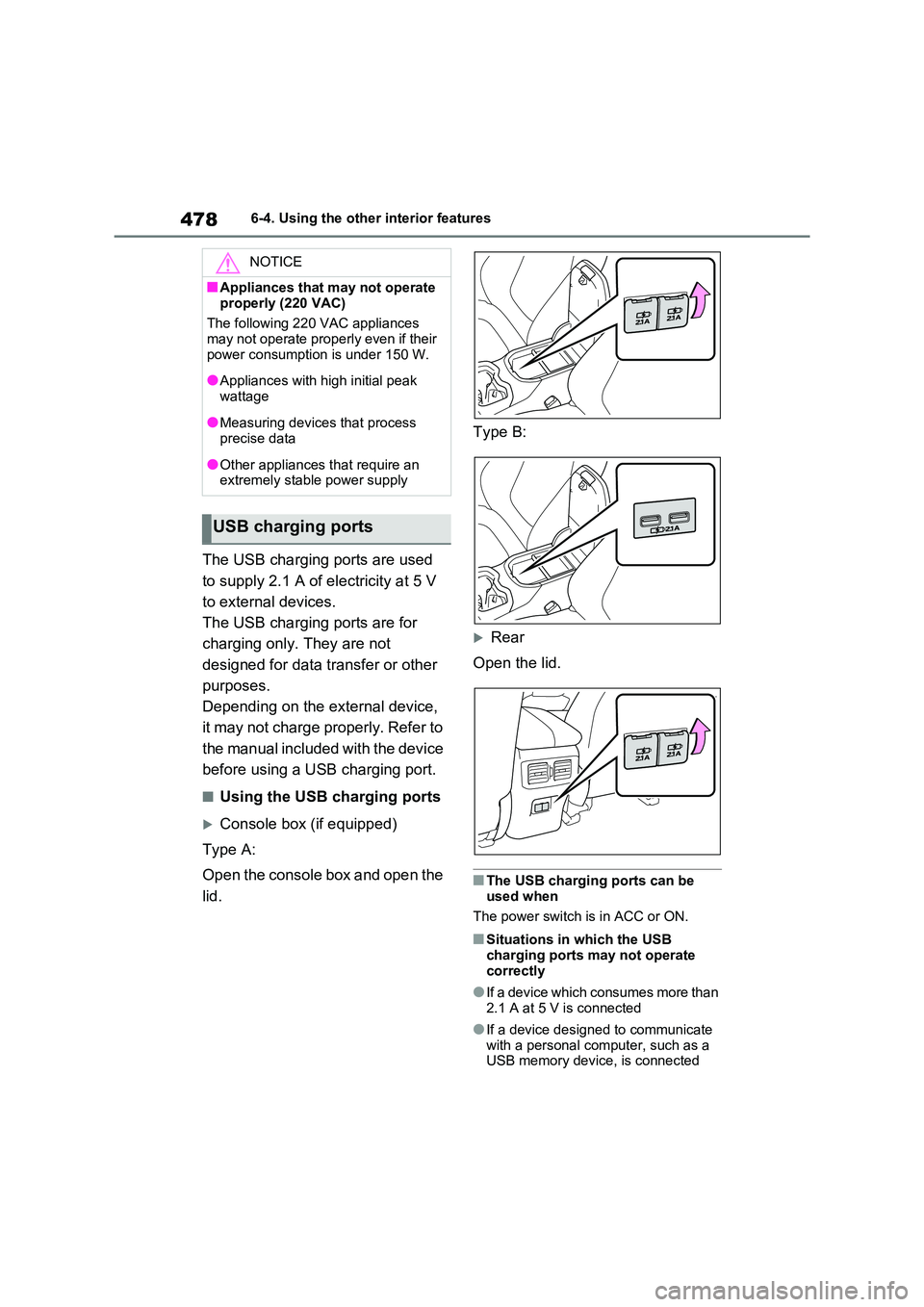
■Using the USB charging ports
Console box (if equipped)
Type A:
Open the console box and open the
lid.
Type B:
Rear
Open the lid.
■The USB charging ports can be
used when
The power switch is in ACC or ON.
■Situations in which the USB
charging ports may not operate
correctly
●If a device which consumes more than
2.1 A at 5 V is connected
●If a device designed to communicate
with a personal com puter, such as a USB memory device, is connected
NOTICE
■Appliances that may not operate
properly (220 VAC)
The following 220 VAC appliances may not operate properly even if their
power consumption is under 150 W.
●Appliances with high initial peak
wattage
●Measuring devices that process precise data
●Other appliances t hat require an extremely stable power supply
USB charging ports
Page 481 of 666
479
6
6-4. Using the other interior features
Interior features
●If the connected ex ternal device is
turned off (depending on device)
●If the temperature inside the vehicle is
high, such as after the vehicle has been parked in the sun
■About connected external devices
Depending on the connected external
device, charging may occasionally be suspended and then st art again. This is
not a malfunction.
A portable device can be charged
by just placing Qi standard wireless
charge compatible portable devices
according to the Wireless Power
Consortium, such as smartphones
and mobile batteries, etc., on the
charge area.
This function canno t be used with
portable devices that are larger
than the charging area. Also,
depending on the portable device, it
may not operate as normal. Please
read the operation manual for por -
table devices to be used.
■The “Qi” symbol
The “Qi” symbol is a trademark of
the Wireless Power Consortium.
NOTICE
■To prevent damage to the USB
charging ports
●Do not insert foreign objects into
the ports.
●Do not spill water or other liquids
into the ports.
●When the USB char ging ports are
not in use, close the lids. If a foreign
object or liquid enters a port may cause a short circuit.
●Do not apply exce ssive force to or impact the USB charging ports.
●Do not disassemble or modify the USB charging ports.
■To prevent damage to external devices
●Do not leave external devices in the
vehicle. The temperature inside the vehicle may become high, resulting
in damage to an external device.
●Do not push down on or apply
unnecessary force to an external
device or the cable of an external device while it is connected.
■To prevent 12-volt battery dis - charge
Do not use the USB charging ports for
a long period of time when the hybrid system is off.
Wireless charger (if
equipped)
Page 482 of 666
4806-4. Using the other interior features
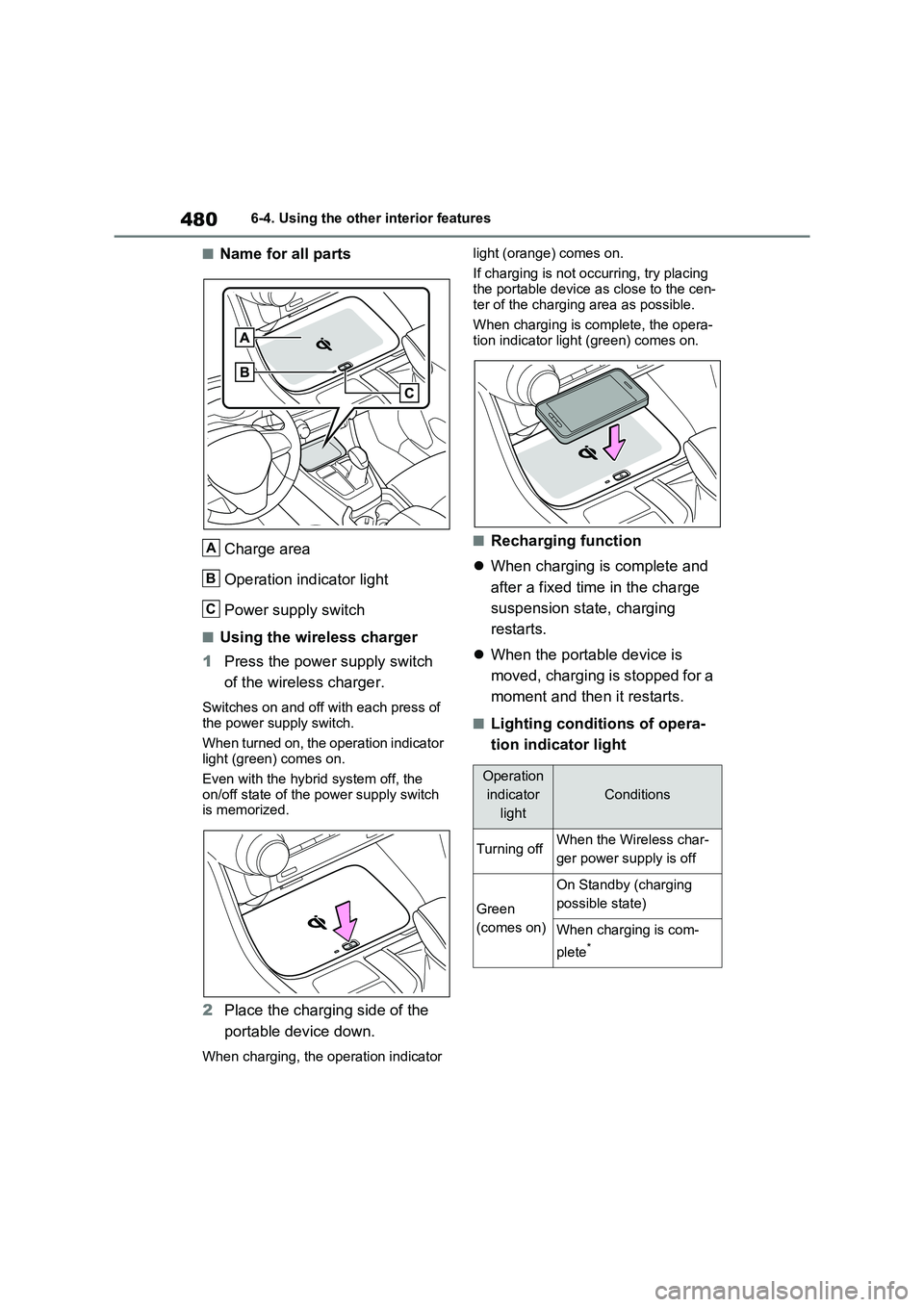
■Name for all parts
Charge area
Operation indicator light
Power supply switch
■Using the wireless charger
1 Press the power supply switch
of the wireless charger.
Switches on and off wi th each press of the power supply switch.
When turned on, the operation indicator
light (green) comes on.
Even with the hybr id system off, the
on/off state of the power supply switch
is memorized.
2 Place the charging side of the
portable device down.
When charging, the operation indicator
light (orange) comes on.
If charging is not occurring, try placing the portable device a s close to the cen-
ter of the charging area as possible.
When charging is complete, the opera - tion indicator light (green) comes on.
■Recharging function
When charging is complete and
after a fixed time in the charge
suspension state, charging
restarts.
When the portable device is
moved, charging is stopped for a
moment and then it restarts.
■Lighting conditions of opera -
tion indicator light
A
B
C
Operation
indicator
light
Conditions
Turning offWhen the Wireless char -
ger power supply is off
Green
(comes on)
On Standby (charging
possible state)
When charging is com -
plete*
Page 483 of 666
481
6
6-4. Using the other interior features
Interior features
*: Depending on the portable device,
there are cases where the operation
indicator light will continue being lit
up orange even afte r the charging is
complete.
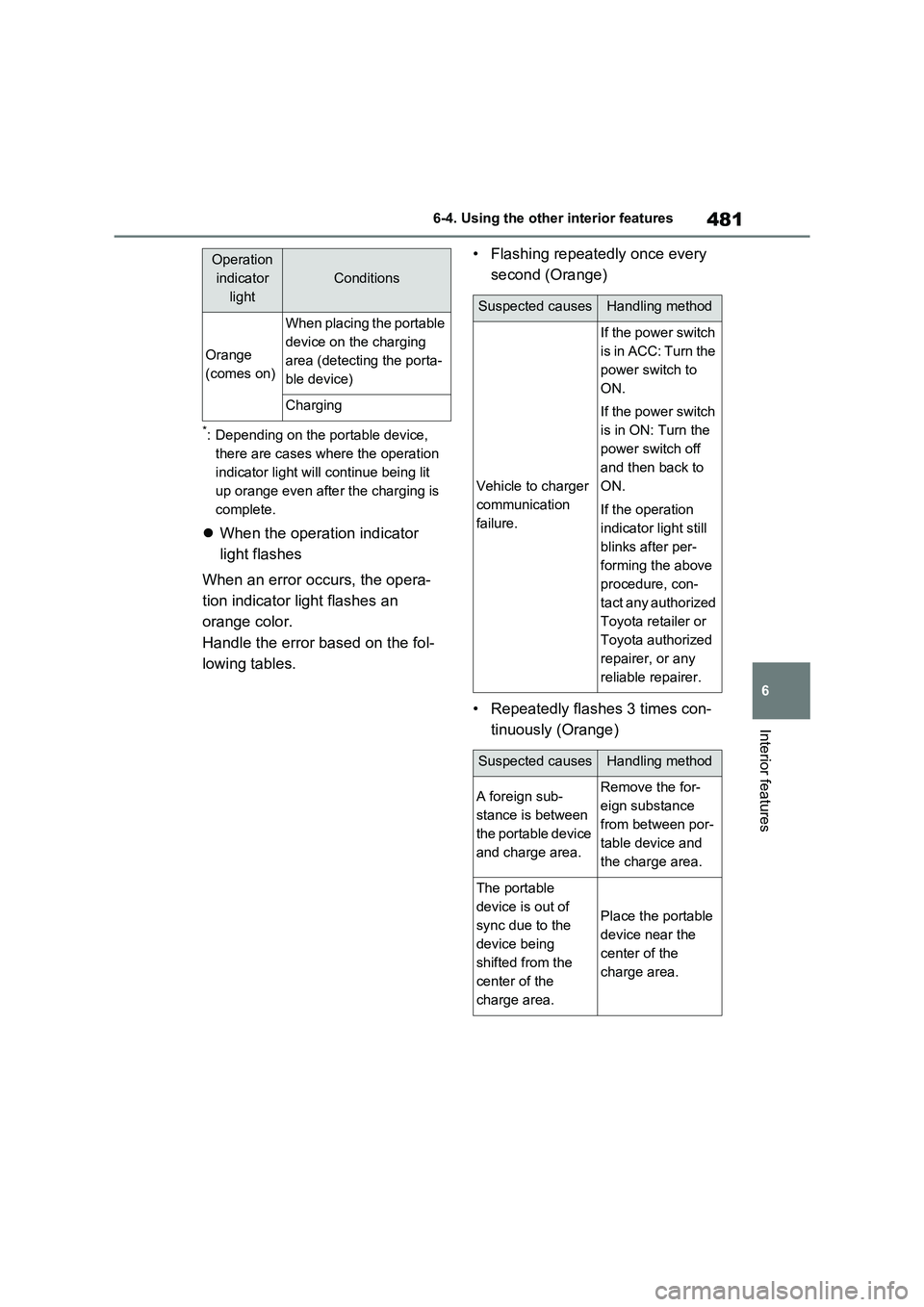
When the operation indicator
light flashes
When an error occurs, the opera -
tion indicator light flashes an
orange color.
Handle the error based on the fol -
lowing tables.
• Flashing repeatedly once every
second (Orange)
• Repeatedly flashes 3 times con -
tinuously (Orange)
Orange
(comes on)
When placing the portable
device on the charging
area (detecting the porta -
ble device)
Charging
Operation
indicator
light
Conditions
Suspected causesHandling method
Vehicle to charger
communication
failure.
If the power switch
is in ACC: Turn the
power switch to
ON.
If the power switch
is in ON: Turn the
power switch off
and then back to
ON.
If the operation
indicator light still
blinks after per -
forming the above
procedure, con -
t a c t a n y a u t h o r i z e d
Toyota retailer or
Toyota authorized
repairer, or any
reliable repairer.
Suspected causesHandling method
A foreign sub -
stance is between
the portable device
and charge area.
Remove the for -
eign substance
from between por -
table device and
the charge area.
The portable
device is out of
sync due to the
device being
shifted from the
center of the
charge area.
Place the portable
device near the
center of the
charge area.
Page 484 of 666
4826-4. Using the other interior features
• Repeatedly flashes 4 times con-
tinuously (Orange)
■The wireless charger can be oper -
ated when
The power switch is in ACC or ON.
■Usable portable devices
Qi standard wireless charge standard
can be used on compatible devices. However, not all Qi standard devices
and compatibility are guaranteed.
Starting with mobile phones and smartphones, it is aimed for low power
electrically supplie d portable devices of
no more than 5W.
■When covers and accessories are attached to portable devices
Do not charge in situations where cover
and accessories not able to handle Qi are attached to the portable device.
Depending on the type of cover and
accessory, it may n ot be possible to charge. When charging is not performed
even with the portable device placed on
the charge area, remove the cover and
accessories.
■While charging, noise enters the AM radio
Turn off the wireless charger and con -
firm that the noise has decreased. If the noise decreases, continuously pushing
the power supply switch of the wireless
charger for 2 seconds, the frequency of the charger can be changed and the
noise can be reduced.Also, on that
occasion, the operation indicator light will flash orange 2 times.
■Important points of the wireless
charger
●If the electronic key cannot be
detected withi n the vehicle interior,
charging cannot b e done. When the door is opened and closed, charging
may be temporarily suspended.
●When charging, the wireless charging
device and portable device will get
warmer, however this is not a mal - function.
When a portable device gets warm
while charging, c harging may stop due to the protecti on function on the
portable device side. In this case,
when the temperature of the portable device drops significantly, charge
again.
●Depending on usage of the portable
device, it may not be fully charged.
This is not a malfunction.
●When using a mobile phone near a
wireless charger, the call sensitivity and communication speed may be
reduced.
■Operation sounds
When the power supply is turned on, wh ile s e ar c hing fo r th e por t ab le de v ic e a
sound will be produced, however this is
not a malfunction.
■Cleaning the wireless charger
→ P.492
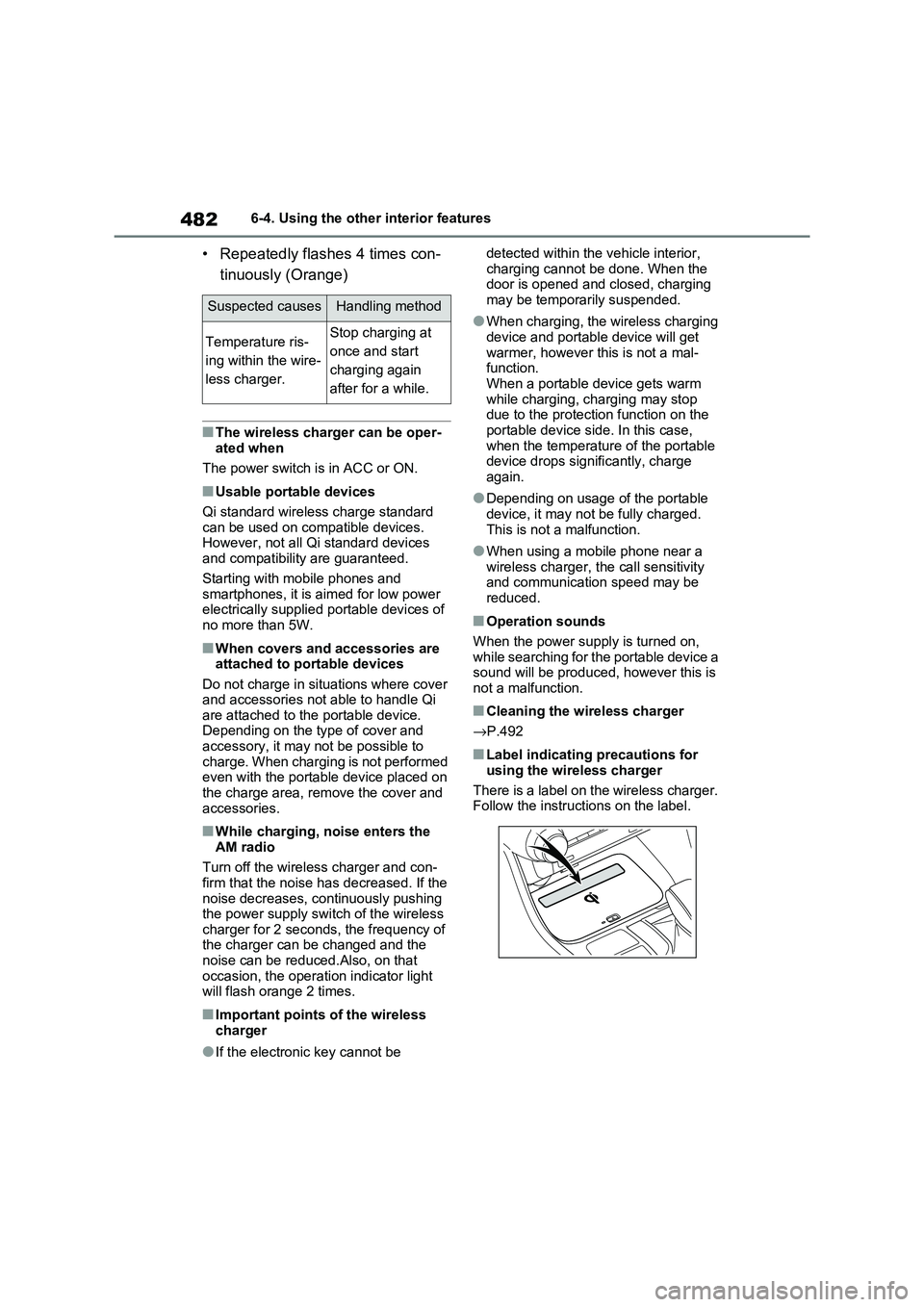
■Label indicating precautions for
using the wireless charger
There is a label on the wireless charger. Follow the instructions on the label.
Suspected causesHandling method
Temperature ris -
ing within the wire -
less charger.
Stop charging at
once and start
charging again
after for a while.
Page 485 of 666
483
6
6-4. Using the other interior features
Interior features
WARNING
■Caution while driving
When charging a portable device, for
safety reasons, the driver should not operate the main pa rt of the portable
device while driving.
■Caution regarding interference
with electro nic devices
People with implantable cardiac pace -
makers, cardiac resynchronization therapy-pacemakers or implantable
cardioverter defibrillators, as well as
any other electrica l medical device, should consult thei r physician about
the usage of the wireless charger.
The operations of the wireless char - ger may have an affect on medical
devices.
■To prevent damage or burns
Observe the following precautions.
Failure to do so may result in a possi - bility of equipment failure and dam -
age, catch fire, burns due to overheat.
●Do not insert any metallic objects between the charging area and the
portable device while charging
●Do not place cont ainers with liquid
such as wate r on the wireless char-
ger.
●Do not attach sti ckers, metallic
objects, etc., to the charger area or portable device
●Do not cover with cloth, etc., and charge
●Do not charge po rtable devices other than designated
●Do not attempt to dismantle for dis - assembly or modifications
●Do not hit or appl y a strong force
NOTICE
■Conditions in which the function
may not operate correctly
In the following cond itions, it may not operate correctly
●The portable device is fully charged
●There is foreign matter between the
charge area and portable device
●The temperature of the portable device gets higher from charging
●The charging surf ace of the porta- ble device is facing up
●The placement of the portable device is out of alignment with the
charge area
●Near a TV tower, electric power
plant, gas station, radio station,
large display, airport or other facility that generates strong radio waves
or electrical noise
●When the electronic key is in con -
tact with, or is covered by the fol -
lowing metallic objects
• Cards to which aluminum foil is
attached
• Cigarette boxes that have alumi - num foil inside
• Metallic wallets or bags
• Coins
• Hand warmers made of metal
• Media such as CDs and DVDs
●When other wireless keys (that emit
radio waves) are being used nearby
In addition, excluding the above-men -
tioned, when the charger does not
perform normally or the operation dis -
play lamp is flashing continuously, it is
considered that the wireless charger
is malfunctioning. C ontact authorized
Toyota dealer.
Page 486 of 666
4846-4. Using the other interior features
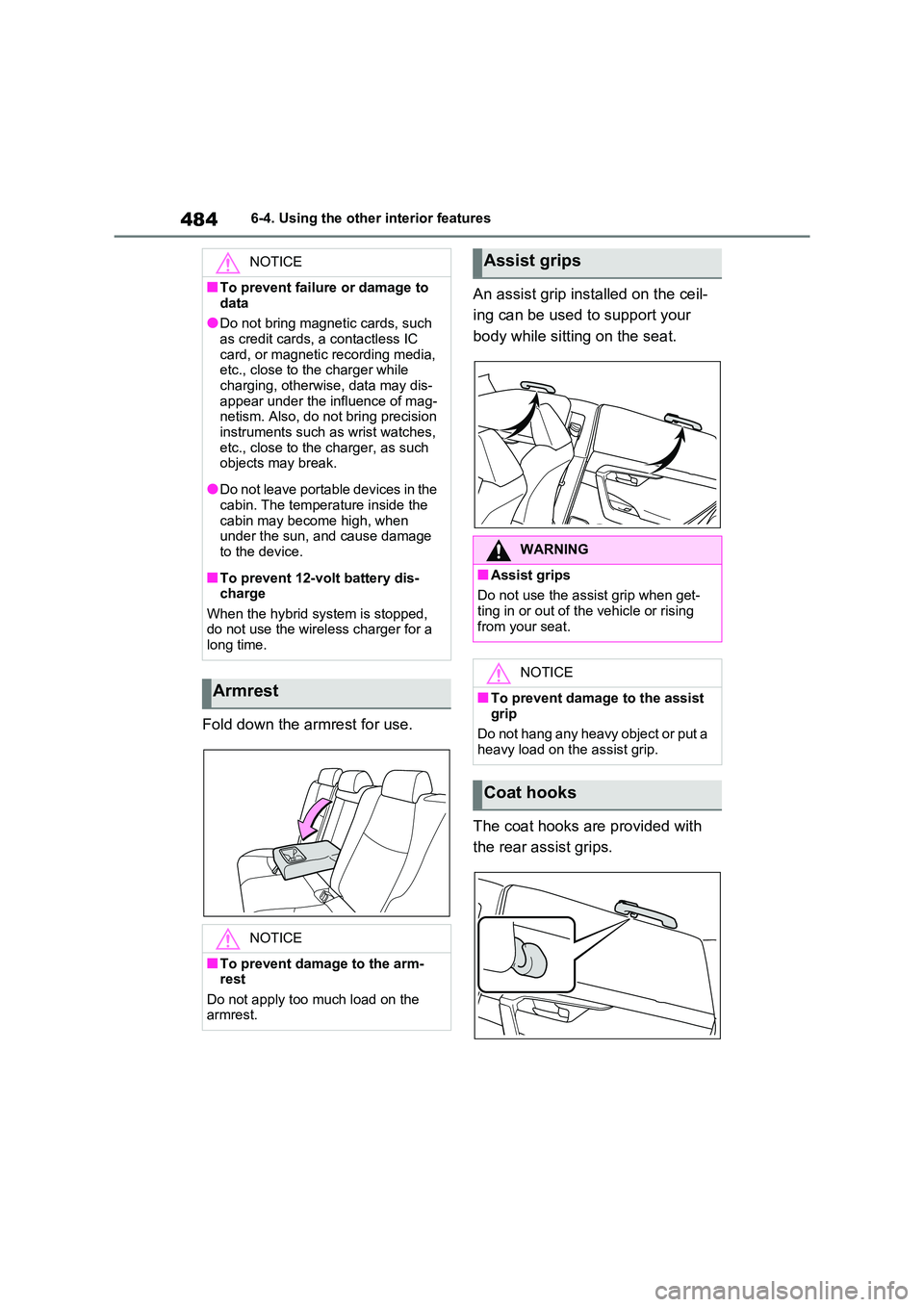
Fold down the armrest for use.
An assist grip inst alled on the ceil-
ing can be used to support your
body while sitti ng on the seat.
The coat hooks are provided with
the rear assist grips.
NOTICE
■To prevent failure or damage to
data
●Do not bring magnet ic cards, such as credit cards, a contactless IC
card, or magnetic recording media,
etc., close to the charger while charging, otherwis e, data may dis-
appear under the influence of mag -
netism. Also, do not bring precision
instruments such as wrist watches, etc., close to the charger, as such
objects may break.
●Do not leave portable devices in the
cabin. The temperature inside the
cabin may become high, when under the sun, and cause damage
to the device.
■To prevent 12-volt battery dis -
charge
When the hybrid syst em is stopped, do not use the wireless charger for a
long time.
Armrest
NOTICE
■To prevent damage to the arm -
rest
Do not apply too much load on the armrest.
Assist grips
WARNING
■Assist grips
Do not use the a ssist grip when get-
ting in or out of t he vehicle or rising
from your seat.
NOTICE
■To prevent damage to the assist
grip
Do not hang any heavy object or put a
heavy load on th e assist grip.
Coat hooks
Page 494 of 666
4927-1. Maintenance and care
WARNING
■Water in the vehicle
●Do not splash or spill liquid in the
vehicle, such as on the floor, on the rear seats, in the DC/DC Converter
air intake vent, junction box or in
the luggage compartment. ( →P.98) Doing so may cause the DC/DC
Converter, electrical components,
etc. to malfunction or catch fire.
●Do not get any o f the SRS compo-
nents or wiring in the vehicle interior
wet. ( →P.40) An electrical malfunction may
cause the airbags to deploy or not
function properly, resulting in death or serious injury.
●Vehicles with wireless charger:Do not let the wir eless charger
( →P.479) get wet. Failure to do so
may cause the charger to become hot and cause burns or could cause
electric shock resu lting in death or
serious injury.
■Cleaning the interior (especially
instrument panel)
Do not use a polish wax or polish
cleaner. The instrument panel may
reflect off the windshield, obstructing the driver’s view and leading to an
accident, resulting in death or serious
injury.
NOTICE
■Cleaning detergents
●Do not use the fol lowing types of
detergent, as they may discolor the vehicle interior or cause streaks or
damage to paint ed surfaces:
• Non-seat portions: Organic sub - stances such as benzene or gaso -
line, alkaline or a cidic solutions,
dye, and bleach
• Seats: Alkaline or acidic solutions,
such as thinner, benzene, and alco -
hol
●Do not use a polish wax or polish cleaner. The instrument panel’s or
other interior part’ s painted surface
may be damaged.
■Preventing damage to leather
surfaces
Observe the following precautions to
avoid damage to and deterioration of
leather surfaces:
●Remove any dust or dirt from
leather surfaces immediately.
●Do not expose the vehicle to direct
sunlight for extended periods of
time. Park the vehicle in the shade, especially during summer.
●Do not place items made of vinyl, plastic, or containing wax on the
upholstery, as they may stick to the
leather surface if the vehicle interior heats up significantly.
■Water on the floor
Do not wash the vehicle floor with
water.
Vehicle systems such as the audio system may be damaged if water
comes into contact with electrical
components such as the audio sys - tem above or under the floor of the
vehicle. Water may also cause the
body to rust.
■When cleaning the inside of the
windshield (vehicles with Toyota Safety Sense)
Do not allow glass cleaner to contact
the lens. Also, do not touch the lens. ( →P.344)
■Cleaning the inside of the rear
window
●Do not use a glass cleaner to clean
the rear window, as this may cause
damage to the rear window defog - ger heater wires. Use a cloth damp -
ened with lukewarm water to gently
wipe the window clean. Wipe the window in strokes running parallel
to the heater wires.
Page 508 of 666
5067-3. Do-it-yourself maintenance
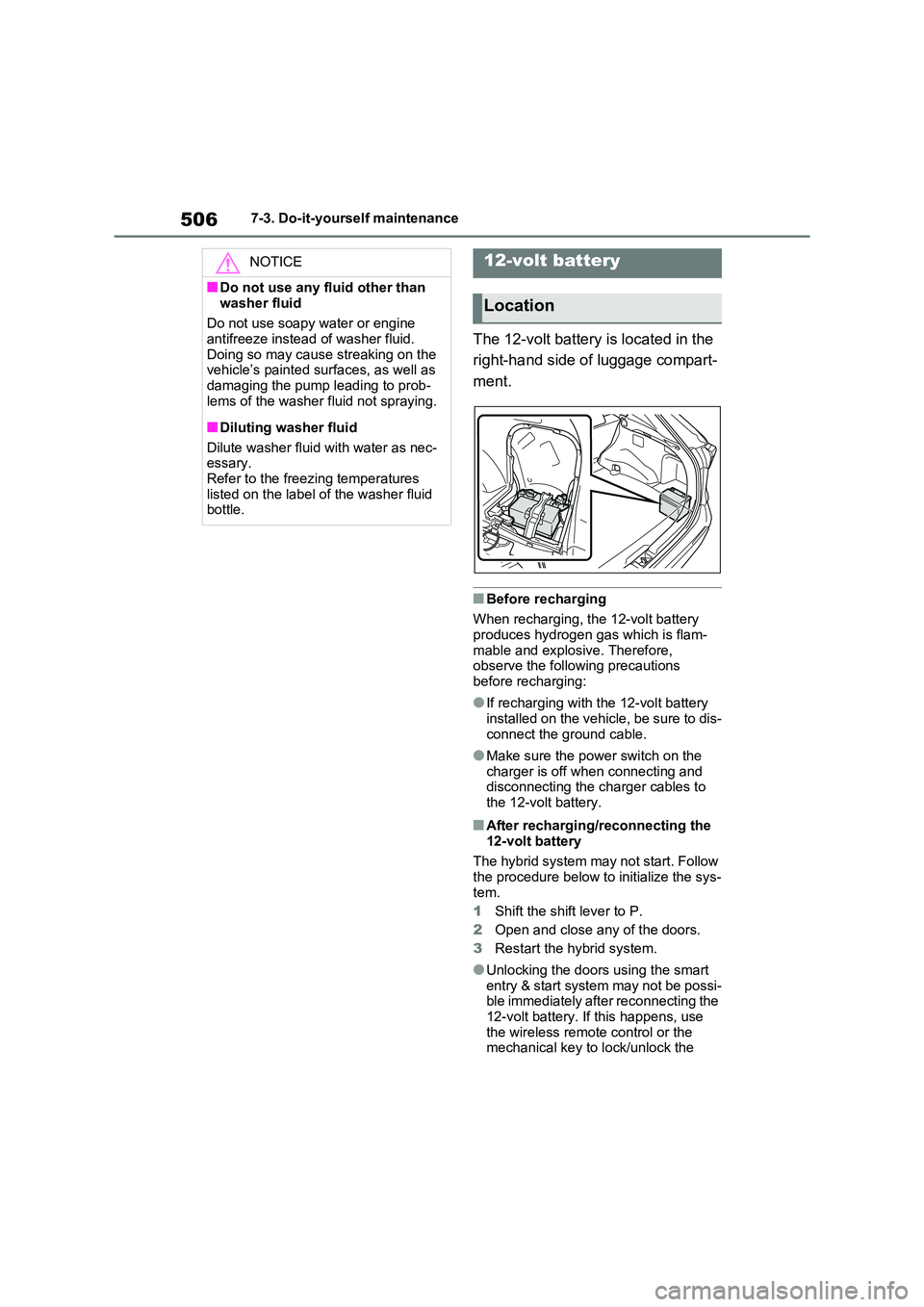
The 12-volt battery is located in the
right-hand side of luggage compart -
ment.
■Before recharging
When recharging, the 12-volt battery produces hydrogen gas which is flam-
mable and explosive. Therefore,
observe the following precautions before recharging:
●If recharging with the 12-volt battery installed on the vehicle, be sure to dis -
connect the ground cable.
●Make sure the power switch on the
charger is off when connecting and
disconnecting the charger cables to the 12-volt battery.
■After recharging/reconnecting the
12-volt battery
The hybrid system may not start. Follow the procedure below to initialize the sys-
tem.
1 Shift the shift lever to P.
2 Open and close any of the doors.
3 Restart the hybrid system.
●Unlocking the doors using the smart entry & start system may not be possi -
ble immediately after reconnecting the
12-volt battery. If this happens, use the wireless remote control or the
mechanical key to lock/unlock the
NOTICE
■Do not use any fluid other than
washer fluid
Do not use soapy water or engine antifreeze instead of washer fluid.
Doing so may cause streaking on the
vehicle’s painted sur faces, as well as damaging the pump leading to prob -
lems of the washer fluid not spraying.
■Diluting washer fluid
Dilute washer fluid with water as nec-
essary.
Refer to the freezing temperatures listed on the label of the washer fluid
bottle.
12-volt battery
Location
Page 509 of 666
507
7
7-3. Do-it-yours elf maintenance
Maintenance and care
doors.
●Start the hybrid system with the power
switch in ACC. The hybrid system
may not start with the power switch turned off. Howeve r, the hybrid sys-
tem will operate normally from the
second attempt.
●The power switch mode is recorded
by the vehicle. If the 12-volt battery is reconnected, the vehicle will return
the power switch mode to the status it
was in before the 12-volt battery was disconnected. Make sure to turn off
the power switch b efore disconnect
the 12-volt battery. Take extra care when connecting the 12-volt battery if
the power switch m ode prior to dis-
charge is unknown.
If the hybrid system will not start even
after multiple attem pts at all methods
above, contact any authorized Toyota retailer or Toyota authorized repairer, or
any reliable repairer.
WARNING
■Chemicals in the 12-volt battery
The 12-volt battery contains poison - ous and corrosive sulfuric acid and
may produce hydrogen gas which is
flammable and expl osive. To reduce the risk of death or serious injury, take
the following precautions while work -
ing on or near the 12-volt battery:
●Do not cause sparks by touching
the 12-volt batter y terminals with tools.
●Do not smoke or light a match near the 12-volt battery.
●Avoid contact with eyes, skin and clothes.
●Never inhale or swallow electrolyte.
●Wear protective safety glasses
when working near the 12-volt bat- tery.
●Keep children away from the 12-volt battery.
■Where to safely charge the 12-volt battery
Always charge the 12-volt battery in
an open area. Do not charge the 12- volt battery in a garage or closed
room where there is not sufficient
ventilation.
■Emergency measures regarding
electrolyte
●If electrolyte gets in your eyes
Flush your eyes with clean water for
at least 15 minutes and get immediate
medical attention. If possible, con-
tinue to apply wate r with a sponge or
cloth while traveling to the nearest
medical facility.
●If electrolyte g ets on your skin
Wash the affec ted area thoroughly. If
you feel pain or burning, get medical
attention immediately.
●If electrolyte gets on your clothes
It can soak through clothing on to
your skin. Immediat ely take off the
clothing and follow the procedure
above if necessary.
●If you accidentally swallow electro -
lyte
Drink a large quantity of water or milk.
Get emergency medical attention
immediately.
■When there is insu fficient 12-volt
battery fluid
Do not use if there is insufficient fluid in the 12-volt battery. There is a pos -
sible danger that the 12-volt battery
may explode.