Charge TOYOTA RAV4 PHEV 2021 Manual Online
[x] Cancel search | Manufacturer: TOYOTA, Model Year: 2021, Model line: RAV4 PHEV, Model: TOYOTA RAV4 PHEV 2021Pages: 666, PDF Size: 161.28 MB
Page 344 of 666
3425-4. Refueling
5-4.Refueling
Close all the doors and windows,
and turn the power switch to
OFF.
Confirm the type of fuel.
■Fuel types
→ P.627
■Fuel tank opening for unleaded
gasoline
To help prevent inco rrect fueling, your vehicle has a fuel tank opening that only
accommodates the special nozzle on
unleaded fuel pumps.
Opening the fuel tank
cap
Perform the foll owing steps to
open the fuel tank cap:
Before refueling the vehicle
WARNING
■When refueling the vehicle
Observe the following precautions
while refueling the vehicle. Failure to
do so may result in death or serious injury.
●After exiting the vehicle and before
opening the fuel door, touch an unpainted metal surface to dis -
charge any static e lectricity. It is
important to discha rge static elec- tricity before re fueling because
sparks resulting fr om static electric-
ity can cause fuel vapors to ignite while refueling.
●Always hold the gr ips on the fuel tank cap and turn it slowly to
remove it.
A whooshing sound may be heard when the fuel tank cap is loosened.
Wait until the sound cannot be
heard before fully removing the cap. In hot weather, pressurized
fuel may spray out of the filler neck
and cause injury.
●Do not allow anyone that has not
discharged static electricity from their body to come close to an open
fuel tank.
●Do not inhale vaporized fuel.
Fuel contains substances that are
harmful if inhaled.
●Do not smoke while refueling the
vehicle. Doing so may cause the fuel to
ignite and cause a fire.
●Do not return to the vehicle or touch
any person or objec t that is stati-
cally charged. T his may cause static electricity t o build up, result-
ing in a possible ignition hazard.
■When refueling
Observe the following precautions to
prevent fuel overflowing from the fuel tank:
●Securely insert the fuel nozzle into
the fuel filler neck.
●Stop filling the tank after the fuel
nozzle automatically clicks off.
●Do not top off the fuel tank.
NOTICE
■Refueling
Do not spill fuel during refueling. Doing so may damage the vehicle,
such as causing the emission control
system to operate abnormally or dam - aging fuel system components or the
vehicle’s pain ted surface.
Page 458 of 666
4566-1. Using the air conditioning system and defogger
●During use, various odors from inside
and outside the vehicle may enter into and accumulate in the air conditioning
system. This may t hen cause odor to
be emitted from the vents.
●To reduce potential odors from occur -
ring: • It is recommended that the air condi-
tioning system be se t to outside air
mode prior to turning the vehicle off. • The start timing o f the blower may be
delayed for a short period of time
immediately after t he air conditioning system is started in automatic mode.
●When parking, the system automati- cally switches to outside air mode to
encourage better air circulation
throughout the vehicle, helping to reduce odors that occur when starting
the vehicle.
■Air conditioning filter
→ P.532
■Noise from air conditioning system
Approximately 90 seconds after the
power switch turned to OFF, you may
hear sound coming from air conditioning system. This is the sound of a air condi -
tioning system initial ize and, it does not
indicate a malfunction.
■Customization
Settings (e.g. A/C Auto switch opera-
tion) can be changed.
(Customizable features: →P.640)
1Press the “AUTO” switch.
The dehumidification function begins to
operate. Air outlets and fan speed are automatically adjusted according to the
temperature setting and humidity.
2 Adjust the temperature setting.
3 To stop the operation, press the
“OFF” switch.
If the fan speed se tting or air flow
modes are operated, the automatic
mode indicator goes off. However,
automatic mode for functions other
than that operated is maintained.
■Using automatic mode
Fan speed is adjusted automatically
according to the temperature setting and
the ambient conditions.
WARNING
■Cautions for using “My Room Mode”
Do not leave children, people who
need assistance, or pets inside the vehicle. The system may turn off
automatically and the interior tem-
perature may become high or low, resulting in heat stroke, dehydration
or hypothermia. Fa ilure to do so may
result in death or serious injury.
■To prevent the windshield from fogging up
Do not use the wi ndshield defogger
switch during cool air operation in extremely humid weather.
The difference bet ween the tempera-
ture of the outside air and that of the windshield can cause the outer sur -
face of the windshield to fog up,
blocking your vision.
■When the outside rear view mir -
ror defoggers are operating
Do not touch the rear view mirror sur -
faces when the out side rear view mir-
ror defoggers are on.
NOTICE
■To prevent 12-volt battery dis - charge
Do not leave the ai r conditioning sys-
tem on longer than necessary when the hybrid system is off.
Using automatic mode
Page 462 of 666
4606-1. Using the air conditioning system and defogger
If the Remote Air Conditioning Sys-
tem is used while the AC charging
cable is connected to the vehicle,
electricity from an external power
source can be used minimizing the
drop in charge of the hybrid battery
(traction battery).
Charging will be co nducted automati-
cally after the Remo te Air Conditioning
System is stopped.
Check the temperature setting of
the air conditioning system.
( →P.452)
The Remote Air Conditioning System
will operate in accordance with the tem -
perature settings of the air conditioning
system.
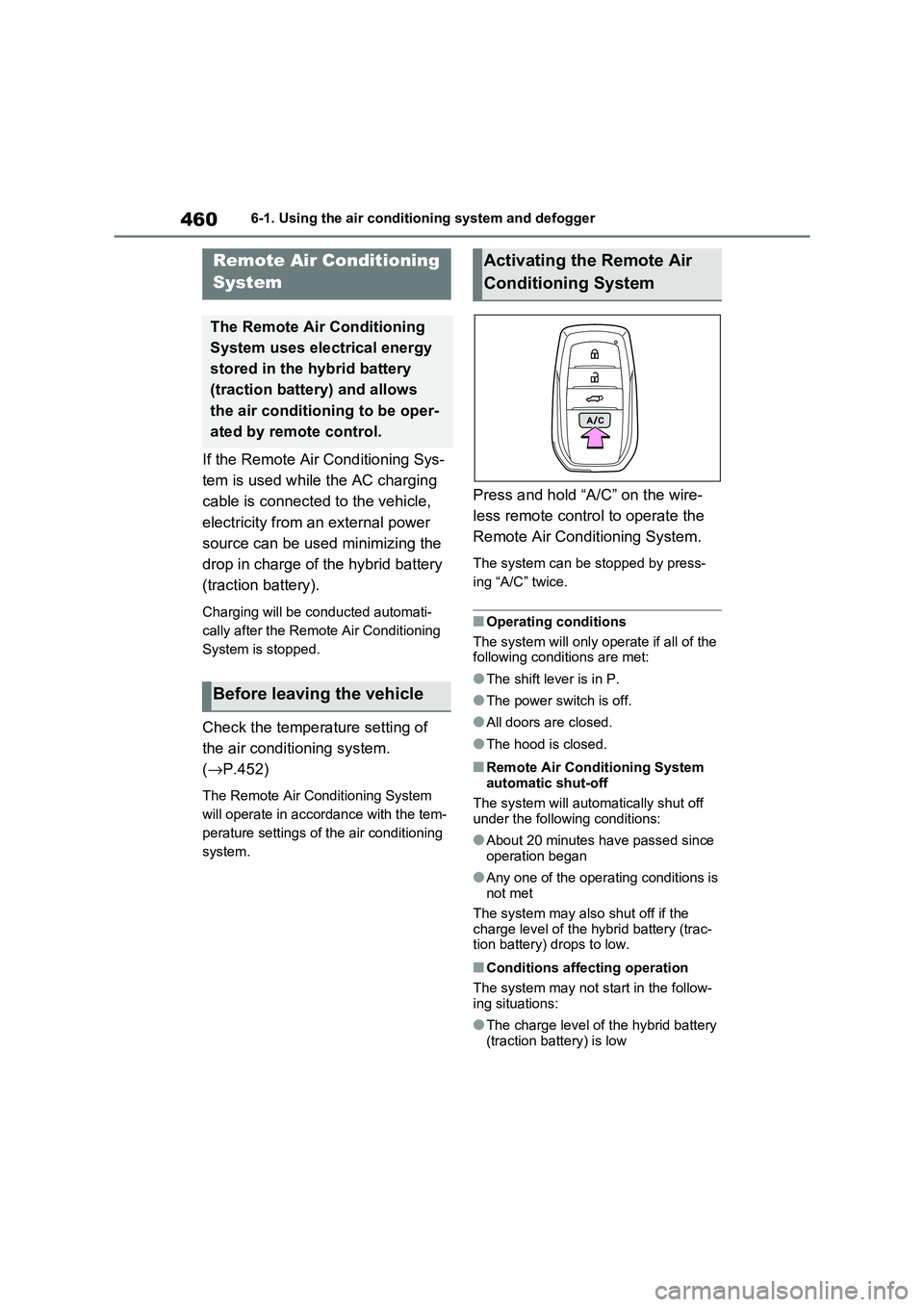
Press and hold “A/C” on the wire -
less remote control to operate the
Remote Air Conditioning System.
The system can be s topped by press-
ing “A/C” twice.
■Operating conditions
The system will only operate if all of the
following conditions are met:
●The shift lever is in P.
●The power switch is off.
●All doors are closed.
●The hood is closed.
■Remote Air Conditioning System
automatic shut-off
The system will automa tically shut off under the following conditions:
●About 20 minutes have passed since operation began
●Any one of the operating conditions is not met
The system may also shut off if the
charge level of the hybrid battery (trac -
tion battery) drops to low.
■Conditions affecting operation
The system may not s tart in the follow-
ing situations:
●The charge level of t he hybrid battery
(traction battery) is low
Remote Air Conditioning
System
The Remote Air Conditioning
System uses electrical energy
stored in the hybrid battery
(traction battery) and allows
the air conditi oning to be oper-
ated by remote control.
Before leaving the vehicle
Activating the Remote Air
Conditioning System
Page 463 of 666
461
6
6-1. Using the air conditi oning system and defogger
Interior features
●The outside temperature is extremely
low
●When the hybrid syst em is cool (for
example, after being left for a long time in low temperatures)
■Windshield defogger
When defogging the windshield using
the Remote Air Conditioning System, defogging may be insufficient due to the
power being restricted more than during
normal air conditioning operation. Also, the outside of the windshield may fog up
due to the outside temperature, humidity
or air conditioning set temperature.
■Using the heater via the Remote Air Conditioning System
●When the outside te mperature is low, heating may feel insufficient due to
restricted operation of the air condi -
tioning.
●When the outside heat exchanger
becomes frosted ov er, heating perfor- mance may decline due to automati -
cally switchi ng to the frost removal
operation. ( →P.452)
■Security feature
Any unlocked doors will be automatically
locked when the system is operating.
The emergency flashers flash to indicate that the doors have been locked or the
system has been turned off.
■Conditions affecting operation
→ P.225
■While the Remote Air Conditioning System is operating
●Depending on the operating condition of the Remote Air Conditioning Sys -
tem, the air condit ioning compressor
or cooling fan may spin and an operat -
ing noise may be heard. However, this does not indicate a mal -
function.
●The air conditi oning operation
switches, etc. will not operate while
the Remote Air Conditioning System is operating.
■Electronic key battery depletion
→ P.202
■When the electronic key battery is fully depleted
→ P.543
■Customization
Setting (e.g. Operation using “A/C” on the wireless remote control) can be
changed. (Customizable features:
→ P.629)
WARNING
■Precautions for the Remote Air Conditioning System
●Do not use the system if people are
in the vehicle. Even when the system is in use, the
internal temperature may still reach
a high or low level due to features such as the automatic shut-off.
Children and pets left inside the
vehicle may suffer heatstroke dehy - dration or hypothermia, or could
result in death or serious injury.
●Depending on the surrounding envi -
ronment, signals from the wireless
switch may transmit further than expected. Pay appropriate attention
to the vehicle’s surroundings and
use the switch only when neces- sary.
●Do not operate “A/C” on the wire - less remote contro l if the hood is
open. The air conditioning may
operate unintentionally and objects may be drawn into the electrical
cooling fan.
NOTICE
■To prevent the hybrid battery (traction battery ) from being dis-
charged
Use “A/C” on the wireless remote control only when necessary.
Page 464 of 666
4626-1. Using the air conditioning system and defogger
*: If equipped
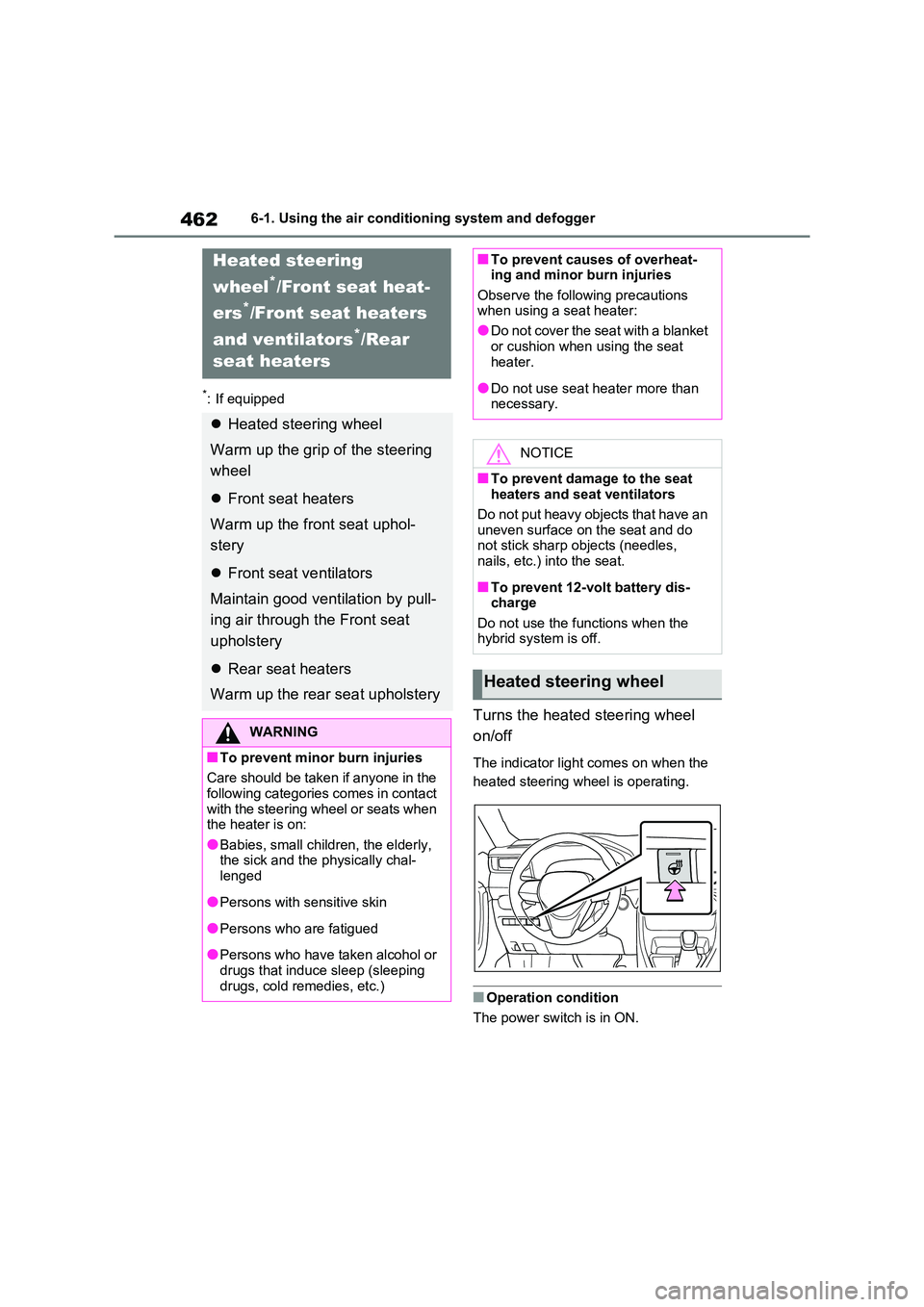
Turns the heated steering wheel
on/off
The indicator light comes on when the
heated steering wheel is operating.
■Operation condition
The power switch is in ON.
Heated steering
wheel*/Front seat heat-
ers*/Front seat heaters
and ventilators*/Rear
seat heaters
Heated steering wheel
Warm up the grip of the steering
wheel
Front seat heaters
Warm up the fr ont seat uphol-
stery
Front seat ventilators
Maintain good ventilation by pull -
ing air through the Front seat
upholstery
Rear seat heaters
Warm up the rear seat upholstery
WARNING
■To prevent minor burn injuries
Care should be taken if anyone in the
following categories comes in contact with the steering wheel or seats when
the heater is on:
●Babies, small children, the elderly, the sick and the p hysically chal-
lenged
●Persons with sensitive skin
●Persons who are fatigued
●Persons who have taken alcohol or
drugs that induce sleep (sleeping drugs, cold remedies, etc.)
■To prevent causes of overheat - ing and minor burn injuries
Observe the following precautions
when using a seat heater:
●Do not cover the seat with a blanket
or cushion when using the seat
heater.
●Do not use seat heater more than
necessary.
NOTICE
■To prevent damage to the seat heaters and seat ventilators
Do not put heavy objects that have an
uneven surface on the seat and do not stick sharp objects (needles,
nails, etc.) into the seat.
■To prevent 12-volt battery dis -
charge
Do not use the functions when the hybrid system is off.
Heated steering wheel
Page 468 of 666
4666-2. Using the interior lights
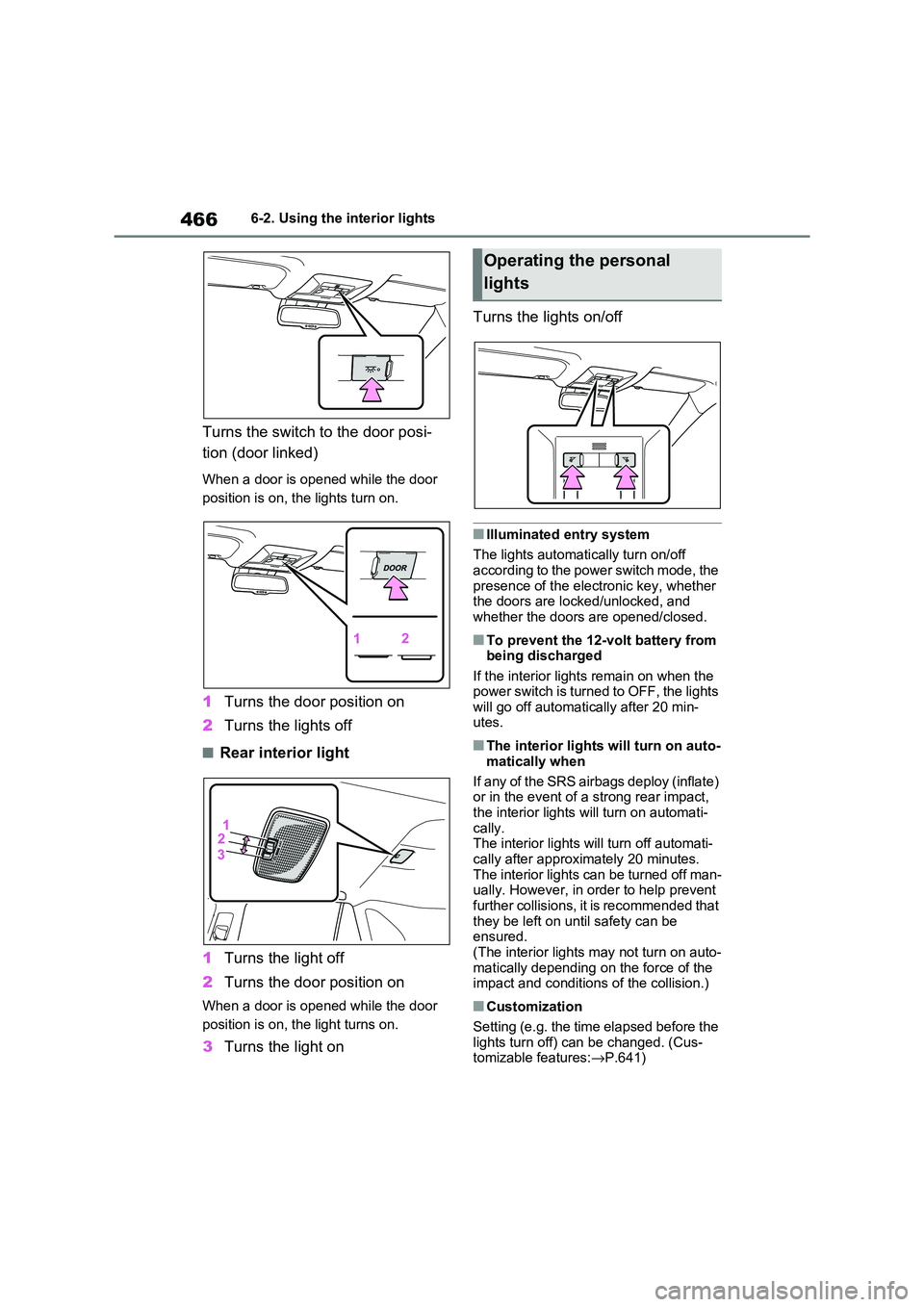
Turns the switch to the door posi-
tion (door linked)
When a door is opened while the door
position is on, the lights turn on.
1 Turns the door position on
2 Turns the lights off
■Rear interior light
1 Turns the light off
2 Turns the door position on
When a door is opened while the door
position is on, t he light turns on.
3Turns the light on
Turns the lights on/off
■Illuminated entry system
The lights automati cally turn on/off
according to the power switch mode, the presence of the electronic key, whether
the doors are locked/unlocked, and
whether the doors are opened/closed.
■To prevent the 12-volt battery from being discharged
If the interior lights remain on when the
power switch is turned to OFF, the lights will go off automati cally after 20 min-
utes.
■The interior lights will turn on auto -
matically when
If any of the SRS airbags deploy (inflate)
or in the event of a strong rear impact,
the interior lights will turn on automati- cally.
The interior lights w ill turn off automati-
cally after approximately 20 minutes. The interior lights can be turned off man -
ually. However, in order to help prevent
further collisions, it is recommended that
they be left on un til safety can be ensured.
(The interior lights may not turn on auto -
matically depending on the force of the impact and conditions of the collision.)
■Customization
Setting (e.g. the time elapsed before the
lights turn off) can be changed. (Cus - tomizable features: →P.641)
Operating the personal
lights
Page 469 of 666
467
6
6-2. Using the interior lights
Interior features
NOTICE
■To prevent 12-volt battery dis -
charge
Do not leave the lights on longer than necessary when the hybrid system is
off.
Page 473 of 666
471
6
6-3. Using the storage features
Interior features
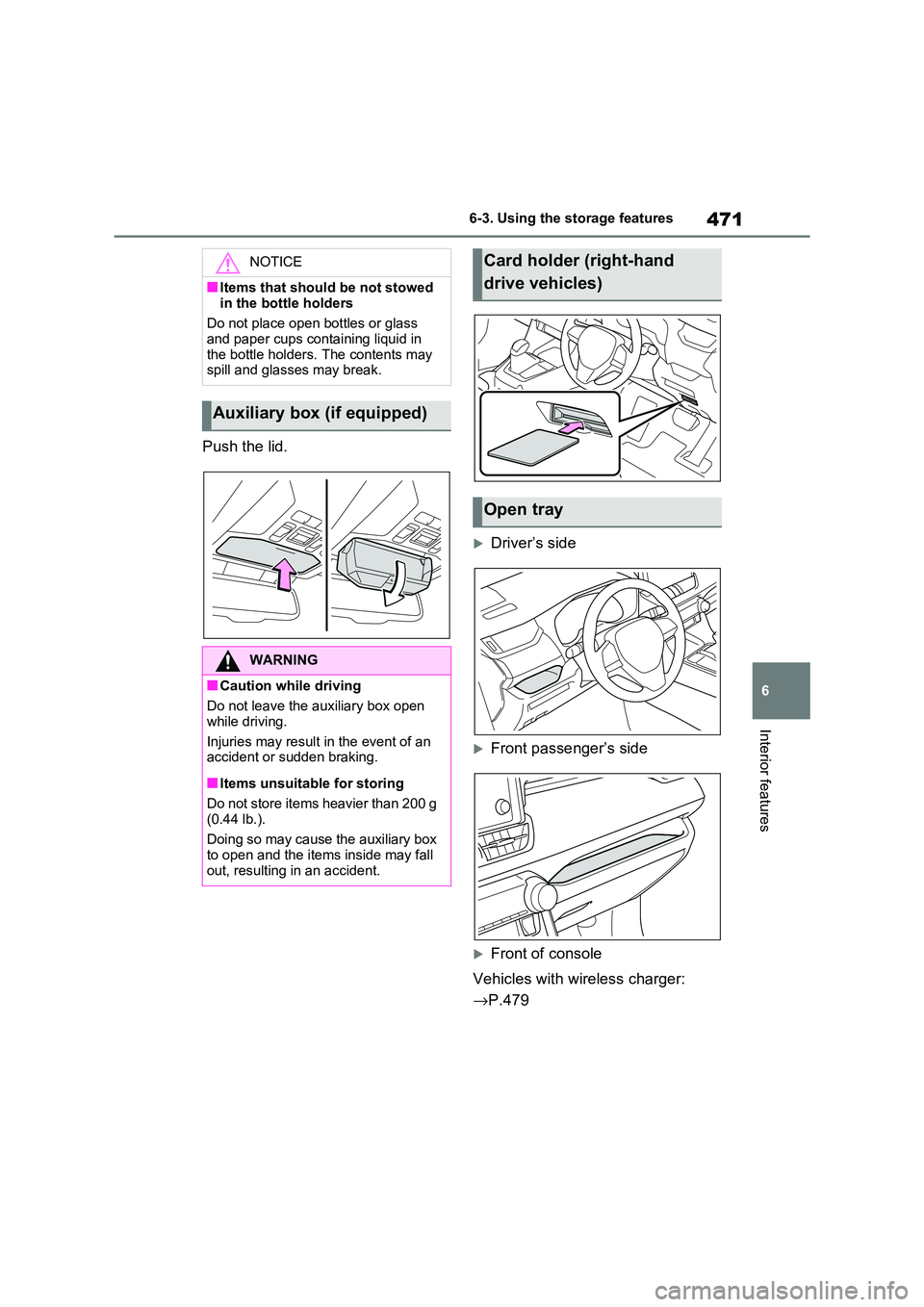
Push the lid.
Driver’s side
Front passenger’s side
Front of console
Vehicles with wireless charger:
→ P.479
NOTICE
■Items that should be not stowed
in the bottle holders
Do not place open bottles or glass and paper cups containing liquid in
the bottle holders. The contents may
spill and glasses may break.
Auxiliary box (if equipped)
WARNING
■Caution while driving
Do not leave the auxiliary box open
while driving.
Injuries may result in the event of an accident or sudden braking.
■Items unsuitable for storing
Do not store items heavier than 200 g
(0.44 lb.).
Doing so may cause the auxiliary box
to open and the items inside may fall out, resulting in an accident.
Card holder (right-hand
drive vehicles)
Open tray
Page 478 of 666
4766-4. Using the other interior features
6-4.Using the other interior features
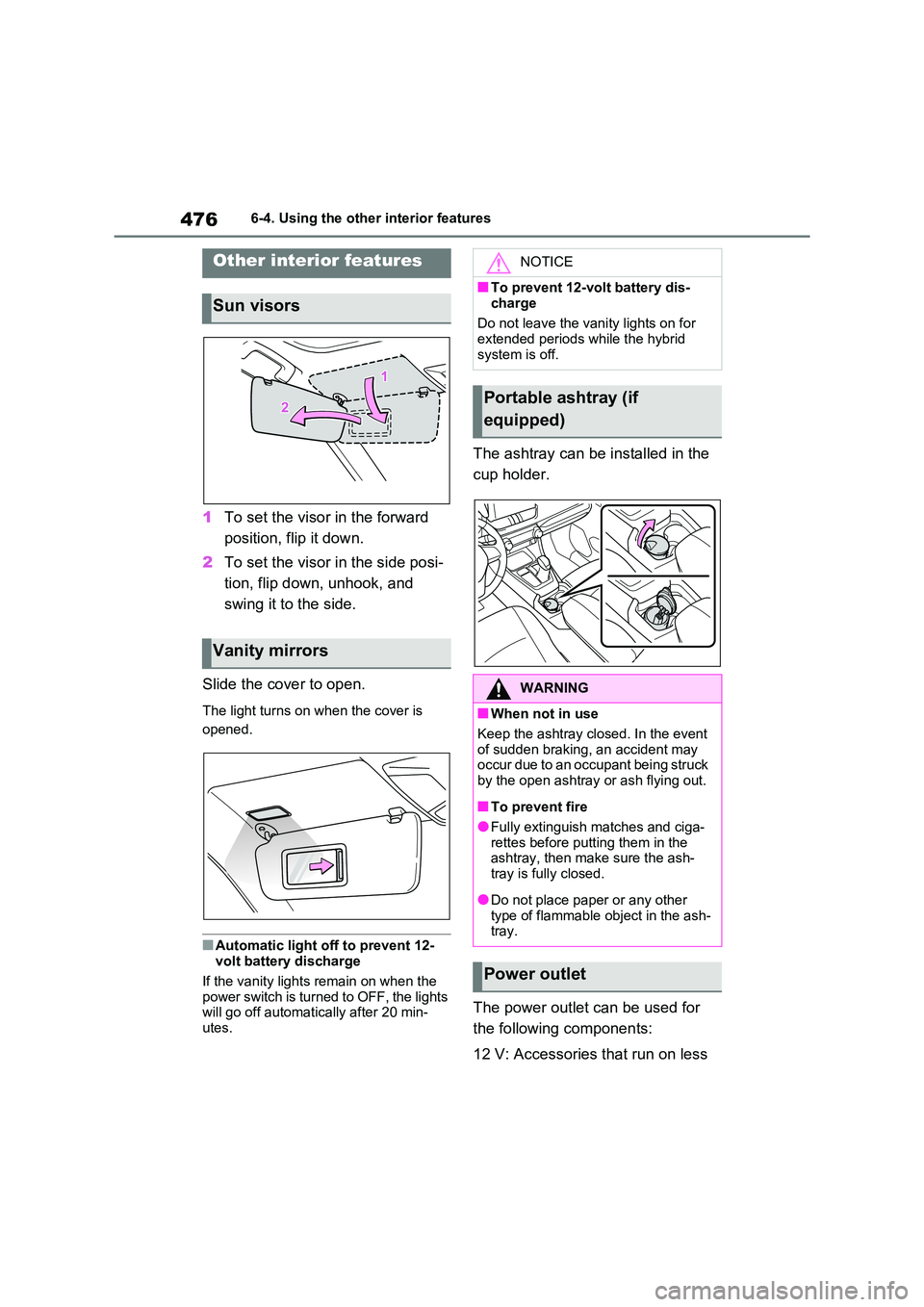
1To set the visor in the forward
position, flip it down.
2 To set the visor in the side posi-
tion, flip down, unhook, and
swing it to the side.
Slide the cover to open.
The light turns on when the cover is
opened.
■Automatic light off to prevent 12-
volt battery discharge
If the vanity lights remain on when the power switch is turned to OFF, the lights
will go off automat ically after 20 min-
utes.
The ashtray can be installed in the
cup holder.
The power outlet can be used for
the following components:
12 V: Accessories t hat run on less
Other interior features
Sun visors
Vanity mirrors
NOTICE
■To prevent 12-volt battery dis-
charge
Do not leave the vani ty lights on for extended periods while the hybrid
system is off.
Portable ashtray (if
equipped)
WARNING
■When not in use
Keep the ashtray closed. In the event
of sudden braking, an accident may
occur due to an occupant being struck by the open ashtray or ash flying out.
■To prevent fire
●Fully extinguish matches and ciga- rettes before putting them in the
ashtray, then make sure the ash -
tray is fully closed.
●Do not place paper or any other
type of flammable object in the ash- tray.
Power outlet
Page 479 of 666
477
6
6-4. Using the other interior features
Interior features
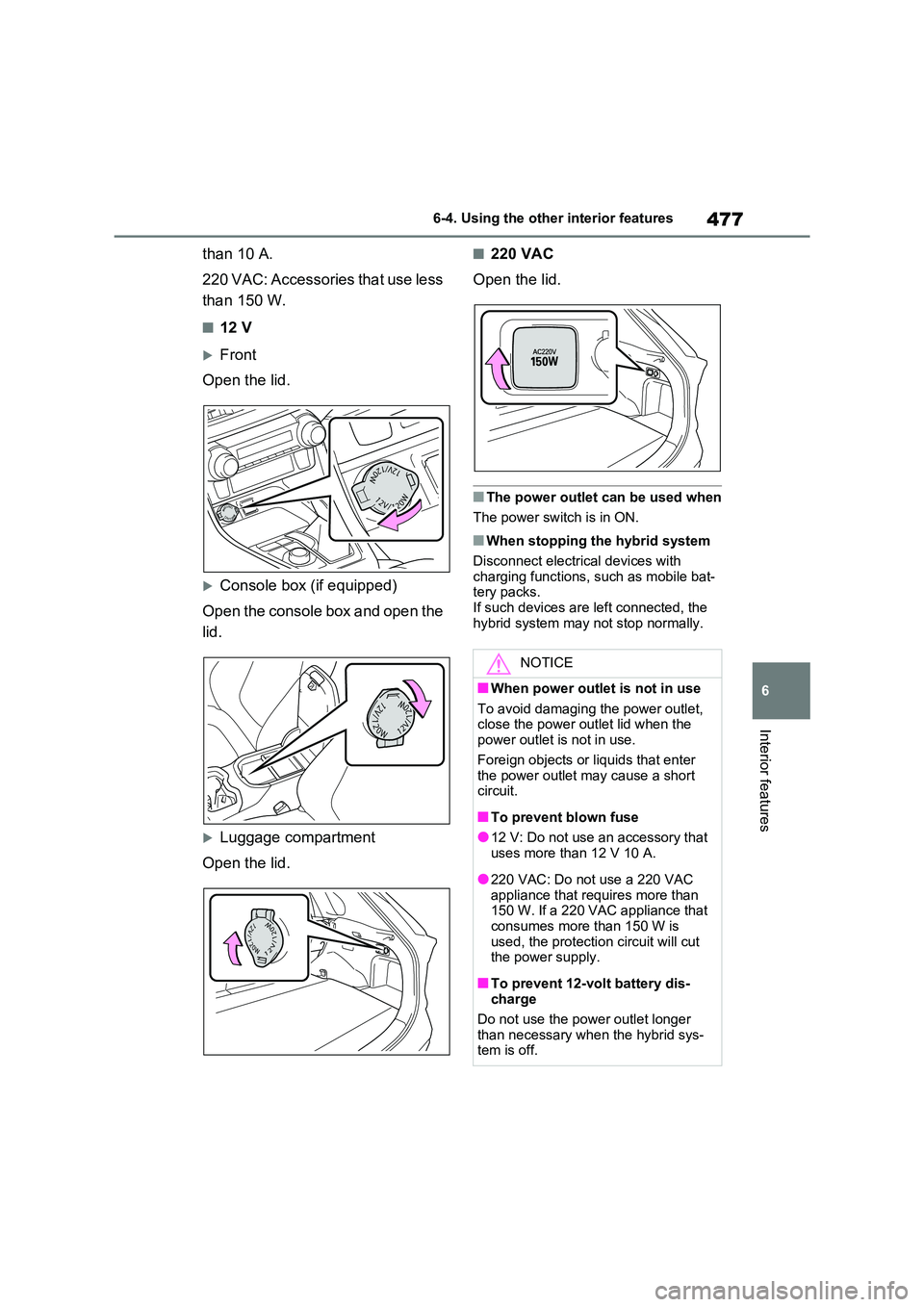
than 10 A.
220 VAC: Accessories that use less
than 150 W.
■12 V
Front
Open the lid.
Console box (if equipped)
Open the console box and open the
lid.
Luggage compartment
Open the lid.
■220 VAC
Open the lid.
■The power outlet can be used when
The power switch is in ON.
■When stopping the hybrid system
Disconnect electrical devices with charging functions, such as mobile bat-
tery packs.
If such devices are left connected, the hybrid system may not stop normally.
NOTICE
■When power outlet is not in use
To avoid damaging the power outlet,
close the power outlet lid when the power outlet is not in use.
Foreign objects or liquids that enter
the power outlet may cause a short circuit.
■To prevent blown fuse
●12 V: Do not use an accessory that
uses more than 12 V 10 A.
●220 VAC: Do not use a 220 VAC
appliance that requires more than
150 W. If a 220 VAC appliance that consumes more than 150 W is
used, the protection circuit will cut
the power supply.
■To prevent 12-volt battery dis -
charge
Do not use the pow er outlet longer
than necessary when the hybrid sys -
tem is off.