Charge TOYOTA RAV4 PHEV 2021 Manual PDF
[x] Cancel search | Manufacturer: TOYOTA, Model Year: 2021, Model line: RAV4 PHEV, Model: TOYOTA RAV4 PHEV 2021Pages: 666, PDF Size: 161.28 MB
Page 226 of 666
2244-2. Opening, closing and locking the doors
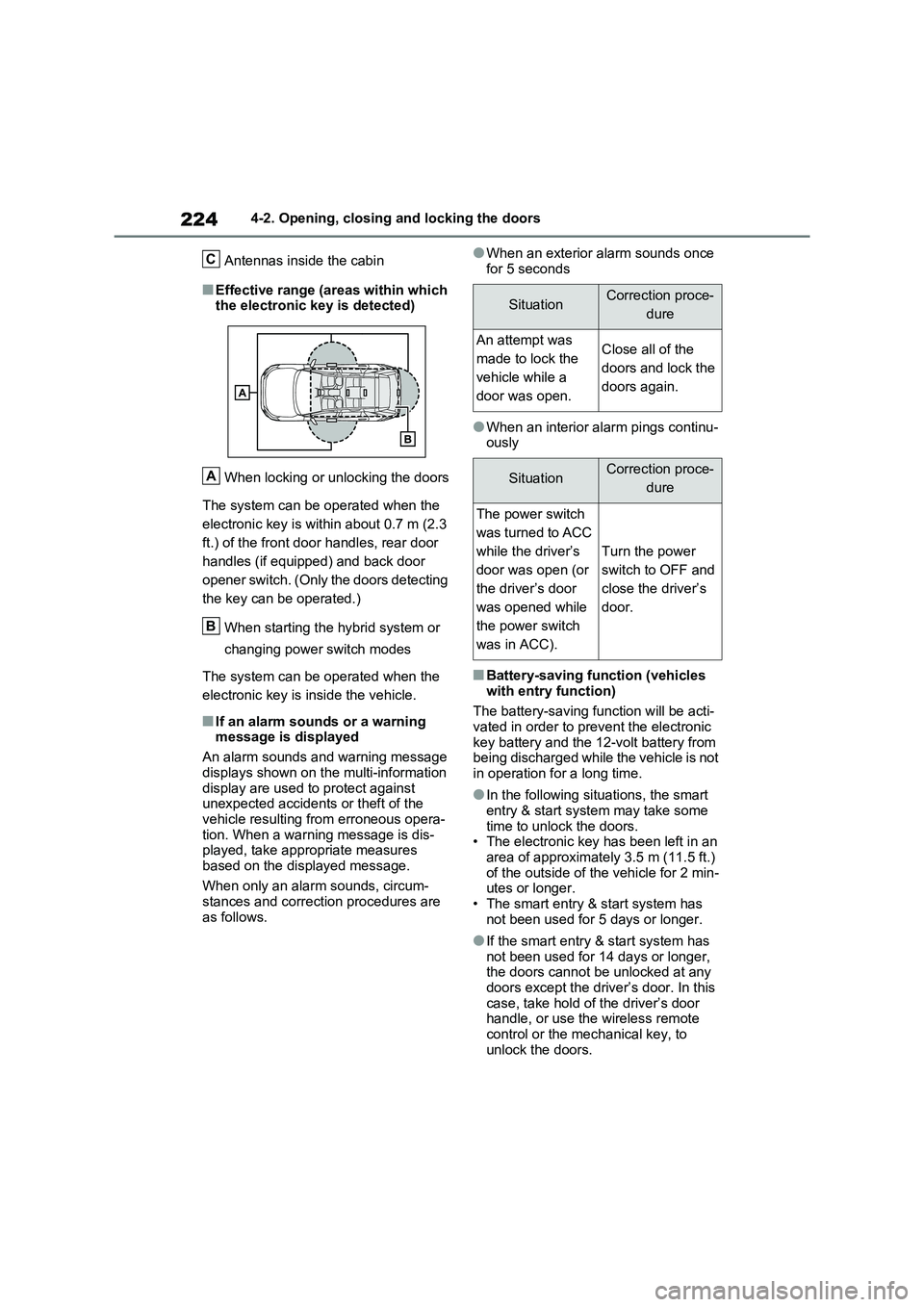
Antennas inside the cabin
■Effective range (areas within which
the electronic key is detected)
When locking or unlocking the doors
The system can be operated when the
electronic key is wit hin about 0.7 m (2.3
ft.) of the front doo r handles, rear door
handles (if equipped) and back door
opener switch. (Only the doors detecting
the key can be operated.)
When starting the hybrid system or
changing power switch modes
The system can be operated when the
electronic key is inside the vehicle.
■If an alarm sounds or a warning
message is displayed
An alarm sounds and warning message
displays shown on the multi-information
display are used to protect against unexpected accidents or theft of the
vehicle resulting from erroneous opera -
tion. When a warning message is dis - played, take appropriate measures
based on the displayed message.
When only an alarm sounds, circum - stances and correcti on procedures are
as follows.
●When an exterior alarm sounds once
for 5 seconds
●When an interior alarm pings continu - ously
■Battery-saving func tion (vehicles
with entry function)
The battery-saving f unction will be acti- vated in order to prevent the electronic
key battery and the 12-volt battery from
being discharged while the vehicle is not in operation for a long time.
●In the following situ ations, the smart entry & start system may take some
time to unlock the doors.
• The electronic key has been left in an area of approximately 3.5 m (11.5 ft.)
of the outside of the vehicle for 2 min -
utes or longer. • The smart entry & start system has
not been used for 5 days or longer.
●If the smart entry & start system has not been used for 14 days or longer,
the doors cannot be unlocked at any
doors except the driver ’s door. In this case, take hold o f the driver’s door
handle, or use the wireless remote
control or the mechanical key, to unlock the doors.
C
A
B
SituationCorrection proce -
dure
An attempt was
made to lock the
vehicle while a
door was open.
Close all of the
doors and lock the
doors again.
SituationCorrection proce -
dure
The power switch
was turned to ACC
while the driver’s
door was open (or
the driver’s door
was opened while
the power switch
was in ACC).
Turn the power
switch to OFF and
close the driver’s
door.
Page 227 of 666
225
4
4-2. Opening, closing and locking the doors
Before driving
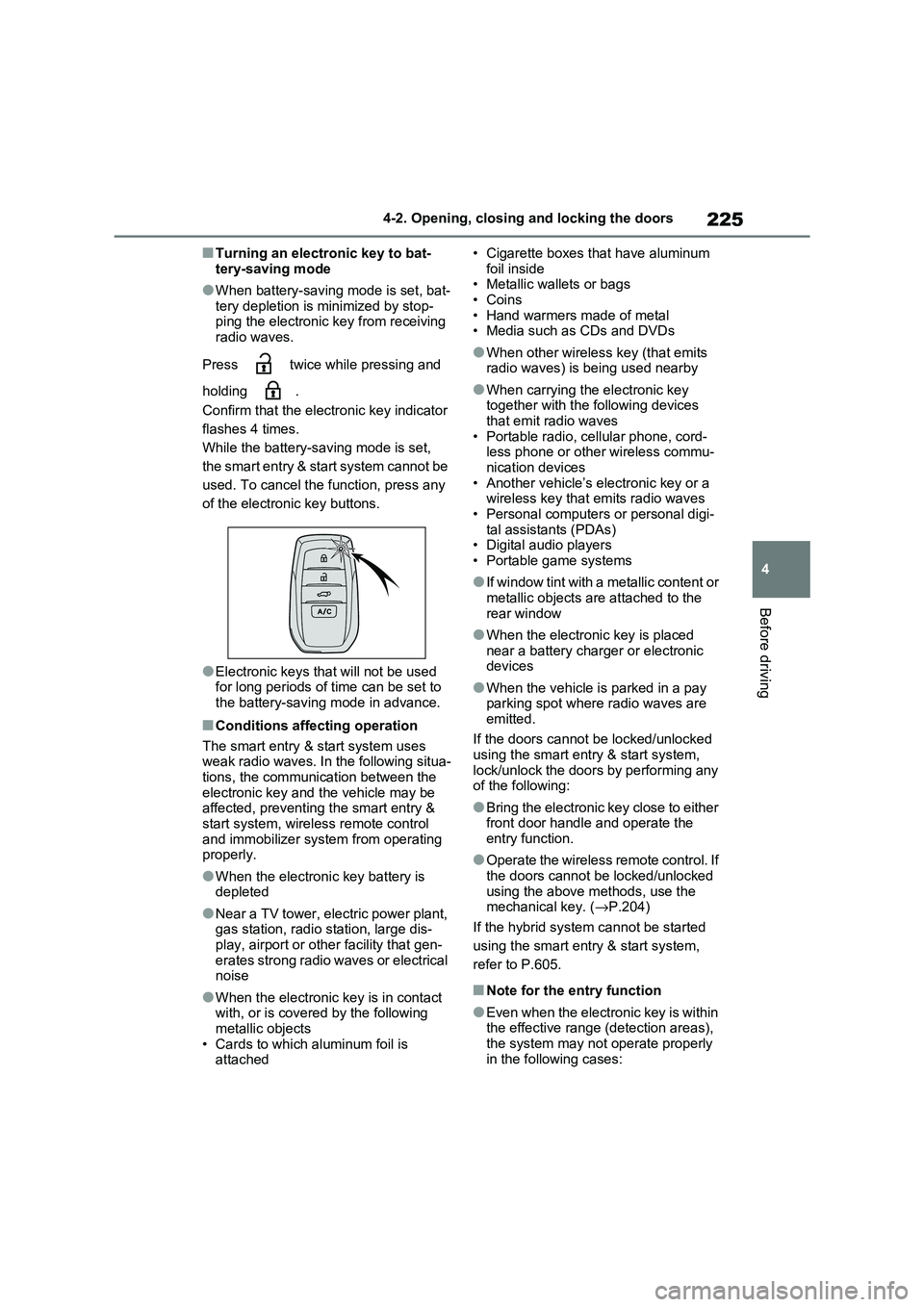
■Turning an electronic key to bat -
tery-saving mode
●When battery-saving mode is set, bat -
tery depletion is minimized by stop - ping the electronic key from receiving
radio waves.
Press twice while pressing and
holding .
Confirm that the electronic key indicator
flashes 4 times.
While the battery- saving mode is set,
the smart entry & start system cannot be
used. To cancel the f unction, press any
of the electronic key buttons.
●Electronic keys t hat will not be used for long periods of time can be set to
the battery-saving mode in advance.
■Conditions affecting operation
The smart entry & start system uses
weak radio waves. In the following situa - tions, the communication between the
electronic key and t he vehicle may be
affected, preventing the smart entry & start system, wireless remote control
and immobilizer system from operating
properly.
●When the electronic key battery is
depleted
●Near a TV tower, electric power plant,
gas station, radio station, large dis- play, airport or oth er facility that gen-
erates strong radio waves or electrical
noise
●When the electronic key is in contact
with, or is covered by the following metallic objects
• Cards to which aluminum foil is
attached
• Cigarette boxes that have aluminum
foil inside • Metallic wallets or bags
•Coins
• Hand warmers made of metal • Media such as CDs and DVDs
●When other wirele ss key (that emits radio waves) is being used nearby
●When carrying the electronic key together with the following devices
that emit radio waves
• Portable radio, cellular phone, cord - less phone or other wireless commu -
nication devices
• Another vehicle’s el ectronic key or a wireless key that emits radio waves
• Personal computer s or personal digi-
tal assistants (PDAs) • Digital audio players
• Portable game systems
●If window tint with a metallic content or
metallic objects are attached to the
rear window
●When the electroni c key is placed
near a battery charger or electronic devices
●When the vehicle is parked in a pay parking spot where radio waves are
emitted.
If the doors cannot be locked/unlocked using the smart entry & start system,
lock/unlock the doors by performing any
of the following:
●Bring the electronic key close to either
front door handle and operate the entry function.
●Operate the wireless remote control. If the doors cannot be locked/unlocked
using the above methods, use the
mechanical key. ( →P.204)
If the hybrid system cannot be started
using the smart entry & start system,
refer to P.605.
■Note for the entry function
●Even when the electronic key is within
the effective range (detection areas),
the system may not operate properly in the following cases:
Page 320 of 666
3185-2. Driving procedures
■When the ambient temperature is
low, such as during winter driving conditions
●When starting the hy brid system, the flashing time of the “READY” indicator
may be long. Leave the vehicle as it is
until the “READY” indicator is steady on, as steady means the vehicle is
able to move.
●When the hybrid bat tery (traction bat-
tery) is extremely cold (below approxi -
mately -30°C [-22°F]) under the influence of the outside temperature, it
may not be possible to start the hybrid
system. In this case, try to start the hybrid system again after the tem -
perature of the hybrid battery
increases due to t he outside tempera- ture increase etc.
■Sounds and vibrations specific to a
hybrid vehicle
→ P.91
■If the 12-volt battery is discharged
The hybrid system cannot be started
using the smart en try & start system.
Refer to P.606 to res tart the hybrid sys- tem.
■Electronic key battery depletion
→ P.202
■Conditions affecting operation
→ P.225
■Note for the entry function
→ P.225
■Steering lock function
●After turning the power switch to OFF and opening and clos ing the doors,
the steering wheel will be locked due
to the steering lock function. Operat -
ing the power switch again automati- cally cancels the steering lock.
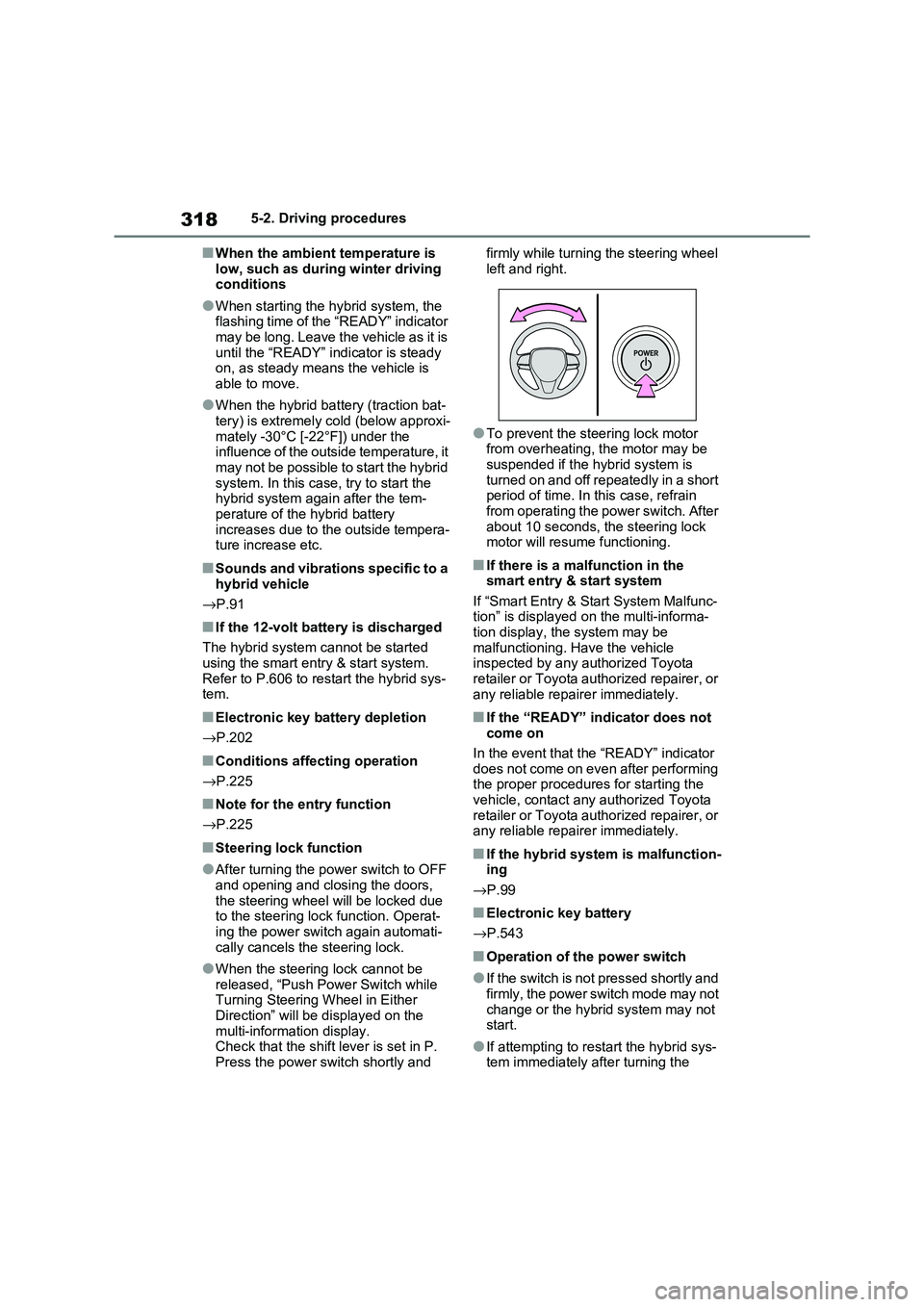
●When the steering lock cannot be released, “Push Power Switch while
Turning Steering Wheel in Either
Direction” will be displayed on the multi-information display.
Check that the shift lever is set in P.
Press the power switch shortly and
firmly while turning the steering wheel
left and right.
●To prevent the st eering lock motor
from overheating, the motor may be suspended if the hybrid system is
turned on and off repeatedly in a short
period of time. In this case, refrain from operating the power switch. After
about 10 seconds, the steering lock
motor will resume functioning.
■If there is a malfunction in the smart entry & start system
If “Smart Entry & St art System Malfunc-
tion” is displayed on the multi-informa - tion display, the system may be
malfunctioning. Have the vehicle
inspected by any a uthorized Toyota retailer or Toyota authorized repairer, or
any reliable repairer immediately.
■If the “READY” indicator does not
come on
In the event that the “READY” indicator
does not come on even after performing
the proper procedures for starting the vehicle, contact any authorized Toyota
retailer or Toyota authorized repairer, or
any reliable repairer immediately.
■If the hybrid system is malfunction - ing
→ P.99
■Electronic key battery
→ P.543
■Operation of the power switch
●If the switch is not pressed shortly and
firmly, the power switch mode may not
change or the hybri d system may not start.
●If attempting to restart the hybrid sys - tem immediately after turning the
Page 321 of 666
319
5
5-2. Driving procedures
Driving
power switch to OF F, the hybrid sys-
tem may not start in some cases. After turning the power switch to OFF,
please wait a few seconds before
restarting the hybrid system.
■Customization
If the smart entry & start system has
been deactivated in a customized set -
ting, refer to P.605.
1 Stop the vehicle completely.
2 If the parking brake is in manual
mode, set the parking brake.
( →P.326)
Check the parking brake indicator is
illuminated.
3 Shift the shift lever to P.
4 Press the power switch shortly
and firmly.
The hybrid system w ill stop, and the meter display will be extinguished.
Release the shift lever when pressing
the power switch.
5 Release the brake pedal and
check that “ACCESSORY” or
“IGNITION ON” is not shown on
the multi-inform ation display.
WARNING
■When starting the hybrid system
Always start the hyb rid system while
sitting in the drive r’s seat. Do not
depress the accelerator pedal while starting the hybri d system under any
circumstances.
Doing so may cause an accident resulting in death or serious injury.
■Caution while driving
If hybrid system fai lure occurs while
the vehicle is moving, do not lock or
open the doors until the vehicle reaches a safe and complete stop.
Activation of the steering lock in this
circumstance may lead to an acci - dent, resulting in death or serious
injury.
NOTICE
■When starting the hybrid system
If the hybrid system becomes difficult
to start, have your vehicle checked by
any authorized Toyo ta retailer or Toyota authorized repairer, or any
reliable repairer immediately.
■Symptoms indicating a malfunc -
tion with the power switch
If the power switch seems to be oper - ating somewhat differently than usual,
such as the switch sticking slightly,
there may be a malfunction. Contact any authorized Toyo ta retailer or
Toyota authorized repairer, or any
reliable repairer immediately.
Stopping the hybrid system
WARNING
■Stopping the hybrid system in an
emergency
●If you want to sto p the hybrid sys- tem in an emergency while driving
the vehicle, press and hold the
power switch for more than 2 sec- onds, or press it b riefly 3 times or
more in succession. ( →P.560)
However, do not touch the power switch while driving except in an
emergency. Turning the hybrid sys -
tem off while driving will not cause a loss of steering or braking control.
However, power assist for the
steering wheel may be lost making it difficult to st eer smoothly before
stopping the vehi cle depending on
the remaining charge in the 12-volt battery or usage co nditions. In this
situation, you should pull over and
stop the vehicle as soon as it is safe to do so.
Page 322 of 666
3205-2. Driving procedures
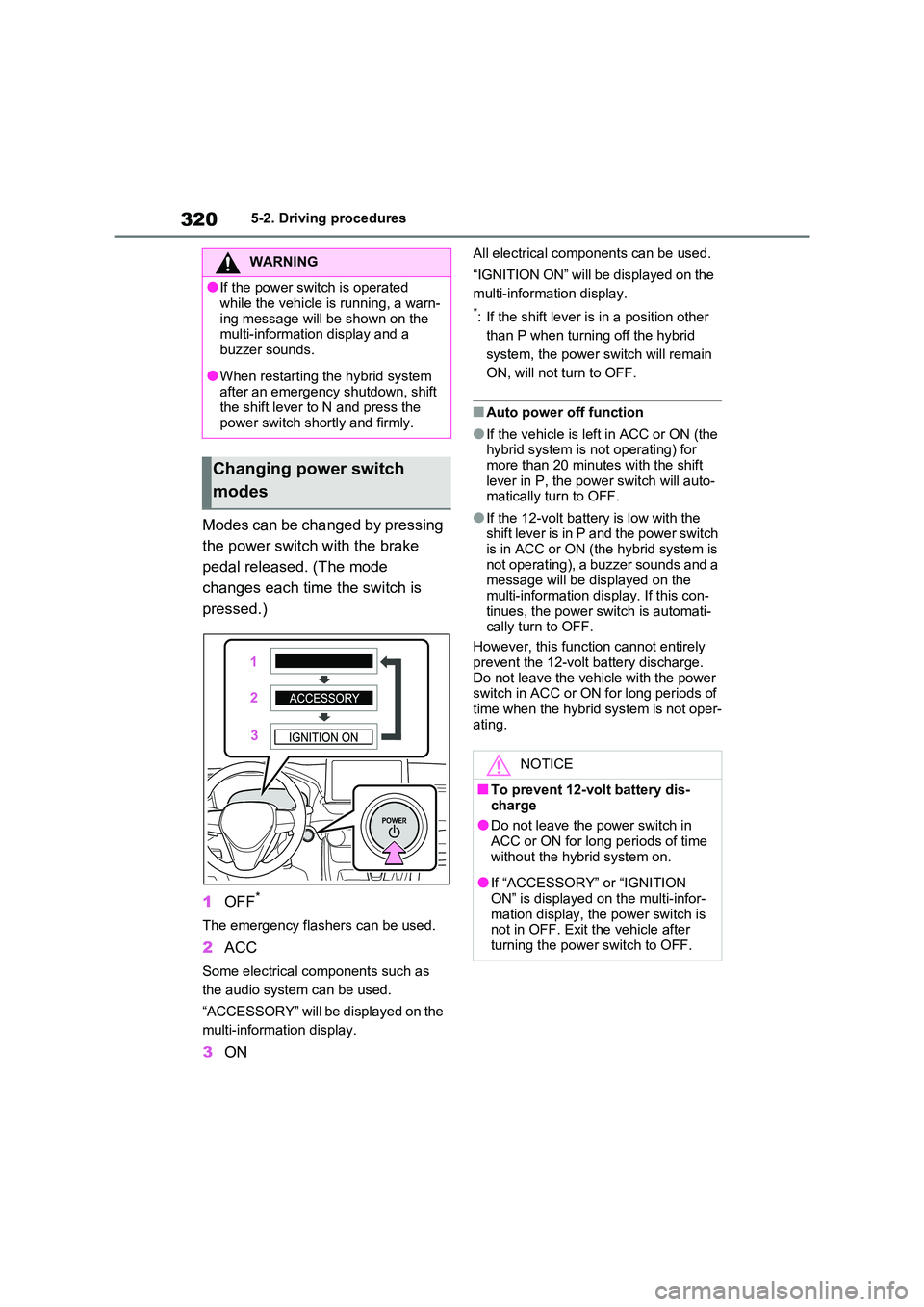
Modes can be changed by pressing
the power switch with the brake
pedal released. (The mode
changes each time the switch is
pressed.)
1 OFF*
The emergency flashers can be used.
2ACC
Some electrical components such as
the audio system can be used.
“ACCESSORY” will be displayed on the
multi-information display.
3 ON
All electrical components can be used.
“IGNITION ON” will be displayed on the
multi-information display.
*: If the shift lever is in a position other
than P when turning off the hybrid
system, the power s witch will remain
ON, will not turn to OFF.
■Auto power off function
●If the vehicle is le ft in ACC or ON (the hybrid system is no t operating) for
more than 20 minutes with the shift
lever in P, the power switch will auto - matically turn to OFF.
●If the 12-volt batte ry is low with the shift lever is in P and the power switch
is in ACC or ON (t he hybrid system is
not operating), a buzzer sounds and a message will be displayed on the
multi-information dis play. If this con-
tinues, the power switch is automati - cally turn to OFF.
However, this functi on cannot entirely
prevent the 12-volt battery discharge. Do not leave the vehicle with the power
switch in ACC or ON for long periods of
time when the hybrid system is not oper - ating.
WARNING
●If the power switch is operated
while the vehicle is running, a warn -
ing message will be shown on the multi-information display and a
buzzer sounds.
●When restarting the hybrid system
after an emergency shutdown, shift
the shift lever to N and press the
power switch shortly and firmly.
Changing power switch
modes
NOTICE
■To prevent 12-volt battery dis -
charge
●Do not leave the power switch in ACC or ON for long periods of time
without the hybr id system on.
●If “ACCESSORY” or “IGNITION
ON” is displayed on the multi-infor -
mation display, the power switch is not in OFF. Exit the vehicle after
turning the power switch to OFF.
Page 323 of 666
321
5
5-2. Driving procedures
Driving
If the hybrid system is stopped with
the shift lever in a position other
than P, the power switch will not be
turned to OFF but instead be turned
to ACC. Perform the following pro -
cedure to turn the switch to OFF:
1 Check that the parking brake is
set.
2 Shift the shift lever to P.
3 Check that “IGNITION ON” is
displayed on the multi-informa -
tion display and press the power
switch shortly and firmly.
4 Check that “ACCESSORY” or
“IGNITION ON” on the multi-
information display is off.
*1: To improve fuel efficiency and
reduce noise, shift the shift lever to
D for normal driving.
*2: Vehicles with paddle shift switches
only: Selecting shift ranges in the D
position allows suitable use of
engine braking. ( →P.323)
*3: By selecting shift ranges using S
mode, you can control accelerating
force and engine braking force.
■When driving with dynamic radar
cruise control with full-speed range or cruise control activated (if
equipped)
Even when performing the following actions with the intent of enabling
engine braking, engine braking will not
activate because dyn amic radar cruise control with full-speed range, or cruise
control will not be canceled.
●While driving in D or S mode, down-
When stopping the hybrid
system with the shift lever in
a position other than P
NOTICE
■To prevent 12-volt battery dis -
charge
Do not stop the hybrid system when the shift lever is i n a position other
than P. If the hy brid system is
stopped in another shift lever position, the power switch will not be turned to
OFF but instead remain ON. If the
vehicle is left in ON , 12-volt battery discharge may occur.
Hybrid transmission
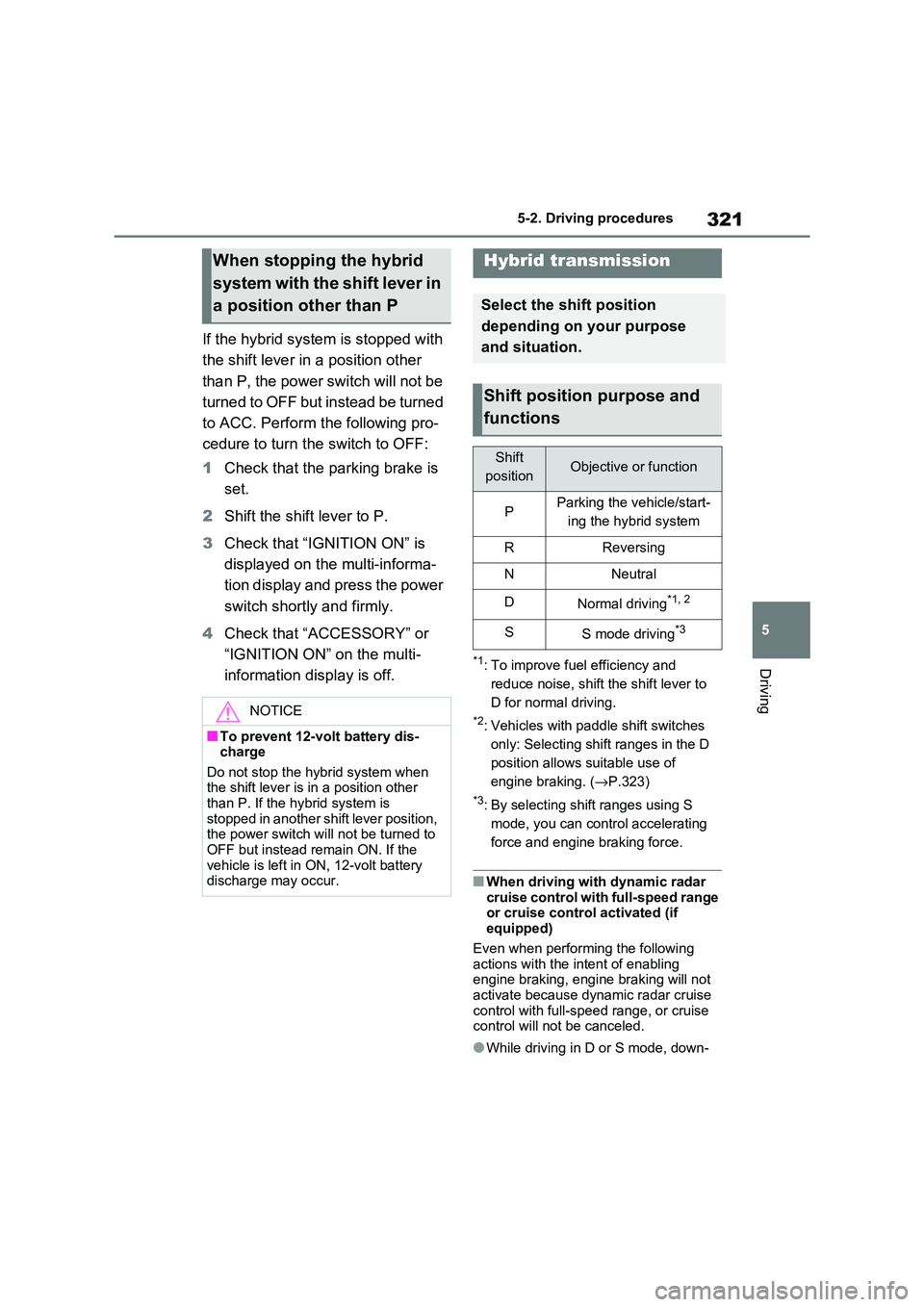
Select the shift position
depending on your purpose
and situation.
Shift position purpose and
functions
Shift
positionObjective or function
PParking the vehicle/start -
ing the hybrid system
RReversing
NNeutral
DNormal driving*1, 2
SS mode driving*3
Page 324 of 666
3225-2. Driving procedures
shifting to 5 or 4. ( →P.323, 324)
●When switching the driving mode to
sport mode while driving in D position.
( →P.434)
■Restraining sudden start (Drive- Start Control)
→ P.301
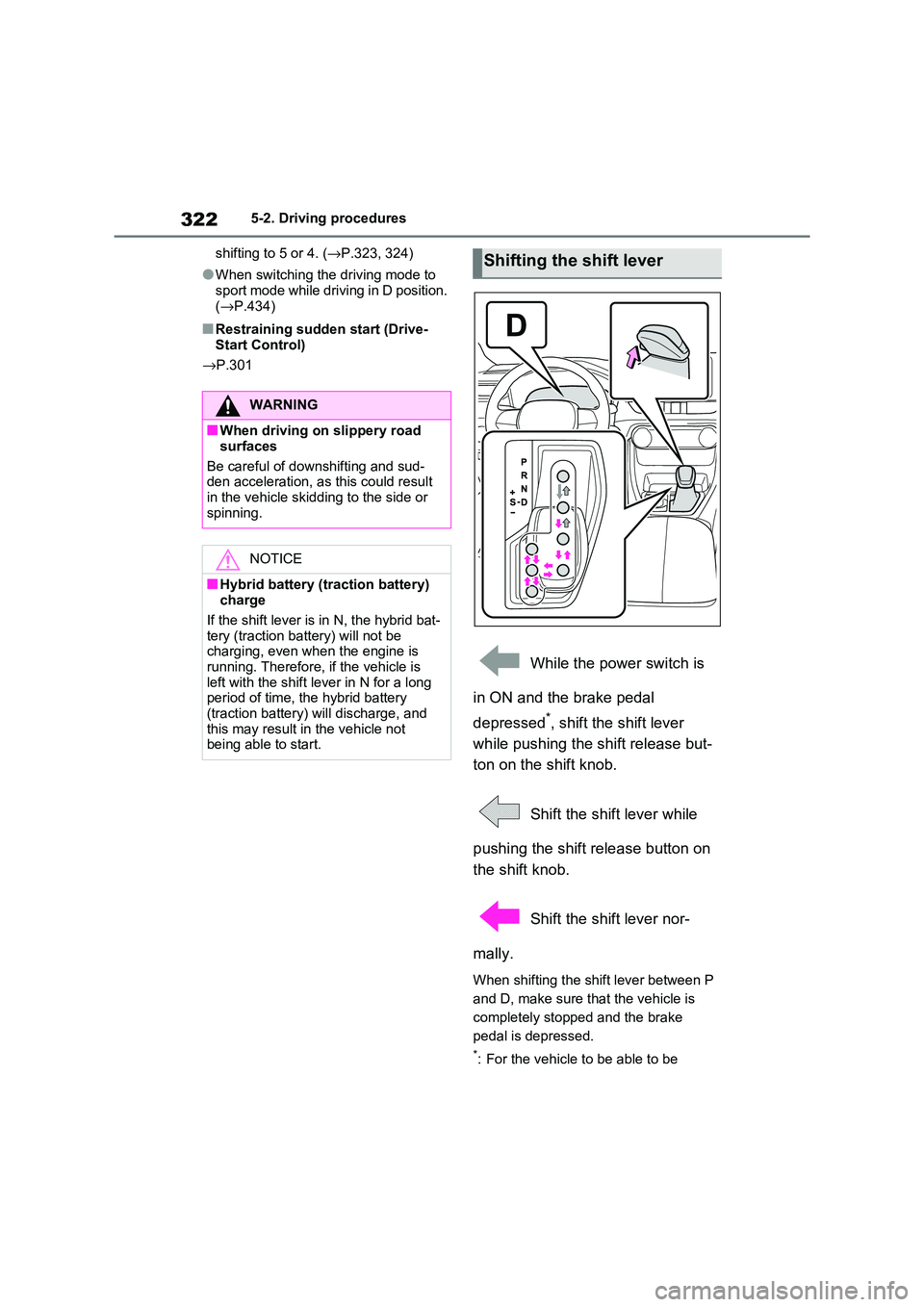
While the power switch is
in ON and the brake pedal
depressed*, shift the shift lever
while pushing the shift release but -
ton on the shift knob.
Shift the shift lever while
pushing the shift release button on
the shift knob.
Shift the shift lever nor -
mally.
When shifting the shift lever between P
and D, make sure that the vehicle is
completely stopped and the brake
pedal is depressed.
*: For the vehicle to be able to be
WARNING
■When driving on slippery road
surfaces
Be careful of down shifting and sud-
den acceleration, as this could result
in the vehicle skidding to the side or spinning.
NOTICE
■Hybrid battery ( traction battery) charge
If the shift lever is in N, the hybrid bat -
tery (traction battery) will not be charging, even when the engine is
running. Therefore, if the vehicle is
left with the shift le ver in N for a long
period of tim e, the hybrid battery (traction battery) will discharge, and
this may result in the vehicle not
being able to start.
Shifting the shift lever
Page 335 of 666
333
5
5-3. Operating the lights and wipers
Driving
■Automatic headlight leveling sys -
tem
The level of the headl ights is automati-
cally adjusted accord ing to the number
of passengers and the loading condition of the vehicle to ens ure that the head-
lights do not interfe re with other road
users.
■12-volt battery- saving function
In order to prevent the 12-volt battery of
the vehicle from discharging, if the light
switch is in po sition when the
power switch is turn ed to OFF, the 12- volt battery-saving function will operate
and automatically turn off all the lights
after approximate ly 20 minutes.
When any of the following are per -
formed, the 12-volt b attery-saving func-
tion is canceled once and then reactivated. All the lights will turn off
automatically 20 minutes after the 12-
volt battery-savin g function has been reactivated:
●When the headlight switch is operated
●When a door is opened or closed
■If “Headlight System Malfunction
Visit Your Dealer” is displayed on the multi-information display
The system may be malfunctioning.
Have the vehicle i nspected by any authorized Toyota retailer or Toyota
authorized repairer, or any reliable
repairer.
■Customization
Settings (e.g. light s ensor sensitivity)
can be changed.
(Customizable features: →P.637)
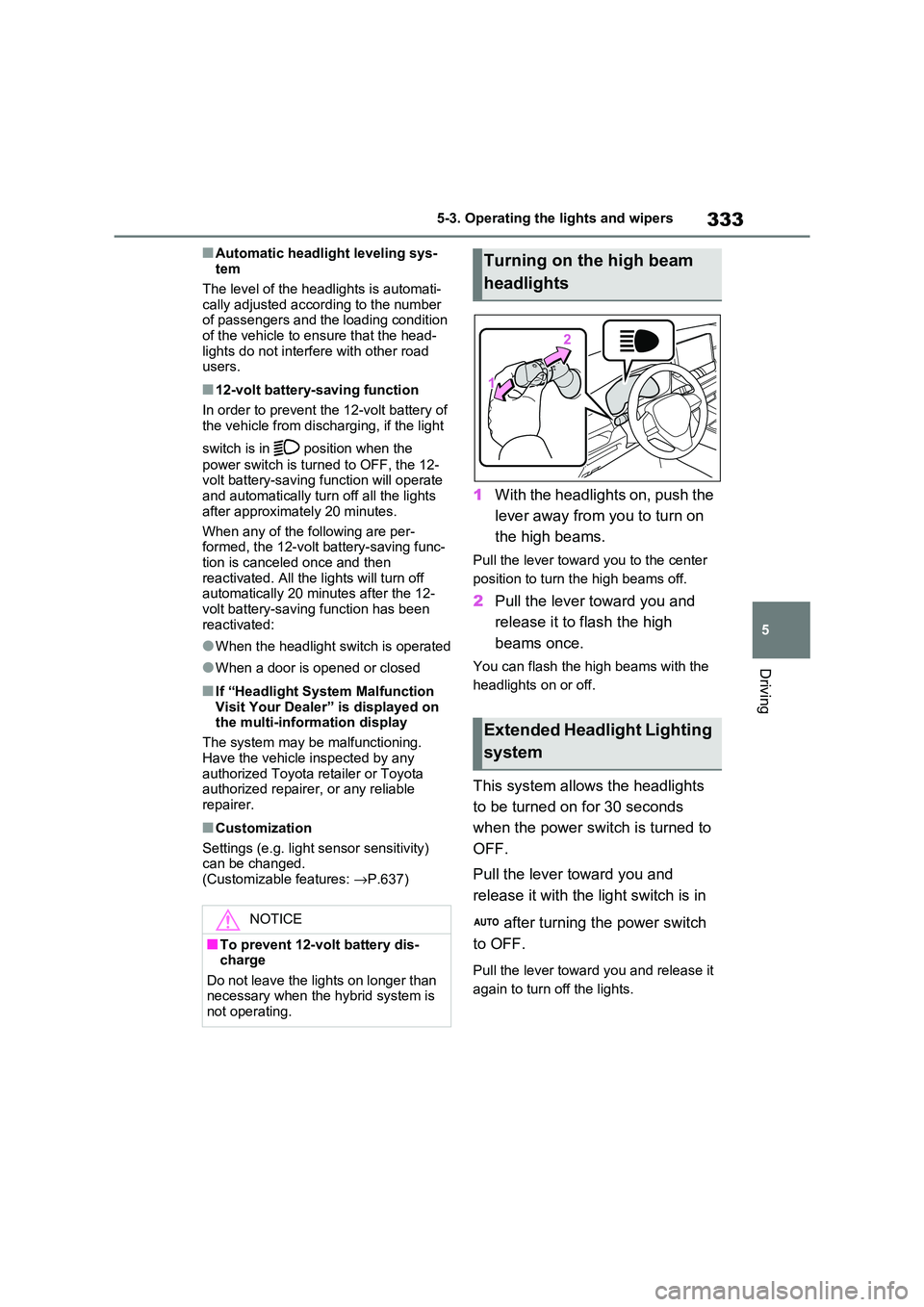
1With the headlights on, push the
lever away from you to turn on
the high beams.
Pull the lever towar d you to the center
position to turn the high beams off.
2 Pull the lever toward you and
release it to flash the high
beams once.
You can flash the hi gh beams with the
headlights on or off.
This system allows the headlights
to be turned on for 30 seconds
when the power switch is turned to
OFF.
Pull the lever to ward you and
release it with the light switch is in
after turning the power switch
to OFF.
Pull the lever towar d you and release it
again to turn off the lights.
NOTICE
■To prevent 12-volt battery dis - charge
Do not leave the lights on longer than
necessary when the hybrid system is not operating.
Turning on the high beam
headlights
Extended Headlight Lighting
system
Page 342 of 666
3405-3. Operating the lights and wipers
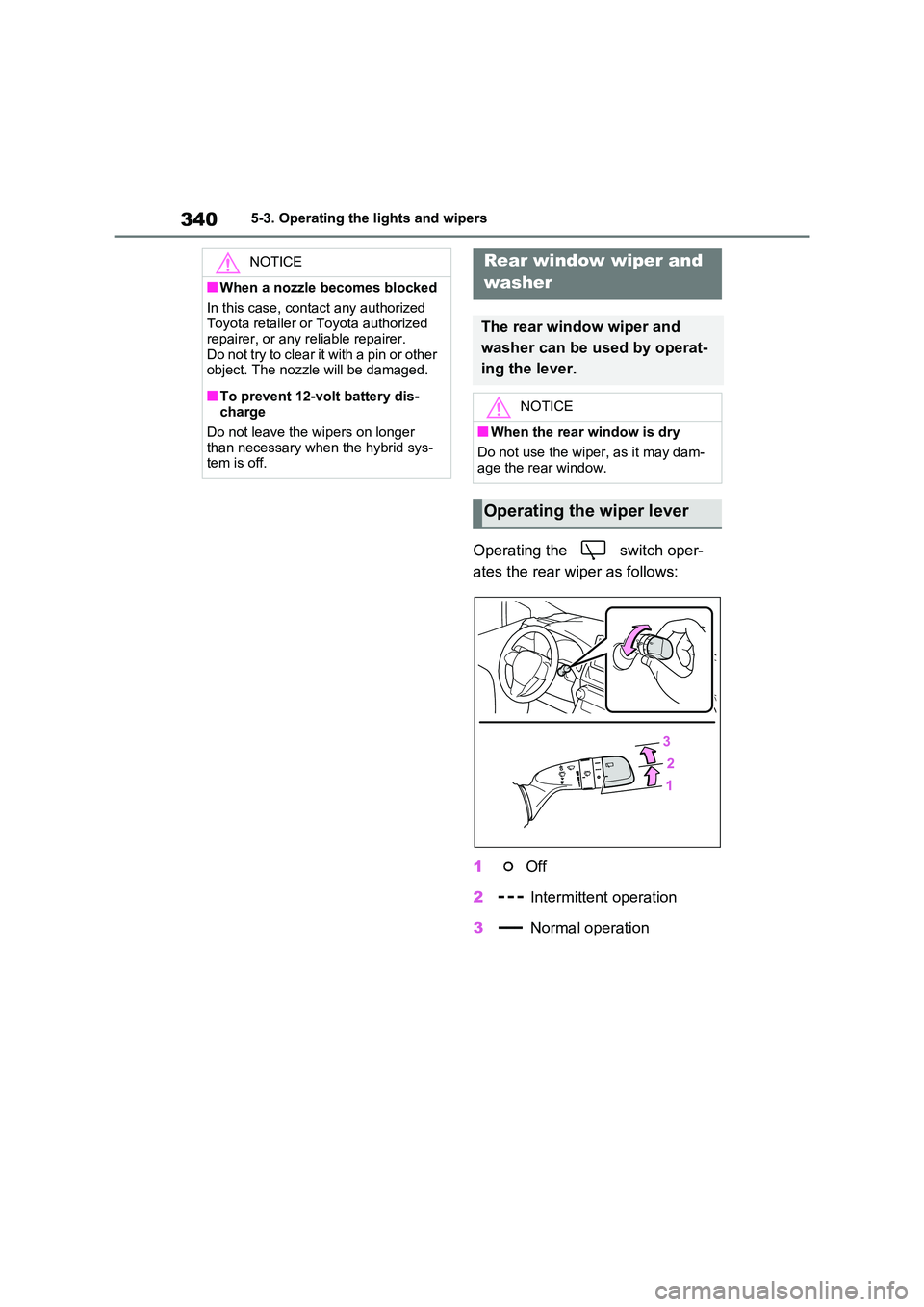
Operating the switch oper-
ates the rear wiper as follows:
1 Off
2 Intermittent operation
3 Normal operation
NOTICE
■When a nozzle becomes blocked
In this case, contact any authorized
Toyota retailer or Toyota authorized repairer, or any reliable repairer.
Do not try to clear it with a pin or other
object. The nozzle will be damaged.
■To prevent 12-volt battery dis -
charge
Do not leave the wipers on longer than necessary when the hybrid sys -
tem is off.
Rear window wiper and
washer
The rear window wiper and
washer can be used by operat -
ing the lever.
NOTICE
■When the rear window is dry
Do not use the wiper, as it may dam -
age the rear window.
Operating the wiper lever
Page 343 of 666
341
5
5-3. Operating the lights and wipers
Driving
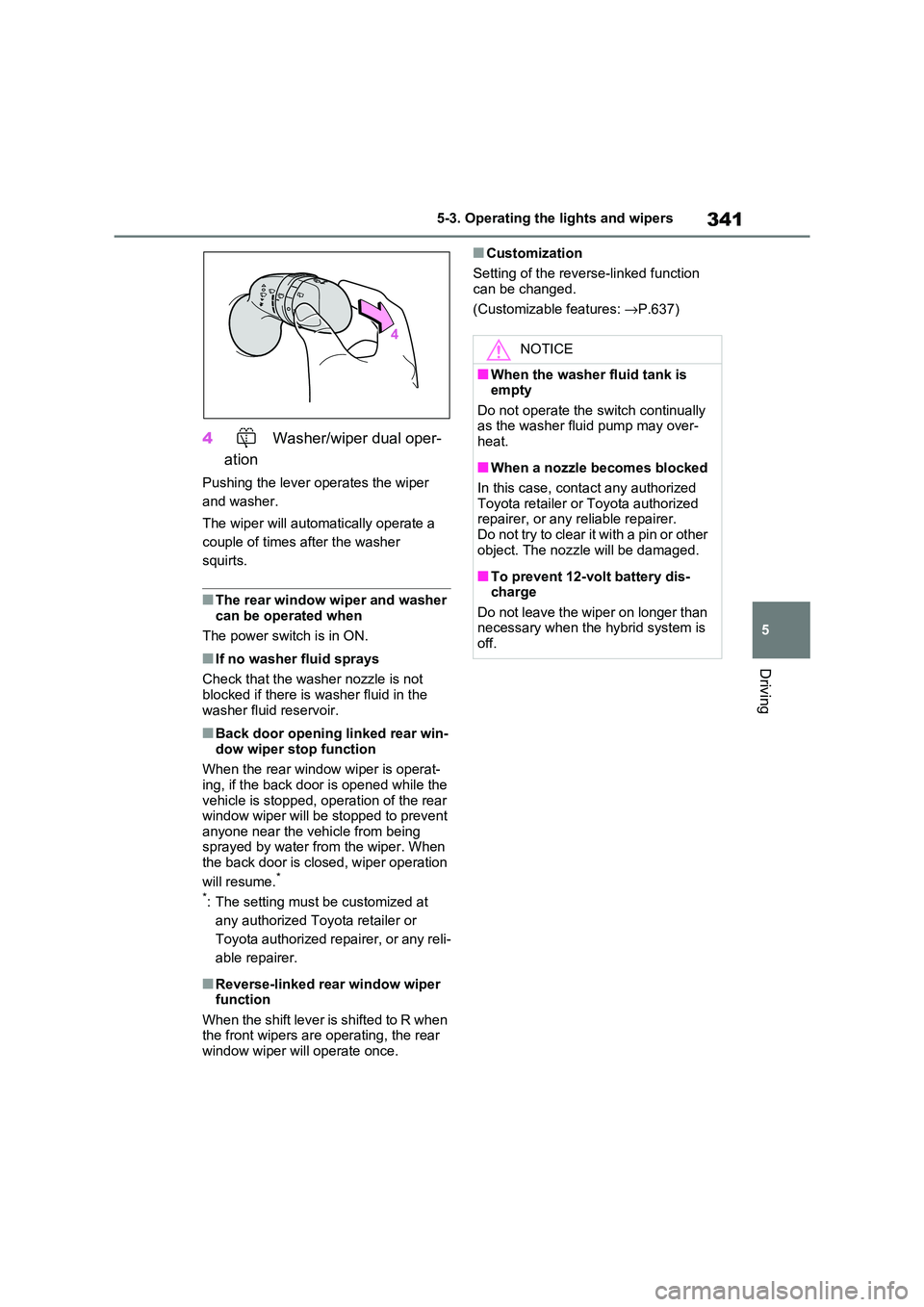
4 Washer/wiper dual oper-
ation
Pushing the lever operates the wiper
and washer.
The wiper will automatically operate a
couple of times after the washer
squirts.
■The rear window wiper and washer
can be operated when
The power switch is in ON.
■If no washer fluid sprays
Check that the wash er nozzle is not
blocked if there is washer fluid in the
washer fluid reservoir.
■Back door opening linked rear win - dow wiper stop function
When the rear window wiper is operat -
ing, if the back door is opened while the vehicle is stopped, o peration of the rear
window wiper will be stopped to prevent
anyone near the vehicle from being sprayed by water f rom the wiper. When
the back door is closed, wiper operation
will resume.*
*: The setting must be customized at
any authorized Toy ota retailer or
Toyota authorized repairer, or any reli -
able repairer.
■Reverse-linked rear window wiper function
When the shift lever is shifted to R when
the front wipers are operating, the rear window wiper will operate once.
■Customization
Setting of the reverse-linked function can be changed.
(Customizable features: →P.637)
NOTICE
■When the washer fluid tank is empty
Do not operate the switch continually
as the washer fluid pump may over -
heat.
■When a nozzle becomes blocked
In this case, contact any authorized Toyota retailer or Toyota authorized
repairer, or any reliable repairer.
Do not try to clear it with a pin or other object. The nozzle will be damaged.
■To prevent 12-volt battery dis - charge
Do not leave the wiper on longer than
necessary when the hybrid system is off.