Charge TOYOTA RAV4 PHEV 2021 Repair Manual
[x] Cancel search | Manufacturer: TOYOTA, Model Year: 2021, Model line: RAV4 PHEV, Model: TOYOTA RAV4 PHEV 2021Pages: 666, PDF Size: 161.28 MB
Page 178 of 666
1763-1. Instrument cluster
Clock
Automatically adjusts the time by using the GPS time information (GPS clock).
For details, refer to “Navigation and Multimedia System Owner’s Manual” or “Multi-
media Owner’s Manual”.
Fuel gauge
Displays the quantity of f uel remaining in the tank
SOC (State of Charge) gauge
Displays the amount of charge remaining in the traction battery.
When the gauge is in t he green zone, EV driving is possible. When the gauge is in
the blue zone, EV driving is no longer possible (in this situat ion, the vehicle switches
to HV mode). Charge the hybrid ba ttery (traction battery) to allow EV driving.
Odometer, trip meter and instrument cluster light control display
Odometer:
Displays the total distance tha t the vehicle has been driven
Trip meter:
Displays the distance t he vehicle has been driven since the meter was last reset.
Trip meters A and B can be us ed to record and display different distances inde-
pendently.
Instrument cluster light control:
Displays the brightne ss of the instrument cluster lights that can be adjusted.
Outside temperature (→P.177)
Multi-information display
Presents the driver with a variety of driving-related data ( →P.179)
Displays warning messages if a malfunction occurs ( →P.578)
Shift position and shift range indicator
Displays the selected shift position or selected shift range (→P.321)
■The meters and display illuminate when
The power switch is in ON.
■When changing driving mode
●Speedometer color is changed follow -
ing the selected driving mode.
( →P.434)
●Speedometer color is changed follow-
ing the selected driving mode or when Trail Mode is turned on. ( →P.434,
435)
■If the units of measure for speed -
ometer can be changed (if equipped)
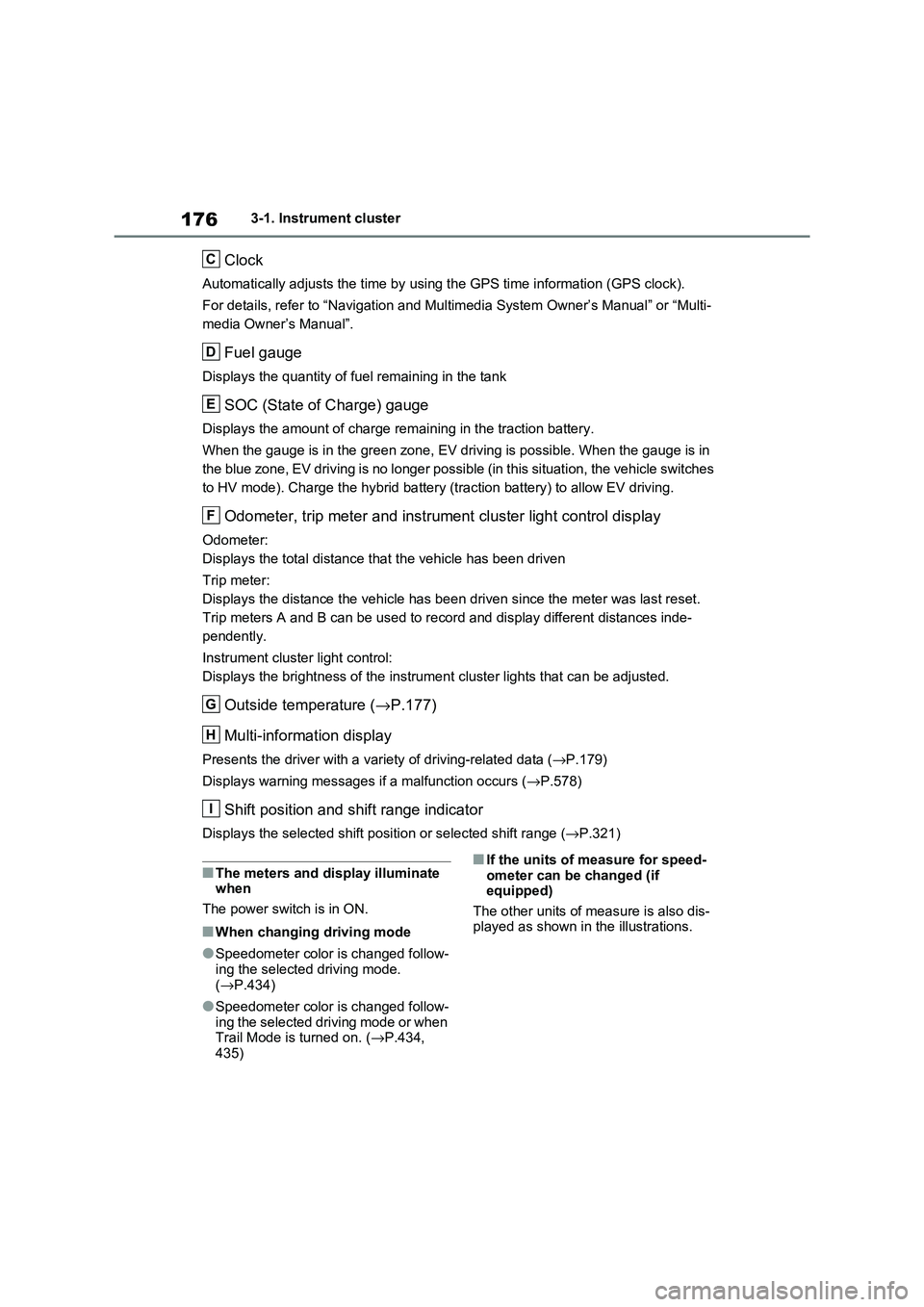
The other units of me asure is also dis-
played as shown in the illustrations.
C
D
E
F
G
H
I
Page 179 of 666
177
3
3-1. Instrument cluster
Vehicle status information and indicators
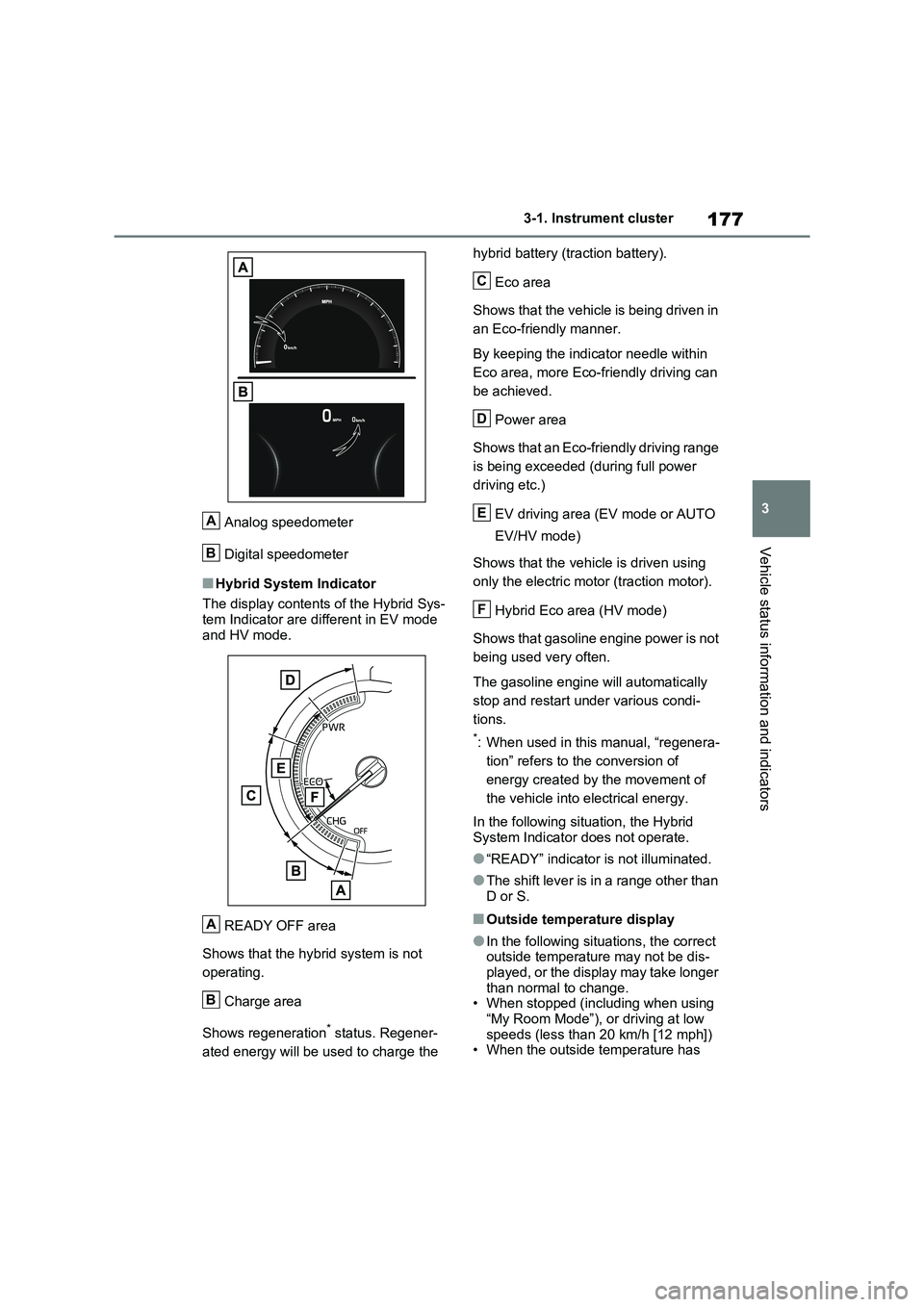
Analog speedometer
Digital speedometer
■Hybrid System Indicator
The display contents of the Hybrid Sys -
tem Indicator are di fferent in EV mode
and HV mode.
READY OFF area
Shows that the hybrid system is not
operating.
Charge area
Shows regeneration* status. Regener -
ated energy will be us ed to charge the
hybrid battery (traction battery).
Eco area
Shows that the vehicle is being driven in
an Eco-friendly manner.
By keeping the indicator needle within
Eco area, more Eco-f riendly driving can
be achieved.
Power area
Shows that an Eco-friendly driving range
is being exceeded (during full power
driving etc.)
EV driving area (EV mode or AUTO
EV/HV mode)
Shows that the vehicle is driven using
only the electric moto r (traction motor).
Hybrid Eco area (HV mode)
Shows that gasoline engine power is not
being used very often.
The gasoline engine will automatically
stop and restart under various condi -
tions.
*: When used in this manual, “regenera -
tion” refers to the conversion of
energy created by the movement of
the vehicle into electrical energy.
In the following sit uation, the Hybrid
System Indicator does not operate.
●“READY” indicator is not illuminated.
●The shift lever is in a range other than D or S.
■Outside temperature display
●In the following situ ations, the correct outside temperature may not be dis -
played, or the display may take longer
than normal to change. • When stopped (including when using
“My Room Mode”), o r driving at low
speeds (less than 2 0 km/h [12 mph]) • When the outside temperature has
A
B
A
B
C
D
E
F
Page 183 of 666
181
3
3-1. Instrument cluster
Vehicle status information and indicators
Select to display fuel consumption
data in various forms.
■Power Consumption/Fuel
Economy
The display contents are different in
EV mode or AUTO EV/HV mode,
and HV mode.
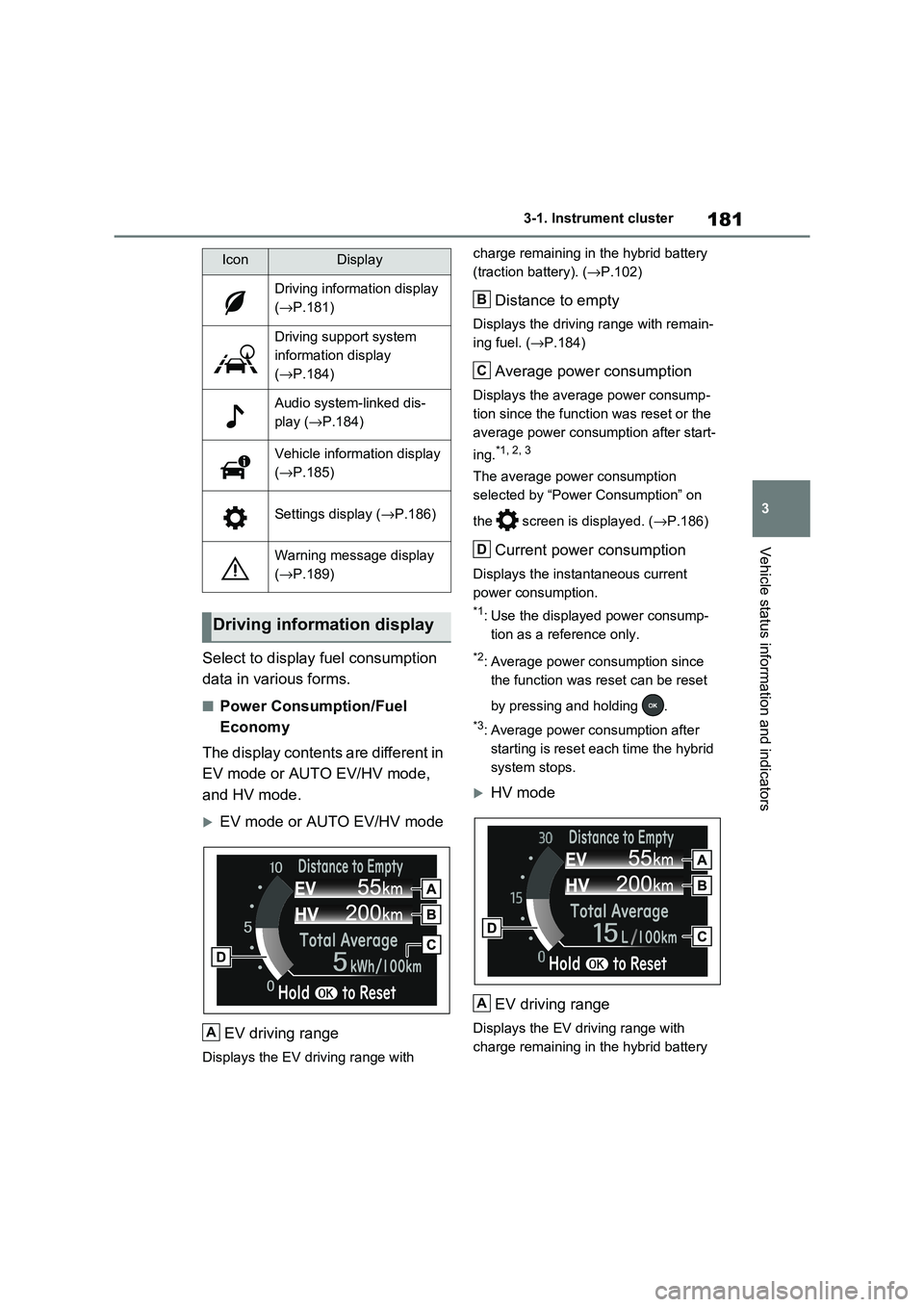
EV mode or AUTO EV/HV mode
EV driving range
Displays the EV driving range with
charge remaining in t he hybrid battery
(traction battery). ( →P.102)
Distance to empty
Displays the driving range with remain-
ing fuel. ( →P.184)
Average power consumption
Displays the average power consump-
tion since the funct ion was reset or the
average power consumption after start -
ing.*1, 2, 3
The average power consumption
selected by “Power Consumption” on
the screen is displayed. ( →P.186)
Current power consumption
Displays the instantaneous current
power consumption.
*1: Use the displayed power consump -
tion as a reference only.
*2: Average power consumption since
the function was reset can be reset
by pressing and holding .
*3: Average power consumption after
starting is reset each time the hybrid
system stops.
HV mode
EV driving range
Displays the EV driving range with
charge remaining in t he hybrid battery
IconDisplay
Driving information display
( →P.181)
Driving support system
information display
( →P.184)
Audio system-linked dis-
play ( →P.184)
Vehicle information display
( →P.185)
Settings display (→P.186)
Warning message display
( →P.189)
Driving information display
A
B
C
D
A
Page 191 of 666
189
3
3-1. Instrument cluster
Vehicle status information and indicators
• “Drive Info Type”
Select to change the drive information
type display between trip and total.
( →P.185).
• “Drive Info Items”
Select to set the items on the upper and
lower side of the drive information
screen from three items, average
speed, distance and total time.
“Closing Display”
Select to set the items displayed when
the power switch is turned off.
“Pop-Up Display” (if equipped)
Select to enable/disable the following
pop-up displays, which may appear in
some situations.
• Intersection guidance display of the
navigation system-linked system (if
equipped)
• Incoming call disp lay of the hands-
free phone system (if equipped)
• Audio operation
• Volume operation
• Voice control (if equipped)
“Calender”
Select to set up the calender.
This can only be set if GPS calibration
of clock is turned off in the multimedia
system settings.
“MID OFF”
A blank screen is displayed
“Default Settings”
Select to reset the meter display set-
tings.
■Suspension of the settings display
●In the following situations, operation of
the settings display will be temporarily suspended.
• When a warning message appears on
the multi-information display
• When the vehicle begins to move
●Settings for functions not equipped to
the vehicle are not displayed.
●When a function is turned off, the
related settings for that function are not selectable.
Select to display warning mes -
sages and measures to be taken if
a malfunction is detected.
( →P.578)
Displays suggestions to the driver
in the following situations. To select
a response to a displayed sugges -
tion, use the meter control
switches.
WARNING
■Cautions during setting up the
display
As the hybrid system needs to be operating during setting up the dis -
play, ensure that the vehicle is parked
in a place with adequate ventilation. In a closed area such as a garage,
exhaust gases including harmful car -
bon monoxide (CO) may collect and enter the vehicle. This may lead to
death or a serious health hazard.
NOTICE
■During setting u p the display
To prevent 12-volt b attery discharge,
ensure that the hyb rid system is oper-
ating while setting up the display fea- tures.
Warning message display
Suggestion function
Page 195 of 666
193
3
3-1. Instrument cluster
Vehicle status information and indicators
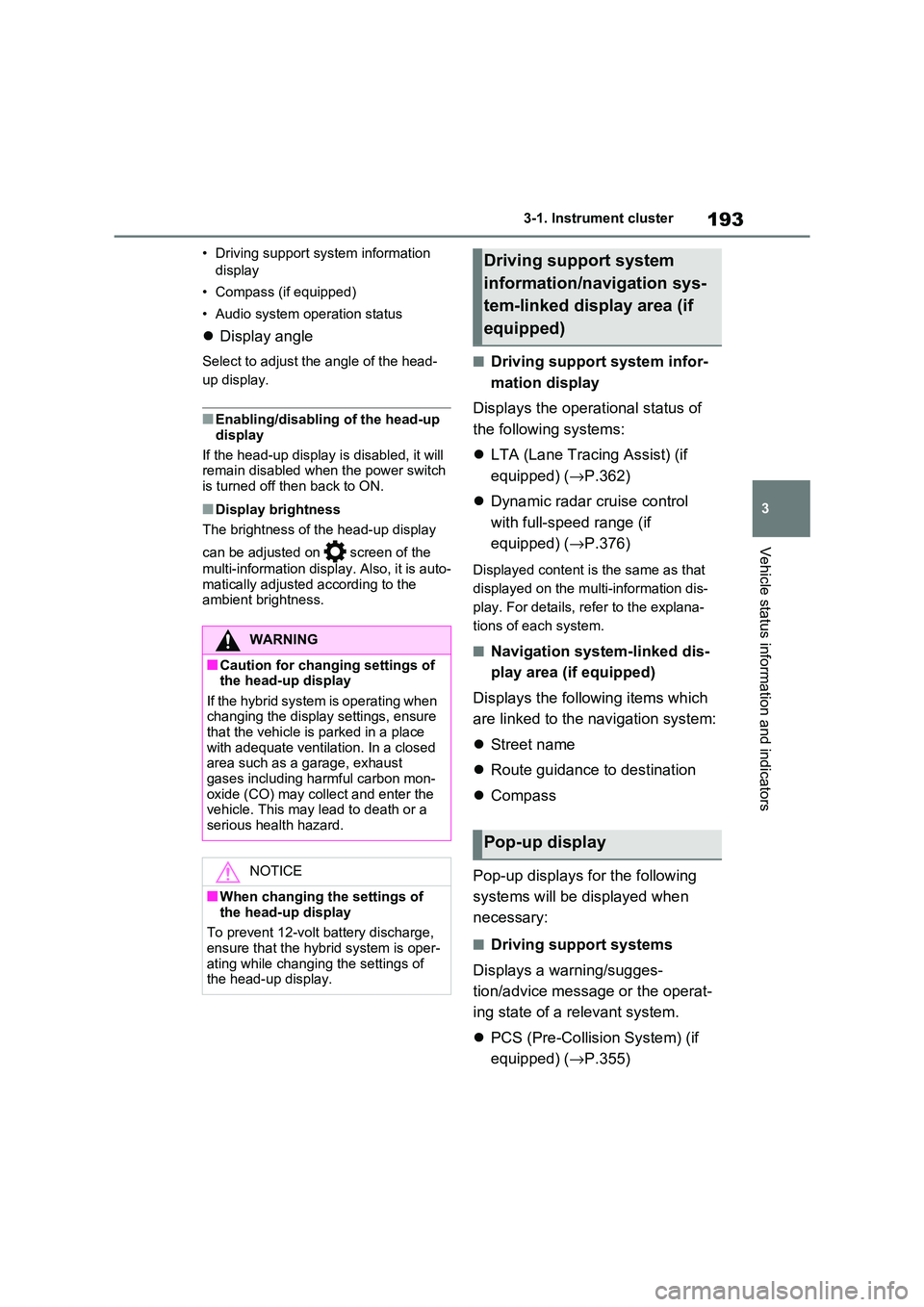
• Driving support system information
display
• Compass (if equipped)
• Audio system operation status
Display angle
Select to adjust the angle of the head-
up display.
■Enabling/disabling of the head-up
display
If the head-up display is disabled, it will remain disabled when the power switch
is turned off then back to ON.
■Display brightness
The brightness of t he head-up display
can be adjusted on screen of the
multi-information display. Also, it is auto -
matically adjusted according to the
ambient brightness.
■Driving support system infor -
mation display
Displays the operational status of
the following systems:
LTA (Lane Tracing Assist) (if
equipped) ( →P.362)
Dynamic radar cruise control
with full-speed range (if
equipped) ( →P.376)
Displayed content is the same as that
displayed on the multi-information dis -
play. For details, refer to the explana -
tions of each system.
■Navigation system-linked dis -
play area (if equipped)
Displays the follo wing items which
are linked to the navigation system:
Street name
Route guidance to destination
Compass
Pop-up displays for the following
systems will be displayed when
necessary:
■Driving support systems
Displays a warning/sugges -
tion/advice messa ge or the operat-
ing state of a relevant system.
PCS (Pre-Collision System) (if
equipped) ( →P.355)
WARNING
■Caution for changing settings of the head-up display
If the hybrid system i s operating when
changing the display settings, ensure that the vehicle is parked in a place
with adequate ventilat ion. In a closed
area such as a garage, exhaust gases including harmful carbon mon -
oxide (CO) may collect and enter the
vehicle. This may lead to death or a serious health hazard.
NOTICE
■When changing the settings of
the head-up display
To prevent 12-volt battery discharge,
ensure that the hyb rid system is oper-
ating while changing the settings of the head-up display.
Driving support system
information/navigation sys -
tem-linked display area (if
equipped)
Pop-up display
Page 197 of 666
195
3
3-1. Instrument cluster
Vehicle status information and indicators
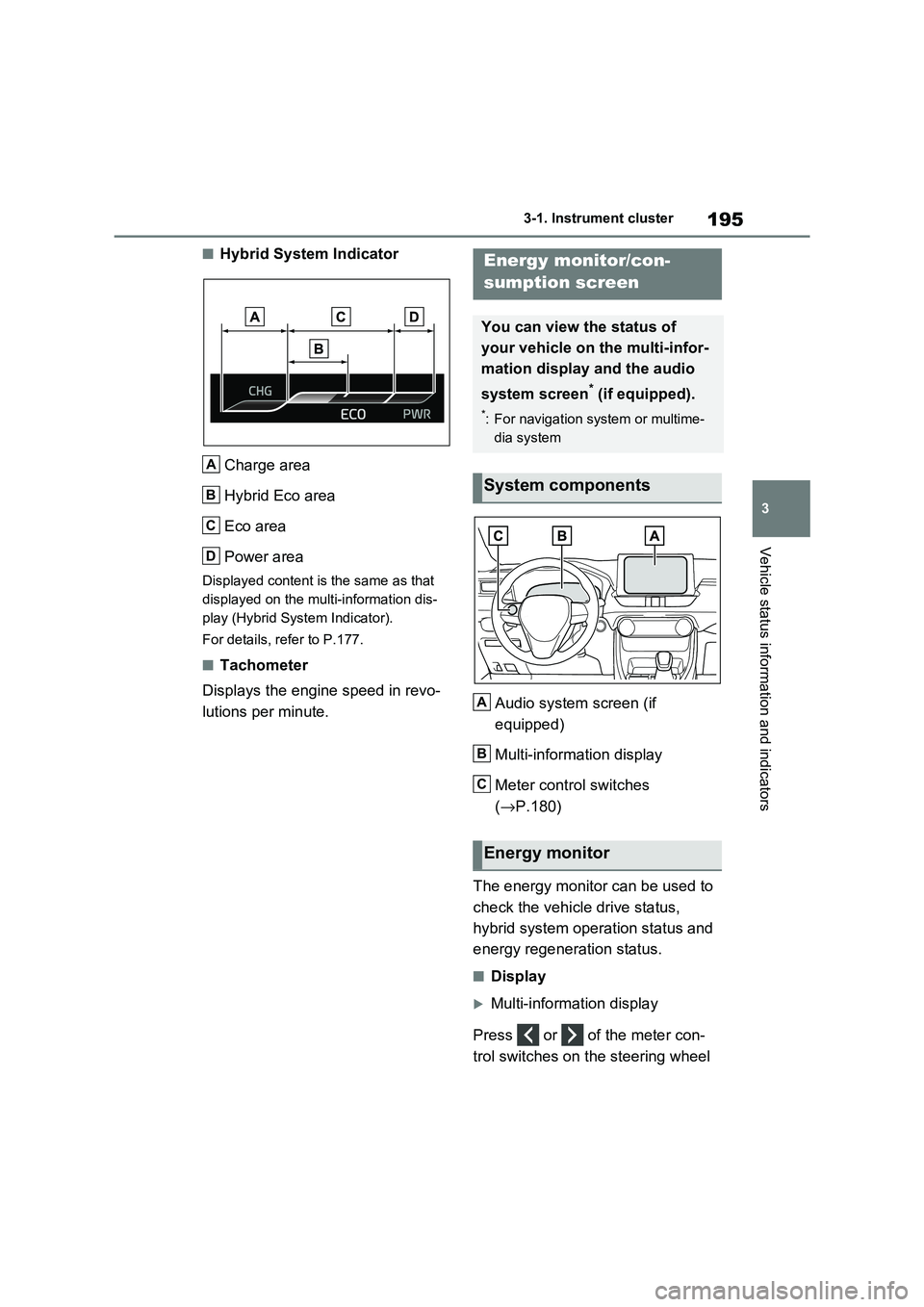
■Hybrid System Indicator
Charge area
Hybrid Eco area
Eco area
Power area
Displayed content is the same as that
displayed on the multi-information dis -
play (Hybrid System Indicator).
For details, refer to P.177.
■Tachometer
Displays the engine speed in revo -
lutions per minute. Audio system screen (if
equipped)
Multi-information display
Meter control switches
( →P.180)
The energy monitor can be used to
check the vehicl e drive status,
hybrid system operation status and
energy regeneration status.
■Display
Multi-information display
Press or of the meter con -
trol switches on the steering wheel
A
B
C
D
Energy monitor/con-
sumption screen
You can view the status of
your vehicle on the multi-infor-
mation display and the audio
system screen* (if equipped).
*: For navigation system or multime -
dia system
System components
Energy monitor
A
B
C
Page 198 of 666
1963-1. Instrument cluster
and select , and then press
or to select the energy mon -
itor display.
Audio system screen (without
navigation function)
1 Press the “MENU” button.
2 Select “Info” on the “Menu”
screen.
If a screen other than “Energy monitor”
is displayed, select “Energy”.
Audio system screen (with navi -
gation function)
1 Press the “MENU” button.
2 Select “Info” on the “Menu”
screen.
3 Select “ECO” on the “Informa-
tion” screen.
If a screen other than “Energy monitor”
is displayed, select “Energy”.
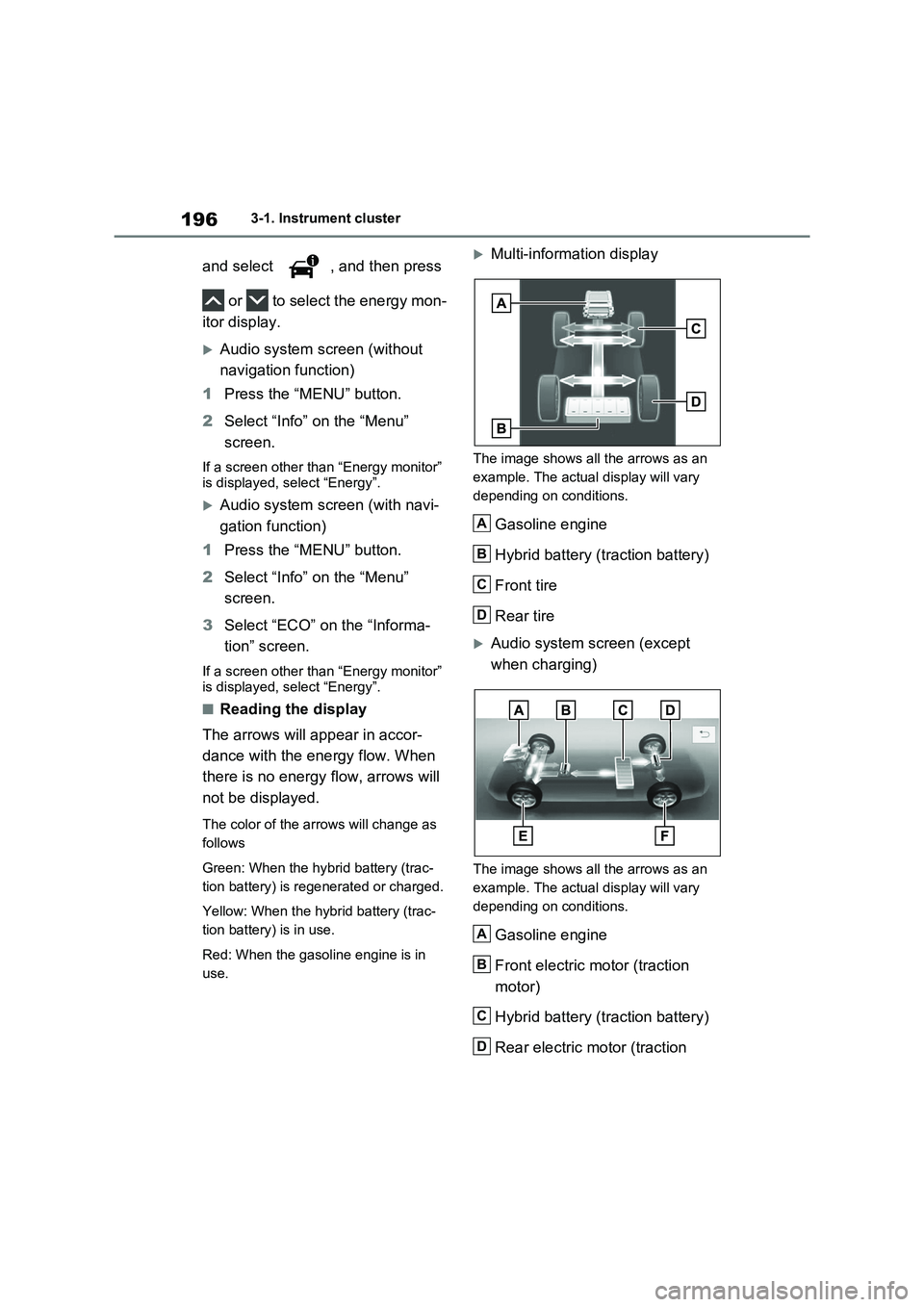
■Reading the display
The arrows will appear in accor-
dance with the energy flow. When
there is no energy flow, arrows will
not be displayed.
The color of the arrows will change as
follows
Green: When the hybr id battery (trac-
tion battery) is rege nerated or charged.
Yellow: When the hybrid battery (trac -
tion battery) is in use.
Red: When the gaso line engine is in
use.
Multi-information display
The image shows all the arrows as an
example. The actual display will vary
depending on conditions.
Gasoline engine
Hybrid battery (traction battery)
Front tire
Rear tire
Audio system screen (except
when charging)
The image shows all the arrows as an
example. The actual display will vary
depending on conditions.
Gasoline engine
Front electric motor (traction
motor)
Hybrid battery (traction battery)
Rear electric motor (traction
A
B
C
D
A
B
C
D
Page 199 of 666
197
3
3-1. Instrument cluster
Vehicle status information and indicators
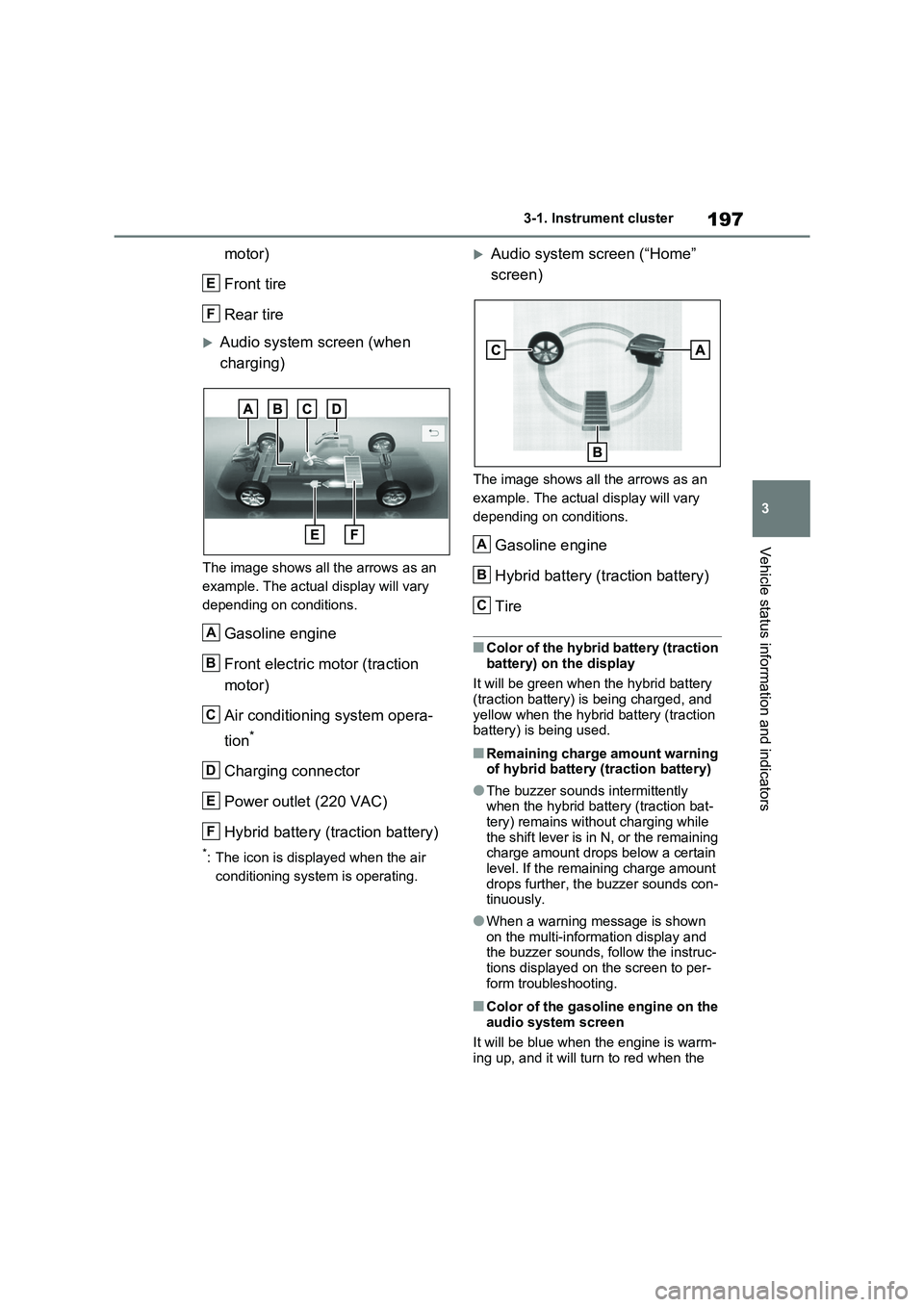
motor)
Front tire
Rear tire
Audio system screen (when
charging)
The image shows all the arrows as an
example. The actual display will vary
depending on conditions.
Gasoline engine
Front electric motor (traction
motor)
Air conditioning system opera -
tion*
Charging connector
Power outlet (220 VAC)
Hybrid battery (traction battery)
*: The icon is displayed when the air
conditioning system is operating.
Audio system screen (“Home”
screen)
The image shows all the arrows as an
example. The actual display will vary
depending on conditions.
Gasoline engine
Hybrid battery (traction battery)
Tire
■Color of the hybrid battery (traction
battery) on the display
It will be green when the hybrid battery (traction battery) is being charged, and
yellow when the hybrid battery (traction
battery) is being used.
■Remaining charge amount warning of hybrid battery (traction battery)
●The buzzer sounds intermittently when the hybrid battery (traction bat -
tery) remains with out charging while
the shift lever is in N, or the remaining charge amount drops below a certain
level. If the remaining charge amount
drops further, the buzzer sounds con - tinuously.
●When a warning message is shown
on the multi-information display and the buzzer sounds, follow the instruc -
tions displayed on the screen to per -
form troubleshooting.
■Color of the gasoline engine on the audio system screen
It will be blue when the engine is warm -
ing up, and it will tu rn to red when the
E
F
A
B
C
D
E
F
A
B
C
Page 204 of 666
2024-1. Key information
4-1.Key information
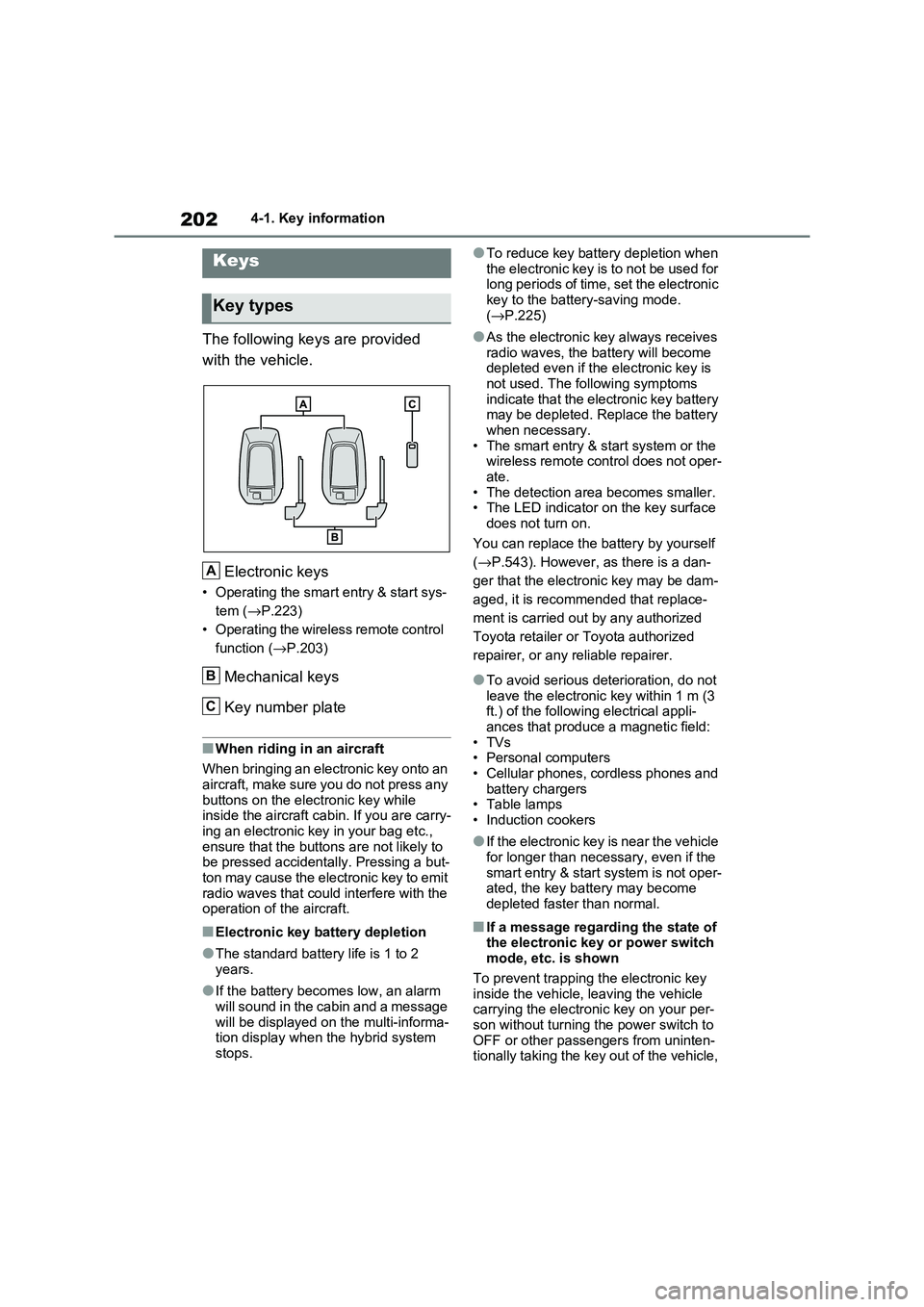
The following keys are provided
with the vehicle.
Electronic keys
• Operating the smart entry & start sys -
tem ( →P.223)
• Operating the wireless remote control
function ( →P.203)
Mechanical keys
Key number plate
■When riding in an aircraft
When bringing an electronic key onto an
aircraft, make sure you do not press any
buttons on the electronic key while inside the aircraft cabin. If you are carry -
ing an electronic key in your bag etc.,
ensure that the buttons are not likely to be pressed accidentally. Pressing a but -
ton may cause the electronic key to emit
radio waves that could interfere with the operation of t he aircraft.
■Electronic key battery depletion
●The standard battery life is 1 to 2
years.
●If the battery becom es low, an alarm
will sound in the cabin and a message will be displayed on the multi-informa -
tion display when the hybrid system
stops.
●To reduce key battery depletion when
the electronic key is to not be used for long periods of time, set the electronic
key to the batter y-saving mode.
( →P.225)
●As the electronic key always receives
radio waves, the ba ttery will become depleted even if the electronic key is
not used. The following symptoms
indicate that the electronic key battery may be depleted. Replace the battery
when necessary.
• The smart entry & start system or the wireless remote control does not oper -
ate.
• The detection area becomes smaller. • The LED indicator on the key surface
does not turn on.
You can replace the battery by yourself
( →P.543). However, as there is a dan-
ger that the electro nic key may be dam-
aged, it is recomm ended that replace-
ment is carried ou t by any authorized
Toyota retailer or Toyota authorized
repairer, or any reliable repairer.
●To avoid serious deterioration, do not
leave the electronic key within 1 m (3
ft.) of the followi ng electrical appli- ances that produce a magnetic field:
•TVs
• Personal computers • Cellular phones, cordless phones and
battery chargers
• Table lamps • Induction cookers
●If the electronic key is near the vehicle for longer than necessary, even if the
smart entry & star t system is not oper-
ated, the key battery may become depleted faster than normal.
■If a message regarding the state of the electronic key or power switch
mode, etc. is shown
To prevent trapping the electronic key inside the vehicle, leaving the vehicle
carrying the electronic key on your per -
son without turning t he power switch to OFF or other passengers from uninten -
tionally taking the key out of the vehicle,
Keys
Key types
A
B
C
Page 209 of 666
207
4
4-2. Opening, closing and locking the doors
Before driving
■Setting the alarm (if equipped)
Locking the doors will set the alarm sys - tem. ( →P.78)
■Conditions affecting the operation
of the smart entry & start system or
wireless remote control
→ P.225
■If the smart entry & start system or
the wireless remote control does
not operate properly
●Use the mechanical key to lock and
unlock the doors. ( →P.604)
●Replace the key battery with a new
one if it is depleted. ( →P.543)
■If the 12-volt battery is discharged
The doors cannot be locked and
unlocked using the smart entry & start
system or wireless rem ote control. Lock or unlock the doors using the mechani -
cal key. ( →P.604)
■Rear seat reminder function
●In order to remind you not to forget
luggage, etc. in the rear seat, when
the power switch i s turned to OFF after any of the fo llowing conditions
are met, a buzzer will sound and a
message will be displayed on the multi-information di splay for approxi-
mately 6 seconds.
• The hybrid system is started within 10 minutes after opening and closing a
rear door.
• A rear door has been opened and closed after the hy brid system was
started.
However, if a rear door is opened and
then closed within approximately 2 sec-
onds, the rear seat reminder function
may not operate.
●The rear seat reminder function deter - mines that luggage, etc. has been
placed in a rear seat based on open -
ing and closing of a rear door. There - fore, depending on t he situation, the
rear seat reminder function may not
operate and you may still forget lug - gage, etc. in the rear seat, or it may
operate unnecessarily.
●The rear seat reminder function can
be enabled/disabled. ( →P.629)
■Customization
Settings (e.g. unlocking function using a key) can be changed.
(Customizable features: →P.633)
WARNING
■To prevent an accident
Observe the following precautions while driving the vehicle.
Failure to do so may result in a door
opening and an occupant could be thrown out of the v ehicle, resulting in
death or serious injury.
●Ensure that all doo rs are properly closed.
●Do not pull the in side handle of the doors while driving.
Be especially care ful for the front
doors, as the doors may be opened even if the inside lock buttons are in
locked position.
●Set the rear door child-protector
locks when childre n are seated in
the rear seats.
■When opening or closing a door
Check the surroundings of the vehicle such as whether the vehicle is on an
incline, whether there is enough
space for a door to open and whether a strong wind is blowing. When open -
ing or closing the door, hold the door
handle tightly to prepare for any unpredictable movement.