Charge TOYOTA RAV4 PHEV 2021 Workshop Manual
[x] Cancel search | Manufacturer: TOYOTA, Model Year: 2021, Model line: RAV4 PHEV, Model: TOYOTA RAV4 PHEV 2021Pages: 666, PDF Size: 161.28 MB
Page 160 of 666
1582-2. Charging
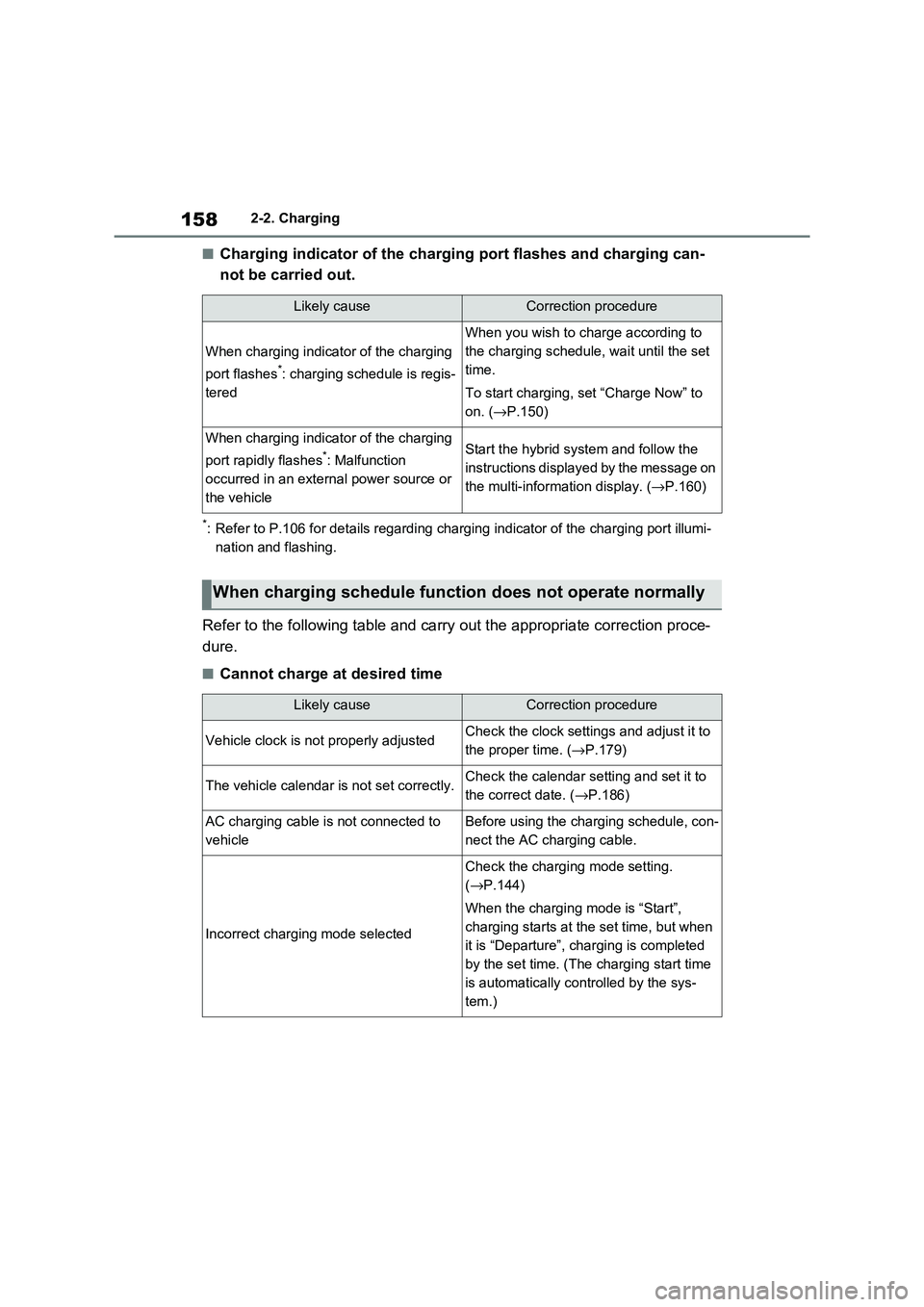
■Charging indicator of the charging port flashes and charging can-
not be carried out.
*: Refer to P.106 for details regarding charging indicator of the charging port illumi-
nation and flashing.
Refer to the following table and carry out the appropriate correction proce-
dure.
■Cannot charge at desired time
Likely causeCorrection procedure
When charging indicator of the charging
port flashes*: charging schedule is regis -
tered
When you wish to c harge according to
the charging schedule, wait until the set
time.
To start charging, s et “Charge Now” to
on. ( →P.150)
When charging indicator of the charging
port rapidly flashes*: Malfunction
occurred in an extern al power source or
the vehicle
Start the hybrid system and follow the
instructions displayed by the message on
the multi-inform ation display. (→P.160)
When charging schedule function does not operate normally
Likely causeCorrection procedure
Vehicle clock is not properly adjustedCheck the clock settings and adjust it to
the proper time. ( →P.179)
The vehicle calendar is not set correctly.Check the calendar setting and set it to
the correct date. ( →P.186)
AC charging cable is not connected to
vehicle
Before using the charging schedule, con -
nect the AC charging cable.
Incorrect charging mode selected
Check the charging mode setting.
( →P.144)
When the charging m ode is “Start”,
charging starts at t he set time, but when
it is “Departure”, charging is completed
by the set time. (The charging start time
is automatically con trolled by the sys-
tem.)
Page 161 of 666
159
2
2-2. Charging
Plug-in hybrid system
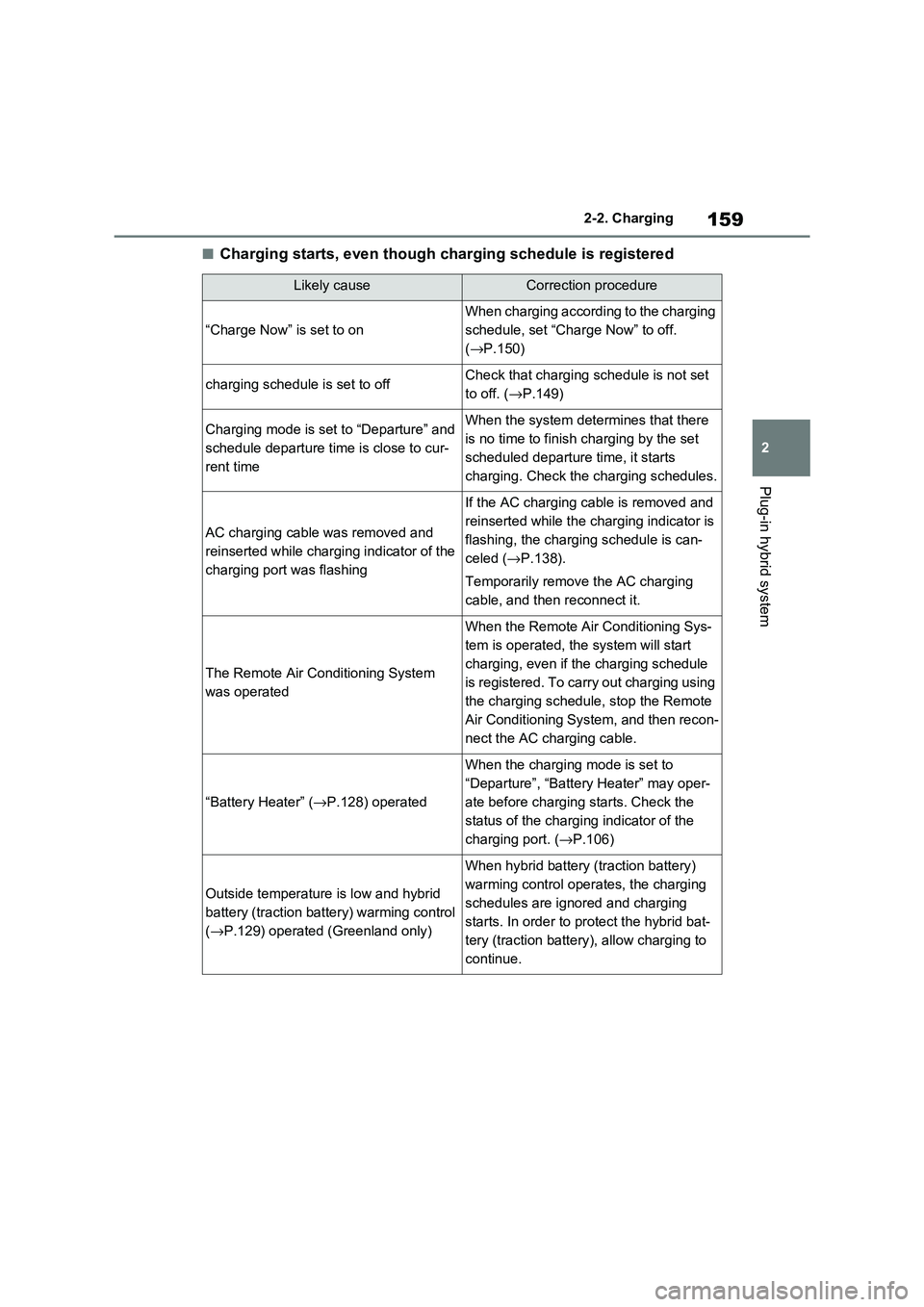
■Charging starts, even though charging schedule is registered
Likely causeCorrection procedure
“Charge Now” is set to on
When charging according to the charging
schedule, set “Char ge Now” to off.
( →P.150)
charging schedule is set to offCheck that charging schedule is not set
to off. ( →P.149)
Charging mode is set to “Departure” and
schedule departure time is close to cur -
rent time
When the system dete rmines that there
is no time to finish c harging by the set
scheduled departure time, it starts
charging. Check the charging schedules.
AC charging cable was removed and
reinserted while charging indicator of the
charging port was flashing
If the AC charging cable is removed and
reinserted while the charging indicator is
flashing, the charging schedule is can -
celed ( →P.138).
Temporarily remove the AC charging
cable, and then reconnect it.
The Remote Air Conditioning System
was operated
When the Remote Air Conditioning Sys -
tem is operated, the system will start
charging, even if the charging schedule
is registered. To carry out charging using
the charging schedule, stop the Remote
Air Conditioning System, and then recon -
nect the AC charging cable.
“Battery Heater” ( →P.128) operated
When the charging mode is set to
“Departure”, “Batter y Heater” may oper-
ate before charging starts. Check the
status of the chargi ng indicator of the
charging port. ( →P.106)
Outside temperature is low and hybrid
battery (traction ba ttery) warming control
( →P.129) operated (Greenland only)
When hybrid battery (traction battery)
warming control opera tes, the charging
schedules are ignored and charging
starts. In order to pro tect the hybrid bat-
tery (traction battery), allow charging to
continue.
Page 162 of 666
1602-2. Charging
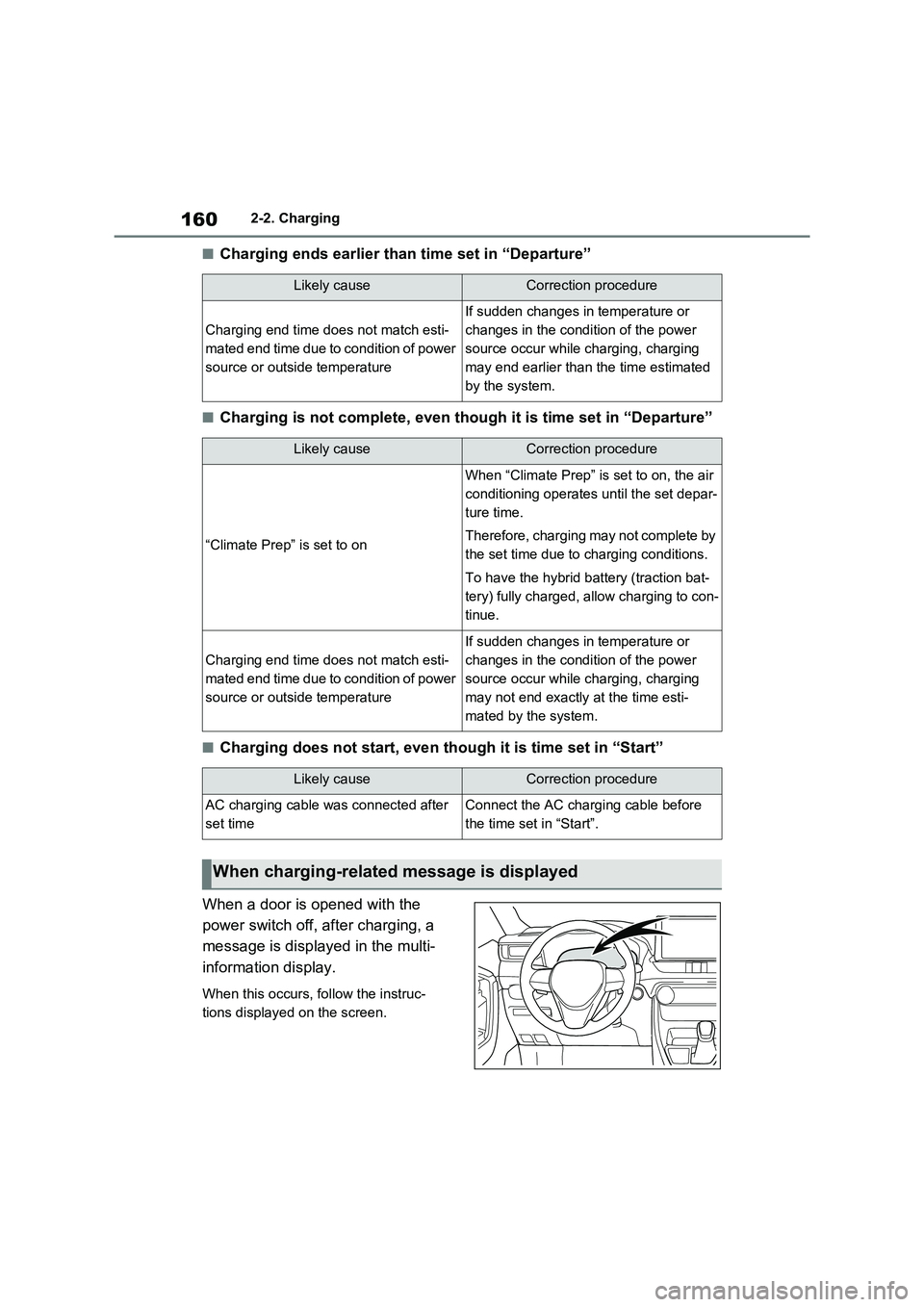
■Charging ends earlier than time set in “Departure”
■Charging is not complete, even though it is time set in “Departure”
■Charging does not start, even though it is time set in “Start”
When a door is opened with the
power switch off, after charging, a
message is displayed in the multi-
information display.
When this occurs, follow the instruc -
tions displayed on the screen.
Likely causeCorrection procedure
Charging end time doe s not match esti-
mated end time due to condition of power
source or outside temperature
If sudden changes in temperature or
changes in the condition of the power
source occur while charging, charging
may end earlier than t he time estimated
by the system.
Likely causeCorrection procedure
“Climate Prep” is set to on
When “Climate Prep” is set to on, the air
conditioning operates until the set depar-
ture time.
Therefore, charging may not complete by
the set time due to charging conditions.
To have the hybrid b attery (traction bat-
tery) fully charged, allow charging to con -
tinue.
Charging end time doe s not match esti-
mated end time due to condition of power
source or outside temperature
If sudden changes in temperature or
changes in the condition of the power
source occur while charging, charging
may not end exactly at the time esti-
mated by the system.
Likely causeCorrection procedure
AC charging cable wa s connected after
set time
Connect the AC charging cable before
the time set in “Start”.
When charging-related message is displayed
Page 163 of 666
161
2
2-2. Charging
Plug-in hybrid system
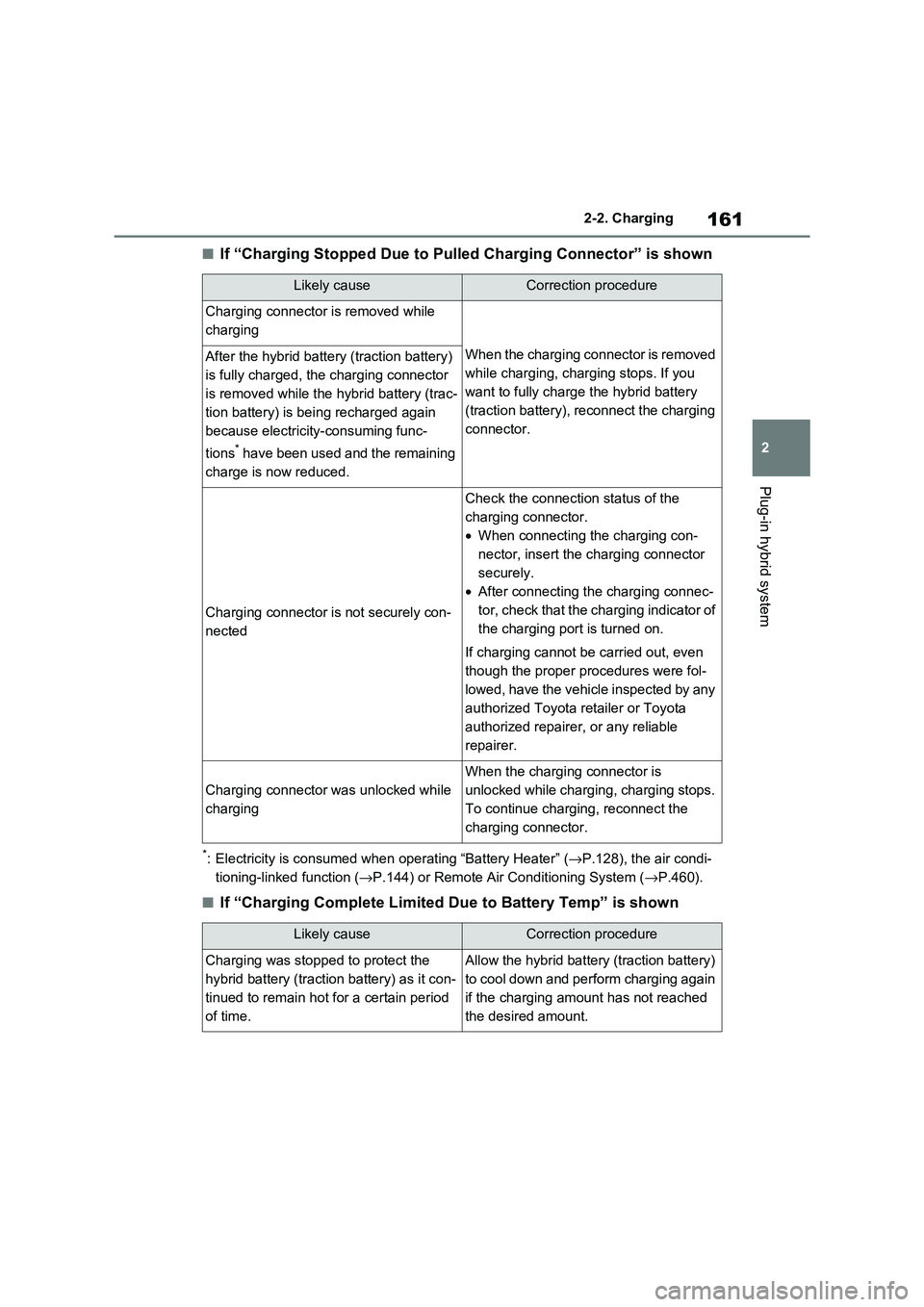
■If “Charging Stopped Due to Pul led Charging Connector” is shown
*: Electricity is consumed when operating “Battery Heater” (→P.128), the air condi-
tioning-linked function ( →P.144) or Remote Air Conditioning System (→P.460).
■If “Charging Complete Limited Due to Battery Temp” is shown
Likely causeCorrection procedure
Charging connector is removed while
charging
When the charging connector is removed
while charging, charging stops. If you
want to fully charge the hybrid battery
(traction battery), reconnect the charging
connector.
After the hybrid battery (traction battery)
is fully charged, the charging connector
is removed while the hybrid battery (trac -
tion battery) is bei ng recharged again
because electricity-consuming func -
tions* have been used and the remaining
charge is now reduced.
Charging connector is not securely con -
nected
Check the connection status of the
charging connector.
• When connecting the charging con-
nector, insert the charging connector
securely.
• After connecting the charging connec-
tor, check that the charging indicator of
the charging port is turned on.
If charging cannot be carried out, even
though the proper procedures were fol -
lowed, have the vehicle inspected by any
authorized Toyota retailer or Toyota
authorized repairer, or any reliable
repairer.
Charging connector was unlocked while
charging
When the charging connector is
unlocked while charging, charging stops.
To continue charging, reconnect the
charging connector.
Likely causeCorrection procedure
Charging was stopped to protect the
hybrid battery (traction battery) as it con -
tinued to remain hot for a certain period
of time.
Allow the hybrid battery (traction battery)
to cool down and perform charging again
if the charging amount has not reached
the desired amount.
Page 165 of 666
163
2
2-2. Charging
Plug-in hybrid system
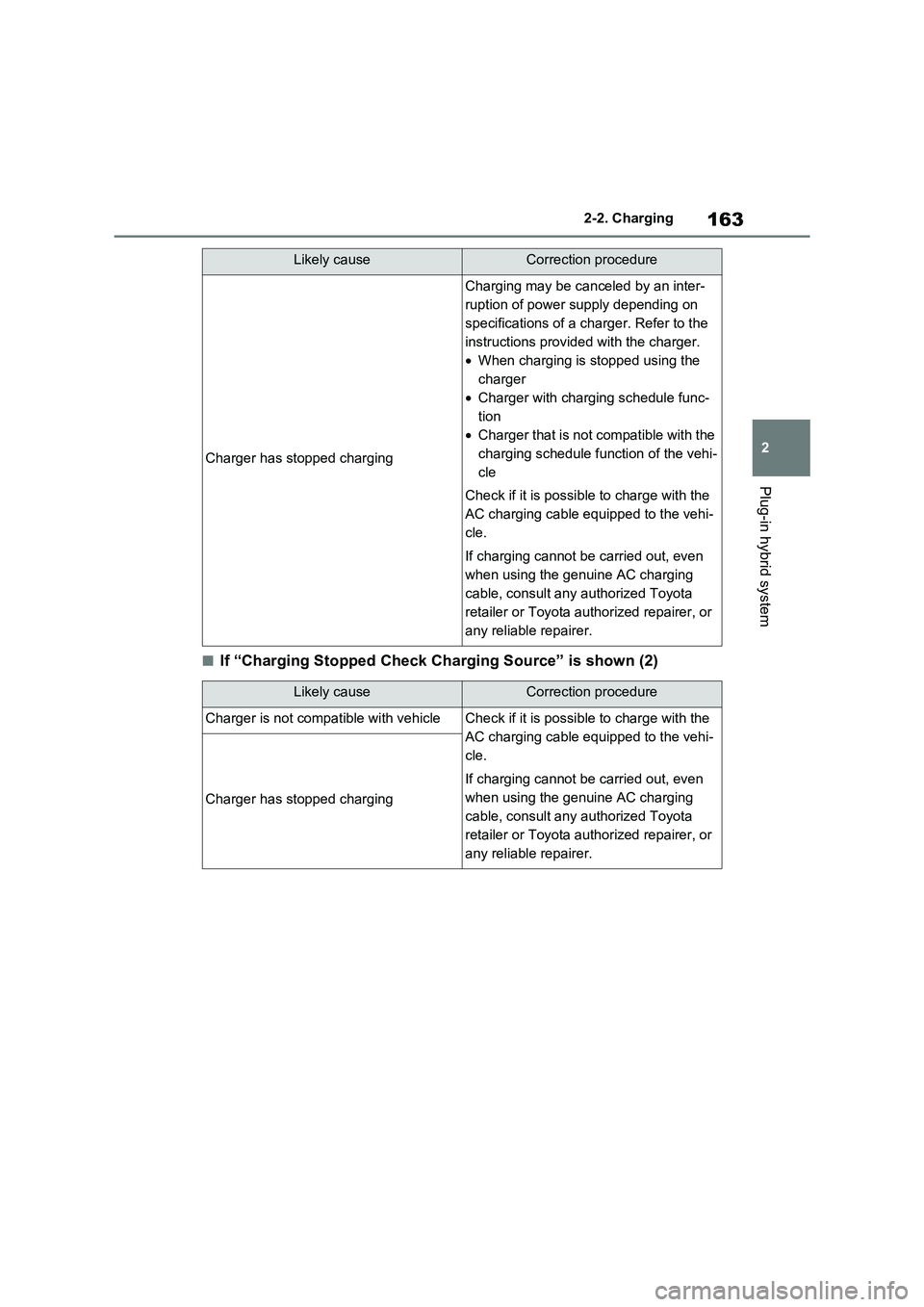
■If “Charging Stopped Check Charging Source” is shown (2)
Charger has stopped charging
Charging may be canceled by an inter -
ruption of power supply depending on
specifications of a charger. Refer to the
instructions provided with the charger.
• When charging is stopped using the
charger
• Charger with charging schedule func-
tion
• Charger that is not compatible with the
charging schedule function of the vehi -
cle
Check if it is possibl e to charge with the
AC charging cable equipped to the vehi -
cle.
If charging cannot be carried out, even
when using the genuine AC charging
cable, consult any authorized Toyota
retailer or Toyota authorized repairer, or
any reliable repairer.
Likely causeCorrection procedure
Charger is not compat ible with vehicleCheck if it is possible to charge with the
AC charging cable equipped to the vehi -
cle.
If charging cannot be carried out, even
when using the genuine AC charging
cable, consult any authorized Toyota
retailer or Toyota authorized repairer, or
any reliable repairer.
Charger has stopped charging
Likely causeCorrection procedure
Page 166 of 666
1642-2. Charging
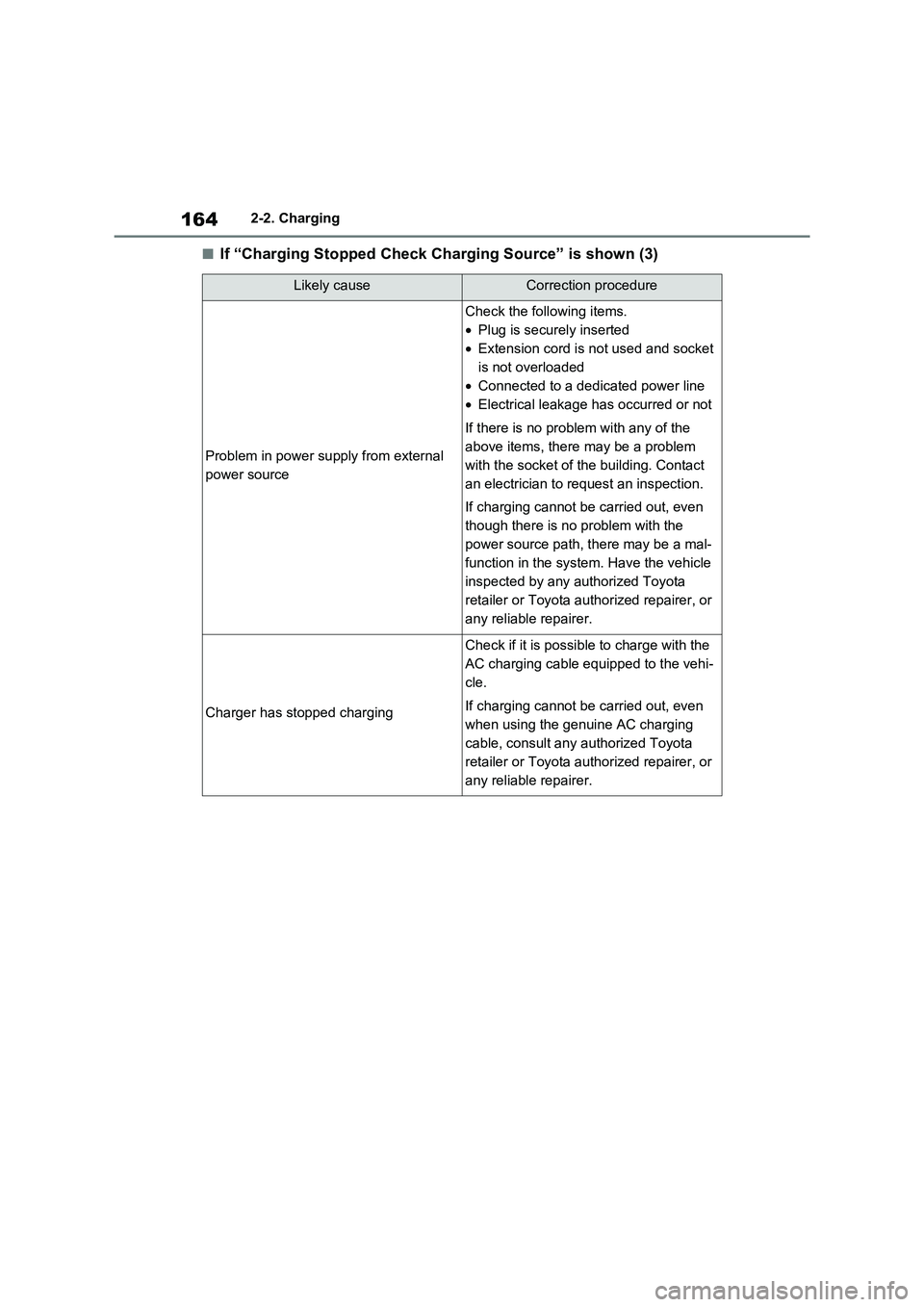
■If “Charging Stopped Check Charging Source” is shown (3)
Likely causeCorrection procedure
Problem in power supply from external
power source
Check the following items.
• Plug is securely inserted
• Extension cord is not used and socket
is not overloaded
• Connected to a dedicated power line
• Electrical leakage has occurred or not
If there is no prob lem with any of the
above items, there may be a problem
with the socket of t he building. Contact
an electrician to request an inspection.
If charging cannot be carried out, even
though there is no problem with the
power source path, there may be a mal -
function in the system . Have the vehicle
inspected by any authorized Toyota
retailer or Toyota authorized repairer, or
any reliable repairer.
Charger has stopped charging
Check if it is possibl e to charge with the
AC charging cable equipped to the vehi -
cle.
If charging cannot be carried out, even
when using the genuine AC charging
cable, consult any authorized Toyota
retailer or Toyota authorized repairer, or
any reliable repairer.
Page 167 of 666
165
2
2-2. Charging
Plug-in hybrid system
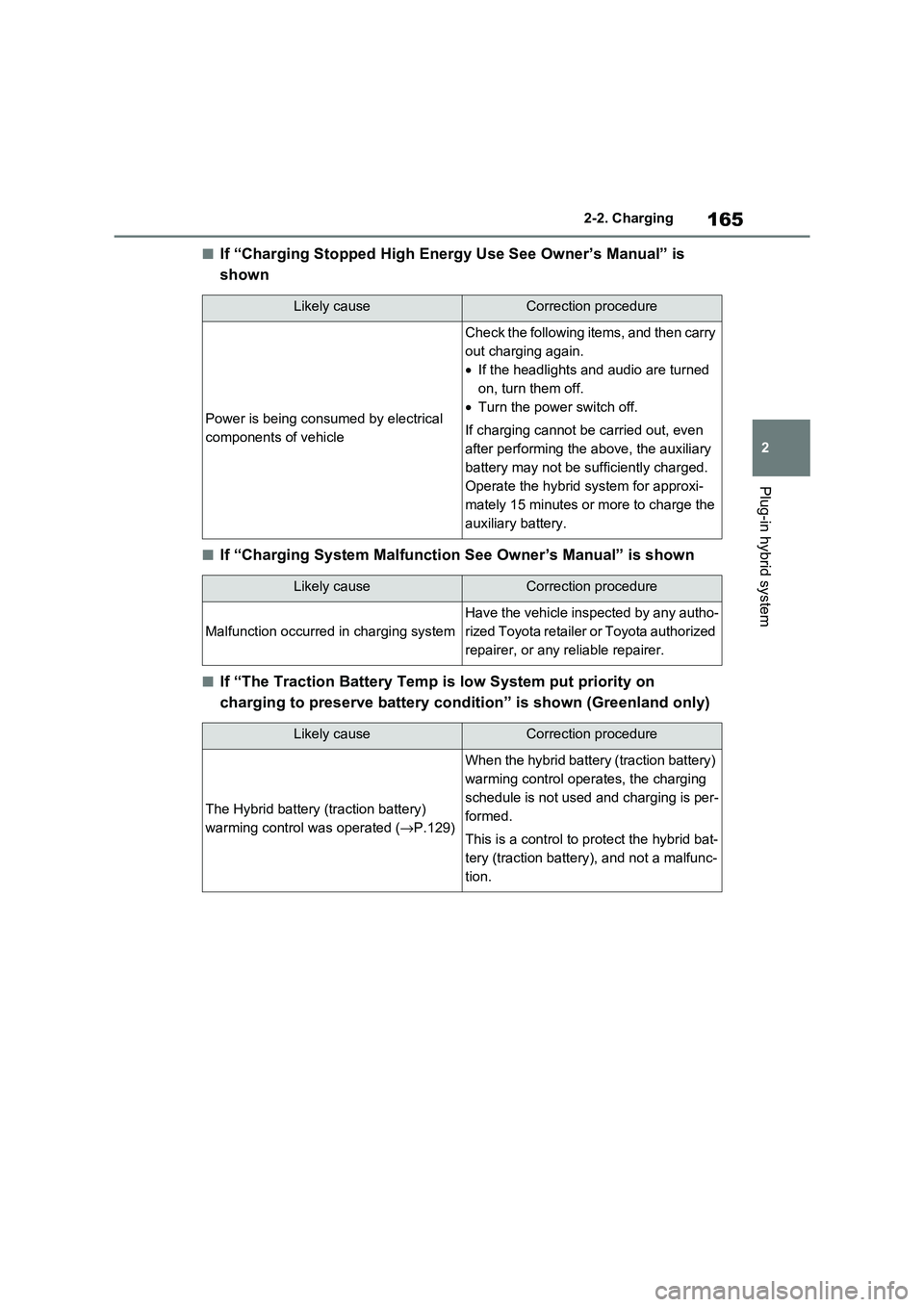
■If “Charging Stopped High Energy Use See Owner’s Manual” is
shown
■If “Charging System Malfunction See Owner’s Manual” is shown
■If “The Traction Battery Temp is low System put priority on
charging to preserve battery co ndition” is shown (Greenland only)
Likely causeCorrection procedure
Power is being consumed by electrical
components of vehicle
Check the following items, and then carry
out charging again.
• If the headlights and audio are turned
on, turn them off.
• Turn the power switch off.
If charging cannot be carried out, even
after performing the above, the auxiliary
battery may not be s ufficiently charged.
Operate the hybrid system for approxi-
mately 15 minutes or more to charge the
auxiliary battery.
Likely causeCorrection procedure
Malfunction o ccurred in charging system
Have the vehicle inspected by any autho-
rized Toyota retailer or Toyota authorized
repairer, or any reliable repairer.
Likely causeCorrection procedure
The Hybrid battery (traction battery)
warming control was operated (→P.129)
When the hybrid battery (traction battery)
warming control opera tes, the charging
schedule is not used and charging is per -
formed.
This is a control to p rotect the hybrid bat-
tery (traction battery), and not a malfunc -
tion.
Page 174 of 666
1723-1. Instrument cluster
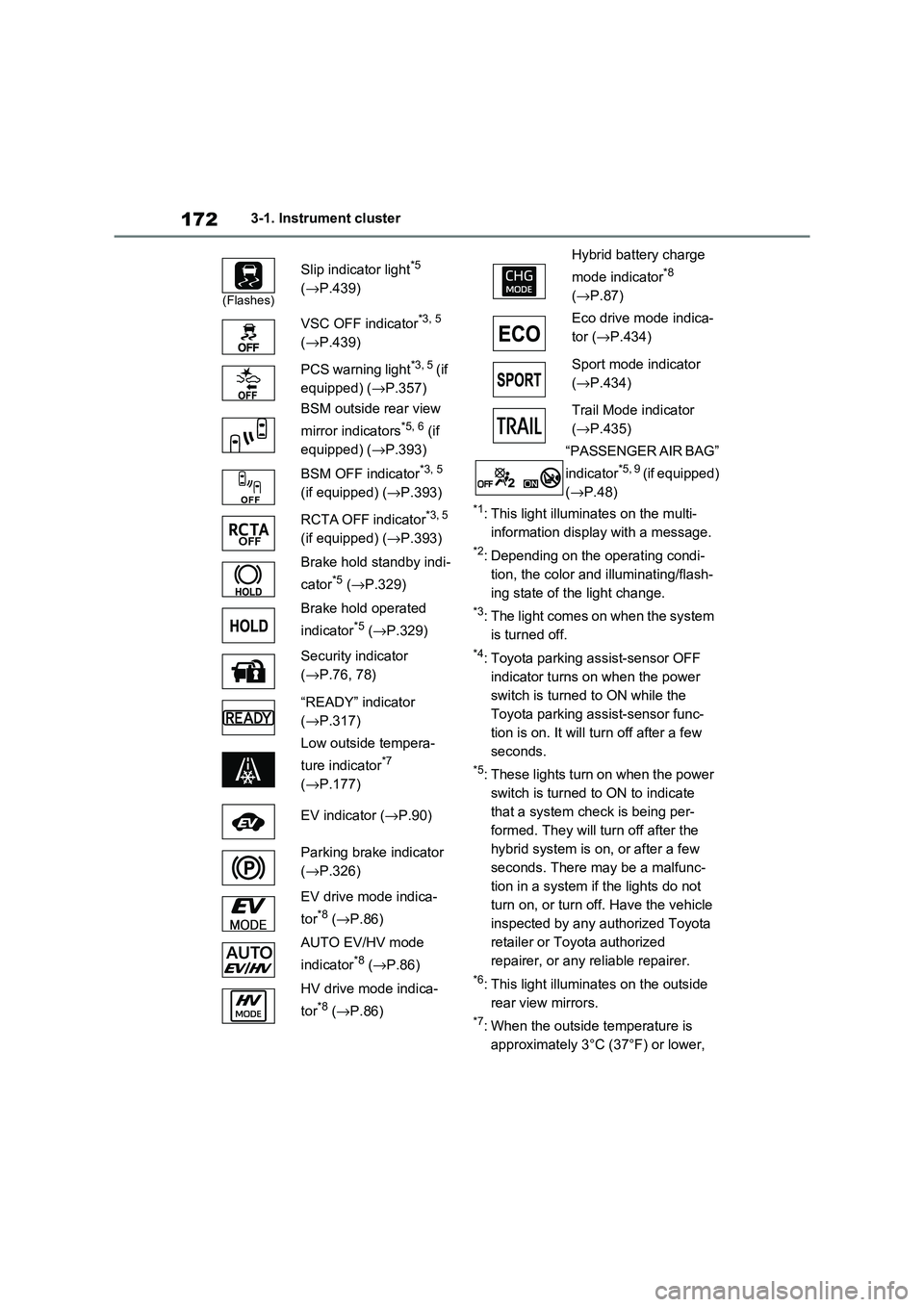
*1: This light illuminates on the multi-
information display with a message.
*2: Depending on the operating condi -
tion, the color and illuminating/flash -
ing state of t he light change.
*3: The light comes on when the system
is turned off.
*4: Toyota parking assist-sensor OFF
indicator turns on when the power
switch is turned to ON while the
Toyota parking a ssist-sensor func-
tion is on. It will t urn off after a few
seconds.
*5: These lights turn on when the power
switch is turned to ON to indicate
that a system check is being per -
formed. They will turn off after the
hybrid system is on , or after a few
seconds. There may be a malfunc-
tion in a system if the lights do not
turn on, or turn off. Have the vehicle
inspected by any authorized Toyota
retailer or Toyota authorized
repairer, or any reliable repairer.
*6: This light illuminates on the outside
rear view mirrors.
*7: When the outside temperature is
approximately 3°C (37°F) or lower,
(Flashes)
Slip indicator light*5
( →P.439)
VSC OFF indicator*3, 5
( →P.439)
PCS warning light*3, 5 ( i f
equipped) ( →P.357)
BSM outside rear view
mirror indicators*5, 6 (if
equipped) ( →P.393)
BSM OFF indicator*3, 5
(if equipped) ( →P.393)
RCTA OFF indicator*3, 5
(if equipped) ( →P.393)
Brake hold standby indi -
cator*5 ( →P.329)
Brake hold operated
indicator*5 ( →P.329)
Security indicator
( →P.76, 78)
“READY” indicator
( →P.317)
Low outside tempera -
ture indicator*7
( →P.177)
EV indicator ( →P.90)
Parking brake indicator
( →P.326)
EV drive mode indica -
tor*8 ( →P.86)
AUTO EV/HV mode
indicator*8 ( →P.86)
HV drive mode indica -
tor*8 ( →P.86)
Hybrid battery charge
mode indicator*8
( →P.87)
Eco drive mode indica -
tor ( →P.434)
Sport mode indicator
( →P.434)
Trail Mode indicator
( →P.435)
“PASSENGER AIR BAG”
indicator*5, 9 ( i f e q u i p p e d )
( →P.48)
Page 176 of 666

1743-1. Instrument cluster
The display of the speedometer can be selected from two types, analog or
digital. ( →P.186)
■Analog speedometer
The units used on the meter and display may differ depending on the target region.
Hybrid System Indicator
Displays the hybrid system output or regeneration level (→P.177)
Speedometer
Displays the vehicle speed
Clock
Automatically adjusts the time by using the GPS time information (GPS clock).
For details, refer to “Navigation and Multimedia System Owner’s Manual” or “Multi-
media Owner’s Manual”.
Fuel gauge
Displays the quantity of f uel remaining in the tank
SOC (State of Charge) gauge
Displays the amount of charge remaining in the traction battery.
When the gauge is in t he green zone, EV driving is possible. When the gauge is in
Gauges and meters
The meters display various drive information.
Meter display
A
B
C
D
E
Page 177 of 666
175
3
3-1. Instrument cluster
Vehicle status information and indicators
the blue zone, EV driving is no longer possible (in this situat ion, the vehicle switches
to HV mode). Charge the hybrid ba ttery (traction battery) to allow EV driving.
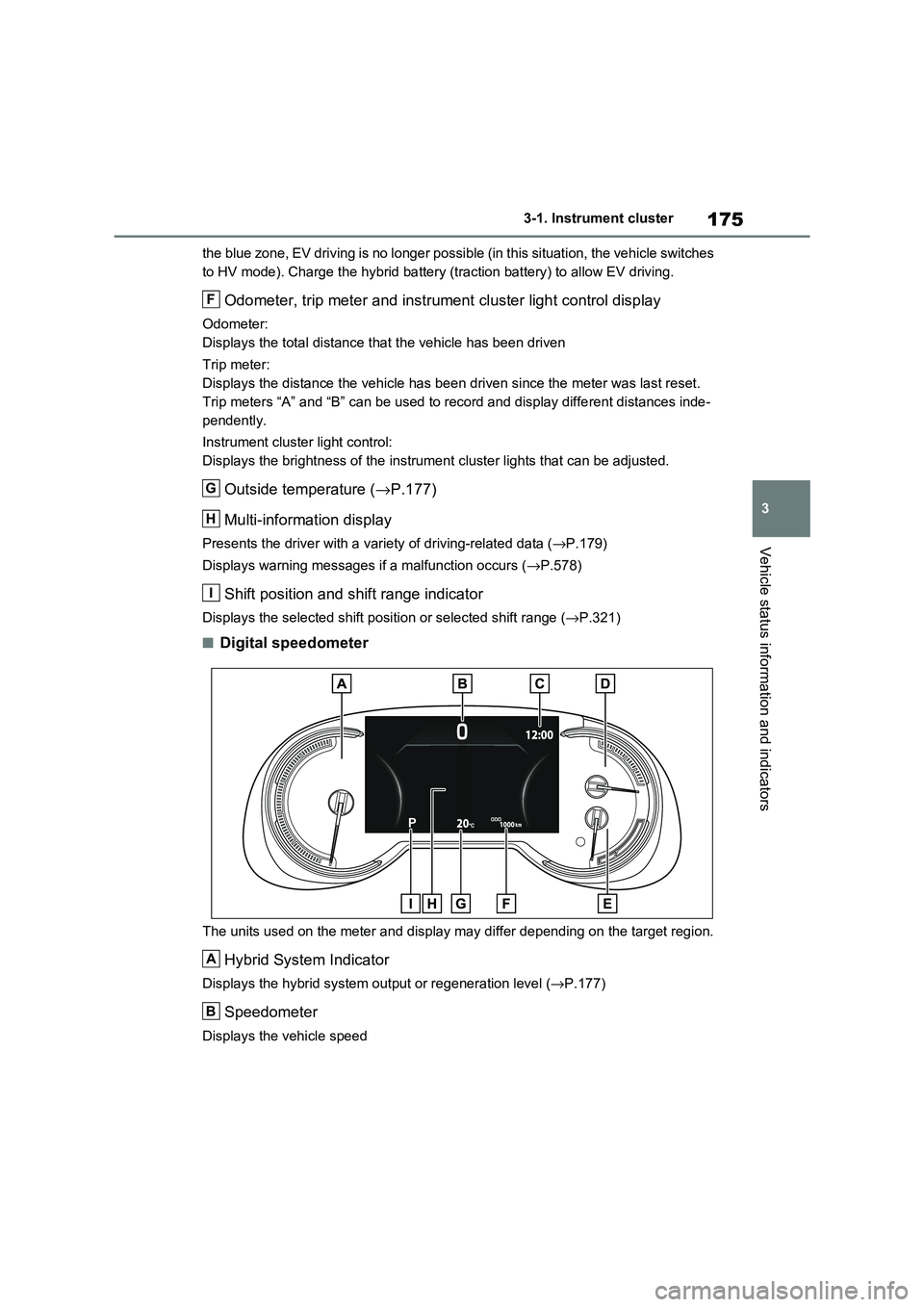
Odometer, trip meter and instrument cluster light control display
Odometer:
Displays the total distance tha t the vehicle has been driven
Trip meter:
Displays the distance t he vehicle has been driven since the meter was last reset.
Trip meters “A” and “B” can be us ed to record and display different distances inde-
pendently.
Instrument cluster light control:
Displays the brightne ss of the instrument cluster lights that can be adjusted.
Outside temperature (→P.177)
Multi-information display
Presents the driver with a variety of driving-related data ( →P.179)
Displays warning messages if a malfunction occurs ( →P.578)
Shift position and shift range indicator
Displays the selected shift position or selected shift range (→P.321)
■Digital speedometer
The units used on the meter and display may differ depending on the target region.
Hybrid System Indicator
Displays the hybrid system output or regeneration level (→P.177)
Speedometer
Displays the vehicle speed
F
G
H
I
A
B