change time TOYOTA RAV4 PLUG-IN HYBRID 2023 Repair Manual
[x] Cancel search | Manufacturer: TOYOTA, Model Year: 2023, Model line: RAV4 PLUG-IN HYBRID, Model: TOYOTA RAV4 PLUG-IN HYBRID 2023Pages: 718, PDF Size: 167.55 MB
Page 375 of 718
![TOYOTA RAV4 PLUG-IN HYBRID 2023 Repair Manual 373
5
5-5. Using the driving support systems
Driving
2 Accelerate or decelerate, with
accelerator pedal operation, to
the desired vehicle speed (at or
above approximately 30 km/h
[20 mph]) an](/img/14/60689/w960_60689-374.png "TOYOTA RAV4 PLUG-IN HYBRID 2023 Repair Manual 373
5
5-5. Using the driving support systems
Driving
2 Accelerate or decelerate, with
accelerator pedal operation, to
the desired vehicle speed (at or
above approximately 30 km/h
[20 mph]) an")
373
5
5-5. Using the driving support systems
Driving
2 Accelerate or decelerate, with
accelerator pedal operation, to
the desired vehicle speed (at or
above approximately 30 km/h
[20 mph]) and press the “-SET”
switch to set the speed.
Cruise control “SET” indicator will come
on.
The vehicle speed at the moment the switch is released becomes the set
speed.
Vehicles with 7-inch multi-infor-
mation display
Vehicles with 12.3-inch multi-
information display
Adjusting the set speed by the
switch
To change the set speed, press the
“+RES” or “-SET” switch until the
desired set speed is displayed.
1 Increases the speed (Except
when the vehicle has been
stopped by system control in
vehicle-to-vehicle distance con-
trol mode)
2 Decreases the speed
Fine adjustment: Press the switch.
Large adjustment: Press and hold the
switch to change the speed, and
release when the desired speed is
reached.
In the vehicle-to-vehicle distance
control mode, the set speed will be
increased or decreased as follows:
Fine adjustment: By 1 km/h (0.6 mph)*1
or 1 mph (1.6 km/h)*2 each time the
switch is pressed
Large adjustment: Increases or
decreases in 5 km/h (3.1 mph)*1 or 5
mph (8 km/h)*2 increments for as long
as the switch is held
In the constant speed control mode
( P.377), the set speed will be
increased or decreased as follows:
Fine adjustment: By 1 km/h (0.6 mph)*1
or 1 mph (1.6 km/h)*2 each time the
switch is pressed
Large adjustment: The speed will con-
tinue to change while the switch is held.
Adjusting the set speed
A
B
Page 378 of 718
3765-5. Using the driving support systems
When the speed of the preceding
vehicle matches or exceeds your
vehicle speed
When the preceding vehicle is
traveling at an extremely slow
speed
Immediately after the cruise con-
trol speed was set
When depressing the accelerator
pedal
While driving in vehicle-to-vehicle
distance control mode, this function
will reduce the vehicle speed, if it is
determined to be necessary.
■Function operation
When the steering wheel begins to
be turned, the vehicle speed will
begin being reduced. When the
steering wheel is returned to the
center position, the vehicle speed
reduction will end.
Depending on the situation, the
vehicle speed will then return to the
vehicle-to-vehicle distance control
mode set speed.
In situations where vehicle-to-vehi-
cle distance control needs to oper-
ate, such as when a preceding
vehicle cuts in front of your vehicle,
the curve speed reduction function
will be canceled.
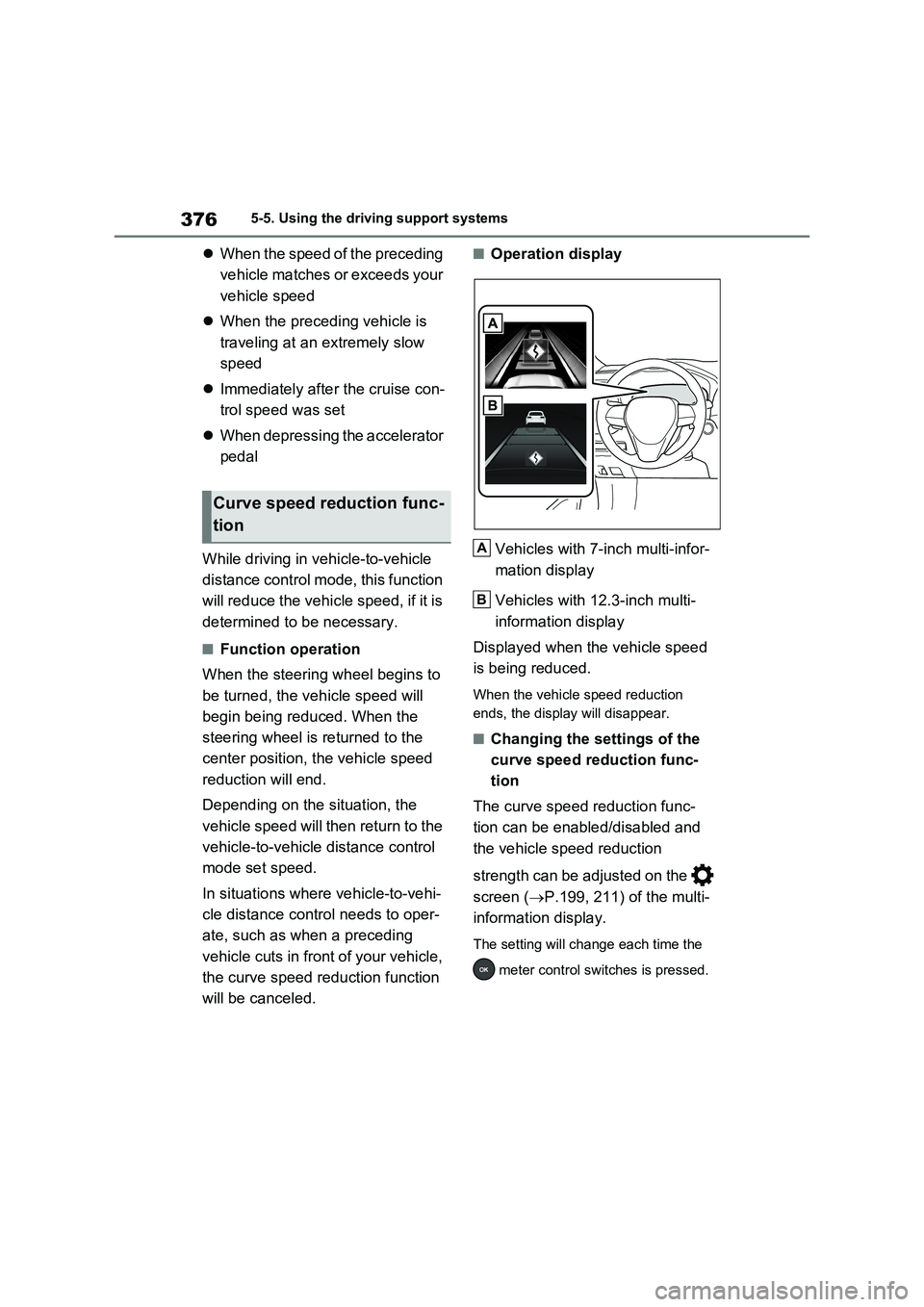
■Operation display
Vehicles with 7-inch multi-infor-
mation display
Vehicles with 12.3-inch multi-
information display
Displayed when the vehicle speed
is being reduced.
When the vehicle speed reduction
ends, the display will disappear.
■Changing the settings of the
curve speed reduction func-
tion
The curve speed reduction func-
tion can be enabled/disabled and
the vehicle speed reduction
strength can be adjusted on the
screen (P.199, 211) of the multi-
information display.
The setting will change each time the
meter control switches is pressed.
Curve speed reduction func-
tion
A
B
Page 381 of 718
379
5 5-5. Using the driving support systems
Driving
• The driver’s door is opened.
• The vehicle has been stopped for
about 3 minutes
If vehicle-to-vehicle distance control
mode is automatically canceled for any
reasons other than the above, there
may be a malfunction in the system.
Contact any authorized Toyota retailer
or Toyota authorized repairer, or any
reliable repairer.
■Automatic cancelation of constant
speed control mode
Constant speed control mode is auto-
matically canceled in the following situa-
tions:
●Actual vehicle speed is more than
approximately 16 km/h (10 mph)
below the set vehicle speed.
●Actual vehicle speed falls below
approximately 30 km/h (20 mph).
●VSC is activated.
●TRC is activated for a period of time.
●When the VSC or TRC system is
turned off.
●When the brake control or output
restriction control of a driving support
system operates.
(For example: Pre-Collision System,
Drive-Start Control)
●The parking brake is operated.
If constant speed control mode is auto-
matically canceled for any reasons other
than the above, there may be a malfunc-
tion in the system. Contact any autho-
rized Toyota retailer or Toyota
authorized repairer, or any reliable
repairer.
■Situations in which the curve speed
reduction function may not operate
In situations such as the following, the
curve speed reduction function may not
operate:
●When the vehicle is being driven
around a gentle curve
●When the accelerator pedal is being
depressed
●When the vehicle is being driven
around an extremely short curve
■The Dynamic Radar Cruise Control
with Road Sign Assist may not
operate properly when (vehicles
with RSA)
As the Dynamic Radar Cruise Control
with Road Sign Assist may not operate
properly in conditions in which RSA may
not operate or detect correctly
(P.367), when using this function,
make sure to check the speed limit sign
displayed.
In the following situations, the set speed
may not be changed to the recognized
speed limit by pressing and holding the
“+RES”/“-SET” switch.
●If speed limit information is not avail-
able
●When the recognized speed limit is
the same as the set speed
●When the recognized speed limit is
outside of the speed range that the
dynamic radar cruise control system
can operate
■Brake operation
A brake operation sound may be heard
and the brake pedal response may
change, but these are not malfunctions.
■Warning messages and buzzers for
dynamic radar cruise control with
full-speed range
Warning messages and buzzers are
used to indicate a system malfunction or
to inform the driver of the need for cau-
tion while driving. If a warning message
is shown on the multi-information dis-
play, read the message and follow the
instructions. (P.341, 544)
■When the sensor may not be cor-
rectly detecting the vehicle ahead
In the case of the following and depend-
ing on the conditions, operate the brake
pedal when deceleration of the system
is insufficient or operate the accelerator
pedal when acceleration is required.
Page 385 of 718
383
5
5-5. Using the driving support systems
Driving
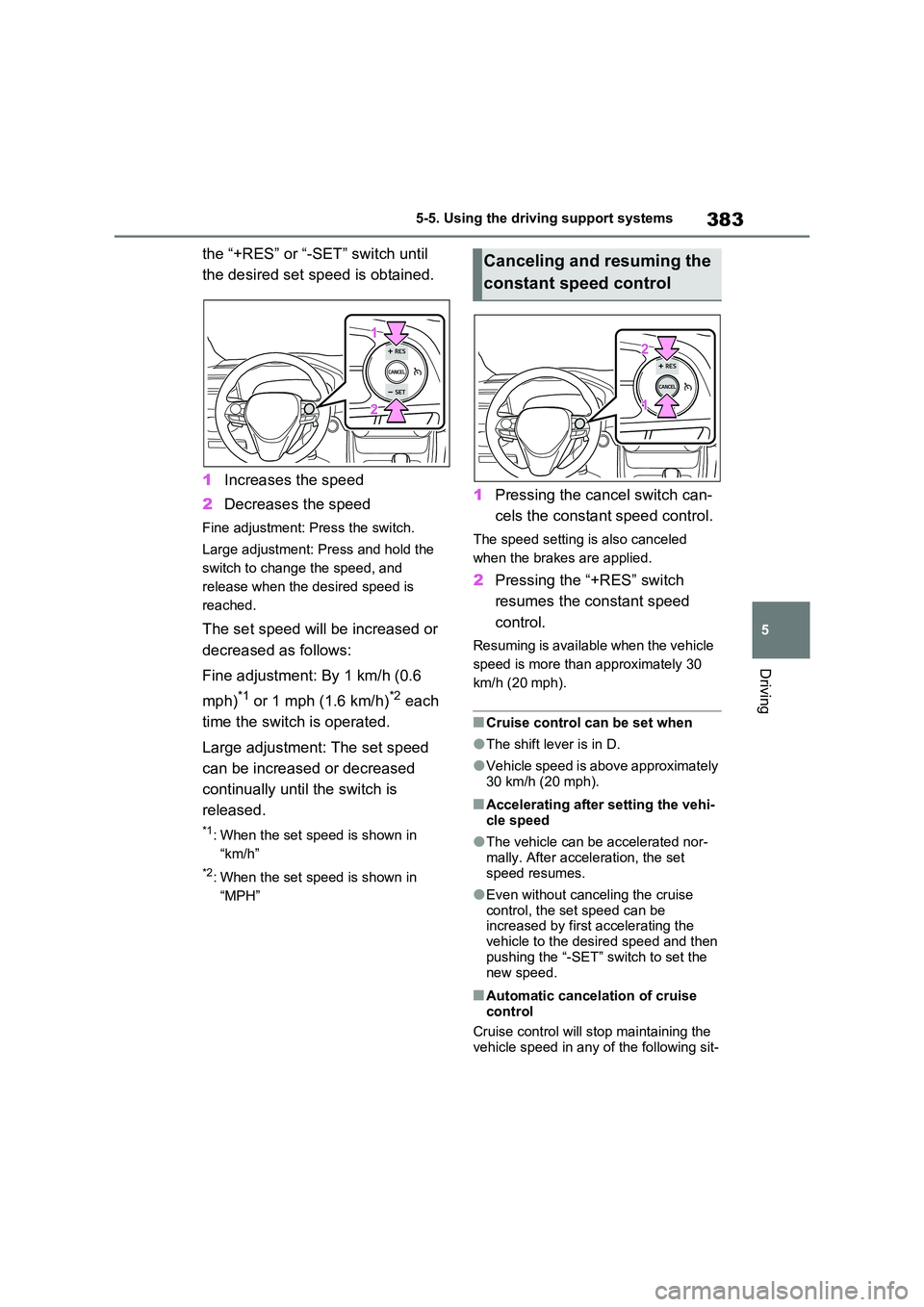
the “+RES” or “-SET” switch until
the desired set speed is obtained.
1 Increases the speed
2 Decreases the speed
Fine adjustment: Press the switch.
Large adjustment: Press and hold the
switch to change the speed, and
release when the desired speed is
reached.
The set speed will be increased or
decreased as follows:
Fine adjustment: By 1 km/h (0.6
mph)*1 or 1 mph (1.6 km/h)*2 each
time the switch is operated.
Large adjustment: The set speed
can be increased or decreased
continually until the switch is
released.
*1: When the set speed is shown in
“km/h”
*2: When the set speed is shown in
“MPH”
1 Pressing the cancel switch can-
cels the constant speed control.
The speed setting is also canceled
when the brakes are applied.
2 Pressing the “+RES” switch
resumes the constant speed
control.
Resuming is available when the vehicle
speed is more than approximately 30
km/h (20 mph).
■Cruise control can be set when
●The shift lever is in D.
●Vehicle speed is above approximately 30 km/h (20 mph).
■Accelerating after setting the vehi-
cle speed
●The vehicle can be accelerated nor-
mally. After acceleration, the set speed resumes.
●Even without canceling the cruise control, the set speed can be increased by first accelerating the
vehicle to the desired speed and then pushing the “-SET” switch to set the
new speed.
■Automatic cancelation of cruise control
Cruise control will stop maintaining the
vehicle speed in any of the following sit-
Canceling and resuming the
constant speed control
Page 402 of 718
4005-5. Using the driving support systems
produce ultrasonic waves are near the
vehicle.
●If the front of the vehicle is raised or
lowered due to the carried load.
●If the orientation of a sensor has been
changed due to a collision or other
impact.
●The vehicle is approaching a tall or
curved curb.
●Driving close to columns (H-shaped
steel beams, etc.) in multi-story park-
ing garages, construction sites, etc.
●If the vehicle cannot be driven in a
stable manner, such as when the
vehicle has been in an accident or is
malfunctioning.
●On an extremely bumpy road, on an
incline, on gravel, or on grass.
●When tire chains, a compact spare
tire or an emergency tire puncture
repair kit are used.
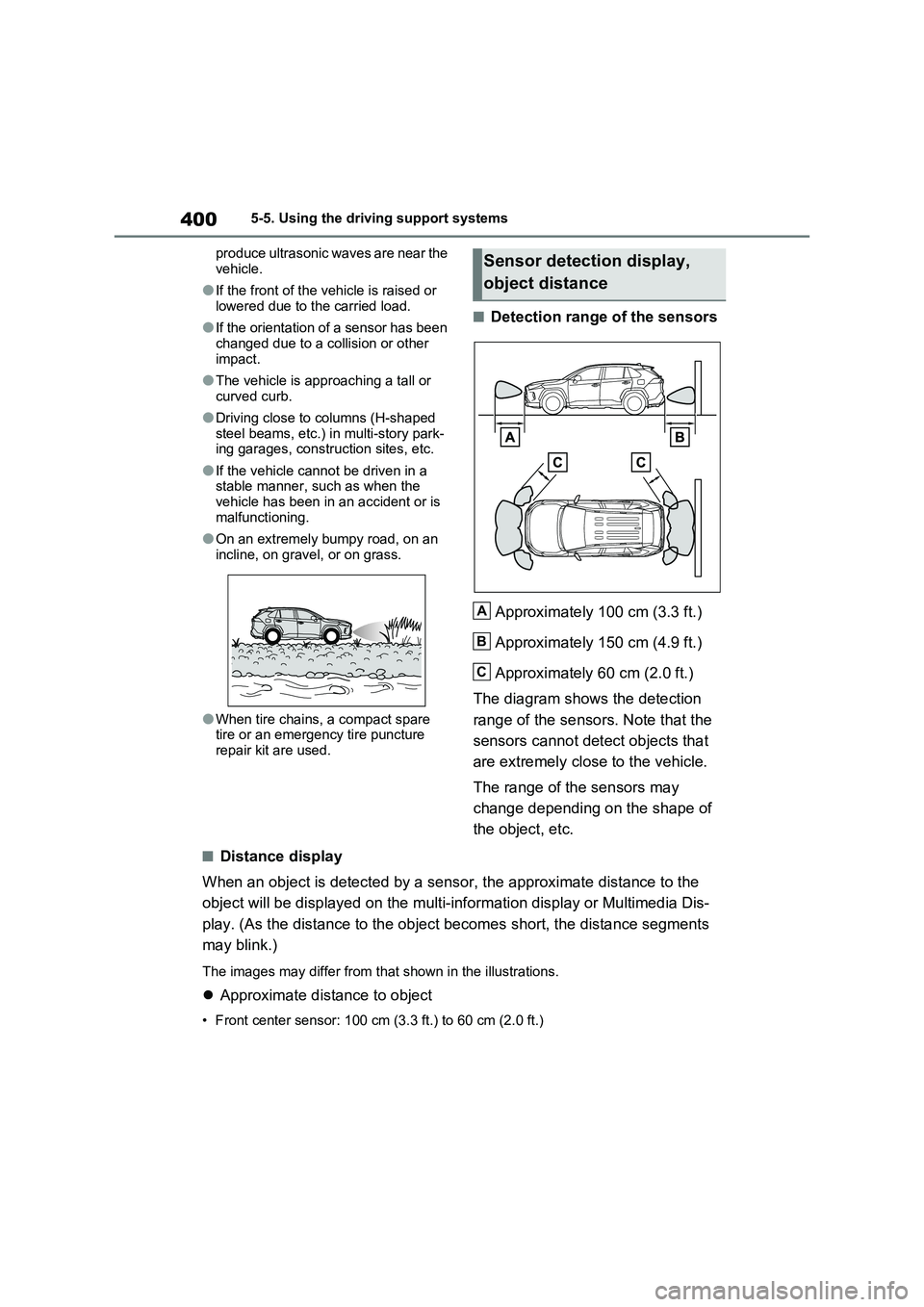
■Detection range of the sensors
Approximately 100 cm (3.3 ft.)
Approximately 150 cm (4.9 ft.)
Approximately 60 cm (2.0 ft.)
The diagram shows the detection
range of the sensors. Note that the
sensors cannot detect objects that
are extremely close to the vehicle.
The range of the sensors may
change depending on the shape of
the object, etc.
■Distance display
When an object is detected by a sensor, the approximate distance to the
object will be displayed on the multi-information display or Multimedia Dis-
play. (As the distance to the object becomes short, the distance segments
may blink.)
The images may differ from that shown in the illustrations.
Approximate distance to object
• Front center sensor: 100 cm (3.3 ft.) to 60 cm (2.0 ft.)
Sensor detection display,
object distance
A
B
C
Page 404 of 718
4025-5. Using the driving support systems
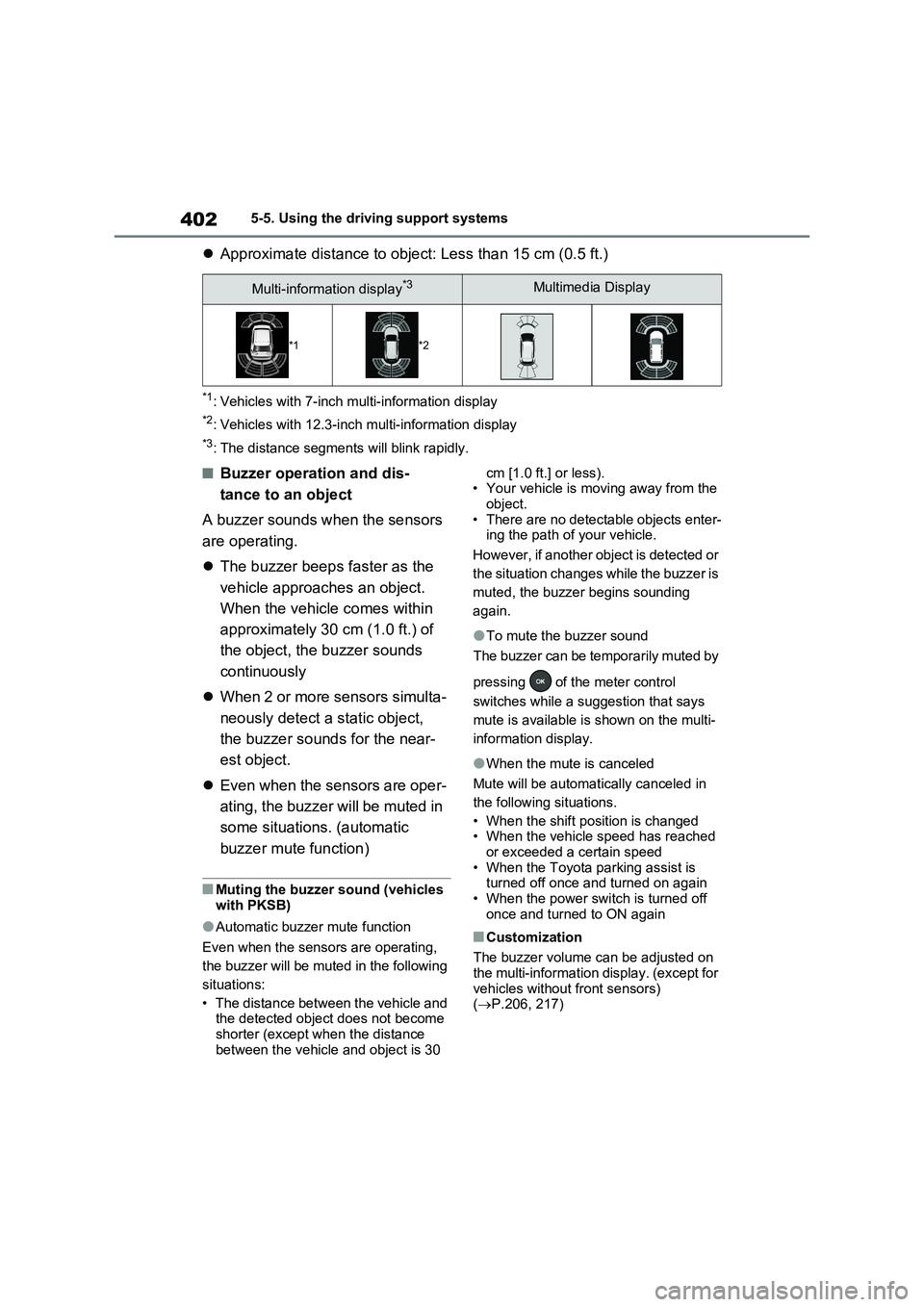
Approximate distance to object: Less than 15 cm (0.5 ft.)
*1: Vehicles with 7-inch multi-information display
*2: Vehicles with 12.3-inch multi-information display
*3: The distance segments will blink rapidly.
■Buzzer operation and dis-
tance to an object
A buzzer sounds when the sensors
are operating.
The buzzer beeps faster as the
vehicle approaches an object.
When the vehicle comes within
approximately 30 cm (1.0 ft.) of
the object, the buzzer sounds
continuously
When 2 or more sensors simulta-
neously detect a static object,
the buzzer sounds for the near-
est object.
Even when the sensors are oper-
ating, the buzzer will be muted in
some situations. (automatic
buzzer mute function)
■Muting the buzzer sound (vehicles
with PKSB)
●Automatic buzzer mute function
Even when the sensors are operating,
the buzzer will be muted in the following
situations:
• The distance between the vehicle and
the detected object does not become
shorter (except when the distance
between the vehicle and object is 30 cm [1.0 ft.] or less).
• Your vehicle is moving away from the
object.
• There are no detectable objects enter-
ing the path of your vehicle.
However, if another object is detected or
the situation changes while the buzzer is
muted, the buzzer begins sounding
again.
●To mute the buzzer sound
The buzzer can be temporarily muted by
pressing of the meter control
switches while a suggestion that says
mute is available is shown on the multi-
information display.
●When the mute is canceled
Mute will be automatically canceled in
the following situations.
• When the shift position is changed
• When the vehicle speed has reached
or exceeded a certain speed
• When the Toyota parking assist is
turned off once and turned on again
• When the power switch is turned off
once and turned to ON again
■Customization
The buzzer volume can be adjusted on
the multi-information display. (except for
vehicles without front sensors)
(P.206, 217)
Multi-information display*3Multimedia Display
*1*2
Page 406 of 718
4045-5. Using the driving support systems
The Parking Support Brake can be
enabled/disabled on the screen
of the multi-information display. All
of the Parking Support Brake func-
tions (static objects and rear-cross-
ing vehicles) are enabled/disabled
simultaneously. ( P.206, 217)
When the Parking Support Brake is dis-
abled, the PKSB OFF indicator
( P.184) illuminates on the multi-infor-
mation display.
To re-enable the system, select on
the multi-information display, select
and turn it on.
If the system is disabled, it will remain
off even if the power switch is turned to
ON after the power switch has been
turned off.
WARNING
●When loading the vehicle onto a boat, truck or other transport ves-
sel.
●If the suspension has been modi-
fied or tires of a size other than specified are installed.
●If the front of the vehicle is raised or lowered due to the carried load.
●When equipment that may obstruct a sensor is installed, such as a tow-ing eyelet, bumper protector (an
additional trim strip, etc.), bicycle carrier, or snow plow.
●When using automatic car washing devices.
●If the vehicle cannot be driven in a stable manner, such as when the vehicle has been in an accident or
is malfunctioning.
●When the vehicle is driven in a
sporty manner or off-road.
●When the tires are not properly
inflated.
●When the tires are very worn.
●When tire chains, a compact spare tire or an emergency tire puncture
repair kit are used.
●When your vehicle is towing a
trailer or during emergency towing.
NOTICE
■If “Parking Support Brake Unavailable” is displayed on the
multi-information display and the PKSB OFF indicator illuminates
If this message is displayed immedi-
ately after the power switch is changed to ON, operate the vehicle carefully, paying attention to your sur-
roundings. It may be necessary to drive the vehicle for a certain amount of time before the system returns to
normal. (If the system does not return to normal after driving for a while, clean the sensors and their surround-
ing area on the bumpers.)
Enabling/Disabling the Park-
ing Support Brake
Page 416 of 718
4145-5. Using the driving support systems
and the system will operate properly.
■When Trail Mode is canceled
In the following situations, Trail Mode is automatically canceled even if it is selected:
●When the driving mode is changed. ( P.411)
●When the hybrid system is restarted.
■Sounds and vibrations when driv- ing in Trail Mode
Any of the following conditions may occur when Trail Mode is operating. None of these indicates that a malfunc-
tion has occurred:
●Vibrations may be felt throughout the
vehicle or steering wheel
●Sounds may be heard from the engine
compartment
■When the Trail Mode indicator does not illuminate
When the Trail Mode indicator does not
illuminate even though the Trail Mode switch is pressed, the system may be malfunctioning.
Have the vehicle inspected by any authorized Toyota retailer or Toyota authorized repairer, or any reliable
repairer immediately.
■If “Exhaust Filter Full See Owner’s
Manual” is shown on the multi- information display
●The message may be displayed while high load driving with particulate mat-ter accumulating.
●Hybrid system output (engine speed) is restricted when a certain amount of
particulate matter accumulates, how- ever, it is possible to drive the vehicle unless the malfunction indicator lamp
comes on.
●Particulate matter can accumulate
more quickly if the vehicle is fre- quently driven short trips or at low speeds, or if the hybrid system is reg-
ularly started in an extremely cold environment. Excessive accumula-
tion of particulate matter can be pre- vented by periodically driving long distances continuously with intermit-
tent releasing of the accelerator pedal, such as when driving on highways and freeways.
■If the malfunction indicator lamp
comes on or “Hybrid System Mal- function Output Power Reduced Visit Your Dealer” is shown on the
multi-information display
The amount of accumulated particulate matter has exceeded a certain level.
Have the vehicle inspected by any authorized Toyota retailer or Toyota authorized repairer, or any reliable
repairer immediately.
NOTICE
■In order to ensure that Trail Mode operates properly
Do not continuously use the Trail Mode for a long period of time. Depending on the driving conditions,
the load on related parts increases and the system may not operate prop-erly.
GPF (Gasoline Particu-
late Filter) system
The GPF system collects par-
ticulate matter in the exhaust
gas by using an exhaust gas
filter. The system will operate
to regenerate the filter auto-
matically, depending on the
vehicle conditions.
Page 433 of 718
431
6
6-1. Using the air conditioning system and defogger
Interior features
■Adjusting the temperature set-
ting
Turn driver’s side temperature con-
trol dial clockwise to increases the
temperature and turn the dial coun-
terclockwise to decreases the tem-
perature.
The air conditioning system switches
between individual and simultaneous
modes each time the “DUAL” switch is
pressed.
Simultaneous mode (the indicator on
the “DUAL” switch is off):
The driver’s side temperature control
dial can be used to adjust the tempera-
ture for the driver’s and passenger’s
side. At this time, operate the passen-
ger’s side temperature control dial to
enter individual mode.
Individual mode (the indicator on the
“DUAL” switch is on):
The temperature for the driver’s and
passenger’s side can be adjusted sepa-
rately.
■Setting the fan speed
Press the fan speed increase
switch to increase the fan speed
and the fan speed decrease switch
to decrease the fan speed.
Pressing the “OFF” switch to turns off
the fan.
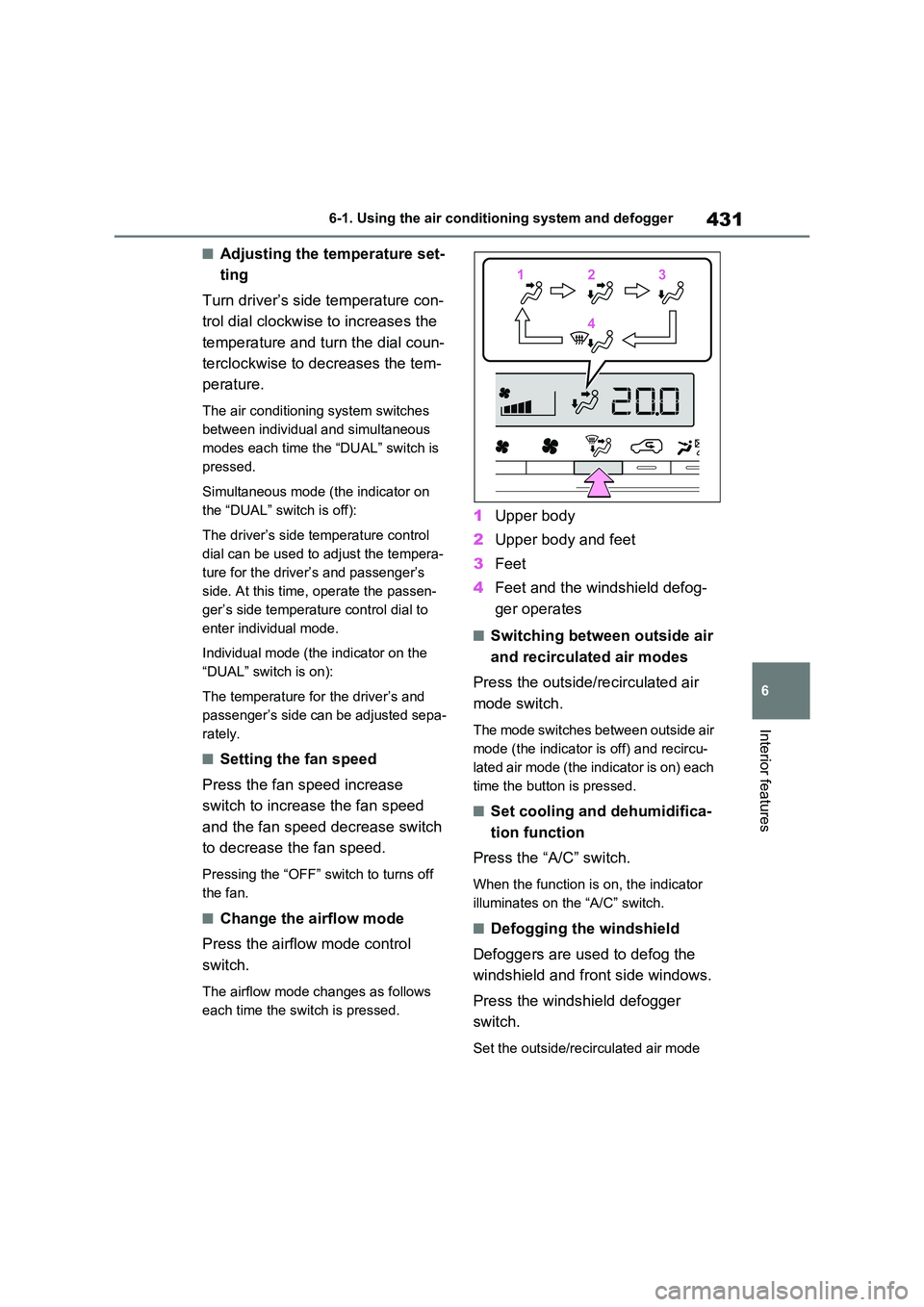
■Change the airflow mode
Press the airflow mode control
switch.
The airflow mode changes as follows
each time the switch is pressed.
1 Upper body
2 Upper body and feet
3 Feet
4 Feet and the windshield defog-
ger operates
■Switching between outside air
and recirculated air modes
Press the outside/recirculated air
mode switch.
The mode switches between outside air
mode (the indicator is off) and recircu-
lated air mode (the indicator is on) each
time the button is pressed.
■Set cooling and dehumidifica-
tion function
Press the “A/C” switch.
When the function is on, the indicator
illuminates on the “A/C” switch.
■Defogging the windshield
Defoggers are used to defog the
windshield and front side windows.
Press the windshield defogger
switch.
Set the outside/recirculated air mode
112233
44
Page 434 of 718
4326-1. Using the air conditioning system and defogger
switch to outside air mode if the recircu-
lated air mode is used. (It may switch
automatically.)
To defog the windshield and the side
windows quickly, turn the air flow and
temperature up.
To return to the previous mode, press
the windshield defogger switch again
when the windshield is defogged.
When the windshield defogger switch is
on, the indicator illuminates on the
windshield defogger switch.
■Defogging the rear window
and outside rear view mirrors
Defoggers are used to defog the
rear window, and to remove rain-
drops, dew and frost from the out-
side rear view mirrors.
Press the rear window and outside
rear view mirror defoggers switch.
The defoggers will automatically turn off
after 15 minutes.
When the rear window and outside rear
view mirror defoggers switch is on, the
indicator illuminates on the rear window
and outside rear view mirror defoggers
switch.
■Blower customization
The fan speed can be adjusted
according to your preference.
1Press the automatic mode or
airflow mode control switch.
2Press the blower customization
switch.
3Each time the blower customi-
zation switch is pressed, the fan
speed changes as follows.
Normal “ECO” “FAST”
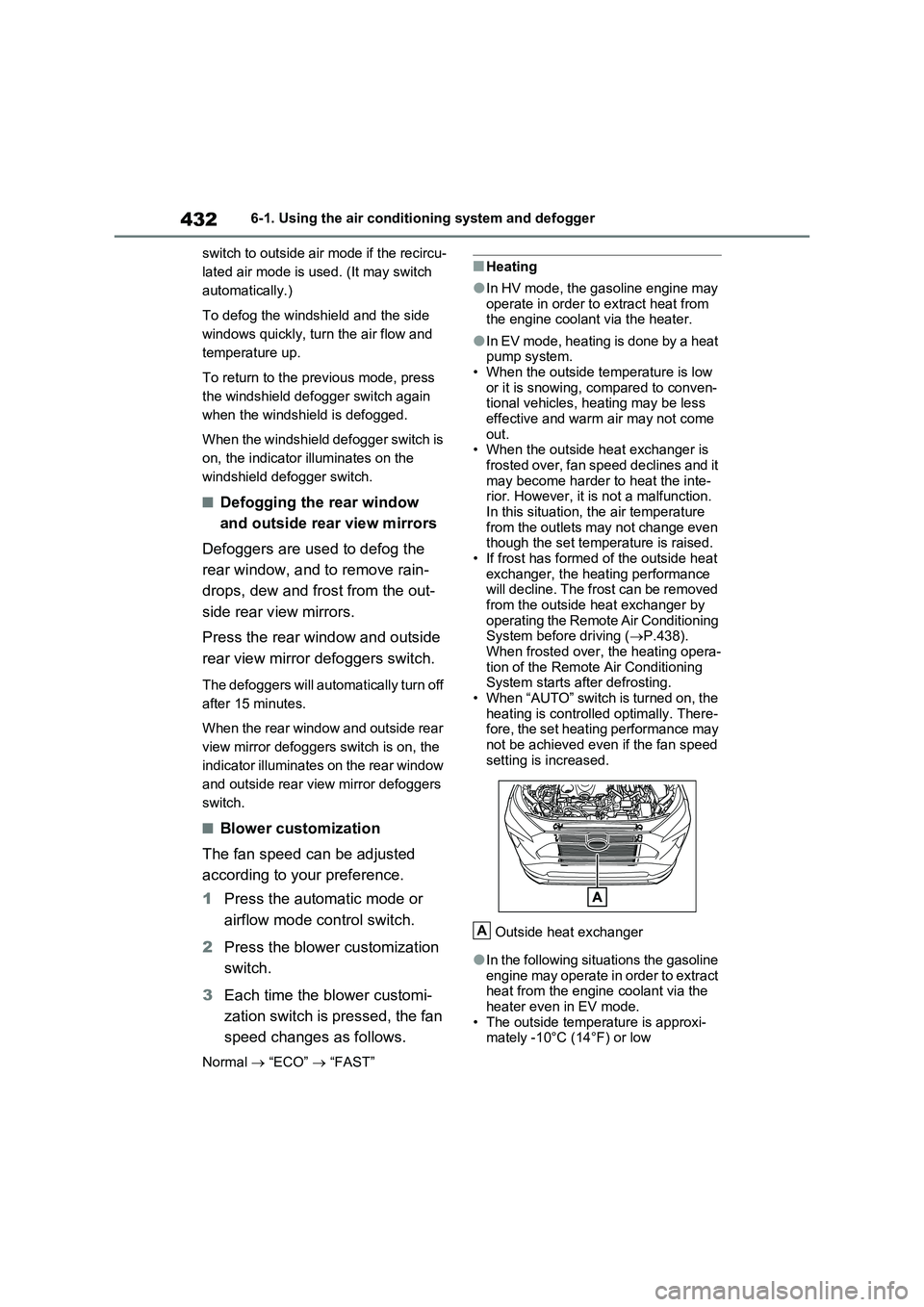
■Heating
●In HV mode, the gasoline engine may
operate in order to extract heat from
the engine coolant via the heater.
●In EV mode, heating is done by a heat
pump system.
• When the outside temperature is low
or it is snowing, compared to conven-
tional vehicles, heating may be less
effective and warm air may not come
out.
• When the outside heat exchanger is
frosted over, fan speed declines and it
may become harder to heat the inte-
rior. However, it is not a malfunction.
In this situation, the air temperature
from the outlets may not change even
though the set temperature is raised.
• If frost has formed of the outside heat
exchanger, the heating performance
will decline. The frost can be removed
from the outside heat exchanger by
operating the Remote Air Conditioning
System before driving (P.438).
When frosted over, the heating opera-
tion of the Remote Air Conditioning
System starts after defrosting.
• When “AUTO” switch is turned on, the
heating is controlled optimally. There-
fore, the set heating performance may
not be achieved even if the fan speed
setting is increased.
Outside heat exchanger
●In the following situations the gasoline
engine may operate in order to extract
heat from the engine coolant via the
heater even in EV mode.
• The outside temperature is approxi-
mately -10°C (14°F) or low
A