cooling TOYOTA RAV4 PLUG-IN HYBRID 2023 Owners Manual
[x] Cancel search | Manufacturer: TOYOTA, Model Year: 2023, Model line: RAV4 PLUG-IN HYBRID, Model: TOYOTA RAV4 PLUG-IN HYBRID 2023Pages: 718, PDF Size: 167.55 MB
Page 93 of 718
91
2 2-1. Plug-in hybrid system
Plug-in hybrid system
gasoline engine needs to be started.*1: The gasoline engine may also oper-
ate in circumstances other than those
listed above, depending on condi-
tions.
*2: When driving in AUTO EV/HV mode.
Even in EV mode, the gasoline
engine may start, depending on the
condition of the hybrid battery (trac-
tion battery).
■If “Engine Started to Protect Sys-
tem EV driving unavailable” is dis-
played on the multi-information
display
EV driving may be canceled in order to
protect the hybrid system, etc.
In this case, perform driving with the
gasoline engine until EV driving will be
returned to automatically.
■Conditions in which the gasoline
engine may not stop
The gasoline engine starts and stops
automatically. However, it may not stop
automatically in the following condi-
tions
*:
●During gasoline engine warm-up
●During hybrid battery (traction battery)
charging
●When the temperature of the hybrid
battery (traction battery) is high or low
●When the windshield defogger switch
is pressed. (P.431)
*: Depending on the circumstances, the
gasoline engine may also not stop
automatically in situations other than
those above.
■Sounds and vibrations specific to a
Plug-in Hybrid Electric Vehicle
There may be no engine sound or vibra-
tion even though the vehicle is able to
move with the “READY” indicator is illu-
minated. For safety, apply the parking
brake and make sure to shift the shift
lever to P when parked.The following sounds or vibrations may
occur when the hybrid system is operat-
ing and are not a malfunction.
●Motor sounds may be heard from the
engine compartment.
●Sounds may be heard from the hybrid
battery (traction battery) when the
hybrid system starts or stops.
●Relay operating sounds such as a
snap or soft clank will be emitted from
the hybrid battery (traction battery),
under the rear seats or under the
floor, when the hybrid system is
started or stopped.
●Sounds from the hybrid system may
be heard when the back door is open.
●Sounds may be heard from the trans-
mission when the gasoline engine
starts or stops, when driving at low
speeds, or during idling.
●Engine sounds may be heard when
accelerating sharply.
●Sounds may be heard due to regener-
ative braking when the brake pedal is
depressed or as the accelerator pedal
is released.
●Vibration may be felt when the gaso-
line engine starts or stops.
●Cooling fan sounds may be heard
from the air intake vent under the rear
seat. (P.99)
●Sounds may be heard from near the
hybrid battery (traction battery) in
accordance with the operation of the
air conditioning system or battery
cooler. (P.128)
■Maintenance, repair, recycling, and
disposal
Contact any authorized Toyota retailer
or Toyota authorized repairer, or any
reliable repairer regarding mainte-
nance, repair, recycling and disposal.
Do not dispose of the vehicle yourself.
In order to make EV mode or AUTO
Charging (P.106)
Page 101 of 718
99
2
2-1. Plug-in hybrid system
Plug-in hybrid system
There is an air intake vent under
the rear seat for cooling the DC/DC
converter.
Blocking the air intake vent may
prevent the plug-in hybrid system
from operating properly.
When a certain level of impact is
detected by the impact sensor, the
emergency shut off system blocks
off the high voltage current and
NOTICE
■Notice about fuel
●For Plug-in Hybrid Electric Vehi-
cles, fuel may remain in the tank for a long time and undergo changes in quality depending on the how the
vehicle is used. Refuel at least 20 L (5.3 gal., 4.4 Imp.gal.) of fuel every 12 months (refuel a total of at least
20 L [5.3 gal., 4.4 Imp.gal.] over a 12-month period), as this may affect components of the fuel sys-
tem or the gasoline engine.
●If the vehicle has not been refueled
for a certain amount of time and it is possible that the quality of the fuel remaining in the tank has changed,
“No New Fuel has been Added Recently Please refuel” is displayed on the multi-information display
when the power switch is turned to ON. If the message is displayed, refuel the vehicle immediately.
DC/DC converter air intake
vent
NOTICE
■DC/DC converter air intake vent
●Make sure not to block the air
intake vent with anything, such as a seat cover, plastic cover, or lug-gage. Blocking the air intake vent
may prevent the plug-in hybrid sys- tem from operating properly.
●When dust etc. has accumulated in the air intake vent, clean it with a vacuum cleaner to prevent the vent
from clogging.
●Do not wet or allow foreign sub-
stances to enter the air vent as this may cause a short circuit and dam-age the DC/DC converter.
●Do not carry large amounts of water such as water cooler bottles in the
vehicle. If water spills onto the DC/DC converter, the converter may be damaged. Have the vehicle
inspected by any authorized Toyota retailer or Toyota authorized repairer, or any reliable repairer.
●A filter is installed to the air intake vent. When the filter remains
noticeably dirty even after cleaning the air intake vent, filter cleaning or replacement is recommended.
When cleaning the filter, refer to P.504.
●If “Maintenance required for DCDC converter cooling parts See Owner’s Manual” is shown on the
multi-information display, the air intake vent and filter may be clogged. Refer to P.504 for informa-
tion on how to clean the air intake vent.
Emergency shut off system
Page 106 of 718
1042-1. Plug-in hybrid system
■When starting off, depress the
accelerator pedal smoothly to
accelerate
As a guide, accelerate up to
approximately 20 km/h (12mph) in
the first 5 seconds.
Electrical and fuel efficiency can be
improved just by using the ECO
Accelerator Guidance displayed on
the multi-information display and
taking care to start off gently.
(P.202)
When the driving mode is set to Eco
drive mode, depressing the accelerator
pedal generates smooth torque that
makes it easier to operate the accelera-
tor gently.
■Maintain sufficient vehicle-to-
vehicle distance and do not
accelerate or decelerate
unnecessarily
Try to maintain a fixed speed while
driving. Driving at a short vehicle-
to-vehicle distance will result in
repeating wasteful acceleration and
deceleration, which will worsen the
electrical and fuel efficiency.
■Release the accelerator pedal
early before stopping the vehi-
cle, such as at a traffic light
The regenerative brake will operate
to convert the kinetic energy of the
vehicle into electrical energy, which
will charge the hybrid battery (trac-
tion battery).
The regeneration status can be
checked from the Hybrid System
Indicator. (P.190)When the brake pedal is depressed
lightly during deceleration, the
regeneration amount increases,
enabling more electrical energy to
be recovered.
If the brake pedal is depressed too
strongly, the recovered amount indica-
tor will reach the maximum level and
the upper limit of the recoverable
energy will be exceeded. Therefore, be
sure to operate the brake pedal early.
■Use the air conditioning sys-
tem appropriately, and also
utilize the heated steering
wheel (if equipped) and seat
heaters
In EV mode, the vehicle is cooled
and heated by electrical energy.
(Except in extremely cold tempera-
tures of approximately -10°C (14°F)
or less.)
Preventing excessive cooling or
heating of the vehicle will reduce
power consumption and improve
electrical efficiency.
The heated steering wheel (if
equipped) and seat heaters are effi-
cient heating device that directly
warm the body using less electric
power.
When used together with the air condi-
tioning system, a low temperature set-
ting can be used to improve electrical
and fuel efficiency.
■Check the tire pressure
If the tire pressure is lower than the
specified value, it will worsen the
electrical and fuel efficiency.
Page 131 of 718
129
2 2-2. Charging
Plug-in hybrid system
performed while “Battery Heater” is
operating, the hybrid battery (traction
battery) heating operation stops.
• The shift lever is changed to any posi-
tion other than P
• The Remote Air Conditioning System
is operated (P.438)
●“Battery Heater” may operate even
when the hybrid battery (traction bat-
tery) is fully charged depending on the
temperature of the hybrid battery
(traction battery).
• The remaining charge of the hybrid
battery (traction battery) decreases
when “Battery Heater” operates. The
charging operation may start again to
charge the hybrid battery (traction bat-
tery).
• “Charging Stopped Due to Pulled
Charging Connector” may be shown
when the charging connector is
removed while recharging. (P.172)
■“Battery Cooler”
●The charging indicator is illuminated
while “Battery Cooler” is on standby or
operating.
●“Battery Cooler” is implemented for a
maximum of approximately 30 min-
utes. However, when the “Departure”
or “Departure time” time is set
(P.144) and there is not sufficient
time between the current time and the
time that charging will complete, “Bat-
tery Cooler” operation time may
become shorter.
●When there is a small amount of
remaining charge in the hybrid battery
(traction battery), even if the hybrid
battery (traction battery) is hot, “Bat-
tery Cooler” may not be implemented.
●When the traction battery is almost
completely charged, “Battery Cooler”
may not be implemented.
●When the following operations are
performed while “Battery Cooler” is
operating, the hybrid battery (traction
battery) cooling operation stops.
• The hood is opened
• The power switch is turned to any
mode other than off• The Remote Air Conditioning System
is operated (P.438)
• “Charge Now” is implemented
(P.145)
●“Battery Cooler” uses the power of the
hybrid battery (traction battery) and
external power source.
• While “Battery Cooler” is operating,
the amount of the remaining charge of
the hybrid battery (traction battery)
increases and decreases in a certain
range, and does not increase as in
normal charging.
• The operation of “Battery Cooler” is
recognized as charging by a charger.
The charger that calculates the fee
according to charging time causes a
charging fee.
Page 135 of 718
133
2 2-2. Charging
Plug-in hybrid system
When charging with a charger,
follow the procedures for using
each charger.
When charging using a public
charging facility, check the set-
ting of the charging schedule
function.
• When the charging schedule is regis-
tered, temporarily turn off the function
or turn “Charge Now” on. (P.150,
156, 162)
• When the charging schedule is set to
on, charging will not start even if the
AC charging cable is connected.
Also, charging fee may occur due to
connection of the AC charging cable.
Before charging, always check the
following items.
The parking brake is applied.
(P.320)
Lights such as the headlights,
emergency flashers and interior
lights etc. are turned off.
If these light switches are turned on,
then these features will consume elec-
tricity, and charging time will increase.
The power switch is turned to
OFF. (P.313)
Before charging, make sure that
each part of the AC charging cable
is in good condition. (P.117)
■During charging
●The charging starting time may differ
depending on the state of the vehicle,
but this does not indicate a malfunc-
tion.
●Cooling fan sounds may be heard
from near the rear seat. (P.99)
●During charging, sounds may be
heard from near the hybrid battery
(traction battery) in accordance with
the operation of the air conditioning
system or “Battery Cooler” (P.128).
●During and after charging, the rear
seat and its surrounding area in which
the onboard traction battery charger is
installed may get warm.
●The surface of the CCID (Charging
Circuit Interrupting Device) may
become hot, but this does not indicate
a malfunction. (When using Mode 2
AC charging cable.)
●Depending on radio wave conditions,
interference may be heard on the
radio.
●The current charging condition and
the estimated time until charging will
complete can be checked on the
multi-information display.
■Capacity reduction of the hybrid
battery (traction battery)
The capacity of the hybrid battery (trac-
tion battery) will decline gradually when
the hybrid battery (traction battery) is in
use. The rate at which it declines will dif-
fer in accordance with environmental
conditions and the way in which the
vehicle is used. Observing the following
can help suppress battery capacity
decline.
●Avoid parking the vehicle in areas with
a high temperature under direct sun-
light when the hybrid battery (traction
battery) is fully charged.
●Avoid accelerating and decelerating
frequently and suddenly when EV
driving.
●Avoid frequent driving near the top
Confirm the following before
charging
Inspecting the AC charging
cable
Page 142 of 718
1402-2. Charging
WARNING
●Do not let the wheels on the AC charging cable, plug, charging con-
nector and CCID (Charging Circuit Interrupting Device).
●Firmly insert the plug into the socket.
●Do not use an extension cord and converting adaptor.
●Close the hood before using the charging system.The cooling fan may start operating
suddenly. Touching or getting close to rotating parts such as the fan may cause your hands or clothes
(especially a necktie or scarf) to become caught and result in a seri-ous injury.
●After connecting the charging cable, confirm that it is not wound
around anything.
●If the power indicator on the CCID
(Charging Circuit Interrupting Device) does not illuminate after plugging the AC charging cable into
the socket-outlet, unplug it immedi- ately.
■If the error warning indicator on the CCID (Charging Circuit Inter-rupting Device) illuminates or
flashes during charging
There may be an electrical leakage in the power source path, or there may
be a malfunction in the AC charging cable or CCID (Charging Circuit Inter-rupting Device). Refer to P.113 and
follow the correction procedure. If the error warning indicator does not turn off even after performing the correc-
tion procedure, immediately stop charging, remove the AC charging cable and contact any authorized
Toyota retailer or Toyota authorized repairer, or any reliable repairer. Con-tinuing to charge the vehicle in that
condition may lead to unforeseen accidents or serious injury.
■Onboard traction battery charger
The onboard traction battery charger is located under the rear seats. Make
sure to observe the following precau- tions regarding the onboard traction battery charger. Failure to observe
these precautions may result in death or serious injury such as burns and electric shocks.
●The onboard traction battery char-ger is hot during charging. Do not touch the onboard traction battery
charger, as doing so may result in burns.
●Do not disassemble, repair or mod-ify the onboard traction battery charger. When the onboard traction
battery charger needs to be repaired, consult any authorized Toyota retailer or Toyota authorized
repairer, or any reliable repairer.
Page 143 of 718
141
2
2-2. Charging
Plug-in hybrid system
To prevent electrical shock, be sure
to remove by following the proce-
dures below.
1 Unlock the doors to unlock the
charging connector. ( P.122)
The charging connector will be
unlocked and the AC charging inlet light will illuminate when the doors are unlocked.
NOTICE
■When charging
Do not insert the plug into the AC
charging inlet.
The AC charging inlet may be dam- aged.
■Using private power generator
Do not use private power generators
as a power source for charging.
Doing so may make charging unsta- ble, the voltage may be insufficient,
and the error warning indicator on the CCID (Charging Circuit Interrupting Device) of the AC charging cable may
flash.
■Usable temperature range
●Do not charge if the outside tem- perature is -30°C (-22°F) or below, as it is likely that charging will take
longer.
●Do not leave the vehicle or the
charging cable in areas where the outside temperature is lower than -40°C (-40°F).
■Charging station
Due to the environment in which the
power equipment is located, charging may be unstable due to noise, the voltage may be insufficient, and the
error warning indicator on the CCID (Charging Circuit Interrupting Device) of the AC charging cable may flash.
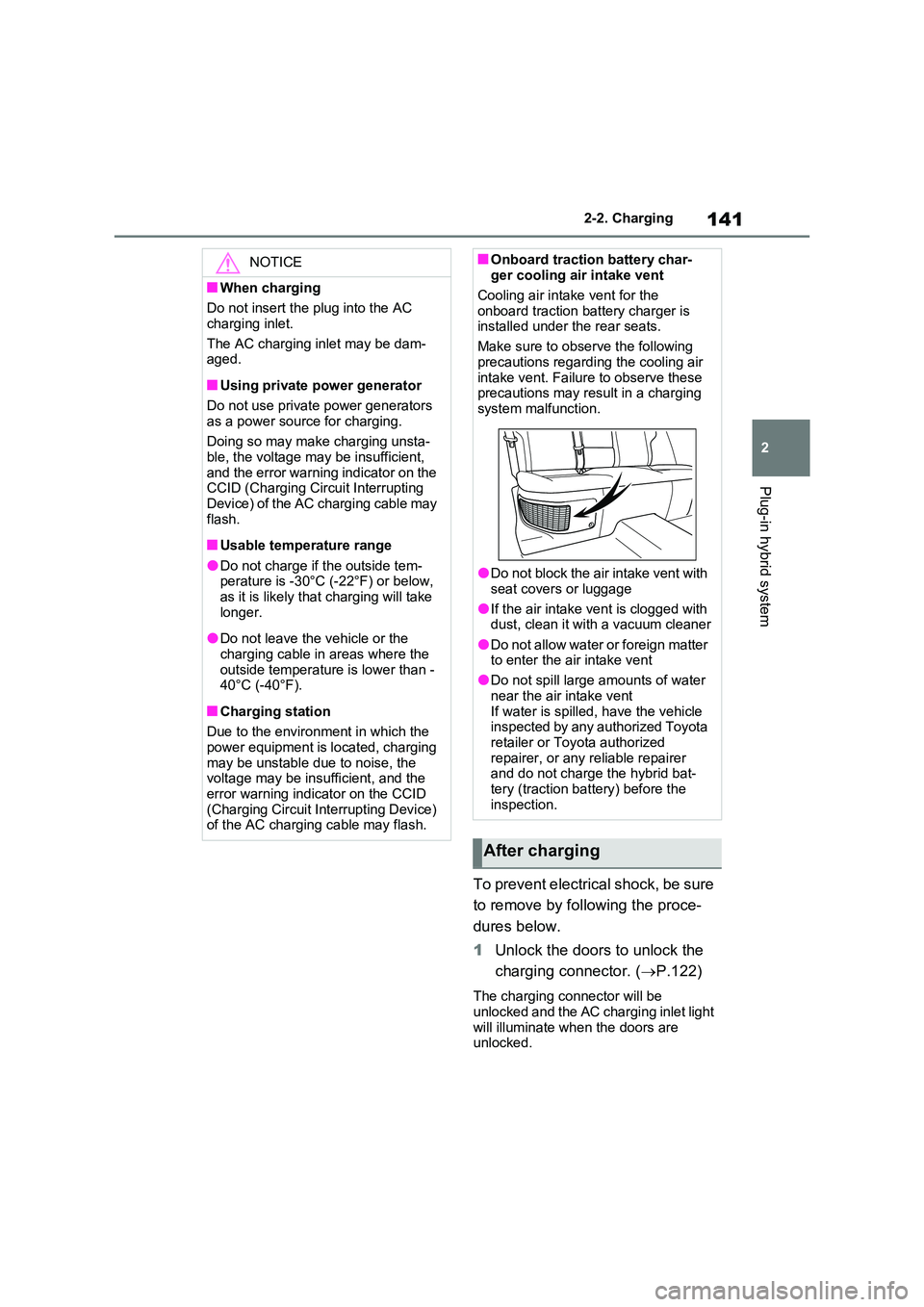
■Onboard traction battery char-ger cooling air intake vent
Cooling air intake vent for the
onboard traction battery charger is installed under the rear seats.
Make sure to observe the following
precautions regarding the cooling air intake vent. Failure to observe these precautions may result in a charging
system malfunction.
●Do not block the air intake vent with
seat covers or luggage
●If the air intake vent is clogged with dust, clean it with a vacuum cleaner
●Do not allow water or foreign matter to enter the air intake vent
●Do not spill large amounts of water
near the air intake vent If water is spilled, have the vehicle inspected by any authorized Toyota
retailer or Toyota authorized repairer, or any reliable repairer and do not charge the hybrid bat-
tery (traction battery) before the inspection.
After charging
Page 149 of 718
147
2 2-2. Charging
Plug-in hybrid system
■“Battery Heater” (P.128) /“Battery
Cooler” (P.128)
When charging is carried out using the
charging schedule, the hybrid battery
(traction battery) heating or cooling func-
tion may operate according to the tem-
perature of the hybrid battery (traction
battery).
●When the charging mode is set to
“Start” or “Start at set time”, the func-
tion starts at the set charging start
time.
●“Battery Heater”: When the charging
mode is set to “Departure” or “Depar-
ture time”, the function starts automat-
ically to complete heating by the
desired departure time.
●“Battery Cooler”: When the charging
mode is set to “Departure” or “Depar-
ture time”, cooling starts approxi-
mately 30 minutes before the charging
start time. However, if there is no time
to finish charging by the charging
schedule, the hybrid battery (traction
battery) cooling time may be short-
ened and “Battery Cooler” may not
operate.
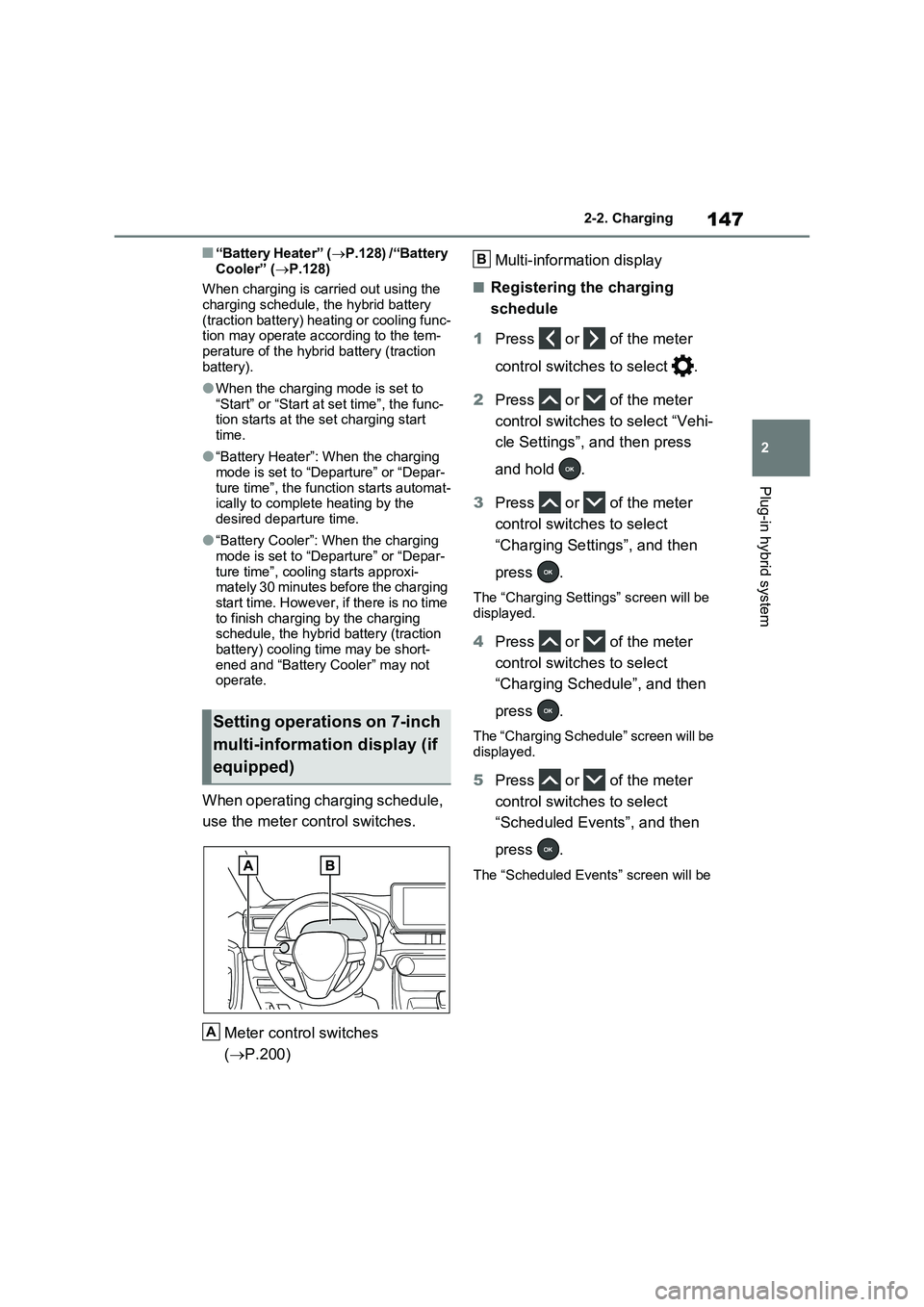
When operating charging schedule,
use the meter control switches.
Meter control switches
(P.200)Multi-information display
■Registering the charging
schedule
1Press or of the meter
control switches to select .
2Press or of the meter
control switches to select “Vehi-
cle Settings”, and then press
and hold .
3Press or of the meter
control switches to select
“Charging Settings”, and then
press .
The “Charging Settings” screen will be
displayed.
4Press or of the meter
control switches to select
“Charging Schedule”, and then
press .
The “Charging Schedule” screen will be
displayed.
5Press or of the meter
control switches to select
“Scheduled Events”, and then
press .
The “Scheduled Events” screen will be
Setting operations on 7-inch
multi-information display (if
equipped)
A
B
Page 274 of 718
2724-4. Adjusting the steering wheel and mirrors
■Cleaning the mirror surface
If the mirror surface is dirty, the
image on the display may be diffi-
cult to see.
Clean the mirror surface gently
using a soft dry cloth.
■Cleaning the camera
If the camera lens is dirty, the dis-
played image may not be clear. In
this case, clean it with a soft cloth
dampened with water or a swab.
■The camera
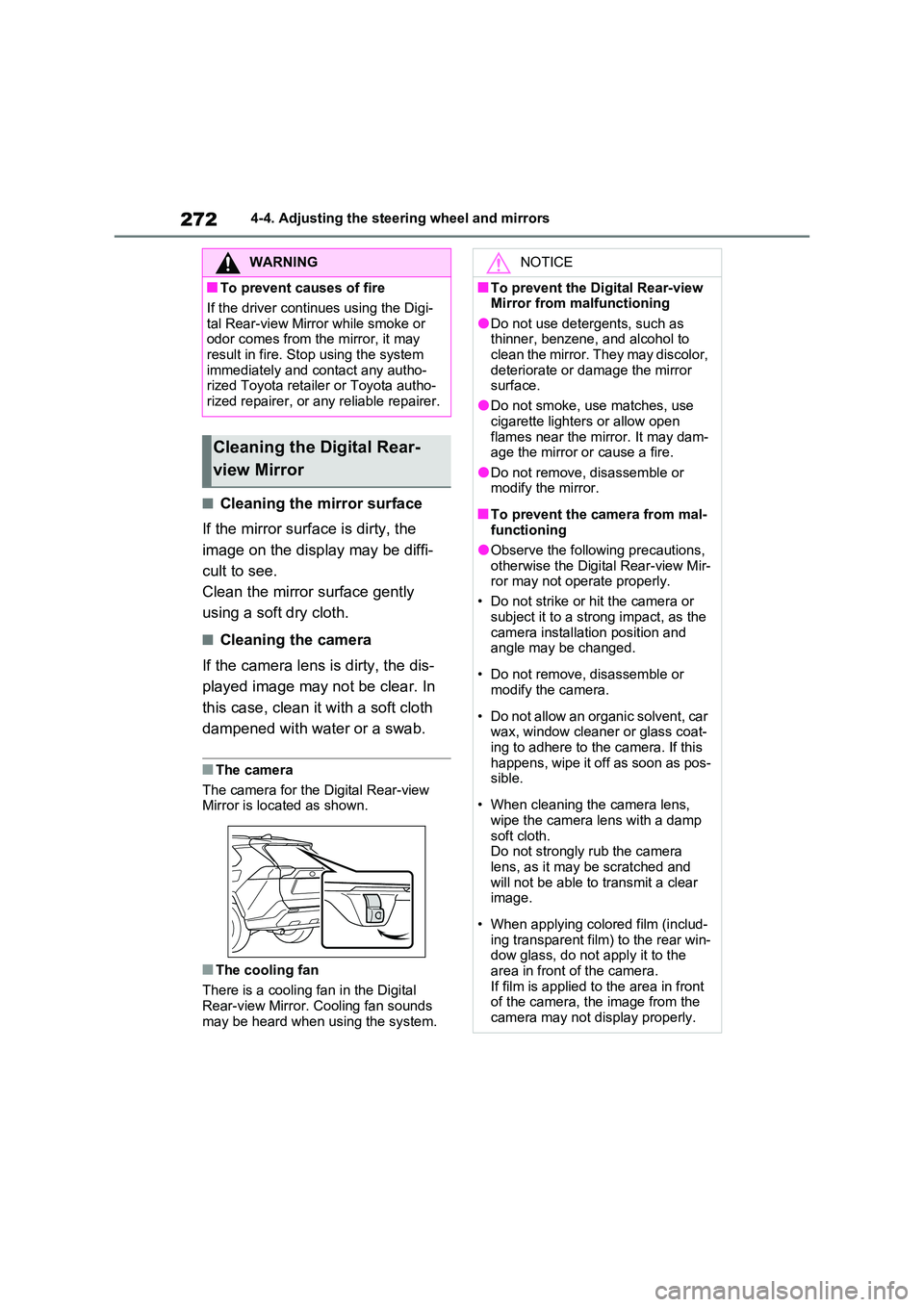
The camera for the Digital Rear-view Mirror is located as shown.
■The cooling fan
There is a cooling fan in the Digital
Rear-view Mirror. Cooling fan sounds may be heard when using the system.
WARNING
■To prevent causes of fire
If the driver continues using the Digi-
tal Rear-view Mirror while smoke or odor comes from the mirror, it may result in fire. Stop using the system
immediately and contact any autho- rized Toyota retailer or Toyota autho-rized repairer, or any reliable repairer.
Cleaning the Digital Rear-
view Mirror
NOTICE
■To prevent the Digital Rear-view Mirror from malfunctioning
●Do not use detergents, such as thinner, benzene, and alcohol to clean the mirror. They may discolor,
deteriorate or damage the mirror surface.
●Do not smoke, use matches, use
cigarette lighters or allow open flames near the mirror. It may dam-age the mirror or cause a fire.
●Do not remove, disassemble or modify the mirror.
■To prevent the camera from mal-functioning
●Observe the following precautions,
otherwise the Digital Rear-view Mir- ror may not operate properly.
• Do not strike or hit the camera or
subject it to a strong impact, as the camera installation position and angle may be changed.
• Do not remove, disassemble or modify the camera.
• Do not allow an organic solvent, car wax, window cleaner or glass coat-
ing to adhere to the camera. If this happens, wipe it off as soon as pos-sible.
• When cleaning the camera lens, wipe the camera lens with a damp
soft cloth. Do not strongly rub the camera lens, as it may be scratched and
will not be able to transmit a clear image.
• When applying colored film (includ- ing transparent film) to the rear win-dow glass, do not apply it to the
area in front of the camera. If film is applied to the area in front of the camera, the image from the
camera may not display properly.
Page 413 of 718
411
5
5-5. Using the driving support systems
Driving
abled.
• The collision becomes avoidable with normal brake operation.• A vehicle is no longer approaching
from the right or left at the rear of the vehicle.
●Brake control• The Parking Support Brake is dis-abled.
• Approximately 2 seconds have elapsed since the vehicle was stopped by brake control.
• The brake pedal is depressed after the vehicle is stopped by brake con-trol.
• A vehicle is no longer approaching from the right or left at the rear of the vehicle.
■Detection area of the Parking Sup-
port Brake function (rear-crossing vehicles)
The detection area of the Parking Sup-
port Brake function (rear-crossing vehi- cles) differs from the detection area of the RCTA function ( P.392). Therefore,
even if the RCTA function detects a vehicle and provides an alert, the Park-ing Support Brake function (rear-cross-
ing vehicles) may not start operating.
■Situations in which the system may not operate properly
P.393
■Situations in which the system may
operate even if there is no possibil- ity of a collision
P.394
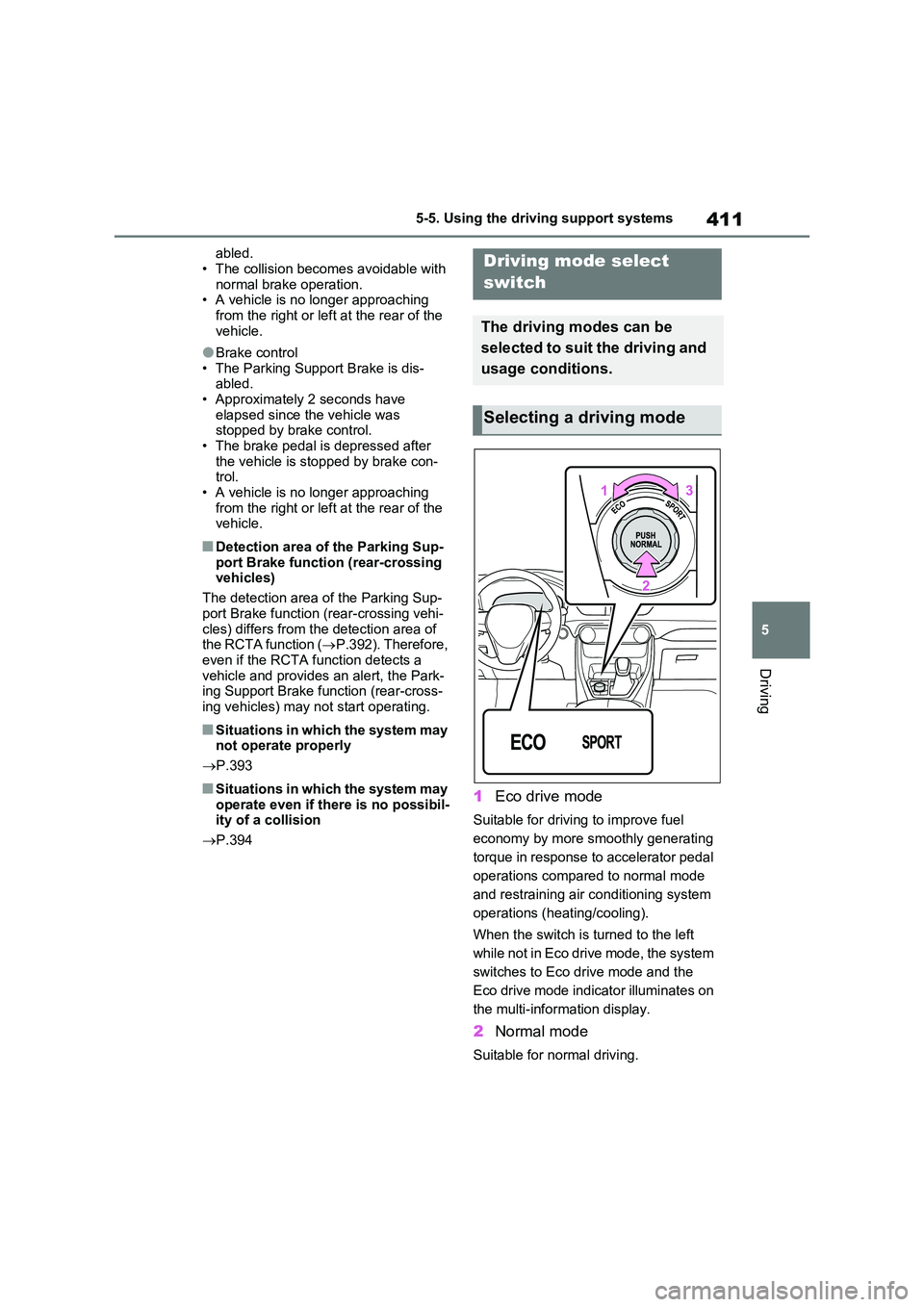
1Eco drive mode
Suitable for driving to improve fuel
economy by more smoothly generating
torque in response to accelerator pedal
operations compared to normal mode
and restraining air conditioning system
operations (heating/cooling).
When the switch is turned to the left
while not in Eco drive mode, the system
switches to Eco drive mode and the
Eco drive mode indicator illuminates on
the multi-information display.
2 Normal mode
Suitable for normal driving.
Driving mode select
switch
The driving modes can be
selected to suit the driving and
usage conditions.
Selecting a driving mode