ABS TOYOTA RAV4 PLUG-IN HYBRID 2023 Owners Manual
[x] Cancel search | Manufacturer: TOYOTA, Model Year: 2023, Model line: RAV4 PLUG-IN HYBRID, Model: TOYOTA RAV4 PLUG-IN HYBRID 2023Pages: 718, PDF Size: 167.55 MB
Page 79 of 718
77
1
1-4. Theft deterrent system
For safety and security
1-4.Theft de terre nt sys te m
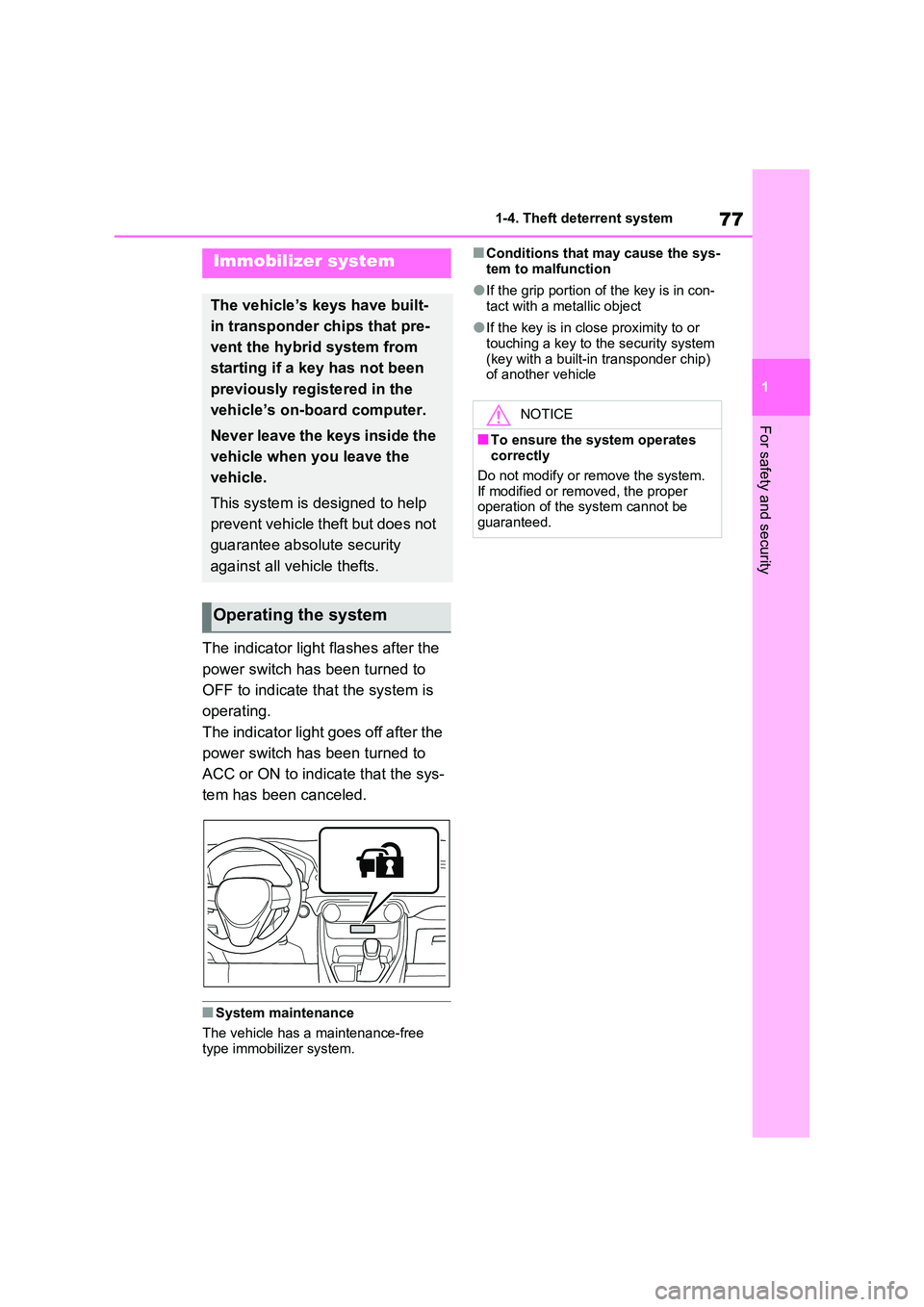
The indicator light flashes after the
power switch has been turned to
OFF to indicate that the system is
operating.
The indicator light goes off after the
power switch has been turned to
ACC or ON to indicate that the sys-
tem has been canceled.
■System maintenance
The vehicle has a maintenance-free type immobilizer system.
■Conditions that may cause the sys-
tem to malfunction
●If the grip portion of the key is in con-
tact with a metallic object
●If the key is in close proximity to or
touching a key to the security system (key with a built-in transponder chip) of another vehicle
Immobilizer system
The vehicle’s keys have built-
in transponder chips that pre-
vent the hybrid system from
starting if a key has not been
previously registered in the
vehicle’s on-board computer.
Never leave the keys inside the
vehicle when you leave the
vehicle.
This system is designed to help
prevent vehicle theft but does not
guarantee absolute security
against all vehicle thefts.
Operating the system
NOTICE
■To ensure the system operates correctly
Do not modify or remove the system.
If modified or removed, the proper operation of the system cannot be guaranteed.
Page 82 of 718
801-4. Theft deterrent system
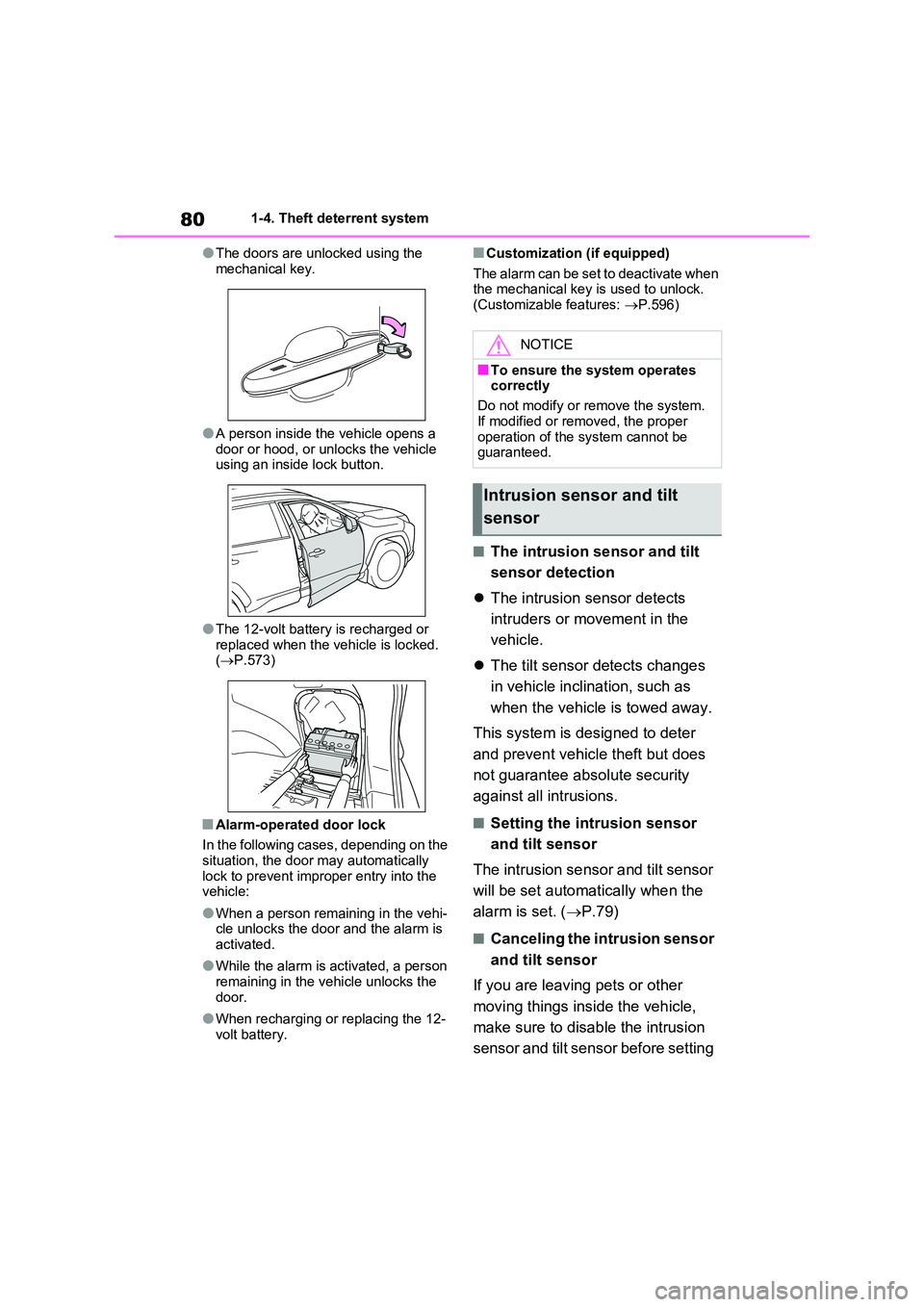
●The doors are unlocked using the
mechanical key.
●A person inside the vehicle opens a
door or hood, or unlocks the vehicle using an inside lock button.
●The 12-volt battery is recharged or replaced when the vehicle is locked. ( P.573)
■Alarm-operated door lock
In the following cases, depending on the
situation, the door may automatically lock to prevent improper entry into the vehicle:
●When a person remaining in the vehi-cle unlocks the door and the alarm is
activated.
●While the alarm is activated, a person
remaining in the vehicle unlocks the door.
●When recharging or replacing the 12-volt battery.
■Customization (if equipped)
The alarm can be set to deactivate when the mechanical key is used to unlock.(Customizable features: P.596)
■The intrusion sensor and tilt
sensor detection
The intrusion sensor detects
intruders or movement in the
vehicle.
The tilt sensor detects changes
in vehicle inclination, such as
when the vehicle is towed away.
This system is designed to deter
and prevent vehicle theft but does
not guarantee absolute security
against all intrusions.
■Setting the intrusion sensor
and tilt sensor
The intrusion sensor and tilt sensor
will be set automatically when the
alarm is set. ( P.79)
■Canceling the intrusion sensor
and tilt sensor
If you are leaving pets or other
moving things inside the vehicle,
make sure to disable the intrusion
sensor and tilt sensor before setting
NOTICE
■To ensure the system operates correctly
Do not modify or remove the system.
If modified or removed, the proper operation of the system cannot be guaranteed.
Intrusion sensor and tilt
sensor
Page 185 of 718
183
3 3-1. Instrument cluster
Vehicle status information and indicators
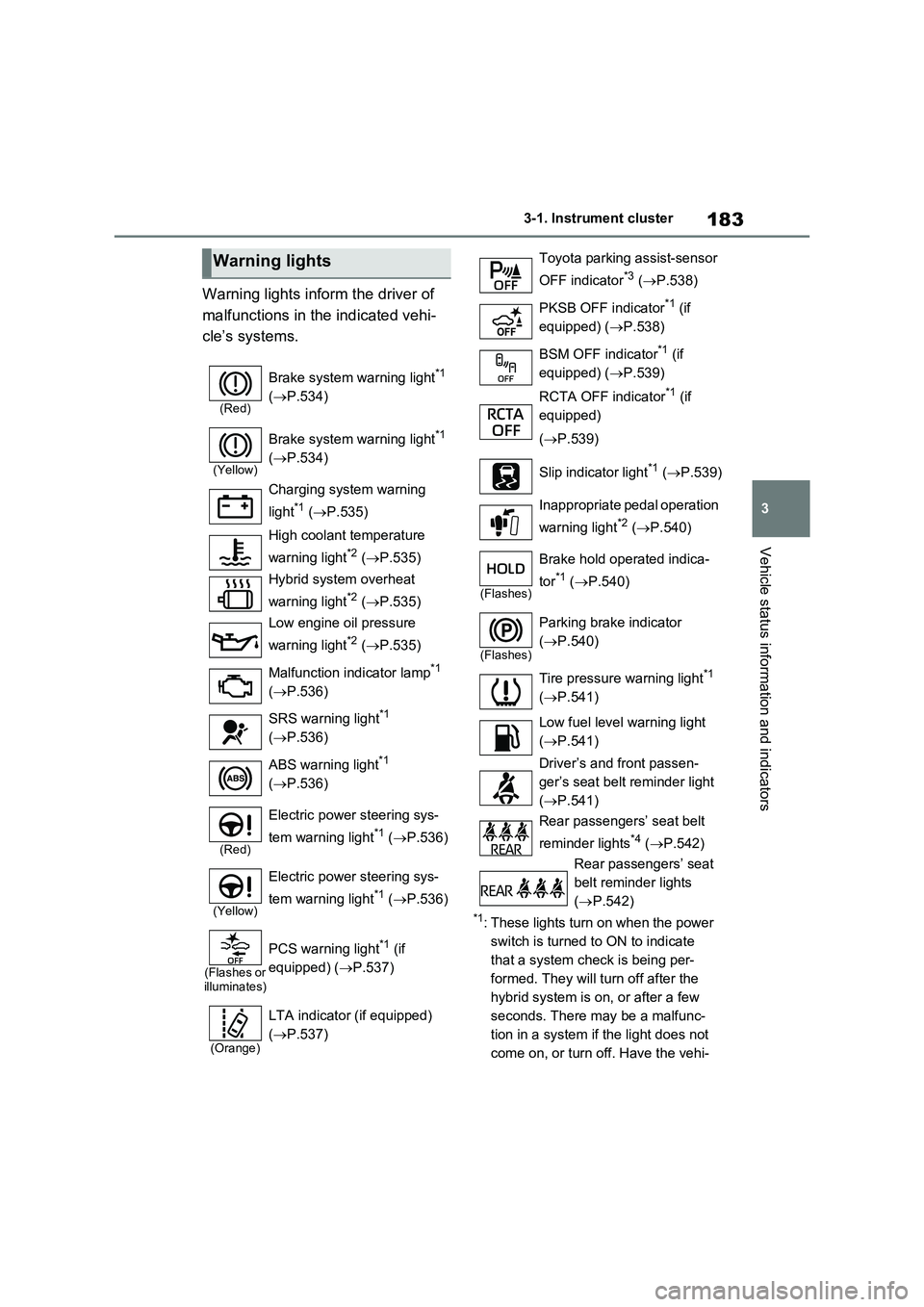
Warning lights inform the driver of
malfunctions in the indicated vehi-
cle’s systems.
*1: These lights turn on when the power
switch is turned to ON to indicate
that a system check is being per-
formed. They will turn off after the
hybrid system is on, or after a few
seconds. There may be a malfunc-
tion in a system if the light does not
come on, or turn off. Have the vehi-
Warning lights
(Red)
Brake system warning light*1
(P.534)
(Yellow)
Brake system warning light*1
(P.534)
Charging system warning
light
*1 (P.535)
High coolant temperature
warning light
*2 (P.535)
Hybrid system overheat
warning light
*2 (P.535)
Low engine oil pressure
warning light
*2 (P.535)
Malfunction indicator lamp
*1
(P.536)
SRS warning light
*1
(P.536)
ABS warning light
*1
(P.536)
(Red)
Electric power steering sys-
tem warning light
*1 (P.536)
(Yellow)
Electric power steering sys-
tem warning light
*1 (P.536)
(Flashes or
illuminates)
PCS warning light*1 (if
equipped) (P.537)
(Orange)
LTA indicator (if equipped)
(P.537)
Toyota parking assist-sensor
OFF indicator
*3 (P.538)
PKSB OFF indicator
*1 (if
equipped) (P.538)
BSM OFF indicator
*1 (if
equipped) (P.539)
RCTA OFF indicator
*1 (if
equipped)
(P.539)
Slip indicator light
*1 (P.539)
Inappropriate pedal operation
warning light
*2 (P.540)
(Flashes)
Brake hold operated indica-
tor
*1 (P.540)
(Flashes)
Parking brake indicator
(P.540)
Tire pressure warning light
*1
(P.541)
Low fuel level warning light
(P.541)
Driver’s and front passen-
ger’s seat belt reminder light
(P.541)
Rear passengers’ seat belt
reminder lights
*4 (P.542)
Rear passengers’ seat
belt reminder lights
(P.542)
Page 186 of 718
1843-1. Instrument cluster
cle inspected by any authorized
Toyota retailer or Toyota authorized
repairer, or any reliable repairer.
*2: This light illuminates on the multi-
information display with a message.
*3: Toyota parking assist-sensor OFF
indicator turns on when the power
switch is turned to ON while the
Toyota parking assist-sensor func-
tion is on. It will turn off after a few
seconds.
*4: Vehicles with 12.3-inch display
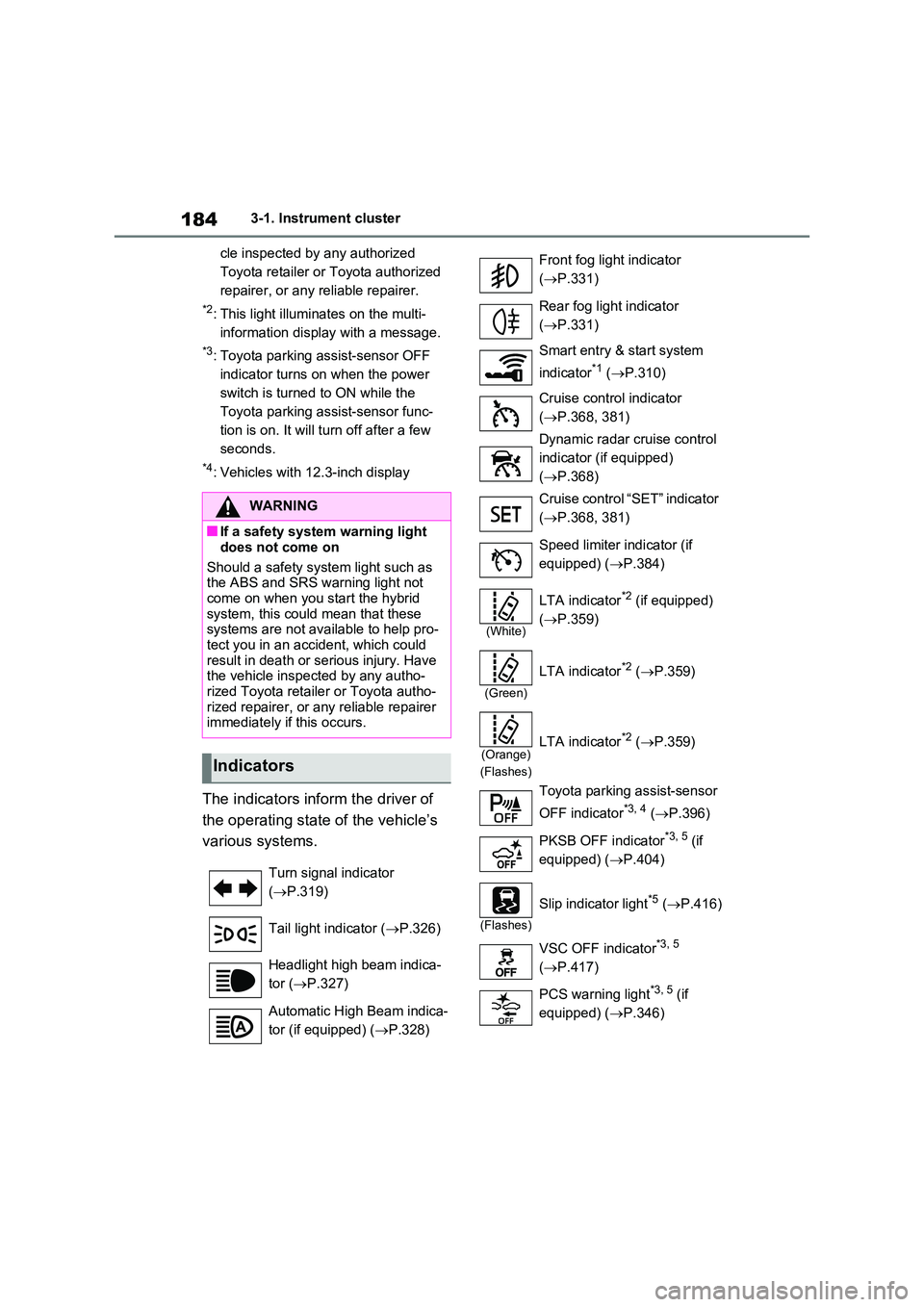
The indicators inform the driver of
the operating state of the vehicle’s
various systems.
WARNING
■If a safety system warning light
does not come on
Should a safety system light such as the ABS and SRS warning light not
come on when you start the hybrid system, this could mean that these systems are not available to help pro-
tect you in an accident, which could result in death or serious injury. Have the vehicle inspected by any autho-
rized Toyota retailer or Toyota autho- rized repairer, or any reliable repairer immediately if this occurs.
Indicators
Turn signal indicator
( P.319)
Tail light indicator ( P.326)
Headlight high beam indica-
tor ( P.327)
Automatic High Beam indica-
tor (if equipped) ( P.328)
Front fog light indicator
( P.331)
Rear fog light indicator
( P.331)
Smart entry & start system
indicator*1 ( P.310)
Cruise control indicator
( P.368, 381)
Dynamic radar cruise control
indicator (if equipped)
( P.368)
Cruise control “SET” indicator
( P.368, 381)
Speed limiter indicator (if
equipped) ( P.384)
(White)
LTA indicator*2 (if equipped)
( P.359)
(Green)
LTA indicator*2 (P.359)
(Orange)
(Flashes)
LTA indicator*2 ( P.359)
Toyota parking assist-sensor
OFF indicator*3, 4 ( P.396)
PKSB OFF indicator*3, 5 (if
equipped) ( P.404)
(Flashes)
Slip indicator light*5 (P.416)
VSC OFF indicator*3, 5
( P.417)
PCS warning light*3, 5 (if
equipped) ( P.346)
Page 364 of 718
3625-5. Using the driving support systems
• Vehicle is not accelerated or deceler-
ated by a fixed amount or more.
• Steering wheel is not operated with a
steering force level suitable for chang-
ing lanes.
• ABS, VSC, TRC and PCS are not
operating.
• TRC or VSC is not turned off.
●Vehicle sway warning function
This function operates when all of the
following conditions are met.
• Setting for “Sway Warning” in the
screen of the multi-information display
is set to “ON”. (P.199, 211)
• Vehicle speed is approximately 50
km/h (32 mph) or more.
• Width of traffic lane is approximately 3
m (9.8 ft.) or more.
• No system malfunctions are detected.
(P.363)
●Lane centering function
This function operates when all of the
following conditions are met.
• LTA is turned on.
• Setting for “Lane Centre” in the
screen of the multi-information display
are set to “ON”. (P.199, 211)
• This function recognizes white (yel-
low) lane lines or the position of a pre-
ceding vehicle (except when the
preceding vehicle is small, such as a
motorcycle).
• The dynamic radar cruise control with
full-speed range is operating in vehi-
cle-to-vehicle distance control mode.
• Width of traffic lane is approximately 3
to 4 m (10 to 13 ft.).
• Turn signal lever is not operated.
• Vehicle is not being driven around a
sharp curve.
• No system malfunctions are detected.
(P.363)
• Vehicle does not accelerate or decel-
erate by a fixed amount or more.
• Steering wheel is not operated with a
steering force level suitable for chang-
ing lanes.
• ABS, VSC, TRC and PCS are not operating.
• TRC or VSC is not turned off.
• Hands off steering wheel warning is
not displayed. (P.363)
• The vehicle is being driven in the cen-
ter of a lane.
• Steering assist function is not operat-
ing.
■Temporary cancelation of functions
●When operation conditions are no lon-
ger met, a function may be temporar-
ily canceled. However, when the
operation conditions are met again,
operation of the function is automati-
cally restored. (P.361)
●If the operation conditions (P.361)
are no longer met while the lane cen-
tering function is operating, the steer-
ing wheel may vibrate and the buzzer
may sound to indicate that the func-
tion has been temporarily canceled.
However, if the “Alert” or “Alert
Options” customization setting is set
to steering wheel vibration, the system
will notify the driver by vibrating the
steering wheel instead of sounding
the buzzer.
■Steering assist function/lane cen-
tering function
●Depending on the vehicle speed, lane
departure situation, road conditions,
etc., the driver may not feel the func-
tion is operating or the function may
not operate at all.
●The steering control of the function is
overridden by the driver’s steering
wheel operation.
●Do not attempt to test the operation of
the steering assist function.
■Lane departure alert function
●The warning buzzer may be difficult to
hear due to external noise, audio play-
back, etc. Also, it may be difficult to
feel steering wheel vibrations due to
the road conditions, etc.
●If the edge of the course* is not clear
or straight, the lane departure alert
function may not operate.
Page 372 of 718
3705-5. Using the driving support systems
WARNING
■Cautions regarding the driving assist systems
Observe the following precautions, as there are limitations to the assistance provided by the system. Failure to do
so may cause an accident resulting in death or serious injury.
●Assisting the driver to measure fol-
lowing distance
The dynamic radar cruise control with
full-speed range is only intended to
help the driver in determining the fol-
lowing distance between the driver’s
own vehicle and a designated vehicle
traveling ahead. It is not a mechanism
that allows careless or inattentive
driving, and it is not a system that can
assist the driver in low-visibility condi-
tions.
It is still necessary for driver to pay
close attention to the vehicle’s sur-
roundings.
●Assisting the driver to judge proper following distance
The dynamic radar cruise control with
full-speed range determines whether
the following distance between the
driver’s own vehicle and a designated
vehicle traveling ahead is within a set
range. It is not capable of making any
other type of judgement. Therefore, it
is absolutely necessary for the driver
to remain vigilant and to determine
whether or not there is a possibility of
danger in any given situation.
●Assisting the driver to operate the vehicle
The dynamic radar cruise control with
full-speed range does not include
functions which will prevent or avoid
collisions with vehicles ahead of your
vehicle. Therefore, if there is ever any
possibility of danger, the driver must
take immediate and direct control of
the vehicle and act appropriately in
order to ensure the safety of all
involved.
■Situations unsuitable for dynamic radar cruise control
with full-speed range
Do not use dynamic radar cruise con- trol with full-speed range in any of the
following situations. Doing so may result in inappropriate speed control and could cause an accident resulting
in death or serious injury.
●Roads where there are pedestrians, cyclists, etc.
●In heavy traffic
●On roads with sharp bends
●On winding roads
●On slippery roads, such as those covered with rain, ice or snow
●On steep downhills, or where there are sudden changes between sharp
up and down gradients
Vehicle speed may exceed the set
speed when driving down a steep hill.
●At entrances to freeways and high- ways
●When weather conditions are bad enough that they may prevent the sensors from detecting correctly
(fog, snow, sandstorm, heavy rain, etc.)
Page 400 of 718
3985-5. Using the driving support systems
may be displayed or the sensor may not
be able to detect an object. Once the ice
melts, the system will return to normal.
If a warning message is displayed even
if the sensor is clean, there may be a
sensor malfunction. Have the vehicle
inspected by any authorized Toyota
retailer or Toyota authorized repairer, or
any reliable repairer.
■If “Parking Assist Unavailable” is
displayed on the multi-information
display (vehicles with PKSB)
Water may be continuously flowing over
the sensor surface, such as in a heavy
rain. When the system determines that it
is normal, the system will return to nor-
mal.
■Sensor detection information
●The sensor’s detection areas are lim-
ited to the areas around the vehicle’s
front and rear bumpers.
●The following situations may occur
during use.
• Depending on the shape of the object
and other factors, the detection dis-
tance may shorten, or detection may
be impossible.
• Detection may be impossible if static
objects draw too close to the sensor.
• There will be a short delay between
static object detection and display
(warning buzzer sounds). Even at low
speeds, there is a possibility that the
object will come within 25 cm (9.8 in.)
before the display is shown and the
warning buzzer sounds.
• It might be difficult to hear the buzzer
due to the volume of the audio system
or air flow noise of the air conditioning
system.
• It may be difficult to hear the sound of this system due to the buzzers of
other systems.
■Objects which the system may not
properly detect
The shape of the object may prevent the
sensor from detecting it. Pay particular
attention to the following objects:
●Wires, fences, ropes, etc.
●Cotton, snow and other materials that
absorb sound waves
●Sharply-angled objects
●Low objects
●Tall objects with upper sections pro-
jecting outwards in the direction of
your vehicle
People may not be detected if they are
wearing certain types of clothing.
■Situations in which the system may
not operate properly
Certain vehicle conditions and the sur-
rounding environment may affect the
ability of a sensor to correctly detect
objects. Particular instances where this
may occur are listed below.
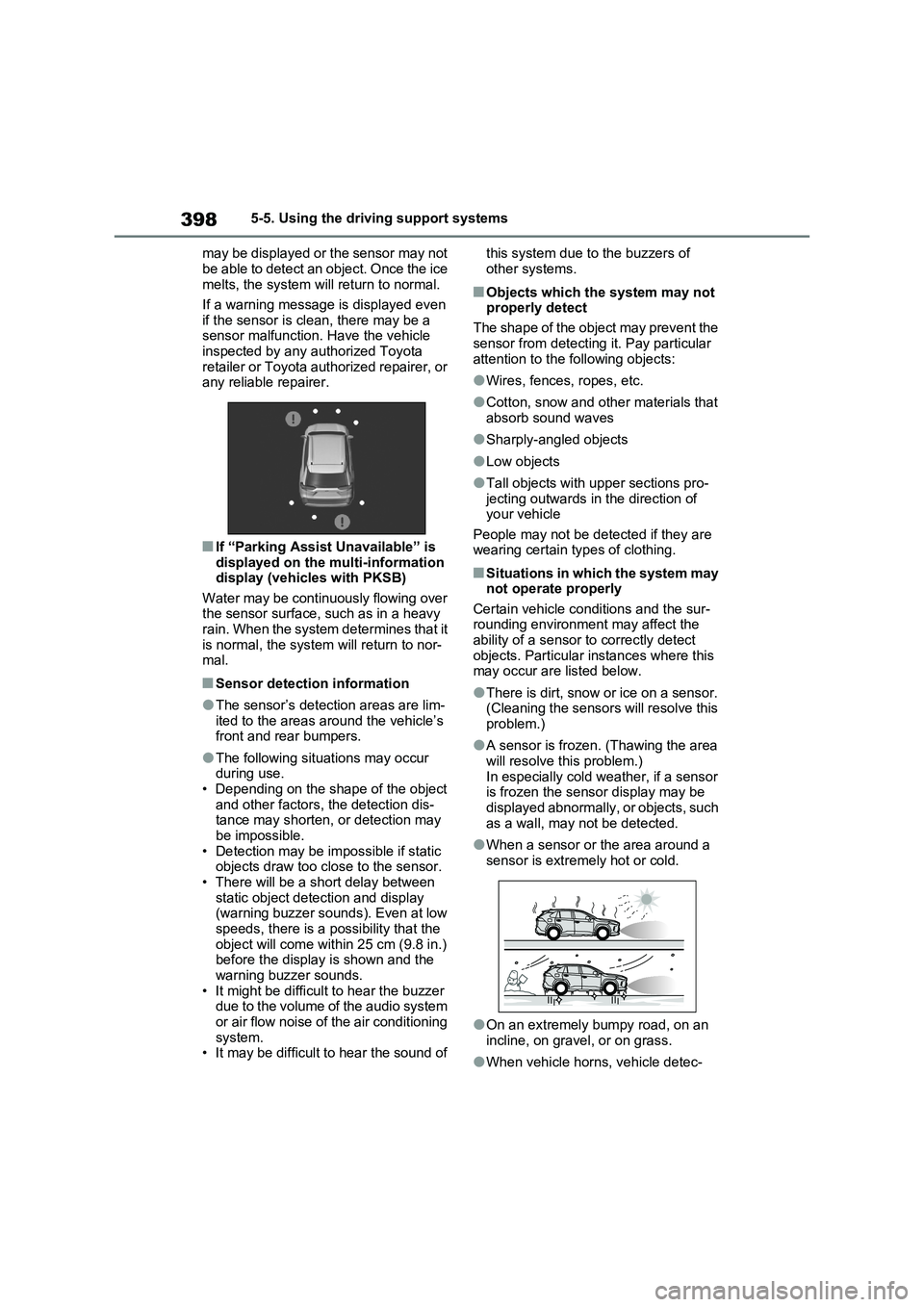
●There is dirt, snow or ice on a sensor.
(Cleaning the sensors will resolve this
problem.)
●A sensor is frozen. (Thawing the area
will resolve this problem.)
In especially cold weather, if a sensor
is frozen the sensor display may be
displayed abnormally, or objects, such
as a wall, may not be detected.
●When a sensor or the area around a
sensor is extremely hot or cold.
●On an extremely bumpy road, on an
incline, on gravel, or on grass.
●When vehicle horns, vehicle detec-
Page 417 of 718
415
5
5-5. Using the driving support systems
Driving
■ECB (Electronically Con-
trolled Brake System)
The electronically controlled sys-
tem generates braking force corre-
sponding to the brake operation
■ABS (Anti-lock Brake System)
Helps to prevent wheel lock when
the brakes are applied suddenly, or
if the brakes are applied while driv-
ing on a slippery road surface
■Brake assist
Generates an increased level of
braking force after the brake pedal
is depressed when the system
detects a panic stop situation
■VSC (Vehicle Stability Control)
Helps the driver to control skidding
when swerving suddenly or turning
on slippery road surfaces.
NOTICE
■To prevent the GPF system from not operating properly
●Do not use fuel other than the spec-ified type
●Do not modify the exhaust pipes
Driving assist systems
To keep driving safety and per-
formance, the following sys-
tems operate automatically in
response to various driving sit-
uations. Be aware, however,
that these systems are supple-
mentary and should not be
relied upon too heavily when
operating the vehicle.
Summary of the driving
assist systems
Page 418 of 718
4165-5. Using the driving support systems
■VSC+ (Vehicle Stability Con-
trol+)
Provides cooperative control of the
ABS, TRC, VSC and EPS.
Helps to maintain directional stabil-
ity when swerving on slippery road
surfaces by controlling steering per-
formance.
■Trailer Sway Control
Helps the driver to control trailer
sway by selectively applying brake
pressure for individual wheels and
reducing driving torque when trailer
sway is detected.
■TRC (Traction Control)
Helps to maintain drive power and
prevent the drive wheels from spin-
ning when starting the vehicle or
accelerating on slippery roads
■Active Cornering Assist (ACA)
Helps to prevent the vehicle from
drifting to the outer side by perform-
ing inner wheel brake control when
attempting to accelerate while turn-
ing
■Hill-start assist control
Helps to reduce the backward
movement of the vehicle when
starting on an uphill
■EPS (Electric Power Steering)
Employs an electric motor to
reduce the amount of effort needed
to turn the steering wheel.
■E-Four (Electronic On-Demand
AWD system)
Automatically controls the drive
system such as to front-wheel drive
or AWD (all wheel drive) according
to various running conditions
including normal driving, during cor-
nering, on a uphill, when starting
off, during acceleration, on a slip-
pery roads due to snow or rain,
thus contributing to stable
operability and driving stability.
■Emergency brake signal
When the brakes are applied sud-
denly, the emergency flashers
automatically flash to alert the vehi-
cle behind.
■The Secondary Collision
Brake (if equipped)
When the SRS airbag sensor
detects a collision and the system
operates, the brakes and brake
lights are automatically controlled
to reduce the vehicle speed and
help reduce the possibility of further
damage due to a secondary colli-
sion.
■When the TRC/VSC/ABS/Trail
Mode/Trailer Sway Control systems
are operating
The slip indicator light will flash while the
TRC/VSC/ABS/Trail Mode/Trailer Sway
Control systems are operating.
Page 420 of 718
4185-5. Using the driving support systems
■Sounds and vibrations caused by
the ABS, brake assist, VSC, Trailer
Sway Control, TRC and hill-start
assist control systems
●A sound may be heard from the
engine compartment when the brake
pedal is depressed repeatedly, when
the hybrid system is started or just
after the vehicle begins to move. This
sound does not indicate that a mal-
function has occurred in any of these
systems.
●Any of the following conditions may
occur when the above systems are
operating. None of these indicates
that a malfunction has occurred.
• Vibrations may be felt through the
vehicle body and steering.
• A motor sound may be heard also
after the vehicle comes to a stop.
■ECB operating sound
ECB operating sound may be heard in
the following cases, but it does not indi-
cate that a malfunction has occurred.
●Operating sound heard from the
engine compartment when the brake
pedal is operated.
●Motor sound of the brake system
heard from the front part of the vehicle
when the driver’s door is opened.
●Operating sound heard from the
engine compartment when one or two
minutes passed after the stop of the
hybrid system.
■Active Cornering Assist operation
sounds and vibrations
When the Active Cornering Assist is
operated, operation sounds and vibra-
tions may be generated from the brake
system, but this is not a malfunction.
■Automatic reactivation of TRC,
Trailer Sway Control and VSC sys-
tems
After turning the TRC, Trailer Sway
Control and VSC systems off, the sys-
tems will be automatically re-enabled in
the following situations:
●When the power switch is turned off
●If only the TRC system is turned off,
the TRC will turn on when vehicle
speed increases
If both the TRC and VSC systems are
turned off, automatic re-enabling will
not occur when vehicle speed
increases.
■Operating conditions of Active Cor-
nering Assist
The system operates when the following
occurs.
●TRC/VSC can operate
●The driver is attempting to accelerate
while turning
●The system detects that the vehicle is
drifting to the outer side
●The brake pedal is released
■Reduced effectiveness of the EPS
system
The effectiveness of the EPS system is
reduced to prevent the system from
overheating when there is frequent
steering input over an extended period
of time. The steering wheel may feel
heavy as a result. Should this occur,
refrain from excessive steering input or
stop the vehicle and turn the hybrid sys-
tem off. The EPS system should return
to normal within 10 minutes.
■Operating conditions of emergency
brake signal
When the following conditions are met,
the emergency brake signal will operate:
●The emergency flashers are off.
●Actual vehicle speed is over 55 km/h
(35 mph).
●The system judges from the vehicle
deceleration that it is a sudden brak-
ing operation.
■Automatic system cancelation of
emergency brake signal
The emergency brake signal will be can-
celed in any of the following situations:
●The emergency flashers are turned
on.
●The system judges from the vehicle