warning light TOYOTA SUPRA 2020 (in English) Owner's Manual
[x] Cancel search | Manufacturer: TOYOTA, Model Year: 2020, Model line: SUPRA, Model: TOYOTA SUPRA 2020Pages: 352, PDF Size: 6.49 MB
Page 181 of 352
1813-1. CONTROLS
Supra Owner's Manual
3
CONTROLS
trians and cyclists when the
speed of the vehicle is below
approx. 53 mph/85 km/h.
The system's detection potential
is limited.
Thus, a warning might not be
issued or be issued late.
The following situations may not
be detected, for instance:
Partially covered pedestrians.
Pedestrians that are not
detected as such because of
the viewing angle or contour.
Pedestrians outside of the
detection range.
Pedestrians having a body
size less than 32 in/80 cm.
The system may not be fully
functional or may not be avail-
able in the following situations:
In heavy fog, wet conditions,
or snowfall.
In tight curves.
If the driving stability control
systems are deactivated, for
instance VSC OFF.
If the field of view of the cam-
era or the windshield is dirty
or covered in the area of the
interior mirror.
If the camera has overheated and been temporarily
switched off due to exces-
sively high temperatures.
Depending on the equipment:
if the radar sensors are dirty
or covered.
Up to 10 seconds after the
start of the engine via the
Start/Stop button.
During calibration of the cam-
era immediately after vehicle
delivery.
If there are constant blinding
effects because of oncoming
light, for instance from the sun
low in the sky.
When it is dark outside.
The lane departure warning
alerts when the vehicle is about
to run off the road or exit the
lane.
This camera-based system
warns starting at a minimum
speed.
The minimum speed is coun-
try-specific and is displayed in
the menu for the Toyota Supra
Safety systems.
Warnings are issued by means
of a steering wheel vibration.
Detection range
Functional limitations
Lane departure warning
Concept
General information
Page 183 of 352
1833-1. CONTROLS
Supra Owner's Manual
3
CONTROLS
The lane departure warning acti-
vates automatically after depar-
ture if the function was switched
on at the end of the last trip.
The menu for the Toyota Supra
Safety system is displayed.
If all Toyota Supra Safety sys-
tems were switched off, all sys-
tems are now switched on.
"Customize Settings": depend-
ing on the equipment version,
the Toyota Supra Safety sys-
tems can be individually config-
ured. The individual settings are
activated and stored for the
driver profile currently used. As
soon as a setting is changed on
the menu, all settings of the
menu are activated.
The following settings are
switched between:
"ALL ON": all Toyota Supra
Safety systems are switched on.
Basic settings are activated for
the subfunctions. "Customize": the Toyota Supra
Safety systems are switched on
according to the individual set-
tings.
Some Toyota Supra Safety sys-
tems cannot be individually
switched off.
All Toyota Supra Safety systems
are switched off.
Via Toyota Supra Command:
1
"My Vehicle"
2 "Vehicle settings"
3 "Toyota Supra Safety"
4 "Lane Departure Warn."
5 Select desired setting:
"Early": the system promptly
issues a warning whenever a
Switching on/off
Switching on automatically
Switching on/off manually
Press the button.
Press the button repeat-
edly.
Press and hold this button.
ButtonStatus
Indicator lights up
green: all Toyota Supra
Safety systems are
switched on.
Indicator lights up
orange: some Toyota
Supra Safety systems
are switched off or cur-
rently unavailable.
Indicator does not light
up: all Toyota Supra
Safety systems are
switched off.
Setting the warning time
Page 186 of 352
1863-1. CONTROLS
Supra Owner's Manual
light, for instance from the sun
low in the sky.
If the field of view of the cam-
era or the windshield is dirty
or covered in the area of the
interior mirror.
If the camera has overheated
and been temporarily
switched off due to exces-
sively high temperatures.
Up to 10 seconds after the
start of the engine via the
Start/Stop button.
During calibration of the cam-
era immediately after vehicle
delivery.
A vehicle message may be dis-
played when the system is not
fully functional.
Blind spot monitor detects vehi-
cles in the blind spot or vehicles
approaching from behind in the
adjacent lane. A warning is
issued in various gradations in
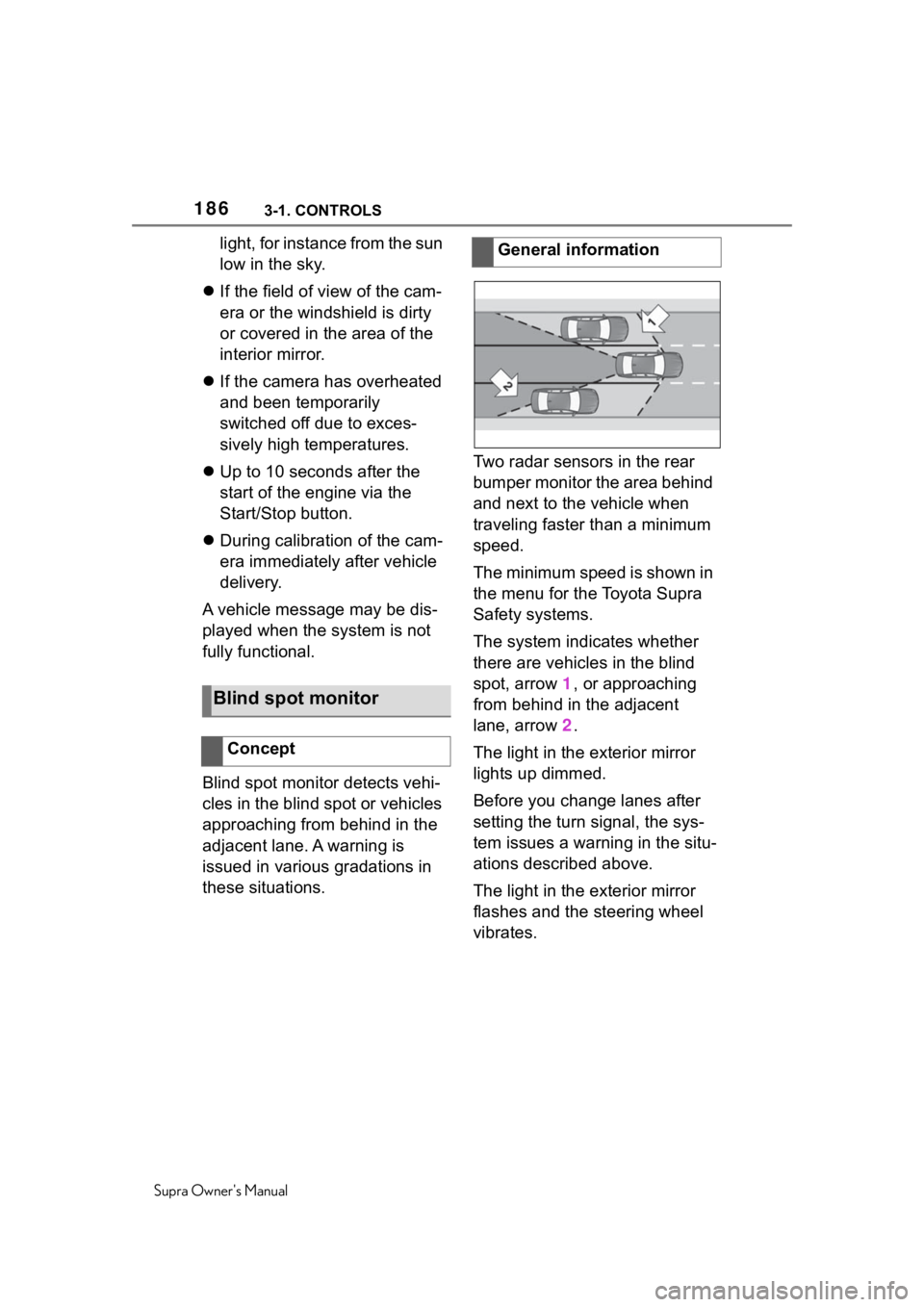
these situations. Two radar sensors in the rear
bumper monitor the area behind
and next to the vehicle when
traveling faster than a minimum
speed.
The minimum speed is shown in
the menu for the Toyota Supra
Safety systems.
The system indicates whether
there are vehicles in the blind
spot, arrow 1, or approaching
from behind in the adjacent
lane, arrow
2.
The light in the exterior mirror
lights up dimmed.
Before you change lanes after
setting the turn signal, the sys-
tem issues a warning in the situ-
ations described above.
The light in the exterior mirror
flashes and the steering wheel
vibrates.
Blind spot monitor
Concept
General information
Page 188 of 352
1883-1. CONTROLS
Supra Owner's Manual
tems can be individually config-
ured. The individual settings are
activated and stored for the
driver profile currently used. As
soon as a setting is changed on
the menu, all settings of the
menu are activated.
The following settings are
switched between:
"ALL ON": all Toyota Supra
Safety systems are switched on.
Basic settings are activated for
the subfunctions.
"Customized": the Toyota Supra
Safety systems are switched on
according to the individual set-
tings.
Some Toyota Supra Safety sys-
tems cannot be individually
switched off.
All Toyota Supra Safety systems
are switched off.Via Toyota Supra Command:
1
"My Vehicle"
2 "Vehicle settings"
3 "Toyota Supra Safety"
4 "Blind spot monitor"
5 Select the desired setting.
"Off": with this setting, no warning is
output.
The setting is stored for the
driver profile currently used.
Via Toyota Supra Command:
1"My Vehicle"
2 "Vehicle settings"
3 "Steering wheel vibration"
4 Select the desired setting.
The setting is applied to all Toy-
Press the button repeat-
edly.
Press and hold this button.
ButtonStatus
Indicator lights up
green: all Toyota Supra
Safety systems are
switched on.
Indicator lights up
orange: some Toyota
Supra Safety systems
are switched off or cur-
rently unavailable.
Indicator does not light
up: all Toyota Supra
Safety systems are
switched off.
Setting the warning time
Setting the force of the steer-
ing wheel vibration
Page 189 of 352
1893-1. CONTROLS
Supra Owner's Manual
3
CONTROLS
ota Supra Safety systems and
stored for the driver profile cur-
rently used.
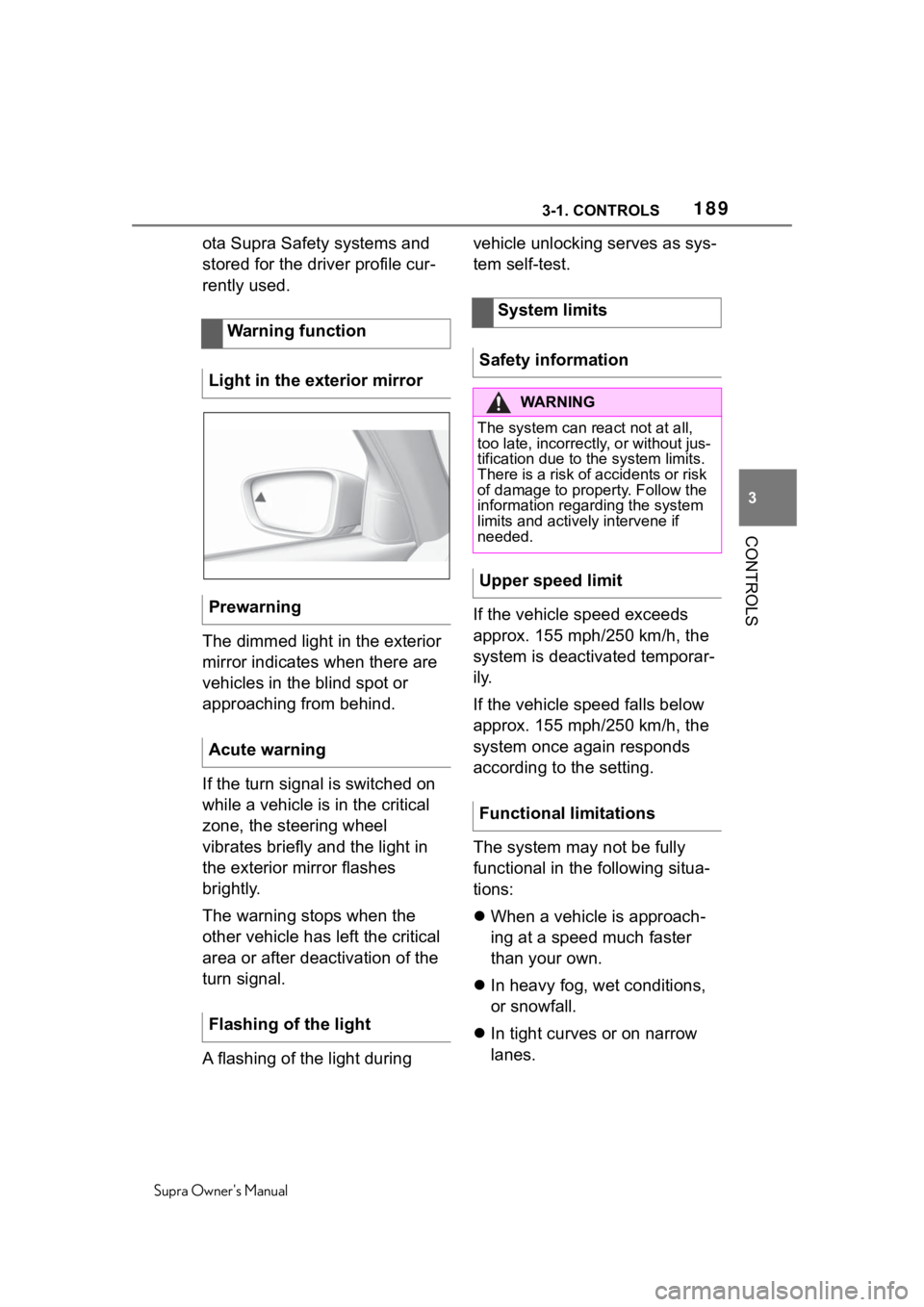
The dimmed light in the exterior
mirror indicates when there are
vehicles in the blind spot or
approaching from behind.
If the turn signal is switched on
while a vehicle is in the critical
zone, the steering wheel
vibrates briefly and the light in
the exterior mirror flashes
brightly.
The warning stops when the
other vehicle has left the critical
area or after deactivation of the
turn signal.
A flashing of the light during vehicle unlocking serves as sys-
tem self-test.
If the vehicle speed exceeds
approx. 155 mph/250 km/h, the
system is deactivated temporar-
ily.
If the vehicle speed falls below
approx. 155 mph/250 km/h, the
system once again responds
according to the setting.
The system may not be fully
functional in the following situa-
tions:
When a vehicle is approach-
ing at a speed much faster
than your own.
In heavy fog, wet conditions,
or snowfall.
In tight curves or on narrow
lanes.
Warning function
Light in the exterior mirror
Prewarning
Acute warning
Flashing of the light
System limits
Safety information
WA R N I N G
The system can react not at all,
too late, incorrectly, or without jus-
tification due to the system limits.
There is a risk of accidents or risk
of damage to property. Follow the
information regarding the system
limits and actively intervene if
needed.
Upper speed limit
Functional limitations
Page 195 of 352
1953-1. CONTROLS
Supra Owner's Manual
3
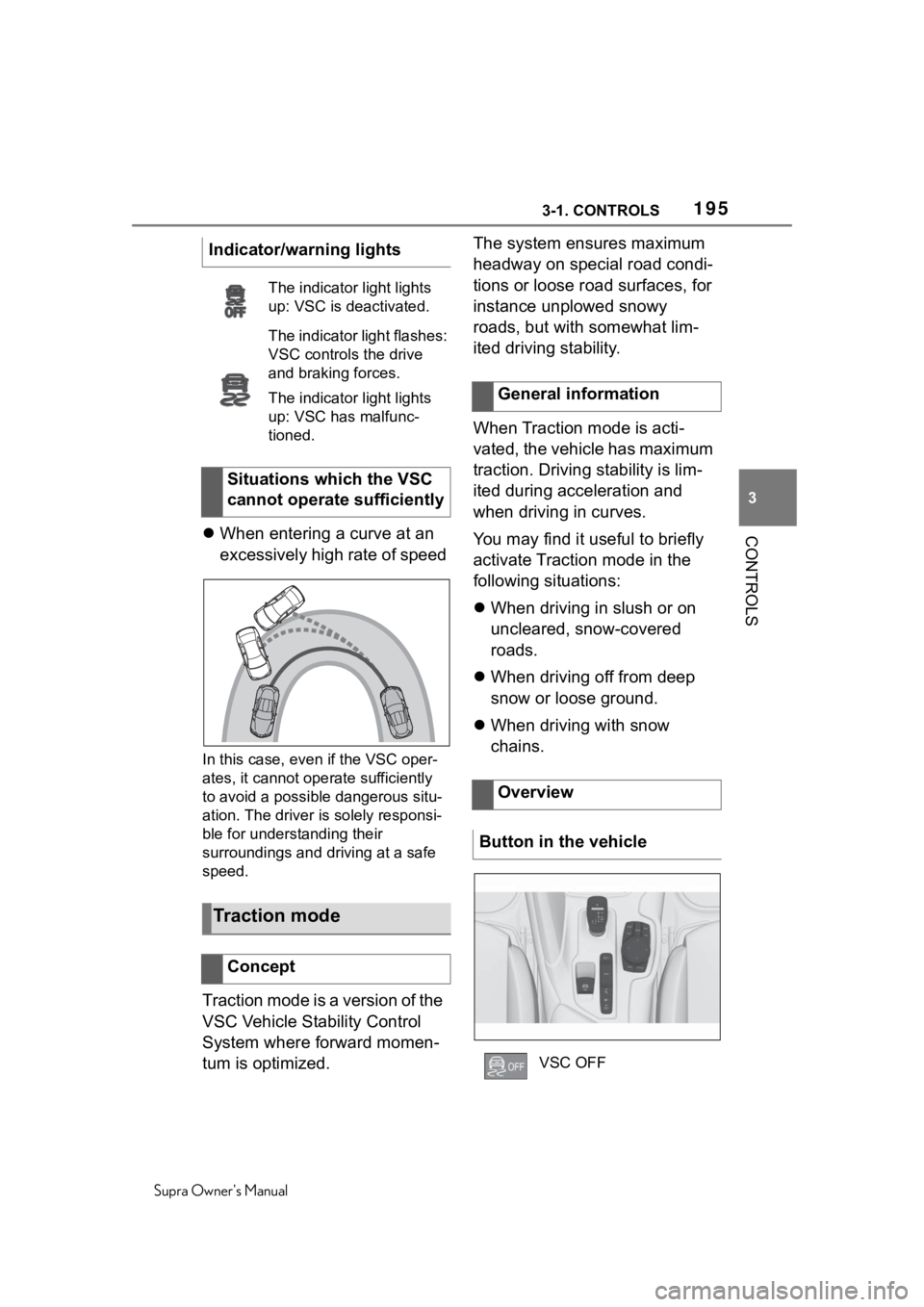
CONTROLS When entering a curve at an
excessively high rate of speed
In this case, even if the VSC oper-
ates, it cannot oper ate sufficiently
to avoid a possible dangerous situ-
ation. The driver is solely responsi-
ble for understanding their
surroundings and driving at a safe
speed.
Traction mode is a version of the
VSC Vehicle Stability Control
System where forward momen-
tum is optimized. The system ensures maximum
headway on special road condi-
tions or loose road surfaces, for
instance unplowed snowy
roads, but with somewhat lim-
ited driving stability.
When Traction mode is acti-
vated, the vehicle has maximum
traction. Driving stability is lim-
ited during acceleration and
when driving in curves.
You may find it useful to briefly
activate Traction mode in the
following situations:
When driving in slush or on
uncleared, snow-covered
roads.
When driving off from deep
snow or loose ground.
When driving with snow
chains.
Indicator/warning lights
The indicator
light lights
up: VSC is deactivated.
The indicator light flashes:
VSC controls the drive
and braking forces.
The indicator light lights
up: VSC has malfunc-
tioned.
Situations which the VSC
cannot operate sufficiently
Traction mode
Concept
General information
Overview
Button in the vehicle
VSC OFF
Page 196 of 352
1963-1. CONTROLS
Supra Owner's Manual
If Traction mode is activated,
TRACTION is displayed in the
instrument cluster.
In certain situations, the VSC is
activated automatically:
If Adaptive Cruise Control
with Stop & Go function ACC
is activated.
On a braking intervention by
the Toyota Supra Safety sys-
tems.
The vehicle has a flat tire.
The active differential step-
lessly locks the rear axle
depending on the driving condi-
tions. This provides optimal
power transfer in all driving con-
ditions by helping prevent wheel
spin at either rear wheel.
The driver is responsible adapt-
ing his or her driving style to the
situation.
Activating/deactivating
Traction mode
Activating Traction mode
Press the button.
TRACTION is displayed in
the instrument cluster and
the indicator light for VSC
OFF lights up.
Deactivating Traction mode
Press the button again.
TRACTION and the VSC
OFF indicator light go out.
Display
Display in the instrument
cluster
Indicator/warning lights
The indicator light lights
up: Traction mode is acti-
vated.
Automatic program
change
Active differential
Page 207 of 352
2073-1. CONTROLS
Supra Owner's Manual
3
CONTROLS
Some system information can
also be displayed in the
Head-up Display. The distance information is
active in the following situations:
Adaptive Cruise Control
switched off.
Display in the Head-up Dis-
play selected, refer to page
148.
Distance too short.
Speed greater than approx.
40 mph/70 km/h.
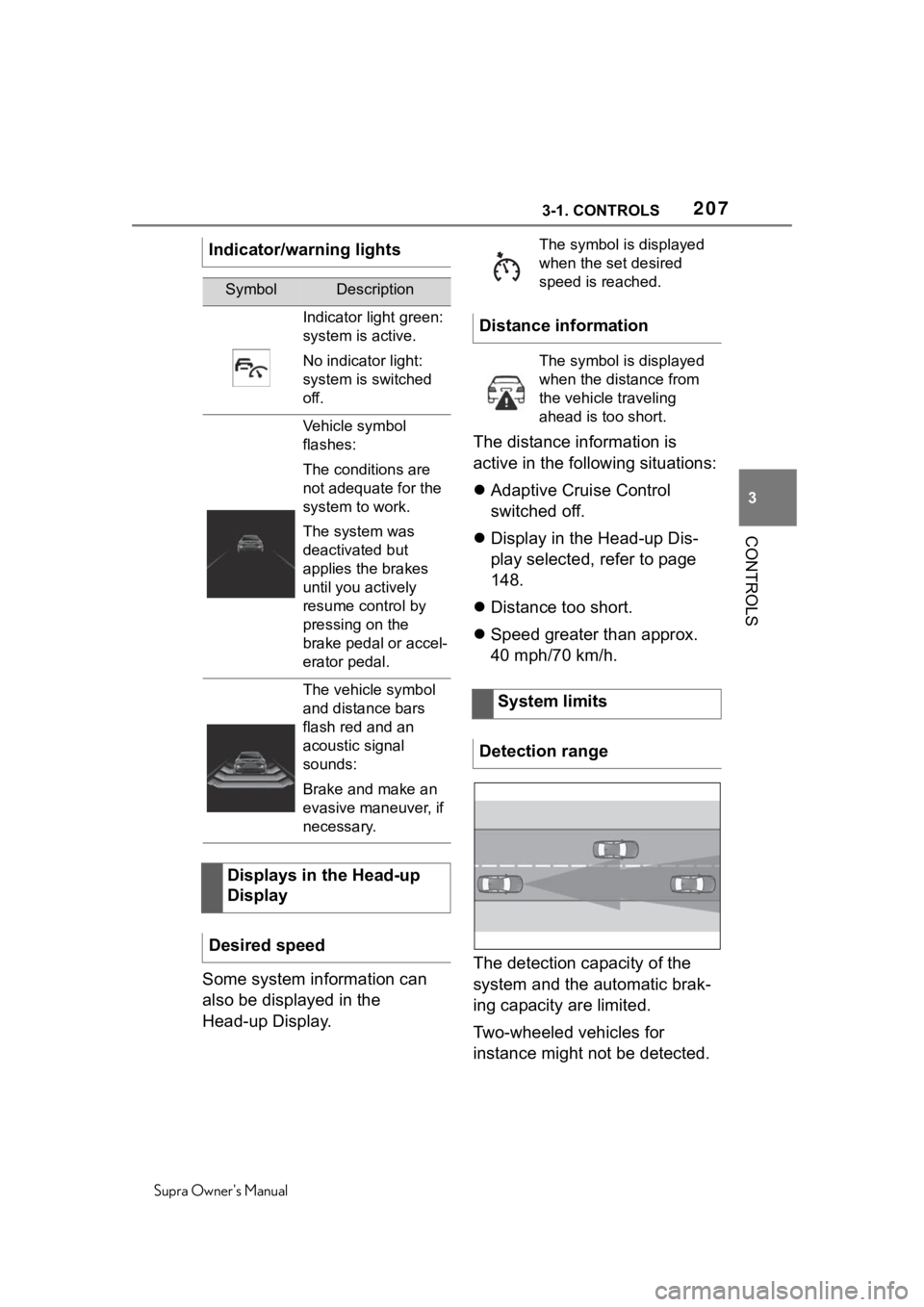
The detection capacity of the
system and the automatic brak-
ing capacity are limited.
Two-wheeled vehicles for
instance might not be detected.
Indicator/warning lights
SymbolDescription
Indicator light green:
system is active.
No indicator light:
system is switched
off.
Vehicle symbol
flashes:
The conditions are
not adequate for the
system to work.
The system was
deactivated but
applies the brakes
until you actively
resume control by
pressing on the
brake pedal or accel-
erator pedal.
The vehicle symbol
and distance bars
flash red and an
acoustic signal
sounds:
Brake and make an
evasive maneuver, if
necessary.
Displays in the Head-up
Display
Desired speed
The symbol is displayed
when the set desired
speed is reached.
Distance information
The symbol is displayed
when the distance from
the vehicle traveling
ahead is too short.
System limits
Detection range
Page 211 of 352
2113-1. CONTROLS
Supra Owner's Manual
3
CONTROLS
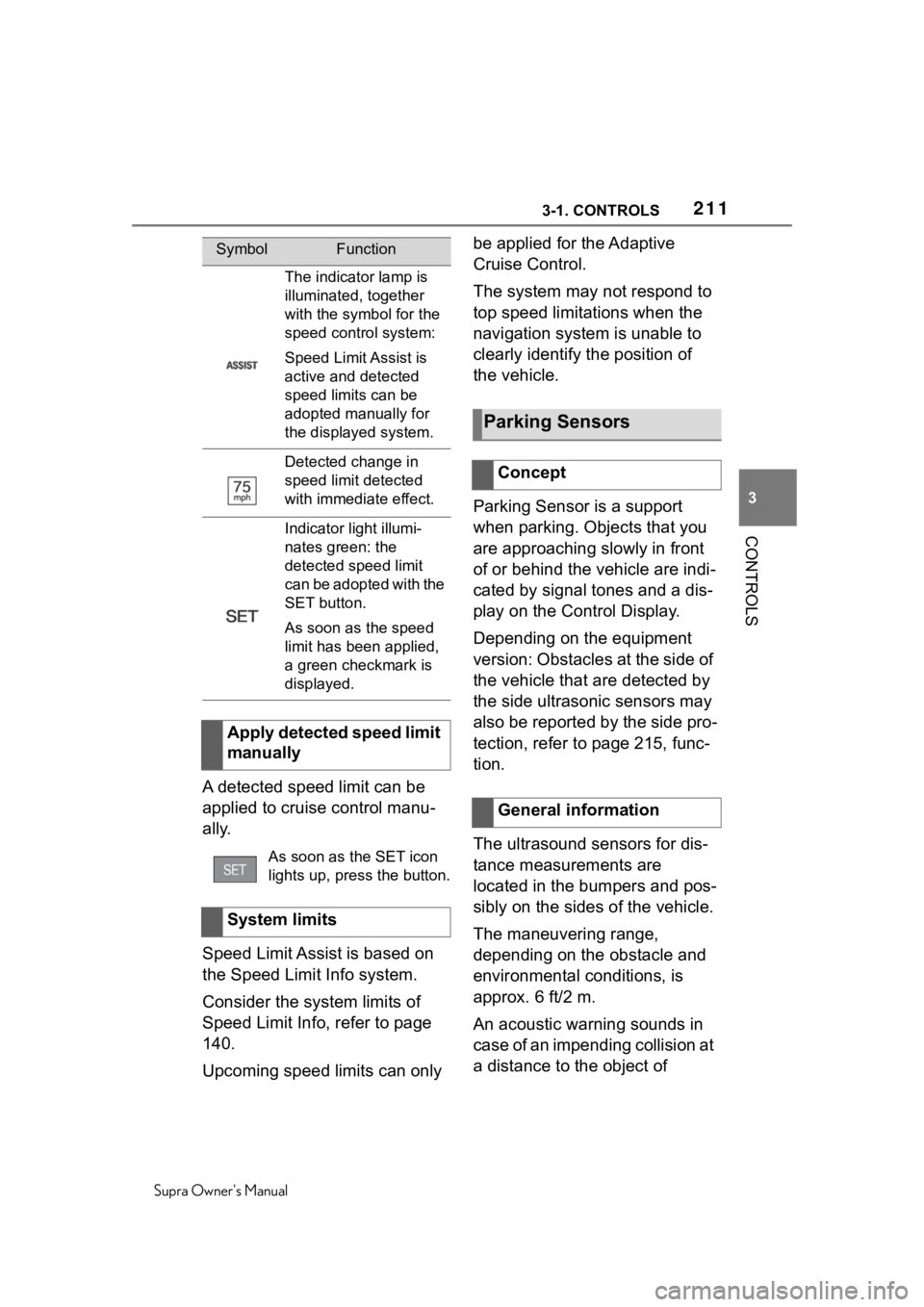
A detected speed limit can be
applied to cruise control manu-
ally.
Speed Limit Assist is based on
the Speed Limit Info system.
Consider the system limits of
Speed Limit Info, refer to page
140.
Upcoming speed limits can only be applied for the Adaptive
Cruise Control.
The system may not respond to
top speed limitations when the
navigation system is unable to
clearly identify the position of
the vehicle.
Parking Sensor is a support
when parking. Objects that you
are approaching slowly in front
of or behind the vehicle are indi-
cated by signal tones and a dis-
play on the Control Display.
Depending on the equipment
version: Obstacles at the side of
the vehicle that are detected by
the side ultrasonic sensors may
also be reported by the side pro-
tection, refer to page 215, func-
tion.
The ultrasound sensors for dis-
tance measurements are
located in the bumpers and pos-
sibly on the sides of the vehicle.
The maneuvering range,
depending on the obstacle and
environmental conditions, is
approx. 6 ft/2 m.
An acoustic warning sounds in
case of an impending collision at
a distance to the object of
SymbolFunction
The indicator lamp is
illuminated, together
with the symbol for the
speed control system:
Speed Limit Assist is
active and detected
speed limits can be
adopted manually for
the displayed system.
Detected change in
speed limit detected
with immediate effect.
Indicator light illumi-
nates green: the
detected speed limit
can be adopted with the
SET button.
As soon as the speed
limit has been applied,
a green checkmark is
displayed.
Apply detected speed limit
manually
As soon as the SET icon
lights up, press the button.
System limits
Parking Sensors
Concept
General information
Page 213 of 352
2133-1. CONTROLS
Supra Owner's Manual
3
CONTROLS
engaged when the engine is
running.
Depending on the equipment
version: while approaching
detected obstacles if the
speed is slower than approx.
2.5 mph/4 km/h. The activa-
tion distance depends on the
situation in question.
You may switch automatic acti-
vation on and off when obsta-
cles are detected.
Via Toyota Supra Command:
1 "My vehicle"
2 "Vehicle settings"
3 "Parking"
4 Where applicable: "Automatic
Parking Sens. activation"
5 "Automatic Parking Sensors
activ."
The setting is stored for the
driver profile currently used.
Depending on equipment, an
additional camera view is also
switched on.
The system switches off when a
certain driving distance or speed
is exceeded.
Switch the system back on, if
needed.
On: the LED lights up.
Off: the LED goes out.
The rearview camera image is
displayed if the reverse gear is
engaged when pressing the
park assistance button.
■General information
When approaching an object, an
intermittent sound indicates the
position of the object. E.g., if an
object is detected to the left rear
of the vehicle, a signal tone
sounds from the left rear
speaker.
The shorter the distance to the
object, the shorter the intervals.
If the distance to a detected
object is less than approx. 10
inches/25 cm, a continuous tone
is sounded.
If there are objects in front of
and behind the vehicle at the
same time, with a distance
smaller than approx. 10 in/25
cm, an alternating constant tone
will sound.
The intermittent tone and con-
stant tone are switched off if the
selector lever position P is
Automatic deactivation
during forward travel
Switching on/off manually
Press park assistance but-
ton.
WARNING
Signal tones