display TOYOTA SUPRA 2022 Owners Manual
[x] Cancel search | Manufacturer: TOYOTA, Model Year: 2022, Model line: SUPRA, Model: TOYOTA SUPRA 2022Pages: 498, PDF Size: 104.06 MB
Page 332 of 498
3305-1. MOBILITY
This chapter describes all standard,
country-specific and special equip-
ment available for the model series.
It may therefore describe equip-
ment and functions which are not
installed in your vehicle, for exam-
ple on account of the special equip-
ment selected or the country
specification. This also applies to
safety-relevant functions and sys-
tems. Please comply with the rele-
vant laws and regulations when
using the corresponding functions
and systems.
The maintenance system indicates
what maintenance measures are
required and thereby assists in
maintaining the road safety and
operational safety of the vehicle.
The exact work required and the
maintenance intervals may vary
depending on the country specifica-
tions. Replacement work, spare
parts, operating materials and wear
materials are calculated sepa-
rately. Additional information is
available from a dealer of the man-
ufacturer or another qualified dealer
or a specialist workshop.
Condition Based Service CBS
determines the maintenance
requirement using sensors and
special algorithms which monitor
the conditions in which the vehicle
is used.
The system thus enables the scope
of the maintenance work to be
adapted to the individual usage
profile.
Information on service require-
ments, see page 170, can be
shown on the Control Display.
Periods when the vehicle is out of
use with its battery disconnected
are not taken into account.
In such cases, have any
time-dependent maintenance pro-
cedures, for example for the brake
fluid and, where applicable, the
engine oil and microfilter/activated
charcoal filter, updated by a dealer
of the manufacturer or another
qualified dealer or a specialist
workshop.
Maintenance
Vehicle equipment
Maintenance System
Condition Based Service
CBS
Principle
General
Periods out of use
Page 333 of 498
331
5
5-1. MOBILITY
MOBILITY
Have maintenance and repairs car-
ried out by a deal er of the manufac-
turer or another qualified dealer or
a specialist workshop.
The maintenance work carried out
is entered in the maintenance
records and the vehicle data. As
with a service booklet, the entries
provide evidence of regular mainte-
nance.
Maintenance entered is shown on
the Control Display, see page 170.
Scheduled maintenance should be
performed at specified intervals
according to the maintenance
schedule.
For full details of your maintenance
schedule, read the "Toyota Service
Booklet" or "Toyota Warranty Booklet".
Scheduled maintenance should be
performed at specified intervals
according to the maintenance
schedule.
For full details of your maintenance
schedule, refer to the "Warranty and
Service Booklet".
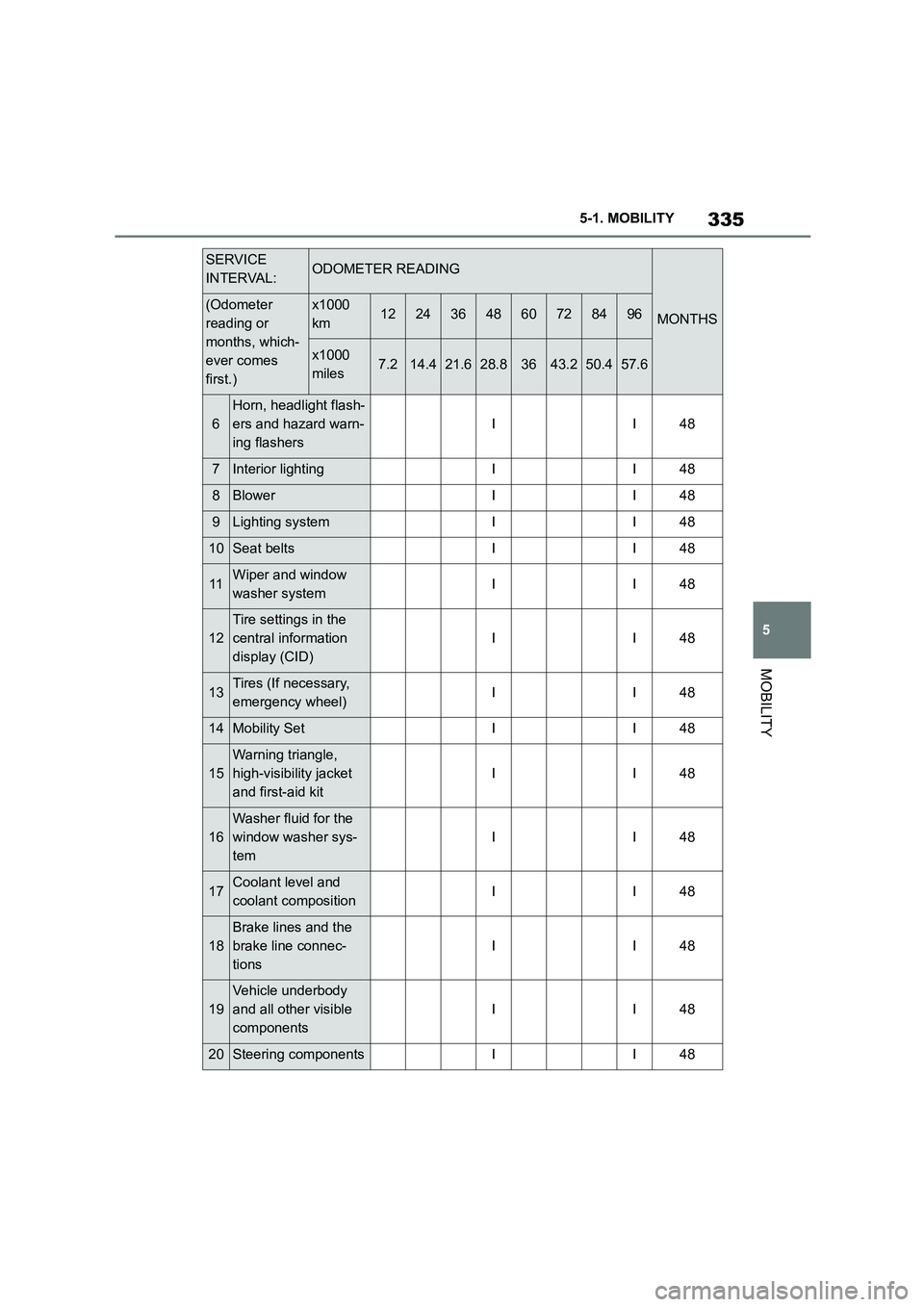
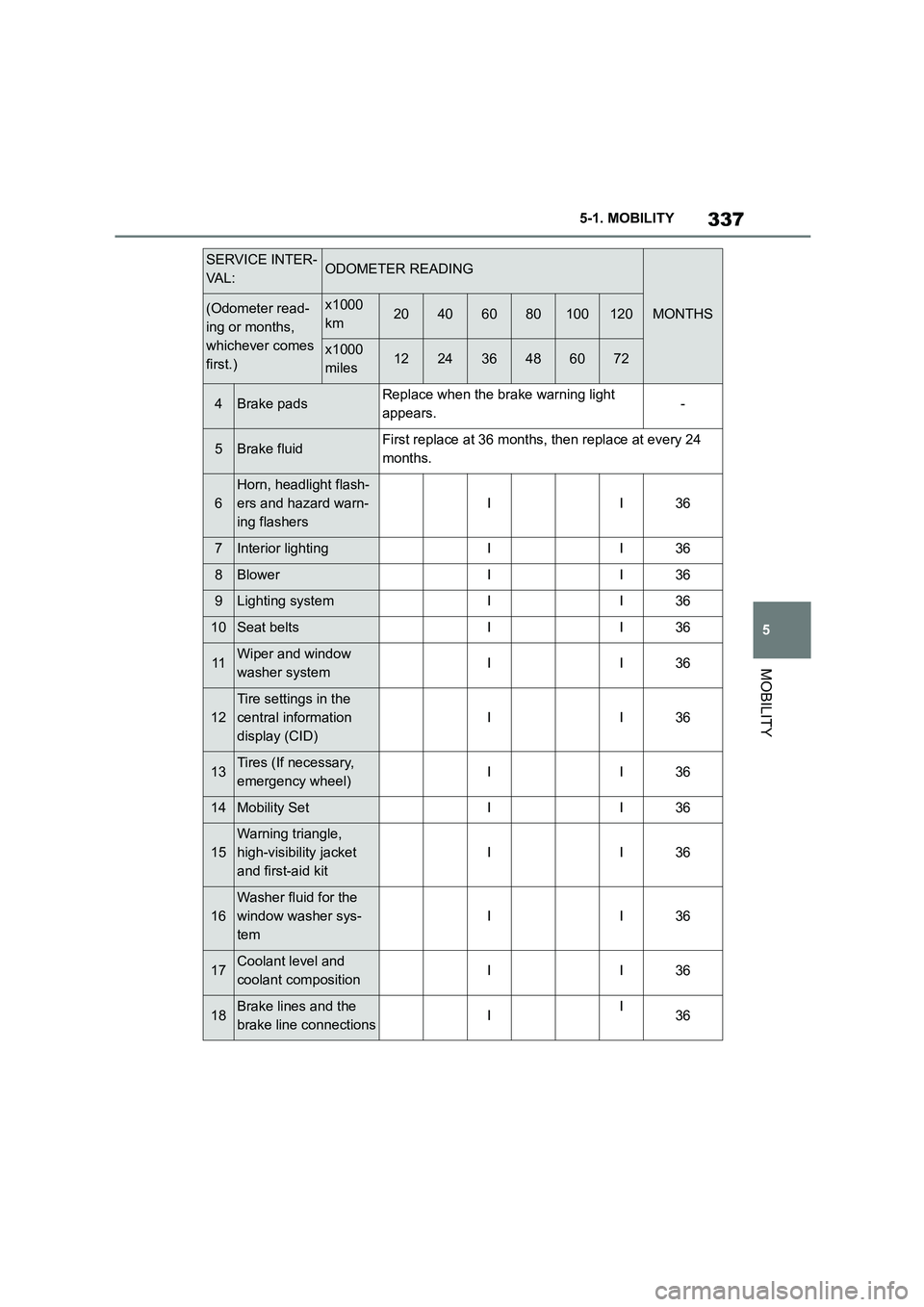
Scheduled maintenance should
be performed at specified inter-
vals according to the mainte-
nance schedule.
The interval for scheduled maintenance
is determined by the odometer reading
or the time interval, whichever comes
first, shown in the schedule.
Maintenance beyond the last period
should be performed at the same inter-
vals.
Where to go for maintenance
service?
It makes good sense to take your vehi-
cle to your local Toyota dealer for main-
tenance service as well as other
inspections and repairs.
Toyota technicians are well-trained spe-
cialists receiving the latest service infor-
mation through technical bulletins,
service tips and in-dealership training
programs. They learn to work on Toyota
before they work on your vehicle, rather
than while they are working on it.
Doesn’t that seem like the best way?
Your Toyota dealer has invested a lot of
money in special Toyota tools and ser-
vice equipment. It helps them to do the
job better and at less cost.
Your Toyota dealer’s service depart-
ment will perform all of the scheduled
Service history
Maintenance and repairs
Entries
Displays
Scheduled maintenance (for
Europe)
Scheduled maintenance (for
Australia)
Scheduled maintenance
(except for Europe and
Australia)
Page 337 of 498
335
5
5-1. MOBILITY
MOBILITY
6
Horn, headlight flash-
ers and hazard warn-
ing flashers
II48
7Interior lightingII48
8BlowerII48
9Lighting systemII48
10Seat beltsII48
11Wiper and window
washer systemII48
12
Tire settings in the
central information
display (CID)
II48
13Tires (If necessary,
emergency wheel)II48
14Mobility SetII48
15
Warning triangle,
high-visibility jacket
and first-aid kit
II48
16
Washer fluid for the
window washer sys-
tem
II48
17Coolant level and
coolant compositionII48
18
Brake lines and the
brake line connec-
tions
II48
19
Vehicle underbody
and all other visible
components
II48
20Steering componentsII48
SERVICE
INTERVAL:ODOMETER READING
MONTHS(Odometer
reading or
months, which-
ever comes
first.)
x1000
km1224364860728496
x1000
miles7.214.421.628.83643.250.457.6
Page 339 of 498
337
5
5-1. MOBILITY
MOBILITY
4Brake padsReplace when the brake warning light
appears.-
5Brake fluidFirst replace at 36 months, then replace at every 24
months.
6
Horn, headlight flash-
ers and hazard warn-
ing flashers
II36
7Interior lightingII36
8BlowerII36
9Lighting systemII36
10Seat beltsII36
11Wiper and window
washer systemII36
12
Tire settings in the
central information
display (CID)
II36
13Tires (If necessary,
emergency wheel)II36
14Mobility SetII36
15
Warning triangle,
high-visibility jacket
and first-aid kit
II36
16
Washer fluid for the
window washer sys-
tem
II36
17Coolant level and
coolant compositionII36
18Brake lines and the
brake line connectionsII36
SERVICE INTER-
VA L :ODOMETER READING
MONTHS(Odometer read-
ing or months,
whichever comes
first.)
x1000
km20406080100120
x1000
miles122436486072
Page 352 of 498
3505-1. MOBILITY
This chapter describes all standard,
country-specific and special equip-
ment available for the model series.
It may therefore describe equip-
ment and functions which are not
installed in your vehicle, for exam-
ple on account of the special equip-
ment selected or the country
specification. This also applies to
safety-relevant functions and sys-
tems. Please comply with the rele-
vant laws and regulations when
using the corresponding functions
and systems.
Breakdown Assist
Vehicle equipment
If a malfunction occurs
while driving
WA R N I N G
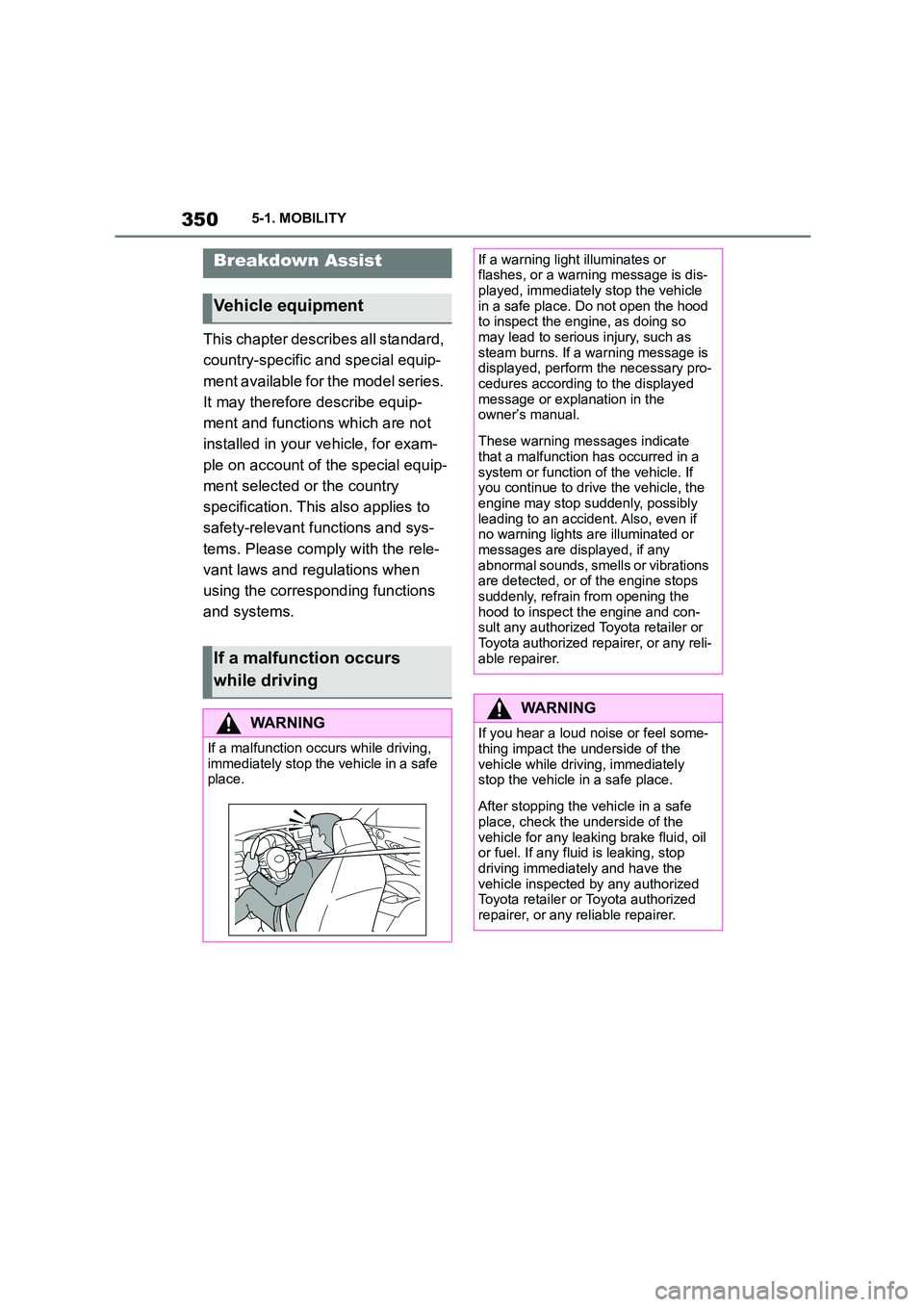
If a malfunction occurs while driving,
immediately stop the vehicle in a safe
place.
If a warning light illuminates or flashes, or a warning message is dis-
played, immediately stop the vehicle
in a safe place. Do not open the hood to inspect the engine, as doing so
may lead to serious injury, such as
steam burns. If a warning message is displayed, perform the necessary pro-
cedures according to the displayed
message or explanation in the owner’s manual.
These warning messages indicate that a malfunction has occurred in a
system or function of the vehicle. If
you continue to drive the vehicle, the engine may stop suddenly, possibly
leading to an accident. Also, even if
no warning lights are illuminated or messages are displayed, if any
abnormal sounds, smells or vibrations
are detected, or of the engine stops suddenly, refrain from opening the
hood to inspect the engine and con-
sult any authorized Toyota retailer or Toyota authorized repairer, or any reli-
able repairer.
WA R N I N G
If you hear a loud noise or feel some-
thing impact the underside of the vehicle while driving, immediately
stop the vehicle in a safe place.
After stopping the vehicle in a safe
place, check the underside of the
vehicle for any leaking brake fluid, oil or fuel. If any fluid is leaking, stop
driving immediately and have the
vehicle inspected by any authorized Toyota retailer or Toyota authorized
repairer, or any reliable repairer.
Page 356 of 498
3545-1. MOBILITY
Standby state is switched on.
Emergency call system is func-
tional.
If the vehicle is equipped with
automatic emergency call: the
SIM card integrated in the vehi-
cle is activated.
In certain circumstances, for exam-
ple deployment of the airbags, an
emergency call may be placed
automatically immediately after an
accident of corresponding severity.
An automatic emergency call is not
influenced by pressing the SOS
button.
1 Tap on cover flap.
2 Press and hold the SOS button
until the LED in the button area
is illuminated green.
The LED is illuminated green
when the emergency call has
been activated.
If a cancellation request is displayed on
the Control Display, the emergency call
can be cancelled.
If the situation permits, wait in the vehi-
cle until voice contact has been estab-
lished.
The LED flashes green when the
connection to the emergency
number has been established.
In the case of an emergency call, data
is sent to the public rescue coordination
centre in order to decide what rescue
measures are required. The data may
include, for example, the current posi-
tion of the vehicle, if this can be deter-
mined.
For information on data transfer and
storage, see page 16.
Even if you can no longer hear the res-
cue coordination centre through the
loudspeakers, the rescue coordination
centre may still be able to hear you
speak.
The rescue coordination centre
ends the emergency call.
The emergency call function may
be impaired.
The LED in the SOS button area
illuminates for appr ox. 30 seconds.
A vehicle message is shown.
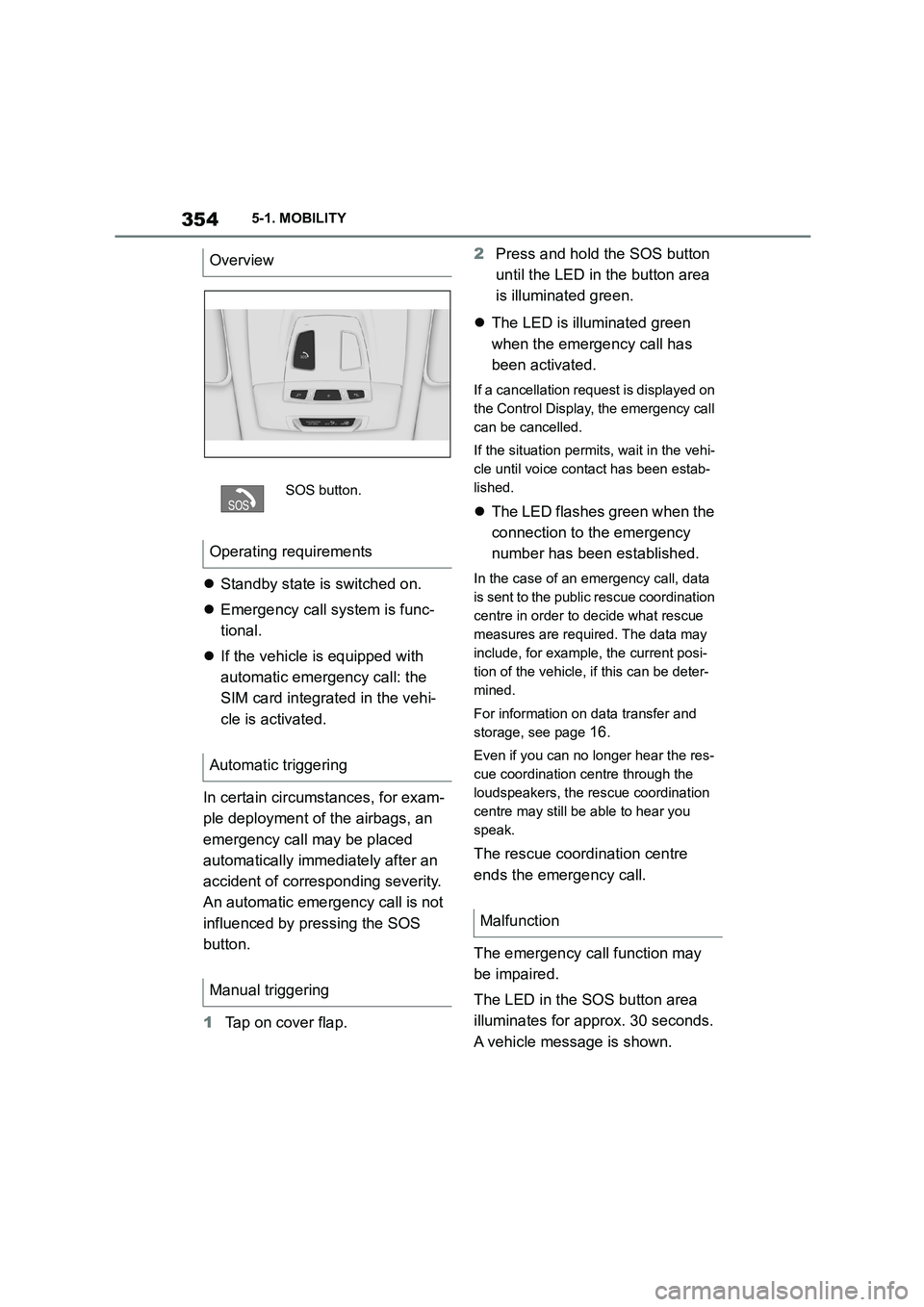
Overview
SOS button.
Operating requirements
Automatic triggering
Manual triggering
Malfunction
Page 358 of 498
3565-1. MOBILITY
2Press and hold the SOS button
until the LED in the button area
is illuminated green.
The LED is illuminated green
when the emergency call has
been activated.
If a cancellation request is displayed on
the Control Display, the emergency call
can be cancelled.
If the situation permits, wait in the vehi-
cle until voice contact has been estab-
lished.
The LED flashes green when the
connection to the emergency
number has been established.
When an emergency call is sent via
Toyota Emergency Call Centre, data is
sent to the Toyota Emergency Call
Centre in order to decide what rescue
measures are required. The data may
include, for example, the current posi-
tion of the vehicle, if this can be deter-
mined.
If questions posed by the Toyota Emer-
gency Call Centre remain unanswered,
rescue measures are automatically ini-
tiated.
Even if you can no longer hear the
Toyota Emergency Call Centre through
the loudspeakers, the Toyota Emer-
gency Call Centre may still be able to
hear you speak.
The Toyota Emergency Call Centre
ends the emergency call.
*: if equipped
The fire extinguisher can be used to
put out vehicle fires.
Depending on the vehicle's equip-
ment and national-market version,
the vehicle may have a fire extin-
guisher.
The fire extinguisher is located in
the vehicle interiour, e.g. behind the
cupholder or in the glove box.
Fire extinguisher*
Principle
General
Overview
Safety note
WA R N I N G
Incorrect use of the fire extinguisher
can cause injury. There is a danger of
injury. Observe the information below when using the fire extinguisher:
●Do not inhale the extinguishing agent. If the extinguishing agent is
inhaled, move the casualty out into
the fresh air. If the casualty experi- ences breathing difficulties, contact
a doctor immediately.
●Do not allow the extinguishing
agent to come into contact with the
skin. Prolonged contact with the extinguishing agent can cause the
skin to dry out.
●Do not allow the extinguishing
agent to come into contact with the
eyes. In the event of contact with the eyes, rinse them immediately
with plenty of water. In case of pro-
longed discomfort, contact a doctor.
Page 370 of 498
3685-1. MOBILITY
Use a dry, clean antistatic microfi-
bre cloth.
Clean the protective glass of the
Head-Up Display, see page 182,
with a microfibre cloth and commer-
cially available dishwashing liquid.
Special measures need to be taken
if putting the vehicle out of use for
longer than three months. Addi-
tional information is available from
any authorized Toyota retailer or
Toyota authorized repairer, or any
reliable repairer.
Displays, screens and protective
glass of the Head-Up Display
NOTICE
Chemical cleaners, moisture or fluids
of all kinds can damage the surface of displays and screens. There is a dan-
ger of damage to property. Clean with
a clean, anti-static microfibre cloth.
NOTICE
The surfaces of displays can be dam-
aged due to improper cleaning. There
is a danger of damage to property. Avoid applying excessive pressure
and do not use abrasive materials.
Laying up the vehicle
Page 487 of 498
485Alphabetical Index
Bluetooth connection..................... 81
Bonnet ........................................... 320
Boot ............................................... 275
Boot lid .......................................... 100
Boot lid via remote control ............ 91
Boot lid, emergency release........ 101
Boot, emergency release ............. 101
Bottle holder, see Cupholder....... 275
Brake assist .................................. 228
Brake assist, adaptive.................. 228
Brake lights, see Bulbs and lights
..................................................... 340
Brake system ................................ 281
Brake, Fluid ................................... 375
Braking safely ............................... 284
Braking, notes .............................. 284
Break recommendations, see Driver
Attention Control........................ 226
Breakdown Assist ........................ 352
Breakdown assistance................. 353
Breakdown, help........................... 352
Brightness, Control Display .......... 73
Bulbs and lights ........................... 340
Button SOS, see Automatic emer-
gency call .................................... 355
Button, start/stop.......................... 144
Buttons on the steering wheel ...... 46
C
Call up mirror adjustment ............ 102
Call up seat adjustment ............... 102
Calling up steering wheel adjust-
ment............................................. 102
Camera lenses, care ..................... 367
Camera, rear-view camera, without
Surround View ............................ 253
Camera-based assistance systems,
see Toyota Supra Safety ............ 205
Camera-based Cruise Control, see
Dynamic radar cruise control ... 238
Cameras, see Sensors of the vehicle
....................................................... 50
Can holder, see Cupholder .......... 275
Car wash ............................... 362, 363
Care of displays, screens ............368
Care of upholstery fabrics ........... 366
Care products ............................... 364
Care, Head-Up Display ................. 368
Care, see Vehicle wash ................362
Care, vehicle.................................. 364
Carpet, care ...................................367
CarPlay, connection to the vehicle84
Carrying children ..........................122
Carrying children safely ...............122
Catalytic converter, see Hot exhaust
system ......................................... 281
CBS Condition Based Service ..... 330
CC, see Cruise Control................. 234
Central locking system .................. 95
Central screen, see Control Display
....................................................... 59
Centre console ................................ 48
Changes, technical, see Your own
safety ...............................................6
Changing bulbs, see Bulbs and
lights ............................................340
Changing gear, Automatic transmis-
sion ..............................................154
Chassis number, see Vehicle identifi-
cation number............................... 22
Checking the oil level electronically
..................................................... 324
Child restraint systems, i-Size..... 128
Child restraint systems, see Carry-
ing children safely ...................... 122
Child seat mounting .....................123
Child seat mountings, ISOFIX ..... 126
Child seats, see Carrying children
safely ...........................................122
Chrome surfaces, care ................. 366
Chrome-plated surfaces, care ..... 366
Cleaning of displays, screens ..... 368
Cleaning, Head-Up Display ..........368
Comfort closing with the remote
control ........................................... 91
Comfort opening using the remote
control ........................................... 90
Compact wheel, see Emergency
wheel ...........................................318
Page 488 of 498
486Alphabetical Index
Compartments in the doors......... 274
Compressor .................................. 300
Condensation when vehicle is
parked ......................................... 285
Condition Based Service CBS..... 330
Connection point, starting assis-
tance ............................................ 358
Connections, Screen Mirroring ..... 85
Continuing a journey with a flat tyre
..................................................... 311
Control Display ............................... 59
Control Display, settings ............... 71
Control systems, driving stability228
Controller ........................................ 60
Coolant .......................................... 327
Coolant level ................................. 327
Coolant temperature .................... 169
Cooling effect, maximum............. 263
Cooling function ........................... 262
Cooling system ............................. 327
Cornering light .............................. 188
Corrosion of brake discs ............. 285
Cruise Control with distance control,
see Dynamic radar cruise control
..................................................... 238
Cruise Control without distance con-
trol, see Cruise Control ............. 234
Cruise Control, active with Stop &
Go ACC........................................ 238
Cruise Control, see Cruise Control
..................................................... 234
Cruise control, see Dynamic radar
cruise control ............................. 238
Cupholder ..................................... 275
Curtain shield airbag.................... 193
Customize settings, see Sport mode
switch .......................................... 160
D
Damage, tyres ............................... 295
Data protection, settings ............... 75
Data, see Deleting personal data .. 75
Data, technical .............................. 370
Date.................................................. 72
Daytime driving lights ..................187
Deactivation, airbags.................... 202
Deleting personal data ................... 75
Deletion of personal data ............... 75
Departure time, auxiliary heating 268
Departure time, independent ventila-
tion ............................................... 268
Desired speed, see Dynamic radar
cruise control..............................238
Devices, managing ......................... 86
Diagnosis connection ..................332
Diesel particle filter, see Exhaust gas
particle filter ................................281
Differential oil ................................375
Dimensions ...................................370
Dimmable exterior mirrors ........... 118
Dimming rear-view mirror ............ 118
Dipping headlights, see Automatic
high-beam ...................................188
Direct selection buttons, see Favour-
ites buttons ................................... 68
Display in windscreen, see Head-Up
Display.........................................182
Display lighting, see Instrument
lighting ........................................191
Displaying the device list ............... 86
Displays .........................................162
Displays and symbols ......................4
Displays, screens ......................... 368
Disposal, coolant ..........................328
Disposal, vehicle battery.............. 343
Disposing of the battery...............343
Disposing of the old battery ........ 343
Distance warning, see Parking Sen-
sors ..............................................248
Downhill gradients........................285
Drive mode, see Sport mode switch
..................................................... 160
Driver assistance, see Toyota Supra
Safety...........................................205
Driver Attention Control ...............226
Driver profiles ................................. 76
Drive-ready state, idle state and
standby state ................................ 53