ECU TOYOTA SUPRA 2022 Owner's Manual
[x] Cancel search | Manufacturer: TOYOTA, Model Year: 2022, Model line: SUPRA, Model: TOYOTA SUPRA 2022Pages: 498, PDF Size: 104.06 MB
Page 316 of 498
3145-1. MOBILITY
The vehicle manufacturer recom-
mends that the vehicle should addi-
tionally be protec ted against rolling
away during a wheel change.
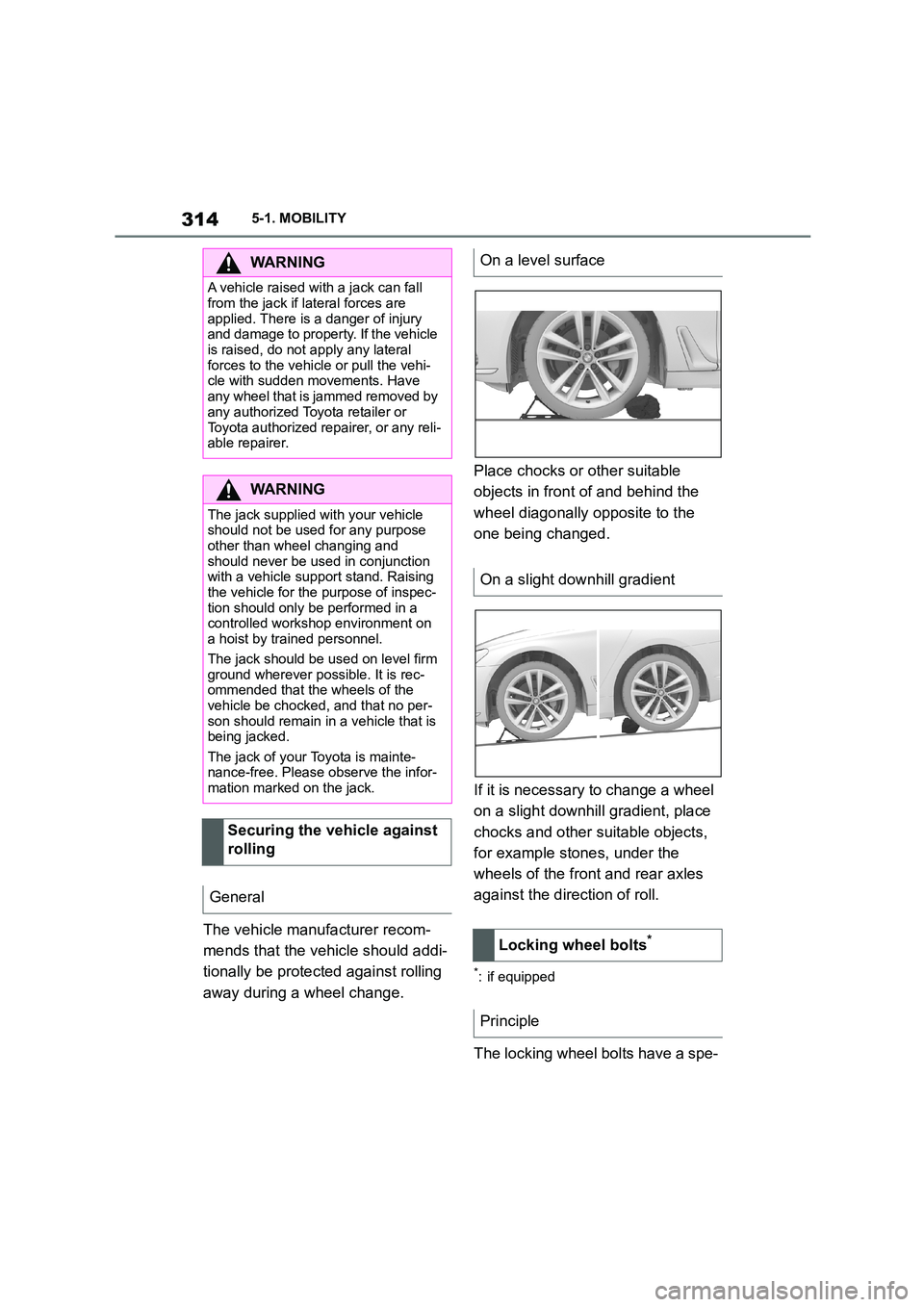
Place chocks or other suitable
objects in front of and behind the
wheel diagonally opposite to the
one being changed.
If it is necessary to change a wheel
on a slight downh ill gradient, place
chocks and other suitable objects,
for example stones, under the
wheels of the front and rear axles
against the direction of roll.
*: if equipped
The locking wheel bolts have a spe-
WA R N I N G
A vehicle raised with a jack can fall
from the jack if lateral forces are
applied. There is a danger of injury and damage to property. If the vehicle
is raised, do not apply any lateral
forces to the vehicle or pull the vehi- cle with sudden movements. Have
any wheel that is jammed removed by
any authorized Toyota retailer or
Toyota authorized repairer, or any reli- able repairer.
WA R N I N G
The jack supplied with your vehicle should not be used for any purpose
other than wheel changing and
should never be used in conjunction with a vehicle support stand. Raising
the vehicle for the purpose of inspec-
tion should only be performed in a controlled workshop environment on
a hoist by trained personnel.
The jack should be used on level firm ground wherever possible. It is rec-
ommended that the wheels of the
vehicle be chocked, and that no per-
son should remain in a vehicle that is being jacked.
The jack of your Toyota is mainte-
nance-free. Please observe the infor- mation marked on the jack.
Securing the vehicle against
rolling
General
On a level surface
On a slight downhill gradient
Locking wheel bolts*
Principle
Page 319 of 498
317
5
5-1. MOBILITY
MOBILITY
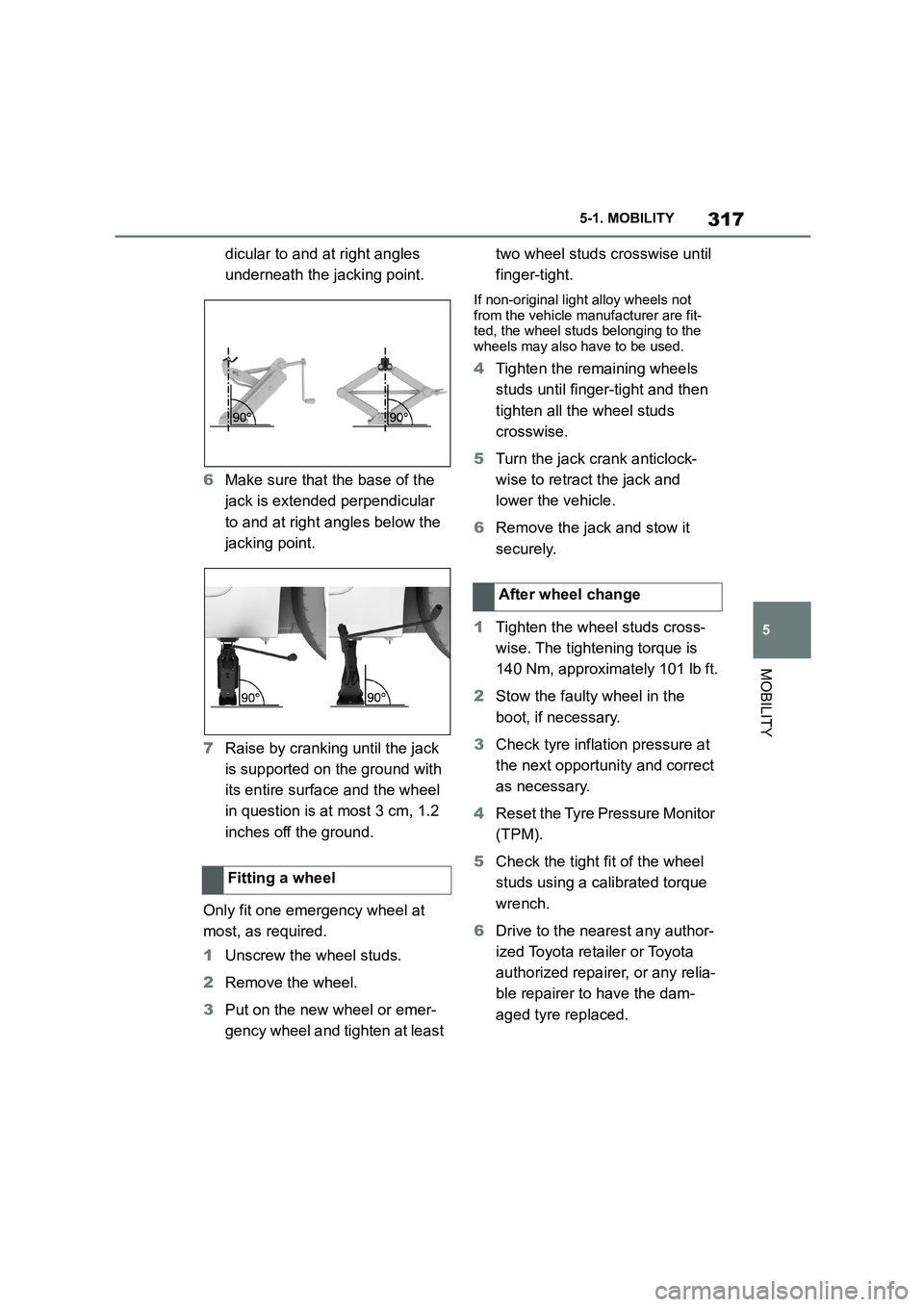
dicular to and at right angles
underneath the jacking point.
6 Make sure that the base of the
jack is extended perpendicular
to and at right angles below the
jacking point.
7 Raise by cranking until the jack
is supported on the ground with
its entire surface and the wheel
in question is at most 3 cm, 1.2
inches off the ground.
Only fit one emergency wheel at
most, as required.
1 Unscrew the wheel studs.
2 Remove the wheel.
3 Put on the new wheel or emer-
gency wheel and tighten at least
two wheel studs crosswise until
finger-tight.
If non-original light alloy wheels not
from the vehicle manufacturer are fit- ted, the wheel studs belonging to the
wheels may also have to be used.
4 Tighten the remaining wheels
studs until finger-tight and then
tighten all the wheel studs
crosswise.
5 Turn the jack crank anticlock-
wise to retract the jack and
lower the vehicle.
6 Remove the jack and stow it
securely.
1 Tighten the wheel studs cross-
wise. The tightening torque is
140 Nm, approximately 101 lb ft.
2 Stow the faulty wheel in the
boot, if necessary.
3 Check tyre inflation pressure at
the next opportunity and correct
as necessary.
4 Reset the Tyre Pressure Monitor
(TPM).
5 Check the tight fit of the wheel
studs using a calibrated torque
wrench.
6 Drive to the nearest any author-
ized Toyota reta iler or Toyota
authorized repairer, or any relia-
ble repairer to have the dam-
aged tyre replaced.
Fitting a wheel
After wheel change
Page 345 of 498
343
5
5-1. MOBILITY
MOBILITY
repairer, or any reliable repairer.
Following an electrical power fail-
ure, some equipme nt will have to
be reinitialised or in dividual settings
will need to be updated, for exam-
ple:
Memory function: save positions
again.
Time: update.
Date: update.
Observe the following information
on storing vehicle batteries:
Store the battery in a cool and
dry place.
Protect the battery from direct
sunlight and frost.
Only clean the battery with a
damp, anti-static cloth.
Store the battery upright and
secure it against falling over.
Install the oldest batteries first.
Do not remove the protective cap
from the contacts.
Charge or install the battery by
the date on the battery label at
the latest. Once fully charged,
the battery will wo rk for another
10 months.
Batteries filled with acid should be
transported upright. Protect batter-
ies against falling over when in
transit.
The fuses are located at different
positions in the vehicle.
Fuses are located behind a cover in
the driver's side or front passen-
ger's side footwell.
Power failure
Storing the battery
Disposing of the old battery
Dispose of old batteries at
any authorized Toyota
retailer or Toyota author-
ized repairer, or any relia-
ble repairer or hand them
in to an authorised collect-
ing point.
Fuses
General
Safety note
WA R N I N G
Incorrect or repaired fuses can over-
load electrical cables and compo- nents. There is a risk of fire. Do not
repair blown fuses or replace them
with fuses with a different colour or amp rating.
In the interior
Page 350 of 498
3485-1. MOBILITY
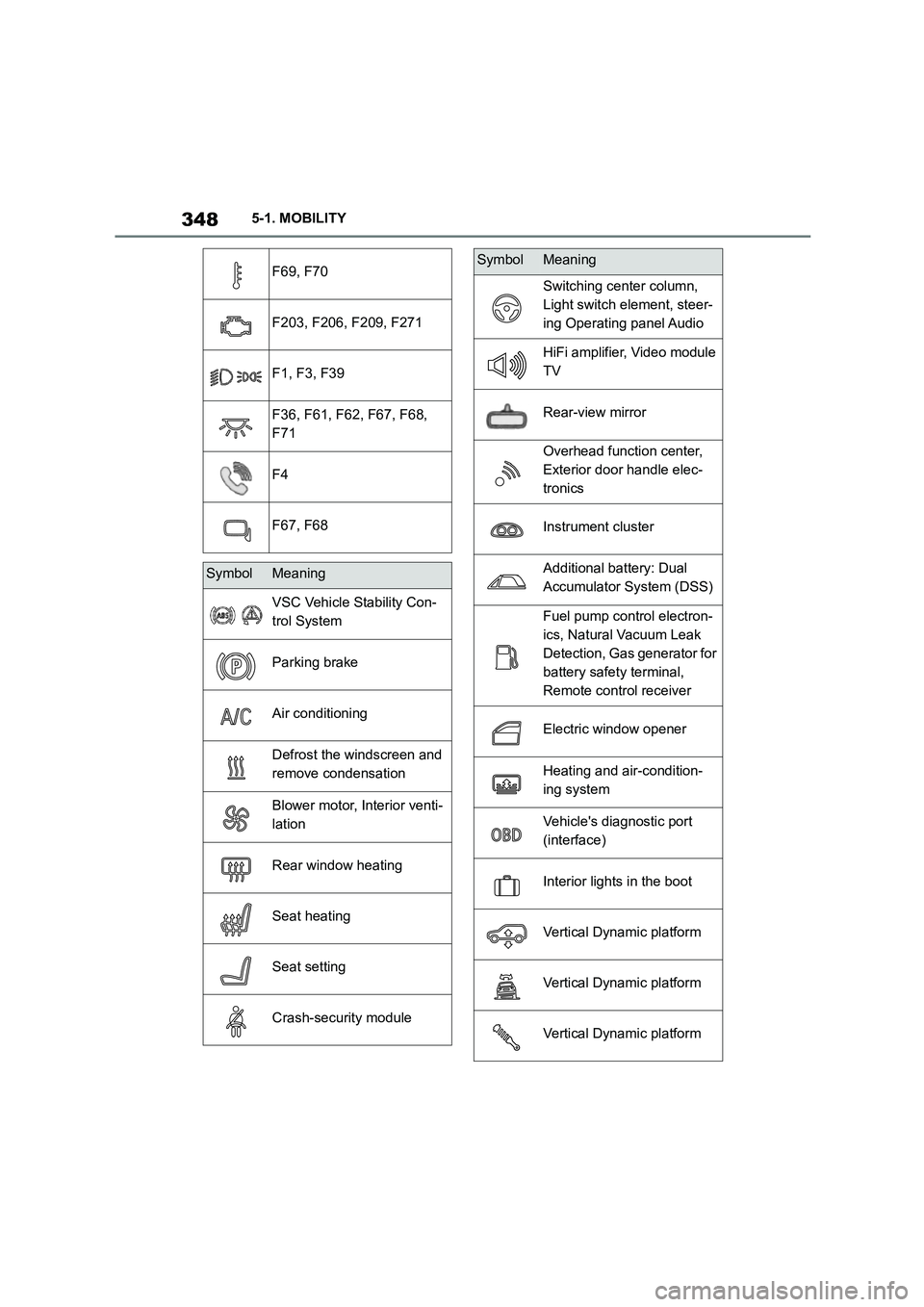
F69, F70
F203, F206, F209, F271
F1, F3, F39
F36, F61, F62, F67, F68,
F71
F4
F67, F68
SymbolMeaning
VSC Vehicle Stability Con-
trol System
Parking brake
Air conditioning
Defrost the windscreen and
remove condensation
Blower motor, Interior venti-
lation
Rear window heating
Seat heating
Seat setting
Crash-security module
Switching center column,
Light switch element, steer-
ing Operating panel Audio
HiFi amplifier, Video module
TV
Rear-view mirror
Overhead function center,
Exterior door handle elec-
tronics
Instrument cluster
Additional battery: Dual
Accumulator System (DSS)
Fuel pump control electron-
ics, Natural Vacuum Leak
Detection, Gas generator for
battery safety terminal,
Remote control receiver
Electric window opener
Heating and air-condition-
ing system
Vehicle's diagnostic port
(interface)
Interior lights in the boot
Vertical Dynamic platform
Vertical Dynamic platform
Vertical Dynamic platform
SymbolMeaning
Page 359 of 498
357
5
5-1. MOBILITY
MOBILITY
Open the buckles on the retaining
strap.
To use the fire extinguisher, follow
the manufacturer's instructions on
the fire extinguisher and the infor-
mation supplied with it.
1 Insert the fire extinguisher into
the holder.
2 Hook in and close the buckles.
Have the fire extinguisher checked
every 2 years by any authorized
Toyota retailer or Toyota authorized
repairer, or any reliable repairer.
Take note of the next maintenance
date for the fire extinguisher.
Replace the fire extinguisher after
use or have it refilled.
If the vehicle battery is discharged,
the engine can be started from
another vehicle's battery using two
jump leads. Only use jump leads
with fully insulated terminal clamps.
1 Check whether the battery in the
other vehicle shows 12 volts.
Information about the voltage is
provided on the battery.
2 Switch off the engine of the
other vehicle.
WA R N I N G
Objects in the driver's footwell can
restrict the pedal travel or block a
pedal that has been pressed. There is a risk of accident. Ensure that items in
the vehicle are stowed securely and
cannot get into the driver's footwell.
Taking out the fire extin-
guisher
Using the fire extinguisher
Stowing the fire extinguisher
Maintenance and refilling
Starting assistance
General
Safety notes
WA R N I N G
Touching live components can result
in an electric shock. There is a danger
of injury or even death. Do not touch any components that could be live.
WA R N I N G
Connecting the jump leads in the wrong sequence can cause sparks.
There is a danger of injury. Please
comply with the correct sequence
when connecting up.
NOTICE
Contact between the bodywork of the
two vehicles can result in a short cir- cuit during starting assistance. There
is a danger of damage to property.
Make sure there is no contact between the bodywork.
Preparations
Page 361 of 498
359
5
5-1. MOBILITY
MOBILITY
Do not have the vehicle towed.
To remove a broken-down vehicle
from a dangerous area, it can be
pushed for a short distance.
To roll or push the vehicle, see
page 156.
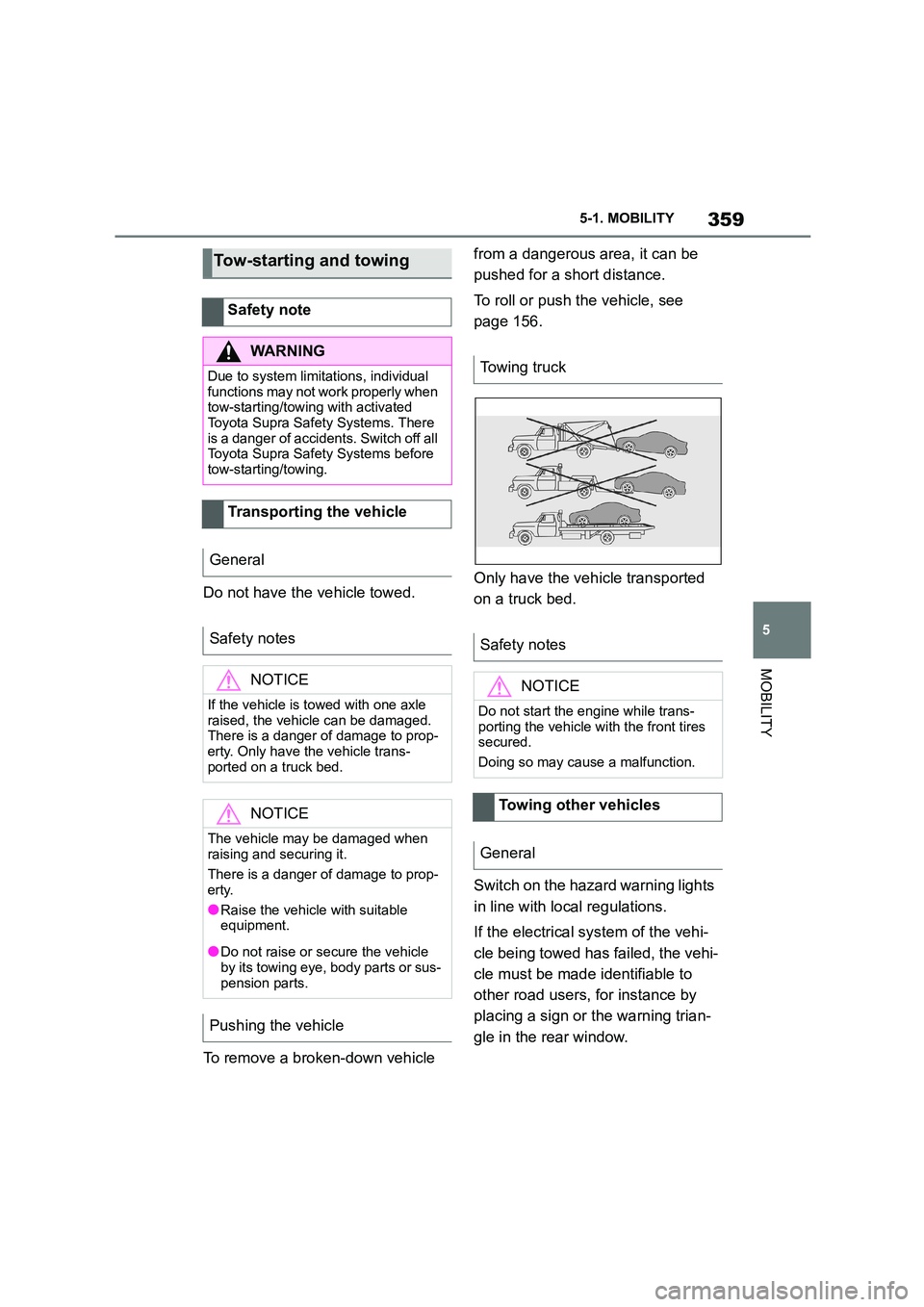
Only have the vehicle transported
on a truck bed.
Switch on the hazard warning lights
in line with local regulations.
If the electrical system of the vehi-
cle being towed has failed, the vehi-
cle must be made identifiable to
other road users, for instance by
placing a sign or the warning trian-
gle in the rear window.
Tow-starting and towing
Safety note
WA R N I N G
Due to system limitations, individual
functions may not work properly when
tow-starting/towing with activated
Toyota Supra Safety Systems. There is a danger of accidents. Switch off all
Toyota Supra Safety Systems before
tow-starting/towing.
Transporting the vehicle
General
Safety notes
NOTICE
If the vehicle is towed with one axle raised, the vehicle can be damaged.
There is a danger of damage to prop-
erty. Only have the vehicle trans- ported on a truck bed.
NOTICE
The vehicle may be damaged when raising and securing it.
There is a danger of damage to prop-
erty.
●Raise the vehicle with suitable
equipment.
●Do not raise or secure the vehicle by its towing eye, body parts or sus-
pension parts.
Pushing the vehicle
Towing truck
Safety notes
NOTICE
Do not start the engine while trans-
porting the vehicle with the front tires secured.
Doing so may cause a malfunction.
Towing other vehicles
General
Page 369 of 498
367
5
5-1. MOBILITY
MOBILITY
the wiper blades to prevent a
reduction in wipe quality.
Clean with a microfibre cloth.
Lightly moisten the cloth with water,
if necessary.
Do not soak the roof lining.
Dirt on the belt straps can interfere
with the action of the reel and is a
safety hazard.
Only clean the belt straps with a
mild soap solution while still fitted to
the vehicle.
Do not allow seat belts to retract
unless they are dry.
Floor mats can be removed from
the vehicle to enable the interior to
be cleaned more thoroughly.
In the event of he avy soiling, clean
floor carpets using a microfibre
cloth and water or textile cleaner.
Rub back and forth in the direction
of travel to prevent matting.
Clean sensors or camera lenses
using a cloth moistened with a
small amount of glass cleaner.
Plastic parts
NOTICE
Cleaning agents containing alcohol or
solvents, such as ni tro thinners, cold
cleaners, fuel or similar can damage plastic parts. There is a danger of
damage to property. Clean with a
microfibre cloth. Lightly moisten the cloth with water, if necessary.
Seat belts
WA R N I N G
Chemical cleaners can cause irrepa-rable damage to the fabric of the seat
belts. The protective function of the
seat belts will be lost. There is a dan- ger of injury or even death. Only use a
mild soap and water solution for
cleaning the seat belts.
Carpets and foot mats
WA R N I N G
Objects in the driver's footwell can
restrict the pedal travel or block a pedal that has been pressed. There is
a danger of accidents. Stow items in
the vehicle so that they are secure and cannot get into the driver's
footwell. Only use floor mats that are
suitable for the vehicle and can be
securely fastened to the floor. Do not use loose floor mats, and do not place
several floor mats on top of one
another. Make sure that there is suffi- cient space for the pedals. Ensure
that floor mats are securely reat-
tached after having been removed, for example for cleaning.
Sensors/camera lenses
Page 491 of 498
489Alphabetical Index
Idle state, standby state and
drive-ready state .......................... 53
Important considerations ............ 122
Indicator and warning lamps, see
Vehicle messages ...................... 163
Indicator lamp, front passenger
airbags ........................................ 204
Individual settings, see Driver pro-
files ................................................ 76
Inflation pressure check, see Tyre
Pressure Monitor........................ 304
Inflation pressure, tyres ............... 292
Information on no passing .......... 173
Initialising, Tyre Pressure Monitor
TPM.............................................. 307
Instrument cluster ........................ 162
Instrument cluster switch, see Wiper
system ......................................... 151
Instrument lighting ....................... 191
Integrated key ................................. 94
Intended use ..................................... 6
Interior light .................................. 191
Interior light when unlocking ........ 89
Interior light with the vehicle locked
....................................................... 91
Interior movement detector ......... 104
Interval Display, see Service require-
ments........................................... 170
i-Size child restraint systems ...... 128
ISOFIX, child seat mountings...... 126
J
Joystick, Automatic transmission
..................................................... 154
Jump starting, see Starting assis-
tance ............................................ 357
Jump-starting connections ......... 358
Junction warning, see Pre-Collision
System ........................................ 207
K
Key switch for front passenger
airbags ........................................ 202
Key, mechanical .............................. 94
Key, see Remote control ................ 88
Keyless Go, see Smart Key System
....................................................... 96
Kick-down, Automatic transmission
..................................................... 154
Knee airbag ...................................193
L
Labelling of recommended tyres 297
Labelling of run-flat tyres.............298
Lane boundary, warning .............. 216
Lane Departure Warning .............. 216
Language, setting on the Control
Display........................................... 71
Lashing eyes in the boot.............. 276
Lashing straps, see Lashing eyes in
the boot ....................................... 276
Launch Control .............................159
Laying up the vehicle ................... 368
Laying up, vehicle......................... 368
Leather care .................................. 365
Left-hand traffic, lig ht setting ...... 190
Light alloy wheels, care ...............366
Light in exterior mirror, see RCTA
(Rear cross traffic alert) function
..................................................... 256
Light in the exterior mirror, see Blind
spot monitor ............................... 220
Light switch ...................................184
Lighting.......................................... 184
Lights ............................................. 184
LIM button, see Manual Speed Lim-
iter ................................................ 232
List of all messages........................ 74
Loading .......................................... 275
Loading the boot, see Stowing and
securing a transported load ...... 276
Locking settings ...........................101
Locking wheel bolts .....................314
Locking with the remote control ... 90
Locking, automatic .......................102
Locking, see Opening and closing88
Low-beam headlights ................... 186
Page 494 of 498
492Alphabetical Index
RES CNCL button, see Cruise Con-
trol ............................................... 234
RES CNCL button, see Dynamic
radar cruise control ................... 238
Reset, Tyre Pressure Monitor TPM
..................................................... 307
Restraint systems for children, see
Carrying children safely ............ 122
Retreaded tyres ............................ 297
Reuse, recycling ........................... 333
Reversing light, replacing Bulbs, see
Bulbs and lights ......................... 340
Revolution counter....................... 168
Right-hand tra ffic, light setting ... 190
Rim cleaner, light alloy wheels ... 366
RON, petrol grade......................... 323
Roof lining....................................... 49
Roof load ....................................... 371
Rope for tow-starting/towing....... 360
RSC Runflat System Component,
see Run-flat tyres ....................... 298
Rubber parts, care........................ 366
Run Flat tyres, see Run-flat tyres 298
Run-flat tyres ................................ 298
Running in..................................... 280
Running in brake discs, see Brake
system ......................................... 281
Running in brake pads, see Brake
system ......................................... 281
Run-on of fan, see Exhaust gas parti-
cle filter ....................................... 281
S
Safe seating position ................... 107
Safety systems, see Airbags ....... 192
Safety systems, see Toyota Supra
Safety .......................................... 205
Saving energy, see Shift position
indicator ...................................... 171
Saving fuel .................................... 286
Screen Mirroring, connection........ 85
Screen, see Control Display .......... 59
Screwdriver, see On-board tool kit
..................................................... 339
Sealant, see Mobility System.......299
Seat belt reminder for driver and
front passenger seat .................. 116
Seat belts ....................................... 111
Seat belts, care .............................367
Seat heating .................................. 120
Seat, see Memory function .......... 119
Seats, front .................................... 107
Securing a transported load ........ 276
Selection list in the instrument clus-
ter .................................................177
Selector lever, Automatic transmis-
sion ..............................................154
Sensors of the vehicle.................... 50
Sensors, care ................................367
Service requirement, see CBS Con-
dition Based Service ..................330
Service requirements ................... 170
Service, see Breakdown assistance
..................................................... 353
Settings on the Control Display .... 71
Settings, locking/unlocking .........101
Shift Lights, revolu tion counter .. 168
Shift paddles on the steering wheel
..................................................... 154
Shift position indicator................. 171
Side airbag .................................... 193
Side lights......................................186
Side nozzles, see Ventilation .......266
Signal horn, horn ............................ 46
Signals on unlocking, see
Acknowledgement signals ........ 102
Sizes, see Dimensions ................. 370
Smallest turning circle ................. 370
Smart Key System .......................... 96
Snow chains .................................. 304
Socket for on-board diagnosis OBD
..................................................... 332
Sockets, connecting electrical appli-
ances, see Sockets .................... 269
Soot particle filter, see Exhaust gas
particle filter ................................281
SOS button, see Automatic emer-
gency call .................................... 355
Spanner, see On-board tool kit.... 339
Page 495 of 498
493Alphabetical Index
Spare wheel, see Emergency wheel
..................................................... 318
Special equipment, see Vehicle
equipment ....................................... 4
Speed Limit Assist ....................... 246
Speed Limit Device, see Manual
Speed Limiter ............................. 232
Speed Limit Info ........................... 173
Speed limit, display, see Speed Limit
Info............................................... 173
Speed Limiter, manual ................. 232
Sport displays............................... 180
Sport mode switch ............... 154, 160
Sport programme, Automatic trans-
mission........................................ 154
Sport suspension, see Adaptive vari-
able suspension ......................... 259
SPORT, see Sport mode switch .. 160
Stability control systems ............. 228
Standard equipment, see Vehicle
equipment ....................................... 4
Standard view, Head-Up Display. 182
Standby state, idle state and
drive-ready state .......................... 53
Start/stop button........................... 144
Starting assistance ...................... 357
Starting assistance, see VSC ...... 229
Status Control Display, tyres....... 306
Status information, Toyota Supra
Command...................................... 58
Status of the Owner's Manual ......... 5
Status, vehicle .............................. 181
Steering wheel, adjusting ............ 119
Steering wheel, buttons ................. 46
Steering wheel, see Memory function
..................................................... 119
Storage facilities........................... 274
Storage, see Laying up the vehicle
..................................................... 368
Storage, tyres ............................... 298
Stowing and securing a transported
load .............................................. 276
Stowing heavy transported loads276
Summer tyres, tread ..................... 294
Sun visor ....................................... 269
Supplementary text message ...... 164
Suspension settings, see Sport
mode switch................................160
Switch for driving dynamics, see
Sport mode switch .....................160
Switches, see Driving area ............ 46
Switching on the headlight courtesy
delay feature ................................. 92
Symbols and displays ......................4
T
Tail lights, see Bulbs and lights .. 340
Tailgate, see Boot lid .................... 100
Tank display .................................. 168
Technical changes, see Your own
safety ...............................................6
Technical data ............................... 370
Teleservice call .............................220
Temperature display, see Outside
temperature................................. 169
Temperature, automatic air condi-
tioning .........................................262
Temperature, engine oil ...............169
Tension belt, see Lashing eyes in the
boot..............................................276
Text message, supplementary..... 164
Thiefproof wheel studs ................314
Tilt alarm sensor ...........................104
Tilting down front passenger's mir-
ror, see Automatic parking function
..................................................... 118
Time ................................................. 72
Tire inflation pressure
Maintenance data....................... 374
Tires
Size ............................................374
Tool ................................................ 339
Topping up engine oil................... 325
Torque display, see Sport displays
..................................................... 180
Total weight, permitted................. 371
Touchscreen.................................... 65
Touchscreen, see Operation by
touchscreen .................................. 65