wheel TOYOTA SUPRA 2022 Owner's Manual
[x] Cancel search | Manufacturer: TOYOTA, Model Year: 2022, Model line: SUPRA, Model: TOYOTA SUPRA 2022Pages: 498, PDF Size: 104.06 MB
Page 122 of 498
1203-1. CONTROLS
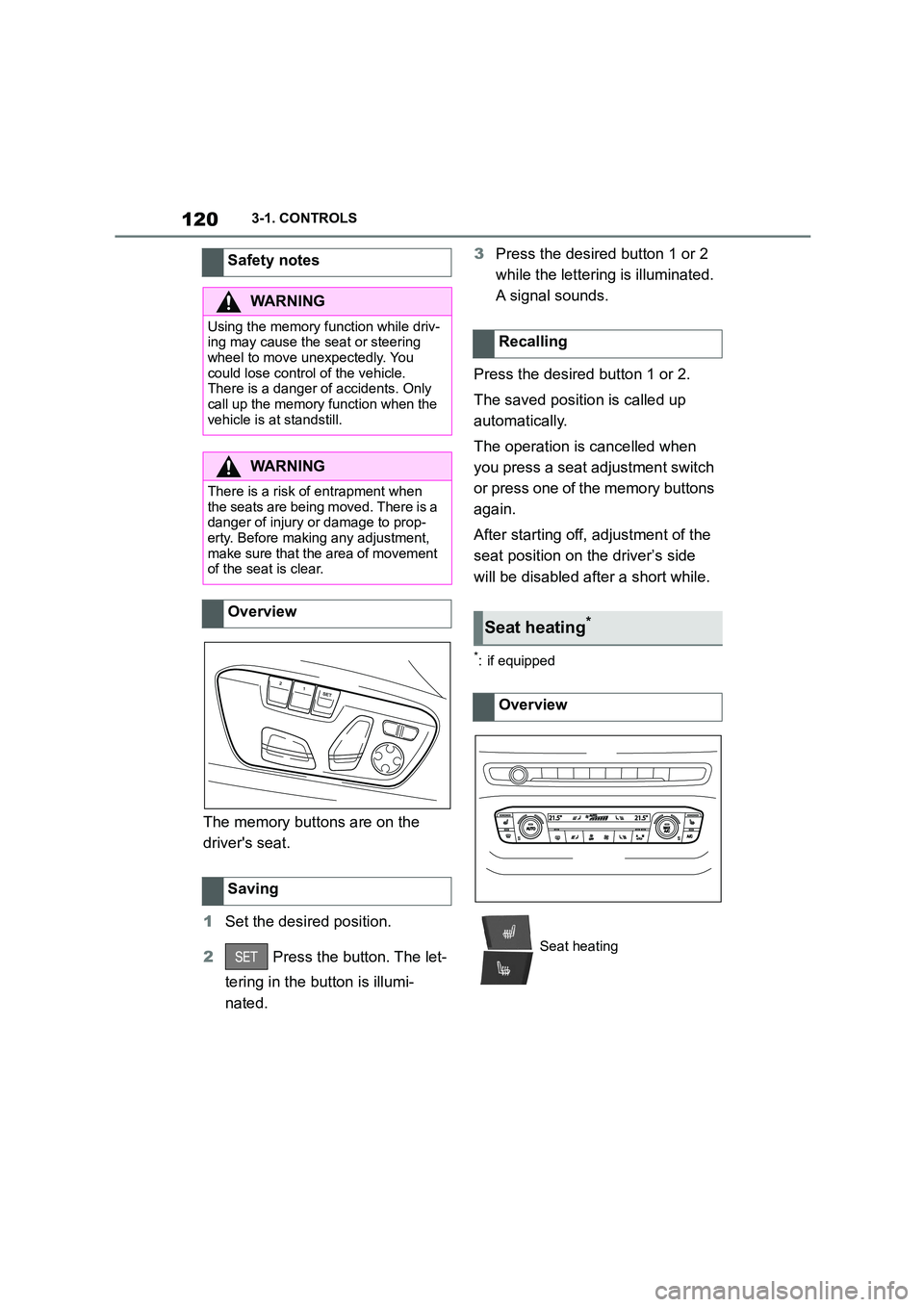
The memory buttons are on the
driver's seat.
1 Set the desired position.
2 Press the button. The let-
tering in the button is illumi-
nated.
3 Press the desired button 1 or 2
while the lettering is illuminated.
A signal sounds.
Press the desired button 1 or 2.
The saved position is called up
automatically.
The operation is cancelled when
you press a seat adjustment switch
or press one of the memory buttons
again.
After starting off, adjustment of the
seat position on the driver’s side
will be disabled after a short while.
*: if equipped
Safety notes
WA R N I N G
Using the memory function while driv-
ing may cause the seat or steering wheel to move unexpectedly. You
could lose control of the vehicle.
There is a danger of accidents. Only call up the memory function when the
vehicle is at standstill.
WA R N I N G
There is a risk of entrapment when the seats are being moved. There is a
danger of injury or damage to prop-
erty. Before making any adjustment, make sure that the area of movement
of the seat is clear.
Overview
Saving
Recalling
Seat heating*
Overview
Seat heating
Page 148 of 498
1463-1. CONTROLS
On steep downward gradients.
Brake not pressed strongly
enough.
High outside temperature and
operation of the automatic air
conditioning.
Interior not heated or cooled to
the desired temperature.
Where there is a risk of conden-
sation when the automatic air
conditioning is switched on.
Engine or other parts not at oper-
ating temperature.
Engine cooling is required.
Sharp steering angle or steering
operation.
Vehicle battery is heavily dis-
charged.
At high altitudes.
Bonnet is unlocked.
Park Assistant is activated.
Stop-and-go traffic.
Selector lever position in N or R.
After reversing.
Use of fuel with high ethanol
content.
For driving off, the engine automati-
cally starts under the following con-
ditions:
By releasing the brake pedal.
After starting the engine, accelerate
as normal.
After an automatic shut down, the
engine will not rest art automatically,
if one of the following conditions is
met:
Driver's seat belt unbuckled and
driver's door open.
Bonnet has been unlocked.
Several indicator lamps illuminate
for various lengths of time.
The engine can only be started
using the start/stop button.
Even if you do not want to drive off,
the engine restarts automatically in
the following situations:
Very high temperature in the
interior when the cooling function
is switched on.
Very low temperature in the inte-
rior when the heating is switched
on.
Where there is a risk of conden-
sation when the automatic air
conditioning is switched on.
When the steering wheel is
turned.
Shift from selector lever position
D to N or R.
Engine start
Operating requirements
Driving off
Safety function
System limits
Page 150 of 498
1483-1. CONTROLS
example in order to leave it.
1 Press the start/stop button.
Drive-ready state is switched off.
Standby state is switched on.
Selector lever position P is auto-
matically engaged.
2 Apply the parking brake.
In certain situations the Auto
Start/Stop is deactivated automati-
cally for safety reasons, for exam-
ple if the absence of the driver is
detected.
The Auto Start/Stop no longer shuts
down the engine automatically. A
vehicle message is shown. It is
possible to keep driving. Have the
system checked by any authorized
Toyota retailer or Toyota authorized
repairer, or any reliable repairer.
The parking brake is used to pre-
vent the vehicle from rolling when it
is parked.
Automatic deactivation
General
Malfunction
Parking brake
Principle
Safety notes
WA R N I N G
An unsecured vehicle can start mov-
ing and rolling away. There is a risk of accident. Before leaving the vehicle,
secure it to prevent it from rolling
away.
Observe the following to ensure that
the vehicle is secured against rolling
away:
●Apply the parking brake.
●Turn the front wheels towards the kerb on upward or downward gradi-
ents.
●Additionally secure the vehicle on
upward or downward gradients, for
example with a chock.
WA R N I N G
Unsupervised children or pets in the
vehicle can set the vehicle in motion
and endanger themselves or other road users, for example by the follow-
ing actions:
●Pressing the start/stop button.
●Releasing the parking brake.
●Opening and closing doors or win-
dows.
●Engaging selector lever position N.
●Operating vehicle equipment.
There is a risk of accidents or injury. Do not leave children or pets unsu-
pervised in the vehicle. When leaving
the vehicle, take the remote control with you and lock the vehicle.
Page 155 of 498
153
3
3-1. CONTROLS
CONTROLS
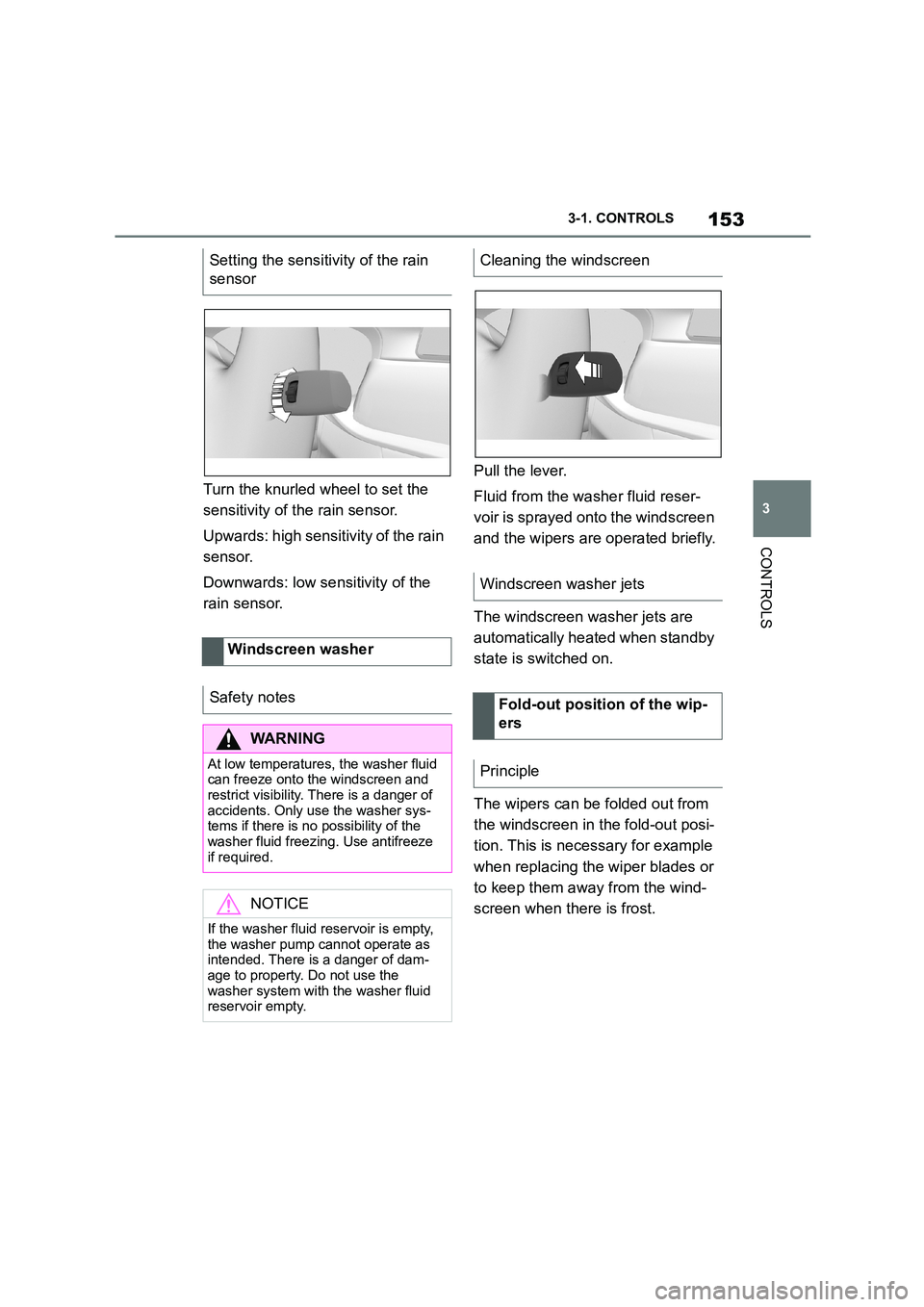
Turn the knurled wheel to set the
sensitivity of t he rain sensor.
Upwards: high sensitivity of the rain
sensor.
Downwards: low se nsitivity of the
rain sensor.
Pull the lever.
Fluid from the washer fluid reser-
voir is sprayed on to the windscreen
and the wipers are operated briefly.
The windscreen washer jets are
automatically heated when standby
state is switched on.
The wipers can be folded out from
the windscreen in the fold-out posi-
tion. This is necessary for example
when replacing the wiper blades or
to keep them away from the wind-
screen when there is frost.
Setting the sensitivity of the rain
sensor
Windscreen washer
Safety notes
WA R N I N G
At low temperatures, the washer fluid can freeze onto the windscreen and
restrict visibility. There is a danger of
accidents. Only use the washer sys- tems if there is no possibility of the
washer fluid freezing. Use antifreeze
if required.
NOTICE
If the washer fluid reservoir is empty,
the washer pump cannot operate as
intended. There is a danger of dam- age to property. Do not use the
washer system with the washer fluid
reservoir empty.
Cleaning the windscreen
Windscreen washer jets
Fold-out position of the wip-
ers
Principle
Page 157 of 498
155
3
3-1. CONTROLS
CONTROLS
Selector lever posi tion for all nor-
mal driving. All gears for forward
driving are selected automatically.
Only engage selector lever posi-
tion R when the vehicle is station-
ary.
In selector lever position N, the
vehicle can be pushed or can roll
without power from the engine, for
example in car washes, see page
156.
Selector lever position for parking
the vehicle, for example. In selector
lever position P, the transmission
blocks the drive wheels.
Only engage selector lever posi-
tion P when the vehicle is station-
ary.
■P is engaged automatically
Selector lever position P is auto-
matically engaged in the following
situations, for example:
After switching off drive-ready
state if selector lever position R,
D or M is engaged.
After switching off standby state
if selector leve r position N is
engaged.
If, while the vehicle is at a stand-
still and selector le ver position D,
M or R is engaged, the driver's
seat belt is unfastened, the
driver's door is opened and the
brake pedal is not depressed.
Apply the brakes until you are
ready to drive off, otherwise the
vehicle will move wh en a drive posi-
tion is selected.
Safety note
WA R N I N G
An unsecured vehicle can start mov-
ing and rolling away. There is a dan- ger of accidents. Before leaving the
vehicle, secure it to prevent it from
rolling away, for example by applying the parking brake.
Observe the following to ensure that
the vehicle is secured against rolling away:
• Apply the parking brake.
• Turn the front wheels towards the
kerb on upward or downward gradi- ents.
• Additionally secure the vehicle on upward or downward gradients, for
example with a chock.
Selector lever positions
D drive position
R Reverse
N neutral
P Park
Engaging selector lever posi-
tions
General
Page 159 of 498
157
3
3-1. CONTROLS
CONTROLS
3 Depress the brake pedal.
4 Touch the selector lever lock
and engage selector lever posi-
tion N.
5 Switch off drive-ready state.
Standby state then remains switched
on and a vehicle message is shown.
The vehicle can now roll.
Selector lever position P is auto-
matically engaged after approxi-
mately 35 minutes.
If there is a fault, it may not be pos-
sible to change the selector lever
position.
Unlock the transmission lockout
electronically if necessary, see
page 158.
Kick-down enables you to achieve
maximum performance.
Press the accelerator pedal down
beyond the regular full-throttle posi-
tion; resistance will be felt.
The gears can be changed manu-
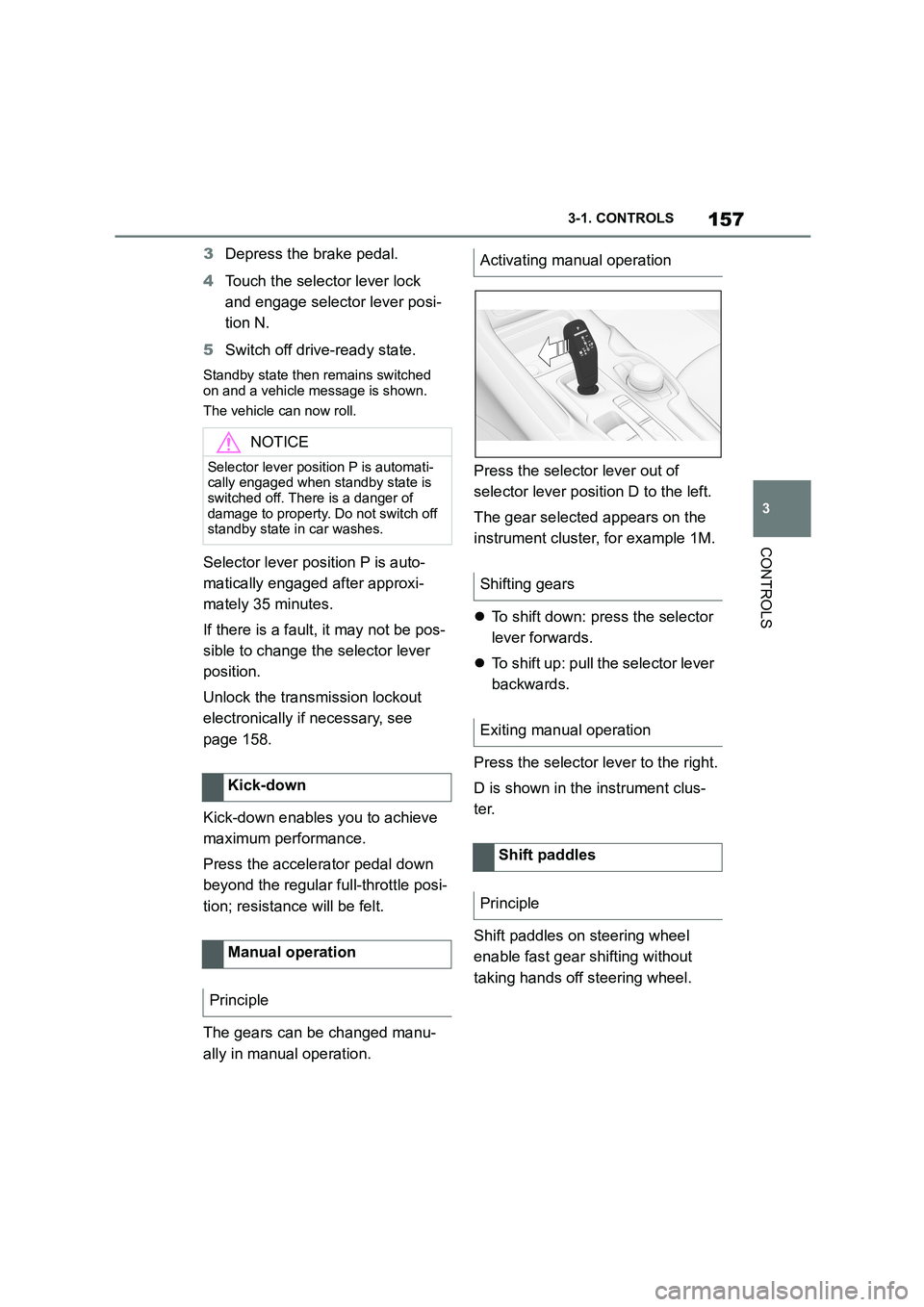
ally in manual operation.
Press the selector lever out of
selector lever position D to the left.
The gear selected appears on the
instrument cluster, for example 1M.
To shift down: press the selector
lever forwards.
To shift up: pull the selector lever
backwards.
Press the selector lever to the right.
D is shown in the instrument clus-
ter.
Shift paddles on steering wheel
enable fast gear shifting without
taking hands off steering wheel.
NOTICE
Selector lever position P is automati- cally engaged when standby state is
switched off. There is a danger of
damage to property. Do not switch off standby state in car washes.
Kick-down
Manual operation
Principle
Activating manual operation
Shifting gears
Exiting manual operation
Shift paddles
Principle
Page 161 of 498
159
3
3-1. CONTROLS
CONTROLS
can turn the engine.
Before the transmission lockout is
released, apply the parking brake
to prevent the ve hicle from rolling
away.
1 Apply the brakes and keep them
applied.
2 Press the start/stop button. The
starter must be heard to start
turning. Press and hold the
start/stop button.
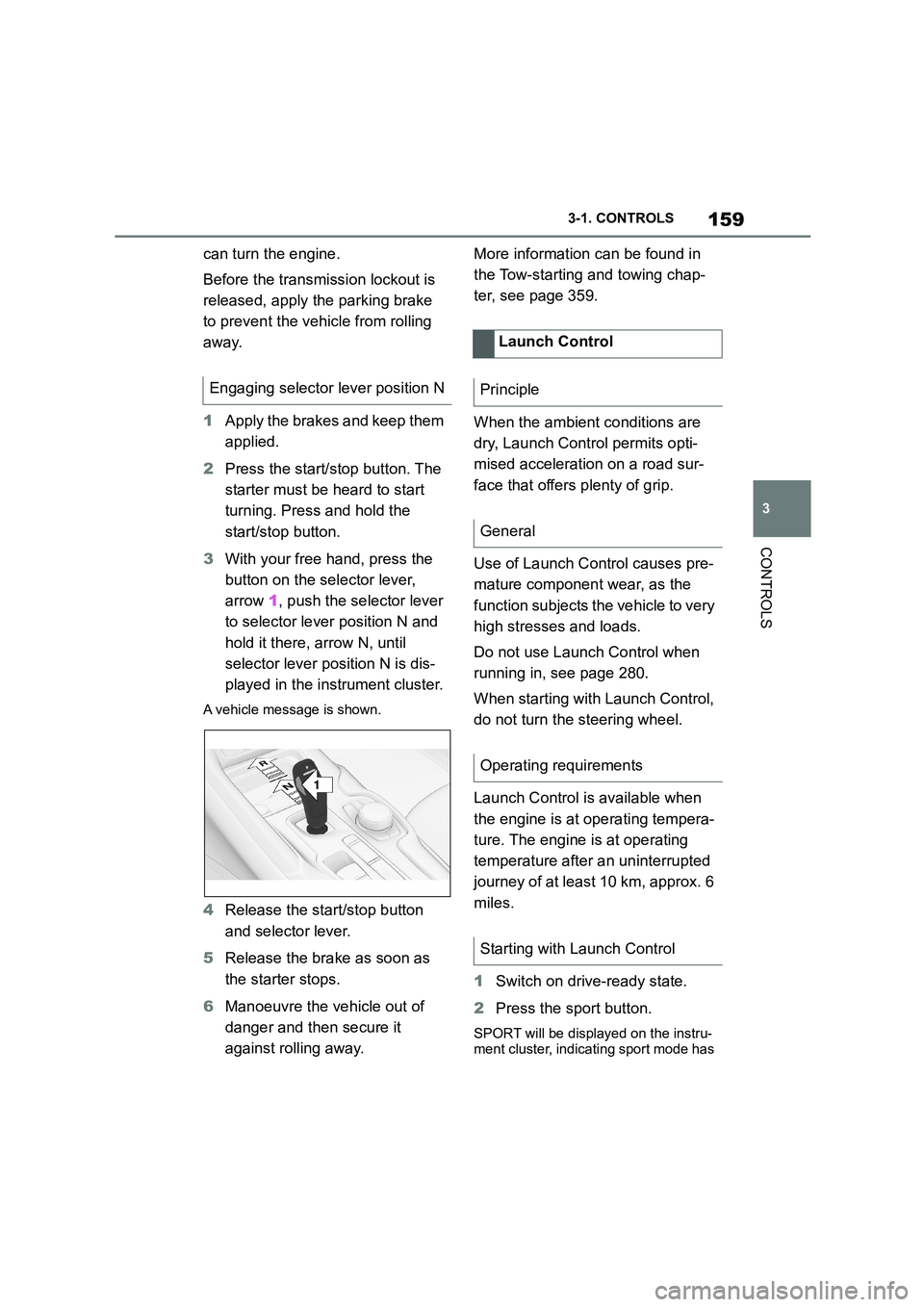
3 With your free hand, press the
button on the selector lever,
arrow 1, push the selector lever
to selector lever position N and
hold it there, arrow N, until
selector lever position N is dis-
played in the instrument cluster.
A vehicle message is shown.
4 Release the start/stop button
and selector lever.
5 Release the brake as soon as
the starter stops.
6 Manoeuvre the vehicle out of
danger and then secure it
against rolling away.
More information can be found in
the Tow-starting and towing chap-
ter, see page 359.
When the ambient conditions are
dry, Launch Control permits opti-
mised acceleration on a road sur-
face that offers plenty of grip.
Use of Launch Control causes pre-
mature component wear, as the
function subjects t he vehicle to very
high stresses and loads.
Do not use Launch Control when
running in, see page 280.
When starting with Launch Control,
do not turn the steering wheel.
Launch Control is available when
the engine is at operating tempera-
ture. The engine is at operating
temperature after an uninterrupted
journey of at least 10 km, approx. 6
miles.
1 Switch on drive-ready state.
2 Press the sport button.
SPORT will be displayed on the instru-
ment cluster, indicating sport mode has
Engaging selector lever position N
1
R
N
Launch Control
Principle
General
Operating requirements
Starting with Launch Control
Page 168 of 498
1663-1. CONTROLS
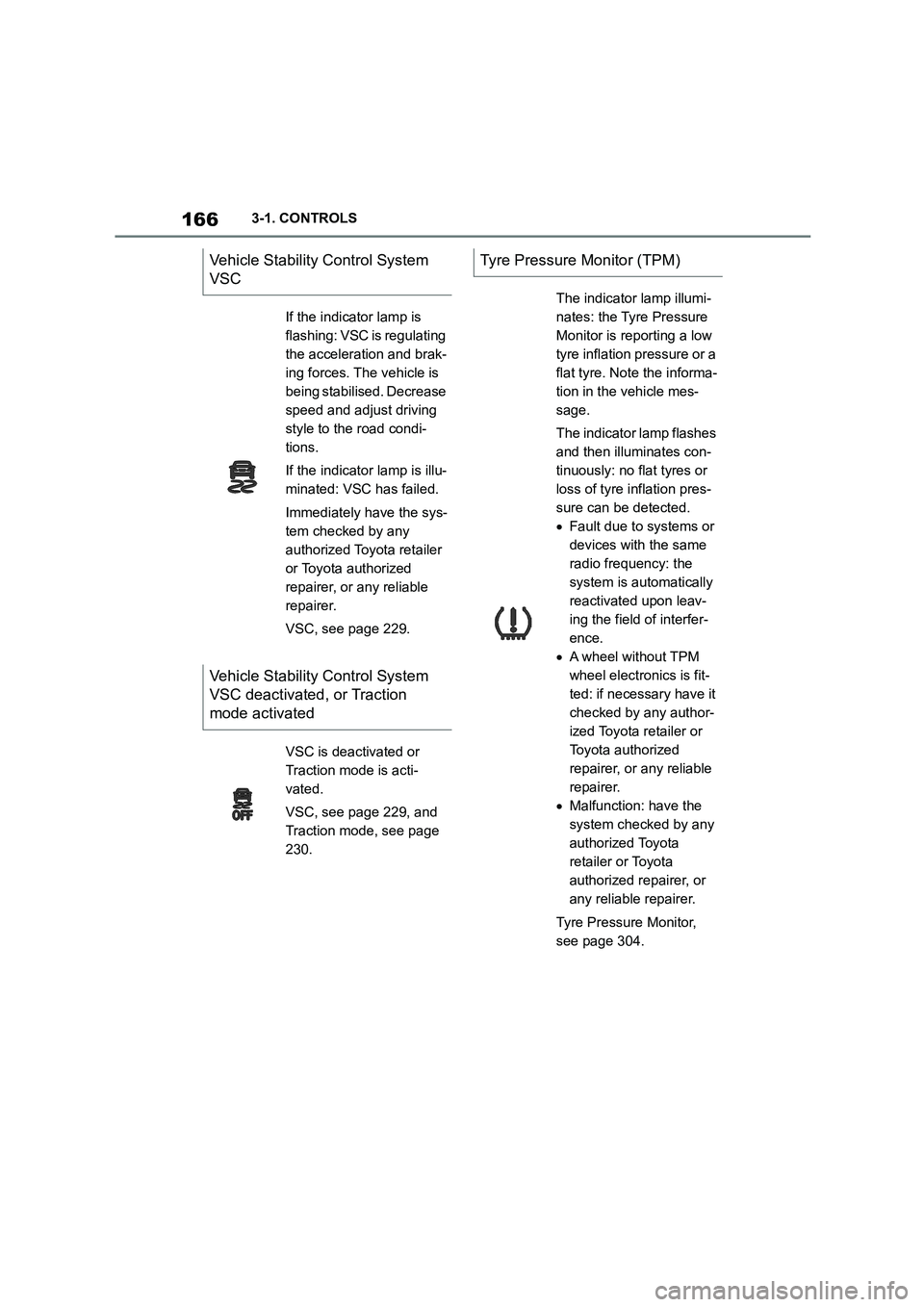
Vehicle Stability Control System
VSC
If the indicator lamp is
flashing: VSC is regulating
the acceleration and brak-
ing forces. The vehicle is
being stabilised. Decrease
speed and adjust driving
style to the road condi-
tions.
If the indicator lamp is illu-
minated: VSC has failed.
Immediately have the sys-
tem checked by any
authorized Toyota retailer
or Toyota authorized
repairer, or any reliable
repairer.
VSC, see page 229.
Vehicle Stability Control System
VSC deactivated, or Traction
mode activated
VSC is deactivated or
Traction mode is acti-
vated.
VSC, see page 229, and
Traction mode, see page
230.
Tyre Pressure Monitor (TPM)
The indicator lamp illumi-
nates: the Tyre Pressure
Monitor is reporting a low
tyre inflation pressure or a
flat tyre. Note the informa-
tion in the vehicle mes-
sage.
The indicator lamp flashes
and then illuminates con-
tinuously: no flat tyres or
loss of tyre inflation pres-
sure can be detected.
Fault due to systems or
devices with the same
radio frequency: the
system is automatically
reactivated upon leav-
ing the field of interfer-
ence.
A wheel without TPM
wheel electronics is fit-
ted: if necessary have it
checked by any author-
ized Toyota retailer or
Toyota authorized
repairer, or any reliable
repairer.
Malfunction: have the
system checked by any
authorized Toyota
retailer or Toyota
authorized repairer, or
any reliable repairer.
Tyre Pressure Monitor,
see page 304.
Page 179 of 498
177
3
3-1. CONTROLS
CONTROLS
to the standard.
If signs are detected that apply to
a parallel road.
In the case of country-specific
signs or road layouts.
During the camera calibration
process immediately after vehi-
cle delivery.
The display can be operated when
necessary.
Entertainment source.
Current audio source.
Last calls list.
If applicable, the relevant menu is
opened on the Control Display.
Items displayed may differ depend-
ing on the specifications of the vehi-
cle.
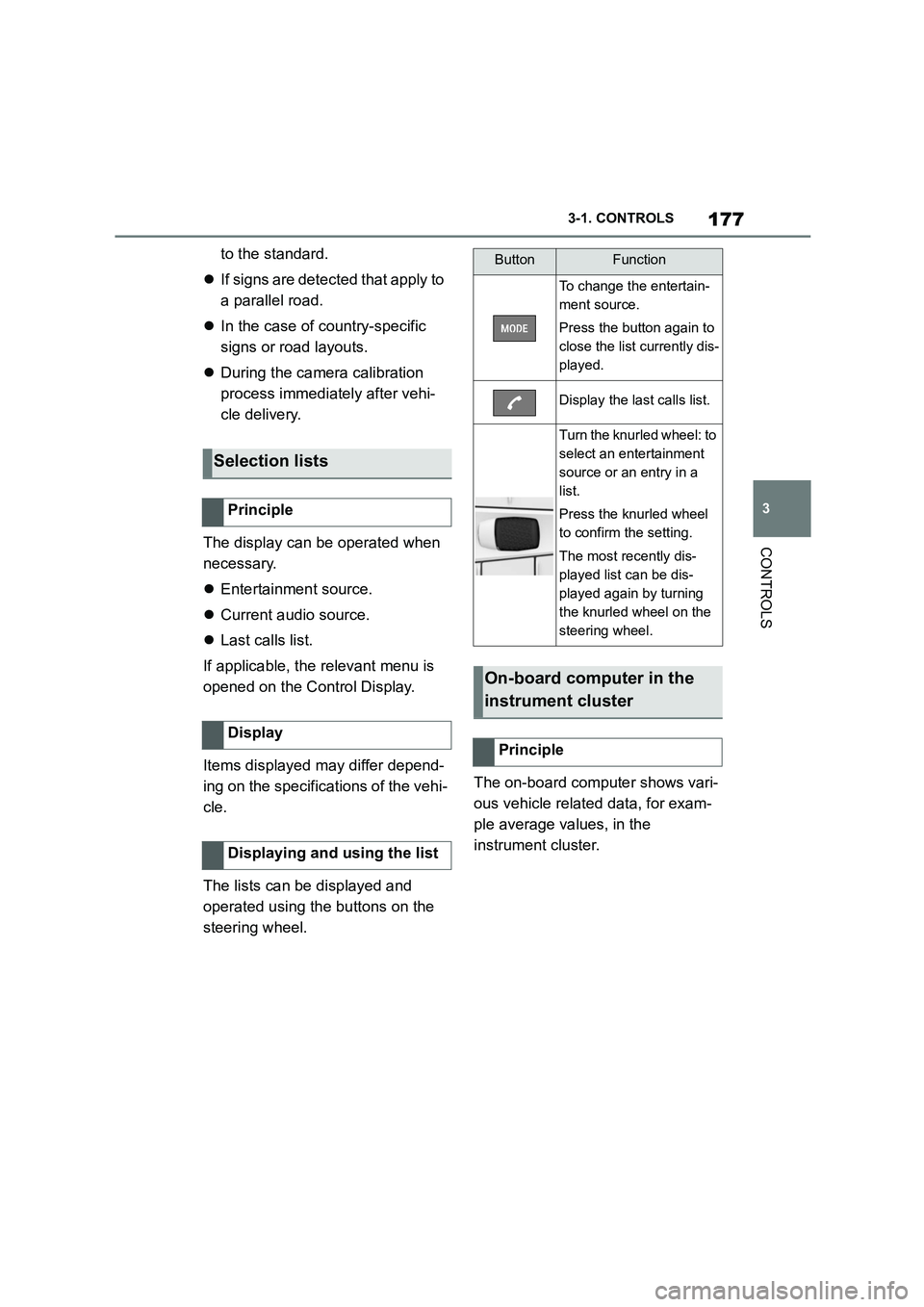
The lists can be displayed and
operated using the buttons on the
steering wheel.
The on-board computer shows vari-
ous vehicle related data, for exam-
ple average values, in the
instrument cluster.
Selection lists
Principle
Display
Displaying and using the list
ButtonFunction
To change the entertain-
ment source.
Press the button again to
close the list currently dis-
played.
Display the last calls list.
Turn the knurled wheel: to
select an entertainment
source or an entry in a
list.
Press the knurled wheel
to confirm the setting.
The most recently dis-
played list can be dis-
played again by turning
the knurled wheel on the
steering wheel.
On-board computer in the
instrument cluster
Principle
Page 186 of 498
1843-1. CONTROLS
cover.
Dirt on the inside or outside of
the windscreen.
Sunglasses with certain polarisa-
tion filters.
Wet road.
Unfavourable lighting conditions.
If the image is di storted, have the
default settings checked by any
authorized Toyota retailer or Toyota
authorized repairer, or any reliable
repairer.
The windscreen is an integral part
of the system.
The shape of the windscreen ena-
bles a sharp image to be projected.
A film in the windscreen prevents
double images occurring.
Therefore if the special windscreen
needs to be replaced, it is strongly
recommended that this be carried
out by any authorized Toyota
retailer or Toyota authorized
repairer, or any reliable repairer if
required.
This chapter describes all standard,
country-specific and special equip-
ment available for the model series.
It may therefore describe equip-
ment and functions which are not
installed in your vehicle, for exam-
ple on account of the special equip-
ment selected or the country
specification. This also applies to
safety-relevant functions and sys-
tems. Please comply with the rele-
vant laws and regulations when
using the corresponding functions
and systems.
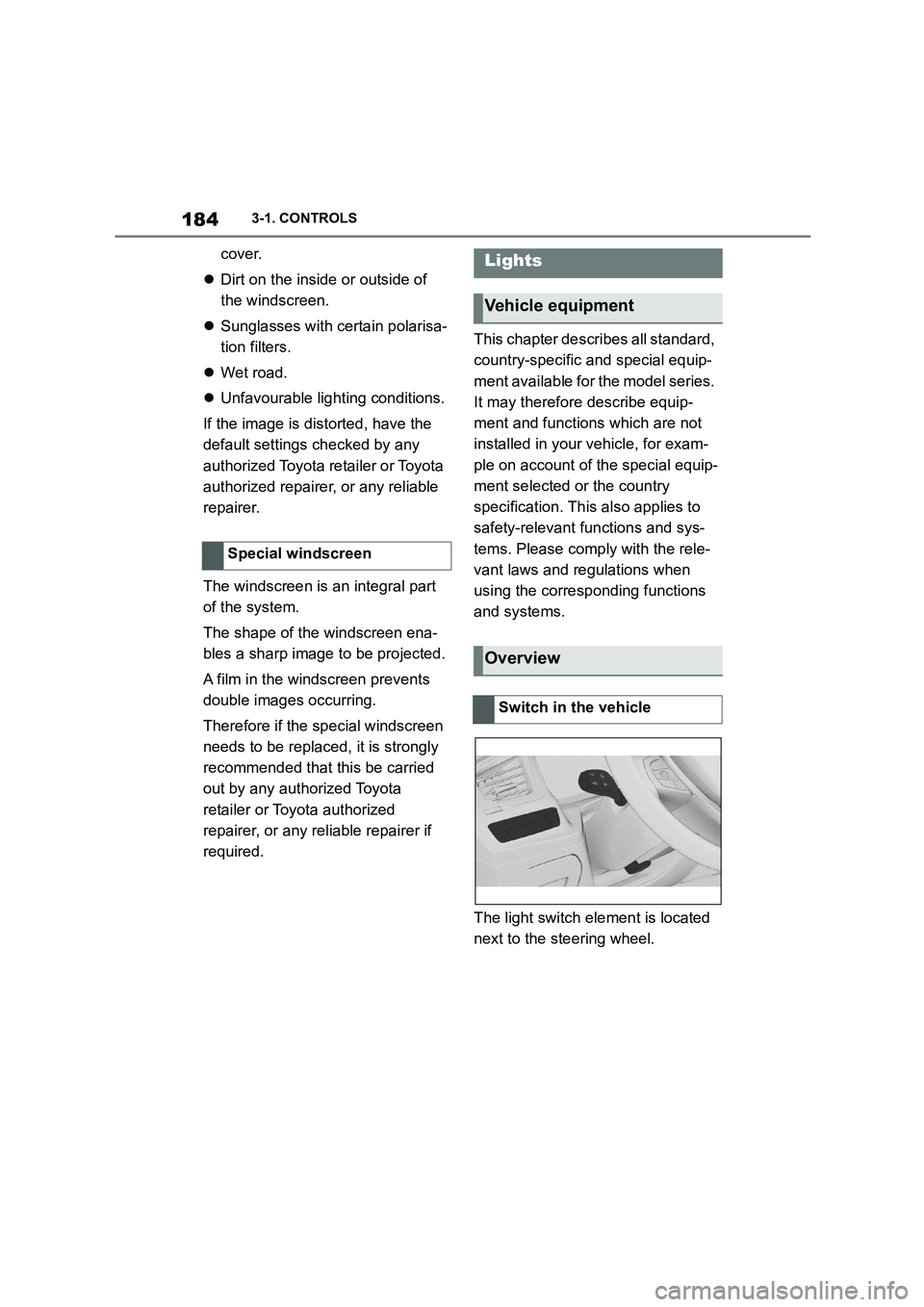
The light switch element is located
next to the steering wheel.
Special windscreen
Lights
Vehicle equipment
Overview
Switch in the vehicle