Drive TOYOTA YARIS 2022 Workshop Manual
[x] Cancel search | Manufacturer: TOYOTA, Model Year: 2022, Model line: YARIS, Model: TOYOTA YARIS 2022Pages: 590, PDF Size: 128.6 MB
Page 131 of 590
129
3
HV Owner's Manual_Europe_M52N30_en
3-1. Key information
Before driving
battery may be depleted. Replace the
battery when necessary. ( P.351) • The wireless remote control does not operate.
• The detection area becomes smaller.
■Key battery depletion (vehicles with a smart entry & start system)
●The standard battery life is 1 to 2 years.
●If the battery becomes low, an alarm will sound in the cabin and a message will be shown on the multi-information
display when the hybrid system is stopped.
●To reduce key battery depletion when the electronic key is to not be used for long periods of time, set the electronic
key to the battery-saving mode. ( P.141)
●As the electronic key always receives radio waves, the battery will become depleted even if the electronic key is
not used. The following symptoms indicate that the electronic key battery may be depleted. Replace the battery
when necessary. ( P.351) • The smart entry & start system or the wireless remote control does not oper-
ate. • The detection area becomes smaller.• The LED indicator on the key surface
does not turn on.
●To avoid serious deterioration, do not
leave the electronic key within 1 m (3 ft.) of the following electrical appli-ances that produce a magnetic field:
•TVs • Personal computers• Cellular phones, cordless phones and
battery chargers • Recharging cellular phones or cord-less phones
• Table lamps • Induction cookers
●If the electronic key is near the vehicle for longer than necessary, even if the smart entry & start system is not oper-
ated, the key battery may become depleted faster than normal.
■Replacing the battery
P. 3 5 1
■If “A New Key has been Registered Contact Your Dealer for Details” is shown on the multi-information
display (vehicles with a smart entry & start system)
This message will be displayed each
time the driver’s door is opened when the doors are unlocked from the outside for approximately 10 days after a new
electronic key has been registered. If this message is displayed but you have not had a new electronic key regis-
tered, ask any authorized Toyota retailer or Toyota authorized repairer, or any reli-able repairer to check if an unknown
electronic key (other than those in your possession) has been registered.
■If a wrong key is used
The key cylinder rotates freely, isolated
from the internal mechanism.
NOTICE
■To prevent key damage
●Do not drop the keys, subject them
to strong shocks, or bend them.
●Do not expose the keys to high
temperatures for long periods of time.
●Do not get the keys wet or wash them in an ultrasonic washer, etc.
●Vehicles with a smart entry & start system: Do not attach metallic or magnetic materials to the keys or
place the keys close to such materi- als.
●Do not disassemble the keys.
●Do not attach a sticker or anything
else to the surface of the key.
Page 142 of 590
140
HV Owner's Manual_Europe_M52N30_en
3-2. Opening, closing and locking the doors
■Luggage compartment light
●The luggage compartment light turns on when the back door is opened.
●If the luggage compartment light is left on when the power switch is turned
off, the light will go off automatically after 20 minutes.
*: If equipped
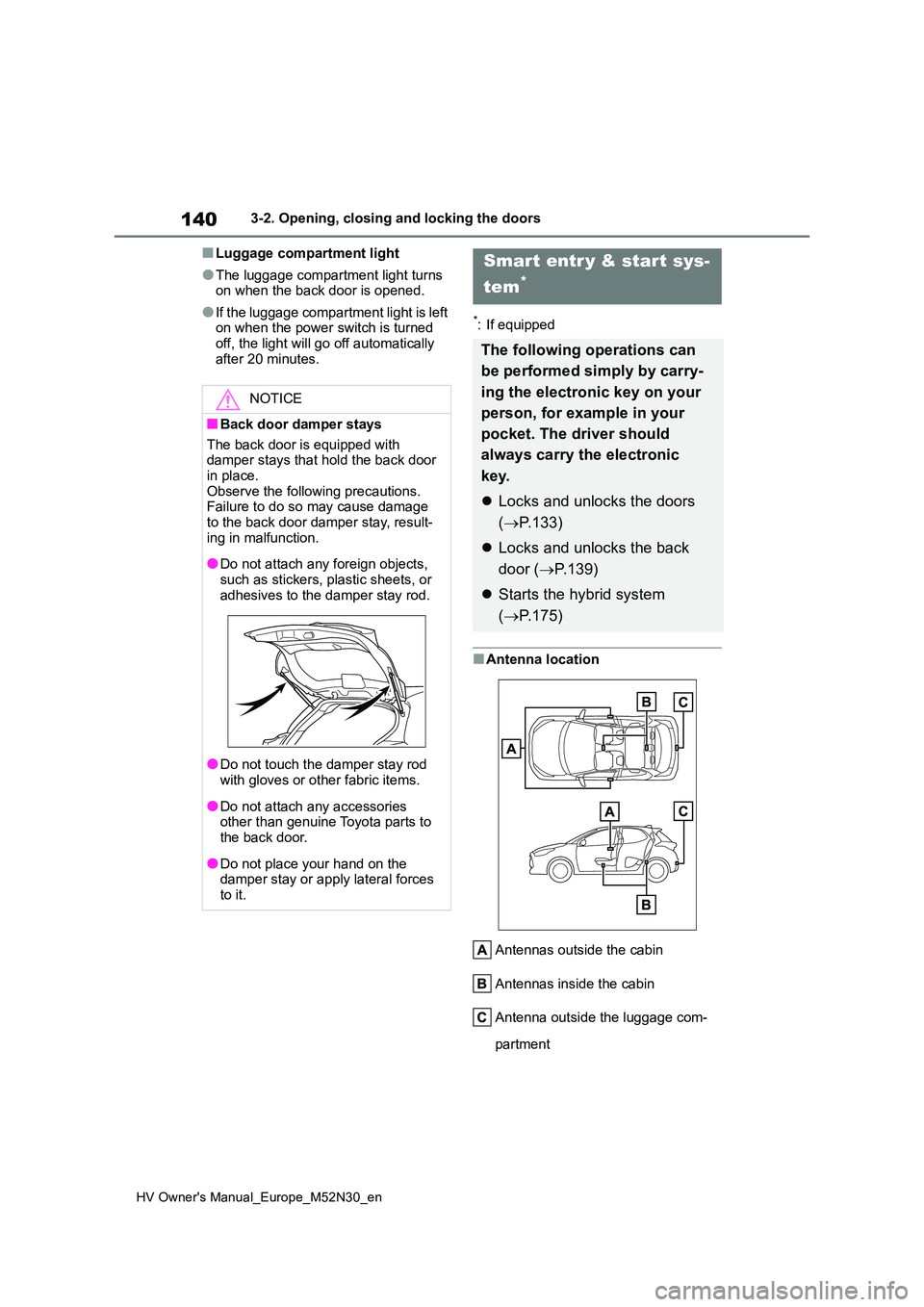
■Antenna location
Antennas outside the cabin
Antennas inside the cabin
Antenna outside the luggage com-
partment
NOTICE
■Back door damper stays
The back door is equipped with damper stays that hold the back door in place.
Observe the following precautions. Failure to do so may cause damage to the back door damper stay, result-
ing in malfunction.
●Do not attach any foreign objects,
such as stickers, plastic sheets, or adhesives to the damper stay rod.
●Do not touch the damper stay rod with gloves or other fabric items.
●Do not attach any accessories other than genuine Toyota parts to the back door.
●Do not place your hand on the damper stay or apply lateral forces
to it.
Smart entr y & start sys-
tem*
The following operations can
be performed simply by carry-
ing the electronic key on your
person, for example in your
pocket. The driver should
always carry the electronic
key.
Locks and unlocks the doors
( P.133)
Locks and unlocks the back
door ( P.139)
Starts the hybrid system
( P.175)
Page 143 of 590
141
3
HV Owner's Manual_Europe_M52N30_en
3-2. Opening, closing and locking the doors
Before driving
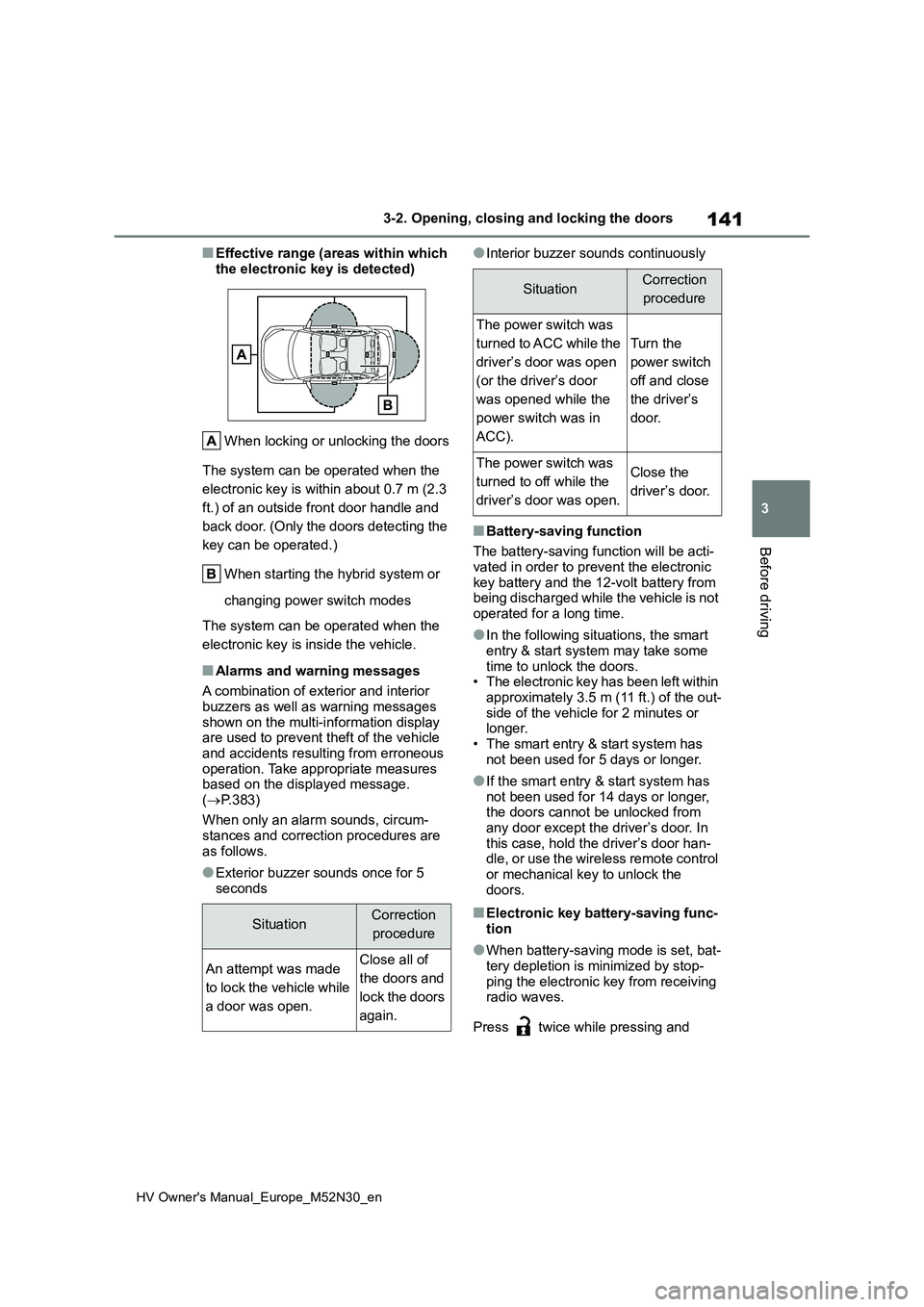
■Effective range (areas within which
the electronic key is detected)
When locking or unlocking the doors
The system can be operated when the
electronic key is within about 0.7 m (2.3
ft.) of an outside front door handle and
back door. (Only the doors detecting the
key can be operated.)
When starting the hybrid system or
changing power switch modes
The system can be operated when the
electronic key is inside the vehicle.
■Alarms and warning messages
A combination of exterior and interior
buzzers as well as warning messages shown on the multi-information display are used to prevent theft of the vehicle
and accidents resulting from erroneous operation. Take appropriate measures based on the displayed message.
( P.383)
When only an alarm sounds, circum-
stances and correction procedures are as follows.
●Exterior buzzer sounds once for 5 seconds
●Interior buzzer sounds continuously
■Battery-saving function
The battery-saving function will be acti-
vated in order to prevent the electronic key battery and the 12-volt battery from being discharged while the vehicle is not
operated for a long time.
●In the following situations, the smart
entry & start system may take some time to unlock the doors.• The electronic key has been left within
approximately 3.5 m (11 ft.) of the out- side of the vehicle for 2 minutes or longer.
• The smart entry & start system has not been used for 5 days or longer.
●If the smart entry & start system has not been used for 14 days or longer, the doors cannot be unlocked from
any door except the driver’s door. In this case, hold the driver’s door han-dle, or use the wireless remote control
or mechanical key to unlock the doors.
■Electronic key battery-saving func-tion
●When battery-saving mode is set, bat-tery depletion is minimized by stop-
ping the electronic key from receiving radio waves.
Press twice while pressing and
SituationCorrection
procedure
An attempt was made
to lock the vehicle while
a door was open.
Close all of
the doors and
lock the doors
again.
SituationCorrection
procedure
The power switch was
turned to ACC while the
driver’s door was open
(or the driver’s door
was opened while the
power switch was in
ACC).
Turn the
power switch
off and close
the driver’s
door.
The power switch was
turned to off while the
driver’s door was open.
Close the
driver’s door.
Page 145 of 590
143
3
HV Owner's Manual_Europe_M52N30_en
3-2. Opening, closing and locking the doors
Before driving
switch modes are changed.
●Do not leave the electronic key on top of the instrument panel or near the
door pockets when exiting the vehicle. Depending on the radio wave recep-tion conditions, it may be detected by
the antenna outside the cabin and the door will become lockable from the outside, possibly trapping the elec-
tronic key inside the vehicle.
●As long as the electronic key is within
the effective range, the doors may be locked or unlocked by anyone. How-ever, only the doors detecting the
electronic key can be used to unlock the vehicle.
●Even if the electronic key is not inside the vehicle, it may be possible to start the hybrid system if the electronic key
is near the window.
●The doors may unlock or lock if a
large amount of water splashes on the door handle, such as in the rain or in a car wash when the electronic key is
within the effective range. (The doors will automatically be locked after approximately 30 seconds if the doors
are not opened and closed.)
●If the wireless remote control is used
to lock the doors when the electronic key is near the vehicle, there is a pos-sibility that the door may not be
unlocked by the entry function. (Use the wireless remote control to unlock the doors.)
●Touching the door lock or unlock sen-sor while wearing gloves may prevent
lock or unlock operation.
●When the lock operation is performed
using the lock sensor, recognition sig- nals will be shown up to two consecu-tive times. After this, no recognition
signals will be given.
●If the door handle becomes wet while
the electronic key is within the effec- tive range, the door may lock and unlock repeatedly. In that case, follow
the following correction procedures to wash the vehicle:
• Place the electronic key in a location 2
m (6 ft.) or more away from the vehi- cle. (Take care to ensure that the key is not stolen.)
• Set the electronic key to battery-sav- ing mode to disable the smart entry & start system. ( P.141)
●If the electronic key is inside the vehi- cle and a door handle becomes wet
during a car wash, a message may be shown on the multi-information dis-play and a buzzer will sound outside
the vehicle. To turn off the alarm, lock all the doors.
●The lock sensor may not work prop-erly if it comes into contact with ice, snow, mud, etc. Clean the lock sensor
and attempt to operate it again.
●A sudden handle operation or a han-
dle operation immediately after enter- ing the effective range may prevent the doors from being unlocked. Touch
the door unlock sensor and check that the doors are unlocked before pulling the door handle again.
●If there is another electronic key in the detection area, it may take slightly lon-
ger to unlock the doors after the door handle is gripped.
■When the vehicle is not driven for extended periods
●To prevent theft of the vehicle, do not leave the electronic key within 2 m (6
ft.) of the vehicle.
●The smart entry & start system can be
deactivated in advance. ( P.431)
●Setting the electronic key to battery-
saving mode helps to reduce key bat- tery depletion. ( P.141)
■To operate the system properly
Make sure to carry the electronic key
when operating the system. Do not get the electronic key too close to the vehi-cle when operating the system from the
outside of the vehicle. Depending on the position and holding condition of the electronic key, the key
may not be detected correctly and the system may not operate properly. (The
Page 147 of 590
145
3
HV Owner's Manual_Europe_M52N30_en
3-3. Adjusting the seats
Before driving
3-3.Adjusting the sea ts
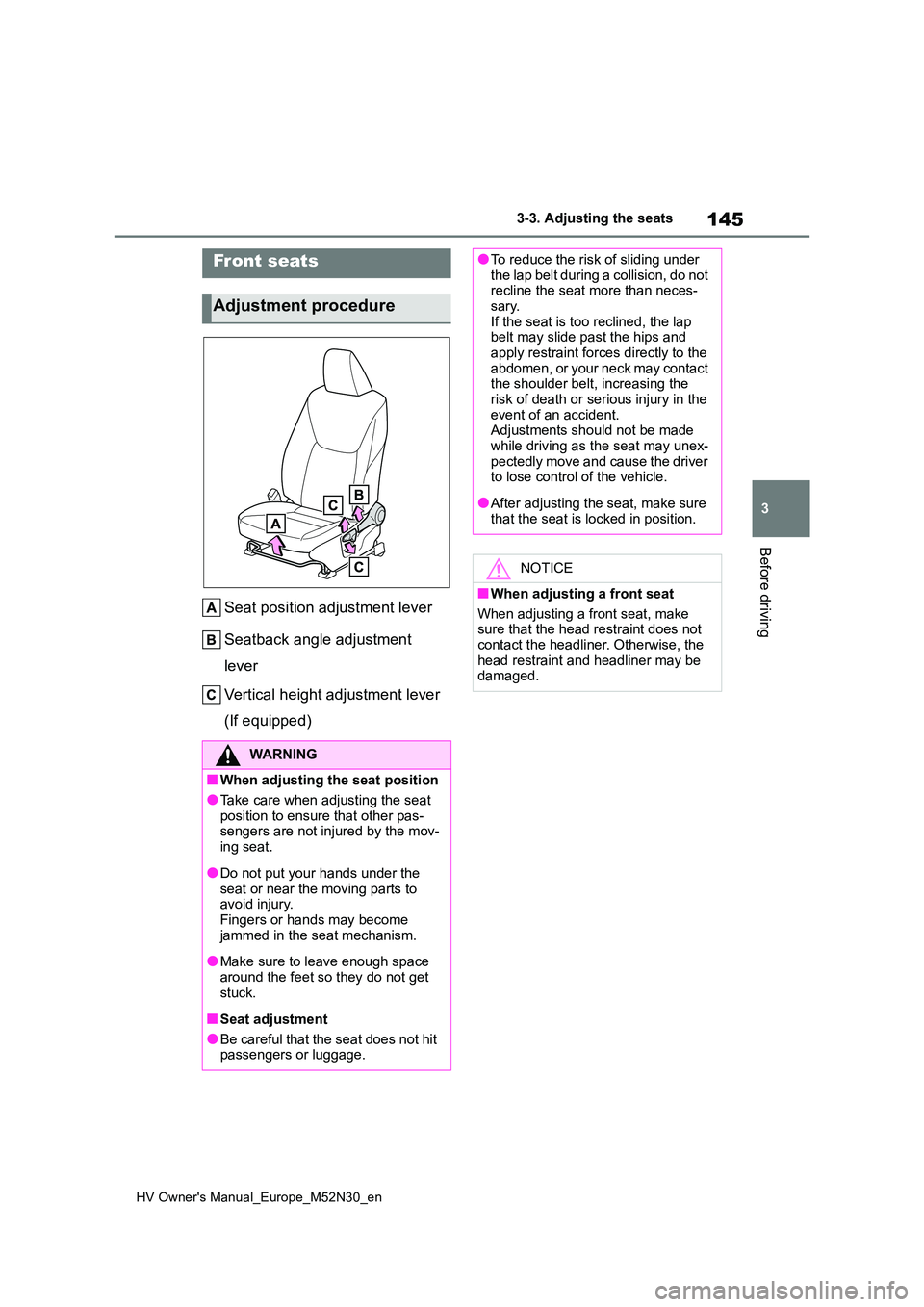
Seat position adjustment lever
Seatback angle adjustment
lever
Vertical height adjustment lever
(If equipped)
Front seats
Adjustment procedure
WARNING
■When adjusting the seat position
●Take care when adjusting the seat position to ensure that other pas-sengers are not injured by the mov-
ing seat.
●Do not put your hands under the
seat or near the moving parts to avoid injury.Fingers or hands may become
jammed in the seat mechanism.
●Make sure to leave enough space
around the feet so they do not get stuck.
■Seat adjustment
●Be careful that the seat does not hit passengers or luggage.
●To reduce the risk of sliding under the lap belt during a collision, do not recline the seat more than neces-
sary. If the seat is too reclined, the lap belt may slide past the hips and
apply restraint forces directly to the abdomen, or your neck may contact the shoulder belt, increasing the
risk of death or serious injury in the event of an accident.Adjustments should not be made
while driving as the seat may unex- pectedly move and cause the driver to lose control of the vehicle.
●After adjusting the seat, make sure that the seat is locked in position.
NOTICE
■When adjusting a front seat
When adjusting a front seat, make sure that the head restraint does not
contact the headliner. Otherwise, the head restraint and headliner may be damaged.
Page 149 of 590
147
3
HV Owner's Manual_Europe_M52N30_en
3-3. Adjusting the seats
Before driving
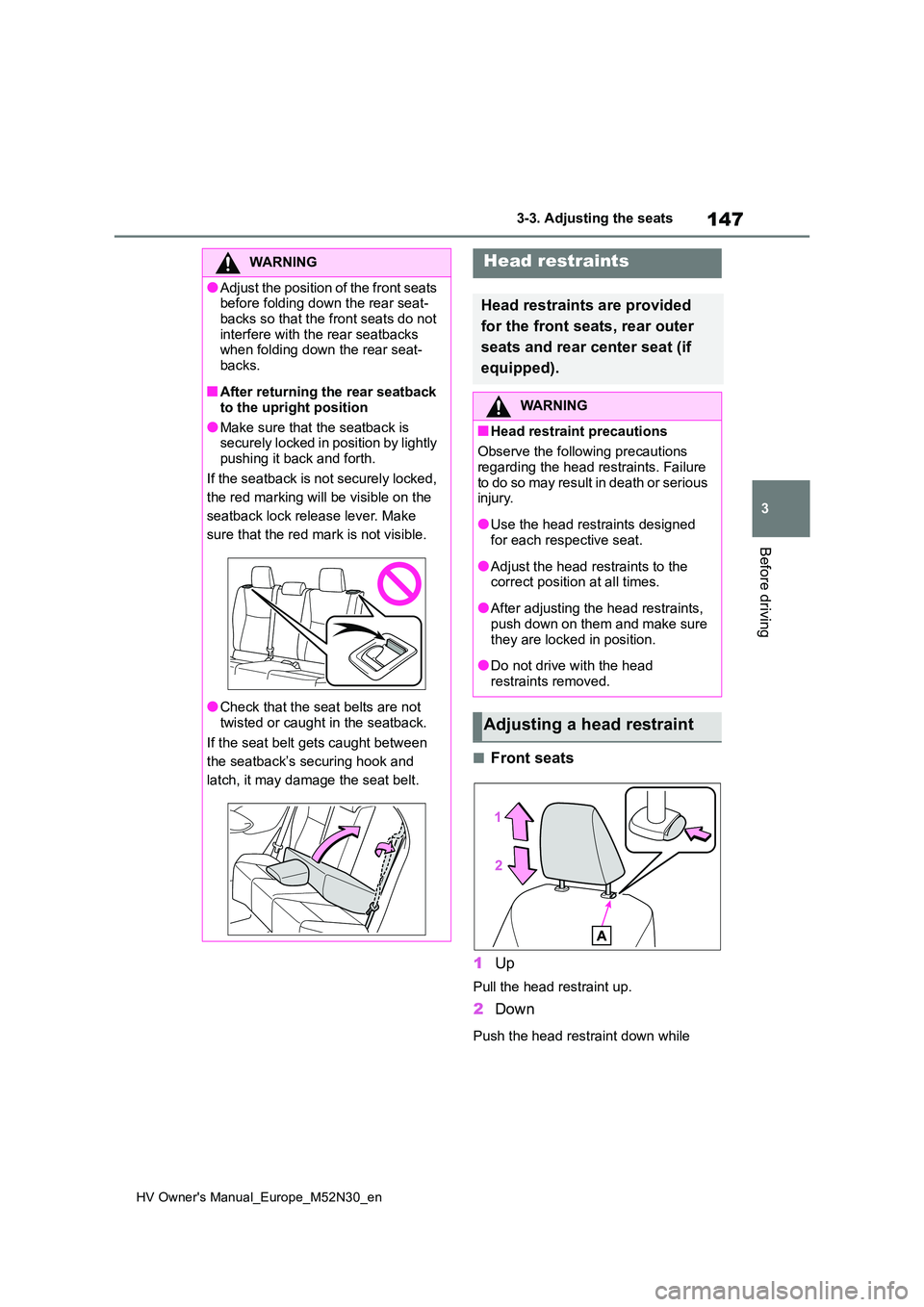
■Front seats
1 Up
Pull the head restraint up.
2Down
Push the head restraint down while
WARNING
●Adjust the position of the front seats before folding down the rear seat-
backs so that the front seats do not interfere with the rear seatbacks when folding down the rear seat-
backs.
■After returning the rear seatback
to the upright position
●Make sure that the seatback is securely locked in position by lightly
pushing it back and forth.
If the seatback is not securely locked,
the red marking will be visible on the
seatback lock release lever. Make
sure that the red mark is not visible.
●Check that the seat belts are not
twisted or caught in the seatback.
If the seat belt gets caught between
the seatback’s securing hook and
latch, it may damage the seat belt.
Head restraints
Head restraints are provided
for the front seats, rear outer
seats and rear center seat (if
equipped).
WARNING
■Head restraint precautions
Observe the following precautions
regarding the head restraints. Failure to do so may result in death or serious injury.
●Use the head restraints designed for each respective seat.
●Adjust the head restraints to the correct position at all times.
●After adjusting the head restraints, push down on them and make sure
they are locked in position.
●Do not drive with the head
restraints removed.
Adjusting a head restraint
Page 153 of 590
151
3
HV Owner's Manual_Europe_M52N30_en
3-4. Adjusting the steering wheel and mirrors
Before driving
3-4.Adjusting the steering whe el an d mirrors
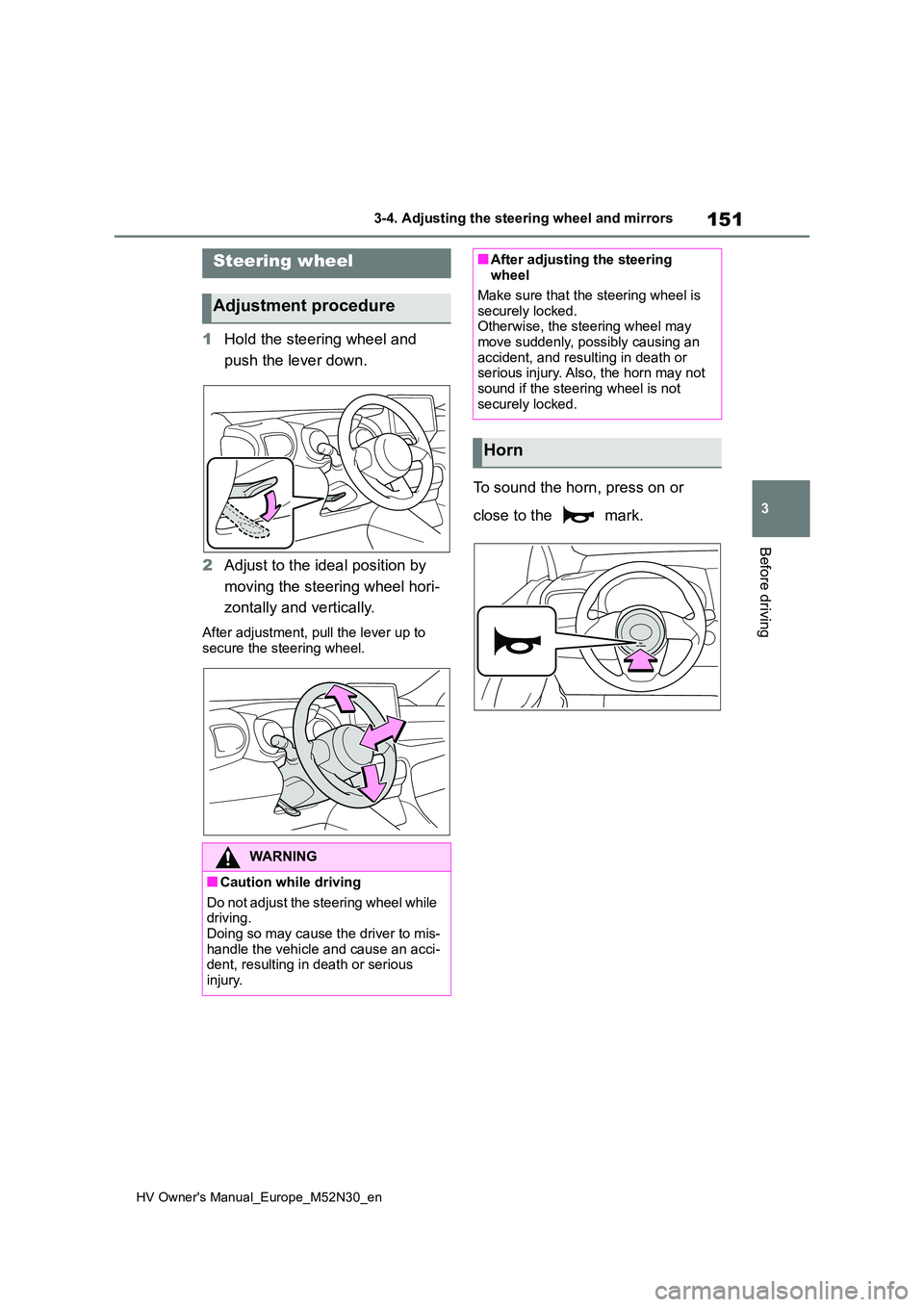
1Hold the steering wheel and
push the lever down.
2 Adjust to the ideal position by
moving the steering wheel hori-
zontally and vertically.
After adjustment, pull the lever up to
secure the steering wheel.
To sound the horn, press on or
close to the mark.
Steering wheel
Adjustment procedure
WARNING
■Caution while driving
Do not adjust the steering wheel while driving.Doing so may cause the driver to mis-
handle the vehicle and cause an acci- dent, resulting in death or serious injury.
■After adjusting the steering wheel
Make sure that the steering wheel is
securely locked. Otherwise, the steering wheel may move suddenly, possibly causing an
accident, and resulting in death or serious injury. Also, the horn may not sound if the steering wheel is not
securely locked.
Horn
Page 155 of 590
153
3
HV Owner's Manual_Europe_M52N30_en
3-4. Adjusting the steering wheel and mirrors
Before driving
■To prevent sensor error (vehicles with an auto anti-glare inside rear
view mirror)
To ensure that the sensors operate properly, do not touch or cover them.
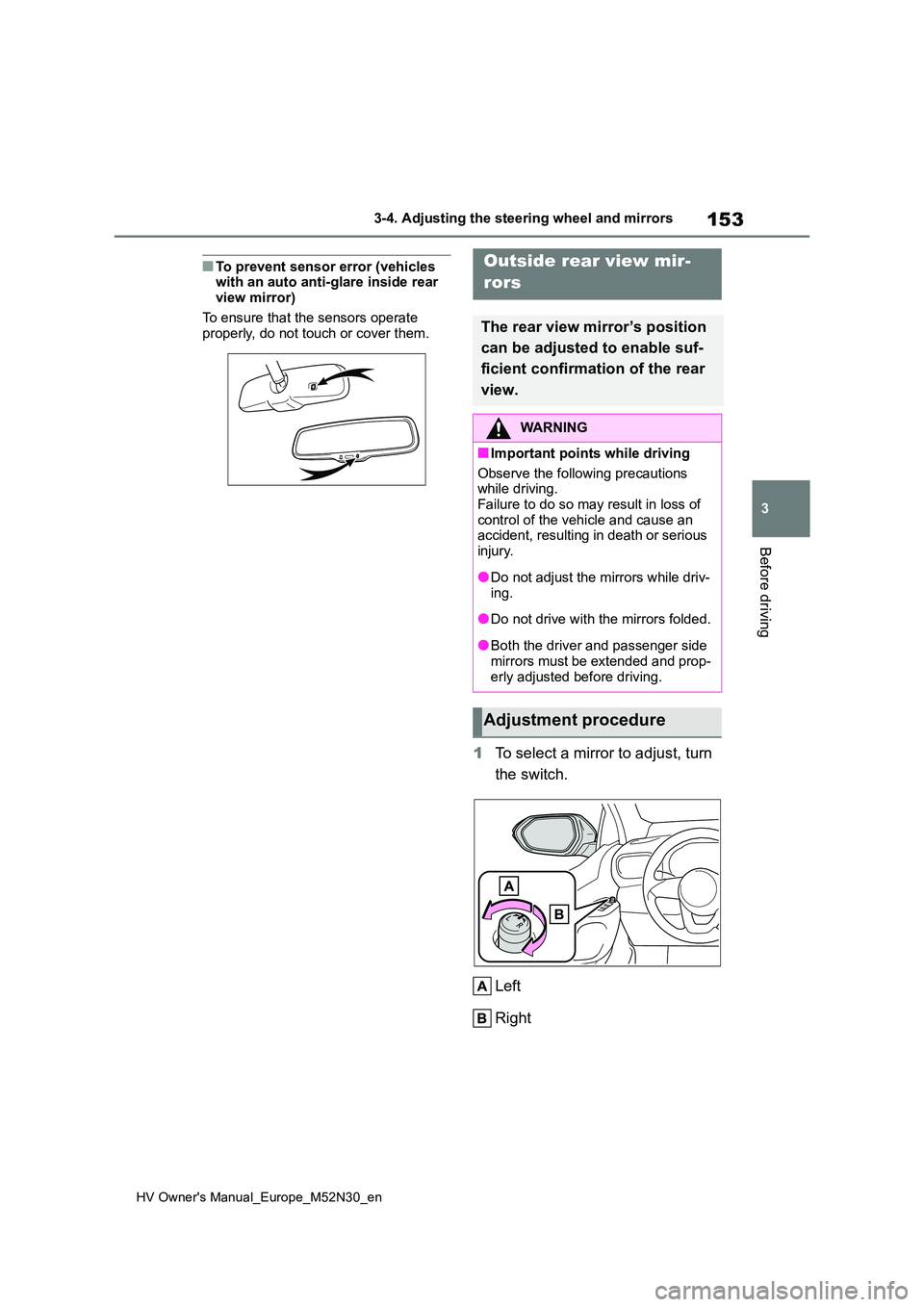
1 To select a mirror to adjust, turn
the switch.
Left
Right
Outside rear view mir-
rors
The rear view mirror’s position
can be adjusted to enable suf-
ficient confirmation of the rear
view.
WARNING
■Important points while driving
Observe the following precautions while driving.
Failure to do so may result in loss of control of the vehicle and cause an accident, resulting in death or serious
injury.
●Do not adjust the mirrors while driv-
ing.
●Do not drive with the mirrors folded.
●Both the driver and passenger side mirrors must be extended and prop-
erly adjusted before driving.
Adjustment procedure
Page 159 of 590
157
3
HV Owner's Manual_Europe_M52N30_en
3-5. Opening and closing the windows
Before driving
direction, and hold it there for
approximately 4 seconds or more.
6 Pull and hold the power window switch in the one-touch closing direction again. After the side win-
dow is completely closed, continue holding the switch for a further 1 sec-ond or more.
If you release the switch while the win- dow is moving, start again from the beginning.
If the window reverses and cannot be fully closed or opened, have the vehicle inspected by any authorized Toyota
retailer or Toyota authorized repairer, or any reliable repairer.
■Door lock linked window operation
●The power windows can be opened
and closed using the key (vehicles without a smart entry & start system)
or mechanical key (vehicles with a
sm ar t e n tr y & st a r t sy st em ) .* ( P.134, 408)
●The power windows can be opened
and closed using the wireless remote
control.* ( P.133)*: These settings must be customized at
any authorized Toyota retailer or
Toyota authorized repairer, or any reli-
able repairer.
■Customization
Some functions can be customized.
( P.431)
WARNING
Observe the following precautions. Failure to do so may result in death or
serious injury.
■Closing the windows
●The driver is responsible for all the power window operations, including
the operation for the passengers. In order to prevent accidental opera-tion, especially by a child, do not let
a child operate the power windows. It is possible for children and other passengers to have body parts
caught in the power window. Also, when riding with a child, it is recom-mended to use the window lock
switch. ( P.158)
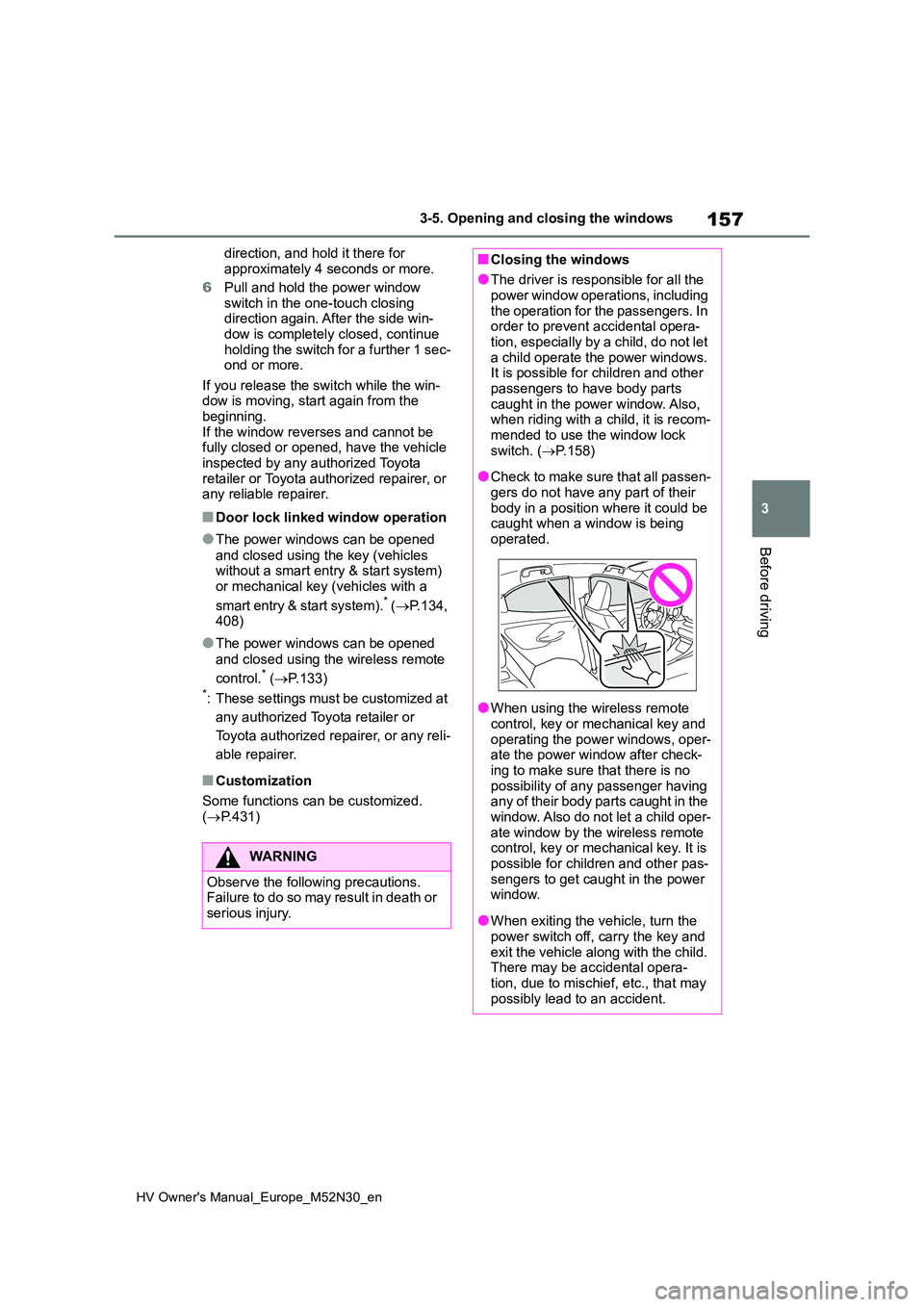
●Check to make sure that all passen-
gers do not have any part of their body in a position where it could be caught when a window is being
operated.
●When using the wireless remote
control, key or mechanical key and operating the power windows, oper-ate the power window after check-
ing to make sure that there is no possibility of any passenger having any of their body parts caught in the
window. Also do not let a child oper- ate window by the wireless remote control, key or mechanical key. It is
possible for children and other pas- sengers to get caught in the power window.
●When exiting the vehicle, turn the power switch off, carry the key and
exit the vehicle along with the child. There may be accidental opera-tion, due to mischief, etc., that may
possibly lead to an accident.
Page 160 of 590
158
HV Owner's Manual_Europe_M52N30_en
3-5. Opening and closing the windows
This function can be used to pre-
vent children from accidentally
opening or closing a passenger
window.
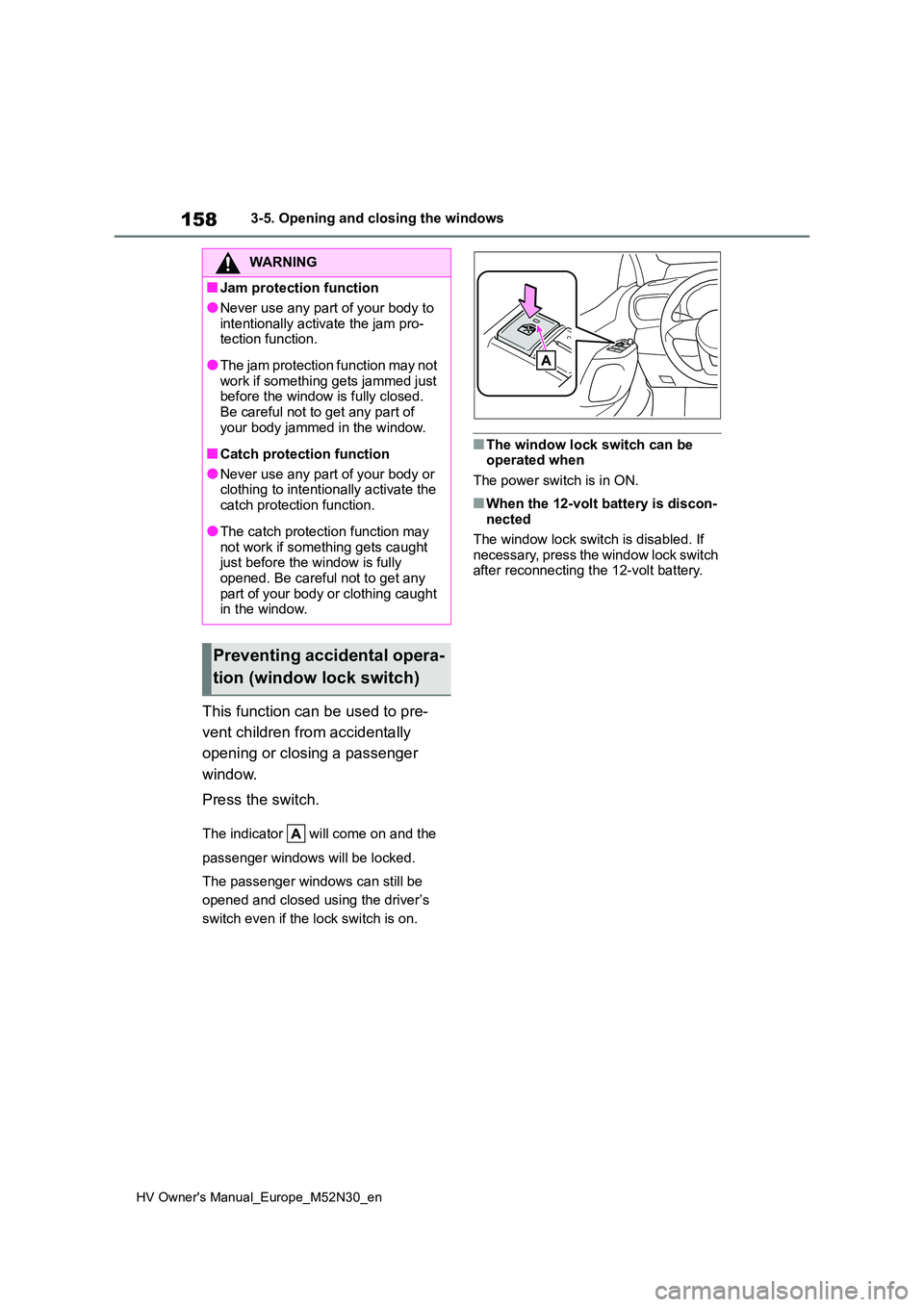
Press the switch.
The indicator will come on and the
passenger windows will be locked.
The passenger windows can still be
opened and closed using the driver’s
switch even if the lock switch is on.
■The window lock switch can be operated when
The power switch is in ON.
■When the 12-volt battery is discon- nected
The window lock switch is disabled. If
necessary, press the window lock switch after reconnecting the 12-volt battery.
WARNING
■Jam protection function
●Never use any part of your body to
intentionally activate the jam pro- tection function.
●The jam protection function may not work if something gets jammed just before the window is fully closed.
Be careful not to get any part of your body jammed in the window.
■Catch protection function
●Never use any part of your body or clothing to intentionally activate the
catch protection function.
●The catch protection function may
not work if something gets caught just before the window is fully opened. Be careful not to get any
part of your body or clothing caught in the window.
Preventing accidental opera-
tion (window lock switch)