My Car VOLVO S60 2018 Owner´s Manual
[x] Cancel search | Manufacturer: VOLVO, Model Year: 2018, Model line: S60, Model: VOLVO S60 2018Pages: 396, PDF Size: 9.4 MB
Page 147 of 396

LOCKS AND ALARM
* Option/accessory.145
Related information
•Remote key – functions (p. 147)
Key memory
The memory in the remote key makes it possible to store certain personal settings.
The position of the side door mirrors, power driv- er's seat * and the selected instrument panel
theme 1
are stored in the remote keys when the
vehicle is locked . The next time the driver's door
is unlocked with the same remote key and the
door is opened within 2 minutes, the power driv-
er's seat and side door mirrors will automatically move to the position that they were in when thedoors were most recently locked with the sameremote key. If the seat/mirrors have not beenreadjusted since the vehicle was locked, they willalready be in the position stored in that particularremote key and will not move. For more informa-tion on this feature, see Front seats – power seat(p. 76). This feature can be activated or deactivated in the vehicle's menu by pressing MY CAR and
going into
SettingsCar settingsCar key
memory. For a description of the menu system,
see My Car – introduction (p. 71).
NOTE
If the vehicle is locked with the remote key or is left unlocked for more than 30 minutes, thekey memory function will be deactivated. To reactivate the key's memory:
• Press the unlock button on the remote key.
For information regarding vehicles with the optional keyless drive, see Keyless drive
*– lock-
ing/unlocking (p. 153).
Related information
• Locking/unlocking confirmation (p. 146)
1
Optional digital instrument panel only
Page 148 of 396
LOCKS AND ALARM
* Option/accessory.
146
Locking/unlocking confirmation Settings can be made in the menu system for audible and visual confirmation when the vehiclehas been locked or unlocked. With these func-tions activated, the following will occur when thevehicle is locked/unlocked:
Locking confirmation
• The turn signals flash once, an audible signal sounds and the door mirrors will fold
* in.
Confirmation will only be given when all doors and the trunk are properly closed and locked.
NOTE
If you do not receive confirmation when lock- ing the vehicle, check whether a door or thetrunk is ajar, or if this feature has been turnedoff in the menu.
Unlocking confirmation
• The turn signals will flash twice and the door mirrors will fold
* out.
Making a setting
Different alternatives for locking/unlocking con- firmation can be selected in the menus by press- ing MY CAR on the center console control panel.
• To activate visual confirmation: go to
SettingsCar settingsLight settingsand select Door lock confirmation light
and/or Unlock confirmation light by
pressing OK/MENU .
• To activate audible confirmation: go to
SettingsCar settingsLock settingsand select Audible confirmation by press-
ing OK/MENU .
For a description of the menu system, see My Car – introduction (p. 71).
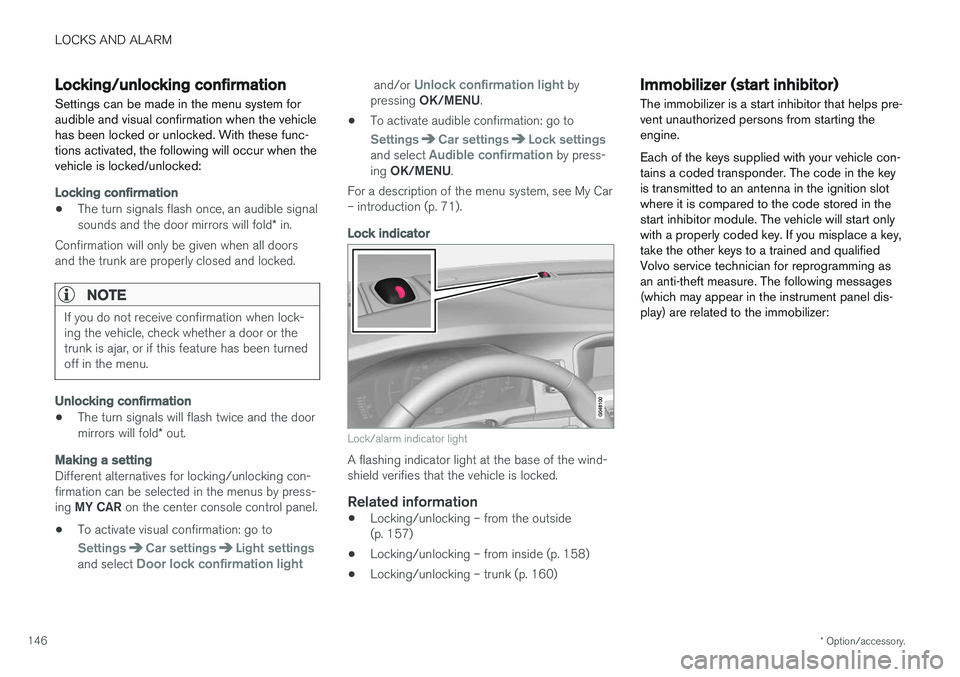
Lock indicator
Lock/alarm indicator light
A flashing indicator light at the base of the wind- shield verifies that the vehicle is locked.
Related information
• Locking/unlocking – from the outside(p. 157)
• Locking/unlocking – from inside (p. 158)
• Locking/unlocking – trunk (p. 160)
Immobilizer (start inhibitor)
The immobilizer is a start inhibitor that helps pre- vent unauthorized persons from starting theengine. Each of the keys supplied with your vehicle con- tains a coded transponder. The code in the keyis transmitted to an antenna in the ignition slotwhere it is compared to the code stored in thestart inhibitor module. The vehicle will start onlywith a properly coded key. If you misplace a key,take the other keys to a trained and qualifiedVolvo service technician for reprogramming asan anti-theft measure. The following messages(which may appear in the instrument panel dis-play) are related to the immobilizer:
Page 149 of 396

LOCKS AND ALARM
}}
* Option/accessory.147
MessageMeaning
Insert car keyRemote key not recognized dur- ing start. Try to start the vehicleagain.
Car key not foundVehicles with keyless drive *
only. Remote key not recog- nized during start. Try to startthe vehicle again. If the problem continues, insert the remote key into the ignitionslot and try to start the vehicleagain.
Immobil- izer Trystart againRemote key fault during start. Contact an authorized Volvoworkshop.
CAUTION
Never use force when inserting the remote key in the ignition slot. The vehicle cannot bestarted if the transponder is damaged.
USA–FCC ID: LTQWFS 125VO This device complies with part 15 of the FCC rules. Operation is subject to the following condi-tion: (1) This device may not cause harmful inter-ference, and (2) this device must accept anyinterference received, including interference thatmay cause undesired operation. Canada–IC: 3659A-WFS125VO Operation is subject to the following conditions: (1) this device may not cause interference, and(2) this device must accept any interference,including interference that may cause undesiredoperation of the device. For information on starting the vehicle, see Star- ting the engine (p. 250).
Remote key – functions
The remote key is used e.g., to unlock the doors and start the engine.
Remote key
Lock
Unlock
Approach lighting
Trunk unlock/open
Panic alarm
Buttons on the remote
Lock – Press the Lock button on the remote
once to lock all doors and the trunk. The turn sig- nals will flash once to confirm locking.
Page 150 of 396
||
LOCKS AND ALARM
* Option/accessory.
148
Unlock – Press the Unlock button on the
remote once to unlock the driver's door. After a short pause, press the Unlock button a second time within 10 seconds to unlock theother doors and the trunk. This function can be changed so that all doors unlock at the same time by pressing My Car and
going to
SettingsCar settingsLock
settings
Change doors unlock setting. For
a description of the menu system, see My Car – introduction (p. 71).
Approach lighting – As you approach the
vehicle, press the button on the remote key to light the interior lighting, parking lights, license plate lighting and the lights in the door mirrors *.
These lights will switch off automatically after 30, 60 or 90 seconds. For a description of the menusystem, see My Car – introduction (p. 71).
Unlock/open trunk
Press once: This unlocks the trunk (but does
not open it) and disarms the alarm (the alarm indicator light on the dashboard will go out). If thetrunk is not opened within two minutes it willautomatically relock and the alarm will berearmed. Press twice: This both unlocks the trunk and
pops it open slightly.
NOTE
Any excess weight (snow, etc.) on the trunk lid may prevent it from opening.
For information on opening the trunk from the passenger compartment, see Locking/unlocking– trunk (p. 160). After closing, the trunk will not automatically relock. Press Lock to relock it and rearm thealarm.
Panic alarm – This button can be used to
attract attention during emergency situations. To activate the panic alarm, press and hold this button for at least 3 seconds or press it twicewithin 3 seconds. The turn signals and horn willbe activated. The panic alarm will stop automati-cally after 2 minutes and 45 seconds. To deactivate, wait approximately 5 seconds and press the button again. The Panic alarm button will not unlock the vehi- cle.
Related information
• Locking/unlocking – from inside (p. 158)
• Locking/unlocking – from the outside(p. 157)
• Locking/unlocking confirmation (p. 146)
Remote key – range The remote key has a range of approximately 60 ft. (20 m) from the vehicle.
NOTE
Buildings or other obstacles may interfere with the function of the remote key. The vehi-cle can also be locked or unlocked with thekey blade, see Alarm-related functions(p. 164).
If the remote key is removed from the vehicle while the engine is running or if the ignition is in mode
I or II and all of the doors are closed, a
message will appear in the instrument panel dis- play and there will be an audible signal. When the remote key is returned to the vehicle, the message will be erased and the audible sig-nal will stop after one of the following has beendone:
• The remote key is inserted in the ignition slot
• The vehicle's speed exceeds 20 mph(30 km/h)
• The
OK button on the left steering wheel
lever is pressed
Related information
• Remote key – functions (p. 147)
Page 151 of 396
LOCKS AND ALARM
149
Detachable key blade – general informationEach remote key contains a detachable metal key blade (p. 144) for mechanically locking orunlocking the driver's door and the glove com-partment, and to enable the valet lock-ing (p. 150) function. The key blades have aunique code, which is used if new ones need tobe produced. This code is available at an author-ized Volvo retailer. The visible ends of these key blades are unique to make it easier to identify "your" remote key.
Related information
• Detachable key blade – unlocking (p. 150)
• Detachable key blade – detaching/reinsert- ing (p. 149)
Detachable key blade – detaching/ reinserting
The detachable key blade (p. 149) can be removed or reinserted in the remote key as fol-lows:
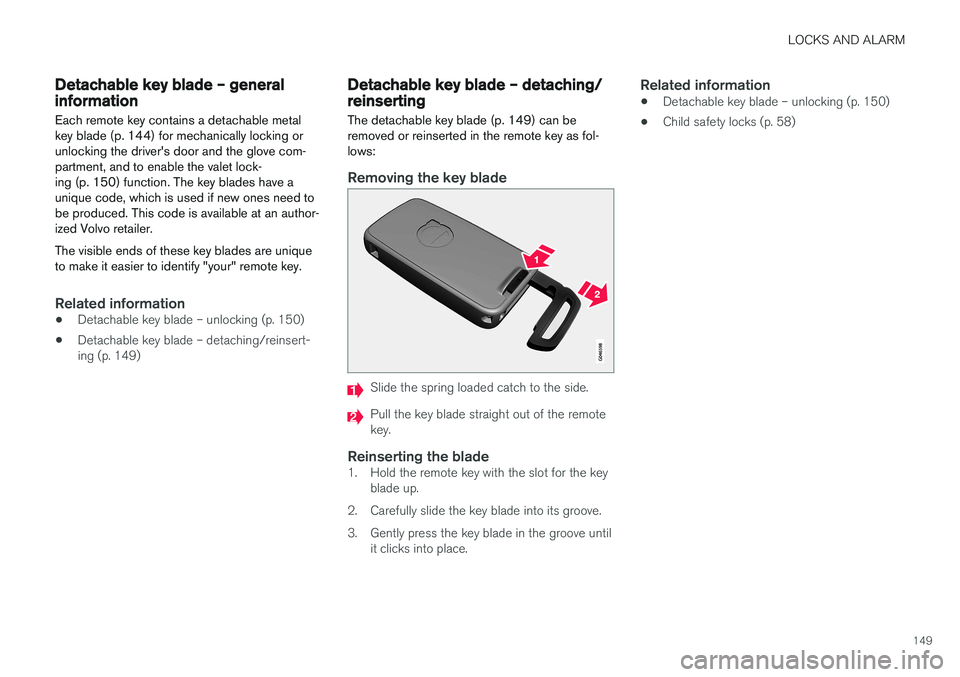
Removing the key blade
Slide the spring loaded catch to the side.
Pull the key blade straight out of the remote key.
Reinserting the blade1. Hold the remote key with the slot for the key blade up.
2. Carefully slide the key blade into its groove.
3. Gently press the key blade in the groove until it clicks into place.
Related information
• Detachable key blade – unlocking (p. 150)
• Child safety locks (p. 58)
Page 154 of 396
||
LOCKS AND ALARM
152
Opening the remote key
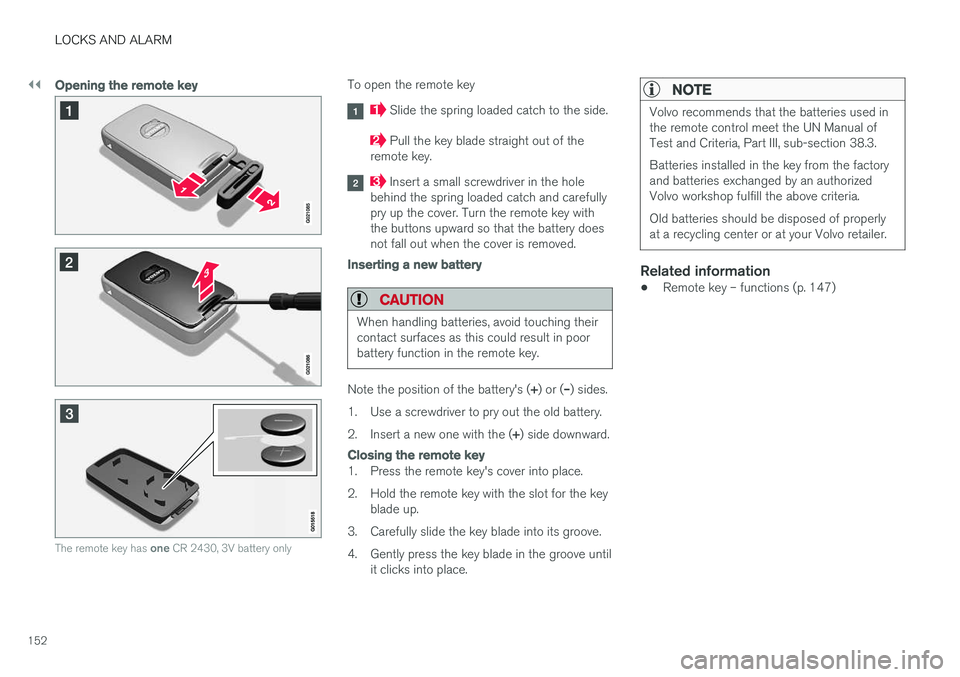
The remote key has one CR 2430, 3V battery only
To open the remote key
Slide the spring loaded catch to the side.
Pull the key blade straight out of the
remote key.
Insert a small screwdriver in the hole
behind the spring loaded catch and carefully pry up the cover. Turn the remote key withthe buttons upward so that the battery doesnot fall out when the cover is removed.
Inserting a new battery
CAUTION
When handling batteries, avoid touching their contact surfaces as this could result in poorbattery function in the remote key.
Note the position of the battery's ( +) or ( –) sides.
1. Use a screwdriver to pry out the old battery. 2. Insert a new one with the ( +) side downward.
Closing the remote key
1. Press the remote key's cover into place.
2. Hold the remote key with the slot for the key
blade up.
3. Carefully slide the key blade into its groove.
4. Gently press the key blade in the groove until it clicks into place.
NOTE
Volvo recommends that the batteries used in the remote control meet the UN Manual ofTest and Criteria, Part III, sub-section 38.3. Batteries installed in the key from the factory and batteries exchanged by an authorizedVolvo workshop fulfill the above criteria. Old batteries should be disposed of properly at a recycling center or at your Volvo retailer.
Related information
• Remote key – functions (p. 147)
Page 155 of 396

LOCKS AND ALARM
}}
* Option/accessory.153
Keyless drive *– locking/unlocking
This system makes it possible to unlock and lock the vehicle without having to press any buttonson the remote key. It is only necessary to have akeyless drive remote key in your possession tooperate the central locking system.
G020577
Range of the keyless drive remote key–5 ft (1.5 meters)
NOTE
• The gear selector must in the
P position
before the vehicle can be locked and the alarm can be armed.
• The buttons on the keyless drive remotekey can also be used to lock and unlockthe vehicle. For more information, seeRemote key and key blade (p. 144).
Both of the remote keys provided with the vehicle have the keyless function, and additional onescan be ordered. The system can accommodateup to six remote keys. The red rings in the illustration indicate the area around the vehicle that is within range of the key-less drive antennas.
Locking the vehicle
Models with keyless drive have a pressure-sensitive area on the outside door handles and a rubber-covered but-ton next to the trunk opening control
The doors and the trunk can be locked by press- ing the pressure-sensitive area on each of theoutside door handles or the rubber-covered but-ton next to the trunk opening control. The lockindicator on the dash will begin to flash.
NOTE
On keyless drive vehicles, the gear selector must be in the Park (
P) position, all doors and
the trunk must be closed and the ignition must be switched off before the vehicle canbe locked.
Unlocking the vehicle
• A keyless drive remote key must be on the same side of the vehicle as the door to beopened, and be within 5 feet (1.5 meters) ofthe door's lock or the trunk (see the shadedareas in the illustration).
• Pull a door handle to unlock and open thedoor or press the trunk opening control onthe trunk lid.
The number of doors that are unlocked at thesame time can be set in the vehicle's menu sys- tem. Press MY CAR and go to
Car settings
Lock settingsKeyless entry. For a descrip-
tion of the menu system, see My Car – introduc- tion (p. 71).
NOTE
In some cases, wearing thick gloves or pulling the door handle too quickly may affect theunlocking function. If this occurs, try pullingthe door handle again or pull it after taking offthe glove.
Page 157 of 396
LOCKS AND ALARM
}}
* Option/accessory.155
Keyless drive * – key memory
When you leave the vehicle with a remote key in your possession and lock any door, the position of the driver's seat 2
and door mirrors will be
stored in the remote key's memory.
The next time a door is opened by a person with the same remote key in his/her possession, the
driver's seat and door mirrors will automatically move to the position that they were in when thedoor was most recently locked.
NOTE
If several people carrying remote keys approach the vehicle at the same time, thedriver's seat and door mirrors will assume thepositions they were in for the person whoopens the driver's door.
See also power seats (p. 76) for information on adjusting and storing the seat's position in theseat memory.
NOTE
If the vehicle is locked by pressing the button on one of the door handles or by pressing thelock button on the remote key, or if it is leftunlocked for more than 30 minutes, the keymemory function will be deactivated. To reactivate the key's memory:
• Unlock the vehicle by pulling a door han- dle with the remote key in your posses-sion or by pressing the unlock button onthe remote key.
Related information
•
Keyless drive
*– locking/unlocking (p. 153)
• Remote key – functions (p. 147)
Keyless drive
* – messages
If all of the remote keys are removed from the vehicle while the engine is running or if the igni-tion modes (p. 74) is in mode II and all of the
doors are closed, a message will appear in theinstrument panel display and an audible signalwill sound.
When at least one remote key has been returned to the car, the message will be erased in the dis-play and the audible signal will stop when:
• A door has been opened and closed
• The remote key has been inserted in theignition slot
• The
OK button has been pressed. For the
location of this button, see Information dis-play – menu controls (p. 108)
2 Power seats only
Page 159 of 396
LOCKS AND ALARM
* Option/accessory.157
WARNING
People with implanted pacemakers should not allow the pacemaker to come closer than9 inches (22 cm) to any of the keyless drivesystem's antennas. This is to help preventinterference between the pacemaker and thekeyless drive system.
Related information
•Keyless drive
*– locking/unlocking (p. 153)
Locking/unlocking – from the outside
The remote key (p. 144) is used to lock/unlock all of the doors and the trunk at the same time.Different settings for unlocking the vehicle canbe selected, see Remote key – functions(p. 147). Before the vehicle can be locked from the out- side with the remote key, the driver's door mustbe closed. If the trunk or any other door is open,it will be locked and the alarm will be armed.
NOTE
Be sure the remote key is outside of the vehi- cle before the other doors/trunk are closed tohelp avoid locking the remote inside the vehi-cle.
If the vehicle is equipped with the optional key- less drive system, all doors/trunk must be closedbefore the vehicle can be locked. The first press on the unlock button unlocks the driver's door and a second press unlocks theother doors and the trunk (see also remote keyand key blade (p. 144)). This setting can be changed in the menu system. See MY
CAR (p. 71) for a description.
If the locks repeatedly do not react when the unlock button is pressed, it may be necessary toreplace the battery in the remote, see Remote key – replacing the battery (p. 151). In this casethe vehicle can be unlocked with the detachablekey blade (p. 150).
Related information
•
Locking/unlocking – from inside (p. 158)
Page 161 of 396
LOCKS AND ALARM
159
Unlocking
The vehicle can be unlocked from inside the vehi- cle in two ways:• By pressing the unlock button
.
• The
front doors can be unlocked and
opened by pulling the door handle once. The rear doors can be unlocked by pulling the
door handle once and opened by pulling the handle again.
Locking
• Press the lock button after the front
doors have been closed.
• Press the lock button
: all of the doors
that are closed will lock.
• Each door can be locked individually with the lock button on the respective doors. The doormust be closed first.
Indicator light in the lock buttons
There are two versions of the central locking sys- tem that affect the indicator light in the driver'sdoor central locking button. If
only the driver's door has a central locking but-
ton:
• If the light is on, this indicates that all of the doors are locked.
If there are central locking buttons in both front
doors and electric lock buttons in the rear sidedoors: •
If a light is on in one of the buttons, thismeans that only that door is locked. Whenthe lights are on in all of the buttons, all ofthe doors are locked.
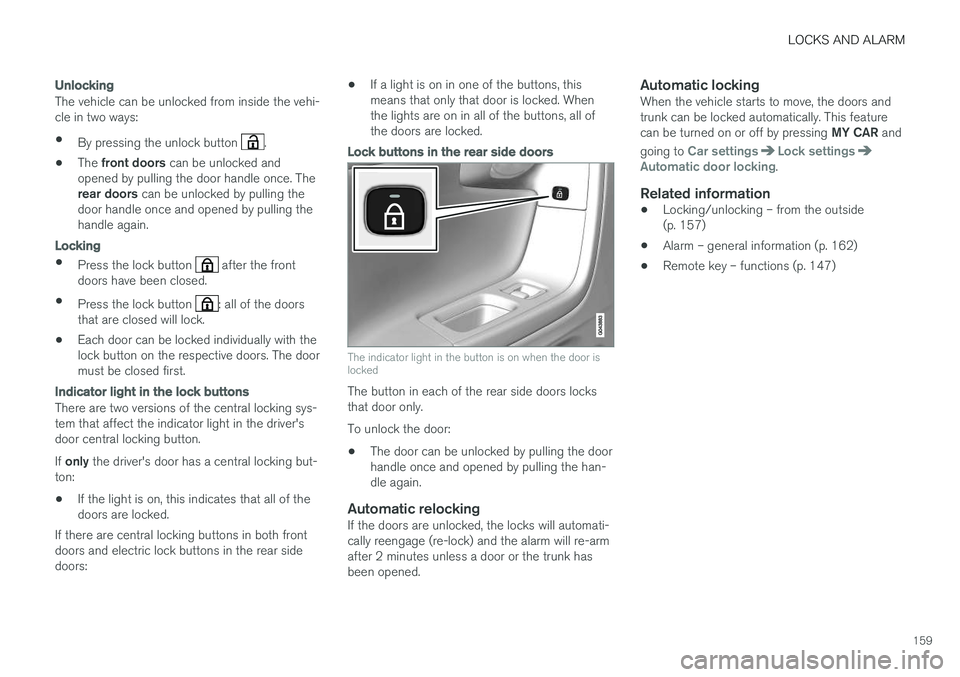
Lock buttons in the rear side doors
The indicator light in the button is on when the door is locked
The button in each of the rear side doors locks that door only. To unlock the door:
• The door can be unlocked by pulling the door handle once and opened by pulling the han-dle again.
Automatic relockingIf the doors are unlocked, the locks will automati-cally reengage (re-lock) and the alarm will re-armafter 2 minutes unless a door or the trunk hasbeen opened.
Automatic lockingWhen the vehicle starts to move, the doors andtrunk can be locked automatically. This feature can be turned on or off by pressing
MY CAR and
going to
Car settingsLock settingsAutomatic door locking.
Related information
• Locking/unlocking – from the outside (p. 157)
• Alarm – general information (p. 162)
• Remote key – functions (p. 147)