rear view VOLVO XC60 T8 2018 Owner´s Manual
[x] Cancel search | Manufacturer: VOLVO, Model Year: 2018, Model line: XC60 T8, Model: VOLVO XC60 T8 2018Pages: 674, PDF Size: 11.93 MB
Page 384 of 674
DRIVER SUPPORT
* Option/accessory.
382
Starting the Park Assist Camera
The Park Assist Camera starts automatically when reverse gear is engaged or can be startedmanually using one of the center display's func-tion buttons.
Camera view when backing upWhen reverse gear is engaged, the screen shows the rear view 122
.
Camera view when manually starting
the camera
Start the Park Assist Camera using this button in the centerdisplay's Function view. The screen will first show the most recently used cameraview. However, each time the
engine is started, the previous side view will bereplaced by the 360° view and a previously dis-played zoomed-in rear view will be replaced bythe regular rear view.
Automatically deactivating the cameraFront view switches off when the vehicle's speed reaches 25 km/h (16 mph) to help avoid dis-tracting the driver. It will be automatically reactiva-ted if the vehicle's speed falls below 22 km/h(14 mph) within 1 minute as long as the vehicle'sspeed has not exceeded 50 km/h (31 mph). Other camera views switch off at 15 km/h(9 mph) and are not reactivated.
Related information
•
Park Assist Camera
* (p. 377)
Park Assist Camera limitations
The Park Assist Camera may not be able to detect all conditions in all situations and func-tionality may therefore be limited.
The driver should be aware of the following limi- tations for the Park Assist Camera:
WARNING
Be extra cautious when reversing if this symbol isshown when a trailer, bikecarrier or similar is attachedand electrically connectedto the vehicle. The symbol indicates that
the rear parking assist sensors are deacti-
vated and will not warn of any obstacles.
NOTE
A bike carrier and other accessories mounted on the rear of the vehicle can obscure thecamera's view.
122
In Canada, it is also possible to select the 360° view.
Page 385 of 674
DRIVER SUPPORT
* Option/accessory.383
Blind sectors
There are "blind" sectors between the cameras' fields of vision.
With 360° view selected, objects/obstacles may not be detected if they are located in the "joints"where the edges of the individual camera viewsmeet.
WARNING
Even if it seems as though only a fairly small section of the screen image is obstructed, thismay mean that a relatively large sector is hid-den and obstacles there may not be detecteduntil they are very near the vehicle.
Defective cameraIf a camera sector is dark and contains this symbol, this indi-cates that the camera is notfunctioning properly. See the following illustration for an example.
The vehicle's left-side camera is malfunctioning.
Dark camera sector
A dark camera sector may also be displayed in the following situations, but without the defective
camera symbol:
• a door is open
• the tailgate is open
• a rearview mirror is folded in
Lighting conditionsThe camera image is automatically adjusted according to the current lighting conditions. This means that the brightness and quality of theimage may vary slightly. Poor lighting conditionsmay result in reduced image quality.
Related information
•
Park Assist Camera
* (p. 377)
Page 445 of 674
STARTING AND DRIVING
}}
* Option/accessory.443
Leveling control settings *
The vehicle can be lowered or raised to make it easier to load or for passengers to get in andout. Turn off leveling control before lifting the vehicle with a jack to help avoid problems with thepneumatic suspension.
Adjusting loading mode
Use the buttons in the cargo compartment to raise or lower the rear section of the vehicle tofacilitate loading or unloading the vehicle or con-necting or disconnecting a trailer.
Center display settings
Easy Entry and Exit Suspension Control
The vehicle can be lowered to make it easier to get in and out. Activating easy entry in the center display: 1.
Tap
Settings in the Top view.
2. Tap
My CarMirrors and Convenience.
3. Select
Easy Entry and Exit Suspension
Control.
> When the vehicle is parked and the engine is turned off, the level is lowered. (Level adjustment will stop if a side dooris opened and will resume after a slightdelay when the door has been closed.)When the engine is started and the vehi-cle begins to move, the level will be raisedto the height set by the selected drivemode.
Disable Leveling Control
In certain situations, this function must be turned off, e.g. before the vehicle is raised using a jack *.
The level difference caused by raising the vehicle with a jack could cause problems with the pneu-matic suspension. Turning off the function in the center display:1. Tap
Settings in the Top view.
2. Tap
My CarParking Brake and
Suspension.
3. Select
Disable Leveling Control.
Related information
• Leveling control
* and suspension (p. 440)
• Loading recommendations (p. 577)
Low Speed Control The low-speed function, Low Speed Control (LSC), facilitates and improves control and trac-tion on rough roads and slippery surfaces, e.g.when towing a trailer on grass or up boat ramps. The function is included in the Off Road drive mode.
Low Speed Control is designed for driving on rough roads and when towing trailers at lowspeeds, up to approximately 40 km/h (25 mph). When driving at low speeds, LSC prioritizes low gears and all-wheel drive to help avoid wheel spinand improve traction on all wheels. The accelera-tor pedal will be less responsive to improve trac-tion and speed control at low speeds. The function is activated together with Hill Descent Control (HDC), which makes it possibleto control speed going down steep hills using theaccelerator pedal and reduces the need to usethe brake pedal. The system makes it possible tomaintain a low and uniform speed when drivingdown steep hills.
Page 449 of 674
STARTING AND DRIVING
}}
447
Driving
•Choose the Pure drive mode to help mini- mize electric power consumption.
• Maintain a steady speed and a generous fol-lowing distance to traffic ahead to minimizebraking. This drive mode has the lowestpower consumption.
• Balance energy requirements using theaccelerator pedal. Use the indicator on theinstrument panel to see available electricpower and avoid starting the combustionengine unnecessarily. The electric motor ismore effective than the combustion engine,especially at low speeds.
• When braking is necessary, brake gentlyusing the brake pedal. This will recharge thehybrid battery. A regenerative function isintegrated in the brake pedal and can beaugmented by the electric motor's brakingcapacity when the gear selector is in mode B
.
• Higher speeds increase energy consumption - air resistance increases with speed.
• Activate the
Hold function in the Function
view at high speeds when traveling farther than is possible using the hybrid battery'scapacity.
• Whenever possible, avoid using the
Chargefunction to charge the hybrid battery. Charg- ing the battery using the combustion engine increases fuel consumption and carbon diox-ide emissions.
• In a cold climate, reduce heating of the wind-shield/rear window, mirrors, seats and thesteering wheel.
• Maintain the correct pressure in the tires andcheck pressure regularly.
• The type of tires used could affect energyconsumption - consult a retailer for advice onsuitable tires.
• Remove unnecessary items from the vehicle- the heavier the load, the higher the fuelconsumption.
• Roof loads increase air resistance andincrease fuel consumption. Remove roofboxes, ski racks, etc. that are not in use.
• Avoid driving with the windows open.
• Do not keep the vehicle still on an upwardgradient by using the accelerator pedal. Usethe brakes instead.
Related information
•
Drive-E
‒
purer driving pleasure (p. 27)
• Factors affecting electric motor range(p. 448)
• Using the electric motor only (p. 447)
• Hybrid gauge (p. 83)
• Checking tire pressure (p. 547)
Using the electric motor only
When using the electric motor, Volvo Twin Engine provides a combination of good fueleconomy, low emissions and high performance.
For energy-efficient driving:
• Select the Pure drive mode to help maximize driving range using only the electric motor.
• Balance energy requirements using theaccelerator pedal. Use the indicator on theinstrument panel's hybrid gauge to see avail-able electric power and avoid starting thecombustion engine unnecessarily.
• When braking is necessary, brake gentlyusing the brake pedal. This will recharge thehybrid battery.
• Activate the
Hold function in the Function
view at high speeds when traveling farther than is possible using the hybrid battery'scapacity.
• Reduce current consumption in the passen-ger compartment by reducing e.g. fan speed,electric heating, or air conditioning use.
Also follow the general economical driving adviceregarding speed, tires and load to maximizerange.
Related information
• General information about Twin Engine(p. 396)
• Economical driving (p. 446)
Page 467 of 674
STARTING AND DRIVING
* Option/accessory.465
Checking trailer lights
When connecting a trailer, make sure that all of the lights on the trailer are functioning beforestarting to drive.
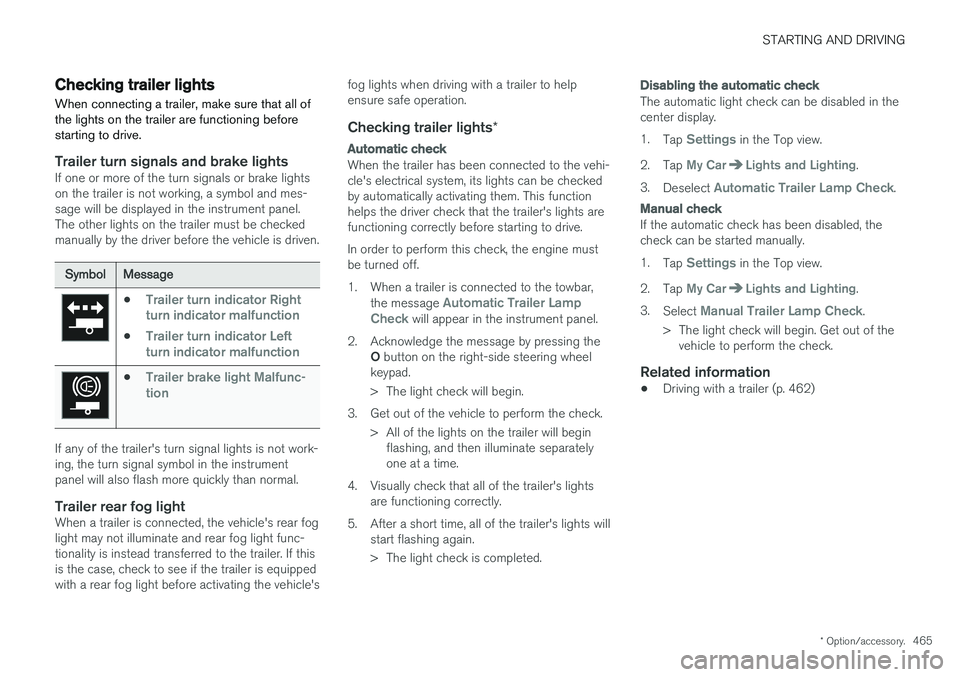
Trailer turn signals and brake lightsIf one or more of the turn signals or brake lights on the trailer is not working, a symbol and mes-sage will be displayed in the instrument panel.The other lights on the trailer must be checkedmanually by the driver before the vehicle is driven.
SymbolMessage
•Trailer turn indicator Right
turn indicator malfunction
•Trailer turn indicator Left
turn indicator malfunction
•Trailer brake light Malfunc-
tion
If any of the trailer's turn signal lights is not work- ing, the turn signal symbol in the instrumentpanel will also flash more quickly than normal.
Trailer rear fog lightWhen a trailer is connected, the vehicle's rear foglight may not illuminate and rear fog light func-tionality is instead transferred to the trailer. If thisis the case, check to see if the trailer is equippedwith a rear fog light before activating the vehicle's fog lights when driving with a trailer to helpensure safe operation.
Checking trailer lights
*
Automatic check
When the trailer has been connected to the vehi- cle's electrical system, its lights can be checkedby automatically activating them. This functionhelps the driver check that the trailer's lights arefunctioning correctly before starting to drive. In order to perform this check, the engine must be turned off.
1. When a trailer is connected to the towbar,
the message
Automatic Trailer Lamp
Check will appear in the instrument panel.
2. Acknowledge the message by pressing the O button on the right-side steering wheel
keypad.
> The light check will begin.
3. Get out of the vehicle to perform the check. > All of the lights on the trailer will beginflashing, and then illuminate separately one at a time.
4. Visually check that all of the trailer's lights are functioning correctly.
5. After a short time, all of the trailer's lights will start flashing again.
> The light check is completed.
Disabling the automatic check
The automatic light check can be disabled in the center display. 1.Tap
Settings in the Top view.
2. Tap
My CarLights and Lighting.
3. Deselect
Automatic Trailer Lamp Check.
Manual check
If the automatic check has been disabled, the check can be started manually. 1.Tap
Settings in the Top view.
2. Tap
My CarLights and Lighting.
3. Select
Manual Trailer Lamp Check.
> The light check will begin. Get out of the vehicle to perform the check.
Related information
• Driving with a trailer (p. 462)
Page 470 of 674
||
STARTING AND DRIVING
* Option/accessory.
468
WARNING
No person or object should be behind the tow truck when the vehicle is lifted onto the bedof the truck.
Related information
• Attaching and removing the towing eyelet (p. 466)
HomeLink®
*10
HomeLink ®
11
is a programmable remote control,
integrated in the vehicle electrical system, that can control up to three different devices (e.g.garage door opener, alarm system, outdoor andindoor lighting, etc.) and thereby replace theremote controls for these.
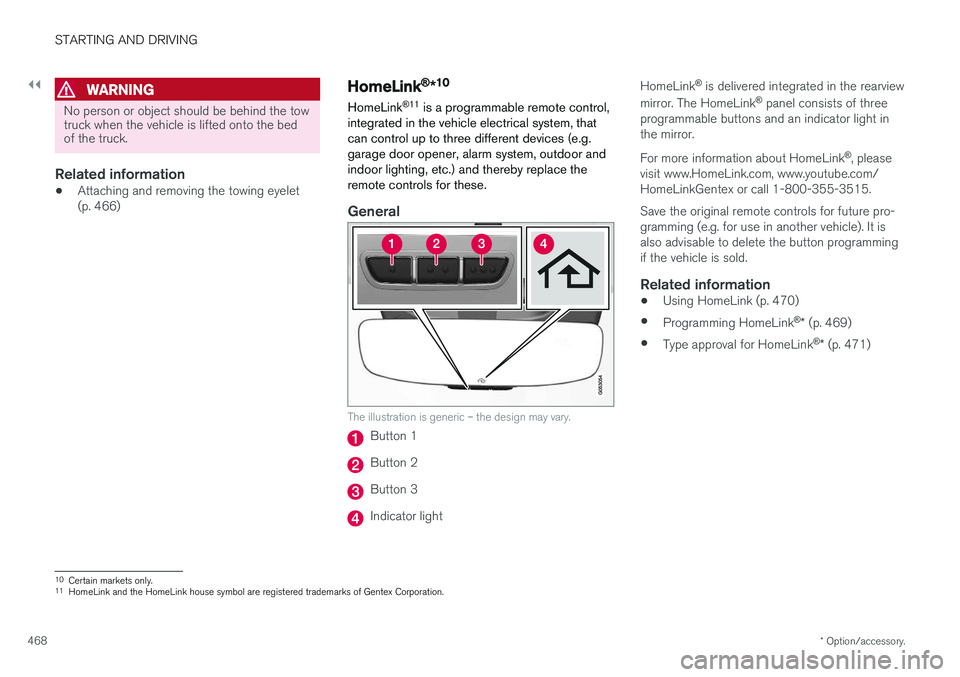
General
The illustration is generic – the design may vary.
Button 1
Button 2
Button 3
Indicator light HomeLink
®
is delivered integrated in the rearview
mirror. The HomeLink ®
panel consists of three
programmable buttons and an indicator light in the mirror. For more information about HomeLink ®
, please
visit www.HomeLink.com, www.youtube.com/ HomeLinkGentex or call 1-800-355-3515. Save the original remote controls for future pro- gramming (e.g. for use in another vehicle). It isalso advisable to delete the button programmingif the vehicle is sold.
Related information
• Using HomeLink (p. 470)
• Programming HomeLink ®
* (p. 469)
• Type approval for HomeLink ®
* (p. 471)
10
Certain markets only.
11 HomeLink and the HomeLink house symbol are registered trademarks of Gentex Corporation.
Page 473 of 674
STARTING AND DRIVING
* Option/accessory.471
Type approval for HomeLink®
*14
FCC (USA) and IC (Canada)This device complies with FCC rules part 15 and Industry Canada RSS-210. Operation is subjectto the following two conditions: (1) This devicemay not cause harmful interference, and (2) Thisdevice must accept any interference that may bereceived including interference that may causeundesired operation.
WARNING
The transmitter has been tested and complies with FCC and IC rules. Changes or modifica-tions not expressly approved by the partyresponsible for compliance could void the user's authority to operate the device. 15
Type approval for EUGentex Corporation hereby declares that HomeLink®
Model UAHL5 complies with the
Radio equipment directive 2014/53/EU. Wavelengths within which the radio equipment operates:
• 433.05MHz-434.79MHz <10mW E.R.P.
• 868.00MHz-868.60MHz <25mW E.R.P.
• 868.70MHz-868.20MHz <25mW E.R.P.
• 869.40MHz-869.65MHz <25mW E.R.P. •
869.70MHz-870.00MHz <25mW E.R.P.
Certificate holder address: Gentex Corporation,600 North Centennial Street, Zeeland MI 49464,USA For more information, see support.volvocars.com.
Related information
• HomeLink ®
* (p. 468)
Compass
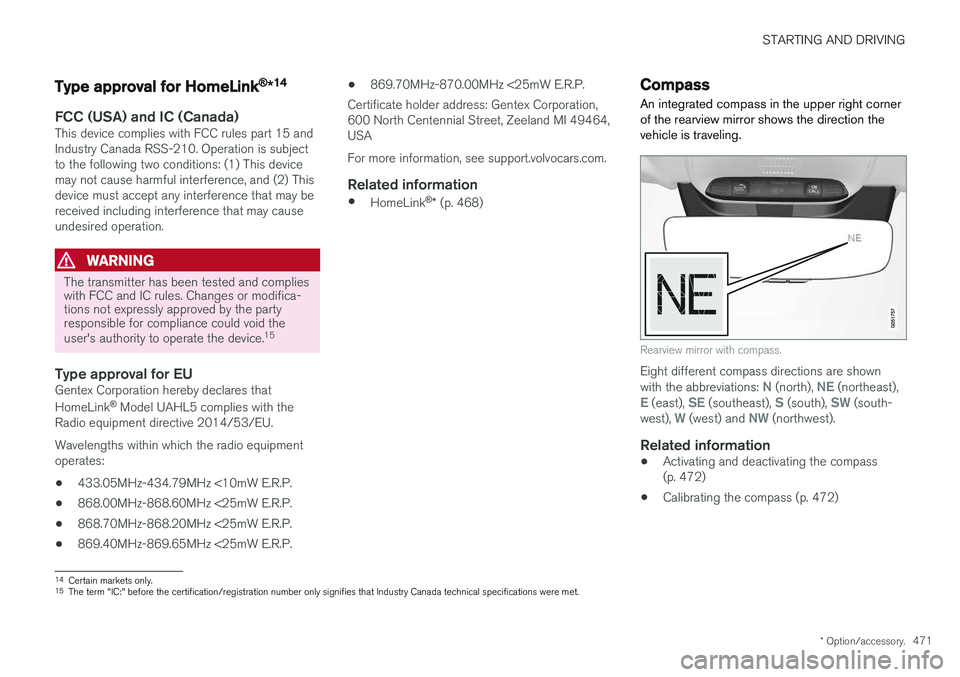
An integrated compass in the upper right corner of the rearview mirror shows the direction thevehicle is traveling.
Rearview mirror with compass.
Eight different compass directions are shown with the abbreviations: N (north), NE (northeast),E (east), SE (southeast), S (south), SW (south-
west), W (west) and NW (northwest).
Related information
• Activating and deactivating the compass (p. 472)
• Calibrating the compass (p. 472)
14
Certain markets only.
15 The term "IC:" before the certification/registration number only signifies that Industry Canada technical specifications were met.
Page 474 of 674
STARTING AND DRIVING
* Option/accessory.
472
Activating and deactivating thecompass
An integrated compass in the upper right corner of the rearview mirror shows the direction thevehicle is traveling.
Activating and deactivating the compass
The compass is automatically activated when the vehicle is started. To deactivate/activate the compass manually:
–Use a paper clip or similar object to press the button on the bottom of the mirror.
Related information
• Compass (p. 471)
• Calibrating the compass (p. 472)
Calibrating the compass
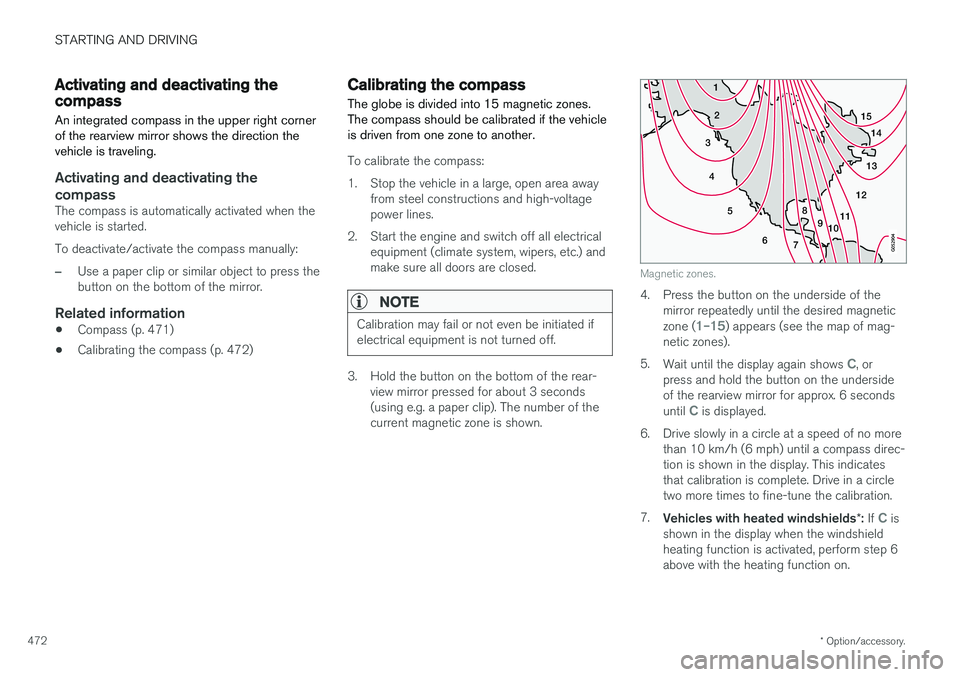
The globe is divided into 15 magnetic zones. The compass should be calibrated if the vehicleis driven from one zone to another.
To calibrate the compass:
1. Stop the vehicle in a large, open area away from steel constructions and high-voltage power lines.
2. Start the engine and switch off all electrical equipment (climate system, wipers, etc.) andmake sure all doors are closed.
NOTE
Calibration may fail or not even be initiated if electrical equipment is not turned off.
3. Hold the button on the bottom of the rear-view mirror pressed for about 3 seconds (using e.g. a paper clip). The number of thecurrent magnetic zone is shown.
15
14
13
12
11
9
8
7
6
5
4
3
2
1
10
Magnetic zones.
4. Press the button on the underside of themirror repeatedly until the desired magnetic zone (
1–15) appears (see the map of mag-
netic zones).
5. Wait until the display again shows
C, or
press and hold the button on the underside of the rearview mirror for approx. 6 seconds until
C is displayed.
6. Drive slowly in a circle at a speed of no more than 10 km/h (6 mph) until a compass direc- tion is shown in the display. This indicatesthat calibration is complete. Drive in a circletwo more times to fine-tune the calibration.
7. Vehicles with heated windshields *: If
C is
shown in the display when the windshield heating function is activated, perform step 6above with the heating function on.
Page 478 of 674
AUDIO, MEDIA AND INTERNET
* Option/accessory.
476
Audio, media and Internet
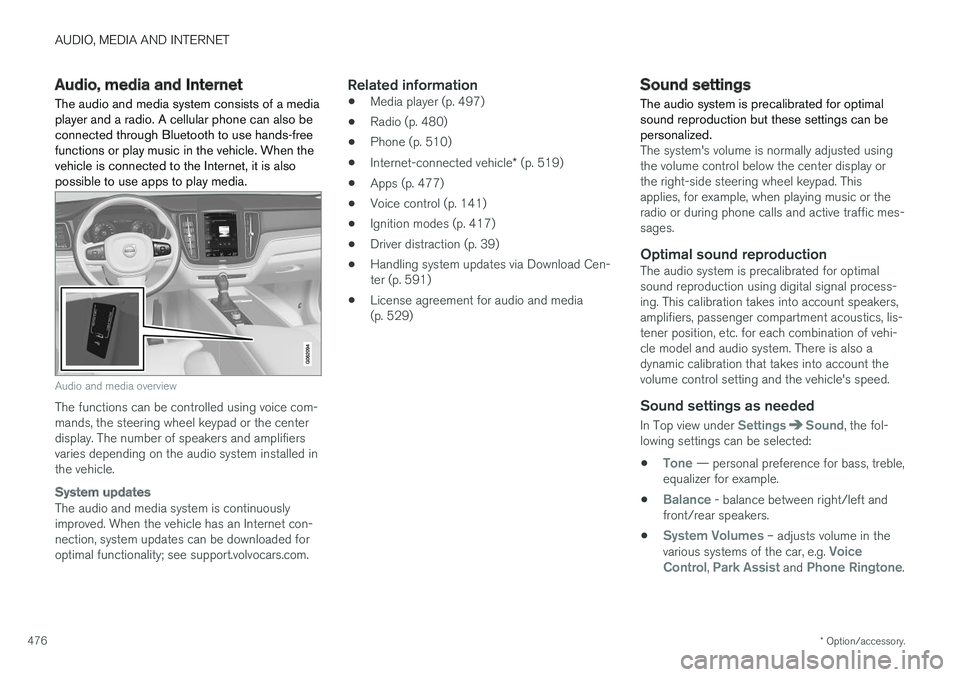
The audio and media system consists of a media player and a radio. A cellular phone can also beconnected through Bluetooth to use hands-freefunctions or play music in the vehicle. When thevehicle is connected to the Internet, it is alsopossible to use apps to play media.
Audio and media overview
The functions can be controlled using voice com- mands, the steering wheel keypad or the centerdisplay. The number of speakers and amplifiersvaries depending on the audio system installed inthe vehicle.
System updates
The audio and media system is continuously improved. When the vehicle has an Internet con-nection, system updates can be downloaded foroptimal functionality; see support.volvocars.com.
Related information
• Media player (p. 497)
• Radio (p. 480)
• Phone (p. 510)
• Internet-connected vehicle
* (p. 519)
• Apps (p. 477)
• Voice control (p. 141)
• Ignition modes (p. 417)
• Driver distraction (p. 39)
• Handling system updates via Download Cen-ter (p. 591)
• License agreement for audio and media(p. 529)
Sound settings
The audio system is precalibrated for optimal sound reproduction but these settings can bepersonalized.
The system's volume is normally adjusted using the volume control below the center display orthe right-side steering wheel keypad. Thisapplies, for example, when playing music or theradio or during phone calls and active traffic mes-sages.
Optimal sound reproductionThe audio system is precalibrated for optimalsound reproduction using digital signal process-ing. This calibration takes into account speakers,amplifiers, passenger compartment acoustics, lis-tener position, etc. for each combination of vehi-cle model and audio system. There is also adynamic calibration that takes into account thevolume control setting and the vehicle's speed.
Sound settings as needed
In Top view under SettingsSound, the fol-
lowing settings can be selected:
•
Tone — personal preference for bass, treble,
equalizer for example.
•
Balance - balance between right/left and
front/rear speakers.
•
System Volumes – adjusts volume in the
various systems of the car, e.g. Voice
Control, Park Assist and Phone Ringtone.
Page 479 of 674
AUDIO, MEDIA AND INTERNET
}}
* Option/accessory.477
Sound experience *
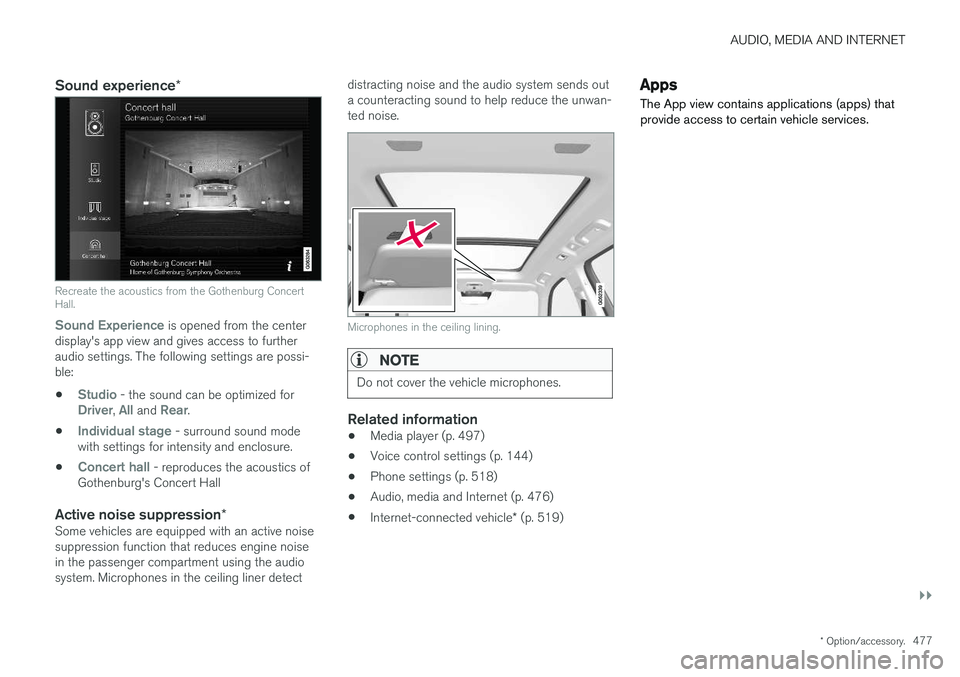
Recreate the acoustics from the Gothenburg Concert Hall.
Sound Experience
is opened from the center
display's app view and gives access to further audio settings. The following settings are possi-ble:
•
Studio - the sound can be optimized forDriver, All and Rear.
•
Individual stage - surround sound mode
with settings for intensity and enclosure.
•
Concert hall - reproduces the acoustics of
Gothenburg's Concert Hall
Active noise suppression *Some vehicles are equipped with an active noise suppression function that reduces engine noisein the passenger compartment using the audiosystem. Microphones in the ceiling liner detect distracting noise and the audio system sends outa counteracting sound to help reduce the unwan-ted noise.
Microphones in the ceiling lining.
NOTE
Do not cover the vehicle microphones.
Related information
•
Media player (p. 497)
• Voice control settings (p. 144)
• Phone settings (p. 518)
• Audio, media and Internet (p. 476)
• Internet-connected vehicle
* (p. 519)
Apps
The App view contains applications (apps) that provide access to certain vehicle services.