Led VOLVO XC60 TWIN ENGINE 2020 Service Manual
[x] Cancel search | Manufacturer: VOLVO, Model Year: 2020, Model line: XC60 TWIN ENGINE, Model: VOLVO XC60 TWIN ENGINE 2020Pages: 687, PDF Size: 14.65 MB
Page 112 of 687

||
DISPLAYS AND VOICE CONTROL
110
Service messages
The following table lists a selection of impor- tant service messages and what they mean.
Message Meaning
Stop safelyAStop and switch off the engine. Serious risk ofdamage - contact a workshop B
.
Turn off engineA Stop and switch off the engine. Serious risk ofdamage - contact a workshop
B
.
Service urgent Drive to work- shop
A Contact a workshop
B
to
have the vehicle inspec- ted immediately.
Service requiredA Contact a workshop
B
to
have the vehicle inspec- ted as soon as possible.
Regular main- tenance Book time for maintenanceTime for service - contact a workshop B
. Shown
before the next service date.
Regular main- tenance Time for main- tenanceTime for service - contact a workshop B
. Shown on
the next service date.
Message Meaning
Regular main- tenance Maintenance overdueTime for service - contact a workshop B
. Shown
when the date for service has passed.
Temporarily offA A function has been tem- porarily deactivated andwill be reactivated auto-matically while driving orafter the engine is restar-ted.
A
Part of message, shown along with information on the loca- tion of the problem.
B An authorized Volvo workshop is recommended.
Related information
Handling messages in the instrument panel (p. 110)
Handling messages saved from the instru- ment panel (p. 111)
Messages in the center display (p. 143)
Handling messages in the instrument panel
Messages in the instrument panel are con- trolled using the right-side steering wheelkeypad.
Examples of messages in the instrument panel and the right-side steering wheel keypad. The illustrationis generic - details may vary according to vehiclemodel.
Left/right
Confirm
Some messages in the instrument panel con- tain one or more buttons for e.g. confirmingthe message or accepting a request.
Page 113 of 687

DISPLAYS AND VOICE CONTROL
}}
111
Handling new messages
For messages with buttons:
1. Navigate between the buttons by tappingleft or right (1).
2. Confirm your selection by pressing con- firm (2).
> The message will disappear from theinstrument panel.
For messages without buttons:
–Close the message by pressing confirm (2) or let the message automatically time-out after a short period.
> The message will disappear from the instrument panel.
Messages that need to be saved are stored in the
Car Status app, which can be opened
from the App view in the center display. The message
Vehicle message stored in Car
Status app will simultaneously appear in the
center display.
Related information
Messages in the instrument panel (p. 109)
Handling messages saved from the instru- ment panel (p. 111)
Messages in the center display (p. 143)
Handling messages saved from the instrument panel
Messages saved from the instrument panel and center displays are handled in the centerdisplay.
Saved messages can be viewed in the Car Status
app.
The messages displayed in the instrument panel thatneed to be saved are stored in the
Car Status app in the
center display. The message
Vehicle message stored in Car Status app will simulta-
neously appear in the center display.
Reading saved messages
To read a saved message immediately:
–Tap the button to the right of the messageVehicle message stored in Car Status app in the center display.
> The saved message will be displayed in the
Car Status app.
To read saved messages at a later time: 1. Open the
Car Status app from App view
in the center display.
> The app will open in the bottom tile of Home view.
2. Select the
Messages tab in the app.
> A list of saved messages will be dis- played.
3. Tap a message to expand/minimize it. > More information about the messagewill appear in the list and the image to the left of the app will display informa-tion about the message in graphic form.
Page 115 of 687
DISPLAYS AND VOICE CONTROL
}}
113
Center display overview
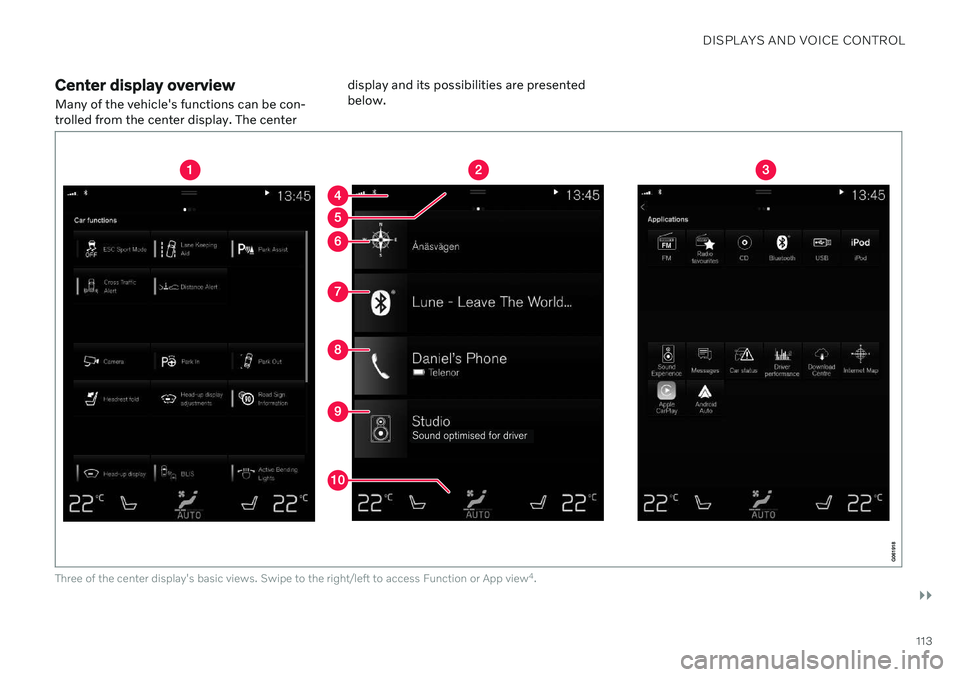
Many of the vehicle's functions can be con- trolled from the center display. The center display and its possibilities are presentedbelow.
Three of the center display's basic views. Swipe to the right/left to access Function or App view
4
.
Page 116 of 687
||
DISPLAYS AND VOICE CONTROL
* Option/accessory.
114
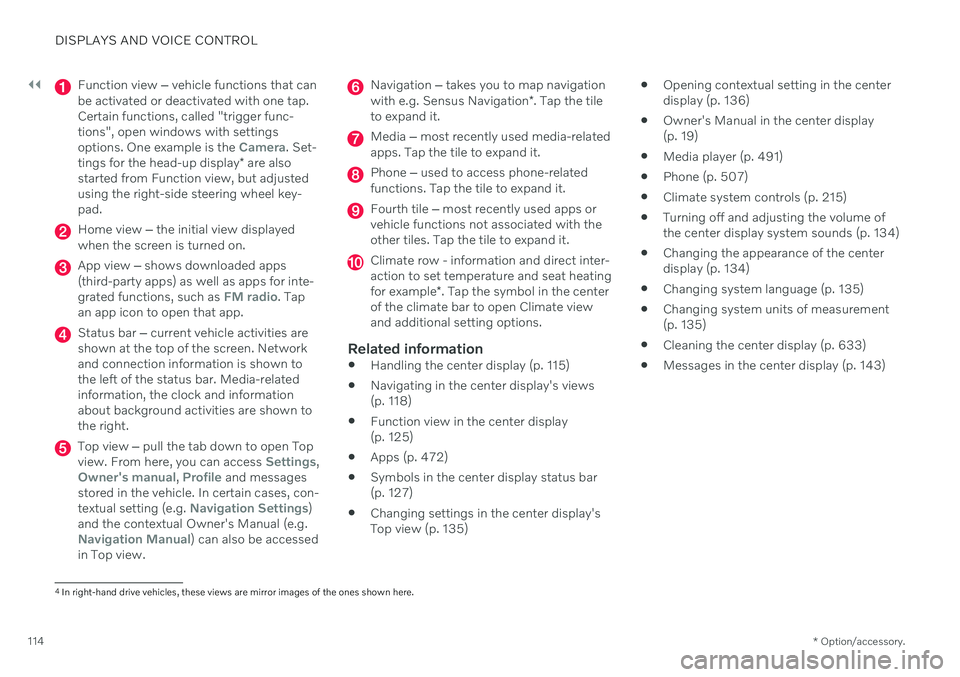
Function view ‒ vehicle functions that can
be activated or deactivated with one tap. Certain functions, called "trigger func-tions", open windows with settingsoptions. One example is the
Camera. Set-
tings for the head-up display * are also
started from Function view, but adjusted using the right-side steering wheel key-pad.
Home view ‒ the initial view displayed
when the screen is turned on.
App view ‒ shows downloaded apps
(third-party apps) as well as apps for inte- grated functions, such as
FM radio. Tap
an app icon to open that app.
Status bar ‒ current vehicle activities are
shown at the top of the screen. Network and connection information is shown tothe left of the status bar. Media-relatedinformation, the clock and informationabout background activities are shown tothe right.
Top view ‒ pull the tab down to open Top
view. From here, you can access Settings,Owner's manual, Profile and messages
stored in the vehicle. In certain cases, con- textual setting (e.g.
Navigation Settings)
and the contextual Owner's Manual (e.g.
Navigation Manual) can also be accessed
in Top view.
Navigation ‒ takes you to map navigation
with e.g. Sensus Navigation *. Tap the tile
to expand it.
Media ‒ most recently used media-related
apps. Tap the tile to expand it.
Phone ‒ used to access phone-related
functions. Tap the tile to expand it.
Fourth tile ‒ most recently used apps or
vehicle functions not associated with the other tiles. Tap the tile to expand it.
Climate row - information and direct inter- action to set temperature and seat heating for example *. Tap the symbol in the center
of the climate bar to open Climate view and additional setting options.
Related information
Handling the center display (p. 115)
Navigating in the center display's views (p. 118)
Function view in the center display (p. 125)
Apps (p. 472)
Symbols in the center display status bar(p. 127)
Changing settings in the center display'sTop view (p. 135)
Opening contextual setting in the centerdisplay (p. 136)
Owner's Manual in the center display(p. 19)
Media player (p. 491)
Phone (p. 507)
Climate system controls (p. 215)
Turning off and adjusting the volume ofthe center display system sounds (p. 134)
Changing the appearance of the centerdisplay (p. 134)
Changing system language (p. 135)
Changing system units of measurement(p. 135)
Cleaning the center display (p. 633)
Messages in the center display (p. 143)
4
In right-hand drive vehicles, these views are mirror images of the ones shown here.
Page 117 of 687

DISPLAYS AND VOICE CONTROL
}}
115
Handling the center displayMany of the vehicle's functions and features can be controlled and adjusted from the cen-ter display. The center display is atouchscreen that reacts to taps and othergestures.
Using the center display's touchscreen
The touchscreen reacts differently depending on whether the user taps, drags or swipes the screen. It is possible to e.g. move between dif-ferent views, mark objects, scroll in a list andmove apps by touching the screen in variousways. An infrared light curtain just above the surface of the screen enables the screen to detectwhen a finger is directly in front of the screen.This technology makes it possible to use thescreen even while wearing gloves. Two people can interact with the screen at the same time, e.g. to adjust climate system set-tings for both the driver and passenger sides.
CAUTION
Do not use sharp objects on the screen as this could cause scratches.
The following table presents the various pro- cedures for using the screen:
Procedure Gesture Result
Tap once. Marks an object, confirms a selection or activates a function.
Double-tap. Zooms in on a digital object, such as a map.
Press and hold. Grabs hold of an object so it can be moved. Can be used to move apps or points on a map. Press and hold
your finger on the screen and drag the object to the desired position.
Tap once with two fingers.Zooms out from a digital object, such as a map.
Page 127 of 687

DISPLAYS AND VOICE CONTROL
}}
125
Function view in the center displayFunction view, which is one of the center dis- play's basic views, contains all of the vehi-cle's function buttons. From the Home view, navigate to Function view by swiping from left to right over the screen
7
.Different types of buttonsThere are three different types of buttons for vehicle functions; see below:
Type of button Functions Vehicle function affected
Function buttons Have On/Off modes. When a function is active, an LED indicator light will illuminate to the left of the but- ton's icon. Press the button to turn the function on or off. Most buttons in Function view arefunction buttons.
Trigger buttons Do not have On/Off modes. Pressing a trigger button opens a window for the function. This can be, for example, awindow to change seat position.
Camera
Headrest Fold
Head-up Display Adjustments
Parking buttons Have On/Off and scanning modes.
Similar to function buttons, but have an extra mode for parking scanning. Park In
Park Out
7
Applies for left-hand drive vehicles. For right-hand drive vehicles, swipe in the other direction.
Page 128 of 687

||
DISPLAYS AND VOICE CONTROL
126
Button modes
When a function or parking button's LED indi- cator is green, the function is activated (on).For some functions, an additional text explain-ing the function will be shown when the func-tion is initially activated. The text will be dis-played for a few seconds and then the buttonwill be displayed with the LED indicator illumi-nated. For
Lane Keeping Aid, for example, the textWorks only at certain speeds will be dis-
played when the button is pressed. Press the button once briefly to activate or deactivate the function.
The function is deactivated when the LED indicator light is switched off.
A warning triangle in the right-hand section of the button indicates that something is notworking correctly.
Related information
Handling the center display (p. 115)
Navigating in the center display's views (p. 118)
Page 138 of 687

||
DISPLAYS AND VOICE CONTROL
136
A sub-category in the Settings menu with various possible settings; has a multi-selection button andradio buttons.
Related information
Center display overview (p. 113)
Resetting center display settings (p. 137)
Table of settings in the center display (p. 138)
Opening contextual setting in the center display Most of the settings for the vehicle's basic apps can be changed directly in Top view inthe center display via contextual settings.
Top view with button for contextual settings.
Contextual setting is a shortcut for accessing specific settings related to the active functiondisplayed on the screen. Apps that are factory- installed in your vehicle, e.g.
FM radio andUSB, are part of Sensus and are used to con-
trol the vehicle's integrated functions. The set- tings for these apps can be changed directlyvia contextual setting in Top view. When contextual setting is available:
1. Pull down Top view when an app is in
expanded form, e.g.
Navigation. 2.
Tap
Navigation Settings.
> The navigation settings page will open.
3. Change the desired settings and confirm. Tap
Close or press the Home button under
the center display to close Settings view. Most of the vehicle's basic apps have this con- textual setting option, but not all.
Third-party appsThird-party apps are apps that are not factory-installed in the vehicle's system, but can be downloaded, e.g.
Volvo ID. Settings for these
apps are changed in the apps themselves, not in Top view.
Related information
Changing settings in the center display'sTop view (p. 135)
Center display overview (p. 113)
Resetting center display settings (p. 137)
Download apps (p. 473)
Page 145 of 687
DISPLAYS AND VOICE CONTROL
143
Resetting driver profile settings
Settings that have been saved for one or more driver profiles can be reset when thevehicle is stationary.
NOTE
Factory Reset is only possible when the
vehicle is stationary.
1. Tap Settings in the Top view.
2. Tap
SystemFactory ResetReset
Personal Settings.
3. Select option
Reset for the active
profile, Reset for all profiles or Cancel.
Related information
Driver profiles (p. 139)
Resetting center display settings (p. 137)
Messages in the center display
The center display shows messages in certain circumstances to inform or assist the driver.
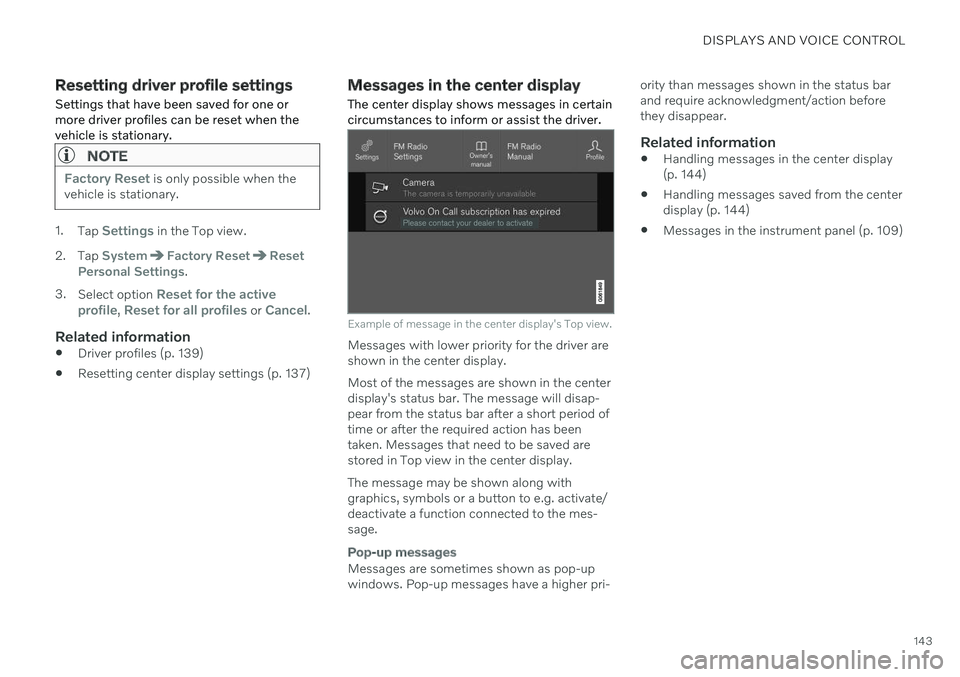
Example of message in the center display's Top view.
Messages with lower priority for the driver are shown in the center display. Most of the messages are shown in the center display's status bar. The message will disap- pear from the status bar after a short period of time or after the required action has beentaken. Messages that need to be saved are stored in Top view in the center display. The message may be shown along with graphics, symbols or a button to e.g. activate/deactivate a function connected to the mes-sage.
Pop-up messages
Messages are sometimes shown as pop-up windows. Pop-up messages have a higher pri- ority than messages shown in the status barand require acknowledgment/action beforethey disappear.
Related information
Handling messages in the center display(p. 144)
Handling messages saved from the centerdisplay (p. 144)
Messages in the instrument panel (p. 109)
Page 146 of 687
DISPLAYS AND VOICE CONTROL
144
Handling messages in the center display
Messages in the center display are handled in the center display's views.
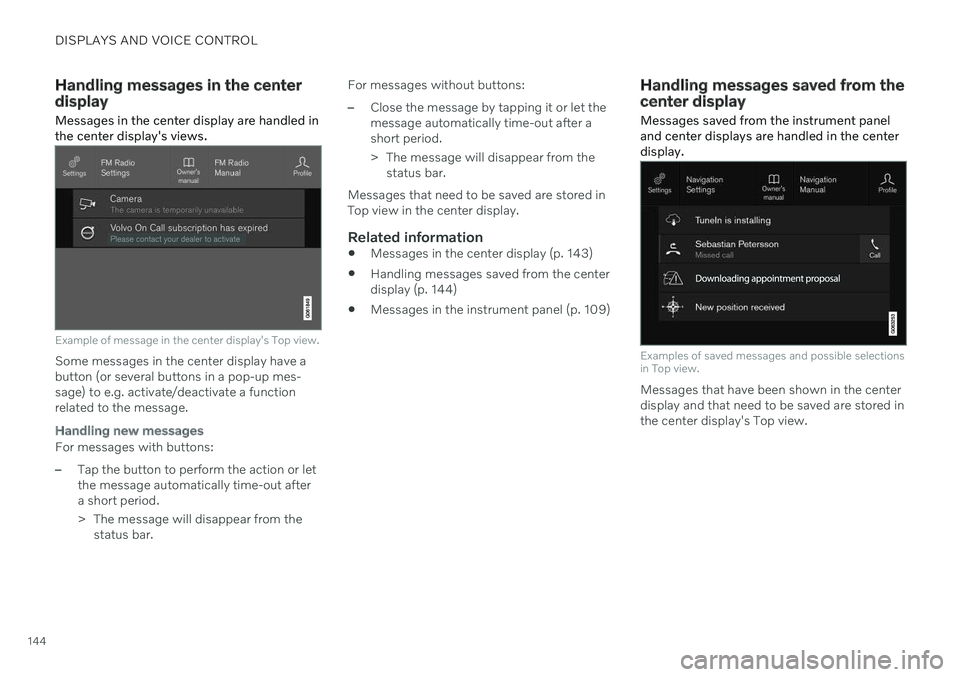
Example of message in the center display's Top view.
Some messages in the center display have a button (or several buttons in a pop-up mes-sage) to e.g. activate/deactivate a functionrelated to the message.
Handling new messages
For messages with buttons:
–Tap the button to perform the action or let the message automatically time-out aftera short period.
> The message will disappear from the status bar. For messages without buttons:
–Close the message by tapping it or let the message automatically time-out after ashort period.
> The message will disappear from the
status bar.
Messages that need to be saved are stored in Top view in the center display.
Related information
Messages in the center display (p. 143)
Handling messages saved from the centerdisplay (p. 144)
Messages in the instrument panel (p. 109)
Handling messages saved from the center display Messages saved from the instrument panel and center displays are handled in the centerdisplay.
Examples of saved messages and possible selections in Top view.
Messages that have been shown in the center display and that need to be saved are stored inthe center display's Top view.