Led VOLVO XC60 TWIN ENGINE 2020 Repair Manual
[x] Cancel search | Manufacturer: VOLVO, Model Year: 2020, Model line: XC60 TWIN ENGINE, Model: VOLVO XC60 TWIN ENGINE 2020Pages: 687, PDF Size: 14.65 MB
Page 195 of 687

SEATS AND STEERING WHEEL
* Option/accessory.193
Restarting the massage function
The massage function turns off automatically after 20 minutes. The function is reactivatedmanually.
–Tap Restart, which is displayed in the
center display, to restart the selected mas- sage program.
> The massage program will restart. If no selection is made, the message will be stored in Top view.
Related information
Manual front seats (p. 188)
Power
* front seats (p. 189)
Adjusting the power
* front seats (p. 189)
Storing positions for seats, mirrors and head-up display
* (p. 190)
Using stored positions for seats, mirrorsand head-up display
* (p. 191)
Adjusting front seat massage settings
*
(p. 193)
Adjusting
* front seat cushion length
(p. 194)
Adjusting front seat side bolster settings
*
(p. 195)
Adjusting front seat lumbar support
*
(p. 195)
Adjusting the passenger seat from thedriver's seat
* (p. 197)
Adjusting front seat massage settings *
The settings for the multifunctional seats can be adjusted using either the mutifunctioncontrol on the seat or the center display. Theadjustment settings are shown in the centerdisplay.
Adjusting front seat massage settingsThe front seat backrests have a massage func- tion. Air-filled cushions provide the massagingaction and a number of settings are available. The massage function can only be activated when the engine is running.
1. Activate the multifunction control by turn-
ing the control
upward/downward. The
seat settings view will appear in the center display. 2.
Select
Massage in the seat settings view.
3. Select massage settings by tapping the center display or by moving the cursor up/ down using the multifunction control's upper
/lower buttons. Change a set-
ting in the selected function by tapping the arrows on the center display or by using the multifunction control's front
/
rear
buttons.
Related information
Manual front seats (p. 188)
Power
* front seats (p. 189)
Adjusting the power
* front seats (p. 189)
Storing positions for seats, mirrors and head-up display
* (p. 190)
Using stored positions for seats, mirrorsand head-up display
* (p. 191)
Adjusting
* front seat cushion length
(p. 194)
Front seat massage
* settings (p. 192)
Adjusting front seat side bolster settings
*
(p. 195)
Adjusting front seat lumbar support
*
(p. 195)
Adjusting the passenger seat from thedriver's seat
* (p. 197)
Page 200 of 687
SEATS AND STEERING WHEEL
* Option/accessory.
198
Folding down the rear seat backrests The rear seat backrest is split into two sec- tions. The two sections can be folded forwardindividually.
WARNING
Adjust the seat and ensure it locks into position before driving. Use cautionwhen adjusting the seat. Uncontrolledor careless adjustments could lead toinjury.
Long objects must always be securelytied down to help prevent injury ordamage in the event of sudden brak-ing.
Always turn off the engine and applythe parking brake when loading orunloading the vehicle.
Put the gear selector in
P to help pre-
vent the gear selector from being inad-vertently moved.
CAUTION
When the backrest is folded down, make sure there are no objects in the rear seat,and the seat belts are not buckled. Other-wise there is a risk of damage to theupholstery.
CAUTION
The seat cushion of the integrated child restraint * must be in the stowed position
before the rear seat backrest can be folded down. The armrest * in the center seat must be
raised before the seat backrest is folded down. The ski hatch must be closed before the seat backrest is folded down.
NOTE
The front seats may need to be pushed for- ward and/or the backrest adjusted so thatthe rear seat backrests can be fully low-ered.
Folding down the backrestsThe vehicle must be stationary and at least one of the rear doors must be open before abackrest can be folded down.
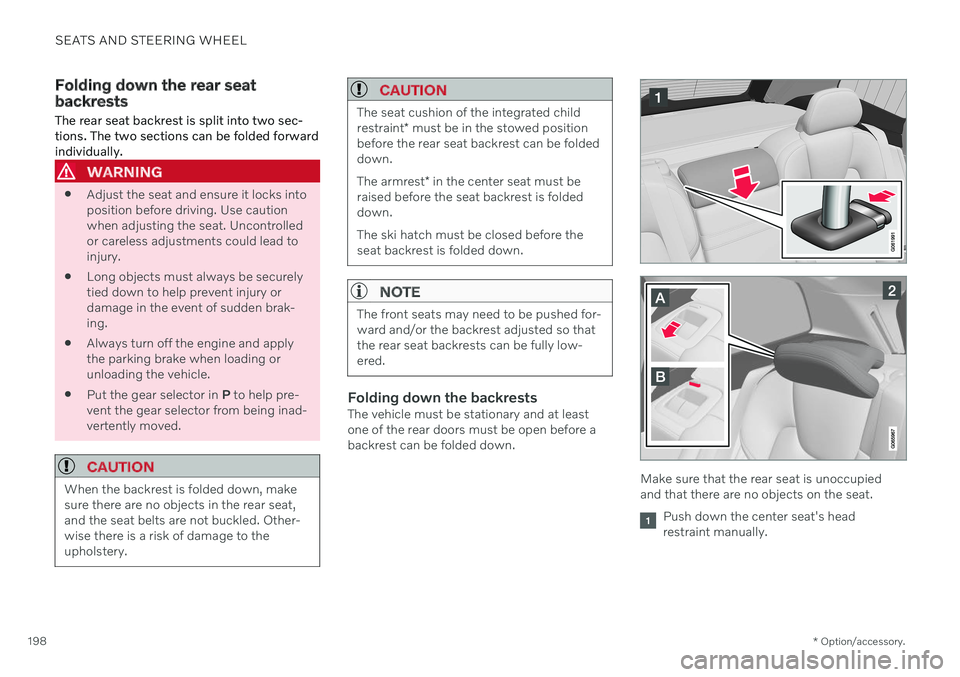
Make sure that the rear seat is unoccupied and that there are no objects on the seat.
Push down the center seat's head restraint manually.
Page 201 of 687
SEATS AND STEERING WHEEL
}}
* Option/accessory.199
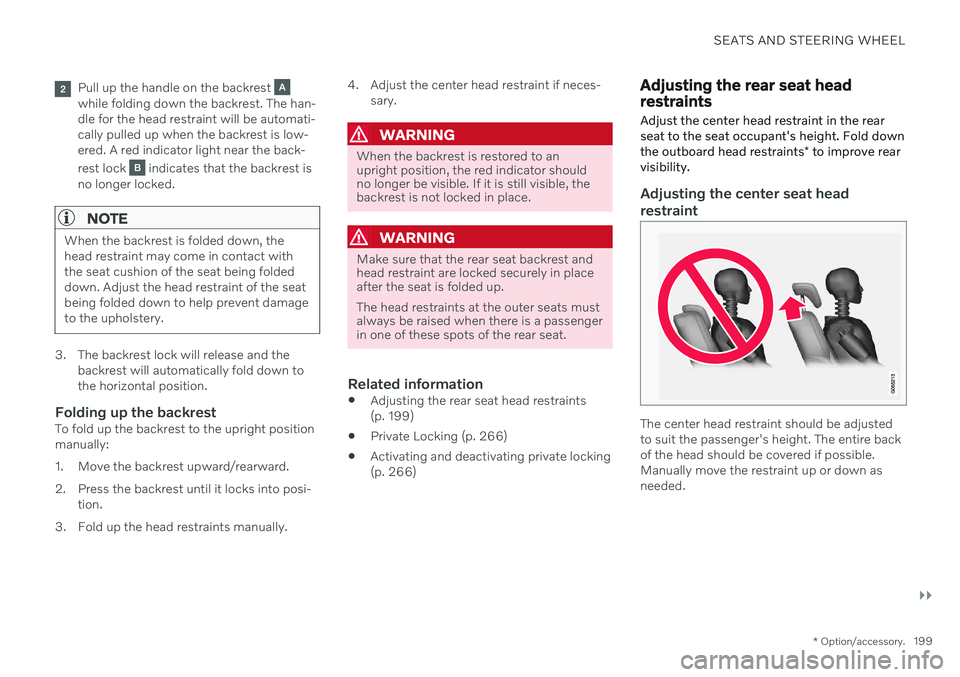
Pull up the handle on the backrest while folding down the backrest. The han- dle for the head restraint will be automati-cally pulled up when the backrest is low-ered. A red indicator light near the back- rest lock
indicates that the backrest is
no longer locked.
NOTE
When the backrest is folded down, the head restraint may come in contact withthe seat cushion of the seat being foldeddown. Adjust the head restraint of the seatbeing folded down to help prevent damageto the upholstery.
3. The backrest lock will release and the backrest will automatically fold down to the horizontal position.
Folding up the backrestTo fold up the backrest to the upright positionmanually:
1. Move the backrest upward/rearward.
2. Press the backrest until it locks into posi-tion.
3. Fold up the head restraints manually. 4. Adjust the center head restraint if neces-
sary.
WARNING
When the backrest is restored to an upright position, the red indicator shouldno longer be visible. If it is still visible, thebackrest is not locked in place.
WARNING
Make sure that the rear seat backrest and head restraint are locked securely in placeafter the seat is folded up. The head restraints at the outer seats must always be raised when there is a passengerin one of these spots of the rear seat.
Related information
Adjusting the rear seat head restraints (p. 199)
Private Locking (p. 266)
Activating and deactivating private locking(p. 266)
Adjusting the rear seat head restraints
Adjust the center head restraint in the rear seat to the seat occupant's height. Fold down the outboard head restraints * to improve rear
visibility.
Adjusting the center seat head restraint
The center head restraint should be adjusted to suit the passenger's height. The entire backof the head should be covered if possible.Manually move the restraint up or down asneeded.
Page 206 of 687

CLIMATE CONTROL
* Option/accessory.
204
Climate The vehicle is equipped with electronic cli- mate control. The climate system cools, heatsand dehumidifies the air in the passengercompartment.
All of the climate system functions are con- trolled from the center display and the buttonson the center console. Certain rear seat functions can also be con- trolled from the climate controls * on the rear
of the tunnel console.
Related information
Climate zones (p. 204)
Climate control sensors (p. 204)
Perceived temperature (p. 205)
Climate control system voice commands (p. 205)
Parking climate (p. 225)
Heater (p. 233)
Air quality (p. 206)
Air distribution (p. 209)
Climate system controls (p. 215)
Climate zones The vehicle is divided into climate zones to make it possible to set different temperaturesfor different parts of the passenger compart-ment.
2-zone climate system
Climate zones with 2-zone climate system.
In 2-zone climate systems, the passenger compartment temperature can be set sepa-rately for the left and right sides of the vehicle.
Related information
Climate (p. 204)
Climate control sensors
The climate system has a number of sensors to help regulate the climate settings in thevehicle.
Location of the sensors
Sunlight sensors - on the upper side of the dashboard.
Humidity sensor - in the rearview mirror console.
Ambient temperature sensor - in the right- side door mirror.
Passenger compartment temperature sen- sor - near the buttons in the center con-sole.
Page 209 of 687

CLIMATE CONTROL
* Option/accessory.207
Interior Air Quality System
* (p. 208)
Passenger compartment air filter (p. 209)
Clean Zone
*
The Clean Zone function monitors the condi- tions affecting good air quality in the passen-ger compartment and indicates whether theyare fulfilled or not.
The indicator is shown in the center dis- play's Climate view.
The indicator is shown in the climate bar when Climate view is not open.
If the conditions are not met, the text
Clean
Zone will be shown in white. When all the
conditions are met, the text will change to blue. The following conditions must be met:
All doors and tailgate are closed.
All side windows and panoramic roof
* are
closed.
The Interior Air Quality System
* is acti-
vated.
The blower is activated.
Air recirculation is deactivated.
NOTE
Clean Zone does not indicate that the air quality is good, but only that the conditionsfor good air quality have been met.
Related information
Air quality (p. 206)
Clean Zone Interior Package
* (p. 208)
Interior Air Quality System
* (p. 208)
Passenger compartment air filter (p. 209)
Page 211 of 687
CLIMATE CONTROL
}}
* Option/accessory.209
Activating and deactivating the air quality sensor *
The air quality sensor is part of the fully auto- mated Interior Air Quality System (IAQS).
The air quality sensor can be switched on or off. 1. Tap
Settings in the Top view in the center
display.
2. Tap
Climate.
3. Select
Air Quality Sensor to activate/
deactivate the air quality sensor.
Related information
Interior Air Quality System
* (p. 208)
Passenger compartment air filter
All air entering the passenger compartment through the climate control system intake isfiltered.
Replacing the passenger compartment filter
To maintain the high performance of the cli- mate control system, the filter must bereplaced regularly. Follow Volvo's serviceschedule for recommended replacement inter-vals. When driving in areas with a lot of smog,dust, etc., the filter may need to be changedmore frequently.
NOTE
There are two types of passenger compart- ment filters. Make sure that the correct fil-ter is installed.
Related information
Air quality (p. 206)
Clean Zone
* (p. 207)
Clean Zone Interior Package
* (p. 208)
Interior Air Quality System
* (p. 208)
Air distribution
The climate system distributes incoming air through a number of vents in the passengercompartment.
Automatic and manual air distributionWhen the auto-climate feature is on, air distri- bution is regulated automatically. Air distribu-tion can also be controlled manually.
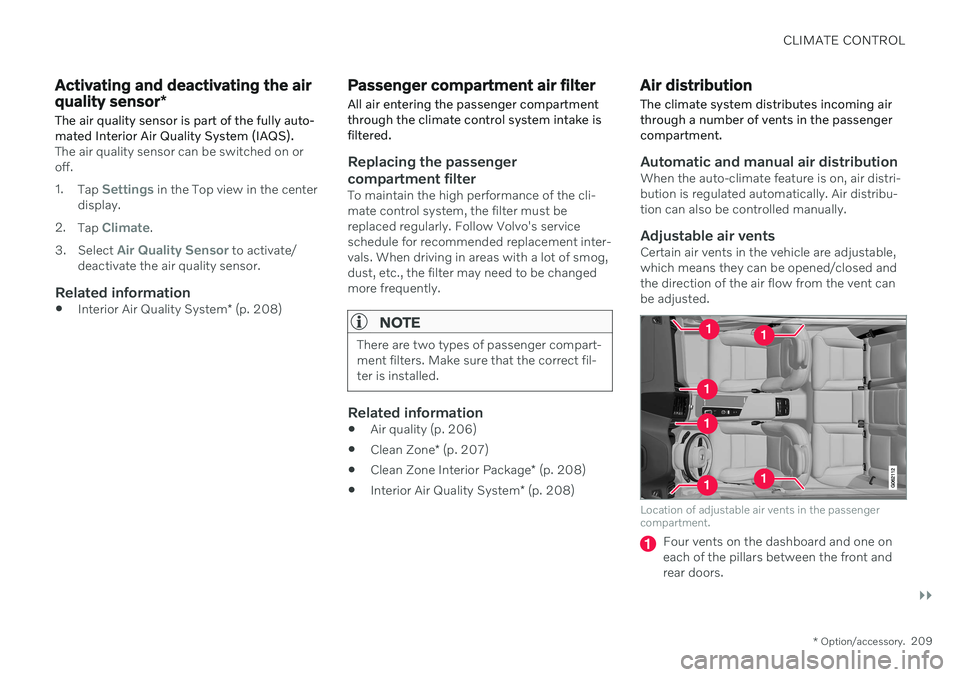
Adjustable air ventsCertain air vents in the vehicle are adjustable,which means they can be opened/closed andthe direction of the air flow from the vent canbe adjusted.
Location of adjustable air vents in the passenger compartment.
Four vents on the dashboard and one on each of the pillars between the front andrear doors.
Page 217 of 687

CLIMATE CONTROL
}}
* Option/accessory.215
Climate system controls
The climate system functions are controlled from physical buttons on the center console,the center display, and the climate panel on the rear side of the tunnel console *.
Physical buttons in the center console
Button for max defroster.
Button for heated rear window and door mirrors.
Climate bar in the center displayThe most common climate system functionscan be controlled from the climate bar.
Temperature controls for driver and pas- senger side.
Controls for heated * and ventilated * driver
and front passenger seat, as well as heated steering wheel *.
Button for opening Climate view. The graphic in the button shows activated cli-mate system settings.
Climate view in the center displayTap the symbol in the center of theclimate bar to open Climate view. Depending on equipment level, Cli- mate view may be divided into sev-
eral tabs. Toggle between the tabs by swipingthe screen to the left/right or by tapping thedesired heading.
Main climate
In addition to the functions in the climate bar, other main climate system functions can be controlled from the
Main climate tab.
Max, Rear – Controls for defrosting win-
dows and door mirrors.
AC - Air conditioning controls.
Recirc - Air recirculation controls.
Air distribution controls.
Page 218 of 687
||
CLIMATE CONTROL
* Option/accessory.
216
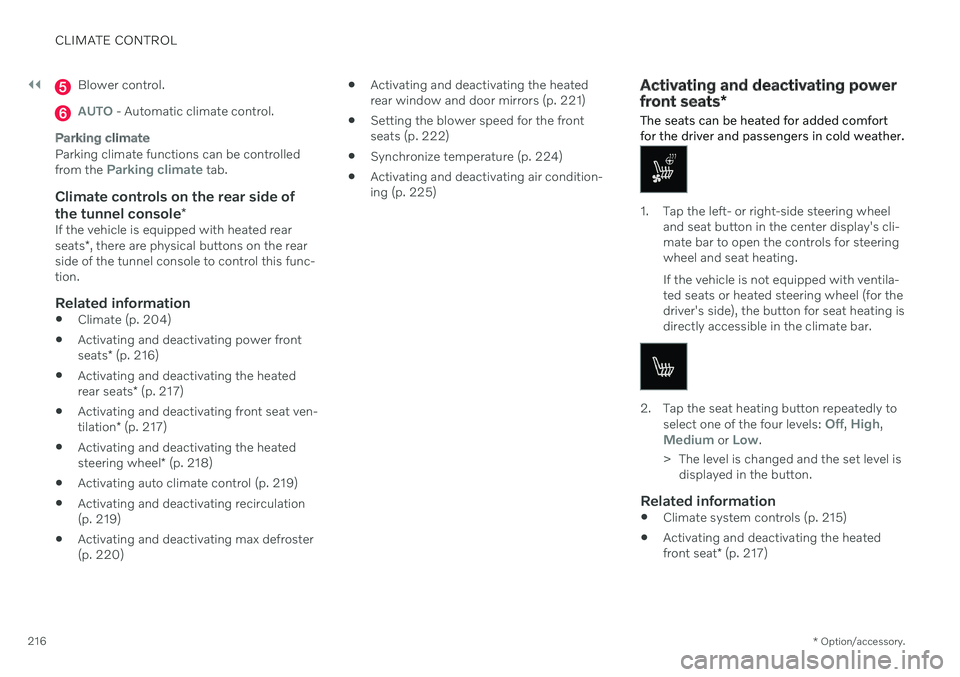
Blower control.
AUTO - Automatic climate control.
Parking climate
Parking climate functions can be controlled from the Parking climate tab.
Climate controls on the rear side of
the tunnel console *
If the vehicle is equipped with heated rear seats*, there are physical buttons on the rear
side of the tunnel console to control this func- tion.
Related information
Climate (p. 204)
Activating and deactivating power front seats
* (p. 216)
Activating and deactivating the heatedrear seats
* (p. 217)
Activating and deactivating front seat ven-tilation
* (p. 217)
Activating and deactivating the heatedsteering wheel
* (p. 218)
Activating auto climate control (p. 219)
Activating and deactivating recirculation (p. 219)
Activating and deactivating max defroster(p. 220)
Activating and deactivating the heatedrear window and door mirrors (p. 221)
Setting the blower speed for the frontseats (p. 222)
Synchronize temperature (p. 224)
Activating and deactivating air condition-ing (p. 225)
Activating and deactivating power front seats
*
The seats can be heated for added comfort for the driver and passengers in cold weather.
1. Tap the left- or right-side steering wheel and seat button in the center display's cli- mate bar to open the controls for steeringwheel and seat heating. If the vehicle is not equipped with ventila- ted seats or heated steering wheel (for thedriver's side), the button for seat heating isdirectly accessible in the climate bar.
2. Tap the seat heating button repeatedly to
select one of the four levels: Off, High,Medium or Low.
> The level is changed and the set level is displayed in the button.
Related information
Climate system controls (p. 215)
Activating and deactivating the heated front seat
* (p. 217)
Page 221 of 687
CLIMATE CONTROL
}}
219
Activating auto climate control
If auto climate control is activated, several cli- mate system functions are controlled auto-matically.
1. Tap the symbol in the center of the climate bar to open Climate view in the center dis- play.
2. Tap or press and hold
AUTO Climate
Tap - air recirculation, air conditioning and air distribution are controlled auto-matically.
Press and hold - air recirculation, airconditioning and air distribution arecontrolled automatically. Temperatureand blower speed are changed tostandard settings: 22 °C (72 °F) and speed
3.
> Auto climate mode is activated and the button lights up.
NOTE
It is possible to change the temperature and blower speed without deactivatingautomatic climate control. Automatic cli-mate control is deactivated when the airdistribution is changed manually or whenthe max defroster is activated.
Related information
Climate system controls (p. 215)
Activating and deactivating recirculation The climate system's recirculation function helps shut out smog, smoke, exhaust fumes,etc. by reusing the air in the passenger com-partment.
1. Tap the symbol in the center of the climate
bar to open Climate view in the center dis- play.
2.Tap Recirc.
> Air recirculation is activated/deacti- vated and the button lights up/goes out.
CAUTION
If the air in the vehicle is recirculated too long, there is a risk of fogging on the insideof the windows.
NOTE
Recirculation cannot be activated when the max defroster is on.
Page 224 of 687

||
CLIMATE CONTROL
222
Activating and deactivating the heated rear window and door mirrors fromthe center display
1. Tap the symbol in the center of the climatebar to open Climate view in the center dis- play.
2.Tap Rear.
> Heated windows and door mirrors are activated and the button lights up/goes out.
Related information
Climate system controls (p. 215)
Automatically activating and deactivatingthe heated rear window and door mirrors(p. 222)
Automatically activating and deactivating the heated rearwindow and door mirrors
The heated rear window and door mirrors are used to quickly remove condensation and icefrom the glass.
It is possible to select whether rear window and door mirror heating should be automati-cally activated or deactivated when the engineis started. With automatic start activated,heating will be activated when there is a riskof ice or condensation on the windows or mir-rors. Heating is automatically switched offwhen the window or door mirror is sufficientlywarm and the condensation or ice is gone. 1. Tap
Settings in the Top view in the center
display.
2. Tap
Climate.
3. Select
Auto Rear Defroster to activate/
deactivate automatic rear window and door heating.
Related information
Activating and deactivating the heatedrear window and door mirrors (p. 221)
Setting the blower speed for the front seats 2
The blower can be set to several different automatically controlled speeds for the frontseat.
1. Tap the symbol in the center of the climate bar to open Climate view in the center dis- play.
2The same setting applies to the rear seats with the 2-zone climate system.