Led VOLVO XC60 TWIN ENGINE 2020 Workshop Manual
[x] Cancel search | Manufacturer: VOLVO, Model Year: 2020, Model line: XC60 TWIN ENGINE, Model: VOLVO XC60 TWIN ENGINE 2020Pages: 687, PDF Size: 14.65 MB
Page 150 of 687

||
DISPLAYS AND VOICE CONTROL
* Option/accessory.
148
Raising position
Lowering position
Confirm
The brightness of the graphic is automatically adapted to the light conditions in its back-ground. Brightness is also affected by adjust-ments to the brightness of the other displaysin the vehicle. The height position can be stored in the front power seat's * memory function using the key-
pad in the driver's door.
Calibrating the horizontal positionIf the windshield or display unit has been replaced, the head-up display's horizontalposition may need to be calibrated. Calibrationmeans that the projected image is rotatedclockwise or counterclockwise. 1. Tap
Settings in the center display's Top
view.
2. Select
My CarDisplaysHead-Up
Display Options
Head-Up Display
Calibration.
3. Calibrate the horizontal position of the image using the right-side steering wheel keypad.
Rotate counterclockwise
Rotate clockwise
Confirm
Related information
Head-up display
* (p. 145)
Activating and deactivating the head-up display
* (p. 147)
Driver profiles (p. 139)
Storing positions for seats, mirrors andhead-up display
* (p. 190)
Voice Control
Voice control 14
allows you to control func-
tions in the vehicle, e.g. the climate control system, radio or a Bluetooth-connectedphone, using spoken commands. In vehicles equipped with Sensus Navigation *, the navi-
gation system can also be controlled using voice commands.
What is voice control?Voice control is a driver support function that can simplify the use of various commands inyour vehicle. It works in general like a regularapplication in which you input information in aset order in order to perform a task, butinstead of typing on a keypad, you use voicecommands. It can therefore be a good idea tofamiliarize yourself with how, and in whatorder, a voice command should be spoken toget the desired result. You can control certain infotainment and cli- mate control functions through the voice con-trol system by using voice commands. Thesystem can respond verbally and by displayinginformation in the instrument panel.
14 Certain markets only.
Page 151 of 687

DISPLAYS AND VOICE CONTROL
}}
149
WARNING
The driver is always responsible for ensur- ing that the vehicle is operated in a safemanner and that all applicable traffic regu-lations are followed.
Voice control microphone
System updatesThe voice control system is continuously improved. It is recommended to always havethe latest version installed. Download updates at support.volvocars.com.
Related information
Use voice recognition (p. 149)
Voice control for cellular phones (p. 151)
Voice control for radio and media (p. 152)
Climate control system voice commands (p. 205)
Voice control settings (p. 153)
Use voice recognition
Starting voice control 15Voice commands are given through a "dialog" with thevoice control system. Pressthe button for voice control
on the right-side steering
wheel keypad to activate the system and initiate a voice
command dialog. When you press the button,a beep will sound and the voice control sym-bol will appear in the instrument panel. This shows that the system has begun listen- ing and you can now begin speaking com-mands. As soon as you start speaking, thesystem will be trained to recognize and under-stand your voice. This takes several secondsand is done automatically, which means thatyou don't need to manually initiate any voicetraining.
15 Certain markets only.
Page 152 of 687

||
DISPLAYS AND VOICE CONTROL
* Option/accessory.
150 These may include:
Wait until after the tone, and then speak in your normal voice at a normal speed.
Do not speak while the system is respond-ing (the system is unable to process com-mands during this time).
Avoid background noises in the passengercompartment by keeping doors, windows and the panoramic roof
* closed.
Generally, the system will listen for a basic command that is then followed by moredetailed commands specifying what you wantthe system to do. To change the audio volume of the system, turn the volume knob while the voice is speak-ing. It is possible to use other buttons whilevoice commands are being given. However,because other audio is silenced during dialogwith the system, it is not possible to performany functions connected to audio using thebuttons.
Canceling voice controlTo cancel voice control, do one of the follow-ing:
Briefly press
and say "Cancel".
Press and hold the steering wheel key- pad's voice command button
until two audible signals are given. This cancels voice control even when the system isspeaking.
Voice control will also be canceled if you donot respond during a dialog. The system willfirst ask three times for a response and if theresponse is still not given, voice control will beautomatically canceled. To speed up communication and skip prompts from the system, press the voice control but- ton
on the steering wheel keypad. This
will interrupt the system's response and you can say the next command.
Voice command examples
1. Tap .
2. Say "
Call [First name] [Last name]
[number category]", e.g. "Call Robyn
Smith cellular".
> The system will call the selected con- tact from the phone book. If the contact has several phone numbers (e.g. home,cell, work), the right category must alsobe given.
Commands/phrasesThe following commands can usually be usedin any situation:
"
Repeat" - repeats the most recent voice
command in the current dialog.
"
Cancel" - cancels the dialog. 16
"
Help" - initiates a help dialog. The sys-
tem responds with commands that can be used in the current situation, an instruc-tion or an example.
Commands for specific functions, such asphone and audio, are described in the sectionsrelated to that function.
16 Note that this only cancels the dialog when the system is not speaking. To do this, press and hold until you hear two beeps.
Page 153 of 687

DISPLAYS AND VOICE CONTROL
}}
151
Numbers
Number commands can be given in different ways depending on the function to be con-trolled:
Phone numbers and zip codes
should be
given by stating each number individually,e.g. "zero, three, one, two, two, four, four,three" (03122443).
Addresses
can be given by stating each
number individually or in a group, e.g."two, two" or "twenty-two" (22). For Eng-lish and Dutch language settings, groupsof numbers can also be said in sequence,e.g. "twenty-two, twenty-two" (22 22).For English, double or triple digits can alsobe used, e.g. "double zero" (00). Numbersin the range 0-2300 can be used.
Frequencies
can be given as "ninety-eight
point eight" (98.8), "one hundred fourpoint two" or "hundred and four pointtwo" (104.2).
Speech rate and repeat mode
The speed at which the system speaks can be adjusted. With repeat mode on, the system will repeat what you have said. To change the speech rate or activate/deacti- vate repeat mode: 1. Tap
Settings in the Top view. 2. Tap
SystemVoice Control and select
settings.
Repeat Voice Command
Speech Rate
Related information
Voice Control (p. 148)
Voice control for cellular phones (p. 151)
Voice control for radio and media (p. 152)
Climate control system voice commands (p. 205)
Voice control settings (p. 153)
Voice control for cellular phones 17
Call a contact in the phone book, have a text message read aloud or dictate short mes-sages using voice commands to a Bluetooth-connected phone.
To access a contact in the phone book, the voice command must contain the contactinformation entered in the phone book. If a contact, e.g.
Robyn Smith, has several phone
numbers listed in the phone book, a number category such as
home or cellular can also be
specified, i.e. "Call Robyn Smith cellular".
Tap
and say one of the following com-
mands: "
Call [contact]" - call the selected con-
tact from the phone book.
"
Call [phone number]" - call a phone
number.
"
Recent calls" - display the list of recent
calls.
"
Read message" - read a text message
aloud. If there are several messages, select the message to read aloud.
"
Message to [contact]" – the user is
prompted to dictate a short message. The message will then be read aloud and theuser can choose to send or re-dictate themessage. The vehicle must be connectedto the Internet to access this function.
Page 164 of 687

LIGHTING
* Option/accessory.
162
Using turn signals
The vehicle's turn signals are controlled using the left-side steering wheel lever. The turnsignals flash three times or continuously,depending on how far up or down the lever ismoved.
Turn signals.
Triple flash indicatorMove the steering wheel lever up or down to the first position and release. The turnsignals will flash three times. If the func-tion is deactivated via the center display,the signals will flash once.
NOTE
This automatic flashing sequence can be interrupted by immediately movingthe lever in the opposite direction.
If the turn signal indicator flashes morequickly than normal, refer to the mes-sage in the instrument panel.
Continuous flashing sequenceMove the lever up or down as far as possi- ble.
The lever will stop in its end position and canbe moved back manually or automatically bymoving the steering wheel.
Related information
Hazard warning flashers (p. 164)
Adjusting light functions via the centerdisplay (p. 157)
Active Bending Lights
*
Active Bending Lights (ABL) are designed to help provide extra illumination in curves andintersections. Depending on equipment level, vehicles with LED 3
headlights * may be equip-
ped with Active Bending Lights.
Headlight pattern with function deactivated (left) and activated (right).
Active Bending Lights follow the movement of the steering wheel to help provide extra illumi-nation in curves and intersections, helping toimprove visibility for the driver. The function is automatically activated when the engine is started. If a fault is detected in the system, the
symbol will illuminate in
the instrument panel and a message will be displayed.
3 LED (Light Emitting Diode)
Page 167 of 687

LIGHTING
}}
* Option/accessory.165
Using home safe lighting
Some of the exterior lights remain on to illu- minate the area around the vehicle. This iscalled home safe lighting.
To activate home safe lighting:
1. Switch off the ignition.
2. Push the left-side steering wheel lever toward the dashboard and release.
3. Exit the vehicle and lock the doors. > A symbol in the instrument panel illumi-nates to indicate that the function is activated and exterior lighting switcheson: Parking lights, headlights, licenseplate lighting and outer door handle lighting *.
The length of time home safe lighting remains illuminated can be set in the center display.
Related information
Adjusting light functions via the centerdisplay (p. 157)
Welcome Light (p. 165)
Welcome Light
Approach lighting is activated when the vehi- cle is unlocked and can be used to providelight as you walk toward the vehicle.
The function is activated when the remote key is used for unlocking. The parking lights, ceil-ing lights, footwell lights and trunk/cargocompartment lights are activated in daylightconditions. In weak daylight or dark condi-tions, the license plate lighting and outer door handle lighting * will also be activated, with the
light directed toward the ground. If no door is opened, the lights will remain illu- minated for approx. 2 minutes. If a door isopened while the function is activated, the interior lighting and outer door handle lighting *
will remain on for a longer period of time. This function can be activated and deactivated in the center display.
Related information
Adjusting light functions via the centerdisplay (p. 157)
Using home safe lighting (p. 165)
Remote key (p. 238)
Interior Lighting
The passenger compartment is equipped with several different types of lighting, e.g.general lighting, adjustable ambient lightingand reading lights.
All lighting in the passenger compartment can be turned on and off manually within5 minutes after:
the engine has been switched off and theignition is in mode
0.
the vehicle is unlocked but has not yetbeen started.
Front ceiling lighting
The controls in the ceiling console for the front read- ing lights and courtesy lighting.
Reading light left side
Passenger compartment lighting
Page 168 of 687
||
LIGHTING
* Option/accessory.
166
Courtesy lighting auto switch
Reading light right side
Reading lights
The reading lights on the right and left sides are switched on and off by briefly pressing thebuttons in the ceiling console. To adjust thebrightness, press and hold the button.
Passenger compartment lighting
Briefly press the button in the ceiling console to switch on or off the footwell lighting andceiling lighting.
Courtesy lighting auto switch
Activate the auto switch by briefly pressing the AUTO button in the ceiling console. With
Auto activated, the indicator light in the buttonand the courtesy lighting come on and areturned off as follows. Courtesy lighting is switched on when:
The vehicle is unlocked
The vehicle is switched off
A side door is opened.
Courtesy lighting is switched off when: The vehicle is locked
The engine is started
A side door is closed
A side door has been open for approx. 2 minutes.
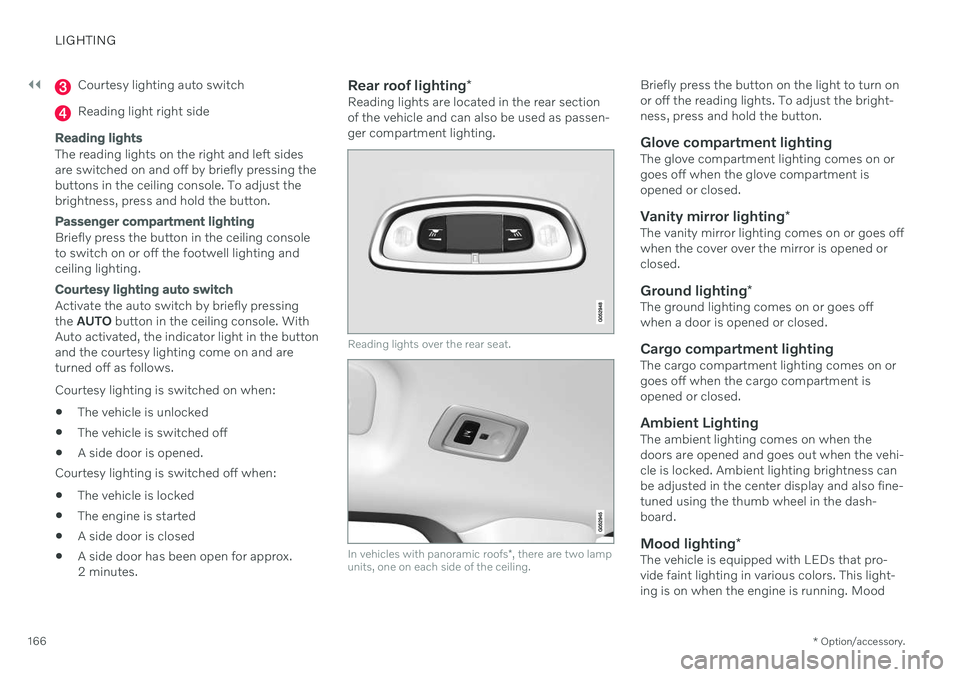
Rear roof lighting
*Reading lights are located in the rear sectionof the vehicle and can also be used as passen-ger compartment lighting.
Reading lights over the rear seat.
In vehicles with panoramic roofs *, there are two lamp
units, one on each side of the ceiling.
Briefly press the button on the light to turn on or off the reading lights. To adjust the bright-ness, press and hold the button.
Glove compartment lightingThe glove compartment lighting comes on orgoes off when the glove compartment isopened or closed.
Vanity mirror lighting *The vanity mirror lighting comes on or goes offwhen the cover over the mirror is opened orclosed.
Ground lighting*The ground lighting comes on or goes offwhen a door is opened or closed.
Cargo compartment lightingThe cargo compartment lighting comes on orgoes off when the cargo compartment isopened or closed.
Ambient LightingThe ambient lighting comes on when thedoors are opened and goes out when the vehi-cle is locked. Ambient lighting brightness canbe adjusted in the center display and also fine-tuned using the thumb wheel in the dash-board.
Mood lighting*The vehicle is equipped with LEDs that pro-vide faint lighting in various colors. This light-ing is on when the engine is running. Mood
Page 169 of 687

LIGHTING
* Option/accessory.167
lighting can be adjusted in the center display and also fine-tuned using the thumb wheel inthe dashboard.
Lighting in the door storage
compartments
Lighting in the door storage compartmentscomes on when the doors are opened andgoes out when the vehicle is locked. Thebrightness can be adjusted using the thumbwheel in the dashboard.
Lighting in the tunnel console's front
cup holder
The lighting in front console cup holdersswitches on when the vehicle is unlocked andoff when the vehicle is locked. The brightnesscan be adjusted using the thumb wheel in thedashboard.
Related information
Adjusting interior lighting (p. 167)
Lighting control and panel (p. 156)
Ignition modes (p. 405)
Passenger compartment interior (p. 570)
Adjusting interior lighting
Illumination in the vehicle varies depending on ignition mode. The interior lighting can beadjusted with a thumb wheel in the dash-board and certain light functions can also beadjusted via the center display.
The thumb wheel on the dashboard to the left of thesteering wheel can be usedto adjust the brightness ofthe display lighting, instru-ment lights, ambient lighting and mood lighting *.
Adjust ambient decor lighting1.
Tap Settings in the Top view in the center
display.
2. Tap
My CarLights and LightingInterior Lighting.
3. Choose from among the following set- tings:
Under
Ambient Light Intensity, selectOff, Low or High.
Under
Ambient Light Level, selectReduced or Full.
Adjusting mood lighting
*The vehicle is equipped with several LEDs that provide faint lighting in various colors. Thislighting is on when the engine is running.
Changing the brightness
1.
Tap Settings in the Top view in the center
display.
2. Tap
My CarLights and Lighting
Interior LightingInterior Mood
Lighting.
3. Under
Interior Mood Light Intensity,
select Off, Low or High.
Changing the color of the light
1. Tap Settings in the Top view in the center
display.
2. Tap
My CarLights and Lighting
Interior LightingInterior Mood
Lighting.
3. Choose
By Temperature or By Color to
change the color of the light. If
By Temperature is selected, the light
will change according to the temperature set for the passenger compartment. If
By Color is selected, the subcategoryTheme Colors can be used to make fur-
ther adjustments.
Related information
Interior Lighting (p. 165)
Adjusting light functions via the center display (p. 157)
Ignition modes (p. 405)
Page 178 of 687

WINDOWS, GLASS AND MIRRORS
* Option/accessory.
176
Panoramic roof *
The panoramic roof is divided into two glass sections. The front section can be openedvertically at the rear edge (ventilation posi-tion) or horizontally (open position). The rearsection cannot be moved. The panoramic roof has a wind deflector and sun curtain made of perforated fabric (locatedbeneath the glass sections) for extra protec-tion in e.g. bright sunlight.
The panoramic roof and sun curtain are oper- ated using the controls in the ceiling. To operate the panoramic roof and sun cur- tain, the ignition must be in mode I or II.
WARNING
Children, other passengers or objects can be trapped by the moving parts.
Always operate the windows with cau- tion.
Do not allow children to play with theoperating controls.
Never leave a child alone in the vehicle.
Remember to always cut the current tothe power windows by setting thevehicle's electrical system to ignitionmode
0 and then taking the remote
key with you when leaving the vehicle.
Never stick objects or body parts outthrough the windows, even if the vehi-cle electrical system is completelyturned off.
CAUTION
Do not open the panoramic roof when load carriers are installed.
Never place heavy objects on the pan-oramic roof.
CAUTION
Remove ice and snow before opening the panoramic roof. Be careful not toscratch any surfaces or damage thetrim.
Do not operate the panoramic roof if itis frozen in place.
Wind blocker
The panoramic roof is equipped with a wind blocker that folds up when the roof is open.
Related information
Operating the panoramic roof
* (p. 177)
Auto closing the panoramic roof
* sun cur-
tain (p. 179)
Pinch protection for windows and sun cur- tains (p. 170)
Page 179 of 687

WINDOWS, GLASS AND MIRRORS
}}
* Option/accessory.177
Keyless locking and unlocking
* (p. 254)
Locking and unlocking using the remote key (p. 240)
Operating the panoramic roof
*
The panoramic roof and sun curtain are oper- ated using a control in the ceiling panel, andboth are equipped with pinch protection.
WARNING
Children, other passengers or objects can be trapped by the moving parts.
Always operate the windows with cau- tion.
Do not allow children to play with theoperating controls.
Never leave a child alone in the vehicle.
Remember to always cut the current tothe power windows by setting thevehicle's electrical system to ignitionmode
0 and then taking the remote
key with you when leaving the vehicle.
Never stick objects or body parts outthrough the windows, even if the vehi-cle electrical system is completelyturned off.
CAUTION
Do not open the panoramic roof when load carriers are installed.
Never place heavy objects on the pan-oramic roof.
CAUTION
Remove ice and snow before opening the panoramic roof. Be careful not toscratch any surfaces or damage thetrim.
Do not operate the panoramic roof if itis frozen in place.
To operate the panoramic roof and sun cur- tain, the ignition must be in mode
I or II.
It can also be operated using keyless opening *
with the door handle.
WARNING
Make sure that no child or other passenger comes into contact with the windows as they are closing with keyless closing *.