Led VOLVO XC60 TWIN ENGINE 2020 Owners Manual
[x] Cancel search | Manufacturer: VOLVO, Model Year: 2020, Model line: XC60 TWIN ENGINE, Model: VOLVO XC60 TWIN ENGINE 2020Pages: 687, PDF Size: 14.65 MB
Page 354 of 687

DRIVER SUPPORT
352
Lane Keeping Aid symbols and messages
A number of symbols and messages related to Lane Keeping Aid (LKA 93
) may be dis- played in the instrument panel. Several exam- ples are provided below.
Symbol Message Meaning
Driver support system Reduced functionality Service requiredThe system is not functioning as intended. Contact a workshop
A
.
Windscreen sensor Sensor blocked, see Owner's manualThe camera's ability to detect the lane in front of the vehicle is reduced.
Lane Keeping Aid Apply steeringLKA's steering assistance is disabled when the driver's hands are not on the wheel. Follow the instructions and steer the vehicle.
Lane Keeping Aid Standby until steering appliedLKA will go into standby mode until the driver begins steering the vehicle again.
A An authorized Volvo workshop is recommended.
93 Lane Keeping Aid
Page 363 of 687
DRIVER SUPPORT
* Option/accessory.361
Park Assist*
The Park Assist function can help the driver when maneuvering in tight spaces by indicat-ing distances to obstacles using audible sig-nals and graphics in the center display.
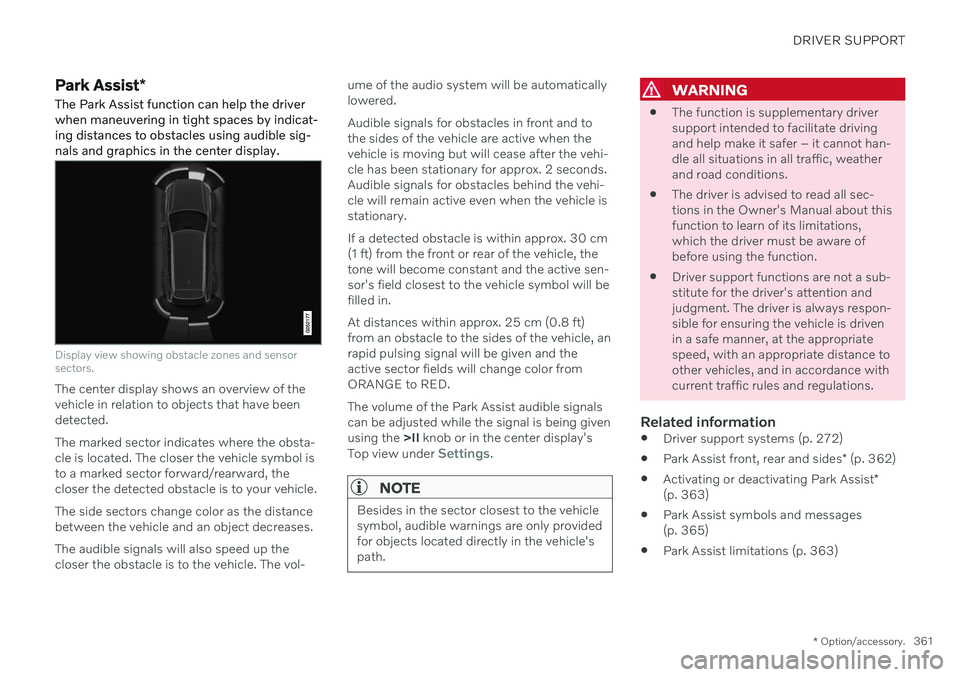
Display view showing obstacle zones and sensor sectors.
The center display shows an overview of the vehicle in relation to objects that have beendetected. The marked sector indicates where the obsta- cle is located. The closer the vehicle symbol isto a marked sector forward/rearward, thecloser the detected obstacle is to your vehicle. The side sectors change color as the distance between the vehicle and an object decreases. The audible signals will also speed up the closer the obstacle is to the vehicle. The vol- ume of the audio system will be automaticallylowered. Audible signals for obstacles in front and to the sides of the vehicle are active when thevehicle is moving but will cease after the vehi-cle has been stationary for approx. 2 seconds.Audible signals for obstacles behind the vehi-cle will remain active even when the vehicle isstationary. If a detected obstacle is within approx. 30 cm (1 ft) from the front or rear of the vehicle, thetone will become constant and the active sen-sor's field closest to the vehicle symbol will befilled in. At distances within approx. 25 cm (0.8 ft) from an obstacle to the sides of the vehicle, anrapid pulsing signal will be given and theactive sector fields will change color fromORANGE to RED. The volume of the Park Assist audible signals can be adjusted while the signal is being givenusing the
>II knob or in the center display's
Top view under
Settings.
NOTE
Besides in the sector closest to the vehicle symbol, audible warnings are only providedfor objects located directly in the vehicle'spath.
WARNING
The function is supplementary driver support intended to facilitate drivingand help make it safer – it cannot han-dle all situations in all traffic, weatherand road conditions.
The driver is advised to read all sec-tions in the Owner's Manual about thisfunction to learn of its limitations,which the driver must be aware ofbefore using the function.
Driver support functions are not a sub-stitute for the driver's attention andjudgment. The driver is always respon-sible for ensuring the vehicle is drivenin a safe manner, at the appropriatespeed, with an appropriate distance toother vehicles, and in accordance withcurrent traffic rules and regulations.
Related information
Driver support systems (p. 272)
Park Assist front, rear and sides
* (p. 362)
Activating or deactivating Park Assist
*
(p. 363)
Park Assist symbols and messages(p. 365)
Park Assist limitations (p. 363)
Page 370 of 687

||
DRIVER SUPPORT
* Option/accessory.
368
360° view *
The location of the cameras and their approximate fields of vision.
The 360° view function activates all Park
Assist Cameras and all four sides of the vehi- cle are shown in the center display at once tohelp the driver see what is around the vehiclewhile maneuvering at low speeds. From the 360° view, each camera view can be activated separately:
Tap the screen to select the camera's fieldof vision, e.g. in the area in front/above thefront camera.
The active cameras will beindicated by a camera symbolon the vehicle symbol in thecenter display.
If the vehicle is equipped with Park Assist
System* , the distance to detected obstacles
will be illustrated by fields in different colors. The cameras can be activated automatically or manually.
Back
The rear camera is located above the license plate.
The rear camera shows a wide area behind the vehicle. On certain models, part of the bumperand the towbar (if installed) may be visible. Objects on the center display may appear to be leaning slightly. This is normal.
Front camera
The front Park Assist Camera is located in the grille.
The front camera can be useful when pulling out from areas with limited visibility, such as adriveway surrounded by a hedge. The frontcamera is active at speeds up to 25 km/h(16 mph) and is automatically turned off whenthe vehicle exceeds this speed. If the vehicle does not reach a speed of 50 km/h (30 mph) and speed falls below22 km/h (14 mph) within 1 minute after thefront camera turns off, the camera will bereactivated.
Page 382 of 687

||
DRIVER SUPPORT
* Option/accessory.
380 3. Be prepared to stop the vehicle when
instructed to do so by a graphic and mes- sage in the center display. Follow theinstructions in the same way as for theparking procedure.
Note that the steering wheel can "spring"back when the procedure is completed andthe driver may need to turn the steering wheelback to the maximum position in order to pullout of the parking space. If the function determines that the driver can pull out of the parking space without any extramaneuvers, the function will be deactivated,even if it seems as though the vehicle is notcompletely out of the parking space.
Related information
Park Assist Pilot
* (p. 375)
Park Assist Pilot
* limitations (p. 380)
Park Assist Pilot * limitations
Park Assist Pilot (PAP 104
) may not be able to
detect all conditions in all situations and func- tionality may therefore be limited.
WARNING
The parking sensors have dead/blind spots where objects cannot bedetected.
Pay particular attention to people andanimals near the vehicle.
Bear in mind that the front end of thevehicle may swing out towards oncom-ing traffic during the parking maneuver.
CAUTION
Objects situated higher than the detection area of the sensors are not included whenthe parking maneuver is calculated, whichcould cause the function to swing into theparking space too early. Such parkingspaces should be avoided for this reason.
The driver should be aware of the following limitations for Park Assist Pilot:
The parking sequence is cancelledA parking sequence will be cancelled if: the driver moves the steering wheel
the vehicle's speed exceeds 7 km/h (4 mph)
the driver taps
Cancel in the center dis-
play
when the anti-lock brakes or the Elec- tronic stability control are engaged - e.g.when a wheel loses grip on a slippery road
when speed-dependent power steeringwheel resistance is working at reducedpower – e.g. during cooling due to over-heating.
A message in the center display will explainwhy the parking sequence was cancelled.
CAUTION
Under certain circumstances, the function may not be able to find parking spaces –one reason may be that the sensors aredisrupted by external sound sources thatemit the same ultrasonic frequencies thatthe system works with. Examples of such sources include horns, wet tires on asphalt, pneumatic brakes,exhaust noise from motorcycles, etc.
104 Park Assist Pilot
Page 383 of 687

DRIVER SUPPORT
* Option/accessory.381
NOTE
Dirt, ice and snow covering the sensors reduce their function and can make meas-urement impossible.
Driver responsibilityThe driver should keep in mind that the func- tion is a parking aid ‒ not an infallible fully
automatic system. The driver must always beprepared to take control and cancel a parkingsequence if necessary. There are a number of things to keep in mind when parking, including:
The driver is always responsible for deter-mining if the space suggested by the func- tion is suitable for parking.
Do not use the function when using snow chains or a temporary spare tire.
Do not use the function if there are anyobjects protruding from the vehicle.
Heavy rain or snowfall may inhibit PAP'sability to accurately measure a parkingspace.
While searching and measuring the park-ing space, the function may be unable todetect objects located far into the space.
PAP may not suggest parking spaces onnarrow streets if it does not detect suffi-cient space for maneuvering the vehicle.
Use approved tires 105
inflated to the cor-
rect tire pressure because this affects thefunction's ability to provide parking assis-tance.
The function is based on the way the vehi-cles are parked behind and in front of yourparking space. If they are, for example,parked too close to the curb, there is a riskthat your vehicle's tires or wheel rimscould be damaged by the curb during theparking procedure.
Perpendicular parking spaces may not bedetected or may be suggested unneces-sarily if a parked vehicle is sticking outmore than other parked vehicles.
The function is intended to provide park-ing assistance on straight streets, not sec-tions of street with sharp curves or bends.Always make sure that your vehicle is par-allel to relevant parking spaces when thefunction is measuring the parking space.
Related information
Park Assist Pilot
* (p. 375)
Speed-dependent steering wheel resis-tance (p. 272)
Camera/radar sensor limitations (p. 313)
105
"Approved tires" refers to tires of the same type and make as the vehicle's original, factory-installed tires.
Page 386 of 687

HYBRID INFORMATION
384
General information about Twin Engine Twin Engine vehicles are driven just like any other vehicle, but certain functions differ froma vehicle powered exclusively by gasoline.The electric motor powers the vehicle primar-ily at low speeds; the gasoline engine is usedat higher speeds or during more active driv-ing.
The instrument panel displays Twin Engine- specific information - charging information,selected drive mode, distance to dischargedbattery and hybrid battery charge level. Different drive modes can be selected while driving, e.g. electric power only or, if morepower is needed, a combination of electric andgasoline power. The vehicle calculates a com-bination of driveability, driving experience,environmental impact and fuel economy forthe selected drive mode. In order to function optimally, the hybrid bat- tery (and its electrical drive systems) and thegasoline engine (and its drive systems) mustbe at the correct operating temperature. Bat-tery capacity can be considerably reduced ifthe battery is too cold or too hot. Precondi-tioning prepares the vehicle's drive systemsand passenger compartment before driving tohelp reduce both wear and energy consump-tion. It also helps increase the hybrid battery'srange.The hybrid battery which powers the electricmotor is recharged using the charging cable. Itcan also be recharged during light braking andthrough engine braking in gear position
B. The
combustion engine can also help recharge thehybrid battery.
Important
No electrical current
Keep in mind that if there is no electrical cur- rent to the vehicle, i.e. the ignition is switchedoff or the start battery is discharged, certainfunctions such as brakes, power steering, etc.will not work.
WARNING
If the vehicle does not have electrical cur- rent and both the electric motor and thegasoline engine are switched off, thebrakes cannot be used to stop the vehicle.
Towing not permitted
Never tow a Twin Engine vehicle behind another vehicle, as this could damage theelectric motor.
Exterior engine noise
Because there is no sound from the engine when only the electric motor is running, thevehicle is equipped with artificial exteriorbackground noise. This sound is intended tohelp warn children, pedestrians, cyclists, ani- mals, etc. outside the vehicle of the vehicle'sapproach.
High-voltage electrical current
WARNING
A number of electrical components in Twin Engine Plug-in Hybrid vehicles use high-voltage current and can be extremely dan-gerous if handled incorrectly. These com-ponents and any orange wiring in the vehi-cle may only be handled by trained andqualified Volvo service technicians.
Do not touch anything that is not clearly described in this Owner's Manual.
Related information
Charging the hybrid battery (p. 385)
Hybrid gauge (p. 89)
Drive modes (p. 423)
Starting and stopping preconditioning(p. 226)
Hybrid battery (p. 611)
Page 390 of 687
||
HYBRID INFORMATION
388
WARNING
The charging cable must be grounded when in use. It is equipped with a cordwith a grounding conductor and agrounding plug. The plug must beinserted into an appropriate outlet thatis properly installed and grounded inaccordance with all local codes andordinances and is not damaged in anyway.
Children should be supervised when inthe vicinity of the charging cable whenit is plugged in.
High voltage is present in your electricmeter housing and power distributionservice panel. Contact with high volt-age can cause death or serious per-sonal injury.
Do not use the charging cable if it isdamaged in any way. A damaged ormalfunctioning charging cable mayonly be repaired by a workshop – anauthorized Volvo workshop is recom-mended.
Always position the charging cable sothat it will not be driven over, steppedon, tripped over or otherwise damaged,or cause personal injury.
Disconnect the charger from the walloutlet before cleaning it.
Never connect the charging cable to an extension cord or a multiple plugsocket.
Also, refer to the manufacturer's instruc- tions for using the charging cable and itscomponents.
CAUTION
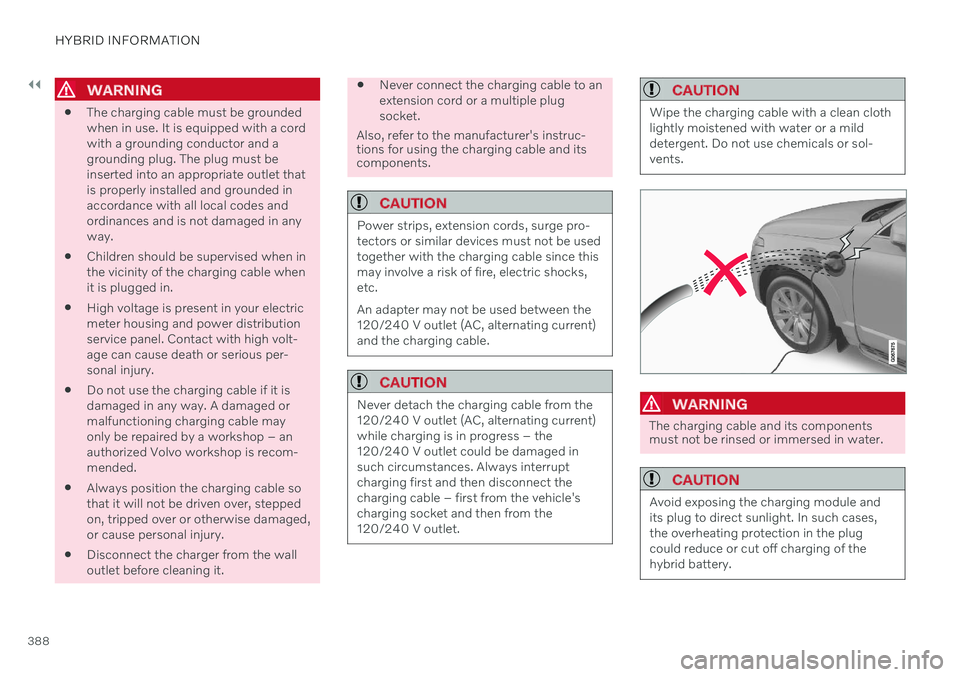
Power strips, extension cords, surge pro- tectors or similar devices must not be usedtogether with the charging cable since thismay involve a risk of fire, electric shocks,etc. An adapter may not be used between the 120/240 V outlet (AC, alternating current)and the charging cable.
CAUTION
Never detach the charging cable from the 120/240 V outlet (AC, alternating current)while charging is in progress – the120/240 V outlet could be damaged insuch circumstances. Always interruptcharging first and then disconnect thecharging cable – first from the vehicle'scharging socket and then from the120/240 V outlet.
CAUTION
Wipe the charging cable with a clean cloth lightly moistened with water or a milddetergent. Do not use chemicals or sol-vents.
WARNING
The charging cable and its components must not be rinsed or immersed in water.
CAUTION
Avoid exposing the charging module and its plug to direct sunlight. In such cases,the overheating protection in the plugcould reduce or cut off charging of thehybrid battery.
Page 393 of 687
HYBRID INFORMATION
}}
391
WARNING
The charging cable must be grounded when in use. It is equipped with a cordwith a grounding conductor and agrounding plug. The plug must beinserted into an appropriate outlet thatis properly installed and grounded inaccordance with all local codes andordinances and is not damaged in anyway.
Children should be supervised when inthe vicinity of the charging cable whenit is plugged in.
High voltage is present in your electricmeter housing and power distributionservice panel. Contact with high volt-age can cause death or serious per-sonal injury.
Do not use the charging cable if it isdamaged in any way. A damaged ormalfunctioning charging cable mayonly be repaired by a workshop – anauthorized Volvo workshop is recom-mended.
Always position the charging cable sothat it will not be driven over, steppedon, tripped over or otherwise damaged,or cause personal injury.
Disconnect the charger from the walloutlet before cleaning it.
Never connect the charging cable to an extension cord or a multiple plugsocket.
Also, refer to the manufacturer's instruc- tions for using the charging cable and itscomponents.
CAUTION
Make sure that the 120/240 V outlet (AC, alternating current) has a power capacitysufficient for charging electric vehicles. Ifyou are uncertain of the capacity, have theoutlet checked by a licensed electrician.
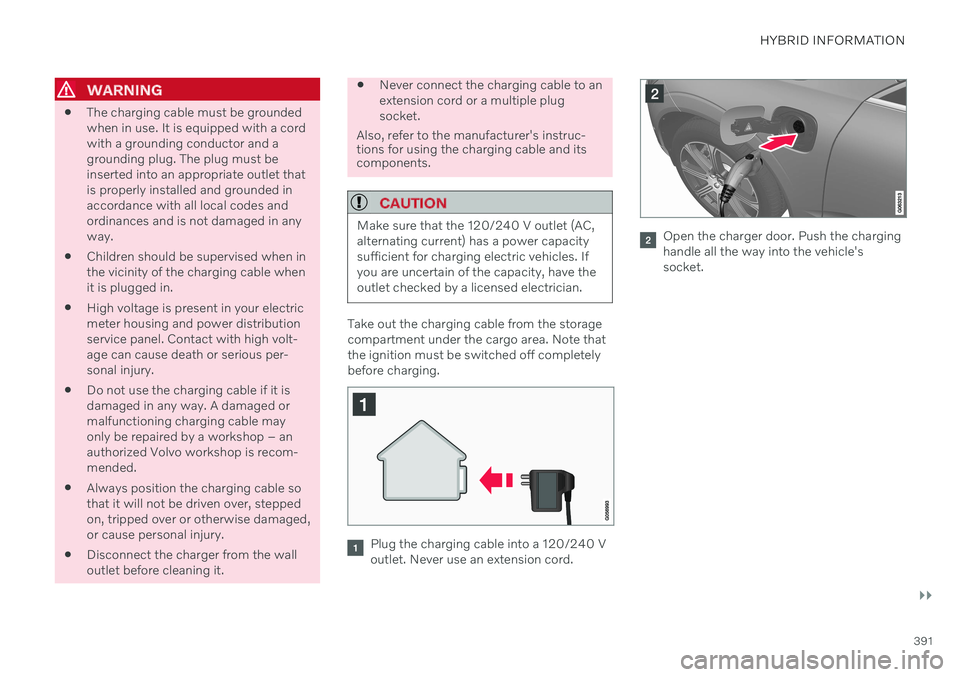
Take out the charging cable from the storage compartment under the cargo area. Note thatthe ignition must be switched off completelybefore charging.
Plug the charging cable into a 120/240 V outlet. Never use an extension cord.
Open the charger door. Push the charging handle all the way into the vehicle'ssocket.
Page 394 of 687

||
HYBRID INFORMATION
3922. The charging cable handle will lock into
place and charging will begin within
5 seconds. When charging starts, thegreen LED light in the charging socket willbegin to flash. The approximate remainingcharging time or the charging status willbe displayed in the instrument panel. Charging may be temporarily interrupted if the vehicle is unlocked:
and a door is open
‒ charging will
restart within a few minutes.
if no door is opened
‒ the vehicle will
automatically relock. Charging willresume after 1 minute.
CAUTION
Never detach the charging cable from the 120/240 V outlet (AC, alternating current)while charging is in progress – the120/240 V outlet could be damaged insuch circumstances. Always interruptcharging first and then disconnect thecharging cable – first from the vehicle'scharging socket and then from the120/240 V outlet.
During charging, condensation from the air conditioning may form under the vehicle. Thisis normal and is caused by the hybrid batterycooling.
Related information
Charging the hybrid battery (p. 385)
Opening and closing the charging socketcover (p. 390)
Charging status in the vehicle's chargingsocket (p. 392)
Charging status in the instrument panel(p. 394)
Charging status in the charging cable's charging module (p. 393)
Stopping hybrid battery charging (p. 396)
Charging status in the vehicle's charging socket
The charging status is indicated by an LED light in the charging socket.
Location of the LED indicator light in the vehicle's charging socket.
The LED indicator light shows the current charge status during charging. If the LED indi-cator light is not illuminated, check to makesure the cable is securely connected in thewall outlet and in the outlet in the vehicle. Awhite, red or yellow light illuminates when thepassenger compartment lighting is activatedand will remain illuminated for a short timeafter the passenger compartment lighting hasgone out.
Page 395 of 687

HYBRID INFORMATION
393
LED indicator light's colorMeaning
White Courtesy light. Yellow Wait modeA
– waiting for
charging to start.
Flashing green Charging is in progress B
.
Green Charging completed C
.
Red Malfunction.
A E.g. after a door has been opened or if the charging cable handle is not locked in place.
B The more slowly the light flashes, the closer the battery is tobeing fully charged.
C The light will go out after a short time.
Related information
Charging the hybrid battery (p. 385)
Charging status in the instrument panel (p. 394)
Charging status in the charging cable'scharging module (p. 393)
Stopping hybrid battery charging (p. 396)
Charging status in the charging cable's charging module
The red and blue lights in the charging mod- ule indicate the status of ongoing and com-pleted charging.
Charge module: 1. Red warning light, 2. Blue status indicator
When the charge module is initially plugged into a wall outlet, the red warning light willflash once to indicate that a startup safetycheck has been performed. When the safetycheck has been completed, the blue statusindicator will glow steadily and the red warn-ing light will be off. The charger is now readyto be used. If the red warning light continuesto flash or glows steadily, a fault has beendetected and the charger will not deliverpower to the vehicle. Contact a Volvo retaileror a certified Volvo service technician. When the charging cable is connected to thevehicle's charging socket, the blue light willflash once. Charging cable connected to the vehicle's charging socket:
Indicator light's color
Meaning
Flashing blue Charging is in progress. Thelight flashes about onceevery other second.
Solid blue Charging completed. This will also be indicated in theinstrument panel.
Related information
Charging the hybrid battery (p. 385)
Charging status in the vehicle's charging socket (p. 392)
Charging status in the instrument panel(p. 394)
Stopping hybrid battery charging (p. 396)