lock YAMAHA TMAX 2019 User Guide
[x] Cancel search | Manufacturer: YAMAHA, Model Year: 2019, Model line: TMAX, Model: YAMAHA TMAX 2019Pages: 122, PDF Size: 14.98 MB
Page 28 of 122
Smart key system
3-13
1
2
3
4
5
6
7
8
9
10
11
12
13
14
EAU80841
Parking mode
The steering is locked, and the hazard
lights and turn signal lights can be
turned on, but all other electrical sys-
tems are off.
To enter parking mode 1. Lock the steering. (See page 3-10.)
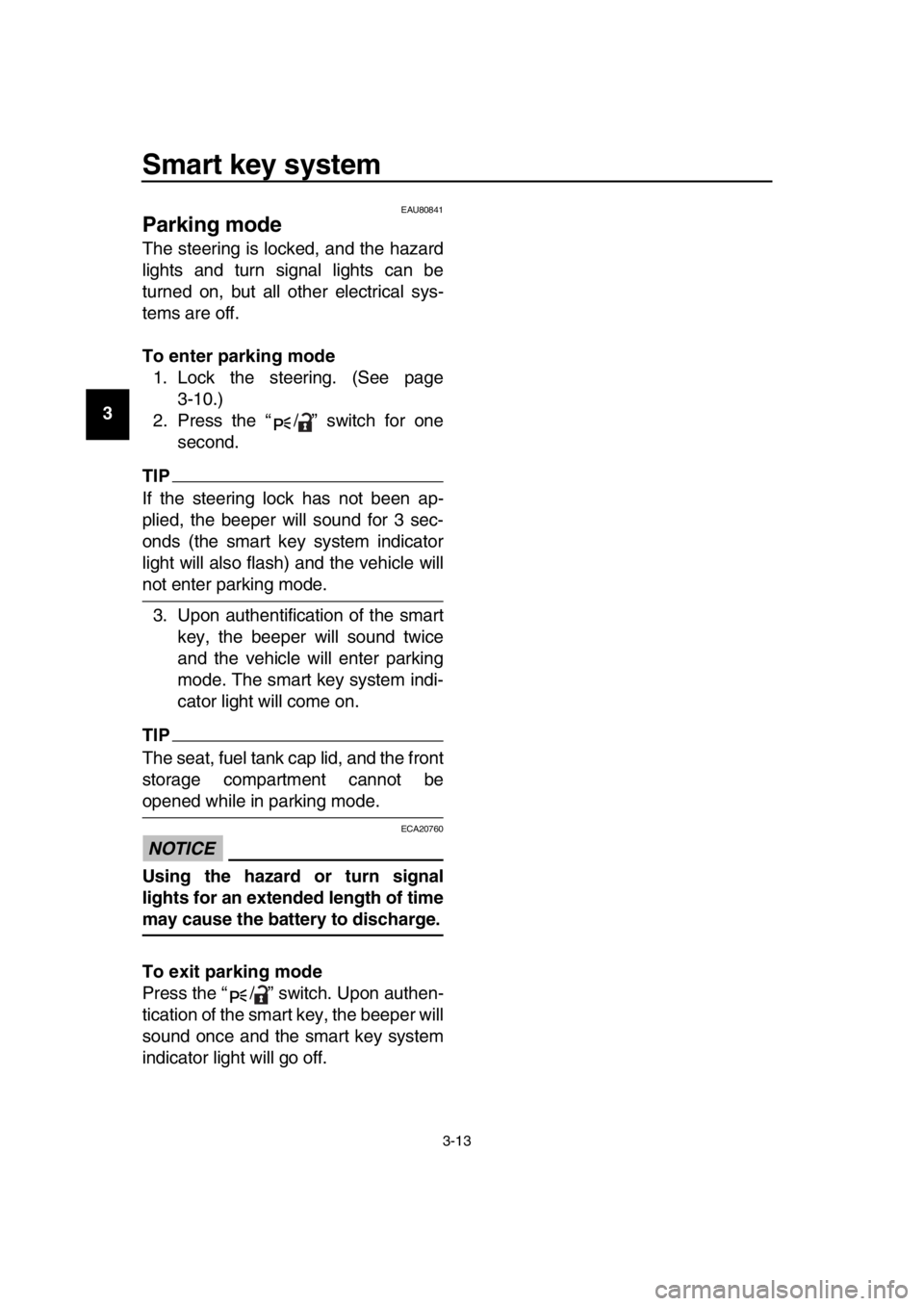
2. Press the “ / ” switch for one second.
TIP
If the steering lock has not been ap-
plied, the beeper will sound for 3 sec-
onds (the smart key system indicator
light will also flash) and the vehicle will
not enter parking mode.
3. Upon authentification of the smart key, the beeper will sound twice
and the vehicle will enter parking
mode. The smart key system indi-
cator light will come on.
TIP
The seat, fuel tank cap lid, and the front
storage compartment cannot be
opened while in parking mode.
NOTICE
ECA20760
Using the hazard or turn signal
lights for an extended length of time
may cause the battery to discharge.
To exit parking mode
Press the “ / ” switch. Upon authen-
tication of the smart key, the beeper will
sound once and the smart key system
indicator light will go off.
BV1-9-E2.book 13 ページ 2018年8月28日 火曜日 午後5時28分
Page 36 of 122
Instrument and control functions
5-3
1
2
3
4
5
6
7
8
9
10
11
12
13
14 have a Yamaha dealer check the on-
board diagnostic system.
The electrical circuit of the warning light
can be checked by turning the vehicle
power on. The warning light should
come on for a few seconds, and then
go off.
If the warning light does not come on at
all, or if the warning light remains on,
have a Yamaha dealer check the vehi-
cle.
EAU77073ABS warning light “ ”
This warning light comes on when a
problem is detected with the ABS. (See
page 5-18.)
When the vehicle power is turned on,
this light will come on and then go off af-
ter reaching a traveling speed of 10
km/h (6 mi/h). If the warning light:
does not come on when the vehi-
cle power is turned on
does not go off after traveling at a
speed of 10 km/h (6 mi/h) or higher
comes on or flashes while riding
the anti-lock brake system may not
work correctly. Have a Yamaha dealer
check the vehicle as soon as possible.
WARNING
EWA16041
If the ABS warning light does not go
off after traveling at a speed of 10
km/h (6 mi/h) or higher, or if the
warning light comes on or flashes
while riding, the brake system re-
verts to conventional braking. If ei-
ther of the above occurs, or if the
warning light does not come on at
all, use extra caution to avoid possi-
ble wheel lock during emergency
braking. Have a Yamaha dealer
check the brake system and electri-
cal circuits as soon as possible.
TIP
The ABS warning light may come on
when revving the engine with the scoot-
er on its centerstand, but this does not
indicate a malfunction.
EAU74082Traction control system indicator
light “ ”
This indicator light will flash when trac-
tion control has engaged.
If the traction control system is turned
off, this indicator light will come on.
TIP
When the vehicle is turned on, the light
should come on for a few seconds and
then go off. If the light does not come
on, or if the light remains on, have a
Yamaha dealer check the vehicle.
EAU78080Smart key system indicator light
“”
This indicator light will flash when com-
munication between the vehicle and
smart key takes place and when certain
smart key system operations are car-
ried out.
The indicator light may also flash when
there is an error in the smart key sys-
tem.
TIP
When the start switch is pushed, the in-
dicator light will come on for about one
second and then go off. If the indicator
light does not come on or go off as nor-
mal, have a Yamaha dealer check the
vehicle.
ABS
BV1-9-E2.book 3 ページ 2018年8月28日 火曜日 午後5時28分
Page 38 of 122
Instrument and control functions
5-5
1
2
3
4
5
6
7
8
9
10
11
12
13
14
EAU77338
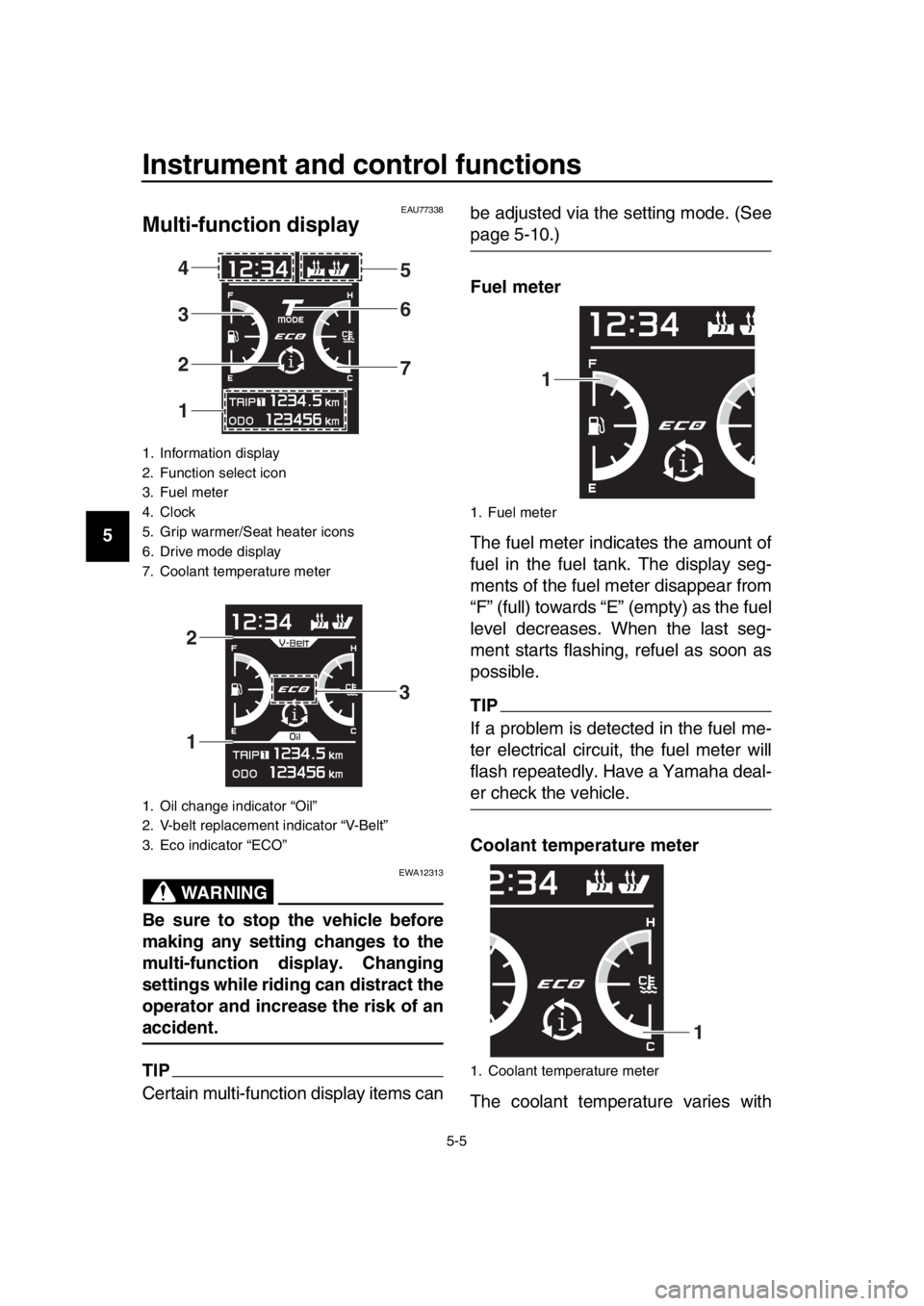
Multi-function display
WARNING
EWA12313
Be sure to stop the vehicle before
making any setting changes to the
multi-function display. Changing
settings while riding can distract the
operator and increase the risk of an
accident.
TIP
Certain multi-function display items can be adjusted via the setting mode. (See
page 5-10.)
Fuel meter
The fuel meter indicates the amount of
fuel in the fuel tank. The display seg-
ments of the fuel meter disappear from
“F” (full) towards “E” (empty) as the fuel
level decreases. When the last seg-
ment starts flashing, refuel as soon as
possible.
TIP
If a problem is detected in the fuel me-
ter electrical circuit,
the fuel meter will
flash repeatedly. Have a Yamaha deal-
er check the vehicle.
Coolant temperature meter
The coolant temperature varies with
1. Information display
2. Function select icon
3. Fuel meter
4. Clock
5. Grip warmer/Seat heater icons
6. Drive mode display
7. Coolant temperature meter
1. Oil change indicator “Oil”
2. V-belt replacement indicator “V-Belt”
3. Eco indicator “ECO”
1 2 3 4 5
6
7
1 2
3
1. Fuel meter
1. Coolant temperature meter
1
1
BV1-9-E2.book 5 ページ 2018年8月28日 火曜日 午後5時28分
Page 42 of 122

Instrument and control functions
5-9
1
2
3
4
5
6
7
8
9
10
11
12
13
14 The odometer shows the total distance
traveled by the vehicle.
Tripmeters:
“TRIP1” and “TRIP2” show the distance
traveled since they were last set to ze-
ro.
To reset a tripmeter, use the select
switch to select the information display
page that contains the tripmeter you
want to reset. Push the “ ” side of the
select switch for one second so that the
tripmeter flashes, and then push the
“ ” side of the select switch again for
one second while the tripmeter is flash-
ing.
TIP
The odometer will lock at 999999.
The tripmeters will reset and con-
tinue counting after 9999.9 is
reached.
When approximately 3.0 L (0.79 US gal,
0.66 Imp.gal) of fuel remains in the fuel
tank, the last segment of the fuel meter
starts flashing. In addition, the informa-
tion display will automatically change to
the fuel reserve tripmeter mode “F-
TRIP” and start counting the distance
traveled from that point.
In this case, push the select switch to switch the display in the following order:
F-TRIP Display–1 Display–2
Display–3 F-TRIP
If you do not reset the fuel reserve trip-
meter manually, it will reset automati-
cally after refueling and traveling 5 km
(3 mi).
TIP
You cannot enter setting mode (page
5-10) while “F-TRIP” is on.
Estimated traveling range:
The estimated distance that can be
traveled with the remaining fuel under
the current riding conditions is shown.
Ambient temperature:
This shows the ambient temperature
from –9 C to 50 C in 1 C increments.
The temperature displayed may vary
from the actual ambient temperature.
TIP
–9 C will be displayed even if the
detected temperature is lower.
50 C will be displayed even if the
detected temperature is higher.
The accuracy of the temperature
reading may be affected when rid-
ing under 20 km/h (12 mi/h) or
when stopped at traffic signals and
BV1-9-E2.book 9 ページ 2018年8月28日 火曜日 午後5時28分
Page 44 of 122
Instrument and control functions
5-11
1
2
3
4
5
6
7
8
9
10
11
12
13
14
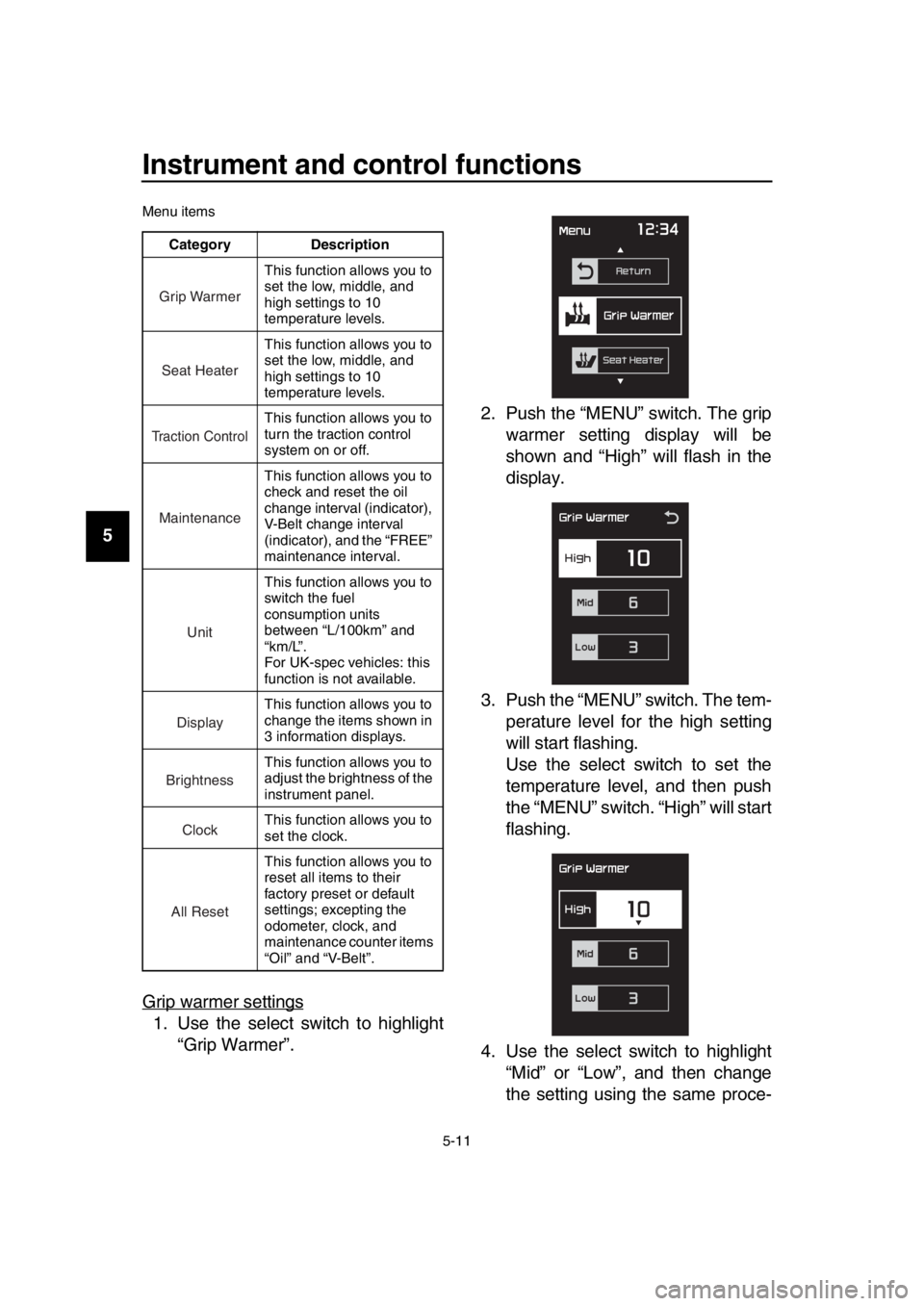
Menu items
Grip warmer settings
1. Use the select switch to highlight “Grip Warmer”. 2. Push the “MENU” switch. The grip
warmer setting display will be
shown and “High” will flash in the
display.
3. Push the “MENU” switch. The tem- perature level for the high setting
will start flashing.
Use the select switch to set the
temperature level, and then push
the “MENU” switch. “High” will start
flashing.
4. Use the select switch to highlight “Mid” or “Low”, and then change
the setting using the same proce-
Category Description
This function allows you to
set the low, middle, and
high settings to 10
temperature levels.
This function allows you to
set the low, middle, and
high settings to 10
temperature levels.
This function allows you to
turn the traction control
system on or off.
This function allows you to
check and reset the oil
change interval (indicator),
V-Belt change interval
(indicator), and the “FREE”
maintenance interval.
This function allows you to
switch the fuel
consumption units
between “L/100km” and
“km/L”.
For UK-spec vehicles: this
function is not available.
This function allows you to
change the items shown in
3 information displays.
This function allows you to
adjust the brightness of the
instrument panel.
This function allows you to
set the clock.
This function allows you to
reset all items to their
factory preset or default
settings; excepting the
odometer, clock, and
maintenance counter items
“Oil” and “V-Belt”.
Grip Warmer
Seat Heater
Tr action Control
Maintenance
Unit
Display
Brightness
Clock
All Reset
BV1-9-E2.book 11 ページ 2018年8月28日 火曜日 午後5時28分
Page 48 of 122
Instrument and control functions
5-15
1
2
3
4
5
6
7
8
9
10
11
12
13
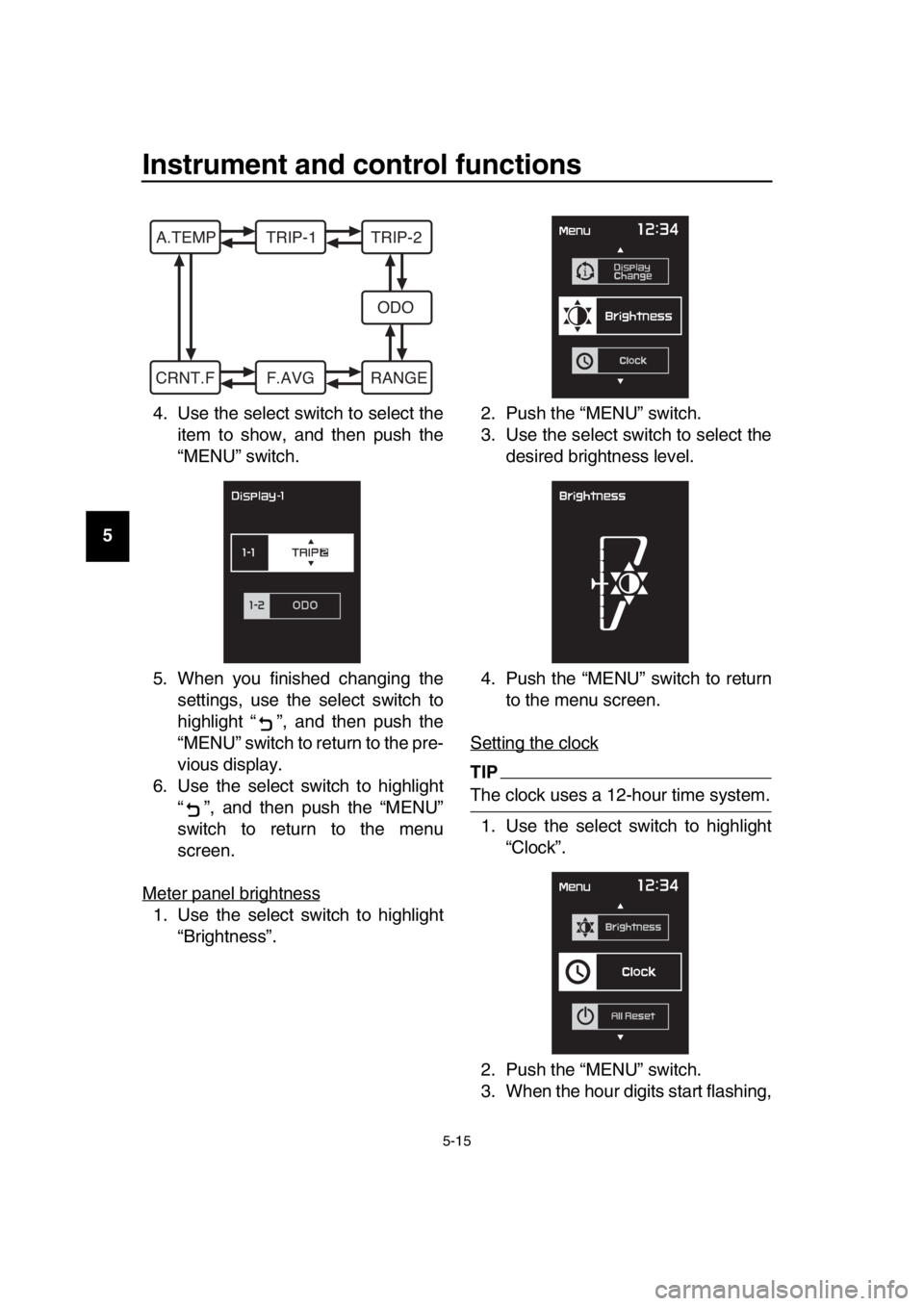
14 4. Use the select switch to select the
item to show, and then push the
“MENU” switch.
5. When you finished changing the settings, use the select switch to
highlight “ ”, and then push the
“MENU” switch to return to the pre-
vious display.
6. Use the select switch to highlight “ ”, and then push the “MENU”
switch to return to the menu
screen.
Meter panel brightness
1. Use the select switch to highlight “Brightness”. 2. Push the “MENU” switch.
3. Use the select switch to select the
desired brightness level.
4. Push the “MENU” switch to return to the menu screen.
Setting the clock
TIP
The clock uses a 12-hour time system. 1. Use the select switch to highlight “Clock”.
2. Push the “MENU” switch.
3. When the hour digits start flashing,
A.TEMP TRIP-1 TRIP-2 ODO
CRNT.F F.AVG RANGE
BV1-9-E2.book 15 ページ 2018年8月28日 火曜日 午後5時28分
Page 49 of 122
Instrument and control functions
5-16
1
2
3
4
5
6
7
8
9
10
11
12
13
14
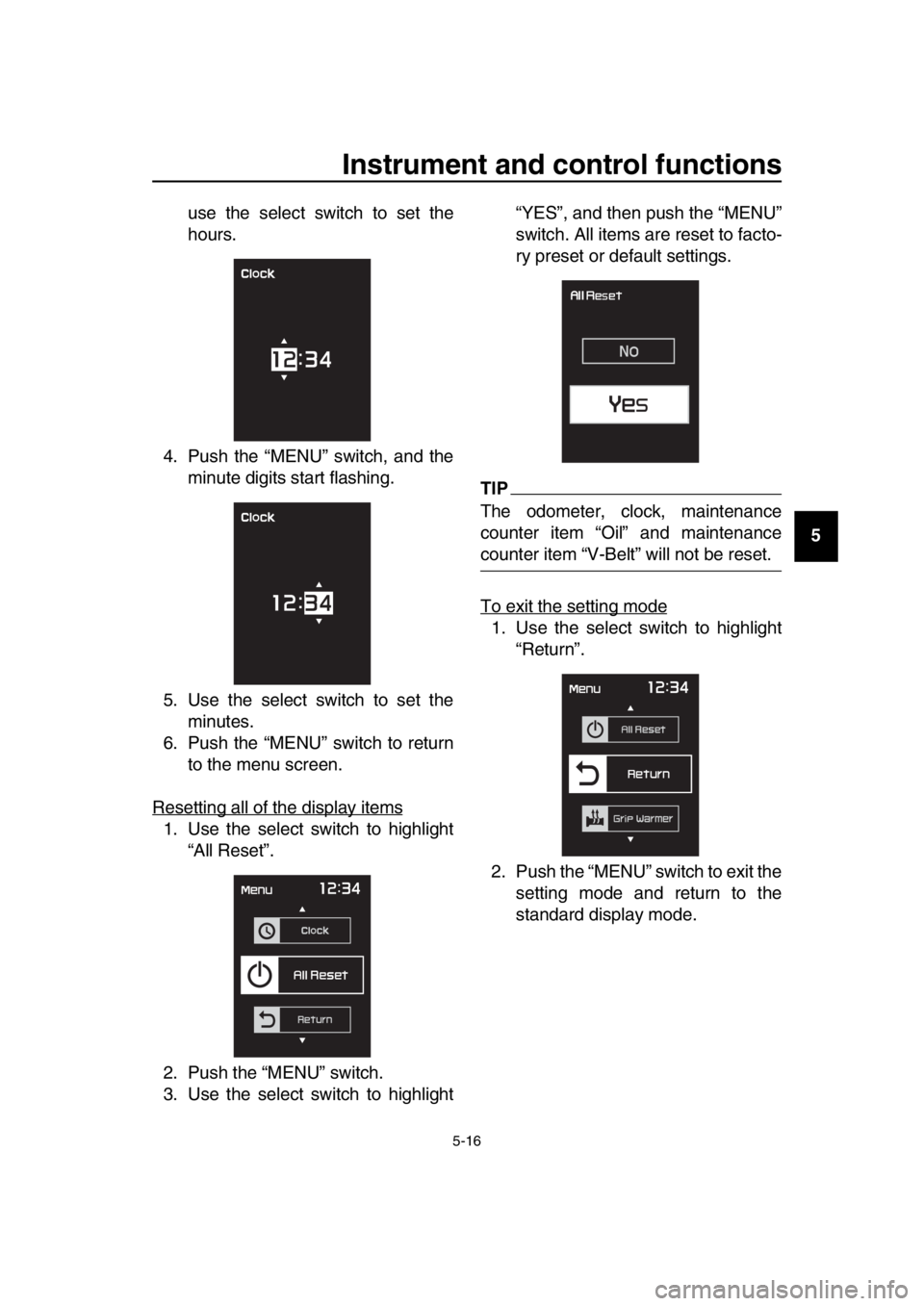
use the select switch to set the
hours.
4. Push the “MENU” switch, and the minute digits start flashing.
5. Use the select switch to set the minutes.
6. Push the “MENU” switch to return to the menu screen.
Resetting all of the display items
1. Use the select switch to highlight “All Reset”.
2. Push the “MENU” switch.
3. Use the select switch to highlight “YES”, and then push the “MENU”
switch. All items are reset to facto-
ry preset or default settings.
TIP
The odometer, clock, maintenance
counter item “Oil” and maintenance
counter item “V-Belt” will not be reset.
To exit the setting mode
1. Use the select switch to highlight
“Return”.
2. Push the “MENU” switch to exit the setting mode and return to the
standard display mode.
BV1-9-E2.book 16 ページ 2018年8月28日 火曜日 午後5時28分
Page 51 of 122
Instrument and control functions
5-18
1
2
3
4
5
6
7
8
9
10
11
12
13
14
EAU63230
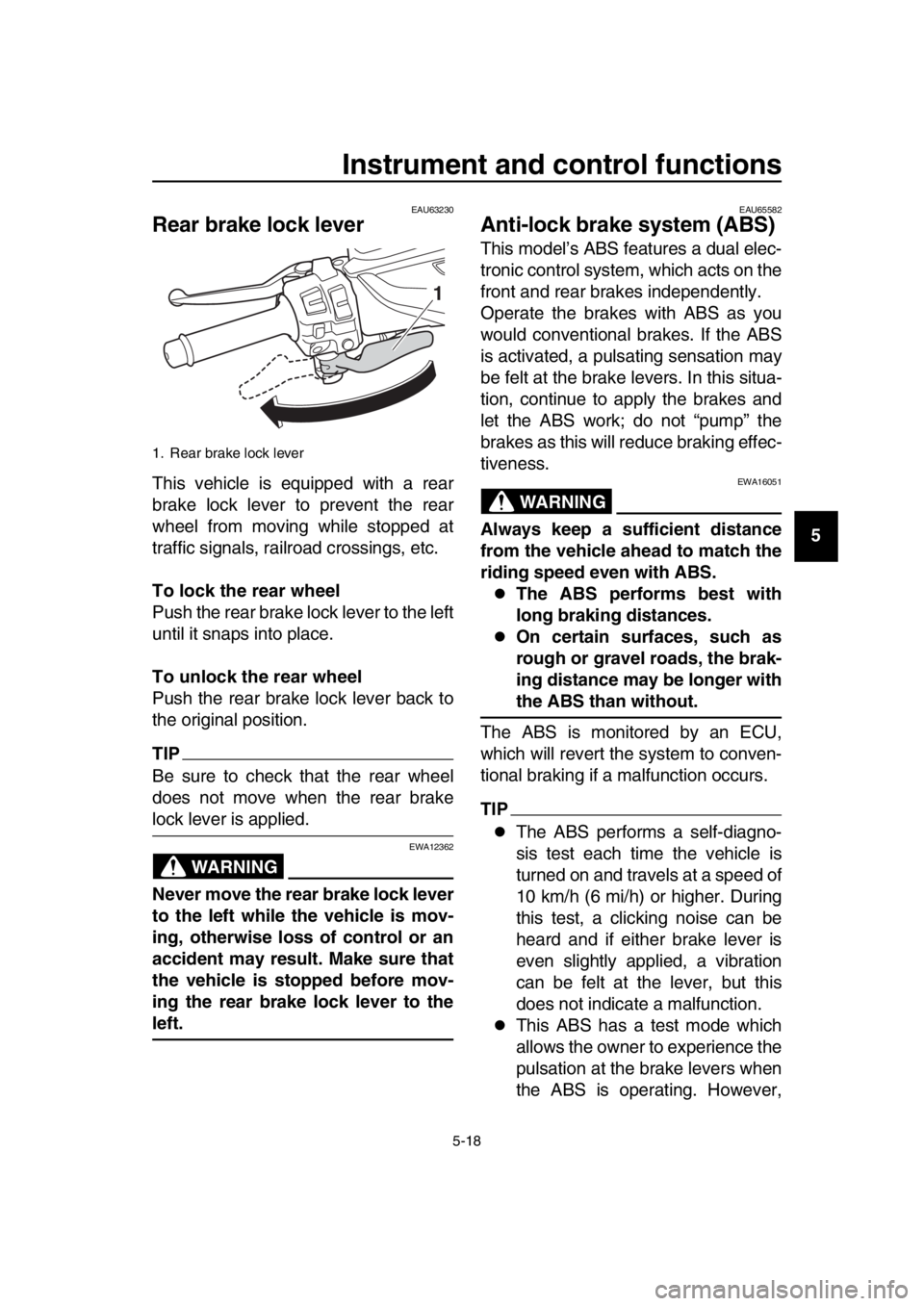
Rear brake lock lever
This vehicle is equipped with a rear
brake lock lever to prevent the rear
wheel from moving while stopped at
traffic signals, railroad crossings, etc.
To lock the rear wheel
Push the rear brake lock lever to the left
until it snaps into place.
To unlock the rear wheel
Push the rear brake lock lever back to
the original position.
TIP
Be sure to check that the rear wheel
does not move when the rear brake
lock lever is applied.
WARNING
EWA12362
Never move the rear brake lock lever
to the left while the vehicle is mov-
ing, otherwise loss of control or an
accident may result. Make sure that
the vehicle is stopped before mov-
ing the rear brake lock lever to the
left.
EAU65582
Anti-lock brake system (ABS)
This model’s ABS features a dual elec-
tronic control system, which acts on the
front and rear brakes independently.
Operate the brakes with ABS as you
would conventional brakes. If the ABS
is activated, a pulsating sensation may
be felt at the brake levers. In this situa-
tion, continue to apply the brakes and
let the ABS work; do not “pump” the
brakes as this will reduce braking effec-
tiveness.
WARNING
EWA16051
Always keep a sufficient distance
from the vehicle ahead to match the
riding speed even with ABS.
The ABS performs best with
long braking distances.
On certain surfaces, such as
rough or gravel roads, the brak-
ing distance may be longer with
the ABS than without.
The ABS is monitored by an ECU,
which will revert the system to conven-
tional braking if a malfunction occurs.
TIP
The ABS performs a self-diagno-
sis test each time the vehicle is
turned on and travels at a speed of
10 km/h (6 mi/h) or higher. During
this test, a clicking noise can be
heard and if either brake lever is
even slightly applied, a vibration
can be felt at the lever, but this
does not indicate a malfunction.
This ABS has a test mode which
allows the owner to experience the
pulsation at the brake levers when
the ABS is operating. However,
1. Rear brake lock lever
1
BV1-9-E2.book 18 ページ 2018年8月28日 火曜日 午後5時28分
Page 52 of 122
Instrument and control functions
5-19
1
2
3
4
5
6
7
8
9
10
11
12
13
14 special tools are required, so
please consult your Yamaha deal-
er.
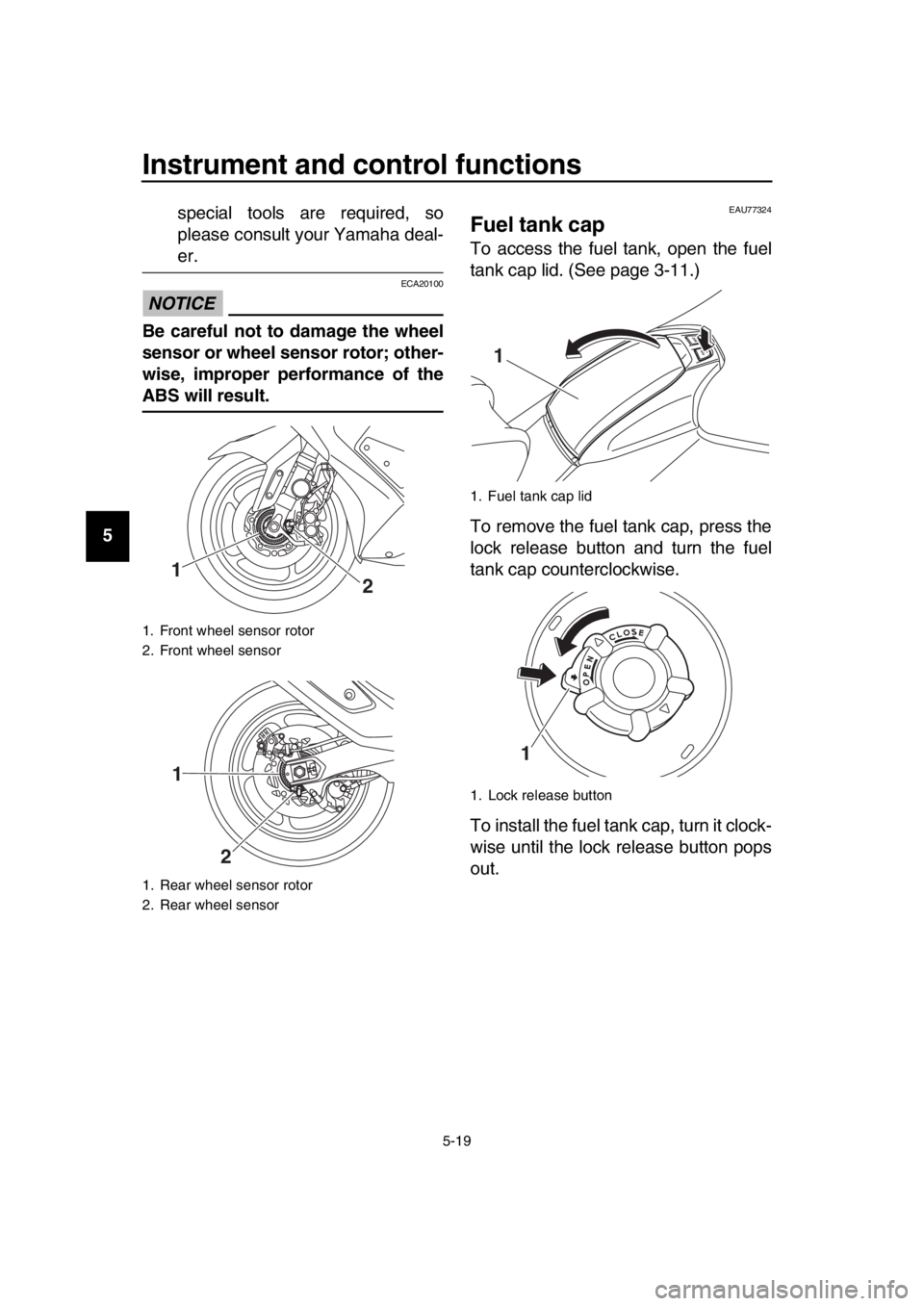
NOTICE
ECA20100
Be careful not to damage the wheel
sensor or wheel sensor rotor; other-
wise, improper performance of the
ABS will result.
EAU77324
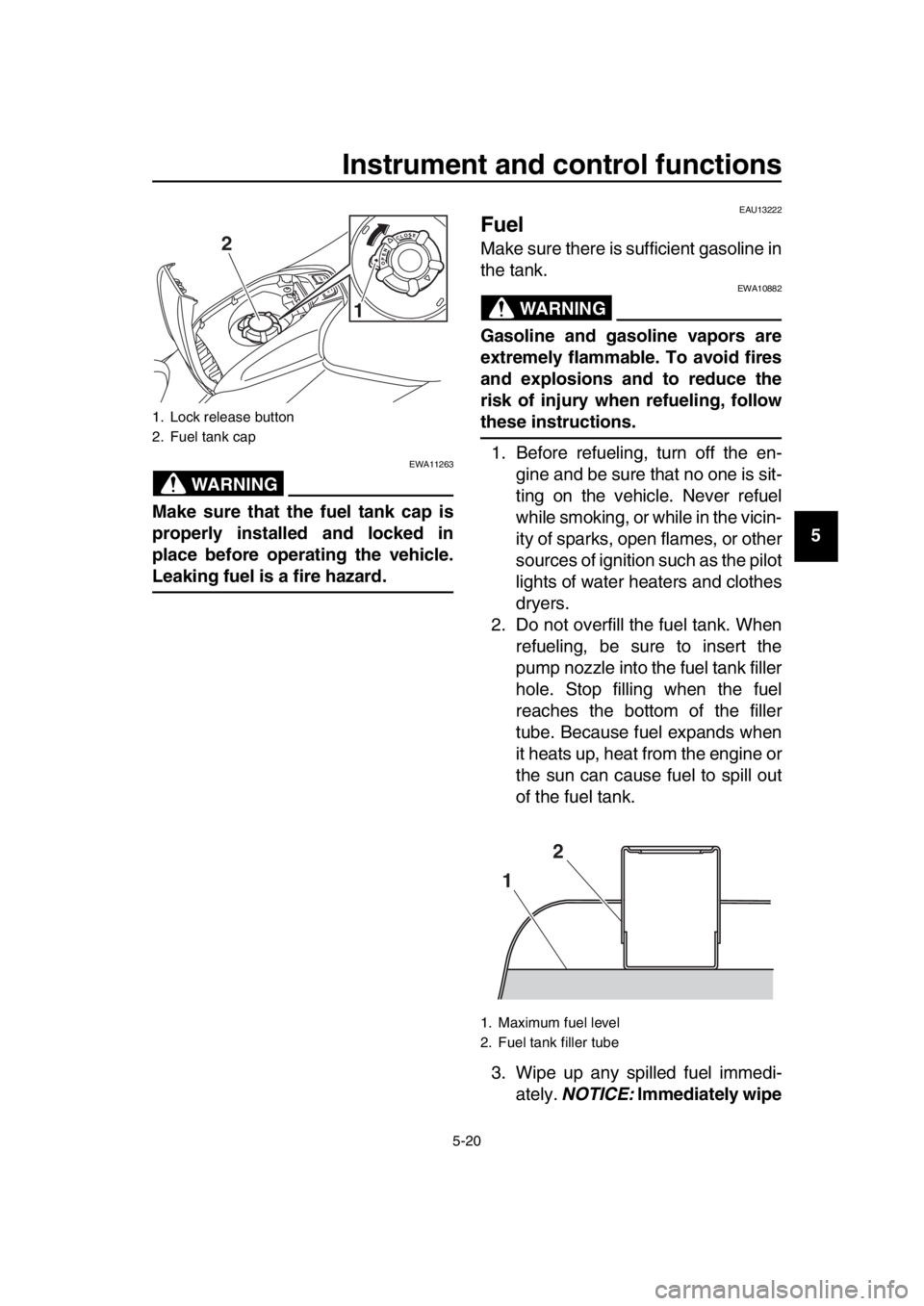
Fuel tank cap
To access the fuel tank, open the fuel
tank cap lid. (See page 3-11.)
To remove the fuel tank cap, press the
lock release button and turn the fuel
tank cap counterclockwise.
To install the fuel tank cap, turn it clock-
wise until the lock release button pops
out.
1. Front wheel sensor rotor
2. Front wheel sensor
1. Rear wheel sensor rotor
2. Rear wheel sensor
1
2
1
2
1. Fuel tank cap lid
1. Lock release button
1
1
BV1-9-E2.book 19 ページ 2018年8月28日 火曜日 午後5時28分
Page 53 of 122
Instrument and control functions
5-20
1
2
3
4
5
6
7
8
9
10
11
12
13
14
WARNING
EWA11263
Make sure that the fuel tank cap is
properly installed and locked in
place before operating the vehicle.
Leaking fuel is a fire hazard.
EAU13222
Fuel
Make sure there is sufficient gasoline in
the tank.
WARNING
EWA10882
Gasoline and gasoline vapors are
extremely flammable. To avoid fires
and explosions and to reduce the
risk of injury when refueling, follow
these instructions. 1. Before refueling, turn off the en- gine and be sure that no one is sit-
ting on the vehicle. Never refuel
while smoking, or while in the vicin-
ity of sparks, open flames, or other
sources of ignition such as the pilot
lights of water heaters and clothes
dryers.
2. Do not overfill the fuel tank. When refueling, be sure to insert the
pump nozzle into the fuel tank filler
hole. Stop filling when the fuel
reaches the bottom of the filler
tube. Because fuel expands when
it heats up, heat from the engine or
the sun can cause fuel to spill out
of the fuel tank.
3. Wipe up any spilled fuel immedi- ately. NOTICE: Immediately wipe1. Lock release button
2. Fuel tank cap
2
1
1. Maximum fuel level
2. Fuel tank filler tube
12
BV1-9-E2.book 20 ページ 2018年8月28日 火曜日 午後5時28分