display YAMAHA XSR 900 2022 User Guide
[x] Cancel search | Manufacturer: YAMAHA, Model Year: 2022, Model line: XSR 900, Model: YAMAHA XSR 900 2022Pages: 114, PDF Size: 4.36 MB
Page 37 of 114
Instrument and control functions
4-14
1
2
345
6
7
8
9
10
11
12
13
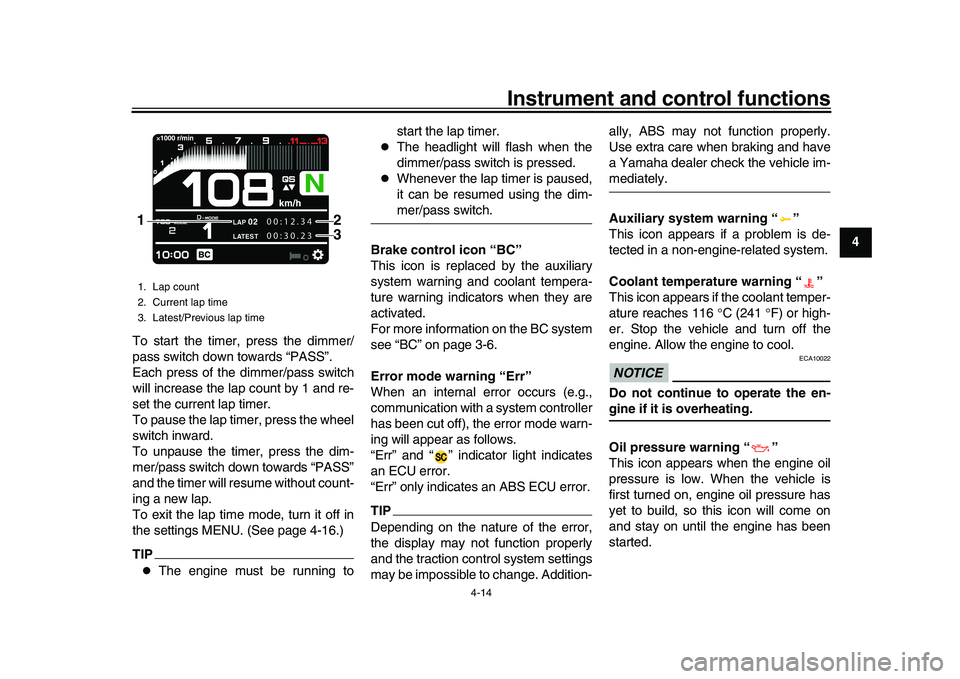
To start the timer, press the dimmer/
pass switch down towards “PASS”.
Each press of the dimmer/pass switch
will increase the lap count by 1 and re-
set the current lap timer.
To pause the lap timer, press the wheel
switch inward.
To unpause the timer, press the dim-
mer/pass switch down towards “PASS”
and the timer will resume without count-
ing a new lap.
To exit the lap time mode, turn it off in
the settings MENU. (See page 4-16.)
TIP
The engine must be running to start the lap timer.
The headlight will flash when the
dimmer/pass switch is pressed.
Whenever the lap timer is paused,
it can be resumed using the dim-mer/pass switch.
Brake control icon “BC”
This icon is replaced by the auxiliary
system warning and coolant tempera-
ture warning indicators when they are
activated.
For more information on the BC system
see “BC” on page 3-6.
Error mode warning “Err”
When an internal error occurs (e.g.,
communication with a system controller
has been cut off), the error mode warn-
ing will appear as follows.
“Err” and “ ” indicator light indicates
an ECU error.
“Err” only indicates an ABS ECU error.
TIPDepending on the nature of the error,
the display may not function properly
and the traction control system settings
may be impossible to change. Addition- ally, ABS may not function properly.
Use extra care when braking and have
a Yamaha dealer check the vehicle im-
mediately.
Auxiliary system warning “ ”
This icon appears if a problem is de-
tected in a non-engine-related system.
Coolant temperature warning “ ”
This icon appears if the coolant temper-
ature reaches 116
C (241 F) or high-
er. Stop the vehicle and turn off the
engine. Allow the engine to cool.NOTICE
ECA10022
Do not continue to operate the en-gine if it is overheating.
Oil pressure warning “ ”
This icon appears when the engine oil
pressure is low. When the vehicle is
first turned on, engine oil pressure has
yet to build, so this icon will come on
and stay on until the engine has been
started.
1. Lap count
2. Current lap time
3. Latest/Previous lap time
LAP
02
LATEST
00:12.34
00:30.23
2
1
3
BEA-28199-E0.book 14 ページ 2021年12月1日 水曜日 午後7時8分
Page 38 of 114
Instrument and control functions
4-15
1
2
34
5
6
7
8
9
10
11
12
13
TIPIf a malfunction is detected, the oil pres-sure warning icon will flash repeatedly.NOTICE
ECA26410
Do not continue to operate the en-gine if the oil pressure is low.
EAU9145B
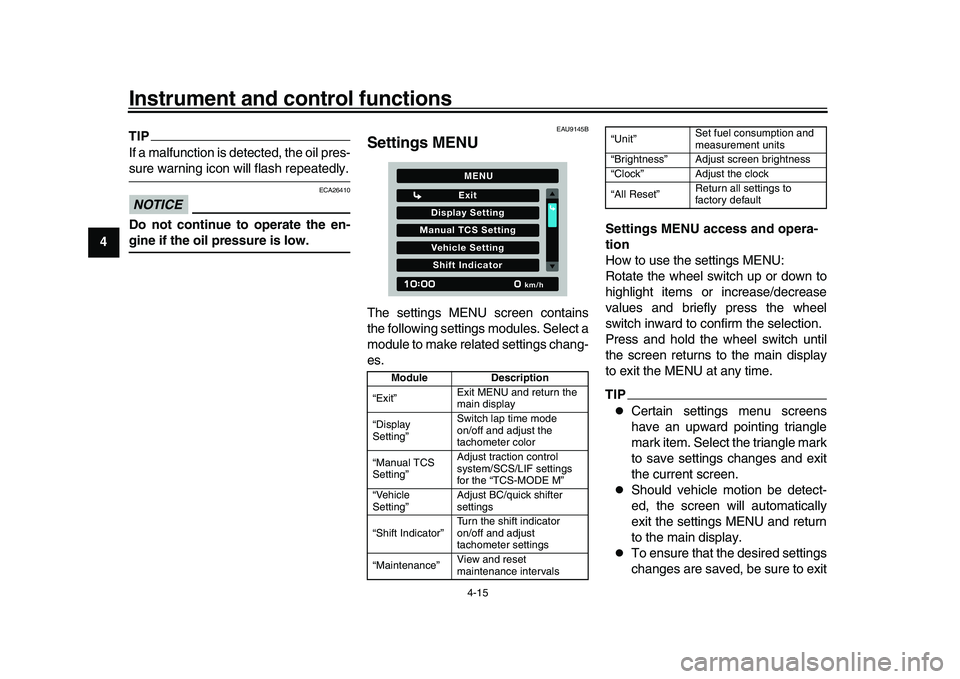
Settings MENUThe settings MENU screen contains
the following settings modules. Select a
module to make related settings chang-
es. Settings MENU access and opera-
tion
How to use the settings MENU:
Rotate the wheel switch up or down to
highlight items or increase/decrease
values and briefly press the wheel
switch inward to confirm the selection.
Press and hold the wheel switch until
the screen returns to the main display
to exit the MENU at any time.
TIP
Certain settings menu screens
have an upward pointing triangle
mark item. Select the triangle mark
to save settings changes and exit
the current screen.
Should vehicle motion be detect-
ed, the screen will automatically
exit the settings MENU and return
to the main display.
To ensure that the desired settings
changes are saved, be sure to exit
Module
Description
“Exit” Exit MENU and return the
main display
“Display
Setting” Switch lap time mode
on/off and adjust the
tachometer color
“Manual TCS
Setting” Adjust traction control
system/SCS/LIF settings
for the “TCS-MODE M”
“Vehicle
Setting” Adjust BC/quick shifter
settings
“Shift Indicator” Turn the shift indicator
on/off and adjust
tachometer settings
“Maintenance” View and reset
maintenance intervals
Display Setting
Exit
Manual TCS SettingVehicle SettingShift Indicator
km/h
MENU
“Unit”Set fuel consumption and
measurement units
“Brightness” Adjust screen brightness
“Clock” Adjust the clock
“All Reset” Return all settings to
factory default
BEA-28199-E0.book 15 ページ 2021年12月1日 水曜日 午後7時8分
Page 39 of 114
Instrument and control functions
4-16
1
2
345
6
7
8
9
10
11
12
13
each menu via the triangle mark (if
displayed). Exiting the settings
menu by pressing and holding the
wheel switch may not save set-
tings changes.
“Display Setting”
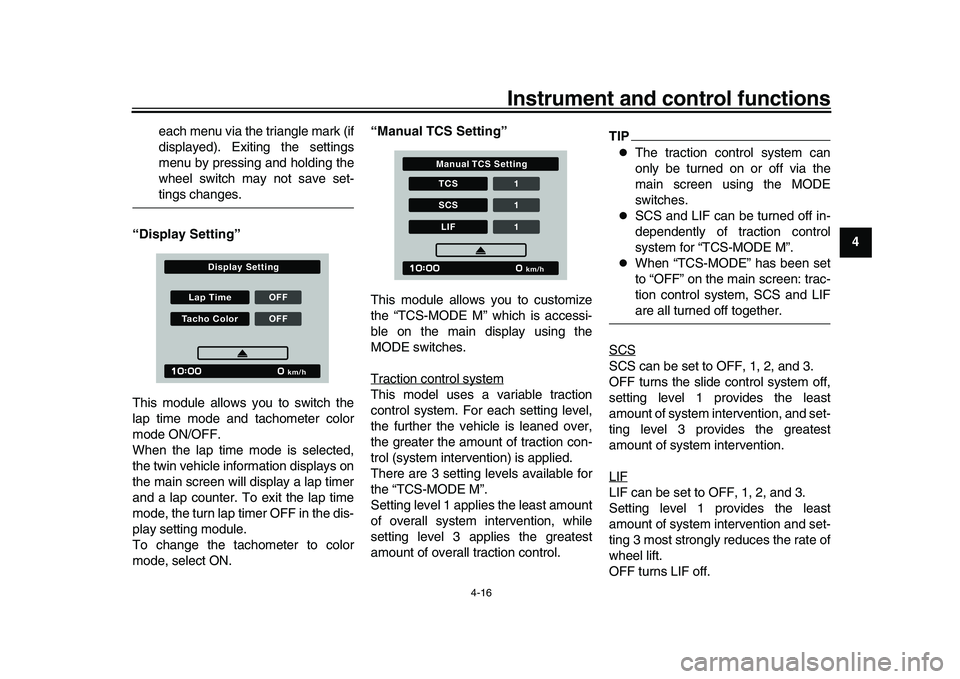
This module allows you to switch the
lap time mode and tachometer color
mode ON/OFF.
When the lap time mode is selected,
the twin vehicle in formation displays on
the main screen will display a lap timer
and a lap counter. To exit the lap time
mode, the turn lap timer OFF in the dis-
play setting module.
To change the tachometer to color
mode, select ON. “Manual TCS Setting”
This module allows you to customize
the “TCS-MODE M” which is accessi-
ble on the main display using the
MODE switches.
Traction control system
This model uses a variable traction
control system. For each setting level,
the further the vehicle is leaned over,
the greater the amount of traction con-
trol (system interv
ention) is applied.
There are 3 setting levels available for
the “TCS-MODE M”.
Setting level 1 applies the least amount
of overall system intervention, while
setting level 3 applies the greatest
amount of overall traction control.
TIP
The traction control system can
only be turned on or off via the
main screen using the MODE
switches.
SCS and LIF can be turned off in-
dependently of traction control
system for “TCS-MODE M”.
When “TCS-MODE” has been set
to “OFF” on the main screen: trac-
tion control system, SCS and LIFare all turned off together.
SCS
SCS can be set to OFF, 1, 2, and 3.
OFF turns the slide control system off,
setting level 1 provides the least
amount of system intervention, and set-
ting level 3 provides the greatest
amount of system intervention.
LIFLIF can be set to OFF, 1, 2, and 3.
Setting level 1 provides the least
amount of system intervention and set-
ting 3 most strongly reduces the rate of
wheel lift.
OFF turns LIF off.
Lap Time OFFTacho Color OFF
km/h
Display Setting
TCS 1SCS 1LIF1
km/h
Manual TCS Setting
BEA-28199-E0.book 16 ページ 2021年12月1日 水曜日 午後7時8分
Page 41 of 114
Instrument and control functions
4-18
1
2
345
6
7
8
9
10
11
12
13
“IND Start” - the r/min at which the indi-
cator starts flashing can be chosen.
Once selected, rotate the wheel switch
up/down to increase or decrease the
r/min value by increments of 200 r/min.
“IND Start” is settable between 6000 -
12800 r/min.
“IND Stop” - the r/min at which the indi-
cator stops flashing can be chosen.
Once selected, rotate the wheel switch
up/down to increase or decrease the
r/min value by increments of 200 r/min.
“IND Stop” is settable between 6200 -
13000 r/min.
“Maintenance”
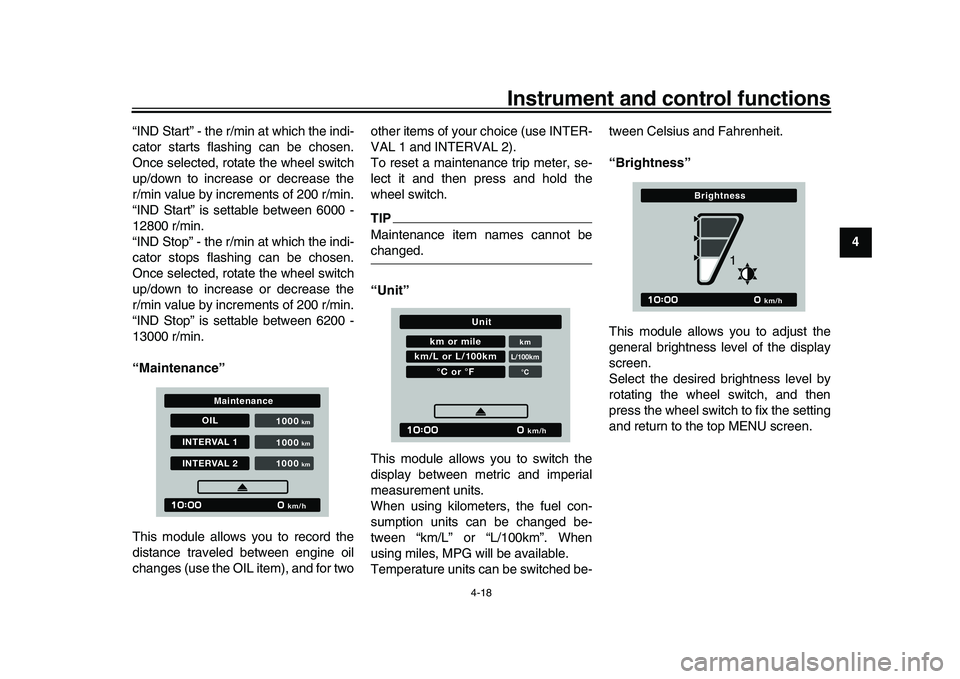
This module allows you to record the
distance traveled between engine oil
changes (use the OIL item), and for two other items of your choice (use INTER-
VAL 1 and INTERVAL 2).
To reset a maintenance trip meter, se-
lect it and then press and hold the
wheel switch.
TIPMaintenance item names cannot bechanged.
“Unit”
This module allows you to switch the
display between metric and imperial
measurement units.
When using kilometers, the fuel con-
sumption units can be changed be-
tween “km/L” or “L/100km”. When
using miles, MPG will be available.
Temperature units can be switched be-tween Celsius and Fahrenheit.
“Brightness”
This module allows you to adjust the
general brightness level of the display
screen.
Select the desired brightness level by
rotating the wheel switch, and then
press the wheel switch to fix the setting
and return to the top MENU screen.
OIL
INTERVAL 1INTERVAL 2 1000
km/h
km
1000
km
1000
km
Maintenance
km or mile
kmL/100km°C
km/L or L/100km
°C or °F
km/h
Unit
km/h
Brightness
1
BEA-28199-E0.book 18 ページ 2021年12月1日 水曜日 午後7時8分
Page 110 of 114
11-1
1
2
3
4
5
6
7
8
9
1011
12
13
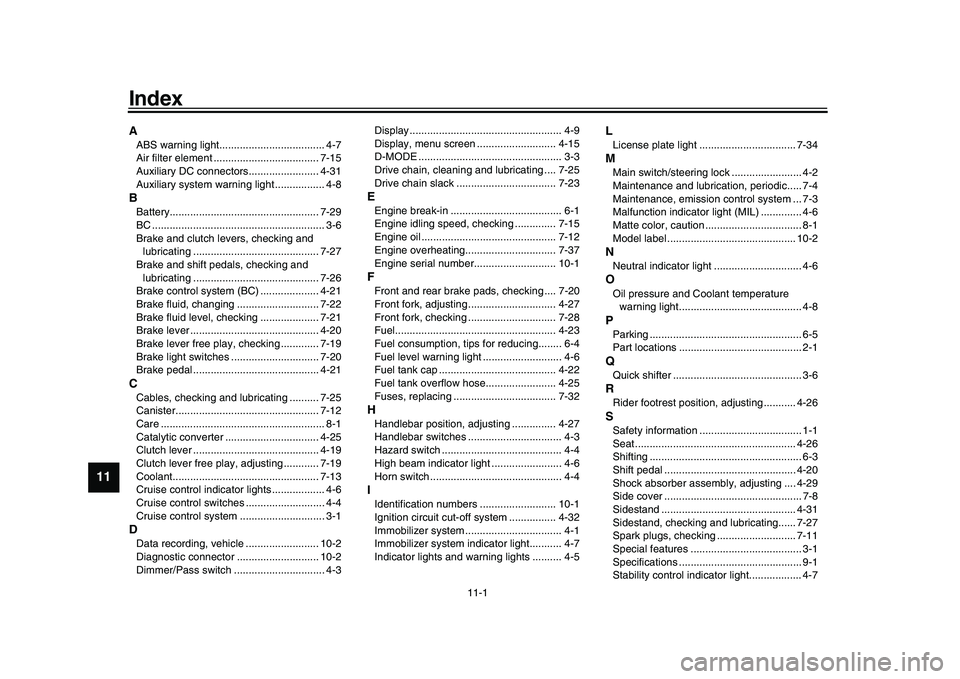
IndexAABS warning light.................................... 4-7
Air filter element .................................... 7-15
Auxiliary DC connectors........................ 4-31
Auxiliary system warning light ................. 4-8BBattery................................................... 7-29
BC ........................................................... 3-6
Brake and clutch levers, checking and lubricating ........................................... 7-27
Brake and shift pedals, checking and lubricating ........................................... 7-26
Brake control system (BC) .................... 4-21
Brake fluid, changing ............................ 7-22
Brake fluid level, checking .................... 7-21
Brake lever ............................................ 4-20
Brake lever free play, checking ............. 7-19
Brake light switches .............................. 7-20
Brake pedal ........................................... 4-21CCables, checking and lubricating .......... 7-25
Canister................................................. 7-12
Care ........................................................ 8-1
Catalytic converter ................................ 4-25
Clutch lever ........................................... 4-19
Clutch lever free play, adjusting ............ 7-19
Coolant.................................................. 7-13
Cruise control indicator lights .................. 4-6
Cruise control switches ........................... 4-4
Cruise control system ............................. 3-1DData recording, vehicle ......................... 10-2
Diagnostic connector ............................ 10-2
Dimmer/Pass switch ............................... 4-3 Display .................................................... 4-9
Display, menu screen ........................... 4-15
D-MODE ................................................. 3-3
Drive chain, cleaning and lubricating .... 7-25
Drive chain slack .................................. 7-23
EEngine break-in ...................................... 6-1
Engine idling speed, checking .............. 7-15
Engine oil .............................................. 7-12
Engine overheating............................... 7-37
Engine serial number............................ 10-1FFront and rear brake
pads, checking .... 7-20
Front fork, adjusting .............................. 4-27
Front fork, checking .............................. 7-28
Fuel....................................................... 4-23
Fuel consumption, tips for reducing........ 6-4
Fuel level warning light ........................... 4-6
Fuel tank cap ........................................ 4-22
Fuel tank overflow hose........................ 4-25
Fuses, replacing ................................... 7-32HHandlebar position, adjusting ............... 4-27
Handlebar switches ................................ 4-3
Hazard switch ......................................... 4-4
High beam indicator light ........................ 4-6
Horn switch ............................................. 4-4IIdentification numbers .......................... 10-1
Ignition circuit cut-off system ................ 4-32
Immobilizer system ................................. 4-1
Immobilizer system indicator light........... 4-7
Indicator lights and warning lights .......... 4-5
LLicense plate light ................................. 7-34MMain switch/steering lock ........................ 4-2
Maintenance and lubrication, periodic..... 7-4
Maintenance, emission control system ... 7-3
Malfunction indicator light (MIL) .............. 4-6
Matte color, caution ................................. 8-1
Model label ............................................ 10-2NNeutral indicator light .............................. 4-6OOil pressure and Coolant temperature warning light.......................................... 4-8PParking .................................................... 6-5
Part locations .......................................... 2-1QQuick shifter ............................................ 3-6RRider footrest position, adjusting ........... 4-26SSafety information ................................... 1-1
Seat ....................................................... 4-26
Shifting .................................................... 6-3
Shift pedal ............................................. 4-20
Shock absorber assembly, adjusting .... 4-29
Side cover ............................................... 7-8
Sidestand .............................................. 4-31
Sidestand, checking an d lubricating...... 7-27
Spark plugs, checking ........................... 7-11
Special features ...................................... 3-1
Specifications .......................................... 9-1
Stability control indicator light.................. 4-7
BEA-28199-E0.book 1 ページ 2021年12月1日 水曜日 午後7時8分