brake AUDI S8 2009 Owner's Guide
[x] Cancel search | Manufacturer: AUDI, Model Year: 2009, Model line: S8, Model: AUDI S8 2009Pages: 408, PDF Size: 91.63 MB
Page 149 of 408
_____________________________________________ A_ d_a ...: p_ t_ i_ v _e_ C_ ru_ is_ e_ C_ o_n _ t_ r_o _ l _ __._
• "°" ""° D riv ing in traffi c: The warning light "°"""° shows that a
vehic le moving in your lane of travel has been de tected up front in
your lane of travel. Your speed is adjusted according to the speed of
the vehicle up front. ACC accelerates and brakes automatical ly
within the system's capabilities.
• "°" ""°
Reque st f or driver to a ssume control: The red flashing
warning light
G'.'.::> 1,.,<:Q means R equ est fo r d riv er to assume control.
You as the driver must slow the vehicle with the foot brake. The
symbo l "°""G'.'.::l tells you that the Adaptive Cruise Control is not able
to slow the vehicle down enough to keep a enough distance to the
vehicle in front of you . A warning tone signal wi ll also sound when
the symbol appears .
& WARNING
Improper use of the Adaptive Cruis e Control f eatures and inatten
ti on c an lead to an cra sh a nd s erio us per sonal injury .
• Never allo w the c losing speed between you and other v ehicles
to be so high t hat th e Adap tive Cru is e Control ma y not be abl e to
slow your vehi cle safel y. If closing speed i s too high , you must
apply the brake s yourself to r ed uc e the ri sk of a r ear-end cra sh .
• Alway s sele ct a greater follow ing di stance to th e vehi cle up
a he ad on w et ro ad s th an on dr y roa ds.
• Alway s read and he ed the inf ormation and WARNINGS~
& in
" De scription " on
pag e 139 .
[ i J Tips
• If the Adaptive Cruise Control initiates braking, the hydraulic
brake system is under pressure . Therefore, the brake peda l distance
is shorter and the pedal feels "harder".
• If you use the accelerator to go faster than the speed of the
vehicle ahead of you, the driver intervention prompt wi ll not be
accompanied by a warning tone.
• If the speed you previously set is exceeded, the indicator light in
the speedometer wi ll switch o ff.•
Con tro ls and eq uip
ment
Ap plies to vehi cle s: wi th Ad apt ive Crui se Co ntro l
Display in the instrument cluster
You should hove the supplementary information
displayed here, p articularly on your first trips.
Fig. 160 D ispla y in th e
i n strum ent cl uste r
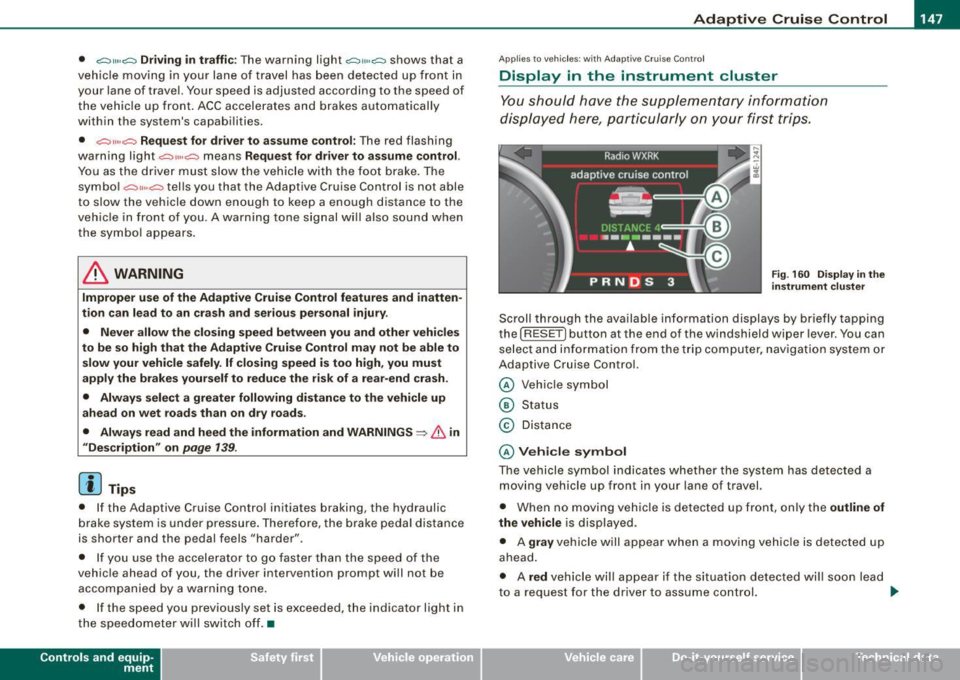
Scroll th rough the available information displays by briefly tapping
the ( RESET] button at the end of the windshield wiper lever . You can
se lect and information from the trip computer, naviga tion syste m or
Adaptive Cruise Control.
@ Veh icle symbol
@ Status
© Distance
@ V ehi cle sym bol
The vehicle symbol indicates whether the system has detected a
moving vehicle up front in your lane of travel.
• When no moving vehic le is detected up front, on ly the
outline of
the vehicle
is displayed.
• A
gra y vehicle will appear when a moving vehic le is detected up
ahead.
• A
red vehicle will appear i f the situation detected will soon lead
to a request for the driver to assume control. .,,_
Vehicle care I I irechnical data
Page 150 of 408
• ..__A_ d_a...: p:,..._ ti_v _ e_ C_ ru_ is_ e_ C_ o_n_ t_ r_ o _ l ___________________________________________ _
If Adaptive Cruise Control is turned off or no speed is set, no vehicle
is shown.
@ Status
• The text OFF appears in white letters when Adaptive Cruise
Control is turned off.
• The text
AVAILABLE appears in white letters when the system is
turned on but no requested speed has been set.
• The text
OVERRIDE appears in white letters when you exceed the
requested speed by accelerating.
• The text
DISTANCE! appears in red letters when the interval to a
vehic le traveling ahead is too short and you also have to slow your
vehicle with the foot brake.
• The text messages
DISTANCE 1, DISTANCE 2, DISTANCE 3 or
DISTANCE 4
appear in green letters to indicate the time interval
(distance) you have set and ACC is active.
© Distance
A pointer (arrow) is shown in this area. When slowly approaching a
moving vehicle detected ahead in your lane of travel, this pointer
represents the distance to that vehicle . When approaching that
vehicle rapidly, it serves as early warning of an impending request
for the driver to assume ful l vehicle control. The pointer moves on a
scale from right to left.
Open road: With an open road and no moving vehicle detected up
ahead, no pointer is shown.
Driving in traffic: If a vehicle traveling up ahead in your lane of travel
is detected, the pointer moves to the center area of the scale. This
area represents the time interval (distance) set. It is shown in
green
to make it easier to see.
Driver intervention prompt: Whenever the selected time interval
(distance) to the vehicle moving up ahead in your lane of travel is
less than the time interval (distance) set, the pointer moves into the
red area of the display. When the pointer reaches the farthest posi
tion on the left, the driver intervention prompt is disp layed to indi -cate that the driver must now assume full vehicle control in order to
prevent
a collision. •
Applies to vehicles : with Adapt ive Cru ise Contro l
Messages
The text messages and symbols shown in this area of the
display are not displayed permanently.
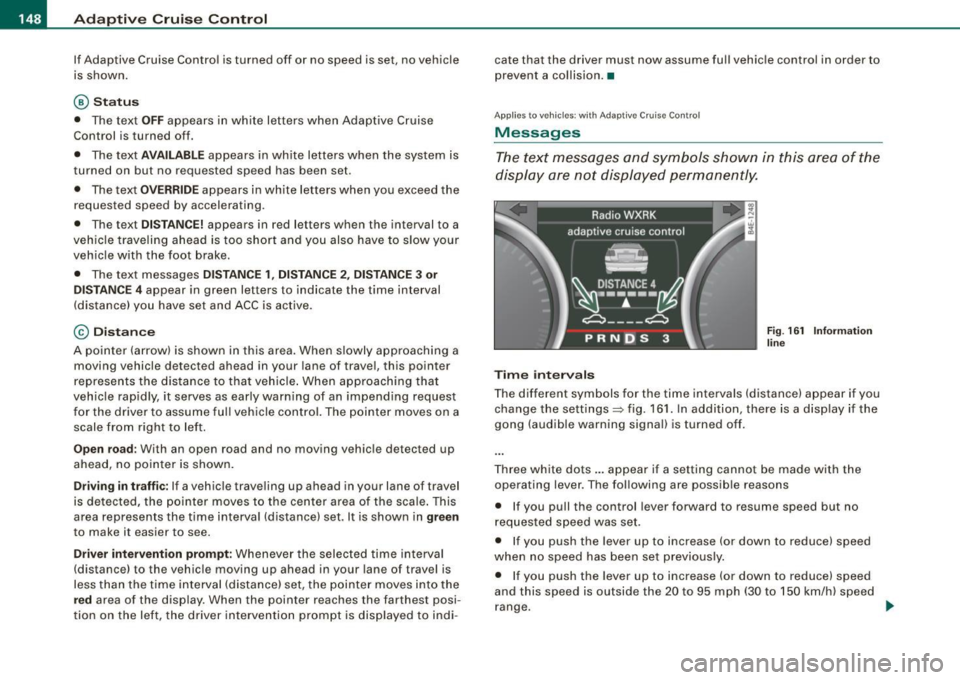
Time intervals
Fig. 161 Information
line
The different symbols for the time intervals (distance) appear if you
change the settings=> fig. 161. In addition, there is a disp lay if the
gong (audible warning signal) is turned off.
Three white dots ... appear if a setting cannot be made with the
operating lever. The following are possible reasons
• If you pull the control lever forward to resume speed but no
requested speed was set.
• If you push the lever up to increase (or down to reduce) speed
when no speed has been set previously.
• If you push the lever up to increase (or down to reduce) speed
and this speed is outside the 20 to 95 mph (30 to 150 km/h) speed
range. .,
Page 151 of 408
_____________________________________________ A_ d_a ...: pc.. t _i_ v _e_ C_ ru_ is_ e_ C_ o_n_ t_ r_ o _ l __ fflJI
A CC no t avai la bl e
The text message ACC n ot av aila bl e appears, for examp le, if the
temperature of the brakes is excessive. Adaptive Cruise Contro l is
temporari ly not available . A warning tone sounds as a reminder.
A CC no t avai lable!
The text message ACC not avai la ble! appears in the event of a
malfunction. Adaptive Cruise Control is turned off. A warning tone
sounds as a rem inder. Have the system inspected by a qua lified
dea lership.
A CC sen sor bloc ked
The text message AC C se nsor b lo cked appears when the ACC
System does not detect any objects over an extended time period .
For the time being, the distance to vehicles up ahead is not being
controlled. The ACC system is not switched off, so increased a lert
ness is required. The following may be reasons for the text message
ACC sensor blocked:
• The ACC sensor is d irty. The ACC system is not reacting, or is not
reacting correctly, to vehicles trave ling ahead .
• It is possible that you are dr iving on a road with very light traffic
without anything at the side of the road (e.g. guard rai ls, traffic
s igns, trees) . As soon as a vehicle is detected by the system aga in,
it returns to its control range and the text message disappears .
The ACC sensor is located in the area under the front license plate .
If there is a loss of operation due to heavy contamination, this area
should cleaned to restore proper operation.
A CC se nso r blo cked !
The text message ACC sen sor blocked! appears when the ACC
System can no longer accurately detect vehic les moving up ahead
in your lane of travel. Adapt ive Cruise Cont rol is tu rned off . A
warning tone a lso sounds as a reminder.
T o decide whether it is necessary to switch off the ACC (ACC sensor
b locked!) o r if it is on ly a temporary condition (ACC sensor blocked),
Controls and equip
ment
the system will also takes into consideration the outside tempera
t ure and/or the windshield wiper operation.
The ACC sensor is dirty or blocked (e.g. leaves, snow).
The ACC sensor is located in the area under the front license plate .
I f the ACC sensor is d irty or blocked, clean the area to restore system
operation .
EPB acti vation
The text message EPB a cti vation appears if emergency braking was
initiated with the Electromechan ical Parking Brake (EPB) . Adaptive
Cruise Control is turned off. A gong sounds as a reminder.
ESP activ at ion
The text message E S P activ ation appears if the Electronic Stabiliza
tion Program (ESP) has intervened to take control in a critica l driving
situation. In this case Adaptive Cruise Control is automatically
turned o ff. A gong sounds as a reminder .
Speed r ange
The text message Sp eed r ange appea rs if the current speed is too
low
to set or to hold the requested speed.
When se tting a desired speed, it must be a t leas t 20 m ph (30 km/h).
At speeds below 17 mph (25 km/h), the cruise control is turned off.
Shift le ver po sition!
The text message Shift lever po sition! appears when the shift se lect
leve r is m oved to position
N. In this position, Adaptive Cruise
Control is not avai lable .•
I • •
Page 153 of 408
Adaptive Crui se Control -
---------------=-------'
Applies to vehicles: with Adaptive Cru ise Co nt rol
When driving around curves
k;;;:;::;;;;~==========; ~
o5
J
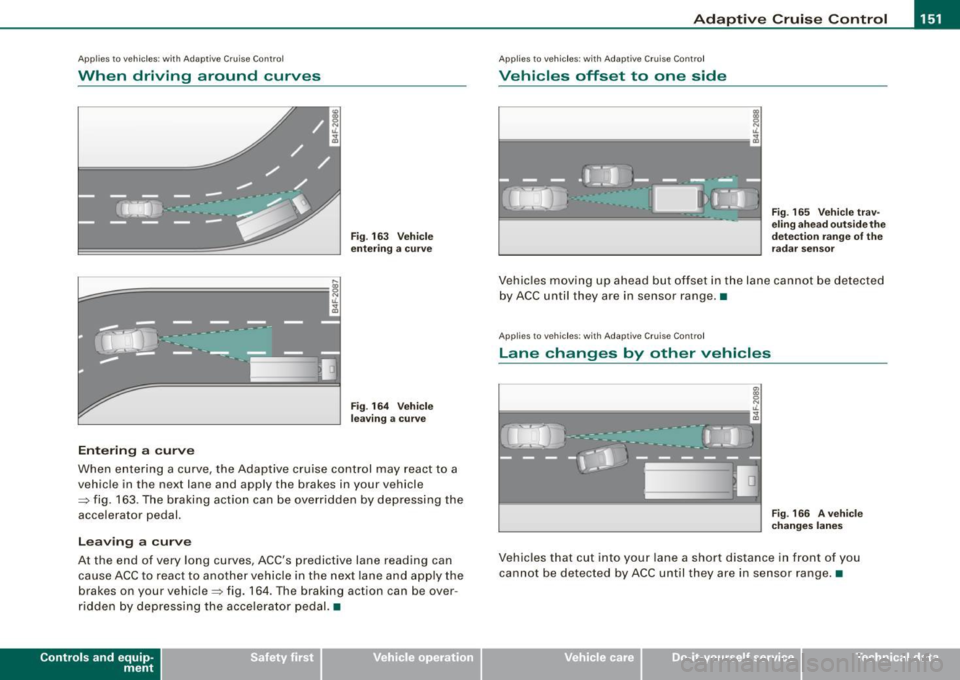
Entering a curve
Fig . 1 63 V eh ic le
enterin g a c urve
F ig . 164 Vehicle
l ea ving a curv e
When entering a curve, the Adaptive cruise control may react to a
vehicle in the next lane and apply the brakes in your vehicle
=> fig . 163 . The braking action can be overridden by depressing the
accelerator pedal.
L e avi ng a cu rve
At the end of very long curves, ACC 's predictive lane reading can
cause ACC to react to a nother vehicle in the next lane and app ly the
brakes on your vehicle=> fig. 164 . T he braking action can be over
ridden by depressing the accelera tor pedal. •
Contro ls and eq uip
ment
Ap plies to veh icles: with Adapt ive Crui se Contro l
Vehicles offset to one side
Fig . 165 V ehi cle tra v
e ling ahe ad outsid e th e
d etec tion r ange of the
ra dar se nsor
Vehic les moving up ahead but offset in the lane cannot be detected
by ACC until they are in sensor range. •
Applies to veh ic les: with Adaptive Cruise Co nt ro l
Lane changes by other vehicles
Fig . 166 A veh ic le
c han ges la ne s
Vehicles that cut into your lane a short distance in front of you
cannot be detected by ACC until they are in sensor range. •
Vehicle care I I irechnical data
Page 168 of 408

• ..__A_ u_t _o _m_ a_ t_ i_c _ t _r_ a_ n_ s_m _ is_ s_ io_ n ___________________________________________ _
Automatic transmission
tiptronic® (6-speed automatic
transmission)
General information
Your vehicle is equipped with an e lectronica lly controlled automatic
transmission. Upshifting and downshifting takes place
automati
cally.
The transmission is also equipped with tiptronic®. It allows the driver to shift gears
manually if desired => page 170 . •
Driving the automatic transmission
Start ing the en gin e
- T he selector lever must be in
N or P.
Start ing off
- Press and hold the bra ke pedal.
Fi g. 185 Sh ift gate o n
t h e ce nter c onsole :
selec tor le v er wit h
re lease butto n
- Press and hold the release button in the se lector lever
hand le and move the selector lever from
P or N to D and
release the button
=:> & .
- Wait br iefly u ntil the transm ission has shifted (you will
feel a sligh t movement).
- Remove your foot f rom t he brake pedal and accelerate .
Rocking back and forth to be com e unstu ck
- Sh ift only between
D and R when the ve hicle is at a fu ll
stop and the engine is running at idle speed.
Stopping
- Press and h old the brake pedal unti l the vehicle has come
to a comp lete stop.
Keep the brake pedal depressed so that the vehic le
cannot ro ll forward or backward while it is idling =:>& .
- Once stopped,
do not depress the acce lerator pedal to
rev up the engine=:>&.
Par king
- Press and h old the brake pedal unti l the vehicle has come
to a comp lete stop.
- Set the parking brake firmly=:>
page 135, "Parking" .
- Press and hold the release button in the selector lever
handle, m ove the selector lever i nto
P and then let go of
the release button =:> & . ._
Page 169 of 408

_______________________________________________ A_ u_t _o _ m_ a_ t _i_ c_ t_r _a _n _ s_ m __ is_s_ i _o _ n __ !II
T he selector lever must be in Nor P. If one of the driving positions
is engaged a safety switch w ill preven t the eng ine from being
started. See also=>
page 130.
Before you move the selector lever from the P position, you must
a lways apply the brake pedal before and while depressing the
button in the hand le of the se lector lever .
_& WARNING
• Unintended v ehicle movement c an cause serious injury .
- When the selector lever i s in a driving po sition , the vehicle
may creep, even at idle speed . Therefore do not release the
parking brake or foot brake until you are ready to move ,
be cau se power is tran smitted to the wheel s as soon as a
driving po sition i s engaged.
- Do not accelerate while selecting a driving pos ition . At this
time the engine must be at idle speed so that undue stress is
not placed on the clut che s in the t ransmission .
-Remember : - even when stopped briefly with the automatic
transmi ssion in "D" or "R ", engine po wer is being tr ansmitted
to the wheels. Your vehicle could "creep " forward or ba ckward .
When stopped , keep the brake pedal fully depres sed and u se
the parking brake if ne ces sary to keep the vehicle from rolling.
• If the selecto r leve r is unintentionally mo ved into N whi le you
are dr iving, take your foot off the accelerator pedal and wait for
the eng ine to return to idle speed before sele cting a dr iving posi
tion .
• Never shift into "R " or "P " when the ve hicle is in motion .
• Never get out of the driver 's seat when the eng ine i s running .
• If you must get out of the vehicle , move the selector lever
s ecurely into the P po sition and apply the park ing brake firmly.
• If the engine must remain running , never have any driving po si
tion engaged when che cking under the hood . Make sure the
selector lever has securely engaged and is locked in "P" with the
p ark ing br ake firmly set =>
page 301 , "E n gine compart ment ".
Controls and equip
ment
& W ARNING (continued )
Otherwise , any in crease in engine speed may set the vehi cle in
motion , even with the parking brake applied. •
Selector lever positions
This section describes the selector lever positi ons and
drivi ng ra nges .
Fig . 18 6 D ispl ay in the
in strument cluste r:
s elec tor lev er in po si
tion D
The selector leve r posi tion engaged appears next to the selec tor
lever as wel l as in the instrument c luster display . A lso, the current
gear engaged is sh own in positi ons D and S .
P -Park
In this selector leve r pos it ion the transmission is mechanica lly
locked . Engage
P on ly when the vehicle is completely stopped=> &
in "Driving the automatic transm ission" on page 166 .
To shift in or out of position P, you must first press and hold the
brake peda l
and then press the re lease bu tton in t he se lecto r leve r
handle while moving the selector lever to or from
P . You can shift
out of this position only with the ignit ion on.
R -Re ver se
The transmission wi ll au tomatically select the lowest gear ratio
when you shift into reverse .
I • •
Page 170 of 408
• ..__A_ u_ t _o_ m_ a_ t_ i_ c _ t_r _a _n_ s_ m_ is_ s_io _ n ________________________________________________ _
Select R only when the vehicle is at a full stop and the engine is
running at idle speed=>
& in "Driving the automatic transmission"
on
page 166.
Before you move the selector lever to R, press both the button in the
handle of the selector lever
and the brake pedal at the same time.
When the ignition is on, the backup lights illuminate when the
selector lever is moved into
R.
N -Neutral
The transmission is in neutral in this position. Shift to this position
for standing with the brakes applied =>
page 168 .
When the vehicle is stationary or at speeds below 3 mph (5 km/h),
you must always apply the footbrake before and while moving the
lever out of
N.
D -Normal position for driving forward
Position Dis for normal city and highway driving. It ranges from zero
to top speed and all six gears shift automatically, depending on
engine load, driving speed and automatically selected shift
programs.
When the vehicle is stationary or at speeds below 3 mph (5 km/h),
you must always apply the foot brake before and while moving the
lever to
D out of N.
In certain circumstances it may be advantageous to temporarily
switch to the manual shift program to manually select gear ratios to
match specific driving conditions=>
page 170.
S -Sport position
Select this position for sportier performance. In this position, the
transmission will not upshift as soon, allowing the vehicle to use the increased power available at higher engine speeds to achieve live
lier acceleration.
When the vehicle is stationary or at speeds below 3 mph (5 km/h),
you must always apply the foot brake before and while moving the lever to
S out of N.
& WARNING
Read and follow all WARNINGS => & in "Driving the automatic
transmission" on
page 166.
0 Note
Coasting downhill with the transmission in N and the engine not
running will result in damage to the automatic transmission and
possibly the catalytic converter. •
Automatic Shift Lock (ASL)
Automatic shift lock prevents you from accidentally
shifting into a forward gear or into reverse, thus causing the vehicle to move unintentionally.
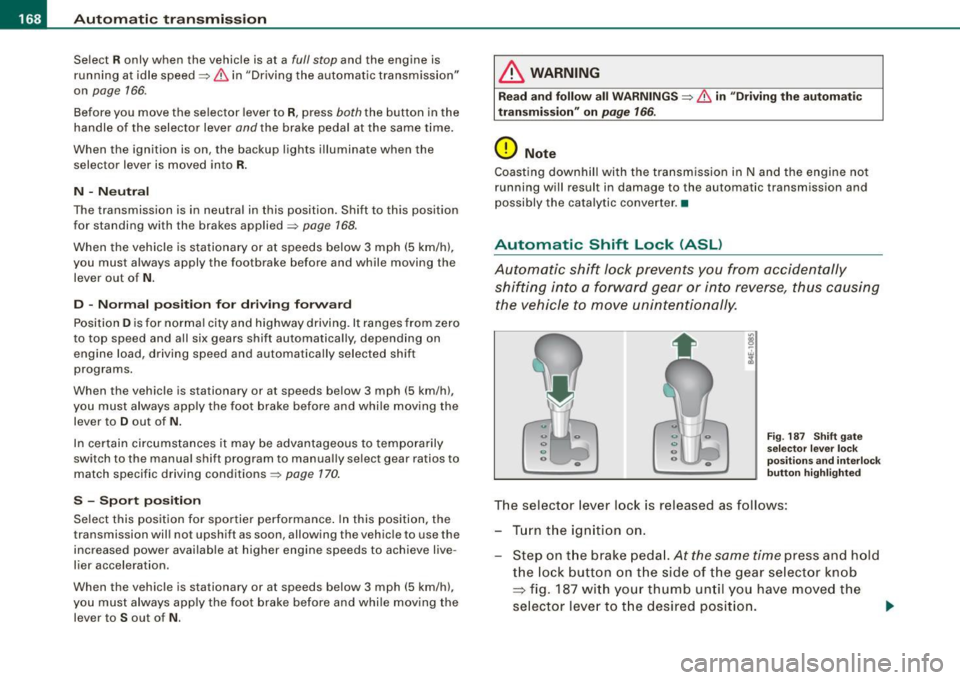
Fig. 187 Shift gate
selector lever lock
positions and interlock
button highl ighted
The selector lever lock is released as follows:
- Turn the ignition on.
Step on the brake pedal.
At the same time press and hold
the lock button on the side of the gear selector knob
=> fig. 187 with your thumb until you have moved the
selector lever to the desired position.
~
Page 171 of 408
_______________________________________________ A_ u_t _o _ m_ a_ t _i_ c_ t_r _a _n _ s_ m __ is_s_ i _o _ n __ lfflll
Autom ati c selec to r l eve r lock
The se lector lever is locked in the P and N positions when the igni
tion is turned on. To move the lever from these positions the driver
must depress the brake pedal. As a reminder to the driver, the
follow ing warning appears in the instrument cluster disp lay when
the selector is in
P and N:
When stationary app ly foot brake while s electing gear
A time delay e lement prevents the selector lever from locking when
it is moved through the
N position (going from R to Dl. The locking
e lement will lock the selector lever if the lever is left in N (Neutral)
for more than approximately 1 second, without the brake peda l
being pressed.
At speeds above about 3 mph (5 km/h) the Automatic Shift Lock is
automatically deactivated in the
N posi tion .
Interl ock button
The lock button on the selector lever prevents the lever from being
accidentally shifted into certain positions. Pressing this button
deactivates the selector leve r lock. Dependi ng on the direction of
the shift, the selector lever locks at different positions. The positions
are highligh ted in the illus trati on =>
page 168, fig . 187.
Igniti on k ey saf ety in te rlo ck
The key canno t be removed from the ignition un less the selector
lever is in the
P park position. When the ignition key is removed, the
selector lever wil l be l ocked in the
P posi tion .•
Kick -down
T he kick-down feature allows the vehicle to genera te
maximum accelera tion.
When you press the acce lerator pedal beyond the resistance point
that is reached at ful l throttle, the transmission wi ll select a lower
gear ratio based on vehic le speed and engine RPM . The engine RPM
wil l be control led to produce maximum vehic le acceleration as long
Controls and equip
ment
as you continue to press the acce lerator pedal beyond this resis
t ance poin t.
& WARNING
Be careful when u sing the ki ck -down feature on slippery road s.
Rapid acceleration ma y cause the vehicle to skid . •
Dynamic shift program (DSP)
T he aut omatic tr ans mission is electro nically c ontrolle d.
The transmission is se lf adapting and will automaticall y select the
b est shi ft program su ited to the driving conditio ns and driving style.
The transmission will select one of the
e conomy programs when
you drive at a s teady speed or a g radually changing speed without
heavy acceleration. This achieves optimum fuel efficiency, with ear ly
upshifting and delayed downshifting .
The trans mission will au tomatically select the
sporty shift progra ms
when you drive at higher speeds, or with heavy acce leration and
frequent ly cha nging speeds . Upshifts ar e delayed t o make f ull use
of engine power . Downshifting takes place at higher engine speeds
than in t he ec onomy p rograms .
The selection of the most su itable shift program is a continuous,
automatic process . The driver can a lso make the transmission
sw itch to a sporty progra m by
quickly pressing down the gas peda l.
This causes the transmission to shift down to a lower gear to
achiev e rapid acc elerati on, e.g . fo r q uickly pass ing another vehicle .
You do not need to press the gas pedal into the kick-down range.
After the transm ission has upshifted, the original progra m is
selected according to your driving sty le.
An additiona l shift program allows the automatic transmission to
select the proper gear fo r uph ill and downhi ll gradients.
This prevents the transmission from upshifting and downshifting unnecessa rily o n hills . The transm ission wi ll shift down to a lower _,.
I • •
Page 172 of 408
• ..__A_ u_ t _o_ m_ a_ t_ i_ c _ t_r _a _n_ s_ m_ is_ s_i o _ n ________________________________________________ _
gear when the driver presses the brake pedal on a downhill
gradient. This makes use of the braking effect of the engine without
the need to shift down manually.•
Manual shift program
Using the manual shift program you can manually select
gears.
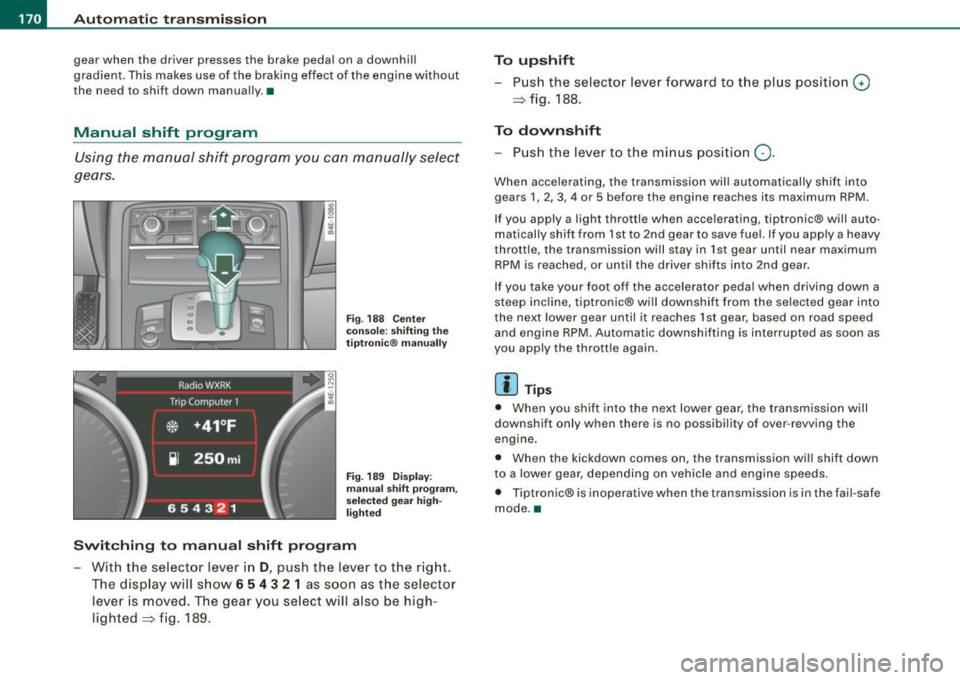
Fi g. 18 8 Ce nte r
co nso le: s hiftin g the
t ip tr on ic® ma nually
F ig . 18 9 Disp lay:
ma nua l shi ft prog ra m ,
selecte d gear high
l ig hte d
Swit ching to manual shift program
With the selecto r lever in D, push the lever to the rig ht.
T he d isplay will s how
6 5 4 3 2 1 as soon as the selector
lever is moved. The gear you se lect will also be high
lighted => fig . 189.
To upshift
Push the selector lever forward to the plus position 0
=> fig. 188.
To downshift
- Push the lever to the minus position Q.
When accelerating, the transmission will automatically shift into
gears 1 , 2, 3, 4 or 5 before the engine reaches its maximum RPM .
If you apply a light throttle when accelerating, tiptronic® will auto
matically shift from 1st to 2nd gear to save fuel. If you apply a heavy
throttle, the transmission will stay in 1st gear until near maximum
RPM is reached, or unti l the driver shifts into 2nd gear .
If you take your foot off the accelerator peda l when driving down a
steep incline, tiptronic® will downshift from the selected gear into
the next lower gear until it reaches 1st gear, based on road speed
and engine RPM. Automatic downshifting is interrupted as soon as
you apply the thrott le again .
[ i ] Tips
• When you shi ft into the next lower gear, the transmission will
downshift only when there is no possibi lity of over -revving the
engine.
• When the kickdown comes on, the transmission wil l shift down
to a lower gear, depending on vehicle and eng ine speeds.
• Tiptronic® is inoperative when the transmission is in the fai l-safe
mode. •
Page 196 of 408
• .___H_ o_ m _ e _L_i _ n _k _® ____________________________________________________ _
Homelink®
Universal remote control
Applies to vehic les: w ith Home link ® universal remote cont ro l
General information
The HomeLink® fe ature can le arn up to th ree r adio
fre quency codes for m ost c urrent transmitters used for
operating garage doors, es tate gates , home or outdoor
ligh ting sy stems, and other devices .
You m ust first pro gram the H omel in k® trans mitter befor e you can
use the system=>
page 195, "Programm ing th e Homelink® trans
m itter".
In order to pro gram t he Homelink® transmitter fo r devices utilizing
ro lling code, a second person on a ladder who can safe ly reach the
ga rage door o pene r m oto r is rec omm ended . It is also necessa ry to
locate the "learn" button on your garage door opener motor. Refer
to t he op era ting instructions for the opene r, as the loca tion and
co lor of this button may vary by manufacturer .
Y ou can still use the o rigina l remote c ontrol fo r th e dev ice at any
time.
& WARNING
• Never use the Homelinkl1JI transmitter with any garage door
opener that does have not the safety stop and reverse feature as
requ ired by federal safety standards . This in cludes any garage
door opener model manufactured before April 1, 1982.
• A garage door opener which cannot detect an object , signaling
the door to stop and reverse does not meet current federal safety
standards . Using a garage door opener without these features
increases risk of serious injury or death .
& WARNING (continued)
• For safety reasons never release the parking brake or start the
engine while anyone is standing in front of the vehicle.
• A garage door or an estate gate may sometimes be set in
motion when the Homelink ® remote control is being
programmed . If the devi ce is repeatedly activated , this can over
strain motor and damage its electrical components -an over
heated motor is a fire hazard!
• To avoid possible injuries or property damage , please always
make absolutely certain that no persons or objects are located in
the range of motion of any equipment being operated.
[ i ] Tips
• I f you wou ld l ik e mor e infor mation o n Hom elink®, w here to
purchase the Homelink ® compatib le products, or wou ld li k e to
pu rchase the Homeli nk® Home Ligh ting Package, please call t oll
free: 1 -8 0 0 -355 -3515.
• F or Dec lara tion of Compliance to U nite d Sta tes FCC an d Indu stry
C anada regulations=>
page 385 . •