fig. 78 CHRYSLER CARAVAN 2002 Service Manual
[x] Cancel search | Manufacturer: CHRYSLER, Model Year: 2002, Model line: CARAVAN, Model: CHRYSLER CARAVAN 2002Pages: 2399, PDF Size: 57.96 MB
Page 426 of 2399
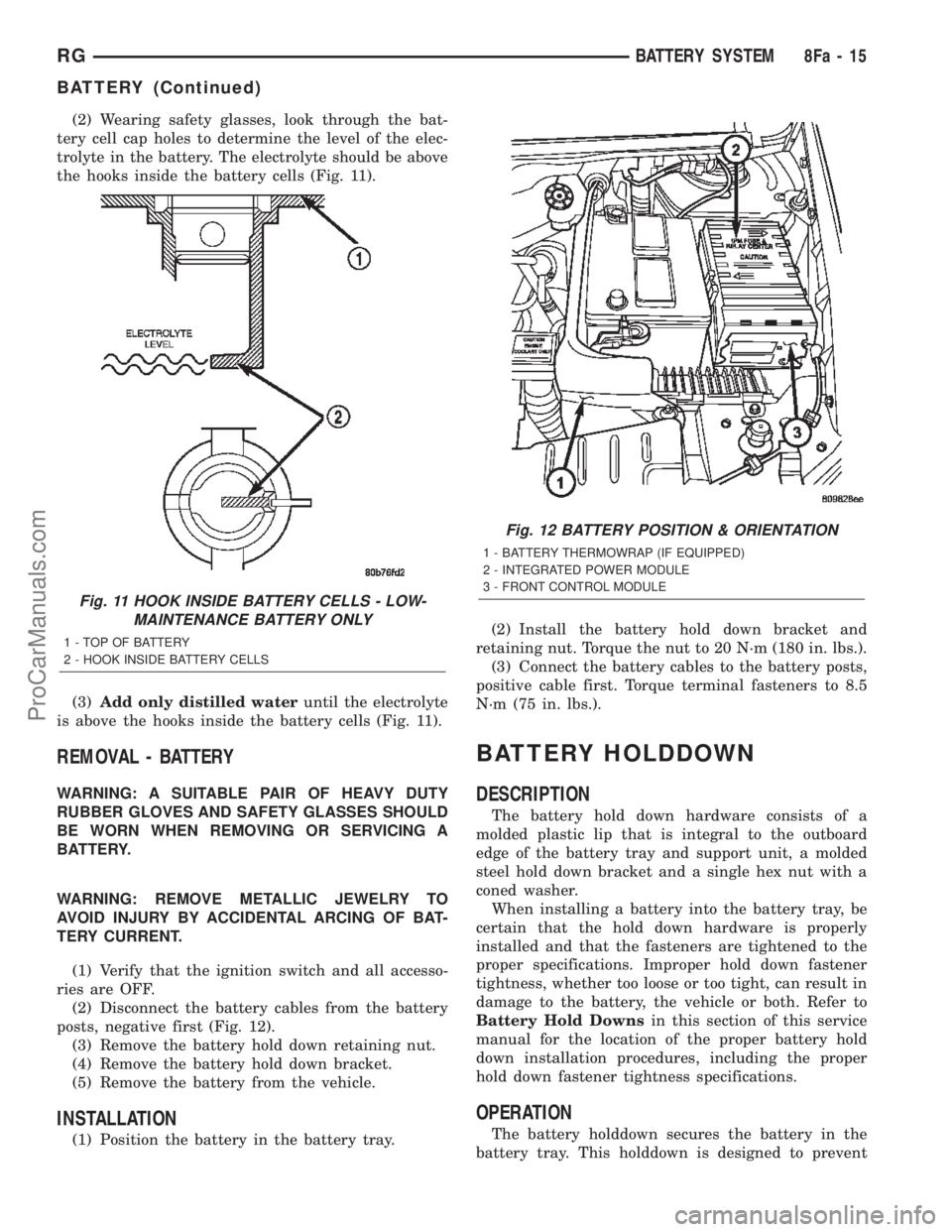
(2) Wearing safety glasses, look through the bat-
tery cell cap holes to determine the level of the elec-
trolyte in the battery. The electrolyte should be above
the hooks inside the battery cells (Fig. 11).
(3)Add only distilled wateruntil the electrolyte
is above the hooks inside the battery cells (Fig. 11).
REMOVAL - BATTERY
WARNING: A SUITABLE PAIR OF HEAVY DUTY
RUBBER GLOVES AND SAFETY GLASSES SHOULD
BE WORN WHEN REMOVING OR SERVICING A
BATTERY.
WARNING: REMOVE METALLIC JEWELRY TO
AVOID INJURY BY ACCIDENTAL ARCING OF BAT-
TERY CURRENT.
(1) Verify that the ignition switch and all accesso-
ries are OFF.
(2) Disconnect the battery cables from the battery
posts, negative first (Fig. 12).
(3) Remove the battery hold down retaining nut.
(4) Remove the battery hold down bracket.
(5) Remove the battery from the vehicle.
INSTALLATION
(1) Position the battery in the battery tray.(2) Install the battery hold down bracket and
retaining nut. Torque the nut to 20 N´m (180 in. lbs.).
(3) Connect the battery cables to the battery posts,
positive cable first. Torque terminal fasteners to 8.5
N´m (75 in. lbs.).
BATTERY HOLDDOWN
DESCRIPTION
The battery hold down hardware consists of a
molded plastic lip that is integral to the outboard
edge of the battery tray and support unit, a molded
steel hold down bracket and a single hex nut with a
coned washer.
When installing a battery into the battery tray, be
certain that the hold down hardware is properly
installed and that the fasteners are tightened to the
proper specifications. Improper hold down fastener
tightness, whether too loose or too tight, can result in
damage to the battery, the vehicle or both. Refer to
Battery Hold Downsin this section of this service
manual for the location of the proper battery hold
down installation procedures, including the proper
hold down fastener tightness specifications.
OPERATION
The battery holddown secures the battery in the
battery tray. This holddown is designed to prevent
Fig. 11 HOOK INSIDE BATTERY CELLS - LOW-
MAINTENANCE BATTERY ONLY
1 - TOP OF BATTERY
2 - HOOK INSIDE BATTERY CELLS
Fig. 12 BATTERY POSITION & ORIENTATION
1 - BATTERY THERMOWRAP (IF EQUIPPED)
2 - INTEGRATED POWER MODULE
3 - FRONT CONTROL MODULE
RGBATTERY SYSTEM8Fa-15
BATTERY (Continued)
ProCarManuals.com
Page 428 of 2399

PLE:When testing the resistance of the battery pos-
itive cable, touch the voltmeter leads to the battery
positive cable terminal clamp and to the battery pos-
itive cable eyelet terminal at the starter solenoid
B(+) terminal stud. If you probe the battery positive
terminal post and the battery positive cable eyelet
terminal at the starter solenoid B(+) terminal stud,
you are reading the combined voltage drop in the
battery positive cable terminal clamp-to-terminal
post connection and the battery positive cable.
VOLTAGE DROP TEST
The following operation will require a voltmeter
accurate to 1/10 (0.10) volt. Before performing this
test, be certain that the following procedures are
accomplished:
²The battery is fully-charged and load tested.
Refer to Standard Procedures for the proper battery
charging and load test procedures.
²Fully engage the parking brake.
²If the vehicle is equipped with an automatic
transmission, place the gearshift selector lever in the
Park position. If the vehicle is equipped with a man-
ual transmission, place the gearshift selector lever in
the Neutral position and block the clutch pedal in the
fully depressed position.
²Verify that all lamps and accessories are turned
off.
²To prevent the engine from starting, remove the
Automatic Shut Down (ASD) relay. The ASD relay is
located in the Intelligent Power Module (IPM), in the
engine compartment. See the fuse and relay layout
label affixed to the underside of the IPM cover for
ASD relay identification and location.
(1) Connect the positive lead of the voltmeter to
the battery negative terminal post. Connect the neg-
ative lead of the voltmeter to the battery negative
cable terminal clamp (Fig. 13). Rotate and hold the
ignition switch in the Start position. Observe the
voltmeter. If voltage is detected, correct the poor con-
nection between the battery negative cable terminal
clamp and the battery negative terminal post.
(2) Connect the positive lead of the voltmeter to
the battery positive terminal post. Connect the nega-
tive lead of the voltmeter to the battery positive cable
terminal clamp (Fig. 14). Rotate and hold the ignition
switch in the Start position. Observe the voltmeter. If
voltage is detected, correct the poor connection
between the battery positive cable terminal clamp
and the battery positive terminal post.
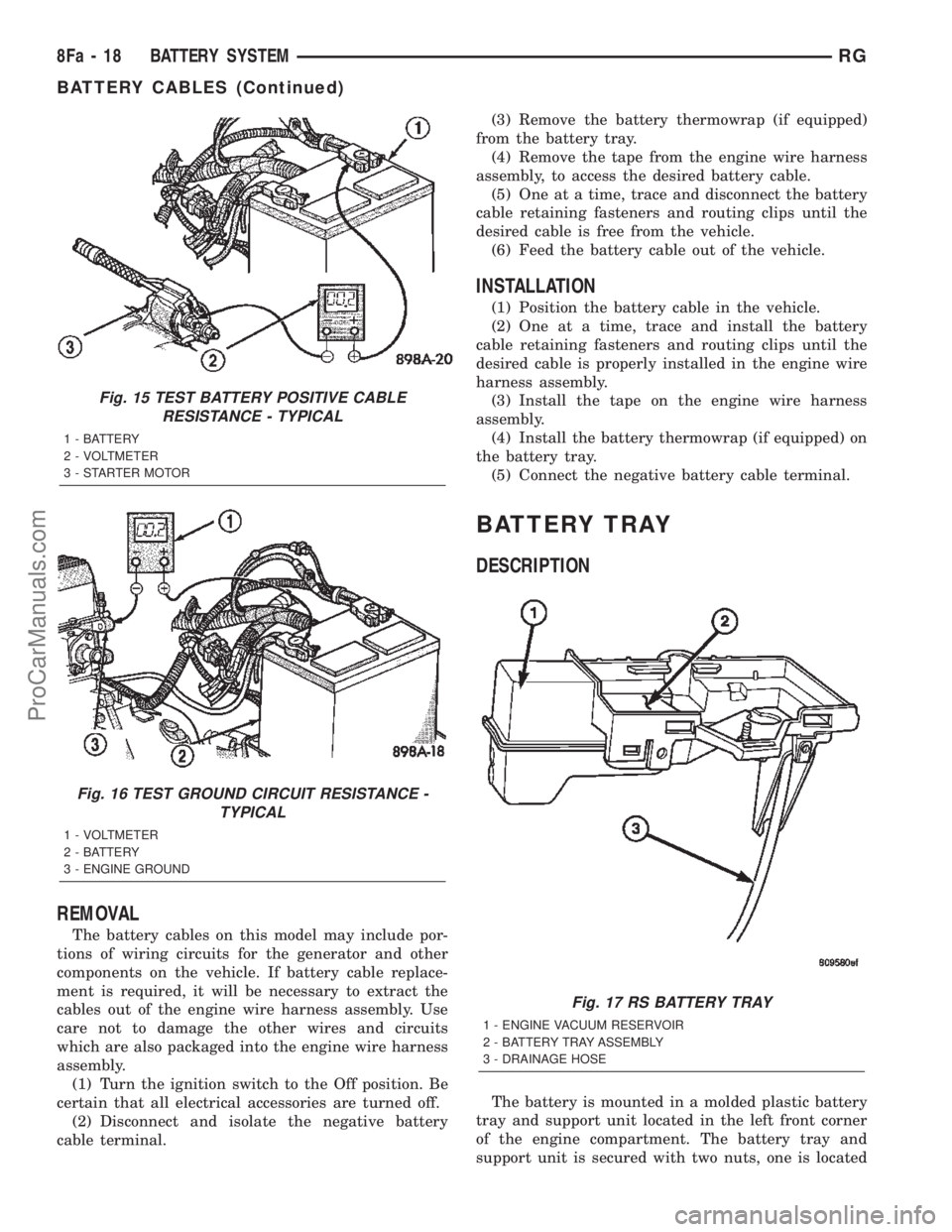
(3) Connect the voltmeter to measure between the
battery positive cable terminal clamp and the starter
solenoid B(+) terminal stud (Fig. 15). Rotate and hold
the ignition switch in the Start position. Observe the
voltmeter. If the reading is above 0.2 volt, clean and
tighten the battery positive cable eyelet terminal con-nection at the starter solenoid B(+) terminal stud.
Repeat the test. If the reading is still above 0.2 volt,
replace the faulty battery positive cable.
(4) Connect the voltmeter to measure between the
battery negative cable terminal clamp and a good
clean ground on the engine block (Fig. 16). Rotate
and hold the ignition switch in the Start position.
Observe the voltmeter. If the reading is above 0.2
volt, clean and tighten the battery negative cable
eyelet terminal connection to the engine block.
Repeat the test. If the reading is still above 0.2 volt,
replace the faulty battery negative cable.
Fig. 13 TEST BATTERY NEGATIVE CONNECTION
RESISTANCE - TYPICAL
1 - VOLTMETER
2 - BATTERY
Fig. 14 TEST BATTERY POSITIVE CONNECTION
RESISTANCE - TYPICAL
1 - VOLTMETER
2 - BATTERY
RGBATTERY SYSTEM8Fa-17
BATTERY CABLES (Continued)
ProCarManuals.com
Page 429 of 2399
REMOVAL
The battery cables on this model may include por-
tions of wiring circuits for the generator and other
components on the vehicle. If battery cable replace-
ment is required, it will be necessary to extract the
cables out of the engine wire harness assembly. Use
care not to damage the other wires and circuits
which are also packaged into the engine wire harness
assembly.
(1) Turn the ignition switch to the Off position. Be
certain that all electrical accessories are turned off.
(2) Disconnect and isolate the negative battery
cable terminal.(3) Remove the battery thermowrap (if equipped)
from the battery tray.
(4) Remove the tape from the engine wire harness
assembly, to access the desired battery cable.
(5) One at a time, trace and disconnect the battery
cable retaining fasteners and routing clips until the
desired cable is free from the vehicle.
(6) Feed the battery cable out of the vehicle.
INSTALLATION
(1) Position the battery cable in the vehicle.
(2) One at a time, trace and install the battery
cable retaining fasteners and routing clips until the
desired cable is properly installed in the engine wire
harness assembly.
(3) Install the tape on the engine wire harness
assembly.
(4) Install the battery thermowrap (if equipped) on
the battery tray.
(5) Connect the negative battery cable terminal.
BATTERY TRAY
DESCRIPTION
The battery is mounted in a molded plastic battery
tray and support unit located in the left front corner
of the engine compartment. The battery tray and
support unit is secured with two nuts, one is located
Fig. 15 TEST BATTERY POSITIVE CABLE
RESISTANCE - TYPICAL
1 - BATTERY
2 - VOLTMETER
3 - STARTER MOTOR
Fig. 16 TEST GROUND CIRCUIT RESISTANCE -
TYPICAL
1 - VOLTMETER
2 - BATTERY
3 - ENGINE GROUND
Fig. 17 RS BATTERY TRAY
1 - ENGINE VACUUM RESERVOIR
2 - BATTERY TRAY ASSEMBLY
3 - DRAINAGE HOSE
8Fa - 18 BATTERY SYSTEMRG
BATTERY CABLES (Continued)
ProCarManuals.com
Page 430 of 2399
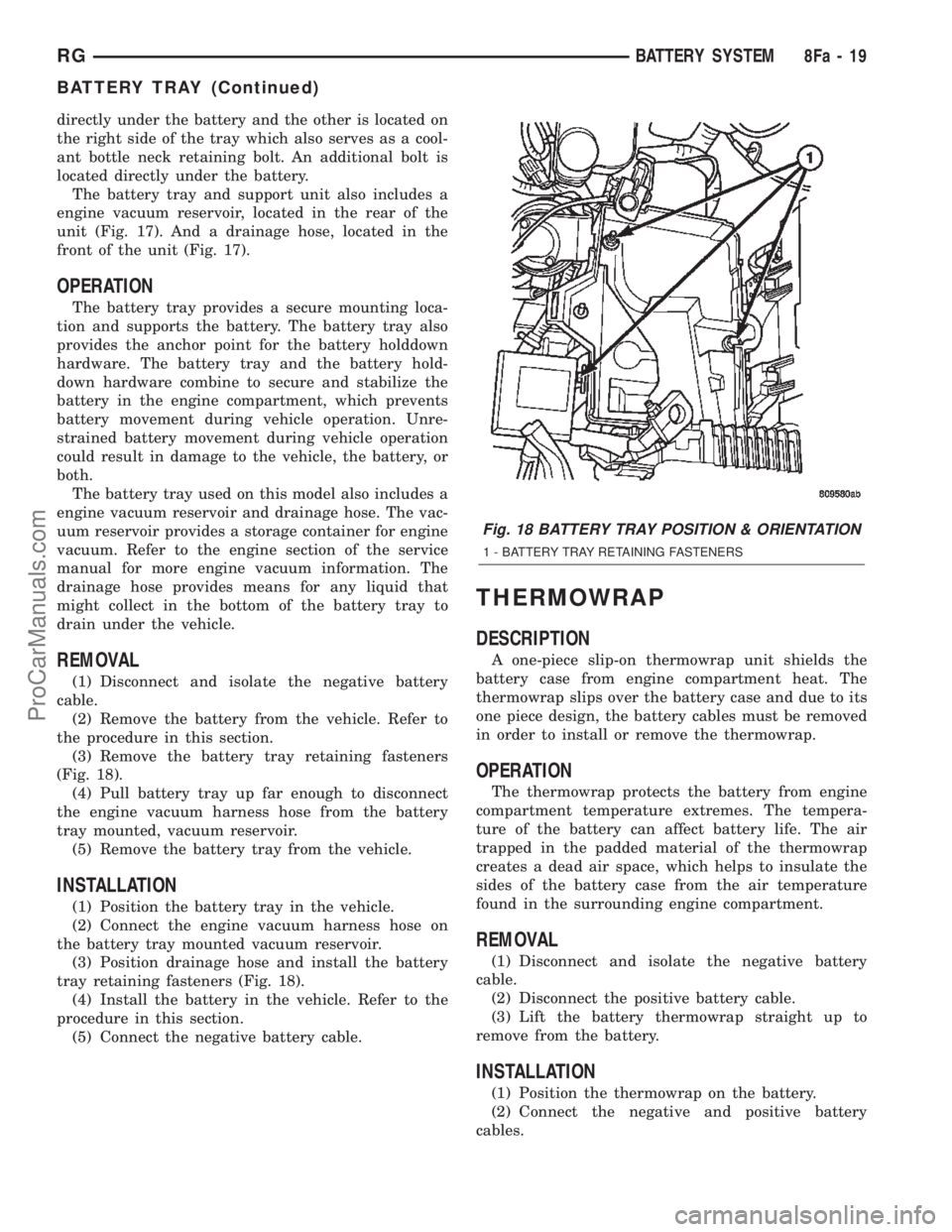
directly under the battery and the other is located on
the right side of the tray which also serves as a cool-
ant bottle neck retaining bolt. An additional bolt is
located directly under the battery.
The battery tray and support unit also includes a
engine vacuum reservoir, located in the rear of the
unit (Fig. 17). And a drainage hose, located in the
front of the unit (Fig. 17).
OPERATION
The battery tray provides a secure mounting loca-
tion and supports the battery. The battery tray also
provides the anchor point for the battery holddown
hardware. The battery tray and the battery hold-
down hardware combine to secure and stabilize the
battery in the engine compartment, which prevents
battery movement during vehicle operation. Unre-
strained battery movement during vehicle operation
could result in damage to the vehicle, the battery, or
both.
The battery tray used on this model also includes a
engine vacuum reservoir and drainage hose. The vac-
uum reservoir provides a storage container for engine
vacuum. Refer to the engine section of the service
manual for more engine vacuum information. The
drainage hose provides means for any liquid that
might collect in the bottom of the battery tray to
drain under the vehicle.
REMOVAL
(1) Disconnect and isolate the negative battery
cable.
(2) Remove the battery from the vehicle. Refer to
the procedure in this section.
(3) Remove the battery tray retaining fasteners
(Fig. 18).
(4) Pull battery tray up far enough to disconnect
the engine vacuum harness hose from the battery
tray mounted, vacuum reservoir.
(5) Remove the battery tray from the vehicle.
INSTALLATION
(1) Position the battery tray in the vehicle.
(2) Connect the engine vacuum harness hose on
the battery tray mounted vacuum reservoir.
(3) Position drainage hose and install the battery
tray retaining fasteners (Fig. 18).
(4) Install the battery in the vehicle. Refer to the
procedure in this section.
(5) Connect the negative battery cable.
THERMOWRAP
DESCRIPTION
A one-piece slip-on thermowrap unit shields the
battery case from engine compartment heat. The
thermowrap slips over the battery case and due to its
one piece design, the battery cables must be removed
in order to install or remove the thermowrap.
OPERATION
The thermowrap protects the battery from engine
compartment temperature extremes. The tempera-
ture of the battery can affect battery life. The air
trapped in the padded material of the thermowrap
creates a dead air space, which helps to insulate the
sides of the battery case from the air temperature
found in the surrounding engine compartment.
REMOVAL
(1) Disconnect and isolate the negative battery
cable.
(2) Disconnect the positive battery cable.
(3) Lift the battery thermowrap straight up to
remove from the battery.
INSTALLATION
(1) Position the thermowrap on the battery.
(2) Connect the negative and positive battery
cables.
Fig. 18 BATTERY TRAY POSITION & ORIENTATION
1 - BATTERY TRAY RETAINING FASTENERS
RGBATTERY SYSTEM8Fa-19
BATTERY TRAY (Continued)
ProCarManuals.com
Page 435 of 2399
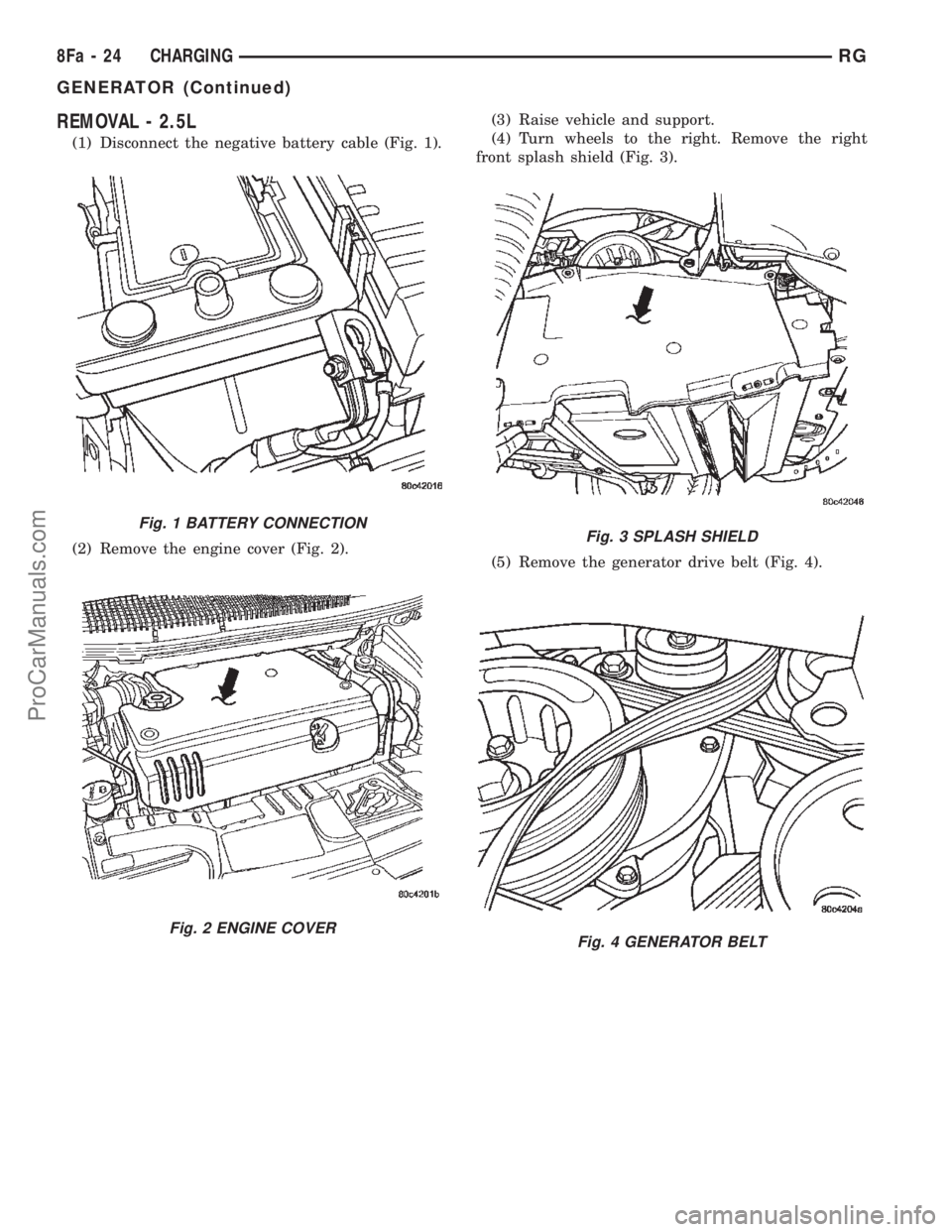
REMOVAL - 2.5L
(1) Disconnect the negative battery cable (Fig. 1).
(2) Remove the engine cover (Fig. 2).(3) Raise vehicle and support.
(4) Turn wheels to the right. Remove the right
front splash shield (Fig. 3).
(5) Remove the generator drive belt (Fig. 4).
Fig. 1 BATTERY CONNECTION
Fig. 2 ENGINE COVER
Fig. 3 SPLASH SHIELD
Fig. 4 GENERATOR BELT
8Fa - 24 CHARGINGRG
GENERATOR (Continued)
ProCarManuals.com
Page 436 of 2399
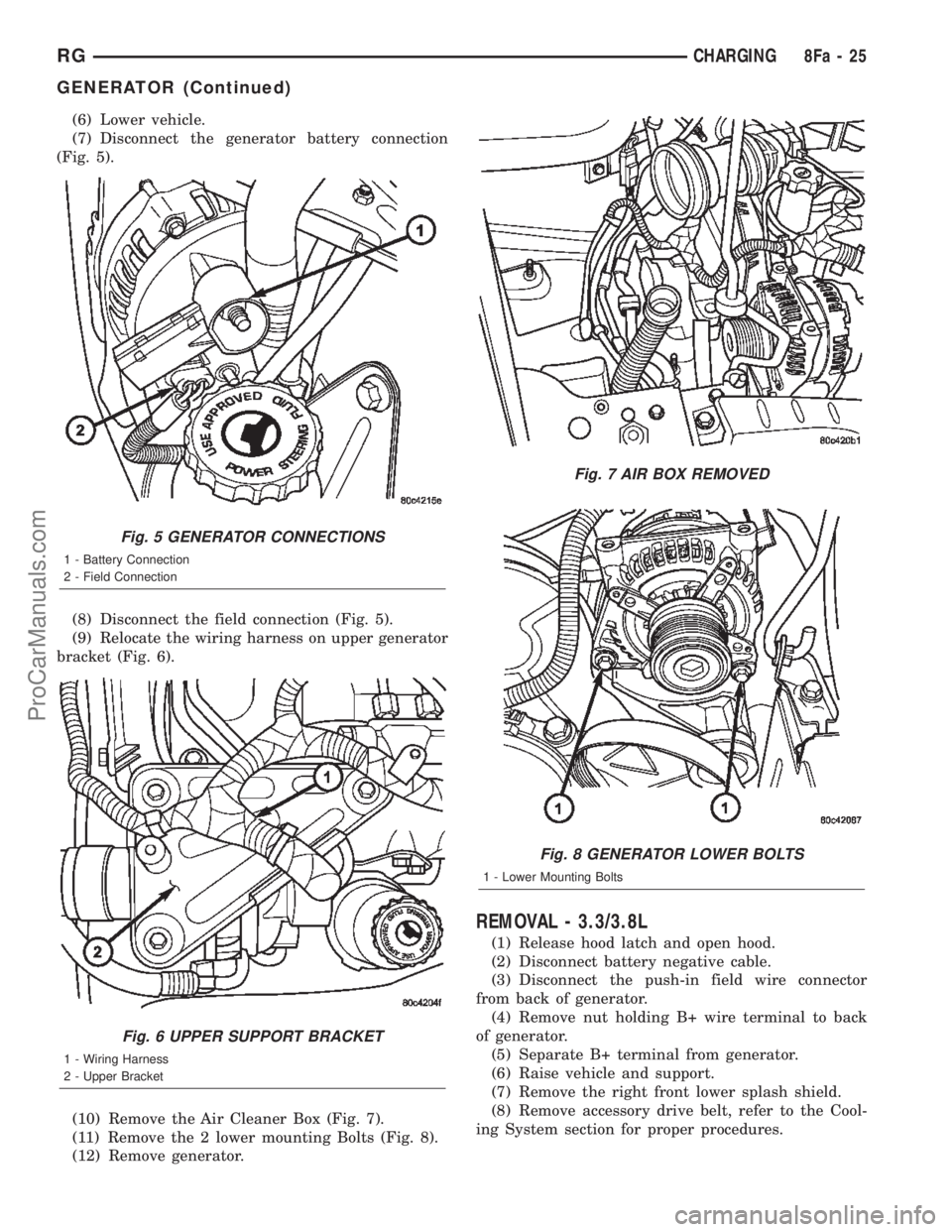
(6) Lower vehicle.
(7) Disconnect the generator battery connection
(Fig. 5).
(8) Disconnect the field connection (Fig. 5).
(9) Relocate the wiring harness on upper generator
bracket (Fig. 6).
(10) Remove the Air Cleaner Box (Fig. 7).
(11) Remove the 2 lower mounting Bolts (Fig. 8).
(12) Remove generator.
REMOVAL - 3.3/3.8L
(1) Release hood latch and open hood.
(2) Disconnect battery negative cable.
(3) Disconnect the push-in field wire connector
from back of generator.
(4) Remove nut holding B+ wire terminal to back
of generator.
(5) Separate B+ terminal from generator.
(6) Raise vehicle and support.
(7) Remove the right front lower splash shield.
(8) Remove accessory drive belt, refer to the Cool-
ing System section for proper procedures.
Fig. 5 GENERATOR CONNECTIONS
1 - Battery Connection
2 - Field Connection
Fig. 6 UPPER SUPPORT BRACKET
1 - Wiring Harness
2 - Upper Bracket
Fig. 7 AIR BOX REMOVED
Fig. 8 GENERATOR LOWER BOLTS
1 - Lower Mounting Bolts
RGCHARGING8Fa-25
GENERATOR (Continued)
ProCarManuals.com
Page 437 of 2399
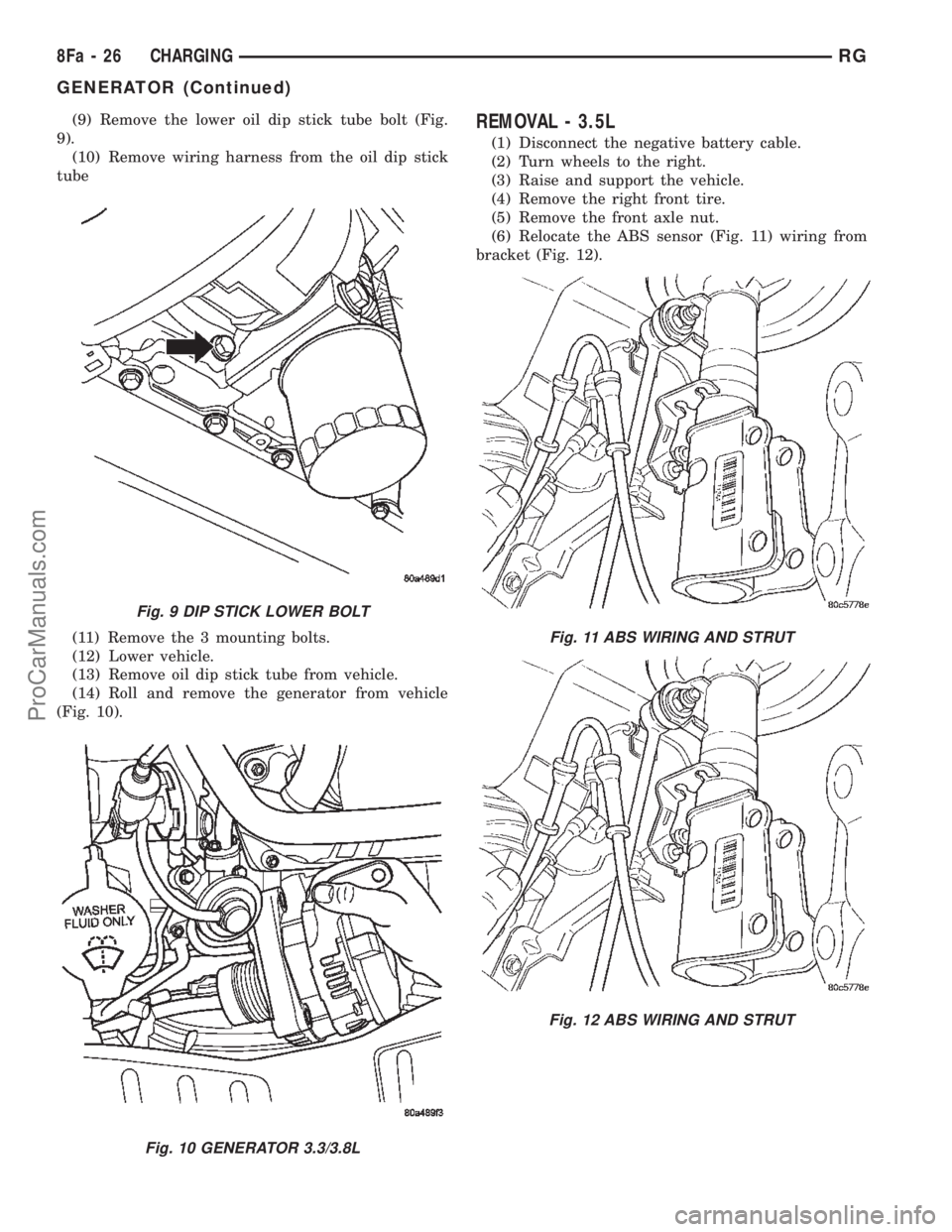
(9) Remove the lower oil dip stick tube bolt (Fig.
9).
(10) Remove wiring harness from the oil dip stick
tube
(11) Remove the 3 mounting bolts.
(12) Lower vehicle.
(13) Remove oil dip stick tube from vehicle.
(14) Roll and remove the generator from vehicle
(Fig. 10).REMOVAL - 3.5L
(1) Disconnect the negative battery cable.
(2) Turn wheels to the right.
(3) Raise and support the vehicle.
(4) Remove the right front tire.
(5) Remove the front axle nut.
(6) Relocate the ABS sensor (Fig. 11) wiring from
bracket (Fig. 12).
Fig. 9 DIP STICK LOWER BOLT
Fig. 10 GENERATOR 3.3/3.8L
Fig. 11 ABS WIRING AND STRUT
Fig. 12 ABS WIRING AND STRUT
8Fa - 26 CHARGINGRG
GENERATOR (Continued)
ProCarManuals.com
Page 438 of 2399
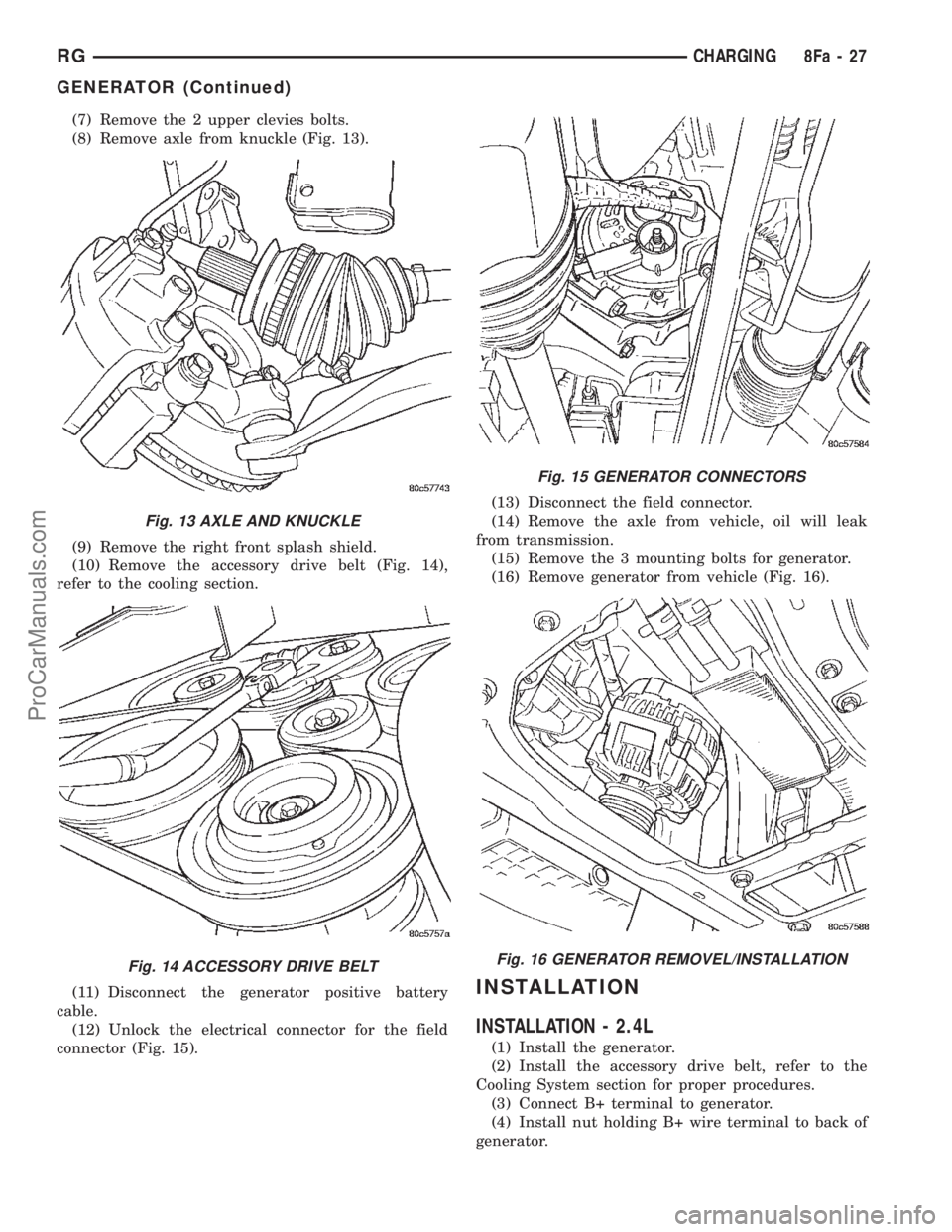
(7) Remove the 2 upper clevies bolts.
(8) Remove axle from knuckle (Fig. 13).
(9) Remove the right front splash shield.
(10) Remove the accessory drive belt (Fig. 14),
refer to the cooling section.
(11) Disconnect the generator positive battery
cable.
(12) Unlock the electrical connector for the field
connector (Fig. 15).(13) Disconnect the field connector.
(14) Remove the axle from vehicle, oil will leak
from transmission.
(15) Remove the 3 mounting bolts for generator.
(16) Remove generator from vehicle (Fig. 16).
INSTALLATION
INSTALLATION - 2.4L
(1) Install the generator.
(2) Install the accessory drive belt, refer to the
Cooling System section for proper procedures.
(3) Connect B+ terminal to generator.
(4) Install nut holding B+ wire terminal to back of
generator.
Fig. 13 AXLE AND KNUCKLE
Fig. 14 ACCESSORY DRIVE BELT
Fig. 15 GENERATOR CONNECTORS
Fig. 16 GENERATOR REMOVEL/INSTALLATION
RGCHARGING8Fa-27
GENERATOR (Continued)
ProCarManuals.com
Page 439 of 2399
(5) Connect the push-in field wire connector to
back of generator.
(6) Install the EVAP Purge solenoid to its bracket.
(7) Install the Air Box, refer to the Engine/Air
Cleaner for more information.
(8) Connect the Inlet Air Temperature sensor.
(9) Connect battery negative cable.
INSTALLATION - 2.5L
(1) Install generator.
(2) Install the 2 lower mounting Bolts (Fig. 8).
(3) Install the Air Cleaner Box (Fig. 7).
(4) Install the upper support bracket (Fig. 6).
(5) Install the wiring harness on upper generator
bracket (Fig. 6).
(6) Connect the field connection (Fig. 5).
(7) Connect the generator battery connection (Fig.
5).
(8) Raise vehicle and support.
(9) Install the generator drive belt (Fig. 4).
(10) Install the right front splash shield (Fig. 3).
(11) Lower vehicle.
(12) Install the engine cover (Fig. 2).
(13) Connect the negative battery cable (Fig. 1).
INSTALLATION - 3.3/3.8L
(1) Roll and place generator in position on vehicle
(Fig. 10).
(2) Install upper bolts to hold generator in place.
(3) Lubricate the o-ring. Install oil dip stick tube.
(4) Install the upper oil dip stick tube bolt.
(5) Place B+ terminal in position on generator.
(6) Install nut to hold B+ wire terminal to back of
generator.
(7) Connect the push-in field wire connector into
back of generator.
(8) Raise vehicle and support.
(9) Install the lower mounting bolt and tighten.
(10) Install the lower oil dip stick tube bolt and
tighten (Fig. 9).
(11) Install accessory drive belt, refer to the Cool-
ing System section for proper procedures.
(12) Install the right front lower splash shield.
(13) Lower vehicle.
(14) Install wiring harness to the oil dip stick tube
(15) Connect battery negative cable.
(16) Verify generator output rate.
INSTALLATION - 3.5L
(1) Install generator (Fig. 16) and the 3 mounting
bolts and tighten.
(2) Connect the generator positive battery cable
(Fig. 15).
(3) Connect the field connector and lock the con-
nector (Fig. 15).
(4) Install the axle shaft to the transmission.(5) Install axle to steering knuckle (Fig. 13).
(6) Install the 2 upper clevies bolts and tighten,
refer to the Suspension section.
(7) Install axle nut and tighten, refer to the Differ-
ential and Driveline section.
(8) Relocate the ABS sensor wiring to bracket (Fig.
12).
(9) Install the accessory drive belt (Fig. 14), refer
to the Cooling section.
(10) Install the right front splash shield.
(11) Install the right front tire, refer to the Wheels
and Tires section.
(12) Lower vehicle.
(13) Connect the negative battery cable.
GENERATOR DECOUPLER
PULLEY
DESCRIPTION
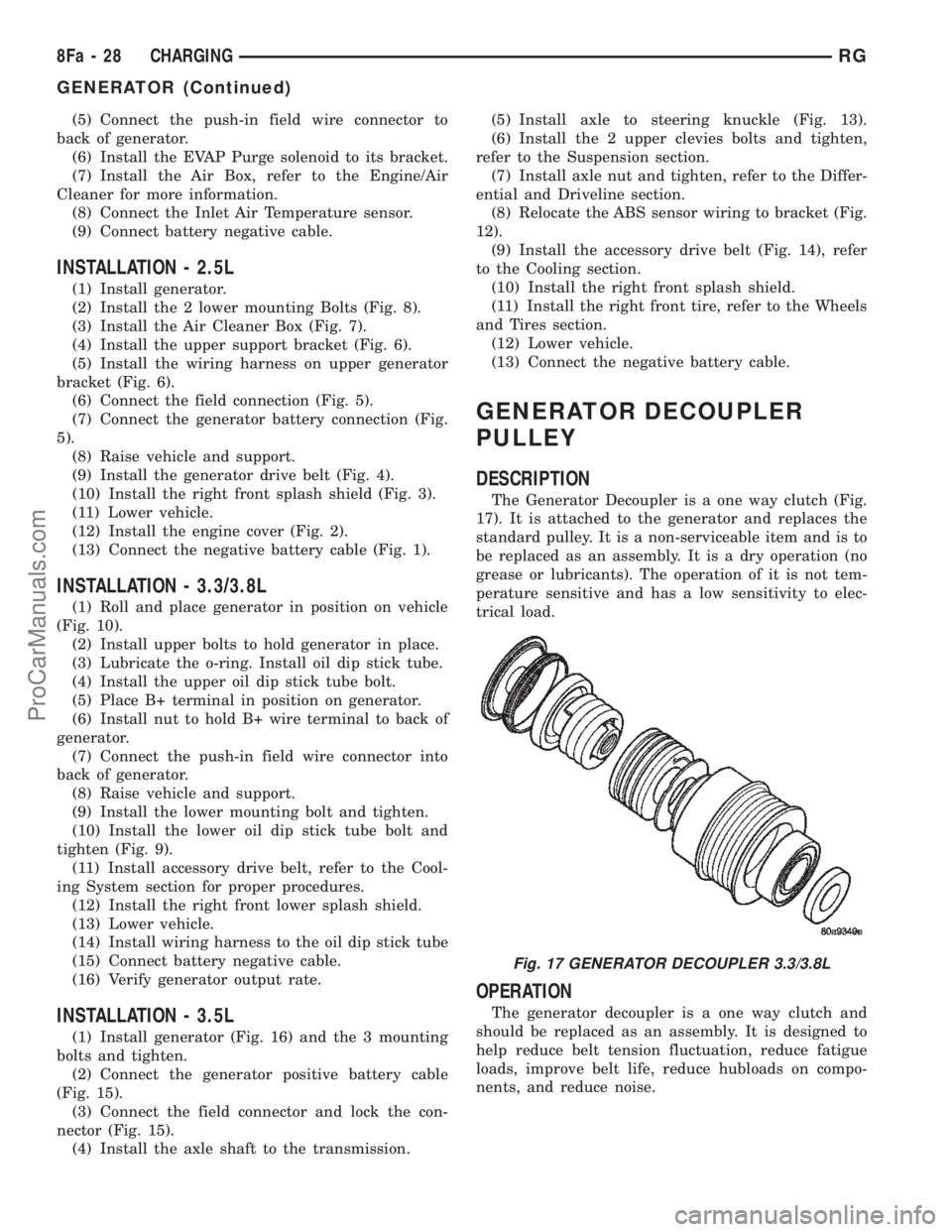
The Generator Decoupler is a one way clutch (Fig.
17). It is attached to the generator and replaces the
standard pulley. It is a non-serviceable item and is to
be replaced as an assembly. It is a dry operation (no
grease or lubricants). The operation of it is not tem-
perature sensitive and has a low sensitivity to elec-
trical load.
OPERATION
The generator decoupler is a one way clutch and
should be replaced as an assembly. It is designed to
help reduce belt tension fluctuation, reduce fatigue
loads, improve belt life, reduce hubloads on compo-
nents, and reduce noise.
Fig. 17 GENERATOR DECOUPLER 3.3/3.8L
8Fa - 28 CHARGINGRG
GENERATOR (Continued)
ProCarManuals.com
Page 440 of 2399
DIAGNOSIS AND TESTING - GENERATOR DECOUPLER PULLEY
CONDITION POSSIBLE CAUSES CORRECTION
Does not drive generator
(Generator not Charging)Clutch failure Replace Decoupler
REMOVAL
(1) Release hood latch and open hood.
(2) Disconnect battery negative cable.
(3) Raise vehicle and support.
(4) Remove the right front lower splash shield.
(5) Remove accessory drive belt, refer to the Cool-
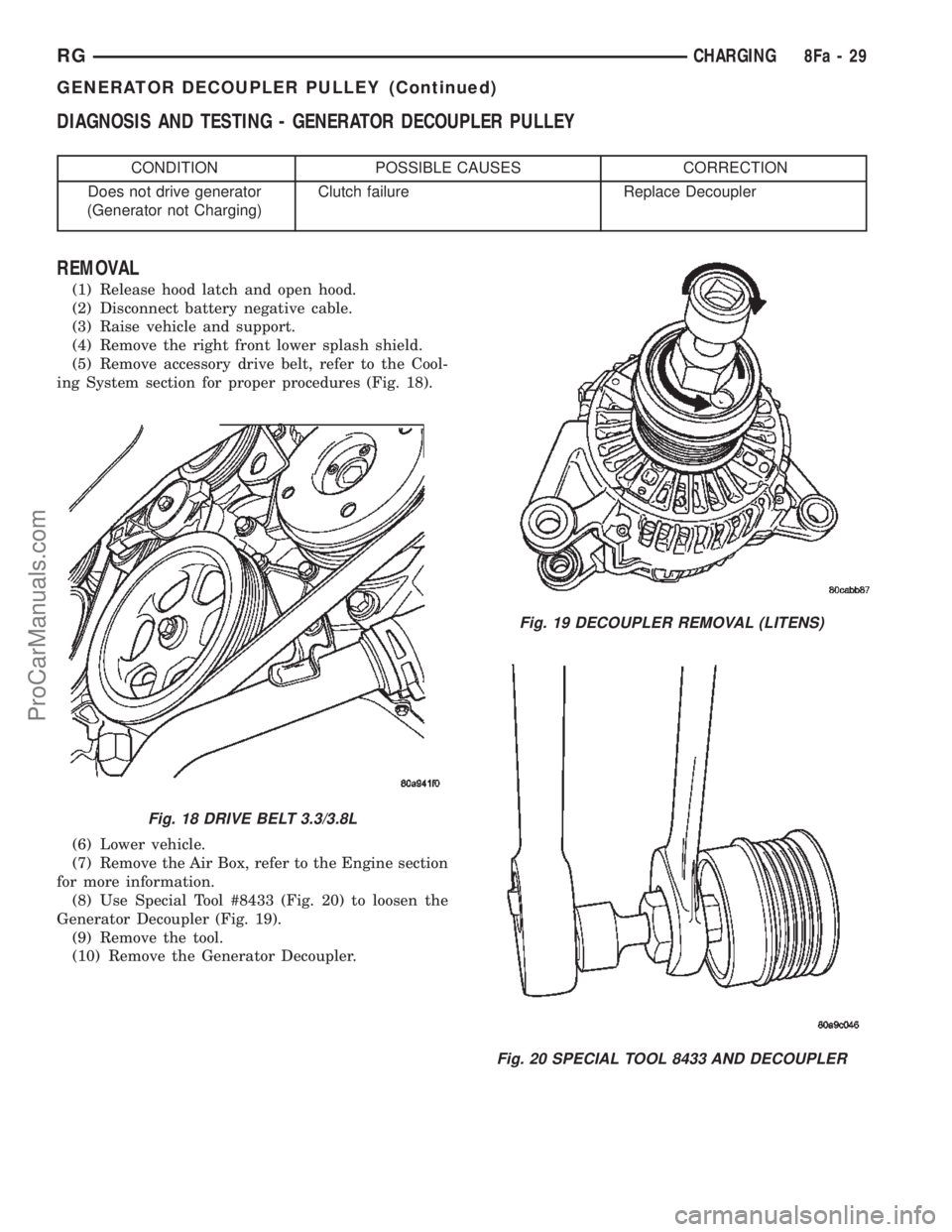
ing System section for proper procedures (Fig. 18).
(6) Lower vehicle.
(7) Remove the Air Box, refer to the Engine section
for more information.
(8) Use Special Tool #8433 (Fig. 20) to loosen the
Generator Decoupler (Fig. 19).
(9) Remove the tool.
(10) Remove the Generator Decoupler.
Fig. 18 DRIVE BELT 3.3/3.8L
Fig. 19 DECOUPLER REMOVAL (LITENS)
Fig. 20 SPECIAL TOOL 8433 AND DECOUPLER
RGCHARGING8Fa-29
GENERATOR DECOUPLER PULLEY (Continued)
ProCarManuals.com