light DATSUN 210 1979 Manual PDF
[x] Cancel search | Manufacturer: DATSUN, Model Year: 1979, Model line: 210, Model: DATSUN 210 1979Pages: 548, PDF Size: 28.66 MB
Page 447 of 548
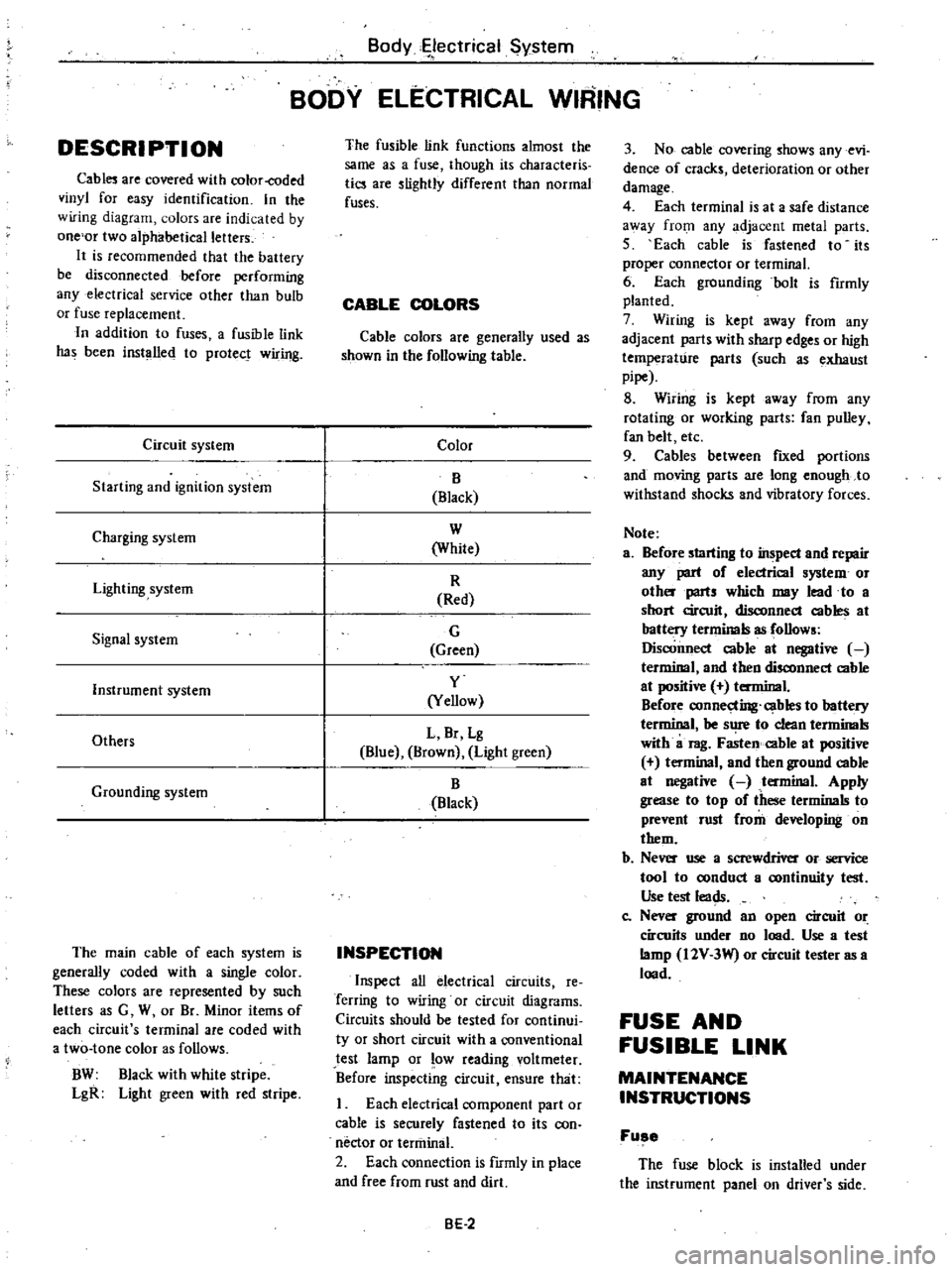
DESCRI
PTI
ON
Cabl
are
covered
with
color
coded
vinyl
for
easy
identification
In
the
wiring
diagram
olors
are
indicated
by
one
or
two
alphabetical
letters
It
is
recommended
that
the
battery
be
disconnected
before
performing
any
electrical
service
other
than
bulb
or
fuse
replacement
In
addition
to
fuses
a
fusible
link
has
been
installed
to
protect
wiring
Circuit
system
Starting
and
ignition
system
Charging
system
Lighting
system
Signal
system
Instrument
system
Others
Grounding
system
The
main
cable
of
each
system
is
generally
coded
with
a
single
color
These
colors
are
represented
by
such
letters
as
G
W
or
Br
Minor
items
of
each
circuit
s
terminal
are
coded
with
a
two
tone
color
as
follows
BW
Black
with
white
stripe
LgR
Light
green
with
red
stripe
Body
ectrical
System
BODY
ELECTRICAL
WIRING
The
fusible
link
functions
almost
the
same
as
a
fuse
though
its
characteris
tics
are
slightly
different
than
normal
fuses
CABLE
COLORS
Cable
colors
are
generally
used
as
shown
in
the
following
table
Color
B
Black
W
White
R
Red
G
Green
y
Yellow
L
Br
Lg
Blue
Brown
Light
green
B
Black
INSPECTION
Inspect
all
electrical
circuits
Ie
Terring
to
wiring
or
circuit
diagrams
Circuits
should
be
tested
for
continui
ty
or
short
circuit
with
a
conventional
test
lamp
or
low
reading
voltmeter
Before
inspecting
circuit
ensure
that
I
Each
electrical
component
part
or
cable
is
securely
fastened
to
its
con
nector
or
tenninal
2
Each
connection
is
fIrmly
in
place
and
free
from
rust
and
dirt
BE
2
3
No
cable
covering
shows
any
evi
dence
of
cracks
deterioration
or
other
damage
4
Each
terminal
is
at
a
safe
distance
3
Vay
from
any
adjacent
metal
parts
5
Each
cable
is
fastened
to
its
proper
connector
or
terminal
6
Each
grounding
bolt
is
fumly
planted
7
Wiring
is
kept
away
from
any
adjacent
parts
with
sharp
edges
or
high
temperature
parts
such
as
exhaust
pipe
8
Wiring
is
kept
away
from
any
rotating
or
working
parts
fan
pulley
fan
belt
etc
9
Cables
between
fIXed
portions
and
moving
parts
are
long
enough
to
withstand
shocks
and
vibratory
forces
Note
a
Before
starting
to
inspect
and
repair
any
part
of
electrical
system
or
oth
parts
which
may
lead
to
a
short
circuit
disconnect
cables
at
battery
terminals
as
follows
Disconnect
cable
at
negative
terminal
and
then
disconnect
cable
at
positive
terminal
Before
connecting
cables
to
battery
terminal
be
s
1
to
clean
tenninals
with
a
rag
Fasten
cable
at
positive
t
minal
and
then
ground
cable
at
negative
tenninal
Apply
grease
to
top
of
these
terminals
to
prevent
rust
from
developing
on
them
b
Ne
use
a
screwdriver
or
service
tool
to
oonduct
a
oontinuity
test
Use
test
leads
Co
Nev
ground
an
open
circuit
or
circuits
under
no
lood
Use
a
test
lamp
I2V
3W
or
circuit
tester
as
a
lood
FUSE
AND
FUSIBLE
LINK
MAINTENANCE
INSTRUCTIONS
Fuse
The
fuse
block
is
installed
under
the
instrument
panel
on
driver
s
side
Page 450 of 548
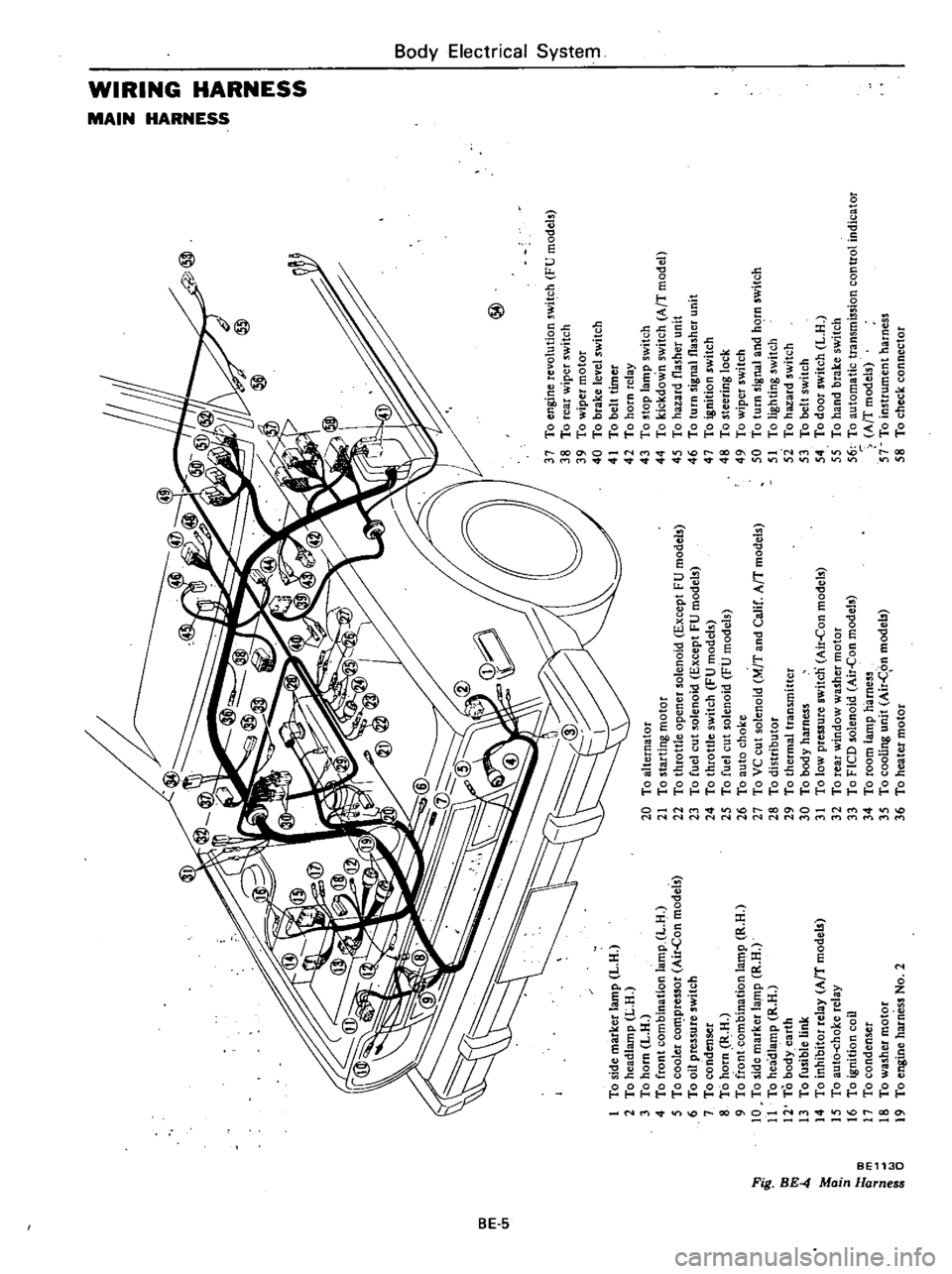
m
c
n
to
l
l
I
g
iF
0
1
To
side
marker
lamp
L
H
2
To
headlamp
L
H
3
To
horn
L
H
4
To
front
combination
lamp
L
H
5
To
cooler
co
pressor
Air
Con
models
6
To
oil
pressure
switch
7
To
condenser
8
To
horn
R
H
9
To
front
combination
la
t11p
R
H
10
To
side
marker
lamp
R
H
11
To
headlamp
R
H
12
To
body
earth
13
To
fusible
link
14
To
inhibitor
relay
AfT
model
15
To
aut6
choke
relay
16
To
ignition
coil
17
To
condenser
18
To
washer
motor
19
To
engine
harness
No
2
@
20
To
alternator
21
To
starting
motor
22
To
throttle
opener
solenoid
Except
FU
models
23
To
fuel
cut
solenoid
Except
FU
models
24
To
throttle
switch
FU
models
25
To
fuel
cut
solenoid
FU
models
26
To
auto
choke
27
To
VC
cut
solenoid
M
T
and
Calif
AfT
models
28
To
distributor
29
To
thermal
transmitter
30
To
body
harness
31
To
low
pressure
switcn
Air
Con
models
32
To
rear
window
washer
motor
33
To
FICO
solenoid
Air
Con
models
34
To
room
lamp
harness
35
To
cooling
unit
Air
C
on
models
36
To
heater
motor
37
To
engine
revolution
switch
FU
models
38
To
rear
wiper
switch
39
To
wiper
motor
40
To
brake
level
switch
41
To
belt
timer
42
To
horn
relay
43
To
stop
lamp
switch
44
To
kickdown
switch
AfT
model
45
To
hazard
flasher
unit
46
To
turn
signal
flasher
unit
47
To
ignition
switch
48
To
steering
lock
49
To
wiper
switch
50
To
turn
signal
and
hC
rn
switch
51
To
lighting
switch
5i
To
hazard
switch
53
To
belt
switch
54
To
door
switch
L
H
55
To
hand
brake
switch
56
To
automatic
transmission
control
indicator
AfT
models
57
To
instrument
harness
58
To
check
connector
I
0
i
a
z
Z
G
z
tIl
tIl
a
Z
Il
I
to
o
Co
m
16
n
n
OJ
1
3
Page 451 of 548
BodyElectrital
System
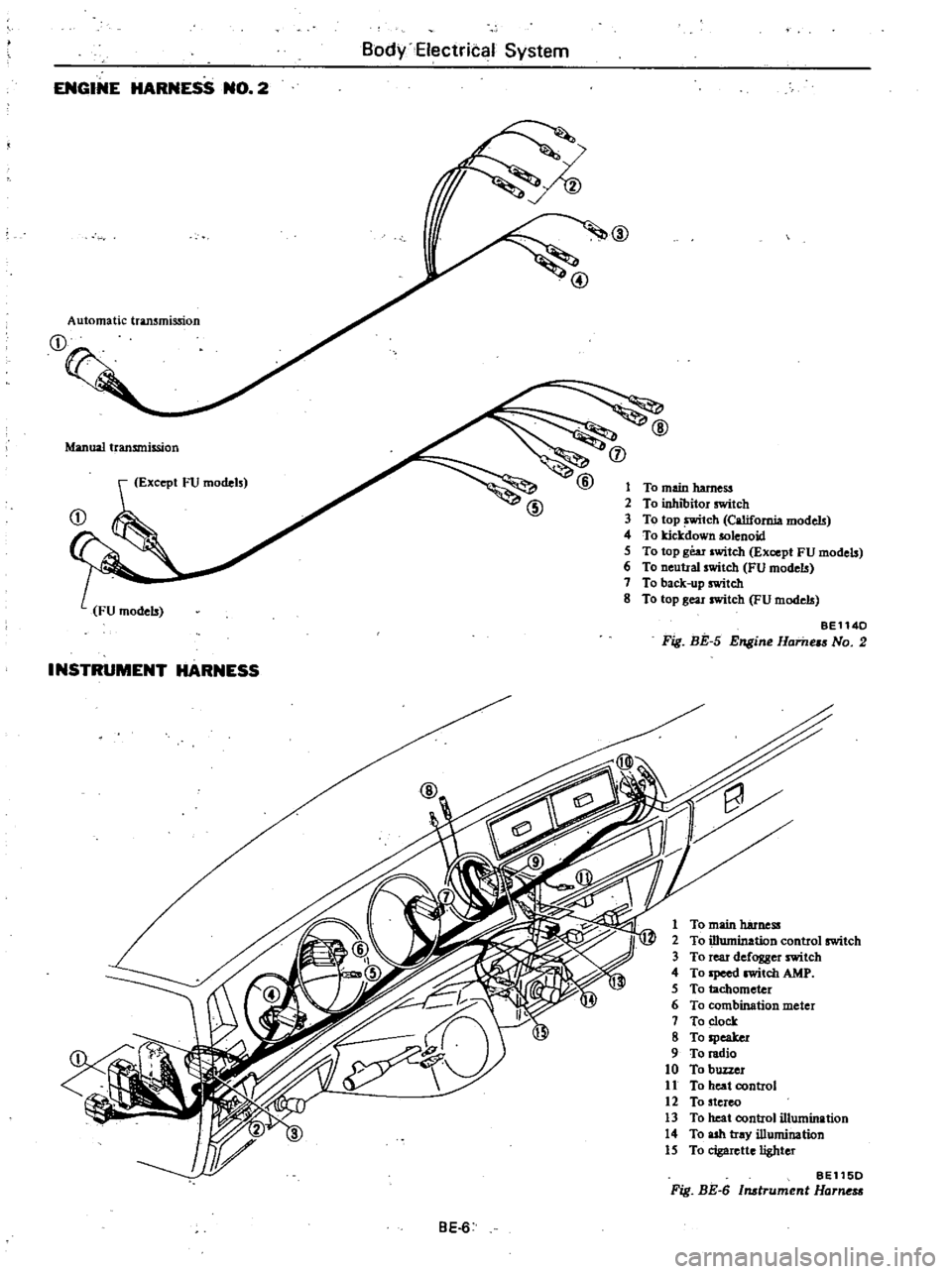
ENGINE
HARNESS
NO
2
@
Automatic
transmission
Manual
transmission
j
Except
FU
models
1
To
main
harness
2
To
inhibitor
switch
3
To
top
tch
California
models
4
To
kicJcdown
solenoid
5
To
top
gear
switch
Except
FU
models
6
To
neutral
switch
FU
models
7
To
back
up
switch
8
To
top
gear
switch
FU
models
BE1140
Fig
BE
5
Engine
Hame
No
2
INSTRUMENT
HARNESS
1
To
main
harness
2
To
illumination
control
switch
3
To
rear
defogger
switch
4
To
Ipeed
witch
AMP
5
To
tachometer
6
To
combination
meter
7
To
clock
8
To
speaker
9
To
radio
10
To
buzzer
11
To
heat
control
12
To
stereo
13
To
heat
control
illumination
14
To
ash
tray
illumination
15
To
cigarette
lighter
BE115D
Fig
BE
6
Instrument
Harne
BE
6
Page 454 of 548
Body
Electrical
System
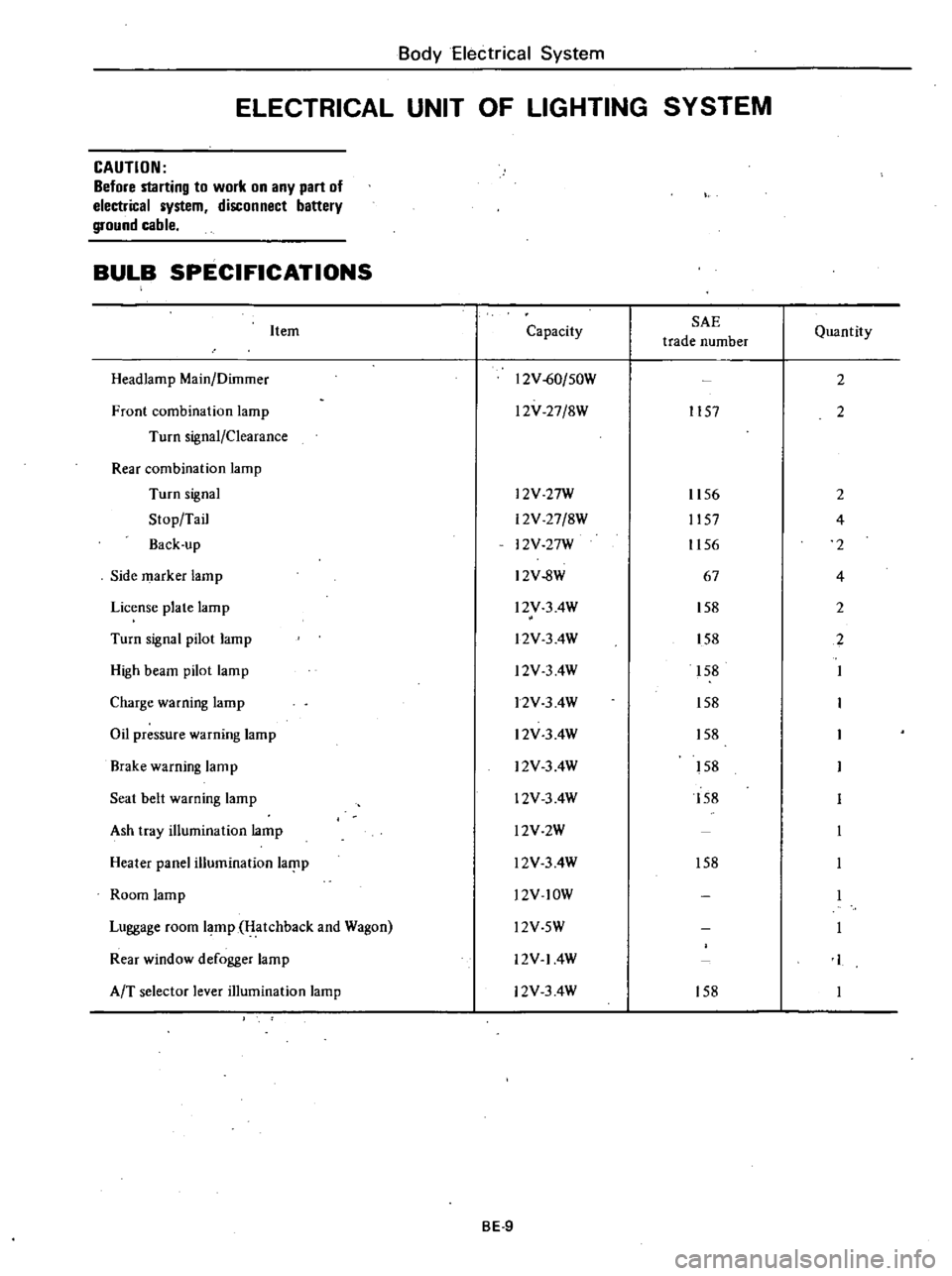
ELECTRICAL
UNIT
OF
LIGHTING
SYSTEM
CAUTION
Before
starting
to
work
on
any
part
of
electrical
system
disconnect
battery
ground
cable
BULB
SPECIFICATIONS
Item
Headlamp
Main
Dilnmer
Front
combination
lamp
Turn
signal
Clearance
Rear
combination
lamp
Turn
signal
Stop
Tail
Back
up
Side
marker
lamp
License
plate
lamp
Turn
signal
pilot
lamp
High
beam
pilot
lamp
Charge
warning
lamp
Oil
pressure
warning
lamp
Brake
warning
lamp
Seat
belt
warning
lamp
Ash
tray
illumination
lamp
Heater
panel
illumination
laf
lp
Room
lamp
Luggage
room
lamp
Hatchback
and
Wagon
Rear
window
defogger
lamp
AfT
selector
lever
illumination
lamp
Capacity
SAE
trade
number
12V
60
50W
l2V
27
8W
1157
l2V
27W
12V
27
8W
12V
27W
12V
8W
l2V
3
4W
l2V
3
4W
l2V
3
4W
12V
3
4W
12V
3
4W
12V
3
4W
12V
3
4W
l2V2W
l2V
3
4W
l2V
lOW
Quantity
2
2
1156
2
1157
4
1156
2
67
4
158
2
158
2
158
158
158
158
158
158
l2V
5W
12V
14W
12V
3
4W
158
BE
9
Page 455 of 548
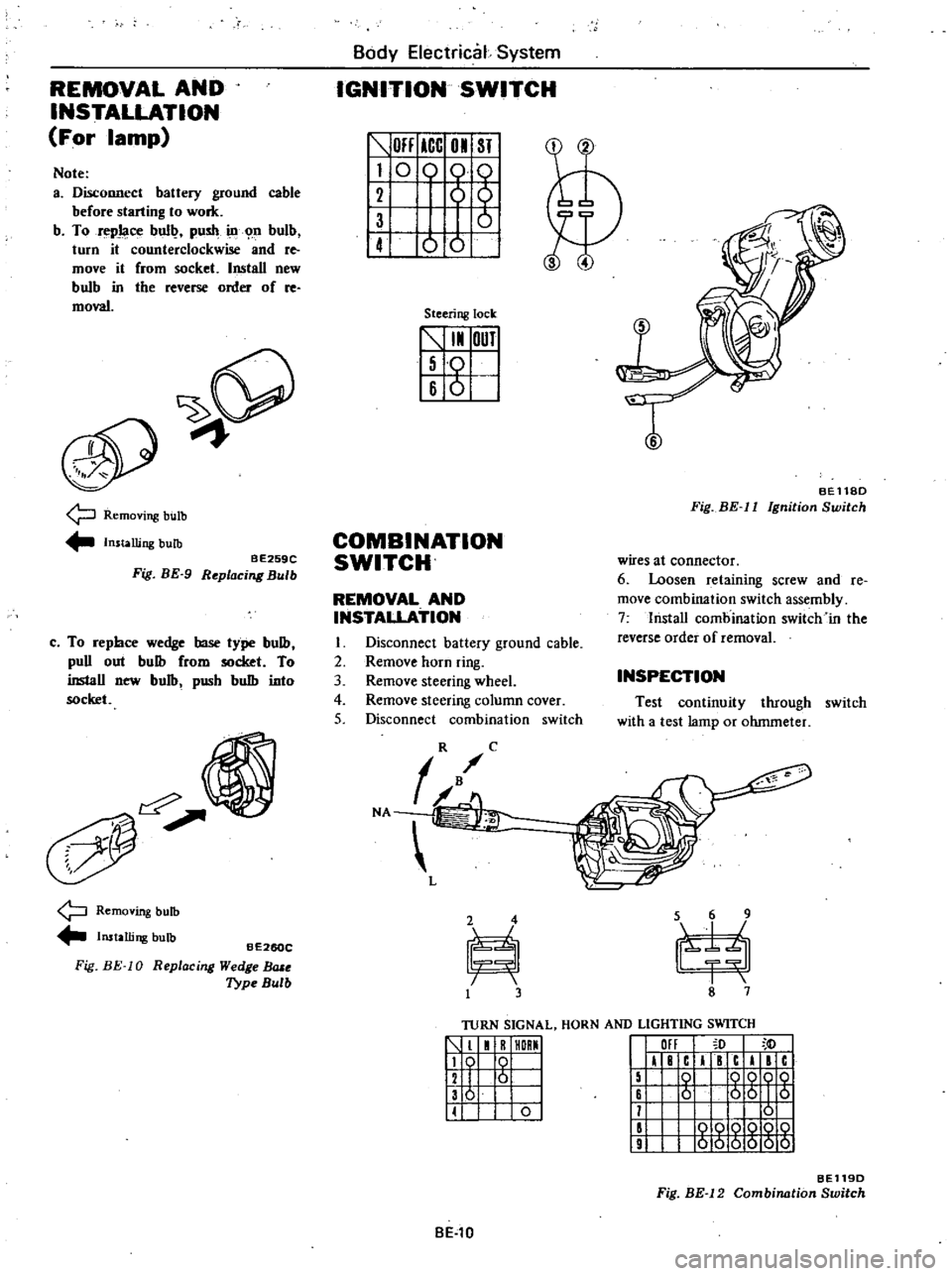
REMOVAL
AND
INSTALLATION
For
lamp
Note
a
Disconnect
battery
ground
cable
before
starting
to
work
b
To
repJaoe
bull
push
ill
n
bulb
turn
it
counterclockwise
and
re
move
it
from
socket
Install
new
bulb
in
tbe
reverse
order
of
re
moval
9
Removing
bulb
Installing
bulb
BE259C
Fig
BE
9
Replacing
Bulb
c
To
repbce
wedge
base
type
bulb
puD
out
bulb
from
socket
To
inslaD
new
bulb
pusb
bulb
into
socket
Removing
bulb
Installing
bulb
Fig
BE
10
BE260C
R
eplac
ing
Wedge
BlUe
Type
Bulb
Body
Electrical
System
IGNITION
SWITCH
OFF
ICC
01
ST
I
0
0
61
1
ot
Steering
lock
5
I
OUT
I
Iso
16
6
I
T
BEll8D
Fig
BE
II
Ignition
Switch
COMBINATION
SWITCH
wires
at
connector
6
Loosen
retaining
screw
and
Ie
move
combination
switch
assembly
7
lnstaD
combination
switch
in
the
reverse
order
of
removal
REMOVAL
AND
INSTALLATION
I
Disconnect
battery
ground
cable
2
Remove
horn
ring
3
Remove
steering
wheel
4
Remove
steering
column
cover
5
Disconnect
combination
switch
INSPECTION
Test
continuity
through
switch
with
a
test
lamp
or
ohmmeter
TURN
SIGNAL
HORN
AND
LIGHTING
SWITCH
1
1
R
HORMI
119
0
I
12
I
6
I
136
I
II
0
I
III
I
F
c
I
c
I
c
15
0
QQOQ
16
6
56
I
5
11
0
II
000Q
10
9
000000
BE119D
Fig
BE
12
Combination
Switch
BE
l0
Page 460 of 548
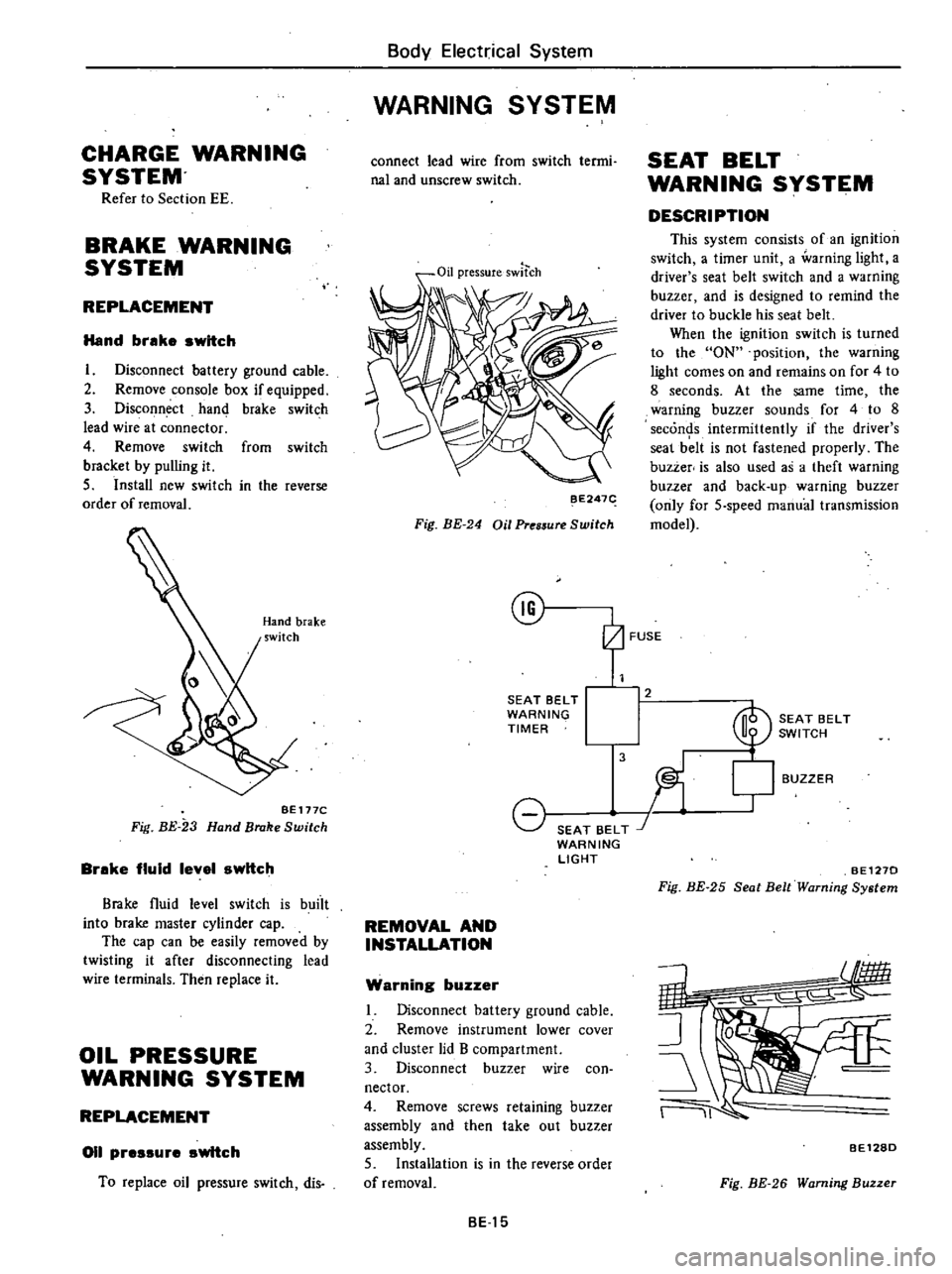
CHARGE
WARNING
SYSTEM
Refer
to
Section
EE
BRAKE
WARNING
SYSTEM
REPLACEMENT
Hand
brake
switch
I
Disconnect
battery
ground
cable
2
Remove
console
box
if
equipped
3
Disconnect
hand
brake
switch
lead
wire
at
connector
4
Remove
switch
from
switch
bracket
by
pulling
it
5
Install
new
switch
in
the
reverse
order
of
removal
BE
177C
Fig
BE
23
Hand
Brake
Switch
Brake
fluid
level
switch
Brake
fluid
level
switch
is
buiit
into
brake
master
cylinder
cap
The
cap
can
be
easily
removed
by
twisting
it
after
disconnecting
lead
wire
terminals
Then
replace
it
OIL
PRESSURE
WARNING
SYSTEM
REPLACEMENT
011
pressure
switch
To
replace
oil
pressure
switch
dis
Body
Electrical
System
WARNING
SYSTEM
connect
lead
wire
from
switch
termi
nal
and
unscrew
switch
Oil
pressureswltch
BE247
Fig
BE
24
Oil
Pres5ure
Switch
@
SEAT
BELT
WARNING
TIMER
8
SEAT
BELT
J
WARNING
LIGHT
REMOVAL
AND
INSTALLATION
Warning
buzzer
Disconnect
battery
ground
cable
2
Remove
instrument
lower
cover
and
cluster
lid
B
compartment
3
Disconnect
buzzer
wire
con
nector
4
Remove
screws
retaining
buzzer
assembly
and
then
take
out
buzzer
assembly
5
Installation
is
in
the
reverse
order
of
removal
BE15
SEAT
BELT
WARNING
SYSTEM
DESCRIPTION
This
system
consists
of
an
ignition
switch
a
timer
unit
a
warning
light
a
driver
s
seat
belt
switch
and
a
warning
buzzer
and
is
designed
to
remind
the
driver
to
buckle
his
seat
belt
When
the
ignition
switch
is
turned
to
the
ON
position
the
warning
light
comes
on
and
remains
on
for
4
to
8
seconds
At
the
same
time
the
warning
buzzer
sounds
for
4
to
8
seconds
intermittently
if
the
driver
s
seal
b
lt
is
not
fastened
properly
The
buzzer
is
also
used
as
a
theft
warning
buzzer
and
back
up
warning
buzzer
only
for
5
speed
manual
transmission
model
2
3
BUZZER
SEAT
BELT
SWITCH
l
BE1270
Fig
BE
25
Seat
Belt
Warning
System
11
BE128D
Fig
BE
26
Warning
Buzzer
Page 463 of 548
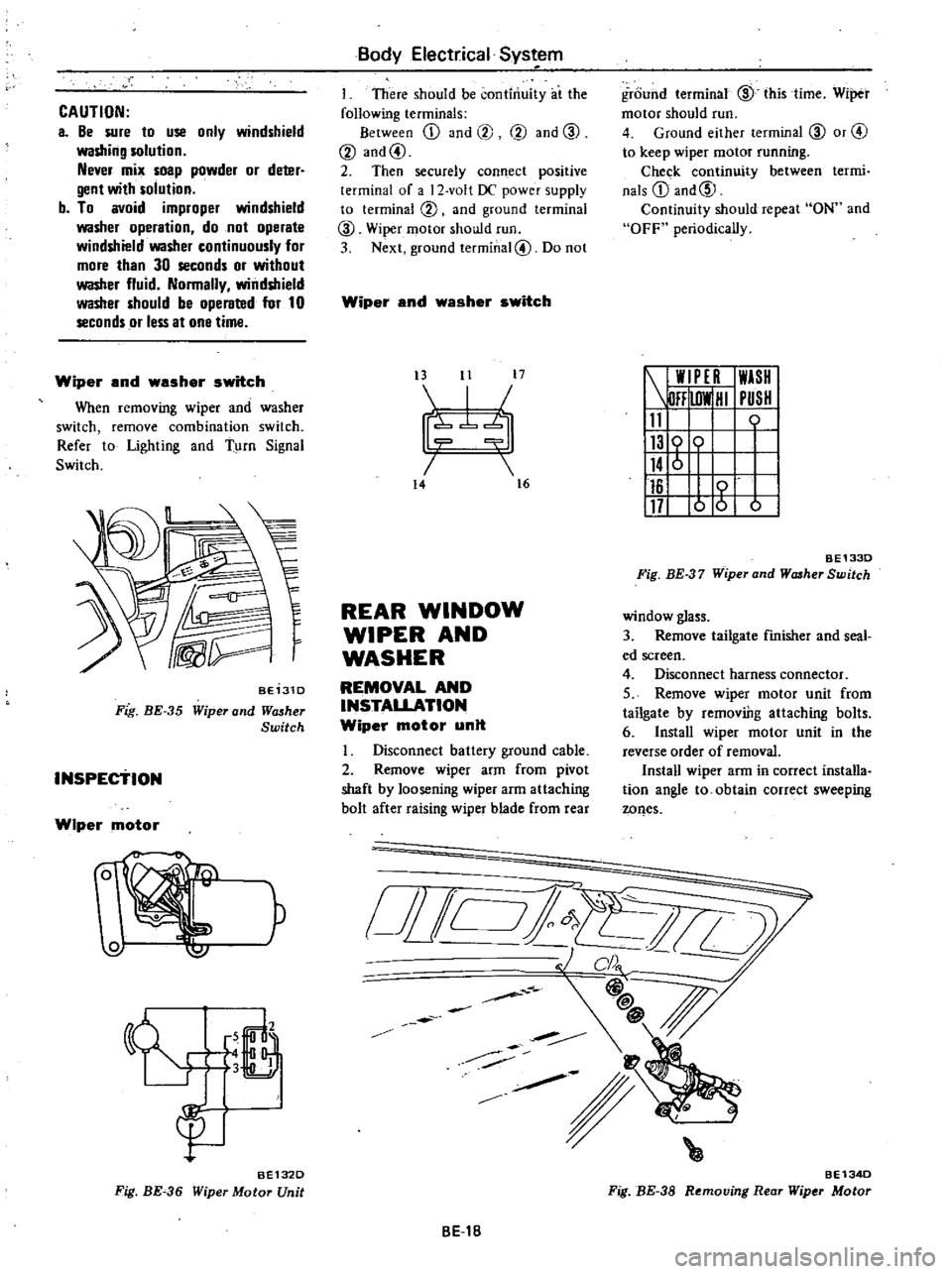
CAUTION
a
Be
sure
to
use
only
windshield
washing
solution
Never
mix
soap
powder
or
deter
gent
with
solution
b
To
avoid
improper
windshield
washer
operation
do
not
operate
windshield
washer
continuously
for
more
than
30
seconds
or
without
washer
fluid
Normally
windshield
washer
should
be
operated
for
10
seconds
or
less
at
one
time
Wiper
and
washer
switch
When
removing
wiper
and
washer
switch
remove
combination
switch
Refer
to
Lighting
and
Turn
Signal
Switch
BE131D
Fig
BE
35
Wiper
and
Wll5her
Switch
INSPEctiON
Wiper
motor
W
P
6
LJ
3
B
gu
BE132D
Fig
BE
36
Wiper
Motor
Unit
Body
Electrical
Sys
em
I
There
should
be
continuity
at
the
following
terminals
Between
ill
and
@
@
and
CID
@
and@
2
Then
securely
connect
positive
terminal
of
a
2
volt
DC
power
supply
to
terminal
@
and
ground
terminal
CID
Wiper
motor
should
run
3
Next
ground
terminal@
Do
not
Wiper
and
washer
switch
t3
11
17
I
7b
14
16
REAR
WINDOW
WIPER
AND
WASHER
REMOVAL
AND
INSTALLATION
Wiper
motor
unit
Disconnect
battery
ground
cable
2
Remove
wiper
arm
from
pivot
shaft
by
loosening
wiper
arm
attaching
bolt
after
raising
wiper
blade
from
rear
o
i
Jill
BE1B
ground
terminal
CID
this
time
Wiper
motor
should
run
4
Ground
either
terminal
CID
or
@
to
keep
wiper
motor
running
Chec
k
continuity
between
termi
nals
ill
and@
Continuity
should
repeat
ON
and
OFF
periodically
W
PE
I
WASH
DFF
lOW
HI
PUSH
11
0
116
117
o
g
b
BE1330
Fig
BE
37
Wiper
and
WcuherSwitch
window
glass
3
Remove
tailgate
finisher
and
seal
ed
screen
4
Disconnect
harness
connector
5
Remove
wiper
motor
unit
from
tailgate
by
removiDg
attaching
bolts
6
Install
wiper
motor
unit
in
the
reverse
order
of
removal
Install
wiper
arm
in
correct
installa
tion
angle
to
obtain
correct
sweeping
wQes
BE134D
Fig
BE
38
Removing
Rear
Wiper
Motor
Page 465 of 548
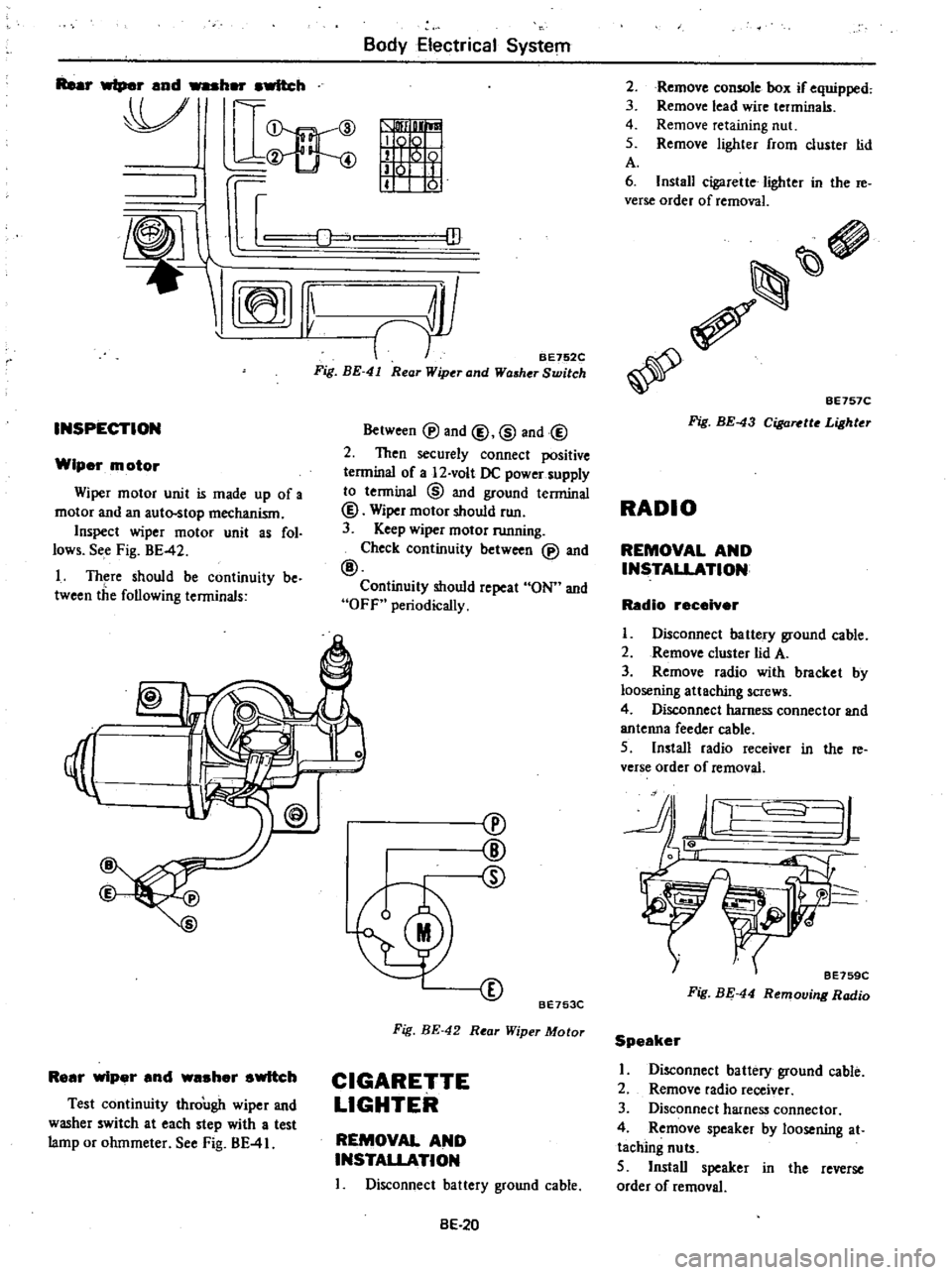
Rear
wiper
and
her
awltch
V
D
mn
ID
I
INSPECTION
Wiper
motor
Wiper
motor
unit
is
made
up
of
a
motor
and
an
auto
stop
mechanism
Inspect
wiper
motor
unit
as
fol
lows
See
Fig
BE
42
I
Th
re
should
be
continuity
be
tween
the
following
terminals
Body
Electrical
System
ill
BE752C
Fig
BE
41
Rear
Wiper
and
Washer
Switch
Between
@
and
@
@
and@
2
Then
securely
connect
positive
terminal
of
a
12
volt
DC
power
supply
to
tenninal
@
and
ground
terminal
@
Wiper
motor
should
run
3
Keep
wiper
motor
running
Check
continuity
between
@
and
@
Continuity
should
repeat
ON
and
OFf
periodically
I
Rear
wiper
and
waaher
switch
Test
continuity
through
wiper
and
washer
switch
at
each
step
with
a
test
lamp
or
ohmmeter
See
Fig
BE
41
cv
@
CD
BE753C
Fig
BE
42
Rear
Wiper
Motor
CIGARETTE
LIGHTER
REMOVAL
AND
INSTALLATION
I
Disconnect
battery
ground
cable
BE
20
Remove
comole
box
if
equipped
Remove
lead
wire
terminals
Remove
retaining
nut
Remove
lighter
from
cluster
lid
2
3
4
5
A
6
Install
cigarette
lighter
in
the
re
verse
order
of
removal
BE757C
Fig
BE
43
CiI
a
tto
Lighter
RADIO
REMOVAL
AND
INSTALLATION
Radio
receiver
I
Disconnect
battery
ground
cable
2
Remove
cluster
lid
A
3
Remove
radio
with
bracket
by
loosening
attaching
screws
4
DiscOnnect
harness
connector
and
antenna
feeder
cable
5
Install
radio
receiver
in
the
re
verse
order
of
removal
JL
J
tf
BE759C
Fig
BE
44
Removing
Radio
Speaker
I
Disconnect
battery
ground
cable
2
Remove
radio
receiver
3
Disconnect
harness
connector
4
Remove
speaker
by
loosening
at
taching
nuts
5
Install
speaker
in
the
reverse
order
of
removal
Page 467 of 548
B6
Y
Electrica
System
f
EIIII
I
I
I
11111111
111
777
Rea
window
1
j
glass
W
777
n
1
r7
U
u
T
t
I
I
I
j
T
cD
t
ID
3
BE537
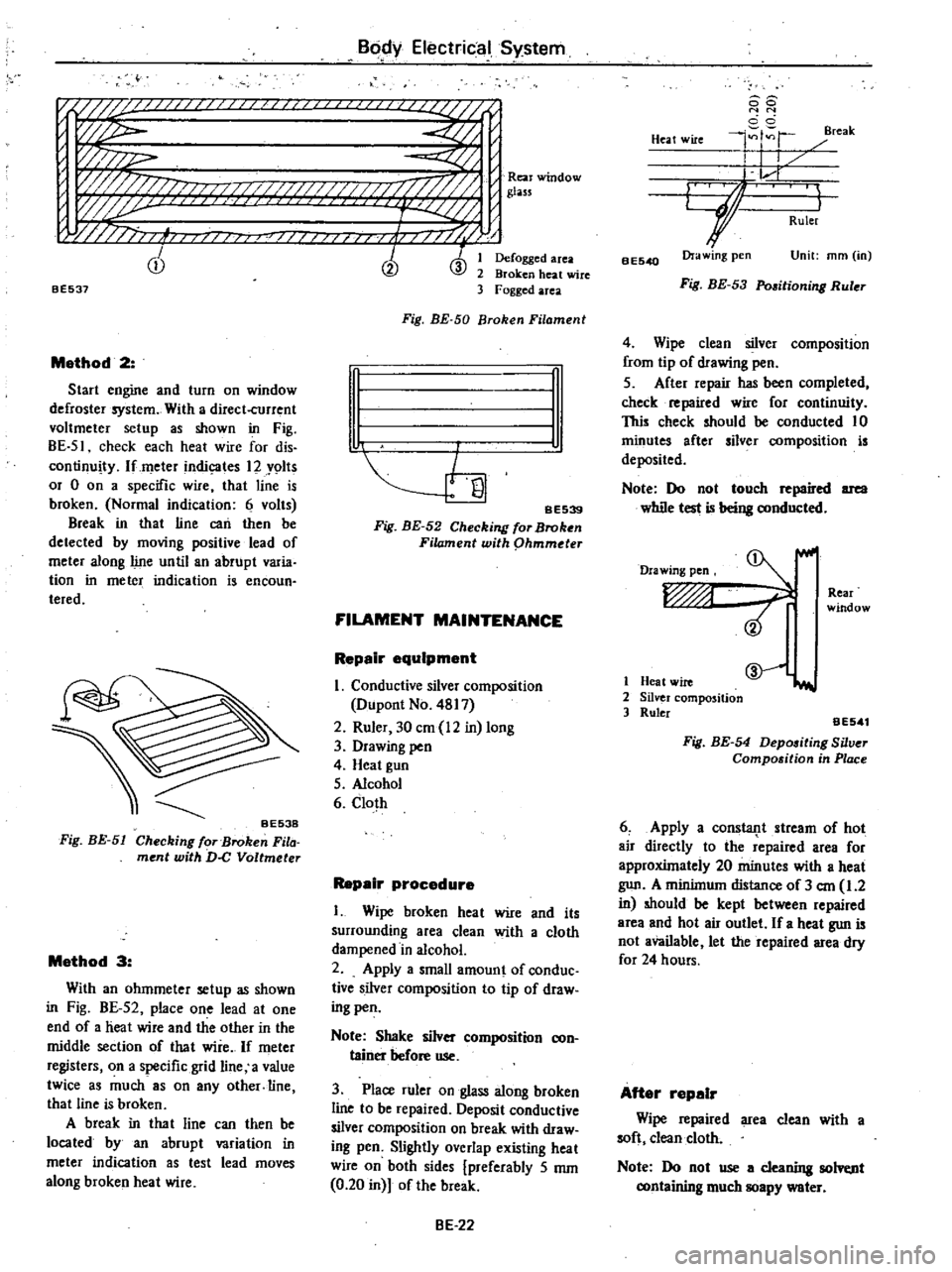
Method
2
Start
engine
and
turn
on
window
defroster
system
With
a
direct
current
voltmeter
setup
as
shown
in
Fig
BE
51
check
each
heat
wire
for
dis
continuity
lfmeter
indic
ates
12
Y9lts
or
0
on
a
specific
wire
that
line
is
broken
Normal
indication
6
volts
Break
in
that
line
can
then
be
detected
by
moving
positive
lead
of
meter
along
line
until
an
abrupt
varia
tion
in
meter
indication
is
encoun
teredo
Fig
BE
51
Method
3
With
an
ohmmeter
setup
as
shown
in
Fig
BE
52
place
one
lead
at
one
end
of
a
heat
wire
and
the
other
in
the
middle
section
of
that
wire
If
meter
registers
on
a
specific
grid
line
a
value
twice
as
much
8S
on
any
other
line
that
line
is
broken
A
break
in
tha
t
line
can
then
be
located
by
an
abrupt
variation
in
meter
indication
as
test
lead
moves
along
broken
heat
wire
Defogged
area
Broken
heat
wire
Fogged
area
Fig
BE
50
Broken
Filament
n
I
I
SE539
Fig
BE
52
Checking
for
Broken
Filament
with
phmmder
FILAMENT
MAINTENANCE
Repair
equipment
I
Conductive
silver
composition
Dupont
No
4817
2
Ruler
30
em
12
in
long
3
Drawing
pen
4
Heat
gun
5
Alcohol
6
Cloth
Repair
procedure
I
Wipe
broken
heat
wire
and
its
surrounding
area
clean
with
a
cloth
dampened
in
alcohol
2
Apply
a
small
amount
of
conduc
tive
silver
composition
to
tip
of
draw
ing
pen
Note
Shake
silver
composition
con
tainer
before
use
3
Place
ruler
on
glass
along
broken
line
to
be
repaired
Deposit
conductive
silver
composition
on
break
with
draw
ing
pen
Slightly
overlap
existing
heat
wire
on
both
sides
preferably
5
mm
0
20
in
of
the
break
BE
22
88
N
N
cci
4
r
reak
Heat
wire
I
I
L
r
GJ
I
Ruler
BE540
Ora
wing
pen
Unit
mm
in
Fig
BE
53
Pmitioning
Ruler
4
Wipe
clean
silver
composition
from
tip
of
drawing
pen
5
After
repair
has
been
completed
check
repaired
wire
for
continuity
This
check
should
be
conducted
10
minutes
after
silver
composition
is
deposited
Note
Do
not
touch
repaired
area
while
test
is
being
conducted
Drawing
pen
Rear
window
1
Heat
wire
2
Silver
composition
3
Ruler
@
iI
aE541
Fig
BE
54
Depositing
Silver
Compo
ition
in
Place
6
Apply
a
consla11t
stream
of
hot
air
directly
to
the
repaired
area
for
approxUnately
20
minutes
with
a
heat
gun
A
minilnum
distance
of
3
em
1
2
in
should
be
kept
between
repaired
area
and
hot
air
outlet
If
a
heat
gun
is
not
available
let
the
repaired
area
dry
for
24
hours
After
repair
Wipe
repaired
area
clean
with
a
soft
clean
cloth
Note
Do
not
use
a
cleaning
solvt
nt
containing
much
soapy
water
Page 471 of 548
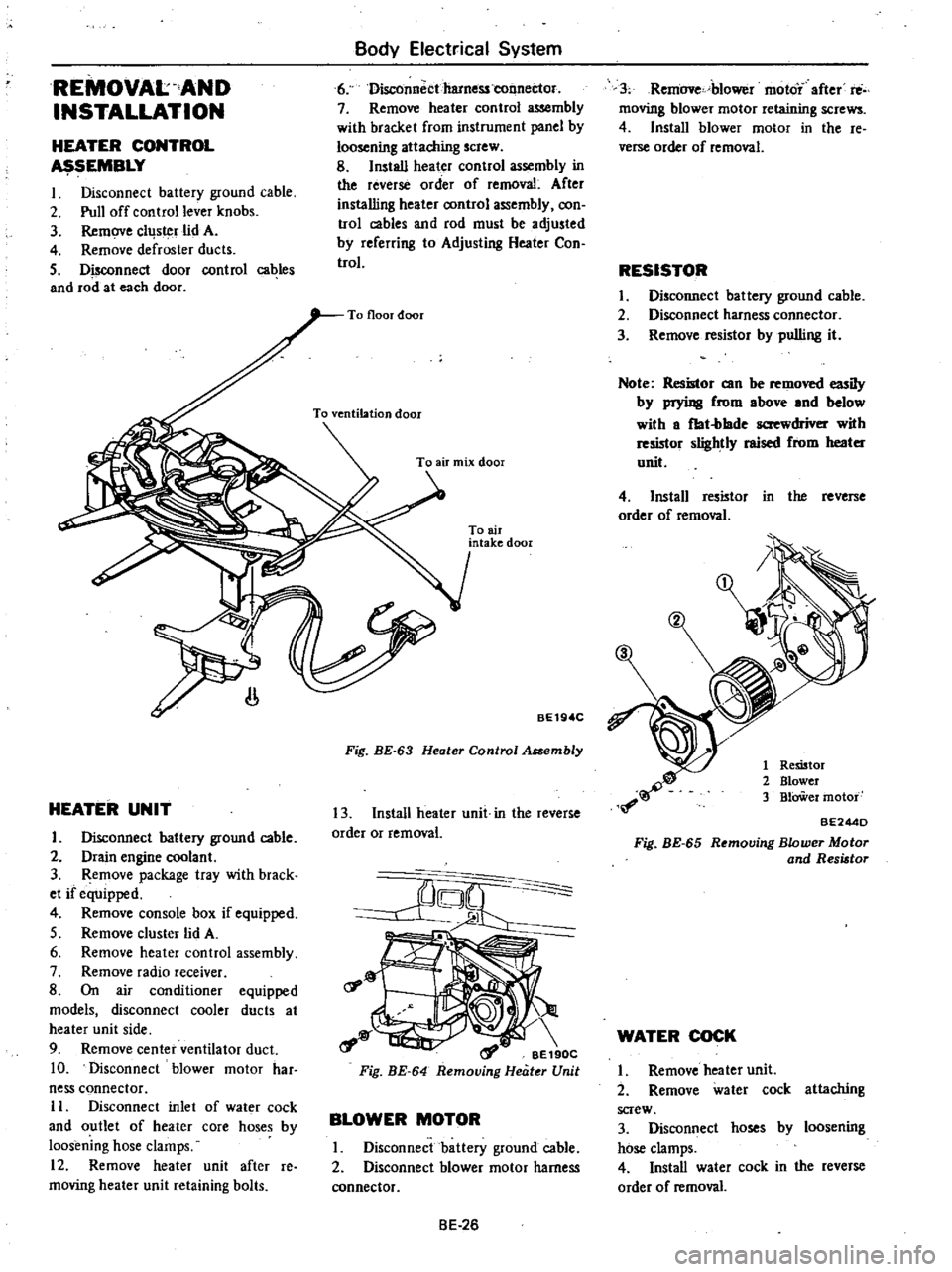
REMOVAL
AND
INSTALLATION
HEATER
CONTROL
SEMBLY
I
Disconnect
battery
ground
cable
2
Pull
off
control
lever
knobs
3
Remove
cllJs
r
lid
A
4
Remove
defroster
ducts
5
Disconnect
door
control
cables
and
rod
at
each
door
Body
Electrical
System
6
Disconnectharness
tonnec1or
7
Remove
heater
control
assembly
with
bracket
from
instrument
panel
by
loosening
attaching
screw
8
Install
heater
control
assembly
in
the
reverse
order
of
removal
After
installing
heater
oontrol
assembly
oon
trol
cables
and
rod
must
be
adjusted
by
referring
to
Adjusting
Heater
Con
trol
HEATER
UNIT
I
Disconnect
battery
ground
cable
2
Drain
engine
coolant
3
Remove
package
tray
with
brack
et
if
equipped
4
Remove
console
box
if
equipped
5
Remove
cluster
lid
A
6
Remove
heater
control
assembly
7
Remove
radio
receiver
8
On
air
conditioner
equipped
models
disconnect
cooler
ducts
at
heater
unit
side
9
Remove
center
ventilator
duct
10
Disconnect
blower
motor
har
ness
connector
II
Disconnect
inlet
of
wat
r
cock
and
outlet
of
heater
core
hoses
by
loosening
hose
clamps
12
Remove
heater
unit
after
re
moving
heater
unit
retaining
bolts
To
air
intake
door
BE19
C
Fig
BE
63
Heater
Control
Assembly
13
Install
heater
unit
in
the
reverse
order
or
removal
rf
o
t
a
1
BE190C
Fig
BE
64
Removing
Heater
Unit
BLOWER
MOTOR
I
Disconnect
battery
ground
cable
2
Disconnect
blower
motor
harness
connector
BE
26
3
Remove
blower
moto
after
rti
moving
blower
motor
retaining
screws
4
Install
blower
motor
in
the
re
verse
order
of
removal
RESISTOR
I
Disconnect
battery
ground
cable
2
Disconnect
harness
connector
3
Remove
resistor
by
pulling
it
Note
Resistor
can
be
removed
iIy
by
prying
from
above
and
below
with
a
fbt
blade
screwdriver
with
resmor
slightly
raised
from
heater
unit
4
Install
resistor
in
the
reverse
order
of
removal
1
Remtor
2
Blower
3
BlOWer
motor
BE244D
Fig
BE
65
Removing
Blower
Motor
and
Resistor
WATER
COCK
I
Remove
heater
unit
2
Remove
water
cock
attaching
screw
3
Disconnect
hoses
by
loosening
hose
clamps
4
Install
water
cock
in
the
reverse
order
of
removal