ABS DODGE NEON 1999 Service Service Manual
[x] Cancel search | Manufacturer: DODGE, Model Year: 1999, Model line: NEON, Model: DODGE NEON 1999Pages: 1200, PDF Size: 35.29 MB
Page 164 of 1200
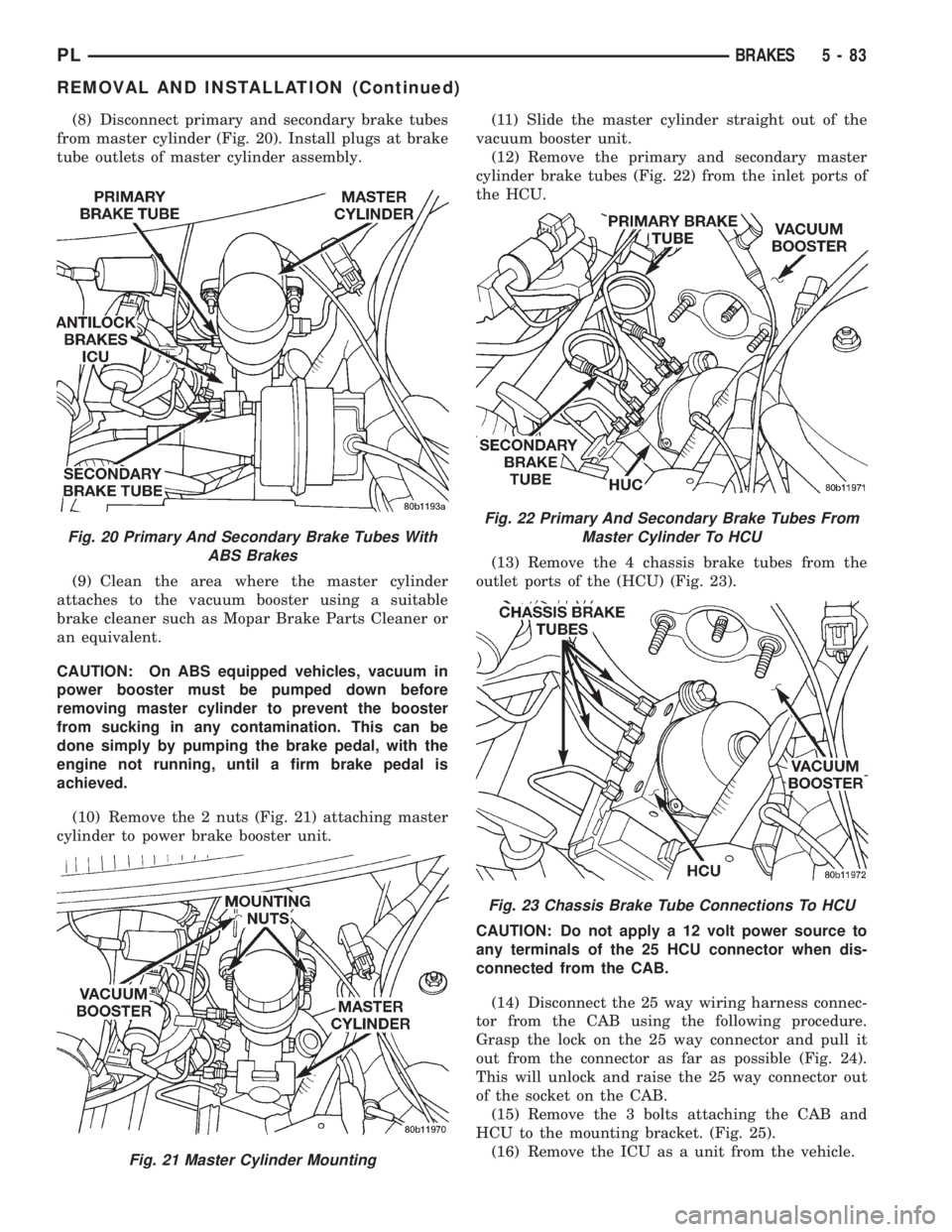
(8) Disconnect primary and secondary brake tubes
from master cylinder (Fig. 20). Install plugs at brake
tube outlets of master cylinder assembly.
(9) Clean the area where the master cylinder
attaches to the vacuum booster using a suitable
brake cleaner such as Mopar Brake Parts Cleaner or
an equivalent.
CAUTION: On ABS equipped vehicles, vacuum in
power booster must be pumped down before
removing master cylinder to prevent the booster
from sucking in any contamination. This can be
done simply by pumping the brake pedal, with the
engine not running, until a firm brake pedal is
achieved.
(10) Remove the 2 nuts (Fig. 21) attaching master
cylinder to power brake booster unit.(11) Slide the master cylinder straight out of the
vacuum booster unit.
(12) Remove the primary and secondary master
cylinder brake tubes (Fig. 22) from the inlet ports of
the HCU.
(13) Remove the 4 chassis brake tubes from the
outlet ports of the (HCU) (Fig. 23).
CAUTION: Do not apply a 12 volt power source to
any terminals of the 25 HCU connector when dis-
connected from the CAB.
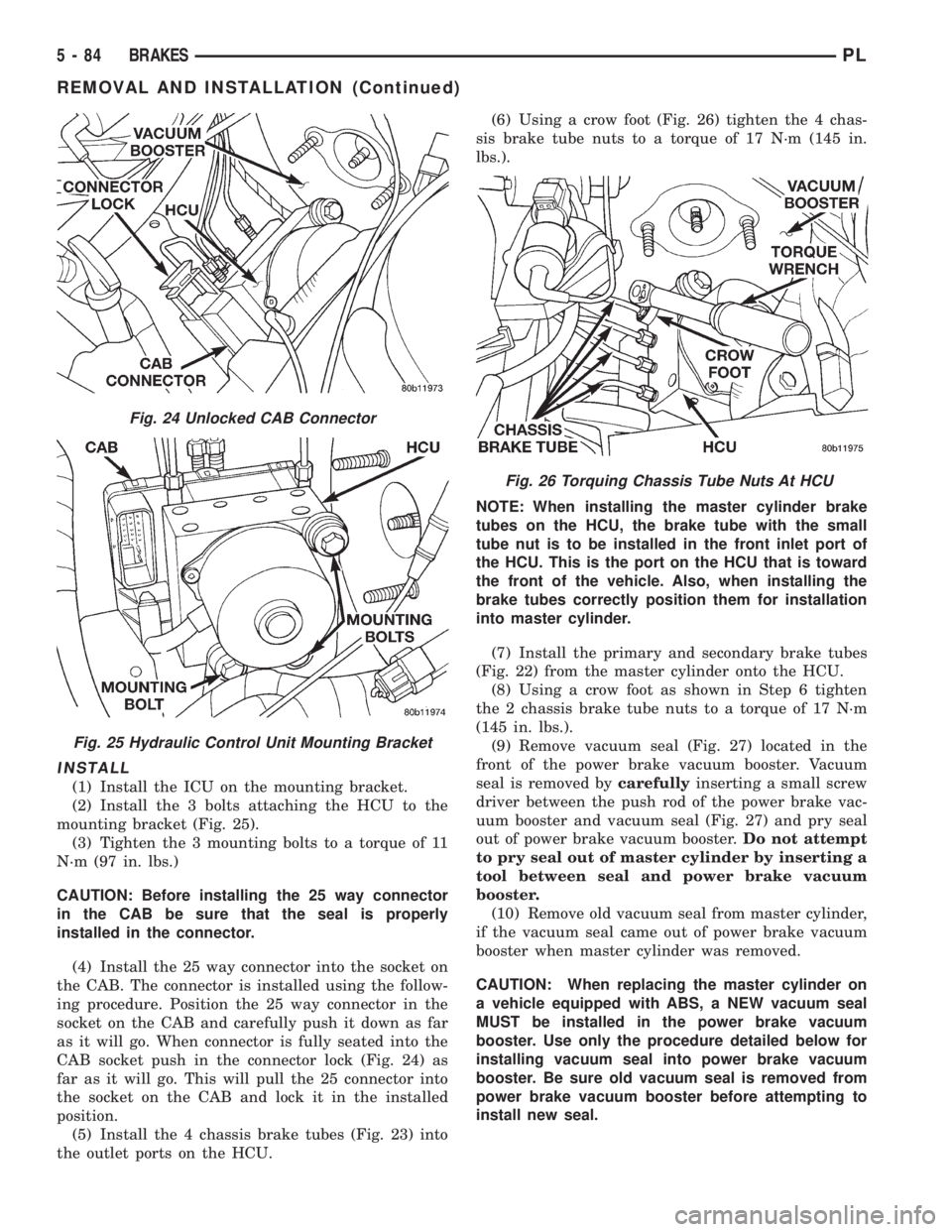
(14) Disconnect the 25 way wiring harness connec-
tor from the CAB using the following procedure.
Grasp the lock on the 25 way connector and pull it
out from the connector as far as possible (Fig. 24).
This will unlock and raise the 25 way connector out
of the socket on the CAB.
(15) Remove the 3 bolts attaching the CAB and
HCU to the mounting bracket. (Fig. 25).
(16) Remove the ICU as a unit from the vehicle.
Fig. 20 Primary And Secondary Brake Tubes With
ABS Brakes
Fig. 21 Master Cylinder Mounting
Fig. 22 Primary And Secondary Brake Tubes From
Master Cylinder To HCU
Fig. 23 Chassis Brake Tube Connections To HCU
PLBRAKES 5 - 83
REMOVAL AND INSTALLATION (Continued)
Page 165 of 1200
INSTALL
(1) Install the ICU on the mounting bracket.
(2) Install the 3 bolts attaching the HCU to the
mounting bracket (Fig. 25).
(3) Tighten the 3 mounting bolts to a torque of 11
N´m (97 in. lbs.)
CAUTION: Before installing the 25 way connector
in the CAB be sure that the seal is properly
installed in the connector.
(4) Install the 25 way connector into the socket on
the CAB. The connector is installed using the follow-
ing procedure. Position the 25 way connector in the
socket on the CAB and carefully push it down as far
as it will go. When connector is fully seated into the
CAB socket push in the connector lock (Fig. 24) as
far as it will go. This will pull the 25 connector into
the socket on the CAB and lock it in the installed
position.
(5) Install the 4 chassis brake tubes (Fig. 23) into
the outlet ports on the HCU.(6) Using a crow foot (Fig. 26) tighten the 4 chas-
sis brake tube nuts to a torque of 17 N´m (145 in.
lbs.).
NOTE: When installing the master cylinder brake
tubes on the HCU, the brake tube with the small
tube nut is to be installed in the front inlet port of
the HCU. This is the port on the HCU that is toward
the front of the vehicle. Also, when installing the
brake tubes correctly position them for installation
into master cylinder.
(7) Install the primary and secondary brake tubes
(Fig. 22) from the master cylinder onto the HCU.
(8) Using a crow foot as shown in Step 6 tighten
the 2 chassis brake tube nuts to a torque of 17 N´m
(145 in. lbs.).
(9) Remove vacuum seal (Fig. 27) located in the
front of the power brake vacuum booster. Vacuum
seal is removed bycarefullyinserting a small screw
driver between the push rod of the power brake vac-
uum booster and vacuum seal (Fig. 27) and pry seal
out of power brake vacuum booster.Do not attempt
to pry seal out of master cylinder by inserting a
tool between seal and power brake vacuum
booster.
(10) Remove old vacuum seal from master cylinder,
if the vacuum seal came out of power brake vacuum
booster when master cylinder was removed.
CAUTION: When replacing the master cylinder on
a vehicle equipped with ABS, a NEW vacuum seal
MUST be installed in the power brake vacuum
booster. Use only the procedure detailed below for
installing vacuum seal into power brake vacuum
booster. Be sure old vacuum seal is removed from
power brake vacuum booster before attempting to
install new seal.
Fig. 24 Unlocked CAB Connector
Fig. 25 Hydraulic Control Unit Mounting Bracket
Fig. 26 Torquing Chassis Tube Nuts At HCU
5 - 84 BRAKESPL
REMOVAL AND INSTALLATION (Continued)
Page 167 of 1200
(18) Install the wiring harness connector (Fig. 19)
on the speed control servo. Then install the routing
clip for the speed control servo wiring harness on the
speed control servo mounting bracket.
Install speed control servo mounting bracket on
body.
(19) Install and securely tighten the 2 bolts (Fig.
18) mounting the bracket for the speed control servo
to the body.
(20) Install the vacuum supply hose on the speed
control servo (Fig. 18).
(21) Install the power distribution center (PDC)
(Fig. 17) on the battery thermogaurd. PDC is install
by pushing straight down on it until the two retain-
ing clips holding it to the thermogaurd are latched to
the thermogaurd.
(22) Connect the negative (ground) cable on the
battery.
(23) Bleed the base brakes and the ABS brakes
hydraulic systems. Refer to Bleeding Base Brake
Hydraulic System in Service Procedures of the Base
Brake Section and Antilock Brakes Hydraulic System
Bleeding Procedure in Service Procedures of the
Antilock Brake Section for the required procedures.
(24) Fill the master cylinder to the proper fill
level.
(25) Road test vehicle to ensure proper operation
of the base and ABS brake systems.
PROPORTIONING VALVES
CAUTION: Proportioning valves should never be
disassembled.
REMOVE
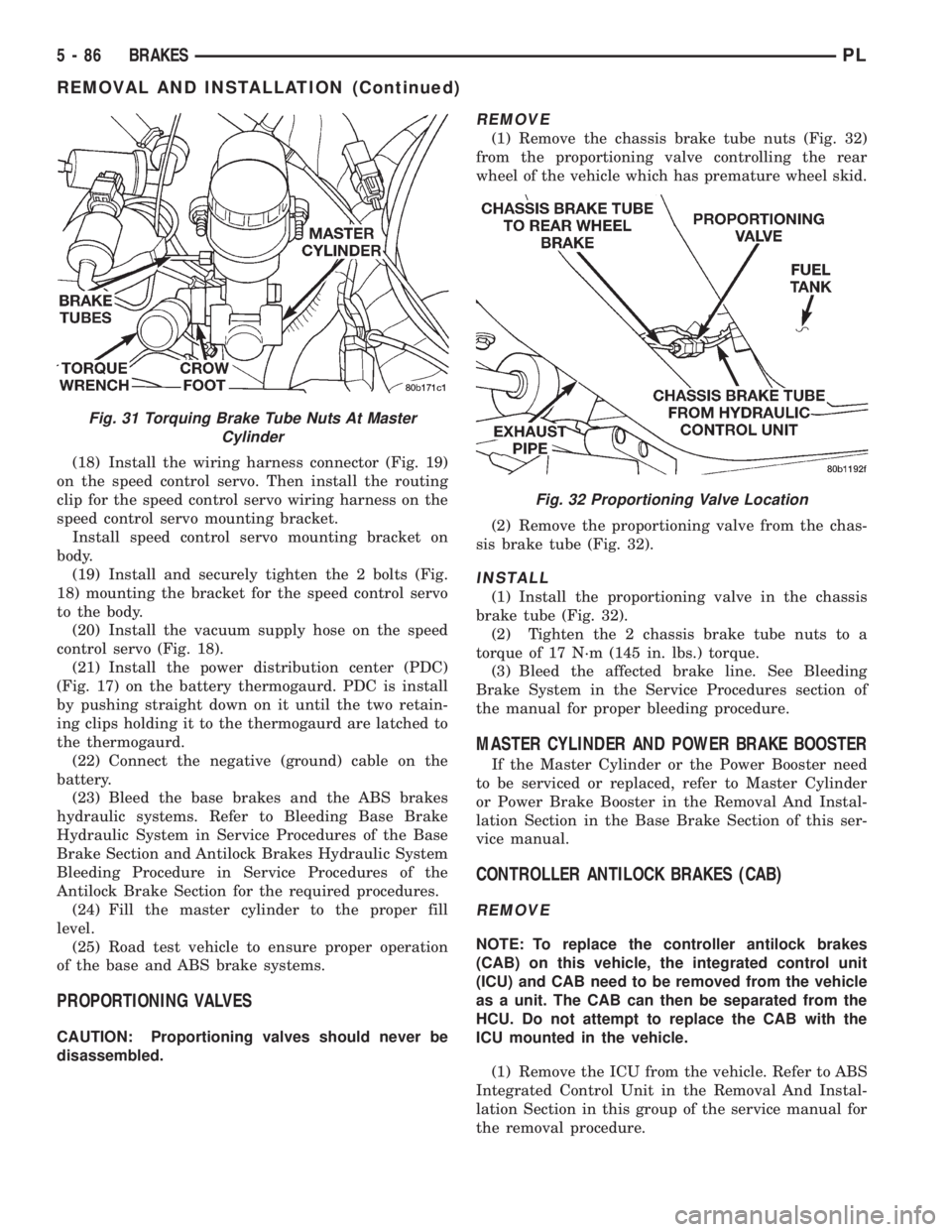
(1) Remove the chassis brake tube nuts (Fig. 32)
from the proportioning valve controlling the rear
wheel of the vehicle which has premature wheel skid.
(2) Remove the proportioning valve from the chas-
sis brake tube (Fig. 32).
INSTALL
(1) Install the proportioning valve in the chassis
brake tube (Fig. 32).
(2) Tighten the 2 chassis brake tube nuts to a
torque of 17 N´m (145 in. lbs.) torque.
(3) Bleed the affected brake line. See Bleeding
Brake System in the Service Procedures section of
the manual for proper bleeding procedure.
MASTER CYLINDER AND POWER BRAKE BOOSTER
If the Master Cylinder or the Power Booster need
to be serviced or replaced, refer to Master Cylinder
or Power Brake Booster in the Removal And Instal-
lation Section in the Base Brake Section of this ser-
vice manual.
CONTROLLER ANTILOCK BRAKES (CAB)
REMOVE
NOTE: To replace the controller antilock brakes
(CAB) on this vehicle, the integrated control unit
(ICU) and CAB need to be removed from the vehicle
as a unit. The CAB can then be separated from the
HCU. Do not attempt to replace the CAB with the
ICU mounted in the vehicle.
(1) Remove the ICU from the vehicle. Refer to ABS
Integrated Control Unit in the Removal And Instal-
lation Section in this group of the service manual for
the removal procedure.
Fig. 31 Torquing Brake Tube Nuts At Master
Cylinder
Fig. 32 Proportioning Valve Location
5 - 86 BRAKESPL
REMOVAL AND INSTALLATION (Continued)
Page 168 of 1200
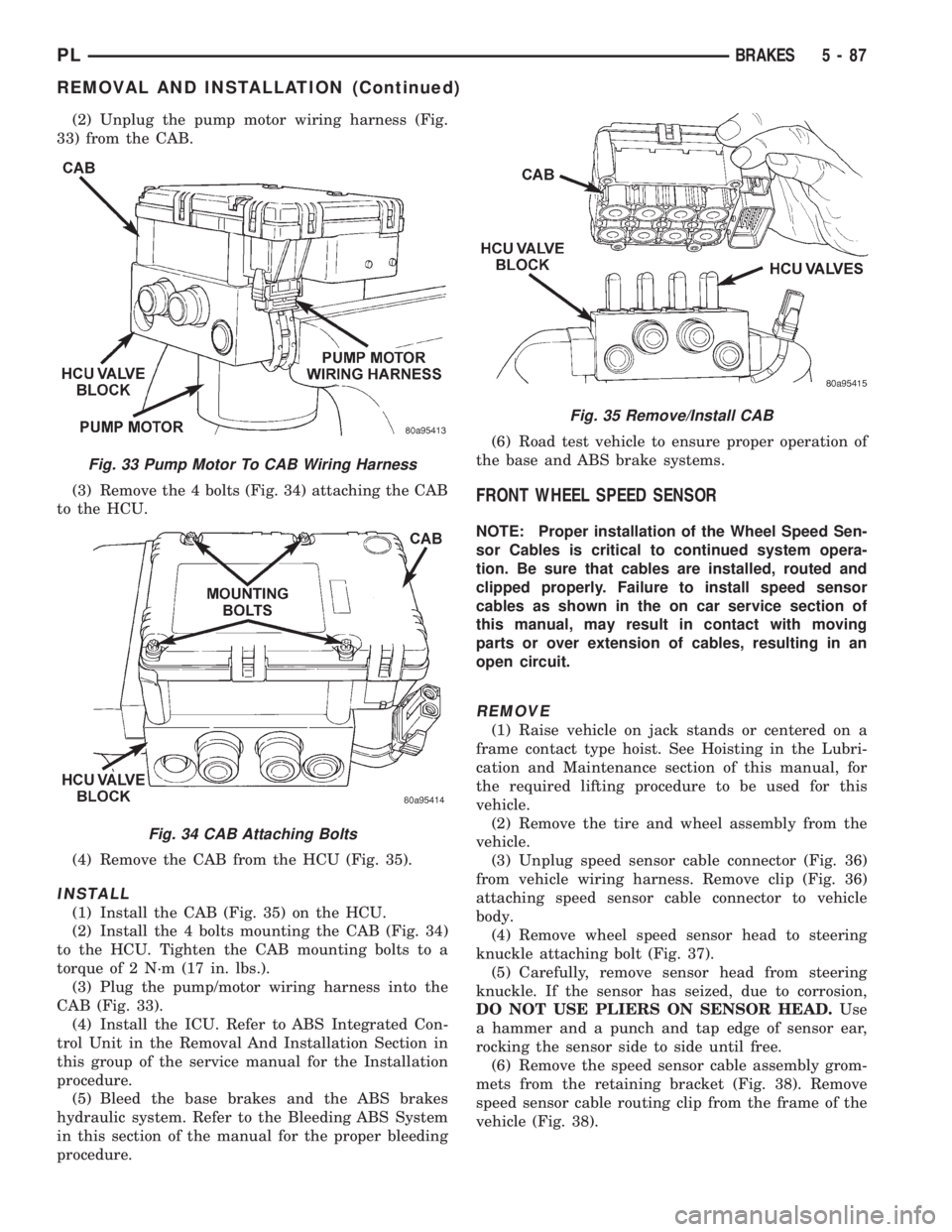
(2) Unplug the pump motor wiring harness (Fig.
33) from the CAB.
(3) Remove the 4 bolts (Fig. 34) attaching the CAB
to the HCU.
(4) Remove the CAB from the HCU (Fig. 35).
INSTALL
(1) Install the CAB (Fig. 35) on the HCU.
(2) Install the 4 bolts mounting the CAB (Fig. 34)
to the HCU. Tighten the CAB mounting bolts to a
torque of 2 N´m (17 in. lbs.).
(3) Plug the pump/motor wiring harness into the
CAB (Fig. 33).
(4) Install the ICU. Refer to ABS Integrated Con-
trol Unit in the Removal And Installation Section in
this group of the service manual for the Installation
procedure.
(5) Bleed the base brakes and the ABS brakes
hydraulic system. Refer to the Bleeding ABS System
in this section of the manual for the proper bleeding
procedure.(6) Road test vehicle to ensure proper operation of
the base and ABS brake systems.
FRONT WHEEL SPEED SENSOR
NOTE: Proper installation of the Wheel Speed Sen-
sor Cables is critical to continued system opera-
tion. Be sure that cables are installed, routed and
clipped properly. Failure to install speed sensor
cables as shown in the on car service section of
this manual, may result in contact with moving
parts or over extension of cables, resulting in an
open circuit.
REMOVE
(1) Raise vehicle on jack stands or centered on a
frame contact type hoist. See Hoisting in the Lubri-
cation and Maintenance section of this manual, for
the required lifting procedure to be used for this
vehicle.
(2) Remove the tire and wheel assembly from the
vehicle.
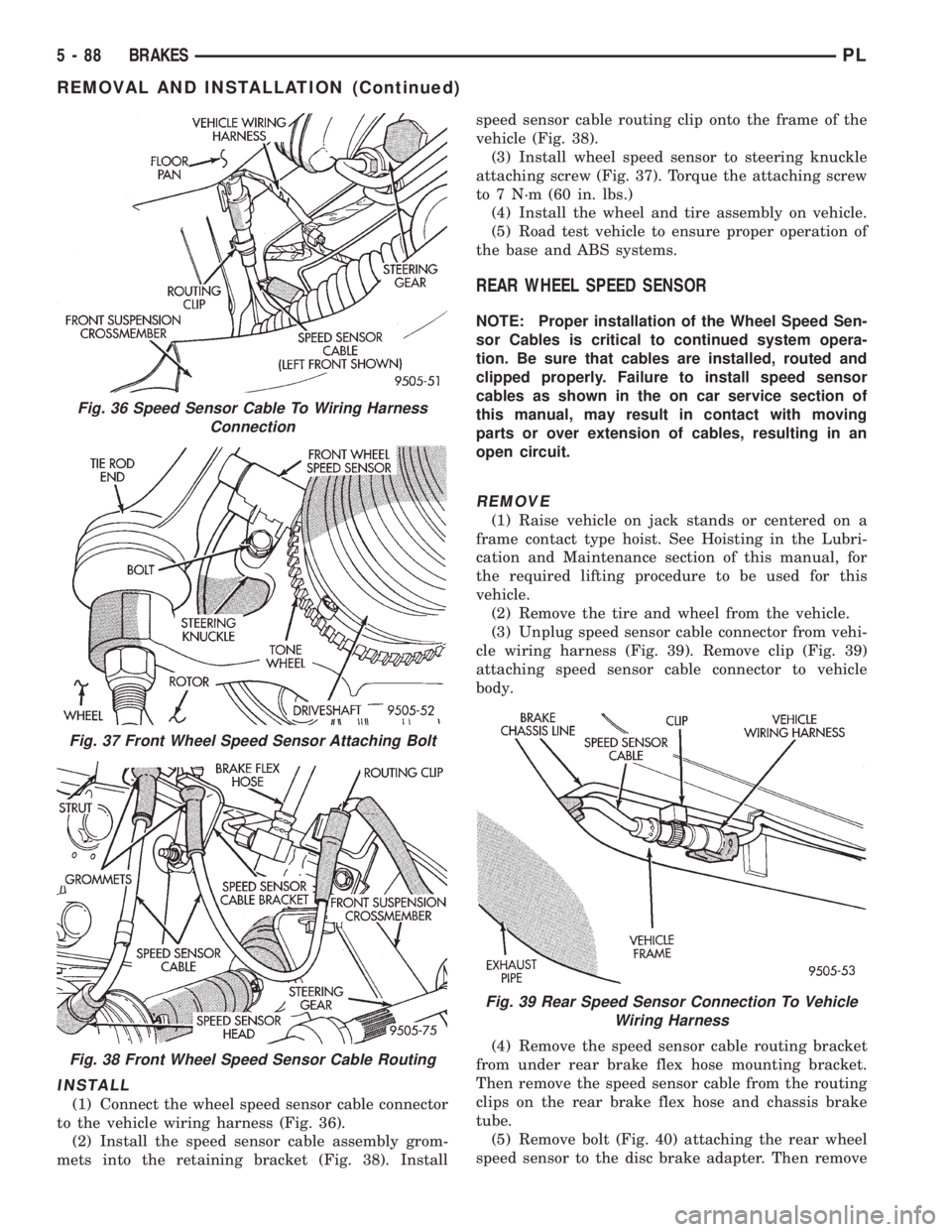
(3) Unplug speed sensor cable connector (Fig. 36)
from vehicle wiring harness. Remove clip (Fig. 36)
attaching speed sensor cable connector to vehicle
body.
(4) Remove wheel speed sensor head to steering
knuckle attaching bolt (Fig. 37).
(5) Carefully, remove sensor head from steering
knuckle. If the sensor has seized, due to corrosion,
DO NOT USE PLIERS ON SENSOR HEAD.Use
a hammer and a punch and tap edge of sensor ear,
rocking the sensor side to side until free.
(6) Remove the speed sensor cable assembly grom-
mets from the retaining bracket (Fig. 38). Remove
speed sensor cable routing clip from the frame of the
vehicle (Fig. 38).
Fig. 33 Pump Motor To CAB Wiring Harness
Fig. 34 CAB Attaching Bolts
Fig. 35 Remove/Install CAB
PLBRAKES 5 - 87
REMOVAL AND INSTALLATION (Continued)
Page 169 of 1200
INSTALL
(1) Connect the wheel speed sensor cable connector
to the vehicle wiring harness (Fig. 36).
(2) Install the speed sensor cable assembly grom-
mets into the retaining bracket (Fig. 38). Installspeed sensor cable routing clip onto the frame of the
vehicle (Fig. 38).
(3) Install wheel speed sensor to steering knuckle
attaching screw (Fig. 37). Torque the attaching screw
to 7 N´m (60 in. lbs.)
(4) Install the wheel and tire assembly on vehicle.
(5) Road test vehicle to ensure proper operation of
the base and ABS systems.
REAR WHEEL SPEED SENSOR
NOTE: Proper installation of the Wheel Speed Sen-
sor Cables is critical to continued system opera-
tion. Be sure that cables are installed, routed and
clipped properly. Failure to install speed sensor
cables as shown in the on car service section of
this manual, may result in contact with moving
parts or over extension of cables, resulting in an
open circuit.
REMOVE
(1) Raise vehicle on jack stands or centered on a
frame contact type hoist. See Hoisting in the Lubri-
cation and Maintenance section of this manual, for
the required lifting procedure to be used for this
vehicle.
(2) Remove the tire and wheel from the vehicle.
(3) Unplug speed sensor cable connector from vehi-
cle wiring harness (Fig. 39). Remove clip (Fig. 39)
attaching speed sensor cable connector to vehicle
body.
(4) Remove the speed sensor cable routing bracket
from under rear brake flex hose mounting bracket.
Then remove the speed sensor cable from the routing
clips on the rear brake flex hose and chassis brake
tube.
(5) Remove bolt (Fig. 40) attaching the rear wheel
speed sensor to the disc brake adapter. Then remove
Fig. 36 Speed Sensor Cable To Wiring Harness
Connection
Fig. 37 Front Wheel Speed Sensor Attaching Bolt
Fig. 38 Front Wheel Speed Sensor Cable Routing
Fig. 39 Rear Speed Sensor Connection To Vehicle
Wiring Harness
5 - 88 BRAKESPL
REMOVAL AND INSTALLATION (Continued)
Page 170 of 1200
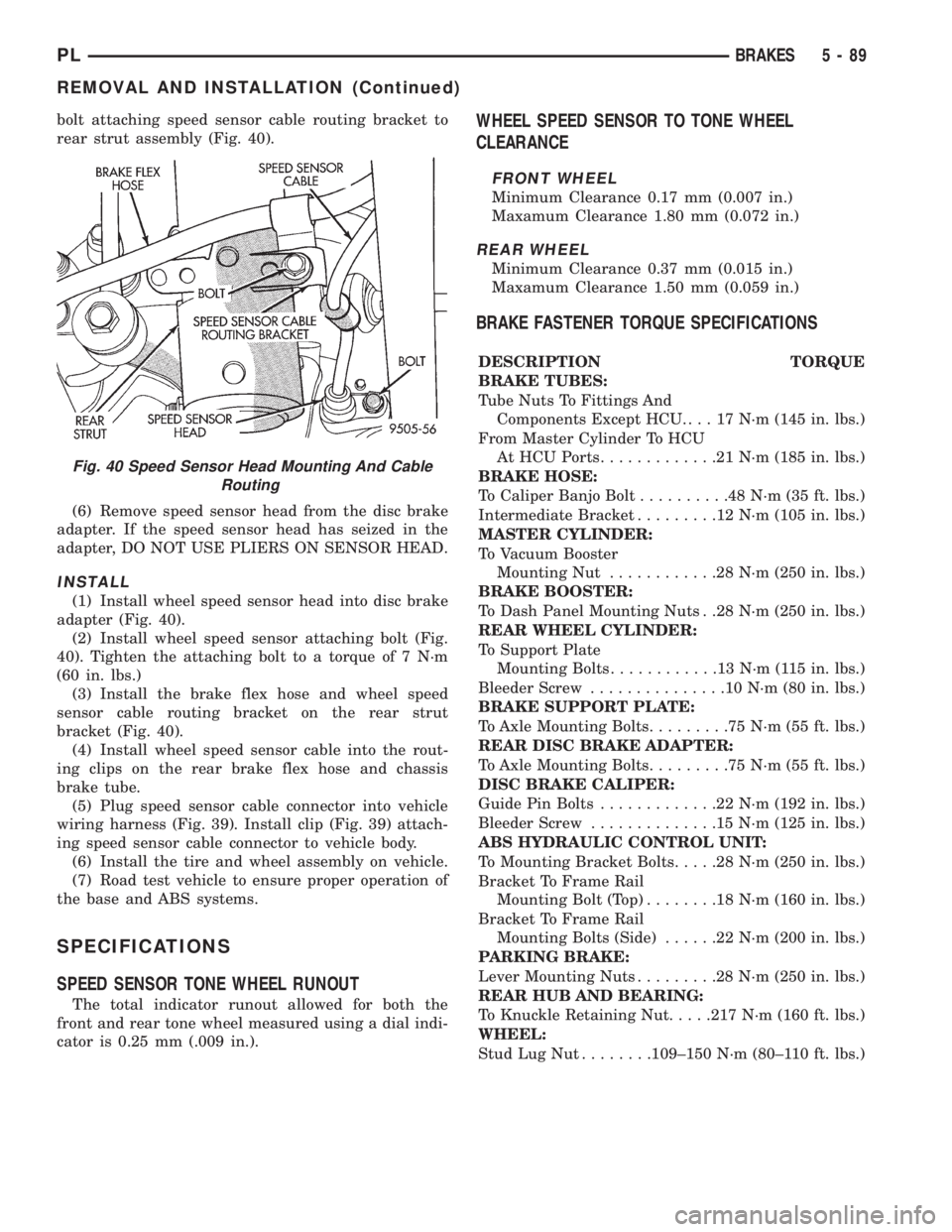
bolt attaching speed sensor cable routing bracket to
rear strut assembly (Fig. 40).
(6) Remove speed sensor head from the disc brake
adapter. If the speed sensor head has seized in the
adapter, DO NOT USE PLIERS ON SENSOR HEAD.
INSTALL
(1) Install wheel speed sensor head into disc brake
adapter (Fig. 40).
(2) Install wheel speed sensor attaching bolt (Fig.
40). Tighten the attaching bolt to a torque of 7 N´m
(60 in. lbs.)
(3) Install the brake flex hose and wheel speed
sensor cable routing bracket on the rear strut
bracket (Fig. 40).
(4) Install wheel speed sensor cable into the rout-
ing clips on the rear brake flex hose and chassis
brake tube.
(5) Plug speed sensor cable connector into vehicle
wiring harness (Fig. 39). Install clip (Fig. 39) attach-
ing speed sensor cable connector to vehicle body.
(6) Install the tire and wheel assembly on vehicle.
(7) Road test vehicle to ensure proper operation of
the base and ABS systems.
SPECIFICATIONS
SPEED SENSOR TONE WHEEL RUNOUT
The total indicator runout allowed for both the
front and rear tone wheel measured using a dial indi-
cator is 0.25 mm (.009 in.).
WHEEL SPEED SENSOR TO TONE WHEEL
CLEARANCE
FRONT WHEEL
Minimum Clearance 0.17 mm (0.007 in.)
Maxamum Clearance 1.80 mm (0.072 in.)
REAR WHEEL
Minimum Clearance 0.37 mm (0.015 in.)
Maxamum Clearance 1.50 mm (0.059 in.)
BRAKE FASTENER TORQUE SPECIFICATIONS
DESCRIPTION TORQUE
BRAKE TUBES:
Tube Nuts To Fittings And
Components Except HCU. . . . 17 N´m (145 in. lbs.)
From Master Cylinder To HCU
At HCU Ports.............21N´m(185 in. lbs.)
BRAKE HOSE:
To Caliper Banjo Bolt..........48N´m(35ft.lbs.)
Intermediate Bracket.........12N´m(105 in. lbs.)
MASTER CYLINDER:
To Vacuum Booster
Mounting Nut............28N´m(250 in. lbs.)
BRAKE BOOSTER:
To Dash Panel Mounting Nuts . .28 N´m (250 in. lbs.)
REAR WHEEL CYLINDER:
To Support Plate
Mounting Bolts............13N´m(115in.lbs.)
Bleeder Screw...............10N´m(80in.lbs.)
BRAKE SUPPORT PLATE:
To Axle Mounting Bolts.........75N´m(55ft.lbs.)
REAR DISC BRAKE ADAPTER:
To Axle Mounting Bolts.........75N´m(55ft.lbs.)
DISC BRAKE CALIPER:
Guide Pin Bolts.............22N´m(192 in. lbs.)
Bleeder Screw..............15N´m(125 in. lbs.)
ABS HYDRAULIC CONTROL UNIT:
To Mounting Bracket Bolts.....28N´m(250 in. lbs.)
Bracket To Frame Rail
Mounting Bolt (Top)........18N´m(160 in. lbs.)
Bracket To Frame Rail
Mounting Bolts (Side)......22N´m(200 in. lbs.)
PARKING BRAKE:
Lever Mounting Nuts.........28N´m(250 in. lbs.)
REAR HUB AND BEARING:
To Knuckle Retaining Nut.....217 N´m (160 ft. lbs.)
WHEEL:
Stud Lug Nut........109±150 N´m (80±110 ft. lbs.)
Fig. 40 Speed Sensor Head Mounting And Cable
Routing
PLBRAKES 5 - 89
REMOVAL AND INSTALLATION (Continued)
Page 173 of 1200
The clutch cable has a unique self-adjuster mecha-
nism built into the cable which compensates for
clutch disc wear. The cable requires no maintenance
or lubrication. There are no serviceable components
on the cable assembly.
The clutch pedal is connected to the cable through
a plastic spacer. The upper end of the clutch pedal
pivots in the pedal bracket on two nylon bushings
and a shaft. These bushings are greased at assembly
and do not require periodic lubrication.
CLUTCH DISC AND COVER APPLICATION
The 2.0 single overhead cam engine uses a 216 mm
(8.5 in.) clutch disc. The manual transaxle is avail-
able only with the 2.0 liter engine.
CLUTCH REPLACEMENT
The transaxle must be removed to service the
clutch disc, pressure plate, flywheel/drive plate,
and/or clutch release bearing and lever.
DESCRIPTION AND OPERATION
CLUTCH CABLE
The manual transaxle clutch release system has a
unique self-adjusting mechanism to compensate for
clutch disc wear. This adjuster mechanism is located
within the clutch cable assembly. The preload spring
maintains tension on the cable. This tension keeps
the clutch release bearing continuously loaded
against the fingers of the clutch cover assembly.
CLUTCH PEDAL POSITION SWITCH
The clutch pedal position switch functions as a
safety interlock device. It prevents possible engine
cranking with the clutch engaged.
The clutch pedal position switch is wired in series
between the starter relay coil and the ignition
switch.
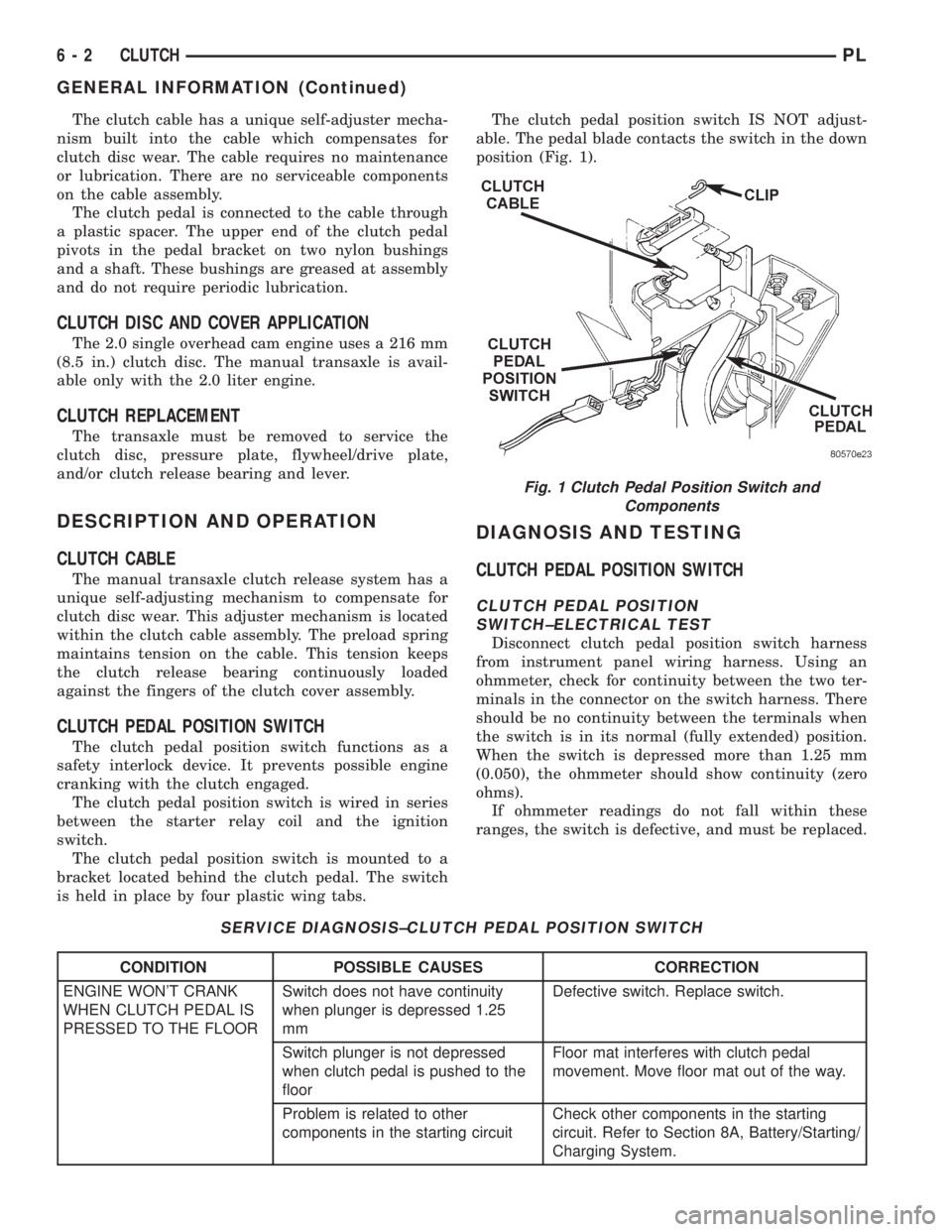
The clutch pedal position switch is mounted to a
bracket located behind the clutch pedal. The switch
is held in place by four plastic wing tabs.The clutch pedal position switch IS NOT adjust-
able. The pedal blade contacts the switch in the down
position (Fig. 1).
DIAGNOSIS AND TESTING
CLUTCH PEDAL POSITION SWITCH
CLUTCH PEDAL POSITION
SWITCH±ELECTRICAL TEST
Disconnect clutch pedal position switch harness
from instrument panel wiring harness. Using an
ohmmeter, check for continuity between the two ter-
minals in the connector on the switch harness. There
should be no continuity between the terminals when
the switch is in its normal (fully extended) position.
When the switch is depressed more than 1.25 mm
(0.050), the ohmmeter should show continuity (zero
ohms).
If ohmmeter readings do not fall within these
ranges, the switch is defective, and must be replaced.
SERVICE DIAGNOSIS±CLUTCH PEDAL POSITION SWITCH
CONDITION POSSIBLE CAUSES CORRECTION
ENGINE WON'T CRANK
WHEN CLUTCH PEDAL IS
PRESSED TO THE FLOORSwitch does not have continuity
when plunger is depressed 1.25
mmDefective switch. Replace switch.
Switch plunger is not depressed
when clutch pedal is pushed to the
floorFloor mat interferes with clutch pedal
movement. Move floor mat out of the way.
Problem is related to other
components in the starting circuitCheck other components in the starting
circuit. Refer to Section 8A, Battery/Starting/
Charging System.
Fig. 1 Clutch Pedal Position Switch and
Components
6 - 2 CLUTCHPL
GENERAL INFORMATION (Continued)
Page 178 of 1200
(4) Guide cable through slot in transaxle and dis-
connect cable from release lever.
(5) Disconnect clutch cable up-stop/spacer with
cable strand from clutch pedal.
NOTE: Depressing the clutch pedal provides
access to the clutch cable strand. Disconnect the
cable up-stop/spacer from the pedal pivot pin by
removing the snap ring at the top of the clutch
pedal. Wedge a flat±blade pry tool between the pin
and the retaining tab. While holding the tab slightly
separated from the pin, pull the up-stop/spacer off
the pedal. Now remove the cable end from the up-
stop/spacer.
CAUTION: Do not pull on the clutch cable to
remove it from the dash panel. Damage to the cable
self-adjuster may occur.
(6) Remove the cable from the cable routing tube
and clutch bracket.
INSTALLATION
(1) Insert the self±adjuster mechanism end of the
clutch cable through the cable routing tube and into
the bracket.
(2) Be sure the self±adjuster is firmly seated
against the clutch bracket to ensure proper adjuster
mechanism function.
(3) Connect the clutch cable to the up-stop/spacer.
(4) Connect the up-stop/spacer to the clutch pedal.
(5) Install snap ring to hold up-stop spacer in
place.
(6) Perform the Adjuster Mechanism Function
Check before finishing installation.
ADJUSTER MECHANISM FUNCTION CHECK
(1) With slight pressure, pull the clutch release
lever end of the cable to draw the cable taut. Push
the clutch cable housing toward the dash panel (With
less than 25 lbs. of effort, the cable housing should
move 30-50mm.). This indicates proper adjuster
mechanism function. If the cable does not adjust,
determine if the mechanism is properly seated on the
bracket tube.
(2) If the adjust mechanism functions properly,
guide the cable through the slot in the transaxle
housing. Connect cable to release lever, seating the
cupped washer securely on lever tangs.
(3) Pull back on clutch cable housing and insert
into transaxle housing (Fig. 2).
(4) Reinstall cable inspection cover and PDC.
Check clutch pedal position switch operation.
CLUTCH PEDAL POSITION SWITCH
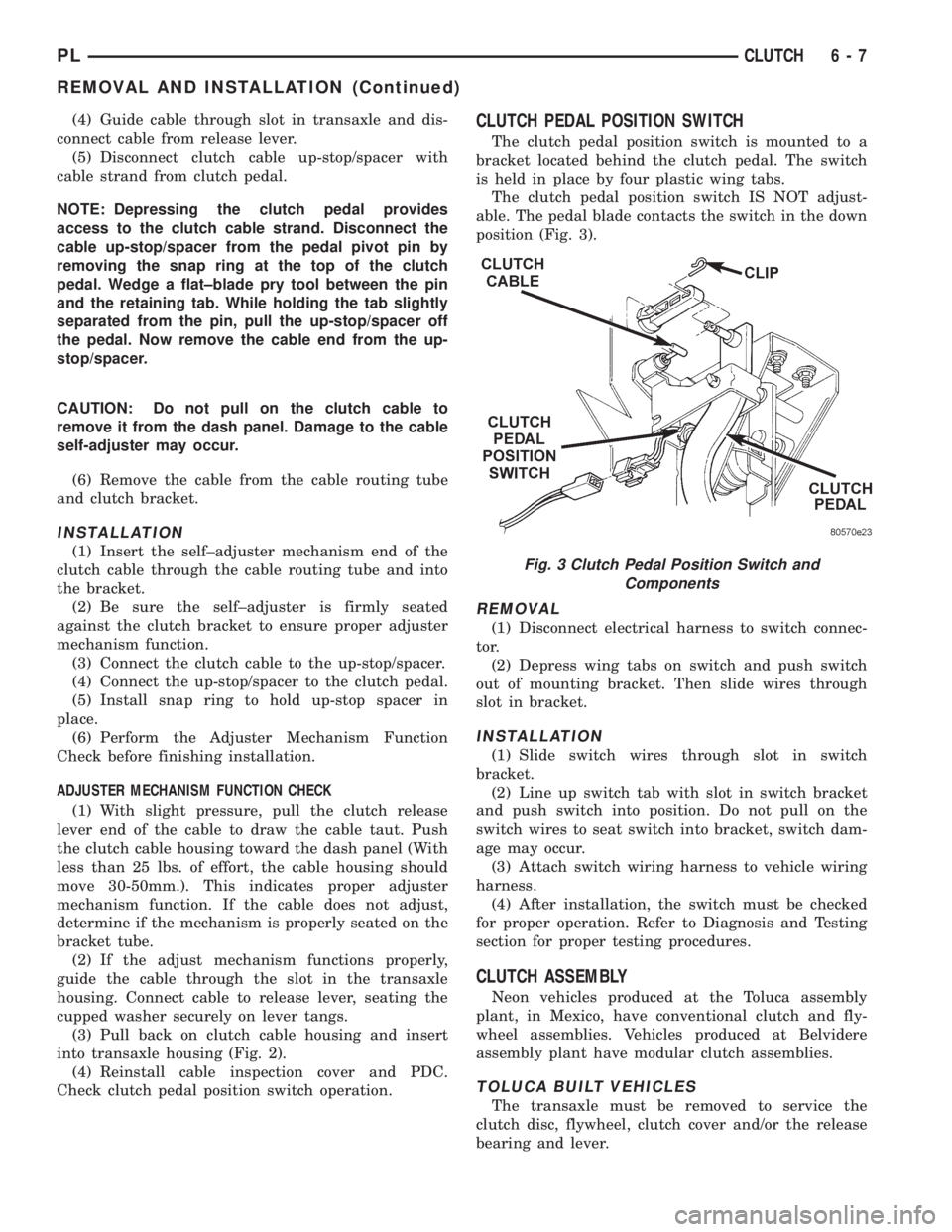
The clutch pedal position switch is mounted to a
bracket located behind the clutch pedal. The switch
is held in place by four plastic wing tabs.
The clutch pedal position switch IS NOT adjust-
able. The pedal blade contacts the switch in the down
position (Fig. 3).
REMOVAL
(1) Disconnect electrical harness to switch connec-
tor.
(2) Depress wing tabs on switch and push switch
out of mounting bracket. Then slide wires through
slot in bracket.
INSTALLATION
(1) Slide switch wires through slot in switch
bracket.
(2) Line up switch tab with slot in switch bracket
and push switch into position. Do not pull on the
switch wires to seat switch into bracket, switch dam-
age may occur.
(3) Attach switch wiring harness to vehicle wiring
harness.
(4) After installation, the switch must be checked
for proper operation. Refer to Diagnosis and Testing
section for proper testing procedures.
CLUTCH ASSEMBLY
Neon vehicles produced at the Toluca assembly
plant, in Mexico, have conventional clutch and fly-
wheel assemblies. Vehicles produced at Belvidere
assembly plant have modular clutch assemblies.
TOLUCA BUILT VEHICLES
The transaxle must be removed to service the
clutch disc, flywheel, clutch cover and/or the release
bearing and lever.
Fig. 3 Clutch Pedal Position Switch and
Components
PLCLUTCH 6 - 7
REMOVAL AND INSTALLATION (Continued)
Page 180 of 1200
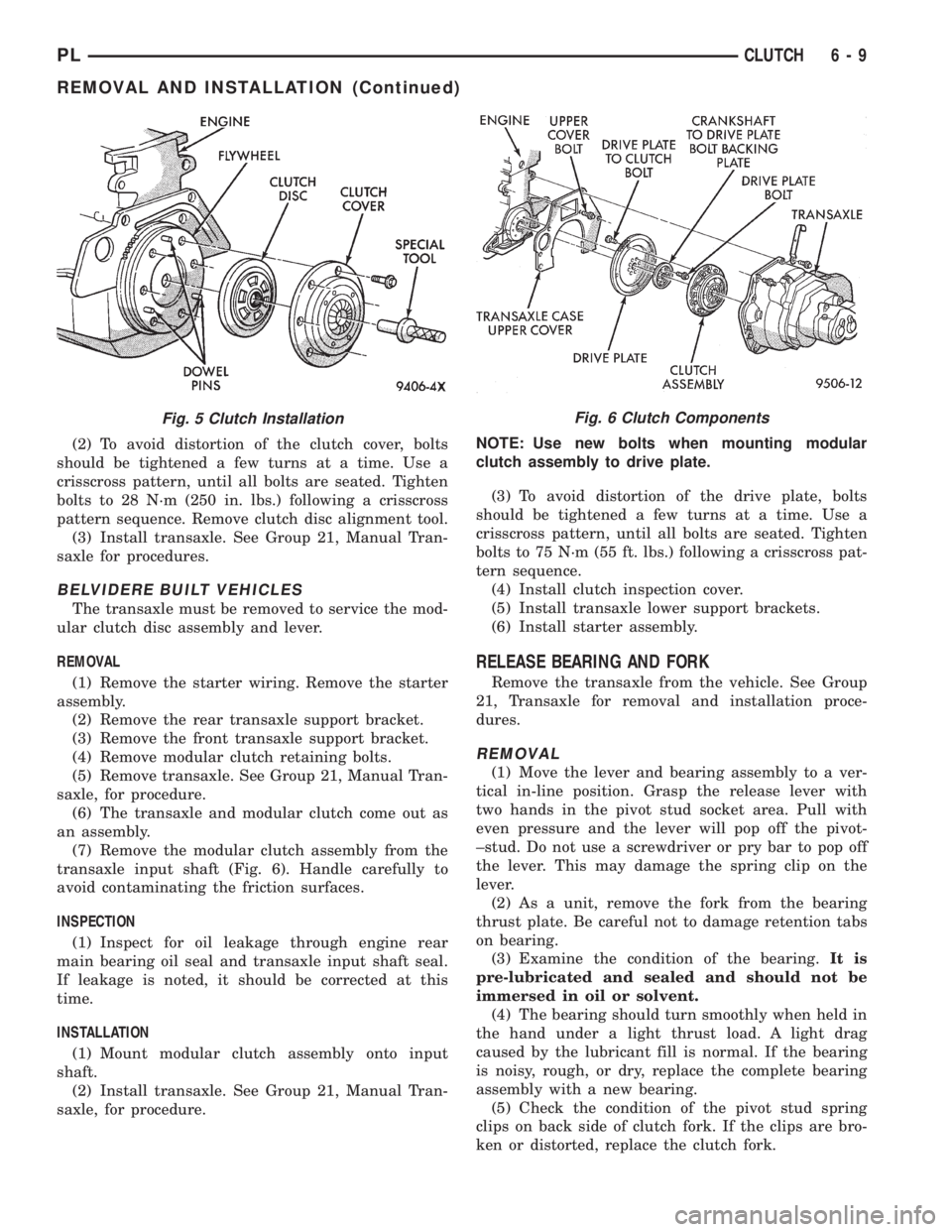
(2) To avoid distortion of the clutch cover, bolts
should be tightened a few turns at a time. Use a
crisscross pattern, until all bolts are seated. Tighten
bolts to 28 N´m (250 in. lbs.) following a crisscross
pattern sequence. Remove clutch disc alignment tool.
(3) Install transaxle. See Group 21, Manual Tran-
saxle for procedures.
BELVIDERE BUILT VEHICLES
The transaxle must be removed to service the mod-
ular clutch disc assembly and lever.
REMOVAL
(1) Remove the starter wiring. Remove the starter
assembly.
(2) Remove the rear transaxle support bracket.
(3) Remove the front transaxle support bracket.
(4) Remove modular clutch retaining bolts.
(5) Remove transaxle. See Group 21, Manual Tran-
saxle, for procedure.
(6) The transaxle and modular clutch come out as
an assembly.
(7) Remove the modular clutch assembly from the
transaxle input shaft (Fig. 6). Handle carefully to
avoid contaminating the friction surfaces.
INSPECTION
(1) Inspect for oil leakage through engine rear
main bearing oil seal and transaxle input shaft seal.
If leakage is noted, it should be corrected at this
time.
INSTALLATION
(1) Mount modular clutch assembly onto input
shaft.
(2) Install transaxle. See Group 21, Manual Tran-
saxle, for procedure.NOTE: Use new bolts when mounting modular
clutch assembly to drive plate.
(3) To avoid distortion of the drive plate, bolts
should be tightened a few turns at a time. Use a
crisscross pattern, until all bolts are seated. Tighten
bolts to 75 N´m (55 ft. lbs.) following a crisscross pat-
tern sequence.
(4) Install clutch inspection cover.
(5) Install transaxle lower support brackets.
(6) Install starter assembly.
RELEASE BEARING AND FORK
Remove the transaxle from the vehicle. See Group
21, Transaxle for removal and installation proce-
dures.
REMOVAL
(1) Move the lever and bearing assembly to a ver-
tical in-line position. Grasp the release lever with
two hands in the pivot stud socket area. Pull with
even pressure and the lever will pop off the pivot-
±stud. Do not use a screwdriver or pry bar to pop off
the lever. This may damage the spring clip on the
lever.
(2) As a unit, remove the fork from the bearing
thrust plate. Be careful not to damage retention tabs
on bearing.
(3) Examine the condition of the bearing.It is
pre-lubricated and sealed and should not be
immersed in oil or solvent.
(4) The bearing should turn smoothly when held in
the hand under a light thrust load. A light drag
caused by the lubricant fill is normal. If the bearing
is noisy, rough, or dry, replace the complete bearing
assembly with a new bearing.
(5) Check the condition of the pivot stud spring
clips on back side of clutch fork. If the clips are bro-
ken or distorted, replace the clutch fork.
Fig. 6 Clutch ComponentsFig. 5 Clutch Installation
PLCLUTCH 6 - 9
REMOVAL AND INSTALLATION (Continued)
Page 181 of 1200
INSTALLATION
(1) The pivot ball pocket in the fork is Teflon
coated and should be installed WITHOUT any lubri-
cant such as grease. Using grease will break down
the Teflon coating. Be sure the ball stud and fork
pocket are clean of contamination and dirt.
(2) Assemble the fork to the bearing. The small
pegs on the bearing must go over the fork arms.
(3) Slide the bearing and fork assembly onto the
input shaft bearing retainer, as a unit.
(4) Snap the clutch fork onto the pivot ball.
(5) Reinstall transaxle assembly. Refer to Group
21, Transaxle for further information.
CLEANING AND INSPECTION
CLUTCH CONTAMINATION
Fluid contamination is a frequent cause of clutch
malfunctions. Oil, grease, water, or other fluids on
the clutch contact surfaces will cause faulty opera-
tion.
During inspection, note if any components are con-
taminated. Look for evidence of oil, grease, or water/
road splash on clutch components.
OIL CONTAMINATION
Oil contamination indicates a leak at the rear main
seal and/or transaxle input shaft. Oil leaks produce a
residue of oil on the transaxle housing interior, clutch
cover and flywheel. Heat buildup caused by slippage
can bake the oil residue onto the components. This
glaze-like residue ranges in color from amber to
black.
GREASE CONTAMINATION
Grease contamination is usually a product of over-
lubrication. During clutch service, apply only a small
amount of grease to the input shaft splines. Excess
grease may be thrown off during operation, contami-
nating the disc.
ROAD SPLASH/WATER CONTAMINATION
Road splash contamination is usually caused by
driving the vehicle through deep water puddles.
Water can be forced into the clutch housing, causing
clutch components to become contaminated. Facing of
disc will absorb moisture and bond to the flywheel
and/or, pressure plate, if vehicle is allowed to stand
for some time before use. If this condition occurs,
replacement of clutch assembly may be required.
Drive the vehicle until normal clutch operating tem-
perature has been obtained. This will dry off disc
assembly, pressure plate, and flywheel.
CLEANING PRECAUTIONS
Condensation from steam vapors tend to accumu-
late on the internal clutch mechanism when the vehi-
cle is steam cleaned. Facing of disc will absorb
moisture and will bond to flywheel and/or pressure
plate, if vehicle is allowed to stand for some time
before use. If this condition occurs, it may require
replacement of clutch assembly. After cleaning, drive
the vehicle to its normal clutch operating tempera-
ture. This will dry off disc assembly, pressure plate,
and flywheel.
ADJUSTMENTS
CLUTCH CABLE
The manual transaxle clutch release system has a
unique self-adjusting mechanism to compensate for
clutch disc wear. This adjuster mechanism is located
within the clutch cable assembly. The preload spring
maintains tension on the cable. This tension keeps
the clutch release bearing continuously loaded
against the fingers of the clutch cover assembly.
ADJUSTER MECHANISM FUNCTION CHECK
(1) With slight pressure, pull the clutch release
lever end of the cable to draw the cable taut. Push
the clutch cable housing toward the dash panel. With
less than 25 lbs. of effort the cable housing should
move 30-50mm. This indicates proper adjuster mech-
anism function. If the cable does not adjust, deter-
mine if the mechanism is properly seated on the
bracket.
(2) If the adjust mechanism functions properly,
guide the cable through the slot in the transaxle
housing. Connect cable to release lever, seating the
cupped washer securely on lever tangs.
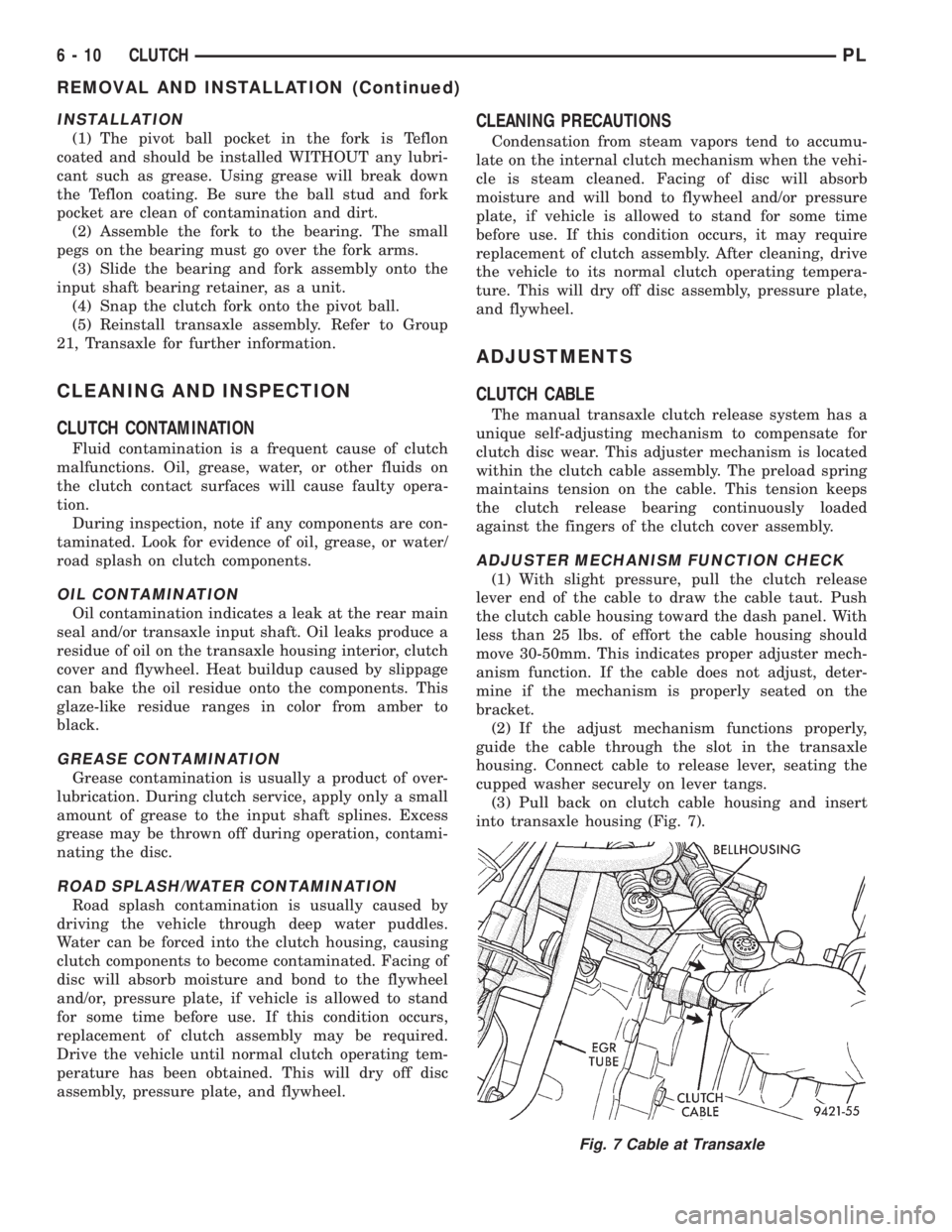
(3) Pull back on clutch cable housing and insert
into transaxle housing (Fig. 7).
Fig. 7 Cable at Transaxle
6 - 10 CLUTCHPL
REMOVAL AND INSTALLATION (Continued)