tow DODGE NEON 2000 Service Service Manual
[x] Cancel search | Manufacturer: DODGE, Model Year: 2000, Model line: NEON, Model: DODGE NEON 2000Pages: 1285, PDF Size: 29.42 MB
Page 246 of 1285
TORQUE SPECIFICATION
DESCRIPTION TORQUE
Camshaft Position Sensor Screw.......... 9N´m
(80 in. lbs.)
SOHC Cam Magnet/Target . . . 3.4 N´m (30 in. lbs.)
Crankshaft Position Sensor Screw........ 9N´m
(80 in. lbs.)
Coolant Temp. Sensor.....18.6 N´m (165 in. lbs.)
Ignition Coil to Cyl. Head . . 11.9 N´m (105 in. lbs.)
Knock Sensor.............. 10N´m(90in.lbs.)
MAP/IAT Sensor Plastic Manifold......... 2N´m
(20 in. lbs.)
Spark Plugs................ 28N´m(20ft.lbs.)
SPARK PLUG CABLE RESISTANCEÐSOHC
SPARK PLUG
Engine Spark Plug Gap Thread Size
2.0L RC9YC 0.033 TO 0.038 14mm (3/4 in.) reach
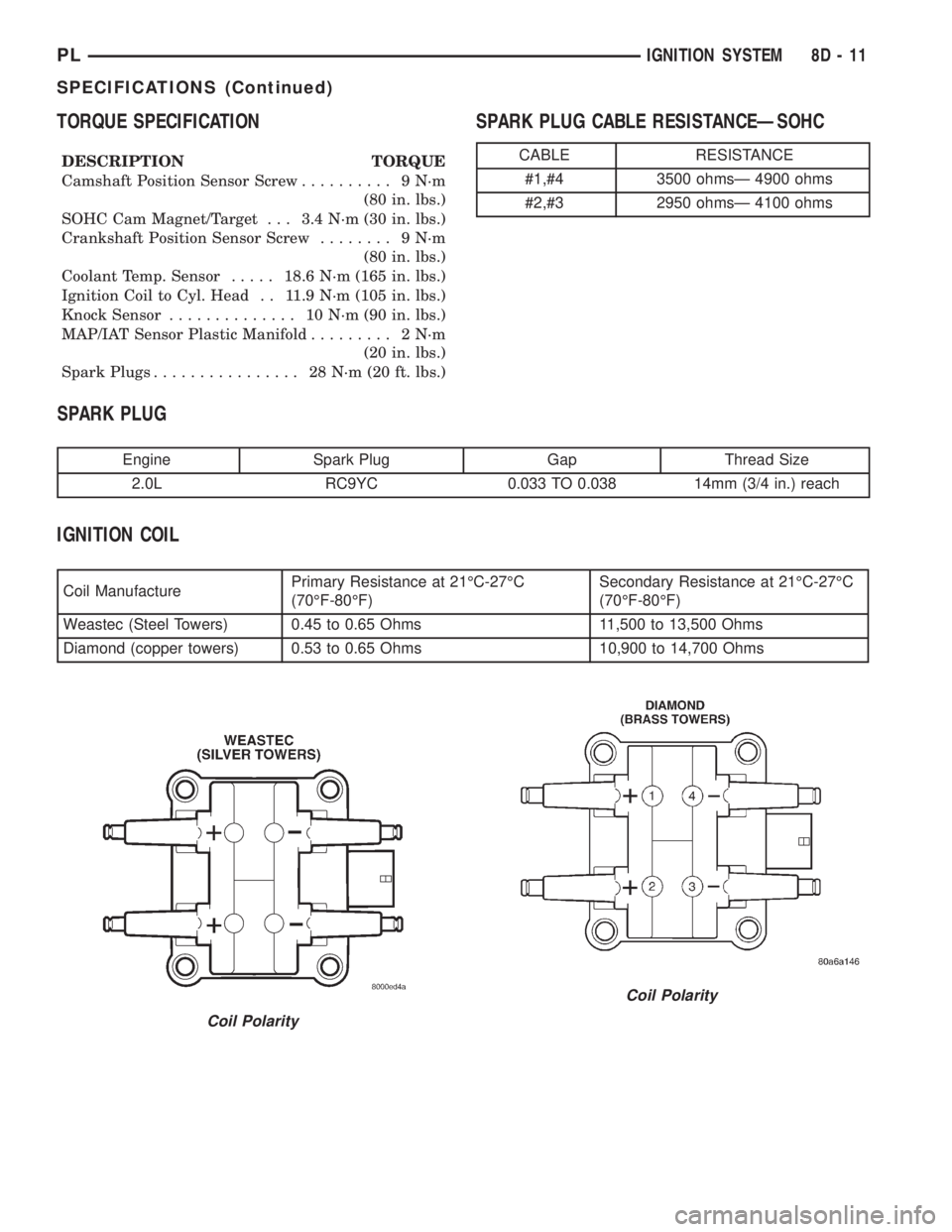
IGNITION COIL
Coil ManufacturePrimary Resistance at 21ÉC-27ÉC
(70ÉF-80ÉF)Secondary Resistance at 21ÉC-27ÉC
(70ÉF-80ÉF)
Weastec (Steel Towers) 0.45 to 0.65 Ohms 11,500 to 13,500 Ohms
Diamond (copper towers) 0.53 to 0.65 Ohms 10,900 to 14,700 Ohms
CABLE RESISTANCE
#1,#4 3500 ohmsÐ 4900 ohms
#2,#3 2950 ohmsÐ 4100 ohms
Coil Polarity
Coil Polarity
PLIGNITION SYSTEM 8D - 11
SPECIFICATIONS (Continued)
Page 270 of 1285
AUDIO SYSTEM
TABLE OF CONTENTS
page page
GENERAL INFORMATION
INTRODUCTION..........................1
DESCRIPTION AND OPERATION
INTERFERENCE ELIMINATION...............1
DIAGNOSIS AND TESTING
AUDIO DIAGNOSTIC TEST PROCEDURES......1
TESTING................................1
BENCH TEST FOR ANTENNA MALFUNCTION...7REMOVAL AND INSTALLATION
CD CHANGER............................7
FRONT DOOR SPEAKER....................8
INSTRUMENT PANEL SPEAKER(S)...........8
MAST and ANTENNA ASSEMBLY.............8
RADIO..................................9
REAR SHELF SPEAKER(S).................10
GENERAL INFORMATION
INTRODUCTION
Operating instructions for the factory installed
audio systems can be found in the Owner's Manual
provided with the vehicle.
The vehicles are equipped with an Interior (Igni-
tion Off Draw) fuse in the Power Distribution Center
located in the engine compartment. After the Interior
(IOD) fuse or battery has been disconnected the clock
will require resetting. The radio station presets have
a nonvolatile memory and will retain the preset sta-
tions after a battery disconnect.
The available radio options are:
²AM/FM Stereo Cassette w/Clock
²AM/FM/CD
²AM/FM Cassette w/CD Changer Controls and
Display
²CD/4 Disc Changer - In-Dash (used w/Radio CD
Changer Controls)
DESCRIPTION AND OPERATION
INTERFERENCE ELIMINATION
The radio utilizes a ground wire plugged on to a
blade terminal and is bolted to the radio chassis.
Both connector and terminal should be securely
attached. The engine has two separate ground straps
to suppress ignition noise which may interfere with
radio reception.
²Left engine mount clip on strap
²Engine to shock tower reinforcement
Inductive type spark plug cables in the high ten-
sion circuit of the ignition system complete the inter-
ference suppression. Faulty or deteriorated spark
plug wires should be replaced.
DIAGNOSIS AND TESTING
AUDIO DIAGNOSTIC TEST PROCEDURES
CAUTION: The CD player will only operate between
approximate temperatures of -23ÉC and +65ÉC (-10ÉF
and +145ÉF).
Whenever a radio malfunction occurs;
(1) First check FUSES:
(a) Power Distribution Center (PDC), Interior
lamp fuse, M1 - Radio Memory Feed
(b) Fuse Block:
(I) Fuse 12, Illumination in the fuse block
(II) Fuse 16, Ignition feed in the fuse block
NOTE: The vehicles are shipped with the INTERIOR
LAMP fuse disconnected.
(2) Verify, the radio wire harness are properly con-
nected before starting normal diagnosis and repair
procedures. Refer to Audio Diagnostic Charts and/or
Group 8W, Wiring Diagrams, Radio Section.
TESTING
The antenna has a short cable which connects into
the instrument panel harness. The connection is
made on the right side of the instrument panel.
Antenna performance may be tested by substitut-
ing a known good antenna. It is also possible to
check short or open circuits with an ohmmeter or
continuity light once the antenna cable is discon-
nected from the radio as follows:
(1) Continuity should be present between the
antenna mast and radio end pin of antenna cable
plug (Fig. 1).
(2) No continuity should be observed or a very
high resistance of several megohms between the
ground shell of the connector and radio end pin.
PLAUDIO SYSTEM 8F - 1
Page 296 of 1285
REMOVAL AND INSTALLATION
COMBINATION FLASHER
The flasher is mounted to the back side of the
multi-function switch (Fig. 2). To gain access the
upper steering column shroud must be removed.
Refer to Group 8E Instrument Panel Systems, Steer-
ing Column Shroud Removal and Installation. The
flasher can be removed by pulling it toward the
instrument cluster (forward). The flasher is serviced
separately from the multi-function switch.
MULTI-FUNCTION SWITCH
REMOVAL
(1) Disconnect and isolate the battery negative
cable (Fig. 6).
(2) Remove both upper and lower steering column
shrouds. Refer to Group 8E Instrument Panel Sys-
tems, Steering Column Shroud Removal and Instal-
lation.
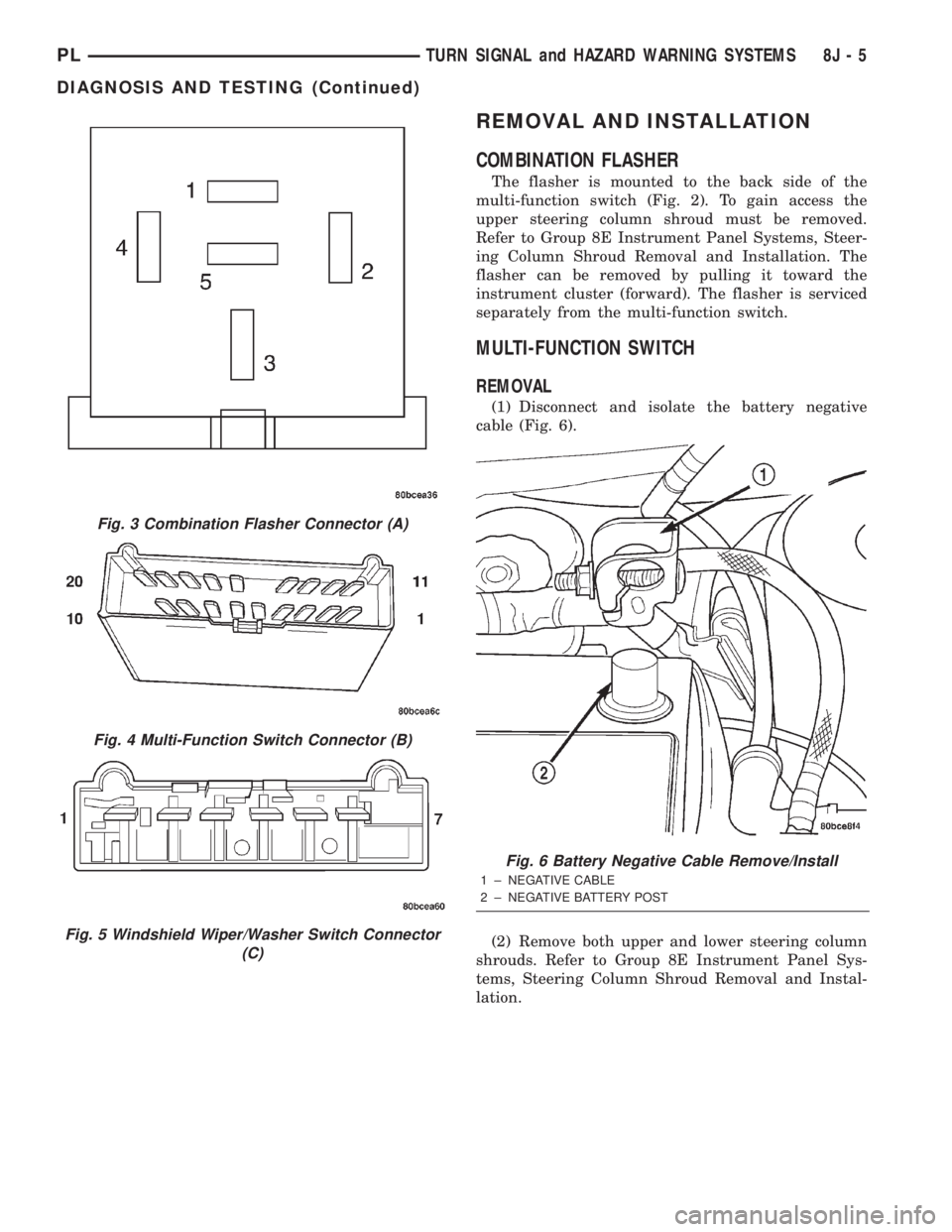
Fig. 3 Combination Flasher Connector (A)
Fig. 4 Multi-Function Switch Connector (B)
Fig. 5 Windshield Wiper/Washer Switch Connector
(C)
Fig. 6 Battery Negative Cable Remove/Install
1 ± NEGATIVE CABLE
2 ± NEGATIVE BATTERY POST
PLTURN SIGNAL and HAZARD WARNING SYSTEMS 8J - 5
DIAGNOSIS AND TESTING (Continued)
Page 348 of 1285
DIAGNOSIS AND TESTING
AIRBAG SYSTEM
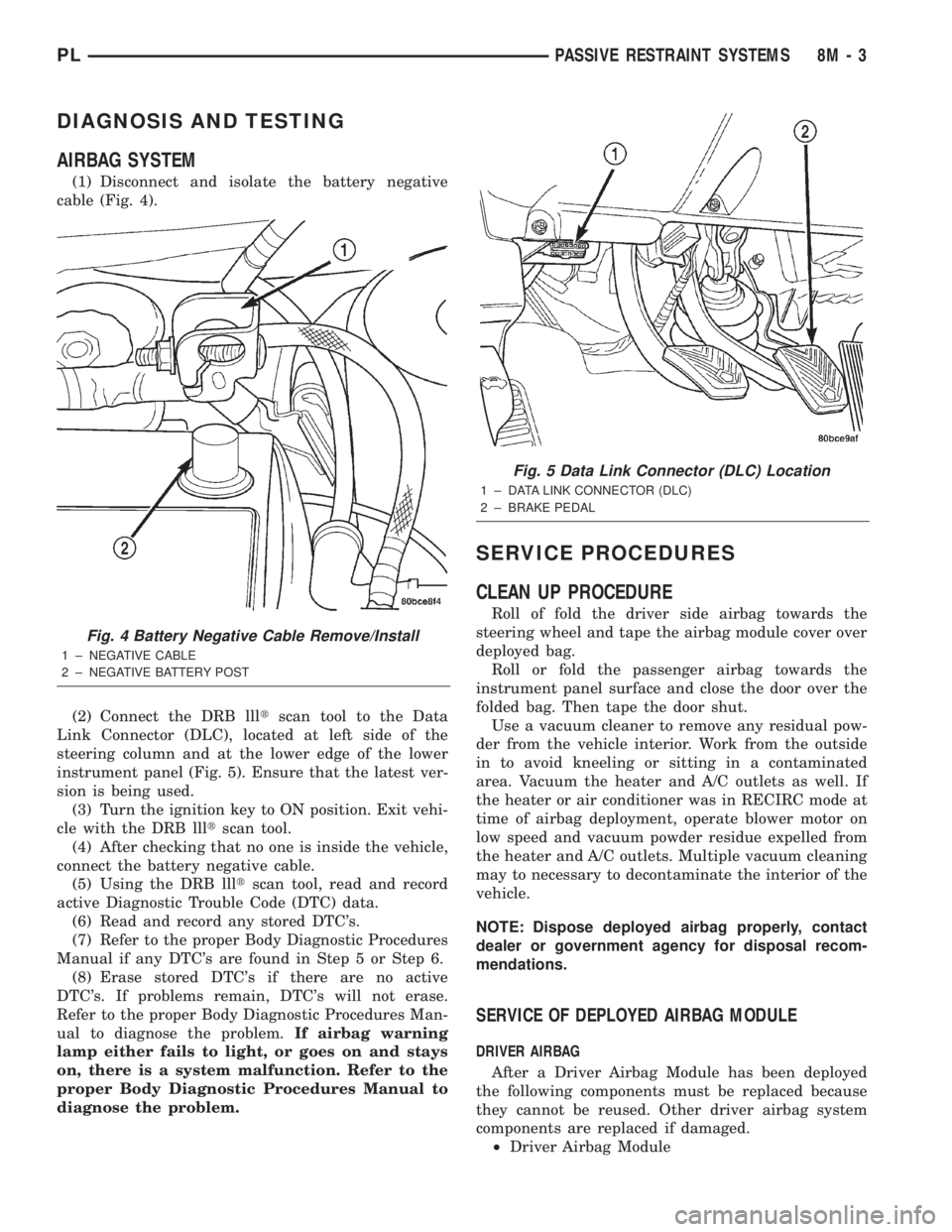
(1) Disconnect and isolate the battery negative
cable (Fig. 4).
(2) Connect the DRB llltscan tool to the Data
Link Connector (DLC), located at left side of the
steering column and at the lower edge of the lower
instrument panel (Fig. 5). Ensure that the latest ver-
sion is being used.
(3) Turn the ignition key to ON position. Exit vehi-
cle with the DRB llltscan tool.
(4) After checking that no one is inside the vehicle,
connect the battery negative cable.
(5) Using the DRB llltscan tool, read and record
active Diagnostic Trouble Code (DTC) data.
(6) Read and record any stored DTC's.
(7) Refer to the proper Body Diagnostic Procedures
Manual if any DTC's are found in Step 5 or Step 6.
(8) Erase stored DTC's if there are no active
DTC's. If problems remain, DTC's will not erase.
Refer to the proper Body Diagnostic Procedures Man-
ual to diagnose the problem.If airbag warning
lamp either fails to light, or goes on and stays
on, there is a system malfunction. Refer to the
proper Body Diagnostic Procedures Manual to
diagnose the problem.
SERVICE PROCEDURES
CLEAN UP PROCEDURE
Roll of fold the driver side airbag towards the
steering wheel and tape the airbag module cover over
deployed bag.
Roll or fold the passenger airbag towards the
instrument panel surface and close the door over the
folded bag. Then tape the door shut.
Use a vacuum cleaner to remove any residual pow-
der from the vehicle interior. Work from the outside
in to avoid kneeling or sitting in a contaminated
area. Vacuum the heater and A/C outlets as well. If
the heater or air conditioner was in RECIRC mode at
time of airbag deployment, operate blower motor on
low speed and vacuum powder residue expelled from
the heater and A/C outlets. Multiple vacuum cleaning
may to necessary to decontaminate the interior of the
vehicle.
NOTE: Dispose deployed airbag properly, contact
dealer or government agency for disposal recom-
mendations.
SERVICE OF DEPLOYED AIRBAG MODULE
DRIVER AIRBAG
After a Driver Airbag Module has been deployed
the following components must be replaced because
they cannot be reused. Other driver airbag system
components are replaced if damaged.
²Driver Airbag Module
Fig. 4 Battery Negative Cable Remove/Install
1 ± NEGATIVE CABLE
2 ± NEGATIVE BATTERY POST
Fig. 5 Data Link Connector (DLC) Location
1 ± DATA LINK CONNECTOR (DLC)
2 ± BRAKE PEDAL
PLPASSIVE RESTRAINT SYSTEMS 8M - 3
Page 353 of 1285
INSTALLATION
For installation, reverse the above procedures.
Ensure that the red locking tab is in the lock position
after installing the connector. Tighten trim screws to
2 N´m (20 in. lbs.) torque. Tighten the three module
retaining nuts to 22 to 34 N´m (200 to 300 in. lbs.)
torque. Do not connect battery negative cable. Refer
to Diagnosis and Testing for Airbag System Test pro-
cedures.
DEPLOYED MODULE
REMOVAL
When removing a deployed module, rubber gloves,
eye protection, and a long-sleeved shirt should be
worn, as there may be deposits on the surface which
could irritate the skin and eyes.
(1) Roll/fold airbag towards instrument panel.
(2) Close door over folded airbag and tape door
closed.
(3) Disconnect and isolate the battery negative
cable (Fig. 4).
(4) Remove instrument panel top cover. Refer to
Group 8E Instrument Panel Systems, Instrument
Panel Top Cover Removal and Installation.
(5) Remove three screws to glove box door and
remove door from instrument panel.
(6) Remove three passenger airbag cover screws
attaching cover to top of instrument panel (Fig. 9).
(7) Remove two passenger airbag cover screws
attaching cover to front lower instrument panel.
(8) Remove three module attaching nuts from the
support structure.
(9) Lift module up until the wire connector is visi-
ble and disconnect the 4-way wire connector from
module. Unlock the red locking tab and compress
lock to release the connector (Fig. 10).
INSTALLATION
For installation, reverse the above procedures.
Ensure that the red locking tab is in the lock position
after installing the connector. Tighten trim screws to
2 N´m (20 in. lbs.) torque. Tighten the module nuts to
22 to 34 N´m (200 to 300 in. lbs.) torque. Do not con-
nect battery negative cable. Refer to Diagnosis and
Testing for Airbag System Test procedures.
STEERING WHEEL
WARNING: DISCONNECT AND ISOLATE THE BAT-
TERY NEGATIVE (GROUND) CABLE BEFORE
BEGINNING ANY AIRBAG SYSTEM COMPONENT
REMOVAL OR INSTALLATION PROCEDURE. THIS
WILL DISABLE THE AIRBAG SYSTEM. FAILURE TO
DISCONNECT BATTERY COULD RESULT IN ACCI-DENTAL AIRBAG DEPLOYMENT AND POSSIBLE
PERSONAL INJURY.
ALLOW SYSTEM CAPACITOR TO DISCHARGE
FOR 1 MINUTE BEFORE REMOVING ANY AIRBAG
COMPONENTS.
REMOVAL
(1) Adjust the steering wheel so that the tires are
in the straight ahead position. Then:
(a) Rotate the steering wheel half turn (180
degrees) to the right (clockwise).
(b) Lock column with the ignition cylinder lock.
(2) Disconnect and isolate the battery negative
cable (Fig. 4).
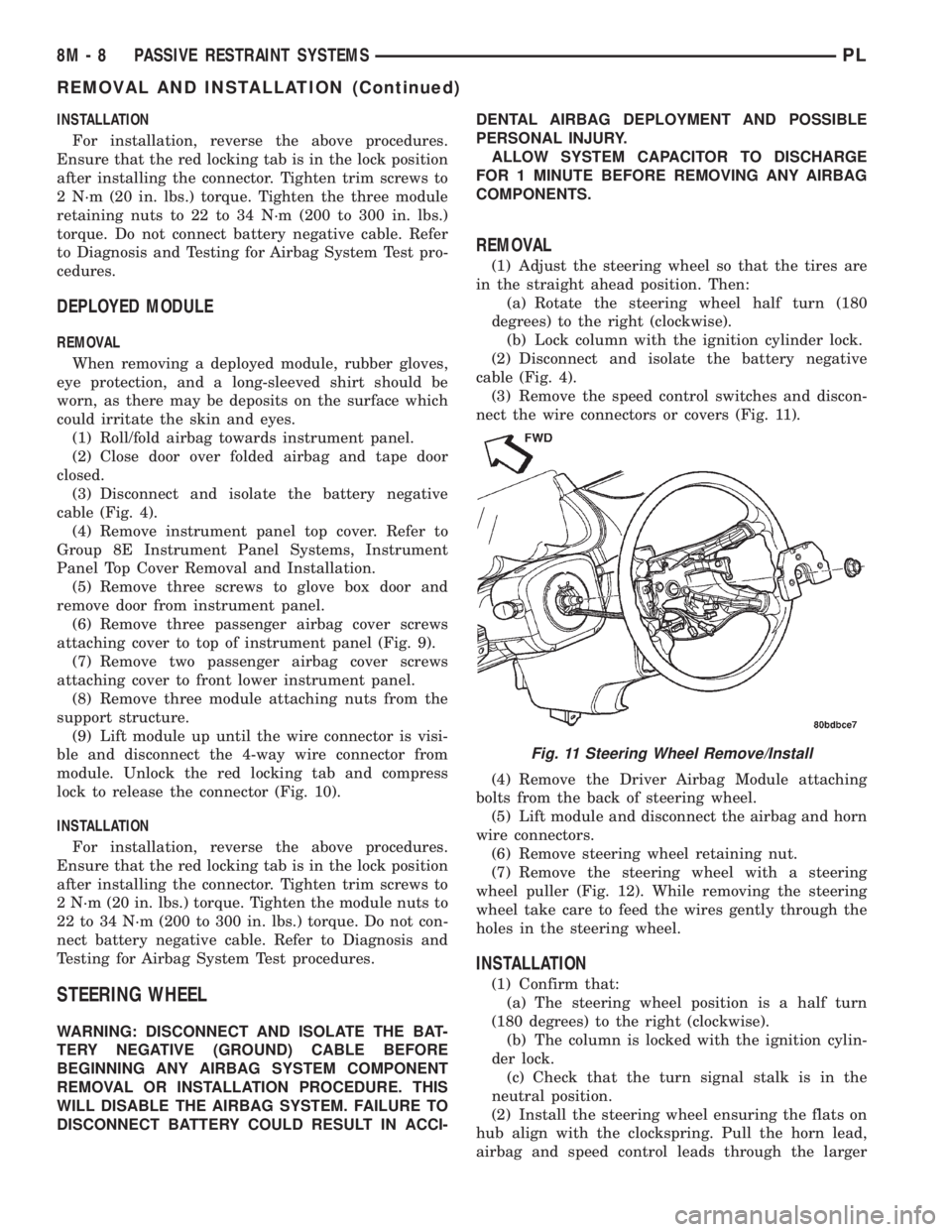
(3) Remove the speed control switches and discon-
nect the wire connectors or covers (Fig. 11).
(4) Remove the Driver Airbag Module attaching
bolts from the back of steering wheel.
(5) Lift module and disconnect the airbag and horn
wire connectors.
(6) Remove steering wheel retaining nut.
(7) Remove the steering wheel with a steering
wheel puller (Fig. 12). While removing the steering
wheel take care to feed the wires gently through the
holes in the steering wheel.
INSTALLATION
(1) Confirm that:
(a) The steering wheel position is a half turn
(180 degrees) to the right (clockwise).
(b) The column is locked with the ignition cylin-
der lock.
(c) Check that the turn signal stalk is in the
neutral position.
(2) Install the steering wheel ensuring the flats on
hub align with the clockspring. Pull the horn lead,
airbag and speed control leads through the larger
Fig. 11 Steering Wheel Remove/Install
8M - 8 PASSIVE RESTRAINT SYSTEMSPL
REMOVAL AND INSTALLATION (Continued)
Page 356 of 1285
ELECTRICALLY HEATED SYSTEMS
TABLE OF CONTENTS
page page
DESCRIPTION AND OPERATION
REAR WINDOW DEFOGGER SYSTEM.........1
REAR WINDOW DEFOGGER SWITCH.........1
DIAGNOSIS AND TESTING
GRID LINES.............................2
REAR WINDOW DEFOGGER SWITCH.........2REAR WINDOW DEFOGGER SYSTEM.........2
SERVICE PROCEDURES
GRID LINE AND TERMINAL REPAIR..........3
REMOVAL AND INSTALLATION
REAR WINDOW DEFOGGER SWITCH.........4
DESCRIPTION AND OPERATION
REAR WINDOW DEFOGGER SYSTEM
For proper operation of the Rear Window Defogger
system refer to the Owner's Manual.
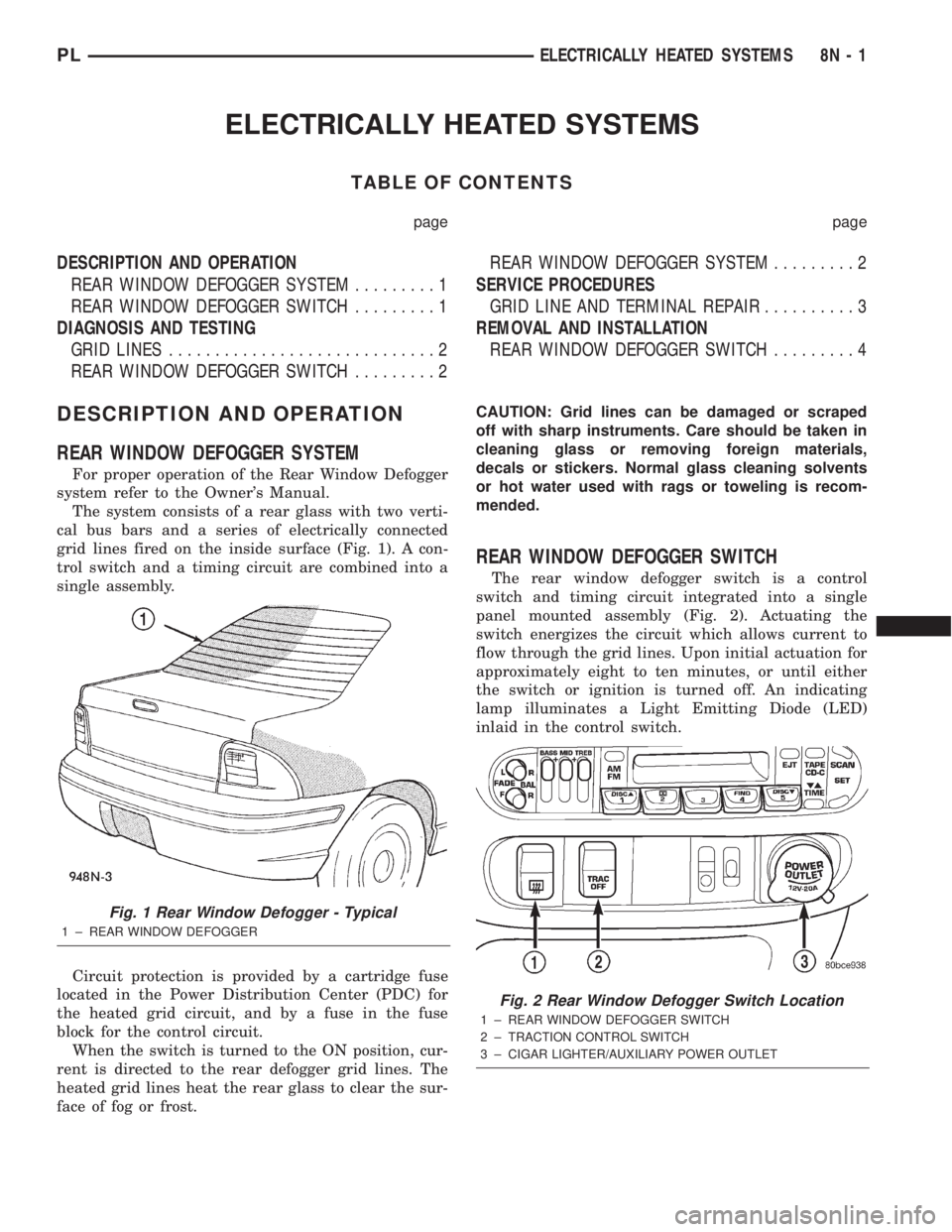
The system consists of a rear glass with two verti-
cal bus bars and a series of electrically connected
grid lines fired on the inside surface (Fig. 1). A con-
trol switch and a timing circuit are combined into a
single assembly.
Circuit protection is provided by a cartridge fuse
located in the Power Distribution Center (PDC) for
the heated grid circuit, and by a fuse in the fuse
block for the control circuit.
When the switch is turned to the ON position, cur-
rent is directed to the rear defogger grid lines. The
heated grid lines heat the rear glass to clear the sur-
face of fog or frost.CAUTION: Grid lines can be damaged or scraped
off with sharp instruments. Care should be taken in
cleaning glass or removing foreign materials,
decals or stickers. Normal glass cleaning solvents
or hot water used with rags or toweling is recom-
mended.
REAR WINDOW DEFOGGER SWITCH
The rear window defogger switch is a control
switch and timing circuit integrated into a single
panel mounted assembly (Fig. 2). Actuating the
switch energizes the circuit which allows current to
flow through the grid lines. Upon initial actuation for
approximately eight to ten minutes, or until either
the switch or ignition is turned off. An indicating
lamp illuminates a Light Emitting Diode (LED)
inlaid in the control switch.
Fig. 1 Rear Window Defogger - Typical
1 ± REAR WINDOW DEFOGGER
Fig. 2 Rear Window Defogger Switch Location
1 ± REAR WINDOW DEFOGGER SWITCH
2 ± TRACTION CONTROL SWITCH
3 ± CIGAR LIGHTER/AUXILIARY POWER OUTLET
PLELECTRICALLY HEATED SYSTEMS 8N - 1
Page 357 of 1285
DIAGNOSIS AND TESTING
GRID LINES
The horizontal grid lines and vertical bus bar lines
printed and fired on the inside surface of rear win-
dow glass (Fig. 5) comprise an electrical parallel cir-
cuit. The electrically conductive lines are composed of
a silver-ceramic material which when fired on glass
becomes bonded to the glass and is highly resistant
to abrasion. It is possible however, that a break may
occur in an individual grid line resulting in no cur-
rent flow through the line. To detect breaks in grid
lines the following procedure is required:
(1) Turn ignition ON and turn control switch to
ON. The LED should come on.
(2) Using a DC voltmeter with 0-15 volt range,
contact terminal (B) with the negative lead of the
voltmeter. With the positive lead of the voltmeter,
contact terminal (A) (Fig. 5). The voltmeter should
read 10-14 volts. A lower voltage reading indicates a
poor connection in the feed or the ground circuit.
(3) With the negative lead of the voltmeter, contact
a good body ground point. The voltage reading should
not change.
(4) Connect the negative lead of the voltmeter to
terminal (B) and touch each grid line at Mid-Point
with the positive lead. A reading of:
²Approximately 6 volts indicates the line is OK.
²0 volts indicates a break in line between Mid-
Point (C) and terminal (A).
²10-14 volts indicates a break between Mid-Point
(C) and terminal (B).
Move the lead toward the break and voltage will
change as soon as the break is crossed. Refer to (Fig.
5).
REAR WINDOW DEFOGGER SWITCH
The rear window defogger switch may be tested in
the vehicle or out of the vehicle, on the bench.
IN-VEHICLE TESTING
(1) Remove the switch from the instrument panel
but leave the switch connected, refer to Group 8E-In-
strument Panel and Systems, Auxiliary Switch Bezel
Removal and Installation.
(2) Turn the ignition switch ON.
(3) Using a voltmeter, check for battery voltage at
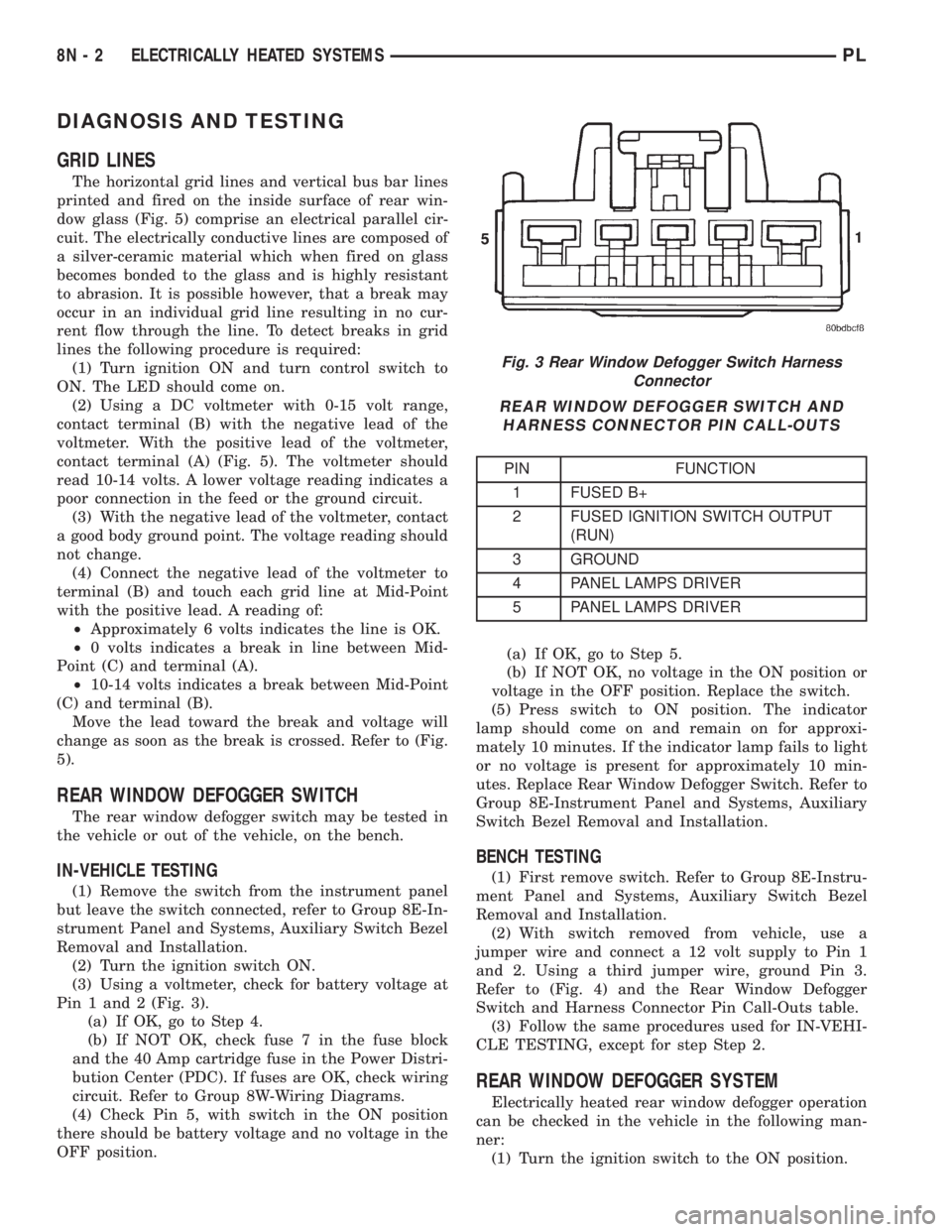
Pin 1 and 2 (Fig. 3).
(a) If OK, go to Step 4.
(b) If NOT OK, check fuse 7 in the fuse block
and the 40 Amp cartridge fuse in the Power Distri-
bution Center (PDC). If fuses are OK, check wiring
circuit. Refer to Group 8W-Wiring Diagrams.
(4) Check Pin 5, with switch in the ON position
there should be battery voltage and no voltage in the
OFF position.(a) If OK, go to Step 5.
(b) If NOT OK, no voltage in the ON position or
voltage in the OFF position. Replace the switch.
(5) Press switch to ON position. The indicator
lamp should come on and remain on for approxi-
mately 10 minutes. If the indicator lamp fails to light
or no voltage is present for approximately 10 min-
utes. Replace Rear Window Defogger Switch. Refer to
Group 8E-Instrument Panel and Systems, Auxiliary
Switch Bezel Removal and Installation.
BENCH TESTING
(1) First remove switch. Refer to Group 8E-Instru-
ment Panel and Systems, Auxiliary Switch Bezel
Removal and Installation.
(2) With switch removed from vehicle, use a
jumper wire and connect a 12 volt supply to Pin 1
and 2. Using a third jumper wire, ground Pin 3.
Refer to (Fig. 4) and the Rear Window Defogger
Switch and Harness Connector Pin Call-Outs table.
(3) Follow the same procedures used for IN-VEHI-
CLE TESTING, except for step Step 2.
REAR WINDOW DEFOGGER SYSTEM
Electrically heated rear window defogger operation
can be checked in the vehicle in the following man-
ner:
(1) Turn the ignition switch to the ON position.
Fig. 3 Rear Window Defogger Switch Harness
Connector
REAR WINDOW DEFOGGER SWITCH AND
HARNESS CONNECTOR PIN CALL-OUTS
PIN FUNCTION
1 FUSED B+
2 FUSED IGNITION SWITCH OUTPUT
(RUN)
3 GROUND
4 PANEL LAMPS DRIVER
5 PANEL LAMPS DRIVER
8N - 2 ELECTRICALLY HEATED SYSTEMSPL
Page 364 of 1285
POWER LOCK SYSTEMS
TABLE OF CONTENTS
page page
POWER DOOR LOCKS...................... 1REMOTE KEYLESS ENTRY (RKE).............. 4
POWER DOOR LOCKS
TABLE OF CONTENTS
page page
DESCRIPTION AND OPERATION
INTRODUCTION..........................1
POWER DOOR LOCKS.....................2
CHILD PROTECTION LOCKS................2
DOOR LOCK INHIBIT.......................2
DIAGNOSIS AND TESTING
DOOR LOCK MOTOR......................2
DOOR LOCK SWITCH......................2SERVICE PROCEDURES
DOUBLE ACTIVATION UNLOCK...............3
ROLLING DOOR LOCKS....................3
REMOVAL AND INSTALLATION
DOOR LOCK MOTOR/LATCH.................3
DOOR LOCK SWITCH......................3
REMOTE KEYLESS ENTRY (RKE) MODULE.....3
DESCRIPTION AND OPERATION
INTRODUCTION
All doors can be locked or unlocked electrically by
operating the switch on either front door panel.
When the door lock switch is activated the Remote
Keyless Entry Module provides power to the door
lock motors through relays internal to the module.
The Remote Keyless Entry (RKE) Module also con-
trols the Vehicle Theft Security System (VTSS).
All doors can be locked or unlocked mechanically
and independently with their respective locking
knobs. The front doors can also be unlocked by actu-
ation of the inside remote door handle.
The RKE Module has three modes of operation
including customer usage mode, dealer lot storage
mode, and shipping mode. The customer usage mode
provides full functionality of the module and is the
mode in which the RKE module should be operating
when used by the customer. Dealer lot storage mode
and shipping modes are reduced power modes meant
to extend vehicle battery life during shipping and
storage in the dealer lot. Dealer lot storage mode pro-
vides limited VTSS and power door lock functions,
but disables the Remote Keyless Entry (RKE) func-
tions. This mode is intended to be used when the
vehicle is on the dealer lot to provide VTSS coverageof the vehicle while minimizing battery drain. Ship-
ping mode disables all normal functions (i.e. power
door locks, RKE, and VTSS) of the module, and is
intended to be used when the vehicle is shipped from
the assembly plant.
NOTE: The dealer must remove the module from
ªShip Modeº and place the RKE Module into either
the ªDealer Lotº storage or ªCustomer Usageº
modes of operation after receiving the vehicle from
the assembly plant. Refer to Group 8Q-Vehicle
Theft/Security Systems, Switching Operating
Modes/Configuring a New Module under Service
Procedures.
CENTRAL LOCKING/UNLOCKING
The door locks can be locked or unlocked electri-
cally via the exterior door key cylinders to provide
the central locking/unlocking feature. The central
locking/unlocking feature incorporates a customer
programmable ``Double activation unlockº feature
which operates in the following manner: When
enabled, the first turn of the key cylinder to the
UNLOCK position (toward the front of the vehicle)
will mechanically unlock the door whose key cylinder
is being turned. A second turn of the key cylinder to
the UNLOCK position (within five seconds of the
PLPOWER LOCK SYSTEMS 8P - 1
Page 658 of 1285
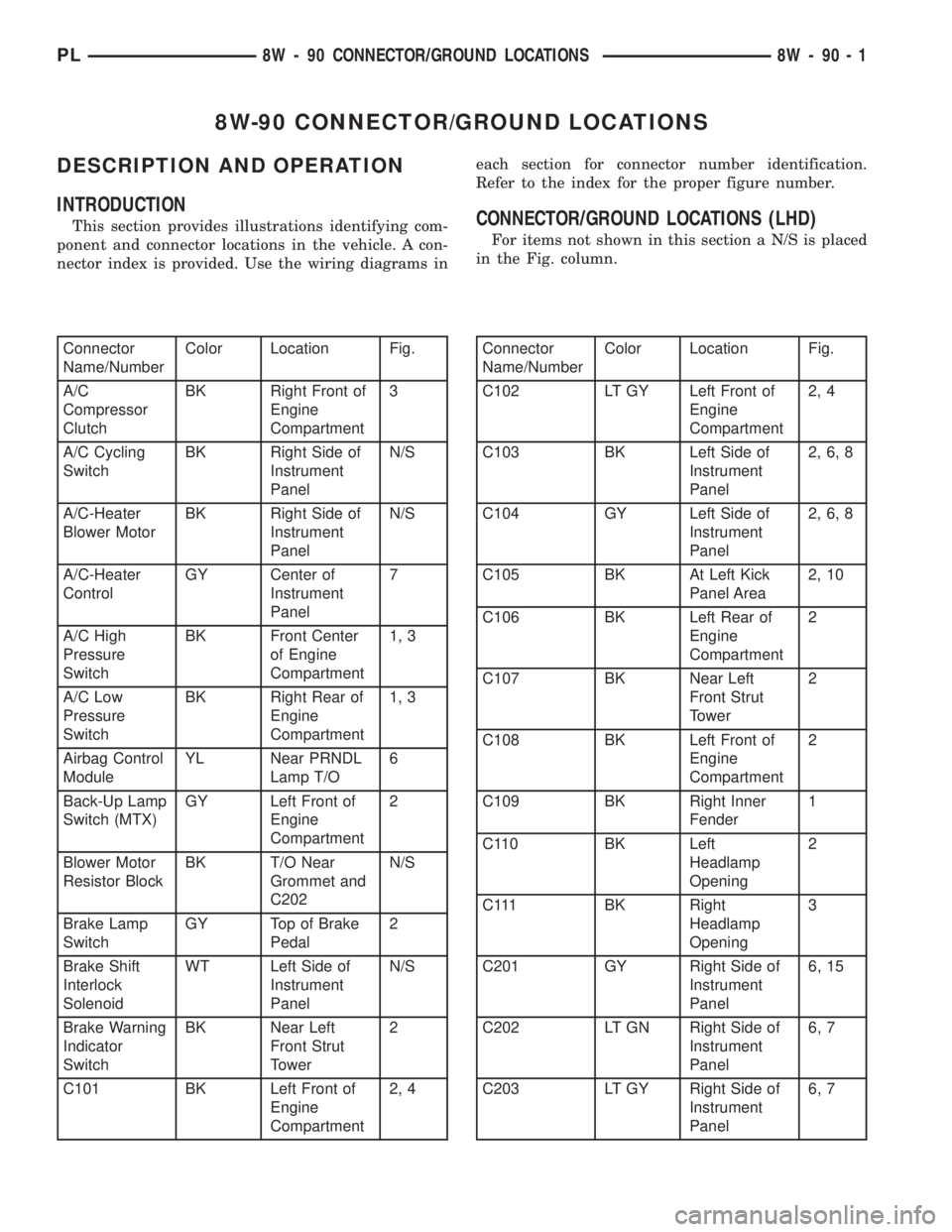
8W-90 CONNECTOR/GROUND LOCATIONS
DESCRIPTION AND OPERATION
INTRODUCTION
This section provides illustrations identifying com-
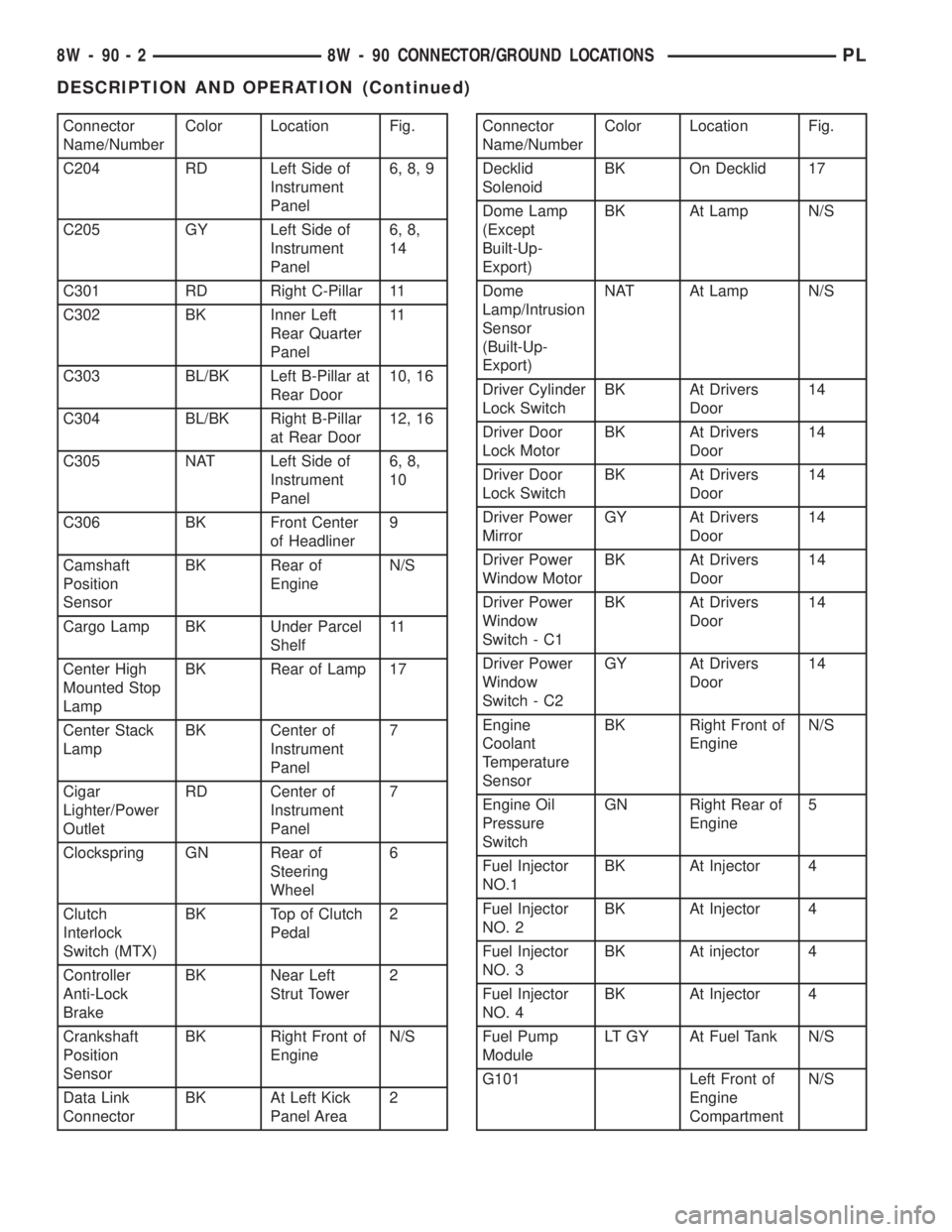
ponent and connector locations in the vehicle. A con-
nector index is provided. Use the wiring diagrams ineach section for connector number identification.
Refer to the index for the proper figure number.CONNECTOR/GROUND LOCATIONS (LHD)
For items not shown in this section a N/S is placed
in the Fig. column.
Connector
Name/NumberColor Location Fig.
A/C
Compressor
ClutchBK Right Front of
Engine
Compartment3
A/C Cycling
SwitchBK Right Side of
Instrument
PanelN/S
A/C-Heater
Blower MotorBK Right Side of
Instrument
PanelN/S
A/C-Heater
ControlGY Center of
Instrument
Panel7
A/C High
Pressure
SwitchBK Front Center
of Engine
Compartment1, 3
A/C Low
Pressure
SwitchBK Right Rear of
Engine
Compartment1, 3
Airbag Control
ModuleYL Near PRNDL
Lamp T/O6
Back-Up Lamp
Switch (MTX)GY Left Front of
Engine
Compartment2
Blower Motor
Resistor BlockBK T/O Near
Grommet and
C202N/S
Brake Lamp
SwitchGY Top of Brake
Pedal2
Brake Shift
Interlock
SolenoidWT Left Side of
Instrument
PanelN/S
Brake Warning
Indicator
SwitchBK Near Left
Front Strut
Tower2
C101 BK Left Front of
Engine
Compartment2, 4Connector
Name/NumberColor Location Fig.
C102 LT GY Left Front of
Engine
Compartment2, 4
C103 BK Left Side of
Instrument
Panel2, 6, 8
C104 GY Left Side of
Instrument
Panel2, 6, 8
C105 BK At Left Kick
Panel Area2, 10
C106 BK Left Rear of
Engine
Compartment2
C107 BK Near Left
Front Strut
Tower2
C108 BK Left Front of
Engine
Compartment2
C109 BK Right Inner
Fender1
C110 BK Left
Headlamp
Opening2
C111 BK Right
Headlamp
Opening3
C201 GY Right Side of
Instrument
Panel6, 15
C202 LT GN Right Side of
Instrument
Panel6, 7
C203 LT GY Right Side of
Instrument
Panel6, 7
PL8W - 90 CONNECTOR/GROUND LOCATIONS 8W - 90 - 1
Page 659 of 1285
Connector
Name/NumberColor Location Fig.
C204 RD Left Side of
Instrument
Panel6, 8, 9
C205 GY Left Side of
Instrument
Panel6, 8,
14
C301 RD Right C-Pillar 11
C302 BK Inner Left
Rear Quarter
Panel11
C303 BL/BK Left B-Pillar at
Rear Door10, 16
C304 BL/BK Right B-Pillar
at Rear Door12, 16
C305 NAT Left Side of
Instrument
Panel6, 8,
10
C306 BK Front Center
of Headliner9
Camshaft
Position
SensorBK Rear of
EngineN/S
Cargo Lamp BK Under Parcel
Shelf11
Center High
Mounted Stop
LampBK Rear of Lamp 17
Center Stack
LampBK Center of
Instrument
Panel7
Cigar
Lighter/Power
OutletRD Center of
Instrument
Panel7
Clockspring GN Rear of
Steering
Wheel6
Clutch
Interlock
Switch (MTX)BK Top of Clutch
Pedal2
Controller
Anti-Lock
BrakeBK Near Left
Strut Tower2
Crankshaft
Position
SensorBK Right Front of
EngineN/S
Data Link
ConnectorBK At Left Kick
Panel Area2Connector
Name/NumberColor Location Fig.
Decklid
SolenoidBK On Decklid 17
Dome Lamp
(Except
Built-Up-
Export)BK At Lamp N/S
Dome
Lamp/Intrusion
Sensor
(Built-Up-
Export)NAT At Lamp N/S
Driver Cylinder
Lock SwitchBK At Drivers
Door14
Driver Door
Lock MotorBK At Drivers
Door14
Driver Door
Lock SwitchBK At Drivers
Door14
Driver Power
MirrorGY At Drivers
Door14
Driver Power
Window MotorBK At Drivers
Door14
Driver Power
Window
Switch - C1BK At Drivers
Door14
Driver Power
Window
Switch - C2GY At Drivers
Door14
Engine
Coolant
Temperature
SensorBK Right Front of
EngineN/S
Engine Oil
Pressure
SwitchGN Right Rear of
Engine5
Fuel Injector
NO.1BK At Injector 4
Fuel Injector
NO. 2BK At Injector 4
Fuel Injector
NO. 3BK At injector 4
Fuel Injector
NO. 4BK At Injector 4
Fuel Pump
ModuleLT GY At Fuel Tank N/S
G101 Left Front of
Engine
CompartmentN/S
8W - 90 - 2 8W - 90 CONNECTOR/GROUND LOCATIONSPL
DESCRIPTION AND OPERATION (Continued)