display FORD F450 SUPER DUTY 2017 Owners Manual
[x] Cancel search | Manufacturer: FORD, Model Year: 2017, Model line: F450 SUPER DUTY, Model: FORD F450 SUPER DUTY 2017Pages: 642, PDF Size: 12.35 MB
Page 259 of 642
System Limitations
Cross Traffic Alert has its limitations;situations such as severe weatherconditions or debris build-up on the sensorarea may limit vehicle detection.
The following are other situations that maylimit the Cross Traffic Alert performance:
•Adjacently parked vehicles or objectsobstructing the sensors.
•Approaching vehicles passing atspeeds greater than 37 mph(60 km/h).
•Driving in reverse faster than 7 mph(12 km/h).
•Backing out of an angled parking spot.
False Alerts
Note:If your vehicle has a tow bar with afactory equipped trailer tow module and itis towing a trailer, the sensors willautomatically turn the Cross Traffic Alertoff. If your vehicle has a tow bar but nofactory equipped trailer tow module, it isrecommended to turn the Cross Traffic Alertoff manually. Operating Cross Traffic Alertwith a trailer attached will cause poor CrossTraffic Alert performance.
There may be certain instances when thereis a false alert by the Cross Traffic Alertsystem that illuminates the alert indicatorwith no vehicle in the coverage zone. Someamount of false alerts are normal; they aretemporary and self-correct.
System Errors
If Cross Traffic Alert senses a problem withthe left or right sensor a message appearsin the display screen. See InformationMessages (page 128).
Switching the System Off and On
Note:The Cross Traffic Alert switches onwhenever the ignition is switched on andready to provide appropriate alerts whenthe transmission is in reverse (R). CrossTraffic Alert will not remember the lastselected on or off setting.
You can temporarily switch Cross TrafficAlert off in the information display. SeeGeneral Information (page 111). Whenyou switch Cross Traffic Alert off, you donot receive alerts and the display screenshows a system off message.
You can also have Cross Traffic Alertswitched off permanently at an authorizeddealer. Once switched off permanently,the system can only be switched back onat an authorized dealer.
STEERING
Power Steering
To help prevent damage to the powersteering system:
•Never hold the steering wheel at itsfurthest turning points (until it stops)for more than three seconds when theengine is running.
•Do not operate the vehicle with a lowpower steering pump fluid level (belowthe MIN mark on the reservoir).
•Some noise is normal during operation.If excessive, check for low powersteering pump fluid level beforeseeking service by your dealer.
•Heavy or uneven efforts may be causedby low power steering fluid. Check forlow power steering pump fluid levelbefore seeking service by your dealer.
•Do not fill the power steering pumpreservoir above the MAX mark on thereservoir, as this may result in leaksfrom the reservoir.
256
Super Duty (TFE) Canada/United States of America, enUSA, Edition date: 201710, Second Printing
Driving Aids
Page 260 of 642
If the power steering system breaks down(or if the engine is turned off), you cansteer the vehicle manually, but it takesmore effort.
If the steering wanders or pulls, check for:
•an improperly inflated tire
•uneven tire wear
•loose or worn suspension components
•loose or worn steering components
•improper vehicle alignment
If any steering components are serviced orreplaced, install new fasteners (many arecoated with thread adhesive or haveprevailing torque features which may notbe re-used). Never re-use a bolt or nut.Torque fasteners to specifications.
A high crown in the road or high crosswindsmay also make the steering seem towander or pull.
Adaptive Steering (If Equipped)
WARNING
The adaptive steering system hasdiagnostic checks that continuouslymonitor the system. If a fault isdetected a message displays in theinformation display. Stop your vehicle assoon as it is safe to do so. This warningmessage may clear if the fault is no longerpresent. If an adaptive steering systemwarning message appears each time youstart your vehicle, have the systemchecked as soon as possible.
The adaptive steering system continuallychanges the steering ratio with changes tovehicle speed, optimizing the steeringresponse in all conditions. The system alsochanges when you switch on thetransmission tow/haul feature. When youselect the tow/haul button, the adaptivesteering system reduces vehicle sensitivityto steering inputs at higher vehicle speeds,while maintaining the ease of parking andmaneuverability at low speeds.
Note:The adaptive steering system isdesigned with a locking device. With thelock engaged, the adaptive steering systemremains mechanically locked at a fixedsteering ratio. You may also notice a clickwhen you switch the vehicle on or after youswitch it off, as the lock disengages orengages.
Note:If your vehicle loses electrical poweror detects a fault when you are driving, thesystem automatically shuts down and youretain normal steering function with a fixedsteering ratio. During this time it is possiblethat the steering wheel may not be straightwhen the vehicle is driving straight ahead.In addition, the driver may notice that thesteering wheel angle required to steer thevehicle may be different.
Note:During parking maneuvers, theadaptive steering system balances the driverwork load for various steering wheel inputsand vehicle loading conditions. Underextreme operating conditions the systemlocking device may engage. This strategyprevents overheating and permanentdamage to the adaptive steering system.Typical steering and driving maneuversallow the system to cool and return tonormal operation.
257
Super Duty (TFE) Canada/United States of America, enUSA, Edition date: 201710, Second Printing
Driving Aids
Page 261 of 642
COLLISION WARNING SYSTEM
(If Equipped)
Principle Of Operation (If Equipped)
WARNINGS
This system is an extra driving aid. Itdoes not replace your attention andjudgment, or the need to apply thebrakes. This system does NOTautomatically brake your vehicle. If you failto press the brake pedal when necessary,you may collide with another vehicle.
The collision warning system withbrake support cannot help preventall collisions. Do not rely on thissystem to replace your judgment and theneed to maintain correct distance andspeed.
Note:The system does not detect, warn orrespond to potential collisions with vehiclesto the rear or sides of your vehicle.
Note:The collision warning system is activeat speeds above approximately 5 mph(8 km/h).
Note:The collision warning system will beunavailable if you disable the electronicstability control. See Using StabilityControl (page 227).
The system alerts you of certain collisionrisks. The system's sensor detects yourvehicle's rapid approach to other vehiclestraveling in the same direction as yourvehicle.
When your vehicle rapidly approachesanother vehicle, a red warning light flashesand a tone sounds.
The brake support system assists you inreducing any collision speed bypre-charging the brakes. If the risk ofcollision continues to increases after theaudio-visual warning, the brake supportprepares the brake system for rapidbraking. The system does notautomatically activate the brakes, but ifthe brake pedal is pressed even lightly, thebrakes apply full stopping power.
Using the Collision Warning System
WARNING
The collision warning system’s brakesupport reduces collision speed onlyif you brake your vehicle before anycollision. As in any typical braking situation,you must press your brake pedal.
You can use your information displaycontrol to adjust the collision warningsystem's sensitivity or to turn the systemOn or Off. Your vehicle will rememberthese settings across key cycles. You maychange the collision warning systemsensitivity to any one of three possiblesettings. See General Information (page111).
258
Super Duty (TFE) Canada/United States of America, enUSA, Edition date: 201710, Second Printing
Driving AidsE156130 E156131
Page 262 of 642
Note:It is recommended that you turn thecollision warning system off if a snow plowor similar object is installed in such a waythat it may block the radar sensor. Yourvehicle will remember the selected settingacross key cycles.
Note:When possible, the manufacturerrecommends using the highest sensitivitysetting. If warnings are too frequent, you canreduce your system's sensitivity. Reducedsensitivity causes fewer and later systemwarnings. See General Information (page111).
Blocked Sensors
If a blocked sensor message appears in theinformation display, dirt, water, or an objectis blocking the sensor. The sensor islocated behind a cover near the driver sideof the lower grille. If anything blocks thesensor, your vehicle cannot see throughthe sensor, and the collision warningsystem will not work. Possible causes forthe blocked sensor message and correctiveactions are listed below.
ActionCause
Clean the radar sensor cover or remove theobstructionThe radar sensor cover in the grille is dirtyor obstructed
Wait a short time. The radar may takeseveral minutes to reset after you removethe obstruction
The surface of the radar sensor cover isclean but the message remains in thedisplay
The collision warning system is temporarilydisabled. Shortly after weather conditionsimprove, the collision warning systemautomatically reactivates
Heavy rain, spray, snow or fog in the airinterferes with the radar signals
The collision warning system is temporarilydisabled. Shortly after weather conditionsimprove, the collision warning systemautomatically reactivates
Swirling water, snow or ice on the roadsurface interferes with the radar signals
259
Super Duty (TFE) Canada/United States of America, enUSA, Edition date: 201710, Second Printing
Driving AidsE183741
Page 273 of 642
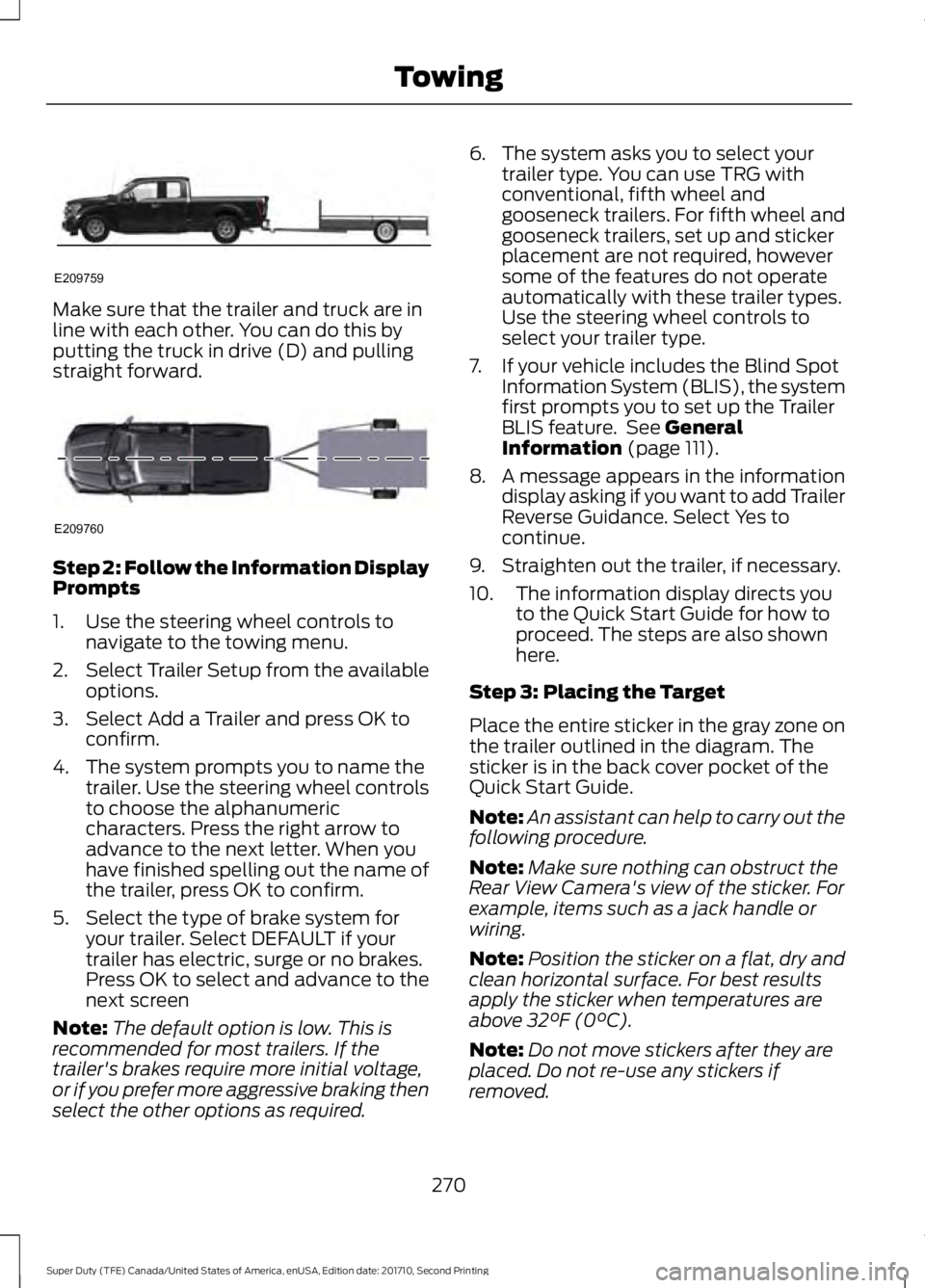
Make sure that the trailer and truck are inline with each other. You can do this byputting the truck in drive (D) and pullingstraight forward.
Step 2: Follow the Information DisplayPrompts
1. Use the steering wheel controls tonavigate to the towing menu.
2.Select Trailer Setup from the availableoptions.
3. Select Add a Trailer and press OK toconfirm.
4. The system prompts you to name thetrailer. Use the steering wheel controlsto choose the alphanumericcharacters. Press the right arrow toadvance to the next letter. When youhave finished spelling out the name ofthe trailer, press OK to confirm.
5. Select the type of brake system foryour trailer. Select DEFAULT if yourtrailer has electric, surge or no brakes.Press OK to select and advance to thenext screen
Note:The default option is low. This isrecommended for most trailers. If thetrailer's brakes require more initial voltage,or if you prefer more aggressive braking thenselect the other options as required.
6. The system asks you to select yourtrailer type. You can use TRG withconventional, fifth wheel andgooseneck trailers. For fifth wheel andgooseneck trailers, set up and stickerplacement are not required, howeversome of the features do not operateautomatically with these trailer types.Use the steering wheel controls toselect your trailer type.
7. If your vehicle includes the Blind SpotInformation System (BLIS), the systemfirst prompts you to set up the TrailerBLIS feature. See GeneralInformation (page 111).
8. A message appears in the informationdisplay asking if you want to add TrailerReverse Guidance. Select Yes tocontinue.
9. Straighten out the trailer, if necessary.
10. The information display directs youto the Quick Start Guide for how toproceed. The steps are also shownhere.
Step 3: Placing the Target
Place the entire sticker in the gray zone onthe trailer outlined in the diagram. Thesticker is in the back cover pocket of theQuick Start Guide.
Note:An assistant can help to carry out thefollowing procedure.
Note:Make sure nothing can obstruct theRear View Camera's view of the sticker. Forexample, items such as a jack handle orwiring.
Note:Position the sticker on a flat, dry andclean horizontal surface. For best resultsapply the sticker when temperatures areabove 32°F (0°C).
Note:Do not move stickers after they areplaced. Do not re-use any stickers ifremoved.
270
Super Duty (TFE) Canada/United States of America, enUSA, Edition date: 201710, Second Printing
TowingE209759 E209760
Page 274 of 642
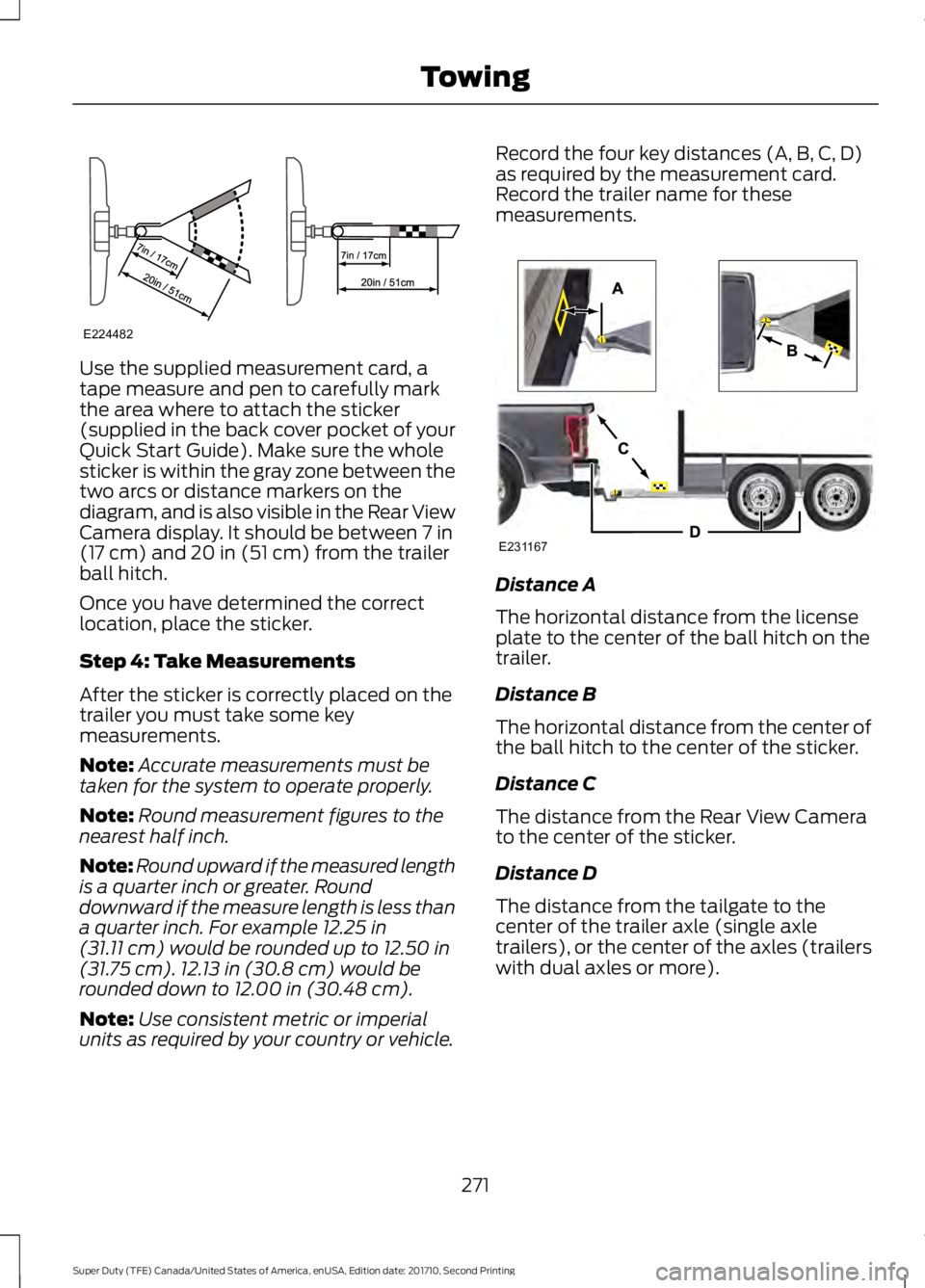
Use the supplied measurement card, atape measure and pen to carefully markthe area where to attach the sticker(supplied in the back cover pocket of yourQuick Start Guide). Make sure the wholesticker is within the gray zone between thetwo arcs or distance markers on thediagram, and is also visible in the Rear ViewCamera display. It should be between 7 in(17 cm) and 20 in (51 cm) from the trailerball hitch.
Once you have determined the correctlocation, place the sticker.
Step 4: Take Measurements
After the sticker is correctly placed on thetrailer you must take some keymeasurements.
Note:Accurate measurements must betaken for the system to operate properly.
Note:Round measurement figures to thenearest half inch.
Note:Round upward if the measured lengthis a quarter inch or greater. Rounddownward if the measure length is less thana quarter inch. For example 12.25 in(31.11 cm) would be rounded up to 12.50 in(31.75 cm). 12.13 in (30.8 cm) would berounded down to 12.00 in (30.48 cm).
Note:Use consistent metric or imperialunits as required by your country or vehicle.
Record the four key distances (A, B, C, D)as required by the measurement card.Record the trailer name for thesemeasurements.
Distance A
The horizontal distance from the licenseplate to the center of the ball hitch on thetrailer.
Distance B
The horizontal distance from the center ofthe ball hitch to the center of the sticker.
Distance C
The distance from the Rear View Camerato the center of the sticker.
Distance D
The distance from the tailgate to thecenter of the trailer axle (single axletrailers), or the center of the axles (trailerswith dual axles or more).
271
Super Duty (TFE) Canada/United States of America, enUSA, Edition date: 201710, Second Printing
TowingE224482 E231167
Page 275 of 642
Step 5: Enter Measurements Using theInformation Display
Using the recorded measurements, enterthe required data into the system. Followthe on screen prompts to enter each of themeasurements taken in step 4. Use theup/down arrows to increase or decreasethe numbers as needed. Press OK toconfirm each measurement. The screenprompts you to add the nextmeasurement. Once you add your lastmeasurement, the information displayshows you all of your enteredmeasurements. You can choose to confirmor change the measurements.
Step 6: Confirming the Sticker Location
Check the Rear View Camera display tosee if the sticker is identified by the systemand marked with a red circle.
Confirm that the red circle is correctlylocated over the sticker image in thedisplay. The on screen prompt will ask youto confirm this.
Note:If the system cannot locate thesticker try cleaning the camera lens, andalso make sure the sticker is within the zoneas indicated in step 3.
The information display shows aconfirmation message when yousuccessfully confirm the target.
Calibrating the System
To complete setup, drive your vehiclestraight forward between 4 mph (6 km/h)and 24 mph (39 km/h) as directed by theinformation display.
Note:Keep the steering wheel straightduring the calibration process. If the steeringwheel is in a turned position, then thecalibration pauses. The information displayprompts you to drive straight forward tocomplete the calibration.
The information display shows a messageduring calibration and after calibration iscomplete
Note:For best results, we do notrecommend that you calibrate the systemat night.
Using Trailer Reverse Guidance
1. Shift into reverse (R) if you are notalready in reverse. Press the rearcamera button to expand the menu.
2. Press the trailer icon .
3. Select your trailer on your informationdisplay.
4. While in TRG mode, you can see thecamera view on the side where yourtrailer is moving, or both sides whenthe trailer is straight behind you. Whenthe views change with the trailerdirection, it's called Auto Mode. Forexample, If you turn the trailer to theright, then you see the right side of yourvehicle and trailer. You can switch thisview manually at any time by using thearrow keys. To return to Auto Mode,press the Auto button.
Note:Auto Mode is your default setting.
Use the view that helps you the most whilebacking up your vehicle and trailer.
Normal rear view camera view.Use this feature when you wantto see your trailer hitch or whatis directly behind your vehicle.
Straight back-up mode. Use thisfeature when you want to keepyour trailer completely in linewith your truck. In this mode, a steeringwheel graphic shows you which way to turnyour steering wheel to keep your trailerstraight.
272
Super Duty (TFE) Canada/United States of America, enUSA, Edition date: 201710, Second Printing
TowingE224483 E224484
Page 276 of 642
Note: It may be helpful to shift your vehicleinto drive (D), pull forward and straightenout the vehicle and trailer before engagingStraight Backup Mode.
Left and right arrows let you see otherviews regardless of your trailer angle. Usethem to switch views manually.
Note: If you're using a Fifth Wheel orGooseneck trailer, or you haven't set up theTrailer Reverse Guidance System yet, AutoView is not available.
To change your view, use the arrows. Youcan see the following views:
•Full driver
•Partial driver
•50/50
•Partial passenger
•Full passenger
Zoom. Use this feature to zoomin on any view.
Return. Ths feature takes youback to the 360-degree camerasystem and out of the TrailerReverse Guidance feature.
Auto. Ths feature returns you toautomatic view mode.
In addition to multiple view options, yourtouchscreen adds some features to giveyou more information.
After using the set up for a conventionaltrailer, for example, the display alwaysshows you a small, top-viewrepresentation of your truck and trailer.
This representation shows two,different-colored lines: A black line showsyou where your trailer is in relation to yourvehicle. A white line gives you a projectionof where your trailer will go based on yourcurrent steering wheel position
Note:When you move the steering wheel,the white line indicates where the trailer willgo based on your steering wheel input.
When you turn your steering wheel to theleft, the trailer moves to the right; when youturn your steering wheel to the right, thetrailer moves to the left.
When you turn the wheel, the smallrepresentation shows you two zones towarn you of a possible jackknife condition.The view shows you your truck and trailerposition and provides visual feedback tohelp you avoid jackknifing entirely.
The yellow zone warns you of a potentialjackknife position. When you enter into thiszone, it's best to put your vehicle back intodrive (D) and pull forward. Moving forwardhelps put the truck and trailer back into anin-line position.
The RED zone indicates that you need toput the truck into drive (D) and pullforward immediately.
Troubleshooting
Note:The system requires a clear view ofthe sticker placed on the trailer. You mustkeep the camera lens and sticker clean forthe system to operate correctly.
Setup
The system is designed to be used with awide variety of trailers. However there aresome trailers that do not have a propersurface and location to mount the sticker.These trailers are not supported. Attemptsto place the sticker on a surface that doesnot meet the sticker placementrequirement listed in Step 3 of the setupinstruction or entering inaccuratemeasurements to proceed through setupcan result in improper system function.
273
Super Duty (TFE) Canada/United States of America, enUSA, Edition date: 201710, Second Printing
TowingE224485 E224487 E224486
Page 277 of 642
Accurate measurements are critical tocorrect system function. If you need tocheck measurements entered or changethem you can access them through thetrailer menus in the information display.Choose the option to change the stickerfrom the change trailer settings menu. It isnot necessary to remove the sticker if youare just reviewing or changingmeasurements.
The following menu warnings or difficultiesmay occur during setup. Tips to resolvethem are listed below.
Measurement A has reached maximum orminimum value:
•The system is designed to work withdrawbars that have a license plate tohitch ball center measurement of 9 in(229 mm) to 16 in (406 mm) wheninstalled. Do not attempt to usedrawbars that have a length outsidethis range as the system performancewill be degraded and could causeimproper system function.
•Make sure that the measurement beingmade is the horizontal distance onlyfrom license plate and the hitch ballcenter. A straight line distance thatincludes any vertical rise or drop willincrease the measurement and makeit inaccurate. Inaccuratemeasurements will degrade systemperformance and could cause impropersystem function. See step 4 of thesetup instruction to reviewmeasurement instructions.
Measurement B has reached maximum orminimum value:
•Make sure that the sticker placementinstruction in step 3 of the setup hasbeen followed. Stickers placed outsidethe allowed zone will adversely affectthe system performance and couldcause improper feature function.
•Make sure that the measurement beingmade is the horizontal distance onlyfrom center of sticker to the hitch ballcenter. A straight line distance thatincludes any vertical rise or drop willincrease the measurement and causean inaccurate value to be entered intothe system. See step 4 of the setup foradditional measurement instructions.
Measurement C has reached maximum orminimum value:
•Make sure that the sticker placementinstructions in step 3 of the setup havebeen followed. Stickers placed outsidethe allowed zone will adversely affectthe system performance and couldcause improper feature function. If youhave met all the criteria for stickerplacement and you see this messagethis sticker is either too far below or tooclose to the camera to properlyrecognize the sticker. In order for thesystem to operate correctly the stickerheight must be lowered if you receivethe minimum warning or the stickerheight must be raised if you receive themaximum warning.
•Only one sticker can be placed onthe trailer for correct systemfunction. The previous sticker mustbe removed or covered so only onesticker is visible to the camera.
•Measurement B and C must bemeasured again if a new sticker isplaced on the trailer.
274
Super Duty (TFE) Canada/United States of America, enUSA, Edition date: 201710, Second Printing
Towing
Page 278 of 642
Measurement D has reached maximum orminimum value:
•Make sure that the measurement beingmade is the horizontal distance onlyfrom tailgate to the center of the singleaxle or the center of all the axles on thetrailer. See step 4 of the setup foradditional measurement instructions.The TBA system does not supporttrailer lengths outside the rangeallowed by the information display.
System is circling something beside thesticker or system cannot find the sticker:
•Make sure the rear camera is clean andthe sticker is clearly visible in thecamera image. Clean the camera andsticker if necessary.
•The camera system uses the enteredmeasurements to help locate thesticker. Inaccurate stickermeasurements will degrade thesystem’s ability to locate the sticker.Verify the measurements entered intothe system are accurate.
•Remove the incorrectly circled label ordecal if possible.
•If you cannot resolve the issue a newsticker location should be tried. Thesticker location must still meet therequirements noted in step 3 of thesetup instructions. Only one sticker canbe placed on the trailer for correctsystem function. The previous stickermust be removed or covered so onlyone sticker is visible to the camera.
Calibration
The system monitors various vehicleparameters to ensure your vehicle is beingdriven straight and the trailer straightbehind your vehicle. Any steering input ortrailer movement will pause the calibration.
For best results:
•Use a long, straight and smooth roadwhen attempting to calibrate.
•Drive straight forward.
•Drive between 4 mph (6 km/h) and24 mph (39 km/h).
System Operation
The following warnings or difficulties mayoccur during feature operation. Tips toresolve them are listed below.
The system is not available:
•The system relies on manysub-systems in your vehicle to operatecorrectly. If those sub-systems are notoperating correctly the system may notbe available.
•Low battery voltage is a conditionwhich will prevent the system fromoperating. Please make sure thebattery is correctly charged if thesystem is not available.
•You may need to drive your vehiclestraight forward above 25 mph(40 km/h) before the system isavailable again.
•If the message still displays take yourvehicle to an authorized dealer forservice.
275
Super Duty (TFE) Canada/United States of America, enUSA, Edition date: 201710, Second Printing
Towing