lock FORD MUSTANG 1969 Volume One Chassis
[x] Cancel search | Manufacturer: FORD, Model Year: 1969, Model line: MUSTANG, Model: FORD MUSTANG 1969Pages: 413, PDF Size: 75.81 MB
Page 40 of 413
02-02-21
Brake System
02-02-21
INSTALLATION
CLUTCH ASSIST
SPRING
MASTER CYLINDER
2140
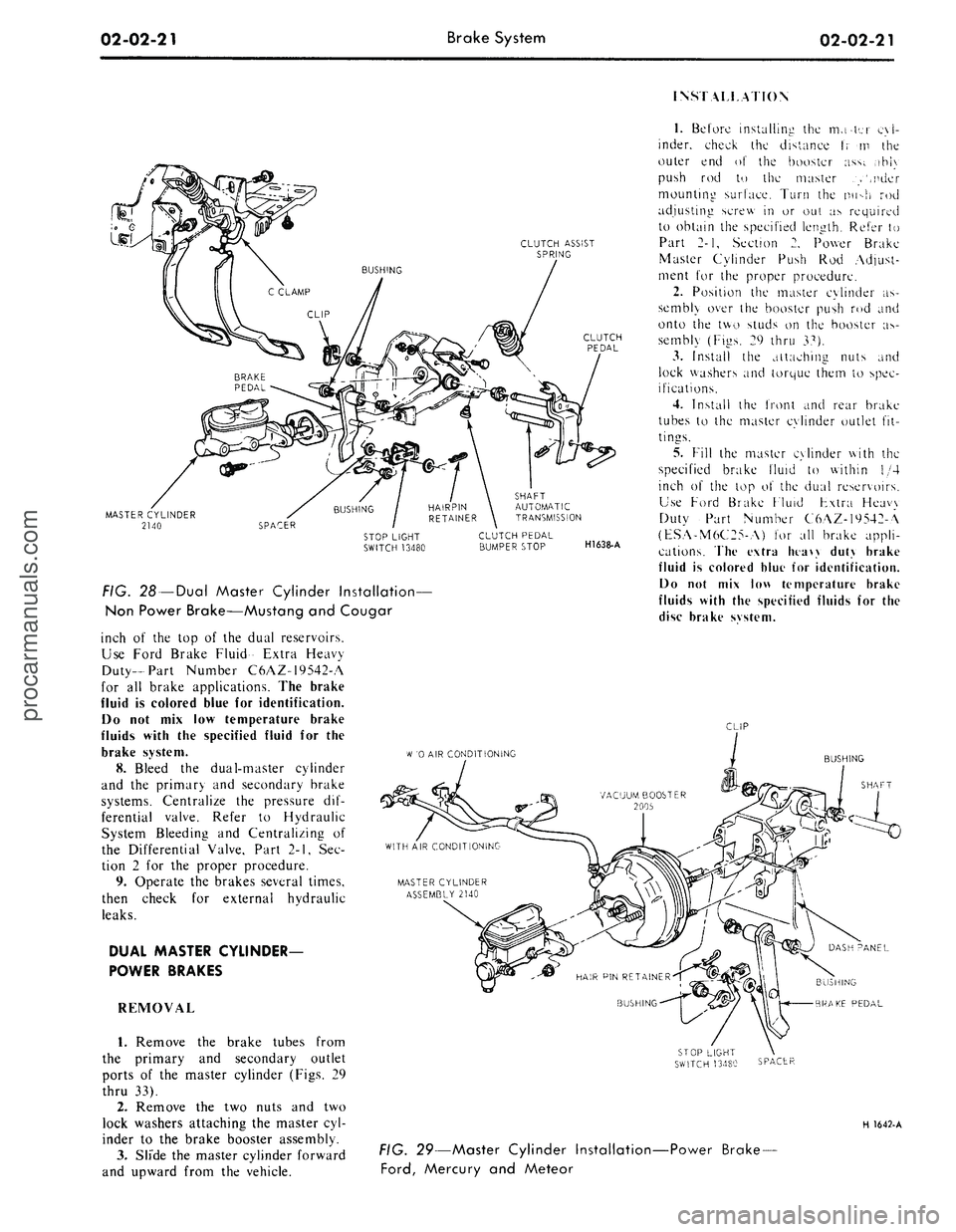
FIG. 28 —Dual Master Cylinder Installation—
Non Power Brake—Mustang and Cougar
inch of the top of the dual reservoirs.
Use Ford Brake Fluid- Extra Heavy
Duty-Part Number C6AZ-19542-A
for all brake applications. The brake
fluid is colored blue for identification.
Do not mix low temperature brake
fluids with the specified fluid for the
brake system.
8. Bleed the dual-master cylinder
and the primary and secondary brake
systems. Centralize the pressure dif-
ferential valve. Refer to Hydraulic
System Bleeding and Centralizing of
the Differential Valve, Part 2-1, Sec-
tion 2 for the proper procedure.
9. Operate the brakes several times,
then check for external hydraulic
leaks.
DUAL MASTER CYLINDER-
POWER BRAKES
REMOVAL
1.
Remove the brake tubes from
the primary and secondary outlet
ports of the master cylinder (Figs. 29
thru 33).
2.
Remove the two nuts and two
lock washers attaching the master cyl-
inder to the brake booster assembly.
3.
Slide the master cylinder forward
and upward from the vehicle.
SHAFT
AUTOMATIC
TRANSMISSION
CLUTCH PEDAL
BUMPER STOP
H1638-A
1.
Before installing the mater cyl-
inder, check the distance t; m the
outer end of the booster ass;. ,ihi\
push rod to the master .>',nder
mounting surface. Turn the nu->h rod
adjusting screw in or out as required
to obtain the specified length. Refer to
Part 2-1, Section 2. Power Brake
Master Cylinder Push Rod Adjust-
ment for the proper procedure.
2.
Position the master cylinder as-
sembly over the booster push rod and
onto the two studs on the booster as-
sembly (Figs. 29 thru 37).
3.
Install the attaching nuts and
lock washers and torque them to spec-
ifications.
4.
Install the front and rear brake
tubes to the master cylinder outlet fit-
tings.
5.
Fill the master cylinder with the
specified brake fluid to within 1/4
inch of the top o\ the dual reservoirs.
Use Ford Brake Fluid Fxtra Heavy
Duty Part Number C6AZ-19542-A
(ESA-M6C25-A) for all brake appli-
cations. The extra htaw duty brake
fluid is colored blue for identification.
Do not mix low temperature brake
fluids with the specified fluids for the
disc brake svstem.
CLIP
W
'0 AIR CONDITIONING
BUSHING
SHAFT
BUSHING
BRAKE PEDAL
SPACER
H 1642-A
FIG. 29—Master Cylinder Installation-
Ford,
Mercury and Meteor
-Power Brake-procarmanuals.com
Page 43 of 413
02-02-24
Brake
System
02-02-24
proportioning valve to the fender
apron and remove the proportioning
valve.
Installation
1.
Position the proportioning valve
to the fender apron.
2.
Connect the two brake lines at
the proportioning valve. Do not tight-
en.
3.
Install the bolt retaining the pro-
portioning valve to the fender apron.
4.
Tighten the brake line tube nuts
at the proportioning valve to specifica-
tions.
5.
Bleed the brakes and centralize
pressure differential valve.
THUNDERBIRD AND
CONTINENTAL MARK III
Removal
Refer to Fig. 20.
1.
Disconnect the two hydraulic
brake lines at the master cylinder.
2.
Remove the two nuts retaining
the master cylinder to the booster and
remove the master cylinder for clear-
ance.
3.
Disconnect the two brake lines at
the proportioning valve.
4.
Remove the bolt and nut retain-
ing the proportioning valve to the
pressure differential valve bracket and
remove the proportioning valve assem-
bly.
Installation
1.
Transfer the bracket to the new
proportioning valve.
2.
Position the proportioning valve
assembly to the pressure differential
valve bracket.
3.
Connect the two brake lines to
the proportioning valve. Do not tight-
en.
4.
Install the bolt and nut retaining
the proportioning valve to the pressure
differential valve bracket.
5.
Tighten the two brake line tube
nuts at the proportioning valve to
specifications.
6. Position the master cylinder to
the booster and install the nuts retain-
ing the master cylinder to the booster.
7.
Connect the two brake lines at
the master cylinder and tighten the
tube nuts to specifications.
8. Bleed the brakes and centralize
the pressure differential valve.
LINCOLN CONTINENTAL
Removal
Refer to Fig. 21.
1.
Disconnect the two brake lines at
the proportioning valve.
2.
Loosen the bolt and nut on the
bracket retaining the proportioning
valve to the chassis.
3.
Remove the proportioning valve
from the bracket.
Installation
- 1. Position the proportioning valve
in the bracket and connect the two
brake lines. Do not tighten.
2.
Tighten the bolt and nut on the
bracket.
3.
Tighten the tube nuts on the
brake lines at the proportioning valve
to specifications.
4.
Bleed the brakes and centralize
the pressure differential valve.
PRESSURE METERING VALVE—
LINCOLN CONTINENTAL
REMOVAL
Refer to Fig. 21.
1.
Loosen the tube nuts connecting
the inlet and outlet tubes at the me-
tering valve, and remove the tubes.
2.
Remove the two screws retaining
the metering valve to the frame
crossmember, and remove the me-
tering valve. The metering valve is ser-
viced as an assembly only.
INSTALLATION
1.
Position the metering valve to
the frame crossmember, and install
the retaining screws.
2.
Connect the inlet and outlet
tubes to the metering valve, and tight-
en the tube nuts to specification.
BRAKE BOOSTER
REMOVAL
1.
Working from inside the\ vehicle
below the instrument panel, disconnect
the booster push rod from the brake
pedal assembly. To do this, proceed as
follows:
Disconnect the stop light switch
wires at the connector. Remove the
hairpin retainer. Slide the stop light
switch off from the brake pedal pin
just far enough for the switch outer
hole to clear the pin, and then remove
the switch from the pin and booster
push rod. Be careful not to damage
the switch during removal. Slide the
booster push rod and the nylon wash-
ers and bushing off the brake pedal
pin (Figs. 29 thru 33).
2.
Open the hood and remove the
master cylinder from the booster. Se-
cure it to one side without disturbing
the hydraulic lines. It is not necessary
to disconnect the brake lines, but care
should be taken that the brake lines
are not deformed. Permanent defor-
mation of brake lines can lead to tube
failure.
3.
Disconnect the manifold vacuum
hose or hoses from the booster unit.
4.
Remove the booster-to-dash
panel attaching nuts or bolts (Figs. 29
thru 33). Remove the booster and
bracket assembly from the dash panel,
sliding the push rod link out from the
engine side of the dash panel.
5.
On Fairlane, Montego, and Fal-
con models, remove the push rod link
boot from the dash panel.
INSTALLATION
1.
On Fairlane, Montego and Fal-
con models, install the push rod link
boot in the hole in the dash panel as
shown in Fig. 23. Install the four
spacers on the mounting studs.
2.
Mount the booster and bracket
assembly to the dash panel by insert-
ing the push rod or push rod link in
through the hole and boot in the dash
panel. Install the bracket-to-dash
panel attaching lock nuts or bolts
(Figs.
29 thru 33).
3.
Connect the manifold vacuum
hose or hoses to the booster.
4.
Before installing the master cyl-
inder, check the distance from the
outer end of the booster assembly
push rod to master cylinder surface.
Turn the screw in or out to obtain the
specified length. Refer to Part 2-1,
Section 2, Power Brake Master Cylin-
der Push Rod Adjustment. Install the
master cylinder and torque the attach-
ing nuts to specifications.
5.
Working from inside the vehicle
below the instrument panel, connect
the booster push rod link to the brake
pedal assembly. To do this, proceed as
follows:
Install the inner nylon washer, the
booster push rod, and the bushing on
the brake pedal pin. Position the
switch so that it straddles the push
rod with the switch slot on the pedal
pin and the switch outer hole justprocarmanuals.com
Page 44 of 413
02-02-25
Brake System
02-02-25
clearing the pin. Slide the switch com-
pletely onto the pin, and install the
nylon washer as shown in Figs. 29
thru 33. Be careful not to bend or de-
form the switch. Secure these parts to
the pin with the hairpin retainer. Con-
nect the stop light switch wires to the
connector, and install the wires in the
retaining clip.
BRAKE PEDAL
FORD, MERCURY
AND METEOR
Removal
1.
Disconnect the stop light switch
wires at the connector.
2.
Remove the hairpin retainer.
Slide the stop light switch off the
brake pedal pin just far enough for
the switch outer hole to clear the pin,
and then lift the switch straight up-
ward from the pin. Be careful not to
damage the switch during removal.
Slide the master cylinder or booster
push rod and the nylon washers and
bushing off the brake pedal pin (Figs.
26 and 29).
3.
Remove the hairpin type retainer
and washer from the brake pedal
shaft, then remove the shaft, the brake
pedal and the bushings from the pedal
support bracket.
Installation
1.
Apply a coating of SAE 10 En-
gine oil to the bushings and locate
bushings in their proper places on the
pedal assembly and pedal support
bracket (Figs. 26 and 29).
2.
Position the brake pedal assem-
bly to the support bracket, then install
the pedal shaft through the support
bracket and brake pedal assembly. In-
stall the retainer.
3.
Install the inner nylon washer,
the master cylinder or booster push
rod, and the bushing on the brake
pedal pin. Position the switch so that
it straddles the push rod with the
switch slot on the pedal pin and the
switch outer hole just clearing the pin.
Slide the switch completely onto the
pin, and install the nylon washer as
shown in Figs. 26 and 29. Be careful
not to bend or deform the switch. Se-
cure these parts to the pin with the
hairpin retainer.
4.
Connect the stop light switch
wires to the connector, and install the
wires in the retaining clip.
5.
Check the Brake Pedal Free
Height and Travel Measurements,
Part 2-1, Section 1.
FAIRLANE, MONTEGO AND
FALCON—MANUAL-SHIFT
TRANSMISSION
Removal
1.
Remove the clutch pedal assist
spring.
2.
Disconnect the clutch pedal-
to-equalizer rod at the clutch pedal by
removing the retainer and bushing.
3.
Disconnect the stop light switch
wires at the connector.
4.
Remove the switch retainer, and
slide the stop light switch off the
brake pedal pin just far enough for
the switch outer hole to clear the pin.
Then lower the switch away from the
pin.
5. Slide the master cylinder or
booster push rod and the nylon wash-
ers and bushing off from the brake
pedal pin (Figs. 27 and 30).
6. Remove the self-locking pin and
washer from the clutch and brake
pedal shaft, then remove the clutch
pedal and shaft assembly, the brake
pedal assembly, and the bushings from
the pedal support bracket (Figs. 27
and 30).
Installation
1.
Apply a coating of SAE 10 en-
gine oil to the bushings and locate all
bushings in their proper places on the
clutch and brake pedal assemblies.
2.
Position the brake pedal to the
support bracket, then install the clutch
pedal and shaft assembly through the
support bracket and brake pedal as-
sembly. Install the spring clip (Figs.
27 and 30).
3.
Install the clutch pedal assist
spring.
4.
Connect the clutch pedal-
to-equalizer rod to the clutch pedal
assembly with the bushing and the
spring clip retainer. Apply SAE 10
engine oil to the bushing.
5.
Install the inner nylon washer,
the master cylinder or booster push
rod, and the bushing on the brake
pedal pin. Position the switch so that
it straddles the push rod with the
switch slot on the pedal pin and the
switch outer hole just clearing the pin.
Slide the switch completely onto the
pin, and install the outer nylon washer
as shown in Figs. 27 and 30. Secure
these parts to the pin with the
self-
locking pin.
6. Connect the stop light switch
wires to the connector, and install the
wires to the retaining clip.
7.
Adjust the clutch pedal free play
(Group 5) to specification, if required.
8. Check the Brake Pedal Free
Height and Travel Measurements
(Part 2-1, Section 1).
MUSTANG AND COUGAR—
MANUAL-SHIFT
TRANSMISSION
Removal
1.
Disconnect the battery ground
cable from the battery.
2.
Remove the steering column.
Refer to Part 3-4, Section 2 for pro-
cedure.
3.
On non-power brakes, remove
the two cap screws retaining the mas-
ter cylinder to the dash panel and re-
move the two cap screws retaining the
brake pedal support bracket to the
dash panel. On power brakes remove
the two cap screws retaining the
booster to the dash panel.
4.
Working inside the vehicle, se-
cure the clutch pedal against the
bumper stop with a small C-clamp as
shown in Figs. 28 and 31.
5.
Disconnect the clutch pedal-
to-equalizer rod at the clutch pedal by
removing the retainer and bushing.
6. Disconnect the stop light switch
wires at the connector.
7.
Remove the switch retainer and
slide the stop light switch off the
brake pedal pin just far enough for
the switch outer hole to clear the pin.
Then lower the switch away from the
pin.
Remove the master cylinder or
booster push rod, bushing and nylon
washer from the brake pedal pin.
8. Remove the screw retaining the
pedal support bracket to the top inner
cowl bracket (Figs. 28 and 31).
9. Remove the two sheet metal
screws retaining the pedal support
bracket to the dash panel. On power
brakes remove the nuts from the
brake booster studs.
10.
Remove the two screws retain-
ing the pedal support bracket to the
upper cowl brace and lower the pedal
support bracket away from the steer-
ing column studs.
11.
Remove the pedal support
bracket assembly from the vehicle.
12.
Position the pedal and support
bracket assembly in a vise.
13.
Remove the C-clamp to release
the clutch pedal from its bumper stop
and pivot the pedal away from the
bumper.procarmanuals.com
Page 45 of 413
02-02-26
Brake System
02-02-26
14.
Remove the clutch pedal assist
spring.
15.
On non-power brakes, remove
the retainer clip from the clutch and
brake pedal shaft, then remove the
clutch pedal and shaft assembly, the
brake pedal assembly, and the bush-
ings from the pedal support bracket.
On power brakes, remove the retainer
nut from the brake pedal shaft then
remove the pedal shaft, the brake
pedal assembly and the bushings from
the pedal support bracket.
Installation
1. Apply a coating of SAE 10 en-
gine oil to the bushings and locate all
bushings in their proper places on the
clutch and brake pedal assemblies.
2.
On non-power brakes, position
the brake pedal to the pedal support
bracket, then install the clutch pedal
and shaft assembly through the sup-
port bracket and brake pedal assem-
bly. On power brakes position the
brake pedal to the pedal support
bracket, then install the pedal shaft
and nut.
3.
Install the clutch pedal assist
spring and pivot the clutch pedal
against its bumper stop. Secure the
pedal to the stop with a small C-
clamp as shown in Figs. 28 and 31.
4.
Position the pedal support
bracket assembly to the dash panel,
and to the steering column retainer
studs.
5.
Align the pedal support bracket
holes with the holes in the dash panel
and install the two attaching sheet
metal screws. On power brakes install
the nuts on the brake booster studs.
6. Install the two cap screws at-
taching the pedal support bracket to
the upper cowl bracket.
7. Install the cap screw attaching
the pedal support bracket to the top
inner cowl bracket (Figs. 28 and 31).
8. Install the inner nylon washer,
the master cylinder push rod, and the
bushing on the brake pedal pin. Posi-
tion the stop light switch so that it
straddles the push rod with the switch
slot on the pedal pin and the switch
outer hole just clearing the pin. Slide
the switch completely onto the pin,
and install the outer nylon washer as
shown in Figs. 28 and 31. Secure
these parts to the pin with the
self-
locking retainer.
9. Connect the stop light switch
wires to the connector.
10.
Connect the clutch pedal-
to-equalizer rod to the clutch pedal
assembly with the bushing and the
spring clip retainer. Apply SAE 10
engine oil to the bushing. Remove the
C-clamp from the clutch pedal.
11.
Working from the engine side
of the dash panel, on non-power
brakes, install the two cap screws at-
taching the pedal support bracket to
the dash panel. Then install the two
screws attaching the master cylinder
to the dash panel. On power brakes
install the cap screws retaining the
brake booster to the dash panel.
12.
Install the steering column.
Refer to Part 3-4, Section 2 for pro-
cedure.
13.
Adjust the clutch pedal free
play (Group 5) to specification, if re-
quired.
14.
Check the Brake Pedal Free
Height and Travel Measurements
(Part 2-1, Section 1).
15.
Connect the ground cable to the
battery.
FAIRLANE, MONTEGO,
FALCON, MUSTANG
AND COUGAR-
AUTOMATIC TRANSMISSION
Removal
1. Disconnect the stop light switch
wires at the connector.
2.
Remove the self-locking pin and
slide the stop light switch off the
brake pedal pin just far enough for
the switch outer hole to clear the pin.
Then lower the switch away from the
pin. Slide the master cylinder or
booster push rod and the nylon wash-
ers and bushing off from the brake
pedal pin (Figs. 27, 28, 30 and 31).
3.
On all vehicles except Mustang
and Cougar with power brakes, re-
move the self-locking pin and washer
from the brake pedal shaft, then re-
move the shaft, the brake pedal as-
sembly and the bushings from the
pedal support bracket. On Mustang
and Cougar vehicles with power
brakes, remove the locknut and bolt
from the pedal. Remove the pedal as-
sembly from the support bracket (Fig.
3).
Installation
1. Apply a coating of SAE 10 en-
gine oil to the bushings and locate all
the bushings in their proper places on
the pedal assembly and pedal support
bracket (Figs. 27, 28, 30 and 31).
2.
Position the brake pedal assem-
bly to the support bracket, then install
the pedal shaft or bolt through the
support bracket and brake pedal as-
sembly. Install the retainer or locknut.
3.
Install the inner nylon washer,
the master cylinder or booster push
rod, and the bushing on the brake
pedal pin. Position the switch so that
it straddles the push rod with the
switch slot on the pedal pin, and the
switch outer hole just clearing the pin.
Slide the switch completely onto the
pin, and install the outer nylon washer
as shown in Figs. 27, 28, 30 and 31.
Secure these parts to the pin with the
self-locking pin.
4.
Connect the stop light switch
wires to the connector, and install the
wires in the retaining clip.
Check the Brake Pedal Free Height
and Travel Measurements, Part 2,
Section 1.
THUNDERBIRD
AND
CONTINENTAL MARK
III
Removal
1.
Loosen the booster mounting
nuts.
2.
Disconnect the stop light switch
wires at the connector.
3.
Remove the hairpin retainer.
Slide the stop light switch off from
the brake pedal pin just far enough
for
the
switch outer hole
to
clear
the
pin,
and then lift the switch straight
upward from the pin. Slide the master
cylinder push rod and the nylon wash-
ers and bushing off from the brake
pedal pin (Fig. 32).
4.
Remove the pivot bolt and nut
that holds the pedal to the pedal sup-
port bracket. Remove the brake pedal
assembly from the pedal support
bracket, and remove the bushings.
Installation
1. Apply a coating of SAE 10 en-
gine oil to the bushings and locate all
the bushings in their proper places on
the pedal assembly (Fig. 32).
2.
Install the brake pedal assembly
and bushings to the support bracket,
and then install the pivot bolt through
the support bracket and brake pedal
assembly. Install the pivot bolt nut
and torque to specifications.
3.
Install the inner nylon washer,
the master cylinder push rod, and the
bushing on the brake pedal pin. Posi-
tion the switch so that it straddles the
push rod with the switch slot on the
pedal pin and the switch outer hole
just clearing the pin. Slide the switch
completely onto the pin, install the
outer nylon washer as shown in Fig.
32.
Secure these parts to the pin with
the hairpin retainer.procarmanuals.com
Page 47 of 413
BRAKE PEDAL BRACKET
CABLE MUST BE TIGHT
ON -4 CROSSMEMBER
INSTRUMENT PANEL
VIEWZ
VACUUM RELEASE
INSTRUMENT PANEL
CONTROL CABLE
CABLE AND HOUSING R.H.
.25 INSULATOR
.00 TO CLIP
VIEWX
CABLE AND HOUSING L.H.
CLIP
CROSSMEMBER
CABLE AND HOUSING R.H.
LOWER SUSPENSION ARM
INTERMEDIATE CABLE
CONVERTIBLE ONLY
EQUALIZER
VIEWY
VIEWZ
MANUAL RELEASE
PRONGS MUST BE SECURELY
LOCKED IN PLACE WITHIN
BRAKE DRUM
L.H. SHOWN R.H. TYPICAL
H1645-A
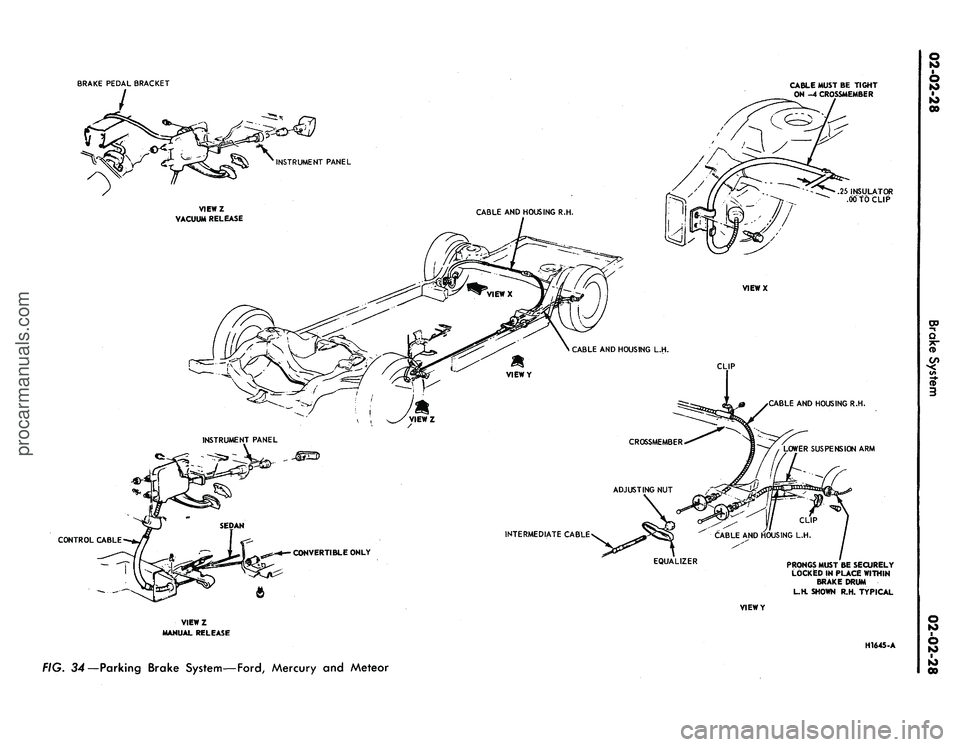
FIG. 34—Parking Brake System—Ford, Mercury and Meteorprocarmanuals.com
Page 50 of 413
CABLE ASSEMBLY
2A635 R.H.
DUAL EXHAUST
PRONGS MUST BE SECURELY
LOCKED IN PLACE
EXTENSION SIDE MEMBER
EQUALIZER
2A602
VIEW IN CIRCLE R
TYPICAL 2 PLACES
CONVERTIBLE ONLY
VIEWY
VIEWZ
HI646-A
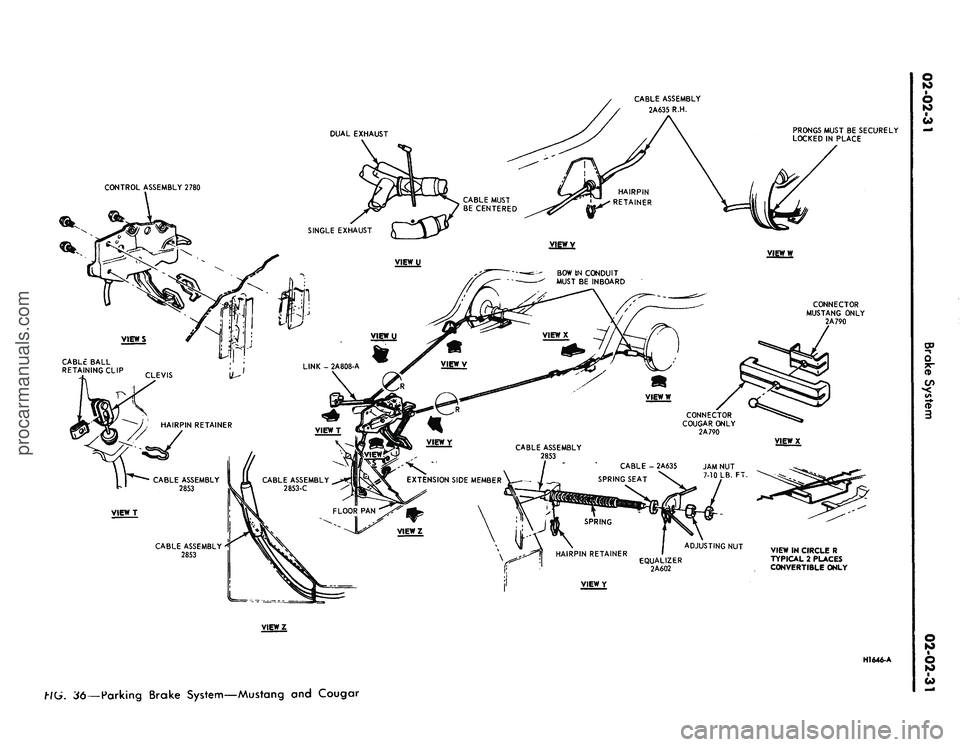
36—Parking Brake System—Mustang and Cougarprocarmanuals.com
Page 51 of 413
BOLT
2-REQUIRED
PARKING BRAKE
CONTROL ASSEMBLY
2780
2.00 ARMOR
I
A RKING
RRAKE
HONT CABLE-2853
ADJUSTING NUT
EQUALIZER-2A602
2628
CLIP
VIEWY 2A814 ASSEMBLY
BOLT-2 REQUIRED 2A706
2853 ASSEMBLY
PARKING BRAKE REAR
CABLE-2A635 2 REQUIRED
BRACKET-2A813
SCREW
4 REQUIRED
VIEWZ
8~-
VIEWX
HAIRPIN RETAINER-74277-S
PARKING BRAKE FRONT CABLE-2853
BOLT-374032-S 2 REQUIRED
7-12 LB. FT. APPLY CAULKING CORD
(AB19560-A) OVER HEADS OF SCREWS
AFTER ASSEMBLY.
WIRING HARNESS
HOSE
BRAKE SUPPORT
PARKING BRAKE
REAR CABLE-2A635
PARKING BRAKE
REAR CABLE-2A635
PARKING BRAKE
REAR CABLE-2A635
HAIRPIN RETAINER
( 2 REQUIRED
V1EWW
PARKING BRAKE
REAR CABLE-2A635
CLIP 2 REQUIRED
PRONGS MUST BE SECURELY
LOCKED IN PLACE
VtEWU
BOLT 2 REQUIRED
VIEWY
VIEWT
CABLE WllHIN BRAKE DRUM
H 1529-B
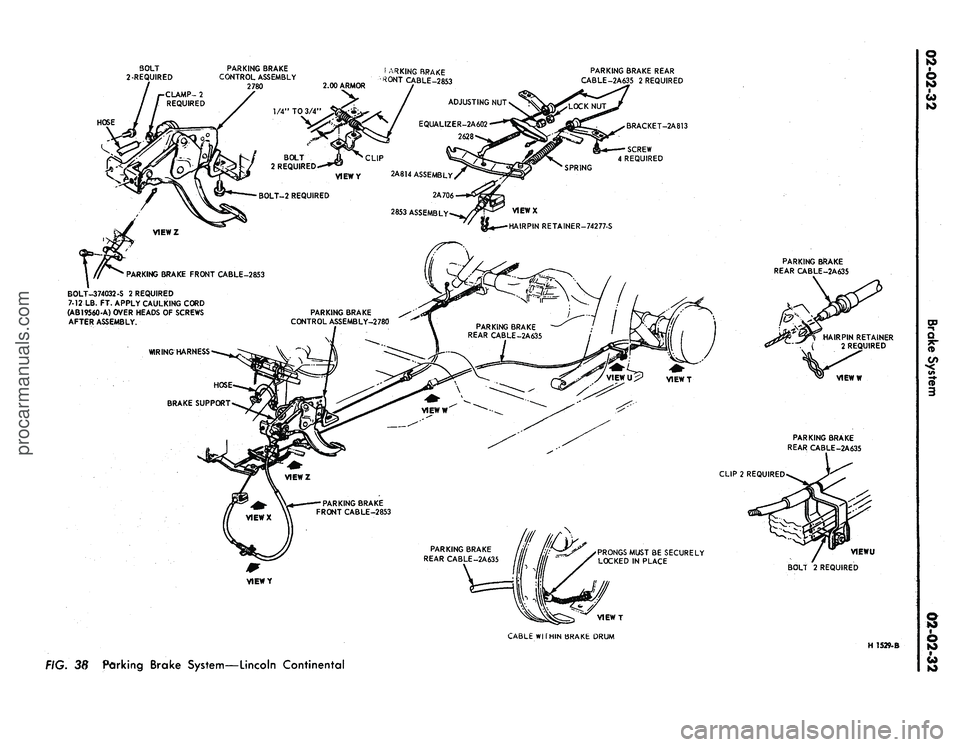
FIG. 38
Parking Brake System—Lincoln Continentalprocarmanuals.com
Page 52 of 413
PARKING BRAKE CONTROL
TO-ACTUATOR CABLE AND
CONDUIT ASSEMBLY-2853
PARKING BRAKE CABLE ASSEMBLY-2A635 R.H.
2A635 PARKING BRAKE CABLE
ASSEMBLY R.H. TO BE POSITIONED
WITH RUBBER LOCATERS CENTERED
IN 2649 AND
2A 720
BRACKETS
NO.
4 CROSSMEMBER
NO.
4 CROSSMEMBER
BRACKET
(2 REQUIRED)
PARKING BRAKE
CABLE ASSEMBLY
2A635 R.H.
BOLT-382062-S2
(2 REQUIRED)
EQUALIZER.TO-ACTUATOR
CABLE ASSEMBLY-2A815
2A635 ASSEMBLY R.H.
ACTUATOR ASSEMBLY-2A7U
CABLE WITHIN BRAKE DRUM
L.H. SHOWN (R.H. TYPICAL)
PARKING BRAKE
CABLE ASSEMBLY
2A809 UH.
2780 ASSEMBLY
2795
2A809
ASSEMBLY
L.H.
PRONGS MUST BE
SECURELY LOCKED IN PLACE
PARKING BRAKE CABLE
ASSEMBLY-2A809 L.H.
PARKING BRAKE
CONTROL ASSEMBLY-2780
BOLT-378735-S2
(2 REQUIRED)
LB.
FT.
2A791 (2 REQUIRED)
PARKING BRAKE
CABLE ASSEMBLY
2A809 L.H.
NUT-2A812
EQUALIZER-2A602
PARKING BRAKE
CABLE ASSEMBLY
2A635 R.H.
NUT-379930-S2
(2 REQUIRED)
12-18 LB. FT.
CONTROL-TO-ACTUATOR
CABLE AND CONDUIT
ASSEMBLY-2853
381877-S2
RETAINER-74277-S
BOLT-378180-S
12-18 LB. FT.
EQUALIZER.TO-ACTUATOR
CABLE ASSEMBLY-2A815
H1542-C
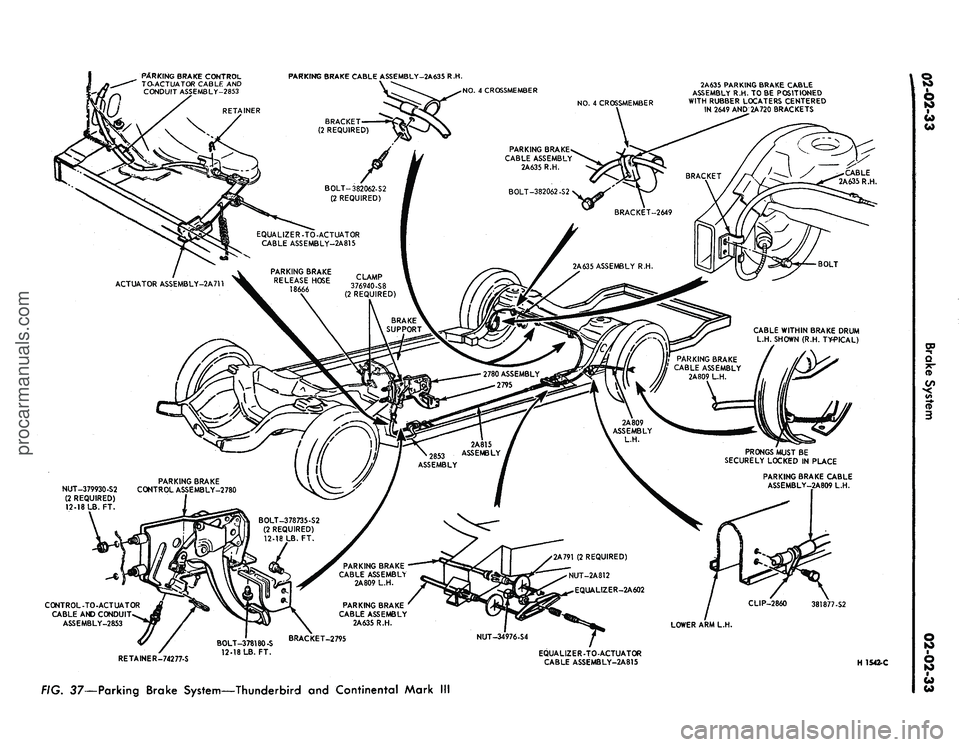
FIG. 37—Parking Brake System—Thunderbird and Continental Mark IIIprocarmanuals.com
Page 54 of 413
02-02-35
Brake System
02-02-35
4.
Attach a wire to the end of the
cable to assist in routing new cable.
5.
Lower the vehicle.
6. Remove the parking brake front
cable ball retaining clip from the
clevis.
7.
Disconnect the cable ball from
the notch in the brake clevis.
8.. Remove the hairpin retainer and
remove the cable assembly from the
brake control assembly.
9. Pull the cable assembly up through
the opening in the floor and remove
the wire from the end of the cable.
Installation
Refer to Fig. 36.
1.
Connect the wire to the end of
the cable assembly and pull the cable
down through the opening in the
floor. Remove the wire.
2.
Connect the cable assembly to
the brake control assembly and in-
stall the hairpin retainer.
3.
Position the ball end of the
cable in the notch of the brake clevis.
4.
Raise the vehicle on a hoist.
5.
Pull the cable grommet into po-
sition and route the cable through
the access holes in the side rail and
under the fuel line.
6. Insert the cable into the body
bracket and install the hairpin re-
tainer.
7.
Position the spring, spring seat,
and equalizer on the cable and install
the two nuts.
8. Adjust the parking brake.
LINCOLN CONTINENTAL
Removal
1.
Raise the car on a hoist. Dis-
connect the parking brake cable from
the equalizer lever underneath the
car (Fig. 38).
2.
Remove the retaining clip at the
cable bracket, and disengage the cable
from the bracket (Fig. 38).
3.
Remove the supporting clip re-
taining bolts and remove the support
plate from the underbody.
4.
Lower the car on a hoist.
5.
With the parking brake in the
fully released position, disconnect the
cable at the control assembly.
6. Raise the vehicle on a hoist. Re-
move the left front fender apron
splash shield retaining bolts and the
splash shield.
7.
Remove the two bolts securing
the parking brake control to equaliz-
er cable bracket to the dash panel
and remove the cable from the vehicle.
Installation
1.
Route the parking brake control
to equalizer cable to the control as-
sembly and the equalizer, and install
the two bolts that retain the cable
to the dash panel (Fig. 38).
2.
Install the left fror%/ender apron
splash shield and the ^u attaching
bolts.
3.
Lower the vehicle.
4.
Connect the control cable to the
clevis on the control assembly.
5.
Raise the car on a hoist.
6. Position the supporting clip and
cable on the vehicle and install the
retaining bolts. Do not tighten the
bolts.
Position the cable armor ap-
proximately 1/2 inch to the right of
the clip (looking toward the rear of
the car) and tighten the retaining
bolts.
7.
Position the equalizer control
cable to the support bracket and in-
stall the retaining hairpin clip.
8. Connect the ball end of the con-
trol cable to the equalizer lever.
9. Adjust the parking brake linkage
(Part
2-1,
Section 2).
10.
Check the operation of the auto-
matic release mechanism.
PARKING BRAKE
ACTUATOR-TO-EQUALIZER
CABLE
FORD, MERCURY,
METEOR, THUNDERBIRD
AND CONTINENTAL
MARK III
Removal
Refer to Figs. 34 and 37.
1.
Raise the vehicle on a hoist.
2.
Remove the lock and adjusting
nut which retains the cable to the
equalizer.
3.
Remove the cable end from the
equalizer.
4.
Unhook the cable from the act-
uator, and remove from the vehicle. *
Installation
1.
Insert new cable end into act-
uator.
2.
Insert cable end into equalizer
and tighten the adjusting nut snug.
Install the lock nut.
3.
Adjust the parking brake cable
tension and check operation as out-
lined in Part
2-1,
Section 2.
4.
Lower the vehicle.
PARKING BRAKE EQUALIZER
TO REAR WHEEL CABLE
FORD, MERCURY,
METEOR, THUNDERBIRD
AND CONTINENTAL
MARK III
Removal
1.
Raise the vehicle and tffosen the
parking brake equalizer rod" adjusting
nut. Disconnect the equalizer from the
rear cables (Figs. 34 and 37).
2.
Compress the prongs on the left
cable-to-frame side member retainer
so the prong can pass through the
side-member. Remove the clip that at-
taches the left cable to the left lower
arm. Pull the cable thru the frame left
side member.
3.
Compress the prongs on the
right cable-to-frame side member re-
tainer bracket so the prong can pass
through the bracket. Remove the clips
retaining the right cable to the frame
crossmember.
4.
Remove the rear wheel cover and
wheel. Remove the three Tinnerman
nuts that hold the brake drum in place
and remove the drum.
5.
Working on the wheel side of the
rear brake, remove the automatic
brake adjuster spring. Compress the
prongs on the parking brake cable re-
tainer so that they can pass through
the hole in the brake backing plate.
Draw the cable retainer through the
hole.
6. With the spring tension off the
parking brake lever, lift the cable out
of the slot in the lever and remove the
cable through the backing plate hole.
Installation
1.
Pull enough of the parking brake
cable through the housing so that the
end of the cable may be inserted over
the slot in the parking brake lever on
the rear brake shoe.
2.
Pull the excess slack from the
cable, and insert the cable housing
into the brake backing plate access
hole so that the retainer prongs ex-
pand. The prongs must be securely
locked in place. Install the automatic
brake adjuster spring.
3.
Position the right hand cable and
the two retaining clips and screws on
the rear crossmember. Compress the
prongs on the right cable and position
the cable in the retaining bracket on
the frame side member. Be sure theprocarmanuals.com
Page 55 of 413
02-02-36
Brake System
02-02-36
locating stripe on the cable is midway
between the retaining clips and tighten
all retaining clip screws.
4.
Position the left cable, retaining
clip and screw on the left lower sus-
pension arm. Compress the prongs on
the left cable and position the cable
through the frame side-member. The
prongs must be securely locked in
place.
5.
Insert the ball ends of the cables
into the equalizer assembly.
6. Install the rear drum(s) and
tighten the three Tinnerman nuts and
secure the drum. Install the wheel and
tire and the wheel cover.
7.
Adjust the parking brake linkage
as outlined in Part 2-1, Section 2. Ad-
just the rear brakes, as required (Part
2-1,
Section 2).
FAIRLANE, MONTEGO,
MUSTANG AND COUGAR—
EXCEPT STATION WAGON
Removal
1.
Remove the equalizer lock nut
and adjusting nut, equalizer, spring
and spring seat.
2.
With the cables slack, discon-
nect the ball-ends from the connector
(Figs.
35 and 36).
3.
Remove the cable from the re-
tainer hooks (station wagon models)
and the underbody guide (convertible
models) if required.
4.
Remove the hairpin lock retain-
ing the cable housing to the side rail
bracket.
5.
Remove the wheel cover, wheel
and tire and the rear brake drum as
outlined in Section 2.
6. Remove self-adjuster springs to
allow clearance to remove cable re-
tainer from the backing plate. Discon-
nect the rear end of the cable from the
parking brake lever on the brake shoe.
Disengage the cable housing retaining
grommet or steel-pronged Hi-Hat
from the backing plate and withdraw
the cable and housing from the in-
board side of the backing plate.
7.
Slide the cable and housing out
of the side rail bracket.
Installation
1.
Insert the rear end of the cable
through the side rail bracket and pull
the cable and housing into position.
2.
Insert the rear end of the cable
and housing through the hole in the
backing plate from the inboard side.
3.
Connect the cable to the parking
brake lever on the brake shoe and in-
stall the cable housing retaining grom-
met or steel-pronged Hi-Hat in the
backing plate.
4.
Install the self-adjuster springs.
Position the cable housing in the side
rail bracket and install the hairpin
type retainer.
5.
Install rear hub and drum as-
sembly, wheel and tire assemblies and
wheel cover as outlined in Section 2.
6. Position the cable retainer hooks
(station wagon models) in the under-
body guide (convertible models) and
install the connector, thus hooking the
two cables together.
7.
Insert the cable into the equaliz-
er and install the equalizer, spring
seat, spring, adjusting nut and lock
nut to the front, parking brake control
cable.
8. Adjust the parking brake^as di-
rected in Part 2-1, Section 2.
FAIRLANE AND MONTEGO
STATION WAGONS AND
FALCON PASSENGER
MODELS
Removal and Installation
Refer to Fig. 35.
Generally follow the procedure
given above, omitting separation of
the cables, since the parking brake
rear cable assemblies supplied for
these models is in one piece. Removal
and installation of both rear wheels,
tires and drums will also be required.
LINCOLN CONTINENTAL
Removal
1.
Raise the car. Remove the rear
wheel cover. Remove the wheel and
tire as an assembly.
2.
Remove the three Tinnerman
nuts that hold the brake drum in
place, and remove the drum.
3.
Remove the brake shoe retract-
ing springs.
4.
Loosen the equalizer rod adjust-
ing nut and disconnect the cable from
the equalizer (Fig. 38).
5.
Remove the hairpin-type retainer
clip that secures the cable housing to
the body bracket, and pull the cable
and housing out of the bracket (Fig.
38).
6. Remove the cable to underbody
clamp attaching nuts and the clamp.
Disengage the cable housing from the
hook-type retainer at the spring U-
bolt.
7.
Working on the wheel side of the
backing plate (Fig. 38), compress the
prongs on the cable retainer so that it
can pass through the hole in the back-
ing plate. Draw the cable retainer out
of the hole.
8. With the spring tension off the
parking brake lever, lift the cable out
of the slot in the lever and remove it
through the backing plate hols.
Installation
1.
Pull enough of the cable through
the cable housing so that the end of
the cable may be inserted through the
backing plate hole from the inner side
and engage the cable end with the slot
in the parking brake lever.
2.
Pull the excess slack from the
cable and insert the cable housing into
the backing plate access hole (Fig.
38).
The prongs must be securely
locked in place.
3.
Install the brake shoe retracting
springs.
4.
Position the cable to the under-
body and install the retaining clamp
so that the cable conduit armor ex-
tends forward of the clamp as shown
in Fig. 38. Install the clamp retaining
nuts.
5.
Hook the cable housing to the
retainer at the spring U-bolt.
6. Engage the forward end of the
cable housing with the frame bracket
and secure it with the hairpin-type
clip.
7.
Insert the ball end of the cable
into the equalizer.
8. Make a preliminary brake ad-
justment with the use of Tool HRA-
8650 (Fig. 11).
9. Install the rear drum. Tighten
the three Tinnerman nuts that secure
the drum. Install the wheel and wheel
cover.
10.
Adjust the parking brake link-
age.
11.
Lower the vehicle.
ANTI-SKID CONTROL
ACTUATOR
REMOVAL
Refer to Fig. 39.
1.
Working in the passenger com-
partment, under the glove box, remove
the screw that attaches the forward
end of the control module retainer to
the support assembly. Lower the for-
ward end of the control module re-
tainer and remove the module assem-
bly.procarmanuals.com