engine Hyundai Ioniq Electric 2017 User Guide
[x] Cancel search | Manufacturer: HYUNDAI, Model Year: 2017, Model line: Ioniq Electric, Model: Hyundai Ioniq Electric 2017Pages: 582, PDF Size: 37.73 MB
Page 265 of 582
3-96
Convenient features of your vehicle
Non-operational conditions ofParking Assist System
Parking Assist System may not
operate normally when:
Moisture is frozen to the sensor.
The sensor is covered with dirt or debris such as snow or ice, or the
sensor cover is blocked.
There is a possibility of Parking
Assist System malfunction when:
Driving on uneven road surfacessuch as unpaved roads, gravel,
bumps, or gradient.
Objects generating excessive noise such as vehicle horns, loud motor-
cycle engines, or truck air brakes
can interfere with the sensor.
Heavy rain or water spray is present.
Wireless transmitters or mobile phones are present near the sensor.
The sensor is covered with snow.
Any non-factory equipment or accessories have been installed, or
if the vehicle bumper height or sen-sor installation has been modified.
Detecting range may decrease when:
Outside air temperature isextremely hot or cold.
Undetectable objects smaller than 1 m and narrower than 14 cm in
diameter.
The following objects may not be
recognized by the sensor:
Sharp or slim objects such asropes, chains or small poles.
Objects, which tend to absorb sen- sor frequency such as clothes,
spongy material or snow.
Parking assist system precau-
tions
The parking assist system may not operate consistently in some cir-cumstances depending on the
speed of the vehicle and theshapes of the objects detected.
The parking assist system may mal- function if the vehicle bumper heightor sensor installation has been
modified or damaged. Any non-fac-
tory installed equipment or acces-
sories may also interfere with the
sensor performance. The sensor may not recognize
objects less than 40 cm (15 in)
from the sensor, or it may sense an
incorrect distance. Use caution.
When the sensor is blocked with snow, dirt, debris, or ice, the park-
ing assist system may be inopera-
tive until the snow or ice melts, or
the debris is removed. Use a soft
cloth to wipe debris away from the
sensor.
Do not push, scratch or strike the sensor with any hard objects that
could damage the surface of the
sensor. Sensor damage could occur.
Do not spray the sensors or its sur- rounding area directly with a high
pressure washer. Doing so may
cause the sensors to fail to operate
normally.
Your new vehicle warranty does
not cover any accidents or dam-
age to the vehicle or injuries toits occupants related to a
Parking Assist System. Always
drive safely and cautiously.
WARNING
Page 301 of 582
(1) Call / Answer button
(2) Call end button
(3) Microphone
Audio : For detailed information,refer to “AUDIO” in this chapter.
AVN : Detailed information for the
Bluetooth® Wireless Technology
hands-free is described in the man-
ual supplied separately.
Audio / Video / Navigation sys-
tem (AVN) (if equipped)
Detailed information for the AVN sys-
tem is described in a separately sup-
plied manual.
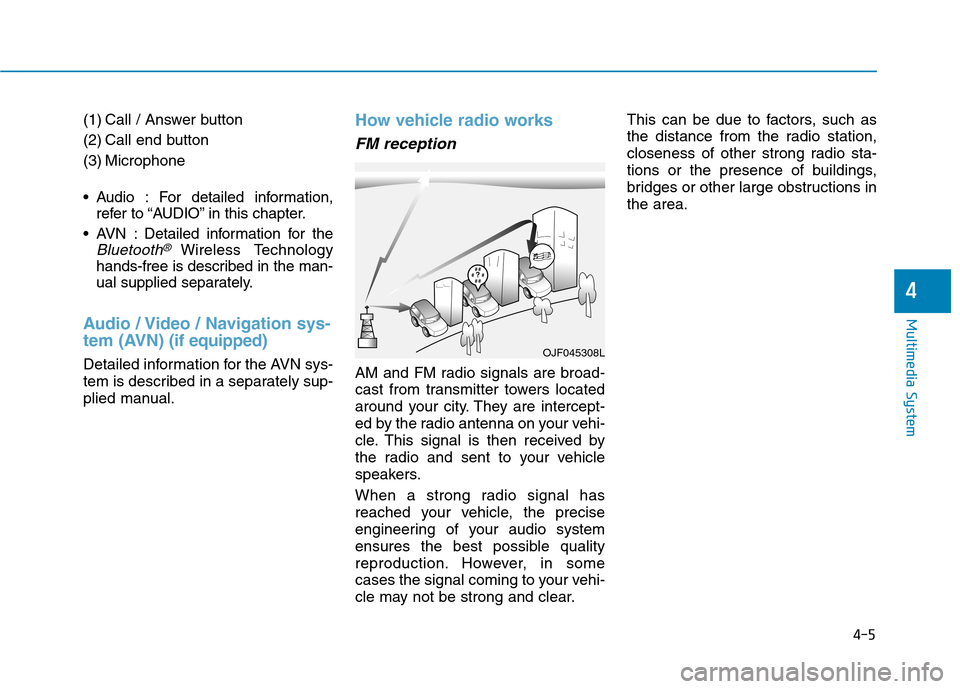
How vehicle radio works
FM reception
AM and FM radio signals are broad-
cast from transmitter towers located
around your city. They are intercept-
ed by the radio antenna on your vehi-
cle. This signal is then received by
the radio and sent to your vehicle
speakers.
When a strong radio signal has
reached your vehicle, the precise
engineering of your audio system
ensures the best possible quality
reproduction. However, in some
cases the signal coming to your vehi-
cle may not be strong and clear. This can be due to factors, such as
the distance from the radio station,
closeness of other strong radio sta-
tions or the presence of buildings,
bridges or other large obstructions inthe area.
OJF045308L
4-5
Multimedia System
4
Page 318 of 582
![Hyundai Ioniq Electric 2017 User Guide 4-22
Multimedia System
(6) Pause
Pause or play music.
(7) Playback progress
Press to skip to the desired location.
Playback
Press the [MEDIA]button and
select [Disc MP3].
When a disc is inserted in](/img/35/14909/w960_14909-317.png "Hyundai Ioniq Electric 2017 User Guide 4-22
Multimedia System
(6) Pause
Pause or play music.
(7) Playback progress
Press to skip to the desired location.
Playback
Press the [MEDIA]button and
select [Disc MP3].
When a disc is inserted in")
4-22
Multimedia System
(6) Pause
Pause or play music.
(7) Playback progress
Press to skip to the desired location.
Playback
Press the [MEDIA]button and
select [Disc MP3].
When a disc is inserted in the audio system, disc playback
begins automatically.
Changing songs
Press the [SEEK/TRACK] button
to play the previous or next song.
Press and hold the [SEEK/TRACK]
button to rewind or fast-forward the
song that is currently playing.
Search songs by turning the TUNE
knob, and press the knob to play.
Selecting songs from a list
Press the [List] to view a list of songs
available to play.
Select and play the desired song.
Repeat play
Press the [Repeat] to enable or dis-
able ‘Repeat all’, ‘Repeat current
song’ or ‘Repeat folder’.
Repeat all: Repeat all songs in the playlist.
Repeat current song: The song that is currently playing is repeated.
Repeat folder: All songs in the current folder are repeated.
Shuffle play
Press the [Shuffle] to enable/disable
‘Shuffle’, ‘Shuffle folder’ play.
Shuffle: Songs are played in arandom order.
Shuffle folder: Songs within the current folder are played in ran-
dom order.
Menu
Press the [Menu] and select the desired function.
Information: Detailed informationon the song that is currently play-
ing is displayed.
Sound Settings: Audio sound set- tings can be changed. Information
- Using the USB Devices
Starting the vehicle while a USB device is connected can damage the
device. Please disconnect USB
devices before starting the vehicle.
Starting the vehicle or stopping the engine while an external USB device
is connected can result in failure of
the external USB device to operate.
Be cautious of static electricity when connecting/disconnecting external
USB devices.
An encrypted MP3 player is not rec- ognized when connected as an exter-
nal device.
External USB devices may not be recognized, depending on the state
of the external USB device.
Only products with byte/sectors for- matted at 4 KB or lower are recog-
nized.
Only USB devices in FAT12/16/32 format are recognized; NTFS and
ExFAT file systems are not recog-
nized.
(Continued)
i
Page 435 of 582
5-96
Driving your vehicle
The severe weather conditions of
winter quickly wear out tires and
cause other problems. To minimize
winter driving problems, you should
take the following suggestions:Information
Information for Snow Tires and Tire
Chains in the national language
(Bulgarian, Hungarian, Icelandic,
Polish) is provided in the Appendix.
Snow or icy conditions
You need to keep sufficient distance
between your vehicle and the vehicle
in front of you.
Apply the brakes gently. Speeding,
rapid acceleration, sudden brake
applications, and sharp turns are
potentially very hazardous practices.
During deceleration, use engine
braking to the fullest extent. Sudden
brake applications on snowy or icy
roads may cause the vehicle to skid.
To drive your vehicle in deep snow, it
may be necessary to use snow tires
or to install tire chains on your tires. Always carry emergency equipment.
Some of the items you may want to
carry include tire chains, tow straps
or chains, a flashlight, emergency
flares, sand, a shovel, jumper cables,
a window scraper, gloves, ground
cloth, coveralls, a blanket, etc.
Snow tires
If you mount snow tires on your vehi-
cle, make sure to use radial tires of
the same size and load range as the
original tires. Mount snow tires on all
four wheels to balance your vehicle’s
handling in all weather conditions.
The traction provided by snow tires
on dry roads may not be as high as
your vehicle's original equipment
tires. Check with the tire dealer for
maximum speed recommendations.
Information
Do not install studded tires without first
checking local and municipal regula-
tions for possible restrictions against
their use.
i
i
WW IINN TTEERR DD RRIIVV IINN GG
Snow tires should be equivalent
in size and type to the vehicle's
standard tires. Otherwise, the
safety and handling of your
vehicle may be adversely affect-ed.
WARNING
Page 446 of 582
6-5
What to do in an emergency
To prevent damage to your vehicle:
• Only use a 12-volt power supply(battery or jumper system) to
jump start your vehicle.
Do not attempt to jump start your vehicle by push-starting.
Information An inappropriately disposedbattery can be harmful to the
environment and human
health. Dispose the battery
according to your local law(s)
or regulations.
i
NOTICE
6
(Continued)
Batteries contain sulfu-
ric acid which is highly
corrosive. Do not allow
acid to contact your
eyes, skin or clothing.
If acid gets into your eyes, flush
your eyes with clean water for at
least 15 minutes and get imme-
diate medical attention. If acid
gets on your skin, thoroughly
wash the area. If you feel pain or
a burning sensation, get med-
ical attention immediately.
When lifting a plastic-cased
battery, excessive pressure
on the case may cause battery
acid to leak. Lift with a battery
carrier or with your hands on
opposite corners.
Do not attempt to jump start
your vehicle if your battery is
frozen.
(Continued)
(Continued)
NEVER attempt to recharge
the battery when the vehicle’s
battery cables are connected
to the battery.
The electrical ignition system
works with high voltage.
NEVER touch these compo-nents with the engine running
or when the Engine Start/Stop
button is in the ON position.
Do not allow the (+) and (-)
jumper cables to touch. It maycause sparks.
The battery may rupture or
explode when you jump start
with a low or frozen battery.
Pb
Page 447 of 582
6-6
What to do in an emergency
Jump starting procedure
1. Position the vehicles close enoughthat the jumper cables will reach,
but do not allow the vehicles totouch.
2. Avoid fans or any moving parts in the motor compartment at all
times, even when the vehicles are
turned off.
3. Turn off all electrical devices such as radios, lights, air conditioning,
etc. Put the vehicles in P (Park)
and set the parking brakes. Turn
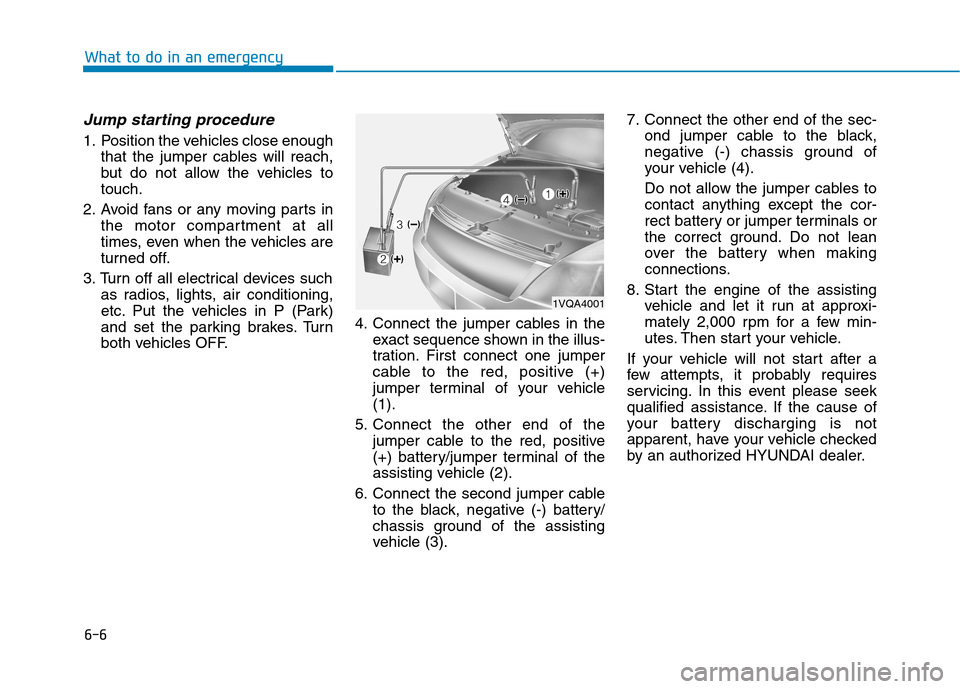
both vehicles OFF. 4. Connect the jumper cables in the
exact sequence shown in the illus-
tration. First connect one jumper
cable to the red, positive (+)
jumper terminal of your vehicle(1).
5. Connect the other end of the jumper cable to the red, positive
(+) battery/jumper terminal of the
assisting vehicle (2).
6. Connect the second jumper cable to the black, negative (-) battery/
chassis ground of the assisting
vehicle (3). 7. Connect the other end of the sec-
ond jumper cable to the black,
negative (-) chassis ground of
your vehicle (4).
Do not allow the jumper cables to
contact anything except the cor-
rect battery or jumper terminals or
the correct ground. Do not lean
over the battery when making
connections.
8. Start the engine of the assisting vehicle and let it run at approxi-
mately 2,000 rpm for a few min-
utes. Then start your vehicle.
If your vehicle will not start after a
few attempts, it probably requires
servicing. In this event please seek
qualified assistance. If the cause of
your battery discharging is not
apparent, have your vehicle checked
by an authorized HYUNDAI dealer.
1VQA4001
Page 469 of 582
7-3
7
Maintenance
MMOOTTOO RR CC OO MM PPAA RRTTMM EENN TT
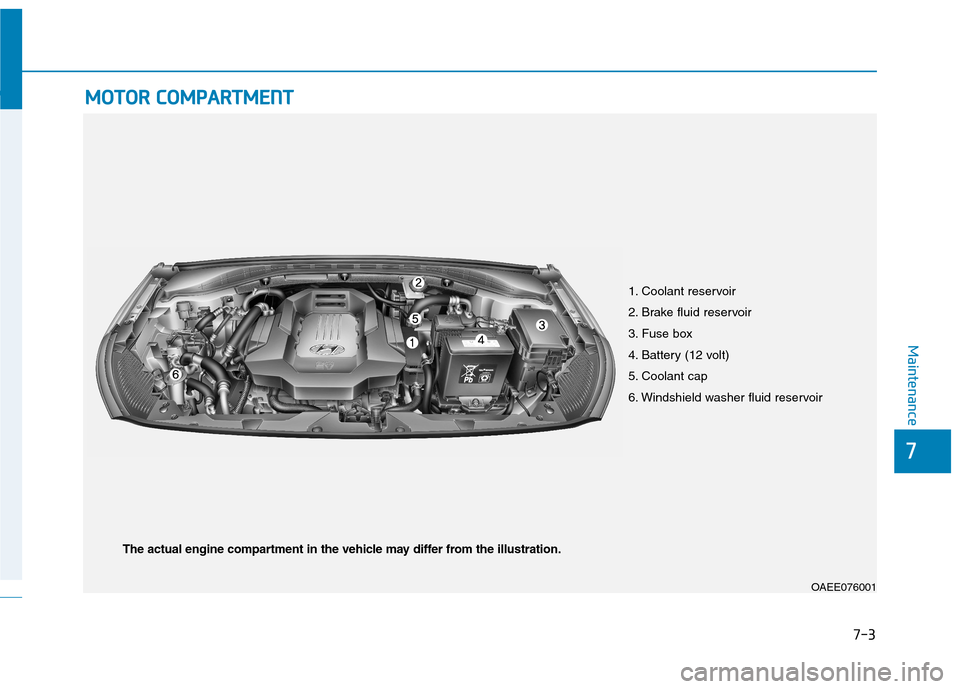
1. Coolant reservoir
2. Brake fluid reservoir
3. Fuse box
4. Battery (12 volt)
5. Coolant cap
6. Windshield washer fluid reservoir
OAEE076001
The actual engine compartment in the vehicle may differ from the illustration.
Page 473 of 582
SSCC HH EEDD UU LLEE DD MM AAIINN TTEENN AANN CCEE SS EE RR VV IICC EE SS
7-7
7
Maintenance
Follow Normal Maintenance Schedule if the vehicle is usually operated where none of the following conditions apply. If any
of the following conditions apply, you must follow the Maintenance Under Severe Usage Conditions.
Repeated driving short distance of less than 8 km (5 miles) in normal temperature or less than 16 km (10miles) in
freezing temperature
Extensive engine idling or low speed driving for long distances
Driving on rough, dusty, muddy, unpaved, graveled or salt-spread roads
Driving in areas using salt or other corrosive materials or in very cold weather
Driving in heavy dust condition
Driving in heavy traffic area
Driving on uphill, downhill, or mountain road repeatedly
Towing a trailer or using a camper, or roof rack
Driving as a patrol car, taxi, other commercial use of vehicle towing
Driving over 170 km/h (106 miles/h)
Frequently driving in stop-and-go condition
If your vehicle is operated under the above conditions, you should inspect, replace or refill more frequently than the following Normal Maintenance Schedule. After the periods or distance shown in the chart, continue to follow the pre-scribed maintenance intervals.
Page 477 of 582
7-11
7
Maintenance
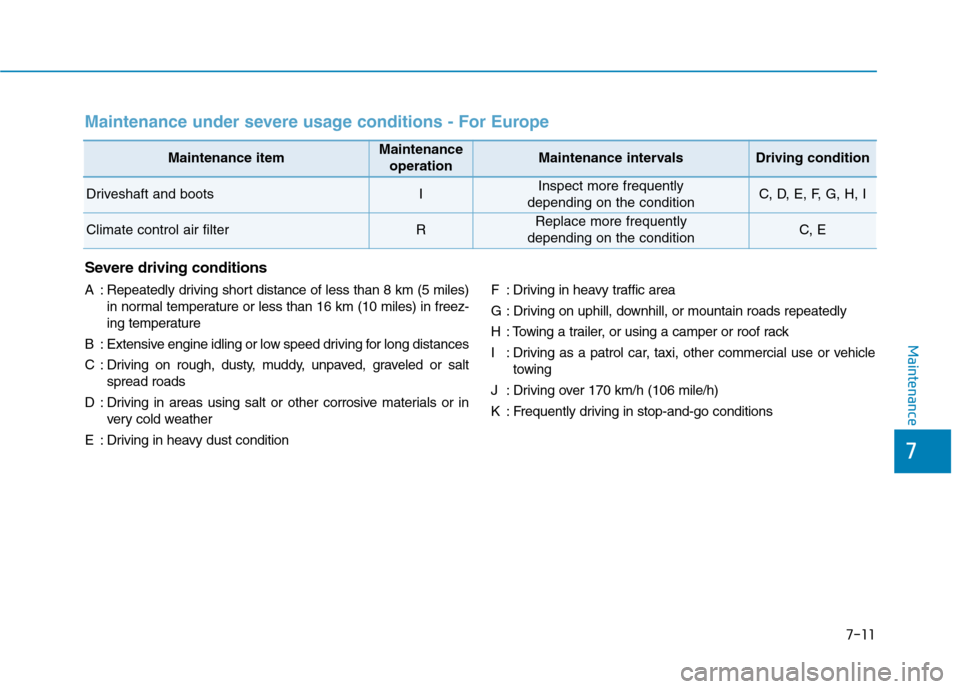
Maintenance under severe usage conditions - For Europe
Severe driving conditions
A : Repeatedly driving short distance of less than 8 km (5 miles)in normal temperature or less than 16 km (10 miles) in freez-
ing temperature
B : Extensive engine idling or low speed driving for long distances
C : Driving on rough, dusty, muddy, unpaved, graveled or salt spread roads
D : Driving in areas using salt or other corrosive materials or in very cold weather
E : Driving in heavy dust condition F : Driving in heavy traffic area
G : Driving on uphill, downhill, or mountain roads repeatedly
H : Towing a trailer, or using a camper or roof rack
I : Driving as a patrol car, taxi, other commercial use or vehicle
towing
J : Driving over 170 km/h (106 mile/h)
K : Frequently driving in stop-and-go conditions
Maintenance itemMaintenance operationMaintenance intervalsDriving condition
Driveshaft and bootsIInspect more frequently
depending on the conditionC, D, E, F, G, H, I
Climate control air filterRReplace more frequently
depending on the conditionC, E
Page 481 of 582
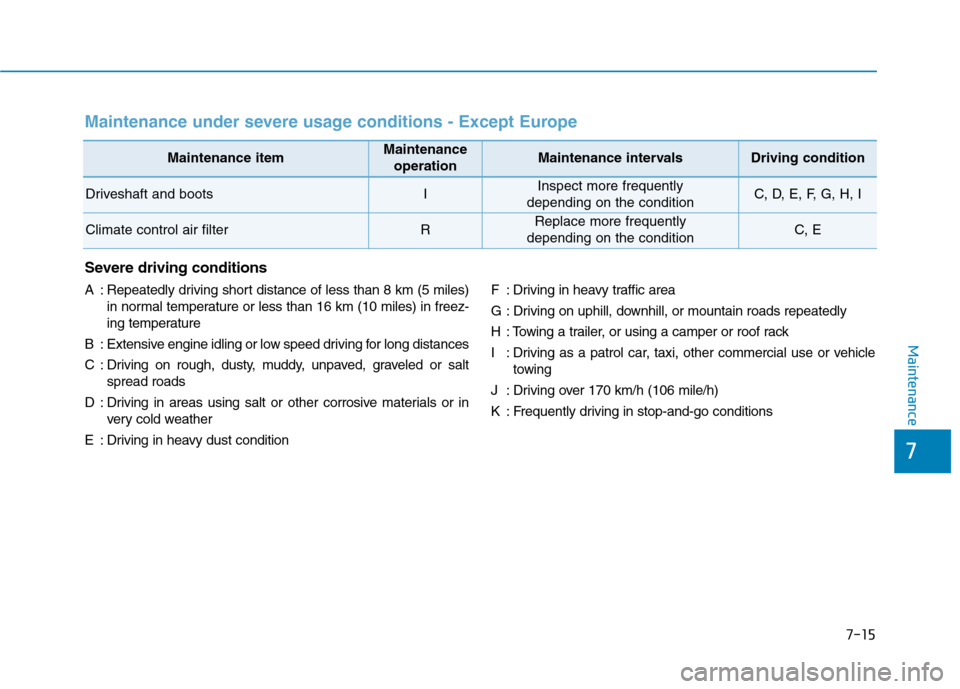
7-15
7
Maintenance
Maintenance itemMaintenance operationMaintenance intervalsDriving condition
Driveshaft and bootsIInspect more frequently
depending on the conditionC, D, E, F, G, H, I
Climate control air filterRReplace more frequently
depending on the conditionC, E
Maintenance under severe usage conditions - Except Europe
Severe driving conditions
A : Repeatedly driving short distance of less than 8 km (5 miles) in normal temperature or less than 16 km (10 miles) in freez-
ing temperature
B : Extensive engine idling or low speed driving for long distances
C : Driving on rough, dusty, muddy, unpaved, graveled or salt spread roads
D : Driving in areas using salt or other corrosive materials or in very cold weather
E : Driving in heavy dust condition F : Driving in heavy traffic area
G : Driving on uphill, downhill, or mountain roads repeatedly
H : Towing a trailer, or using a camper or roof rack
I : Driving as a patrol car, taxi, other commercial use or vehicle
towing
J : Driving over 170 km/h (106 mile/h)
K : Frequently driving in stop-and-go conditions