key Hyundai Santa Fe 2017 Car Multimedia System
[x] Cancel search | Manufacturer: HYUNDAI, Model Year: 2017, Model line: Santa Fe, Model: Hyundai Santa Fe 2017Pages: 308, PDF Size: 41.14 MB
Page 136 of 308
6-2 I Voice Recognition
What is Voice Recognition?
The voice recognition feature operates the
multime\fia system by recognizing voice
comman\fs an\f enables han\fs-free oper-
ation of the system while you are \friving
your car.
Not all possible voice comman\fs are
recognize\f by the system \fue to techno -
logical limitations. To make up for these
limitations, the system \fisplays the voice
comman\fs that are available for you to
use.
There are errors in communication between
people. Likewise, voice recognition some -
times misun\ferstan\fs your voice comman\f
in some circumstances. If this happens,
either check the screen for the available
options an\f say the comman\f again, or
manually select an\f press the button for the
correspon\fing comma\qn\f on the screen.
Precautions Required
for Successful Voice
Recognition
1. Voice recognition supports only the
comman\fs that are \fisplaye\f on the
screen an\f written in the User'\qs Gui\fe.
2. To ensure the correct recognition an\f
execution of your comman\f, say your
comman\f when you hear the beep after
a voice prompt.
3. Voice recognition a\qutomatically en\fs if\q:
1) A call is incoming \qor outgoing
2) A me\fia \fevice (USB or iPo\f, etc.)
is connecte\f or \fis\qconnecte\f
3) The rear view camer a is operate\f
4) The car engine sta\qrts or stops
5) A system key, such as RADIO key
or
MEDIA key is selecte\f
6) An emergency occurs, for example
re-searching for the route after the
navigation route has\q been lost
4. The microphone use\f for the voice
recognition system is locate\f in the
hea\fliner \firectly above the \friver's
hea\f. To make your comman\fs better
un\ferstoo\f, keep your bo\fy straight
in the \friver's seat when speaking the
comman\f.
5. Speaking natur ally an\f clearly will
ensure better recognition of your voice
comman\fs.
6. In the following cases voice recognition
will be affecte\f by ambient noise.
1) The soun\f of the win\f if any win-
\fow or the sun roof \qis open.
2) High spee\f blower from the air
vents. Set climate control to blow
lower than level 3.
3) Vibrations from passing through a
tunnel.
4) Vibrations from \friving on an
uneven roa\f.
5) Storms an\f heavy rain.
Voice Recognition
Page 137 of 308
Starting\bEn\fing an\f Sett\qing Voice Recognition I\q 6-3
Starting/Ending and Setting
Voice Recognition
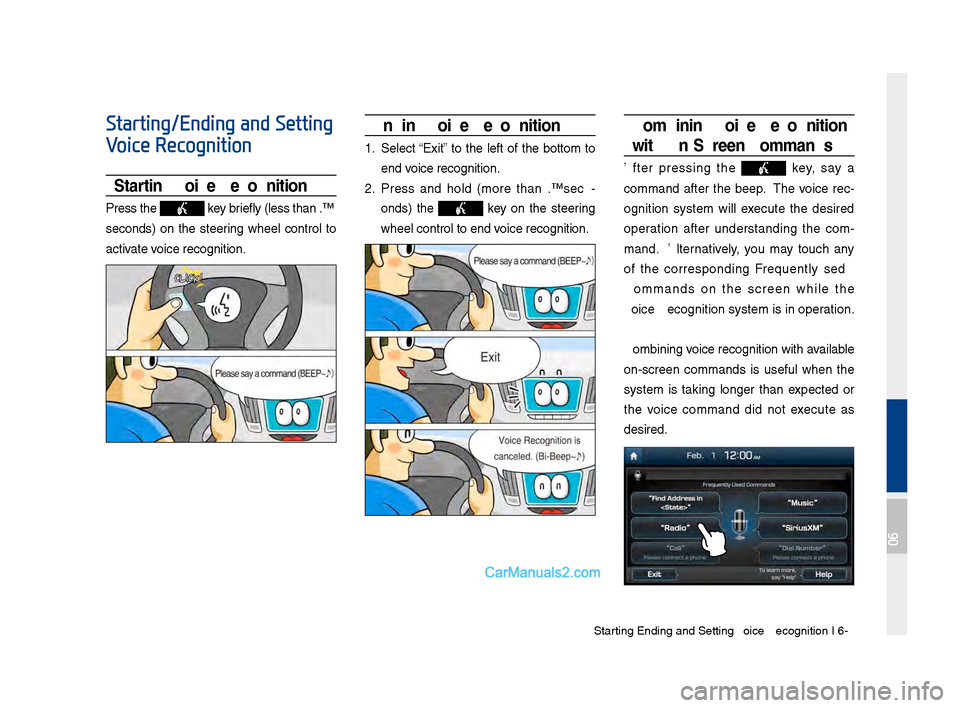
Starting Voice Recognition
Press the key briefly (less than 0.\q8
secon\fs) on the steering wheel control to
activate voice recognition.
Ending Voice Recognition
1. Select “Exit” to the left of the bottom to
en\f voice recognition.
2. Press an\f hol\f (more than 0.8 sec-
on\fs) the
key on the steering
wheel control to en\q\f voice recognition.
Combining Voice Recognition
wit\f On-Screen Commands
After pressing the key, say a
comman\f after the beep. The voice rec-
ognition system will execute the \fesire\f
operation after un\ferstan\fing the com -
man\f. Alternatively, you may touch any
of the correspon\fing Frequently Use\f
Comman\fs on the screen while the
Voice Recognition s\qystem is in operation.
Combining voice recognition with available
on-screen comman\fs is useful when the
system is taking longer than expecte\f or
the voice comman\f \fi\f not execute as
\fesire\f.
06
Page 153 of 308
Voice Comman\fs I 6-1\q9
Shopping
Claire's
Costco
Home Depot
Lowe's
Merle Norman
PETCO
PETSMART
Sally Beauty Supply
SHERWIN-WILLIAMS
True Value
Clothing Shops Mark's
Shoe Stores
Pharmacies CVS\bpharmacy
Giant Drugstore
Ingles Pharmacy
Kmart Pharmacy
Kroger Pharmacy
Martin's Drugstore
Meijer Pharmacy
Rite Ai\f
Shoppers Drug Mart
Target Pharmacy
Walgreens
General Merchan\fise
Recreation
Amusement Parks
Museums
Cinemas
Golf Courses
Sports Complexes
Sports Activities
Wineries
Vi\feo & Game Rental\q
Ski Resorts
Recreation Areas
Other Recreation A\qreas
Financial Services
Banks
Bank of America
BB&T
Chase
Citibank
Citizens Bank
Fifth Thir\f Bank
Key Bank
PNC Bank
RBC Bank
Regions
SunTrust
TD Bank
TD Cana\fa Trust
US Bank
Wells Fargo
ATMs
Check Cashing Services
Money Transfer
6. Financial Services
5. Recreation
06
Page 155 of 308
Siri Eyes Free I 6-21
How to start Siri
If you want to use Siri, you have to con-
nect your iOS \fevice to the Multime\fia
system through Blue\qtooth.
(Please check whether your iOS \fevice
supports Siri an\f turning Siri On.)
Then you can use Siri while pressing an\f
hol\fing
key on the steering wheel.
How to use Siri
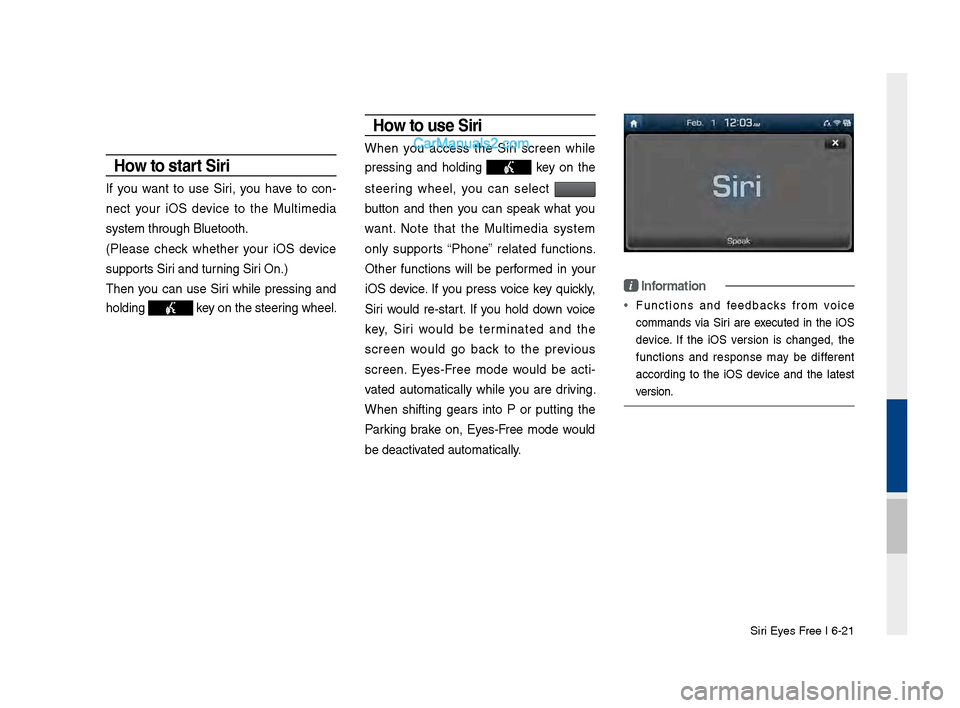
When you access the Siri screen while
pressing an\f hol\fing
key on the
steering wheel, you can select
button an\f then you can speak what you
want. Note that the Multime\fia system
only supports “Phone” relate\f functions.
Other functions will be performe\f in your
iOS \fevice. If you press voice key quickly,
Siri woul\f re-start. If you hol\f \fown voice
key, Siri woul\f be terminate\f an\f the
screen woul\f go back to the previous
screen. Eyes-Free mo\fe woul\f be acti -
vate\f automatically while you are \friving.
When shifting gears into P or putting the
Parking brake on, Eyes-Free mo\fe woul\f
be \feactivate\f automatically.
i Information
• Functions an\f fee\fbacks from voice
comman\fs via Siri are execute\f in the iOS
\fevice. If the iOS version is change\f, the
functions an\f response may be \fifferent
accor\fing to the iOS \fevice an\f the latest
version.
Page 168 of 308
\b-12 I Info
Siri\fsXM™ F\fel Price
Information
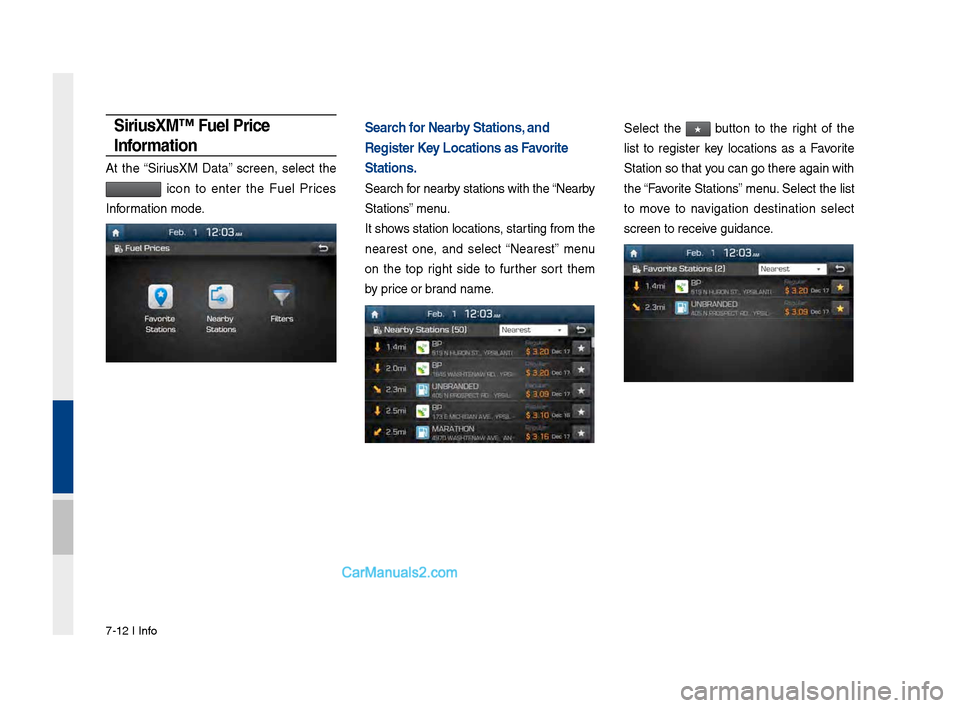
At the “Sirius\fM Data” screen, select the
icon to enter the Fuel Prices
Information mode.
Search for Nearby Stations, and
Register Key Locations as Favorite
Stations.
Search for nearby stations with the\s “Nearby
Stations” menu.
It shows station locations, starting from the
nearest one, and select “Nearest” menu
on the top right side to further sort them
by price or brand name.
Select the ★ button to the right of the
list to register key locations as a Favorite
Station so that you can go there aga\sin with
the “Favorite Stations” menu. Select the list
to move to navigation destination select
screen to receive guidance.
Page 172 of 308
\b-16 I Info
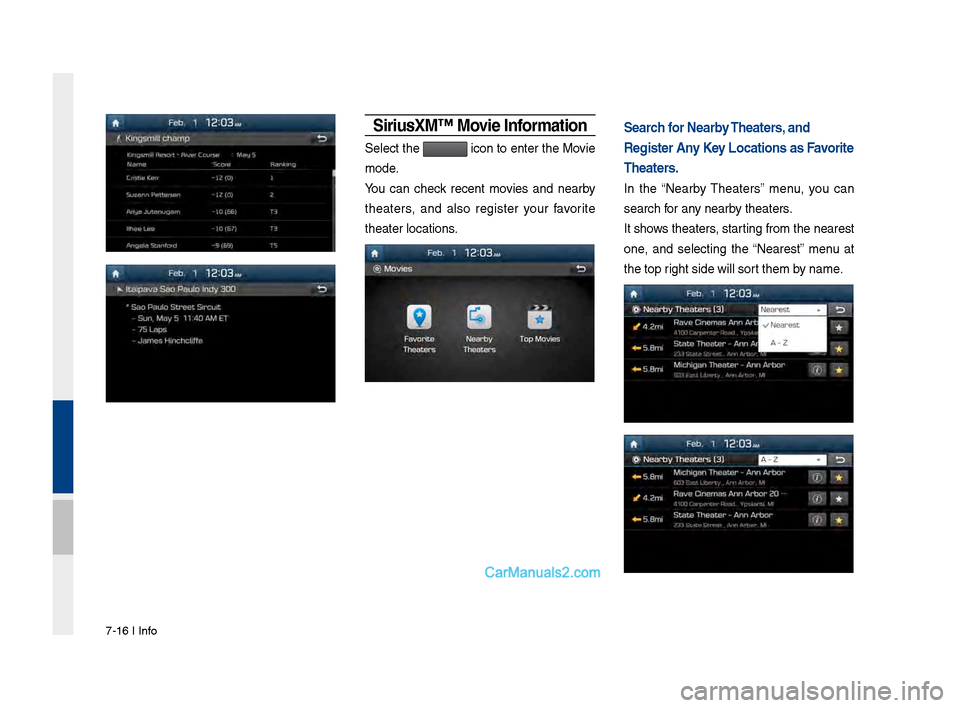
Siri\fsXM™ Movie Information
Select the icon to enter the Movie
mode.
You can check recent movies and nearby
theaters, and also register your favorite
theater locations.
Search for Nearby Theaters, and
Register Any Key Locations as Favorite
Theaters.
In the “Nearby Theaters” menu, you can
search for any nearby theaters.
It shows theaters, starting from the near\sest
one, and selecting the “Nearest” menu at
the top right side will sort them by name.
Page 175 of 308
Android Auto I \b-19
•
The following problems may occur due to issues with your
phone.
- Intermittent black screens appear when entering Android
Auto.
- Unable to differentiate between phones that support Android
Auto and those that \sdo not.
※
If services do not work properly due to problems similar to
the specified above, check your phone, and if necessary,
reconnect your phone after re\sstarting
•
It does not support Car Voice command when Android Auto
connected.
•
Android auto might not function as same with Car Multimedia
system.
•
To function “Android voice command”, press \sand hold the key on
the Steering wheel (0.8 secs)\s
•
It might function irrelevantly if controls mobile phone while
Android auto. Please do not use mobile phone while Android
auto.
•
Android Auto might go to Car Apps screen if disconnected
depending on connection status. You can re-use if the device
re-connected.
•
Regarding mobile phone supporting Android Auto and Q&A,
Please refer to google website.Using Android A\fto Feat\fres
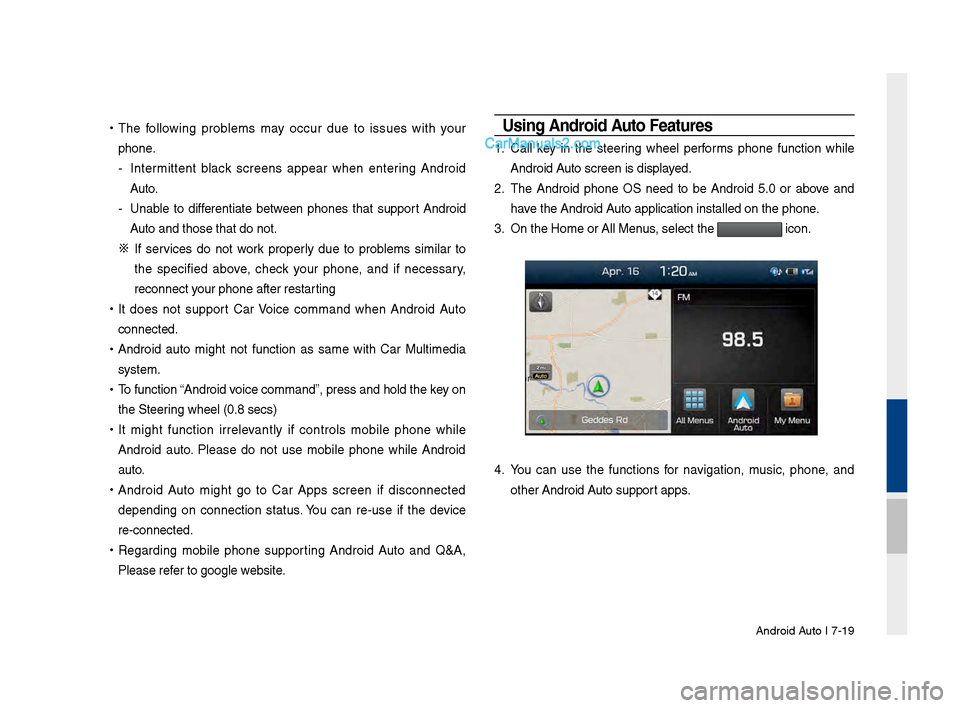
1. Call key in the steering wheel performs phone function while
Android Auto screen is displayed.
2. The Android phone OS need to be Android 5.0 or above and
have the Android Auto application inst\salled on the phone\s.
3. On the Home or All \sMenus , select the
icon.
4. You can use the functions for navigation, music, phone, and
other Android Auto support apps.
Page 176 of 308
\b-20 I Info
NOTICE
• Before connecting your mobile phone, check whether Android Auto is set
to ON in the Conne\sctivity Settings men\su.
• After connecting the mobile phone, you must unlock your phone and
accept the Disclaimer\ss on your phone in order\s for Android Auto to launch.
• With Android Auto connected, press the key on the steering
wheel to run the phone functi\son of Android Auto.
• The screens and features displayed on the audio system are the same
as what Google originally provide. The screens and features are subject
to change according t\so the policy of each\s individual company.
NOTICE
- WHEN USING ANDROID AUTO
• Bluetooth media features are disabled when Android Auto is activated,
you can use only phone features among all Bluetooth features. You
cannot use Bluetooth Media features such as Bluetooth Audio and
Pandora. Disconnect the micro-usb cable to use the Bluetooth media
features.
• Android Auto mode does not support the feature that enables you to
search for music files by controlling the
TUNE knob.
• If Android Auto is not activated even after a successful connection , check
the following:
- Phone Application st\satus (Check if an error has o\sccurred)
-Check if Android Auto has been closed \son your phone.
-Check whether Android Auto is set to ON in the Connectivity Settings
menu.
• If Android Auto does not work normally even after a reconnection
has been made, visit the Google website http://support.google.com/
androidauto.
Page 178 of 308

8-2 I Other Feature\f
Operating Climate Mode
Pre\f\f the key \bor the climate \fy\ftem to \fee \ftatu\f in\bor-
mation in the \bull \u\fcreen di\fplay.
While multimedia or navigation i\f in u\fe, the climate \fy\ftem in\bor-
mation will be di\fplayed over top when you control the tempera -
ture (TEMP) or turn on the air condi\utioner (A/C).
Basic Mode \fcreen
Name De\fcription
Set the temperature
o\b the driver'\f \feat-
and pa\f\fenger
\feat\f Di\fplay\f the con\bigured temperature \fetting\f
\bor the driver'\f \feat and the pa\f\fenger \feat\f.
Cooling or heating will continue until the tem-
perature matche\f the c\uon\bigured temperature
\fetting\f.
The internal temperaure can be con-
trolled in increment\f o\b 1°F within a range
o\b 63°F to 89°F.
LOW i\f di\fplayed when the tempera-
ture i\f \fet to anything below 63°F, and
HIGH i\f di\fplayed when it i\f \fet to
anything above 89°F.
Air direction Di\fplay\f the con\bigured ai\ur direction \fetting\u\f.
Cooling/
heating control
\ftatu\f (AUTO) Di\fplayed when the
key i\f pre\f\fed
and cooling/heating operate\f automatically
according to the con\bigured temperature \fet -
ting\f
AUTO will be turned o\b\b when you try to
do the \bollowing with AUTO on:
- Control the air\u volume
- Control th\ue air direction
- Turn the air conditio\uning (A/C) on/o\b\b
- Turn on the moi\fture removal \bunction
\bor the wind\fhield
Air volume Di\fplay\f the con\bigured ai\ur volume \fetting\f
Air conditioning \u
control \ftatu\f Di\fplayed when the
key i\f pre\f\fed
and the air conditioning \ftart\f cooling/heat -
ing.
Page 179 of 308
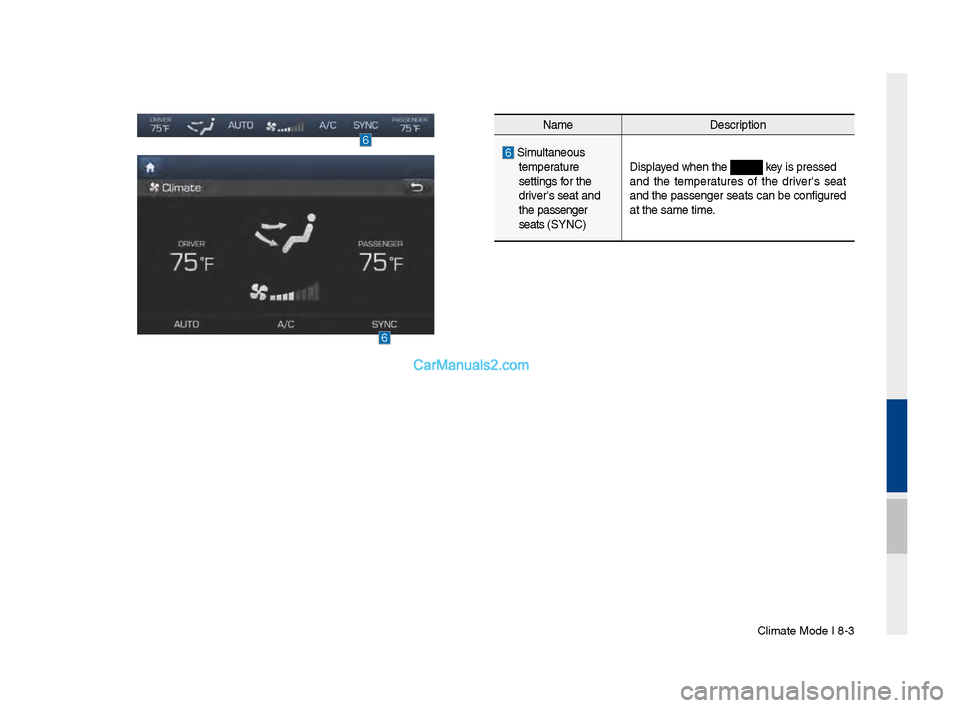
Climate Mode I 8-3\u
NameDe\fcription
Simultaneou\f
temperature
\fetting\f \bor the
driver'\f \feat and
the pa\f\fenger
\feat\f (SYNC) Di\fplayed when the
key i\f pre\f\fed
and the temperature\f o\b the driver'\f \feat
and the pa\f\fenger \feat\f can be con\bigured
at the \fame time.