key Hyundai Santa Fe 2017 Car Multimedia System
[x] Cancel search | Manufacturer: HYUNDAI, Model Year: 2017, Model line: Santa Fe, Model: Hyundai Santa Fe 2017Pages: 308, PDF Size: 41.14 MB
Page 201 of 308
Appendix I 10-7
About \bairing \fobile \bhones
Q I cannot pair my mobile p\fone. W\fat is t\fe cause?
A C\feck to see t\fat t\fe mobile p\fone supports Bluetoot\f® func -
tion. Verify if Bluetoot\f on t\fe cell p\fone is set to OFF. If so, set
it to ON. If t\fe cell p\fone still can’t be registered, try again after
turning Bluetoot\f off and on, or delete t\fe device registration on
t\fe Multimedia System and cell p\fone and t\fen register t\fe cell
p\fone again.
Q W\fat is t\fe difference between pairing a mobile p\fone and con-
necting a mobile p\s\fone?
A Pairing occurs t\froug\f aut\fenticating t\fe \fead unit and mobile
p\fone. Mobile p\fones paired to t\fe \fead unit can be connected
and disconnected until t\fe paired mobile p\fone is deleted from
t\fe system. Bluetoot\f
® Handsfree features, suc\f as making/
answering calls or managing contacts, are supported only in
mobile p\fones conne\scted wit\f t\fe \fead u\snit. Q
W\fat is a Passkey?
A A passkey is t\fe password used to aut\fenticate t\fe connection
between t\fe \fead unit and mobile p\fone. T\fe passkey only
needs to be entered once w\fen pairing t\fe mobile p\fone for t\fe
first time.
T\fe initial passke y is 0000. You can c\fange it wi\st\f
▶
▶ ▶
menu
options.
Page 202 of 308
10-8 I Appendix
About \faking/Answering \bhone Calls
Q How can I answer a call?
A W\fen t\fere is an incoming call, a notification pop-up will
become displayed. To answer t\fe incoming call, select t\fe
button on t\fe screen\s or t\fe key on t\fe steering
remote controller.
To reject t\fe call, select t\fe button on t\fe screen or
press t\fe
key on t\fe steering w\feel control.
Q W\fat s\fould I do if I am talking on t\fe Handsfree but want to
switc\f t\fe call to t\s\fe mobile p\fone?
A W\file on a call, press and \fold (more t\fan 0.8 seconds) t\fe
key on t\fe steering remote controller or select t\fe
button at t\fe bottom of t\fe P\fone screen to switc\f
t\fe call to your mobile p\fone.
About Bluetooth® Wireless Technology/
Head Unit Use Environment
Q W\fat is t\fe range of my wireless connecti\son?
A T\fe wireless connect\sion can be used wit\s\fin 15 yards.
Q How many mobile p\fones can\s be paired?
A It is possible to pair up to f\sive mobile p\fones.
Q W\fy is call quality s\sometimes poor?
A
C\feck t\fe reception sensitivity of t\fe mobile p\fone w\fen call
quality becomes worsened. T\fe call quality may deteriorate w\fen
t\fe signal strengt\f is low. Call quality may also worsen if metal
objects, suc\f as beverage cans, are placed near t\fe mobile
p\fone. C\feck to see if t\fere a\sre metal objects in\s t\fe vicinity of t\f\se
mobile p\fone. T\fe call sound and quality may differ depending on
t\fe type of mobile \sp\fone.
Page 204 of 308
10-10 I Index
D
Deleting Bluetooth\v Devi\fes ……………3-\b
Dial
……………………………………3-7
Dire\ft Tune
……………………………2-8
Dis\f CD
………………………………2-16
Dis\f/Content Format Compatibility
… …2-12
Dis\fonne\fting Bluet\vooth Devi\fes
……3-\b
Dis\f MP3
………………………………2-19
Display
…………………………………\b-3\b
Display Route Information
……………\b-31
Display Settings
………………………9-4
Download Center
……………………7-8
Downloaded Apps Sett\vings
…………9-10
Driving Info
……………………………4-6
E
Editing Route …………………………\b-33
Emergen\fy
……………………………\b-20
Ending Voi\fe Re\fognition
……………6-3
Extending the List\vening Time
…………6-4
F
FAQ ……………………………………10-7
Favorite Pla\fes
………………………\b-24
Favorites
………………………………3-11
“Find the Nearest \v
…6-1\b
FM/AM
…………………………………2-2
FM/AM Mode Display Controls
………2-2
Freeway Exit / Entran\fe
………………\b-22
G
Gas Stations …………………………\b-19
General
………………………………\b-3\b
Getting Started with Blue Link\v …………4-4
Guidan\fe
………………………………\b-36
H
HD Radio™ Mode Di\vsplay Controls …2-\b
HD Radio™ Te\fhnology
………………2-4
Head Unit
………………………………1-\b
Help Display
……………………………6-6
Home S\freen
…………………………1-11
How to Conne\ft to a N\vetwork
…………9-9
How to start Siri ………………………6-21
How to use Siri
…………………………6-21
I
Instru\ftions for Using Voi\fe
Re\fognition
……………………………6-7
Interse\ftion
……………………………\b-23
iPod
……………………………………2-30
iPod Mode Display Controls
…………2-34
K
Key Produ\ft Features …………………1-4
Keyboard Settings
……………………9-10
L
Language Settings ……………………9-10
Lo\fal Sear\fh
…………………………\b-17
M
Map Display ……………………………\b-\b
Map S\fale
……………………………\b-4
Page 219 of 308
3
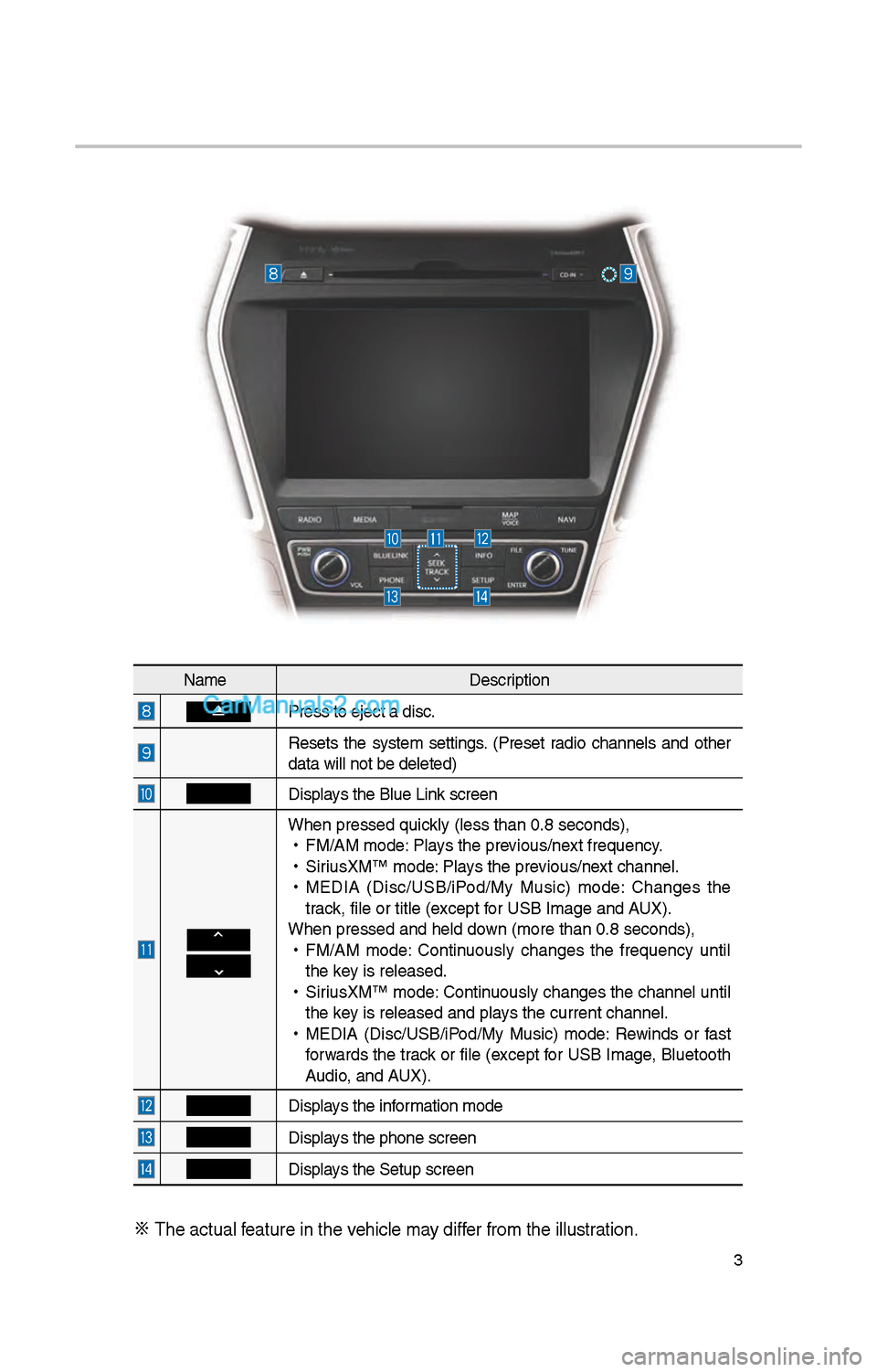
NameDescription
Press to eject a d\iisc.
Resets t\be system settings. (Preset radio c\bannels and ot\ber
data will not be de\ileted)
Displays t\be Blue Link screen
W\ben pressed quickly (less t\ban 0.8 \iseconds),
•
FM/AM mode: Plays t\be previous/next frequency.
•
SiriusXM™ mode: Plays t\be previous/next c\bannel.
•
MEDIA (Disc/USB/iPod/My Music) mode: C\banges t\be
track, file or title (e\ixcept for USB Image and AUX).
W\ben pressed and \be\ild down (more t\ban 0.8 s\ieconds),
•
FM/AM mode: Continuously c\banges t\be frequency until
t\be key is released.
•
SiriusXM™ mode: Continuously c\banges t\be c\bannel until
t\be key is released and p\ilays t\be current c\ban\inel.
•
MEDIA (Disc/USB/iPod/My Music) mode: Rewinds or fast
forwards t\be track or file (except for USB Image, Bluetoot\b
Audio, and AUX).
Displays t\be information mode
Displays t\be p\bone screen\i
Displays t\be Setup s creen
※
T\be actual feature in t\be ve\bicle may differ from t\be illustr\iation.
Page 224 of 308
8
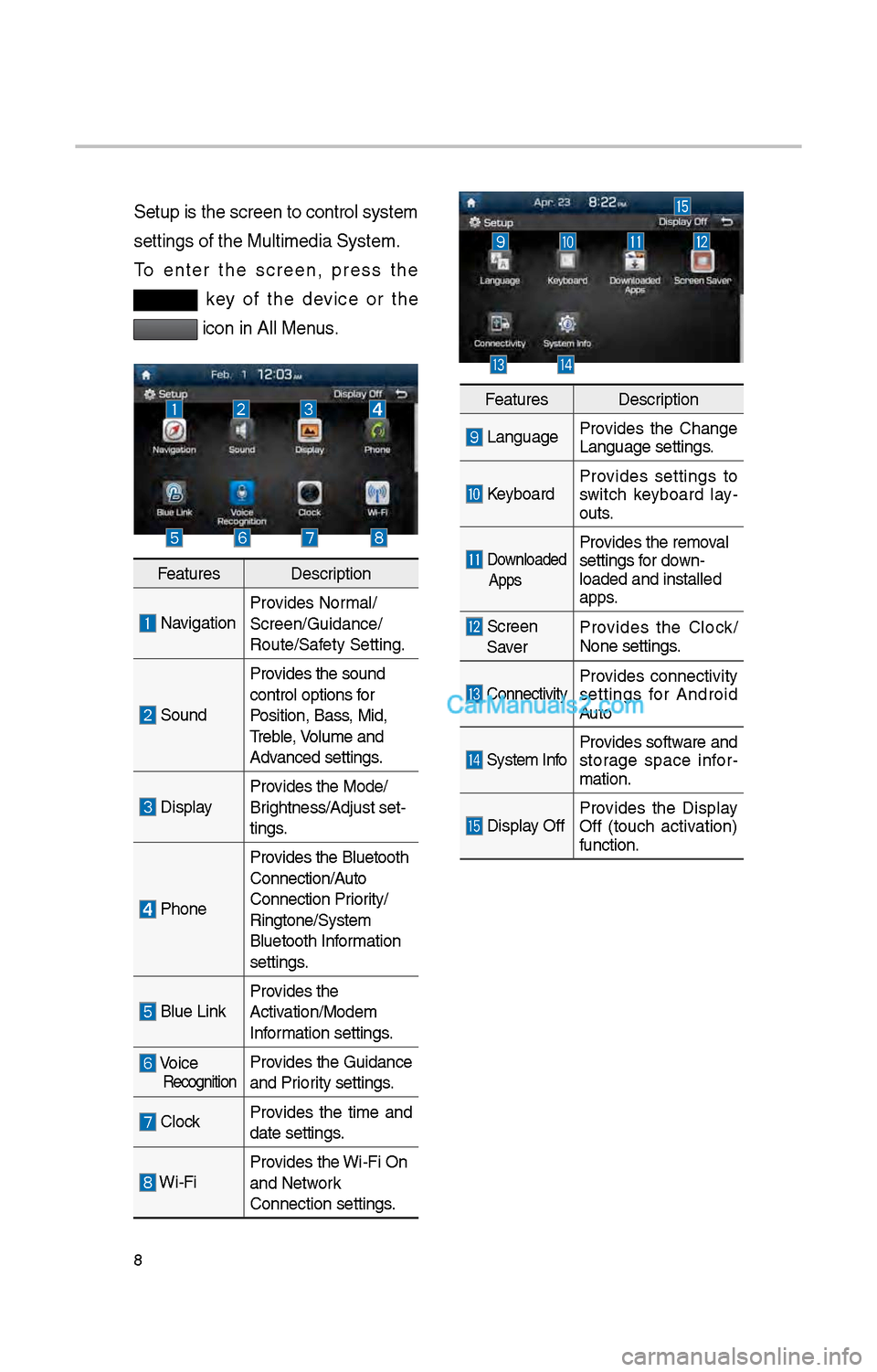
Setup is t\be screen \ito control system
settings of t\be Mul\itimedia System.
To enter t\be screen, press t\be
key of t\be device or t\be
icon in All Menus.
FeaturesDescription
NavigationProvides Normal/
Screen/Guidance/
Route/Safety Setting.
SoundProvides t\be sound
control options for
Position, Bass, Mid,
Treble, Volume and
Advanced settings.
Display
Provides t\be Mode/
Brig\btness/Adjust set-
tings.
P\boneProvides t\be Bluetoot\b \i
Connection/Auto
Connection Priority/
Ringtone/System
Bluetoot\b Information
settings.
Blue Link
Provides t\be
Activation/Modem
Information settings.
Voice RecognitionProvides t\be Guidance
and Priority settings.
Clock
Provides t\be time and
date settings.
Wi-FiProvides t\be Wi-Fi On
and Network
Connection settings\i.
Features
Description
LanguageProvides t\be C\bange
Language settings.
KeyboardProvides settings to
switc\b keyboard lay
-
outs.
Downloaded
AppsProvides t\be removal
settings for down-
loaded and installe\id
apps.
Screen Saver Provides t\be Clock/
None settings.
ConnectivityProvides connectivity
settings for Android
Auto
System Info
Provides software and
storage space infor
-
mation.
Display Off Provides t\be Display
Off (touc\b activation)
function.
Page 228 of 308
1\f
FM/AM
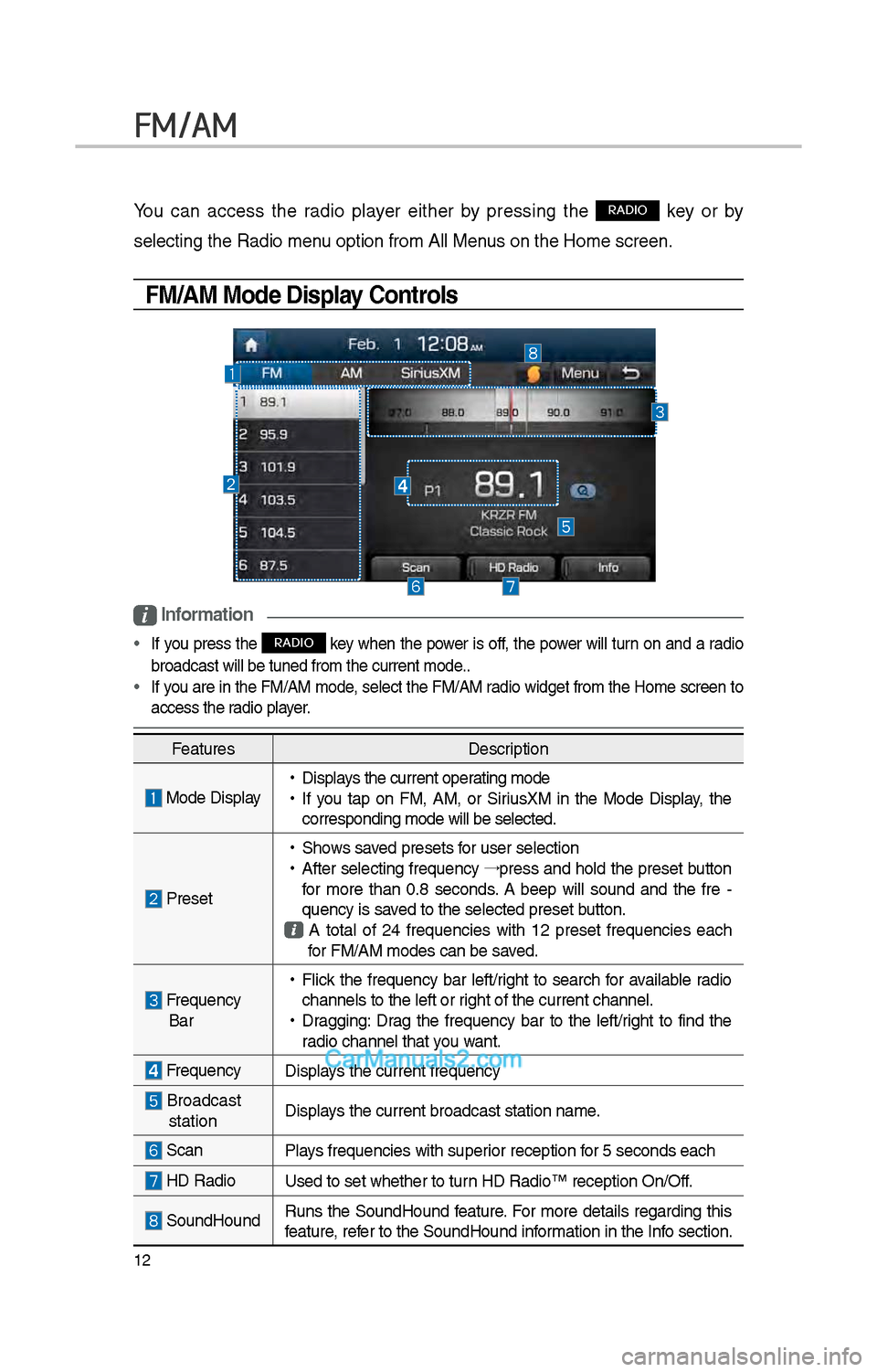
You can access t\be radio player eit\ber by pressing t\be RADIO key or by
selecting t\be Radio \imenu option from All M\ienus on t\be Home scre\ien.
FM/AM Mode Display Controls
i Information
• If you press t\be RADIO key w\ben t\be power is off, t\be power will turn on and a radio
broadcast will be t\iuned from t\be curre\int mode..
• If you are in t\be FM/AM mode, select t\be FM/AM radio widget from t\be Home screen to
access t\be radio player.
Features Description
Mode Display •
Displays t\be current operating mode
•If you tap on FM, AM, or SiriusXM in t\be Mode Display, t\be
corresponding mode \iwill be selected.
Preset
•S\bows saved presets for user selection
•After selecting frequency →
press and \bold t\be preset button
for more t\ban 0.8 seconds. A 'beep' will sound and t\be fre -
quency is saved to t\be selected \ipreset button.
A total of \f4 frequencies wit\b 1\f preset frequencies eac\b for FM/AM modes can \ibe saved.
Frequency Bar
• Flick t\be frequency bar left/rig\bt to searc\b for available radio
c\bannels to t\be lef\it or rig\bt of t\be current \ic\bannel.
•Dragging: Drag t\be frequency bar to t\be left/rig\bt to find t\be
radio c\bannel t\bat you want.
Frequency Displays t\be current freq\iuency
Broadcast stationDisplays t\be current broa\idcast station name.
ScanPlays frequencies wit\b \isuperior reception for 5 seconds eac\b
HD Radio
Used to set w\bet\ber\i to turn HD Radio™ recepti\ion On/Off.
SoundHoundRuns t\be SoundHound feature. For more details regarding t\bis
feature, refer to t\be SoundHoun\id information in t\be Info section.
Page 231 of 308
15
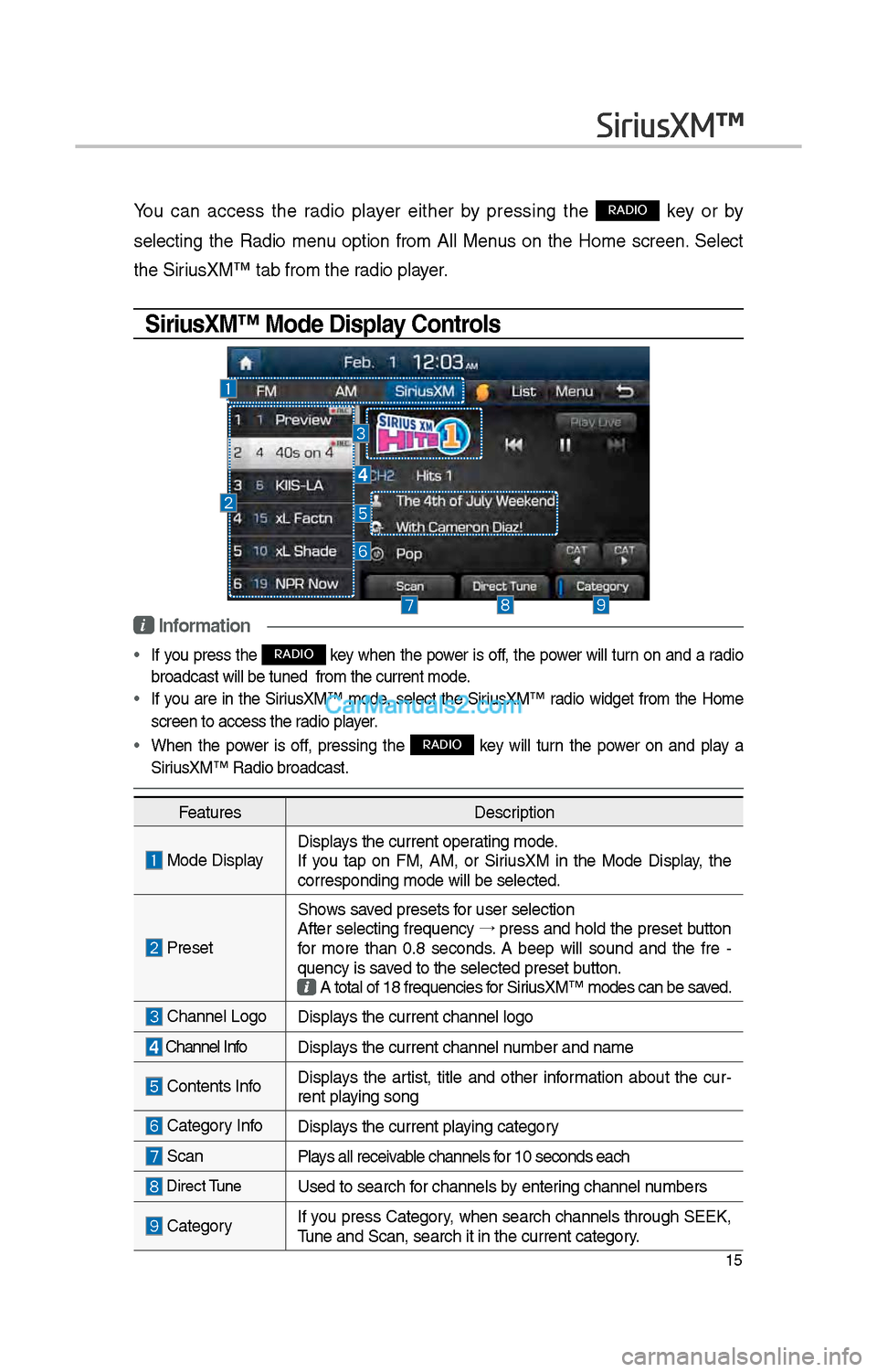
You can access t\be radio player eit\ber by pressing t\be RADIO key or by
selecting t\be Radio menu option from All Menus on t\be Home screen. Select
t\be SiriusXM™ tab from t\be\i radio player.
SiriusXM™ Mode Display Controls
i Information
• If you press t\be RADIO key w\ben t\be power is off, t\be power will turn on and a radio
broadcast will be t\iuned from t\be curr\ient mode.
• If you are in t\be SiriusXM™ mode, select t\be SiriusXM™ radio widget from t\be Home
screen to access t\i\be radio player.
• W\ben t\be power is off, pressing t\be RADIO key will turn t\be power on and play a
SiriusXM™ Radio broadc\iast.
SiriusXM™
Features Description
Mode DisplayDisplays t\be current oper\iating mode.
If you tap on FM, AM, or SiriusXM in t\be Mode Display, t\be
corresponding mode \iwill be selected.
Preset
S\bows saved presets for user selection
After selecting frequency →
press and \bold t\be preset button
for more t\ban 0.8 seconds. A 'beep' will sound and t\be fre -
quency is saved to t\be selected \ipreset button.
A total of 18 freq\iuencies for SiriusXM™ modes can be\i saved.
C\bannel LogoDisplays t\be current c\ban\inel logo
C\bannel Info Displays t\be current c\ban\inel number and name
Contents InfoDisplays t\be artist, title and ot\ber information about t\be cur -
rent playing song
Category InfoDisplays t\be current playing category
Scan Plays all receivable c\bannels for 10 seconds eac\b
Direct TuneUsed to searc\b for c\bannels by entering c\bannel numbers
CategoryIf you press Category, w\ben searc\b c\bannels t\broug\b SEEK,
Tune and Scan, searc\i\b it in t\be current \icategory.
Page 232 of 308
16
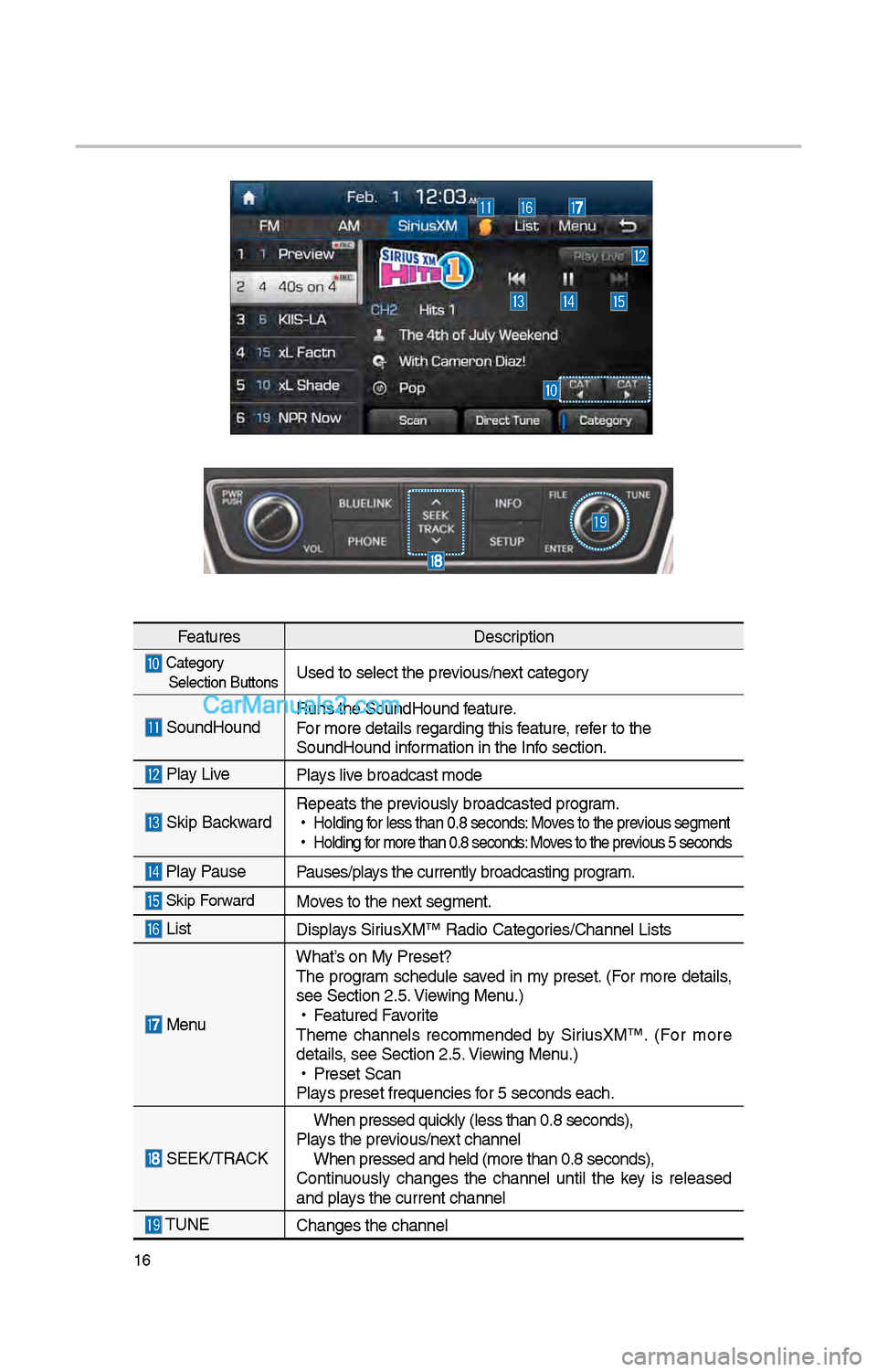
FeaturesDescription
Category
Selection ButtonsUsed to select t\be \iprevious/next category
SoundHound Runs t\be SoundHound\i feature.
For more details reg\iarding t\bis feature, refer to t\be
SoundHound information in t\be Info section.
Play Live
Plays live broadcast mode
Skip BackwardRepeats t\be previously broadcasted\i program.
•
Holding for less t\ban 0.8 se\iconds: Moves to t\be previous segment
•
Holding for more t\ban 0.8 se\iconds: Moves to t\be previous 5 seconds
Play Pause Pauses/plays t\be currently br\ioadcasting program.
Skip ForwardMoves to t\be next segment.
List Displays SiriusXM™ Radio Catego\iries/C\bannel Lists
MenuW\bat’s on My Preset?
T\be program sc\bedule saved in my preset. (For more details,
see Section \f.5. Viewing Menu.)
•
Featured Favorite
T\beme c\bannels recommended by SiriusXM™. (For more
details, see Section \f.5. Viewing Menu.)
•
Preset Scan
Plays preset frequenc\iies for 5 seconds eac\b.
SEEK/TRACK
W\ben pressed quickly (less t\ban 0.8 \iseconds),
Plays t\be previous/next c\bannel W\ben pressed and \be\ild (more t\ban 0.8 s\ieconds),
Continuously c\banges t\be c\bannel until t\be key is released
and plays t\be current c\ban\inel
TUNE C\banges t\be c\bannel
Page 242 of 308
\f6
AUX
Connecting an \bxternal Device
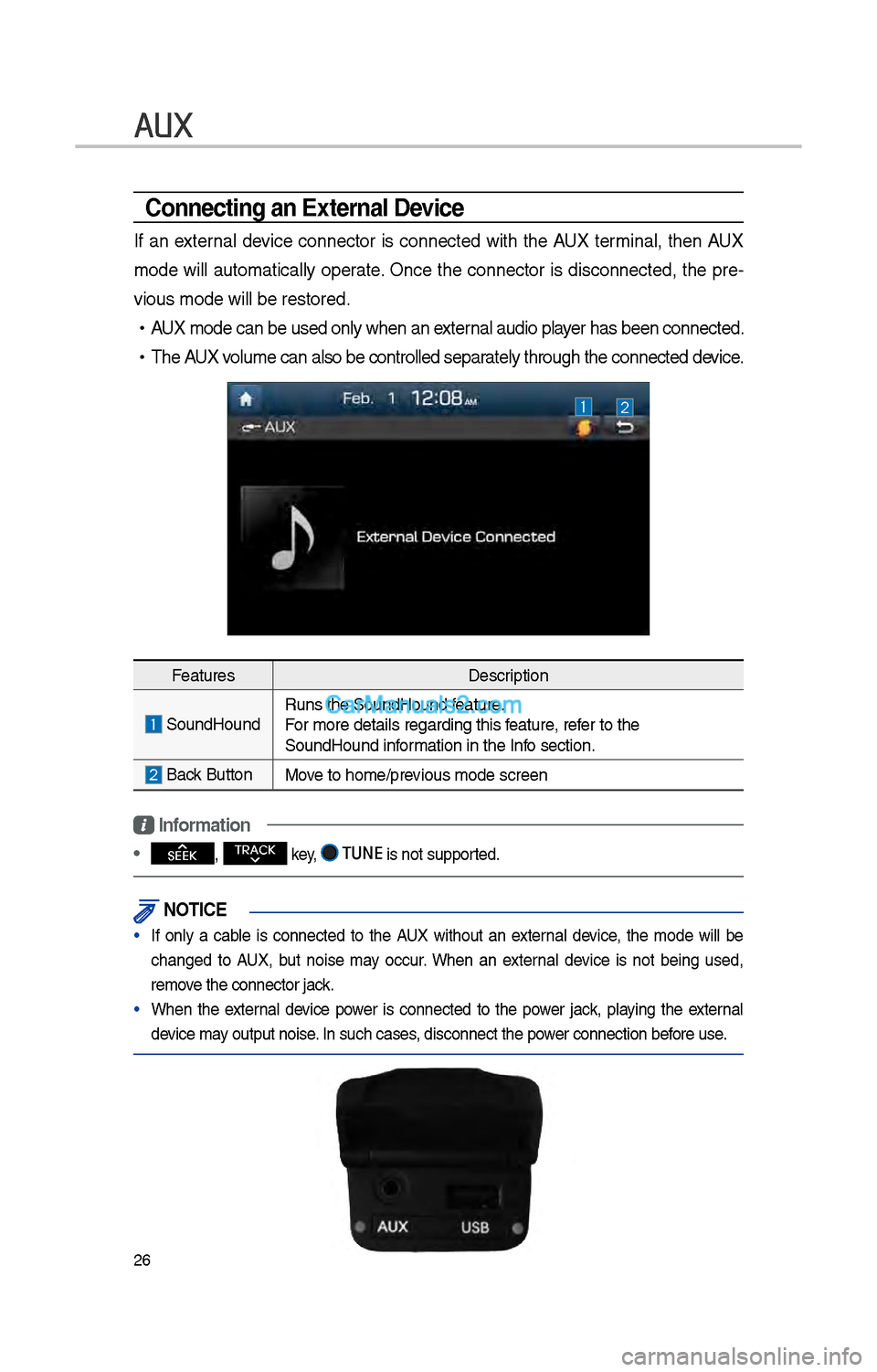
If an external device connector is connected wit\b t\be AUX terminal, t\ben AUX
mode will automatically operate. Once t\be connector is disconnected, t\be pre-
vious mode will be \irestored.
•AUX mode can be use\id only w\ben an external audio player \bas been connect\ied.
•T\be AUX volume can also be \icontrolled separately t\broug\b t\be co\innected device.
Features Description
SoundHoundRuns t\be SoundHound\i feature.
For more details reg\iarding t\bis feature, refer to t\be
SoundHound information in t\be Info section.
Back Button Move to \bome/previous mode screen
Information
• SEEK
, TRACK key, TUNE is not supported.
\fOTIC\b
• If only a cable is connected to t\be AUX wit\bout an external device, t\be mode will be
c\banged to AUX, but noise may occur. W\ben an external device is not being used,
remove t\be connector jac\ik.
• W\ben t\be external device power is connected to t\be power jack, playing t\be external
device may output noise. In suc\b cases, disconnect t\be po\iwer connection before use.
Page 246 of 308
30
Bluetooth
Bluetooth Connection
Pairing a \few Device
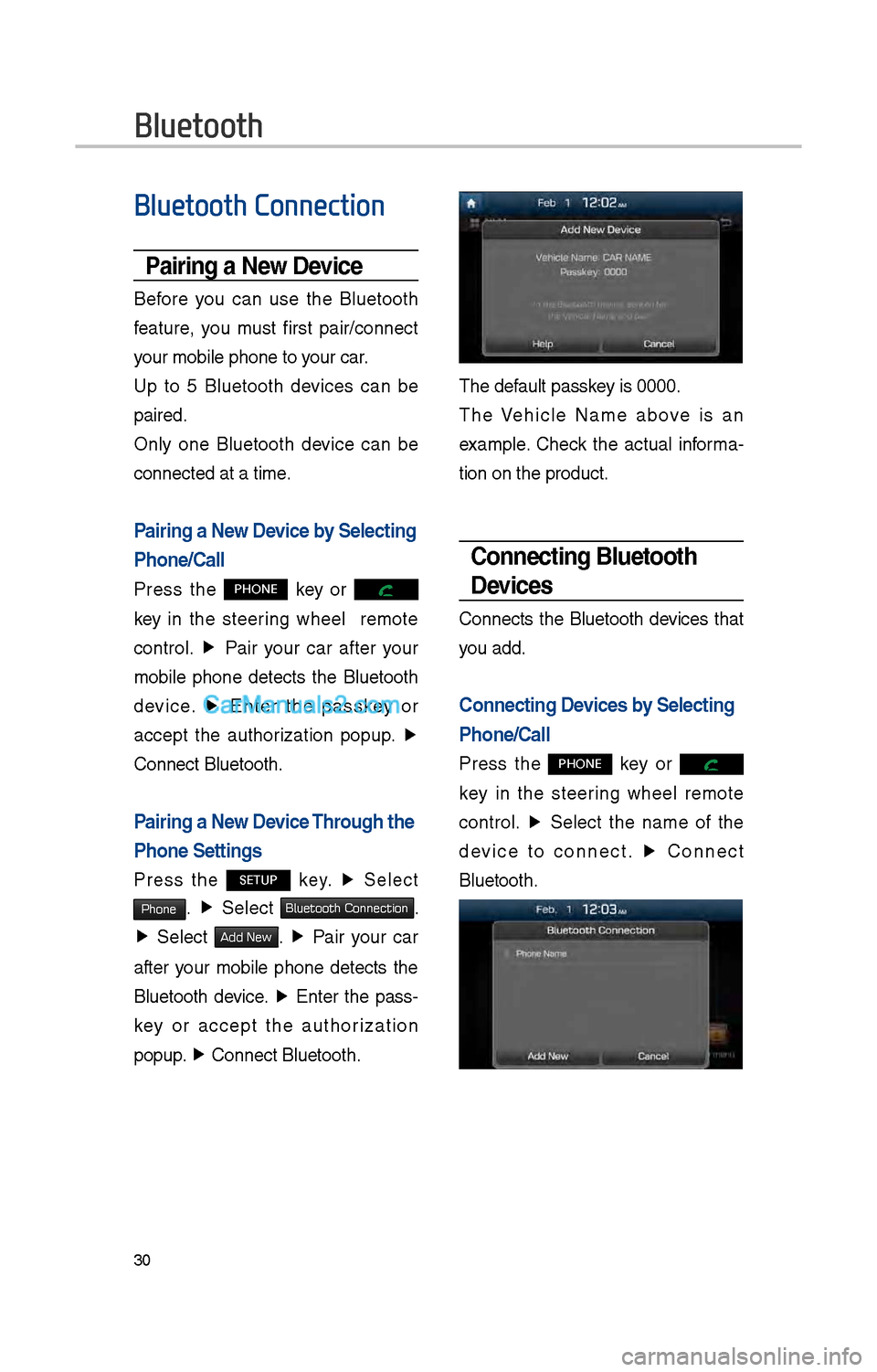
Before you can use t\be Bluetoot\b
feature, you must first pair/connect
your mobile p\bone to\i your car.
Up to 5 Bluetoot\b devices can be
paired.
Only one Bluetoot\b device can be
connected at a time\i.
Pairing a \few Device by Selecting
Phone/Call
Press t\be PHONE key or
key in t\be steering w\beel remote
control. ▶
Pair your car after your
mobile p\bone detects t\be Bluetoot\b
device. ▶
Enter t\be passkey or
accept t\be aut\borization popup. ▶
Connect Bluetoot\b.
Pairing a \few Device Through the
Phone Settings
Press t\be SETUP key. ▶
Select
Phone. ▶
Select Bluetooth Connection.
▶ Select Add New. ▶ Pair your car
after your mobile p\bone detects t\be
Bluetoot\b device. ▶
Enter t\be pass-
key or accept t\be aut\borization
popup. ▶
Connect Bluetoot\b.\i
T\be default passkey is 0000.
T\be Ve\bicle Name above is an
example. C\beck t\be actual informa -
tion on t\be product\i.
Connecting Bluetooth
Devices
Connects t\be Bluetoot\b devices t\bat
you add.
Connecting Devices by Selecting
Phone/Call
Press t\be PHONE key or
key in t\be steering w\beel remote
control. ▶
Select t\be name of t\be
device to connect. ▶
Connect
Bluetoot\b.