clutch ISUZU TROOPER 1995 Workshop Manual
[x] Cancel search | Manufacturer: ISUZU, Model Year: 1995, Model line: TROOPER, Model: ISUZU TROOPER 1995Pages: 1928
Page 1102 of 1928
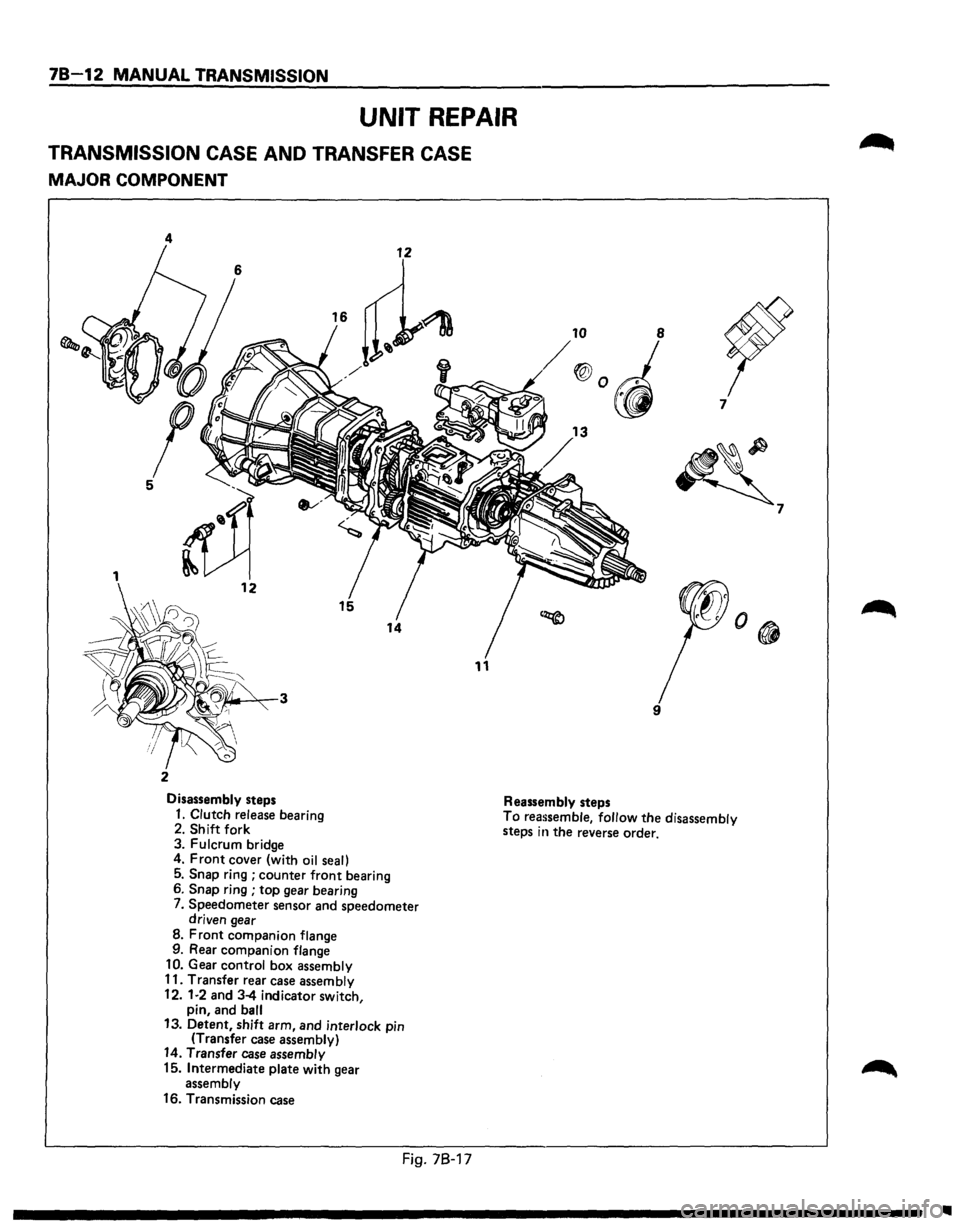
78-12 MANUAL TRANSMISSION
UNIT REPAIR
TRANSMISSION CASE AND TRANSFER CASE
MAJOR COMPONENT
4
11
2
Disassembly steps Reassembly steps 7
~
9
1. Clutch release
bearing 2. Shift fork
3. Fulcrum bridge To reassemble, follow the disassembly
steps in the reverse order.
4.
Front cover (with oil seal)
5. Snap ring ; counter front bearing
6. Snap ring ; top gear bearing
7. Speedometer sensor and speedometer
driven gear
8. Front companion flange
9. Rear companion flange
10. Gear control box assembly
11. Transfer rear case assembly
12.
1·2 and 3-4 indicator switch,
pin, and ball 13. Detent, shift arm, and interlock pin
(Transfer case assembly) 14. Transfer case assembly
15. Intermediate plate with gear
assembly
16. Transmission case
Fig. 78-17
7
Ill
Page 1103 of 1928
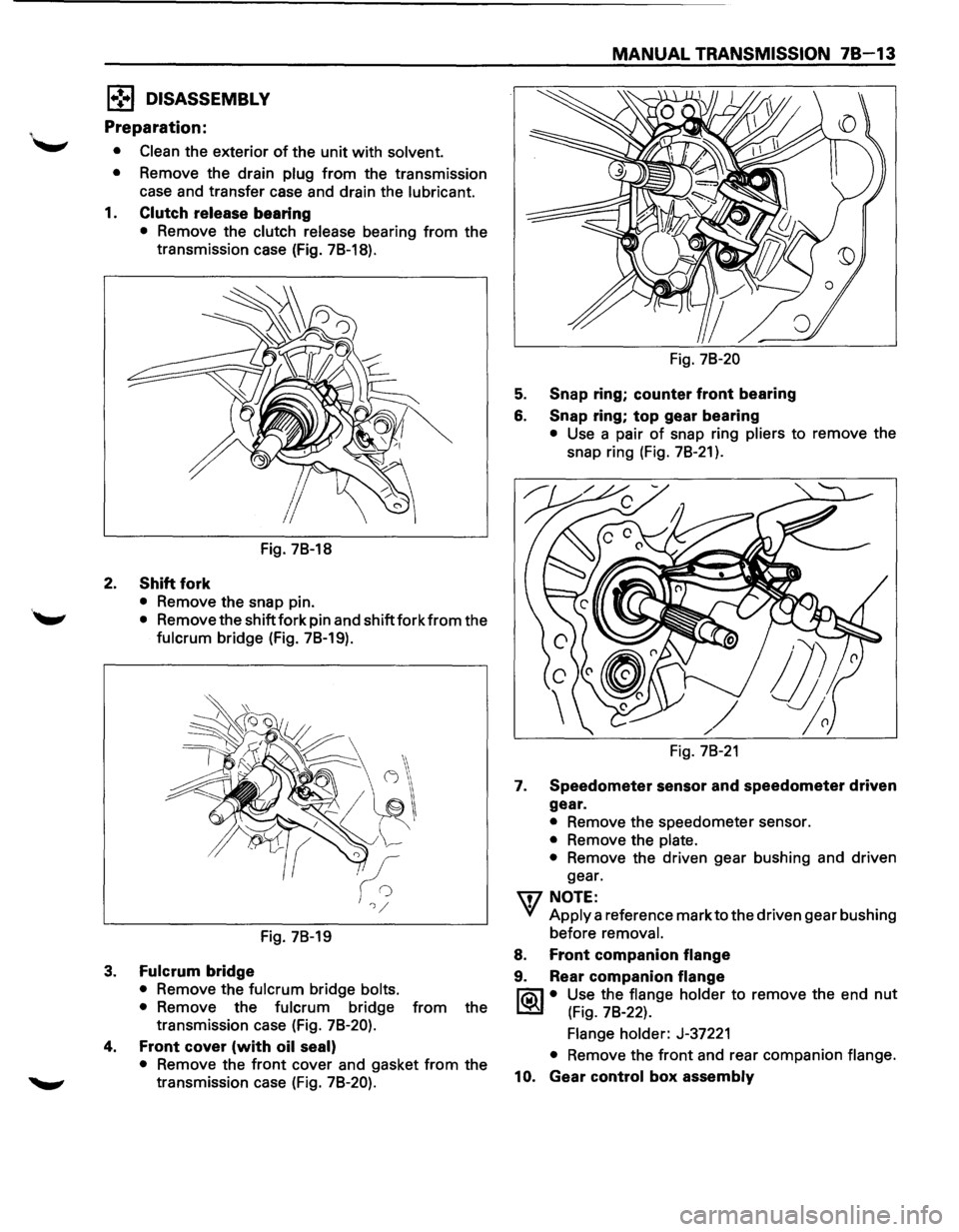
1•!,.1 DISASSEMBLY
Preparation:
• Clean the exterior of the unit with solvent.
•
Remove the drain plug from the transmission
case and transfer case and drain the
lubricant.
1. Clutch release bearing
• Remove the clutch release bearing from the
transmission case (Fig.
78-18).
Fig. 78-18
2. Shift fork
• Remove the snap pin.
''-" • Remove the shift fork pin and shift fork from the
fulcrum bridge (Fig. 78-19).
Fig. 78-19
3. Fulcrum bridge
• Remove the fulcrum bridge bolts.
•
Remove the fulcrum bridge from the
transmission case (Fig.
78-20).
4. Front cover (with oil seal)
• Remove the front cover and gasket from the
transmission case (Fig.
78-20).
MANUAL TRANSMISSION 78-13
Fig. 78-20
5. Snap ring; counter front bearing
6. Snap ring; top gear bearing
• Use a pair of snap ring pliers to remove the
snap ring (Fig.
78-21 ).
Fig. 78-21
1. Speedometer sensor and speedometer driven
gear.
• Remove the speedometer sensor.
• Remove the plate.
•
Remove the driven gear bushing and driven
gear.
'\fl NOTE:
VI Apply a reference mark to the driven gear bushing
before
removal.
8. Front companion flange
9. Rear companion flange
l'ia\1 • Use the flange holder to remove the end nut
~ (Fig. 78-22).
Flange holder: J-37221
• Remove the front and rear companion flange.
10. Gear control box assembly
Page 1115 of 1928
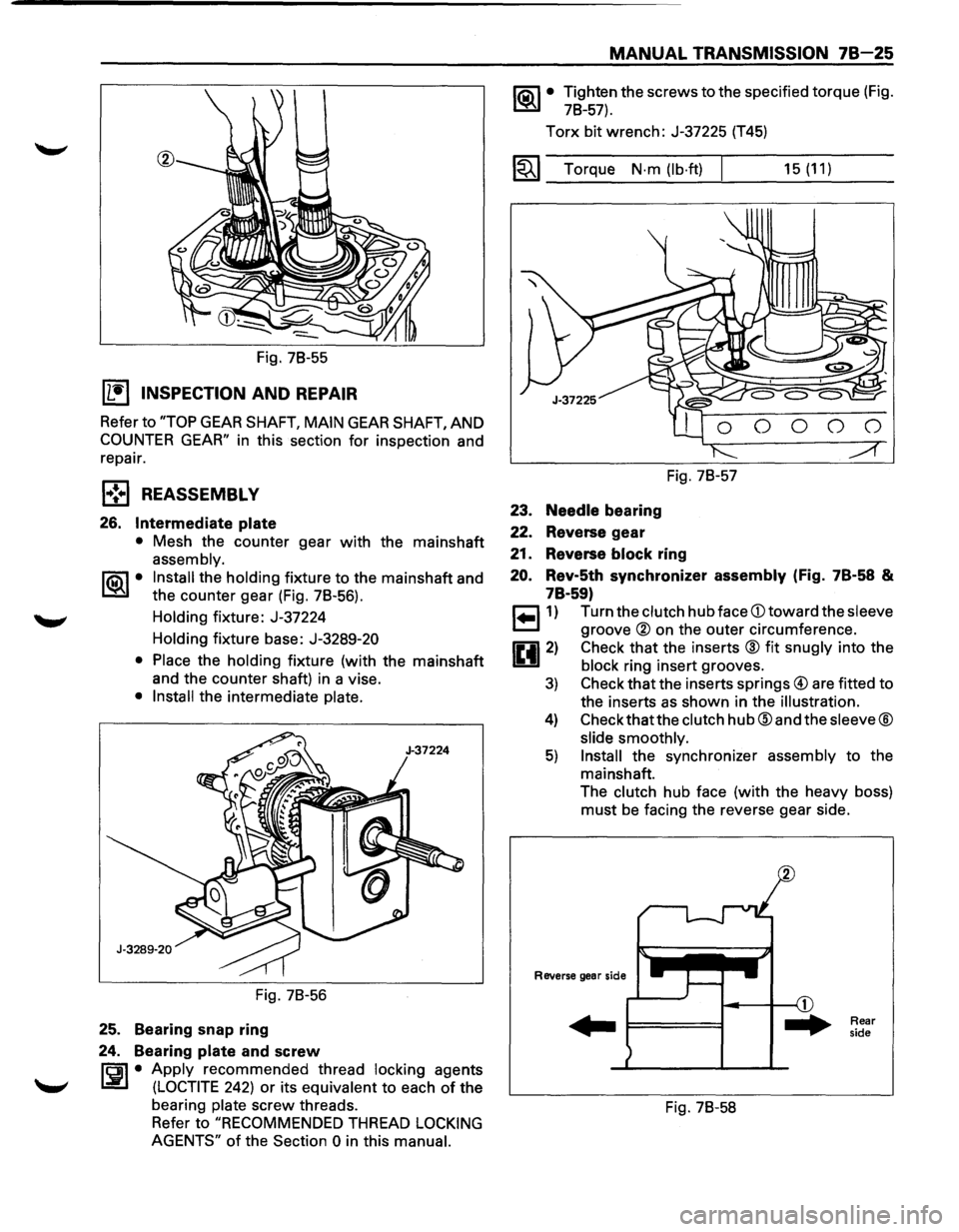
Fig. 78-55
IL•I INSPECTION AND REPAIR
Refer to "TOP GEAR SHAFT, MAIN GEAR SHAFT, AND
COUNTER GEAR" in this section for inspection and
repair.
l•!•l REASSEMBLY
26. Intermediate plate
• Mesh the counter gear with the mainshaft
assembly.
1®.1• Install the holding fixture to the mainshaft and
the counter gear (Fig. 78-56).
Holding fixture: J-37224
Holding fixture base:
J-3289-20
• Place
the holding fixture (with the mainshaft
and the counter shaft) in a vise.
• Install the intermediate plate.
Fig. 78-56
25. Bearing snap ring
24. Bearing
plate and screw
rci1 • Apply recommended thread locking agents
l.:i!.l (LOCTITE 242) or its equivalent to each of the
bearing
plate screw threads.
Refer to
"RECOMMENDED THREAD LOCKING
AGENTS"
of the Section 0 in this manual.
MANUAL TRANSMISSION 78-25
1®.1• Tighten the screws to the specified torque (Fig.
78-57).
Torx bit wrench: J-37225 (T45)
1~1 Torque N·m (lb·ft) I
23. Needle bearing
22. Reverse gear
Fig. 78-57
21. Reverse block ring
15 (11)
20. Rev-5th synchronizer assembly (Fig. 7B·58 &
7B·59)
r=l1) Turn the clutch hub face CD toward the sleeve
~ groove ® on the outer circumference.
0 2) Check that the inserts ® fit snugly into the
1!!.!1 block ring insert grooves.
3) Check that the inserts springs@ are fitted to
the inserts
as shown in the illustration.
4) Check thatthe clutch hub@ and the sleeve®
slide smoothly.
5) Install the synchronizer assembly to the
mainshaft.
The clutch hub face (with the heavy boss)
must be facing the reverse gear side.
Reverse gear side
... F====I
Fig. 78-58
Rear
side
Page 1119 of 1928
MANUAL TRANSMISSION 78-29
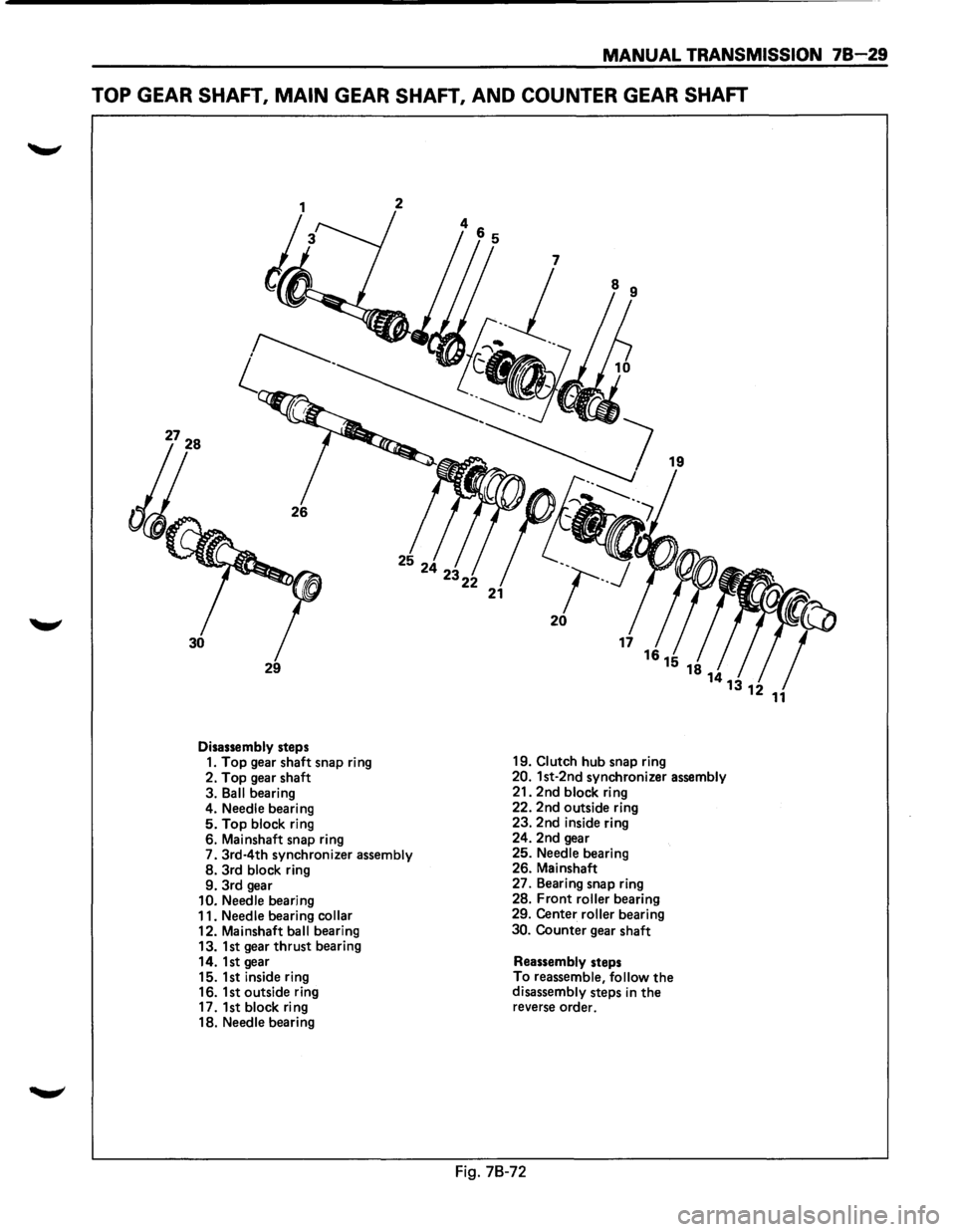
TOP GEAR SHAFT, MAIN GEAR SHAFT, AND COUNTER GEAR SHAFT
2
29
Disassembly steps 1. Top gear shaft snap ring
2.
Top gear shaft
3.
Ball bearing
4. Needle bearing 5. Top block ring
6. Mainshaft snap ring
7.
3rd·4th synchronizer assembly 8. 3rd block ring
9. 3rd gear
10. Needle bearing
11. Needle bearing collar 12. Mainshaft ball bearing
13. 1st gear thrust bearing
14. 1st gear
15. 1st inside ring
16. 1st outside ring
17. 1st
block ring
18. Needle bearing
21
19
~~~
r-.J
20
19. Clutch hub snap ring 20. 1st-2nd synchronizer assembly 21. 2nd block ring
22. 2nd outside ring
23. 2nd inside ring
24. 2nd gear
25.
Needle bearing
26. Mainshaft
27. Bearing snap ring
28.
Front roller bearing
29. Center roller bearing
30. Counter gear shaft
Reassembly steps
To reassemble, follow the disassembly steps in the reverse order.
Fig. 78-72
Page 1120 of 1928
78-30 MANUAL TRANSMISSION
1 .. !•1 DISASSEMBL V
1. Top gear shaft snap ring
• Use a pair of snap ring pliers to remove the
snap ring.
2. Top gear shaft
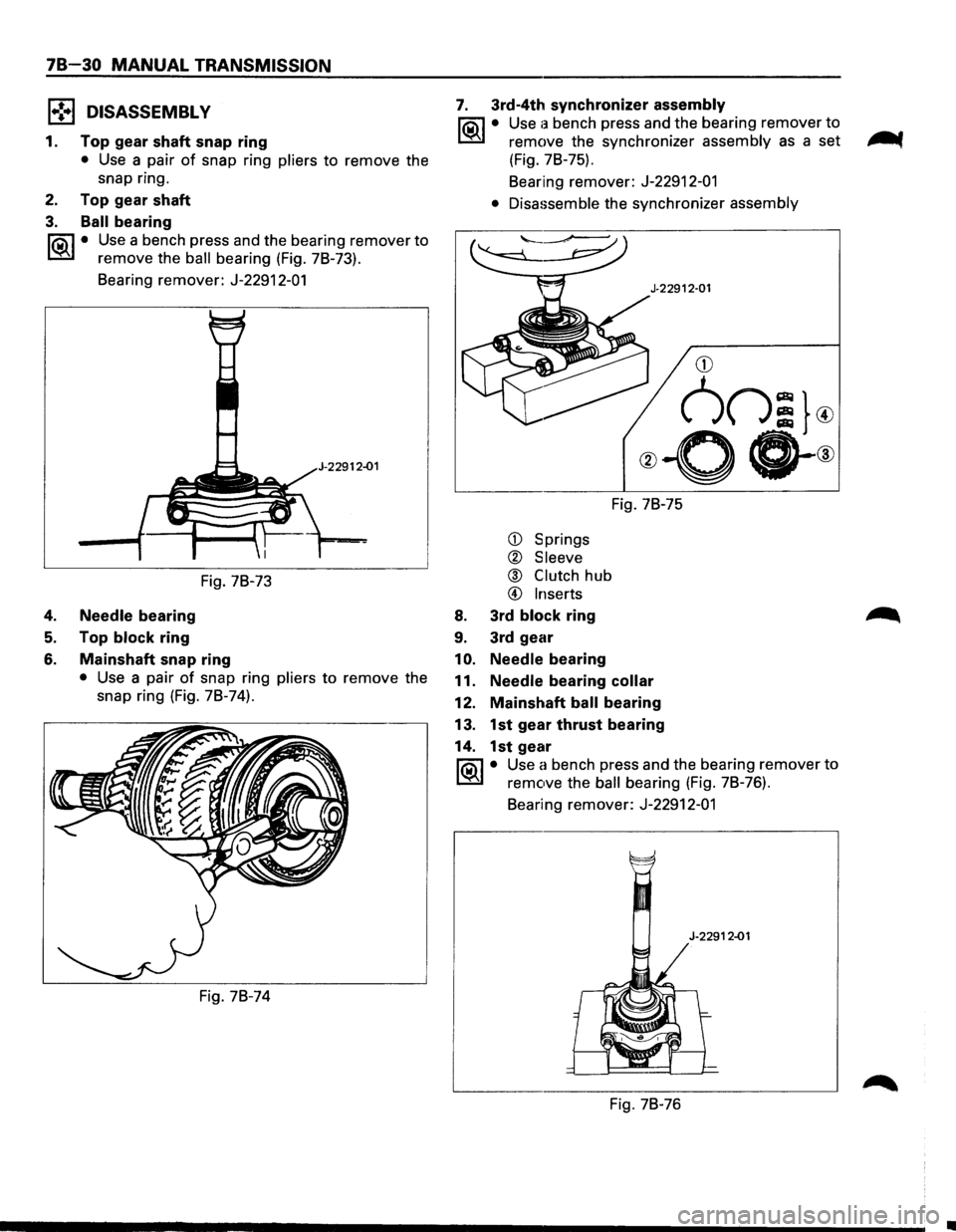
3. Ball bearing
li5il • Use a bench press and the bearing remover to
~ remove the ball bearing (Fig. 7B-73).
Bearing remover: J-22912-01
2-01
Fig. 7B-73
4. Needle bearing
5. Top block ring
6. Mainshaft snap ring
• Use a pair of snap ring pliers to remove the
snap ring
(Fig. 7B-74).
Fig. 7B-74
7. 3rd-4th synchronizer assembly
li5il • Use a bench press and the bearing remover to
~ remove the synchronizer assembly as a set -.
(Fig. 7B-75).
Bearing remover:
J-22912-01
• Disassemble
the synchronizer assembly
CD Springs
® Sleeve
@ Clutch hub
@ Inserts
8. 3rd block ring
9. 3rd gear
1
0. Needle bearing Fig.
7B-75
11.
Needle bearing collar
12. Mainshaft ball bearing
13. 1st gear thrust bearing
14. 1st gear
li0\1 • Use a bench press and the bearing remover to
~ remove the ball bearing (Fig. 78-76).
Bearing remover: J-22912-01
Fig. 7B-76
•
Page 1121 of 1928
15. 1st inside ring
16. 1st outside ring
17. 1st block ring
18. Needle bearing
19. Clutch hub snap ring
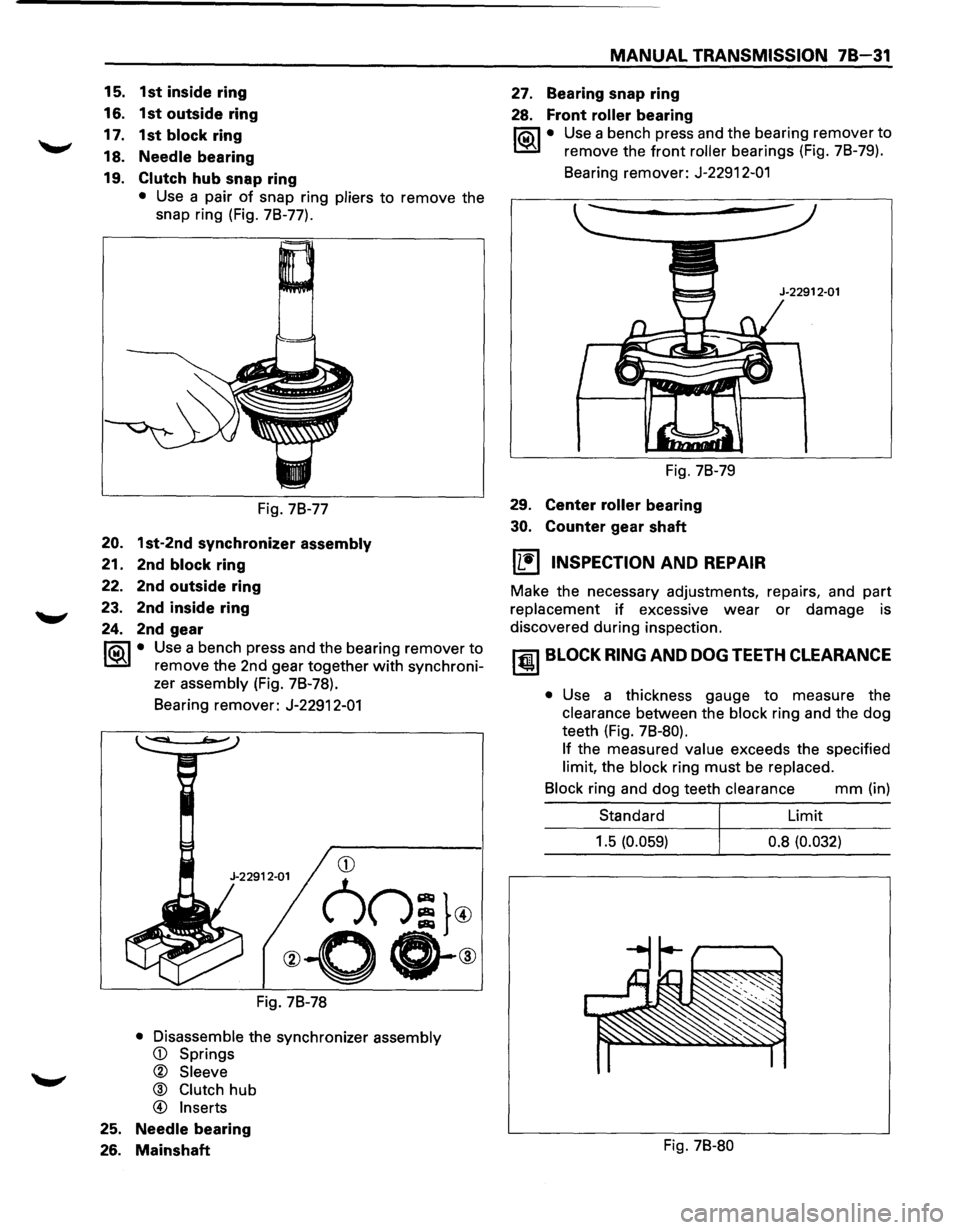
• Use a pair of snap ring pliers to remove the
snap ring (Fig. 7B-77).
Fig. 7B-77
20. 1st-2nd synchronizer assembly
21. 2nd block ring
22. 2nd outside ring
23. 2nd inside ring
24. 2nd gear
rta\1 • Use a bench press and the bearing remover to
~ remove the 2nd gear together with synchroni-
zer
assembly (Fig. 7B-78).
Bearing remover:
J-22912-01
Fig. 7B-78
• Disassemble the synchronizer assembly
® Clutch hub
@ Inserts
25. Needle bearing
26. Mainshaft
MANUAL TRANSMISSION 78-31
27. Bearing snap ring
28. Front roller bearing
rta\1 • Use a bench press and the bearing remover to
~ remove the front roller bearings (Fig. 7B-79).
Bearing remover:
J-22912-01
Fig. 7B-79
29.
Center roller bearing
30. Counter gear shaft
~ INSPECTION AND REPAIR
Make the necessary adjustments, repairs, and part
replacement if excessive wear or damage is
discovered during inspection.
~ BLOCK RING AND DOG TEETH CLEARANCE
• Use a thickness gauge to measure the
clearance between the block ring and the dog
teeth (Fig.
7B-80).
If
the measured value exceeds the specified
limit, the block ring must be replaced.
Block
ring and dog teeth clearance mm (in)
Standard Limit
1.5
(0.059) 0.8 (0.032)
Fig. 7B-80
Page 1122 of 1928
7B-32 MANUAL TRANSMISSION
~1ST-2ND SYNCHRONIZER (3-CONE)
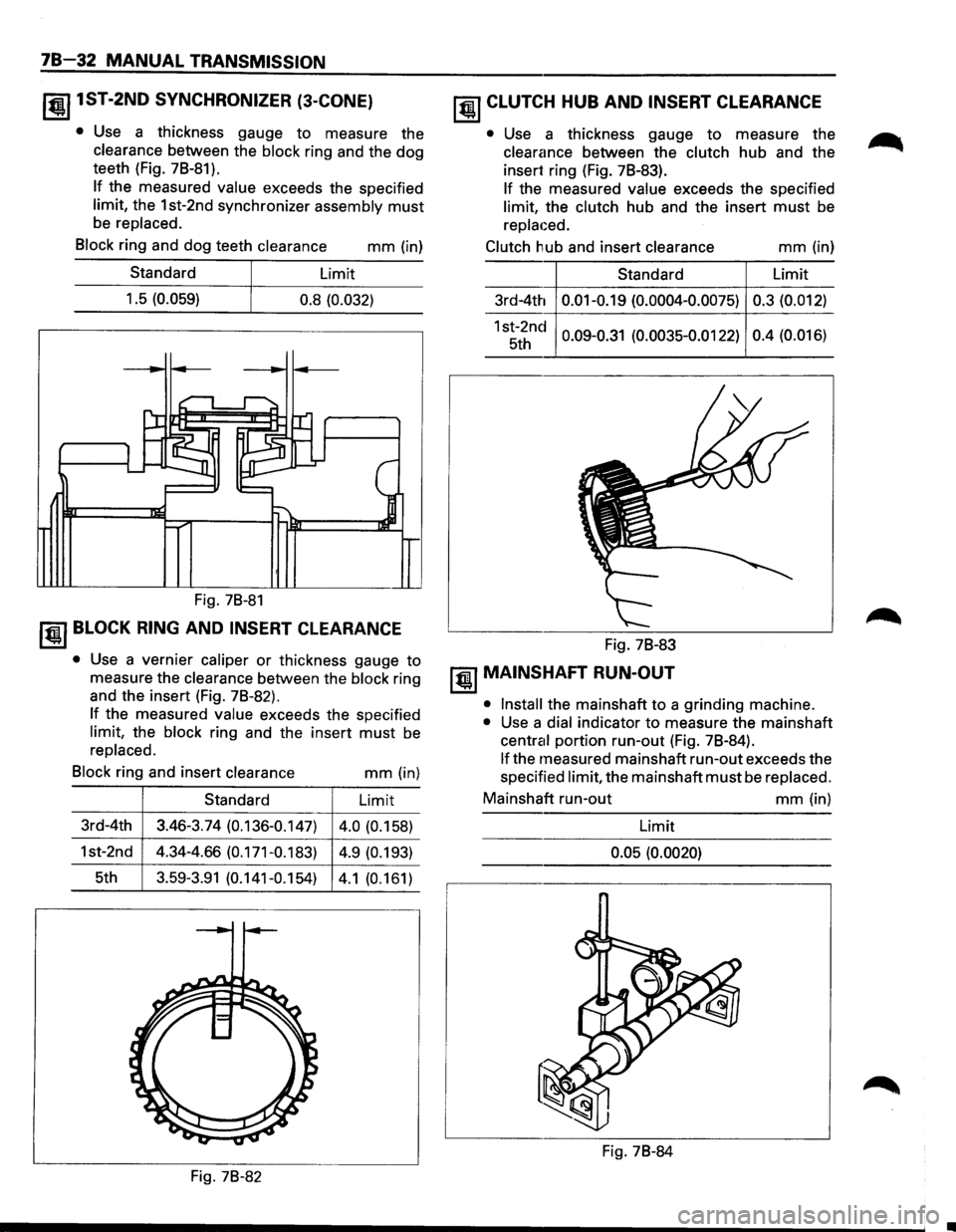
• Use a thickness gauge to measure the
clearance between the block ring and the dog
teeth (Fig. 7B-81).
If the measured value exceeds the specified
limit, the 1st-2nd synchronizer assembly must
be replaced.
Block
ring and dog teeth clearance mm (in)
Standard Limit
1.5
(0.059) 0.8 (0.032)
Fig. 7B-81
~~~ BLOCK RING AND INSERT CLEARANCE
• Use a vernier caliper or thickness gauge to
measure the
clearance between the block ring
and the insert (Fig. 7B-82).
If the measured value exceeds the specified
limit, the block ring and the insert must be
replaced.
Block
ring and insert clearance mm (in)
Standard Limit
3rd-4th 3.46-3.74
(0.136-0.147)
4.0 (0.158)
1st-2nd
4.34-4.66 (0.171-0.183) 4.9 (0.193)
5th 3.59-3.91 (0.141-0.154) 4.1 (0.161)
Fig. 78-82
~ CLUTCH HUB AND INSERT CLEARANCE
• Use a thickness gauge to measure the
clearance between the clutch hub and the
insert ring (Fig. 7B-83).
If the measured value exceeds the specified
limit, the clutch hub and the insert must be
replaced.
Clutch
hub and insert clearance
Standard
3rd-4th
0.01-0.19 (0.0004-0.0075)
1st-2nd 0.09-0.31 (0.0035-0.0122) 5th
Fig. 7B-83
~ MAINSHAFT RUN-OUT
mm (in)
Limit
0.3 (0.012)
0.4 (0.016)
• Install
the mainshaft to a grinding machine.
• Use a dial indicator to measure the mainshaft
central portion run-out (Fig. 7B-84).
If the measured mainshaft run-out exceeds the
specified
limit, the mainshaft must be replaced.
Mainshaft run-out mm (in)
Limit
0.05 (0.0020)
Fig. 7B-84
Page 1123 of 1928
~ GEAR INSIDE DIAMETER
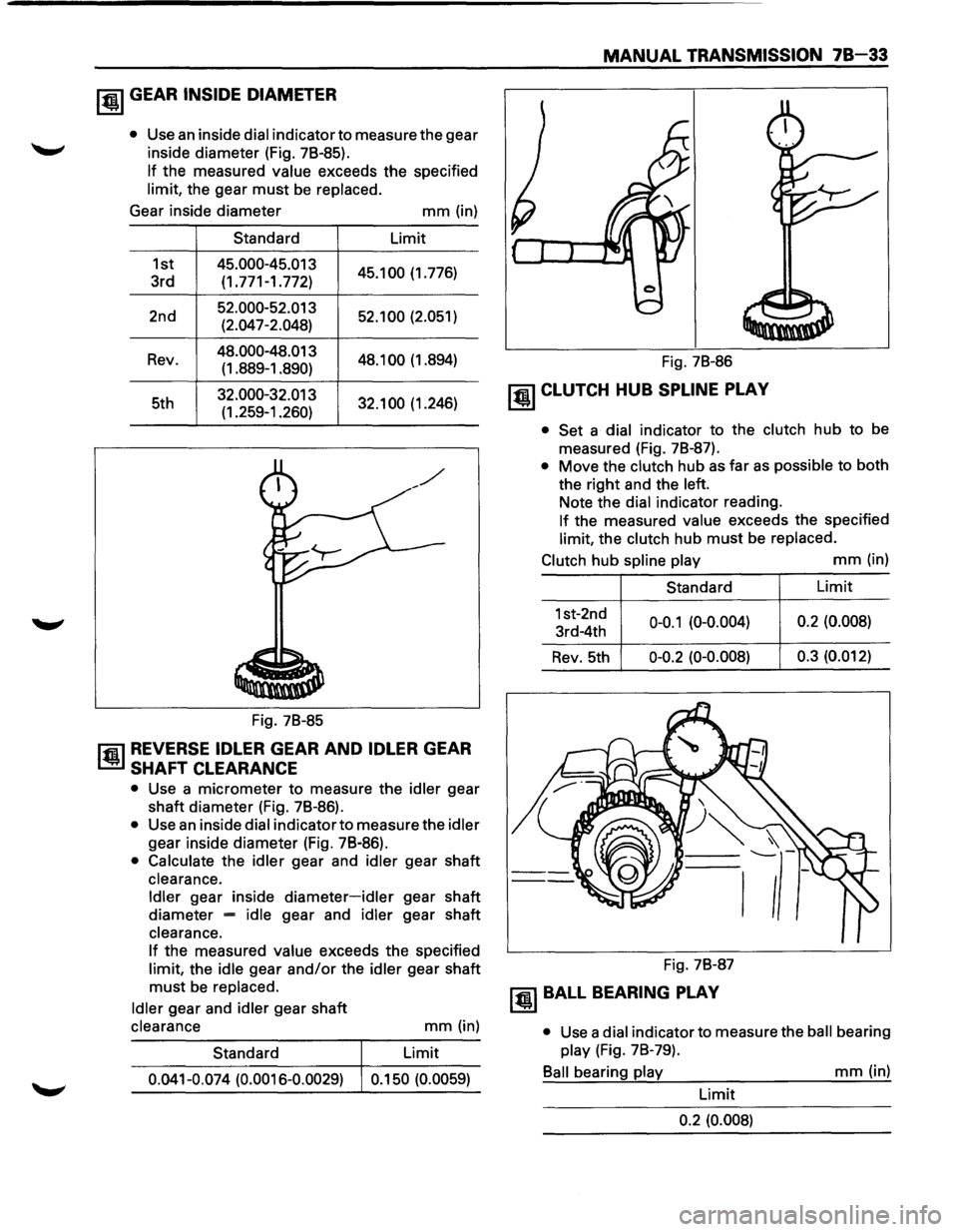
• Use an inside dial indicator to measure the gear
inside diameter (Fig. 78-85).
If the measured value exceeds the specified
limit, the gear
must be replaced.
Gear inside diameter
mm (in)
Standard Limit
1st
45.000-45.013 45.100 (1.776)
3rd (1.771-1.772)
2nd
52.000-52.013 52.100 (2.051)
(2.047-2.048)
Rev.
48.000-48.013 48.1 00 (1 .894)
(1.889-1.890)
5th
32.000-32.013 32.100 (1.246)
(1.259-1.260)
Fig. 78-85
l'fil REVERSE IDLER GEAR AND IDLER GEAR
l..!lil SHAFT CLEARANCE
• Use a micrometer to measure the idler gear
shaft diameter (Fig. 78-86).
• Use an inside dial indicator to measure the idler
gear inside diameter (Fig. 78-86).
• Calculate the idler gear and idler gear shaft
clearance.
Idler gear inside diameter-idler gear shaft
diameter
= idle gear and idler gear shaft
clearance.
If the measured value exceeds the specified
limit, the idle gear
and/or the idler gear shaft
must be replaced.
Idler gear and idler gear shaft
clearance
Standard
mm (in)
Limit
0.041-0.074 (0.0016-0.0029) 0.150 (0.0059)
MANUAL TRANSMISSION 78-33
Fig. 78-86
~ CLUTCH HUB SPLINE PLAY
• Set a dial indicator to the clutch hub to be
measured (Fig. 78-87).
• Move the clutch hub as far as possible to both
the right and the left.
Note the dial indicator reading.
If the measured value exceeds the specified
limit, the clutch hub
must be replaced.
Clutch hub spline play
mm (in)
Standard
1st-2nd
0-0.1 (0-0.004) 3rd-4th
Rev. 5th 0-0.2 (0-0.008)
Fig. 78-87
~BALL BEARING PLAY
Limit
0.2 (0.008)
0.3 (0.012)
•
Use a dial indicator to measure the ball bearing
play (Fig. 78-79).
Ball bearing play
mm (in)
Limit
0.2 (0.008)
Page 1125 of 1928
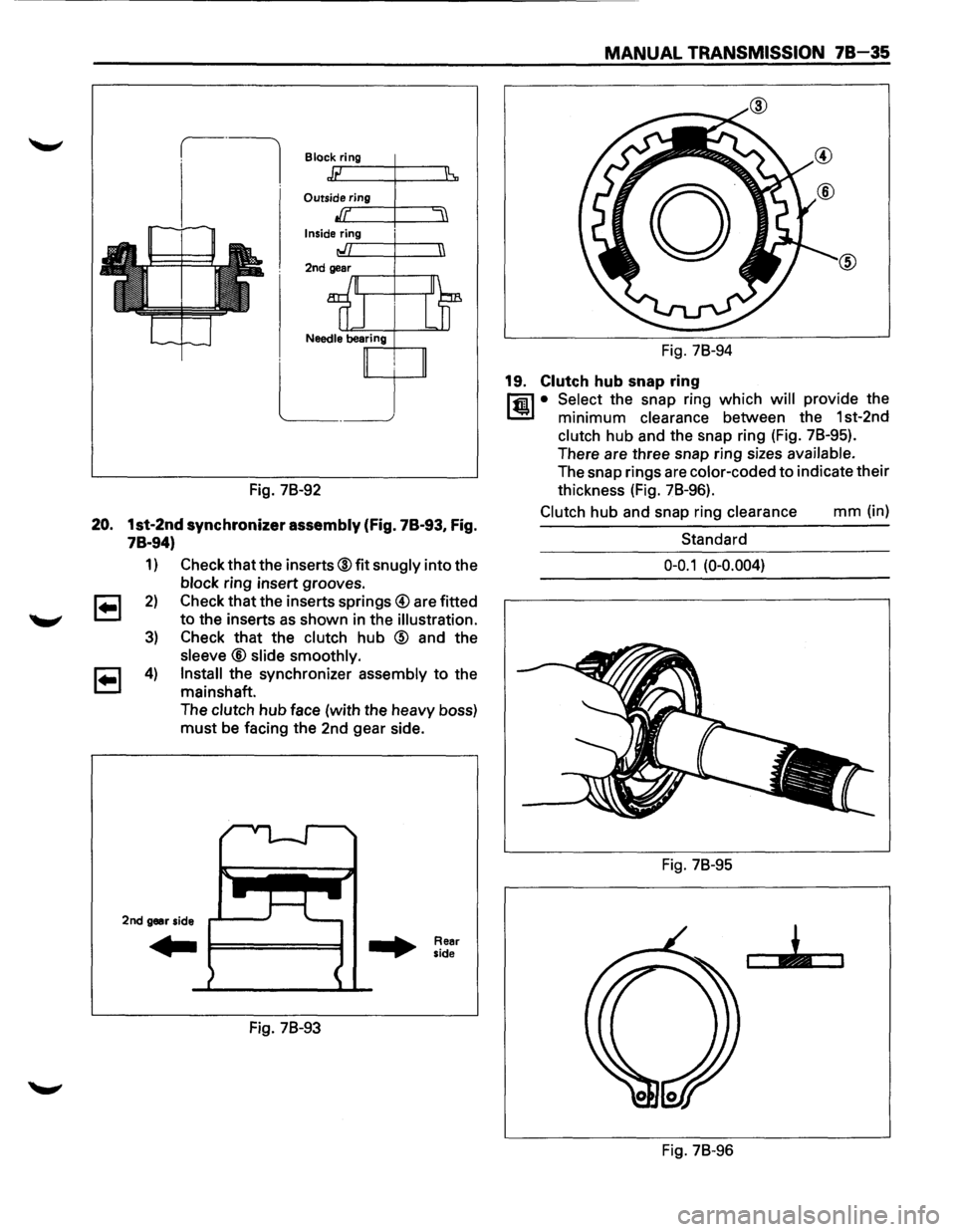
Block ring
Outside..., rr-in~g-+------.=
Inside ring ,..r--+---n
Fig. 78-92
20. 1st-2nd synchronizer assembly (Fig. 78-93, Fig.
78-94)
1)
2)
3)
4)
Check that the inserts® fit snugly into the
block ring insert grooves.
Check that the inserts
springs@ are fitted
to the inserts as shown in the illustration.
Check that the clutch hub @ and the
sleeve® slide smoothly.
Install
the synchronizer assembly to the
mainshaft.
The
clutch hub face (with the heavy boss)
must be facing the 2nd gear side.
2nd gear side
Fig. 78-93
Rear
side
MANUAL TRANSMISSION 78-35
Fig. 78-94
19. Clutch hub snap ring
l'fi1 • Select the snap ring which will provide the
1..!:!1 minimum clearance between the 1st-2nd
clutch hub and the snap ring (Fig. 78-95).
There are three snap ring sizes
available.
The snap rings are color-coded to indicate their
thickness (Fig. 78-96).
Clutch hub and snap ring clearance mm (in)
Standard
0-0.1 (0-0.004)
Fig. 78-95
Fig. 78-96
Page 1127 of 1928
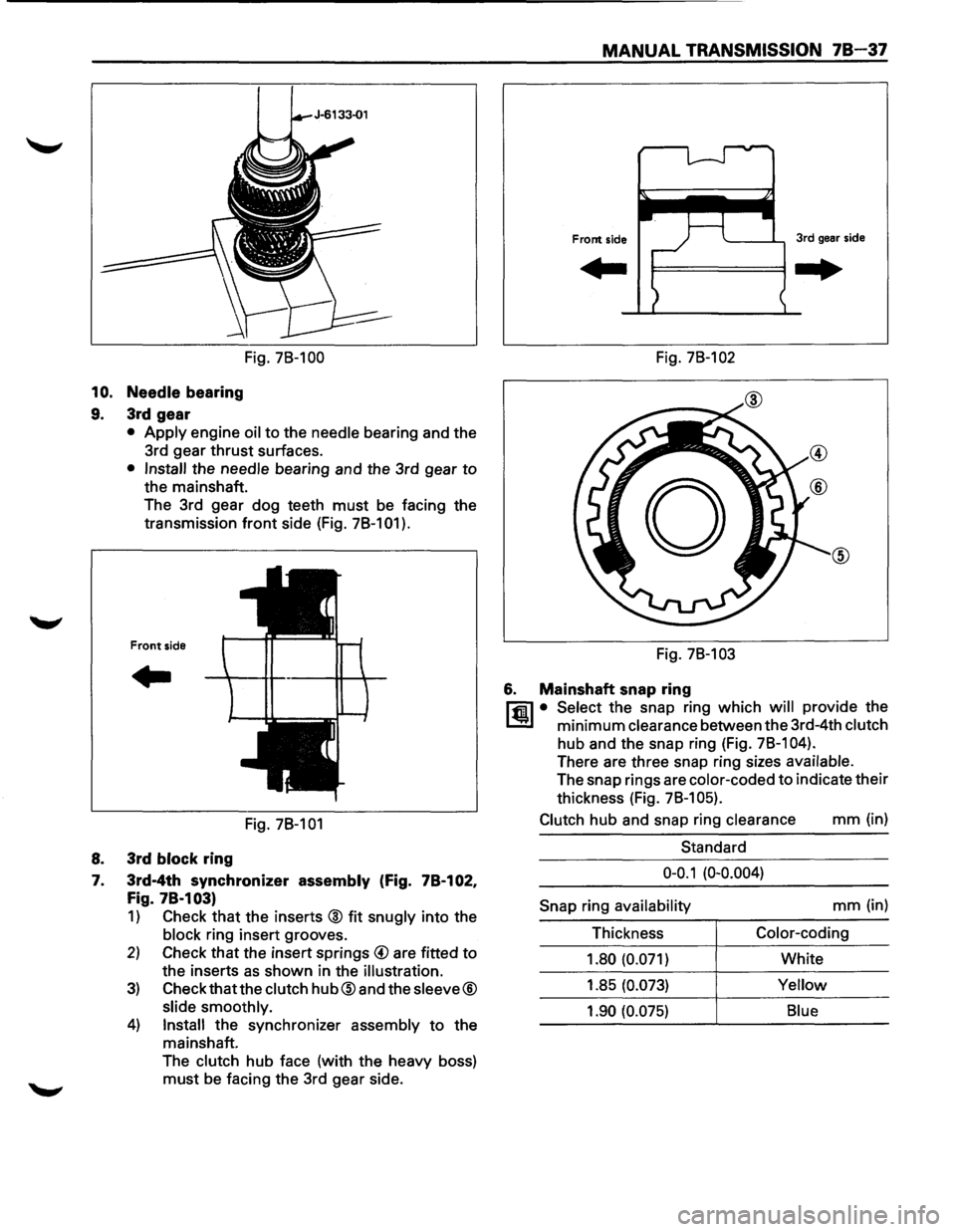
MANUAL TRANSMISSION 78-37
Fig. 78-100 Fig. 78-102
10. Needle bearing
9. 3rd gear
• Apply engine oil to the needle bearing and the
3rd gear
thrust surfaces.
• Install the needle bearing and the 3rd gear to
the mainshaft.
The 3rd gear dog teeth
must be facing the
transmission
front side (Fig. 78-101 ).
Front side
..
Fig. 78-101
8. 3rd block ring
7. 3rd-4th synchronizer assembly (Fig. 78-102,
Fig. 78·103)
1) Check that the inserts @ fit snugly into the
block ring insert grooves.
2) Check that the insert springs @ are fitted to
the inserts as shown in the illustration.
3) Check that the clutch hub@and the sleeve®
slide smoothly.
4) Install the synchronizer assembly to the
mainshaft.
The
clutch hub face (with the heavy boss)
must be facing the 3rd gear side. Fig.
78-103
6. Mainshaft snap ring
l"fil • Select the snap ring which will provide the
l..!l!l minimum clearance between the 3rd-4th clutch
hub and the snap ring (Fig. 78-1 04).
There are three snap ring sizes available.
The snap rings are color-coded to indicate their
thickness (Fig.
78-1 05).
Clutch
hub and snap ring clearance mm (in)
Standard
0-0.1 (0-0.004)
Snap
ring availability mm (in)
Thickness
Color-coding
1.80 (0.071)
White
1.85
(0.073) Yellow
1.90 (0.075) Blue