battery ISUZU TROOPER 1995 User Guide
[x] Cancel search | Manufacturer: ISUZU, Model Year: 1995, Model line: TROOPER, Model: ISUZU TROOPER 1995Pages: 1928
Page 45 of 1928
HEATING AND VENTILATION 1A-15
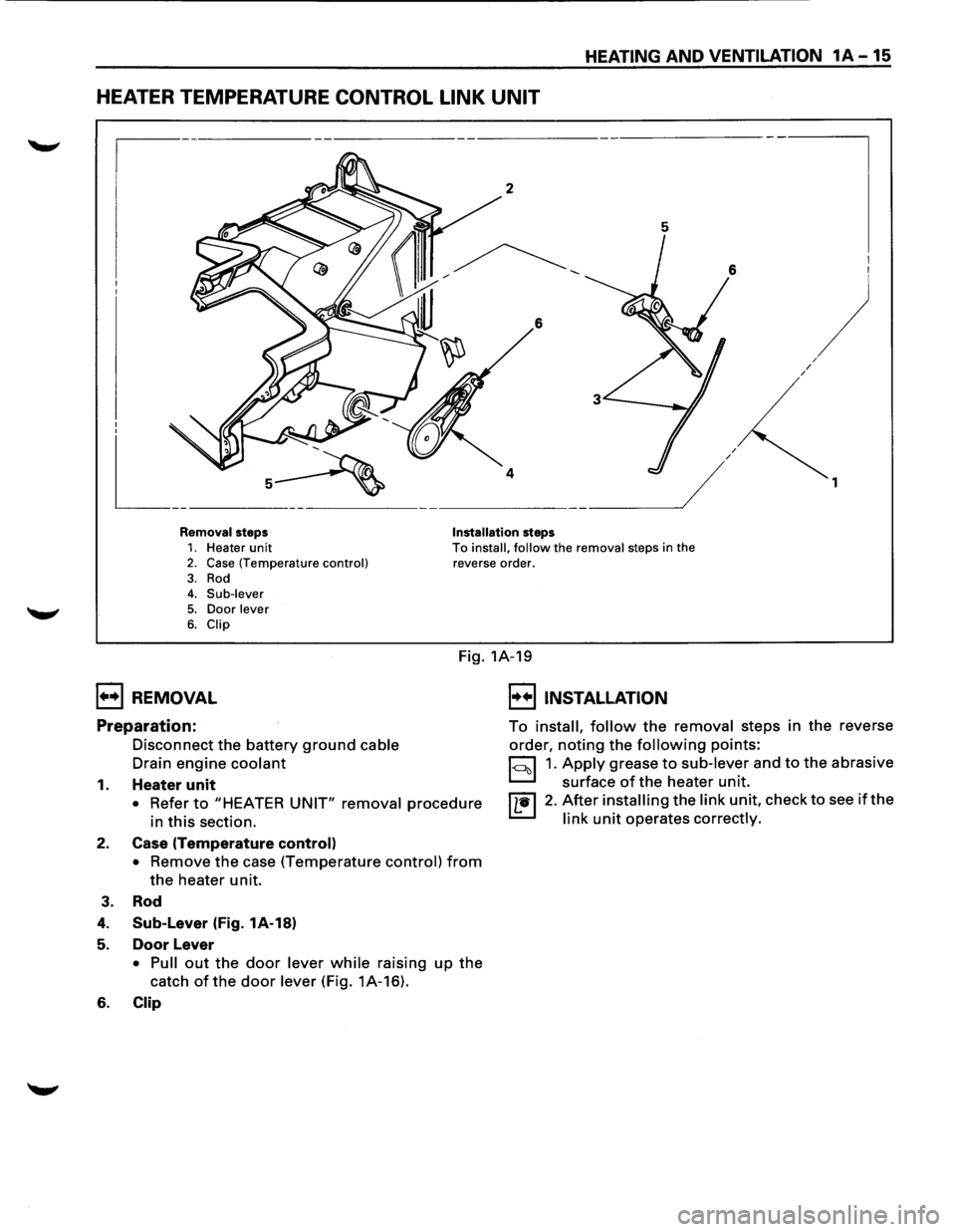
HEATER TEMPERATURE CONTROL LINK UNIT
5
6
/ /
I I
)
1
Removal steps Installation steps 1. Heater unit 2. Case (Temperature control) To install, follow the removal steps in the
reverse order.
3. Rod 4. Sub-lever
5. Door lever 6. Clip
Fig. 1A-19
1••1 REMOVAL
Preparation:
Disconnect the battery ground cable
Drain engine coolant
1. Heater unit
• Refer to "HEATER UNIT" removal procedure
in this section.
2. Case (Temperature control)
• Remove the case (Temperature control) from
the heater unit.
3. Rod
4. Sub-Lever (Fig. 1A-18)
5. Door Lever
• Pull out the door lever while raising up the
catch of the door lever (Fig. 1A-16).
6. Clip
I••! INSTALLATION
To install, follow the removal steps in the reverse
order,
noting the following points:
1~1 1. Apply grease to sub-lever and to the abrasive
surface
of the heater unit.
I L•l 2. After installing the link unit, check to see if the
link unit operates correctly.
Page 46 of 1928
1A-16 HEATING AND VENTILATION
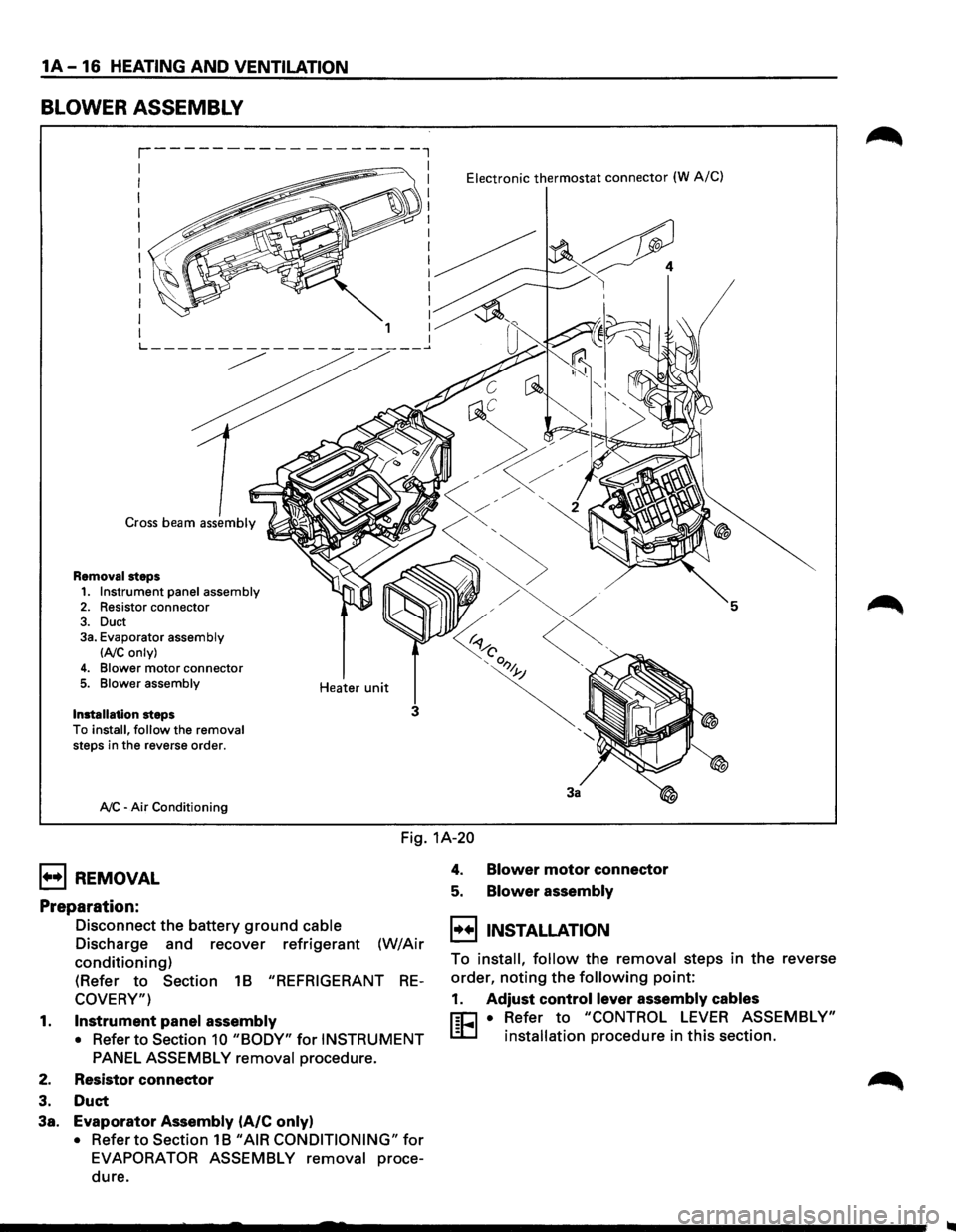
BLOWER ASSEMBLY
Cross beam assembly
Removal steps
1. Instrument panel assembly 2. Resistor connector
3. Duct 3a. Evaporator assembly
lAIC only)
4. Blower motor connector 5. Blower assembly
Installation
steps
To install, follow the removal steps in the reverse order.
A/C -Air Conditioning Heater
unit
Electronic thermostat connector (W A/C)
5
3
3a
Fig.
1A-20
1+•1 REMOVAL
Preparation:
Disconnect the battery ground cable
Discharge and recover refrigerant (W/Air
conditioning)
(Refer to Section 1B "REFRIGERANT RE
COVERY")
1. Instrument panel assembly
• Refer to Section 10 "BODY" for INSTRUMENT
PANEL ASSEMBLY removal
procedure.
2. Resistor connector
3. Duct
3a. Evaporator Assembly (A/C only)
• Refer to Section 1B "AIR CONDITIONING" for
EVAPORATOR ASSEMBLY removal proce
dure.
4. Blower motor connector
5. Blower assembly
I••IINSTALLATION
To install, follow the removal steps in the reverse
order,
noting the following point:
1. Adjust control lever assembly cables
r:C1 • Refer to "CONTROL LEVER ASSEMBLY"
L.:D installation procedure in this section.
Page 47 of 1928
HEATING AND VENTILATION 1A -17
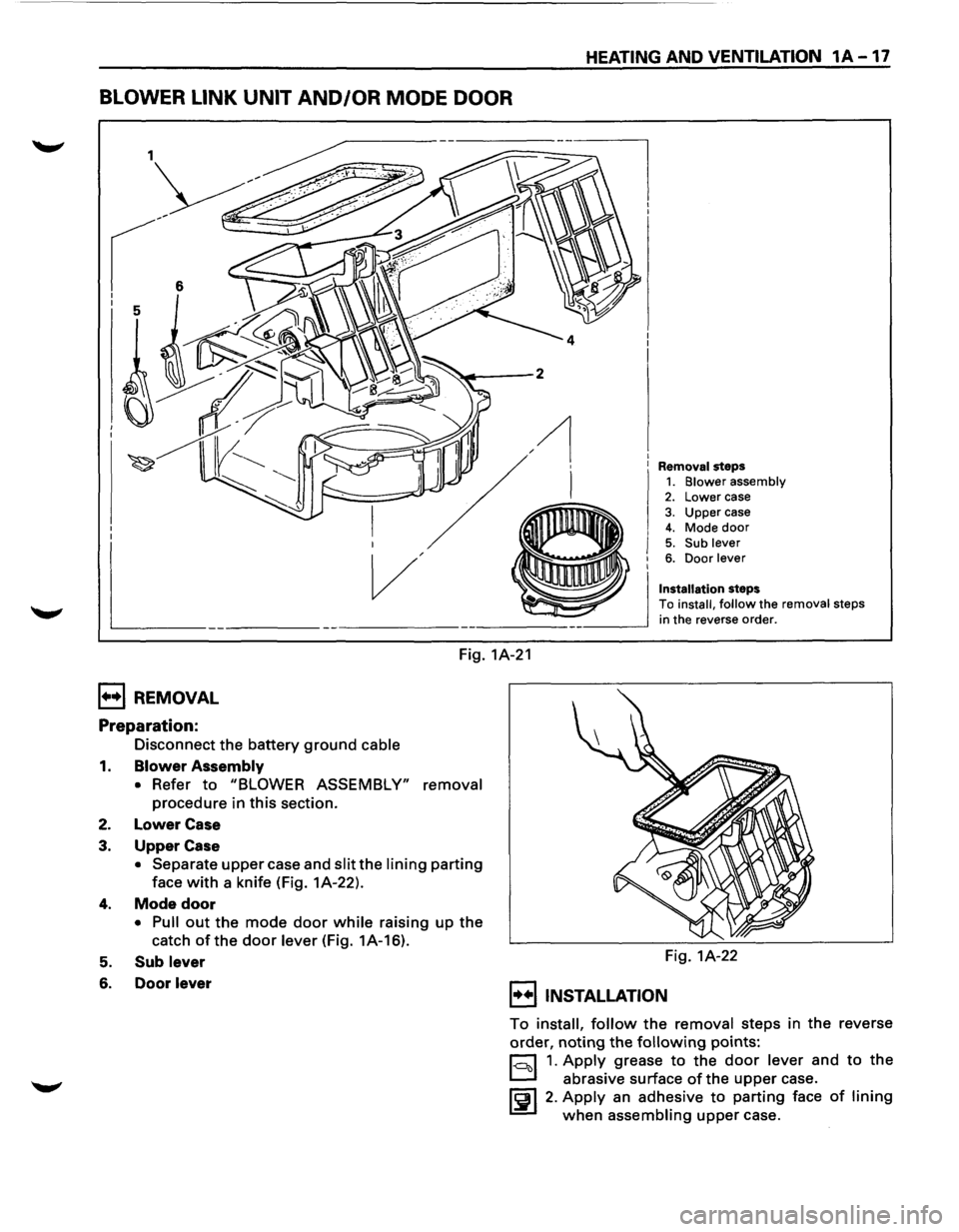
BLOWER LINK UNIT AND/OR MODE DOOR
Removal steps 1. Blower assembly 2. Lower case
3. Upper case 4. Mode door 5. Sub lever 6. Door lever
Installation steps
To install, follow the removal steps
in the reverse order.
Fig. 1A-21
1++1 REMOVAL
Preparation:
Disconnect the battery ground cable
1. Blower Assembly
• Refer to "BLOWER ASSEMBLY" removal
procedure in this section.
2. Lower Case
3. Upper Case
• Separate upper case and slit the lining parting
face with a knife (Fig. 1A-22).
4. Mode door
• Pull out the mode door while raising up the
catch ofthe door lever (Fig. 1A-16).
5. Sub lever
6. Door lever
Fig. 1A-22
I••IINSTALLATION
To install, follow the removal steps in the reverse
order,
noting the following points:
r:::::::l 1. Apply grease to the door lever and to the
D abrasive surface of the upper case.
~~I 2. Apply an adhesive to parting face of lining
when assembling upper case.
Page 48 of 1928
1A-18 HEATING AND VENTILATION
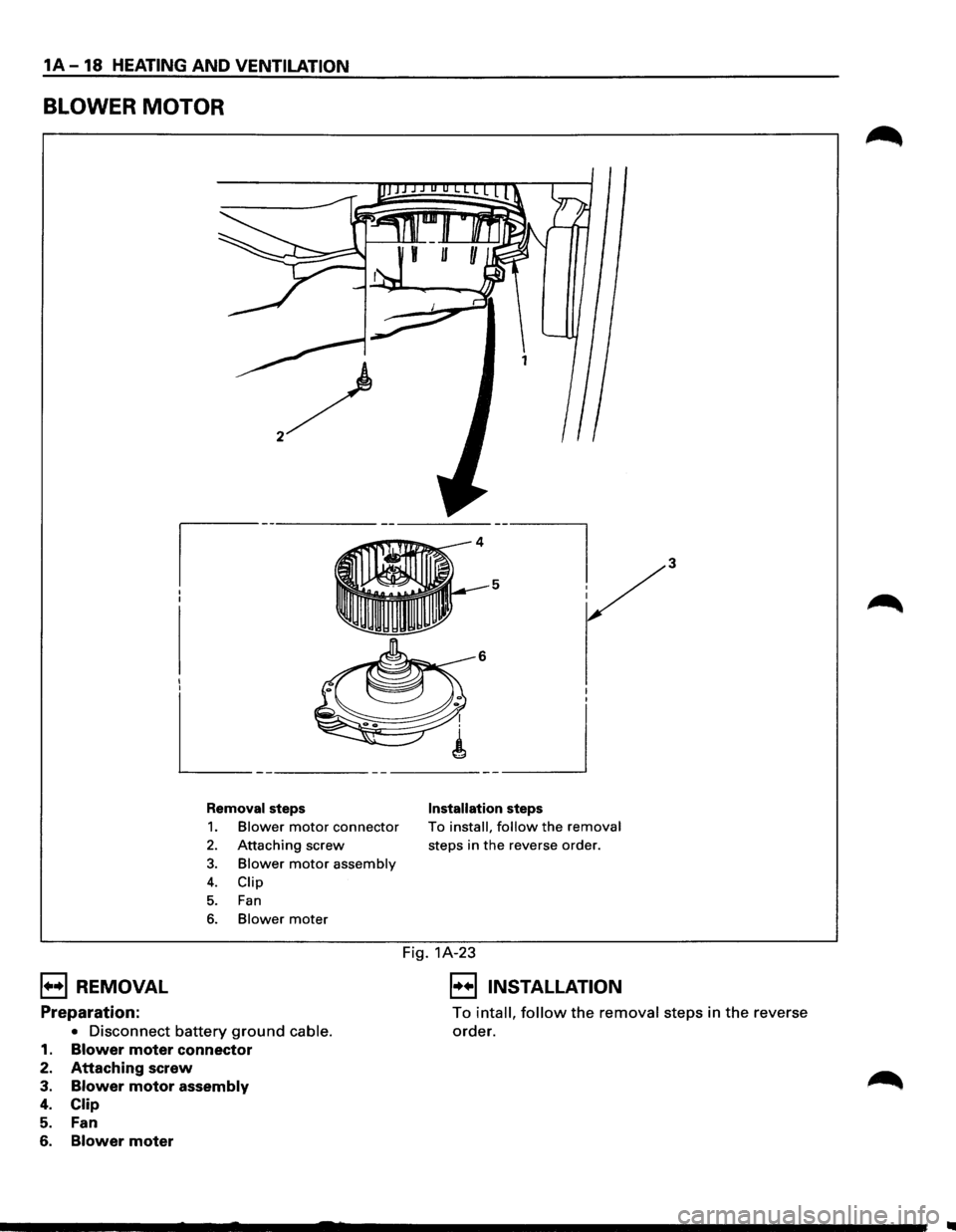
BLOWER MOTOR
I I I I
L_ -----------___ _j
Removal steps
1. Blower motor connector
2. Attaching screw
3. Blower motor assembly
4. Clip
5. Fan
6. Blower mater
Installation steps
To install, follow the removal
steps in the reverse order.
Fig. 1A-23
B REMOVAL 8 INSTALLATION
Preparation:
• Disconnect battery ground cable.
1. Blower moter connector
2. Attaching screw
3. Blower motor assembly
4. Clip
5. Fan
6. Blower moter
To intall, follow the removal steps in the reverse
order.
Page 49 of 1928
HEATING AND VENTILATION 1A-19
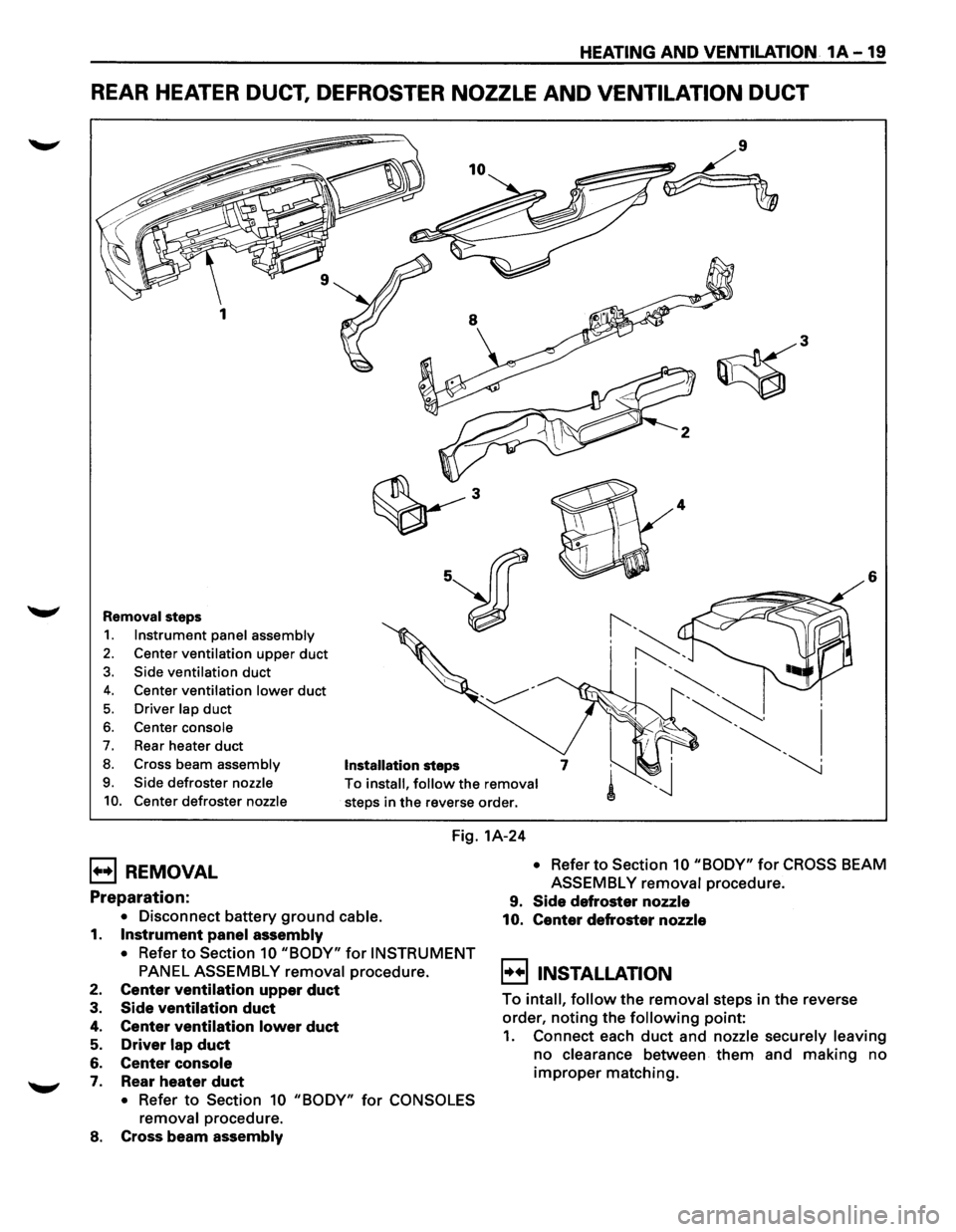
REAR HEATER DUCT, DEFROSTER NOZZLE AND VENTILATION DUCT
6
Removal steps
1. Instrument panel assembly
2. Center ventilation upper duct
3. Side ventilation duct
4. Center ventilation lower duct
5. Driver lap duct
6. Center console
7. Rear heater duct
8. Cross beam assembly Installation steps
9. Side defroster nozzle
10. Center defroster nozzle
To install, follow the removal
steps in the reverse order.
Fig. 1A-24
B REMOVAL
Preparation:
• Disconnect battery ground cable.
1. Instrument panel assembly
• Refer to Section 10 "BODY" for INSTRUMENT
PANEL ASSEMBLY removal procedure.
2. Center ventilation upper duct
3. Side ventilation duct
4. Center ventilation lower duct
5. Driver lap duct
6. Center console
7. Rear heater duct
• Refer to Section 10 "BODY" for CONSOLES
removal
procedure.
8. Cross beam assembly
• Refer to Section 10 "BODY" for CROSS BEAM
ASSEMBLY
removal procedure.
9. Side defroster nozzle
10. Center defroster nozzle
~!!) INSTALLATION
To intall, follow the removal steps in the reverse
order,
noting the following point:
1. Connect each duct and nozzle securely leaving
no clearance between them and making no
improper matching.
Page 50 of 1928
1A-20 HEATING AND VENTILATION
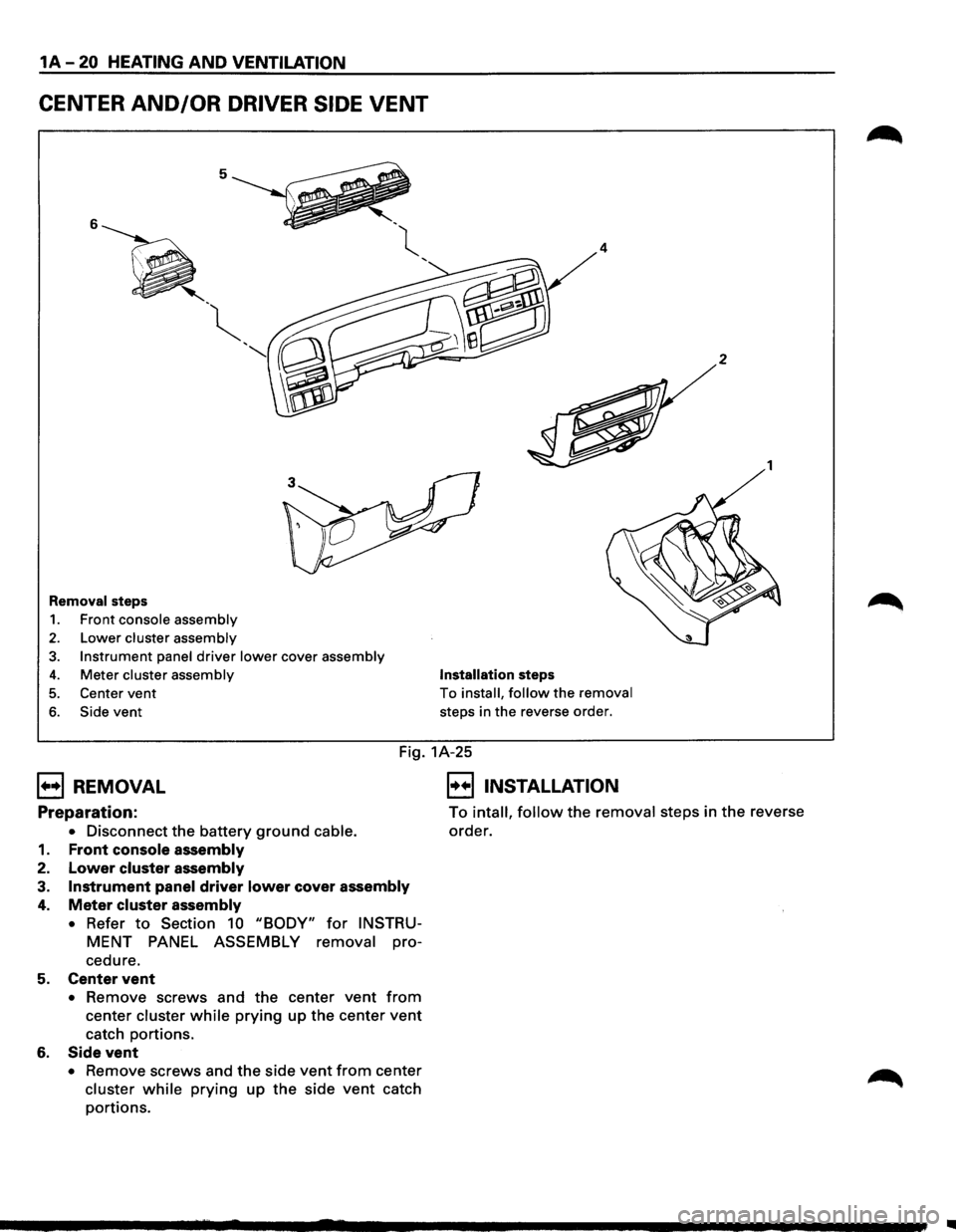
CENTER AND/OR DRIVER SIDE VENT
5
6
' -~
'
"
Removal steps
1. Front console assembly
2. Lower cluster assembly
3. Instrument panel driver lower cover assembly
4. Meter cluster assembly
5. Center vent
6. Side vent
4
Installation steps
To install, follow the removal
steps in the reverse order.
2
1
Fig. 1A-25
B REMOVAL
Preparation:
• Disconnect the battery ground cable.
1. Front console assembly
2. Lower cluster assembly
3. Instrument panel driver lower cover assembly
4. Meter cluster assembly
•
Refer to Section 10 "BODY" for INSTRU
MENT PANEL ASSEMBLY removal pro-
cedure.
5. Center vent
• Remove screws and the center vent from
center cluster while prying up the center vent
catch portions.
6. Side vent
• Remove screws and the side vent from center
cluster while prying up the side vent catch
portions.
E] INSTALLATION
To intall, follow the removal steps in the reverse
order.
..
Page 51 of 1928
HEATING AND VENTILATION 1A-21
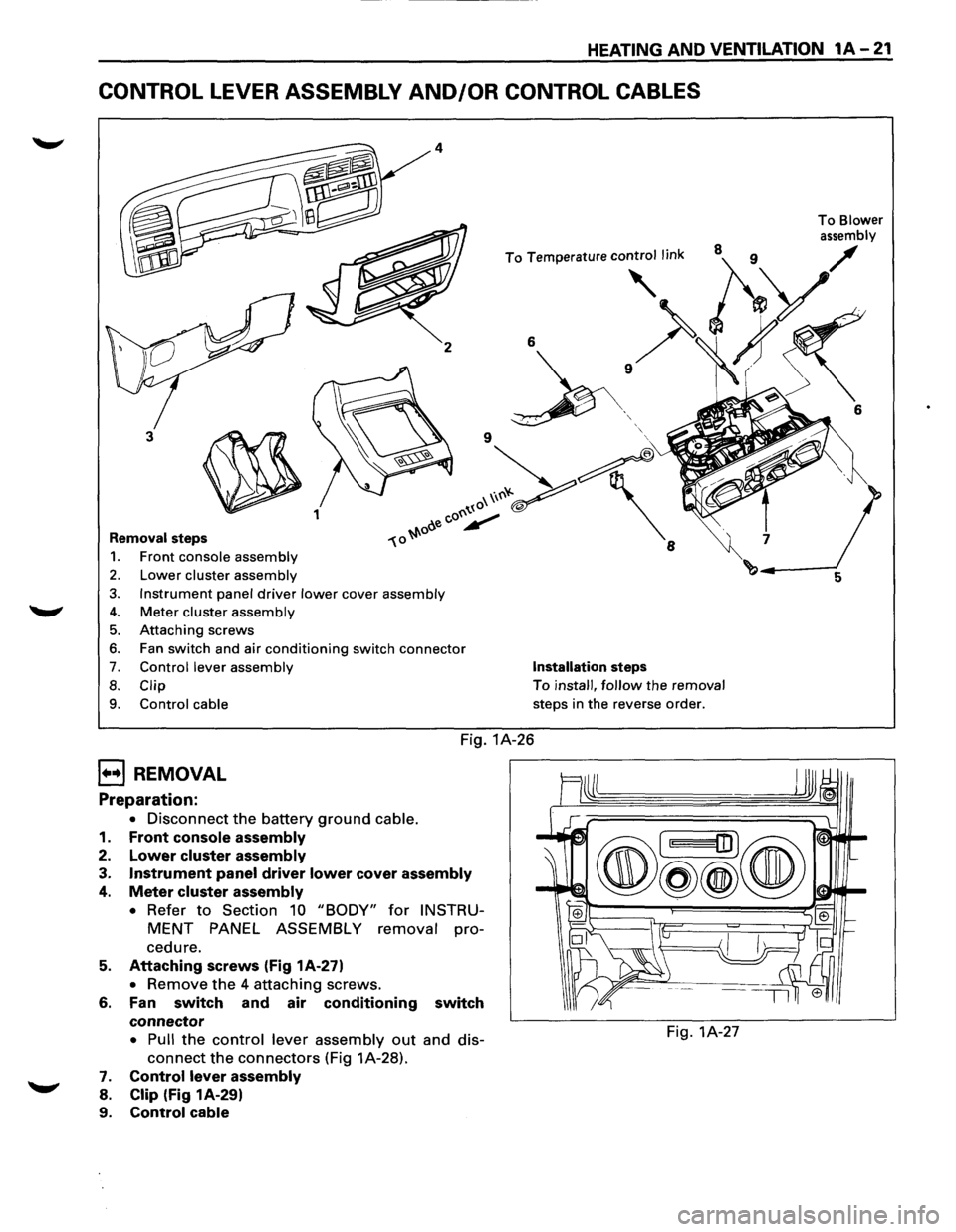
CONTROL LEVER ASSEMBLY AND/OR CONTROL CABLES
2
3
~ 1
Removal steps
1. Front console assembly
2. Lower cluster assembly
3. Instrument panel driver lower cover assembly
4. Meter cluster assembly
5. Attaching screws
6. Fan switch and air conditioning switch connector
7. Control lever assembly
8. Clip
9.
Control cable
6
' '
Installation steps
To install, follow the removal
steps in
the reverse order.
Fig. 1A-26
B REMOVAL
Preparation:
• Disconnect the battery ground cable.
1.
Front console assembly
2. Lower cluster assembly
3. Instrument panel driver lower cover assembly
4. Meter cluster assembly
• Refer to Section 10 "BODY" for INSTRU
MENT PANEL ASSEMBLY removal pro
cedure.
5. Attaching screws (Fig 1A-27)
• Remove the 4 attaching screws.
6. Fan switch and air conditioning switch
connector
• Pull the control lever assembly out and dis-
connect the connectors (Fig 1A-28).
7. Control lever assembly
8. Clip (Fig 1A-29)
9.
Control cable
Fig. 1A-27
To Blower
assembly
6
Page 53 of 1928
CONTROL PANEL ILLUMINATION BULB
1••1 REMOVAL
Preparation:
Fig. 1A-31
Disconnect
the battery ground cable
1. Control lever assembly
• Refer to "CONTROL LEVER ASSEMBLY"
removal
procedure in this section.
2. Bulb socket
• Pull out the socket from the panel by turning
it counterclockwise.
3.
Illumination bulb
• Pull the illumination bulb from socket.
I••IINSTALLATION
To install, follow the removal steps in the reverse
order.
HEATING AND VENTILATION 1A-23
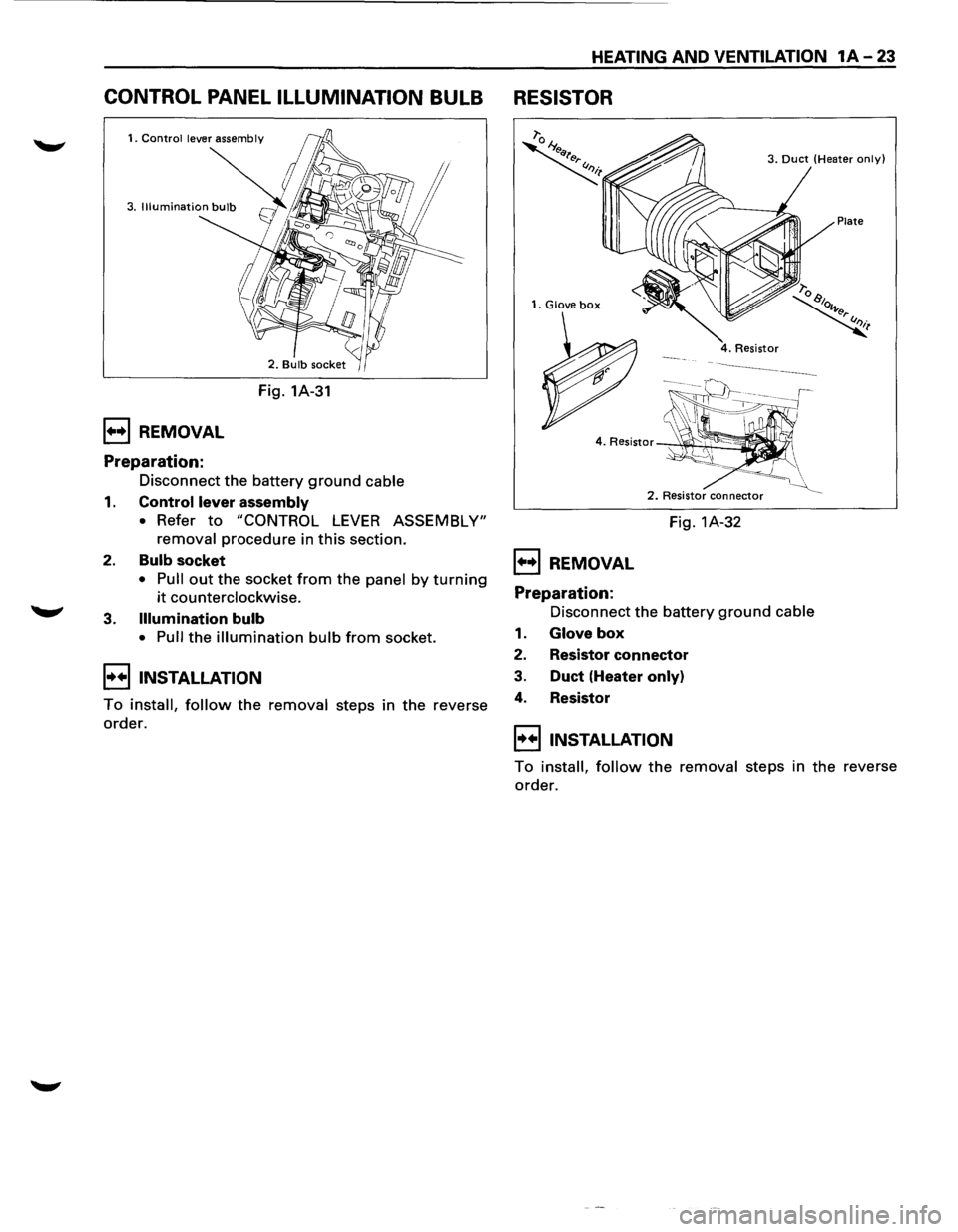
RESISTOR
1. Glove box
1••1 REMOVAL
Preparation:
3. Duct (Heater only)
Plate
2. Resistor connector
Fig. 1A-32
Disconnect the battery
ground cable
1. Glove box
2. Resistor connector
3. Duct (Heater only)
4. Resistor
I••IINSTALLATION
To install, follow the removal steps in the reverse
order.
Page 69 of 1928
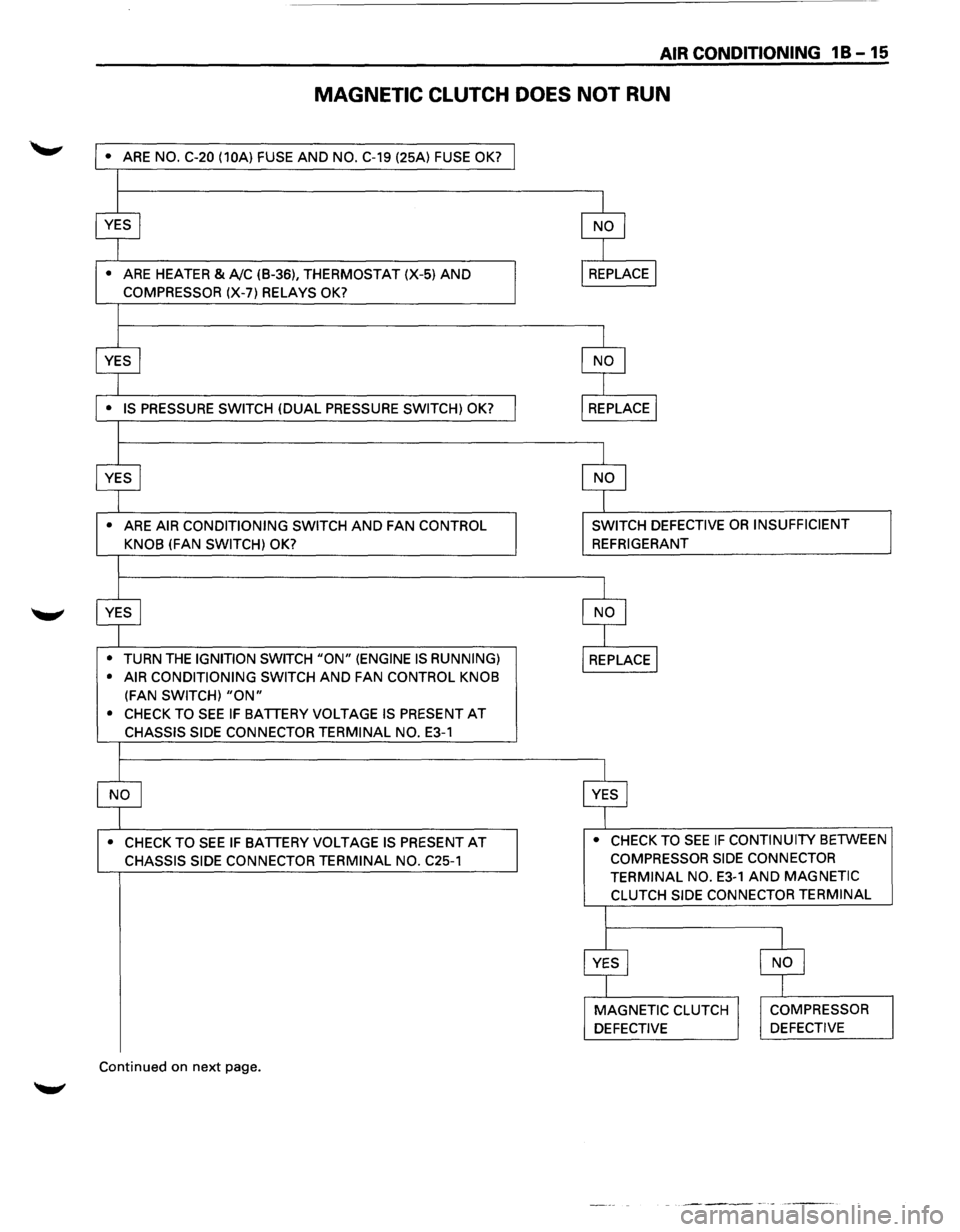
AIR CONDITIONING 1 B -15
MAGNETIC CLUTCH DOES NOT RUN
• ARE NO. C-20 (10A) FUSE AND NO. C-19 (25A) FUSE OK?
•
ARE HEATER & A!C (B-36), THERMOSTAT (X-5) AND
COMPRESSOR (X-7) RELAYS OK?
•
ARE AIR CONDITIONING SWITCH AND FAN CONTROL
KNOB
(FAN SWITCH) OK?
•
TURN THE IGNITION SWITCH "ON" (ENGINE IS RUNNING)
• AIR CONDITIONING SWITCH
AND FAN CONTROL KNOB
(FAN SWITCH) "ON"
• CHECK TO SEE IF BATTERY VOLTAGE IS PRESENT AT
CHASSIS SIDE CONNECTOR TERMINAL NO. E3-1
• CHECK TO SEE IF BATTERY VOLTAGE IS PRESENT AT
CHASSIS SIDE CONNECTOR TERMINAL NO. C25-1
Continued on next page.
SWITCH DEFECTIVE OR INSUFFICIENT
REFRIGERANT
• CHECK TO
SEE IF CONTINUITY BETWEEN
COMPRESSOR SIDE CONNECTOR
TERMINAL NO.
E3-1 AND MAGNETIC
CLUTCH SIDE CONNECTOR TERMINAL
Page 70 of 1928
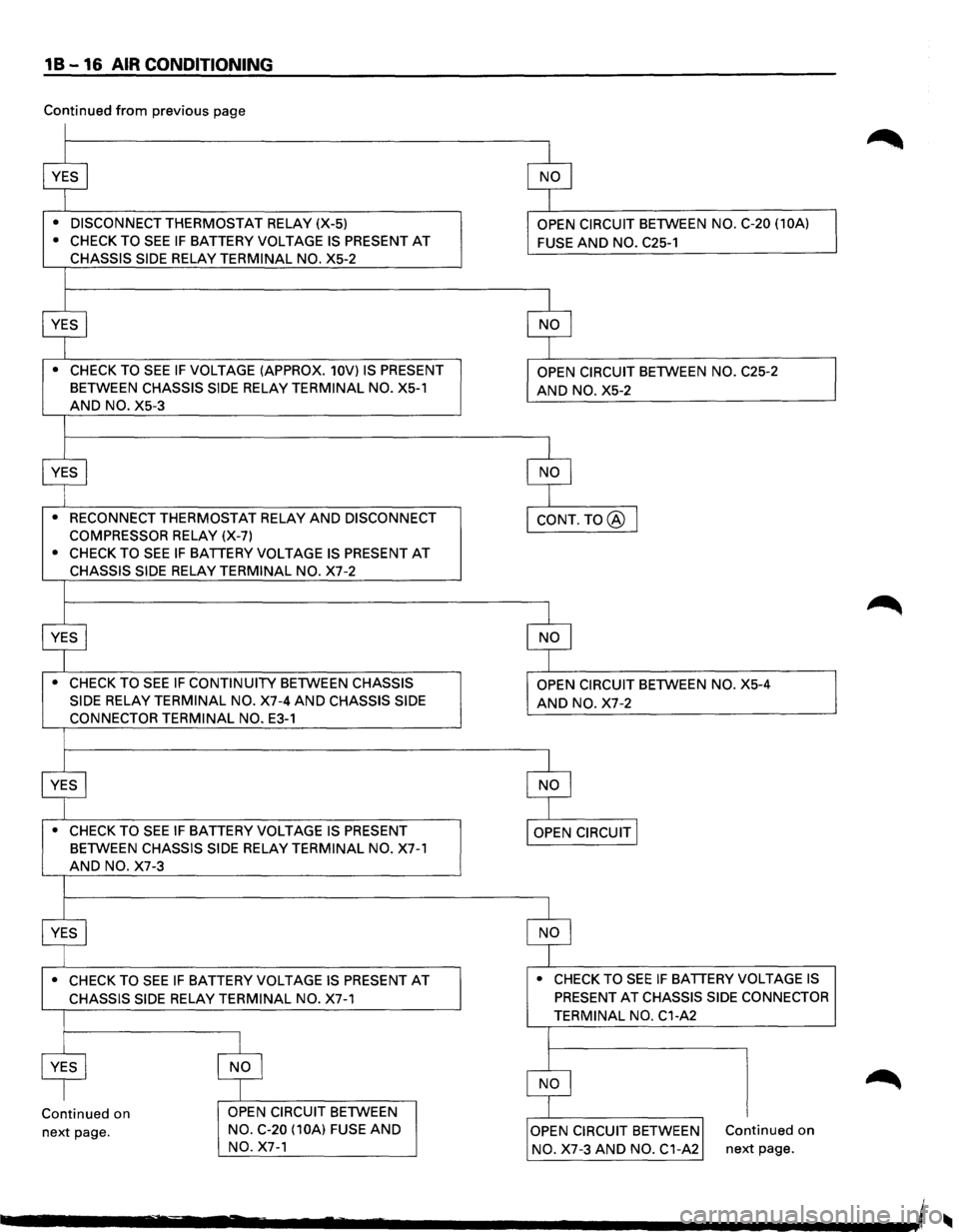
1 B -16 AIR CONDITIONING
Continued from previous page
• DISCONNECT THERMOSTAT RELAY (X-5)
• CHECK TO SEE IF BATTERY VOLTAGE IS PRESENT AT
CHASSIS SIDE RELAY TERMINAL NO. X5-2
• CHECK TO SEE IF VOLTAGE (APPROX. 10V) IS PRESENT
BETWEEN CHASSIS SIDE RELAY TERMINAL NO. X5-1
AND NO. X5-3
• RECONNECT THERMOSTAT RELAY AND DISCONNECT
COMPRESSOR
RELAY (X-7)
• CHECK TO SEE IF BATTERY VOLTAGE IS PRESENT AT
CHASSIS SIDE RELAY TERMINAL NO. X7-2
• CHECK TO SEE IF CONTINUITY BETWEEN CHASSIS
SIDE
RELAY TERMINAL NO. X7-4 AND CHASSIS SIDE
CONNECTOR TERMINAL NO. E3-1
• CHECK TO SEE IF BATTERY VOLTAGE IS PRESENT
BETWEEN CHASSIS SIDE RELAY TERMINAL NO. X7-1
AND NO. X7-3
• CHECK TO SEE IF BATTERY VOLTAGE IS PRESENT AT
CHASSIS SIDE RELAY TERMINAL NO. X7-1
Continued on
next page. OPEN
CIRCUIT BETWEEN
NO. C-20 (10A)
FUSE AND
NO. X7-1 OPEN
CIRCUIT BETWEEN
NO. C-20 (10A)
FUSE AND NO. C25-1
AND NO. X5-2
AND NO. X7-2
• CHECK TO SEE IF BATTERY VOLTAGE IS
PRESENT AT CHASSIS SIDE CONNECTOR
TERMINAL NO. C1-A2
Continued on
NO. X7-3 AND NO. C1-A2 next page.