ISUZU TROOPER 1995 Workshop Manual
Manufacturer: ISUZU, Model Year: 1995, Model line: TROOPER, Model: ISUZU TROOPER 1995Pages: 1928
Page 251 of 1928
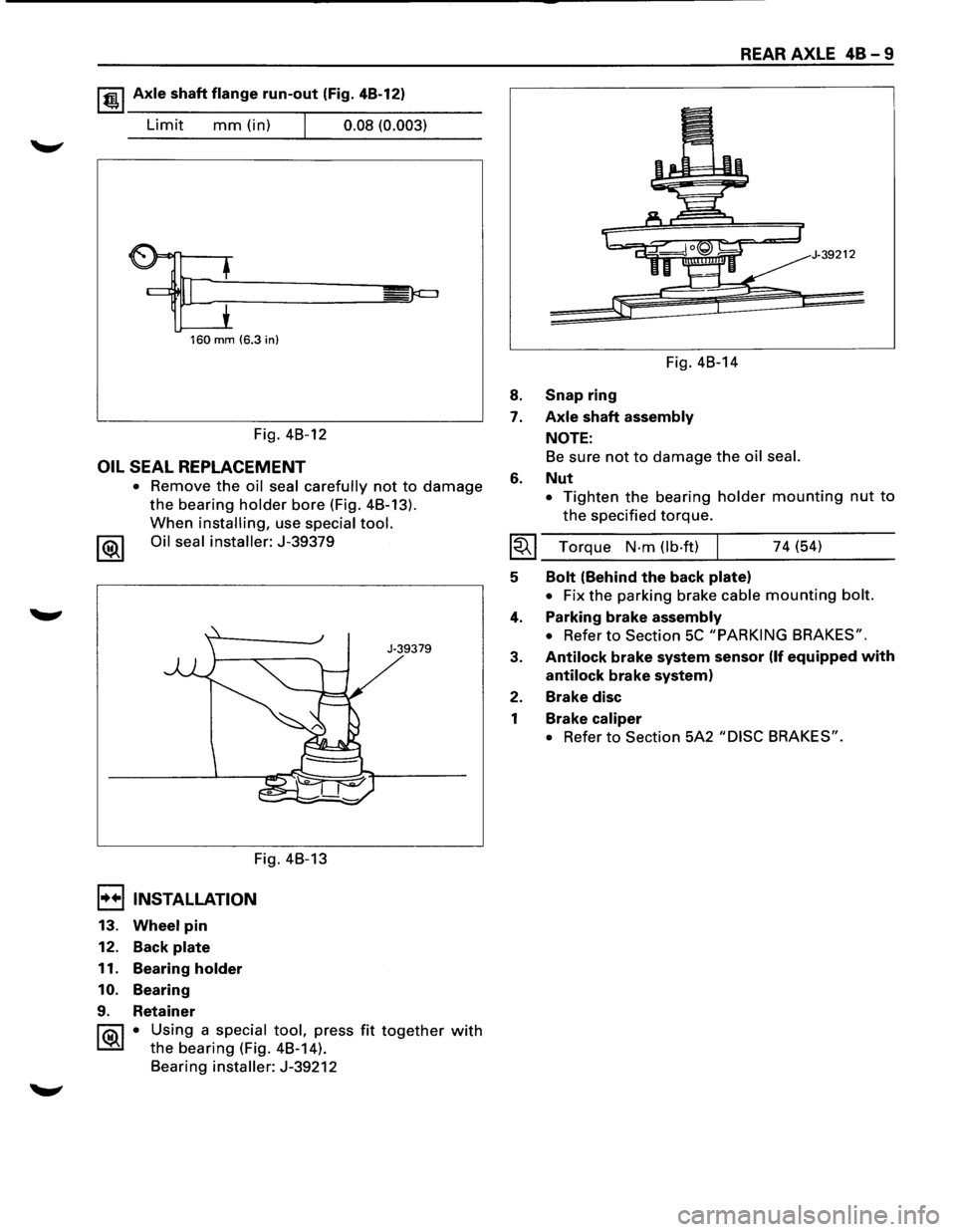
1 t!!.l Axle shaft flange run-out (Fig. 4B-12)
Limit mm (in) I 0.08 (0.003)
160 mm (6.3 in)
Fig. 4B-12
OIL SEAL REPLACEMENT
• Remove the oil seal carefully not to damage
the bearing holder bore (Fig. 4B-13).
When installing, use special tool.
1®1 Oil seal installer: J-39379
Fig. 4B-13
I••IINSTALLATION
13. Wheel pin
12. Back plate
11. Bearing holder
10. Bearing
9. Retainer
J-39379
1 ®I • Using a special tool, press fit together with
the bearing (Fig. 4B-14).
Bearing
installer: J-39212
8.
7.
6.
Fig. 4B-14
Snap ring
Axle shaft assembly
NOTE:
REAR AXLE 48-9
39212
Be sure not to damage the oil seal.
Nut
• Tighten the bearing holder mounting nut to
the specified torque.
I~I ___ T_o_rq_u_e __ N_·_m_(_lb_·f_t)~l _____ 7_4_(~5~4) ____ ___
5
4.
3.
2.
1
Bolt (Behind the back plate)
• Fix the parking brake cable mounting bolt.
Parking brake assembly
• Refer to Section 5C "PARKING BRAKES".
Antilock brake system sensor (If equipped with
antilock brake system)
Brake disc
Brake caliper
• Refer to Section 5A2 "DISC BRAKES".
Page 252 of 1928
48-1 0 REAR AXLE
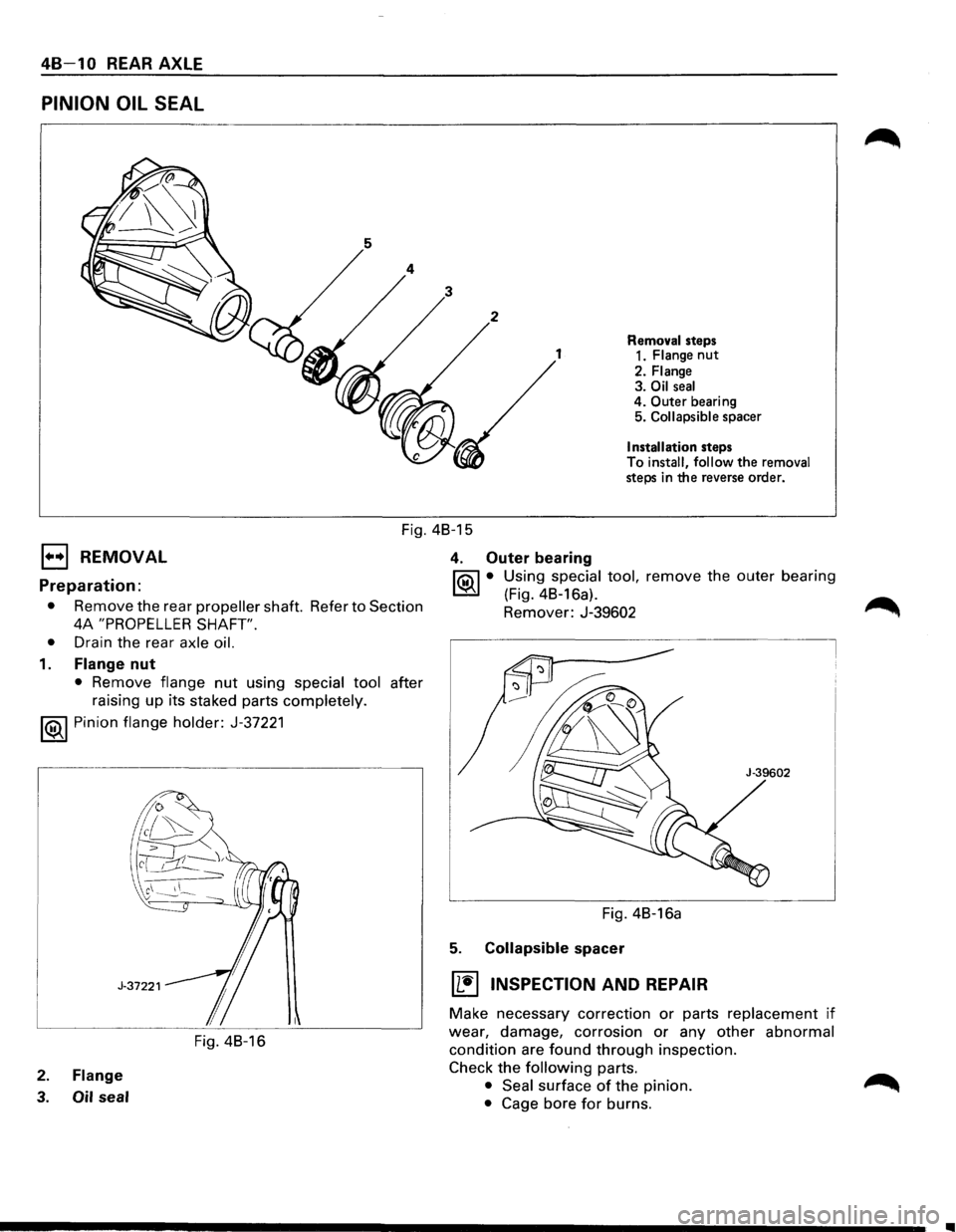
PINION OIL SEAL
Removal steps
1 1. Flange nut
2. Flange 3. Oil seal 4. Outer bearing
5. Collapsible spacer
Installation steps
To
install, follow the removal steps in the reverse order.
Fig. 48-15
1••1 REMOVAL 4. Outer bearing
~ • Using special tool, remove the outer bearing Preparation: ~ (Fig. 48-16a).
• Remove the rear propeller shaft. Refer to Section Remover: J-39602 ~
4A "PROPELLER SHAFT".
•
Drain the rear axle oil.
1. Flange nut
• Remove flange nut using special tool after
raising up its staked parts
completely.
1®..1 Pinion flange holder: J-37221
Fig. 48-16
2. Flange
3. Oil seal
Fig. 4B-16a
5. Collapsible spacer
IL~I INSPECTION AND REPAIR
Make necessary correction or parts replacement if
wear, damage, corrosion or any other abnormal
condition are found through inspection.
Check
the following parts.
• Seal surface of the pinion.
• Cage bore for burns.
..
Page 253 of 1928
E) INSTALLATION
5. Collapsible spacer
• Discard the used collapsible spacer and install
a new one.
4. Outer bearing
NOTE:
• Do not drive in, but just temporarily set in the
outer bearing
by hand, which should be
indirectly pressed in finally by tightening the
flange nut.
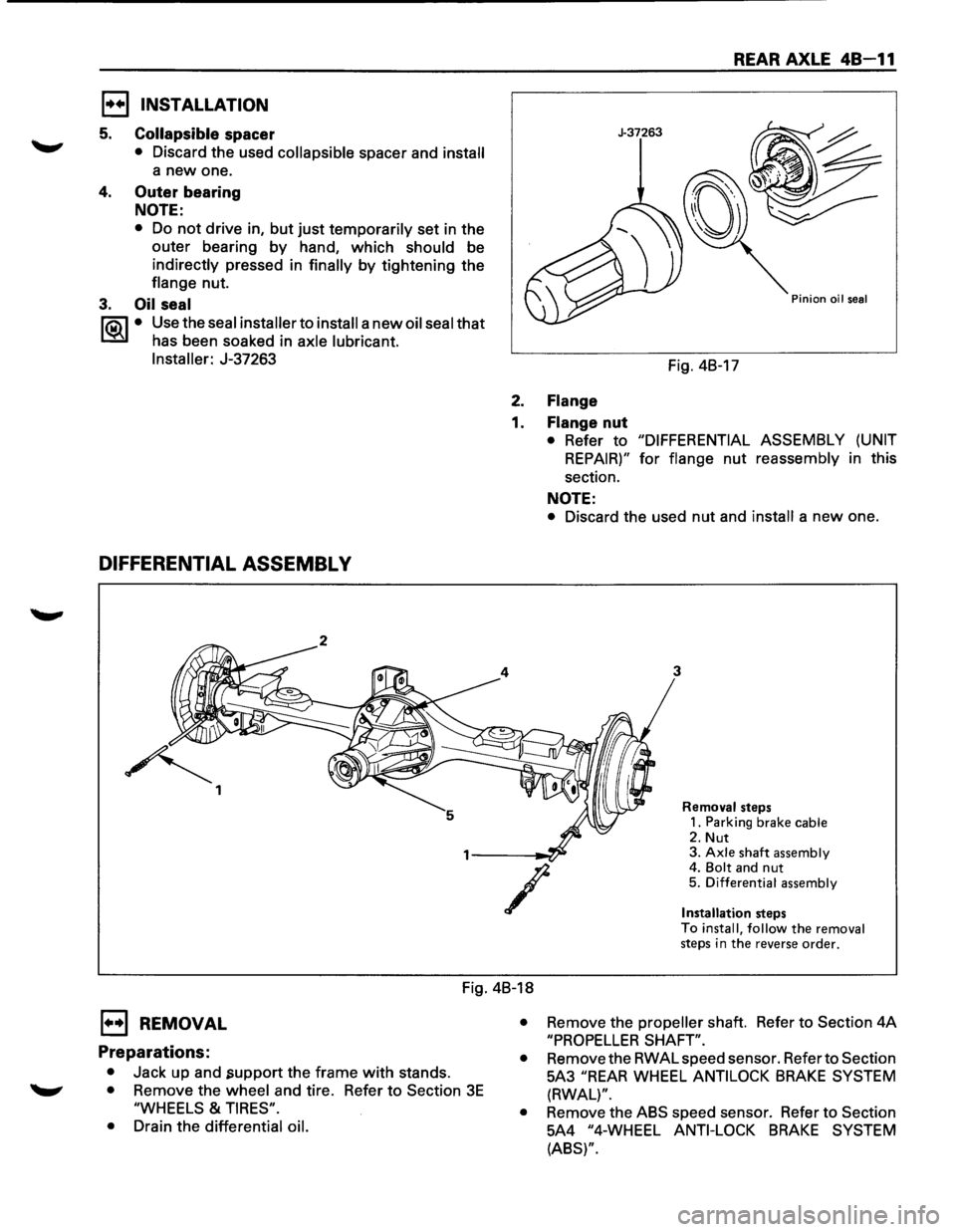
3. Oil seal
1"?.:\1 • Use the seal installer to install a new oil seal that
l.::::'i:il has been soaked in axle lubricant.
Installer:
J-37263
DIFFERENTIAL ASSEMBL V
~ 1
REAR AXLE 48-11
J-37263
Pinion oil seal
Fig. 4B-17
2. Flange
1. Flange nut
• Refer to "DIFFERENTIAL ASSEMBLY (UNIT
REPAIR)" for flange nut reassembly in this
section.
NOTE:
• Discard the used nut and install a new one.
3
/
Removal steps
1. Parking brake cable
2. Nut 3. Axle shaft assembly 4. Bolt and nut 5. Differential assembly
Installation
steps
To install, follow the removal steps in the reverse order.
Fig. 4B-18
E) REMOVAL
Preparations:
• Jack up and .support the frame with stands.
• Remove the wheel and tire. Refer to Section 3E
"WHEELS & TIRES".
•
Drain the differential oil. •
Remove
the propeller shaft. Refer to Section 4A
"PROPELLER SHAFT".
•
Remove the RWAL speed sensor. Refer to Section
5A3
"REAR WHEEL ANTILOCK BRAKE SYSTEM
(RWAL)".
•
Remove the ABS speed sensor. Refer to Section
5A4
"4-WHEEL ANTI-LOCK BRAKE SYSTEM
(ABS)".
Page 254 of 1928
48-12 REAR AXLE
1. Parking brake cable
• Remove the parking brake cable fastening clip
and disconnect the equalizer section. Refer
to
Section SC "PARKING BRAKES".
2. Nut
• Remove the bearing holder fixing nuts.
3. Axle shaft assembly
• Be sure notto damage the oil seal by axle shaft.
4.
Bolt and nut
• Remove differential carrier mounting bolts and
nuts.
5. Differential assembly
1••1 INSTALLATION
5. Differential assembly
• Clean the contact surfaces of the axle and
differential carrier.
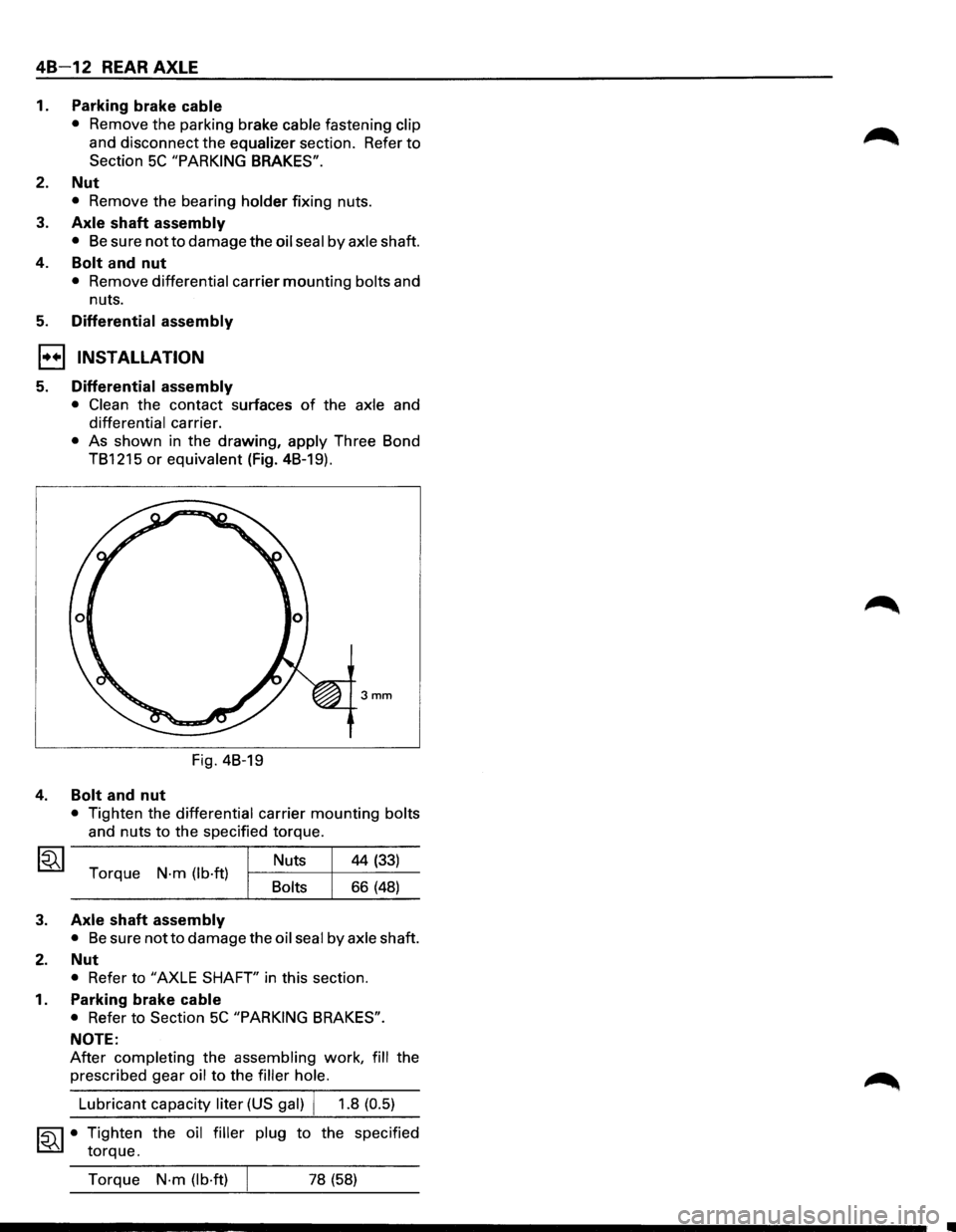
• As shown in the drawing, apply Three Bond
TB1215
or equivalent (Fig. 4B-19).
3mm
Fig. 4B-19
4. Bolt and nut
• Tighten the differential carrier mounting bolts
and nuts
to the specified torque.
Torque
N·m (lb·ft) Bolts Nuts
44
(33)
66 (48)
3. Axle shaft assembly
• Be sure notto damage
the oil seal by axle shaft.
2. Nut
• Refer to "AXLE SHAFT' in this section.
1. Parking brake cable
• Refer to Section 5C "PARKING BRAKES".
NOTE:
After completing the assembling work, fill the
prescribed gear
oil to the filler hole.
~·
Lubricant capacity liter (US gal) j 1.8 (0.5)
Tighten the oil filler plug to the specified
torque.
Torque
N·m (lb·ft) 78 (58)
Page 255 of 1928
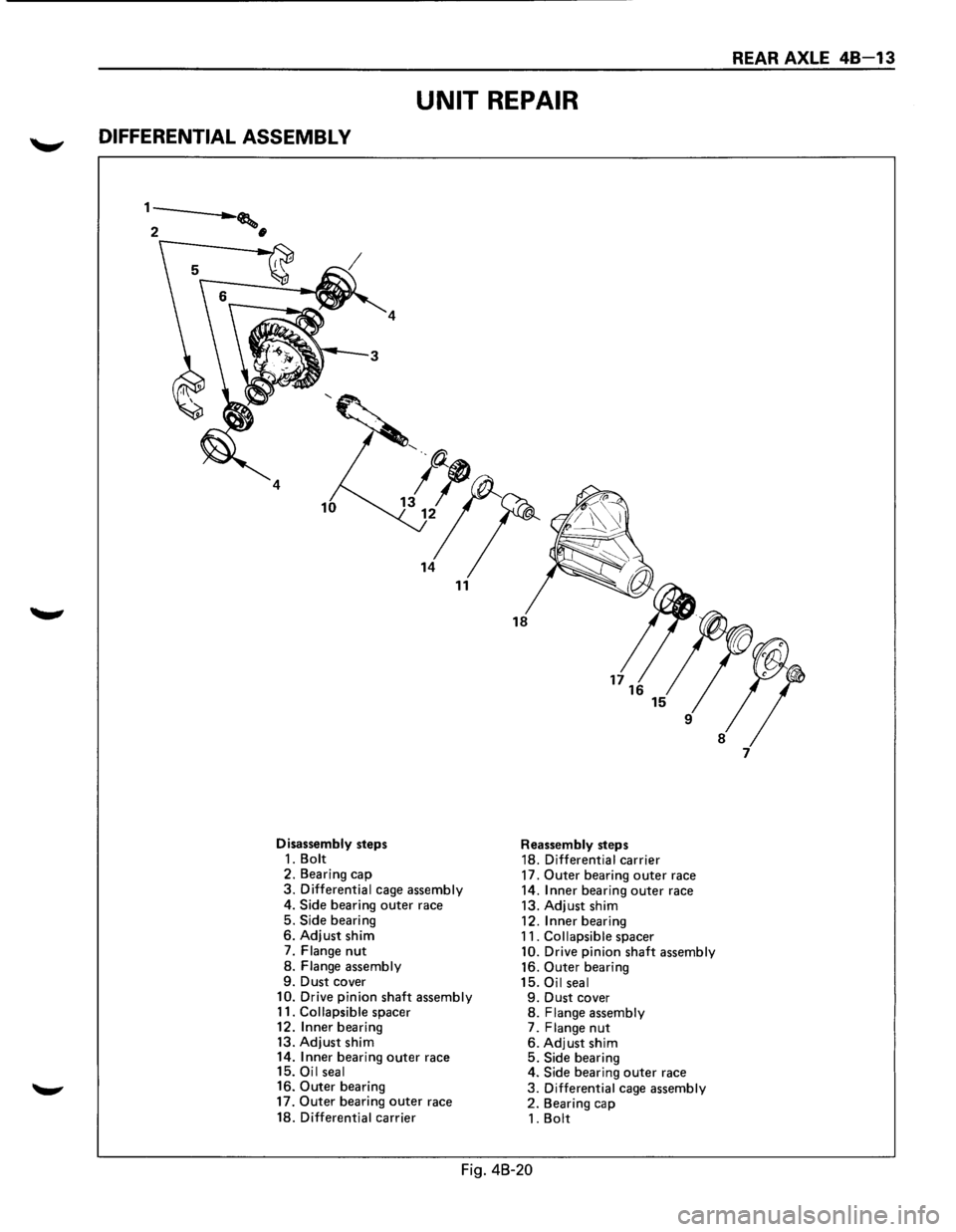
UNIT REPAIR
DIFFERENTIAL ASSEMBL V
1---.___. .......... ,
2 •
4
Disassembly steps 1. Bolt 2. Bearing cap 3. Differential cage assembly
4.
Side bearing outer race
5. Side bearing 6. Adjust shim
7. Flange nut
8. Flange assembly 9. Dust cover 10. Drive pinion shaft assembly
11. Collapsible spacer
12.
Inner bearing
13. Adjust shim
14. Inner bearing outer race
15. Oil seal
16. Outer bearing
17. Outer bearing outer race
18. Differential carrier
Reassembly steps
18. Differential carrier
17.
Outer bearing outer race
14. Inner bearing outer race
13. Adjust shim
12.
Inner bearing
11. Collapsible spacer 10. Drive pinion shaft assembly
16. Outer bearing
15. Oil seal 9. Dust cover 8. Flange assembly 7. Flange nut 6. Adjust shim 5. Side bearing
4. Side bearing outer race
3. Differential cage assembly 2. Bearing cap
1. Bolt
Fig. 48-20
REAR AXLE 48-13
Page 256 of 1928
48 -14 REAR AXLE
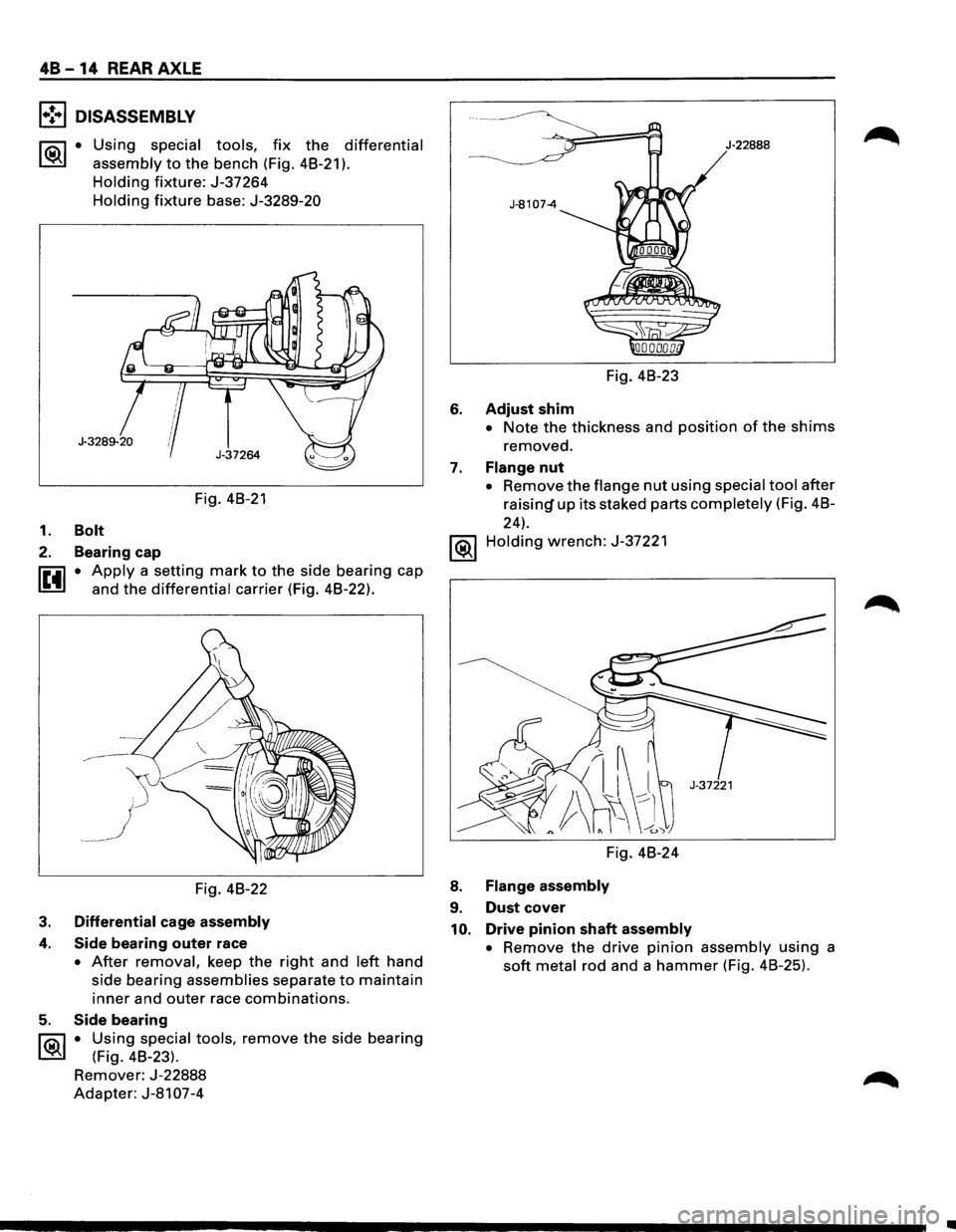
l•!•l DISASSEMBLY
~·
Using special tools, fix the differential
assembly
to the bench (Fig. 48-21 ).
Holding fixture: J-37264
Holding fixture base: J-3289-20
Fig. 48-21
1. Bolt
2. Bearing cap
~ • Apply a setting mark to the side bearing cap
l.!!.!l and the differential carrier (Fig. 48-22).
Fig. 48-22
3. Differential cage assembly
4. Side bearing outer race
• After removal, keep the right and left hand
side bearing
assemblies separate to maintain
inner and outer race combinations.
5. Side bearing
l'i5\J • U~ing special tools, remove the side bearing
~ (F1g. 48-23).
Remover: J-22888
Adapter: J-81 07-4
J·22888
Fig. 48-23
6. Adjust shim
• Note the thickness and position of the shims
removed.
7. Flange nut
• Remove the flange nut using special tool after
raisin~ up its staked parts completely (Fig. 48-
24).
1®.1 Holding wrench: J-37221
Fig. 48-24
8. Flange assembly
9. Dust cover
10. Drive pinion shaft assembly
•
Remove the drive pinion assembly using a
soft metal rod and a hammer (Fig. 48-25).
..
Page 257 of 1928
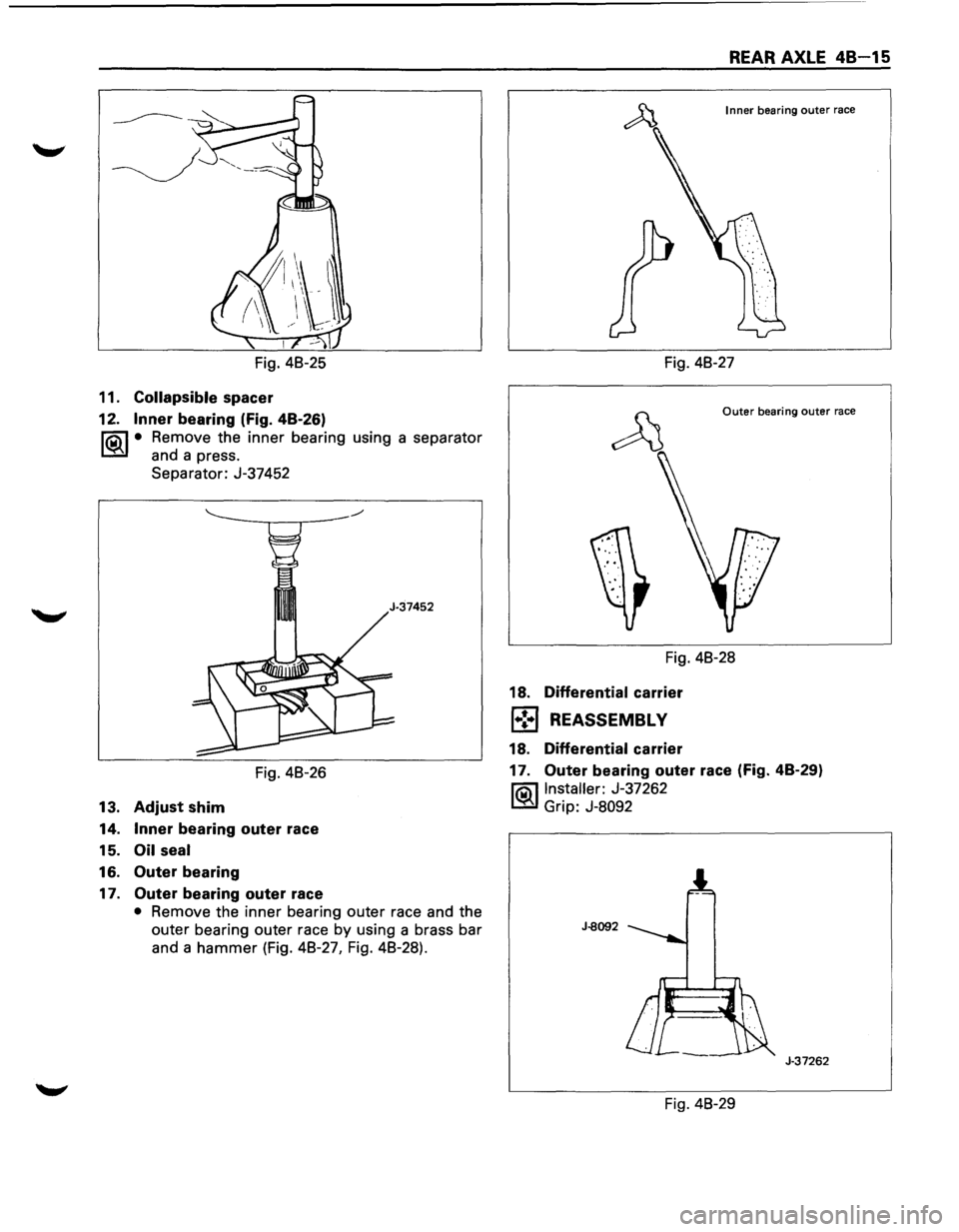
Fig. 48-25
11.
Collapsible spacer
12. Inner bearing (Fig. 48-26)
l?.iil • Remove the inner bearing using a separator
~ and a press.
Separator: J-37452
Fig. 48-26
13.
Adjust shim
14. Inner bearing outer race
15.
Oil seal
16. Outer bearing
17. Outer bearing outer race
• Remove the inner bearing outer race and the
outer bearing outer race by using a brass bar
and a
hammer (Fig. 48-27, Fig. 48-28).
REAR AXLE 48-15
Inner bearing outer race
Fig. 48-27
Outer bearing outer race
Fig. 48-28
18.
Differential carrier
1•:-1 REASSEMBL V
18. Differential carrier
17. Outer bearing outer race (Fig. 48-29)
l?.iil Installer: J-37262
~ Grip: J-8092
J-8092
J-37262
Fig. 48-29
Page 258 of 1928
48 -16 REAR AXLE
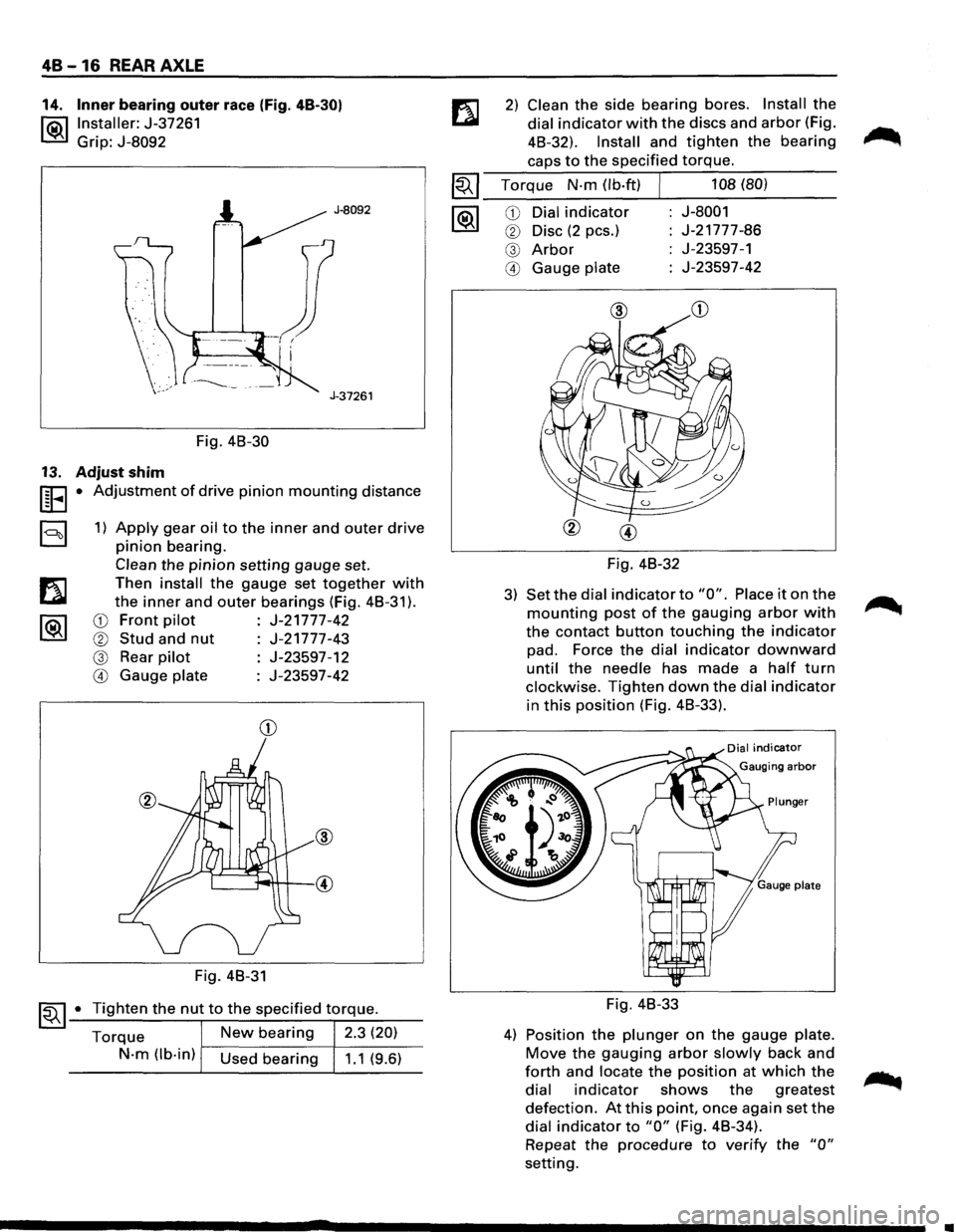
14. Inner bearing outer race (Fig. 48-30)
l®.llnstaller: J-37261
Grip: J-8092
J-8092
J-37261
Fig. 48-30
13. Adjust shim
UEI • Adjustment of drive pinion mounting distance
a 1) Apply gear oil to the inner and outer drive
pinion bearing.
Clean the pinion setting gauge set.
Then
install the gauge set together with
the inner and outer bearings (Fig. 48-31 ).
CD Front pilot J-21777-42
® Stud and nut J-21777-43
@ Rear pilot J-23597-12
@ Gauge plate J-23597-42
CD
Fig. 48-31
~~ 1-•-T_i..::..g_h_te_n_t_h_e_n_u...,t_t_o_t_h_e_s..:..p_e_c_if_ie_d_t-\
.-o_rq....:..._ue_. __
Torque New bearing 2.3 (20)
N-m (lb-in) Used bearing 1.1 (9.6)
2) Clean the side bearing bores. Install the
dial indicator with the discs and arbor (Fig.
48-32).
Install and tighten the bearing
caps to the specified torque.
~~~ Torque N-m (lb·ft) J 108 (80)
--------~----------1®.1 CD Dial indicator J-8001
® Disc (2 pes.) J-21777-86
@ Arbor J-23597-1
@ Gauge plate J-23597-42
Fig. 48-32
3) Set the dial indicator to "0". Place it on the
mounting post of the gauging arbor with
the contact button touching the indicator
pad. Force the dial indicator downward
until the needle has made a half turn
clockwise. Tighten down the dial indicator
in this position (Fig. 48-33).
Fig. 48-33
4) Position the plunger on the gauge plate.
Move the gauging arbor slowly back and
forth and locate the position at which the
dial indicator shows the greatest
defection. At this point, once again set the
dial indicator to "0" (Fig. 48-34).
Repeat
the procedure to verify the "0"
setting.
•
Page 259 of 1928
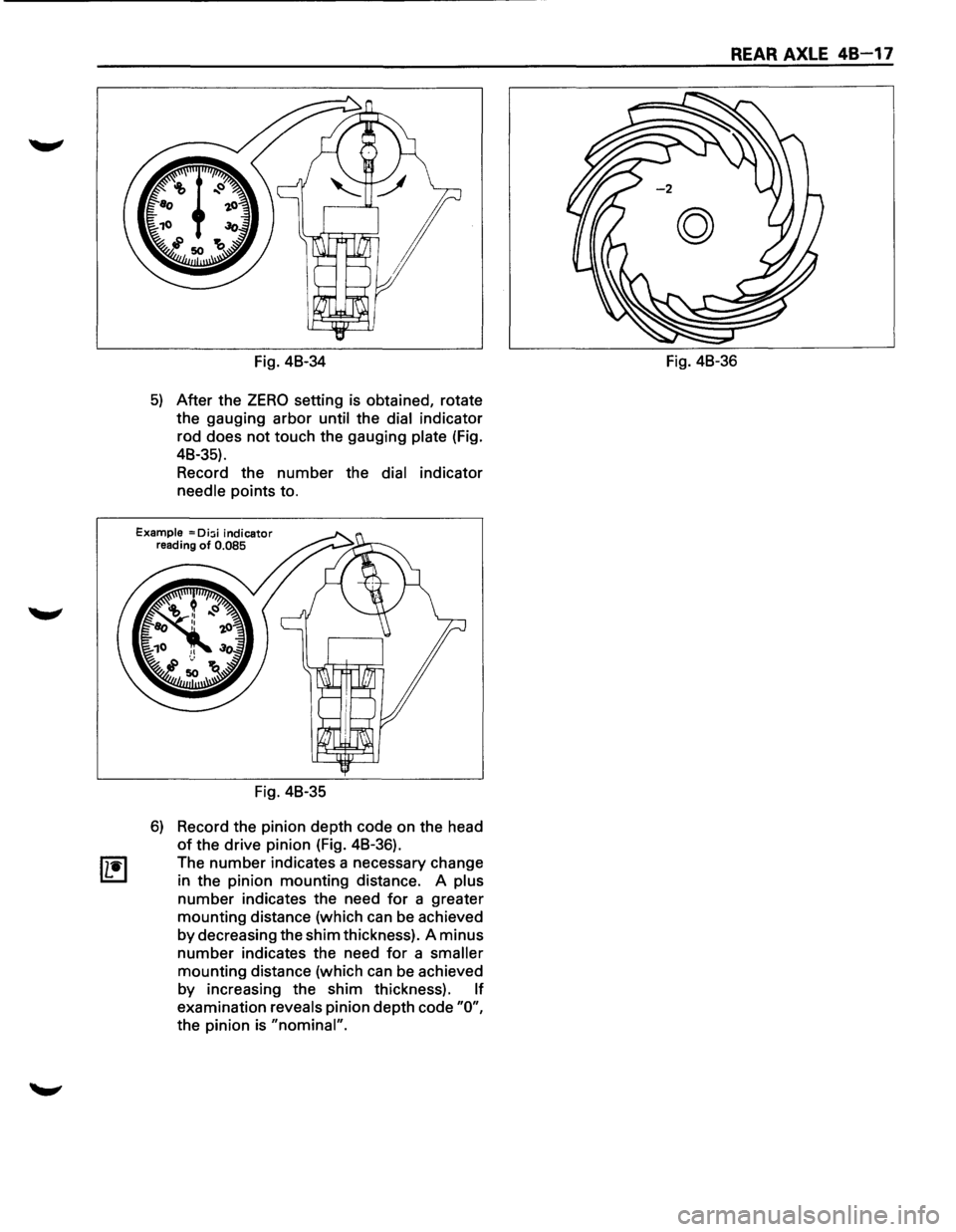
Fig. 48-34
5) After the ZERO setting is obtained, rotate
the gauging arbor
until the dial indicator
rod does
not touch the gauging plate (Fig.
48-35).
Record the number the
dial indicator
needle points to.
Example = Di:;i indicator reading of 0.085
Fig. 48-35
6) Record the pinion depth code on the head
of the drive pinion (Fig. 48-36).
The
number indicates a necessary change
in the pinion mounting distance. A
plus
number indicates the need for a greater
mounting distance (which can be achieved
by decreasing the shim thickness). A minus
number indicates the need for a smaller
mounting distance (which can be achieved
by increasing the shim thickness).
If
examination reveals pinion depth code "0",
the pinion is "nominal".
REAR AXLE 48-17
Fig. 48-36
Page 260 of 1928
48-18 REAR AXLE
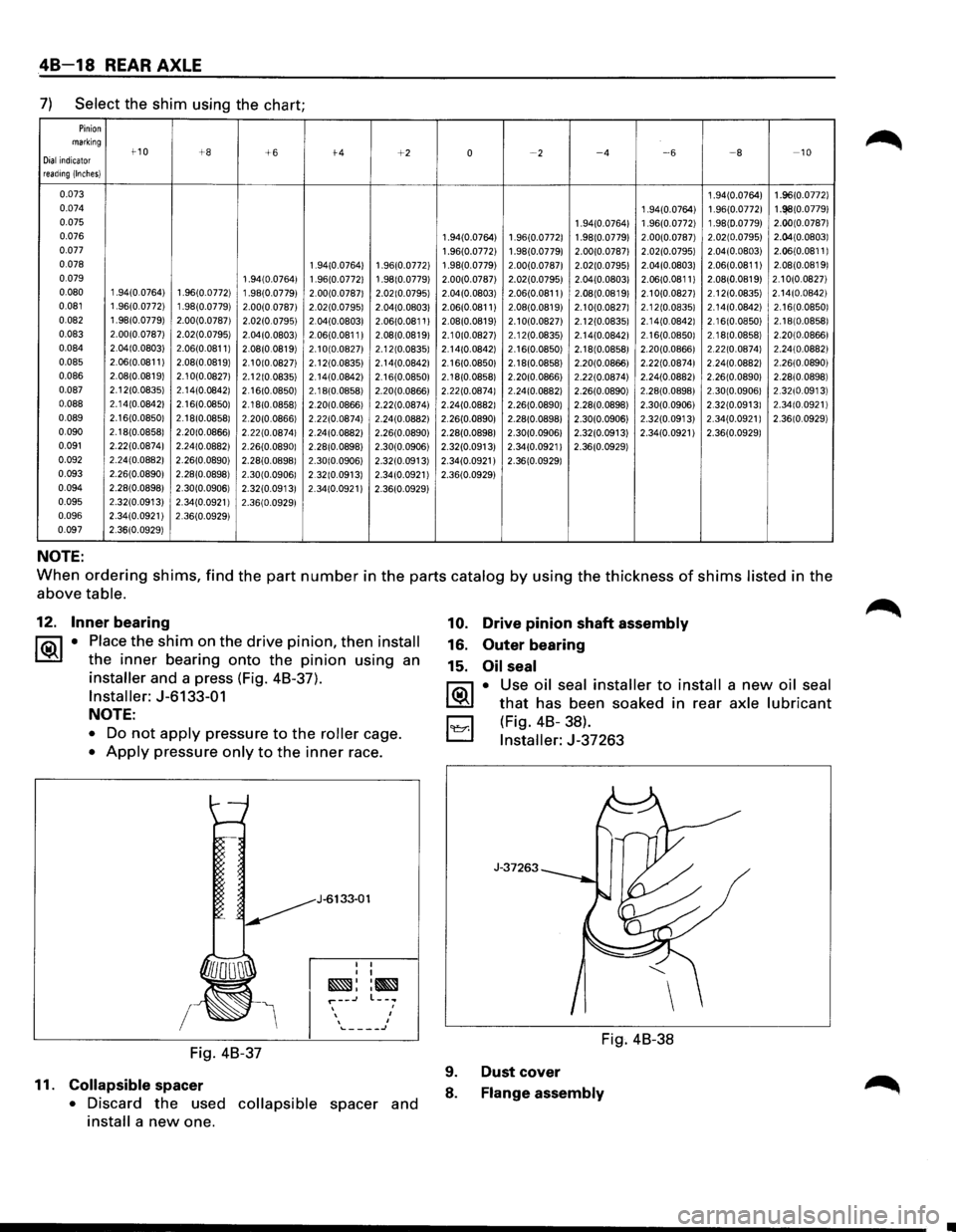
7) Select the shim using the chart;
Pinion marking t-10 +8 Dial indicator +6 t-4 +2 0 ~2 ~4 ~6 ~a -10
reading (Inches}
0.073 1 .94(0.0764} 1 .96(0.0772}
0.074 1 .94(0.0764} 1 .96(0.0772} 1.!~8(0.0779} 0.075 1 .94(0.0764} 1 .96(0.0772) 1 .98(0.0779) 2.00(0.0787}
0.076 1 .94(0.0764) 1 .96(0.0772) 1 .98(0.0779} 2.00(0.0787) 2.02(0.0795)
2.04(0.08031
0.077 1 .96(0.0772) 1 .98(0.07791 2.00(0.07871 2.02(0.07951 2.04(0.0803)
2.06(0.0811 I
0.078 1 .94(0.0764) 1 .96(0.0772) 1 .98(0.0779) 2.00(0.07871 2.02(0.07951 2.04(0.0803} 2.06(0.0811)
2.08(0.08191
0.079 1 .94(0.0764} 1 .96(0.0772} 1 .98(0.0779) 2.00(0.0787) 2.02(0.0795) 2.04(0.0803} 2.06(0.0811 I 2.08(0.0819) 2.1 0(0.0827)
0.080 1 .94(0.0764) 1 .96(0.0772} 1 .98(0.0779) 2.00(0.07871 2.02(0.07951 2.04(0.0803)
2.06(0.0811 I 2.08(0.08191 2.10(0.08271 2. 12(0.0835) 2.14(0.08421
0.081 1 .96(0.0772} 1 .98(0.0779} 2.00(0 07871 2.02(0.07951 2.04(0.08031 2.06(0.0811 I 2.08(0.08191 2.1 0(0.08271 2. 12(0.08351 2. 14(0.08421 2. 16(0.08501
0.082 1 .98(0.0779) 2.00(0.07871 2.02(0.07951 2.04(0.08031 2.06(0.0811 I
2.08(0.08191 2.1 0(0.08271 2. 12(0.08351 2. 14(0.0842} 2.16(0.08501 2. 18(0.08581
0.083 2.00(0.07871
2.02(0.07951 2.04(0.0803}
2.06(0.0811 I 2.08(0.08191 2.1 0(0.0827} 2. 12(0.0835} 2. 14(0.0842} 2. 16(0.08501 2.18(0.0858}
2.20(0.0866}
0.084 2.04(0.08031 2.06(0.0811 I
2.08(0.0819} 2.1 0(0.08271 2. 12(0.08351 2.14(0.0842} 2. 16(0.0850) 2. 18(0.08581 2.20(0.0866}
2.22(0.08741 2.24(0.08821
0.085 2.06(0.0811} 2.08(0.0819} 2.1 0(0.0827} 2. 12(0.08351 2. 14(0.0842}
2.16(0.08501 2. 18(0.0858} 2.20(0.0866} 2.22(0.0874} 2.24(0.0882} 2.26(0.0890}
0.086 2.08(0.0819} 2.1 0(0.0827} 2. 12(0.0835} 2.14(0.0842} 2.16(0.0850} 2.18(0.0858} 2.20(0.0866)
2.22(0.0874) 2.24(0.0882)
2.26(0.0890} 2.28(0.0898)
0.087 2. 12(0.0835) 2.14(0.0842) 2.16(0.08501 2. 18(0.0858) 2.20(0.0866) 2.22(0.0874) 2.24(0.0882) 2.26(0.0890) 2.28(0.08981 2.30(0.09061 2.32(0.0913)
0.088 2. 14(0.0842} 2.16(0.0850)
2.18(0.0858} 2.20(0.0866) 2.22(0.0874)
2.24(0.08821 2.26(0.0890)
2.28(0.0898) 2.30(0.0906) 2.32(0.09131 2.34(0.0921 I
0.089 2. 16(0.08501 2.18(0.08581
2.20(0.08661 2.22(0.0874)
2.24(0.0882) 2.26(0.0890) 2.28(0.0898) 2.30(0.0906) 2.32(0.0913) 2.34(0.0921)
2.36(0.0929)
0.090 2.18(0.0858) 2.20(0.0866)
2.22(0.08741 2.24(0.0882) 2.26(0.0890) 2.28(0.0898)
2.30(0.09061 2.32(0.0913)
2.34(0.0921) 2.36(0.0929)
0.091 2.22(0.0874)
2.24(0.0882)
2.26(0.08901 2.28(0.0898) 2.30(0.0906) 2.32(0.0913)
2.34(0.09211 2.36(0.0929)
0.092 2.24(0.0882) 2.26(0.0890)
2.28(0.08981 2.30(0.0906) 2.32(0.0913) 2.34(0.0921) 2.36(0.0929)
0.093 2.26(0.0890)
2.28(0.0898)
2.30(0.09061 2.32(0.0913) 2.34(0.0921) 2.36(0.0929)
0.094 2.28(0.08981 2.30(0.0906)
2.32(0.0913)
2.34(0.0921) 2.36(0.0929)
0.095 2.32(0.0913)
2.34(0.0921)
2.36(0.09291
0.096 2.34(0.0921)
2.36(0.0929)
0.097 2.36(0.0929)
NOTE:
When ordering shims, find the part number in the parts catalog by using the thickness of shims listed in the
above
table.
12. Inner bearing
1®.1 • Place the shim on the drive pinion, then install
the inner bearing onto the pinion using an
installer and a press (Fig. 48-37).
Installer: J-6133-01
NOTE:
• Do not apply pressure to the roller cage.
• Apply pressure only to the inner race.
I
Fig. 48-37
11.
Collapsible spacer
J-6133-01
I I I I
~::~ r--~ l--.. ' , , .._ ____ J
• Discard the used collapsible spacer and
install a new one.
10. Drive pinion shaft assembly
16. Outer bearing
15.
Oil seal
~·
B
Use oil seal installer to install a new oil seal
that has been soaked in rear axle lubricant
(Fig.
48-38).
Installer: J-37263
J-37263
Fig. 48-38
9.
8. Dust
cover Flange assembly