ISUZU TROOPER 1995 Workshop Manual
Manufacturer: ISUZU, Model Year: 1995, Model line: TROOPER, Model: ISUZU TROOPER 1995Pages: 1928
Page 261 of 1928
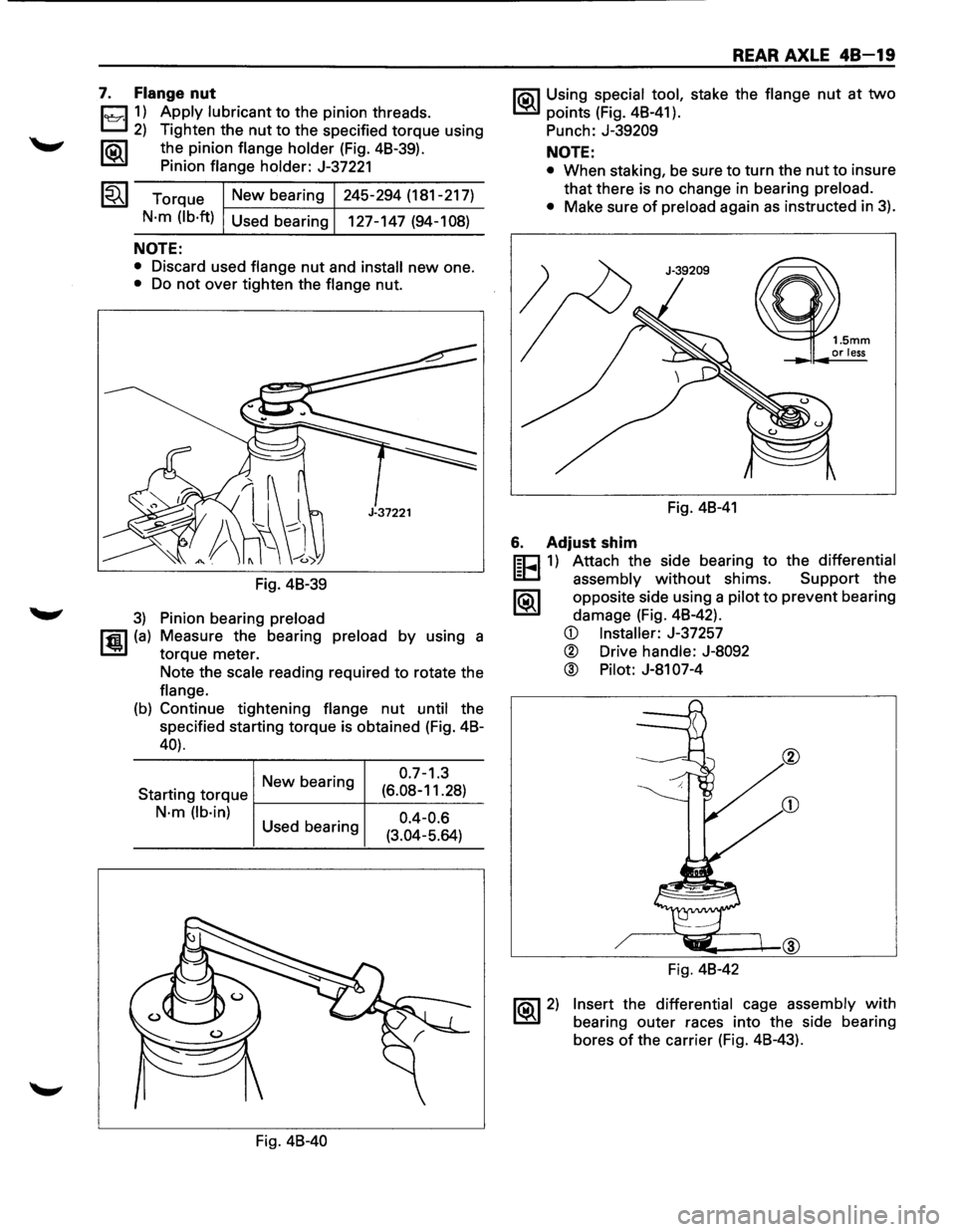
7. Flange nut
1~11) Apply lubricant to the pinion threads.
2) Tighten the nut to the specified torque using
1®.1 the pinion flange holder (Fig. 48-39).
Pinion
flange holder: J-37221
Torque
New bearing 245-294
(181-217)
N·m (lb·ft) Used bearing
127-147 (94-108)
NOTE:
• Discard used flange nut and install new one.
• Do not over tighten the flange nut.
Fig. 48-39
3) Pinion bearing preload
rfiil (a) Measure the bearing preload by using a
1..!!.1 torque meter.
Note the
scale reading required to rotate the
flange.
(b) Continue tightening flange nut until the
specified starting torque is obtained (Fig. 48-
40).
New bearing 0
·7
-1
·3
Starting
torque f-------+--(6_._08_-_1_1_.2_8_) _
N·m (lb·in) 0.4-0.6 Used bearing
(3.04-5.64)
Fig.
48-40
REAR AXLE 48-19
1'?.3\1 Using special tool, stake the flange nut at two
~points (Fig. 48-41).
Punch:
J-39209
NOTE:
• When staking, be sure to turn the nut to insure
that there is no change in bearing
preload.
•
Make sure of preload again as instructed in 3).
Fig. 48-41
6. Adjust shim
m=J 1) Attach the side bearing to the differential
~ assembly without shims. Support the
1®.1 opposite side using a pilot to prevent bearing
damage (Fig. 48-42).
~ 2)
CD Installer: J-37257
® Drive handle: J-8092
® Pilot: J-81 07-4
Fig. 48-42
Insert the differential cage assembly with
bearing outer races into the side bearing
bores
of the carrier (Fig. 48-43).
Page 262 of 1928
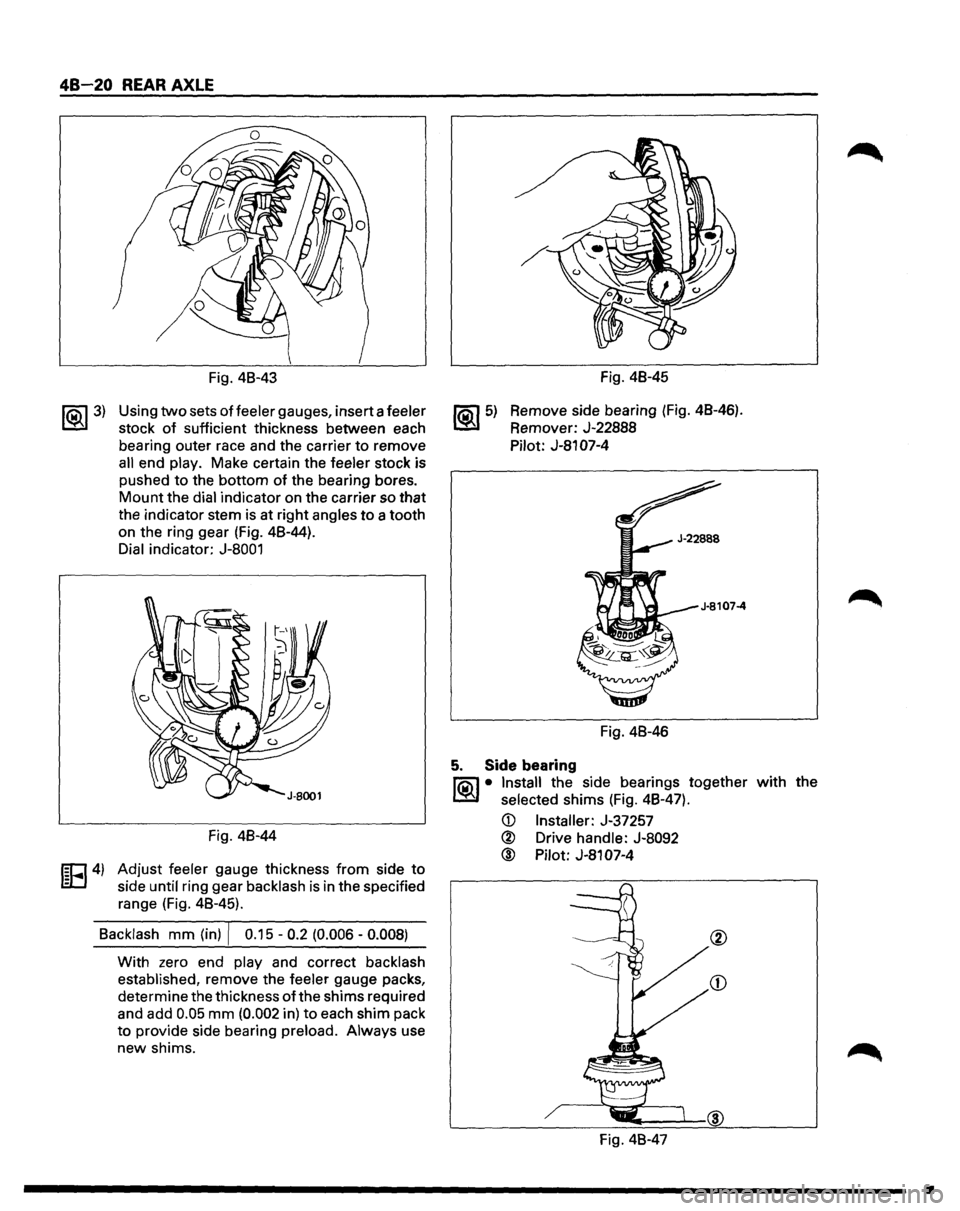
48-20 REAR AXLE
~ 3)
Fig. 48-43
Using
two sets of feeler gauges, insert a feeler
stock
of sufficient thickness between each
bearing outer race and the carrier
to remove
all end play. Make certain the feeler stock is
pushed to the bottom
of the bearing bores.
Mount the dial indicator on the carrier so that
the indicator stem
is at right angles to a tooth
on the ring gear (Fig. 48-44).
Dial indicator:
J-8001
Fig. 48-44
IEFI4) Adjust feeler gauge thickness from side to
side until ring gear backlash is in the specified
range (Fig. 48-45).
Backlash
mm (in) I 0.15 -0.2 (0.006 -0.008)
With zero end play and correct backlash
established, remove the feeler gauge packs,
determine the thickness
of the shims required
and add
0.05 mm (0.002 in) to each shim pack
to provide side bearing preload. Always use
new shims.
~5)
/
Fig. 48-45
Remove side bearing
(Fig. 48-46).
Remover: J-22888
Pilot:
J-81 07-4
Fig. 48-46
5. Side bearing
Jia\1 • Install the side bearings together
~ selected shims (Fig. 48-47).
@ Pilot: J-81 07-4
Fig. 48-47
with the
•
Page 263 of 1928
4. Side bearing outer race
3. Differential cage assembly
2. Bearing cap
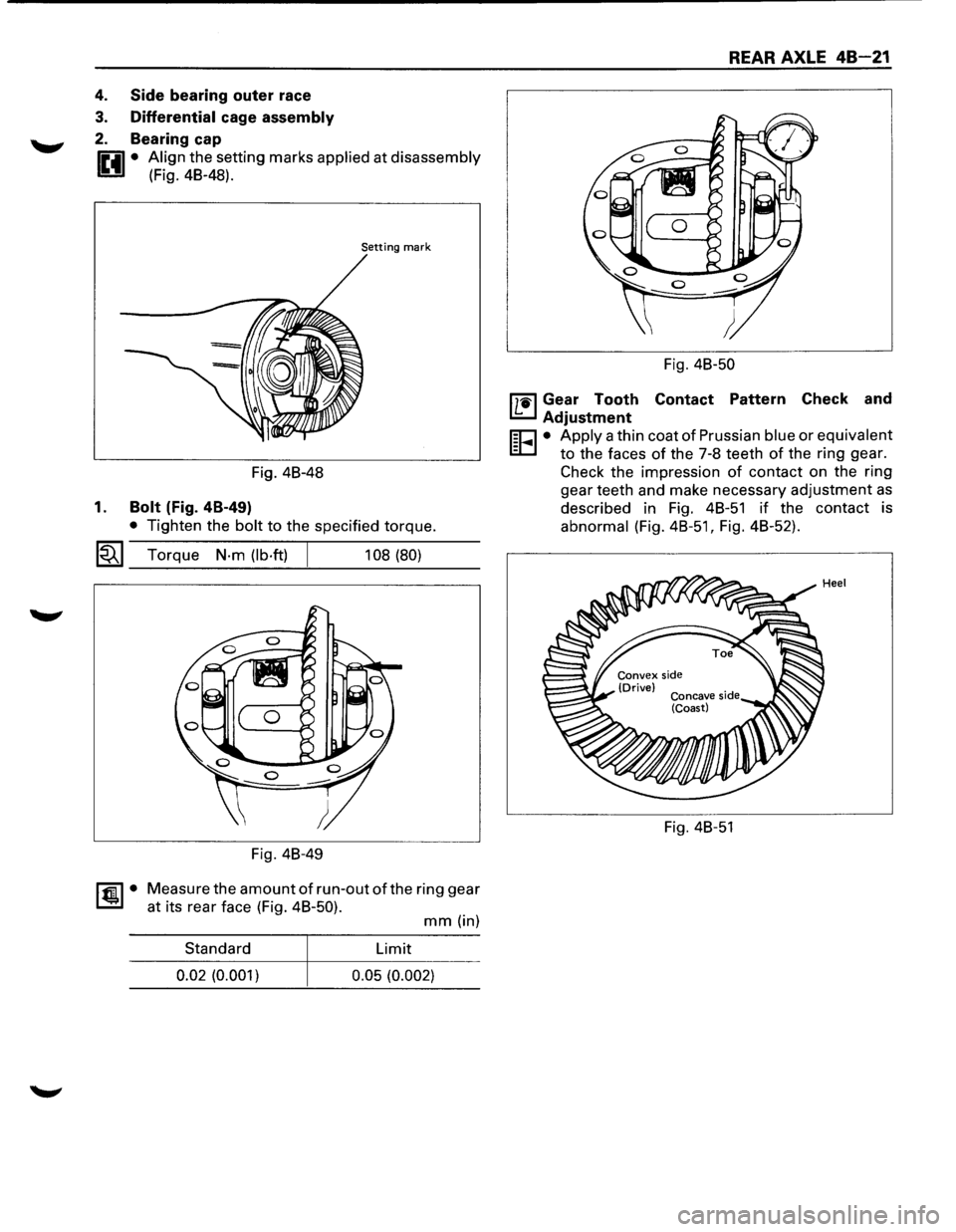
0 • Align the setting marks applied at disassembly
1!!:!.1 (Fig. 48-48).
Setting mark
Fig. 48-48
1. Bolt (Fig. 4B-49)
• Tighten the bolt to the specified torque.
~~~ Torque N·m (lb·ft) 108 (80)
Fig. 48-49
~·
Measure the amount of run-out of the ring gear
at its rear face (Fig. 48-50).
mm (in)
Standard Limit
0.02 (0.001)
0.05 (0.002)
REAR AXLE 48-21
Fig. 48-50
l'7'1il Gear Tooth Contact Pattern Check and
I.£..J Adjustment
r;o • Apply a thin coat of Prussian blue or equivalent
EC.I to the faces of the 7-8 teeth of the ring gear.
Check the impression
of contact on the ring
gear teeth and make necessary adjustment
as
described in Fig. 48-51 if the contact is
abnormal (Fig.
48-51, Fig. 48-52).
Fig. 48-51
Page 264 of 1928
48-22 REAR AXLE
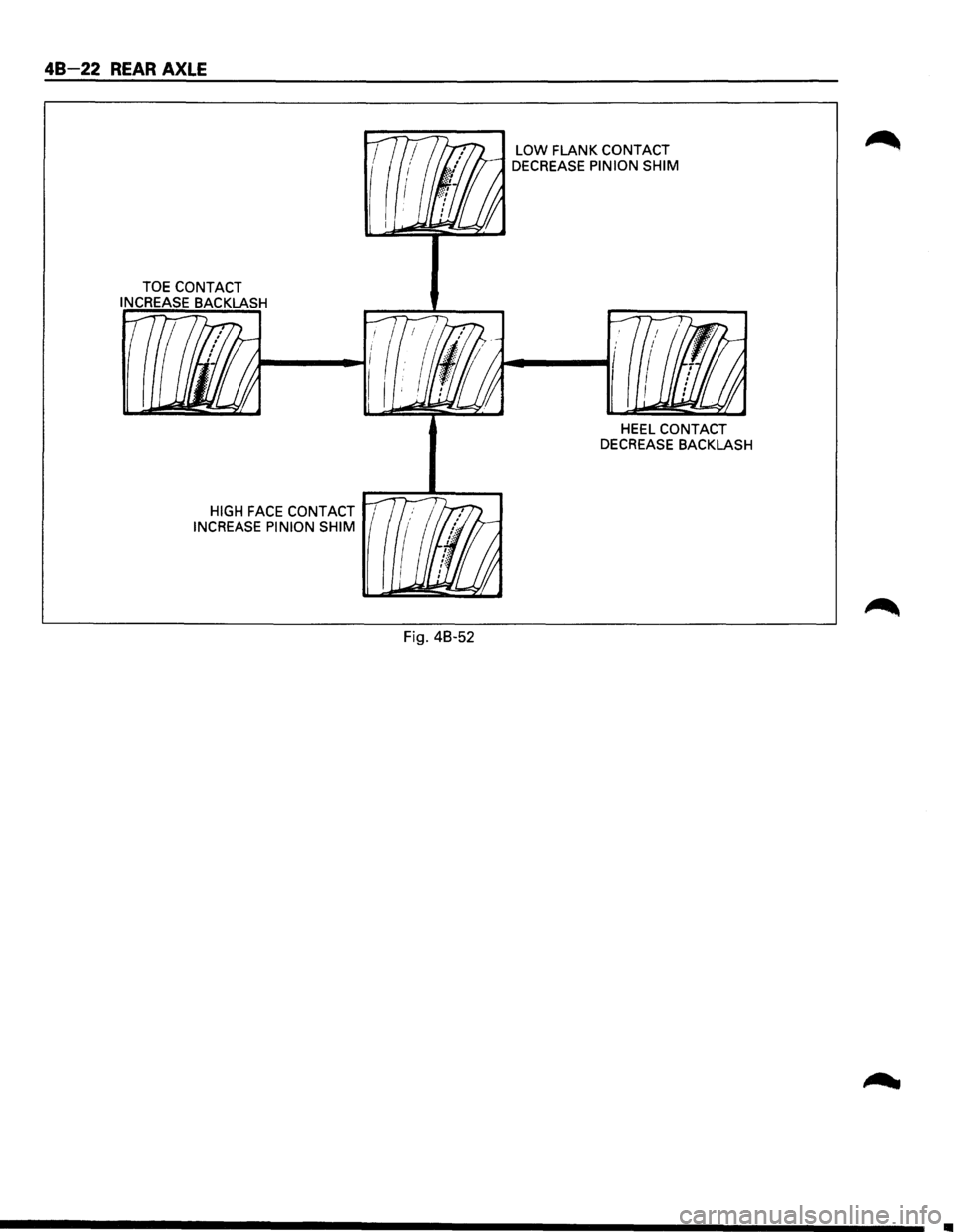
TOE CONTACT
INCREASE
BACKLASH
HIGH FACE CONTACT 1
INCREASE PINION SHIM
Fig. 48-52
LOW FLANK CONTACT
DECREASE PINION SHIM
HEEL CONTACT
DECREASE BACKLASH
Page 265 of 1928
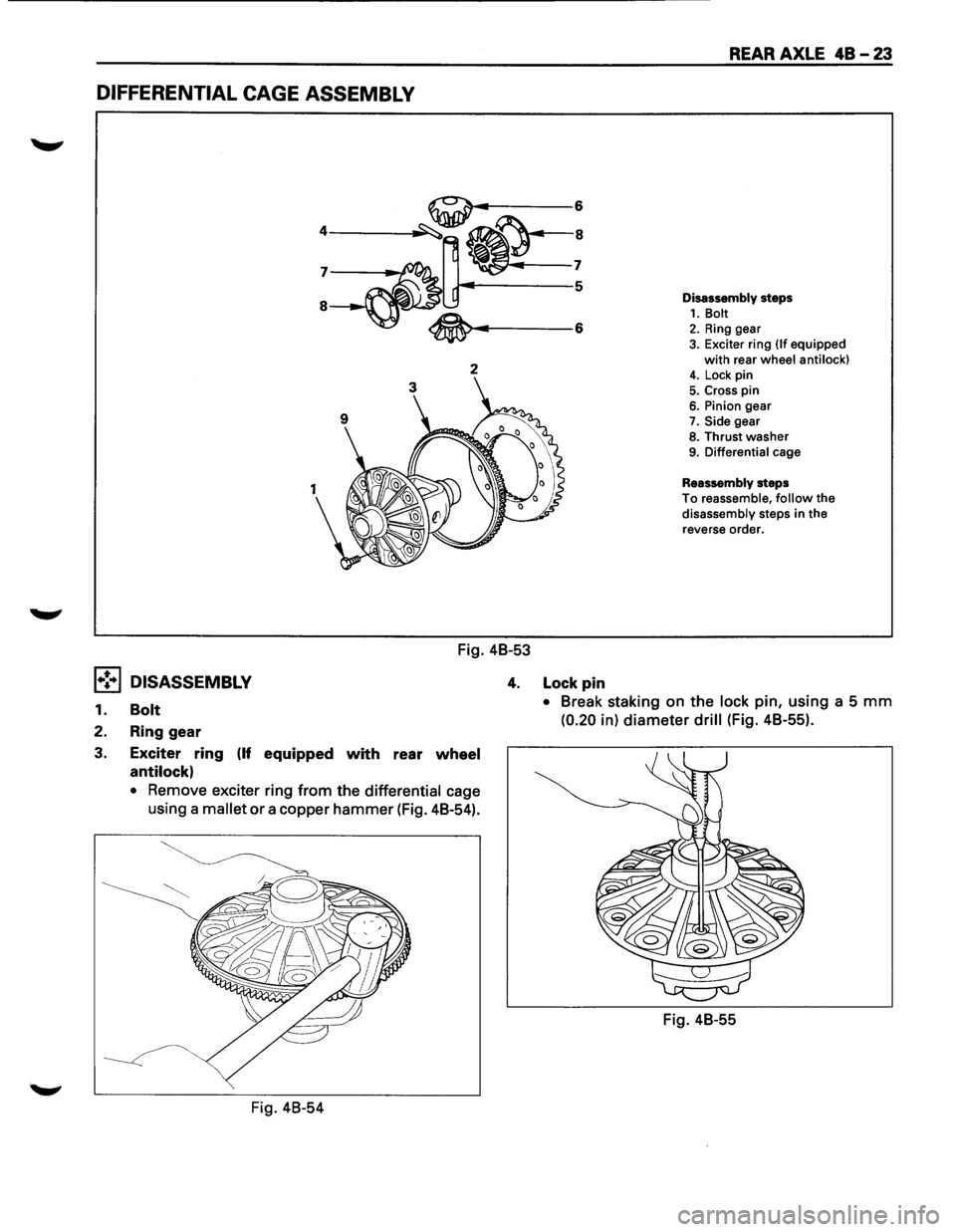
DIFFERENTIAL CAGE ASSEMBLY
2
Fig. 48-53
REAR AXLE 48-23
Disassembly steps 1. Bolt 2. Ring gear 3. Exciter ring (If equipped
with rear wheel anti lock) 4. Lock pin
5. Cross pin 6. Pinion gear
7. Side gear
8. Thrust washer 9. Differential cage
Reassembly steps
To reassemble, follow the
disassembly steps in the
reverse order.
1•! .. 1 DISASSEMBLY 4. Lock pin
1. Bolt
2. Ring gear
3. Exciter
ring (If equipped with rear wheel
antilock)
• Remove exciter ring from the differential cage
using a mallet
or a copper hammer (Fig. 48-54).
Fig. 48-54
• Break staking on the lock pin, using a 5 mm
(0.20 in) diameter drill (Fig. 48-55).
Fig. 48-55
Page 266 of 1928
48-24 REAR AXLE
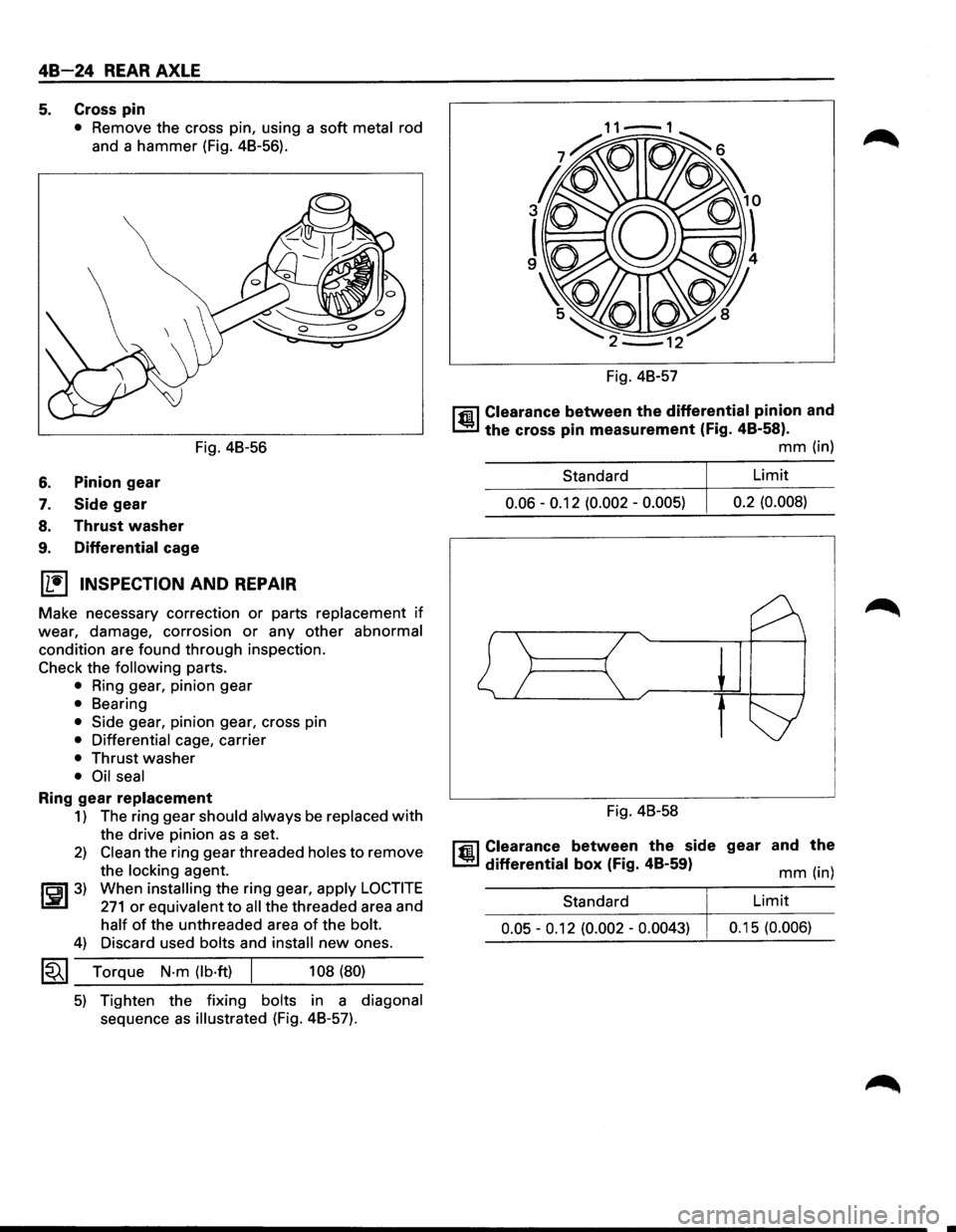
5. Cross pin
• Remove the cross pin, using a soft metal rod
and a hammer (Fig. 48-56).
Fig. 48-56
6. Pinion gear
7. Side gear
8. Thrust washer
9. Differential cage
(1!] INSPECTION AND REPAIR
Make necessary correction or parts replacement if
wear, damage, corrosion or any other abnormal
condition are found through inspection.
Check the following parts.
• Ring gear, pinion gear
• Bearing
• Side gear, pinion gear, cross pin
• Differential cage, carrier
• Thrust washer
• Oil seal
Ring gear replacement
1) The ring gear should always be replaced with
the drive pinion as a set.
2) Clean the ring gear threaded holes to remove
the
locking agent.
~~~3) When installing the ring gear, apply LOCTITE
271 or equivalent to all the threaded area and
half of the unthreaded area of the bolt.
4) Discard used bolts and install new ones.
1~1 Torque N·m (lb·ft) 108 (80)
5) Tighten the fixing bolts in a diagonal
sequence as illustrated (Fig. 48-57). Fig.
48-57
l'fil Clearance between the differential pinion and
1..!:.1 the cross pin measurement (Fig. 48-58).
mm (in)
Standard Limit
0.06 -0.12
(0.002 -0.005) 0.2
(0.008)
Fig. 48-58
l'fil Clearance between the side gear and the
1..!:.1 differential box (Fig. 48-59) mm (in)
Standard
Limit
0.05 -0.12 (0.002 -0.0043) 0.1 5 (0.006)
Page 267 of 1928
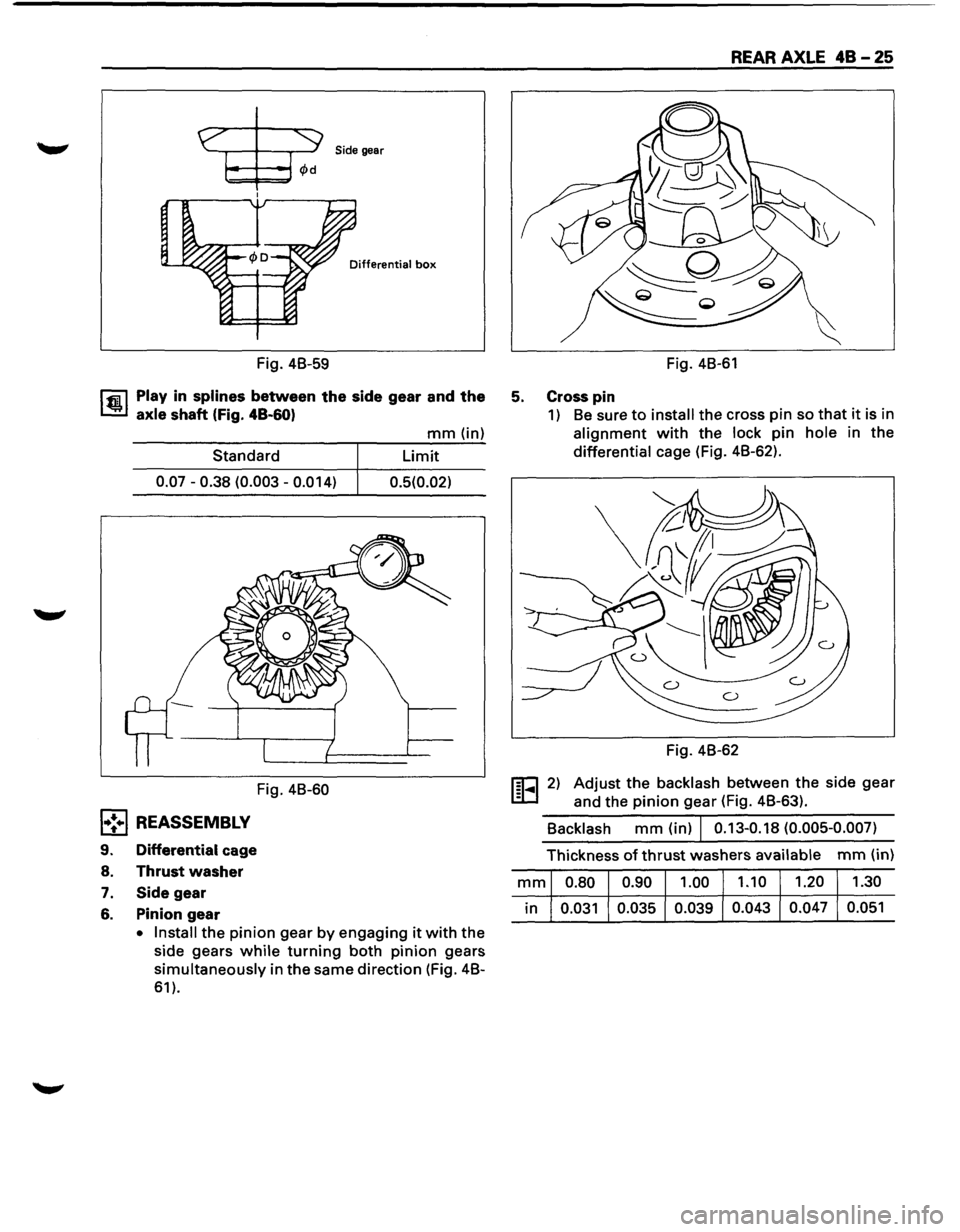
Side gear
Differential box
Fig. 4B-59
l'fiil Play in splines between the side gear and the
1.!!.1 axle shaft (Fig. 48-60)
Standard
0.07-0.38 (0.003-0.014)
Fig. 4B-60
l•!•l REASSEMBLY
9. Differential cage
8.
Thrust washer
7. Side gear
6. Pinion gear
mm (in)
Limit
0.5(0.02)
• Install
the pinion gear by engaging it with the
side gears while turning both pinion gears
simultaneously in the same direction (Fig. 4B-
61).
REAR AXLE 48 - 25
Fig. 4B-61
5. Cross pin
1) Be sure to install the cross pin so that it is in
alignment with the lock pin hole in the
differential cage (Fig. 4B-62).
Fig. 4B-62
1§1-... 1 2) Adjust the backlash between the side gear
and the pinion gear (Fig. 4B-63).
Backlash mm (in) I 0.13-0.18 (0.005-0.007)
Thickness of thrust washers available mm (in)
mm 0.80 0.90 1.00
1.10 1.20
1.30
in 0.031
0.035 0.039 0.043
0.047 0.051
Page 268 of 1928
48-26 REAR AXLE
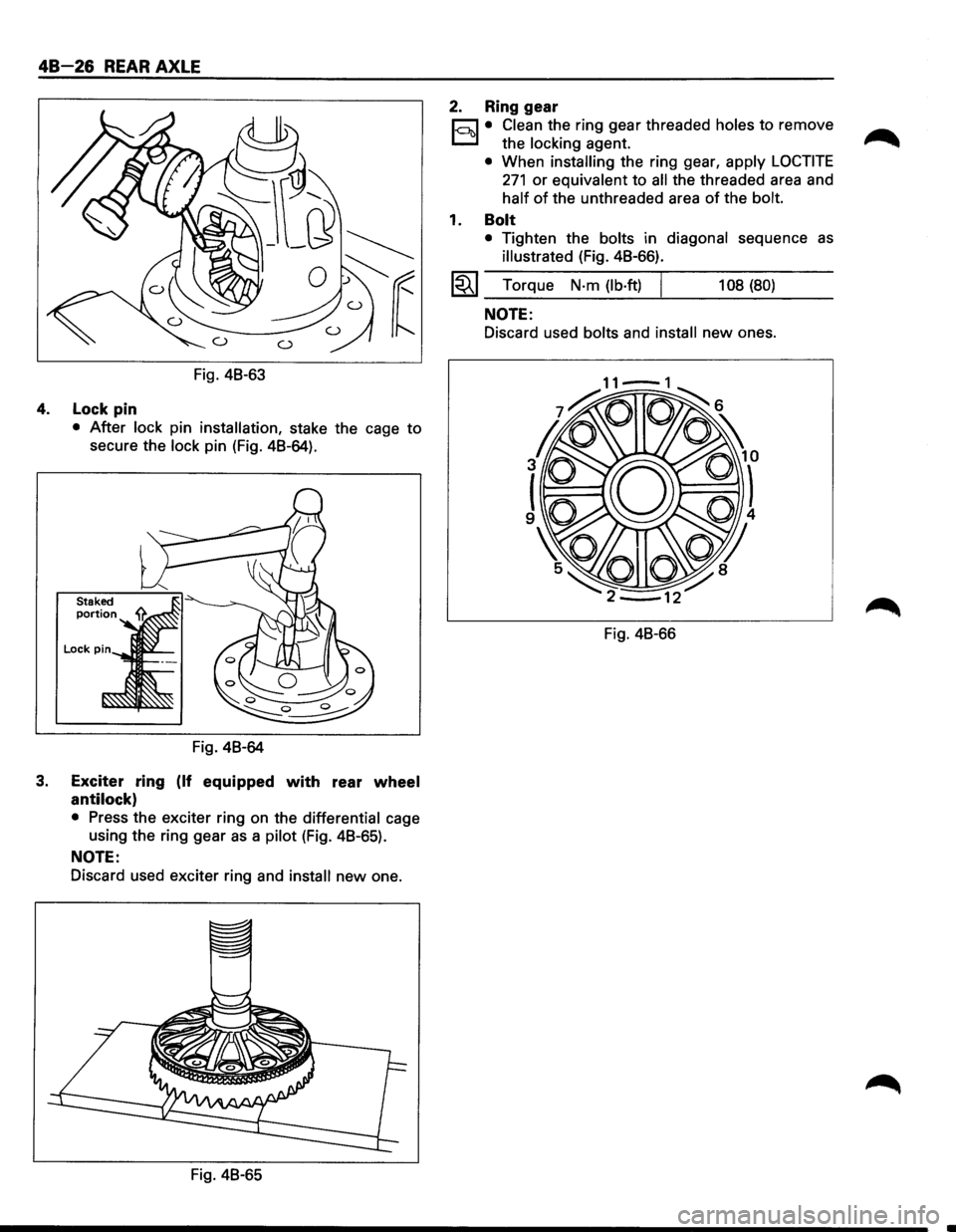
Fig. 48-63
4. Lock pin
• After lock pin installation, stake the cage to
secure the lock pin (Fig. 48-64).
Fig. 48-64
3. Exciter ring (If equipped with rear wheel
antilock)
• Press the exciter ring on the differential cage
using the ring gear
as a pilot (Fig. 48-65).
NOTE:
Discard used exciter ring and install new one.
Fig. 48-65
2. Ring gear
r;:::;J • Clean the ring gear threaded holes to remove
D the locking agent.
• When installing the ring gear, apply LOCTITE
271 or equivalent to all the threaded area and
half of the unthreaded area of the bolt.
1. Bolt
• Tighten the bolts in diagonal sequence as
illustrated (Fig. 48-66).
l~l Torque N·m (lb·ft) I 108 (80)
NOTE:
Discard used bolts and install new ones.
Fig. 48-66
Page 269 of 1928
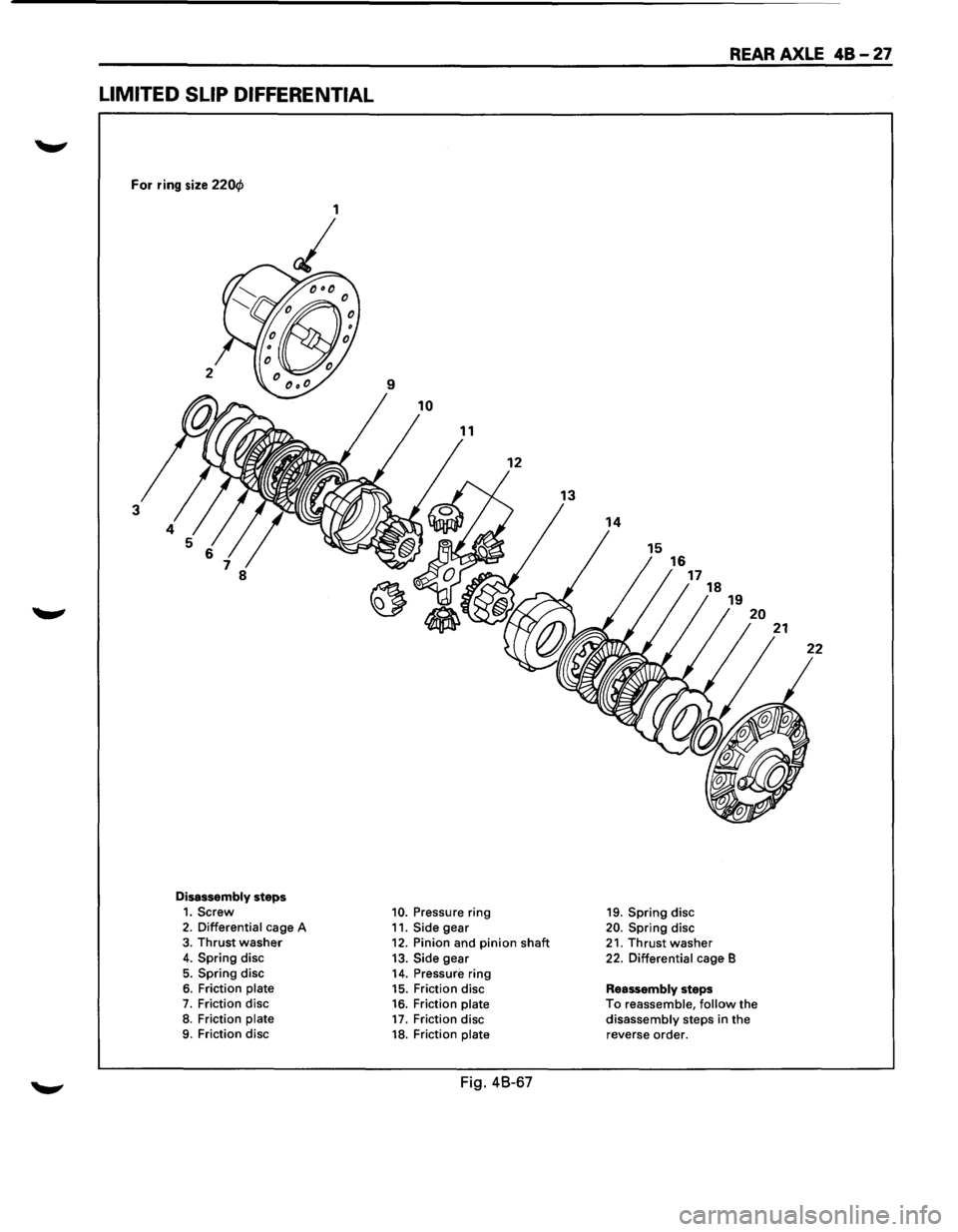
LIMITED SLIP DIFFERENTIAL
For ring size 220cf>
9
10
12
3
8
Disassembly steps 1. Screw 10. Pressure ring 2. Differential cage A
11. Side gear 3. Thrust washer 12. Pinion and pinion shaft 4. Spring disc
13. Side gear 5. Spring disc
14. Pressure ring 6. Friction plate 15. Friction disc 7. Friction disc 16. Friction plate 8. Friction plate 17. Friction disc 9. Friction disc 18. Friction plate
Fig. 48-67
REAR AXLE 48-27
16 17
19. Spring disc
20. Spring disc
18
21. Thrust washer
19
22. Differential cage B
Reassembly steps
20
To reassemble, follow the disassembly steps in the reverse order.
21
Page 270 of 1928
48 -28 REAR AXLE
l•!-.1 DISASSEMBLY
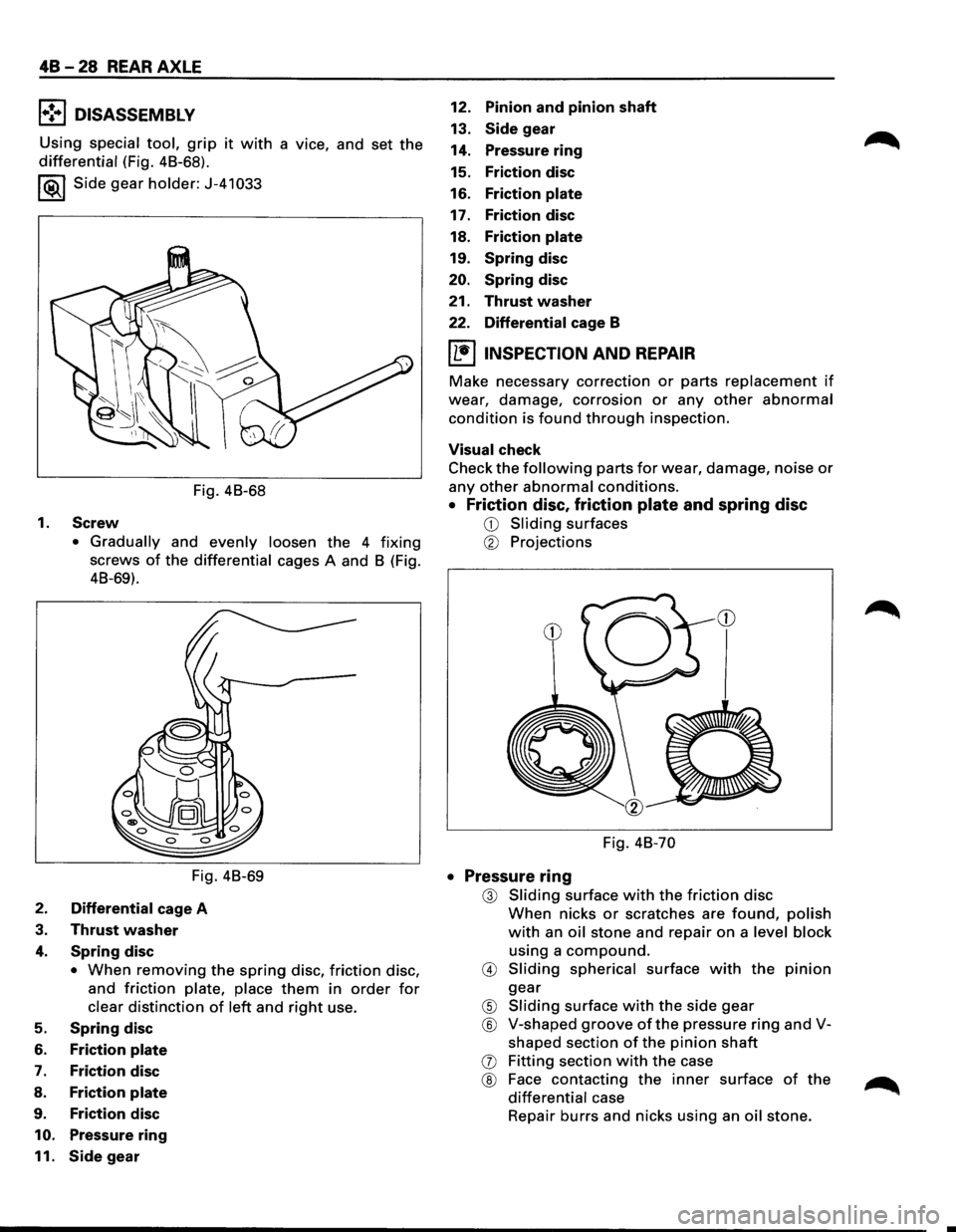
Using special tool, grip it with a vice, and set the
differential (Fig. 48-68).
I ®.1 Side gear holder: J-41 033
Fig. 48-68
1.
Screw
• Gradually and evenly loosen the 4 fixing
screws of the differential cages A and 8 (Fig.
48-69).
Fig. 48-69
2. Differential cage A
3. Thrust washer
4. Spring disc
• When removing the spring disc, friction disc,
and
friction plate, place them in order for
clear distinction of left and right use.
5. Spring disc
6. Friction plate
7. Friction disc
8. Friction plate
9. Friction disc
10. Pressure ring
11. Side gear
12. Pinion and pinion shaft
13. Side gear
14. Pressure
ring
15. Friction disc
16. Friction plate
17. Friction disc
18.
Friction plate
19. Spring disc
20. Spring disc
21.
Thrust washer
22. Differential cage B
IL•IINSPECTION AND REPAIR
Make necessary correction or parts replacement if
wear, damage, corrosion or any other abnormal
condition is found through inspection.
Visual check
Check
the following parts for wear, damage, noise or
any other abnormal conditions.
• Friction disc, friction plate and spring disc
CD Sliding surfaces
® Projections
Fig. 48-70
• Pressure ring
@ Sliding surface with the friction disc
When nicks or scratches are found, polish
with an oil stone and repair on a level block
using a
compound.
@ Sliding spherical surface with the pinion
gear
® Sliding surface with the side gear
® V-shaped groove of the pressure ring and V
shaped section
of the pinion shaft
(j) Fitting section with the case
® Face contacting the inner surface of the
differential case
Repair
burrs and nicks using an oil stone.